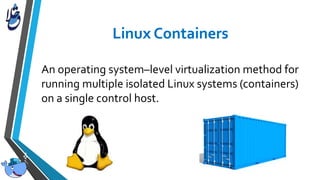
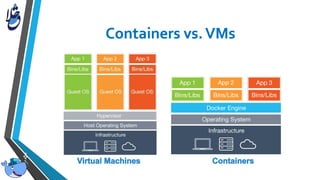
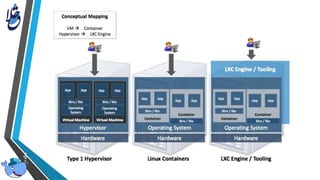
An operating system–level virtualization method for
running multiple isolated Linux systems (containers)
on a single control host.
• Namespaces
• (mnt, pid, net, ipc, uts/hostname, user ids)
• cgroups
• (cpu, memory, disk, i/o - resource management)
• AppArmor, SELinux
• (security/access control)
• seccomp
• (computation isolation)
• chroot
• (file system isolation)
• A platform for managing Linux Containers
• Began as an open-source implementation of the deployment engine which
powers dot Cloud
• Started in March, 2013
• Provided an easy to use API and powerful
• container image management features
• Attracted the community very fast
• Go programming language
• Platform to help code, test and deploy applications
• Open platform for developers and sysadmins to build, ship, and run
distributed applications.
• Light weight containers
• Available on most Linux distros
• Platform to help code, test and deploy applications
• Ship More Software Faster
• Minimal overhead/resource usage
• Run thousands of containers
• Easy to run your whole production stack locally
• Simply share your application with others
• Faster delivery of your applications
• Deploying and scaling more easily
• Fully Automated, EasyTo Deploy, Quickly Scale
• Run more apps on one host machine
• Application portability
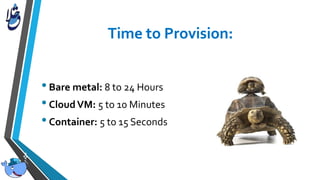
•Bare metal: 8 to 24 Hours
•CloudVM: 5 to 10 Minutes
•Container: 5 to 15 Seconds
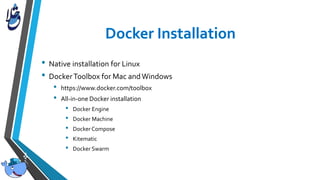
• Native installation for Linux
• DockerToolbox for Mac andWindows
• https://www.docker.com/toolbox
• All-in-one Docker installation
• Docker Engine
• Docker Machine
• Docker Compose
• Kitematic
• Docker Swarm
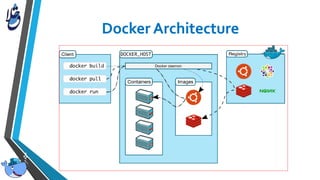
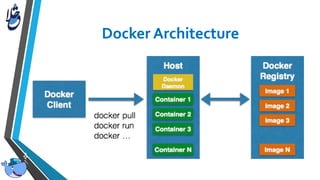
• The Docker Engine
• The Docker Client
• Docker Image
• Docker Registry
• Docker Containers
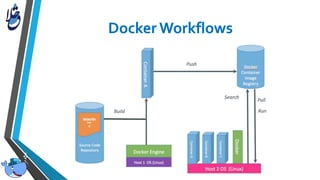
• Docker host, the computer running the Docker Engine.
• The daemon managing Docker images and containers.
• using namespaces and cgroups
• It runs on the (Linux-based) Host
The Docker client, in the form of the docker binary, is the primary user
interface to Docker. It accepts commands from the user and communicates
back and forth with a Docker daemon.
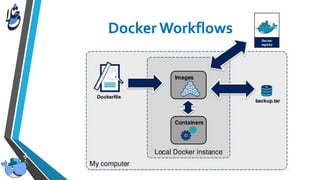
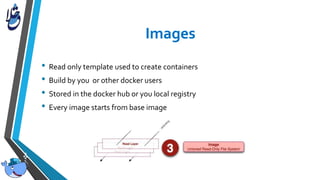
• Read only template used to create containers
• Build by you or other docker users
• Stored in the docker hub or you local registry
• Every image starts from base image
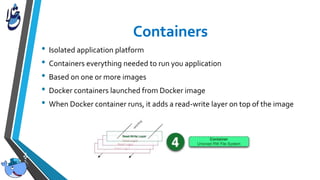
• Isolated application platform
• Containers everything needed to run you application
• Based on one or more images
• Docker containers launched from Docker image
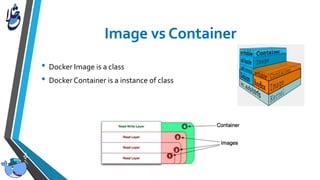
• When Docker container runs, it adds a read-write layer on top of the image
• Docker Image is a class
• Docker Container is a instance of class
• Docker Compose: create and manage multi-container architectures
• Kitematic: Simple application for managing Docker containers on Mac and
Windows
• Docker Swarm: orchestrating tool to provision and schedule containers
• Docker Machine: provision hosts and install Docker on them
• Virtual Box:Virtualization software to run Docker host for Mac and
Windows
• Dockerfile is instructions to build Docker image
• How to run commands
• Add files or directories
• Create environment variables
• What process to run when launching container
• Result from building Dockerfile is Docker image
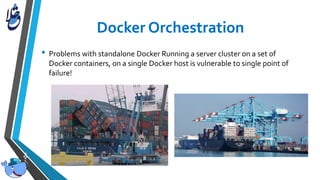
• Problems with standalone Docker Running a server cluster on a set of
Docker containers, on a single Docker host is vulnerable to single point of
failure!
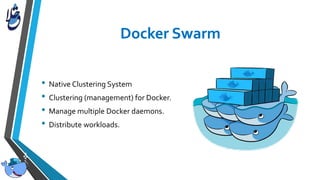
• Native Clustering System
• Clustering (management) for Docker.
• Manage multiple Docker daemons.
• Distribute workloads.
• Tool for defining and running multi-container
• applications with Docker in a single file
• Fast, isolated development environments using Docker.
• Quick and easy to start.
Docker Workshop
Docker Workshop

Docker Workshop

  • 2.
    An operating system–levelvirtualization method for running multiple isolated Linux systems (containers) on a single control host.
  • 3.
    • Namespaces • (mnt,pid, net, ipc, uts/hostname, user ids) • cgroups • (cpu, memory, disk, i/o - resource management) • AppArmor, SELinux • (security/access control) • seccomp • (computation isolation) • chroot • (file system isolation)
  • 5.
    • A platformfor managing Linux Containers • Began as an open-source implementation of the deployment engine which powers dot Cloud • Started in March, 2013 • Provided an easy to use API and powerful • container image management features • Attracted the community very fast • Go programming language
  • 6.
    • Platform tohelp code, test and deploy applications • Open platform for developers and sysadmins to build, ship, and run distributed applications. • Light weight containers • Available on most Linux distros • Platform to help code, test and deploy applications
  • 7.
    • Ship MoreSoftware Faster • Minimal overhead/resource usage • Run thousands of containers • Easy to run your whole production stack locally • Simply share your application with others • Faster delivery of your applications • Deploying and scaling more easily • Fully Automated, EasyTo Deploy, Quickly Scale • Run more apps on one host machine • Application portability
  • 8.
    •Bare metal: 8to 24 Hours •CloudVM: 5 to 10 Minutes •Container: 5 to 15 Seconds
  • 15.
    • Native installationfor Linux • DockerToolbox for Mac andWindows • https://www.docker.com/toolbox • All-in-one Docker installation • Docker Engine • Docker Machine • Docker Compose • Kitematic • Docker Swarm
  • 16.
    • The DockerEngine • The Docker Client • Docker Image • Docker Registry • Docker Containers
  • 17.
    • Docker host,the computer running the Docker Engine. • The daemon managing Docker images and containers. • using namespaces and cgroups • It runs on the (Linux-based) Host
  • 18.
    The Docker client,in the form of the docker binary, is the primary user interface to Docker. It accepts commands from the user and communicates back and forth with a Docker daemon.
  • 19.
    • Read onlytemplate used to create containers • Build by you or other docker users • Stored in the docker hub or you local registry • Every image starts from base image
  • 20.
    • Isolated applicationplatform • Containers everything needed to run you application • Based on one or more images • Docker containers launched from Docker image • When Docker container runs, it adds a read-write layer on top of the image
  • 21.
    • Docker Imageis a class • Docker Container is a instance of class
  • 22.
    • Docker Compose:create and manage multi-container architectures • Kitematic: Simple application for managing Docker containers on Mac and Windows • Docker Swarm: orchestrating tool to provision and schedule containers • Docker Machine: provision hosts and install Docker on them • Virtual Box:Virtualization software to run Docker host for Mac and Windows
  • 23.
    • Dockerfile isinstructions to build Docker image • How to run commands • Add files or directories • Create environment variables • What process to run when launching container • Result from building Dockerfile is Docker image
  • 24.
    • Problems withstandalone Docker Running a server cluster on a set of Docker containers, on a single Docker host is vulnerable to single point of failure!
  • 25.
    • Native ClusteringSystem • Clustering (management) for Docker. • Manage multiple Docker daemons. • Distribute workloads.
  • 26.
    • Tool fordefining and running multi-container • applications with Docker in a single file • Fast, isolated development environments using Docker. • Quick and easy to start.