1
UNIVERSITY INSTITUTE OF
COMPUTING
Master of Computer Applications
Course Name: Containerization with Docker
(22CAH-742)
SYLLABUS
2
Unit-1 Introduction of Docker Contact Hours: 20
Introduction of Docker Docker, Containerization, Uses of container Virtualization, Difference between Docker and Virtual
Machines Docker Architecture, Features, Components of Docker, Advantages of Docker, Advantages
of Containerization over Virtualization
Experiment no. 1.1 1. Install Docker on Linux or windows
2. Using Docker CLI with commands.
Installation of Docker Installation of Docker, Docker Hub, Difference between Docker Image and Container, Containers and
shell, Creating Docker images, backing up a Docker Container, Restoring a Docker Container. Deploy,
Login, Exit Container. List, Start, Stop and Restart Containers. Deleting Containers.
Experiment no. 1.2 Pulling Docker Images from Docker Hub
Chapter 1.3 Data Volumes and system Management
Creating and mounting data volumes, Defining Volumes in images, Pruning unused resources.
Experiment no. 1.3 Deploying Docker images as Stateless Containers.
Experiment no. 1.4 Managing Containers with the Docker CLI
SYLLABUS
CO1 Identify the importance of containerization in virtualization.
CO2 Understand installation steps of Docker on Windows and Linux environments.
CO3 Analyze the containerization of OS images to deploy applications over Docker
CO4 Install applications on Kubernetes using Docker client.
CO5 Deploy Docker images as the stateless container.
3
Introduction to Docker
• It is a tool used to create, deploy and run applications by using containers.
• Containers allows developers to package up an application with all the parts it
needs.
• Containers are isolated from one another and bundle their own software, libraries
and configuration file.
4
Introduction to Docker
• Docker is a set of platforms as a service (PaaS) products that use the Operating
system level visualization to deliver software in packages called containers.
• Containers are isolated from one another and bundle their own software,
libraries, and configuration files; they can communicate with each other through
well-defined channels.
• All containers are run by a single operating system kernel and therefore use fewer
resources than a virtual machine.
5
Difference between Docker Containers
and Virtual Machines
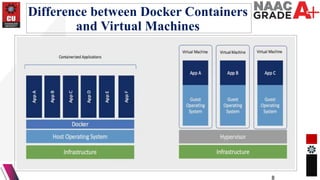
• 1. Docker Containers
• Docker Containers contain binaries, libraries and configuration files along with
the application itself.
• They don’t contain a guest OS for each container and rely on the underlying OS
kernel, which makes the containers lightweight.
• Containers share resources with other containers in the same host
OS and provide OS level process isolation.
6
Difference between Docker Containers
and Virtual Machines
• 2. Virtual Machines
• Virtual Machines (VMs) run on Hypervisors, which allow multiple Virtual
Machines to run on a single Machine along with its own operating system.
• Each VM has its own copy of an operating system along with the application and
necessary binaries, which makes it significantly larger and it requires more
resources.
• They provide Hardware-level process isolation and are slow to boot.
7
Difference between Docker Containers
and Virtual Machines
8
Difference between Docker Containers
and Virtual Machines
• 2. Virtual Machines
• Virtual Machines (VMs) run on Hypervisors, which allow multiple Virtual
Machines to run on a single Machine along with its own operating system.
• Each VM has its own copy of an operating system along with the application and
necessary binaries, which makes it significantly larger and it requires more
resources.
• They provide Hardware-level process isolation and are slow to boot.
9
Uses of Docker Containers
• Running multiple workloads on fewer resources.
• Isolating and segregating applications.
• Standardizing environments to ensure consistency across development and release
cycles.
• Streamlining the development lifecycle and supporting CI/CD workflows.
• Developing highly portable workloads that can run on multi-cloud platforms.
• Additionally, it is used as:
• A cost-effective alternative to virtual machines.
• A version control system for an application.
10
Advantages
• Resource Efficiency: Process level isolation and usage of the container host’s
kernel is more efficient when compared to virtualizing an entire hardware server.
• Portability: All the dependencies for an application are bundled in the container.
This means they can be easily moved between development, test, and production
environments.
• Continuous Deployment and Testing: The ability to have consistent
environments and flexibility with patching has made Docker a great choice for
teams that want to move from waterfall to the modern DevOps approach to
software delivery.
11
Docker architecture
• Docker follows Client-Server architecture, which includes the three main
components that are Docker Client, Docker Host, and Docker Registry.
•
12
What is Docker daemon?
• Docker daemon runs on the host operating system. It is responsible for running
containers to manage docker services. Docker daemon communicates with other
daemons. It offers various Docker objects such as images, containers, networking,
and storage.
13
1.Docker Client
• Docker client uses commands and REST APIs to communicate with the Docker
Daemon (Server). When a client runs any docker command on the docker client
terminal, the client terminal sends these docker commands to the Docker daemon.
Docker daemon receives these commands from the docker client in the form of
command and REST API's request.
14
Docker Host & Docker Registry
• 2. Docker Host
• Docker Host is used to provide an environment to execute and run applications. It
contains the docker daemon, images, containers, networks, and storage.
• 3. Docker Registry
• Docker Registry manages and stores the Docker images.
• There are two types of registries in the Docker -
• Pubic Registry - Public Registry is also called as Docker hub.
15
THANK YOU

CONTAINERIZATION WITH DOCKER .pptx

  • 1.
    1 UNIVERSITY INSTITUTE OF COMPUTING Masterof Computer Applications Course Name: Containerization with Docker (22CAH-742)
  • 2.
    SYLLABUS 2 Unit-1 Introduction ofDocker Contact Hours: 20 Introduction of Docker Docker, Containerization, Uses of container Virtualization, Difference between Docker and Virtual Machines Docker Architecture, Features, Components of Docker, Advantages of Docker, Advantages of Containerization over Virtualization Experiment no. 1.1 1. Install Docker on Linux or windows 2. Using Docker CLI with commands. Installation of Docker Installation of Docker, Docker Hub, Difference between Docker Image and Container, Containers and shell, Creating Docker images, backing up a Docker Container, Restoring a Docker Container. Deploy, Login, Exit Container. List, Start, Stop and Restart Containers. Deleting Containers. Experiment no. 1.2 Pulling Docker Images from Docker Hub Chapter 1.3 Data Volumes and system Management Creating and mounting data volumes, Defining Volumes in images, Pruning unused resources. Experiment no. 1.3 Deploying Docker images as Stateless Containers. Experiment no. 1.4 Managing Containers with the Docker CLI
  • 3.
    SYLLABUS CO1 Identify theimportance of containerization in virtualization. CO2 Understand installation steps of Docker on Windows and Linux environments. CO3 Analyze the containerization of OS images to deploy applications over Docker CO4 Install applications on Kubernetes using Docker client. CO5 Deploy Docker images as the stateless container. 3
  • 4.
    Introduction to Docker •It is a tool used to create, deploy and run applications by using containers. • Containers allows developers to package up an application with all the parts it needs. • Containers are isolated from one another and bundle their own software, libraries and configuration file. 4
  • 5.
    Introduction to Docker •Docker is a set of platforms as a service (PaaS) products that use the Operating system level visualization to deliver software in packages called containers. • Containers are isolated from one another and bundle their own software, libraries, and configuration files; they can communicate with each other through well-defined channels. • All containers are run by a single operating system kernel and therefore use fewer resources than a virtual machine. 5
  • 6.
    Difference between DockerContainers and Virtual Machines • 1. Docker Containers • Docker Containers contain binaries, libraries and configuration files along with the application itself. • They don’t contain a guest OS for each container and rely on the underlying OS kernel, which makes the containers lightweight. • Containers share resources with other containers in the same host OS and provide OS level process isolation. 6
  • 7.
    Difference between DockerContainers and Virtual Machines • 2. Virtual Machines • Virtual Machines (VMs) run on Hypervisors, which allow multiple Virtual Machines to run on a single Machine along with its own operating system. • Each VM has its own copy of an operating system along with the application and necessary binaries, which makes it significantly larger and it requires more resources. • They provide Hardware-level process isolation and are slow to boot. 7
  • 8.
    Difference between DockerContainers and Virtual Machines 8
  • 9.
    Difference between DockerContainers and Virtual Machines • 2. Virtual Machines • Virtual Machines (VMs) run on Hypervisors, which allow multiple Virtual Machines to run on a single Machine along with its own operating system. • Each VM has its own copy of an operating system along with the application and necessary binaries, which makes it significantly larger and it requires more resources. • They provide Hardware-level process isolation and are slow to boot. 9
  • 10.
    Uses of DockerContainers • Running multiple workloads on fewer resources. • Isolating and segregating applications. • Standardizing environments to ensure consistency across development and release cycles. • Streamlining the development lifecycle and supporting CI/CD workflows. • Developing highly portable workloads that can run on multi-cloud platforms. • Additionally, it is used as: • A cost-effective alternative to virtual machines. • A version control system for an application. 10
  • 11.
    Advantages • Resource Efficiency:Process level isolation and usage of the container host’s kernel is more efficient when compared to virtualizing an entire hardware server. • Portability: All the dependencies for an application are bundled in the container. This means they can be easily moved between development, test, and production environments. • Continuous Deployment and Testing: The ability to have consistent environments and flexibility with patching has made Docker a great choice for teams that want to move from waterfall to the modern DevOps approach to software delivery. 11
  • 12.
    Docker architecture • Dockerfollows Client-Server architecture, which includes the three main components that are Docker Client, Docker Host, and Docker Registry. • 12
  • 13.
    What is Dockerdaemon? • Docker daemon runs on the host operating system. It is responsible for running containers to manage docker services. Docker daemon communicates with other daemons. It offers various Docker objects such as images, containers, networking, and storage. 13
  • 14.
    1.Docker Client • Dockerclient uses commands and REST APIs to communicate with the Docker Daemon (Server). When a client runs any docker command on the docker client terminal, the client terminal sends these docker commands to the Docker daemon. Docker daemon receives these commands from the docker client in the form of command and REST API's request. 14
  • 15.
    Docker Host &Docker Registry • 2. Docker Host • Docker Host is used to provide an environment to execute and run applications. It contains the docker daemon, images, containers, networks, and storage. • 3. Docker Registry • Docker Registry manages and stores the Docker images. • There are two types of registries in the Docker - • Pubic Registry - Public Registry is also called as Docker hub. 15
  • 16.