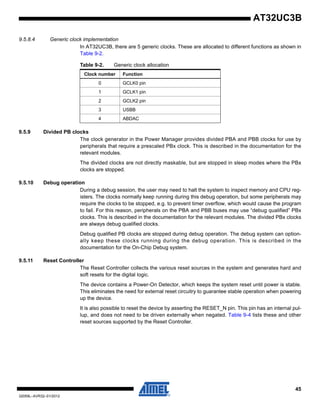
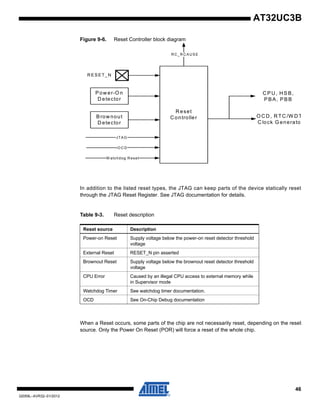
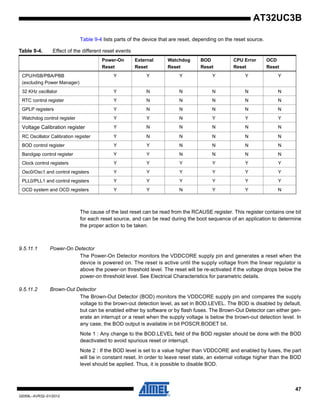
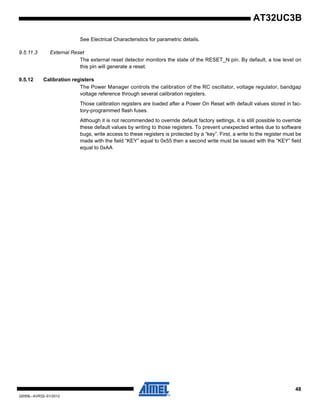
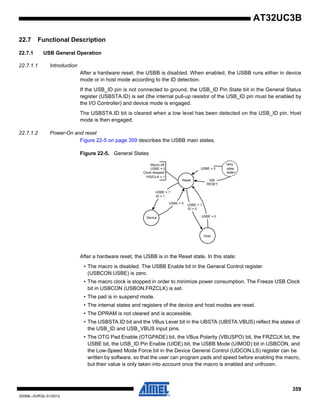
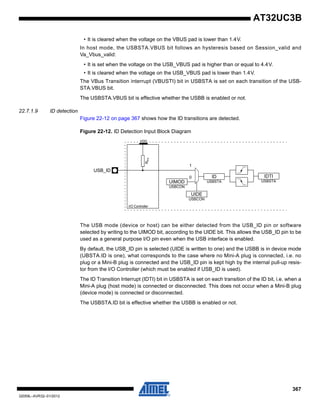
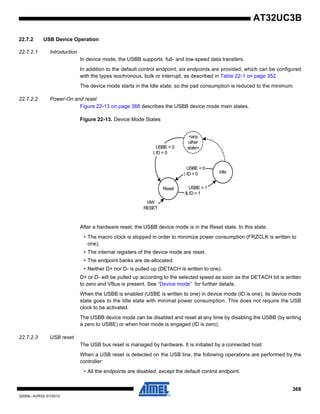
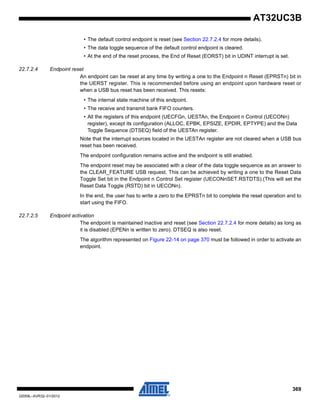
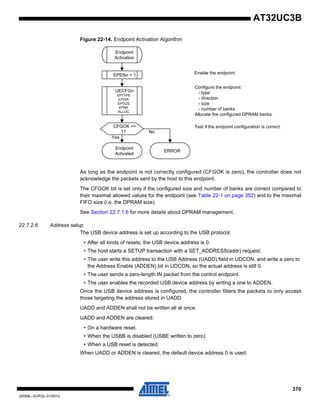
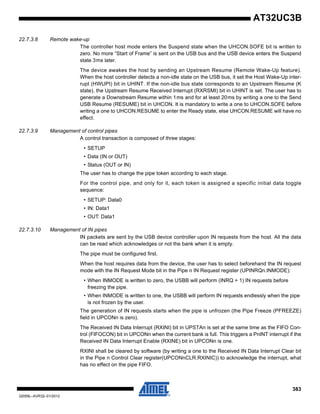
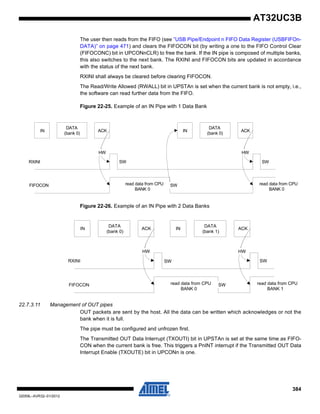
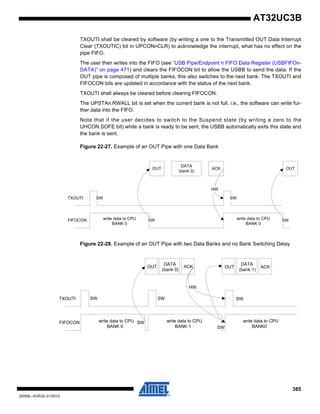
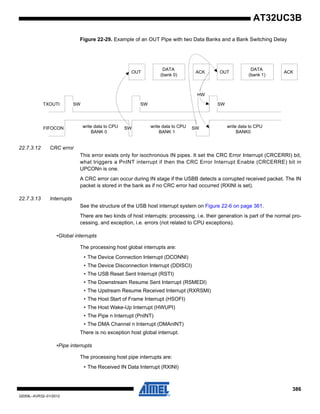
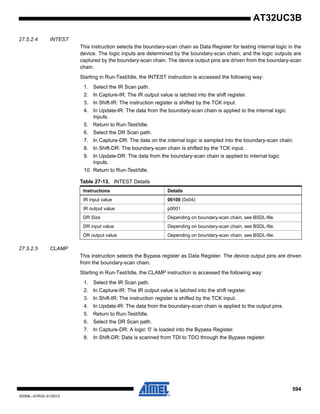
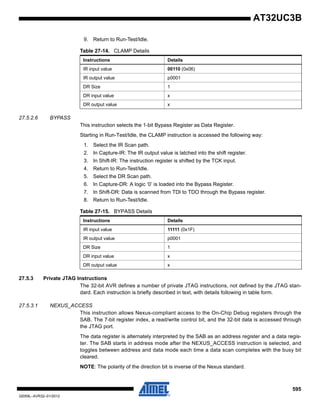
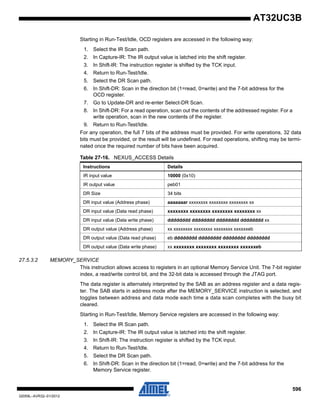
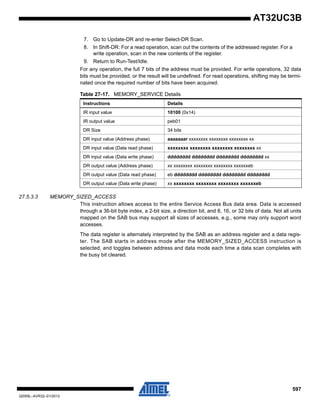
Features
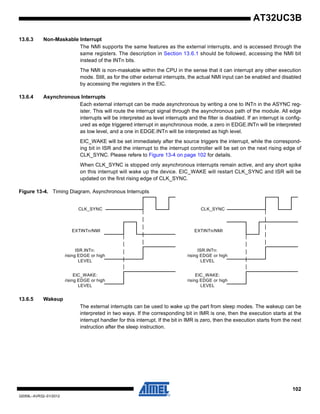
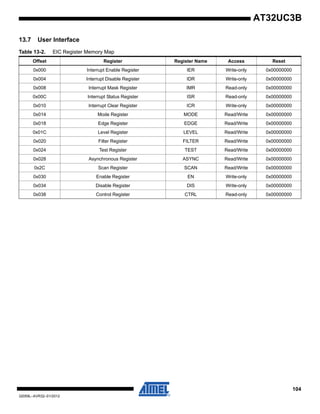
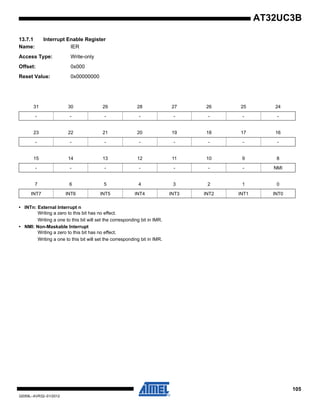
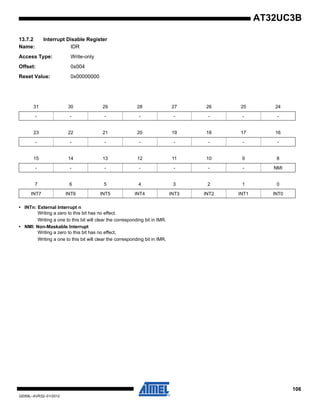
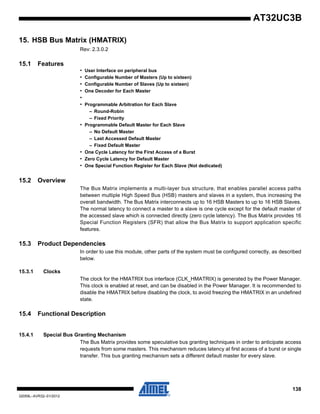
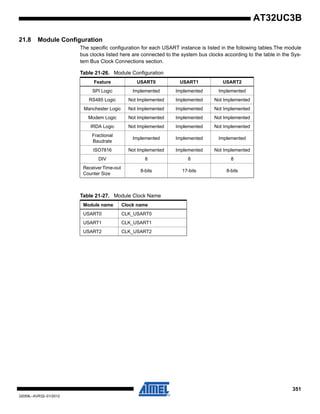
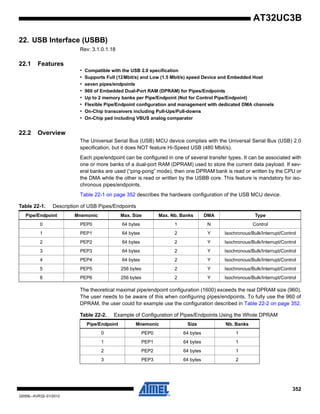
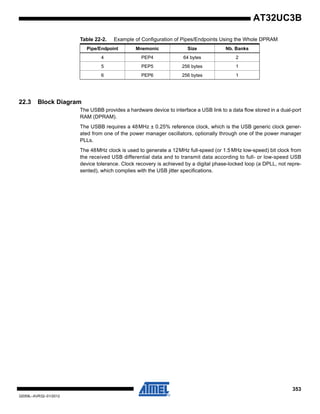
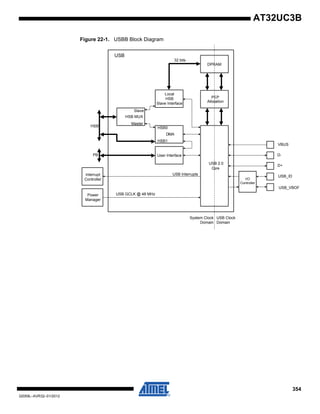
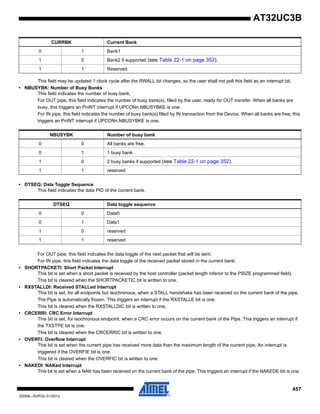
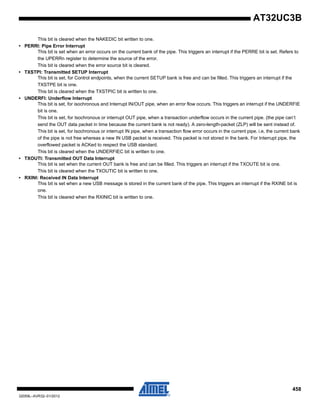
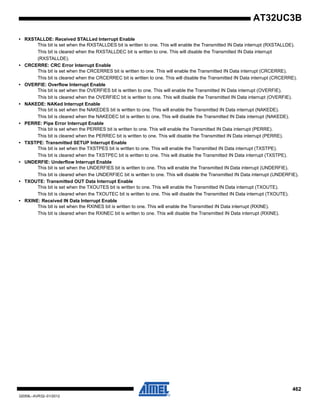
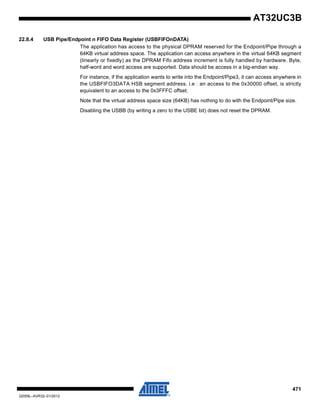
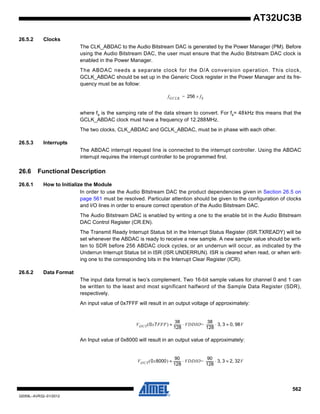
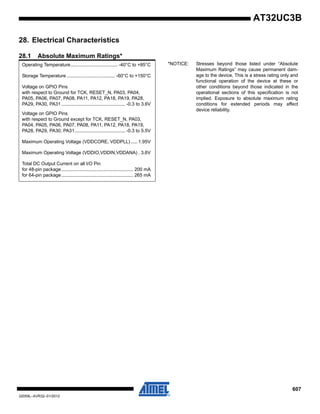
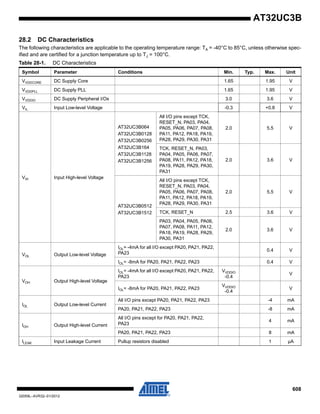
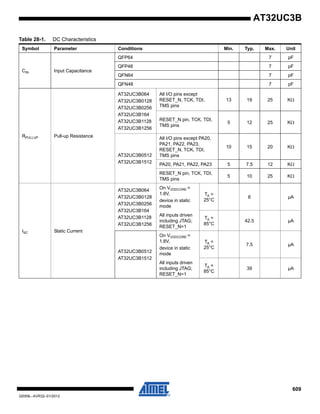
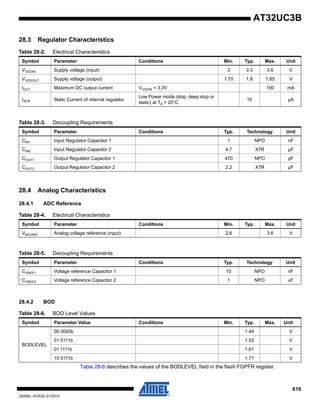
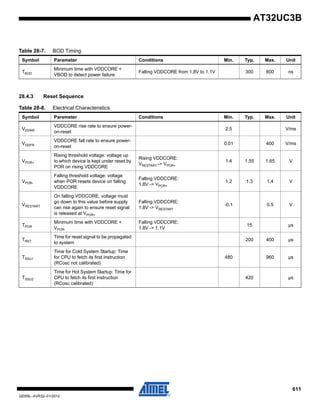
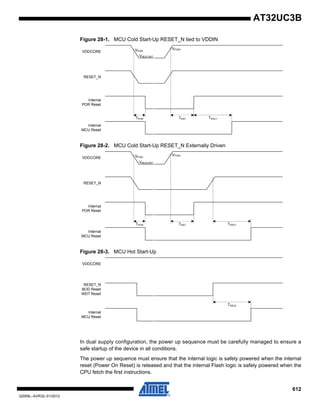
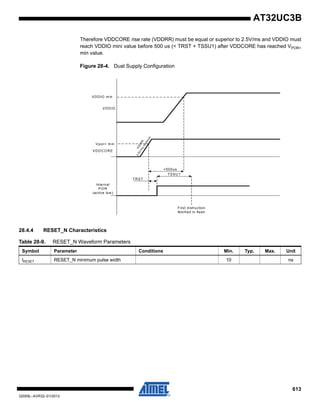
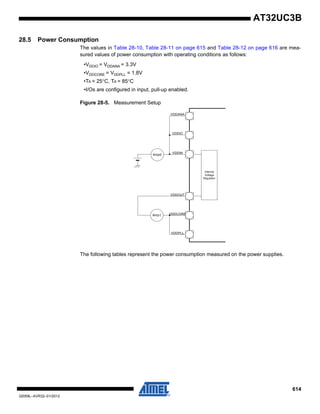
• High Performance, Low Power 32-Bit Atmel®
AVR®
Microcontroller
– Compact Single-cycle RISC Instruction Set Including DSP Instruction Set
– Read-Modify-Write Instructions and Atomic Bit Manipulation
– Performing up to 1.39 DMIPS / MHz
• Up to 83 DMIPS Running at 60 MHz from Flash
• Up to 46 DMIPS Running at 30 MHz from Flash
– Memory Protection Unit
• Multi-hierarchy Bus System
– High-Performance Data Transfers on Separate Buses for Increased Performance
– 7 Peripheral DMA Channels Improves Speed for Peripheral Communication
• Internal High-Speed Flash
– 512K Bytes, 256K Bytes, 128K Bytes, 64K Bytes Versions
– Single Cycle Access up to 30 MHz
– Prefetch Buffer Optimizing Instruction Execution at Maximum Speed
– 4ms Page Programming Time and 8ms Full-Chip Erase Time
– 100,000 Write Cycles, 15-year Data Retention Capability
– Flash Security Locks and User Defined Configuration Area
• Internal High-Speed SRAM, Single-Cycle Access at Full Speed
– 96K Bytes (512KB Flash), 32K Bytes (256KB and 128KB Flash), 16K Bytes (64KB
Flash)
• Interrupt Controller
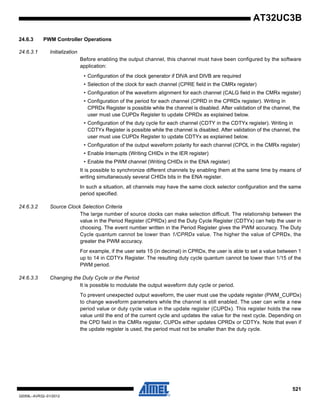
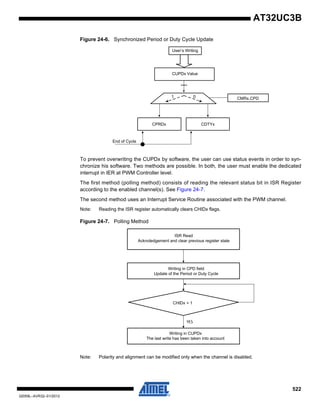
– Autovectored Low Latency Interrupt Service with Programmable Priority
• System Functions
– Power and Clock Manager Including Internal RC Clock and One 32KHz Oscillator
– Two Multipurpose Oscillators and Two Phase-Lock-Loop (PLL) allowing
Independant CPU Frequency from USB Frequency
– Watchdog Timer, Real-Time Clock Timer
• Universal Serial Bus (USB)
– Device 2.0 and Embedded Host Low Speed and Full Speed
– Flexible End-Point Configuration and Management with Dedicated DMA Channels
– On-chip Transceivers Including Pull-Ups
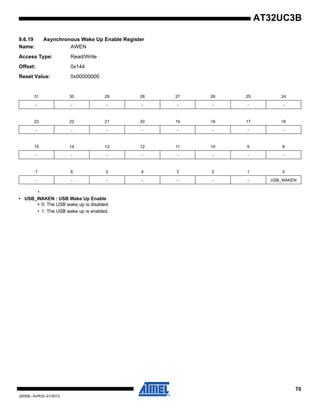
– USB Wake Up from Sleep Functionality
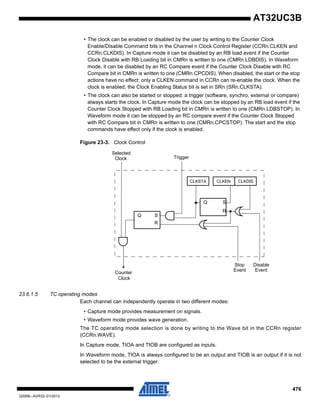
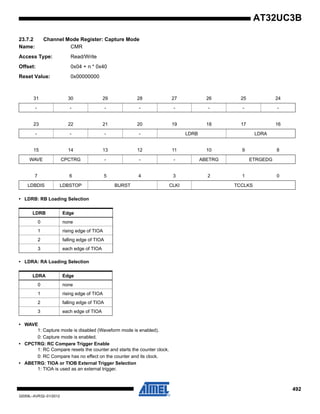
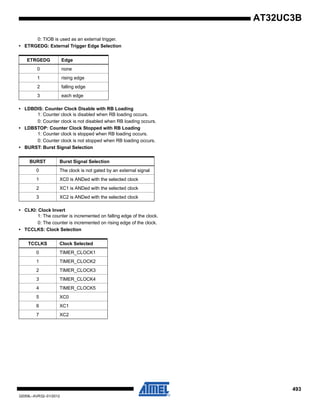
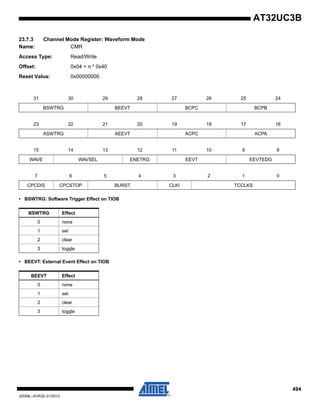
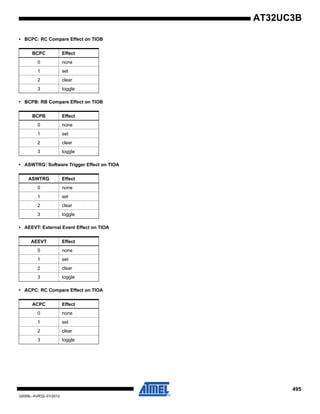
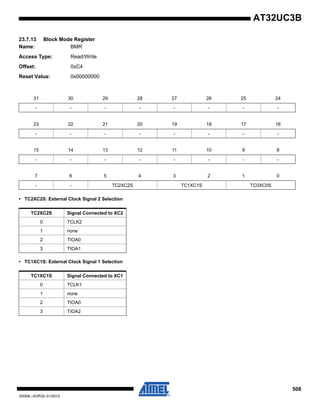
• One Three-Channel 16-bit Timer/Counter (TC)
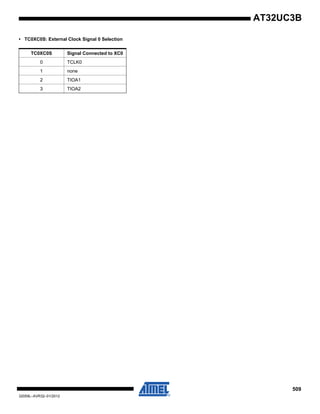
– Three External Clock Inputs, PWM, Capture and Various Counting Capabilities
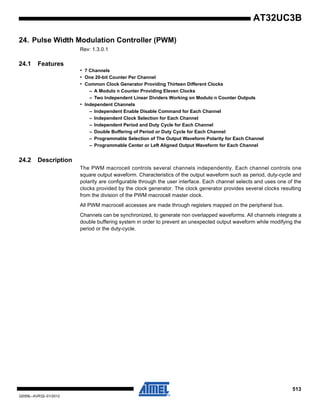
• One 7-Channel 20-bit Pulse Width Modulation Controller (PWM)
• Three Universal Synchronous/Asynchronous Receiver/Transmitters (USART)
– Independant Baudrate Generator, Support for SPI, IrDA and ISO7816 interfaces
– Support for Hardware Handshaking, RS485 Interfaces and Modem Line
• One Master/Slave Serial Peripheral Interfaces (SPI) with Chip Select Signals
• One Synchronous Serial Protocol Controller
– Supports I2
S and Generic Frame-Based Protocols
• One Master/Slave Two-Wire Interface (TWI), 400kbit/s I2
C-compatible
• One 8-channel 10-bit Analog-To-Digital Converter, 384ks/s
• 16-bit Stereo Audio Bitstream DAC
– Sample Rate Up to 50 KHz
• QTouch®
Library Support
– Capacitive Touch Buttons, Sliders, and Wheels
– QTouch and QMatrix Acquisition
32059L–01/2012
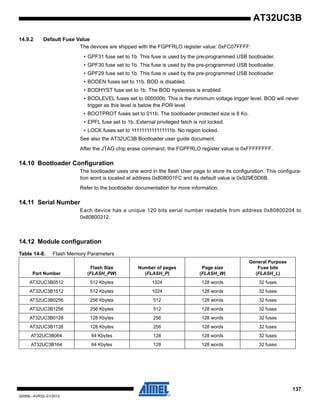
32-bit ATMEL
AVR
Microcontroller
AT32UC3B0512
AT32UC3B0256
AT32UC3B0128
AT32UC3B064
AT32UC3B1512
AT32UC3B1256
AT32UC3B1128
AT32UC3B164
2
32059L–AVR32–01/2012
AT32UC3B
• On-Chip Debug System (JTAG interface)
– Nexus Class 2+, Runtime Control, Non-Intrusive Data and Program Trace
• 64-pin TQFP/QFN (44 GPIO pins), 48-pin TQFP/QFN (28 GPIO pins)
• 5V Input Tolerant I/Os, including 4 high-drive pins
• Single 3.3V Power Supply or Dual 1.8V-3.3V Power Supply
3
32059L–AVR32–01/2012
AT32UC3B
1. Description
The AT32UC3B is a complete System-On-Chip microcontroller based on the AVR32 UC RISC
processor running at frequencies up to 60 MHz. AVR32 UC is a high-performance 32-bit RISC
microprocessor core, designed for cost-sensitive embedded applications, with particular empha-
sis on low power consumption, high code density and high performance.
The processor implements a Memory Protection Unit (MPU) and a fast and flexible interrupt con-
troller for supporting modern operating systems and real-time operating systems.
Higher computation capability is achieved using a rich set of DSP instructions.
The AT32UC3B incorporates on-chip Flash and SRAM memories for secure and fast access.
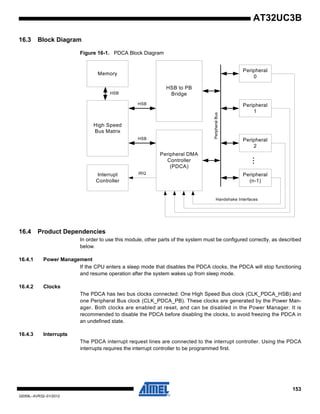
The Peripheral Direct Memory Access controller enables data transfers between peripherals and
memories without processor involvement. PDCA drastically reduces processing overhead when
transferring continuous and large data streams between modules within the MCU.
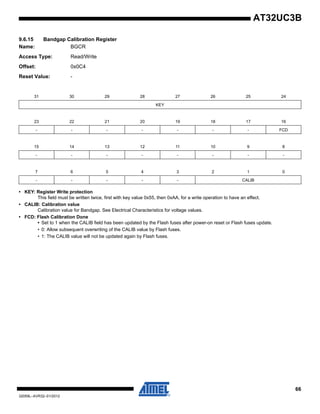
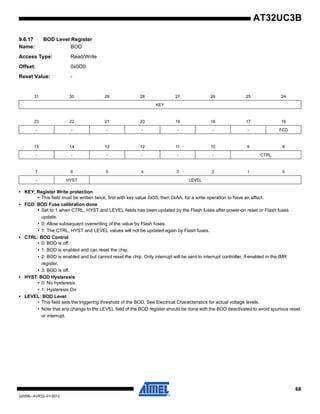
The Power Manager improves design flexibility and security: the on-chip Brown-Out Detector
monitors the power supply, the CPU runs from the on-chip RC oscillator or from one of external
oscillator sources, a Real-Time Clock and its associated timer keeps track of the time.
The Timer/Counter includes three identical 16-bit timer/counter channels. Each channel can be
independently programmed to perform frequency measurement, event counting, interval mea-
surement, pulse generation, delay timing and pulse width modulation.
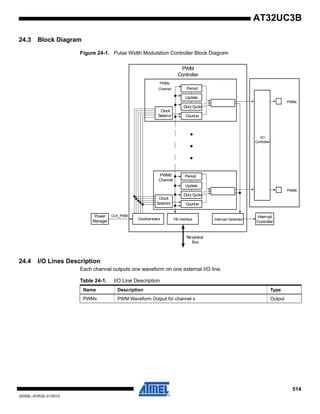
The PWM modules provides seven independent channels with many configuration options
including polarity, edge alignment and waveform non overlap control. One PWM channel can
trigger ADC conversions for more accurate close loop control implementations.
The AT32UC3B also features many communication interfaces for communication intensive
applications. In addition to standard serial interfaces like USART, SPI or TWI, other interfaces
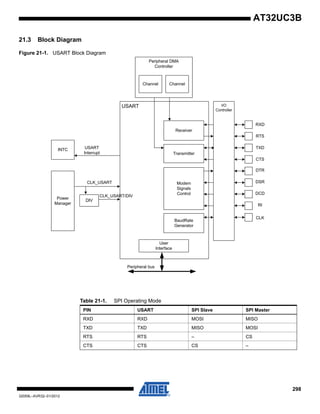
like flexible Synchronous Serial Controller and USB are available. The USART supports different
communication modes, like SPI mode.
The Synchronous Serial Controller provides easy access to serial communication protocols and
audio standards like I2
S, UART or SPI.
The Full-Speed USB 2.0 Device interface supports several USB Classes at the same time
thanks to the rich End-Point configuration. The Embedded Host interface allows device like a
USB Flash disk or a USB printer to be directly connected to the processor.
Atmel offers the QTouch library for embedding capacitive touch buttons, sliders, and wheels
functionality into AVR microcontrollers. The patented charge-transfer signal acquisition offers
robust sensing and included fully debounced reporting of touch keys and includes Adjacent Key
Suppression®
(AKS®
) technology for unambiguous detection of key events. The easy-to-use
QTouch Suite toolchain allows you to explore, develop, and debug your own touch applications.
AT32UC3B integrates a class 2+ Nexus 2.0 On-Chip Debug (OCD) System, with non-intrusive
real-time trace, full-speed read/write memory access in addition to basic runtime control. The
Nanotrace interface enables trace feature for JTAG-based debuggers.
4
32059L–AVR32–01/2012
AT32UC3B
2. Overview
2.1 Blockdiagram
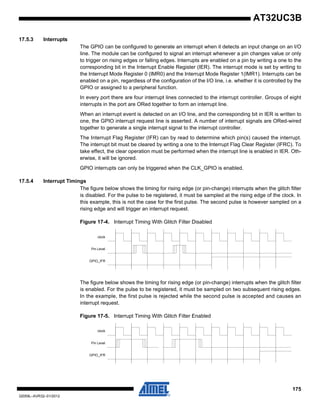
Figure 2-1. Block diagram
TIMER/COUNTER
INTERRUPT
CONTROLLER
REAL TIME
COUNTER
PERIPHERAL
DMA
CONTROLLER
HSB-PB
BRIDGE B
HSB-PB
BRIDGE A
S
M M M
S
S
M
EXTERNAL
INTERRUPT
CONTROLLER
HIGH SPEED
BUS MATRIX
GENERALPURPOSEIOs
GENERALPURPOSEIOs
PA
PB
A[2..0]
B[2..0]
CLK[2..0]
EXTINT[7..0]
KPS[7..0]
NMI
GCLK[3..0]
XIN32
XOUT32
XIN0
XOUT0
PA
PB
RESET_N
32 KHz
OSC
115 kHz
RCOSC
OSC0
PLL0
SERIAL
PERIPHERAL
INTERFACE
TWO-WIRE
INTERFACE
PDCPDC
MISO, MOSI
NPCS[3..0]
SCL
SDA
USART1
PDC
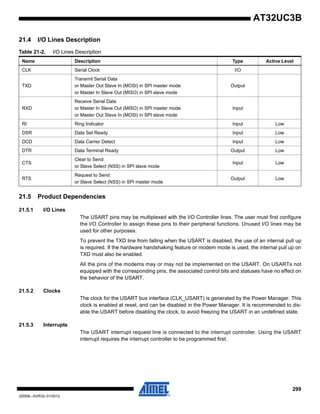
RXD
TXD
CLK
RTS, CTS
DSR, DTR, DCD, RI
USART0
USART2
PDC
RXD
TXD
CLK
RTS, CTS
SYNCHRONOUS
SERIAL
CONTROLLER
PDC
TX_CLOCK, TX_FRAME_SYNC
RX_DATA
TX_DATA
RX_CLOCK, RX_FRAME_SYNC
ANALOG TO
DIGITAL
CONVERTER
PDC
AD[7..0]
ADVREF
WATCHDOG
TIMER
XIN1
XOUT1
OSC1
PLL1
SCK
JTAG
INTERFACE
MCKO
MDO[5..0]
MSEO[1..0]
EVTI_N
TCK
TDO
TDI
TMS
POWER
MANAGER
RESET
CONTROLLER
SLEEP
CONTROLLER
CLOCK
CONTROLLER
CLOCK
GENERATOR
CONFIGURATION REGISTERS BUS
PB
PB
HSBHSB
S
FLASH
CONTROLLER
M
S
USB
INTERFACE
DMA
ID
VBOF
VBUS
D-
D+
EVTO_N
AVR32 UC
CPUNEXUS
CLASS 2+
OCD
INSTR
INTERFACE
DATA
INTERFACE
MEMORYINTERFACE
FAST GPIO
16/32/96 KB
SRAM
MEMORY PROTECTION UNIT
LOCAL BUS
INTERFACE
AUDIO
BITSTREAM
DAC
PDC
DATA[1..0]
DATAN[1..0]
PULSE WIDTH
MODULATION
CONTROLLER
PWM[6..0]
64/128/
256/512 KB
FLASH
5
32059L–AVR32–01/2012
AT32UC3B
3. Configuration Summary
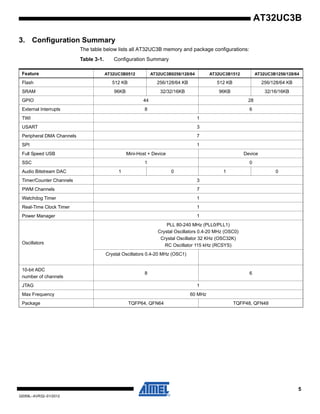
The table below lists all AT32UC3B memory and package configurations:
Table 3-1. Configuration Summary
Feature AT32UC3B0512 AT32UC3B0256/128/64 AT32UC3B1512 AT32UC3B1256/128/64
Flash 512 KB 256/128/64 KB 512 KB 256/128/64 KB
SRAM 96KB 32/32/16KB 96KB 32/16/16KB
GPIO 44 28
External Interrupts 8 6
TWI 1
USART 3
Peripheral DMA Channels 7
SPI 1
Full Speed USB Mini-Host + Device Device
SSC 1 0
Audio Bitstream DAC 1 0 1 0
Timer/Counter Channels 3
PWM Channels 7
Watchdog Timer 1
Real-Time Clock Timer 1
Power Manager 1
Oscillators
PLL 80-240 MHz (PLL0/PLL1)
Crystal Oscillators 0.4-20 MHz (OSC0)
Crystal Oscillator 32 KHz (OSC32K)
RC Oscillator 115 kHz (RCSYS)
Crystal Oscillators 0.4-20 MHz (OSC1)
10-bit ADC
number of channels
8 6
JTAG 1
Max Frequency 60 MHz
Package TQFP64, QFN64 TQFP48, QFN48
6
32059L–AVR32–01/2012
AT32UC3B
4. Package and Pinout
4.1 Package
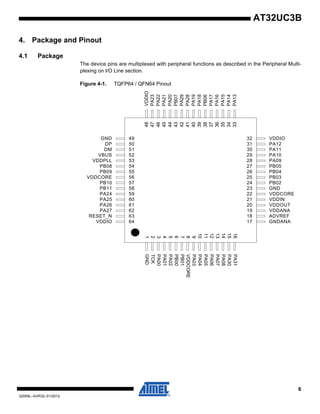
The device pins are multiplexed with peripheral functions as described in the Peripheral Multi-
plexing on I/O Line section.
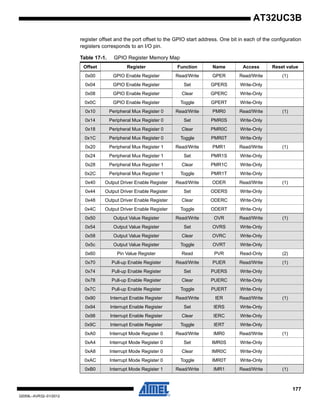
Figure 4-1. TQFP64 / QFN64 Pinout
GND1
TCK2
PA003
PA014
PA025
PB006
PB017
VDDCORE8
PA039
PA0410
PA0511
PA0612
PA0713
PA0814
PA3015
PA3116
GNDANA17
ADVREF18
VDDANA19
VDDOUT20
VDDIN21
VDDCORE22
GND23
PB0224
PB0325
PB0426
PB0527
PA0928
PA1029
PA1130
PA1231
VDDIO32
VDDIO48
PA2347
PA2246
PA2145
PA2044
PB0743
PA2942
PA2841
PA1940
PA1839
PB0638
PA1737
PA1636
PA1535
PA1434
PA1333
GND 49
DP 50
DM 51
VBUS 52
VDDPLL 53
PB08 54
PB09 55
VDDCORE 56
PB10 57
PB11 58
PA24 59
PA25 60
PA26 61
PA27 62
RESET_N 63
VDDIO 64
7
32059L–AVR32–01/2012
AT32UC3B
Figure 4-2. TQFP48 / QFN48 Pinout
Note: The exposed pad is not connected to anything internally, but should be soldered to ground to
increase board level reliability.
4.2 Peripheral Multiplexing on I/O lines
4.2.1 Multiplexed signals
Each GPIO line can be assigned to one of 4 peripheral functions; A, B, C or D (D is only avail-
able for UC3Bx512 parts). The following table define how the I/O lines on the peripherals A, B,C
or D are multiplexed by the GPIO.
GND1
TCK2
PA003
PA014
PA025
VDDCORE6
PA037
PA048
PA059
PA0610
PA0711
PA0812
GNDANA13
ADVREF14
VDDANA15
VDDOUT16
VDDIN17
VDDCORE18
GND19
PA0920
PA1021
PA1122
PA1223
VDDIO24
VDDIO36
PA2335
PA2234
PA2133
PA2032
PA1931
PA1830
PA1729
PA1628
PA1527
PA1426
PA1325
GND 37
DP 38
DM 39
VBUS 40
VDDPLL 41
VDDCORE 42
PA24 43
PA25 44
PA26 45
PA27 46
RESET_N 47
VDDIO 48
Table 4-1. GPIO Controller Function Multiplexing
48-pin 64-pin PIN GPIO Pin Function A Function B Function C
Function D
(only for UC3Bx512)
3 3 PA00 GPIO 0
4 4 PA01 GPIO 1
5 5 PA02 GPIO 2
7 9 PA03 GPIO 3 ADC - AD[0] PM - GCLK[0] USBB - USB_ID ABDAC - DATA[0]
8 10 PA04 GPIO 4 ADC - AD[1] PM - GCLK[1] USBB - USB_VBOF ABDAC - DATAN[0]
9 11 PA05 GPIO 5 EIC - EXTINT[0] ADC - AD[2] USART1 - DCD ABDAC - DATA[1]
8
32059L–AVR32–01/2012
AT32UC3B
10 12 PA06 GPIO 6 EIC - EXTINT[1] ADC - AD[3] USART1 - DSR ABDAC - DATAN[1]
11 13 PA07 GPIO 7 PWM - PWM[0] ADC - AD[4] USART1 - DTR
SSC -
RX_FRAME_SYNC
12 14 PA08 GPIO 8 PWM - PWM[1] ADC - AD[5] USART1 - RI SSC - RX_CLOCK
20 28 PA09 GPIO 9 TWI - SCL SPI0 - NPCS[2] USART1 - CTS
21 29 PA10 GPIO 10 TWI - SDA SPI0 - NPCS[3] USART1 - RTS
22 30 PA11 GPIO 11 USART0 - RTS TC - A2 PWM - PWM[0] SSC - RX_DATA
23 31 PA12 GPIO 12 USART0 - CTS TC - B2 PWM - PWM[1] USART1 - TXD
25 33 PA13 GPIO 13 EIC - NMI PWM - PWM[2] USART0 - CLK SSC - RX_CLOCK
26 34 PA14 GPIO 14 SPI0 - MOSI PWM - PWM[3] EIC - EXTINT[2] PM - GCLK[2]
27 35 PA15 GPIO 15 SPI0 - SCK PWM - PWM[4] USART2 - CLK
28 36 PA16 GPIO 16 SPI0 - NPCS[0] TC - CLK1 PWM - PWM[4]
29 37 PA17 GPIO 17 SPI0 - NPCS[1] TC - CLK2 SPI0 - SCK USART1 - RXD
30 39 PA18 GPIO 18 USART0 - RXD PWM - PWM[5] SPI0 - MISO
SSC -
RX_FRAME_SYNC
31 40 PA19 GPIO 19 USART0 - TXD PWM - PWM[6] SPI0 - MOSI SSC - TX_CLOCK
32 44 PA20 GPIO 20 USART1 - CLK TC - CLK0 USART2 - RXD SSC - TX_DATA
33 45 PA21 GPIO 21 PWM - PWM[2] TC - A1 USART2 - TXD
SSC -
TX_FRAME_SYNC
34 46 PA22 GPIO 22 PWM - PWM[6] TC - B1 ADC - TRIGGER ABDAC - DATA[0]
35 47 PA23 GPIO 23 USART1 - TXD SPI0 - NPCS[1] EIC - EXTINT[3] PWM - PWM[0]
43 59 PA24 GPIO 24 USART1 - RXD SPI0 - NPCS[0] EIC - EXTINT[4] PWM - PWM[1]
44 60 PA25 GPIO 25 SPI0 - MISO PWM - PWM[3] EIC - EXTINT[5]
45 61 PA26 GPIO 26 USBB - USB_ID USART2 - TXD TC - A0 ABDAC - DATA[1]
46 62 PA27 GPIO 27 USBB - USB_VBOF USART2 - RXD TC - B0 ABDAC - DATAN[1]
41 PA28 GPIO 28 USART0 - CLK PWM - PWM[4] SPI0 - MISO ABDAC - DATAN[0]
42 PA29 GPIO 29 TC - CLK0 TC - CLK1 SPI0 - MOSI
15 PA30 GPIO 30 ADC - AD[6] EIC - SCAN[0] PM - GCLK[2]
16 PA31 GPIO 31 ADC - AD[7] EIC - SCAN[1] PWM - PWM[6]
6 PB00 GPIO 32 TC - A0 EIC - SCAN[2] USART2 - CTS
7 PB01 GPIO 33 TC - B0 EIC - SCAN[3] USART2 - RTS
24 PB02 GPIO 34 EIC - EXTINT[6] TC - A1 USART1 - TXD
25 PB03 GPIO 35 EIC - EXTINT[7] TC - B1 USART1 - RXD
26 PB04 GPIO 36 USART1 - CTS SPI0 - NPCS[3] TC - CLK2
27 PB05 GPIO 37 USART1 - RTS SPI0 - NPCS[2] PWM - PWM[5]
38 PB06 GPIO 38 SSC - RX_CLOCK USART1 - DCD EIC - SCAN[4] ABDAC - DATA[0]
43 PB07 GPIO 39 SSC - RX_DATA USART1 - DSR EIC - SCAN[5] ABDAC - DATAN[0]
54 PB08 GPIO 40
SSC -
RX_FRAME_SYNC
USART1 - DTR EIC - SCAN[6] ABDAC - DATA[1]
Table 4-1. GPIO Controller Function Multiplexing
9
32059L–AVR32–01/2012
AT32UC3B
4.2.2 JTAG Port Connections
If the JTAG is enabled, the JTAG will take control over a number of pins, irrespective of the I/O
Controller configuration.
4.2.3 Nexus OCD AUX port connections
If the OCD trace system is enabled, the trace system will take control over a number of pins, irre-
spectively of the PIO configuration. Two different OCD trace pin mappings are possible,
depending on the configuration of the OCD AXS register. For details, see the AVR32 UC Tech-
nical Reference Manual.
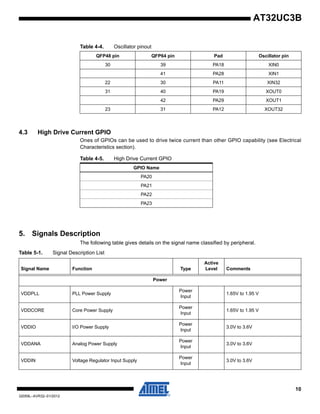
4.2.4 Oscillator Pinout
The oscillators are not mapped to the normal A, B or C functions and their muxings are con-
trolled by registers in the Power Manager (PM). Please refer to the power manager chapter for
more information about this.
55 PB09 GPIO 41 SSC - TX_CLOCK USART1 - RI EIC - SCAN[7] ABDAC - DATAN[1]
57 PB10 GPIO 42 SSC - TX_DATA TC - A2 USART0 - RXD
58 PB11 GPIO 43
SSC -
TX_FRAME_SYNC
TC - B2 USART0 - TXD
Table 4-1. GPIO Controller Function Multiplexing
Table 4-2. JTAG Pinout
64QFP/QFN 48QFP/QFN Pin name JTAG pin
2 2 TCK TCK
3 3 PA00 TDI
4 4 PA01 TDO
5 5 PA02 TMS
Table 4-3. Nexus OCD AUX port connections
Pin AXS=0 AXS=1
EVTI_N PB05 PA14
MDO[5] PB04 PA08
MDO[4] PB03 PA07
MDO[3] PB02 PA06
MDO[2] PB01 PA05
MDO[1] PB00 PA04
MDO[0] PA31 PA03
EVTO_N PA15 PA15
MCKO PA30 PA13
MSEO[1] PB06 PA09
MSEO[0] PB07 PA10
10
32059L–AVR32–01/2012
AT32UC3B
4.3 High Drive Current GPIO
Ones of GPIOs can be used to drive twice current than other GPIO capability (see Electrical
Characteristics section).
5. Signals Description
The following table gives details on the signal name classified by peripheral.
Table 4-4. Oscillator pinout
QFP48 pin QFP64 pin Pad Oscillator pin
30 39 PA18 XIN0
41 PA28 XIN1
22 30 PA11 XIN32
31 40 PA19 XOUT0
42 PA29 XOUT1
23 31 PA12 XOUT32
Table 4-5. High Drive Current GPIO
GPIO Name
PA20
PA21
PA22
PA23
Table 5-1. Signal Description List
Signal Name Function Type
Active
Level Comments
Power
VDDPLL PLL Power Supply
Power
Input
1.65V to 1.95 V
VDDCORE Core Power Supply
Power
Input
1.65V to 1.95 V
VDDIO I/O Power Supply
Power
Input
3.0V to 3.6V
VDDANA Analog Power Supply
Power
Input
3.0V to 3.6V
VDDIN Voltage Regulator Input Supply
Power
Input
3.0V to 3.6V
11
32059L–AVR32–01/2012
AT32UC3B
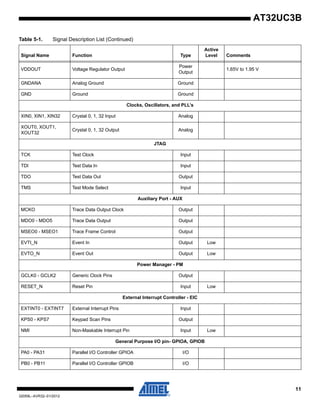
VDDOUT Voltage Regulator Output
Power
Output
1.65V to 1.95 V
GNDANA Analog Ground Ground
GND Ground Ground
Clocks, Oscillators, and PLL’s
XIN0, XIN1, XIN32 Crystal 0, 1, 32 Input Analog
XOUT0, XOUT1,
XOUT32
Crystal 0, 1, 32 Output Analog
JTAG
TCK Test Clock Input
TDI Test Data In Input
TDO Test Data Out Output
TMS Test Mode Select Input
Auxiliary Port - AUX
MCKO Trace Data Output Clock Output
MDO0 - MDO5 Trace Data Output Output
MSEO0 - MSEO1 Trace Frame Control Output
EVTI_N Event In Output Low
EVTO_N Event Out Output Low
Power Manager - PM
GCLK0 - GCLK2 Generic Clock Pins Output
RESET_N Reset Pin Input Low
External Interrupt Controller - EIC
EXTINT0 - EXTINT7 External Interrupt Pins Input
KPS0 - KPS7 Keypad Scan Pins Output
NMI Non-Maskable Interrupt Pin Input Low
General Purpose I/O pin- GPIOA, GPIOB
PA0 - PA31 Parallel I/O Controller GPIOA I/O
PB0 - PB11 Parallel I/O Controller GPIOB I/O
Table 5-1. Signal Description List (Continued)
Signal Name Function Type
Active
Level Comments
12
32059L–AVR32–01/2012
AT32UC3B
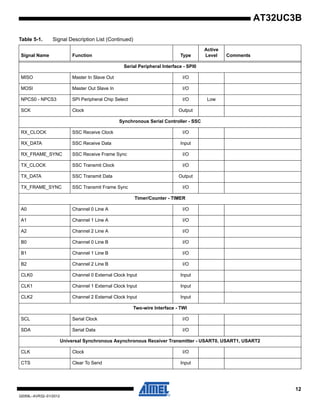
Serial Peripheral Interface - SPI0
MISO Master In Slave Out I/O
MOSI Master Out Slave In I/O
NPCS0 - NPCS3 SPI Peripheral Chip Select I/O Low
SCK Clock Output
Synchronous Serial Controller - SSC
RX_CLOCK SSC Receive Clock I/O
RX_DATA SSC Receive Data Input
RX_FRAME_SYNC SSC Receive Frame Sync I/O
TX_CLOCK SSC Transmit Clock I/O
TX_DATA SSC Transmit Data Output
TX_FRAME_SYNC SSC Transmit Frame Sync I/O
Timer/Counter - TIMER
A0 Channel 0 Line A I/O
A1 Channel 1 Line A I/O
A2 Channel 2 Line A I/O
B0 Channel 0 Line B I/O
B1 Channel 1 Line B I/O
B2 Channel 2 Line B I/O
CLK0 Channel 0 External Clock Input Input
CLK1 Channel 1 External Clock Input Input
CLK2 Channel 2 External Clock Input Input
Two-wire Interface - TWI
SCL Serial Clock I/O
SDA Serial Data I/O
Universal Synchronous Asynchronous Receiver Transmitter - USART0, USART1, USART2
CLK Clock I/O
CTS Clear To Send Input
Table 5-1. Signal Description List (Continued)
Signal Name Function Type
Active
Level Comments
13
32059L–AVR32–01/2012
AT32UC3B
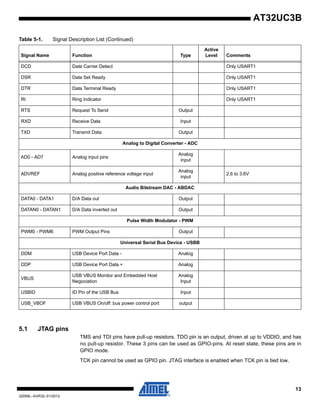
5.1 JTAG pins
TMS and TDI pins have pull-up resistors. TDO pin is an output, driven at up to VDDIO, and has
no pull-up resistor. These 3 pins can be used as GPIO-pins. At reset state, these pins are in
GPIO mode.
TCK pin cannot be used as GPIO pin. JTAG interface is enabled when TCK pin is tied low.
DCD Data Carrier Detect Only USART1
DSR Data Set Ready Only USART1
DTR Data Terminal Ready Only USART1
RI Ring Indicator Only USART1
RTS Request To Send Output
RXD Receive Data Input
TXD Transmit Data Output
Analog to Digital Converter - ADC
AD0 - AD7 Analog input pins
Analog
input
ADVREF Analog positive reference voltage input
Analog
input
2.6 to 3.6V
Audio Bitstream DAC - ABDAC
DATA0 - DATA1 D/A Data out Output
DATAN0 - DATAN1 D/A Data inverted out Output
Pulse Width Modulator - PWM
PWM0 - PWM6 PWM Output Pins Output
Universal Serial Bus Device - USBB
DDM USB Device Port Data - Analog
DDP USB Device Port Data + Analog
VBUS
USB VBUS Monitor and Embedded Host
Negociation
Analog
Input
USBID ID Pin of the USB Bus Input
USB_VBOF USB VBUS On/off: bus power control port output
Table 5-1. Signal Description List (Continued)
Signal Name Function Type
Active
Level Comments
14
32059L–AVR32–01/2012
AT32UC3B
5.2 RESET_N pin
The RESET_N pin is a schmitt input and integrates a permanent pull-up resistor to VDDIO. As
the product integrates a power-on reset cell, the RESET_N pin can be left unconnected in case
no reset from the system needs to be applied to the product.
5.3 TWI pins
When these pins are used for TWI, the pins are open-drain outputs with slew-rate limitation and
inputs with inputs with spike-filtering. When used as GPIO-pins or used for other peripherals, the
pins have the same characteristics as GPIO pins.
5.4 GPIO pins
All the I/O lines integrate a pull-up resistor. Programming of this pull-up resistor is performed
independently for each I/O line through the GPIO Controllers. After reset, I/O lines default as
inputs with pull-up resistors disabled, except when indicated otherwise in the column “Reset
Value” of the GPIO Controller user interface table.
5.5 High drive pins
The four pins PA20, PA21, PA22, PA23 have high drive output capabilities.
5.6 Power Considerations
5.6.1 Power Supplies
The AT32UC3B has several types of power supply pins:
• VDDIO: Powers I/O lines. Voltage is 3.3V nominal.
• VDDANA: Powers the ADC Voltage is 3.3V nominal.
• VDDIN: Input voltage for the voltage regulator. Voltage is 3.3V nominal.
• VDDCORE: Powers the core, memories, and peripherals. Voltage is 1.8V nominal.
• VDDPLL: Powers the PLL. Voltage is 1.8V nominal.
The ground pins GND are common to VDDCORE, VDDIO and VDDPLL. The ground pin for
VDDANA is GNDANA.
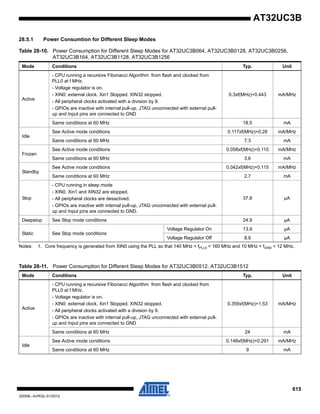
Refer to Electrical Characteristics section for power consumption on the various supply pins.
The main requirement for power supplies connection is to respect a star topology for all electrical
connection.
15
32059L–AVR32–01/2012
AT32UC3B
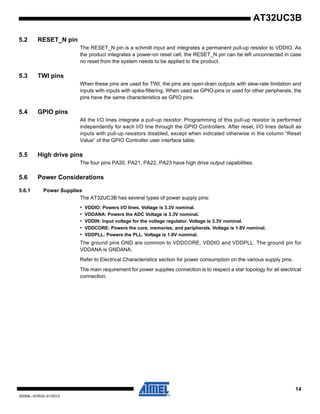
Figure 5-1. Power Supply
5.6.2 Voltage Regulator
5.6.2.1 Single Power Supply
The AT32UC3B embeds a voltage regulator that converts from 3.3V to 1.8V. The regulator takes
its input voltage from VDDIN, and supplies the output voltage on VDDOUT that should be exter-
nally connected to the 1.8V domains.
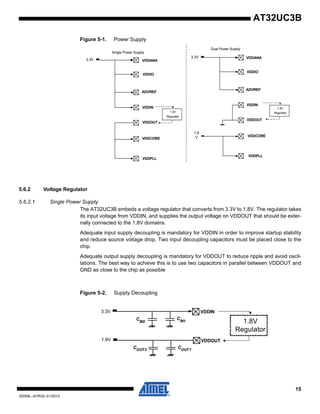
Adequate input supply decoupling is mandatory for VDDIN in order to improve startup stability
and reduce source voltage drop. Two input decoupling capacitors must be placed close to the
chip.
Adequate output supply decoupling is mandatory for VDDOUT to reduce ripple and avoid oscil-
lations. The best way to achieve this is to use two capacitors in parallel between VDDOUT and
GND as close to the chip as possible
Figure 5-2. Supply Decoupling
3.3V VDDANA
VDDIO
VDDIN
VDDCORE
VDDOUT
VDDPLL
ADVREF
3.3V
1.8
V
VDDANA
VDDIO
VDDIN
VDDCORE
VDDOUT
VDDPLL
ADVREF
Single Power Supply
Dual Power Supply
1.8V
Regulator1.8V
Regulator
3.3V
1.8V
VDDIN
VDDOUT
1.8V
Regulator
CIN1
COUT1
COUT2
CIN2
16
32059L–AVR32–01/2012
AT32UC3B
Refer to Section 28.3 on page 610 for decoupling capacitors values and regulator
characteristics.
For decoupling recommendations for VDDIO, VDDANA, VDDCORE and VDDPLL, please refer
to the Schematic checklist.
5.6.2.2 Dual Power Supply
In case of dual power supply, VDDIN and VDDOUT should be connected to ground to prevent
from leakage current.
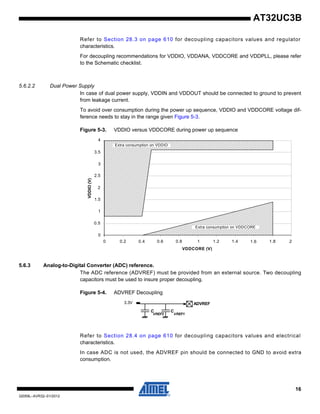
To avoid over consumption during the power up sequence, VDDIO and VDDCORE voltage dif-
ference needs to stay in the range given Figure 5-3.
Figure 5-3. VDDIO versus VDDCORE during power up sequence
5.6.3 Analog-to-Digital Converter (ADC) reference.
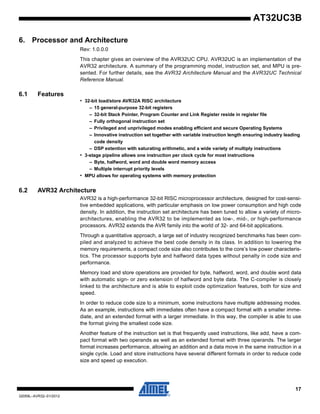
The ADC reference (ADVREF) must be provided from an external source. Two decoupling
capacitors must be used to insure proper decoupling.
Figure 5-4. ADVREF Decoupling
Refer to Section 28.4 on page 610 for decoupling capacitors values and electrical
characteristics.
In case ADC is not used, the ADVREF pin should be connected to GND to avoid extra
consumption.
Extra consumption on VDDCORE
VDDCORE (V)
Extra consumption on VDDIO
VDDIO(V)
0 0.2 0.4 0.6 0.8 1 1.2 1.4 1.6 1.8 2
0
0.5
1.5
1
2
2.5
3
3.5
4
ADVREF
CC
VREF1VREF2
3.3V
17
32059L–AVR32–01/2012
AT32UC3B
6. Processor and Architecture
Rev: 1.0.0.0
This chapter gives an overview of the AVR32UC CPU. AVR32UC is an implementation of the
AVR32 architecture. A summary of the programming model, instruction set, and MPU is pre-
sented. For further details, see the AVR32 Architecture Manual and the AVR32UC Technical
Reference Manual.
6.1 Features
• 32-bit load/store AVR32A RISC architecture
– 15 general-purpose 32-bit registers
– 32-bit Stack Pointer, Program Counter and Link Register reside in register file
– Fully orthogonal instruction set
– Privileged and unprivileged modes enabling efficient and secure Operating Systems
– Innovative instruction set together with variable instruction length ensuring industry leading
code density
– DSP extention with saturating arithmetic, and a wide variety of multiply instructions
• 3-stage pipeline allows one instruction per clock cycle for most instructions
– Byte, halfword, word and double word memory access
– Multiple interrupt priority levels
• MPU allows for operating systems with memory protection
6.2 AVR32 Architecture
AVR32 is a high-performance 32-bit RISC microprocessor architecture, designed for cost-sensi-
tive embedded applications, with particular emphasis on low power consumption and high code
density. In addition, the instruction set architecture has been tuned to allow a variety of micro-
architectures, enabling the AVR32 to be implemented as low-, mid-, or high-performance
processors. AVR32 extends the AVR family into the world of 32- and 64-bit applications.
Through a quantitative approach, a large set of industry recognized benchmarks has been com-
piled and analyzed to achieve the best code density in its class. In addition to lowering the
memory requirements, a compact code size also contributes to the core’s low power characteris-
tics. The processor supports byte and halfword data types without penalty in code size and
performance.
Memory load and store operations are provided for byte, halfword, word, and double word data
with automatic sign- or zero extension of halfword and byte data. The C-compiler is closely
linked to the architecture and is able to exploit code optimization features, both for size and
speed.
In order to reduce code size to a minimum, some instructions have multiple addressing modes.
As an example, instructions with immediates often have a compact format with a smaller imme-
diate, and an extended format with a larger immediate. In this way, the compiler is able to use
the format giving the smallest code size.
Another feature of the instruction set is that frequently used instructions, like add, have a com-
pact format with two operands as well as an extended format with three operands. The larger
format increases performance, allowing an addition and a data move in the same instruction in a
single cycle. Load and store instructions have several different formats in order to reduce code
size and speed up execution.
18
32059L–AVR32–01/2012
AT32UC3B
The register file is organized as sixteen 32-bit registers and includes the Program Counter, the
Link Register, and the Stack Pointer. In addition, register R12 is designed to hold return values
from function calls and is used implicitly by some instructions.
6.3 The AVR32UC CPU
The AVR32UC CPU targets low- and medium-performance applications, and provides an
advanced OCD system, no caches, and a Memory Protection Unit (MPU). Java acceleration
hardware is not implemented.
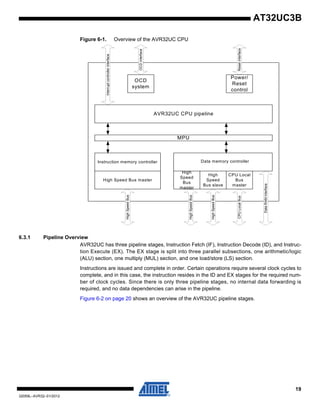
AVR32UC provides three memory interfaces, one High Speed Bus master for instruction fetch,
one High Speed Bus master for data access, and one High Speed Bus slave interface allowing
other bus masters to access data RAMs internal to the CPU. Keeping data RAMs internal to the
CPU allows fast access to the RAMs, reduces latency, and guarantees deterministic timing.
Also, power consumption is reduced by not needing a full High Speed Bus access for memory
accesses. A dedicated data RAM interface is provided for communicating with the internal data
RAMs.
A local bus interface is provided for connecting the CPU to device-specific high-speed systems,
such as floating-point units and fast GPIO ports. This local bus has to be enabled by writing the
LOCEN bit in the CPUCR system register. The local bus is able to transfer data between the
CPU and the local bus slave in a single clock cycle. The local bus has a dedicated memory
range allocated to it, and data transfers are performed using regular load and store instructions.
Details on which devices that are mapped into the local bus space is given in the Memories
chapter of this data sheet.
Figure 6-1 on page 19 displays the contents of AVR32UC.
19
32059L–AVR32–01/2012
AT32UC3B
Figure 6-1. Overview of the AVR32UC CPU
6.3.1 Pipeline Overview
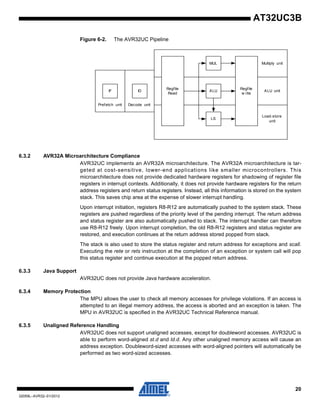
AVR32UC has three pipeline stages, Instruction Fetch (IF), Instruction Decode (ID), and Instruc-
tion Execute (EX). The EX stage is split into three parallel subsections, one arithmetic/logic
(ALU) section, one multiply (MUL) section, and one load/store (LS) section.
Instructions are issued and complete in order. Certain operations require several clock cycles to
complete, and in this case, the instruction resides in the ID and EX stages for the required num-
ber of clock cycles. Since there is only three pipeline stages, no internal data forwarding is
required, and no data dependencies can arise in the pipeline.
Figure 6-2 on page 20 shows an overview of the AVR32UC pipeline stages.
AVR32UC CPU pipeline
Instruction memory controller
High
Speed
Bus
master
MPU
HighSpeedBus
HighSpeedBus
OCD
system
OCDinterface
Interruptcontrollerinterface
High
Speed
Bus slave
HighSpeedBus
DataRAMinterface
High Speed Bus master
Power/
Reset
control
Resetinterface
CPU Local
Bus
master
CPULocalBus
Data memory controller
20
32059L–AVR32–01/2012
AT32UC3B
Figure 6-2. The AVR32UC Pipeline
6.3.2 AVR32A Microarchitecture Compliance
AVR32UC implements an AVR32A microarchitecture. The AVR32A microarchitecture is tar-
geted at cost-sensitive, lower-end applications like smaller microcontrollers. This
microarchitecture does not provide dedicated hardware registers for shadowing of register file
registers in interrupt contexts. Additionally, it does not provide hardware registers for the return
address registers and return status registers. Instead, all this information is stored on the system
stack. This saves chip area at the expense of slower interrupt handling.
Upon interrupt initiation, registers R8-R12 are automatically pushed to the system stack. These
registers are pushed regardless of the priority level of the pending interrupt. The return address
and status register are also automatically pushed to stack. The interrupt handler can therefore
use R8-R12 freely. Upon interrupt completion, the old R8-R12 registers and status register are
restored, and execution continues at the return address stored popped from stack.
The stack is also used to store the status register and return address for exceptions and scall.
Executing the rete or rets instruction at the completion of an exception or system call will pop
this status register and continue execution at the popped return address.
6.3.3 Java Support
AVR32UC does not provide Java hardware acceleration.
6.3.4 Memory Protection
The MPU allows the user to check all memory accesses for privilege violations. If an access is
attempted to an illegal memory address, the access is aborted and an exception is taken. The
MPU in AVR32UC is specified in the AVR32UC Technical Reference manual.
6.3.5 Unaligned Reference Handling
AVR32UC does not support unaligned accesses, except for doubleword accesses. AVR32UC is
able to perform word-aligned st.d and ld.d. Any other unaligned memory access will cause an
address exception. Doubleword-sized accesses with word-aligned pointers will automatically be
performed as two word-sized accesses.
IF ID ALU
MUL
Regfile
w rite
Prefetch unit Decode unit
ALU unit
Multiply unit
Load-store
unit
LS
Regfile
Read
21
32059L–AVR32–01/2012
AT32UC3B
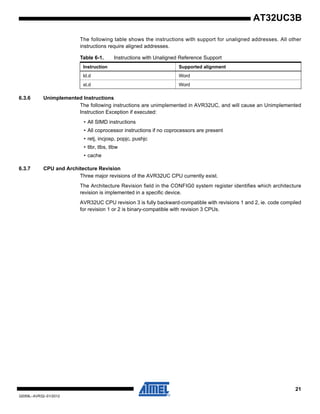
The following table shows the instructions with support for unaligned addresses. All other
instructions require aligned addresses.
6.3.6 Unimplemented Instructions
The following instructions are unimplemented in AVR32UC, and will cause an Unimplemented
Instruction Exception if executed:
• All SIMD instructions
• All coprocessor instructions if no coprocessors are present
• retj, incjosp, popjc, pushjc
• tlbr, tlbs, tlbw
• cache
6.3.7 CPU and Architecture Revision
Three major revisions of the AVR32UC CPU currently exist.
The Architecture Revision field in the CONFIG0 system register identifies which architecture
revision is implemented in a specific device.
AVR32UC CPU revision 3 is fully backward-compatible with revisions 1 and 2, ie. code compiled
for revision 1 or 2 is binary-compatible with revision 3 CPUs.
Table 6-1. Instructions with Unaligned Reference Support
Instruction Supported alignment
ld.d Word
st.d Word
22
32059L–AVR32–01/2012
AT32UC3B
6.4 Programming Model
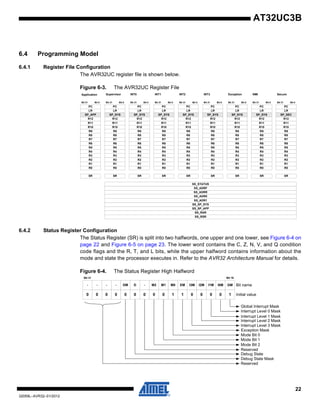
6.4.1 Register File Configuration
The AVR32UC register file is shown below.
Figure 6-3. The AVR32UC Register File
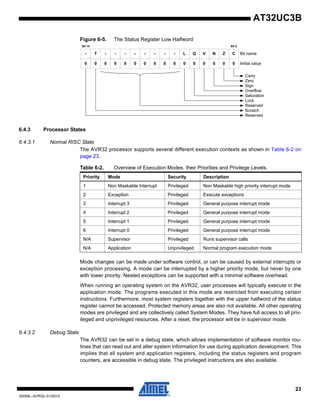
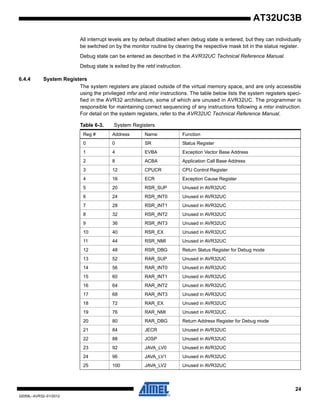
6.4.2 Status Register Configuration
The Status Register (SR) is split into two halfwords, one upper and one lower, see Figure 6-4 on
page 22 and Figure 6-5 on page 23. The lower word contains the C, Z, N, V, and Q condition
code flags and the R, T, and L bits, while the upper halfword contains information about the
mode and state the processor executes in. Refer to the AVR32 Architecture Manual for details.
Figure 6-4. The Status Register High Halfword
Application
Bit 0
Supervisor
Bit 31
PC
SR
INT0PC
FINTPC
INT1PC
SMPC
R7
R5
R6
R4
R3
R1
R2
R0
Bit 0Bit 31
PC
SR
R12
INT0PC
FINTPC
INT1PC
SMPC
R7
R5
R6
R4
R11
R9
R10
R8
R3
R1
R2
R0
INT0
SP_APP SP_SYS
R12
R11
R9
R10
R8
Exception NMIINT1 INT2 INT3
LRLR
Bit 0Bit 31
PC
SR
R12
INT0PC
FINTPC
INT1PC
SMPC
R7
R5
R6
R4
R11
R9
R10
R8
R3
R1
R2
R0
SP_SYS
LR
Bit 0Bit 31
PC
SR
R12
INT0PC
FINTPC
INT1PC
SMPC
R7
R5
R6
R4
R11
R9
R10
R8
R3
R1
R2
R0
SP_SYS
LR
Bit 0Bit 31
PC
SR
R12
INT0PC
FINTPC
INT1PC
SMPC
R7
R5
R6
R4
R11
R9
R10
R8
R3
R1
R2
R0
SP_SYS
LR
Bit 0Bit 31
PC
SR
R12
INT0PC
FINTPC
INT1PC
SMPC
R7
R5
R6
R4
R11
R9
R10
R8
R3
R1
R2
R0
SP_SYS
LR
Bit 0Bit 31
PC
SR
R12
INT0PC
FINTPC
INT1PC
SMPC
R7
R5
R6
R4
R11
R9
R10
R8
R3
R1
R2
R0
SP_SYS
LR
Bit 0Bit 31
PC
SR
R12
INT0PC
FINTPC
INT1PC
SMPC
R7
R5
R6
R4
R11
R9
R10
R8
R3
R1
R2
R0
SP_SYS
LR
Secure
Bit 0Bit 31
PC
SR
R12
INT0PC
FINTPC
INT1PC
SMPC
R7
R5
R6
R4
R11
R9
R10
R8
R3
R1
R2
R0
SP_SEC
LR
SS_STATUS
SS_ADRF
SS_ADRR
SS_ADR0
SS_ADR1
SS_SP_SYS
SS_SP_APP
SS_RAR
SS_RSR
Bit 31
0 0 0
Bit 16
Interrupt Level 0 Mask
Interrupt Level 1 Mask
Interrupt Level 3 Mask
Interrupt Level 2 Mask
10 0 0 0 1 1 0 0 0 00 0
FE I0M GMM1- D M0 EM I2MDM - M2
LC
1
Initial value
Bit nameI1M
Mode Bit 0
Mode Bit 1
-
Mode Bit 2
Reserved
Debug State
- I3M
Reserved
Exception Mask
Global Interrupt Mask
Debug State Mask
-
23
32059L–AVR32–01/2012
AT32UC3B
Figure 6-5. The Status Register Low Halfword
6.4.3 Processor States
6.4.3.1 Normal RISC State
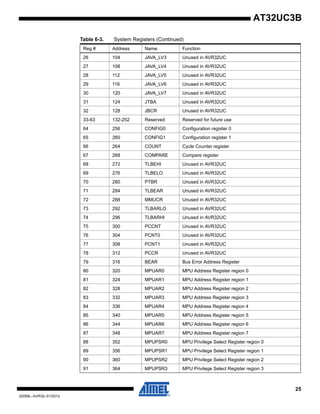
The AVR32 processor supports several different execution contexts as shown in Table 6-2 on
page 23.
Mode changes can be made under software control, or can be caused by external interrupts or
exception processing. A mode can be interrupted by a higher priority mode, but never by one
with lower priority. Nested exceptions can be supported with a minimal software overhead.
When running an operating system on the AVR32, user processes will typically execute in the
application mode. The programs executed in this mode are restricted from executing certain
instructions. Furthermore, most system registers together with the upper halfword of the status
register cannot be accessed. Protected memory areas are also not available. All other operating
modes are privileged and are collectively called System Modes. They have full access to all priv-
ileged and unprivileged resources. After a reset, the processor will be in supervisor mode.
6.4.3.2 Debug State
The AVR32 can be set in a debug state, which allows implementation of software monitor rou-
tines that can read out and alter system information for use during application development. This
implies that all system and application registers, including the status registers and program
counters, are accessible in debug state. The privileged instructions are also available.
Bit 15 Bit 0
Reserved
Carry
Zero
Sign
0 0 0 00000000000
- - --T- Bit name
Initial value0 0
L Q V N Z C-
Overflow
Saturation
- - -
Lock
Reserved
Scratch
Table 6-2. Overview of Execution Modes, their Priorities and Privilege Levels.
Priority Mode Security Description
1 Non Maskable Interrupt Privileged Non Maskable high priority interrupt mode
2 Exception Privileged Execute exceptions
3 Interrupt 3 Privileged General purpose interrupt mode
4 Interrupt 2 Privileged General purpose interrupt mode
5 Interrupt 1 Privileged General purpose interrupt mode
6 Interrupt 0 Privileged General purpose interrupt mode
N/A Supervisor Privileged Runs supervisor calls
N/A Application Unprivileged Normal program execution mode
24
32059L–AVR32–01/2012
AT32UC3B
All interrupt levels are by default disabled when debug state is entered, but they can individually
be switched on by the monitor routine by clearing the respective mask bit in the status register.
Debug state can be entered as described in the AVR32UC Technical Reference Manual.
Debug state is exited by the retd instruction.
6.4.4 System Registers
The system registers are placed outside of the virtual memory space, and are only accessible
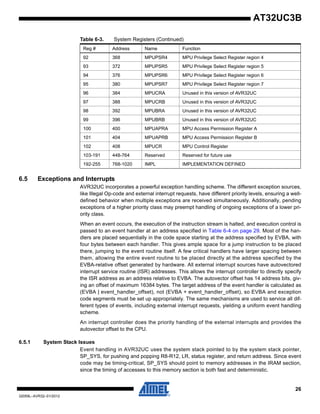
using the privileged mfsr and mtsr instructions. The table below lists the system registers speci-
fied in the AVR32 architecture, some of which are unused in AVR32UC. The programmer is
responsible for maintaining correct sequencing of any instructions following a mtsr instruction.
For detail on the system registers, refer to the AVR32UC Technical Reference Manual.
Table 6-3. System Registers
Reg # Address Name Function
0 0 SR Status Register
1 4 EVBA Exception Vector Base Address
2 8 ACBA Application Call Base Address
3 12 CPUCR CPU Control Register
4 16 ECR Exception Cause Register
5 20 RSR_SUP Unused in AVR32UC
6 24 RSR_INT0 Unused in AVR32UC
7 28 RSR_INT1 Unused in AVR32UC
8 32 RSR_INT2 Unused in AVR32UC
9 36 RSR_INT3 Unused in AVR32UC
10 40 RSR_EX Unused in AVR32UC
11 44 RSR_NMI Unused in AVR32UC
12 48 RSR_DBG Return Status Register for Debug mode
13 52 RAR_SUP Unused in AVR32UC
14 56 RAR_INT0 Unused in AVR32UC
15 60 RAR_INT1 Unused in AVR32UC
16 64 RAR_INT2 Unused in AVR32UC
17 68 RAR_INT3 Unused in AVR32UC
18 72 RAR_EX Unused in AVR32UC
19 76 RAR_NMI Unused in AVR32UC
20 80 RAR_DBG Return Address Register for Debug mode
21 84 JECR Unused in AVR32UC
22 88 JOSP Unused in AVR32UC
23 92 JAVA_LV0 Unused in AVR32UC
24 96 JAVA_LV1 Unused in AVR32UC
25 100 JAVA_LV2 Unused in AVR32UC
25
32059L–AVR32–01/2012
AT32UC3B
26 104 JAVA_LV3 Unused in AVR32UC
27 108 JAVA_LV4 Unused in AVR32UC
28 112 JAVA_LV5 Unused in AVR32UC
29 116 JAVA_LV6 Unused in AVR32UC
30 120 JAVA_LV7 Unused in AVR32UC
31 124 JTBA Unused in AVR32UC
32 128 JBCR Unused in AVR32UC
33-63 132-252 Reserved Reserved for future use
64 256 CONFIG0 Configuration register 0
65 260 CONFIG1 Configuration register 1
66 264 COUNT Cycle Counter register
67 268 COMPARE Compare register
68 272 TLBEHI Unused in AVR32UC
69 276 TLBELO Unused in AVR32UC
70 280 PTBR Unused in AVR32UC
71 284 TLBEAR Unused in AVR32UC
72 288 MMUCR Unused in AVR32UC
73 292 TLBARLO Unused in AVR32UC
74 296 TLBARHI Unused in AVR32UC
75 300 PCCNT Unused in AVR32UC
76 304 PCNT0 Unused in AVR32UC
77 308 PCNT1 Unused in AVR32UC
78 312 PCCR Unused in AVR32UC
79 316 BEAR Bus Error Address Register
80 320 MPUAR0 MPU Address Register region 0
81 324 MPUAR1 MPU Address Register region 1
82 328 MPUAR2 MPU Address Register region 2
83 332 MPUAR3 MPU Address Register region 3
84 336 MPUAR4 MPU Address Register region 4
85 340 MPUAR5 MPU Address Register region 5
86 344 MPUAR6 MPU Address Register region 6
87 348 MPUAR7 MPU Address Register region 7
88 352 MPUPSR0 MPU Privilege Select Register region 0
89 356 MPUPSR1 MPU Privilege Select Register region 1
90 360 MPUPSR2 MPU Privilege Select Register region 2
91 364 MPUPSR3 MPU Privilege Select Register region 3
Table 6-3. System Registers (Continued)
Reg # Address Name Function
26
32059L–AVR32–01/2012
AT32UC3B
6.5 Exceptions and Interrupts
AVR32UC incorporates a powerful exception handling scheme. The different exception sources,
like Illegal Op-code and external interrupt requests, have different priority levels, ensuring a well-
defined behavior when multiple exceptions are received simultaneously. Additionally, pending
exceptions of a higher priority class may preempt handling of ongoing exceptions of a lower pri-
ority class.
When an event occurs, the execution of the instruction stream is halted, and execution control is
passed to an event handler at an address specified in Table 6-4 on page 29. Most of the han-
dlers are placed sequentially in the code space starting at the address specified by EVBA, with
four bytes between each handler. This gives ample space for a jump instruction to be placed
there, jumping to the event routine itself. A few critical handlers have larger spacing between
them, allowing the entire event routine to be placed directly at the address specified by the
EVBA-relative offset generated by hardware. All external interrupt sources have autovectored
interrupt service routine (ISR) addresses. This allows the interrupt controller to directly specify
the ISR address as an address relative to EVBA. The autovector offset has 14 address bits, giv-
ing an offset of maximum 16384 bytes. The target address of the event handler is calculated as
(EVBA | event_handler_offset), not (EVBA + event_handler_offset), so EVBA and exception
code segments must be set up appropriately. The same mechanisms are used to service all dif-
ferent types of events, including external interrupt requests, yielding a uniform event handling
scheme.
An interrupt controller does the priority handling of the external interrupts and provides the
autovector offset to the CPU.
6.5.1 System Stack Issues
Event handling in AVR32UC uses the system stack pointed to by the system stack pointer,
SP_SYS, for pushing and popping R8-R12, LR, status register, and return address. Since event
code may be timing-critical, SP_SYS should point to memory addresses in the IRAM section,
since the timing of accesses to this memory section is both fast and deterministic.
92 368 MPUPSR4 MPU Privilege Select Register region 4
93 372 MPUPSR5 MPU Privilege Select Register region 5
94 376 MPUPSR6 MPU Privilege Select Register region 6
95 380 MPUPSR7 MPU Privilege Select Register region 7
96 384 MPUCRA Unused in this version of AVR32UC
97 388 MPUCRB Unused in this version of AVR32UC
98 392 MPUBRA Unused in this version of AVR32UC
99 396 MPUBRB Unused in this version of AVR32UC
100 400 MPUAPRA MPU Access Permission Register A
101 404 MPUAPRB MPU Access Permission Register B
102 408 MPUCR MPU Control Register
103-191 448-764 Reserved Reserved for future use
192-255 768-1020 IMPL IMPLEMENTATION DEFINED
Table 6-3. System Registers (Continued)
Reg # Address Name Function
27
32059L–AVR32–01/2012
AT32UC3B
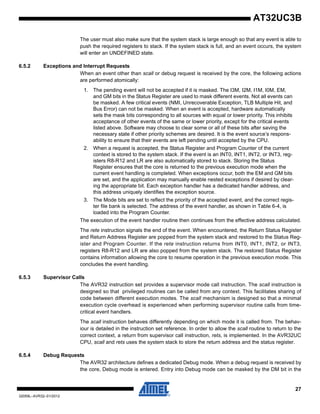
The user must also make sure that the system stack is large enough so that any event is able to
push the required registers to stack. If the system stack is full, and an event occurs, the system
will enter an UNDEFINED state.
6.5.2 Exceptions and Interrupt Requests
When an event other than scall or debug request is received by the core, the following actions
are performed atomically:
1. The pending event will not be accepted if it is masked. The I3M, I2M, I1M, I0M, EM,
and GM bits in the Status Register are used to mask different events. Not all events can
be masked. A few critical events (NMI, Unrecoverable Exception, TLB Multiple Hit, and
Bus Error) can not be masked. When an event is accepted, hardware automatically
sets the mask bits corresponding to all sources with equal or lower priority. This inhibits
acceptance of other events of the same or lower priority, except for the critical events
listed above. Software may choose to clear some or all of these bits after saving the
necessary state if other priority schemes are desired. It is the event source’s respons-
ability to ensure that their events are left pending until accepted by the CPU.
2. When a request is accepted, the Status Register and Program Counter of the current
context is stored to the system stack. If the event is an INT0, INT1, INT2, or INT3, reg-
isters R8-R12 and LR are also automatically stored to stack. Storing the Status
Register ensures that the core is returned to the previous execution mode when the
current event handling is completed. When exceptions occur, both the EM and GM bits
are set, and the application may manually enable nested exceptions if desired by clear-
ing the appropriate bit. Each exception handler has a dedicated handler address, and
this address uniquely identifies the exception source.
3. The Mode bits are set to reflect the priority of the accepted event, and the correct regis-
ter file bank is selected. The address of the event handler, as shown in Table 6-4, is
loaded into the Program Counter.
The execution of the event handler routine then continues from the effective address calculated.
The rete instruction signals the end of the event. When encountered, the Return Status Register
and Return Address Register are popped from the system stack and restored to the Status Reg-
ister and Program Counter. If the rete instruction returns from INT0, INT1, INT2, or INT3,
registers R8-R12 and LR are also popped from the system stack. The restored Status Register
contains information allowing the core to resume operation in the previous execution mode. This
concludes the event handling.
6.5.3 Supervisor Calls
The AVR32 instruction set provides a supervisor mode call instruction. The scall instruction is
designed so that privileged routines can be called from any context. This facilitates sharing of
code between different execution modes. The scall mechanism is designed so that a minimal
execution cycle overhead is experienced when performing supervisor routine calls from time-
critical event handlers.
The scall instruction behaves differently depending on which mode it is called from. The behav-
iour is detailed in the instruction set reference. In order to allow the scall routine to return to the
correct context, a return from supervisor call instruction, rets, is implemented. In the AVR32UC
CPU, scall and rets uses the system stack to store the return address and the status register.
6.5.4 Debug Requests
The AVR32 architecture defines a dedicated Debug mode. When a debug request is received by
the core, Debug mode is entered. Entry into Debug mode can be masked by the DM bit in the
28
32059L–AVR32–01/2012
AT32UC3B
status register. Upon entry into Debug mode, hardware sets the SR[D] bit and jumps to the
Debug Exception handler. By default, Debug mode executes in the exception context, but with
dedicated Return Address Register and Return Status Register. These dedicated registers
remove the need for storing this data to the system stack, thereby improving debuggability. The
mode bits in the status register can freely be manipulated in Debug mode, to observe registers
in all contexts, while retaining full privileges.
Debug mode is exited by executing the retd instruction. This returns to the previous context.
6.5.5 Entry Points for Events
Several different event handler entry points exists. In AVR32UC, the reset address is
0x8000_0000. This places the reset address in the boot flash memory area.
TLB miss exceptions and scall have a dedicated space relative to EVBA where their event han-
dler can be placed. This speeds up execution by removing the need for a jump instruction placed
at the program address jumped to by the event hardware. All other exceptions have a dedicated
event routine entry point located relative to EVBA. The handler routine address identifies the
exception source directly.
AVR32UC uses the ITLB and DTLB protection exceptions to signal a MPU protection violation.
ITLB and DTLB miss exceptions are used to signal that an access address did not map to any of
the entries in the MPU. TLB multiple hit exception indicates that an access address did map to
multiple TLB entries, signalling an error.
All external interrupt requests have entry points located at an offset relative to EVBA. This
autovector offset is specified by an external Interrupt Controller. The programmer must make
sure that none of the autovector offsets interfere with the placement of other code. The autovec-
tor offset has 14 address bits, giving an offset of maximum 16384 bytes.
Special considerations should be made when loading EVBA with a pointer. Due to security con-
siderations, the event handlers should be located in non-writeable flash memory, or optionally in
a privileged memory protection region if an MPU is present.
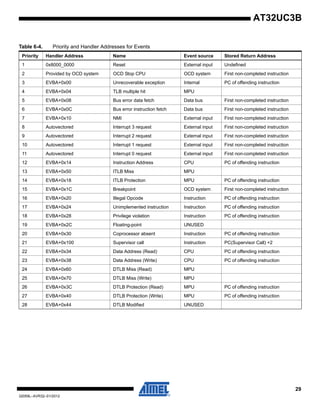
If several events occur on the same instruction, they are handled in a prioritized way. The priority
ordering is presented in Table 6-4. If events occur on several instructions at different locations in
the pipeline, the events on the oldest instruction are always handled before any events on any
younger instruction, even if the younger instruction has events of higher priority than the oldest
instruction. An instruction B is younger than an instruction A if it was sent down the pipeline later
than A.
The addresses and priority of simultaneous events are shown in Table 6-4. Some of the excep-
tions are unused in AVR32UC since it has no MMU, coprocessor interface, or floating-point unit.
29
32059L–AVR32–01/2012
AT32UC3B
Table 6-4. Priority and Handler Addresses for Events
Priority Handler Address Name Event source Stored Return Address
1 0x8000_0000 Reset External input Undefined
2 Provided by OCD system OCD Stop CPU OCD system First non-completed instruction
3 EVBA+0x00 Unrecoverable exception Internal PC of offending instruction
4 EVBA+0x04 TLB multiple hit MPU
5 EVBA+0x08 Bus error data fetch Data bus First non-completed instruction
6 EVBA+0x0C Bus error instruction fetch Data bus First non-completed instruction
7 EVBA+0x10 NMI External input First non-completed instruction
8 Autovectored Interrupt 3 request External input First non-completed instruction
9 Autovectored Interrupt 2 request External input First non-completed instruction
10 Autovectored Interrupt 1 request External input First non-completed instruction
11 Autovectored Interrupt 0 request External input First non-completed instruction
12 EVBA+0x14 Instruction Address CPU PC of offending instruction
13 EVBA+0x50 ITLB Miss MPU
14 EVBA+0x18 ITLB Protection MPU PC of offending instruction
15 EVBA+0x1C Breakpoint OCD system First non-completed instruction
16 EVBA+0x20 Illegal Opcode Instruction PC of offending instruction
17 EVBA+0x24 Unimplemented instruction Instruction PC of offending instruction
18 EVBA+0x28 Privilege violation Instruction PC of offending instruction
19 EVBA+0x2C Floating-point UNUSED
20 EVBA+0x30 Coprocessor absent Instruction PC of offending instruction
21 EVBA+0x100 Supervisor call Instruction PC(Supervisor Call) +2
22 EVBA+0x34 Data Address (Read) CPU PC of offending instruction
23 EVBA+0x38 Data Address (Write) CPU PC of offending instruction
24 EVBA+0x60 DTLB Miss (Read) MPU
25 EVBA+0x70 DTLB Miss (Write) MPU
26 EVBA+0x3C DTLB Protection (Read) MPU PC of offending instruction
27 EVBA+0x40 DTLB Protection (Write) MPU PC of offending instruction
28 EVBA+0x44 DTLB Modified UNUSED
30
32059L–AVR32–01/2012
AT32UC3B
6.6 Module Configuration
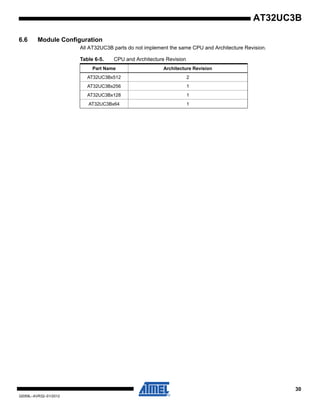
All AT32UC3B parts do not implement the same CPU and Architecture Revision.
Table 6-5. CPU and Architecture Revision
Part Name Architecture Revision
AT32UC3Bx512 2
AT32UC3Bx256 1
AT32UC3Bx128 1
AT32UC3Bx64 1
31
32059L–AVR32–01/2012
AT32UC3B
7. Memories
7.1 Embedded Memories
• Internal High-Speed Flash
– 512KBytes (AT32UC3B0512, AT32UC3B1512)
– 256 KBytes (AT32UC3B0256, AT32UC3B1256)
– 128 KBytes (AT32UC3B0128, AT32UC3B1128)
– 64 KBytes (AT32UC3B064, AT32UC3B164)
• - 0 Wait State Access at up to 30 MHz in Worst Case Conditions
• - 1 Wait State Access at up to 60 MHz in Worst Case Conditions
• - Pipelined Flash Architecture, allowing burst reads from sequential Flash locations,
hiding penalty of 1 wait state access
• - 100 000 Write Cycles, 15-year Data Retention Capability
• - 4 ms Page Programming Time, 8 ms Chip Erase Time
• - Sector Lock Capabilities, Bootloader Protection, Security Bit
• - 32 Fuses, Erased During Chip Erase
• - User Page For Data To Be Preserved During Chip Erase
• Internal High-Speed SRAM, Single-cycle access at full speed
– 96KBytes ((AT32UC3B0512, AT32UC3B1512)
– 32KBytes (AT32UC3B0256, AT32UC3B0128, AT32UC3B1256 and AT32UC3B1128)
– 16KBytes (AT32UC3B064 and AT32UC3B164)
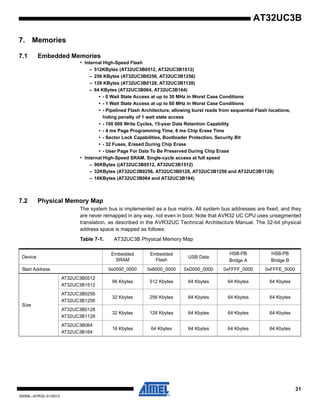
7.2 Physical Memory Map
The system bus is implemented as a bus matrix. All system bus addresses are fixed, and they
are never remapped in any way, not even in boot. Note that AVR32 UC CPU uses unsegmented
translation, as described in the AVR32UC Technical Architecture Manual. The 32-bit physical
address space is mapped as follows:
Table 7-1. AT32UC3B Physical Memory Map
Device
Embedded
SRAM
Embedded
Flash
USB Data
HSB-PB
Bridge A
HSB-PB
Bridge B
Start Address 0x0000_0000 0x8000_0000 0xD000_0000 0xFFFF_0000 0xFFFE_0000
Size
AT32UC3B0512
AT32UC3B1512
96 Kbytes 512 Kbytes 64 Kbytes 64 Kbytes 64 Kbytes
AT32UC3B0256
AT32UC3B1256
32 Kbytes 256 Kbytes 64 Kbytes 64 Kbytes 64 Kbytes
AT32UC3B0128
AT32UC3B1128
32 Kbytes 128 Kbytes 64 Kbytes 64 Kbytes 64 Kbytes
AT32UC3B064
AT32UC3B164
16 Kbytes 64 Kbytes 64 Kbytes 64 Kbytes 64 Kbytes
32
32059L–AVR32–01/2012
AT32UC3B
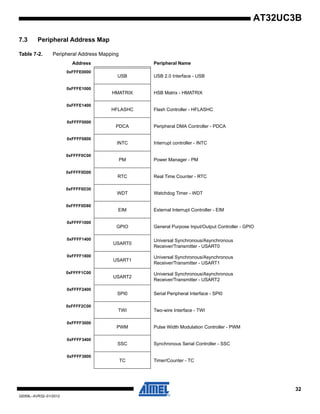
7.3 Peripheral Address Map
Table 7-2. Peripheral Address Mapping
Address Peripheral Name
0xFFFE0000
USB USB 2.0 Interface - USB
0xFFFE1000
HMATRIX HSB Matrix - HMATRIX
0xFFFE1400
HFLASHC Flash Controller - HFLASHC
0xFFFF0000
PDCA Peripheral DMA Controller - PDCA
0xFFFF0800
INTC Interrupt controller - INTC
0xFFFF0C00
PM Power Manager - PM
0xFFFF0D00
RTC Real Time Counter - RTC
0xFFFF0D30
WDT Watchdog Timer - WDT
0xFFFF0D80
EIM External Interrupt Controller - EIM
0xFFFF1000
GPIO General Purpose Input/Output Controller - GPIO
0xFFFF1400
USART0
Universal Synchronous/Asynchronous
Receiver/Transmitter - USART0
0xFFFF1800
USART1
Universal Synchronous/Asynchronous
Receiver/Transmitter - USART1
0xFFFF1C00
USART2
Universal Synchronous/Asynchronous
Receiver/Transmitter - USART2
0xFFFF2400
SPI0 Serial Peripheral Interface - SPI0
0xFFFF2C00
TWI Two-wire Interface - TWI
0xFFFF3000
PWM Pulse Width Modulation Controller - PWM
0xFFFF3400
SSC Synchronous Serial Controller - SSC
0xFFFF3800
TC Timer/Counter - TC
33
32059L–AVR32–01/2012
AT32UC3B
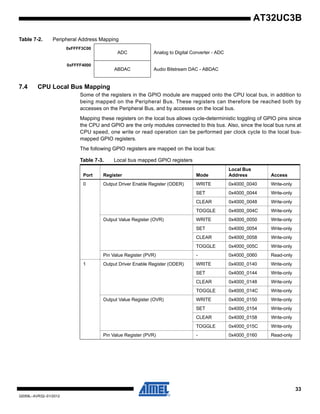
7.4 CPU Local Bus Mapping
Some of the registers in the GPIO module are mapped onto the CPU local bus, in addition to
being mapped on the Peripheral Bus. These registers can therefore be reached both by
accesses on the Peripheral Bus, and by accesses on the local bus.
Mapping these registers on the local bus allows cycle-deterministic toggling of GPIO pins since
the CPU and GPIO are the only modules connected to this bus. Also, since the local bus runs at
CPU speed, one write or read operation can be performed per clock cycle to the local bus-
mapped GPIO registers.
The following GPIO registers are mapped on the local bus:
0xFFFF3C00
ADC Analog to Digital Converter - ADC
0xFFFF4000
ABDAC Audio Bitstream DAC - ABDAC
Table 7-2. Peripheral Address Mapping
Table 7-3. Local bus mapped GPIO registers
Port Register Mode
Local Bus
Address Access
0 Output Driver Enable Register (ODER) WRITE 0x4000_0040 Write-only
SET 0x4000_0044 Write-only
CLEAR 0x4000_0048 Write-only
TOGGLE 0x4000_004C Write-only
Output Value Register (OVR) WRITE 0x4000_0050 Write-only
SET 0x4000_0054 Write-only
CLEAR 0x4000_0058 Write-only
TOGGLE 0x4000_005C Write-only
Pin Value Register (PVR) - 0x4000_0060 Read-only
1 Output Driver Enable Register (ODER) WRITE 0x4000_0140 Write-only
SET 0x4000_0144 Write-only
CLEAR 0x4000_0148 Write-only
TOGGLE 0x4000_014C Write-only
Output Value Register (OVR) WRITE 0x4000_0150 Write-only
SET 0x4000_0154 Write-only
CLEAR 0x4000_0158 Write-only
TOGGLE 0x4000_015C Write-only
Pin Value Register (PVR) - 0x4000_0160 Read-only
34
32059L–AVR32–01/2012
AT32UC3B
8. Boot Sequence
This chapter summarizes the boot sequence of the AT32UC3B. The behaviour after power-up is
controlled by the Power Manager. For specific details, refer to section Power Manager (PM).
8.1 Starting of clocks
After power-up, the device will be held in a reset state by the Power-On Reset circuitry, until the
power has stabilized throughout the device. Once the power has stabilized, the device will use
the internal RC Oscillator as clock source.
On system start-up, the PLLs are disabled. All clocks to all modules are running. No clocks have
a divided frequency, all parts of the system recieves a clock with the same frequency as the
internal RC Oscillator.
8.2 Fetching of initial instructions
After reset has been released, the AVR32 UC CPU starts fetching instructions from the reset
address, which is 0x8000_0000. This address points to the first address in the internal Flash.
The code read from the internal Flash is free to configure the system to use for example the
PLLs, to divide the frequency of the clock routed to some of the peripherals, and to gate the
clocks to unused peripherals.
When powering up the device, there may be a delay before the voltage has stabilized, depend-
ing on the rise time of the supply used. The CPU can start executing code as soon as the supply
is above the POR threshold, and before the supply is stable. Before switching to a high-speed
clock source, the user should use the BOD to make sure the VDDCORE is above the minimum
level.
35
32059L–AVR32–01/2012
AT32UC3B
9. Power Manager (PM)
Rev: 2.3.0.2
9.1 Features
• Controls integrated oscillators and PLLs
• Generates clocks and resets for digital logic
• Supports 2 crystal oscillators 0.4-20 MHz
• Supports 2 PLLs 80-240 MHz
• Supports 32 KHz ultra-low power oscillator
• Integrated low-power RC oscillator
• On-the fly frequency change of CPU, HSB, PBA, and PBB clocks
• Sleep modes allow simple disabling of logic clocks, PLLs, and oscillators
• Module-level clock gating through maskable peripheral clocks
• Wake-up from internal or external interrupts
• Generic clocks with wide frequency range provided
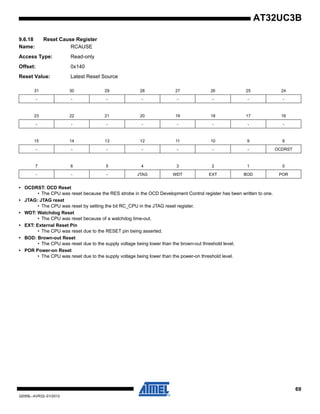
• Automatic identification of reset sources
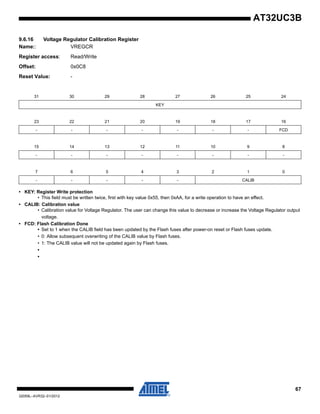
• Controls brownout detector (BOD), RC oscillator, and bandgap voltage reference through control
and calibration registers
9.2 Description
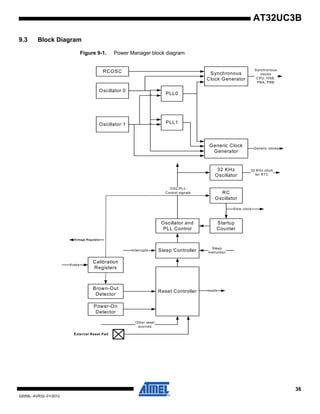
The Power Manager (PM) controls the oscillators and PLLs, and generates the clocks and
resets in the device. The PM controls two fast crystal oscillators, as well as two PLLs, which can
multiply the clock from either oscillator to provide higher frequencies. Additionally, a low-power
32 KHz oscillator is used to generate the real-time counter clock for high accuracy real-time
measurements. The PM also contains a low-power RC oscillator with fast start-up time, which
can be used to clock the digital logic.
The provided clocks are divided into synchronous and generic clocks. The synchronous clocks
are used to clock the main digital logic in the device, namely the CPU, and the modules and
peripherals connected to the HSB, PBA, and PBB buses. The generic clocks are asynchronous
clocks, which can be tuned precisely within a wide frequency range, which makes them suitable
for peripherals that require specific frequencies, such as timers and communication modules.
The PM also contains advanced power-saving features, allowing the user to optimize the power
consumption for an application. The synchronous clocks are divided into three clock domains,
one for the CPU and HSB, one for modules on the PBA bus, and one for modules on the PBB
bus.The three clocks can run at different speeds, so the user can save power by running periph-
erals at a relatively low clock, while maintaining a high CPU performance. Additionally, the
clocks can be independently changed on-the-fly, without halting any peripherals. This enables
the user to adjust the speed of the CPU and memories to the dynamic load of the application,
without disturbing or re-configuring active peripherals.
Each module also has a separate clock, enabling the user to switch off the clock for inactive
modules, to save further power. Additionally, clocks and oscillators can be automatically
switched off during idle periods by using the sleep instruction on the CPU. The system will return
to normal on occurrence of interrupts.
The Power Manager also contains a Reset Controller, which collects all possible reset sources,
generates hard and soft resets, and allows the reset source to be identified by software.
36
32059L–AVR32–01/2012
AT32UC3B
9.3 Block Diagram
Figure 9-1. Power Manager block diagram
Sleep Controller
Oscillator and
PLL Control
PLL0
PLL1
Synchronous
Clock Generator
Generic Clock
Generator
Reset Controller
Oscillator 0
Oscillator 1
RC
Oscillator
Startup
Counter
Slow clock
Sleep
instruction
Power-On
Detector
Other reset
sources
resets
Generic clocks
Synchronous
clocks
CPU, HSB,
PBA, PBB
OSC/PLL
Control signals
RCOSC
32 KHz
Oscillator
32 KHz clock
for RTC
Interrupts
External Reset Pad
Calibration
Registers
Brown-Out
Detector
Voltage Regulator
fuses
37
32059L–AVR32–01/2012
AT32UC3B
9.4 Product Dependencies
9.4.1 I/O Lines
The PM provides a number of generic clock outputs, which can be connected to output pins,
multiplexed with GPIO lines. The programmer must first program the GPIO controller to assign
these pins to their peripheral function. If the I/O pins of the PM are not used by the application,
they can be used for other purposes by the GPIO controller.
9.4.2 Interrupt
The PM interrupt line is connected to one of the internal sources of the interrupt controller. Using
the PM interrupt requires the interrupt controller to be programmed first.
9.4.3 Clock implementation
In AT32UC3B, the HSB shares the source clock with the CPU. This means that writing to the
HSBDIV and HSBSEL bits in CKSEL has no effect. These bits will always read the same as
CPUDIV and CPUSEL.
9.5 Functional Description
9.5.1 Slow clock
The slow clock is generated from an internal RC oscillator which is always running, except in
Static mode. The slow clock can be used for the main clock in the device, as described in ”Syn-
chronous clocks” on page 39. The slow clock is also used for the Watchdog Timer and
measuring various delays in the Power Manager.
The RC oscillator has a 3 cycles startup time, and is always available when the CPU is running.
The RC oscillator operates at approximately 115 kHz, and can be calibrated to a narrow range
by the RCOSCCAL fuses. Software can also change RC oscillator calibration through the use of
the RCCR register. Please see the Electrical Characteristics section for details.
RC oscillator can also be used as the RTC clock when crystal accuracy is not required.
9.5.2 Oscillator 0 and 1 operation
The two main oscillators are designed to be used with an external crystal and two biasing capac-
itors, as shown in Figure 9-2. Oscillator 0 can be used for the main clock in the device, as
described in ”Synchronous clocks” on page 39. Both oscillators can be used as source for the
generic clocks, as described in ”Generic clocks” on page 43.
The oscillators are disabled by default after reset. When the oscillators are disabled, the XIN and
XOUT pins can be used as general purpose I/Os. When the oscillators are configured to use an
external clock, the clock must be applied to the XIN pin while the XOUT pin can be used as a
general purpose I/O.
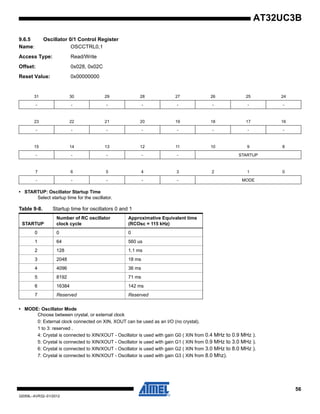
The oscillators can be enabled by writing to the OSCnEN bits in MCCTRL. Operation mode
(external clock or crystal) is chosen by writing to the MODE field in OSCCTRLn. Oscillators are
automatically switched off in certain sleep modes to reduce power consumption, as described in
Section 9.5.7 on page 42.
After a hard reset, or when waking up from a sleep mode that disabled the oscillators, the oscil-
lators may need a certain amount of time to stabilize on the correct frequency. This start-up time
can be set in the OSCCTRLn register.
38
32059L–AVR32–01/2012
AT32UC3B
The PM masks the oscillator outputs during the start-up time, to ensure that no unstable clocks
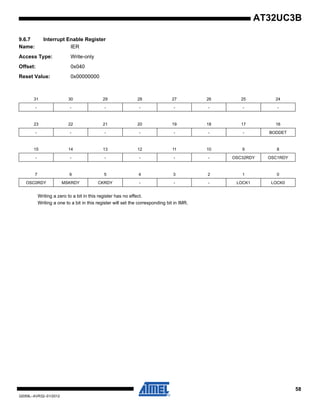
propagate to the digital logic. The OSCnRDY bits in POSCSR are automatically set and cleared
according to the status of the oscillators. A zero to one transition on these bits can also be con-
figured to generate an interrupt, as described in ”MODE: Oscillator Mode” on page 57.
Figure 9-2. Oscillator connections
9.5.3 32 KHz oscillator operation
The 32 KHz oscillator operates as described for Oscillator 0 and 1 above. The 32 KHz oscillator
is used as source clock for the Real-Time Counter.
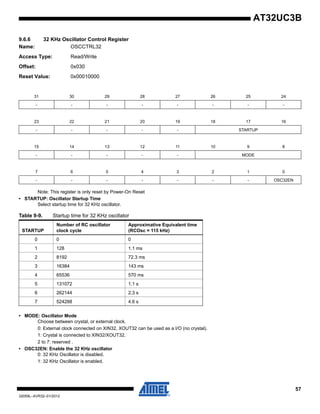
The oscillator is disabled by default, but can be enabled by writing OSC32EN in OSCCTRL32.
The oscillator is an ultra-low power design and remains enabled in all sleep modes except Static
mode.
While the 32 KHz oscillator is disabled, the XIN32 and XOUT32 pins are available as general
purpose I/Os. When the oscillator is configured to work with an external clock (MODE field in
OSCCTRL32 register), the external clock must be connected to XIN32 while the XOUT32 pin
can be used as a general purpose I/O.
The startup time of the 32 KHz oscillator can be set in the OSCCTRL32, after which OSC32RDY
in POSCSR is set. An interrupt can be generated on a zero to one transition of OSC32RDY.
As a crystal oscillator usually requires a very long startup time (up to 1 second), the 32 KHz
oscillator will keep running across resets, except Power-On-Reset.
9.5.4 PLL operation
The device contains two PLLs, PLL0 and PLL1. These are disabled by default, but can be
enabled to provide high frequency source clocks for synchronous or generic clocks. The PLLs
can take either Oscillator 0 or 1 as reference clock. The PLL output is divided by a multiplication
factor, and the PLL compares the resulting clock to the reference clock. The PLL will adjust its
output frequency until the two compared clocks are equal, thus locking the output frequency to a
multiple of the reference clock frequency.
The Voltage Controlled Oscillator inside the PLL can generate frequencies from 80 to 240 MHz.
To make the PLL output frequencies under 80 MHz the OTP[1] bitfield could be set. This will
divide the output of the PLL by two and bring the clock in range of the max frequency of the
CPU.
XIN
XOUT
C2
C1
39
32059L–AVR32–01/2012
AT32UC3B
When the PLL is switched on, or when changing the clock source or multiplication factor for the
PLL, the PLL is unlocked and the output frequency is undefined. The PLL clock for the digital
logic is automatically masked when the PLL is unlocked, to prevent connected digital logic from
receiving a too high frequency and thus become unstable.
Figure 9-3. PLL with control logic and filters
9.5.4.1 Enabling the PLL
PLLn is enabled by writing the PLLEN bit in the PLLn register. PLLOSC selects Oscillator 0 or 1
as clock source. The PLLMUL and PLLDIV bitfields must be written with the multiplication and
division factors, respectively, creating the voltage controlled ocillator frequency fVCO and the PLL
frequency fPLL :
fVCO = (PLLMUL+1)/(PLLDIV) • fOSC if PLLDIV > 0.
fVCO = 2*(PLLMUL+1) • fOSC if PLLDIV = 0.
If PLLOPT[1] field is set to 0:
fPLL = fVCO.
If PLLOPT[1] field is set to 1:
fPLL = fVCO / 2.
The PLLn:PLLOPT field should be set to proper values according to the PLL operating fre-
quency. The PLLOPT field can also be set to divide the output frequency of the PLLs by 2.
The lock signal for each PLL is available as a LOCKn flag in POSCSR. An interrupt can be gen-
erated on a 0 to 1 transition of these bits.
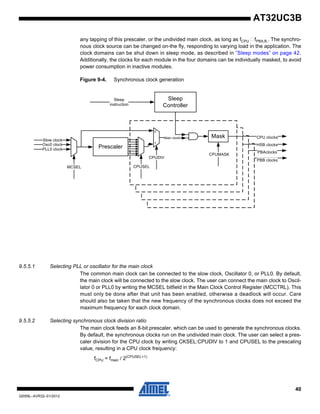
9.5.5 Synchronous clocks
The slow clock (default), Oscillator 0, or PLL0 provide the source for the main clock, which is the
common root for the synchronous clocks for the CPU/HSB, PBA, and PBB modules. The main
clock is divided by an 8-bit prescaler, and each of these four synchronous clocks can run from
P h a s e
D e te c to r
O u tp u t
D iv id e r
0
1
O s c 0
c lo c k
O s c 1
c lo c k
P L L O S C P L L O P T
P L L M U L
L o c k b it
M a s k P L L c lo c k
In p u t
D iv id e r
P L L D IV
1 /2
P L L O P T [1 ]
0
1
V C O
fv c o
fP L L
L o c k
D e te c to r
40
32059L–AVR32–01/2012
AT32UC3B
any tapping of this prescaler, or the undivided main clock, as long as fCPU fPBA,B,. The synchro-
nous clock source can be changed on-the fly, responding to varying load in the application. The
clock domains can be shut down in sleep mode, as described in ”Sleep modes” on page 42.
Additionally, the clocks for each module in the four domains can be individually masked, to avoid
power consumption in inactive modules.
Figure 9-4. Synchronous clock generation
9.5.5.1 Selecting PLL or oscillator for the main clock
The common main clock can be connected to the slow clock, Oscillator 0, or PLL0. By default,
the main clock will be connected to the slow clock. The user can connect the main clock to Oscil-
lator 0 or PLL0 by writing the MCSEL bitfield in the Main Clock Control Register (MCCTRL). This
must only be done after that unit has been enabled, otherwise a deadlock will occur. Care
should also be taken that the new frequency of the synchronous clocks does not exceed the
maximum frequency for each clock domain.
9.5.5.2 Selecting synchronous clock division ratio
The main clock feeds an 8-bit prescaler, which can be used to generate the synchronous clocks.
By default, the synchronous clocks run on the undivided main clock. The user can select a pres-
caler division for the CPU clock by writing CKSEL:CPUDIV to 1 and CPUSEL to the prescaling
value, resulting in a CPU clock frequency:
fCPU = fmain / 2(CPUSEL+1)
Mask
PrescalerOsc0 clock
PLL0 clock
MCSEL
0
1
CPUSEL
CPUDIV
Main clock
Sleep
Controller
CPUMASK
CPU clocks
HSB clocks
PBAclocks
PBB clocks
Sleep
instruction
Slow clock
41
32059L–AVR32–01/2012
AT32UC3B
Similarly, the clock for the PBA, and PBB can be divided by writing their respective bitfields. To
ensure correct operation, frequencies must be selected so that fCPU fPBA,B. Also, frequencies
must never exceed the specified maximum frequency for each clock domain.
CKSEL can be written without halting or disabling peripheral modules. Writing CKSEL allows a
new clock setting to be written to all synchronous clocks at the same time. It is possible to keep
one or more clocks unchanged by writing the same value a before to the xxxDIV and xxxSEL bit-
fields. This way, it is possible to e.g. scale CPU and HSB speed according to the required
performance, while keeping the PBA and PBB frequency constant.
For modules connected to the HSB bus, the PB clock frequency must be set to the same fre-
quency than the CPU clock.
9.5.5.3 Clock Ready flag
There is a slight delay from CKSEL is written and the new clock setting becomes effective. Dur-
ing this interval, the Clock Ready (CKRDY) flag in ISR will read as 0. If IER:CKRDY is written to
1, the Power Manager interrupt can be triggered when the new clock setting is effective. CKSEL
must not be re-written while CKRDY is 0, or the system may become unstable or hang.
9.5.6 Peripheral clock masking
By default, the clock for all modules are enabled, regardless of which modules are actually being
used. It is possible to disable the clock for a module in the CPU, HSB, PBA, or PBB clock
domain by writing the corresponding bit in the Clock Mask register (CPU/HSB/PBA/PBB) to 0.
When a module is not clocked, it will cease operation, and its registers cannot be read or written.
The module can be re-enabled later by writing the corresponding mask bit to 1.
A module may be connected to several clock domains, in which case it will have several mask
bits.
Table 9-6 contains a list of implemented maskable clocks.
9.5.6.1 Cautionary note
Note that clocks should only be switched off if it is certain that the module will not be used.
Switching off the clock for the internal RAM will cause a problem if the stack is mapped there.
Switching off the clock to the Power Manager (PM), which contains the mask registers, or the
corresponding PBx bridge, will make it impossible to write the mask registers again. In this case,
they can only be re-enabled by a system reset.
9.5.6.2 Mask Ready flag
Due to synchronization in the clock generator, there is a slight delay from a mask register is writ-
ten until the new mask setting goes into effect. When clearing mask bits, this delay can usually
be ignored. However, when setting mask bits, the registers in the corresponding module must
not be written until the clock has actually be re-enabled. The status flag MSKRDY in ISR pro-
vides the required mask status information. When writing either mask register with any value,
this bit is cleared. The bit is set when the clocks have been enabled and disabled according to
the new mask setting. Optionally, the Power Manager interrupt can be enabled by writing the
MSKRDY bit in IER.
42
32059L–AVR32–01/2012
AT32UC3B
9.5.7 Sleep modes
In normal operation, all clock domains are active, allowing software execution and peripheral
operation. When the CPU is idle, it is possible to switch off the CPU clock and optionally other
clock domains to save power. This is activated by the sleep instruction, which takes the sleep
mode index number as argument.
9.5.7.1 Entering and exiting sleep modes
The sleep instruction will halt the CPU and all modules belonging to the stopped clock domains.
The modules will be halted regardless of the bit settings of the mask registers.
Oscillators and PLLs can also be switched off to save power. Some of these modules have a rel-
atively long start-up time, and are only switched off when very low power consumption is
required.
The CPU and affected modules are restarted when the sleep mode is exited. This occurs when
an interrupt triggers. Note that even if an interrupt is enabled in sleep mode, it may not trigger if
the source module is not clocked.
9.5.7.2 Supported sleep modes
The following sleep modes are supported. These are detailed in Table 9-1.
•Idle: The CPU is stopped, the rest of the chip is operating. Wake-up sources are any interrupt.
•Frozen: The CPU and HSB modules are stopped, peripherals are operating. Wake-up sources
are any interrupts from PB modules.
•Standby: All synchronous clocks are stopped, but oscillators and PLLs are running, allowing
quick wake-up to normal mode. Wake-up sources are RTC or external interrupt (EIC), external
reset or any asynchronous interrupts from PB modules.
•Stop: As Standby, but Oscillator 0 and 1, and the PLLs are stopped. 32 KHz (if enabled) and
RC oscillators and RTC/WDT will still operate. Wake-up are the same as for Standby mode.
•DeepStop: All synchronous clocks, Oscillator 0 and 1 and PLL 0 and 1 are stopped. 32 KHz
oscillator can run if enabled. RC oscillator still operates. Bandgap voltage reference and BOD is
turned off. Wake-up sources are RTC, external interrupt in asynchronous mode, external reset
or any asynchronous interrupts from PB modules.
•Static: All oscillators, including 32 KHz and RC oscillator are stopped. Bandgap voltage refer-
ence BOD detector is turned off. Wake-up sources are external interrupt (EIC) in asynchronous
mode only, external reset pin or any asynchronous interrupts from PB modules.
Table 9-1. Sleep modes
Index Sleep Mode CPU HSB
PBA,B
GCLK
Osc0,1
PLL0,1,
SYSTIMER Osc32 RCOsc
BOD &
Bandgap
Voltage
Regulator
0 Idle Stop Run Run Run Run Run On Full power
1 Frozen Stop Stop Run Run Run Run On Full power
2 Standby Stop Stop Stop Run Run Run On Full power
3 Stop Stop Stop Stop Stop Run Run On Low power
4 DeepStop Stop Stop Stop Stop Run Run Off Low power
5 Static Stop Stop Stop Stop Stop Stop Off Low power
43
32059L–AVR32–01/2012
AT32UC3B
The power level of the internal voltage regulator is also adjusted according to the sleep mode to
reduce the internal regulator power consumption.
9.5.7.3 Precautions when entering sleep mode
Modules communicating with external circuits should normally be disabled before entering a
sleep mode that will stop the module operation. This prevents erratic behavior when entering or
exiting sleep mode. Please refer to the relevant module documentation for recommended
actions.
Communication between the synchronous clock domains is disturbed when entering and exiting
sleep modes. This means that bus transactions are not allowed between clock domains affected
by the sleep mode. The system may hang if the bus clocks are stopped in the middle of a bus
transaction.
The CPU is automatically stopped in a safe state to ensure that all CPU bus operations are com-
plete when the sleep mode goes into effect. Thus, when entering Idle mode, no further action is
necessary.
When entering a sleep mode (except Idle mode), all HSB masters must be stopped before
entering the sleep mode. Also, if there is a chance that any PB write operations are incomplete,
the CPU should perform a read operation from any register on the PB bus before executing the
sleep instruction. This will stall the CPU while waiting for any pending PB operations to
complete.
When entering a sleep mode deeper or equal to DeepStop, the VBus asynchronous interrupt
should be disabled (USBCON.VBUSTE = 0).
9.5.7.4 Wake Up
The USB can be used to wake up the part from sleep modes through register AWEN of the
Power Manager.
9.5.8 Generic clocks
Timers, communication modules, and other modules connected to external circuitry may require
specific clock frequencies to operate correctly. The Power Manager contains an implementation
defined number of generic clocks that can provide a wide range of accurate clock frequencies.
Each generic clock module runs from either Oscillator 0 or 1, or PLL0 or 1. The selected source
can optionally be divided by any even integer up to 512. Each clock can be independently
enabled and disabled, and is also automatically disabled along with peripheral clocks by the
Sleep Controller.
44
32059L–AVR32–01/2012
AT32UC3B
Figure 9-5. Generic clock generation
9.5.8.1 Enabling a generic clock
A generic clock is enabled by writing the CEN bit in GCCTRL to 1. Each generic clock can use
either Oscillator 0 or 1 or PLL0 or 1 as source, as selected by the PLLSEL and OSCSEL bits.
The source clock can optionally be divided by writing DIVEN to 1 and the division factor to DIV,
resulting in the output frequency:
fGCLK = fSRC / (2*(DIV+1))
9.5.8.2 Disabling a generic clock
The generic clock can be disabled by writing CEN to 0 or entering a sleep mode that disables
the PB clocks. In either case, the generic clock will be switched off on the first falling edge after
the disabling event, to ensure that no glitches occur. If CEN is written to 0, the bit will still read as
1 until the next falling edge occurs, and the clock is actually switched off. When writing CEN to 0,
the other bits in GCCTRL should not be changed until CEN reads as 0, to avoid glitches on the
generic clock.
When the clock is disabled, both the prescaler and output are reset.
9.5.8.3 Changing clock frequency
When changing generic clock frequency by writing GCCTRL, the clock should be switched off by
the procedure above, before being re-enabled with the new clock source or division setting. This
prevents glitches during the transition.
Divider
0
1
Osc0 clock
PLL0 clock
PLLSEL
OSCSEL
Osc1 clock
PLL1 clock
Generic Clock
DIV
0
1
DIVEN
Mask
CEN
Sleep
Controller
45
32059L–AVR32–01/2012
AT32UC3B
9.5.8.4 Generic clock implementation
In AT32UC3B, there are 5 generic clocks. These are allocated to different functions as shown in
Table 9-2.
9.5.9 Divided PB clocks
The clock generator in the Power Manager provides divided PBA and PBB clocks for use by
peripherals that require a prescaled PBx clock. This is described in the documentation for the
relevant modules.
The divided clocks are not directly maskable, but are stopped in sleep modes where the PBx
clocks are stopped.
9.5.10 Debug operation
During a debug session, the user may need to halt the system to inspect memory and CPU reg-
isters. The clocks normally keep running during this debug operation, but some peripherals may
require the clocks to be stopped, e.g. to prevent timer overflow, which would cause the program
to fail. For this reason, peripherals on the PBA and PBB buses may use “debug qualified” PBx
clocks. This is described in the documentation for the relevant modules. The divided PBx clocks
are always debug qualified clocks.
Debug qualified PB clocks are stopped during debug operation. The debug system can option-
ally keep these clocks running during the debug operation. This is described in the
documentation for the On-Chip Debug system.
9.5.11 Reset Controller
The Reset Controller collects the various reset sources in the system and generates hard and
soft resets for the digital logic.
The device contains a Power-On Detector, which keeps the system reset until power is stable.
This eliminates the need for external reset circuitry to guarantee stable operation when powering
up the device.
It is also possible to reset the device by asserting the RESET_N pin. This pin has an internal pul-
lup, and does not need to be driven externally when negated. Table 9-4 lists these and other
reset sources supported by the Reset Controller.
Table 9-2. Generic clock allocation
Clock number Function
0 GCLK0 pin
1 GCLK1 pin
2 GCLK2 pin
3 USBB
4 ABDAC
46
32059L–AVR32–01/2012
AT32UC3B
Figure 9-6. Reset Controller block diagram
In addition to the listed reset types, the JTAG can keep parts of the device statically reset
through the JTAG Reset Register. See JTAG documentation for details.
Table 9-3. Reset description
When a Reset occurs, some parts of the chip are not necessarily reset, depending on the reset
source. Only the Power On Reset (POR) will force a reset of the whole chip.
Reset source Description
Power-on Reset Supply voltage below the power-on reset detector threshold
voltage
External Reset RESET_N pin asserted
Brownout Reset Supply voltage below the brownout reset detector threshold
voltage
CPU Error Caused by an illegal CPU access to external memory while
in Supervisor mode
Watchdog Timer See watchdog timer documentation.
OCD See On-Chip Debug documentation
JTAG
R eset
C ontroller
R E S ET_N
Pow er-O n
D etector
O C D
W atchdog R eset
R C _R C AU S E
C PU, H SB,
PBA, PBB
O C D , R TC /W D T
C lock G enerato
Brow nout
D etector
47
32059L–AVR32–01/2012
AT32UC3B
Table 9-4 lists parts of the device that are reset, depending on the reset source.
The cause of the last reset can be read from the RCAUSE register. This register contains one bit
for each reset source, and can be read during the boot sequence of an application to determine
the proper action to be taken.
9.5.11.1 Power-On Detector
The Power-On Detector monitors the VDDCORE supply pin and generates a reset when the
device is powered on. The reset is active until the supply voltage from the linear regulator is
above the power-on threshold level. The reset will be re-activated if the voltage drops below the
power-on threshold level. See Electrical Characteristics for parametric details.
9.5.11.2 Brown-Out Detector
The Brown-Out Detector (BOD) monitors the VDDCORE supply pin and compares the supply
voltage to the brown-out detection level, as set in BOD.LEVEL. The BOD is disabled by default,
but can be enabled either by software or by flash fuses. The Brown-Out Detector can either gen-
erate an interrupt or a reset when the supply voltage is below the brown-out detection level. In
any case, the BOD output is available in bit POSCR.BODET bit.
Note 1 : Any change to the BOD.LEVEL field of the BOD register should be done with the BOD
deactivated to avoid spurious reset or interrupt.
Note 2 : If the BOD level is set to a value higher than VDDCORE and enabled by fuses, the part
will be in constant reset. In order to leave reset state, an external voltage higher than the BOD
level should be applied. Thus, it is possible to disable BOD.
Table 9-4. Effect of the different reset events
Power-On
Reset
External
Reset
Watchdog
Reset
BOD
Reset
CPU Error
Reset
OCD
Reset
CPU/HSB/PBA/PBB
(excluding Power Manager)
Y Y Y Y Y Y
32 KHz oscillator Y N N N N N
RTC control register Y N N N N N
GPLP registers Y N N N N N
Watchdog control register Y Y N Y Y Y
Voltage Calibration register Y N N N N N
RC Oscillator Calibration register Y N N N N N
BOD control register Y Y N N N N
Bandgap control register Y Y N N N N
Clock control registers Y Y Y Y Y Y
Osc0/Osc1 and control registers Y Y Y Y Y Y
PLL0/PLL1 and control registers Y Y Y Y Y Y
OCD system and OCD registers Y Y N Y Y N
48
32059L–AVR32–01/2012
AT32UC3B
See Electrical Characteristics for parametric details.
9.5.11.3 External Reset
The external reset detector monitors the state of the RESET_N pin. By default, a low level on
this pin will generate a reset.
9.5.12 Calibration registers
The Power Manager controls the calibration of the RC oscillator, voltage regulator, bandgap
voltage reference through several calibration registers.
Those calibration registers are loaded after a Power On Reset with default values stored in fac-
tory-programmed flash fuses.
Although it is not recommended to override default factory settings, it is still possible to override
these default values by writing to those registers. To prevent unexpected writes due to software
bugs, write access to these registers is protected by a “key”. First, a write to the register must be
made with the field “KEY” equal to 0x55 then a second write must be issued with the “KEY” field
equal to 0xAA
49
32059L–AVR32–01/2012
AT32UC3B
9.6 User Interface
Table 9-5. PM Register Memory Map
Offset Register Register Name Access Reset
0x0000 Main Clock Control Register MCCTRL Read/Write 0x00000000
0x0004 Clock Select Register CKSEL Read/Write 0x00000000
0x0008 CPU Mask Register CPUMASK Read/Write 0x00000003
0x000C HSB Mask Register HSBMASK Read/Write 0x0000007F
0x0010 PBA Mask Register PBAMASK Read/Write 0x00007FFF
0x0014 PBB Mask Register PBBMASK Read/Write 0x0000003F
0x0020 PLL0 Control Register PLL0 Read/Write 0x00000000
0x0024 PLL1 Control Register PLL1 Read/Write 0x00000000
0x0028 Oscillator 0 Control Register OSCCTRL0 Read/Write 0x00000000
0x002C Oscillator 1 Control Register OSCCTRL1 Read/Write 0x00000000
0x0030 Oscillator 32 Control Register OSCCTRL32 Read/Write 0x00010000
0x0040 Interrupt Enable Register IER Write-Only 0x00000000
0x0044 Interrupt Disable Register IDR Write-Only 0x00000000
0x0048 Interrupt Mask Register IMR Read-Only 0x00000000
0x004C Interrupt Status Register ISR Read-Only 0x00000000
0x0050 Interrupt Clear Register ICR Write-Only 0x00000000
0x0054 Power and Oscillators Status Register POSCSR Read/Write 0x00000000
0x0060-0x070 Generic Clock Control Register GCCTRL Read/Write 0x00000000
0x00C0 RC Oscillator Calibration Register RCCR Read/Write Factory settings
0x00C4 Bandgap Calibration Register BGCR Read/Write Factory settings
0x00C8 Linear Regulator Calibration Register VREGCR Read/Write Factory settings
0x00D0 BOD Level Register BOD Read/Write BOD fuses in Flash
0x0140 Reset Cause Register RCAUSE Read-Only Latest Reset Source
0x0144 Asynchronous Wake Up Enable Register AWEN Read/Write 0x00000000
0x0200 General Purpose Low-Power Register 0 GPLP0 Read/Write 0x00000000
0x0204 General Purpose Low-Power Register 1 GPLP1 Read/Write 0x00000000
50
32059L–AVR32–01/2012
AT32UC3B
9.6.1 Main Clock Control Register
Name: MCCTRL
Access Type: Read/Write
Offset: 0x000
Reset Value: 0x00000000
• OSC1EN: Oscillator 1 Enable
0: Oscillator 1 is disabled.
1: Oscillator 1 is enabled.
• OSC0EN: Oscillator 0 Enable
0: Oscillator 0 is disabled.
1: Oscillator 0 is enabled.
• MCSEL: Main Clock Select
0: The slow clock is the source for the main clock.
1: Oscillator 0 is the source for the main clock.
2: PLL0 is the source for the main clock.
3: Reserved.
•
31 30 29 28 27 26 25 24
- - - - - - - -
23 22 21 20 19 18 17 16
- - - - - - - -
15 14 13 12 11 10 9 8
- - - - - - - -
7 6 5 4 3 2 1 0
- - OSC1EN OSC0EN MCSEL
51
32059L–AVR32–01/2012
AT32UC3B
9.6.2 Clock Select Register
Name: CKSEL
Access Type: Read/Write
Offset: 0x004
Reset Value: 0x00000000
• PBBDIV, PBBSEL: PBB Division and Clock Select
PBBDIV = 0: PBB clock equals main clock.
PBBDIV = 1: PBB clock equals main clock divided by 2(PBBSEL+1)
.
• PBADIV, PBASEL: PBA Division and Clock Select
PBADIV = 0: PBA clock equals main clock.
PBADIV = 1: PBA clock equals main clock divided by 2(PBASEL+1)
.
• HSBDIV, HSBSEL: HSB Division and Clock Select
For the AT32UC3B, HSBDIV always equals CPUDIV, and HSBSEL always equals CPUSEL, as the HSB clock is always equal
to the CPU clock.
• CPUDIV, CPUSEL: CPU Division and Clock Select
CPUDIV = 0: CPU clock equals main clock.
CPUDIV = 1: CPU clock equals main clock divided by 2(CPUSEL+1)
.
Note that if xxxDIV is written to 0, xxxSEL should also be written to 0 to ensure correct operation.
Also note that writing this register clears POSCSR:CKRDY. The register must not be re-written until CKRDY goes high.
31 30 29 28 27 26 25 24
PBBDIV - - - - PBBSEL
23 22 21 20 19 18 17 16
PBADIV - - - - PBASEL
15 14 13 12 11 10 9 8
HSBDIV - - - - HSBSEL
7 6 5 4 3 2 1 0
CPUDIV - - - - CPUSEL
52
32059L–AVR32–01/2012
AT32UC3B
9.6.3 Clock Mask Register
Name: CPU/HSB/PBA/PBBMASK
Access Type: Read/Write
Offset: 0x008, 0x00C, 0x010, 0x014
Reset Value: -
31 30 29 28 27 26 25 24
MASK[31:24]
23 22 21 20 19 18 17 16
MASK[23:16]
15 14 13 12 11 10 9 8
MASK[15:8]
7 6 5 4 3 2 1 0
MASK[7:0]
53
32059L–AVR32–01/2012
AT32UC3B
• MASK: Clock Mask
If bit n is cleared, the clock for module n is stopped. If bit n is set, the clock for module n is enabled according to the current
power mode. The number of implemented bits in each mask register, as well as which module clock is controlled by each bit, is
shown in Table 9-6.
Note: 1. This bit must be one if the user wishes to debug the device with a JTAG debugger.
Table 9-6. Maskable module clocks in AT32UC3B.
Bit CPUMASK HSBMASK PBAMASK PBBMASK
0 - FLASHC INTC HMATRIX
1 OCD(1)
PBA bridge GPIO USBB
2 - PBB bridge PDCA FLASHC
3 - USBB PM/RTC/EIC -
4 - PDCA ADC -
5 - - SPI -
6 - - TWI -
7 - - USART0 -
8 - - USART1 -
9 - - USART2 -
10 - - PWM -
11 - - SSC -
12 - - TC -
13 - - ABDAC -
14 - - - -
15 - - - -
16 SYSTIMER
(COMPARE/COUNT
REGISTERS CLK)
- - -
31:
17
- - - -
54
32059L–AVR32–01/2012
AT32UC3B
9.6.4 PLL Control Register
Name: PLL0,1
Access Type: Read/Write
Offset: 0x020, 0x024
Reset Value: 0x00000000
• PLLCOUNT: PLL Count
Specifies the number of slow clock cycles before ISR:LOCKn will be set after PLLn has been written, or after PLLn has been
automatically re-enabled after exiting a sleep mode.
• PLLMUL: PLL Multiply Factor
• PLLDIV: PLL Division Factor
These fields determine the ratio of the ouput frequency of the internal VCO of the PLL (fVCO) to the source oscillator frequency:
• fVCO = (PLLMUL+1)/(PLLDIV) * fOSC if PLLDIV > 0.
• fVCO = 2 * (PLLMUL+1) * fOSC if PLLDIV = 0.
If PLLOPT[1] bit is set to 0: fPLL = fVCO.
If PLLOPT[1] bit is set to 1: fPLL = fVCO / 2.
Note that the PLLMUL field cannot be equal to 0 or 1, or the behavior of the PLL will be undefined.
PLLDIV gives also the input frequency of the PLL (fIN):
if the PLLDIV field is set to 0: fIN = fOSC.
if the PLLDIV field is greater than 0: fIN = fOSC / (2 * PLLDIV).
• PLLOPT: PLL Option
Select the operating range for the PLL.
PLLOPT[0]: Select the VCO frequency range.
PLLOPT[1]: Enable the extra output divider.
PLLOPT[2]: Disable the Wide-Bandwidth mode (Wide-Bandwidth mode allows a faster startup time and out-of-lock time).
•
31 30 29 28 27 26 25 24
- - PLLCOUNT
23 22 21 20 19 18 17 16
- - - - PLLMUL
15 14 13 12 11 10 9 8
- - - - PLLDIV
7 6 5 4 3 2 1 0
- - - PLLOPT PLLOSC PLLEN
55
32059L–AVR32–01/2012
AT32UC3B
•
•
• PLLOSC: PLL Oscillator Select
0: Oscillator 0 is the source for the PLL.
1: Oscillator 1 is the source for the PLL.
• PLLEN: PLL Enable
0: PLL is disabled.
1: PLL is enabled.
•
Table 9-7. PLLOPT Fields Description in AT32UC3B
Description
PLLOPT[0]: VCO frequency
0 160MHz<fvco<240MHz
1 80MHz<fvco<180MHz
PLLOPT[1]: Output divider
0 fPLL = fvco
1 fPLL = fvco/2
PLLOPT[2]
0 Wide Bandwidth Mode enabled
1 Wide Bandwidth Mode disabled
56
32059L–AVR32–01/2012
AT32UC3B
9.6.5 Oscillator 0/1 Control Register
Name: OSCCTRL0,1
Access Type: Read/Write
Offset: 0x028, 0x02C
Reset Value: 0x00000000
• STARTUP: Oscillator Startup Time
Select startup time for the oscillator.
• MODE: Oscillator Mode
Choose between crystal, or external clock
0: External clock connected on XIN, XOUT can be used as an I/O (no crystal).
1 to 3: reserved .
4: Crystal is connected to XIN/XOUT - Oscillator is used with gain G0 ( XIN from 0.4 MHz to 0.9 MHz ).
5: Crystal is connected to XIN/XOUT - Oscillator is used with gain G1 ( XIN from 0.9 MHz to 3.0 MHz ).
6: Crystal is connected to XIN/XOUT - Oscillator is used with gain G2 ( XIN from 3.0 MHz to 8.0 MHz ).
7: Crystal is connected to XIN/XOUT - Oscillator is used with gain G3 ( XIN from 8.0 Mhz).
31 30 29 28 27 26 25 24
- - - - - - - -
23 22 21 20 19 18 17 16
- - - - - - - -
15 14 13 12 11 10 9 8
- - - - - STARTUP
7 6 5 4 3 2 1 0
- - - - - MODE
Table 9-8. Startup time for oscillators 0 and 1
STARTUP
Number of RC oscillator
clock cycle
Approximative Equivalent time
(RCOsc = 115 kHz)
0 0 0
1 64 560 us
2 128 1.1 ms
3 2048 18 ms
4 4096 36 ms
5 8192 71 ms
6 16384 142 ms
7 Reserved Reserved
57
32059L–AVR32–01/2012
AT32UC3B
9.6.6 32 KHz Oscillator Control Register
Name: OSCCTRL32
Access Type: Read/Write
Offset: 0x030
Reset Value: 0x00010000
Note: This register is only reset by Power-On Reset
• STARTUP: Oscillator Startup Time
Select startup time for 32 KHz oscillator.
• MODE: Oscillator Mode
Choose between crystal, or external clock.
0: External clock connected on XIN32, XOUT32 can be used as a I/O (no crystal).
1: Crystal is connected to XIN32/XOUT32.
2 to 7: reserved .
• OSC32EN: Enable the 32 KHz oscillator
0: 32 KHz Oscillator is disabled.
1: 32 KHz Oscillator is enabled.
31 30 29 28 27 26 25 24
- - - - - - - -
23 22 21 20 19 18 17 16
- - - - - STARTUP
15 14 13 12 11 10 9 8
- - - - - MODE
7 6 5 4 3 2 1 0
- - - - - - - OSC32EN
Table 9-9. Startup time for 32 KHz oscillator
STARTUP
Number of RC oscillator
clock cycle
Approximative Equivalent time
(RCOsc = 115 kHz)
0 0 0
1 128 1.1 ms
2 8192 72.3 ms
3 16384 143 ms
4 65536 570 ms
5 131072 1.1 s
6 262144 2.3 s
7 524288 4.6 s
58
32059L–AVR32–01/2012
AT32UC3B
9.6.7 Interrupt Enable Register
Name: IER
Access Type: Write-only
Offset: 0x040
Reset Value: 0x00000000
Writing a zero to a bit in this register has no effect.
Writing a one to a bit in this register will set the corresponding bit in IMR.
31 30 29 28 27 26 25 24
- - - - - - - -
23 22 21 20 19 18 17 16
- - - - - - - BODDET
15 14 13 12 11 10 9 8
- - - - - - OSC32RDY OSC1RDY
7 6 5 4 3 2 1 0
OSC0RDY MSKRDY CKRDY - - - LOCK1 LOCK0
59
32059L–AVR32–01/2012
AT32UC3B
9.6.8 Interrupt Disable Register
Name: IDR
Access Type: Write-only
Offset: 0x044
Reset Value: 0x00000000
Writing a zero to a bit in this register has no effect.
Writing a one to a bit in this register will clear the corresponding bit in IMR.
31 30 29 28 27 26 25 24
- - - - - - - -
23 22 21 20 19 18 17 16
- - - - - - - BODDET
15 14 13 12 11 10 9 8
- - - - - - OSC32RDY OSC1RDY
7 6 5 4 3 2 1 0
OSC0RDY MSKRDY CKRDY - - - LOCK1 LOCK0
60
32059L–AVR32–01/2012
AT32UC3B
9.6.9 Interrupt Mask Register
Name: IMR
Access Type: Read-only
Offset: 0x048
Reset Value: 0x00000000
0: The corresponding interrupt is disabled.
1: The corresponding interrupt is enabled.
A bit in this register is cleared when the corresponding bit in IDR is written to one.
A bit in this register is set when the corresponding bit in IER is written to one.
31 30 29 28 27 26 25 24
- - - - - - - -
23 22 21 20 19 18 17 16
- - - - - - - BODDET
15 14 13 12 11 10 9 8
- - - - - - OSC32RDY OSC1RDY
7 6 5 4 3 2 1 0
OSC0RDY MSKRDY CKRDY - - - LOCK1 LOCK0
61
32059L–AVR32–01/2012
AT32UC3B
9.6.10 Interrupt Status Register
Name: ISR
Access Type: Read-only
Offset: 0x04C
Reset Value: 0x00000000
• BODDET: Brown out detection
Set to 1 when 0 to 1 transition on POSCSR:BODDET bit is detected: BOD has detected that power supply is going below
BOD reference value.
• OSC32RDY: 32 KHz oscillator Ready
Set to 1 when 0 to 1 transition on the POSCSR:OSC32RDY bit is detected: The 32 KHz oscillator is stable and ready to be
used as clock source.
• OSC1RDY: Oscillator 1 Ready
Set to 1 when 0 to 1 transition on the POSCSR:OSC1RDY bit is detected: Oscillator 1 is stable and ready to be used as
clock source.
• OSC0RDY: Oscillator 0 Ready
Set to 1 when 0 to 1 transition on the POSCSR:OSC1RDY bit is detected: Oscillator 1 is stable and ready to be used as
clock source.
• MSKRDY: Mask Ready
Set to 1 when 0 to 1 transition on the POSCSR:MSKRDY bit is detected: Clocks are now masked according to the
(CPU/HSB/PBA/PBB)_MASK registers.
• CKRDY: Clock Ready
0: The CKSEL register has been written, and the new clock setting is not yet effective.
1: The synchronous clocks have frequencies as indicated in the CKSEL register.
Note: Writing ICR:CKRDY to 1 has no effect.
• LOCK1: PLL1 locked
Set to 1 when 0 to 1 transition on the POSCSR:LOCK1 bit is detected: PLL 1 is locked and ready to be selected as clock
source.
• LOCK0: PLL0 locked
Set to 1 when 0 to 1 transition on the POSCSR:LOCK0 bit is detected: PLL 0 is locked and ready to be selected as clock
source.
•
•
31 30 29 28 27 26 25 24
- - - - - - - -
23 22 21 20 19 18 17 16
- - - - - - - BODDET
15 14 13 12 11 10 9 8
- - - - - - OSC32RDY OSC1RDY
7 6 5 4 3 2 1 0
OSC0RDY MSKRDY CKRDY - - - LOCK1 LOCK0
62
32059L–AVR32–01/2012
AT32UC3B
9.6.11 Interrupt Clear Register
Name: ICR
Access Type: Write-only
Offset: 0x050
Reset Value: 0x00000000
Writing a zero to a bit in this register has no effect.
Writing a one to a bit in this register will clear the corresponding bit in ISR.
31 30 29 28 27 26 25 24
- - - - - - - -
23 22 21 20 19 18 17 16
- - - - - - - BODDET
15 14 13 12 11 10 9 8
- - - - - - OSC32RDY OSC1RDY
7 6 5 4 3 2 1 0
OSC0RDY MSKRDY CKRDY - - - LOCK1 LOCK0
63
32059L–AVR32–01/2012
AT32UC3B
9.6.12 Power and Oscillators Status Register
Name: POSCSR
Access Type: Read-only
Offset: 0x054
Reset Value: 0x00000000
• BODDET: Brown out detection
0: No BOD event.
1: BOD has detected that power supply is going below BOD reference value.
• OSC32RDY: 32 KHz oscillator Ready
0: The 32 KHz oscillator is not enabled or not ready.
1: The 32 KHz oscillator is stable and ready to be used as clock source.
• OSC1RDY: OSC1 ready
0: Oscillator 1 not enabled or not ready.
1: Oscillator 1 is stable and ready to be used as clock source.
• OSC0RDY: OSC0 ready
0: Oscillator 0 not enabled or not ready.
1: Oscillator 0 is stable and ready to be used as clock source.
• MSKRDY: Mask ready
0: Mask register has been changed, masking in progress.
1: Clock are masked according to xxx_MASK.
• CKRDY:
0: The CKSEL register has been written, and the new clock setting is not yet effective.
1: The synchronous clocks have frequencies as indicated in the CKSEL register.
• LOCK1: PLL 1 locked
0:PLL 1 is unlocked.
1:PLL 1 is locked, and ready to be selected as clock source.
• LOCK0: PLL 0 locked
0: PLL 0 is unlocked.
1: PLL 0 is locked, and ready to be selected as clock source.
31 30 29 28 27 26 25 24
- - - - - - - -
23 22 21 20 19 18 17 16
- - - - - - - BODDET
15 14 13 12 11 10 9 8
- - - - - - OSC32RDY OSC1RDY
7 6 5 4 3 2 1 0
OSC0RDY MSKRDY CKRDY - - WAKE LOCK1 LOCK0
64
32059L–AVR32–01/2012
AT32UC3B
9.6.13 Generic Clock Control Register
Name: GCCTRL
Access Type: Read/Write
Offset: 0x060 - 0x070
Reset Value: 0x00000000
There is one GCCTRL register per generic clock in the design.
• DIV: Division Factor
• DIVEN: Divide Enable
0: The generic clock equals the undivided source clock.
1: The generic clock equals the source clock divided by 2*(DIV+1).
• CEN: Clock Enable
0: Clock is stopped.
1: Clock is running.
• PLLSEL: PLL Select
0: Oscillator is source for the generic clock.
1: PLL is source for the generic clock.
• OSCSEL: Oscillator Select
0: Oscillator (or PLL) 0 is source for the generic clock.
1: Oscillator (or PLL) 1 is source for the generic clock.
31 30 29 28 27 26 25 24
- - - - - - - -
23 22 21 20 19 18 17 16
- - - - - - - -
15 14 13 12 11 10 9 8
DIV[7:0]
7 6 5 4 3 2 1 0
- - - DIVEN - CEN PLLSEL OSCSEL
65
32059L–AVR32–01/2012
AT32UC3B
9.6.14 RC Oscillator Calibration Register
Name: RCCR
Access Type: Read/Write
Offset: 0x0C0
Reset Value: -
• KEY: Register Write protection
This field must be written twice, first with key value 0x55, then 0xAA, for a write operation to have an effect.
• CALIB: Calibration Value
Calibration Value for the RC oscillator.
• FCD: Flash Calibration Done
• Set to 1 when the CALIB field has been updated by the Flash fuses after power-on reset or Flash fuses update.
• 0: Allow subsequent overwriting of the CALIB value by Flash fuses.
• 1: The CALIB value will not be updated again by Flash fuses.
31 30 29 28 27 26 25 24
KEY
23 22 21 20 19 18 17 16
- - - - - - - FCD
15 14 13 12 11 10 9 8
- - - - - - CALIB[9:8]
7 6 5 4 3 2 1 0
CALIB[7:0]
66
32059L–AVR32–01/2012
AT32UC3B
9.6.15 Bandgap Calibration Register
Name: BGCR
Access Type: Read/Write
Offset: 0x0C4
Reset Value: -
• KEY: Register Write protection
This field must be written twice, first with key value 0x55, then 0xAA, for a write operation to have an effect.
• CALIB: Calibration value
Calibration value for Bandgap. See Electrical Characteristics for voltage values.
• FCD: Flash Calibration Done
• Set to 1 when the CALIB field has been updated by the Flash fuses after power-on reset or Flash fuses update.
• 0: Allow subsequent overwriting of the CALIB value by Flash fuses.
• 1: The CALIB value will not be updated again by Flash fuses.
31 30 29 28 27 26 25 24
KEY
23 22 21 20 19 18 17 16
- - - - - - - FCD
15 14 13 12 11 10 9 8
- - - - - - - -
7 6 5 4 3 2 1 0
- - - - - CALIB
67
32059L–AVR32–01/2012
AT32UC3B
9.6.16 Voltage Regulator Calibration Register
Name:: VREGCR
Register access: Read/Write
Offset: 0x0C8
Reset Value: -
• KEY: Register Write protection
• This field must be written twice, first with key value 0x55, then 0xAA, for a write operation to have an effect.
• CALIB: Calibration value
• Calibration value for Voltage Regulator. The user can change this value to decrease or increase the Voltage Regulator output
voltage.
• FCD: Flash Calibration Done
• Set to 1 when the CALIB field has been updated by the Flash fuses after power-on reset or Flash fuses update.
• 0: Allow subsequent overwriting of the CALIB value by Flash fuses.
• 1: The CALIB value will not be updated again by Flash fuses.
•
•
31 30 29 28 27 26 25 24
KEY
23 22 21 20 19 18 17 16
- - - - - - - FCD
15 14 13 12 11 10 9 8
- - - - - - - -
7 6 5 4 3 2 1 0
- - - - - CALIB
68
32059L–AVR32–01/2012
AT32UC3B
9.6.17 BOD Level Register
Name: BOD
Access Type: Read/Write
Offset: 0x0D0
Reset Value: -
• KEY: Register Write protection
• This field must be written twice, first with key value 0x55, then 0xAA, for a write operation to have an effect.
• FCD: BOD Fuse calibration done
• Set to 1 when CTRL, HYST and LEVEL fields has been updated by the Flash fuses after power-on reset or Flash fuses
update.
• 0: Allow subsequent overwriting of the value by Flash fuses.
• 1: The CTRL, HYST and LEVEL values will not be updated again by Flash fuses.
• CTRL: BOD Control
• 0: BOD is off.
• 1: BOD is enabled and can reset the chip.
• 2: BOD is enabled and but cannot reset the chip. Only interrupt will be sent to interrupt controller, if enabled in the IMR
register.
• 3: BOD is off.
• HYST: BOD Hysteresis
• 0: No hysteresis
• 1: Hysteresis On
• LEVEL: BOD Level
• This field sets the triggering threshold of the BOD. See Electrical Characteristics for actual voltage levels.
• Note that any change to the LEVEL field of the BOD register should be done with the BOD deactivated to avoid spurious reset
or interrupt.
31 30 29 28 27 26 25 24
KEY
23 22 21 20 19 18 17 16
- - - - - - - FCD
15 14 13 12 11 10 9 8
- - - - - - CTRL
7 6 5 4 3 2 1 0
- HYST LEVEL
69
32059L–AVR32–01/2012
AT32UC3B
9.6.18 Reset Cause Register
Name: RCAUSE
Access Type: Read-only
Offset: 0x140
Reset Value: Latest Reset Source
• OCDRST: OCD Reset
• The CPU was reset because the RES strobe in the OCD Development Control register has been written to one.
• JTAG: JTAG reset
• The CPU was reset by setting the bit RC_CPU in the JTAG reset register.
• WDT: Watchdog Reset
• The CPU was reset because of a watchdog time-out.
• EXT: External Reset Pin
• The CPU was reset due to the RESET pin being asserted.
• BOD: Brown-out Reset
• The CPU was reset due to the supply voltage being lower than the brown-out threshold level.
• POR Power-on Reset
• The CPU was reset due to the supply voltage being lower than the power-on threshold level.
31 30 29 28 27 26 25 24
- - - - - - - -
23 22 21 20 19 18 17 16
- - - - - - - -
15 14 13 12 11 10 9 8
- - - - - - - OCDRST
7 6 5 4 3 2 1 0
- - - JTAG WDT EXT BOD POR
70
32059L–AVR32–01/2012
AT32UC3B
9.6.19 Asynchronous Wake Up Enable Register
Name: AWEN
Access Type: Read/Write
Offset: 0x144
Reset Value: 0x00000000
•
• USB_WAKEN : USB Wake Up Enable
• 0: The USB wake up is disabled.
• 1: The USB wake up is enabled.
31 30 29 28 27 26 25 24
- - - - - - - -
23 22 21 20 19 18 17 16
- - - - - - - -
15 14 13 12 11 10 9 8
- - - - - - - -
7 6 5 4 3 2 1 0
- - - - - - - USB_WAKEN
71
32059L–AVR32–01/2012
AT32UC3B
9.6.20 General Purpose Low-power Register 0/1
Name: GPLP
Access Type: Read/Write
Offset: 0x200
Reset Value: 0x00000000
These registers are general purpose 32-bit registers that are reset only by power-on-reset. Any other reset will keep the content
of these registers untouched. User software can use these registers to save context variables in a very low power mode.
Two GPLP register are implemented in AT32UC3B.
31 30 29 28 27 26 25 24
DATA[31:24]
23 22 21 20 19 18 17 16
DATA[23:16]
15 14 13 12 11 10 9 8
DATA[15:8]
7 6 5 4 3 2 1 0
DATA[7:0]
72
32059L–AVR32–01/2012
AT32UC3B
10. Real Time Counter (RTC)
Rev: 2.3.1.1
10.1 Features
• 32-bit real-time counter with 16-bit prescaler
• Clocked from RC oscillator or 32KHz oscillator
• Long delays
– Max timeout 272years
• High resolution: Max count frequency 16KHz
• Extremely low power consumption
• Available in all sleep modes except Static
• Interrupt on wrap
10.2 Overview
The Real Time Counter (RTC) enables periodic interrupts at long intervals, or accurate mea-
surement of real-time sequences. The RTC is fed from a 16-bit prescaler, which is clocked from
the system RC oscillator or the 32KHz crystal oscillator. Any tapping of the prescaler can be
selected as clock source for the RTC, enabling both high resolution and long timeouts. The pres-
caler cannot be written directly, but can be cleared by the user.
The RTC can generate an interrupt when the counter wraps around the value stored in the top
register (TOP), producing accurate periodic interrupts.
10.3 Block Diagram
Figure 10-1. Real Time Counter Block Diagram
10.4 Product Dependencies
In order to use this module, other parts of the system must be configured correctly, as described
below.
16-bit Prescaler
RCSYS
32-bit counter
VAL
TOP
TOPI IRQ
CLK_32
CTRL
ENCLK32 PSEL
1
0
73
32059L–AVR32–01/2012
AT32UC3B
10.4.1 Power Management
The RTC remains operating in all sleep modes except Static mode. Interrupts are not available
in DeepStop mode.
10.4.2 Clocks
The RTC can use the system RC oscillator as clock source. This oscillator is always enabled
whenever this module is active. Please refer to the Electrical Characteristics chapter for the
characteristic frequency of this oscillator (fRC).
The RTC can also use the 32 KHz crystal oscillator as clock source. This oscillator must be
enabled before use. Please refer to the Power Manager chapter for details.
The clock for the RTC bus interface (CLK_RTC) is generated by the Power Manager. This clock
is enabled at reset, and can be disabled in the Power Manager. It is recommended to disable the
RTC before disabling the clock, to avoid freezing the RTC in an undefined state.
10.4.3 Interrupts
The RTC interrupt request line is connected to the interrupt controller. Using the RTC interrupt
requires the interrupt controller to be programmed first.
10.4.4 Debug Operation
The RTC prescaler is frozen during debug operation, unless the OCD system keeps peripherals
running in debug operation.
10.5 Functional Description
10.5.1 RTC Operation
10.5.1.1 Source clock
The RTC is enabled by writing a one to the Enable bit in the Control Register (CTRL.EN). The
16-bit prescaler will then increment on the selected clock. The prescaler cannot be read or writ-
ten, but it can be reset by writing a one to the Prescaler Clear bit in CTRL register (CTRL.PCLR).
The 32KHz Oscillator Select bit in CTRL register (CTRL.CLK32) selects either the RC oscillator
or the 32KHz oscillator as clock source (defined as INPUT in the formula below) for the
prescaler.
The Prescale Select field in CTRL register (CTRL.PSEL) selects the prescaler tapping, selecting
the source clock for the RTC:
10.5.1.2 Counter operation
When enabled, the RTC will increment until it reaches TOP, and then wraps to 0x0. The status
bit TOPI in Interrupt Status Register (ISR) is set to one when this occurs. From 0x0 the counter
will count TOP+1 cycles of the source clock before it wraps back to 0x0.
fRTC fINPUT 2⁄
PSEL 1+( )
=
74
32059L–AVR32–01/2012
AT32UC3B
The RTC count value can be read from or written to the Value register (VAL). Due to synchroni-
zation, continuous reading of the VAL register with the lowest prescaler setting will skip every
other value.
10.5.1.3 RTC interrupt
The RTC interrupt is enabled by writing a one to the Top Interrupt bit in the Interrupt Enable Reg-
ister (IER.TOPI), and is disabled by writing a one to the Top Interrupt bit in the Interrupt Disable
Register (IDR.TOPI). The Interrupt Mask Register (IMR) can be read to see whether or not the
interrupt is enabled. If enabled, an interrupt will be generated if the TOPI bit in the Interrupt Sta-
tus Register (ISR) is set. The TOPI bit in ISR can be cleared by writing a one to the TOPI bit in
the Interrupt Clear Register (ICR.TOPI).
The RTC interrupt can wake the CPU from all sleep modes except DeepStop and Static modes.
10.5.1.4 RTC wakeup
The RTC can also wake up the CPU directly without triggering an interrupt when the ISR.TOPI
bit is set. In this case, the CPU will continue executing from the instruction following the sleep
instruction.
This direct RTC wake-up is enabled by writing a one to the Wake Enable bit in the CTRL register
(CTRL.WAKEN). When the CPU wakes from sleep, the CTRL.WAKEN bit must be written to
zero to clear the internal wake signal to the sleep controller, otherwise a new sleep instruction
will have no effect.
The RTC wakeup is available in all sleep modes except Static mode. The RTC wakeup can be
configured independently of the RTC interrupt.
10.5.1.5 Busy bit
Due to the crossing of clock domains, the RTC uses a few clock cycles to propagate the values
stored in CTRL, TOP, and VAL to the RTC. The RTC Busy bit in CTRL (CTRL.BUSY) indicates
that a register write is still going on and all writes to TOP, CTRL, and VAL will be discarded until
the CTRL.BUSY bit goes low again.
75
32059L–AVR32–01/2012
AT32UC3B
10.6 User Interface
Table 10-1. RTC Register Memory Map
Offset Register Register Name Access Reset
0x00 Control Register CTRL Read/Write 0x00010000
0x04 Value Register VAL Read/Write 0x00000000
0x08 Top Register TOP Read/Write 0xFFFFFFFF
0x10 Interrupt Enable Register IER Write-only 0x00000000
0x14 Interrupt Disable Register IDR Write-only 0x00000000
0x18 Interrupt Mask Register IMR Read-only 0x00000000
0x1C Interrupt Status Register ISR Read-only 0x00000000
0x20 Interrupt Clear Register ICR Write-only 0x00000000
76
32059L–AVR32–01/2012
AT32UC3B
10.6.1 Control Register
Name: CTRL
Access Type: Read/Write
Offset: 0x00
Reset Value: 0x00010000
• CLKEN: Clock Enable
1: The clock is enabled.
0: The clock is disabled.
• PSEL: Prescale Select
Selects prescaler bit PSEL as source clock for the RTC.
• BUSY: RTC Busy
This bit is set when the RTC is busy and will discard writes to TOP, VAL, and CTRL.
This bit is cleared when the RTC accepts writes to TOP, VAL, and CTRL.
• CLK32: 32 KHz Oscillator Select
1: The RTC uses the 32 KHz oscillator as clock source.
0: The RTC uses the RC oscillator as clock source.
• WAKEN: Wakeup Enable
1: The RTC wakes up the CPU from sleep modes.
0: The RTC does not wake up the CPU from sleep modes.
• PCLR: Prescaler Clear
Writing a one to this bit clears the prescaler.
Writing a zero to this bit has no effect.
This bit always reads as zero.
• EN: Enable
1: The RTC is enabled.
0: The RTC is disabled.
31 30 29 28 27 26 25 24
- - - - - - - -
23 22 21 20 19 18 17 16
- - - - - - - CLKEN
15 14 13 12 11 10 9 8
- - - - PSEL
7 6 5 4 3 2 1 0
- - - BUSY CLK32 WAKEN PCLR EN
77
32059L–AVR32–01/2012
AT32UC3B
10.6.2 Value Register
Name: VAL
Access Type: Read/Write
Offset: 0x04
Reset Value: 0x00000000
• VAL[31:0]: RTC Value
This value is incremented on every rising edge of the source clock.
31 30 29 28 27 26 25 24
VAL[31:24]
23 22 21 20 19 18 17 16
VAL[23:16]
15 14 13 12 11 10 9 8
VAL[15:8]
7 6 5 4 3 2 1 0
VAL[7:0]
78
32059L–AVR32–01/2012
AT32UC3B
10.6.3 Top Register
Name: TOP
Access Type: Read/Write
Offset: 0x08
Reset Value: 0xFFFFFFFF
• VAL[31:0]: RTC Top Value
VAL wraps at this value.
31 30 29 28 27 26 25 24
VAL[31:24]
23 22 21 20 19 18 17 16
VAL[23:16]
15 14 13 12 11 10 9 8
VAL[15:8]
7 6 5 4 3 2 1 0
VAL[7:0]
79
32059L–AVR32–01/2012
AT32UC3B
10.6.4 Interrupt Enable Register
Name: IER
Access Type: Write-only
Offset: 0x10
Reset Value: 0x00000000
Writing a zero to a bit in this register has no effect.
Writing a one to a bit in this register will set the corresponding bit in IMR.
31 30 29 28 27 26 25 24
- - - - - - - -
23 22 21 20 19 18 17 16
- - - - - - - -
15 14 13 12 11 10 9 8
- - - - - - - -
7 6 5 4 3 2 1 0
- - - - - - - TOPI
80
32059L–AVR32–01/2012
AT32UC3B
10.6.5 Interrupt Disable Register
Name: IDR
Access Type: Write-only
Offset: 0x14
Reset Value: 0x00000000
Writing a zero to a bit in this register has no effect.
Writing a one to a bit in this register will clear the corresponding bit in IMR.
31 30 29 28 27 26 25 24
- - - - - - - -
23 22 21 20 19 18 17 16
- - - - - - - -
15 14 13 12 11 10 9 8
- - - - - - - -
7 6 5 4 3 2 1 0
- - - - - - - TOPI
81
32059L–AVR32–01/2012
AT32UC3B
10.6.6 Interrupt Mask Register
Name: IMR
Access Type: Read-only
Offset: 0x18
Reset Value: 0x00000000
0: The corresponding interrupt is disabled.
1: The corresponding interrupt is enabled.
A bit in this register is cleared when the corresponding bit in IDR is written to one.
A bit in this register is set when the corresponding bit in IER is written to one.
31 30 29 28 27 26 25 24
- - - - - - - -
23 22 21 20 19 18 17 16
- - - - - - - -
15 14 13 12 11 10 9 8
- - - - - - - -
7 6 5 4 3 2 1 0
- - - - - - - TOPI
82
32059L–AVR32–01/2012
AT32UC3B
10.6.7 Interrupt Status Register
Name: ISR
Access Type: Read-only
Offset: 0x1C
Reset Value: 0x00000000
• TOPI: Top Interrupt
This bit is set when VAL has wrapped at its top value.
This bit is cleared when the corresponding bit in ICR is written to one.
31 30 29 28 27 26 25 24
- - - - - - - -
23 22 21 20 19 18 17 16
- - - - - - - -
15 14 13 12 11 10 9 8
- - - - - - - -
7 6 5 4 3 2 1 0
- - - - - - - TOPI
83
32059L–AVR32–01/2012
AT32UC3B
10.6.8 Interrupt Clear Register
Name: ICR
Access Type: Write-only
Offset: 0x20
Reset Value: 0x00000000
Writing a zero to a bit in this register has no effect.
Writing a one to a bit in this register will clear the corresponding bit in SR and the corresponding interrupt request.
31 30 29 28 27 26 25 24
- - - - - - - -
23 22 21 20 19 18 17 16
- - - - - - - -
15 14 13 12 11 10 9 8
- - - - - - - -
7 6 5 4 3 2 1 0
- - - - - - - TOPI
84
32059L–AVR32–01/2012
AT32UC3B
11. Watchdog Timer (WDT)
Rev: 2.3.1.1
11.1 Features
• Watchdog timer counter with 32-bit prescaler
• Clocked from the system RC oscillator (RCSYS)
11.2 Overview
The Watchdog Timer (WDT) has a prescaler generating a time-out period. This prescaler is
clocked from the RC oscillator. The watchdog timer must be periodically reset by software within
the time-out period, otherwise, the device is reset and starts executing from the boot vector. This
allows the device to recover from a condition that has caused the system to be unstable.
11.3 Block Diagram
Figure 11-1. WDT Block Diagram
11.4 Product Dependencies
In order to use this module, other parts of the system must be configured correctly, as described
below.
11.4.1 Power Management
When the WDT is enabled, the WDT remains clocked in all sleep modes, and it is not possible to
enter Static mode.
11.4.2 Clocks
The WDT can use the system RC oscillator (RCSYS) as clock source. This oscillator is always
enabled whenever these modules are active. Please refer to the Electrical Characteristics chap-
ter for the characteristic frequency of this oscillator (fRC).
11.4.3 Debug Operation
The WDT prescaler is frozen during debug operation, unless the On-Chip Debug (OCD) system
keeps peripherals running in debug operation.
RCSYS
CLR
Watchdog
Detector
CTRL
32-bit
Prescaler
Watchdog Reset
EN
85
32059L–AVR32–01/2012
AT32UC3B
11.5 Functional Description
The WDT is enabled by writing a one to the Enable bit in the Control register (CTRL.EN). This
also enables the system RC clock (CLK_RCSYS) for the prescaler. The Prescale Select field
(PSEL) in the CTRL register selects the watchdog time-out period:
TWDT = 2(PSEL+1)
/ fRC
The next time-out period will begin as soon as the watchdog reset has occurred and count down
during the reset sequence. Care must be taken when selecting the PSEL field value so that the
time-out period is greater than the startup time of the chip, otherwise a watchdog reset can reset
the chip before any code has been run.
To avoid accidental disabling of the watchdog, the CTRL register must be written twice, first with
the KEY field set to 0x55, then 0xAA without changing the other bits. Failure to do so will cause
the write operation to be ignored, and the CTRL register value will not change.
The Clear register (CLR) must be written with any value with regular intervals shorter than the
watchdog time-out period. Otherwise, the device will receive a soft reset, and the code will start
executing from the boot vector.
When the WDT is enabled, it is not possible to enter Static mode. Attempting to do so will result
in entering Shutdown mode, leaving the WDT operational.
11.6 User Interface
Table 11-1. WDT Register Memory Map
Offset Register Register Name Access Reset
0x00 Control Register CTRL Read/Write 0x00000000
0x04 Clear Register CLR Write-only 0x00000000
86
32059L–AVR32–01/2012
AT32UC3B
11.6.1 Control Register
Name: CTRL
Access Type: Read/Write
Offset: 0x00
Reset Value: 0x00000000
• KEY: Write protection key
This field must be written twice, first with key value 0x55, then 0xAA, for a write operation to be effective.
This field always reads as zero.
• PSEL: Prescale Select
PSEL is used as watchdog timeout period.
• EN: WDT Enable
1: WDT is enabled.
0: WDT is disabled.
31 30 29 28 27 26 25 24
KEY
23 22 21 20 19 18 17 16
- - - - - - - -
15 14 13 12 11 10 9 8
- - - PSEL
7 6 5 4 3 2 1 0
- - - - - - - EN
87
32059L–AVR32–01/2012
AT32UC3B
11.6.2 Clear Register
Name: CLR
Access Type: Write-only
Offset: 0x04
Reset Value: 0x00000000
• CLR:
Writing periodically any value to this field when the WDT is enabled, within the watchdog time-out period, will prevent a
watchdog reset.
This field always reads as zero.
31 30 29 28 27 26 25 24
CLR[31:24]
23 22 21 20 19 18 17 16
CLR[23:16]
15 14 13 12 11 10 9 8
CLR[15:8]
7 6 5 4 3 2 1 0
CLR[7:0]
88
32059L–AVR32–01/2012
AT32UC3B
12. Interrupt Controller (INTC)
Rev: 1.0.1.5
12.1 Features
• Autovectored low latency interrupt service with programmable priority
– 4 priority levels for regular, maskable interrupts
– One Non-Maskable Interrupt
• Up to 64 groups of interrupts with up to 32 interrupt requests in each group
12.2 Overview
The INTC collects interrupt requests from the peripherals, prioritizes them, and delivers an inter-
rupt request and an autovector to the CPU. The AVR32 architecture supports 4 priority levels for
regular, maskable interrupts, and a Non-Maskable Interrupt (NMI).
The INTC supports up to 64 groups of interrupts. Each group can have up to 32 interrupt request
lines, these lines are connected to the peripherals. Each group has an Interrupt Priority Register
(IPR) and an Interrupt Request Register (IRR). The IPRs are used to assign a priority level and
an autovector to each group, and the IRRs are used to identify the active interrupt request within
each group. If a group has only one interrupt request line, an active interrupt group uniquely
identifies the active interrupt request line, and the corresponding IRR is not needed. The INTC
also provides one Interrupt Cause Register (ICR) per priority level. These registers identify the
group that has a pending interrupt of the corresponding priority level. If several groups have a
pending interrupt of the same level, the group with the lowest number takes priority.
12.3 Block Diagram
Figure 12-1 gives an overview of the INTC. The grey boxes represent registers that can be
accessed via the user interface. The interrupt requests from the peripherals (IREQn) and the
NMI are input on the left side of the figure. Signals to and from the CPU are on the right side of
the figure.
89
32059L–AVR32–01/2012
AT32UC3B
Figure 12-1. INTC Block Diagram
12.4 Product Dependencies
In order to use this module, other parts of the system must be configured correctly, as described
below.
12.4.1 Power Management
If the CPU enters a sleep mode that disables CLK_SYNC, the INTC will stop functioning and
resume operation after the system wakes up from sleep mode.
12.4.2 Clocks
The clock for the INTC bus interface (CLK_INTC) is generated by the Power Manager. This
clock is enabled at reset, and can be disabled in the Power Manager.
The INTC sampling logic runs on a clock which is stopped in any of the sleep modes where the
system RC oscillator is not running. This clock is referred to as CLK_SYNC. This clock is
enabled at reset, and only turned off in sleep modes where the system RC oscillator is stopped.
12.4.3 Debug Operation
When an external debugger forces the CPU into debug mode, the INTC continues normal
operation.
12.5 Functional Description
All of the incoming interrupt requests (IREQs) are sampled into the corresponding Interrupt
Request Register (IRR). The IRRs must be accessed to identify which IREQ within a group that
is active. If several IREQs within the same group are active, the interrupt service routine must
prioritize between them. All of the input lines in each group are logically ORed together to form
the GrpReqN lines, indicating if there is a pending interrupt in the corresponding group.
The Request Masking hardware maps each of the GrpReq lines to a priority level from INT0 to
INT3 by associating each group with the Interrupt Level (INTLEVEL) field in the corresponding
Request
Masking
OR
IREQ0
IREQ1
IREQ2
IREQ31
GrpReq0
Masks SREG
Masks
I[3-0]M
GM
INTLEVEL
AUTOVECTOR
Prioritizer
CPUInterrupt Controller
OR
GrpReqN
NMIREQ
OR
IREQ32
IREQ33
IREQ34
IREQ63
GrpReq1
IRR Registers IPR Registers ICR Registers
INT_level,
offset
INT_level,
offset
INT_level,
offset
IPR0
IPR1
IPRn
IRR0
IRR1
IRRn
ValReq0
ValReq1
ValReqN
.
.
.
.
.
.
.
.
.
90
32059L–AVR32–01/2012
AT32UC3B
Interrupt Priority Register (IPR). The GrpReq inputs are then masked by the mask bits from the
CPU status register. Any interrupt group that has a pending interrupt of a priority level that is not
masked by the CPU status register, gets its corresponding ValReq line asserted.
Masking of the interrupt requests is done based on five interrupt mask bits of the CPU status
register, namely Interrupt Level 3 Mask (I3M) to Interrupt Level 0 Mask (I0M), and Global Inter-
rupt Mask (GM). An interrupt request is masked if either the GM or the corresponding interrupt
level mask bit is set.
The Prioritizer hardware uses the ValReq lines and the INTLEVEL field in the IPRs to select the
pending interrupt of the highest priority. If an NMI interrupt request is pending, it automatically
gets the highest priority of any pending interrupt. If several interrupt groups of the highest pend-
ing interrupt level have pending interrupts, the interrupt group with the lowest number is
selected.
The INTLEVEL and handler autovector offset (AUTOVECTOR) of the selected interrupt are
transmitted to the CPU for interrupt handling and context switching. The CPU does not need to
know which interrupt is requesting handling, but only the level and the offset of the handler
address. The IRR registers contain the interrupt request lines of the groups and can be read via
user interface registers for checking which interrupts of the group are actually active.
The delay through the INTC from the peripheral interrupt request is set until the interrupt request
to the CPU is set is three cycles of CLK_SYNC.
12.5.1 Non-Maskable Interrupts
A NMI request has priority over all other interrupt requests. NMI has a dedicated exception vec-
tor address defined by the AVR32 architecture, so AUTOVECTOR is undefined when
INTLEVEL indicates that an NMI is pending.
12.5.2 CPU Response
When the CPU receives an interrupt request it checks if any other exceptions are pending. If no
exceptions of higher priority are pending, interrupt handling is initiated. When initiating interrupt
handling, the corresponding interrupt mask bit is set automatically for this and lower levels in sta-
tus register. E.g, if an interrupt of level 3 is approved for handling, the interrupt mask bits I3M,
I2M, I1M, and I0M are set in status register. If an interrupt of level 1 is approved, the masking
bits I1M and I0M are set in status register. The handler address is calculated by logical OR of
the AUTOVECTOR to the CPU system register Exception Vector Base Address (EVBA). The
CPU will then jump to the calculated address and start executing the interrupt handler.
Setting the interrupt mask bits prevents the interrupts from the same and lower levels to be
passed through the interrupt controller. Setting of the same level mask bit prevents also multiple
requests of the same interrupt to happen.
It is the responsibility of the handler software to clear the interrupt request that caused the inter-
rupt before returning from the interrupt handler. If the conditions that caused the interrupt are not
cleared, the interrupt request remains active.
12.5.3 Clearing an Interrupt Request
Clearing of the interrupt request is done by writing to registers in the corresponding peripheral
module, which then clears the corresponding NMIREQ/IREQ signal.
The recommended way of clearing an interrupt request is a store operation to the controlling
peripheral register, followed by a dummy load operation from the same register. This causes a
91
32059L–AVR32–01/2012
AT32UC3B
pipeline stall, which prevents the interrupt from accidentally re-triggering in case the handler is
exited and the interrupt mask is cleared before the interrupt request is cleared.
92
32059L–AVR32–01/2012
AT32UC3B
12.6 User Interface
Table 12-1. INTC Register Memory Map
Offset Register Register Name Access Reset
0x000 Interrupt Priority Register 0 IPR0 Read/Write 0x00000000
0x004 Interrupt Priority Register 1 IPR1 Read/Write 0x00000000
... ... ... ... ...
0x0FC Interrupt Priority Register 63 IPR63 Read/Write 0x00000000
0x100 Interrupt Request Register 0 IRR0 Read-only N/A
0x104 Interrupt Request Register 1 IRR1 Read-only N/A
... ... ... ... ...
0x1FC Interrupt Request Register 63 IRR63 Read-only N/A
0x200 Interrupt Cause Register 3 ICR3 Read-only N/A
0x204 Interrupt Cause Register 2 ICR2 Read-only N/A
0x208 Interrupt Cause Register 1 ICR1 Read-only N/A
0x20C Interrupt Cause Register 0 ICR0 Read-only N/A
93
32059L–AVR32–01/2012
AT32UC3B
12.6.1 Interrupt Priority Registers
Name: IPR0...IPR63
Access Type: Read/Write
Offset: 0x000 - 0x0FC
Reset Value: 0x00000000
• INTLEVEL: Interrupt Level
Indicates the EVBA-relative offset of the interrupt handler of the corresponding group:
00: INT0: Lowest priority
01: INT1
10: INT2
11: INT3: Highest priority
• AUTOVECTOR: Autovector Address
Handler offset is used to give the address of the interrupt handler. The least significant bit should be written to zero to give
halfword alignment.
31 30 29 28 27 26 25 24
INTLEVEL - - - - - -
23 22 21 20 19 18 17 16
- - - - - - - -
15 14 13 12 11 10 9 8
- - AUTOVECTOR[13:8]
7 6 5 4 3 2 1 0
AUTOVECTOR[7:0]
94
32059L–AVR32–01/2012
AT32UC3B
12.6.2 Interrupt Request Registers
Name: IRR0...IRR63
Access Type: Read-only
Offset: 0x0FF - 0x1FC
Reset Value: N/A
• IRR: Interrupt Request line
This bit is cleared when no interrupt request is pending on this input request line.
This bit is set when an interrupt request is pending on this input request line.
The are 64 IRRs, one for each group. Each IRR has 32 bits, one for each possible interrupt request, for a total of 2048 possible
input lines. The IRRs are read by the software interrupt handler in order to determine which interrupt request is pending. The
IRRs are sampled continuously, and are read-only.
31 30 29 28 27 26 25 24
IRR[32*x+31] IRR[32*x+30] IRR[32*x+29] IRR[32*x+28] IRR[32*x+27] IRR[32*x+26] IRR[32*x+25] IRR[32*x+24]
23 22 21 20 19 18 17 16
IRR[32*x+23] IRR[32*x+22] IRR[32*x+21] IRR[32*x+20] IRR[32*x+19] IRR[32*x+18] IRR[32*x+17] IRR[32*x+16]
15 14 13 12 11 10 9 8
IRR[32*x+15] IRR[32*x+14] IRR[32*x+13] IRR[32*x+12] IRR[32*x+11] IRR[32*x+10] IRR[32*x+9] IRR[32*x+8]
7 6 5 4 3 2 1 0
IRR[32*x+7] IRR[32*x+6] IRR[32*x+5] IRR[32*x+4] IRR[32*x+3] IRR[32*x+2] IRR[32*x+1] IRR[32*x+0]
95
32059L–AVR32–01/2012
AT32UC3B
12.6.3 Interrupt Cause Registers
Name: ICR0...ICR3
Access Type: Read-only
Offset: 0x200 - 0x20C
Reset Value: N/A
• CAUSE: Interrupt Group Causing Interrupt of Priority n
ICRn identifies the group with the highest priority that has a pending interrupt of level n. This value is only defined when at least
one interrupt of level n is pending.
31 30 29 28 27 26 25 24
- - - - - - - -
23 22 21 20 19 18 17 16
- - - - - - - -
15 14 13 12 11 10 9 8
- - - - - - - -
7 6 5 4 3 2 1 0
- - CAUSE
96
32059L–AVR32–01/2012
AT32UC3B
12.7 Interrupt Request Signal Map
The various modules may output Interrupt request signals. These signals are routed to the Inter-
rupt Controller (INTC), described in a later chapter. The Interrupt Controller supports up to 64
groups of interrupt requests. Each group can have up to 32 interrupt request signals. All interrupt
signals in the same group share the same autovector address and priority level. Refer to the
documentation for the individual submodules for a description of the semantics of the different
interrupt requests.
The interrupt request signals are connected to the INTC as follows.
Table 12-2. Interrupt Request Signal Map
Group Line Module Signal
0 0
AVR32 UC CPU with optional MPU and
optional OCD
SYSREG COMPARE
1
0 External Interrupt Controller EIC 0
1 External Interrupt Controller EIC 1
2 External Interrupt Controller EIC 2
3 External Interrupt Controller EIC 3
4 External Interrupt Controller EIC 4
5 External Interrupt Controller EIC 5
6 External Interrupt Controller EIC 6
7 External Interrupt Controller EIC 7
8 Real Time Counter RTC
9 Power Manager PM
2
0 General Purpose Input/Output Controller GPIO 0
1 General Purpose Input/Output Controller GPIO 1
2 General Purpose Input/Output Controller GPIO 2
3 General Purpose Input/Output Controller GPIO 3
4 General Purpose Input/Output Controller GPIO 4
5 General Purpose Input/Output Controller GPIO 5
3
0 Peripheral DMA Controller PDCA 0
1 Peripheral DMA Controller PDCA 1
2 Peripheral DMA Controller PDCA 2
3 Peripheral DMA Controller PDCA 3
4 Peripheral DMA Controller PDCA 4
5 Peripheral DMA Controller PDCA 5
6 Peripheral DMA Controller PDCA 6
4 0 Flash Controller FLASHC
5 0
Universal Synchronous/Asynchronous
Receiver/Transmitter
USART0
97
32059L–AVR32–01/2012
AT32UC3B
6 0
Universal Synchronous/Asynchronous
Receiver/Transmitter
USART1
7 0
Universal Synchronous/Asynchronous
Receiver/Transmitter
USART2
9 0 Serial Peripheral Interface SPI
11 0 Two-wire Interface TWI
12 0 Pulse Width Modulation Controller PWM
13 0 Synchronous Serial Controller SSC
14
0 Timer/Counter TC0
1 Timer/Counter TC1
2 Timer/Counter TC2
15 0 Analog to Digital Converter ADC
17 0 USB 2.0 Interface USBB
18 0 Audio Bitstream DAC ABDAC
Table 12-2. Interrupt Request Signal Map
98
32059L–AVR32–01/2012
AT32UC3B
13. External Interrupt Controller (EIC)
Rev: 2.3.1.0
13.1 Features
• Dedicated interrupt request for each interrupt
• Individually maskable interrupts
• Interrupt on rising or falling edge
• Interrupt on high or low level
• Asynchronous interrupts for sleep modes without clock
• Filtering of interrupt lines
• Maskable NMI interrupt
• Keypad scan support
13.2 Overview
The External Interrupt Controller (EIC) allows pins to be configured as external interrupts. Each
external interrupt has its own interrupt request and can be individually masked. Each external
interrupt can generate an interrupt on rising or falling edge, or high or low level. Every interrupt
input has a configurable filter to remove spikes from the interrupt source. Every interrupt pin can
also be configured to be asynchronous in order to wake up the part from sleep modes where the
CLK_SYNC clock has been disabled.
A Non-Maskable Interrupt (NMI) is also supported. This has the same properties as the other
external interrupts, but is connected to the NMI request of the CPU, enabling it to interrupt any
other interrupt mode.
The EIC can wake up the part from sleep modes without triggering an interrupt. In this mode,
code execution starts from the instruction following the sleep instruction.
The External Interrupt Controller has support for keypad scanning for keypads laid out in rows
and columns. Columns are driven by a separate set of scanning outputs, while rows are sensed
by the external interrupt lines. The pressed key will trigger an interrupt, which can be identified
through the user registers of the module.
99
32059L–AVR32–01/2012
AT32UC3B
13.3 Block Diagram
Figure 13-1. EIC Block Diagram
13.4 I/O Lines Description
13.5 Product Dependencies
In order to use this module, other parts of the system must be configured correctly, as described
below.
13.5.1 I/O Lines
The external interrupt pins (EXTINTn and NMI) are multiplexed with I/O lines. To generate an
external interrupt from an external source the source pin must be configured as an input pins by
the I/O Controller. It is also possible to trigger the interrupt by driving these pins from registers in
the I/O Controller, or another peripheral output connected to the same pin.
13.5.2 Power Management
All interrupts are available in all sleep modes as long as the EIC module is powered. However, in
sleep modes where CLK_SYNC is stopped, the interrupt must be configured to asynchronous
mode.
E d g e /L e v e l
D e te c to r
M a s k IR Q n
E X T IN T n
N M I
IN T nL E V E L
M O D E
E D G E
IE R
ID R
IC R
C T R L
IS R IM R
F ilte r
F IL T E R
P o la rity
c o n tro l
L E V E L
M O D E
E D G E
A s y n c h ro n u s
d e te c to r
E IC _ W A K E
E n a b le
E N
D IS
C T R L
C L K _ S Y N C
W a k e
d e te c t
A S Y N C
P re s c a le r S h ifte r
P R E S C E N
S C A N
P IN
S C A N m
C L K _ R C S Y S
Table 13-1. I/O Lines Description
Pin Name Pin Description Type
NMI Non-Maskable Interrupt Input
EXTINTn External Interrupt Input
SCANm Keypad scan pin m Output
100
32059L–AVR32–01/2012
AT32UC3B
13.5.3 Clocks
The clock for the EIC bus interface (CLK_EIC) is generated by the Power Manager. This clock is
enabled at reset, and can be disabled in the Power Manager.
The filter and synchronous edge/level detector runs on a clock which is stopped in any of the
sleep modes where the system RC oscillator is not running. This clock is referred to as
CLK_SYNC. Refer to the Module Configuration section at the end of this chapter for details.
The Keypad scan function operates on the system RC oscillator clock CLK_RCSYS.
13.5.4 Interrupts
The external interrupt request lines are connected to the interrupt controller. Using the external
interrupts requires the interrupt controller to be programmed first.
Using the Non-Maskable Interrupt does not require the interrupt controller to be programmed.
13.5.5 Debug Operation
The EIC is frozen during debug operation, unless the OCD system keeps peripherals running
during debug operation.
13.6 Functional Description
13.6.1 External Interrupts
The external interrupts are not enabled by default, allowing the proper interrupt vectors to be set
up by the CPU before the interrupts are enabled.
Each external interrupt INTn can be configured to produce an interrupt on rising or falling edge,
or high or low level. External interrupts are configured by the MODE, EDGE, and LEVEL regis-
ters. Each interrupt n has a bit INTn in each of these registers. Writing a zero to the INTn bit in
the MODE register enables edge triggered interrupts, while writing a one to the bit enables level
triggered interrupts.
If INTn is configured as an edge triggered interrupt, writing a zero to the INTn bit in the EDGE
register will cause the interrupt to be triggered on a falling edge on EXTINTn, while writing a one
to the bit will cause the interrupt to be triggered on a rising edge on EXTINTn.
If INTn is configured as a level triggered interrupt, writing a zero to the INTn bit in the LEVEL
register will cause the interrupt to be triggered on a low level on EXTINTn, while writing a one to
the bit will cause the interrupt to be triggered on a high level on EXTINTn.
Each interrupt has a corresponding bit in each of the interrupt control and status registers. Writ-
ing a one to the INTn bit in the Interrupt Enable Register (IER) enables the external interrupt
from pin EXTINTn to propagate from the EIC to the interrupt controller, while writing a one to
INTn bit in the Interrupt Disable Register (IDR) disables this propagation. The Interrupt Mask
Register (IMR) can be read to check which interrupts are enabled. When an interrupt triggers,
the corresponding bit in the Interrupt Status Register (ISR) will be set. This bit remains set until a
one is written to the corresponding bit in the Interrupt Clear Register (ICR) or the interrupt is
disabled.
Writing a one to the INTn bit in the Enable Register (EN) enables the external interrupt on pin
EXTINTn, while writing a one to INTn bit in the Disable Register (DIS) disables the external inter-
rupt. The Control Register (CTRL) can be read to check which interrupts are enabled. If a bit in
the CTRL register is set, but the corresponding bit in IMR is not set, an interrupt will not propa-
101
32059L–AVR32–01/2012
AT32UC3B
gate to the interrupt controller. However, the corresponding bit in ISR will be set, and
EIC_WAKE will be set.
If the CTRL.INTn bit is zero, then the corresponding bit in ISR will always be zero. Disabling an
external interrupt by writing to the DIS.INTn bit will clear the corresponding bit in ISR.
13.6.2 Synchronization and Filtering of External Interrupts
In synchronous mode the pin value of the EXTINTn pin is synchronized to CLK_SYNC, so
spikes shorter than one CLK_SYNC cycle are not guaranteed to produce an interrupt. The syn-
chronization of the EXTINTn to CLK_SYNC will delay the propagation of the interrupt to the
interrupt controller by two cycles of CLK_SYNC, see Figure 13-2 on page 101 and Figure 13-3
on page 101 for examples (FILTER off).
It is also possible to apply a filter on EXTINTn by writing a one to INTn bit in the FILTER register.
This filter is a majority voter, if the condition for an interrupt is true for more than one of the latest
three cycles of CLK_SYNC the interrupt will be set. This will additionally delay the propagation of
the interrupt to the interrupt controller by one or two cycles of CLK_SYNC, see Figure 13-2 on
page 101 and Figure 13-3 on page 101 for examples (FILTER on).
Figure 13-2. Timing Diagram, Synchronous Interrupts, High Level or Rising Edge
Figure 13-3. Timing Diagram, Synchronous Interrupts, Low Level or Falling Edge
EXTINTn/NMI
CLK_SYNC
ISR.INTn:
FILTER off
ISR.INTn:
FILTER on
EXTINTn/NMI
CLK_SYNC
ISR.INTn:
FILTER off
ISR.INTn:
FILTER on
102
32059L–AVR32–01/2012
AT32UC3B
13.6.3 Non-Maskable Interrupt
The NMI supports the same features as the external interrupts, and is accessed through the
same registers. The description in Section 13.6.1 should be followed, accessing the NMI bit
instead of the INTn bits.
The NMI is non-maskable within the CPU in the sense that it can interrupt any other execution
mode. Still, as for the other external interrupts, the actual NMI input can be enabled and disabled
by accessing the registers in the EIC.
13.6.4 Asynchronous Interrupts
Each external interrupt can be made asynchronous by writing a one to INTn in the ASYNC reg-
ister. This will route the interrupt signal through the asynchronous path of the module. All edge
interrupts will be interpreted as level interrupts and the filter is disabled. If an interrupt is config-
ured as edge triggered interrupt in asynchronous mode, a zero in EDGE.INTn will be interpreted
as low level, and a one in EDGE.INTn will be interpreted as high level.
EIC_WAKE will be set immediately after the source triggers the interrupt, while the correspond-
ing bit in ISR and the interrupt to the interrupt controller will be set on the next rising edge of
CLK_SYNC. Please refere to Figure 13-4 on page 102 for details.
When CLK_SYNC is stopped only asynchronous interrupts remain active, and any short spike
on this interrupt will wake up the device. EIC_WAKE will restart CLK_SYNC and ISR will be
updated on the first rising edge of CLK_SYNC.
Figure 13-4. Timing Diagram, Asynchronous Interrupts
13.6.5 Wakeup
The external interrupts can be used to wake up the part from sleep modes. The wakeup can be
interpreted in two ways. If the corresponding bit in IMR is one, then the execution starts at the
interrupt handler for this interrupt. If the bit in IMR is zero, then the execution starts from the next
instruction after the sleep instruction.
EXTINTn/NMI
CLK_SYNC
ISR.INTn:
rising EDGE or high
LEVEL
EIC_WAKE:
rising EDGE or high
LEVEL
EXTINTn/NMI
CLK_SYNC
ISR.INTn:
rising EDGE or high
LEVEL
EIC_WAKE:
rising EDGE or high
LEVEL
103
32059L–AVR32–01/2012
AT32UC3B
13.6.6 Keypad scan support
The External Interrupt Controller also includes support for keypad scanning. The keypad scan
feature is compatible with keypads organized as rows and columns, where a row is shorted
against a column when a key is pressed.
The rows should be connected to the external interrupt pins with pull-ups enabled in the I/O Con-
troller. These external interrupts should be enabled as low level or falling edge interrupts. The
columns should be connected to the available scan pins. The I/O Controller must be configured
to let the required scan pins be controlled by the EIC. Unused external interrupt or scan pins can
be left controlled by the I/O Controller or other peripherals.
The Keypad Scan function is enabled by writing SCAN.EN to 1, which starts the keypad scan
counter. The SCAN outputs are tri-stated, except SCAN[0], which is driven to zero. After
2(SCAN.PRESC+1)
RC clock cycles this pattern is left shifted, so that SCAN[1] is driven to zero while
the other outputs are tri-stated. This sequence repeats infinitely, wrapping from the most signifi-
cant SCAN pin to SCAN[0].
When a key is pressed, the pulled-up row is driven to zero by the column, and an external inter-
rupt triggers. The scanning stops, and the software can then identify the key pressed by the
interrupt status register and the SCAN.PINS value.
The scanning stops whenever there is an active interrupt request from the EIC to the CPU.
When the CPU clears the interrupt flags, scanning resumes.
104
32059L–AVR32–01/2012
AT32UC3B
13.7 User Interface
Table 13-2. EIC Register Memory Map
Offset Register Register Name Access Reset
0x000 Interrupt Enable Register IER Write-only 0x00000000
0x004 Interrupt Disable Register IDR Write-only 0x00000000
0x008 Interrupt Mask Register IMR Read-only 0x00000000
0x00C Interrupt Status Register ISR Read-only 0x00000000
0x010 Interrupt Clear Register ICR Write-only 0x00000000
0x014 Mode Register MODE Read/Write 0x00000000
0x018 Edge Register EDGE Read/Write 0x00000000
0x01C Level Register LEVEL Read/Write 0x00000000
0x020 Filter Register FILTER Read/Write 0x00000000
0x024 Test Register TEST Read/Write 0x00000000
0x028 Asynchronous Register ASYNC Read/Write 0x00000000
0x2C Scan Register SCAN Read/Write 0x00000000
0x030 Enable Register EN Write-only 0x00000000
0x034 Disable Register DIS Write-only 0x00000000
0x038 Control Register CTRL Read-only 0x00000000
105
32059L–AVR32–01/2012
AT32UC3B
13.7.1 Interrupt Enable Register
Name: IER
Access Type: Write-only
Offset: 0x000
Reset Value: 0x00000000
• INTn: External Interrupt n
Writing a zero to this bit has no effect.
Writing a one to this bit will set the corresponding bit in IMR.
• NMI: Non-Maskable Interrupt
Writing a zero to this bit has no effect.
Writing a one to this bit will set the corresponding bit in IMR.
31 30 29 28 27 26 25 24
- - - - - - - -
23 22 21 20 19 18 17 16
- - - - - - - -
15 14 13 12 11 10 9 8
- - - - - - - NMI
7 6 5 4 3 2 1 0
INT7 INT6 INT5 INT4 INT3 INT2 INT1 INT0
106
32059L–AVR32–01/2012
AT32UC3B
13.7.2 Interrupt Disable Register
Name: IDR
Access Type: Write-only
Offset: 0x004
Reset Value: 0x00000000
• INTn: External Interrupt n
Writing a zero to this bit has no effect.
Writing a one to this bit will clear the corresponding bit in IMR.
• NMI: Non-Maskable Interrupt
Writing a zero to this bit has no effect.
Writing a one to this bit will clear the corresponding bit in IMR.
31 30 29 28 27 26 25 24
- - - - - - - -
23 22 21 20 19 18 17 16
- - - - - - - -
15 14 13 12 11 10 9 8
- - - - - - - NMI
7 6 5 4 3 2 1 0
INT7 INT6 INT5 INT4 INT3 INT2 INT1 INT0
107
32059L–AVR32–01/2012
AT32UC3B
13.7.3 Interrupt Mask Register
Name: IMR
Access Type: Read-only
Offset: 0x008
Reset Value: 0x00000000
• INTn: External Interrupt n
0: The corresponding interrupt is disabled.
1: The corresponding interrupt is enabled.
This bit is cleared when the corresponding bit in IDR is written to one.
This bit is set when the corresponding bit in IER is written to one.
• NMI: Non-Maskable Interrupt
0: The Non-Maskable Interrupt is disabled.
1: The Non-Maskable Interrupt is enabled.
This bit is cleared when the corresponding bit in IDR is written to one.
This bit is set when the corresponding bit in IER is written to one.
31 30 29 28 27 26 25 24
- - - - - - - -
23 22 21 20 19 18 17 16
- - - - - - - -
15 14 13 12 11 10 9 8
- - - - - - - NMI
7 6 5 4 3 2 1 0
INT7 INT6 INT5 INT4 INT3 INT2 INT1 INT0
108
32059L–AVR32–01/2012
AT32UC3B
13.7.4 Interrupt Status Register
Name: ISR
Access Type: Read-only
Offset: 0x00C
Reset Value: 0x00000000
• INTn: External Interrupt n
0: An interrupt event has not occurred
1: An interrupt event has occurred
This bit is cleared by writing a one to the corresponding bit in ICR.
• NMI: Non-Maskable Interrupt
0: An interrupt event has not occurred
1: An interrupt event has occurred
This bit is cleared by writing a one to the corresponding bit in ICR.
31 30 29 28 27 26 25 24
- - - - - - - -
23 22 21 20 19 18 17 16
- - - - - - - -
15 14 13 12 11 10 9 8
- - - - - - - NMI
7 6 5 4 3 2 1 0
INT7 INT6 INT5 INT4 INT3 INT2 INT1 INT0
109
32059L–AVR32–01/2012
AT32UC3B
13.7.5 Interrupt Clear Register
Name: ICR
Access Type: Write-only
Offset: 0x010
Reset Value: 0x00000000
• INTn: External Interrupt n
Writing a zero to this bit has no effect.
Writing a one to this bit will clear the corresponding bit in ISR.
• NMI: Non-Maskable Interrupt
Writing a zero to this bit has no effect.
Writing a one to this bit will clear the corresponding bit in ISR.
31 30 29 28 27 26 25 24
- - - - - - - -
23 22 21 20 19 18 17 16
- - - - - - - -
15 14 13 12 11 10 9 8
- - - - - - - NMI
7 6 5 4 3 2 1 0
INT7 INT6 INT5 INT4 INT3 INT2 INT1 INT0
110
32059L–AVR32–01/2012
AT32UC3B
13.7.6 Mode Register
Name: MODE
Access Type: Read/Write
Offset: 0x014
Reset Value: 0x00000000
• INTn: External Interrupt n
0: The external interrupt is edge triggered.
1: The external interrupt is level triggered.
• NMI: Non-Maskable Interrupt
0: The Non-Maskable Interrupt is edge triggered.
1: The Non-Maskable Interrupt is level triggered.
31 30 29 28 27 26 25 24
- - - - - - - -
23 22 21 20 19 18 17 16
- - - - - - - -
15 14 13 12 11 10 9 8
- - - - - - - NMI
7 6 5 4 3 2 1 0
INT7 INT6 INT5 INT4 INT3 INT2 INT1 INT0
111
32059L–AVR32–01/2012
AT32UC3B
13.7.7 Edge Register
Name: EDGE
Access Type: Read/Write
Offset: 0x018
Reset Value: 0x00000000
• INTn: External Interrupt n
0: The external interrupt triggers on falling edge.
1: The external interrupt triggers on rising edge.
• NMI: Non-Maskable Interrupt
0: The Non-Maskable Interrupt triggers on falling edge.
1: The Non-Maskable Interrupt triggers on rising edge.
31 30 29 28 27 26 25 24
- - - - - - - -
23 22 21 20 19 18 17 16
- - - - - - - -
15 14 13 12 11 10 9 8
- - - - - - - NMI
7 6 5 4 3 2 1 0
INT7 INT6 INT5 INT4 INT3 INT2 INT1 INT0
112
32059L–AVR32–01/2012
AT32UC3B
13.7.8 Level Register
Name: LEVEL
Access Type: Read/Write
Offset: 0x01C
Reset Value: 0x00000000
• INTn: External Interrupt n
0: The external interrupt triggers on low level.
1: The external interrupt triggers on high level.
• NMI: Non-Maskable Interrupt
0: The Non-Maskable Interrupt triggers on low level.
1: The Non-Maskable Interrupt triggers on high level.
31 30 29 28 27 26 25 24
- - - - - - - -
23 22 21 20 19 18 17 16
- - - - - - - -
15 14 13 12 11 10 9 8
- - - - - - - NMI
7 6 5 4 3 2 1 0
INT7 INT6 INT5 INT4 INT3 INT2 INT1 INT0
113
32059L–AVR32–01/2012
AT32UC3B
13.7.9 Filter Register
Name: FILTER
Access Type: Read/Write
Offset: 0x020
Reset Value: 0x00000000
• INTn: External Interrupt n
0: The external interrupt is not filtered.
1: The external interrupt is filtered.
• NMI: Non-Maskable Interrupt
0: The Non-Maskable Interrupt is not filtered.
1: The Non-Maskable Interrupt is filtered.
31 30 29 28 27 26 25 24
- - - - - - - -
23 22 21 20 19 18 17 16
- - - - - - - -
15 14 13 12 11 10 9 8
- - - - - - - NMI
7 6 5 4 3 2 1 0
INT7 INT6 INT5 INT4 INT3 INT2 INT1 INT0
114
32059L–AVR32–01/2012
AT32UC3B
13.7.10 Test Register
Name: TEST
Access Type: Read/Write
Offset: 0x024
Reset Value: 0x00000000
• TESTEN: Test Enable
0: This bit disables external interrupt test mode.
1: This bit enables external interrupt test mode.
• INTn: External Interrupt n
If TESTEN is 1, the value written to this bit will be the value to the interrupt detector and the value on the pad will be ignored.
• NMI: Non-Maskable Interrupt
If TESTEN is 1, the value written to this bit will be the value to the interrupt detector and the value on the pad will be ignored.
31 30 29 28 27 26 25 24
- - - - - - - -
23 22 21 20 19 18 17 16
- - - - - - - -
15 14 13 12 11 10 9 8
- - - - - - - NMI
7 6 5 4 3 2 1 0
INT7 INT6 INT5 INT4 INT3 INT2 INT1 INT0
115
32059L–AVR32–01/2012
AT32UC3B
13.7.11 Asynchronous Register
Name: ASYNC
Access Type: Read/Write
Offset: 0x028
Reset Value: 0x00000000
• INTn: External Interrupt n
0: The external interrupt is synchronized to CLK_SYNC.
1: The external interrupt is asynchronous.
• NMI: Non-Maskable Interrupt
0: The Non-Maskable Interrupt is synchronized to CLK_SYNC
1: The Non-Maskable Interrupt is asynchronous.
31 30 29 28 27 26 25 24
- - - - - - - -
23 22 21 20 19 18 17 16
- - - - - - - -
15 14 13 12 11 10 9 8
- - - - - - - NMI
7 6 5 4 3 2 1 0
INT7 INT6 INT5 INT4 INT3 INT2 INT1 INT0
116
32059L–AVR32–01/2012
AT32UC3B
13.7.12 Scan Register
Name: SCAN
Access Type: Read/Write
Offset: 0x2C
Reset Value: 0x0000000
• EN
0: Keypad scanning is disabled
1: Keypad scanning is enabled
• PRESC
Prescale select for the keypad scan rate:
Scan rate = 2(SCAN.PRESC+1)
TRC
The RC clock period can be found in the Electrical Characteristics section.
• PIN
The index of the currently active scan pin. Writing to this bitfield has no effect.
31 30 29 28 27 26 25 24
- - - - - PIN[2:0]
23 22 21 20 19 18 17 16
- - - - - - - -
15 14 13 12 11 10 9 8
- - - PRESC[4:0]
7 6 5 4 3 2 1 0
- - - - - - - EN
117
32059L–AVR32–01/2012
AT32UC3B
13.7.13 Enable Register
Name: EN
Access Type: Write-only
Offset: 0x030
Reset Value: 0x00000000
• INTn: External Interrupt n
Writing a zero to this bit has no effect.
Writing a one to this bit will enable the corresponding external interrupt.
• NMI: Non-Maskable Interrupt
Writing a zero to this bit has no effect.
Writing a one to this bit will enable the Non-Maskable Interrupt.
31 30 29 28 27 26 25 24
- - - - - - - -
23 22 21 20 19 18 17 16
- - - - - - - -
15 14 13 12 11 10 9 8
- - - - - - - NMI
7 6 5 4 3 2 1 0
INT7 INT6 INT5 INT4 INT3 INT2 INT1 INT0
118
32059L–AVR32–01/2012
AT32UC3B
13.7.14 Disable Register
Name: DIS
Access Type: Write-only
Offset: 0x034
Reset Value: 0x00000000
• INTn: External Interrupt n
Writing a zero to this bit has no effect.
Writing a one to this bit will disable the corresponding external interrupt.
• NMI: Non-Maskable Interrupt
Writing a zero to this bit has no effect.
Writing a one to this bit will disable the Non-Maskable Interrupt.
31 30 29 28 27 26 25 24
- - - - - - - -
23 22 21 20 19 18 17 16
- - - - - - - -
15 14 13 12 11 10 9 8
- - - - - - - NMI
7 6 5 4 3 2 1 0
INT7 INT6 INT5 INT4 INT3 INT2 INT1 INT0
119
32059L–AVR32–01/2012
AT32UC3B
13.7.15 Control Register
Name: CTRL
Access Type: Read-only
Offset: 0x038
Reset Value: 0x00000000
• INTn: External Interrupt n
0: The corresponding external interrupt is disabled.
1: The corresponding external interrupt is enabled.
• NMI: Non-Maskable Interrupt
0: The Non-Maskable Interrupt is disabled.
1: The Non-Maskable Interrupt is enabled.
31 30 29 28 27 26 25 24
- - - - - - - -
23 22 21 20 19 18 17 16
- - - - - - - -
15 14 13 12 11 10 9 8
- - - - - - - NMI
7 6 5 4 3 2 1 0
INT7 INT6 INT5 INT4 INT3 INT2 INT1 INT0
120
32059L–AVR32–01/2012
AT32UC3B
14. Flash Controller (FLASHC)
Rev: 2.1.2.4
14.1 Features
• Controls flash block with dual read ports allowing staggered reads.
• Supports 0 and 1 wait state bus access.
• Allows interleaved burst reads for systems with one wait state, outputting one 32-bit word per
clock cycle.
• 32-bit HSB interface for reads from flash array and writes to page buffer.
• 32-bit PB interface for issuing commands to and configuration of the controller.
• 16 lock bits, each protecting a region consisting of (total number of pages in the flash block / 16)
pages.
• Regions can be individually protected or unprotected.
• Additional protection of the Boot Loader pages.
• Supports reads and writes of general-purpose NVM bits.
• Supports reads and writes of additional NVM pages.
• Supports device protection through a security bit.
• Dedicated command for chip-erase, first erasing all on-chip volatile memories before erasing
flash and clearing security bit.
• Interface to Power Manager for power-down of flash-blocks in sleep mode.
•
14.2 Overview
The flash controller (FLASHC) interfaces a flash block with the 32-bit internal High-Speed Bus
(HSB). Performance for uncached systems with high clock-frequency and one wait state is
increased by placing words with sequential addresses in alternating flash subblocks. Having one
read interface per subblock allows them to be read in parallel. While data from one flash sub-
block is being output on the bus, the sequential address is being read from the other flash
subblock and will be ready in the next clock cycle.
The controller also manages the programming, erasing, locking and unlocking sequences with
dedicated commands.
14.3 Product dependencies
14.3.1 Power Manager
The FLASHC has two bus clocks connected: One High speed bus clock (CLK_FLASHC_HSB)
and one Peripheral bus clock (CLK_FLASHC_PB). These clocks are generated by the Power
manager. Both clocks are turned on by default, but the user has to ensure that
CLK_FLASHC_HSB is not turned off before reading the flash or writing the pagebuffer and that
CLK_FLASHC_PB is not turned off before accessing the FLASHC configuration and control
registers.
14.3.2 Interrupt Controller
The FLASHC interrupt lines are connected to internal sources of the interrupt controller. Using
FLASHC interrupts requires the interrupt controller to be programmed first.
121
32059L–AVR32–01/2012
AT32UC3B
14.4 Functional description
14.4.1 Bus interfaces
The FLASHC has two bus interfaces, one HSB interface for reads from the flash array and
writes to the page buffer, and one Peripheral Bus (PB) interface for writing commands and con-
trol to and reading status from the controller.
14.4.2 Memory organization
To maximize performance for high clock-frequency systems, FLASHC interfaces to a flash block
with two read ports. The flash block has several parameters, given by the design of the flash
block. Refer to the “Memories” chapter for the device-specific values of the parameters.
• p pages (FLASH_P)
• w words in each page and in the page buffer (FLASH_W)
• pw words in total (FLASH_PW)
• f general-purpose fuse bits (FLASH_F)
• 1 security fuse bit
• 1 User Page
14.4.3 User page
The User page is an additional page, outside the regular flash array, that can be used to store
various data, like calibration data and serial numbers. This page is not erased by regular chip
erase. The User page can only be written and erased by proprietary commands. Read accesses
to the User page is performed just as any other read access to the flash. The address map of the
User page is given in Figure 14-1.
14.4.4 Read operations
The FLASHC provides two different read modes:
• 0 wait state (0ws) for clock frequencies < (access time of the flash plus the bus delay)
• 1 wait state (1ws) for clock frequencies < (access time of the flash plus the bus delay)/2
Higher clock frequencies that would require more wait states are not supported by the flash
controller.
The programmer can select the wait states required by writing to the FWS field in the Flash Con-
trol Register (FCR). It is the responsibility of the programmer to select a number of wait states
compatible with the clock frequency and timing characteristics of the flash block.
In 0ws mode, only one of the two flash read ports is accessed. The other flash read port is idle.
In 1ws mode, both flash read ports are active. One read port reading the addressed word, and
the other reading the next sequential word.
If the clock frequency allows, the user should use 0ws mode, because this gives the lowest
power consumption for low-frequency systems as only one flash read port is read. Using 1ws
mode has a power/performance ratio approaching 0ws mode as the clock frequency
approaches twice the max frequency of 0ws mode. Using two flash read ports use twice the
power, but also give twice the performance.
122
32059L–AVR32–01/2012
AT32UC3B
The flash controller supports flash blocks with up to 2^21 word addresses, as displayed in Figure
14-1. Reading the memory space between address pw and 2^21-1 returns an undefined result.
The User page is permanently mapped to word address 2^21.
Figure 14-1. Memory map for the Flash memories
14.4.5 Quick Page Read
A dedicated command, Quick Page Read (QPR), is provided to read all words in an addressed
page. All bits in all words in this page are AND’ed together, returning a 1-bit result. This result is
placed in the Quick Page Read Result (QPRR) bit in Flash Status Register (FSR). The QPR
command is useful to check that a page is in an erased state. The QPR instruction is much
faster than performing the erased-page check using a regular software subroutine.
14.4.6 Write page buffer operations
The internal memory area reserved for the embedded flash can also be written through a write-
only page buffer. The page buffer is addressed only by the address bits required to address w
words (since the page buffer is word addressable) and thus wrap around within the internal
memory area address space and appear to be repeated within it.
When writing to the page buffer, the PAGEN field in the Flash Command register (FCMD) is
updated with the page number corresponding to page address of the latest word written into the
page buffer.
Table 14-1. User page addresses
Memory type Start address, byte sized Size
Main array 0 pw words = 4pw bytes
User 2^23 = 8388608 w words = 4w bytes
0
p w -1
p w
2 ^ 2 1 + 1 2 8
UnusedFlashdataarray
U n u s e d
U s e r p a g e
F la s h w ith
e x tra p a g e
2 ^ 2 1
A ll a d d re s s e s a re w o rd a d d re s s e s
123
32059L–AVR32–01/2012
AT32UC3B
The page buffer is also used for writes to the User page.
Write operations can be prevented by programming the Memory Protection Unit of the CPU.
Writing 8-bit and 16-bit data to the page buffer is not allowed and may lead to unpredictable data
corruption.
Page buffer write operations are performed with 4 wait states.
Writing to the page buffer can only change page buffer bits from one to zero, i.e. writing
0xaaaaaaaa to a page buffer location that has the value 0x00000000, will not change the page
buffer value. The only way to change a bit from zero to one, is to reset the entire page buffer with
the Clear Page Buffer command.
The page buffer is not automatically reset after a page write. The programmer should do this
manually by issuing the Clear Page Buffer flash command. This can be done after a page write,
or before the page buffer is loaded with data to be stored to the flash page.
Example: Writing a word into word address 130 of a flash with 128 words in the page buffer.
PAGEN will be updated with the value 1, and the word will be written into word 2 in the page
buffer.
14.4.7 Writing words to a page that is not completely erased
This can be used for EEPROM emulation, i.e. writes with granularity of one word instead of an
entire page. Only words that are in an completely erased state (0xFFFFFFFF) can be changed.
The procedure is as follows:
1. Clear page buffer
2. Write to the page buffer the result of the logical bitwise AND operation between the
contents of the flash page and the new data to write. Only words that were in an erased
state can be changed from the original page.
3. Write Page.
14.5 Flash commands
The FLASHC offers a command set to manage programming of the flash memory, locking and
unlocking of regions, and full flash erasing. See chapter 14.8.2 for a complete list of commands.
To run a command, the field FCMD.CMD has to be written with the command number. As soon
as FCMD is written, the FRDY bit is automatically cleared. Once the current command is com-
plete, the FRDY bit is automatically set. If an interrupt has been enabled by setting the bit FRDY
in FCR, the interrupt line of the flash controller is activated. All flash commands except for Quick
Page Read (QPR) will generate an interrupt request upon completion if FRDY is set.
After a command has been written to FCMD, the programming algorithm should wait until the
command has been executed before attempting to read instructions or data from the flash or
writing to the page buffer, as the flash will be busy. The waiting can be performed either by poll-
ing the Flash Status Register (FSR) or by waiting for the flash ready interrupt. The command
written to FCMD is initiated on the first clock cycle where the HSB bus interface in FLASHC is
IDLE. The user must make sure that the access pattern to the FLASHC HSB interface contains
an IDLE cycle so that the command is allowed to start. Make sure that no bus masters such as
DMA controllers are performing endless burst transfers from the flash. Also, make sure that the
CPU does not perform endless burst transfers from flash. This is done by letting the CPU enter
sleep mode after writing to FCMD, or by polling FSR for command completion. This polling will
result in an access pattern with IDLE HSB cycles.
124
32059L–AVR32–01/2012
AT32UC3B
All the commands are protected by the same keyword, which has to be written in the eight high-
est bits of FCMD. Writing FCMD with data that does not contain the correct key and/or with an
invalid command has no effect on the flash memory; however, the PROGE bit is set in FSR. This
bit is automatically cleared by a read access to FSR.
Writing a command to FCMD while another command is being executed has no effect on the
flash memory; however, the PROGE bit is set in FSR. This bit is automatically cleared by a read
access to FSR.
If the current command writes or erases a page in a locked region, or a page protected by the
BOOTPROT fuses, the command has no effect on the flash memory; however, the LOCKE bit is
set in FSR . This bit is automatically cleared by a read access to FSR.
14.5.1 Write/erase page operation
Flash technology requires that an erase must be done before programming. The entire flash can
be erased by an Erase All command. Alternatively, pages can be individually erased by the
Erase Page command.
The User page can be written and erased using the mechanisms described in this chapter.
After programming, the page can be locked to prevent miscellaneous write or erase sequences.
Locking is performed on a per-region basis, so locking a region locks all pages inside the region.
Additional protection is provided for the lowermost address space of the flash. This address
space is allocated for the Boot Loader, and is protected both by the lock bit(s) corresponding to
this address space, and the BOOTPROT[2:0] fuses.
Data to be written are stored in an internal buffer called page buffer. The page buffer contains w
words. The page buffer wraps around within the internal memory area address space and
appears to be repeated by the number of pages in it. Writing of 8-bit and 16-bit data to the page
buffer is not allowed and may lead to unpredictable data corruption.
Data must be written to the page buffer before the programming command is written to FCMD.
The sequence is as follows:
• Reset the page buffer with the Clear Page Buffer command.
• Fill the page buffer with the desired contents, using only 32-bit access.
• Programming starts as soon as the programming key and the programming command are
written to the Flash Command Register. The FCMD.PAGEN field must contain the address of
the page to write. PAGEN is automatically updated when writing to the page buffer, but can
also be written to directly. The FRDY bit in FSR is automatically cleared when the page write
operation starts.
• When programming is completed, the bit FRDY in FSR is set. If an interrupt was enabled by
setting the bit FRDY in FCR, the interrupt line of the flash controller is set.
Two errors can be detected in FSR after a programming sequence:
• Programming Error: A bad keyword and/or an invalid command have been written in FCMD.
• Lock Error: The page to be programmed belongs to a locked region. A command must be
executed to unlock the corresponding region before programming can start.
14.5.2 Erase All operation
The entire memory is erased if the Erase All command (EA) is written to FCMD. Erase All erases
all bits in the flash array. The User page is not erased. All flash memory locations, the general-
purpose fuse bits, and the security bit are erased (reset to 0xFF) after an Erase All.
125
32059L–AVR32–01/2012
AT32UC3B
The EA command also ensures that all volatile memories, such as register file and RAMs, are
erased before the security bit is erased.
Erase All operation is allowed only if no regions are locked, and the BOOTPROT fuses are pro-
grammed with a region size of 0. Thus, if at least one region is locked, the bit LOCKE in FSR is
set and the command is cancelled. If the bit LOCKE has been written to 1 in FCR, the interrupt
line rises.
When the command is complete, the bit FRDY bit in FSR is set. If an interrupt has been enabled
by setting the bit FRDY in FCR, the interrupt line of the flash controller is set. Two errors can be
detected in FSR after issuing the command:
• Programming Error: A bad keyword and/or an invalid command have been written in FCMD.
• Lock Error: At least one lock region to be erased is protected, or BOOTPROT is different
from 0. The erase command has been refused and no page has been erased. A Clear Lock
Bit command must be executed previously to unlock the corresponding lock regions.
14.5.3 Region lock bits
The flash block has p pages, and these pages are grouped into 16 lock regions, each region
containing p/16 pages. Each region has a dedicated lock bit preventing writing and erasing
pages in the region. After production, the device may have some regions locked. These locked
regions are reserved for a boot or default application. Locked regions can be unlocked to be
erased and then programmed with another application or other data.
To lock or unlock a region, the commands Lock Region Containing Page (LP) and Unlock
Region Containing Page (UP) are provided. Writing one of these commands, together with the
number of the page whose region should be locked/unlocked, performs the desired operation.
One error can be detected in FSR after issuing the command:
• Programming Error: A bad keyword and/or an invalid command have been written in FCMD.
The lock bits are implemented using the lowest 16 general-purpose fuse bits. This means that
lock bits can also be set/cleared using the commands for writing/erasing general-purpose fuse
bits, see chapter 14.6. The general-purpose bit being in an erased (1) state means that the
region is unlocked.
The lowermost pages in the Flash can additionally be protected by the BOOTPROT fuses, see
Section 14.6.
14.6 General-purpose fuse bits
Each flash block has a number of general-purpose fuse bits that the application programmer can
use freely. The fuse bits can be written and erased using dedicated commands, and read
126
32059L–AVR32–01/2012
AT32UC3B
through a dedicated Peripheral Bus address. Some of the general-purpose fuse bits are
reserved for special purposes, and should not be used for other functions.:
The BOOTPROT fuses protects the following address space for the Boot Loader:
Table 14-2. General-purpose fuses with special functions
General-
Purpose fuse
number Name Usage
15:0 LOCK Region lock bits.
16 EPFL
External Privileged Fetch Lock. Used to prevent the CPU from
fetching instructions from external memories when in privileged
mode. This bit can only be changed when the security bit is
cleared. The address range corresponding to external
memories is device-specific, and not known to the flash
controller. This fuse bit is simply routed out of the CPU or bus
system, the flash controller does not treat this fuse in any
special way, except that it can not be altered when the security
bit is set.
If the security bit is set, only an external JTAG Chip Erase can
clear EPFL. No internal commands can alter EPFL if the
security bit is set.
When the fuse is erased (i.e. "1"), the CPU can execute
instructions fetched from external memories. When the fuse is
programmed (i.e. "0"), instructions can not be executed from
external memories.
19:17 BOOTPROT
Used to select one of eight different boot loader sizes. Pages
included in the bootlegger area can not be erased or
programmed except by a JTAG chip erase. BOOTPROT can
only be changed when the security bit is cleared.
If the security bit is set, only an external JTAG Chip Erase can
clear BOOTPROT, and thereby allow the pages protected by
BOOTPROT to be programmed. No internal commands can
alter BOOTPROT or the pages protected by BOOTPROT if the
security bit is set.
Table 14-3. Boot Loader area specified by BOOTPROT
BOOTPROT
Pages protected by
BOOTPROT
Size of protected
memory
7 None 0
6 0-1 1kByte
5 0-3 2kByte
4 0-7 4kByte
3 0-15 8kByte
2 0-31 16kByte
1 0-63 32kByte
0 0-127 64kByte
127
32059L–AVR32–01/2012
AT32UC3B
To erase or write a general-purpose fuse bit, the commands Write General-Purpose Fuse Bit
(WGPB) and Erase General-Purpose Fuse Bit (EGPB) are provided. Writing one of these com-
mands, together with the number of the fuse to write/erase, performs the desired operation.
An entire General-Purpose Fuse byte can be written at a time by using the Program GP Fuse
Byte (PGPFB) instruction. A PGPFB to GP fuse byte 2 is not allowed if the flash is locked by the
security bit. The PFB command is issued with a parameter in the PAGEN field:
• PAGEN[2:0] - byte to write
• PAGEN[10:3] - Fuse value to write
All General-Purpose fuses can be erased by the Erase All General-Purpose fuses (EAGP) com-
mand. An EAGP command is not allowed if the flash is locked by the security bit.
Two errors can be detected in FSR after issuing these commands:
• Programming Error: A bad keyword and/or an invalid command have been written in FCMD.
• Lock Error: A write or erase of any of the special-function fuse bits in Table 14-3 was
attempted while the flash is locked by the security bit.
The lock bits are implemented using the lowest 16 general-purpose fuse bits. This means that
the 16 lowest general-purpose fuse bits can also be written/erased using the commands for
locking/unlocking regions, see Section 14.5.3.
14.7 Security bit
The security bit allows the entire chip to be locked from external JTAG or other debug access for
code security. The security bit can be written by a dedicated command, Set Security Bit (SSB).
Once set, the only way to clear the security bit is through the JTAG Chip Erase command.
Once the Security bit is set, the following Flash controller commands will be unavailable and
return a lock error if attempted:
• Write General-Purpose Fuse Bit (WGPB) to BOOTPROT or EPFL fuses
• Erase General-Purpose Fuse Bit (EGPB) to BOOTPROT or EPFL fuses
• Program General-Purpose Fuse Byte (PGPFB) of fuse byte 2
• Erase All General-Purpose Fuses (EAGPF)
One error can be detected in FSR after issuing the command:
• Programming Error: A bad keyword and/or an invalid command have been written in FCMD.
128
32059L–AVR32–01/2012
AT32UC3B
14.8 User Interface
(*) The value of the Lock bits is dependent of their programmed state. All other bits in FSR are 0.
All bits in FGPFR and FCFR are dependent on the programmed state of the fuses they map to.
Any bits in these registers not mapped to a fuse read 0.
Table 14-4. FLASHC Register Memory Map
Offset Register Name Access Reset
0x0 Flash Control Register FCR R/W 0x00000000
0x4 Flash Command Register FCMD R/W 0x00000000
0x8 Flash Status Register FSR R/W 0x00000000 (*)
0xc Flash General Purpose Fuse Register Hi FGPFRHI R NA (*)
0x10 Flash General Purpose Fuse Register Lo FGPFRLO R NA (*)
129
32059L–AVR32–01/2012
AT32UC3B
14.8.1 Flash Control Register
Name: FCR
Access Type: Read/Write
Offset: 0x00
Reset value: 0x00000000
• FRDY: Flash Ready Interrupt Enable
0: Flash Ready does not generate an interrupt.
1: Flash Ready generates an interrupt.
• LOCKE: Lock Error Interrupt Enable
0: Lock Error does not generate an interrupt.
1: Lock Error generates an interrupt.
• PROGE: Programming Error Interrupt Enable
0: Programming Error does not generate an interrupt.
1: Programming Error generates an interrupt.
• FWS: Flash Wait State
0: The flash is read with 0 wait states.
1: The flash is read with 1 wait state.
31 30 29 28 27 26 25 24
- - - - - - - -
23 22 21 20 19 18 17 16
- - - - - - - -
15 14 13 12 11 10 9 8
- - - - - - - -
7 6 5 4 3 2 1 0
- FWS - - PROGE LOCKE - FRDY
130
32059L–AVR32–01/2012
AT32UC3B
14.8.2 Flash Command Register
Name: FCMD
Access Type: Read/Write
Offset: 0x04
Reset value: 0x00000000
FCMD can not be written if the flash is in the process of performing a flash command. Doing so
will cause the FCR write to be ignored, and the PROGE bit to be set.
• CMD: Command
This field defines the flash command. Issuing any unused command will cause the Programming Error bit to be set, and the
corresponding interrupt to be requested if FCR.PROGE is set.
31 30 29 28 27 26 25 24
KEY
23 22 21 20 19 18 17 16
PAGEN [15:8]
15 14 13 12 11 10 9 8
PAGEN [7:0]
7 6 5 4 3 2 1 0
- - CMD
Table 14-5. Set of commands
Command Value Mnemonic
No operation 0 NOP
Write Page 1 WP
Erase Page 2 EP
Clear Page Buffer 3 CPB
Lock region containing given Page 4 LP
Unlock region containing given Page 5 UP
Erase All 6 EA
Write General-Purpose Fuse Bit 7 WGPB
Erase General-Purpose Fuse Bit 8 EGPB
Set Security Bit 9 SSB
Program GP Fuse Byte 10 PGPFB
Erase All GPFuses 11 EAGPF
Quick Page Read 12 QPR
131
32059L–AVR32–01/2012
AT32UC3B
• PAGEN: Page number
The PAGEN field is used to address a page or fuse bit for certain operations. In order to simplify programming, the PAGEN field
is automatically updated every time the page buffer is written to. For every page buffer write, the PAGEN field is updated with
the page number of the address being written to. Hardware automatically masks writes to the PAGEN field so that only bits
representing valid page numbers can be written, all other bits in PAGEN are always 0. As an example, in a flash with 1024
pages (page 0 - page 1023), bits 15:10 will always be 0.
• KEY: Write protection key
This field should be written with the value 0xA5 to enable the command defined by the bits of the register. If the field is written
with a different value, the write is not performed and no action is started.
This field always reads as 0.
Write User Page 13 WUP
Erase User Page 14 EUP
Quick Page Read User Page 15 QPRUP
Table 14-6. Semantic of PAGEN field in different commands
Command PAGEN description
No operation Not used
Write Page The number of the page to write
Clear Page Buffer Not used
Lock region containing given Page Page number whose region should be locked
Unlock region containing given Page Page number whose region should be unlocked
Erase All Not used
Write General-Purpose Fuse Bit GPFUSE #
Erase General-Purpose Fuse Bit GPFUSE #
Set Security Bit Not used
Program GP Fuse Byte WriteData[7:0], ByteAddress[2:0]
Erase All GP Fuses Not used
Quick Page Read Page number
Write User Page Not used
Erase User Page Not used
Quick Page Read User Page Not used
Table 14-5. Set of commands
Command Value Mnemonic
132
32059L–AVR32–01/2012
AT32UC3B
14.8.3 Flash Status Register
Name: FSR
Access Type: Read/Write
Offset: 0x08
Reset value: 0x00000000
• FRDY: Flash Ready Status
0: The flash controller is busy and the application must wait before running a new command.
1: The flash controller is ready to run a new command.
• LOCKE: Lock Error Status
Automatically cleared when FSR is read.
0: No programming of at least one locked lock region has happened since the last read of FSR.
1: Programming of at least one locked lock region has happened since the last read of FSR.
• PROGE: Programming Error Status
Automatically cleared when FSR is read.
0: No invalid commands and no bad keywords were written in FCMD.
1: An invalid command and/or a bad keyword was/were written in FCMD.
• SECURITY: Security Bit Status
0: The security bit is inactive.
1: The security bit is active.
• QPRR: Quick Page Read Result
0: The result is zero, i.e. the page is not erased.
1: The result is one, i.e. the page is erased.
31 30 29 28 27 26 25 24
LOCK15 LOCK14 LOCK13 LOCK12 LOCK11 LOCK10 LOCK9 LOCK8
23 22 21 20 19 18 17 16
LOCK7 LOCK6 LOCK5 LOCK4 LOCK3 LOCK2 LOCK1 LOCK0
15 14 13 12 11 10 9 8
FSZ - - - - -
7 6 5 4 3 2 1 0
- - QPRR SECURITY PROGE LOCKE - FRDY
133
32059L–AVR32–01/2012
AT32UC3B
• FSZ: Flash Size
The size of the flash. Not all device families will provide all flash sizes indicated in the table.
• LOCKx: Lock Region x Lock Status
0: The corresponding lock region is not locked.
1: The corresponding lock region is locked.
Table 14-7. Flash size
FSZ Flash Size
0 32 Kbytes
1 64 Kbytes
2 128 Kbytes
3 256 Kbytes
4 384 Kbytes
5 512 Kbytes
6 768 Kbytes
7 1024 Kbytes
134
32059L–AVR32–01/2012
AT32UC3B
14.8.4 Flash General Purpose Fuse Register High
Name: FGPFRHI
Access Type: Read
Offset: 0x0C
Reset value: N/A
This register is only used in systems with more than 32 GP fuses.
• GPFxx: General Purpose Fuse xx
0: The fuse has a written/programmed state.
1: The fuse has an erased state.
31 30 29 28 27 26 25 24
GPF63 GPF62 GPF61 GPF60 GPF59 GPF58 GPF57 GPF56
23 22 21 20 19 18 17 16
GPF55 GPF54 GPF53 GPF52 GPF51 GPF50 GPF49 GPF48
15 14 13 12 11 10 9 8
GPF47 GPF46 GPF45 GPF44 GPF43 GPF42 GPF41 GPF40
7 6 5 4 3 2 1 0
GPF39 GPF38 GPF37 GPF36 GPF35 GPF34 GPF33 GPF32
135
32059L–AVR32–01/2012
AT32UC3B
14.8.5 Flash General Purpose Fuse Register Low
Name: FGPFRLO
Access Type: Read
Offset: 0x10
Reset value: N/A
• GPFxx: General Purpose Fuse xx
0: The fuse has a written/programmed state.
1: The fuse has an erased state.
31 30 29 28 27 26 25 24
GPF31 GPF30 GPF29 GPF28 GPF27 GPF26 GPF25 GPF24
23 22 21 20 19 18 17 16
GPF23 GPF22 GPF21 GPF20 GPF19 GPF18 GPF17 GPF16
15 14 13 12 11 10 9 8
GPF15 GPF14 GPF13 GPF12 GPF11 GPF10 GPF09 GPF08
7 6 5 4 3 2 1 0
GPF07 GPF06 GPF05 GPF04 GPF03 GPF02 GPF01 GPF00
136
32059L–AVR32–01/2012
AT32UC3B
14.9 Fuses Settings
The flash block contains a number of general purpose fuses. Some of these fuses have defined
meanings outside the flash controller and are described in this section.
The general purpose fuses are erase by a JTAG chip erase.
14.9.1 Flash General Purpose Fuse Register Low (FGPFRLO)
BODEN: Brown Out Detector Enable
BODHYST: Brown Out Detector Hysteresis
0: The Brown out detector hysteresis is disabled
1: The Brown out detector hysteresis is enabled
BODLEVEL: Brown Out Detector Trigger Level
This controls the voltage trigger level for the Brown out detector. Refer to Electrical Characteris-
tics section. If the BODLEVEL is set higher than VDDCORE and enabled byt fuses, the part will
be in constant reset. To recover from this situation, apply an external voltage on VDDCORE that
is higher than the BOD level and disable the BOD.
LOCK, EPFL, BOOTPROT
These are Flash controller fuses and are described in the FLASHC section.
As no external memories can be connected to AT32UC3B the EPFL bit has no effect.
31 30 29 28 27 26 25 24
GPF31 GPF30 GPF29 BODEN BODHYST BODLEVEL[5:4]
23 22 21 20 19 18 17 16
BODLEVEL[3:0] BOOTPROT EPFL
15 14 13 12 11 10 9 8
LOCK[15:8]
7 6 5 4 3 2 1 0
LOCK[7:0]
BODEN Description
0x0 BOD disabled
0x1 BOD enabled, BOD reset enabled
0x2 BOD enabled, BOD reset disabled
0x3 BOD disabled
137
32059L–AVR32–01/2012
AT32UC3B
14.9.2 Default Fuse Value
The devices are shipped with the FGPFRLO register value: 0xFC07FFFF:
• GPF31 fuse set to 1b. This fuse is used by the pre-programmed USB bootloader.
• GPF30 fuse set to 1b. This fuse is used by the pre-programmed USB bootloader.
• GPF29 fuse set to 1b. This fuse is used by the pre-programmed USB bootloader.
• BODEN fuses set to 11b. BOD is disabled.
• BODHYST fuse set to 1b. The BOD hysteresis is enabled.
• BODLEVEL fuses set to 000000b. This is the minimum voltage trigger level. BOD will never
trigger as this level is below the POR level.
• BOOTPROT fuses set to 011b. The bootloader protected size is 8 Ko.
• EPFL fuse set to 1b. External privileged fetch is not locked.
• LOCK fuses set to 1111111111111111b. No region locked.
See also the AT32UC3B Bootloader user guide document.
After the JTAG chip erase command, the FGPFRLO register value is 0xFFFFFFFF.
14.10 Bootloader Configuration
The bootloader uses one word in the flash User page to store its configuration. This configura-
tion word is located at address 0x808001FC and its default value is 0x929E0D6B.
Refer to the bootloader documentation for more information.
14.11 Serial Number
Each device has a unique 120 bits serial number readable from address 0x80800204 to
0x80800212.
14.12 Module configuration
Table 14-8. Flash Memory Parameters
Part Number
Flash Size
(FLASH_PW)
Number of pages
(FLASH_P)
Page size
(FLASH_W)
General Purpose
Fuse bits
(FLASH_L)
AT32UC3B0512 512 Kbytes 1024 128 words 32 fuses
AT32UC3B1512 512 Kbytes 1024 128 words 32 fuses
AT32UC3B0256 256 Kbytes 512 128 words 32 fuses
AT32UC3B1256 256 Kbytes 512 128 words 32 fuses
AT32UC3B0128 128 Kbytes 256 128 words 32 fuses
AT32UC3B1128 128 Kbytes 256 128 words 32 fuses
AT32UC3B064 64 Kbytes 128 128 words 32 fuses
AT32UC3B164 64 Kbytes 128 128 words 32 fuses
138
32059L–AVR32–01/2012
AT32UC3B
15. HSB Bus Matrix (HMATRIX)
Rev: 2.3.0.2
15.1 Features
• User Interface on peripheral bus
• Configurable Number of Masters (Up to sixteen)
• Configurable Number of Slaves (Up to sixteen)
• One Decoder for Each Master
•
• Programmable Arbitration for Each Slave
– Round-Robin
– Fixed Priority
• Programmable Default Master for Each Slave
– No Default Master
– Last Accessed Default Master
– Fixed Default Master
• One Cycle Latency for the First Access of a Burst
• Zero Cycle Latency for Default Master
• One Special Function Register for Each Slave (Not dedicated)
15.2 Overview
The Bus Matrix implements a multi-layer bus structure, that enables parallel access paths
between multiple High Speed Bus (HSB) masters and slaves in a system, thus increasing the
overall bandwidth. The Bus Matrix interconnects up to 16 HSB Masters to up to 16 HSB Slaves.
The normal latency to connect a master to a slave is one cycle except for the default master of
the accessed slave which is connected directly (zero cycle latency). The Bus Matrix provides 16
Special Function Registers (SFR) that allow the Bus Matrix to support application specific
features.
15.3 Product Dependencies
In order to use this module, other parts of the system must be configured correctly, as described
below.
15.3.1 Clocks
The clock for the HMATRIX bus interface (CLK_HMATRIX) is generated by the Power Manager.
This clock is enabled at reset, and can be disabled in the Power Manager. It is recommended to
disable the HMATRIX before disabling the clock, to avoid freezing the HMATRIX in an undefined
state.
15.4 Functional Description
15.4.1 Special Bus Granting Mechanism
The Bus Matrix provides some speculative bus granting techniques in order to anticipate access
requests from some masters. This mechanism reduces latency at first access of a burst or single
transfer. This bus granting mechanism sets a different default master for every slave.
139
32059L–AVR32–01/2012
AT32UC3B
At the end of the current access, if no other request is pending, the slave remains connected to
its associated default master. A slave can be associated with three kinds of default masters: no
default master, last access master and fixed default master.
15.4.1.1 No Default Master
At the end of the current access, if no other request is pending, the slave is disconnected from
all masters. No Default Master suits low-power mode.
15.4.1.2 Last Access Master
At the end of the current access, if no other request is pending, the slave remains connected to
the last master that performed an access request.
15.4.1.3 Fixed Default Master
At the end of the current access, if no other request is pending, the slave connects to its fixed
default master. Unlike last access master, the fixed master does not change unless the user
modifies it by a software action (field FIXED_DEFMSTR of the related SCFG).
To change from one kind of default master to another, the Bus Matrix user interface provides the
Slave Configuration Registers, one for each slave, that set a default master for each slave. The
Slave Configuration Register contains two fields: DEFMSTR_TYPE and FIXED_DEFMSTR. The
2-bit DEFMSTR_TYPE field selects the default master type (no default, last access master, fixed
default master), whereas the 4-bit FIXED_DEFMSTR field selects a fixed default master pro-
vided that DEFMSTR_TYPE is set to fixed default master. Please refer to the Bus Matrix user
interface description.
15.4.2 Arbitration
The Bus Matrix provides an arbitration mechanism that reduces latency when conflict cases
occur, i.e. when two or more masters try to access the same slave at the same time. One arbiter
per HSB slave is provided, thus arbitrating each slave differently.
The Bus Matrix provides the user with the possibility of choosing between 2 arbitration types for
each slave:
1. Round-Robin Arbitration (default)
2. Fixed Priority Arbitration
This choice is made via the field ARBT of the Slave Configuration Registers (SCFG).
Each algorithm may be complemented by selecting a default master configuration for each
slave.
When a re-arbitration must be done, specific conditions apply. See Section 15.4.2.1 ”Arbitration
Rules” on page 139.
15.4.2.1 Arbitration Rules
Each arbiter has the ability to arbitrate between two or more different master requests. In order
to avoid burst breaking and also to provide the maximum throughput for slave interfaces, arbitra-
tion may only take place during the following cycles:
1. Idle Cycles: When a slave is not connected to any master or is connected to a master
which is not currently accessing it.
2. Single Cycles: When a slave is currently doing a single access.
140
32059L–AVR32–01/2012
AT32UC3B
3. End of Burst Cycles: When the current cycle is the last cycle of a burst transfer. For
defined length burst, predicted end of burst matches the size of the transfer but is man-
aged differently for undefined length burst.
4. Slot Cycle Limit: When the slot cycle counter has reached the limit value indicating that
the current master access is too long and must be broken.
• Undefined Length Burst Arbitration
In order to avoid long slave handling during undefined length bursts (INCR), the Bus Matrix pro-
vides specific logic in order to re-arbitrate before the end of the INCR transfer. A predicted end
of burst is used as a defined length burst transfer and can be selected from among the following
five possibilities:
1. Infinite: No predicted end of burst is generated and therefore INCR burst transfer will
never be broken.
2. One beat bursts: Predicted end of burst is generated at each single transfer inside the
INCP transfer.
3. Four beat bursts: Predicted end of burst is generated at the end of each four beat
boundary inside INCR transfer.
4. Eight beat bursts: Predicted end of burst is generated at the end of each eight beat
boundary inside INCR transfer.
5. Sixteen beat bursts: Predicted end of burst is generated at the end of each sixteen beat
boundary inside INCR transfer.
This selection can be done through the field ULBT of the Master Configuration Registers
(MCFG).
• Slot Cycle Limit Arbitration
The Bus Matrix contains specific logic to break long accesses, such as very long bursts on a
very slow slave (e.g., an external low speed memory). At the beginning of the burst access, a
counter is loaded with the value previously written in the SLOT_CYCLE field of the related Slave
Configuration Register (SCFG) and decreased at each clock cycle. When the counter reaches
zero, the arbiter has the ability to re-arbitrate at the end of the current byte, half word or word
transfer.
15.4.2.2 Round-Robin Arbitration
This algorithm allows the Bus Matrix arbiters to dispatch the requests from different masters to
the same slave in a round-robin manner. If two or more master requests arise at the same time,
the master with the lowest number is first serviced, then the others are serviced in a round-robin
manner.
There are three round-robin algorithms implemented:
1. Round-Robin arbitration without default master
2. Round-Robin arbitration with last default master
3. Round-Robin arbitration with fixed default master
• Round-Robin Arbitration without Default Master
This is the main algorithm used by Bus Matrix arbiters. It allows the Bus Matrix to dispatch
requests from different masters to the same slave in a pure round-robin manner. At the end of
141
32059L–AVR32–01/2012
AT32UC3B
the current access, if no other request is pending, the slave is disconnected from all masters.
This configuration incurs one latency cycle for the first access of a burst. Arbitration without
default master can be used for masters that perform significant bursts.
• Round-Robin Arbitration with Last Default Master
This is a biased round-robin algorithm used by Bus Matrix arbiters. It allows the Bus Matrix to
remove the one latency cycle for the last master that accessed the slave. In fact, at the end of
the current transfer, if no other master request is pending, the slave remains connected to the
last master that performed the access. Other non privileged masters still get one latency cycle if
they want to access the same slave. This technique can be used for masters that mainly perform
single accesses.
• Round-Robin Arbitration with Fixed Default Master
This is another biased round-robin algorithm. It allows the Bus Matrix arbiters to remove the one
latency cycle for the fixed default master per slave. At the end of the current access, the slave
remains connected to its fixed default master. Every request attempted by this fixed default mas-
ter will not cause any latency whereas other non privileged masters will still get one latency
cycle. This technique can be used for masters that mainly perform single accesses.
15.4.2.3 Fixed Priority Arbitration
This algorithm allows the Bus Matrix arbiters to dispatch the requests from different masters to
the same slave by using the fixed priority defined by the user. If two or more master requests are
active at the same time, the master with the highest priority number is serviced first. If two or
more master requests with the same priority are active at the same time, the master with the
highest number is serviced first.
For each slave, the priority of each master may be defined through the Priority Registers for
Slaves (PRAS and PRBS).
15.4.3 Slave and Master assignation
The index number assigned to Bus Matrix slaves and masters are described in Memories
chapter.
142
32059L–AVR32–01/2012
AT32UC3B
15.5 User Interface
Table 15-1. HMATRIX Register Memory Map
Offset Register Name Access Reset Value
0x0000 Master Configuration Register 0 MCFG0 Read/Write 0x00000002
0x0004 Master Configuration Register 1 MCFG1 Read/Write 0x00000002
0x0008 Master Configuration Register 2 MCFG2 Read/Write 0x00000002
0x000C Master Configuration Register 3 MCFG3 Read/Write 0x00000002
0x0010 Master Configuration Register 4 MCFG4 Read/Write 0x00000002
0x0014 Master Configuration Register 5 MCFG5 Read/Write 0x00000002
0x0018 Master Configuration Register 6 MCFG6 Read/Write 0x00000002
0x001C Master Configuration Register 7 MCFG7 Read/Write 0x00000002
0x0020 Master Configuration Register 8 MCFG8 Read/Write 0x00000002
0x0024 Master Configuration Register 9 MCFG9 Read/Write 0x00000002
0x0028 Master Configuration Register 10 MCFG10 Read/Write 0x00000002
0x002C Master Configuration Register 11 MCFG11 Read/Write 0x00000002
0x0030 Master Configuration Register 12 MCFG12 Read/Write 0x00000002
0x0034 Master Configuration Register 13 MCFG13 Read/Write 0x00000002
0x0038 Master Configuration Register 14 MCFG14 Read/Write 0x00000002
0x003C Master Configuration Register 15 MCFG15 Read/Write 0x00000002
0x0040 Slave Configuration Register 0 SCFG0 Read/Write 0x00000010
0x0044 Slave Configuration Register 1 SCFG1 Read/Write 0x00000010
0x0048 Slave Configuration Register 2 SCFG2 Read/Write 0x00000010
0x004C Slave Configuration Register 3 SCFG3 Read/Write 0x00000010
0x0050 Slave Configuration Register 4 SCFG4 Read/Write 0x00000010
0x0054 Slave Configuration Register 5 SCFG5 Read/Write 0x00000010
0x0058 Slave Configuration Register 6 SCFG6 Read/Write 0x00000010
0x005C Slave Configuration Register 7 SCFG7 Read/Write 0x00000010
0x0060 Slave Configuration Register 8 SCFG8 Read/Write 0x00000010
0x0064 Slave Configuration Register 9 SCFG9 Read/Write 0x00000010
0x0068 Slave Configuration Register 10 SCFG10 Read/Write 0x00000010
0x006C Slave Configuration Register 11 SCFG11 Read/Write 0x00000010
0x0070 Slave Configuration Register 12 SCFG12 Read/Write 0x00000010
0x0074 Slave Configuration Register 13 SCFG13 Read/Write 0x00000010
0x0078 Slave Configuration Register 14 SCFG14 Read/Write 0x00000010
0x007C Slave Configuration Register 15 SCFG15 Read/Write 0x00000010
0x0080 Priority Register A for Slave 0 PRAS0 Read/Write 0x00000000
0x0084 Priority Register B for Slave 0 PRBS0 Read/Write 0x00000000
0x0088 Priority Register A for Slave 1 PRAS1 Read/Write 0x00000000
143
32059L–AVR32–01/2012
AT32UC3B
0x008C Priority Register B for Slave 1 PRBS1 Read/Write 0x00000000
0x0090 Priority Register A for Slave 2 PRAS2 Read/Write 0x00000000
0x0094 Priority Register B for Slave 2 PRBS2 Read/Write 0x00000000
0x0098 Priority Register A for Slave 3 PRAS3 Read/Write 0x00000000
0x009C Priority Register B for Slave 3 PRBS3 Read/Write 0x00000000
0x00A0 Priority Register A for Slave 4 PRAS4 Read/Write 0x00000000
0x00A4 Priority Register B for Slave 4 PRBS4 Read/Write 0x00000000
0x00A8 Priority Register A for Slave 5 PRAS5 Read/Write 0x00000000
0x00AC Priority Register B for Slave 5 PRBS5 Read/Write 0x00000000
0x00B0 Priority Register A for Slave 6 PRAS6 Read/Write 0x00000000
0x00B4 Priority Register B for Slave 6 PRBS6 Read/Write 0x00000000
0x00B8 Priority Register A for Slave 7 PRAS7 Read/Write 0x00000000
0x00BC Priority Register B for Slave 7 PRBS7 Read/Write 0x00000000
0x00C0 Priority Register A for Slave 8 PRAS8 Read/Write 0x00000000
0x00C4 Priority Register B for Slave 8 PRBS8 Read/Write 0x00000000
0x00C8 Priority Register A for Slave 9 PRAS9 Read/Write 0x00000000
0x00CC Priority Register B for Slave 9 PRBS9 Read/Write 0x00000000
0x00D0 Priority Register A for Slave 10 PRAS10 Read/Write 0x00000000
0x00D4 Priority Register B for Slave 10 PRBS10 Read/Write 0x00000000
0x00D8 Priority Register A for Slave 11 PRAS11 Read/Write 0x00000000
0x00DC Priority Register B for Slave 11 PRBS11 Read/Write 0x00000000
0x00E0 Priority Register A for Slave 12 PRAS12 Read/Write 0x00000000
0x00E4 Priority Register B for Slave 12 PRBS12 Read/Write 0x00000000
0x00E8 Priority Register A for Slave 13 PRAS13 Read/Write 0x00000000
0x00EC Priority Register B for Slave 13 PRBS13 Read/Write 0x00000000
0x00F0 Priority Register A for Slave 14 PRAS14 Read/Write 0x00000000
0x00F4 Priority Register B for Slave 14 PRBS14 Read/Write 0x00000000
0x00F8 Priority Register A for Slave 15 PRAS15 Read/Write 0x00000000
0x00FC Priority Register B for Slave 15 PRBS15 Read/Write 0x00000000
0x0110 Special Function Register 0 SFR0 Read/Write –
0x0114 Special Function Register 1 SFR1 Read/Write –
0x0118 Special Function Register 2 SFR2 Read/Write –
0x011C Special Function Register 3 SFR3 Read/Write –
0x0120 Special Function Register 4 SFR4 Read/Write –
0x0124 Special Function Register 5 SFR5 Read/Write –
0x0128 Special Function Register 6 SFR6 Read/Write –
Table 15-1. HMATRIX Register Memory Map (Continued)
Offset Register Name Access Reset Value
144
32059L–AVR32–01/2012
AT32UC3B
0x012C Special Function Register 7 SFR7 Read/Write –
0x0130 Special Function Register 8 SFR8 Read/Write –
0x0134 Special Function Register 9 SFR9 Read/Write –
0x0138 Special Function Register 10 SFR10 Read/Write –
0x013C Special Function Register 11 SFR11 Read/Write –
0x0140 Special Function Register 12 SFR12 Read/Write –
0x0144 Special Function Register 13 SFR13 Read/Write –
0x0148 Special Function Register 14 SFR14 Read/Write –
0x014C Special Function Register 15 SFR15 Read/Write –
Table 15-1. HMATRIX Register Memory Map (Continued)
Offset Register Name Access Reset Value
145
32059L–AVR32–01/2012
AT32UC3B
15.5.1 Master Configuration Registers
Name: MCFG0...MCFG15
Access Type: Read/Write
Offset: 0x00 - 0x3C
Reset Value: 0x00000002
• ULBT: Undefined Length Burst Type
0: Infinite Length Burst
No predicted end of burst is generated and therefore INCR bursts coming from this master cannot be broken.
1: Single Access
The undefined length burst is treated as a succession of single accesses, allowing re-arbitration at each beat of the INCR burst.
2: Four Beat Burst
The undefined length burst is split into a four-beat burst, allowing re-arbitration at each four-beat burst end.
3: Eight Beat Burst
The undefined length burst is split into an eight-beat burst, allowing re-arbitration at each eight-beat burst end.
4: Sixteen Beat Burst
The undefined length burst is split into a sixteen-beat burst, allowing re-arbitration at each sixteen-beat burst end.
31 30 29 28 27 26 25 24
– – – – – – – –
23 22 21 20 19 18 17 16
– – – – – – – –
15 14 13 12 11 10 9 8
– – – – – – – –
7 6 5 4 3 2 1 0
– – – – – ULBT
146
32059L–AVR32–01/2012
AT32UC3B
15.5.2 Slave Configuration Registers
Name: SCFG0...SCFG15
Access Type: Read/Write
Offset: 0x40 - 0x7C
Reset Value: 0x00000010
• ARBT: Arbitration Type
0: Round-Robin Arbitration
1: Fixed Priority Arbitration
• FIXED_DEFMSTR: Fixed Default Master
This is the number of the Default Master for this slave. Only used if DEFMSTR_TYPE is 2. Specifying the number of a master
which is not connected to the selected slave is equivalent to setting DEFMSTR_TYPE to 0.
The size of this field depends on the number of masters. This size is log2(number of masters).
• DEFMSTR_TYPE: Default Master Type
0: No Default Master
At the end of the current slave access, if no other master request is pending, the slave is disconnected from all masters.
This results in a one cycle latency for the first access of a burst transfer or for a single access.
1: Last Default Master
At the end of the current slave access, if no other master request is pending, the slave stays connected to the last master
having accessed it.
This results in not having one cycle latency when the last master tries to access the slave again.
2: Fixed Default Master
At the end of the current slave access, if no other master request is pending, the slave connects to the fixed master the number
that has been written in the FIXED_DEFMSTR field.
This results in not having one cycle latency when the fixed master tries to access the slave again.
• SLOT_CYCLE: Maximum Number of Allowed Cycles for a Burst
When the SLOT_CYCLE limit is reached for a burst, it may be broken by another master trying to access this slave.
This limit has been placed to avoid locking a very slow slave when very long bursts are used.
This limit must not be very small. Unreasonably small values break every burst and the Bus Matrix arbitrates without performing
any data transfer. 16 cycles is a reasonable value for SLOT_CYCLE.
31 30 29 28 27 26 25 24
– – – – – – – ARBT
23 22 21 20 19 18 17 16
– – FIXED_DEFMSTR DEFMSTR_TYPE
15 14 13 12 11 10 9 8
– – – – – – – –
7 6 5 4 3 2 1 0
SLOT_CYCLE
147
32059L–AVR32–01/2012
AT32UC3B
15.5.3 Priority Registers A For Slaves
Name: PRAS0...PRAS15
Access Type: Read/Write
Offset: -
Reset Value: 0x00000000
• MxPR: Master x Priority
Fixed priority of Master x for accessing the selected slave. The higher the number, the higher the priority.
31 30 29 28 27 26 25 24
– – M7PR – – M6PR
23 22 21 20 19 18 17 16
– – M5PR – – M4PR
15 14 13 12 11 10 9 8
– – M3PR – – M2PR
7 6 5 4 3 2 1 0
– – M1PR – – M0PR
148
32059L–AVR32–01/2012
AT32UC3B
15.5.4 Priority Registers B For Slaves
Name: PRBS0...PRBS15
Access Type: Read/Write
Offset: -
Reset Value: 0x00000000
• MxPR: Master x Priority
Fixed priority of Master x for accessing the selected slave. The higher the number, the higher the priority.
31 30 29 28 27 26 25 24
– – M15PR – – M14PR
23 22 21 20 19 18 17 16
– – M13PR – – M12PR
15 14 13 12 11 10 9 8
– – M11PR – – M10PR
7 6 5 4 3 2 1 0
– – M9PR – – M8PR
149
32059L–AVR32–01/2012
AT32UC3B
15.5.5 Special Function Registers
Name: SFR0...SFR15
Access Type: Read/Write
Offset: 0x110 - 0x115
Reset Value: -
• SFR: Special Function Register Fields
Those registers are not a HMATRIX specific register. The field of those will be defined where they are used.
31 30 29 28 27 26 25 24
SFR
23 22 21 20 19 18 17 16
SFR
15 14 13 12 11 10 9 8
SFR
7 6 5 4 3 2 1 0
SFR
150
32059L–AVR32–01/2012
AT32UC3B
15.6 Bus Matrix Connections
Accesses to unused areas returns an error result to the master requesting such an access.
The bus matrix has the several masters and slaves. Each master has its own bus and its own
decoder, thus allowing a different memory mapping per master. The master number in the table
below can be used to index the HMATRIX control registers. For example, HMATRIX MCFG0
register is associated with the CPU Data master interface.
Each slave has its own arbiter, thus allowing a different arbitration per slave. The slave number
in the table below can be used to index the HMATRIX control registers. For example, SCFG3 is
associated with the Internal SRAM Slave Interface.
Table 15-2. High Speed Bus masters
Master 0 CPU Data
Master 1 CPU Instruction
Master 2 CPU SAB
Master 3 PDCA
Master 4 USBB DMA
Table 15-3. High Speed Bus slaves
Slave 0 Internal Flash
Slave 1 HSB-PB Bridge A
Slave 2 HSB-PB Bridge B
Slave 3 Internal SRAM
Slave 4 USBB DPRAM
151
32059L–AVR32–01/2012
AT32UC3B
Figure 15-1. HMatrix Master / Slave Connections
CPU Data 0
CPU
Instruction
1
CPU SAB 2
PDCA 3
USBB DMA 4
InternalFlash
0
HSB-PB
BridgeA
1
HSB-PB
BridgeB
2
InternalSRAM
3
USBBDPRAM
4
HMATRIX SLAVES
HMATRIXMASTERS
152
32059L–AVR32–01/2012
AT32UC3B
16. Peripheral DMA Controller (PDCA)
Rev: 1.0.2.1
16.1 Features
• Multiple channels
• Generates transfers between memories and peripherals such as USART and SPI
• Two address pointers/counters per channel allowing double buffering
16.2 Overview
The Peripheral DMA Controller (PDCA) transfers data between on-chip peripheral modules such
as USART, SPI and memories (those memories may be on- and off-chip memories). Using the
PDCA avoids CPU intervention for data transfers, improving the performance of the microcon-
troller. The PDCA can transfer data from memory to a peripheral or from a peripheral to memory.
The PDCA consists of multiple DMA channels. Each channel has:
• A Peripheral Select Register
• A 32-bit memory pointer
• A 16-bit transfer counter
• A 32-bit memory pointer reload value
• A 16-bit transfer counter reload value
The PDCA communicates with the peripheral modules over a set of handshake interfaces. The
peripheral signals the PDCA when it is ready to receive or transmit data. The PDCA acknowl-
edges the request when the transmission has started.
When a transmit buffer is empty or a receive buffer is full, an optional interrupt request can be
generated.
153
32059L–AVR32–01/2012
AT32UC3B
16.3 Block Diagram
Figure 16-1. PDCA Block Diagram
16.4 Product Dependencies
In order to use this module, other parts of the system must be configured correctly, as described
below.
16.4.1 Power Management
If the CPU enters a sleep mode that disables the PDCA clocks, the PDCA will stop functioning
and resume operation after the system wakes up from sleep mode.
16.4.2 Clocks
The PDCA has two bus clocks connected: One High Speed Bus clock (CLK_PDCA_HSB) and
one Peripheral Bus clock (CLK_PDCA_PB). These clocks are generated by the Power Man-
ager. Both clocks are enabled at reset, and can be disabled in the Power Manager. It is
recommended to disable the PDCA before disabling the clocks, to avoid freezing the PDCA in
an undefined state.
16.4.3 Interrupts
The PDCA interrupt request lines are connected to the interrupt controller. Using the PDCA
interrupts requires the interrupt controller to be programmed first.
HSB to PB
Bridge
Peripheral DMA
Controller
(PDCA)
Peripheral
0
High Speed
Bus Matrix
Handshake Interfaces
PeripheralBus
IRQ
HSB
HSB
Interrupt
Controller
Peripheral
1
Peripheral
2
Peripheral
(n-1)
...
Memory
HSB
154
32059L–AVR32–01/2012
AT32UC3B
16.5 Functional Description
16.5.1 Basic Operation
The PDCA consists of multiple independent PDCA channels, each capable of handling DMA
requests in parallel. Each PDCA channels contains a set of configuration registers which must
be configured to start a DMA transfer.
In this section the steps necessary to configure one PDCA channel is outlined.
The peripheral to transfer data to or from must be configured correctly in the Peripheral Select
Register (PSR). This is performed by writing the Peripheral Identity (PID) value for the corre-
sponding peripheral to the PID field in the PSR register. The PID also encodes the transfer
direction, i.e. memory to peripheral or peripheral to memory. See Section 16.5.5.
The transfer size must be written to the Transfer Size field in the Mode Register (MR.SIZE). The
size must match the data size produced or consumed by the selected peripheral. See Section
16.5.6.
The memory address to transfer to or from, depending on the PSR, must be written to the Mem-
ory Address Register (MAR). For each transfer the memory address is increased by either a
one, two or four, depending on the size set in MR. See Section 16.5.2.
The number of data items to transfer is written to the TCR register. If the PDCA channel is
enabled, a transfer will start immediately after writing a non-zero value to TCR or the reload ver-
sion of TCR, TCRR. After each transfer the TCR value is decreased by one. Both MAR and TCR
can be read while the PDCA channel is active to monitor the DMA progress. See Section 16.5.3.
The channel must be enabled for a transfer to start. A channel is enable by writing a one to the
EN bit in the Control Register (CR).
16.5.2 Memory Pointer
Each channel has a 32-bit Memory Address Register (MAR). This register holds the memory
address for the next transfer to be performed. The register is automatically updated after each
transfer. The address will be increased by either one, two or four depending on the size of the
DMA transfer (byte, halfword or word). The MAR can be read at any time during transfer.
16.5.3 Transfer Counter
Each channel has a 16-bit Transfer Counter Register (TCR). This register must be written with
the number of transfers to be performed. The TCR register should contain the number of data
items to be transferred independently of the transfer size. The TCR can be read at any time dur-
ing transfer to see the number of remaining transfers.
16.5.4 Reload Registers
Both the MAR and the TCR have a reload register, respectively Memory Address Reload Regis-
ter (MARR) and Transfer Counter Reload Register (TCRR). These registers provide the
possibility for the PDCA to work on two memory buffers for each channel. When one buffer has
completed, MAR and TCR will be reloaded with the values in MARR and TCRR. The reload logic
is always enabled and will trigger if the TCR reaches zero while TCRR holds a non-zero value.
After reload, the MARR and TCRR registers are cleared.
If TCR is zero when writing to TCRR, the TCR and MAR are automatically updated with the
value written in TCRR and MARR.
155
32059L–AVR32–01/2012
AT32UC3B
16.5.5 Peripheral Selection
The Peripheral Select Register (PSR) decides which peripheral should be connected to the
PDCA channel. A peripheral is selected by writing the corresponding Peripheral Identity (PID) to
the PID field in the PSR register. Writing the PID will both select the direction of the transfer
(memory to peripheral or peripheral to memory), which handshake interface to use, and the
address of the peripheral holding register. Refer to the Peripheral Identity (PID) table in the Mod-
ule Configuration section for the peripheral PID values.
16.5.6 Transfer Size
The transfer size can be set individually for each channel to be either byte, halfword or word (8-
bit, 16-bit or 32-bit respectively). Transfer size is set by writing the desired value to the Transfer
Size field in the Mode Register (MR.SIZE).
When the PDCA moves data between peripherals and memory, data is automatically sized and
aligned. When memory is accessed, the size specified in MR.SIZE and system alignment is
used. When a peripheral register is accessed the data to be transferred is converted to a word
where bit n in the data corresponds to bit n in the peripheral register. If the transfer size is byte or
halfword, bits greater than 8 and16 respectively are set to zero.
Refer to the Module Configuration section for information regarding what peripheral registers are
used for the different peripherals and then to the peripheral specific chapter for information
about the size option available for the different registers.
16.5.7 Enabling and Disabling
Each DMA channel is enabled by writing a one to the Transfer Enable bit in the Control Register
(CR.TEN) and disabled by writing a one to the Transfer Disable bit (CR.TDIS). The current sta-
tus can be read from the Status Register (SR).
While the PDCA channel is enabled all DMA request will be handled as long the TCR and TCRR
is not zero.
16.5.8 Interrupts
Interrupts can be enabled by writing a one to the corresponding bit in the Interrupt Enable Regis-
ter (IER) and disabled by writing a one to the corresponding bit in the Interrupt Disable Register
(IDR). The Interrupt Mask Register (IMR) can be read to see whether an interrupt is enabled or
not. The current status of an interrupt source can be read through the Interrupt Status Register
(ISR).
The PDCA has three interrupt sources:
• Reload Counter Zero - The TCRR register is zero.
• Transfer Finished - Both the TCR and TCRR registers are zero.
• Transfer Error - An error has occurred in accessing memory.
16.5.9 Priority
If more than one PDCA channel is requesting transfer at a given time, the PDCA channels are
prioritized by their channel number. Channels with lower numbers have priority over channels
with higher numbers, giving channel zero the highest priority.
16.5.10 Error Handling
If the Memory Address Register (MAR) is set to point to an invalid location in memory, an error
will occur when the PDCA tries to perform a transfer. When an error occurs, the Transfer Error
156
32059L–AVR32–01/2012
AT32UC3B
bit in the Interrupt Status Register (ISR.TERR) will be set and the DMA channel that caused the
error will be stopped. In order to restart the channel, the user must program the Memory
Address Register to a valid address and then write a one to the Error Clear bit in the Control
Register (CR.ECLR). If the Transfer Error interrupt is enabled, an interrupt request will be gener-
ated when a transfer error occurs.
157
32059L–AVR32–01/2012
AT32UC3B
16.6 User Interface
16.6.1 Memory Map Overview
The channels are mapped as shown in Table 16-1. Each channel has a set of configuration reg-
isters, shown in Table 16-2, where n is the channel number.
16.6.2 Channel Memory Map
Note: 1. The reset values are device specific. Please refer to the Module Configuration section at the
end of this chapter.
Note: 1. The reset values are device specific. Please refer to the Module Configuration section at the end of this chapter.
Table 16-1. PDCA Register Memory Map
Address Range Contents
0x000 - 0x03F DMA channel 0 configuration registers
0x040 - 0x07F DMA channel 1 configuration registers
... ...
(0x000 - 0x03F)+m*0x040 DMA channel m configuration registers
Table 16-2. PDCA Channel Configuration Registers
Offset Register Register Name Access Reset
0x000 + n*0x040 Memory Address Register MAR Read/Write 0x00000000
0x004 + n*0x040 Peripheral Select Register PSR Read/Write - (1)
0x008 + n*0x040 Transfer Counter Register TCR Read/Write 0x00000000
0x00C + n*0x040 Memory Address Reload Register MARR Read/Write 0x00000000
0x010 + n*0x040 Transfer Counter Reload Register TCRR Read/Write 0x00000000
0x014 + n*0x040 Control Register CR Write-only 0x00000000
0x018 + n*0x040 Mode Register MR Read/Write 0x00000000
0x01C + n*0x040 Status Register SR Read-only 0x00000000
0x020 + n*0x040 Interrupt Enable Register IER Write-only 0x00000000
0x024 + n*0x040 Interrupt Disable Register IDR Write-only 0x00000000
0x028 + n*0x040 Interrupt Mask Register IMR Read-only 0x00000000
0x02C + n*0x040 Interrupt Status Register ISR Read-only 0x00000000
158
32059L–AVR32–01/2012
AT32UC3B
16.6.3 Memory Address Register
Name: MAR
Access Type: Read/Write
Offset: 0x000 + n*0x040
Reset Value: 0x00000000
• MADDR: Memory Address
Address of memory buffer. MADDR should be programmed to point to the start of the memory buffer when configuring the
PDCA. During transfer, MADDR will point to the next memory location to be read/written.
31 30 29 28 27 26 25 24
MADDR[31:24]
23 22 21 20 19 18 17 16
MADDR[23:16]
15 14 13 12 11 10 9 8
MADDR[15:8]
7 6 5 4 3 2 1 0
MADDR[7:0]
159
32059L–AVR32–01/2012
AT32UC3B
16.6.4 Peripheral Select Register
Name: PSR
Access Type: Read/Write
Offset: 0x004 + n*0x040
Reset Value: -
• PID: Peripheral Identifier
The Peripheral Identifier selects which peripheral should be connected to the DMA channel. Writing a PID will select both which
handshake interface to use, the direction of the transfer and also the address of the Receive/Transfer Holding Register for the
peripheral. See the Module Configuration section of PDCA for details. The width of the PID field is device specific and
dependent on the number of peripheral modules in the device.
31 30 29 28 27 26 25 24
- - - - - - - -
23 22 21 20 19 18 17 16
- - - - - - - -
15 14 13 12 11 10 9 8
- - - - - - - -
7 6 5 4 3 2 1 0
PID
160
32059L–AVR32–01/2012
AT32UC3B
16.6.5 Transfer Counter Register
Name: TCR
Access Type: Read/Write
Offset: 0x008 + n*0x040
Reset Value: 0x00000000
• TCV: Transfer Counter Value
Number of data items to be transferred by the PDCA. TCV must be programmed with the total number of transfers to be made.
During transfer, TCV contains the number of remaining transfers to be done.
31 30 29 28 27 26 25 24
- - - - - - - -
23 22 21 20 19 18 17 16
- - - - - - - -
15 14 13 12 11 10 9 8
TCV[15:8]
7 6 5 4 3 2 1 0
TCV[7:0]
161
32059L–AVR32–01/2012
AT32UC3B
16.6.6 Memory Address Reload Register
Name: MARR
Access Type: Read/Write
Offset: 0x00C + n*0x040
Reset Value: 0x00000000
• MARV: Memory Address Reload Value
Reload Value for the MAR register. This value will be loaded into MAR when TCR reaches zero if the TCRR register has a non-
zero value.
31 30 29 28 27 26 25 24
MARV[31:24]
23 22 21 20 19 18 17 16
MARV[23:16]
15 14 13 12 11 10 9 8
MARV[15:8]
7 6 5 4 3 2 1 0
MARV[7:0]
162
32059L–AVR32–01/2012
AT32UC3B
16.6.7 Transfer Counter Reload Register
Name: TCRR
Access Type: Read/Write
Offset: 0x010 + n*0x040
Reset Value: 0x00000000
• TCRV: Transfer Counter Reload Value
Reload value for the TCR register. When TCR reaches zero, it will be reloaded with TCRV if TCRV has a positive value. If TCRV
is zero, no more transfers will be performed for the channel. When TCR is reloaded, the TCRR register is cleared.
31 30 29 28 27 26 25 24
- - - - - - - -
23 22 21 20 19 18 17 16
- - - - - - - -
15 14 13 12 11 10 9 8
TCRV[15:8]
7 6 5 4 3 2 1 0
TCRV[7:0]
163
32059L–AVR32–01/2012
AT32UC3B
16.6.8 Control Register
Name: CR
Access Type: Write-only
Offset: 0x014 + n*0x040
Reset Value: 0x00000000
• ECLR: Transfer Error Clear
Writing a zero to this bit has no effect.
Writing a one to this bit will clear the Transfer Error bit in the Status Register (SR.TERR). Clearing the SR.TERR bit will allow the
channel to transmit data. The memory address must first be set to point to a valid location.
• TDIS: Transfer Disable
Writing a zero to this bit has no effect.
Writing a one to this bit will disable transfer for the DMA channel.
• TEN: Transfer Enable
Writing a zero to this bit has no effect.
Writing a one to this bit will enable transfer for the DMA channel.
31 30 29 28 27 26 25 24
- - - - - - - -
23 22 21 20 19 18 17 16
- - - - - - - -
15 14 13 12 11 10 9 8
- - - - - - - ECLR
7 6 5 4 3 2 1 0
- - - - - - TDIS TEN
164
32059L–AVR32–01/2012
AT32UC3B
16.6.9 Mode Register
Name: MR
Access Type: Read/Write
Offset: 0x018 + n*0x040
Reset Value: 0x00000000
• SIZE: Size of Transfer
31 30 29 28 27 26 25 24
- - - - - - - -
23 22 21 20 19 18 17 16
- - - - - - - -
15 14 13 12 11 10 9 8
- - - - - - - -
7 6 5 4 3 2 1 0
- - - - - - SIZE
Table 16-3. Size of Transfer
SIZE Size of Transfer
0 Byte
1 Halfword
2 Word
3 Reserved
165
32059L–AVR32–01/2012
AT32UC3B
16.6.10 Status Register
Name: SR
Access Type: Read-only
Offset: 0x01C + n*0x040
Reset Value: 0x00000000
• TEN: Transfer Enabled
This bit is cleared when the TDIS bit in CR is written to one.
This bit is set when the TEN bit in CR is written to one.
0: Transfer is disabled for the DMA channel.
1: Transfer is enabled for the DMA channel.
31 30 29 28 27 26 25 24
- - - - - - - -
23 22 21 20 19 18 17 16
- - - - - - - -
15 14 13 12 11 10 9 8
- - - - - - - -
7 6 5 4 3 2 1 0
- - - - - - - TEN
166
32059L–AVR32–01/2012
AT32UC3B
16.6.11 Interrupt Enable Register
Name: IER
Access Type: Write-only
Offset: 0x020 + n*0x040
Reset Value: 0x00000000
Writing a zero to a bit in this register has no effect.
Writing a one to a bit in this register will set the corresponding bit in IMR.
31 30 29 28 27 26 25 24
- - - - - - - -
23 22 21 20 19 18 17 16
- - - - - - - -
15 14 13 12 11 10 9 8
- - - - - - - -
7 6 5 4 3 2 1 0
- - - - - TERR TRC RCZ
167
32059L–AVR32–01/2012
AT32UC3B
16.6.12 Interrupt Disable Register
Name: IDR
Access Type: Write-only
Offset: 0x024 + n*0x040
Reset Value: 0x00000000
Writing a zero to a bit in this register has no effect.
Writing a one to a bit in this register will clear the corresponding bit in IMR.
31 30 29 28 27 26 25 24
- - - - - - - -
23 22 21 20 19 18 17 16
- - - - - - - -
15 14 13 12 11 10 9 8
- - - - - - - -
7 6 5 4 3 2 1 0
- - - - - TERR TRC RCZ
168
32059L–AVR32–01/2012
AT32UC3B
16.6.13 Interrupt Mask Register
Name: IMR
Access Type: Read-only
Offset: 0x028 + n*0x040
Reset Value: 0x00000000
0: The corresponding interrupt is disabled.
1: The corresponding interrupt is enabled.
A bit in this register is cleared when the corresponding bit in IDR is written to one.
A bit in this register is set when the corresponding bit in IER is written to one.
31 30 29 28 27 26 25 24
- - - - - - - -
23 22 21 20 19 18 17 16
- - - - - - - -
15 14 13 12 11 10 9 8
- - - - - - - -
7 6 5 4 3 2 1 0
- - - - - TERR TRC RCZ
169
32059L–AVR32–01/2012
AT32UC3B
16.6.14 Interrupt Status Register
Name: ISR
Access Type: Read-only
Offset: 0x02C + n*0x040
Reset Value: 0x00000000
• TERR: Transfer Error
This bit is cleared when no transfer errors have occurred since the last write to CR.ECLR.
This bit is set when one or more transfer errors has occurred since reset or the last write to CR.ECLR.
• TRC: Transfer Complete
This bit is cleared when the TCR and/or the TCRR holds a non-zero value.
This bit is set when both the TCR and the TCRR are zero.
• RCZ: Reload Counter Zero
This bit is cleared when the TCRR holds a non-zero value.
This bit is set when TCRR is zero.
•
31 30 29 28 27 26 25 24
- - - - - - - -
23 22 21 20 19 18 17 16
- - - - - - - -
15 14 13 12 11 10 9 8
- - - - - - - -
7 6 5 4 3 2 1 0
- - - - - TERR TRC RCZ
170
32059L–AVR32–01/2012
AT32UC3B
16.7 Module Configuration
The specific configuration for the PDCA instance is listed in the following tables.
16.7.1 DMA Handshake Signals
The following table defines the valid settings for the Peripheral Identifier (PID) in the PDCA
Peripheral Select Register (PSR).).
Table 16-4. PDCA Configuration
Features PDCA
Number of channels 7
Table 16-5. Register Reset Values
Register Reset Value
PSRn n
Table 16-6. PDCA Handshake Signals
PID Value Peripheral module & direction
0 ADC
1 SSC - RX
2 USART0 - RX
3 USART1 - RX
4 USART2 - RX
5 TWI - RX
6 SPI0 - RX
7 SSC - TX
8 USART0 - TX
9 USART1 - TX
10 USART2 - TX
11 TWI - TX
12 SPI0 - TX
13 ABDAC - TX
171
32059L–AVR32–01/2012
AT32UC3B
17. General-Purpose Input/Output Controller (GPIO)
Rev: 1.1.0.4
17.1 Features
Each I/O line of the GPIO features:
• Configurable pin-change, rising-edge or falling-edge interrupt on any I/O line
• A glitch filter providing rejection of pulses shorter than one clock cycle
• Input visibility and output control
• Multiplexing of up to four peripheral functions per I/O line
• Programmable internal pull-up resistor
17.2 Overview
The General Purpose Input/Output Controller manages the I/O pins of the microcontroller. Each
I/O line may be dedicated as a general-purpose I/O or be assigned to a function of an embedded
peripheral. This assures effective optimization of the pins of a product.
17.3 Block Diagram
Figure 17-1. GPIO Block Diagram
17.4 Product Dependencies
In order to use this module, other parts of the system must be configured correctly, as described
below.
Interrupt Controller
Power Manager
Embedded
Peripheral
General Purpose
Input/Output - GPIO
GPIO Interrupt Request
CLK_GPIO
Pin Control
Signals
PIN
PIN
PIN
PIN
PIN
MCU
I/O Pins
PB Configuration
Interface
172
32059L–AVR32–01/2012
AT32UC3B
17.4.1 Module Configuration
Most of the features of the GPIO are configurable for each product. The user must refer to the
Package and Pinout chapter for these settings.
Product specific settings includes:
• Number of I/O pins.
• Functions implemented on each pin
• Peripheral function(s) multiplexed on each I/O pin
• Reset value of registers
17.4.2 Clocks
The clock for the GPIO bus interface (CLK_GPIO) is generated by the Power Manager. This
clock is enabled at reset, and can be disabled in the Power Manager.
The CLK_GPIO must be enabled in order to access the configuration registers of the GPIO or to
use the GPIO interrupts. After configuring the GPIO, the CLK_GPIO can be disabled if interrupts
are not used.
17.4.3 Interrupts
The GPIO interrupt lines are connected to the interrupt controller. Using the GPIO interrupt
requires the interrupt controller to be configured first.
17.5 Functional Description
The GPIO controls the I/O lines of the microcontroller. The control logic associated with each pin
is represented in the figure below:
173
32059L–AVR32–01/2012
AT32UC3B
Figure 17-2. Overview of the GPIO Pad Connections
17.5.1 Basic Operation
17.5.1.1 I/O Line or peripheral function selection
When a pin is multiplexed with one or more peripheral functions, the selection is controlled with
the GPIO Enable Register (GPER). If a bit in GPER is written to one, the corresponding pin is
controlled by the GPIO. If a bit is written to zero, the corresponding pin is controlled by a periph-
eral function.
17.5.1.2 Peripheral selection
The GPIO provides multiplexing of up to four peripheral functions on a single pin. The selection
is performed by accessing Peripheral Mux Register 0 (PMR0) and Peripheral Mux Register 1
(PMR1).
17.5.1.3 Output control
When the I/O line is assigned to a peripheral function, i.e. the corresponding bit in GPER is writ-
ten to zero, the drive of the I/O line is controlled by the peripheral. The peripheral, depending on
the value in PMR0 and PMR1, determines whether the pin is driven or not.
When the I/O line is controlled by the GPIO, the value of the Output Driver Enable Register
(ODER) determines if the pin is driven or not. When a bit in this register is written to one, the cor-
0
1
GPER
1
0
OVR
ODER
PMR1
Periph. A output enable
Periph. B output enable
Periph. C output enable
Periph. D output enable
Periph. A output data
Periph. B output data
Periph. C output data
Periph. D output data
PAD
PUER
Periph. A input data
Periph. B input data
Periph. C input data
Periph. D input data
PVR
0
1
Glitch Filter
GFER
Edge Detector
1
0
Interrupt Request
IMR1
PMR0
IMR0
IER
174
32059L–AVR32–01/2012
AT32UC3B
responding I/O line is driven by the GPIO. When the bit is written to zero, the GPIO does not
drive the line.
The level driven on an I/O line can be determined by writing to the Output Value Register (OVR).
17.5.1.4 Inputs
The level on each I/O line can be read through the Pin Value Register (PVR). This register indi-
cates the level of the I/O lines regardless of whether the lines are driven by the GPIO or by an
external component. Note that due to power saving measures, the PVR register can only be
read when GPER is written to one for the corresponding pin or if interrupt is enabled for the pin.
17.5.1.5 Output line timings
The figure below shows the timing of the I/O line when writing a one and a zero to OVR. The
same timing applies when performing a ‘set’ or ‘clear’ access, i.e., writing a one to the Output
Value Set Register (OVRS) or the Output Value Clear Register (OVRC). The timing of PVR is
also shown.
Figure 17-3. Output Line Timings
17.5.2 Advanced Operation
17.5.2.1 Pull-up resistor control
Each I/O line is designed with an embedded pull-up resistor. The pull-up resistor can be enabled
or disabled by writing a one or a zero to the corresponding bit in the Pull-up Enable Register
(PUER). Control of the pull-up resistor is possible whether an I/O line is controlled by a periph-
eral or the GPIO.
17.5.2.2 Input glitch filter
Optional input glitch filters can be enabled on each I/O line. When the glitch filter is enabled, a
glitch with duration of less than 1 clock cycle is automatically rejected, while a pulse with dura-
tion of 2 clock cycles or more is accepted. For pulse durations between 1 clock cycle and 2 clock
cycles, the pulse may or may not be taken into account, depending on the precise timing of its
occurrence. Thus for a pulse to be guaranteed visible it must exceed 2 clock cycles, whereas for
a glitch to be reliably filtered out, its duration must not exceed 1 clock cycle. The filter introduces
2 clock cycles of latency.
The glitch filters are controlled by the Glitch Filter Enable Register (GFER). When a bit is written
to one in GFER, the glitch filter on the corresponding pin is enabled. The glitch filter affects only
interrupt inputs. Inputs to peripherals or the value read through PVR are not affected by the
glitch filters.
PB Access
PB Access
CLK_GPIO
Write OVR to 1
Write OVR to 0
OVR / I/O Line
PVR
175
32059L–AVR32–01/2012
AT32UC3B
17.5.3 Interrupts
The GPIO can be configured to generate an interrupt when it detects an input change on an I/O
line. The module can be configured to signal an interrupt whenever a pin changes value or only
to trigger on rising edges or falling edges. Interrupts are enabled on a pin by writing a one to the
corresponding bit in the Interrupt Enable Register (IER). The interrupt mode is set by writing to
the Interrupt Mode Register 0 (IMR0) and the Interrupt Mode Register 1(IMR1). Interrupts can be
enabled on a pin, regardless of the configuration of the I/O line, i.e. whether it is controlled by the
GPIO or assigned to a peripheral function.
In every port there are four interrupt lines connected to the interrupt controller. Groups of eight
interrupts in the port are ORed together to form an interrupt line.
When an interrupt event is detected on an I/O line, and the corresponding bit in IER is written to
one, the GPIO interrupt request line is asserted. A number of interrupt signals are ORed-wired
together to generate a single interrupt signal to the interrupt controller.
The Interrupt Flag Register (IFR) can by read to determine which pin(s) caused the interrupt.
The interrupt bit must be cleared by writing a one to the Interrupt Flag Clear Register (IFRC). To
take effect, the clear operation must be performed when the interrupt line is enabled in IER. Oth-
erwise, it will be ignored.
GPIO interrupts can only be triggered when the CLK_GPIO is enabled.
17.5.4 Interrupt Timings
The figure below shows the timing for rising edge (or pin-change) interrupts when the glitch filter
is disabled. For the pulse to be registered, it must be sampled at the rising edge of the clock. In
this example, this is not the case for the first pulse. The second pulse is however sampled on a
rising edge and will trigger an interrupt request.
Figure 17-4. Interrupt Timing With Glitch Filter Disabled
The figure below shows the timing for rising edge (or pin-change) interrupts when the glitch filter
is enabled. For the pulse to be registered, it must be sampled on two subsequent rising edges.
In the example, the first pulse is rejected while the second pulse is accepted and causes an
interrupt request.
Figure 17-5. Interrupt Timing With Glitch Filter Enabled
clock
Pin Level
GPIO_IFR
clock
Pin Level
GPIO_IFR
176
32059L–AVR32–01/2012
AT32UC3B
17.6 User Interface
The GPIO controls all the I/O pins on the AVR32 microcontroller. The pins are managed as 32-
bit ports that are configurable through a PB interface. Each port has a set of configuration regis-
ters. The overall memory map of the GPIO is shown below. The number of pins and hence the
number of ports are product specific.
Figure 17-6. Overall Mermory Map
In the GPIO Controller Function Multiplexingtable in the Package and Pinout chapter, each
GPIO line has a unique number. Note that the PA, PB, PC and PX ports do not directly corre-
spond to the GPIO ports. To find the corresponding port and pin the following formula can be
used:
GPIO port = floor((GPIO number) / 32), example: floor((36)/32) = 1
GPIO pin = GPIO number mod 32, example: 36 mod 32 = 4
The table below shows the configuration registers for one port. Addresses shown are relative to
the port address offset. The specific address of a configuration register is found by adding the
Port 0 Configuration Registers
Port 1 Configuration Registers
Port 2 Configuration Registers
Port 3 Configuration Registers
Port 4 Configuration Registers
0x0000
0x0100
0x0200
0x0300
0x0400
177
32059L–AVR32–01/2012
AT32UC3B
register offset and the port offset to the GPIO start address. One bit in each of the configuration
registers corresponds to an I/O pin.
Table 17-1. GPIO Register Memory Map
Offset Register Function Name Access Reset value
0x00 GPIO Enable Register Read/Write GPER Read/Write (1)
0x04 GPIO Enable Register Set GPERS Write-Only
0x08 GPIO Enable Register Clear GPERC Write-Only
0x0C GPIO Enable Register Toggle GPERT Write-Only
0x10 Peripheral Mux Register 0 Read/Write PMR0 Read/Write (1)
0x14 Peripheral Mux Register 0 Set PMR0S Write-Only
0x18 Peripheral Mux Register 0 Clear PMR0C Write-Only
0x1C Peripheral Mux Register 0 Toggle PMR0T Write-Only
0x20 Peripheral Mux Register 1 Read/Write PMR1 Read/Write (1)
0x24 Peripheral Mux Register 1 Set PMR1S Write-Only
0x28 Peripheral Mux Register 1 Clear PMR1C Write-Only
0x2C Peripheral Mux Register 1 Toggle PMR1T Write-Only
0x40 Output Driver Enable Register Read/Write ODER Read/Write (1)
0x44 Output Driver Enable Register Set ODERS Write-Only
0x48 Output Driver Enable Register Clear ODERC Write-Only
0x4C Output Driver Enable Register Toggle ODERT Write-Only
0x50 Output Value Register Read/Write OVR Read/Write (1)
0x54 Output Value Register Set OVRS Write-Only
0x58 Output Value Register Clear OVRC Write-Only
0x5c Output Value Register Toggle OVRT Write-Only
0x60 Pin Value Register Read PVR Read-Only (2)
0x70 Pull-up Enable Register Read/Write PUER Read/Write (1)
0x74 Pull-up Enable Register Set PUERS Write-Only
0x78 Pull-up Enable Register Clear PUERC Write-Only
0x7C Pull-up Enable Register Toggle PUERT Write-Only
0x90 Interrupt Enable Register Read/Write IER Read/Write (1)
0x94 Interrupt Enable Register Set IERS Write-Only
0x98 Interrupt Enable Register Clear IERC Write-Only
0x9C Interrupt Enable Register Toggle IERT Write-Only
0xA0 Interrupt Mode Register 0 Read/Write IMR0 Read/Write (1)
0xA4 Interrupt Mode Register 0 Set IMR0S Write-Only
0xA8 Interrupt Mode Register 0 Clear IMR0C Write-Only
0xAC Interrupt Mode Register 0 Toggle IMR0T Write-Only
0xB0 Interrupt Mode Register 1 Read/Write IMR1 Read/Write (1)
178
32059L–AVR32–01/2012
AT32UC3B
1) The reset value for these registers are device specific. Please refer to the Module Config-
uration section at the end of this chapter.
2) The reset value is undefined depending on the pin states.
17.6.1 Access Types
Each configuration register can be accessed in four different ways. The first address location
can be used to write the register directly. This address can also be used to read the register
value. The following addresses facilitate three different types of write access to the register. Per-
forming a “set” access, all bits written to one will be set. Bits written to zero will be unchanged by
the operation. Performing a “clear” access, all bits written to one will be cleared. Bits written to
zero will be unchanged by the operation. Finally, a toggle access will toggle the value of all bits
written to one. Again all bits written to zero remain unchanged. Note that for some registers (e.g.
IFR), not all access methods are permitted.
Note that for ports with less than 32 bits, the corresponding control registers will have unused
bits. This is also the case for features that are not implemented for a specific pin. Writing to an
unused bit will have no effect. Reading unused bits will always return 0.
0xB4 Interrupt Mode Register 1 Set IMR1S Write-Only
0xB8 Interrupt Mode Register 1 Clear IMR1C Write-Only
0xBC Interrupt Mode Register 1 Toggle IMR1T Write-Only
0xC0 Glitch Filter Enable Register Read/Write GFER Read/Write (1)
0xC4 Glitch Filter Enable Register Set GFERS Write-Only
0xC8 Glitch Filter Enable Register Clear GFERC Write-Only
0xCC Glitch Filter Enable Register Toggle GFERT Write-Only
0xD0 Interrupt Flag Register Read IFR Read-Only (1)
0xD4 Interrupt Flag Register - - -
0xD8 Interrupt Flag Register Clear IFRC Write-Only
0xDC Interrupt Flag Register - - -
Table 17-1. GPIO Register Memory Map
Offset Register Function Name Access Reset value
179
32059L–AVR32–01/2012
AT32UC3B
17.6.2 Enable Register
Name: GPER
Access Type: Read, Write, Set, Clear, Toggle
Offset: 0x00, 0x04, 0x08, 0x0C
Reset Value: -
• P0-P31: Pin Enable
0: A peripheral function controls the corresponding pin.
1: The GPIO controls the corresponding pin.
31 30 29 28 27 26
25 24
P31 P30 P29 P28 P27 P26 P25 P24
23 22 21 20 19 18 17 16
P23 P22 P21 P20 P19 P18 P17 P16
15 14 13 12 11 10 9 8
P15 P14 P13 P12 P11 P10 P9 P8
7 6 5 4 3 2 1 0
P7 P6 P5 P4 P3 P2 P1 P0
180
32059L–AVR32–01/2012
AT32UC3B
17.6.3 Peripheral Mux Register 0
Name: PMR0
Access Type: Read, Write, Set, Clear, Toggle
Offset: 0x10, 0x14, 0x18, 0x1C
Reset Value: -
• P0-31: Peripheral Multiplexer Select bit 0
31 30 29 28 27 26
25 24
P31 P30 P29 P28 P27 P26 P25 P24
23 22 21 20 19 18 17 16
P23 P22 P21 P20 P19 P18 P17 P16
15 14 13 12 11 10 9 8
P15 P14 P13 P12 P11 P10 P9 P8
7 6 5 4 3 2 1 0
P7 P6 P5 P4 P3 P2 P1 P0
181
32059L–AVR32–01/2012
AT32UC3B
17.6.4 Peripheral Mux Register 1
Name: PMR1
Access Type: Read, Write, Set, Clear, Toggle
Offset: 0x20, 0x24, 0x28, 0x2C
Reset Value: -
• P0-31: Peripheral Multiplexer Select bit 1
31 30 29 28 27 26
25 24
P31 P30 P29 P28 P27 P26 P25 P24
23 22 21 20 19 18 17 16
P23 P22 P21 P20 P19 P18 P17 P16
15 14 13 12 11 10 9 8
P15 P14 P13 P12 P11 P10 P9 P8
7 6 5 4 3 2 1 0
P7 P6 P5 P4 P3 P2 P1 P0
{PMR1, PMR0} Selected Peripheral Function
00 A
01 B
10 C
11 D
182
32059L–AVR32–01/2012
AT32UC3B
17.6.5 Output Driver Enable Register
Name: ODER
Access Type: Read, Write, Set, Clear, Toggle
Offset: 0x40, 0x44, 0x48, 0x4C
Reset Value: -
• P0-31: Output Driver Enable
0: The output driver is disabled for the corresponding pin.
1: The output driver is enabled for the corresponding pin.
31 30 29 28 27 26
25 24
P31 P30 P29 P28 P27 P26 P25 P24
23 22 21 20 19 18 17 16
P23 P22 P21 P20 P19 P18 P17 P16
15 14 13 12 11 10 9 8
P15 P14 P13 P12 P11 P10 P9 P8
7 6 5 4 3 2 1 0
P7 P6 P5 P4 P3 P2 P1 P0
183
32059L–AVR32–01/2012
AT32UC3B
17.6.6 Output Value Register
Name: OVR
Access Type: Read, Write, Set, Clear, Toggle
Offset: 0x50, 0x54, 0x58, 0x5C
Reset Value: -
• P0-31: Output Value
0: The value to be driven on the I/O line is 0.
1: The value to be driven on the I/O line is 1.
31 30 29 28 27 26 25 24
P31 P30 P29 P28 P27 P26 P25 P24
23 22 21 20 19 18 17 16
P23 P22 P21 P20 P19 P18 P17 P16
15 14 13 12 11 10 9 8
P15 P14 P13 P12 P11 P10 P9 P8
7 6 5 4 3 2 1 0
P7 P6 P5 P4 P3 P2 P1 P0
184
32059L–AVR32–01/2012
AT32UC3B
17.6.7 Pin Value Register
Name: PVR
Access Type: Read
Offset: 0x60, 0x64, 0x68, 0x6C
Reset Value: -
• P0-31: Pin Value
0: The I/O line is at level ‘0’.
1: The I/O line is at level ‘1’.
Note that the level of a pin can only be read when GPER is set or interrupt is enabled for the pin.
31 30 29 28 27 26 25 24
P31 P30 P29 P28 P27 P26 P25 P24
23 22 21 20 19 18 17 16
P23 P22 P21 P20 P19 P18 P17 P16
15 14 13 12 11 10 9 8
P15 P14 P13 P12 P11 P10 P9 P8
7 6 5 4 3 2 1 0
P7 P6 P5 P4 P3 P2 P1 P0
185
32059L–AVR32–01/2012
AT32UC3B
17.6.8 Pull-up Enable Register
Name: PUER
Access Type: Read, Write, Set, Clear, Toggle
Offset: 0x70, 0x74, 0x78, 0x7C
Reset Value: -
• P0-31: Pull-up Enable
0: The internal pull-up resistor is disabled for the corresponding pin.
1: The internal pull-up resistor is enabled for the corresponding pin.
31 30 29 28 27 26 25 24
P31 P30 P29 P28 P27 P26 P25 P24
23 22 21 20 19 18 17 16
P23 P22 P21 P20 P19 P18 P17 P16
15 14 13 12 11 10 9 8
P15 P14 P13 P12 P11 P10 P9 P8
7 6 5 4 3 2 1 0
P7 P6 P5 P4 P3 P2 P1 P0
186
32059L–AVR32–01/2012
AT32UC3B
17.6.9 Interrupt Enable Register
Name: IER
Access Type: Read, Write, Set, Clear, Toggle
Offset: 0x90, 0x94, 0x98, 0x9C
Reset Value: -
• P0-31: Interrupt Enable
0: Interrupt is disabled for the corresponding pin.
1: Interrupt is enabled for the corresponding pin.
31 30 29 28 27 26 25 24
P31 P30 P29 P28 P27 P26 P25 P24
23 22 21 20 19 18 17 16
P23 P22 P21 P20 P19 P18 P17 P16
15 14 13 12 11 10 9 8
P15 P14 P13 P12 P11 P10 P9 P8
7 6 5 4 3 2 1 0
P7 P6 P5 P4 P3 P2 P1 P0
187
32059L–AVR32–01/2012
AT32UC3B
17.6.10 Interrupt Mode Register 0
Name: IMR0
Access Type: Read, Write, Set, Clear, Toggle
Offset: 0xA0, 0xA4, 0xA8, 0xAC
Reset Value: -
• P0-31: Interrupt Mode Bit 0
31 30 29 28 27 26 25 24
P31 P30 P29 P28 P27 P26 P25 P24
23 22 21 20 19 18 17 16
P23 P22 P21 P20 P19 P18 P17 P16
15 14 13 12 11 10 9 8
P15 P14 P13 P12 P11 P10 P9 P8
7 6 5 4 3 2 1 0
P7 P6 P5 P4 P3 P2 P1 P0
188
32059L–AVR32–01/2012
AT32UC3B
17.6.11 Interrupt Mode Register 1
Name: IMR1
Access Type: Read, Write, Set, Clear, Toggle
Offset: 0xB0, 0xB4, 0xB8, 0xBC
Reset Value: -
• P0-31: Interrupt Mode Bit 1
31 30 29 28 27 26
25 24
P31 P30 P29 P28 P27 P26 P25 P24
23 22 21 20 19 18 17 16
P23 P22 P21 P20 P19 P18 P17 P16
15 14 13 12 11 10 9 8
P15 P14 P13 P12 P11 P10 P9 P8
7 6 5 4 3 2 1 0
P7 P6 P5 P4 P3 P2 P1 P0
{IMR1, IMR0} Interrupt Mode
00 Pin Change
01 Rising Edge
10 Falling Edge
11 Reserved
189
32059L–AVR32–01/2012
AT32UC3B
17.6.12 Glitch Filter Enable Register
Name: GFER
Access Type: Read, Write, Set, Clear, Toggle
Offset: 0xC0, 0xC4, 0xC8, 0xCC
Reset Value: -
• P0-31: Glitch Filter Enable
0: Glitch filter is disabled for the corresponding pin.
1: Glitch filter is enabled for the corresponding pin.
NOTE! The value of this register should only be changed when IER is ‘0’. Updating this GFER while interrupt on the
corresponding pin is enabled can cause an unintentional interrupt to be triggered.
31 30 29 28 27 26
25 24
P31 P30 P29 P28 P27 P26 P25 P24
23 22 21 20 19 18 17 16
P23 P22 P21 P20 P19 P18 P17 P16
15 14 13 12 11 10 9 8
P15 P14 P13 P12 P11 P10 P9 P8
7 6 5 4 3 2 1 0
P7 P6 P5 P4 P3 P2 P1 P0
190
32059L–AVR32–01/2012
AT32UC3B
17.6.13 Interrupt Flag Register
Name: IFR
Access Type: Read, Clear
Offset: 0xD0, 0xD8
Reset Value: -
• P0-31: Interrupt Flag
1: An interrupt condition has been detected on the corresponding pin.
0: No interrupt condition has beedn detected on the corresponding pin since reset or the last time it was cleared.
The number of interrupt request lines is dependant on the number of I/O pins on the MCU. Refer to the product specific data for
details. Note also that a bit in the Interrupt Flag register is only valid if the corresponding bit in IER is set.
31 30 29 28 27 26
25 24
P31 P30 P29 P28 P27 P26 P25 P24
23 22 21 20 19 18 17 16
P23 P22 P21 P20 P19 P18 P17 P16
15 14 13 12 11 10 9 8
P15 P14 P13 P12 P11 P10 P9 P8
7 6 5 4 3 2 1 0
P7 P6 P5 P4 P3 P2 P1 P0
191
32059L–AVR32–01/2012
AT32UC3B
17.7 Programming Examples
17.7.1 8-bit LED-Chaser
// Set R0 to GPIO base address
mov R0, LO(AVR32_GPIO_ADDRESS)
orh R0, HI(AVR32_GPIO_ADDRESS)
// Enable GPIO control of pin 0-8
mov R1, 0xFF
st.w R0[AVR32_GPIO_GPERS], R1
// Set initial value of port
mov R2, 0x01
st.w R0[AVR32_GPIO_OVRS], R2
// Set up toggle value. Two pins are toggled
// in each round. The bit that is currently set,
// and the next bit to be set.
mov R2, 0x0303
orh R2, 0x0303
loop:
// Only change 8 LSB
mov R3, 0x00FF
and R3, R2
st.w R0[AVR32_GPIO_OVRT], R3
rol R2
rcall delay
rjmp loop
It is assumed in this example that a subroutine "delay" exists that returns after a given time.
17.7.2 Configuration of USART pins
The example below shows how to configure a peripheral module to control I/O pins. It assumed
in this example that the USART receive pin (RXD) is connected to PC16 and that the USART
transmit pin (TXD) is connected to PC17. For both pins, the USART is peripheral B. In this
example, the state of the GPIO registers is assumed to be unknown. The two USART pins are
therefore first set to be controlled by the GPIO with output drivers disabled. The pins can then be
assured to be tri-stated while changing the Peripheral Mux Registers.
// Set up pointer to GPIO, PORTC
mov R0, LO(AVR32_GPIO_ADDRESS + PORTC_OFFSET)
orh R0, HI(AVR32_GPIO_ADDRESS + PORTC_OFFSET)
// Disable output drivers
192
32059L–AVR32–01/2012
AT32UC3B
mov R1, 0x0000
orh R1, 0x0003
st.w R0[AVR32_GPIO_ODERC], R1
// Make the GPIO control the pins
st.w R0[AVR32_GPIO_GPERS], R1
// Select peripheral B on PC16-PC17
st.w R0[AVR32_GPIO_PMR0S], R1
st.w R0[AVR32_GPIO_PMR1C], R1
// Enable peripheral control
st.w R0[AVR32_GPIO_GPERC], R1
193
32059L–AVR32–01/2012
AT32UC3B
17.8 Module Configuration
The specific configuration for each GPIO instance is listed in the following tables. The module
bus clocks listed here are connected to the system bus clocks. Refer to the Power Manager
chapter for details.
The reset values for all GPIO registers are zero, with the following exceptions:
Table 17-2. Module Configuration
Feature GPIO
Number of GPIO ports 2
Number of peripheral functions 4
Table 17-3. Module Clock Name
Module Name Clock Name
GPIO CLK_GPIO
Table 17-4. Register Reset Values
Port Register Reset Value
0 GPER 0xFFFFFFFF
0 PMR0 0x00000000
0 PMR1 0x00000000
0 ODER 0x00000000
0 OVR 0x00000000
0 PUER 0x00000000
0 IER 0x00000000
0 IMR0 0x00000000
0 IMR1 0x00000000
0 GFER 0x00000000
0 IFR 0xFFFFFFFF
1 GPER 0x00000FFF
1 PMR0 0x00000000
1 PMR1 0x00000000
1 ODER 0x00000000
1 OVR 0x00000000
1 PUER 0x00000000
1 IER 0x00000000
1 IMR0 0x00000000
1 IMR1 0x00000000
1 GFER 0x00000000
1 IFR 0x00000FFF
194
32059L–AVR32–01/2012
AT32UC3B
18. Serial Peripheral Interface (SPI)
Rev. 1.9.9.2
18.1 Features
• Supports Communication with Serial External Devices
– Four Chip Selects with External Decoder Support Allow Communication with Up to 15
Peripherals
– Serial Memories, such as DataFlash and 3-wire EEPROMs
– Serial Peripherals, such as ADCs, DACs, LCD Controllers, CAN Controllers and Sensors
– External Co-processors
• Master or Slave Serial Peripheral Bus Interface
– 8 - to 16-bit Programmable Data Length Per Chip Select
– Programmable Phase and Polarity Per Chip Select
– Programmable Transfer Delays Between Consecutive Transfers and Between Clock and Data
Per Chip Select
– Programmable Delay Between Consecutive Transfers
– Selectable Mode Fault Detection
• Connection to PDCA Channel Capabilities Optimizes Data Transfers
– One Channel for the Receiver, One Channel for the Transmitter
– Next Buffer Support
18.2 Overview
The Serial Peripheral Interface (SPI) circuit is a synchronous serial data link that provides com-
munication with external devices in Master or Slave Mode. It also enables communication
between processors if an external processor is connected to the system.
The Serial Peripheral Interface is essentially a shift register that serially transmits data bits to
other SPIs. During a data transfer, one SPI system acts as the “master”' which controls the data
flow, while the other devices act as “slaves'' which have data shifted into and out by the master.
Different CPUs can take turn being masters (Multiple Master Protocol opposite to Single Master
Protocol where one CPU is always the master while all of the others are always slaves) and one
master may simultaneously shift data into multiple slaves. However, only one slave may drive its
output to write data back to the master at any given time.
A slave device is selected when the master asserts its NSS signal. If multiple slave devices
exist, the master generates a separate slave select signal for each slave (NPCS).
The SPI system consists of two data lines and two control lines:
• Master Out Slave In (MOSI): This data line supplies the output data from the master shifted
into the input(s) of the slave(s).
• Master In Slave Out (MISO): This data line supplies the output data from a slave to the input
of the master. There may be no more than one slave transmitting data during any particular
transfer.
• Serial Clock (SPCK): This control line is driven by the master and regulates the flow of the
data bits. The master may transmit data at a variety of baud rates; the SPCK line cycles once
for each bit that is transmitted.
• Slave Select (NSS): This control line allows slaves to be turned on and off by hardware.
195
32059L–AVR32–01/2012
AT32UC3B
18.3 Block Diagram
Figure 18-1. Block Diagram
18.4 Application Block Diagram
Figure 18-2. Application Block Diagram: Single Master/Multiple Slave Implementation
Spi Interface
Interrupt Control
PDCA
GPIO
CLK_SPI
Peripheral Bus
SPCK
NPCS3
NPCS2
NPCS1
NPCS0/NSS
MOSI
MISO
SPI Interrupt
DIV
CLK_SPI
32
Slave 0
Slave 2
Slave 1
SPCK
NPCS3
NPCS2
NPCS1
NPCS0
MOSI
MISO
Spi Master
SPCK
NSS
MOSI
MISO
SPCK
NSS
MOSI
MISO
SPCK
NSS
MOSI
MISO
NC
196
32059L–AVR32–01/2012
AT32UC3B
18.5 Signal Description
18.6 Product Dependencies
18.6.1 I/O Lines
The pins used for interfacing the compliant external devices may be multiplexed with GPIO lines.
The programmer must first program the GPIO controller to assign the SPI pins to their peripheral
functions.To use the local loopback function the SPI pins must be controlled by the SPI.
18.6.2 Power Management
The SPI may be clocked through the Power Manager, Before using the SPI, the programmer
must ensure that the SPI clock is enabled in the Power Manager.
In the SPI description, CLK_SPI is the clock of the peripheral bus to which the SPI is connected.
18.6.3 Interrupt
The SPI interface has an interrupt line connected to the Interrupt Controller (INTC). Handling the
SPI interrupt requires programming the INTC before configuring the SPI.
18.7 Functional Description
18.7.1 Modes of Operation
The SPI operates in Master Mode or in Slave Mode.
Operation in Master Mode is programmed by writing at 1 the MSTR bit in the Mode Register.
The pins NPCS0 to NPCS3 are all configured as outputs, the SPCK pin is driven, the MISO line
is wired on the receiver input and the MOSI line driven as an output by the transmitter.
If the MSTR bit is written at 0, the SPI operates in Slave Mode. The MISO line is driven by the
transmitter output, the MOSI line is wired on the receiver input, the SPCK pin is driven by the
transmitter to synchronize the receiver. The NPCS0 pin becomes an input, and is used as a
Slave Select signal (NSS). The pins NPCS1 to NPCS3 are not driven and can be used for other
purposes.
The data transfers are identically programmable for both modes of operations. The baud rate
generator is activated only in Master Mode.
18.7.2 Data Transfer
Four combinations of polarity and phase are available for data transfers. The clock polarity is
programmed with the CPOL bit in the Chip Select Register. The clock phase is programmed with
Table 18-1.
Pin Name Pin Description
Type
Master Slave
MISO Master In Slave Out Input Output
MOSI Master Out Slave In Output Input
SPCK Serial Clock Output Input
NPCS1-NPCS3 Peripheral Chip Selects Output Unused
NPCS0/NSS Peripheral Chip Select/Slave Select Output Input
197
32059L–AVR32–01/2012
AT32UC3B
the NCPHA bit. These two parameters determine the edges of the clock signal on which data is
driven and sampled. Each of the two parameters has two possible states, resulting in four possi-
ble combinations that are incompatible with one another. Thus, a master/slave pair must use the
same parameter pair values to communicate. If multiple slaves are used and fixed in different
configurations, the master must reconfigure itself each time it needs to communicate with a dif-
ferent slave.
Table 18-2 shows the four modes and corresponding parameter settings.
Figure 18-3 on page 197 and Figure 18-4 on page 197 show examples of data transfers.
Figure 18-3. SPI Transfer Format (NCPHA = 1, 8 bits per transfer)
Figure 18-4. SPI Transfer Format (NCPHA = 0, 8 bits per transfer)
Table 18-2. SPI modes
SPI Mode CPOL NCPHA
0 0 1
1 0 0
2 1 1
3 1 0
1 432 5 876SPCK cycle (for reference)
SPCK
(CPOL = 0)
NSS
(to slave)
MISO
(from slave)
MOSI
(from master)
SPCK
(CPOL = 1)
MSB 6 45 LSB123
MSB 6 ***LSB12345
*** Not Defined, but normaly MSB of previous character received
1 432 5 876SPCK cycle (for reference)
SPCK
(CPOL = 0)
NSS
(to slave)
MISO
(from slave)
MOSI
(from master)
SPCK
(CPOL = 1)
MSB 6 45 LSB123
6 LSB12345MSB***
198
32059L–AVR32–01/2012
AT32UC3B
18.7.3 Master Mode Operations
When configured in Master Mode, the SPI uses the internal programmable baud rate generator
as clock source. It fully controls the data transfers to and from the slave(s) connected to the SPI
bus. The SPI drives the chip select line to the slave and the serial clock signal (SPCK).
The SPI features two holding registers, the Transmit Data Register and the Receive Data Regis-
ter, and a single Shift Register. The holding registers maintain the data flow at a constant rate.
After enabling the SPI, a data transfer begins when the processor writes to the TDR (Transmit
Data Register). The written data is immediately transferred in the Shift Register and transfer on
the SPI bus starts. While the data in the Shift Register is shifted on the MOSI line, the MISO line
is sampled and shifted in the Shift Register. Transmission cannot occur without reception.
Before writing the TDR, the PCS field must be set in order to select a slave.
If new data is written in TDR during the transfer, it stays in it until the current transfer is com-
pleted. Then, the received data is transferred from the Shift Register to RDR, the data in TDR is
loaded in the Shift Register and a new transfer starts.
The transfer of a data written in TDR in the Shift Register is indicated by the TDRE bit (Transmit
Data Register Empty) in the Status Register (SR). When new data is written in TDR, this bit is
cleared. The TDRE bit is used to trigger the Transmit Peripheral DMA Controller channel.
The end of transfer is indicated by the TXEMPTY flag in the SR register. If a transfer delay (DLY-
BCT) is greater than 0 for the last transfer, TXEMPTY is set after the completion of said delay.
The CLK_SPI can be switched off at this time.
The transfer of received data from the Shift Register in RDR is indicated by the RDRF bit
(Receive Data Register Full) in the Status Register (SR). When the received data is read, the
RDRF bit is cleared.
If the RDR (Receive Data Register) has not been read before new data is received, the Overrun
Error bit (OVRES) in SR is set. When this bit is set the SPI will continue to update RDR when
data is received, overwriting the previously received data. The user has to read the status regis-
ter to clear the OVRES bit.
Figure 18-5 on page 199 shows a block diagram of the SPI when operating in Master Mode. Fig-
ure 18-6 on page 200 shows a flow chart describing how transfers are handled.
199
32059L–AVR32–01/2012
AT32UC3B
18.7.3.1 Master Mode Block Diagram
Figure 18-5. Master Mode Block Diagram
Baud Rate Generator
Shift Register
TDRE
PS
PCSDEC
Current
Peripheral
MODF
MODFDIS
MSTR
SCBR
CSR0..3
CSR0..3
CPOL
NCPHA
BITS
RDR
RD
RDRF
OVRES
TD
TDR
RDR
CSAAT
CSR0..3
PCS
MR
PCS
TDR
SPCKCLK_SPI
MISO MOSI
MSBLSB
NPCS1
NPCS2
NPCS3
NPCS0
SPI
Clock
0
1
NPCS0
200
32059L–AVR32–01/2012
AT32UC3B
18.7.3.2 Master Mode Flow Diagram
Figure 18-6. Master Mode Flow Diagram
201
32059L–AVR32–01/2012
AT32UC3B
18.7.3.3 Clock Generation
The SPI Baud rate clock is generated by dividing the CLK_SPI by a value between 1 and 255.
This allows a maximum operating baud rate at up to CLK_SPI and a minimum operating baud
rate of CLK_SPI divided by 255.
Programming the SCBR field at 0 is forbidden. Triggering a transfer while SCBR is at 0 can lead
to unpredictable results.
At reset, SCBR is 0 and the user has to program it at a valid value before performing the first
transfer.
The divisor can be defined independently for each chip select, as it has to be programmed in the
SCBR field of the Chip Select Registers. This allows the SPI to automatically adapt the baud
rate for each interfaced peripheral without reprogramming.
18.7.3.4 Transfer Delays
Figure 18-7 on page 201 shows a chip select transfer change and consecutive transfers on the
same chip select. Three delays can be programmed to modify the transfer waveforms:
• The delay between chip selects, programmable only once for all the chip selects by writing
the DLYBCS field in the Mode Register. Allows insertion of a delay between release of one
chip select and before assertion of a new one.
• The delay before SPCK, independently programmable for each chip select by writing the field
DLYBS. Allows the start of SPCK to be delayed after the chip select has been asserted.
• The delay between consecutive transfers, independently programmable for each chip select
by writing the DLYBCT field. Allows insertion of a delay between two transfers occurring on
the same chip select
These delays allow the SPI to be adapted to the interfaced peripherals and their speed and bus
release time.
Figure 18-7. Programmable Delays
DLYBCS DLYBS DLYBCT DLYBCT
Chip Select 1
Chip Select 2
SPCK
202
32059L–AVR32–01/2012
AT32UC3B
18.7.3.5 Peripheral Selection
The serial peripherals are selected through the assertion of the NPCS0 to NPCS3 signals. By
default, all the NPCS signals are high before and after each transfer.
The peripheral selection can be performed in two different ways:
• Fixed Peripheral Select: SPI exchanges data with only one peripheral
• Variable Peripheral Select: Data can be exchanged with more than one peripheral
Fixed Peripheral Select is activated by writing the PS bit to zero in MR (Mode Register). In this
case, the current peripheral is defined by the PCS field in MR and the PCS field in the TDR has
no effect.
Variable Peripheral Select is activated by setting PS bit to one. The PCS field in TDR is used to
select the current peripheral. This means that the peripheral selection can be defined for each
new data.
The Fixed Peripheral Selection allows buffer transfers with a single peripheral. Using the Periph-
eral DMA Controller is an optimal means, as the size of the data transfer between the memory
and the SPI is either 8 bits or 16 bits. However, changing the peripheral selection requires the
Mode Register to be reprogrammed.
The Variable Peripheral Selection allows buffer transfers with multiple peripherals without repro-
gramming the Mode Register. Data written in TDR is 32 bits wide and defines the real data to be
transmitted and the peripheral it is destined to. Using the Peripheral DMA Controller in this mode
requires 32-bit wide buffers, with the data in the LSBs and the PCS and LASTXFER fields in the
MSBs, however the SPI still controls the number of bits (8 to16) to be transferred through MISO
and MOSI lines with the chip select configuration registers. This is not the optimal means in term
of memory size for the buffers, but it provides a very effective means to exchange data with sev-
eral peripherals without any intervention of the processor.
18.7.3.6 Peripheral Chip Select Decoding
The user can program the SPI to operate with up to 15 peripherals by decoding the four Chip
Select lines, NPCS0 to NPCS3 with an external logic. This can be enabled by writing the PCS-
DEC bit at 1 in the Mode Register (MR).
When operating without decoding, the SPI makes sure that in any case only one chip select line
is activated, i.e. driven low at a time. If two bits are defined low in a PCS field, only the lowest
numbered chip select is driven low.
When operating with decoding, the SPI directly outputs the value defined by the PCS field of
either the Mode Register or the Transmit Data Register (depending on PS).
As the SPI sets a default value of 0xF on the chip select lines (i.e. all chip select lines at 1) when
not processing any transfer, only 15 peripherals can be decoded.
The SPI has only four Chip Select Registers, not 15. As a result, when decoding is activated,
each chip select defines the characteristics of up to four peripherals. As an example, CRS0
defines the characteristics of the externally decoded peripherals 0 to 3, corresponding to the
PCS values 0x0 to 0x3. Thus, the user has to make sure to connect compatible peripherals on
the decoded chip select lines 0 to 3, 4 to 7, 8 to 11 and 12 to 14.
18.7.3.7 Peripheral Deselection
When operating normally, as soon as the transfer of the last data written in TDR is completed,
the NPCS lines all rise. This might lead to runtime error if the processor is too long in responding
203
32059L–AVR32–01/2012
AT32UC3B
to an interrupt, and thus might lead to difficulties for interfacing with some serial peripherals
requiring the chip select line to remain active during a full set of transfers.
To facilitate interfacing with such devices, the Chip Select Register can be programmed with the
CSAAT bit (Chip Select Active After Transfer) at 1. This allows the chip select lines to remain in
their current state (low = active) until transfer to another peripheral is required.
Figure 18-8 on page 203 shows different peripheral deselection cases and the effect of the
CSAAT bits.
Figure 18-8. Peripheral Deselection
18.7.3.8 Mode Fault Detection
A mode fault is detected when the SPI is programmed in Master Mode and a low level is driven
by an external master on the NPCS0/NSS signal. NPCS0, MOSI, MISO and SPCK must be con-
figured in open drain through the GPIO controller, so that external pull up resistors are needed to
guarantee high level.
When a mode fault is detected, the MODF bit in the SR is set until the SR is read and the SPI is
automatically disabled until re-enabled by writing the SPIEN bit in the CR (Control Register) at 1.
By default, the Mode Fault detection circuitry is enabled. The user can disable Mode Fault
detection by setting the MODFDIS bit in the SPI Mode Register (MR).
A
NPCS[0..3]
Write SPI_TDR
TDRE
NPCS[0..3]
Write SPI_TDR
TDRE
NPCS[0..3]
Write SPI_TDR
TDRE
DLYBCS
PCS = A
DLYBCS
DLYBCT
A
PCS = B
B
DLYBCS
PCS = A
DLYBCS
DLYBCT
A
PCS = B
B
DLYBCS
DLYBCT
PCS=A
A
DLYBCS
DLYBCT
A
PCS = A
AA
DLYBCT
A A
CSAAT = 0
DLYBCT
A A
CSAAT = 1
A
204
32059L–AVR32–01/2012
AT32UC3B
18.7.4 SPI Slave Mode
When operating in Slave Mode, the SPI processes data bits on the clock provided on the SPI
clock pin (SPCK).
The SPI waits for NSS to go active before receiving the serial clock from an external master.
When NSS falls, the clock is validated on the serializer, which processes the number of bits
defined by the BITS field of the Chip Select Register 0 (CSR0). These bits are processed follow-
ing a phase and a polarity defined respectively by the NCPHA and CPOL bits of the CSR0. Note
that BITS, CPOL and NCPHA of the other Chip Select Registers have no effect when the SPI is
programmed in Slave Mode.
The bits are shifted out on the MISO line and sampled on the MOSI line.
When all the bits are processed, the received data is transferred in the Receive Data Register
and the RDRF bit rises. If the RDR (Receive Data Register) has not been read before new data
is received, the Overrun Error bit (OVRES) in SR is set. Data is loaded in RDR even if this flag is
set. The user has to read the status register to clear the OVRES bit.
When a transfer starts, the data shifted out is the data present in the Shift Register. If no data
has been written in the Transmit Data Register (TDR), the last data received is transferred. If no
data has been received since the last reset, all bits are transmitted low, as the Shift Register
resets at 0.
When a first data is written in TDR, it is transferred immediately in the Shift Register and the
TDRE bit rises. If new data is written, it remains in TDR until a transfer occurs, i.e. NSS falls and
there is a valid clock on the SPCK pin. When the transfer occurs, the last data written in TDR is
transferred in the Shift Register and the TDRE bit rises. This enables frequent updates of critical
variables with single transfers.
Then, a new data is loaded in the Shift Register from the Transmit Data Register. In case no
character is ready to be transmitted, i.e. no character has been written in TDR since the last load
from TDR to the Shift Register, the Shift Register is not modified and the last received character
is retransmitted.
Figure 18-9 on page 205 shows a block diagram of the SPI when operating in Slave Mode.
205
32059L–AVR32–01/2012
AT32UC3B
Figure 18-9. Slave Mode Functional Block Diagram
Shift Register
SPCK
SPIENS
LSB MSB
NSS
MOSI
SPI_RDR
RD
SPI
Clock
TDRE
SPI_TDR
TD
RDRF
OVRES
SPI_CSR0
CPOL
NCPHA
BITS
FLOAD
SPIEN
SPIDIS
MISO
206
32059L–AVR32–01/2012
AT32UC3B
18.8 User Interface
Note: 1. Values in the Version Register vary with the version of the IP block implementation.
Table 18-3. SPI Register Memory Map
Offset Register Name Access Reset
0x00 Control Register CR Write-only 0x00000000
0x04 Mode Register MR Read/write 0x00000000
0x08 Receive Data Register RDR Read-only 0x00000000
0x0C Transmit Data Register TDR Write-only 0x00000000
0x10 Status Register SR Read-only 0x000000F0
0x14 Interrupt Enable Register IER Write-only 0x00000000
0x18 Interrupt Disable Register IDR Write-only 0x00000000
0x1C Interrupt Mask Register IMR Read-only 0x00000000
0x30 Chip Select Register 0 CSR0 Read/write 0x00000000
0x34 Chip Select Register 1 CSR1 Read/write 0x00000000
0x38 Chip Select Register 2 CSR2 Read/write 0x00000000
0x3C Chip Select Register 3 CSR3 Read/write 0x00000000
0x00FC Version Register VERSION Read-only 0x- (1)
207
32059L–AVR32–01/2012
AT32UC3B
18.8.1 Control Register
Name: CR
Access Type: Write-only
Offset: 0x00
Reset Value: 0x00000000
• LASTXFER: Last Transfer
0: No effect.
1: The current NPCS will be deasserted after the character written in TD has been transferred. When CSAAT is set, this allows
to close the communication with the current serial peripheral by raising the corresponding NPCS line as soon as TD transfer has
completed.
• SWRST: SPI Software Reset
0: No effect.
1: Reset the SPI. A software-triggered hardware reset of the SPI interface is performed.
The SPI is in slave mode after software reset.
Peripheral DMA Controller channels are not affected by software reset.
• SPIDIS: SPI Disable
0: No effect.
1: Disables the SPI.
As soon as SPIDIS is set, SPI finishes its tranfer.
All pins are set in input mode and no data is received or transmitted.
If a transfer is in progress, the transfer is finished before the SPI is disabled.
If both SPIEN and SPIDIS are equal to one when the control register is written, the SPI is disabled.
• SPIEN: SPI Enable
0: No effect.
1: Enables the SPI to transfer and receive data.
31 30 29 28 27 26 25 24
– – – – – – – LASTXFER
23 22 21 20 19 18 17 16
– – – – – – – –
15 14 13 12 11 10 9 8
– – – – – – – -
7 6 5 4 3 2 1 0
SWRST – – – – – SPIDIS SPIEN
208
32059L–AVR32–01/2012
AT32UC3B
18.8.2 Mode Register
Name: MR
Access Type: Read/Write
Offset: 0x04
Reset Value: 0x00000000
• DLYBCS: Delay Between Chip Selects
This field defines the delay from NPCS inactive to the activation of another NPCS. The DLYBCS time guarantees non-
overlapping chip selects and solves bus contentions in case of peripherals having long data float times.
If DLYBCS is less than or equal to six, six CLK_SPI periods will be inserted by default.
Otherwise, the following equation determines the delay:
• PCS: Peripheral Chip Select
This field is only used if Fixed Peripheral Select is active (PS = 0).
If PCSDEC = 0:
PCS = xxx0NPCS[3:0] = 1110
PCS = xx01NPCS[3:0] = 1101
PCS = x011NPCS[3:0] = 1011
PCS = 0111NPCS[3:0] = 0111
PCS = 1111forbidden (no peripheral is selected)
(x = don’t care)
If PCSDEC = 1:
NPCS[3:0] output signals = PCS.
• LLB: Local Loopback Enable
0: Local loopback path disabled.
1: Local loopback path enabled (
LLB controls the local loopback on the data serializer for testing in Master Mode only. (MISO is internally connected on MOSI.)
• MODFDIS: Mode Fault Detection
0: Mode fault detection is enabled.
1: Mode fault detection is disabled.
• PCSDEC: Chip Select Decode
0: The chip selects are directly connected to a peripheral device.
1: The four chip select lines are connected to a 4- to 16-bit decoder.
When PCSDEC equals one, up to 15 Chip Select signals can be generated with the four lines using an external 4- to 16-bit
decoder. The Chip Select Registers define the characteristics of the 15 chip selects according to the following rules:
CSR0 defines peripheral chip select signals 0 to 3.
CSR1 defines peripheral chip select signals 4 to 7.
CSR2 defines peripheral chip select signals 8 to 11.
31 30 29 28 27 26 25 24
DLYBCS
23 22 21 20 19 18 17 16
– – – – PCS
15 14 13 12 11 10 9 8
– – – – – – – –
7 6 5 4 3 2 1 0
LLB - - MODFDIS – PCSDEC PS MSTR
Delay Between Chip Selects
DLYBCS
CLKSPI
-----------------------=
209
32059L–AVR32–01/2012
AT32UC3B
CSR3 defines peripheral chip select signals 12 to 14.
• PS: Peripheral Select
0: Fixed Peripheral Select.
1: Variable Peripheral Select.
• MSTR: Master/Slave Mode
0: SPI is in Slave mode.
1: SPI is in Master mode.
210
32059L–AVR32–01/2012
AT32UC3B
18.8.3 Receive Data Register
Name: RDR
Access Type: Read-only
Offset: 0x08
Reset Value: 0x00000000
• RD: Receive Data
Data received by the SPI Interface is stored in this register right-justified. Unused bits read zero.
31 30 29 28 27 26 25 24
– – – – – – – –
23 22 21 20 19 18 17 16
– – – – – – – –
15 14 13 12 11 10 9 8
RD
7 6 5 4 3 2 1 0
RD
211
32059L–AVR32–01/2012
AT32UC3B
18.8.4 Transmit Data Register
Name: TDR
Access Type: Write-only
Offset: 0x0C
Reset Value: 0x00000000
• LASTXFER: Last Transfer
0: No effect.
1: The current NPCS will be deasserted after the character written in TD has been transferred. When CSAAT is set, this allows
to close the communication with the current serial peripheral by raising the corresponding NPCS line as soon as TD transfer has
completed.
This field is only used if Variable Peripheral Select is active (PS = 1).
• PCS: Peripheral Chip Select
This field is only used if Variable Peripheral Select is active (PS = 1).
If PCSDEC = 0:
PCS = xxx0NPCS[3:0] = 1110
PCS = xx01NPCS[3:0] = 1101
PCS = x011NPCS[3:0] = 1011
PCS = 0111NPCS[3:0] = 0111
PCS = 1111forbidden (no peripheral is selected)
(x = don’t care)
If PCSDEC = 1:
NPCS[3:0] output signals = PCS
• TD: Transmit Data
Data to be transmitted by the SPI Interface is stored in this register. Information to be transmitted must be written to the
transmit data register in a right-justified format.
31 30 29 28 27 26 25 24
– – – – – – – LASTXFER
23 22 21 20 19 18 17 16
– – – – PCS
15 14 13 12 11 10 9 8
TD
7 6 5 4 3 2 1 0
TD
212
32059L–AVR32–01/2012
AT32UC3B
18.8.5 Status Register
Name: SR
Access Type: Read-only
Offset: 0x10
Reset Value: 0x00000000
• SPIENS: SPI Enable Status
0: SPI is disabled.
1: SPI is enabled.
• TXEMPTY: Transmission Registers Empty
0: As soon as data is written in TDR.
1: TDR and internal shifter are empty. If a transfer delay has been defined, TXEMPTY is set after the completion of such delay.
• NSSR: NSS Rising
0: No rising edge detected on NSS pin since last read.
1: A rising edge occurred on NSS pin since last read.
• OVRES: Overrun Error Status
0: No overrun has been detected since the last read of SR.
1: An overrun has occurred since the last read of SR.
An overrun occurs when RDR is loaded at least twice from the serializer since the last read of the RDR.
• MODF: Mode Fault Error
0: No Mode Fault has been detected since the last read of SR.
1: A Mode Fault occurred since the last read of the SR.
• TDRE: Transmit Data Register Empty
0: Data has been written to TDR and not yet transferred to the serializer.
1: The last data written in the Transmit Data Register has been transferred to the serializer.
TDRE equals zero when the SPI is disabled or at reset. The SPI enable command sets this bit to one.
• RDRF: Receive Data Register Full
0: No data has been received since the last read of RDR
1: Data has been received and the received data has been transferred from the serializer to RDR since the last read of RDR.
31 30 29 28 27 26 25 24
– – – – – – – –
23 22 21 20 19 18 17 16
– – – – – – – SPIENS
15 14 13 12 11 10 9 8
– – – – – - TXEMPTY NSSR
7 6 5 4 3 2 1 0
– – – – OVRES MODF TDRE RDRF
213
32059L–AVR32–01/2012
AT32UC3B
18.8.6 Interrupt Enable Register
Name: IER
Access Type: Write-only
Offset: 0x14
Reset Value: 0x00000000
Writing a zero to a bit in this register has no effect.
Writing a one to a bit in this register will set the corresponding bit in IMR.
31 30 29 28 27 26 25 24
– – – – – – – –
23 22 21 20 19 18 17 16
– – – – – – – –
15 14 13 12 11 10 9 8
– – – – – - TXEMPTY NSSR
7 6 5 4 3 2 1 0
– – – – OVRES MODF TDRE RDRF
214
32059L–AVR32–01/2012
AT32UC3B
18.8.7 Interrupt Disable Register
Name: IDR
Access Type: Write-only
Offset: 0x18
Reset Value: 0x00000000
Writing a zero to a bit in this register has no effect.
Writing a one to a bit in this register will clear the corresponding bit in IMR.
31 30 29 28 27 26 25 24
– – – – – – – –
23 22 21 20 19 18 17 16
– – – – – – – –
15 14 13 12 11 10 9 8
– – – – – - TXEMPTY NSSR
7 6 5 4 3 2 1 0
– – – – OVRES MODF TDRE RDRF
215
32059L–AVR32–01/2012
AT32UC3B
18.8.8 Interrupt Mask Register
Name: IMR
Access Type: Read-only
Offset: 0x1C
Reset Value: 0x00000000
0: The corresponding interrupt is disabled.
1: The corresponding interrupt is enabled.
A bit in this register is cleared when the corresponding bit in IDR is written to one.
A bit in this register is set when the corresponding bit in IER is written to one.
31 30 29 28 27 26 25 24
– – – – – – – –
23 22 21 20 19 18 17 16
– – – – – – – –
15 14 13 12 11 10 9 8
– – – – – - TXEMPTY NSSR
7 6 5 4 3 2 1 0
– – – – OVRES MODF TDRE RDRF
216
32059L–AVR32–01/2012
AT32UC3B
18.8.9 Chip Select Register n
Name: CSRn
Access Type: Read/Write
Offset: 0x30 +0x04*n
Reset Value: 0x00000000
• DLYBCT: Delay Between Consecutive Transfers
This field defines the delay between two consecutive transfers with the same peripheral without removing the chip select. The
delay is always inserted after each transfer and before removing the chip select if needed.
When DLYBCT equals zero, no delay between consecutive transfers is inserted and the clock keeps its duty cycle over the
character transfers.
Otherwise, the following equation determines the delay:
• DLYBS: Delay Before SPCK
This field defines the delay from NPCS valid to the first valid SPCK transition.
When DLYBS equals zero, the NPCS valid to SPCK transition is 1/2 the SPCK clock period.
Otherwise, the following equations determine the delay:
I
• ISCBR: Serial Clock Baud Rate
In Master Mode, the SPI Interface uses a modulus counter to derive the SPCK baud rate from the CLK_SPI. The Baud rate is
selected by writing a value from 1 to 255 in the SCBR field. The following equations determine the SPCK baud rate:
Writing 0 to the SCBR field is forbidden. Triggering a transfer while SCBR is 0 can lead to unpredictable results.
At reset, SCBR is 0 and the user has to write it at a valid value before performing the first transfer.
IIf a clock divider (SCBRn) is set to 1 and the other SCBR differ from 1, access on CSn is correct but no correct access will be
possible on others CS.
31 30 29 28 27 26 25 24
DLYBCT
23 22 21 20 19 18 17 16
DLYBS
15 14 13 12 11 10 9 8
SCBR
7 6 5 4 3 2 1 0
BITS CSAAT CSNAAT NCPHA CPOL
Delay Between Consecutive Transfers
32 DLYBCT×
CLKSPI
------------------------------------=
Delay Before SPCK
DLYBS
CLKSPI
---------------------=
SPCK Baudrate
CLKSPI
SCBR
---------------------=
217
32059L–AVR32–01/2012
AT32UC3B
• BITS: Bits Per Transfer
The BITS field determines the number of data bits transferred. Reserved values should not be used.
• CSAAT: Chip Select Active After Transfer
0: The Peripheral Chip Select Line rises as soon as the last transfer is achieved.
1: The Peripheral Chip Select does not rise after the last transfer is achieved. It remains active until a new transfer is requested
on a different chip select.
• CSNAAT: Chip Select Not Active After Transfer
0 = The Peripheral Chip Select Line rises as soon as the last transfer is acheived
1 = The Peripheral Chip Select Line rises after every transfer
CSNAAT can be used to force the Peripheral Chip Select Line to go inactive after every transfer. This allows successful
interfacing to SPI slave devices that require this behavior.
• NCPHA: Clock Phase
0: Data is changed on the leading edge of SPCK and captured on the following edge of SPCK.
1: Data is captured on the leading edge of SPCK and changed on the following edge of SPCK.
NCPHA determines which edge of SPCK causes data to change and which edge causes data to be captured. NCPHA is used
with CPOL to produce the required clock/data relationship between master and slave devices.
• CPOL: Clock Polarity
0: The inactive state value of SPCK is logic level zero.
1: The inactive state value of SPCK is logic level one.
CPOL is used to determine the inactive state value of the serial clock (SPCK). It is used with NCPHA to produce the required
clock/data relationship between master and slave devices.
BITS Bits Per Transfer
0000 8
0001 9
0010 10
0011 11
0100 12
0101 13
0110 14
0111 15
1000 16
1001 Reserved
1010 Reserved
1011 Reserved
1100 Reserved
1101 Reserved
1110 Reserved
1111 Reserved
218
32059L–AVR32–01/2012
AT32UC3B
19. Two-Wire Interface (TWI)
2.1.1.1
19.1 Features
• Compatible with Atmel Two-wire Interface Serial Memory and I²C Compatible Devices(1)
• One, Two or Three Bytes for Slave Address
• Sequential Read-write Operations
• Master, Multi-master and Slave Mode Operation
• Bit Rate: Up to 400 Kbits
• General Call Supported in Slave mode
• Connection to Peripheral DMA Controller Channel Capabilities Optimizes Data Transfers in
Master Mode Only
– One Channel for the Receiver, One Channel for the Transmitter
– Next Buffer Support
Note: 1. See Table 19-1 below for details on compatibility with I²C Standard.
19.2 Overview
The Atmel Two-wire Interface (TWI) interconnects components on a unique two-wire bus, made
up of one clock line and one data line with speeds of up to 400 Kbits per second, based on a
byte-oriented transfer format. It can be used with any Atmel Two-wire Interface bus Serial
EEPROM and I²C compatible device such as Real Time Clock (RTC), Dot Matrix/Graphic LCD
Controllers and Temperature Sensor, to name but a few. The TWI is programmable as a master
or a slave with sequential or single-byte access. Multiple master capability is supported. Arbitra-
tion of the bus is performed internally and puts the TWI in slave mode automatically if the bus
arbitration is lost.
A configurable baud rate generator permits the output data rate to be adapted to a wide range of
core clock frequencies.
Below, Table 19-1 lists the compatibility level of the Atmel Two-wire Interface in Master Mode and
a full I2
C compatible device.
Note: 1. START + b000000001 + Ack + Sr
Table 19-1. Atmel TWI compatibility with I2
C Standard
I2C Standard Atmel TWI
Standard Mode Speed (100 KHz) Supported
Fast Mode Speed (400 KHz) Supported
7 or 10 bits Slave Addressing Supported
START BYTE(1)
Not Supported
Repeated Start (Sr) Condition Supported
ACK and NACK Management Supported
Slope control and input filtering (Fast mode) Not Supported
Clock stretching Supported
219
32059L–AVR32–01/2012
AT32UC3B
19.3 List of Abbreviations
19.4 Block Diagram
Figure 19-1. Block Diagram
Table 19-2. Abbreviations
Abbreviation Description
TWI Two-wire Interface
A Acknowledge
NA Non Acknowledge
P Stop
S Start
Sr Repeated Start
SADR Slave Address
ADR Any address except SADR
R Read
W Write
Peripheral
Bus Bridge
Two-wire
Interface
I/O controller
TWCK
TWD
INTC
TWI Interrupt
Power
Manager
CLK_TWI
220
32059L–AVR32–01/2012
AT32UC3B
19.5 Application Block Diagram
Figure 19-2. Application Block Diagram
19.6 I/O Lines Description
19.7 Product Dependencies
19.7.1 I/O Lines
Both TWD and TWCK are bidirectional lines, connected to a positive supply voltage via a current
source or pull-up resistor (see Figure 19-2 on page 220). When the bus is free, both lines are
high. The output stages of devices connected to the bus must have an open-drain or open-col-
lector to perform the wired-AND function.
TWD and TWCK pins may be multiplexed with GPIO lines. To enable the TWI, the programmer
must perform the following steps:
• Program the GPIO controller to:
– Dedicate TWD and TWCK as peripheral lines.
– Define TWD and TWCK as open-drain.
19.7.2 Power Management
The TWI clock is generated by the Power Manager (PM). Before using the TWI, the programmer
must ensure that the TWI clock is enabled in the PM.
In the TWI description, Master Clock (CLK_TWI) is the clock of the peripheral bus to which the
TWI is connected.
Table 19-3. I/O Lines Description
Pin Name Pin Description Type
TWD Two-wire Serial Data Input/Output
TWCK Two-wire Serial Clock Input/Output
Host with
TWI
Interface
TWD
TWCK
Atmel TWI
Serial EEPROM
I²C RTC
I²C LCD
Controller
Slave 1 Slave 2 Slave 3
VDD
I²C Temp.
Sensor
Slave 4
Rp: Pull up value as given by the I²C Standard
Rp Rp
221
32059L–AVR32–01/2012
AT32UC3B
19.7.3 Interrupt
The TWI interface has an interrupt line connected to the Interrupt Controller (INTC). In order to
handle interrupts, the INTC must be programmed before configuring the TWI.
19.8 Functional Description
19.8.1 Transfer Format
The data put on the TWD line must be 8 bits long. Data is transferred MSB first; each byte must
be followed by an acknowledgement. The number of bytes per transfer is unlimited (see Figure
19-4).
Each transfer begins with a START condition and terminates with a STOP condition (see Figure
19-3).
• A high-to-low transition on the TWD line while TWCK is high defines the START condition.
• A low-to-high transition on the TWD line while TWCK is high defines a STOP condition.
Figure 19-3. START and STOP Conditions
Figure 19-4. Transfer Format
19.9 Modes of Operation
The TWI has six modes of operations:
• Master transmitter mode
• Master receiver mode
• Multi-master transmitter mode
• Multi-master receiver mode
• Slave transmitter mode
• Slave receiver mode
These modes are described in the following chapters.
TWD
TWCK
Start Stop
TWD
TWCK
Start Address R/W Ack Data Ack Data Ack Stop
222
32059L–AVR32–01/2012
AT32UC3B
19.10 Master Mode
19.10.1 Definition
The Master is the device which starts a transfer, generates a clock and stops it.
19.10.2 Application Block Diagram
Figure 19-5. Master Mode Typical Application Block Diagram
19.10.3 Programming Master Mode
The following registers have to be programmed before entering Master mode:
1. DADR (+ IADRSZ + IADR if a 10 bit device is addressed): The device address is used
to access slave devices in read or write mode.
2. CKDIV + CHDIV + CLDIV: Determines clock waveform Thigh and Tlow.
3. SVDIS: Disable the slave mode.
4. MSEN: Enable the master mode.
19.10.4 Master Mode Clock Timing
The TWI module monitors the state of the TWCK line as required by the I²C specification. The
counter that determines the TWCK Thigh or Tlow duration is started whenever a high or low level
is detected by the module on TWCK, not when the module begins releasing or driving the TWCK
line. Thus, the CWGR.CHDIV and CLDIV fields do not alone determine the overall TWCK
period; they merely determine the Thigh and Tlow components, whereas the rise and fall times
(Trise and Tfall) are determined by the external circuitry on the TWCK pin as well as the propaga-
tion and synchronization delay of TWCK from the pin back into the TWI module. The TWI
module does not attempt to compensate for these delays, so the overall TWI clock period is
given by Thigh+Tfall+Tlow+Trise.
19.10.5 Master Transmitter Mode
After the master initiates a Start condition when writing into the Transmit Holding Register, THR,
it sends a 7-bit slave address, configured in the Master Mode register (DADR in MMR), to notify
the slave device. The bit following the slave address indicates the transfer direction, 0 in this
case (MREAD = 0 in MMR).
Host with
TWI
Interface
TWD
TWCK
Atmel TWI
Serial EEPROM
I²C RTC
I²C LCD
Controller
Slave 1 Slave 2 Slave 3
VDD
I²C Temp.
Sensor
Slave 4
Rp: Pull up value as given by the I²C Standard
Rp Rp
223
32059L–AVR32–01/2012
AT32UC3B
The TWI transfers require the slave to acknowledge each received byte. During the acknowl-
edge clock pulse (9th pulse), the master releases the data line (HIGH), enabling the slave to pull
it down in order to generate the acknowledge. The master polls the data line during this clock
pulse and sets the NACK in the status register if the slave does not acknowledge the byte. As
with the other status bits, an interrupt can be generated if enabled in the interrupt enable register
(IER). If the slave acknowledges the byte, the data written in the THR, is then shifted in the inter-
nal shifter and transferred. When an acknowledge is detected, the TXRDY bit is set until a new
write in the THR. When no more data is written into the THR, the master generates a stop condi-
tion to end the transfer. The end of the complete transfer is marked by the TXCOMP bit set to
one. See Figure 19-6, Figure 19-7, and Figure 19-8 on page 223.
TXRDY is used as Transmit Ready for the Peripheral DMA Controller transmit channel.
Figure 19-6. Master Write with One Data Byte
Figure 19-7. Master Write with Multiple Data Byte
Figure 19-8. Master Write with One Byte Internal Address and Multiple Data Bytes
TXCOMP
TXRDY
Write THR (DATA) STOP sent automaticaly
(ACK received and TXRDY = 1)
TWD A DATA AS DADR W P
A DATA n AS DADR W DATA n+5 A PDATA n+x A
TXCOMP
TXRDY
Write THR (Data n) Write THR (Data n+1) Write THR (Data n+x)
Last data sent
STOP sent automaticaly
(ACK received and TXRDY = 1)
TWD
A IADR(7:0) A DATA n AS DADR W DATA n+5 A PDATA n+x A
TXCOMP
TXRDY
TWD
Write THR (Data n) Write THR (Data n+1) Write THR (Data n+x)
Last data sent
STOP sent automaticaly
(ACK received and TXRDY = 1)
224
32059L–AVR32–01/2012
AT32UC3B
19.10.6 Master Receiver Mode
The read sequence begins by setting the START bit. After the start condition has been sent, the
master sends a 7-bit slave address to notify the slave device. The bit following the slave address
indicates the transfer direction, 1 in this case (MREAD = 1 in MMR). During the acknowledge
clock pulse (9th pulse), the master releases the data line (HIGH), enabling the slave to pull it
down in order to generate the acknowledge. The master polls the data line during this clock
pulse and sets the NACK bit in the status register if the slave does not acknowledge the byte.
If an acknowledge is received, the master is then ready to receive data from the slave. After data
has been received, the master sends an acknowledge condition to notify the slave that the data
has been received except for the last data, after the stop condition. See Figure 19-9. When the
RXRDY bit is set in the status register, a character has been received in the receive-holding reg-
ister (RHR). The RXRDY bit is reset when reading the RHR.
When a single data byte read is performed, with or without internal address (IADR), the START
and STOP bits must be set at the same time. See Figure 19-9. When a multiple data byte read is
performed, with or without IADR, the STOP bit must be set after the next-to-last data received.
See Figure 19-10. For Internal Address usage see ”Internal Address” on page 224.
Figure 19-9. Master Read with One Data Byte
Figure 19-10. Master Read with Multiple Data Bytes
RXRDY is used as Receive Ready for the Peripheral DMA Controller receive channel.
19.10.7 Internal Address
The TWI interface can perform various transfer formats: Transfers with 7-bit slave address
devices and 10-bit slave address devices.
AS DADR R DATA N P
TXCOMP
Write START &
STOP Bit
RXRDY
Read RHR
TWD
NAS DADR R DATA n A ADATA (n+1) A DATA (n+m)DATA (n+m)-1 PTWD
TXCOMP
Write START Bit
RXRDY
Write STOP Bit
after next-to-last data read
Read RHR
DATA n
Read RHR
DATA (n+1)
Read RHR
DATA (n+m)-1
Read RHR
DATA (n+m)
225
32059L–AVR32–01/2012
AT32UC3B
19.10.7.1 7-bit Slave Addressing
When Addressing 7-bit slave devices, the internal address bytes are used to perform random
address (read or write) accesses to reach one or more data bytes, within a memory page loca-
tion in a serial memory, for example. When performing read operations with an internal address,
the TWI performs a write operation to set the internal address into the slave device, and then
switch to Master Receiver mode. Note that the second start condition (after sending the IADR) is
sometimes called “repeated start” (Sr) in I2C fully-compatible devices. See Figure 19-12. See
Figure 19-11 and Figure 19-13 for Master Write operation with internal address.
The three internal address bytes are configurable through the Master Mode register (MMR).
If the slave device supports only a 7-bit address, i.e. no internal address, IADRSZ must be set to
0.
n the figures below the following abbreviations are used:I
Figure 19-11. Master Write with One, Two or Three Bytes Internal Address and One Data Byte
• S Start
• Sr Repeated Start
• P Stop
• W Write
• R Read
• A Acknowledge
• N Not Acknowledge
• DADR Device Address
• IADR Internal Address
S DADR W A IADR(23:16) A IADR(15:8) A IADR(7:0) A DATA A P
S DADR W A IADR(15:8) A IADR(7:0) A PDATA A
A IADR(7:0) A PDATA AS DADR W
TWD
Three bytes internal address
Two bytes internal address
One byte internal address
TWD
TWD
226
32059L–AVR32–01/2012
AT32UC3B
Figure 19-12. Master Read with One, Two or Three Bytes Internal Address and One Data Byte
19.10.7.2 10-bit Slave Addressing
For a slave address higher than 7 bits, the user must configure the address size (IADRSZ) and
set the other slave address bits in the internal address register (IADR). The two remaining Inter-
nal address bytes, IADR[15:8] and IADR[23:16] can be used the same as in 7-bit Slave
Addressing.
Example: Address a 10-bit device:
(10-bit device address is b1 b2 b3 b4 b5 b6 b7 b8 b9 b10)
1. Program IADRSZ = 1,
2. Program DADR with 1 1 1 1 0 b1 b2 (b1 is the MSB of the 10-bit address, b2, etc.)
3. Program IADR with b3 b4 b5 b6 b7 b8 b9 b10 (b10 is the LSB of the 10-bit address)
Figure 19-13 below shows a byte write to an Atmel AT24LC512 EEPROM. This demonstrates
the use of internal addresses to access the device.
Figure 19-13. Internal Address Usage
19.11 Using the Peripheral DMA Controller
The use of the Peripheral DMA Controller significantly reduces the CPU load.
S DADR W A IADR(23:16) A IADR(15:8) A IADR(7:0) A
S DADR W A IADR(15:8) A IADR(7:0) A
A IADR(7:0) AS DADR W
DATA N P
Sr DADR R A
Sr DADR R A DATA N P
TWD
TWD
TWD
Three bytes internal address
Two bytes internal address
One byte internal address
S
T
A
R
T
M
S
B
Device
Address
0
L
S
B
R
/
W
A
C
K
M
S
B
W
R
I
T
E
A
C
K
A
C
K
L
S
B
A
C
K
FIRST
WORD ADDRESS
SECOND
WORD ADDRESS DATA
S
T
O
P
227
32059L–AVR32–01/2012
AT32UC3B
To assure correct implementation, respect the following programming sequences:
19.11.1 Data Transmit with the Peripheral DMA Controller
1. Initialize the Peripheral DMA Controller TX channel (memory pointers, size, etc.).
2. Configure the master mode (DADR, CKDIV, etc.).
3. Start the transfer by setting the Peripheral DMA Controller TXEN bit.
4. Wait for the Peripheral DMA Controller end TX flag.
5. Disable the Peripheral DMA Controller by setting the Peripheral DMA Controller TXDIS
bit.
19.11.2 Data Receive with the Peripheral DMA Controller
1. Initialize the Peripheral DMA Controller TX channel (memory pointers, size, etc.).
2. Configure the master mode (DADR, CKDIV, etc.).
3. Start the transfer by setting the Peripheral DMA Controller RXEN bit.
4. Wait for the Peripheral DMA Controller end RX flag.
5. Disable the Peripheral DMA Controller by setting the Peripheral DMA Controller RXDIS
bit.
228
32059L–AVR32–01/2012
AT32UC3B
19.11.3 Read-write Flowcharts
The following flowcharts shown in Figure 19-14 to Figure 19-19 on page 233 give examples for
read and write operations. A polling or interrupt method can be used to check the status bits.
The interrupt method requires that the interrupt enable register (IER) be configured first.
Figure 19-14. TWI Write Operation with Single Data Byte without Internal Address.
Set TWI clock
(CLDIV, CHDIV, CKDIV) in TWI_CWGR
(Needed only once)
Set the Control register:
- Master enable
TWI_CR = MSEN + SVDIS
Set the Master Mode register:
- Device slave address (DADR)
- Transfer direction bit
Write ==> bit MREAD = 0
Load Transmit register
TWI_THR = Data to send
Read Status register
TXRDY = 1?
Read Status register
TXCOMP = 1?
Transfer finished
Yes
Yes
BEGIN
No
No
229
32059L–AVR32–01/2012
AT32UC3B
Figure 19-15. TWI Write Operation with Single Data Byte and Internal Address
BEGIN
Set TWI clock
(CLDIV, CHDIV, CKDIV) in TWI_CWGR
(Needed only once)
Set the Control register:
- Master enable
TWI_CR = MSEN + SVDIS
Set the Master Mode register:
- Device slave address (DADR)
- Internal address size (IADRSZ)
- Transfer direction bit
Write ==> bit MREAD = 0
Load transmit register
TWI_THR = Data to send
Read Status register
TXRDY = 1?
Read Status register
TXCOMP = 1?
Transfer finished
Set the internal address
TWI_IADR = address
Yes
Yes
No
No
230
32059L–AVR32–01/2012
AT32UC3B
Figure 19-16. TWI Write Operation with Multiple Data Bytes with or without Internal Address
Set the Control register:
- Master enable
TWI_CR = MSEN + SVDIS
Set the Master Mode register:
- Device slave address
- Internal address size (if IADR used)
- Transfer direction bit
Write ==> bit MREAD = 0
Internal address size = 0?
Load Transmit register
TWI_THR = Data to send
Read Status register
TXRDY = 1?
Data to send?
Read Status register
TXCOMP = 1?
END
BEGIN
Set the internal address
TWI_IADR = address
Yes
TWI_THR = data to send
Yes
Yes
Yes
No
No
No
Set TWI clock
(CLDIV, CHDIV, CKDIV) in TWI_CWGR
(Needed only once)
231
32059L–AVR32–01/2012
AT32UC3B
Figure 19-17. TWI Read Operation with Single Data Byte without Internal Address
Set the Control register:
- Master enable
TWI_CR = MSEN + SVDIS
Set the Master Mode register:
- Device slave address
- Transfer direction bit
Read ==> bit MREAD = 1
Start the transfer
TWI_CR = START | STOP
Read status register
RXRDY = 1?
Read Status register
TXCOMP = 1?
END
BEGIN
Yes
Yes
Set TWI clock
(CLDIV, CHDIV, CKDIV) in TWI_CWGR
(Needed only once)
Read Receive Holding Register
No
No
232
32059L–AVR32–01/2012
AT32UC3B
Figure 19-18. TWI Read Operation with Single Data Byte and Internal Address
Set the Control register:
- Master enable
TWI_CR = MSEN + SVDIS
Set the Master Mode register:
- Device slave address
- Internal address size (IADRSZ)
- Transfer direction bit
Read ==> bit MREAD = 1
Read Status register
TXCOMP = 1?
END
BEGIN
Yes
Set TWI clock
(CLDIV, CHDIV, CKDIV) in TWI_CWGR
(Needed only once)
Yes
Set the internal address
TWI_IADR = address
Start the transfer
TWI_CR = START | STOP
Read Status register
RXRDY = 1?
Read Receive Holding register
No
No
233
32059L–AVR32–01/2012
AT32UC3B
Figure 19-19. TWI Read Operation with Multiple Data Bytes with or without Internal Address
Internal address size = 0?
Start the transfer
TWI_CR = START
Stop the transfer
TWI_CR = STOP
Read Status register
RXRDY = 1?
Last data to read
but one?
Read status register
TXCOMP = 1?
END
Set the internal address
TWI_IADR = address
Yes
Yes
Yes
No
Yes
Read Receive Holding register (TWI_RHR)
No
Set the Control register:
- Master enable
TWI_CR = MSEN + SVDIS
Set the Master Mode register:
- Device slave address
- Internal address size (if IADR used)
- Transfer direction bit
Read ==> bit MREAD = 1
BEGIN
Set TWI clock
(CLDIV, CHDIV, CKDIV) in TWI_CWGR
(Needed only once)
No
Read Status register
RXRDY = 1?
Yes
Read Receive Holding register (TWI_RHR)
No
234
32059L–AVR32–01/2012
AT32UC3B
19.12 Multi-master Mode
19.12.1 Definition
More than one master may handle the bus at the same time without data corruption by using
arbitration.
Arbitration starts as soon as two or more masters place information on the bus at the same time,
and stops (arbitration is lost) for the master that intends to send a logical one while the other
master sends a logical zero.
As soon as arbitration is lost by a master, it stops sending data and listens to the bus in order to
detect a stop. When the stop is detected, the master who has lost arbitration may put its data on
the bus by respecting arbitration.
Arbitration is illustrated in Figure 19-21 on page 235.
19.12.2 Different Multi-master Modes
Two multi-master modes may be distinguished:
1. TWI is considered as a Master only and will never be addressed.
2. TWI may be either a Master or a Slave and may be addressed.
Note: Arbitration is supported in both Multi-master modes.
19.12.2.1 TWI as Master Only
In this mode, TWI is considered as a Master only (MSEN is always at one) and must be driven
like a Master with the ARBLST (ARBitration Lost) flag in addition.
If arbitration is lost (ARBLST = 1), the programmer must reinitiate the data transfer.
If the user starts a transfer (ex.: DADR + START + W + Write in THR) and if the bus is busy, the
TWI automatically waits for a STOP condition on the bus to initiate the transfer (see Figure 19-
20 on page 235).
Note: The state of the bus (busy or free) is not indicated in the user interface.
19.12.2.2 TWI as Master or Slave
The automatic reversal from Master to Slave is not supported in case of a lost arbitration.
Then, in the case where TWI may be either a Master or a Slave, the programmer must manage
the pseudo Multi-master mode described in the steps below.
1. Program TWI in Slave mode (SADR + MSDIS + SVEN) and perform Slave Access (if
TWI is addressed).
2. If TWI has to be set in Master mode, wait until TXCOMP flag is at 1.
3. Program Master mode (DADR + SVDIS + MSEN) and start the transfer (ex: START +
Write in THR).
4. As soon as the Master mode is enabled, TWI scans the bus in order to detect if it is
busy or free. When the bus is considered as free, TWI initiates the transfer.
5. As soon as the transfer is initiated and until a STOP condition is sent, the arbitration
becomes relevant and the user must monitor the ARBLST flag.
6. If the arbitration is lost (ARBLST is set to 1), the user must program the TWI in Slave
mode in the case where the Master that won the arbitration wanted to access the TWI.
235
32059L–AVR32–01/2012
AT32UC3B
7. If TWI has to be set in Slave mode, wait until TXCOMP flag is at 1 and then program
the Slave mode.
Note: In the case where the arbitration is lost and TWI is addressed, TWI will not acknowledge even if it
is programmed in Slave mode as soon as ARBLST is set to 1. Then, the Master must repeat
SADR.
Figure 19-20. Programmer Sends Data While the Bus is Busy
Figure 19-21. Arbitration Cases
The flowchart shown in Figure 19-22 on page 236 gives an example of read and write operations
in Multi-master mode.
TWCK
TWD DATA sent by a master
STOP sent by the master START sent by the TWI
DATA sent by the TWI
Bus is busy
Bus is free
A transfer is programmed
(DADR + W + START + Write THR) Transfer is initiated
TWI DATA transfer Transfer is kept
Bus is considered as free
TWCK
Bus is busy Bus is free
A transfer is programmed
(DADR + W + START + Write THR)
Transfer is initiated
TWI DATA transfer Transfer is kept
Bus is considered as free
Data from a Master
Data from TWI S 0
S 0 0
1
1
1
ARBLST
S 0
S 0 0
1
1
1
TWD S 0 01
1 1
1 1
Arbitration is lost
TWI stops sending data
P
S 01P 0
1 1
1 1Data from the master Data from the TWI
Arbitration is lost
The master stops sending data
Transfer is stopped
Transfer is programmed again
(DADR + W + START + Write THR)
TWCK
TWD
236
32059L–AVR32–01/2012
AT32UC3B
Figure 19-22. Multi-master Flowchart
Programm the SLAVE mode:
SADR + MSDIS + SVEN
SVACC = 1 ?
TXCOMP = 1 ?
GACC = 1 ?
Decoding of the
programming sequence
Prog seq
OK ?
Change SADR
SVREAD = 0 ?
Read Status Register
RXRDY= 0 ?
Read TWI_RHR
TXRDY= 1 ?EOSACC = 1 ?
Write in TWI_THR
Need to perform
a master access ?
Program the Master mode
DADR + SVDIS + MSEN + CLK + R / W
Read Status Register
ARBLST = 1 ?
MREAD = 1 ?
TXRDY= 0 ?
Write in TWI_THRData to send ?
RXRDY= 0 ?
Read TWI_RHR Data to read?
Stop transfer
Read Status Register
TXCOMP = 0 ?
GENERAL CALL TREATMENT
Yes
Yes
Yes
Yes
Yes
Yes
Yes
Yes
Yes
Yes
Yes
Yes
Yes
Yes
START
237
32059L–AVR32–01/2012
AT32UC3B
19.13 Slave Mode
19.13.1 Definition
The Slave Mode is defined as a mode where the device receives the clock and the address from
another device called the master.
In this mode, the device never initiates and never completes the transmission (START,
REPEATED_START and STOP conditions are always provided by the master).
19.13.2 Application Block Diagram
Figure 19-23. Slave Mode Typical Application Block Diagram
19.13.3 Programming Slave Mode
The following fields must be programmed before entering Slave mode:
1. SADR (SMR): The slave device address is used in order to be accessed by master
devices in read or write mode.
2. MSDIS (CR): Disable the master mode.
3. SVEN (CR): Enable the slave mode.
As the device receives the clock, values written in CWGR are not taken into account.
19.13.4 Receiving Data
After a Start or Repeated Start condition is detected and if the address sent by the Master
matches with the Slave address programmed in the SADR (Slave ADdress) field, SVACC (Slave
ACCess) flag is set and SVREAD (Slave READ) indicates the direction of the transfer.
SVACC remains high until a STOP condition or a repeated START is detected. When such a
condition is detected, EOSACC (End Of Slave ACCess) flag is set.
19.13.4.1 Read Sequence
In the case of a Read sequence (SVREAD is high), TWI transfers data written in the THR (TWI
Transmit Holding Register) until a STOP condition or a REPEATED_START + an address differ-
ent from SADR is detected. Note that at the end of the read sequence TXCOMP (Transmission
Complete) flag is set and SVACC reset.
As soon as data is written in the THR, TXRDY (Transmit Holding Register Ready) flag is reset,
and it is set when the shift register is empty and the sent data acknowledged or not. If the data is
not acknowledged, the NACK flag is set.
Host with
TWI
Interface
TWD
TWCK
LCD Controller
Slave 1 Slave 2 Slave 3
R R
VDD
Host with TWI
Interface
Host with TWI
Interface
Master
238
32059L–AVR32–01/2012
AT32UC3B
Note that a STOP or a repeated START always follows a NACK.
See Figure 19-24 on page 239.
19.13.4.2 Write Sequence
In the case of a Write sequence (SVREAD is low), the RXRDY (Receive Holding Register
Ready) flag is set as soon as a character has been received in the RHR (TWI Receive Holding
Register). RXRDY is reset when reading the RHR.
TWI continues receiving data until a STOP condition or a REPEATED_START + an address dif-
ferent from SADR is detected. Note that at the end of the write sequence TXCOMP flag is set
and SVACC reset.
See Figure 19-25 on page 239.
19.13.4.3 Clock Synchronization Sequence
In the case where THR or RHR is not written/read in time, TWI performs a clock synchronization.
Clock stretching information is given by the SCLWS (Clock Wait state) bit.
See Figure 19-27 on page 241 and Figure 19-28 on page 242.
19.13.4.4 General Call
In the case where a GENERAL CALL is performed, GACC (General Call ACCess) flag is set.
After GACC is set, it is up to the programmer to interpret the meaning of the GENERAL CALL
and to decode the new address programming sequence.
See Figure 19-26 on page 240.
19.13.4.5 Peripheral DMA Controller
As it is impossible to know the exact number of data to receive/send, the use of Peripheral DMA
Controller is NOT recommended in SLAVE mode.
19.13.5 Data Transfer
19.13.5.1 Read Operation
The read mode is defined as a data requirement from the master.
After a START or a REPEATED START condition is detected, the decoding of the address
starts. If the slave address (SADR) is decoded, SVACC is set and SVREAD indicates the direc-
tion of the transfer.
Until a STOP or REPEATED START condition is detected, TWI continues sending data loaded
in the THR register.
If a STOP condition or a REPEATED START + an address different from SADR is detected,
SVACC is reset.
Figure 19-24 on page 239 describes the write operation.
239
32059L–AVR32–01/2012
AT32UC3B
Figure 19-24. Read Access Ordered by a MASTER
Notes: 1. When SVACC is low, the state of SVREAD becomes irrelevant.
2. TXRDY is reset when data has been transmitted from THR to the shift register and set when
this data has been acknowledged or non acknowledged.
19.13.5.2 Write Operation
The write mode is defined as a data transmission from the master.
After a START or a REPEATED START, the decoding of the address starts. If the slave address
is decoded, SVACC is set and SVREAD indicates the direction of the transfer (SVREAD is low in
this case).
Until a STOP or REPEATED START condition is detected, TWI stores the received data in the
RHR register.
If a STOP condition or a REPEATED START + an address different from SADR is detected,
SVACC is reset.
Figure 19-25 on page 239 describes the Write operation.
Figure 19-25. Write Access Ordered by a Master
Notes: 1. When SVACC is low, the state of SVREAD becomes irrelevant.
2. RXRDY is set when data has been transmitted from the shift register to the RHR and reset
when this data is read.
Write THR Read RHR
SVREAD has to be taken into account only while SVACC is active
TWD
TXRDY
NACK
SVACC
SVREAD
EOSVACC
SADRS ADR R NA R A DATA A A DATA NA S/SrDATA NA P/S/Sr
SADR matches,
TWI answers with an ACK
SADR does not match,
TWI answers with a NACK
ACK/NACK from the Master
RXRDY
Read RHR
SVREAD has to be taken into account only while SVACC is active
TWD
SVACC
SVREAD
EOSVACC
SADR does not match,
TWI answers with a NACK
SADRS ADR W NA W A DATA A A DATA NA S/SrDATA NA P/S/Sr
SADR matches,
TWI answers with an ACK
240
32059L–AVR32–01/2012
AT32UC3B
19.13.5.3 General Call
The general call is performed in order to change the address of the slave.
If a GENERAL CALL is detected, GACC is set.
After the detection of General Call, it is up to the programmer to decode the commands which
come afterwards.
In case of a WRITE command, the programmer has to decode the programming sequence and
program a new SADR if the programming sequence matches.
Figure 19-26 on page 240 describes the General Call access.
Figure 19-26. Master Performs a General Call
Note: 1. This method allows the user to create an own programming sequence by choosing the pro-
gramming bytes and the number of them. The programming sequence has to be provided to
the master.
0000000 + W
GENERAL CALL PS AGENERAL CALL Reset or write DADD A New SADRDATA1 A DATA2 AA
New SADR
Programming sequence
TXD
GCACC
SVACC
RESET command = 00000110X
WRITE command = 00000100X
Reset after read
241
32059L–AVR32–01/2012
AT32UC3B
19.13.6 Clock Synchronization
In both read and write modes, it may happen that THR/RHR buffer is not filled /emptied before
the emission/reception of a new character. In this case, to avoid sending/receiving undesired
data, a clock stretching mechanism is implemented.
19.13.6.1 Clock Synchronization in Read Mode
The clock is tied low if the shift register is empty and if a STOP or REPEATED START condition
was not detected. It is tied low until the shift register is loaded.
Figure 19-27 on page 241 describes the clock synchronization in Read mode.
Figure 19-27. Clock Synchronization in Read Mode
Notes: 1. TXRDY is reset when data has been written in the TH to the shift register and set when this data has been acknowledged or
non acknowledged.
2. At the end of the read sequence, TXCOMP is set after a STOP or after a REPEATED_START + an address different from
SADR.
3. SCLWS is automatically set when the clock synchronization mechanism is started.
DATA1
The clock is stretched after the ACK, the state of TWD is undefined during clock stretching
SCLWS
SVACC
SVREAD
TXRDY
TWCK
TWI_THR
TXCOMP
The data is memorized in TWI_THR until a new value is written
TWI_THR is transmitted to the shift register Ack or Nack from the master
DATA0DATA0 DATA2
1
2
1
CLOCK is tied low by the TWI
as long as THR is empty
S SADRS R DATA0A A DATA1 A DATA2 NA SXXXXXXX
2
Write THR
As soon as a START is detected
242
32059L–AVR32–01/2012
AT32UC3B
19.13.6.2 Clock Synchronization in Write Mode
The clock is tied low if the shift register and the RHR is full. If a STOP or REPEATED_START
condition was not detected, it is tied low until RHR is read.
Figure 19-28 on page 242 describes the clock synchronization in Read mode.
Figure 19-28. Clock Synchronization in Write Mode
Notes: 1. At the end of the read sequence, TXCOMP is set after a STOP or after a REPEATED_START + an address different from
SADR.
2. SCLWS is automatically set when the clock synchronization mechanism is started and automatically reset when the mecha-
nism is finished.
Rd DATA0 Rd DATA1 Rd DATA2
SVACC
SVREAD
RXRDY
SCLWS
TXCOMP
DATA1 DATA2
SCL is stretched on the last bit of DATA1
As soon as a START is detected
TWCK
TWD
TWI_RHR
CLOCK is tied low by the TWI as long as RHR is full
DATA0 is not read in the RHR
ADRS SADR W ADATA0A A DATA2DATA1 SNA
243
32059L–AVR32–01/2012
AT32UC3B
19.13.7 Reversal after a Repeated Start
19.13.7.1 Reversal of Read to Write
The master initiates the communication by a read command and finishes it by a write command.
Figure 19-29 on page 243 describes the repeated start + reversal from Read to Write mode.
Figure 19-29. Repeated Start + Reversal from Read to Write Mode
Note: 1. TXCOMP is only set at the end of the transmission because after the repeated start, SADR is
detected again.
19.13.7.2 Reversal of Write to Read
The master initiates the communication by a write command and finishes it by a read com-
mand.Figure 19-30 on page 243 describes the repeated start + reversal from Write to Read
mode.
Figure 19-30. Repeated Start + Reversal from Write to Read Mode
Notes: 1. In this case, if THR has not been written at the end of the read command, the clock is automatically stretched before the
ACK.
S SADR R ADATA0A DATA1 SADRSrNA W A DATA2 A DATA3 A P
Cleared after read
DATA0 DATA1
DATA2 DATA3
SVACC
SVREAD
TWD
TWI_THR
TWI_RHR
EOSACC
TXRDY
RXRDY
TXCOMP As soon as a START is detected
S SADR W ADATA0A DATA1 SADRSrA R A DATA2 A DATA3 NA P
Cleared after read
DATA0
DATA2 DATA3
DATA1
TXCOMP
TXRDY
RXRDY
As soon as a START is detected
Read TWI_RHR
SVACC
SVREAD
TWD
TWI_RHR
TWI_THR
EOSACC
244
32059L–AVR32–01/2012
AT32UC3B
2. TXCOMP is only set at the end of the transmission because after the repeated start, SADR is detected again.
19.13.8 Read Write Flowcharts
The flowchart shown in Figure 19-31 on page 244 gives an example of read and write operations
in Slave mode. A polling or interrupt method can be used to check the status bits. The interrupt
method requires that the interrupt enable register (IER) be configured first.
Figure 19-31. Read Write Flowchart in Slave Mode
Set the SLAVE mode:
SADR + MSDIS + SVEN
SVACC = 1 ?
TXCOMP = 1 ?
GACC = 1 ?
Decoding of the
programming sequence
Prog seq
OK ?
Change SADR
SVREAD = 0 ?
Read Status Register
RXRDY= 0 ?
Read TWI_RHR
TXRDY= 1 ?EOSACC = 1 ?
Write in TWI_THR
END
GENERAL CALL TREATMENT
245
32059L–AVR32–01/2012
AT32UC3B
19.14 User Interface
Table 19-4. TWI User Interface
Offset Register Register Name Access Reset
0x00 Control Register CR Write-only N / A
0x04 Master Mode Register MMR Read/Write 0x00000000
0x08 Slave Mode Register SMR Read/Write 0x00000000
0x0C Internal Address Register IADR Read/Write 0x00000000
0x10 Clock Waveform Generator Register CWGR Read/Write 0x00000000
0x20 Status Register SR Read-only 0x0000F009
0x24 Interrupt Enable Register IER Write-only N / A
0x28 Interrupt Disable Register IDR Write-only N / A
0x2C Interrupt Mask Register IMR Read-only 0x00000000
0x30 Receive Holding Register RHR Read-only 0x00000000
0x34 Transmit Holding Register THR Write-only 0x00000000
246
32059L–AVR32–01/2012
AT32UC3B
19.14.1 Control Register
Name: CR
Access: Write-only
Offset: 0x00
Reset Value: 0x00000000
• SWRST: Software Reset
0 = No effect.
1 = Equivalent to a system reset.
• SVDIS: TWI Slave Mode Disabled
0 = No effect.
1 = The slave mode is disabled. The shifter and holding characters (if it contains data) are transmitted in case of read operation.
In write operation, the character being transferred must be completely received before disabling.
• SVEN: TWI Slave Mode Enabled
0 = No effect.
1 = If SVDIS = 0, the slave mode is enabled.
Switching from Master to Slave mode is only permitted when TXCOMP = 1.
• MSDIS: TWI Master Mode Disabled
0 = No effect.
1 = The master mode is disabled, all pending data is transmitted. The shifter and holding characters (if it contains data) are
transmitted in case of write operation. In read operation, the character being transferred must be completely received before
disabling.
• MSEN: TWI Master Mode Enabled
0 = No effect.
1 = If MSDIS = 0, the master mode is enabled.
Switching from Slave to Master mode is only permitted when TXCOMP = 1.
• STOP: Send a STOP Condition
0 = No effect.
1 = STOP Condition is sent just after completing the current byte transmission in master read mode.
• START: Send a START Condition
0 = No effect.
1 = A frame beginning with a START bit is transmitted according to the features defined in the mode register.
31 30 29 28 27 26 25 24
– – – – – – – –
23 22 21 20 19 18 17 16
– – – – – – – –
15 14 13 12 11 10 9 8
– – – – – – – –
7 6 5 4 3 2 1 0
SWRST – SVDIS SVEN MSDIS MSEN STOP START
- In single data byte master read, the START and STOP must both be set.
- In multiple data bytes master read, the STOP must be set after the last data received but one.
- In master read mode, if a NACK bit is received, the STOP is automatically performed.
- In multiple data write operation, when both THR and shift register are empty, a STOP condition is automatically sent.
247
32059L–AVR32–01/2012
AT32UC3B
This action is necessary when the TWI peripheral wants to read data from a slave. When configured in Master Mode with a write
operation, a frame is sent as soon as the user writes a character in the Transmit Holding Register (THR).
248
32059L–AVR32–01/2012
AT32UC3B
19.14.2 Master Mode Register
Name: MMR
Access: Read-write
Offset: 0x04
Reset Value: 0x00000000
• DADR: Device Address
The device address is used to access slave devices in read or write mode. Those bits are only used in Master mode.
• MREAD: Master Read Direction
0 = Master write direction.
1 = Master read direction.
• IADRSZ: Internal Device Address Size
31 30 29 28 27 26 25 24
– – – – – – – –
23 22 21 20 19 18 17 16
– DADR
15 14 13 12 11 10 9 8
– – – MREAD – – IADRSZ
7 6 5 4 3 2 1 0
– – – – – – – –
IADRSZ[9:8] Description
0 0 No internal device address
0 1 One-byte internal device address
1 0 Two-byte internal device address
1 1 Three-byte internal device address
249
32059L–AVR32–01/2012
AT32UC3B
19.14.3 Slave Mode Register
Name: SMR
Access: Read-write
Offset: 0x08
Reset Value: 0x00000000
• SADR: Slave Address
The slave device address is used in Slave mode in order to be accessed by master devices in read or write mode.
SADR must be programmed before enabling the Slave mode or after a general call. Writes at other times have no effect.
31 30 29 28 27 26 25 24
– – – – – – – –
23 22 21 20 19 18 17 16
– SADR
15 14 13 12 11 10 9 8
– – – – – –
7 6 5 4 3 2 1 0
– – – – – – – –
250
32059L–AVR32–01/2012
AT32UC3B
19.14.4 Internal Address Register
Name: IADR
Access: Read-write
Offset: 0x0C
Reset Value: 0x00000000
• IADR: Internal Address
0, 1, 2 or 3 bytes depending on IADRSZ.
31 30 29 28 27 26 25 24
– – – – – – – –
23 22 21 20 19 18 17 16
IADR
15 14 13 12 11 10 9 8
IADR
7 6 5 4 3 2 1 0
IADR
251
32059L–AVR32–01/2012
AT32UC3B
19.14.5 Clock Waveform Generator Register
Name: CWGR
Access: Read-write
Offset: 0x10
Reset Value: 0x00000000
CWGR is only used in Master mode.
• CKDIV: Clock Divider
The CKDIV is used to increase both SCL high and low periods.
• CHDIV: Clock High Divider
The SCL high period is defined as follows:
• CLDIV: Clock Low Divider
The SCL low period is defined as follows:
31 30 29 28 27 26 25 24
– – – – – – – –
23 22 21 20 19 18 17 16
CKDIV
15 14 13 12 11 10 9 8
CHDIV
7 6 5 4 3 2 1 0
CLDIV
Thigh CHDIV( 2
CKDIV
×( ) 4)+ TCLK_TWI×=
Tlow CLDIV( 2
CKDIV
×( ) 4)+ TCLK_TWI×=
252
32059L–AVR32–01/2012
AT32UC3B
19.14.6 Status Register
Name: SR
Access: Read-only
Offset: 0x20
Reset Value: 0x0000F009
• EOSACC: End Of Slave Access (clear on read)
This bit is only used in Slave mode.
0 = A slave access is being performing.
1 = The Slave Access is finished. End Of Slave Access is automatically set as soon as SVACC is reset.
EOSACC behavior can be seen in Figure 19-29 on page 243 and Figure 19-30 on page 243
• SCLWS: Clock Wait State (automatically set / reset)
This bit is only used in Slave mode.
0 = The clock is not stretched.
1 = The clock is stretched. THR / RHR buffer is not filled / emptied before the emission / reception of a new character.
SCLWS behavior can be seen in Figure 19-27 on page 241 and Figure 19-28 on page 242.
• ARBLST: Arbitration Lost (clear on read)
This bit is only used in Master mode.
0 = Arbitration won.
1 = Arbitration lost. Another master of the TWI bus has won the multi-master arbitration. TXCOMP is set at the same time.
• NACK: Not Acknowledged (clear on read)
NACK used in Master mode:
0 = Each data byte has been correctly received by the far-end side TWI slave component.
1 = A data byte has not been acknowledged by the slave component. Set at the same time as TXCOMP.
NACK used in Slave Read mode:
0 = Each data byte has been correctly received by the Master.
1 = In read mode, a data byte has not been acknowledged by the Master. When NACK is set the programmer must not fill THR
even if TXRDY is set, because it means that the Master will stop the data transfer or re initiate it.
Note that in Slave Write mode all data are acknowledged by the TWI.
• OVRE: Overrun Error (clear on read)
This bit is only used in Slave mode.
0 = RHR has not been loaded while RXRDY was set
1 = RHR has been loaded while RXRDY was set. Reset by read in SR when TXCOMP is set.
• GACC: General Call Access (clear on read)
This bit is only used in Slave mode.
0 = No General Call has been detected.
31 30 29 28 27 26 25 24
– – – – – – – –
23 22 21 20 19 18 17 16
– – – – – – – –
15 14 13 12 11 10 9 8
– – – – EOSACC SCLWS ARBLST NACK
7 6 5 4 3 2 1 0
– OVRE GACC SVACC SVREAD TXRDY RXRDY TXCOMP
253
32059L–AVR32–01/2012
AT32UC3B
1 = A General Call has been detected. After the detection of General Call, the programmer decoded the commands that follow
and the programming sequence.
GACC behavior can be seen in Figure 19-26 on page 240.
• SVACC: Slave Access (automatically set / reset)
This bit is only used in Slave mode.
0 = TWI is not addressed. SVACC is automatically cleared after a NACK or a STOP condition is detected.
1 = Indicates that the address decoding sequence has matched (A Master has sent SADR). SVACC remains high until a NACK
or a STOP condition is detected.
SVACC behavior can be seen in Figure 19-24 on page 239, Figure 19-25 on page 239, Figure 19-29 on page 243 and Figure
19-30 on page 243.
• SVREAD: Slave Read (automatically set / reset)
This bit is only used in Slave mode. When SVACC is low (no Slave access has been detected) SVREAD is irrelevant.
0 = Indicates that a write access is performed by a Master.
1 = Indicates that a read access is performed by a Master.
SVREAD behavior can be seen in Figure 19-24 on page 239, Figure 19-25 on page 239, Figure 19-29 on page 243 and Figure
19-30 on page 243.
• TXRDY: Transmit Holding Register Ready (automatically set / reset)
TXRDY used in Master mode:
0 = The transmit holding register has not been transferred into shift register. Set to 0 when writing into THR register.
1 = As soon as a data byte is transferred from THR to internal shifter or if a NACK error is detected, TXRDY is set at the same
time as TXCOMP and NACK. TXRDY is also set when MSEN is set (enable TWI).
TXRDY behavior in Master mode can be seen in Figure 19-8 on page 223.
TXRDY used in Slave mode:
0 = As soon as data is written in the THR, until this data has been transmitted and acknowledged (ACK or NACK).
1 = It indicates that the THR is empty and that data has been transmitted and acknowledged.
If TXRDY is high and if a NACK has been detected, the transmission will be stopped. Thus when TRDY = NACK = 1, the
programmer must not fill THR to avoid losing it.
TXRDY behavior in Slave mode can be seen in Figure 19-24 on page 239, Figure 19-27 on page 241, Figure 19-29 on page
243 and Figure 19-30 on page 243.
• RXRDY: Receive Holding Register Ready (automatically set / reset)
0 = No character has been received since the last RHR read operation.
1 = A byte has been received in the RHR since the last read.
RXRDY behavior in Master mode can be seen in Figure 19-10 on page 224.
RXRDY behavior in Slave mode can be seen in Figure 19-25 on page 239, Figure 19-28 on page 242, Figure 19-29 on page
243 and Figure 19-30 on page 243.
• TXCOMP: Transmission Completed (automatically set / reset)
TXCOMP used in Master mode:
0 = During the length of the current frame.
1 = When both holding and shifter registers are empty and STOP condition has been sent.
TXCOMP behavior in Master mode can be seen in Figure 19-8 on page 223 and in Figure 19-10 on page 224.
TXCOMP used in Slave mode:
0 = As soon as a Start is detected.
1 = After a Stop or a Repeated Start + an address different from SADR is detected.
TXCOMP behavior in Slave mode can be seen in Figure 19-27 on page 241, Figure 19-28 on page 242, Figure 19-29 on page
243 and Figure 19-30 on page 243.
254
32059L–AVR32–01/2012
AT32UC3B
19.14.7 Interrupt Enable Register
Name: IER
Access: Write-only
Offset: 0x24
Reset Value: 0x00000000
Writing a zero to a bit in this register has no effect.
Writing a one to a bit in this register will set the corresponding bit in IMR.
31 30 29 28 27 26 25 24
– – – – – – – –
23 22 21 20 19 18 17 16
– – – – – – – –
15 14 13 12 11 10 9 8
– – – – EOSACC SCL_WS ARBLST NACK
7 6 5 4 3 2 1 0
– OVRE GACC SVACC – TXRDY RXRDY TXCOMP
255
32059L–AVR32–01/2012
AT32UC3B
19.14.8 Interrupt Disable Register
Name: IDR
Access: Write-only
Offset: 0x28
Reset Value: 0x00000000
Writing a zero to a bit in this register has no effect.
Writing a one to a bit in this register will clear the corresponding bit in IMR.
31 30 29 28 27 26 25 24
– – – – – – – –
23 22 21 20 19 18 17 16
– – – – – – – –
15 14 13 12 11 10 9 8
– – – – EOSACC SCL_WS ARBLST NACK
7 6 5 4 3 2 1 0
– OVRE GACC SVACC – TXRDY RXRDY TXCOMP
256
32059L–AVR32–01/2012
AT32UC3B
19.14.9 Interrupt Mask Register
Name: IMR
Access: Read-only
Offset: 0x2C
Reset Value: 0x00000000
0: The corresponding interrupt is disabled.
1: The corresponding interrupt is enabled.
A bit in this register is cleared when the corresponding bit in IDR is written to one.
A bit in this register is set when the corresponding bit in IER is written to one.
31 30 29 28 27 26 25 24
– – – – – – – –
23 22 21 20 19 18 17 16
– – – – – – – –
15 14 13 12 11 10 9 8
– – – – EOSACC SCL_WS ARBLST NACK
7 6 5 4 3 2 1 0
– OVRE GACC SVACC – TXRDY RXRDY TXCOMP
257
32059L–AVR32–01/2012
AT32UC3B
19.14.10 Receive Holding Register
Name: RHR
Access: Read-only
Offset: 0x30
Reset Value: 0x00000000
• RXDATA: Master or Slave Receive Holding Data
31 30 29 28 27 26 25 24
– – – – – – – –
23 22 21 20 19 18 17 16
– – – – – – – –
15 14 13 12 11 10 9 8
– – – – – – – –
7 6 5 4 3 2 1 0
RXDATA
258
32059L–AVR32–01/2012
AT32UC3B
19.14.11 Transmit Holding Register
Name: THR
Access: Read-write
Offset: 0x34
Reset Value: 0x00000000
• TXDATA: Master or Slave Transmit Holding Data
31 30 29 28 27 26 25 24
– – – – – – – –
23 22 21 20 19 18 17 16
– – – – – – – –
15 14 13 12 11 10 9 8
– – – – – – – –
7 6 5 4 3 2 1 0
TXDATA
259
32059L–AVR32–01/2012
AT32UC3B
20. Synchronous Serial Controller (SSC)
Rev: 3.1.0.2
20.1 Features
• Provides serial synchronous communication links used in audio and telecom applications
• Independent receiver and transmitter, common clock divider
• Interfaced with two Peripheral DMA Controller channels to reduce processor overhead
• Configurable frame sync and data length
• Receiver and transmitter can be configured to start automatically or on detection of different
events on the frame sync signal
• Receiver and transmitter include a data signal, a clock signal and a frame synchronization signal
20.2 Overview
The Synchronous Serial Controller (SSC) provides a synchronous communication link with
external devices. It supports many serial synchronous communication protocols generally used
in audio and telecom applications such as I2S, Short Frame Sync, Long Frame Sync, etc.
The SSC consists of a receiver, a transmitter, and a common clock divider. Both the receiver
and the transmitter interface with three signals:
• the TX_DATA/RX_DATA signal for data
• the TX_CLOCK/RX_CLOCK signal for the clock
• the TX_FRAME_SYNC/RX_FRAME_SYNC signal for the frame synchronization
The transfers can be programmed to start automatically or on different events detected on the
Frame Sync signal.
The SSC’s high-level of programmability and its two dedicated Peripheral DMA Controller chan-
nels of up to 32 bits permit a continuous high bit rate data transfer without processor
intervention.
Featuring connection to two Peripheral DMA Controller channels, the SSC permits interfacing
with low processor overhead to the following:
• CODEC’s in master or slave mode
• DAC through dedicated serial interface, particularly I2S
• Magnetic card reader
260
32059L–AVR32–01/2012
AT32UC3B
20.3 Block Diagram
Figure 20-1. SSC Block Diagram
20.4 Application Block Diagram
Figure 20-2. SSC Application Block Diagram
SSCInterface
Peripheral DMA
Controller
Peripheral Bus
Bridge
High
Speed
Bus
Peripheral
Bus
Power
Manager
CLK_SSC
I/O
Controller
Interrupt Control
SSCInterrupt
TX_FRAME_SYNC
RX_FRAME_SYNC
TX_CLOCK
RX_CLOCK
RX_DATA
TX_DATA
Test
Management
Line Interface
Interrupt
Management
Frame
Management
Time Slot
Management
SSC
Power
Management
CodecSerial AUDIO
OS or RTOS Driver
261
32059L–AVR32–01/2012
AT32UC3B
20.5 I/O Lines Description
20.6 Product Dependencies
In order to use this module, other parts of the system must be configured correctly, as described
below.
20.6.1 I/O Lines
The pins used for interfacing the compliant external devices may be multiplexed with I/O lines.
Before using the SSC receiver, the I/O Controller must be configured to dedicate the SSC
receiver I/O lines to the SSC peripheral mode.
Before using the SSC transmitter, the I/O Controller must be configured to dedicate the SSC
transmitter I/O lines to the SSC peripheral mode.
20.6.2 Clocks
The clock for the SSC bus interface (CLK_SSC) is generated by the Power Manager. This clock
is enabled at reset, and can be disabled in the Power Manager. It is recommended to disable the
SSC before disabling the clock, to avoid freezing the SSC in an undefined state.
20.6.3 Interrupts
The SSC interrupt request line is connected to the interrupt controller. Using the SSC interrupt
requires the interrupt controller to be programmed first.
20.7 Functional Description
This chapter contains the functional description of the following: SSC functional block, clock
management, data framing format, start, transmitter, receiver, and frame sync.
The receiver and the transmitter operate separately. However, they can work synchronously by
programming the receiver to use the transmit clock and/or to start a data transfer when transmis-
sion starts. Alternatively, this can be done by programming the transmitter to use the receive
clock and/or to start a data transfer when reception starts. The transmitter and the receiver can
be programmed to operate with the clock signals provided on either the TX_CLOCK or
RX_CLOCK pins. This allows the SSC to support many slave-mode data transfers. The maxi-
mum clock speed allowed on the TX_CLOCK and RX_CLOCK pins is CLK_SSC divided by two.
Table 20-1. I/O Lines Description
Pin Name Pin Description Type
RX_FRAME_SYNC Receiver Frame Synchro Input/Output
RX_CLOCK Receiver Clock Input/Output
RX_DATA Receiver Data Input
TX_FRAME_SYNC Transmitter Frame Synchro Input/Output
TX_CLOCK Transmitter Clock Input/Output
TX_DATA Transmitter Data Output
262
32059L–AVR32–01/2012
AT32UC3B
Figure 20-3. SSC Functional Block Diagram
20.7.1 Clock Management
The transmitter clock can be generated by:
• an external clock received on the TX_CLOCK pin
• the receiver clock
• the internal clock divider
The receiver clock can be generated by:
• an external clock received on the RX_CLOCK pin
• the transmitter clock
• the internal clock divider
Furthermore, the transmitter block can generate an external clock on the TX_CLOCK pin, and
the receiver block can generate an external clock on the RX_CLOCK pin.
This allows the SSC to support many Master and Slave Mode data transfers.
Clock
Divider
User
Interface
Peripheral
Bus
CLK_SSC
Interrupt Control
Start
Selector
Receive Shift Register
Receive Holding
Register
Receive Sync
Holding Register
DMA
Interrupt Controller
RX_FRAME_SYNC
RX_DATA
RX_CLOCK
Frame Sync
Controller
Clock Output
Controller
Receive Clock
Controller
Transmit Holding
Register
Transmit Sync
Holding Register
Transmit Shift Register
Frame Sync
Controller
Clock Output
Controller
Transmit Clock
Controller
Start
Selector
TX_FRAME_SYNC
RX_FRAME_SYNC
TX_CLOCK Input
Transmitter
TX_DMA
Load Shift
RX clock
TX clock
TX_CLOCK
TX_FRAME_SYNC
TX_DATA
Receiver
RX clock
RX_CLOCK
Input
TX clock
TX_FRAME_SYNC
RX_FRAME_SYNC
RX_DMA
Load Shift
263
32059L–AVR32–01/2012
AT32UC3B
20.7.1.1 Clock divider
Figure 20-4. Divided Clock Block Diagram
The peripheral clock divider is determined by the 12-bit Clock Divider field (its maximal value is
4095) in the Clock Mode Register (CMR.DIV), allowing a peripheral clock division by up to 8190.
The divided clock is provided to both the receiver and transmitter. When this field is written to
zero, the clock divider is not used and remains inactive.
When CMR.DIV is written to a value equal to or greater than one, the divided clock has a fre-
quency of CLK_SSC divided by two times CMR.DIV. Each level of the divided clock has a
duration of the peripheral clock multiplied by CMR.DIV. This ensures a 50% duty cycle for the
divided clock regardless of whether the CMR.DIV value is even or odd.
Figure 20-5. Divided Clock Generation
20.7.1.2 Transmitter clock management
The transmitter clock is generated from the receiver clock, the divider clock, or an external clock
scanned on the TX_CLOCK pin. The transmitter clock is selected by writing to the Transmit
Clock Selection field in the Transmit Clock Mode Register (TCMR.CKS). The transmit clock can
Table 20-2. Range of Clock Divider
Maximum Minimum
CLK_SSC / 2 CLK_SSC / 8190
CMR
/ 2
CLK_SSC DividedClock
12-bit Counter
Clock Divider
CLK_SSC
Divided Clock
DIV = 1
CLK_SSC
Divided Clock
DIV = 3
Divided Clock Frequency = CLK_SSC/2
Divided Clock Frequency = CLK_SSC/6
264
32059L–AVR32–01/2012
AT32UC3B
be inverted independently by writing a one to the Transmit Clock Inversion bit in TCMR
(TCMR.CKI).
The transmitter can also drive the TX_CLOCK pin continuously or be limited to the actual data
transfer, depending on the Transmit Clock Output Mode Selection field in the TCMR register
(TCMR.CKO). The TCMR.CKI bit has no effect on the clock outputs.
Writing 0b10 to the TCMR.CKS field to select TX_CLOCK pin and 0b001 to the TCMR.CKO field
to select Continuous Transmit Clock can lead to unpredictable results.
Figure 20-6. Transmitter Clock Management
20.7.1.3 Receiver clock management
The receiver clock is generated from the transmitter clock, the divider clock, or an external clock
scanned on the RX_CLOCK pin. The receive clock is selected by writing to the Receive Clock
Selection field in the Receive Clock Mode Register (RCMR.CKS). The receive clock can be
inverted independently by writing a one to the Receive Clock Inversion bit in RCMR
(RCMR.CKI).
The receiver can also drive the RX_CLOCK pin continuously or be limited to the actual data
transfer, depending on the Receive Clock Output Mode Selection field in the RCMR register
(RCMR.CKO). The RCMR.CKI bit has no effect on the clock outputs.
Writing 0b10 to the RCMR.CKS field to select RX_CLOCK pin and 0b001 to the RCMR.CKO
field to select Continuous Receive Clock can lead to unpredictable results.
TX_CLOCK
Receiver
Clock
Divider
Clock
CKO Data Transfer
Tri-state
Controller
INV
MUX
CKS
MUX
Tri-state
Controller
CKI CKG
Transmitter
Clock
Clock
Output
265
32059L–AVR32–01/2012
AT32UC3B
Figure 20-7. Receiver Clock Management
20.7.1.4 Serial clock ratio considerations
The transmitter and the receiver can be programmed to operate with the clock signals provided
on either the TX_CLOCK or RX_CLOCK pins. This allows the SSC to support many slave-mode
data transfers. In this case, the maximum clock speed allowed on the RX_CLOCK pin is:
– CLK_SSC divided by two if RX_FRAME_SYNC is input.
– CLK_SSC divided by three if RX_FRAME_SYNC is output.
In addition, the maximum clock speed allowed on the TX_CLOCK pin is:
– CLK_SSC divided by six if TX_FRAME_SYNC is input.
– CLK_SSC divided by two if TX_FRAME_SYNC is output.
20.7.2 Transmitter Operations
A transmitted frame is triggered by a start event and can be followed by synchronization data
before data transmission.
The start event is configured by writing to the TCMR register. See Section 20.7.4.
The frame synchronization is configured by writing to the Transmit Frame Mode Register
(TFMR). See Section 20.7.5.
To transmit data, the transmitter uses a shift register clocked by the transmitter clock signal and
the start mode selected in the TCMR register. Data is written by the user to the Transmit Holding
Register (THR) then transferred to the shift register according to the data format selected.
When both the THR and the transmit shift registers are empty, the Transmit Empty bit is set in
the Status Register (SR.TXEMPTY). When the THR register is transferred in the transmit shift
register, the Transmit Ready bit is set in the SR register (SR.TXREADY) and additional data can
be loaded in the THR register.
Divider
Clock
RX_CLOCK
Transmitter
Clock
MUX Tri-state
Controller
CKO Data Transfer
INV
MUX
CKI
Tri-state
Controller
CKG
Receiver
Clock
Clock
Output
CKS
266
32059L–AVR32–01/2012
AT32UC3B
Figure 20-8. Transmitter Block Diagram
20.7.3 Receiver Operations
A received frame is triggered by a start event and can be followed by synchronization data
before data transmission.
The start event is configured by writing to the RCMR register. See Section 20.7.4.
The frame synchronization is configured by writing to the Receive Frame Mode Register
(RFMR). See Section 20.7.5.
The receiver uses a shift register clocked by the receiver clock signal and the start mode
selected in the RCMR register. The data is transferred from the shift register depending on the
data format selected.
When the receiver shift register is full, the SSC transfers this data in the Receive Holding Regis-
ter (RHR), the Receive Ready bit is set in the SR register (SR.RXREADY) and the data can be
read in the RHR register. If another transfer occurs before a read of the RHR register, the
Receive Overrun bit is set in the SR register (SR.OVRUN) and the receiver shift register is trans-
ferred to the RHR register.
TFMR.DATDEF
TFMR.MSBF 0
1
Transmit Shift Register
0 1
THR TSHR TFMR.FSLEN
TCMR.STTDLY
TFMR.FSDEN
TFMR.DATNB
CR.TXEN
CR.TXDIS
SR.TXEN
TX_DATA
TFMR.DATLEN
TCMR.STTDLY
TFMR.FSDEN
Start
Selector
RX_FRAME_SYNC
TX_FRAME_SYNC
Transmitter Clock
267
32059L–AVR32–01/2012
AT32UC3B
Figure 20-9. Receiver Block Diagram
20.7.4 Start
The transmitter and receiver can both be programmed to start their operations when an event
occurs, respectively in the Transmit Start Selection field of the TCMR register (TCMR.START)
and in the Receive Start Selection field of the RCMR register (RCMR.START).
Under the following conditions the start event is independently programmable:
• Continuous: in this case, the transmission starts as soon as a word is written to the THR
register and the reception starts as soon as the receiver is enabled
• Synchronously with the transmitter/receiver
• On detection of a falling/rising edge on TX_FRAME_SYNC/RX_FRAME_SYNC
• On detection of a low/high level on TX_FRAME_SYNC/RX_FRAME_SYNC
• On detection of a level change or an edge on TX_FRAME_SYNC/RX_FRAME_SYNC
A start can be programmed in the same manner on either side of the Transmit/Receive Clock
Mode Register (TCMR/RCMR). Thus, the start could be on TX_FRAME_SYNC (transmit) or
RX_FRAME_SYNC (receive).
Moreover, the receiver can start when data is detected in the bit stream with the compare func-
tions. See Section 20.7.6 for more details on receive compare modes.
Detection on TX_FRAME_SYNC input/output is done by the Transmit Frame Sync Output
Selection field in the TFMR register (TFMR.FSOS). Similarly, detection on RX_FRAME_SYNC
input/output is done by the Receive Frame Output Sync Selection field in the RFMR register
(RFMR.FSOS).
Divider
Clock
RX_CLOCK
Transm itter
Clock
M UX Tri-state
Controller
CKO Data Transfer
INV
M UX
CKI
Tri-state
Controller
CKG
Receiver
Clock
Clock
O utput
CKS
268
32059L–AVR32–01/2012
AT32UC3B
Figure 20-10. Transmit Start Mode
Figure 20-11. Receive Pulse/Edge Start Modes
X B0 B1
B1B0
B0 B1
B1B0
B0 B1 B0 B1
B0 B1B1B0
X
X
X
X
X
TX_DATA (Output)
Start= Any Edge on TX_FRAME_SYNC
TX_DATA (Output)
Start= Level Change on TX_FRAME_SYNC
TX_DATA (Output)
Start= Rising Edge on TX_FRAME_SYNC
TX_DATA (Output)
Start= Falling Edge on TX_FRAME_SYNC
TX_DATA (Output)
Start= High Level on TX_FRAME_SYNC
TX_DATA (Output)
Start= Low Level on TX_FRAME_SYNC
TX_FRAME_SYNC (Input)
TX_CLOCK (Input)
STTDLY
STTDLY
STTDLY
STTDLY
STTDLY
STTDLY
RX_CLOCK
RX_FRAME_SYNC (Input)
RX_DATA (Input)
Start = High Level on RX_FRAME_SYNC
RX_DATA (Input)
Start = Falling Edge on RX_FRAME_SYNC
RX_DATA (Input)
Start = Rising Edge on RX_FRAME_SYNC
RX_DATA (Input)
Start = Level Change on RX_FRAME_SYNC
RX_DATA (Input)
Start = Any Edge on RX_FRAME_SYNC
RX_DATA (Input)
Start = Low Level on RX_FRAME_SYNC
X
X
X
X
X
X B0
B0
B0
B0
B0
B0
B0
B1 B1
B1
B1
B1
B1
B1
STTDLY
STTDLY
STTDLY
STTDLY
STTDLY
STTDLY
269
32059L–AVR32–01/2012
AT32UC3B
20.7.5 Frame Sync
The transmitter and receiver frame synchro pins, TX_FRAME_SYNC and RX_FRAME_SYNC,
can be programmed to generate different kinds of frame synchronization signals. The
RFMR.FSOS and TFMR.FSOS fields are used to select the required waveform.
• Programmable low or high levels during data transfer are supported.
• Programmable high levels before the start of data transfers or toggling are also supported.
If a pulse waveform is selected, in reception, the Receive Frame Sync Length High Part and the
Receive Frame Sync Length fields in the RFMR register (RFMR.FSLENHI and RFMR.FSLEN)
define the length of the pulse, from 1 bit time up to 256 bit time.
Similarly, in transmission, the Transmit Frame Sync Length High Part and the Transmit Frame
Sync Length fields in the TFMR register (TFMR.FSLENHI and TFMR.FSLEN) define the length
of the pulse, from 1 bit up to 256 bit time.
The periodicity of the RX_FRAME_SYNC and TX_FRAME_SYNC pulse outputs can be config-
ured respectively through the Receive Period Divider Selection field in the RCMR register
(RCMR.PERIOD) and the Transmit Period Divider Selection field in the TCMR register
(TCMR.PERIOD).
20.7.5.1 Frame sync data
Frame Sync Data transmits or receives a specific tag during the Frame Sync signal.
During the Frame Sync signal, the receiver can sample the RX_DATA line and store the data in
the Receive Sync Holding Register (RSHR) and the transmitter can transfer the Transmit Sync
Holding Register (TSHR) in the shifter register.
The data length to be sampled in reception during the Frame Sync signal shall be written to the
RFMR.FSLENHI and RFMR.FSLEN fields.
The data length to be shifted out in transmission during the Frame Sync signal shall be written to
the TFMR.FSLENHI and TFMR.FSLEN fields.
Concerning the Receive Frame Sync Data operation, if the Frame Sync Length is equal to or
lower than the delay between the start event and the actual data reception, the data sampling
operation is performed in the RSHR through the receive shift register.
The Transmit Frame Sync operation is performed by the transmitter only if the Frame Sync Data
Enable bit in TFMR register (TFMR.FSDEN) is written to one. If the Frame Sync length is equal
to or lower than the delay between the start event and the actual data transmission, the normal
transmission has priority and the data contained in the TSHR is transferred in the transmit regis-
ter, then shifted out.
20.7.5.2 Frame sync edge detection
The Frame Sync Edge detection is configured by writing to the Frame Sync Edge Detection bit in
the RFMR/TFMR registers (RFMR.FSEDGE and TFMR.FSEDGE). This sets the Receive Sync
Reception Pulse Length ((16 FSLENHI× ) FSLEN 1) receive clock periods+ +=
Transmission Pulse Length ((16 FSLENHI× ) FSLEN 1) transmit clock periods+ +=
270
32059L–AVR32–01/2012
AT32UC3B
and Transmit Sync bits in the SR register (SR.RXSYN and SR.TXSYN) on frame synchro edge
detection (signals RX_FRAME_SYNC/TX_FRAME_SYNC).
20.7.6 Receive Compare Modes
Figure 20-12. Receive Compare Modes
20.7.6.1 Compare functions
Compare 0 can be one start event of the receiver. In this case, the receiver compares at each
new sample the last {RFMR.FSLENHI, RFMR.FSLEN} bits received to the {RFMR.FSLENHI,
RFMR.FSLEN} lower bits of the data contained in the Receive Compare 0 Register (RC0R).
When this start event is selected, the user can program the receiver to start a new data transfer
either by writing a new Compare 0, or by receiving continuously until Compare 1 occurs. This
selection is done with the Receive Stop Selection bit in the RCMR register (RCMR.STOP).
20.7.7 Data Framing Format
The data framing format of both the transmitter and the receiver are programmable through the
TFMR, TCMR, RFMR, and RCMR registers. In either case, the user can independently select:
• the event that starts the data transfer (RCMR.START and TCMR.START)
• the delay in number of bit periods between the start event and the first data bit
(RCMR.STTDLY and TCMR.STTDLY)
• the length of the data (RFMR.DATLEN and TFMR.DATLEN)
• the number of data to be transferred for each start event (RFMR.DATNB and
TFMR.DATLEN)
• the length of synchronization transferred for each start event (RFMR.FSLENHI,
RFMR.FSLEN, TFMR.FSLENHI, and TFMR.FSLEN)
• the bit sense: most or lowest significant bit first (RFMR.MSBF and TFMR.MSBF)
Additionally, the transmitter can be used to transfer synchronization and select the level driven
on the TX_DATA pin while not in data transfer operation. This is done respectively by writing to
the Frame Sync Data Enable and the Data Default Value bits in the TFMR register
(TFMR.FSDEN and TFMR.DATDEF).
RX_DATA
(Input)
RX_CLOCK
CMP0 CMP1 CMP2 CMP3
Start
{FSLENHI,FSLEN}
Up to 256 Bits
(4 in This Example)
STTDLY
Ignored
DATLEN
B2B0 B1
Table 20-3. Data Framing Format Registers
Transmitter Receiver Bit/Field Length Comment
TCMR RCMR PERIOD Up to 512 Frame size
TCMR RCMR START Start selection
TCMR RCMR STTDLY Up to 255 Size of transmit start delay
271
32059L–AVR32–01/2012
AT32UC3B
Figure 20-13. Transmit and Receive Frame Format in Edge/Pulse Start Modes
Note: Example of input on falling edge of TX_FRAME_SYNC/RX_FRAME_SYNC.
Figure 20-14. Transmit Frame Format in Continuous Mode
Note: STTDLY is written to zero. In this example, THR is loaded twice. FSDEN value has no effect on
the transmission. SyncData cannot be output in continuous mode.
TFMR RFMR DATNB Up to 16
Number of words transmitted in
frame
TFMR RFMR DATLEN Up to 32 Size of word
TFMR RFMR {FSLENHI,FSLEN} Up to 256 Size of Synchro data register
TFMR RFMR MSBF Most significant bit first
TFMR FSDEN Enable send TSHR
TFMR DATDEF Data default value ended
Table 20-3. Data Framing Format Registers
Transmitter Receiver Bit/Field Length Comment
DATNB
DATLEN
Data
DataData
Data
Data Data Default
Default
Sync Data
Sync DataIgnored
From DATDEF
Start
From DATDEF
DATLEN
To RHRTo RHR
From THR
From THRFrom THR
From THR
From DATDEF
From DATDEF
Ignored
Default
Default
Sync Data
To RSHR
From TSHR
FSLEN
Start
TX_FRAME_SYNC
/
RX_FRAME_SYNC
TX_DATA
(If FSDEN = 1)
TX_DATA
(If FSDEN = 0)
RX_DATA
STTDLY
Sync Data
PERIOD
(1)
Start
Data Data
DATLEN
From THR
DATLEN
TX_DATA
Start: 1. TXEMPTY set to one
2. Write into the THR
From THR
Default
272
32059L–AVR32–01/2012
AT32UC3B
Figure 20-15. Receive Frame Format in Continuous Mode
Note: STTDLY is written to zero.
20.7.8 Loop Mode
The receiver can be programmed to receive transmissions from the transmitter. This is done by
writing a one to the Loop Mode bit in RFMR register (RFMR.LOOP). In this case, RX_DATA is
connected to TX_DATA, RX_FRAME_SYNC is connected to TX_FRAME_SYNC and
RX_CLOCK is connected to TX_CLOCK.
20.7.9 Interrupt
Most bits in the SR register have a corresponding bit in interrupt management registers.
The SSC can be programmed to generate an interrupt when it detects an event. The interrupt is
controlled by writing to the Interrupt Enable Register (IER) and Interrupt Disable Register (IDR).
These registers enable and disable, respectively, the corresponding interrupt by setting and
clearing the corresponding bit in the Interrupt Mask Register (IMR), which controls the genera-
tion of interrupts by asserting the SSC interrupt line connected to the interrupt controller.
Figure 20-16. Interrupt Block Diagram
Data Data
To RHRTo RHR
DATLENDATLEN
RX_DATA
Start = Enable Receiver
IM R
IE R ID R
C learS et
Interrupt
C ontrol
S S C Interrupt
TX R D Y
TX E M P TY
TX S Y N C
Transm itter
R eceiver
R X R D Y
O V R U N
R X S Y N C
273
32059L–AVR32–01/2012
AT32UC3B
20.8 SSC Application Examples
The SSC can support several serial communication modes used in audio or high speed serial
links. Some standard applications are shown in the following figures. All serial link applications
supported by the SSC are not listed here.
Figure 20-17. Audio Application Block Diagram
Figure 20-18. Codec Application Block Diagram
Clock SCK
Word Select WS
Data SD MSB
Left Channel
LSB MSB
Right Channel
Data SD
Word Select WS
Clock SCK
SSC
TX_CLOCK
TX_FRAME_SYNC
TX_DATA
RX_DATA
RX_FRAME_SYNC
RX_CLOCK
I2S
RECEIVER
SSC
Serial Data Clock (SCLK)
Frame sync (FSYNC)
Serial Data Out
Serial Data In
Serial Data Clock (SCLK)
Frame sync (FSYNC)
Serial Data Out
Serial Data In
Dstart Dend
First Time Slot
CODEC
TX_CLOCK
TX_FRAME_SYNC
TX_DATA
RX_DATA
RX_FRAME_SYNC
RX_CLOCK
274
32059L–AVR32–01/2012
AT32UC3B
Figure 20-19. Time Slot Application Block Diagram
CODEC
First
Time Slot
CODEC
Second
Time Slot
Data in
Data Out
FSYNC
SCLK
Serial Data Clock (SCLK)
Frame sync (FSYNC)
Serial Data Out
Serial Data In
Dstart
First Time Slot Second Time Slot
Dend
SSC
TX_CLOCK
TX_FRAME_SYNC
TX_DATA
RX_DATA
RX_FRAME_SYNC
RX_CLOCK
275
32059L–AVR32–01/2012
AT32UC3B
20.9 User Interface
Table 20-4. SSC Register Memory Map
Offset Register Register Name Access Reset
0x00 Control Register CR Write-only 0x00000000
0x04 Clock Mode Register CMR Read/Write 0x00000000
0x10 Receive Clock Mode Register RCMR Read/Write 0x00000000
0x14 Receive Frame Mode Register RFMR Read/Write 0x00000000
0x18 Transmit Clock Mode Register TCMR Read/Write 0x00000000
0x1C Transmit Frame Mode Register TFMR Read/Write 0x00000000
0x20 Receive Holding Register RHR Read-only 0x00000000
0x24 Transmit Holding Register THR Write-only 0x00000000
0x30 Receive Synchronization Holding Register RSHR Read-only 0x00000000
0x34 Transmit Synchronization Holding Register TSHR Read/Write 0x00000000
0x38 Receive Compare 0 Register RC0R Read/Write 0x00000000
0x3C Receive Compare 1 Register RC1R Read/Write 0x00000000
0x40 Status Register SR Read-only 0x000000CC
0x44 Interrupt Enable Register IER Write-only 0x00000000
0x48 Interrupt Disable Register IDR Write-only 0x00000000
0x4C Interrupt Mask Register IMR Read-only 0x00000000
276
32059L–AVR32–01/2012
AT32UC3B
20.9.1 Control Register
Name: CR
Access Type: Write-only
Offset: 0x00
Reset value: 0x00000000
• SWRST: Software Reset
1: Writing a one to this bit will perform a software reset. This software reset has priority on any other bit in CR.
0: Writing a zero to this bit has no effect.
• TXDIS: Transmit Disable
1: Writing a one to this bit will disable the transmission. If a character is currently being transmitted, the disable occurs at the
end of the current character transmission.
0: Writing a zero to this bit has no effect.
• TXEN: Transmit Enable
1: Writing a one to this bit will enable the transmission if the TXDIS bit is not written to one.
0: Writing a zero to this bit has no effect.
• RXDIS: Receive Disable
1: Writing a one to this bit will disable the reception. If a character is currently being received, the disable occurs at the end of
current character reception.
0: Writing a zero to this bit has no effect.
• RXEN: Receive Enable
1: Writing a one to this bit will enables the reception if the RXDIS bit is not written to one.
0: Writing a zero to this bit has no effect.
31 30 29 28 27 26 25 24
- - - - - - - -
23 22 21 20 19 18 17 16
- - - - - - - -
15 14 13 12 11 10 9 8
SWRST - - - - - TXDIS TXEN
7 6 5 4 3 2 1 0
- - - - - - RXDIS RXEN
277
32059L–AVR32–01/2012
AT32UC3B
20.9.2 Clock Mode Register
Name: CMR
Access Type: Read/Write
Offset: 0x04
Reset value: 0x00000000
• DIV[11:0]: Clock Divider
The divided clock equals the CLK_SSC divided by two times DIV. The maximum bit rate is CLK_SSC/2. The minimum bit rate is
CLK_SSC/(2 x 4095) = CLK_SSC/8190.
The clock divider is not active when DIV equals zero.
31 30 29 28 27 26 25 24
- - - - - - - -
23 22 21 20 19 18 17 16
- - - - - - - -
15 14 13 12 11 10 9 8
- - - - DIV[11:8]
7 6 5 4 3 2 1 0
DIV[7:0]
Divided Clock CLK_SSC (⁄ DIV 2)×=
278
32059L–AVR32–01/2012
AT32UC3B
20.9.3 Receive Clock Mode Register
Name: RCMR
Access Type: Read/Write
Offset: 0x10
Reset value: 0x00000000
• PERIOD: Receive Period Divider Selection
This field selects the divider to apply to the selected receive clock in order to generate a periodic Frame Sync Signal.
If equal to zero, no signal is generated.
If not equal to zero, a signal is generated each 2 x (PERIOD+1) receive clock periods.
• STTDLY: Receive Start Delay
If STTDLY is not zero, a delay of STTDLY clock cycles is inserted between the start event and the actual start of reception.
When the receiver is programmed to start synchronously with the transmitter, the delay is also applied.
Note: It is very important that STTDLY be written carefully. If STTDLY must be written, it should be done in relation to Receive
Sync Data reception.
• STOP: Receive Stop Selection
1: After starting a receive with a Compare 0, the receiver operates in a continuous mode until a Compare 1 is detected.
0: After completion of a data transfer when starting with a Compare 0, the receiver stops the data transfer and waits for a new
Compare 0.
31 30 29 28 27 26 25 24
PERIOD
23 22 21 20 19 18 17 16
STTDLY
15 14 13 12 11 10 9 8
- - - STOP START
7 6 5 4 3 2 1 0
CKG CKI CKO CKS
279
32059L–AVR32–01/2012
AT32UC3B
• START: Receive Start Selection
• CKG: Receive Clock Gating Selection
• CKI: Receive Clock Inversion
CKI affects only the receive clock and not the output clock signal.
1: The data inputs (Data and Frame Sync signals) are sampled on receive clock rising edge. The Frame Sync signal output is
shifted out on receive clock falling edge.
0: The data inputs (Data and Frame Sync signals) are sampled on receive clock falling edge. The Frame Sync signal output is
shifted out on receive clock rising edge.
• CKO: Receive Clock Output Mode Selection
• CKS: Receive Clock Selection
START Receive Start
0
Continuous, as soon as the receiver is enabled, and immediately after the end of
transfer of the previous data.
1 Transmit start
2 Detection of a low level on RX_FRAME_SYNC signal
3 Detection of a high level on RX_FRAME_SYNC signal
4 Detection of a falling edge on RX_FRAME_SYNC signal
5 Detection of a rising edge on RX_FRAME_SYNC signal
6 Detection of any level change on RX_FRAME_SYNC signal
7 Detection of any edge on RX_FRAME_SYNC signal
8 Compare 0
Others Reserved
CKG Receive Clock Gating
0 None, continuous clock
1 Receive Clock enabled only if RX_FRAME_SYNC is low
2 Receive Clock enabled only if RX_FRAME_SYNC is high
3 Reserved
CKO Receive Clock Output Mode RX_CLOCK pin
0 None Input-only
1 Continuous receive clock Output
2 Receive clock only during data transfers Output
Others Reserved
CKS Selected Receive Clock
0 Divided clock
1 TX_CLOCK clock signal
2 RX_CLOCK pin
3 Reserved
280
32059L–AVR32–01/2012
AT32UC3B
20.9.4 Receive Frame Mode Register
Name: RFMR
Access Type: Read/Write
Offset: 0x14
Reset value: 0x00000000
• FSLENHI: Receive Frame Sync Length High Part
The four MSB of the FSLEN field.
• FSEDGE: Receive Frame Sync Edge Detection
Determines which edge on Frame Sync will generate the SR.RXSYN interrupt.
• FSOS: Receive Frame Sync Output Selection
• FSLEN: Receive Frame Sync Length
This field defines the length of the Receive Frame Sync signal and the number of bits sampled and stored in the RSHR register.
When this mode is selected by the RCMR.START field, it also determines the length of the sampled data to be compared to the
Compare 0 or Compare 1 register.
Note: The four most significant bits for this field are located in the FSLENHI field.
The pulse length is equal to ({FSLENHI,FSLEN} + 1) receive clock periods. Thus, if {FSLENHI,FSLEN} is zero, the Receive
Frame Sync signal is generated during one receive clock period.
31 30 29 28 27 26 25 24
FSLENHI - - - FSEDGE
23 22 21 20 19 18 17 16
- FSOS FSLEN
15 14 13 12 11 10 9 8
- - - - DATNB
7 6 5 4 3 2 1 0
MSBF - LOOP DATLEN
FSEDGE Frame Sync Edge Detection
0 Positive edge detection
1 Negative edge detection
FSOS Selected Receive Frame Sync Signal RX_FRAME_SYNC Pin
0 None Input-only
1 Negative Pulse Output
2 Positive Pulse Output
3 Driven Low during data transfer Output
4 Driven High during data transfer Output
5 Toggling at each start of data transfer Output
Others Reserved Undefined
281
32059L–AVR32–01/2012
AT32UC3B
• DATNB: Data Number per Frame
This field defines the number of data words to be received after each transfer start, which is equal to (DATNB + 1).
• MSBF: Most Significant Bit First
1: The most significant bit of the data register is sampled first in the bit stream.
0: The lowest significant bit of the data register is sampled first in the bit stream.
• LOOP: Loop Mode
1: RX_DATA is driven by TX_DATA, RX_FRAME_SYNC is driven by TX_FRAME_SYNC and TX_CLOCK drives RX_CLOCK.
0: Normal operating mode.
• DATLEN: Data Length
The bit stream contains (DATLEN + 1) data bits.
This field also defines the transfer size performed by the Peripheral DMA Controller assigned to the receiver.
DATLEN Transfer Size
0 Forbidden value
1-7 Data transfer are in bytes
8-15 Data transfer are in halfwords
Others Data transfer are in words
282
32059L–AVR32–01/2012
AT32UC3B
20.9.5 Transmit Clock Mode Register
Name: TCMR
Access Type: Read/Write
Offset: 0x18
Reset value: 0x00000000
• PERIOD: Transmit Period Divider Selection
This field selects the divider to apply to the selected transmit clock in order to generate a periodic Frame Sync Signal.
If equal to zero, no signal is generated.
If not equal to zero, a signal is generated each 2 x (PERIOD+1) transmit clock periods.
• STTDLY: Transmit Start Delay
If STTDLY is not zero, a delay of STTDLY clock cycles is inserted between the start event and the actual start of transmission.
When the transmitter is programmed to start synchronously with the receiver, the delay is also applied.
Note: STTDLY must be written carefully, in relation to Transmit Sync Data transmission.
• START: Transmit Start Selection
31 30 29 28 27 26 25 24
PERIOD
23 22 21 20 19 18 17 16
STTDLY
15 14 13 12 11 10 9 8
- - - - START
7 6 5 4 3 2 1 0
CKG CKI CKO CKS
START Transmit Start
0
Continuous, as soon as a word is written to the THR Register (if Transmit is enabled), and
immediately after the end of transfer of the previous data.
1 Receive start
2 Detection of a low level on TX_FRAME_SYNC signal
3 Detection of a high level on TX_FRAME_SYNC signal
4 Detection of a falling edge on TX_FRAME_SYNC signal
5 Detection of a rising edge on TX_FRAME_SYNC signal
6 Detection of any level change on TX_FRAME_SYNC signal
7 Detection of any edge on TX_FRAME_SYNC signal
Others Reserved
283
32059L–AVR32–01/2012
AT32UC3B
• CKG: Transmit Clock Gating Selection
• CKI: Transmit Clock Inversion
CKI affects only the Transmit Clock and not the output clock signal.
1: The data outputs (Data and Frame Sync signals) are shifted out on transmit clock rising edge. The Frame sync signal input is
sampled on transmit clock falling edge.
0: The data outputs (Data and Frame Sync signals) are shifted out on transmit clock falling edge. The Frame sync signal input is
sampled on transmit clock rising edge.
• CKO: Transmit Clock Output Mode Selection
• CKS: Transmit Clock Selection
CKG Transmit Clock Gating
0 None, continuous clock
1 Transmit Clock enabled only if TX_FRAME_SYNC is low
2 Transmit Clock enabled only if TX_FRAME_SYNC is high
3 Reserved
CKO Transmit Clock Output Mode TX_CLOCK pin
0 None Input-only
1 Continuous transmit clock Output
2 Transmit clock only during data transfers Output
Others Reserved
CKS Selected Transmit Clock
0 Divided Clock
1 RX_CLOCK clock signal
2 TX_CLOCK Pin
3 Reserved
284
32059L–AVR32–01/2012
AT32UC3B
20.9.6 Transmit Frame Mode Register
Name: TFMR
Access Type: Read/Write
Offset: 0x1C
Reset value: 0x00000000
• FSLENHI: Transmit Frame Sync Length High Part
The four MSB of the FSLEN field.
• FSEDGE: Transmit Frame Sync Edge Detection
Determines which edge on Frame Sync will generate the SR.TXSYN interrupt.
• FSDEN: Transmit Frame Sync Data Enable
1: TSHR value is shifted out during the transmission of the Transmit Frame Sync signal.
0: The TX_DATA line is driven with the default value during the Transmit Frame Sync signal.
• FSOS: Transmit Frame Sync Output Selection
• FSLEN: Transmit Frame Sync Length
This field defines the length of the Transmit Frame Sync signal and the number of bits shifted out from the TSHR register if
TFMR.FSDEN is equal to one.
Note: The four most significant bits for this field are located in the FSLENHI field.
31 30 29 28 27 26 25 24
FSLENHI - - - FSEDGE
23 22 21 20 19 18 17 16
FSDEN FSOS FSLEN
15 14 13 12 11 10 9 8
- - - - DATNB
7 6 5 4 3 2 1 0
MSBF - DATDEF DATLEN
FSEDGE Frame Sync Edge Detection
0 Positive Edge Detection
1 Negative Edge Detection
FSOS Selected Transmit Frame Sync Signal TX_FRAME_SYNC Pin
0 None Input-only
1 Negative Pulse Output
2 Positive Pulse Output
3 Driven Low during data transfer Output
4 Driven High during data transfer Output
5 Toggling at each start of data transfer Output
Others Reserved Undefined
285
32059L–AVR32–01/2012
AT32UC3B
The pulse length is equal to ({FSLENHI,FSLEN} + 1) transmit clock periods, i.e., the pulse length can range from 1 to 256
transmit clock periods. If {FSLENHI,FSLEN} is zero, the Transmit Frame Sync signal is generated during one transmit clock
period.
• DATNB: Data Number per Frame
This field defines the number of data words to be transferred after each transfer start, which is equal to (DATNB + 1).
• MSBF: Most Significant Bit First
1: The most significant bit of the data register is shifted out first in the bit stream.
0: The lowest significant bit of the data register is shifted out first in the bit stream.
• DATDEF: Data Default Value
This bit defines the level driven on the TX_DATA pin while out of transmission.
Note that if the pin is defined as multi-drive by the I/O Controller, the pin is enabled only if the TX_DATA output is one.
1: The level driven on the TX_DATA pin while out of transmission is one.
0: The level driven on the TX_DATA pin while out of transmission is zero.
• DATLEN: Data Length
The bit stream contains (DATLEN + 1) data bits.
This field also defines the transfer size performed by the Peripheral DMA Controller assigned to the transmitter.
DATLEN Transfer Size
0 Forbidden value (1-bit data length is not supported)
1-7 Data transfer are in bytes
8-15 Data transfer are in halfwords
Others Data transfer are in words
286
32059L–AVR32–01/2012
AT32UC3B
20.9.7 Receive Holding Register
Name: RHR
Access Type: Read-only
Offset: 0x20
Reset value: 0x00000000
• RDAT: Receive Data
Right aligned regardless of the number of data bits defined by the RFMR.DATLEN field.
31 30 29 28 27 26 25 24
RDAT[31:24]
23 22 21 20 19 18 17 16
RDAT[23:16]
15 14 13 12 11 10 9 8
RDAT[15:8]
7 6 5 4 3 2 1 0
RDAT[7:0]
287
32059L–AVR32–01/2012
AT32UC3B
20.9.8 Transmit Holding Register
Name: THR
Access Type: Write-only
Offset: 0x24
Reset value: 0x00000000
• TDAT: Transmit Data
Right aligned regardless of the number of data bits defined by the TFMR.DATLEN field.
31 30 29 28 27 26 25 24
TDAT[31:24]
23 22 21 20 19 18 17 16
TDAT[23:16]
15 14 13 12 11 10 9 8
TDAT[15:8]
7 6 5 4 3 2 1 0
TDAT[7:0]
288
32059L–AVR32–01/2012
AT32UC3B
20.9.9 Receive Synchronization Holding Register
Name: RSHR
Access Type: Read-only
Offset: 0x30
Reset value: 0x00000000
• RSDAT: Receive Synchronization Data
31 30 29 28 27 26 25 24
- - - - - - - -
23 22 21 20 19 18 17 16
- - - - - - - -
15 14 13 12 11 10 9 8
RSDAT[15:8]
7 6 5 4 3 2 1 0
RSDAT[7:0]
289
32059L–AVR32–01/2012
AT32UC3B
20.9.10 Transmit Synchronization Holding Register
Name: TSHR
Access Type: Read/Write
Offset: 0x34
Reset value: 0x00000000
• TSDAT: Transmit Synchronization Data
31 30 29 28 27 26 25 24
- - - - - - - -
23 22 21 20 19 18 17 16
- - - - - - - -
15 14 13 12 11 10 9 8
TSDAT[15:8]
7 6 5 4 3 2 1 0
TSDAT[7:0]
290
32059L–AVR32–01/2012
AT32UC3B
20.9.11 Receive Compare 0 Register
Name: RC0R
Access Type: Read/Write
Offset: 0x38
Reset value: 0x00000000
• CP0: Receive Compare Data 0
31 30 29 28 27 26 25 24
- - - - - - - -
23 22 21 20 19 18 17 16
- - - - - - - -
15 14 13 12 11 10 9 8
CP0[15:8]
7 6 5 4 3 2 1 0
CP0[7:0]
291
32059L–AVR32–01/2012
AT32UC3B
20.9.12 Receive Compare 1 Register
Name: RC1R
Access Type: Read/Write
Offset: 0x3C
Reset value: 0x00000000
• CP1: Receive Compare Data 1
31 30 29 28 27 26 25 24
- - - - - - - -
23 22 21 20 19 18 17 16
- - - - - - - -
15 14 13 12 11 10 9 8
CP1[[15:8]
7 6 5 4 3 2 1 0
CP1[7:0]
292
32059L–AVR32–01/2012
AT32UC3B
20.9.13 Status Register
Name: SR
Access Type: Read-only
Offset: 0x40
Reset value: 0x000000CC
• RXEN: Receive Enable
This bit is set when the CR.RXEN bit is written to one.
This bit is cleared when no data are being processed and the CR.RXDIS bit has been written to one.
• TXEN: Transmit Enable
This bit is set when the CR.TXEN bit is written to one.
This bit is cleared when no data are being processed and the CR.TXDIS bit has been written to one.
• RXSYN: Receive Sync
This bit is set when a Receive Sync has occurred.
This bit is cleared when the SR register is read.
• TXSYN: Transmit Sync
This bit is set when a Transmit Sync has occurred.
This bit is cleared when the SR register is read.
• CP1: Compare 1
This bit is set when compare 1 has occurred.
This bit is cleared when the SR register is read.
• CP0: Compare 0
This bit is set when compare 0 has occurred.
This bit is cleared when the SR register is read.
• OVRUN: Receive Overrun
This bit is set when data has been loaded in the RHR register while previous data has not yet been read.
This bit is cleared when the SR register is read.
• RXRDY: Receive Ready
This bit is set when data has been received and loaded in the RHR register.
This bit is cleared when the RHR register is empty.
• TXEMPTY: Transmit Empty
This bit is set when the last data written in the THR register has been loaded in the TSR register and last data loaded in the TSR
register has been transmitted.
This bit is cleared when data remains in the THR register or is currently transmitted from the TSR register.
31 30 29 28 27 26 25 24
- - - - - - - -
23 22 21 20 19 18 17 16
- - - - - - RXEN TXEN
15 14 13 12 11 10 9 8
- - - - RXSYN TXSYN CP1 CP0
7 6 5 4 3 2 1 0
- - OVRUN RXRDY - - TXEMPTY TXRDY
293
32059L–AVR32–01/2012
AT32UC3B
• TXRDY: Transmit Ready
This bit is set when the THR register is empty.
This bit is cleared when data has been loaded in the THR register and is waiting to be loaded in the TSR register.
294
32059L–AVR32–01/2012
AT32UC3B
20.9.14 Interrupt Enable Register
Name: IER
Access Type: Write-only
Offset: 0x44
Reset value: 0x00000000
Writing a zero to a bit in this register has no effect.
Writing a one to a bit in this register will set the corresponding bit in IMR.
31 30 29 28 27 26 25 24
- - - - - - - -
23 22 21 20 19 18 17 16
- - - - - - - -
15 14 13 12 11 10 9 8
- - - - RXSYN TXSYN CP1 CP0
7 6 5 4 3 2 1 0
– – OVRUN RXRDY – – TXEMPTY TXRDY
295
32059L–AVR32–01/2012
AT32UC3B
20.9.15 Interrupt Disable Register
Name: IDR
Access Type: Write-only
Offset: 0x48
Reset value: 0x00000000
Writing a zero to a bit in this register has no effect.
Writing a one to a bit in this register will clear the corresponding bit in IMR.
31 30 29 28 27 26 25 24
- - - - - - - -
23 22 21 20 19 18 17 16
- - - - - - - -
15 14 13 12 11 10 9 8
- - - - RXSYN TXSYN CP1 CP0
7 6 5 4 3 2 1 0
– – OVRUN RXRDY – – TXEMPTY TXRDY
296
32059L–AVR32–01/2012
AT32UC3B
20.9.16 Interrupt Mask Register
Name: IMR
Access Type: Read-only
Offset: 0x4C
Reset value: 0x00000000
0: The corresponding interrupt is disabled.
1: The corresponding interrupt is enabled.
A bit in this register is cleared when the corresponding bit in IDR is written to one.
A bit in this register is set when the corresponding bit in IER is written to one.
31 30 29 28 27 26 25 24
- - - - - - - -
23 22 21 20 19 18 17 16
- - - - - - - -
15 14 13 12 11 10 9 8
- - - - RXSYN TXSYN CP1 CP0
7 6 5 4 3 2 1 0
– – OVRUN RXRDY – – TXEMPTY TXRDY
297
32059L–AVR32–01/2012
AT32UC3B
21. Universal Synchronous Asynchronous Receiver Transmitter (USART)
Rev: 4.0.0.6
21.1 Features
• Configurable baud rate generator
• 5- to 9-bit full-duplex, synchronous and asynchronous, serial communication
– 1, 1.5, or 2 stop bits in asynchronous mode, and 1 or 2 in synchronous mode
– Parity generation and error detection
– Framing- and overrun error detection
– MSB- or LSB-first
– Optional break generation and detection
– Receiver frequency over-sampling by 8 or 16 times
– Optional RTS-CTS hardware handshaking
– Optional DTR-DSR-DCD-RI modem signal management
– Receiver Time-out and transmitter Timeguard
– Optional Multidrop mode with address generation and detection
• RS485 with line driver control
• ISO7816, T=0 and T=1 protocols for Interfacing with smart cards
– , NACK handling, and customizable error counter
• IrDA modulation and demodulation
– Communication at up to 115.2Kbit/s
• SPI Mode
– Master or slave
– Configurable serial clock phase and polarity
– CLK SPI serial clock frequency up to a quarter of the CLK_USART internal clock frequency
• Test Modes
– Automatic echo, remote- and local loopback
• Supports two Peripheral DMA Controller channels
– Buffer transfers without processor intervention
21.2 Overview
The Universal Synchronous Asynchronous Receiver Transceiver (USART) provides a full
duplex, universal, synchronous/asynchronous serial link. Data frame format is widely configu-
rable, including basic length, parity, and stop bit settings, maximizing standards support. The
receiver implements parity-, framing-, and overrun error detection, and can handle un-fixed
frame lengths with the time-out feature. The USART supports several operating modes, provid-
ing an interface to RS485 and SPI buses, with ISO7816 T=0 and T=1 smart card slots, infrared
transceivers, and modem port connections. Communication with slow and remote devices is
eased by the timeguard. Duplex multidrop communication is supported by address and data dif-
ferentiation through the parity bit. The hardware handshaking feature enables an out-of-band
flow control, automatically managing RTS and CTS pins. The Peripheral DMA Controller con-
nection enables memory transactions, and the USART supports chained buffer management
without processor intervention. Automatic echo, remote-, and local loopback -test modes are
also supported.
298
32059L–AVR32–01/2012
AT32UC3B
21.3 Block Diagram
Figure 21-1. USART Block Diagram
Peripheral DMA
Controller
Channel Channel
INTC
Power
Manager
DIV
Receiver
Transmitter
Modem
Signals
Control
User
Interface
I/O
Controller
RXD
RTS
TXD
CTS
DTR
DSR
DCD
RI
CLK
BaudRate
Generator
USART
Interrupt
CLK_USART
CLK_USART/DIV
USART
Peripheral bus
Table 21-1. SPI Operating Mode
PIN USART SPI Slave SPI Master
RXD RXD MOSI MISO
TXD TXD MISO MOSI
RTS RTS – CS
CTS CTS CS –
299
32059L–AVR32–01/2012
AT32UC3B
21.4 I/O Lines Description
21.5 Product Dependencies
21.5.1 I/O Lines
The USART pins may be multiplexed with the I/O Controller lines. The user must first configure
the I/O Controller to assign these pins to their peripheral functions. Unused I/O lines may be
used for other purposes.
To prevent the TXD line from falling when the USART is disabled, the use of an internal pull up
is required. If the hardware handshaking feature or modem mode is used, the internal pull up on
TXD must also be enabled.
All the pins of the modems may or may not be implemented on the USART. On USARTs not
equipped with the corresponding pins, the associated control bits and statuses have no effect on
the behavior of the USART.
21.5.2 Clocks
The clock for the USART bus interface (CLK_USART) is generated by the Power Manager. This
clock is enabled at reset, and can be disabled in the Power Manager. It is recommended to dis-
able the USART before disabling the clock, to avoid freezing the USART in an undefined state.
21.5.3 Interrupts
The USART interrupt request line is connected to the interrupt controller. Using the USART
interrupt requires the interrupt controller to be programmed first.
Table 21-2. I/O Lines Description
Name Description Type Active Level
CLK Serial Clock I/O
TXD
Transmit Serial Data
or Master Out Slave In (MOSI) in SPI master mode
or Master In Slave Out (MISO) in SPI slave mode
Output
RXD
Receive Serial Data
or Master In Slave Out (MISO) in SPI master mode
or Master Out Slave In (MOSI) in SPI slave mode
Input
RI Ring Indicator Input Low
DSR Data Set Ready Input Low
DCD Data Carrier Detect Input Low
DTR Data Terminal Ready Output Low
CTS
Clear to Send
or Slave Select (NSS) in SPI slave mode
Input Low
RTS
Request to Send
or Slave Select (NSS) in SPI master mode
Output Low
300
32059L–AVR32–01/2012
AT32UC3B
21.6 Functional Description
21.6.1 Selecting Mode
The USART can operate in several modes. The operating mode is selected by writing to the
Mode field in the “Mode Register” (MR.MODE). In addition, Synchronous or Asynchronous
mode is selected by writing to the Synchronous Mode Select bit in MR (MR.SYNC).
21.6.2 Baud Rate Generator
The baud rate generator provides the bit period clock named the Baud Rate Clock to both
receiver and transmitter. It is based on a 16-bit divider, which is specified in the Clock Divider
field in the Baud Rate Generator Register (BRGR.CD). A non-zero value enables the generator,
and if CD is one, the divider is bypassed and inactive. The Clock Selection field in the Mode
Register (MR.USCLKS) selects clock source between:
• CLK_USART (internal clock, refer to Power Manager chapter for details)
• CLK_USART/DIV (a divided CLK_USART, refer to Module Configuration section)
• CLK (external clock, available on the CLK pin)
If the external CLK clock is selected, the duration of the low and high levels of the signal pro-
vided on the CLK pin must be at least 4.5 times longer than those provided by CLK_USART.
Figure 21-2. Baud Rate Generator
21.6.2.1 Baud Rate in Asynchronous Mode
If the USART is configured to operate in an asynchronous mode, the selected clock is divided by
the CD value before it is provided to the receiver as a sampling clock. Depending on the Over-
sampling Mode bit (MR.OVER) value, the clock is then divided by either 8 (OVER=1), or 16
(OVER=0). The baud rate is calculated with the following formula:
This gives a maximum baud rate of CLK_USART divided by 8, assuming that CLK_USART is
the fastest clock possible, and that OVER is one.
16-bit Counter
CDUSCLKS
CDCLK_USART
CLK_USART/DIV
Reserved
CLK
SYNC
SYNC
USCLKS= 3
FIDI
OVER
Sampling
Divider
BaudRate
Clock
Sampling
Clock
1
00
CLK0
1
2
3
>1
1
1
0
0
BaudRate
SelectedClock
8 2 OVER–( )CD( )
------------------------------------------------=
301
32059L–AVR32–01/2012
AT32UC3B
21.6.2.2 Baud Rate Calculation Example
Table 21-3 shows calculations based on the CD field to obtain 38400 baud from different source
clock frequencies. This table also shows the actual resulting baud rate and error.
The baud rate is calculated with the following formula (OVER=0):
The baud rate error is calculated with the following formula. It is not recommended to work with
an error higher than 5%.
21.6.2.3 Fractional Baud Rate in Asynchronous Mode
The baud rate generator has a limitation: the source frequency is always a multiple of the baud
rate. An approach to this problem is to integrate a high resolution fractional N clock generator,
outputting fractional multiples of the reference source clock. This fractional part is selected with
the Fractional Part field (BRGR.FP), and is activated by giving it a non-zero value. The resolu-
tion is one eighth of CD. The resulting baud rate is calculated using the following formula:
Table 21-3. Baud Rate Example (OVER=0)
Source Clock (Hz)
ExpectedBaud
Rate (bit/s) Calculation Result CD Actual Baud Rate (bit/s) Error
3 686 400 38 400 6.00 6 38 400.00 0.00%
4 915 200 38 400 8.00 8 38 400.00 0.00%
5 000 000 38 400 8.14 8 39 062.50 1.70%
7 372 800 38 400 12.00 12 38 400.00 0.00%
8 000 000 38 400 13.02 13 38 461.54 0.16%
12 000 000 38 400 19.53 20 37 500.00 2.40%
12 288 000 38 400 20.00 20 38 400.00 0.00%
14 318 180 38 400 23.30 23 38 908.10 1.31%
14 745 600 38 400 24.00 24 38 400.00 0.00%
18 432 000 38 400 30.00 30 38 400.00 0.00%
24 000 000 38 400 39.06 39 38 461.54 0.16%
24 576 000 38 400 40.00 40 38 400.00 0.00%
25 000 000 38 400 40.69 40 38 109.76 0.76%
32 000 000 38 400 52.08 52 38 461.54 0.16%
32 768 000 38 400 53.33 53 38 641.51 0.63%
33 000 000 38 400 53.71 54 38 194.44 0.54%
40 000 000 38 400 65.10 65 38 461.54 0.16%
50 000 000 38 400 81.38 81 38 580.25 0.47%
60 000 000 38 400 97.66 98 38 265.31 0.35%
BaudRate CLKUSART( ) CD 16×( )⁄=
Error 1
ExpectedBaudRate
ActualBaudRate
---------------------------------------------------
⎝ ⎠
⎛ ⎞–=
BaudRate
SelectedClock
8 2 OVER–( ) CD
FP
8
-------+
⎝ ⎠
⎛ ⎞
⎝ ⎠
⎛ ⎞
--------------------------------------------------------------------=
302
32059L–AVR32–01/2012
AT32UC3B
The modified architecture is presented below:
Figure 21-3. Fractional Baud Rate Generator
21.6.2.4 Baud Rate in Synchronous and SPI Mode
If the USART is configured to operate in synchronous mode, the selected clock is divided by the
BRGR.CD field. This does not apply when CLK is selected.
When CLK is selected the external frequency must be at least 4.5 times lower than the system
clock, and when either CLK or CLK_USART/DIV are selected, CD must be even to ensure a
50/50 duty cycle. If CLK_USART is selected, the generator ensures this regardless of value.
21.6.2.5 Baud Rate in ISO 7816 Mode
The ISO7816 specification defines the bit rate with the following formula:
where:
• B is the bit rate
• Di is the bit-rate adjustment factor
• Fi is the clock frequency division factor
• f is the ISO7816 clock frequency (Hz)
USCLKS CD
Modulus
Control
FP
FP
CD
glitch-free
logic
16-bit Counter
OVER
SYNC
Sampling
Divider
CLK_USART
CLK_USART/DIV
Reserved
CLK
CLK
BaudRate
Clock
Sampling
Clock
SYNC
USCLKS = 3
>1
1
2
3
0
0
1
0
1
1
0
0
BaudRate
SelectedClock
CD
--------------------------------------=
B
Di
Fi
------ f×=
303
32059L–AVR32–01/2012
AT32UC3B
Di is a binary value encoded on a 4-bit field, named DI, as represented in Table 21-4.
Fi is a binary value encoded on a 4-bit field, named FI, as represented in Table 21-5.
Table 21-6 shows the resulting Fi/Di ratio, which is the ratio between the ISO7816 clock and the
baud rate clock.
If the USART is configured to run in ISO7816 mode, the clock selected by the MR.USCLKS field
is first divided by the CD value before it can be output on the CLK pin, to feed the smart card
clock inputs, by writing a one to the Clock Output Select bit (MR.CLK0). It is then divided by the
FI Over DI Ratio Value field in the FI DI Ratio Register (FIDI.FI_DI_RATIO), which can be up to
2047 in ISO7816 mode. This will be rounded off to an integral so the user has to select a
FI_DI_RATIO value that comes as close as possible to the expected Fi/Di ratio. The
FI_DI_RATIO reset value is 0x174 (372 in decimal) and is the most common divider between the
ISO7816 clock and bit rate (Fi=372, Di=1). Figure 21-4 shows the relationship between the Ele-
mentary Time Unit (ETU), corresponding to a bit period, and the ISO 7816 clock.
Figure 21-4. Elementary Time Unit (ETU)
Table 21-4. Binary and Decimal Values for Di
DI field 0001 0010 0011 0100 0101 0110 1000 1001
Di (decimal) 1 2 4 8 16 32 12 20
Table 21-5. Binary and Decimal Values for Fi
FI field 0000 0001 0010 0011 0100 0101 0110 1001 1010 1011 1100 1101
Fi (decimal 372 372 558 744 1116 1488 1860 512 768 1024 1536 2048
Table 21-6. Possible Values for the Fi/Di Ratio
Fi 372 558 744 1116 1488 1860 512 768 1024 1536 2048
Di=2 186 279 372 558 744 930 256 384 512 768 1024
Di=4 93 139.5 186 279 372 465 128 192 256 384 512
Di=8 46.5 69.75 93 139.5 186 232.5 64 96 128 192 256
Di=16 23.25 34.87 46.5 69.75 93 116.2 32 48 64 96 128
Di=32 11.62 17.43 23.25 34.87 46.5 58.13 16 24 32 48 64
Di=12 31 46.5 62 93 124 155 42.66 64 85.33 128 170.6
Di=20 18.6 27.9 37.2 55.8 74.4 93 25.6 38.4 51.2 76.8 102.4
1 ETU
FI_DI_RATIO
ISO7816 Clock Cycles
ISO7816 Clock
on CLK
ISO7816 I/O Line
on TXD
304
32059L–AVR32–01/2012
AT32UC3B
21.6.3 Receiver and Transmitter Control
After a reset, the transceiver is disabled. The receiver/transmitter is enabled by writing a one to
either the Receiver Enable, or Transmitter Enable bit in the Control Register (CR.RXEN, or
CR.TXEN). They may be enabled together and can be configured both before and after they
have been enabled. The user can reset the USART receiver/transmitter at any time by writing a
one to either the Reset Receiver (CR.RSTRX), or Reset Transmitter (CR.RSTTX) bit. This soft-
ware reset clears status bits and resets internal state machines, immediately halting any
communication. The user interface configuration registers will retain their values.
The user can disable the receiver/transmitter by writing a one to either the Receiver Disable, or
Transmitter Disable bit (CR.RXDIS, or CR.TXDIS). If the receiver is disabled during a character
reception, the USART will wait for the current character to be received before disabling. If the
transmitter is disabled during transmission, the USART will wait until both the current character
and the character stored in the Transmitter Holding Register (THR) are transmitted before dis-
abling. If a timeguard has been implemented it will remain functional during the transaction.
21.6.4 Synchronous and Asynchronous Modes
21.6.4.1 Transmitter Operations
The transmitter performs equally in both synchronous and asynchronous operating modes
(MR.SYNC). One start bit, up to 9 data bits, an optional parity bit, and up to two stop bits are
successively shifted out on the TXD pin at each falling edge of the serial clock. The number of
data bits is selected by the Character Length field (MR.CHRL) and the MR.MODE9 bit. Nine bits
are selected by writing a one to MODE9, overriding any value in CHRL. The parity bit configura-
tion is selected in the MR.PAR field. The Most Significant Bit First bit (MR.MSBF) selects which
data bit to send first. The number of stop bits is selected by the MR.NBSTOP field. The 1.5 stop
bit configuration is only supported in asynchronous mode.
Figure 21-5. Character Transmit
The characters are sent by writing to the Character to be Transmitted field (THR.TXCHR). The
transmitter reports status with the Transmitter Ready (TXRDY) and Transmitter Empty
(TXEMPTY) bits in the Channel Status Register (CSR). TXRDY is set when THR is empty.
TXEMPTY is set when both THR and the transmit shift register are empty (transmission com-
plete). Both TXRDY and TXEMPTY are cleared when the transmitter is disabled. Writing a
character to THR while TXRDY is zero has no effect and the written character will be lost.
D0 D1 D2 D3 D4 D5 D6 D7
TXD
Start
Bit
Parity
Bit
Stop
Bit
Example: 8-bit, Parity Enabled One Stop
Baud Rate
Clock
305
32059L–AVR32–01/2012
AT32UC3B
Figure 21-6. Transmitter Status
21.6.4.2 Manchester Encoder
When the Manchester endec is used, characters transmitted through the USART are encoded in
Manchester II Biphase format. To enable this mode, write a one to MR.MAN. Depending on
polarity configuration, as selected by the Transmission Manchester Polarity bit in the Man-
chester Configuration Register (MAN.TX_MOPL),a logic level (zero or one), is transmitted as
the transition from high -to-low or low-to-high during the middle of each bit period. This consumes
twice the bandwidth than the simpler NRZ coding schemes, but the receiver has more error con-
trol since the expected input has a transition at every mid-bit period. An example of a
Manchester encoded sequence is the byte 0xB1 or 10110001 being encoded to 10 01 10 10 01
01 01 10, assuming default encoder polarity. Figure 21-7 illustrates this coding scheme.
Figure 21-7. NRZ to Manchester Encoding
A Manchester encoded character can be preceded by both a preamble sequence, and a start
frame delimiter. The preamble sequence is a pre-defined pattern with a configurable length from
1 to 15 bit periods. If the preamble length is zero, the preamble waveform is not generated. The
length is selected by writing to the Transmitter Preamble Length field (MAN.TX_PL). The avail-
able preamble sequence patterns are: ALL_ONE, ALL_ZERO, ONE_ZERO or ZERO_ONE, and
are selected by writing to the Transmitter Preamble Pattern field (MAN.TX_PP). Figure 21-8
illustrates the supported patterns.
D0 D1 D2 D3 D4 D5 D6 D7
TXD
Start
Bit
Parity
Bit
Stop
Bit
Baud Rate
Clock
Start
Bit
Write
THR
D0 D1 D2 D3 D4 D5 D6 D7
Parity
Bit
Stop
Bit
TXRDY
TXEMPTY
NRZ
encoded
data
Manchester
encoded
data
1 0 1 1 0 0 0 1
Txd
306
32059L–AVR32–01/2012
AT32UC3B
Figure 21-8. Preamble Patterns, Default Polarity Assumed
The Start Frame Delimiter Selector bit (MR.ONEBIT) configures the Manchester start bit pattern
following the preamble. If MR.ONEBIT is one, a Manchester encoded zero is transmitted to indi-
cate that a new character is about to be sent. If MR.ONEBIT is zero, a synchronization pattern is
sent for the duration of three bit periods to inaugurate the new character. The sync pattern wave-
form by itself is an invalid Manchester encoding, since the transition only occurs at the middle of
the second bit period.
The Manchester Synchronization Mode bit (MR.MODSYNC) selects sync pattern, and this also
defines if the character is data (MODSYNC=0) with a zero to one transition, or a command
(MODSYNC=1) with a one to zero transition. When direct memory access is used, the sync pat-
tern can be updated on-the-fly with a modified character located in memory. To enable this
mode the Variable Synchronization of Command/Data Sync Start Frame Delimiter bit
(MR.VAR_SYNC) has to be written to one. In this case, MODSYNC is bypassed and
THR.TXSYNH selects the sync type to be included. Figure 21-9 illustrates supported patterns.
Manchester
encoded
data Txd
SFD DATA
8 bit width "ALL_ONE" Preamble
Manchester
encoded
data Txd
SFD DATA
8 bit width "ALL_ZERO" Preamble
Manchester
encoded
data Txd
SFD DATA
8 bit width "ZERO_ONE" Preamble
Manchester
encoded
data Txd
SFD DATA
8 bit width "ONE_ZERO" Preamble
307
32059L–AVR32–01/2012
AT32UC3B
Figure 21-9. Start Frame Delimiter
Manchester Drift Compensation
The Drift compensation bit (MAN.DRIFT) enables a hardware drift compensation and recovery
system that allows for sub-optimal clock drifts without further user intervention. Drift compensa-
tion is only available in 16x oversampling mode. If the RXD event is one 16th clock cycle from
the expected edge, it is considered as normal jitter and no corrective action will be taken. If the
event is two to four 16th’s early, the current period will be shortened by a 16th. If the event is two
to three 16th’s after the expected edge, the current period will be prolonged by a 16th.
Figure 21-10. Bit Resynchronization
21.6.4.3 Asynchronous Receiver
If the USART is configured in an asynchronous operating mode (MR.SYNC = 0), the receiver will
oversample the RXD input line by either 8 or 16 times the baud rate clock, as selected by the
Oversampling Mode bit (MR.OVER). If the line is zero for half a bit period (four or eight consecu-
tive samples, respectively), a start bit will be assumed, and the following 8th or 16th sample will
determine the logical value on the line, in effect resulting in bit values being determined at the
middle of the bit period.
The number of data bits, endianess, parity mode, and stop bits are selected by the same bits
and fields as for the transmitter (MR.CHRL, MODE9, MSBF, PAR, and NBSTOP). The synchro-
Manchester
encoded
data Txd
SFD
DATA
One bit start frame delimiter
Preamble Length
is set to 0
Manchester
encoded
data
Txd
SFD
DATA
Command Sync
start frame delimiter
Manchester
encoded
data Txd
SFD
DATA
Data Sync
start frame delimiter
RXD
Oversampling
16x Clock
Sampling
point
Expected edge
ToleranceSynchro.
Jump
Sync
JumpSynchro.
Error
Synchro.
Error
308
32059L–AVR32–01/2012
AT32UC3B
nization mechanism will only consider one stop bit, regardless of the used protocol, and when
the first stop bit has been sampled, the receiver will automatically begin looking for a new start
bit, enabling resynchronization even if there is a protocol miss-match. Figure 21-11 and Figure
21-12 illustrate start bit detection and character reception in asynchronous mode.
Figure 21-11. Asynchronous Start Bit Detection
Figure 21-12. Asynchronous Character Reception
21.6.4.4 Manchester Decoder
When MR.MAN is one, the Manchester endec is enabled. The decoder can detect selectable
preamble sequences and start frame delimiters. The Receiver Manchester Polarity bit
(MAN.RX_MPOL) selects input stream polarity. The Receiver Preamble Length field
(MAN.RX_PL) specifies the length characteristics of detectable preambles, and if written to zero
the preamble pattern detection will be disabled. The Receiver Preamble Pattern field
(MAN.RX_PP) selects the pattern to be detected. See Figure 21-8 for available preamble pat-
terns. Figure 21-13 illustrates two types of Manchester preamble pattern mismatches.
The Manchester endec uses the same Start Frame Delimiter Selector (MR.ONEBIT) for both
encoder and decoder. If ONEBIT is one, only a Manchester encoded zero will be accepted as a
valid start frame delimiter. If ONEBIT is zero, a data or command sync pattern will be expected.
The Received Sync bit in the Receive Holding Register (RHR.RXSYNH) will be zero if it is a data
sync, and a one if it is a command sync.
Sampling
Clock (x16)
RXD
Start
Detection
Sampling
Baud Rate
Clock
RXD
Start
Rejection
Sampling
1 2 3 4 5 6 7 8
1 2 3 4 5 6 7 0 1 2 3 4
1 2 3 4 5 6 7 8 9 10 11 12 13 14 15 16
D0
Sampling
D0 D1 D2 D3 D4 D5 D6 D7
RXD
Parity
Bit
Stop
Bit
Example: 8-bit, Parity Enabled
Baud Rate
Clock
Start
Detection
16
samples
16
samples
16
samples
16
samples
16
samples
16
samples
16
samples
16
samples
16
samples
16
samples
309
32059L–AVR32–01/2012
AT32UC3B
Figure 21-13. Preamble Pattern Mismatch
The receiver samples the RX line in continuos bit period quarters, making the smallest time
frame in which to assume a bit value three quarters. A start bit is assumed if RXD is zero during
one of these quarters. See Figure 21-14.
Figure 21-14. Asynchronous Start Bit Detection
If a valid preamble pattern or start frame delimiter is detected, the receiver continues decoding
with the same synchronization. If the stream does not match a valid preamble pattern or a start
frame delimiter, the receiver re-synchronizes at the next valid edge. When a valid start sequence
has been detected, the decoded data is passed to the USART and the user will be notified of
any incoming Manchester encoding violations by the Manchester Error bit (CSR.MANE). This bit
is cleared by writing a one to the Reset Status bits in the Control Register (CR.RSTSTA). A vio-
lation occurs when there is no transition in the middle of a bit period. See Figure 21-15 for an
illustration of a violation causing the Manchester Error bit to be set.
Figure 21-15. Manchester Error
21.6.4.5 Radio Interface: Manchester Endec Application
This section describes low data rate, full duplex, dual frequency, RF systems integrated with a
Manchester endec, that support ASK and/or FSK modulation schemes. See Figure 21-16.
Manchester
encoded
data Txd
SFD DATA
Preamble Length is set to 8
Preamble Mismatch
invalid pattern
Preamble Mismatch
Manchester coding error
Manchester
encoded
data Txd
1 2 3 4
Sampling
Clock
(16 x)
Start
Detection
Manchester
encoded
data
Txd
SFD
Preamble Length
is set to 4
Elementary character bit time
Manchester
Coding Error
detected
sampling points
Preamble subpacket
and Start Frame Delimiter
were successfully
decoded
Entering USART character area
310
32059L–AVR32–01/2012
AT32UC3B
Figure 21-16. Manchester Encoded Characters RF Transmission
To transmit downstream, encoded data is sent serially to the RF modulator and then through
space to the RF receiver. To receive, another frequency carrier is used and the RF demodulator
does a bit-checking search for valid patterns before it switches to a receiving mode and forwards
data to the decoder. Defining preambles to help distinguish between noise and valid data has to
be done in conjunction with the RF module, and may sometimes be filtered away from the endec
stream. Using the ASK modulation scheme, a one is transmitted as a RF signal at the down-
stream frequency, while a zero is transmitted as no signal. See Figure 21-17 The FSK
modulation scheme uses two different frequencies to transmit data. A one is sent as a signal on
one frequency, and a zero on the other. See Figure 21-18.
Figure 21-17. ASK Modulator Output
LNA
VCO
RF filter
Demod
control
bi-dir
line
PA
RF filter
Mod
VCO
control
Manchester
decoder
Manchester
encoder
USART
Receiver
USART
Emitter
ASK/FSK
Upstream Receiver
ASK/FSK
downstream transmitter
Upstream
Emitter
Downstream
Receiver
Serial
Configuration
Interface
Fup frequency Carrier
Fdown frequency Carrier
Manchester
encoded
data
default polarity
unipolar output
Txd
ASK Modulator
Output
Uptstream Frequency F0
NRZ stream
1 0 0 1
311
32059L–AVR32–01/2012
AT32UC3B
Figure 21-18. FSK Modulator Output
21.6.4.6 Synchronous Receiver
In synchronous mode (SYNC=1), the receiver samples the RXD signal on each rising edge of
the Baud Rate Clock. If a low level is detected, it is considered as a start bit. Configuration bits
and fields are the same as in asynchronous mode.
Figure 21-19. Synchronous Mode Character Reception
21.6.4.7 Receiver Operations
When a character reception is completed, it is transferred to the Received Character field in the
Receive Holding Register (RHR.RXCHR), and the Receiver Ready bit in the Channel Status
Register (CSR.RXRDY) is set. If RXRDY is already set, RHR will be overwritten and the Overrun
Error bit (CSR.OVRE) is set. Reading RHR will clear CSR.RXRDY, and writing a one to the
Reset Status bit in the Control Register (CR.RSTSTA) will clear CSR.OVRE.
Manchester
encoded
data
default polarity
unipolar output
Txd
FSK Modulator
Output
Uptstream Frequencies
[F0, F0+offset]
NRZ stream
1 0 0 1
D0 D1 D2 D3 D4 D5 D6 D7
RXD
Start
Sampling
Parity Bit
Stop Bit
Example: 8-bit, Parity Enabled 1 Stop
Baud Rate
Clock
312
32059L–AVR32–01/2012
AT32UC3B
Figure 21-20. Receiver Status
21.6.4.8 Parity
The USART supports five parity modes selected by MR.PAR. The PAR field also enables the
Multidrop mode, see ”Multidrop Mode” on page 313. If even parity is selected, the parity bit will
be a zero if there is an even number of ones in the data character, and if there is an odd number
it will be a one. For odd parity the reverse applies. If space or mark parity is chosen, the parity bit
will always be a zero or one, respectively. See Table 21-7.
The receiver will report parity errors in CSR.PARE, unless parity is disabled. Writing a one to
CR.RSTSTA will clear CSR.PARE. See Figure 21-21.
Figure 21-21. Parity Error
D0 D1 D2 D3 D4 D5 D6 D7
RXD
Start
Bit
Parity
Bit
Stop
Bit
Baud Rate
Clock
Write
CR
RXRDY
OVRE
D0 D1 D2 D3 D4 D5 D6 D7
Start
Bit
Parity
Bit
Stop
Bit
RSTSTA = 1
Read
RHR
Table 21-7. Parity Bit Examples
Alphanum
Character Hex Bin
Parity Mode
Odd Even Mark Space None
A 0x41 0100 0001 1 0 1 0 -
V 0x56 0101 0110 1 0 1 0 -
R 0x52 0101 0010 0 1 1 0 -
D0 D1 D2 D3 D4 D5 D6 D7
RXD
Start
Bit
Bad
Parity
Bit
Stop
Bit
Baud Rate
Clock
Write
CR
PARE
RXRDY
RSTSTA = 1
313
32059L–AVR32–01/2012
AT32UC3B
21.6.4.9 Multidrop Mode
If PAR is either 0x6 or 0x7, the USART runs in Multidrop mode. This mode differentiates data
and address characters. Data has the parity bit zero and addresses have a one. By writing a one
to the Send Address bit (CR.SENDA) the user will cause the next character written to THR to be
transmitted as an address. Receiving a character with a one as parity bit will set CSR.PARE.
21.6.4.10 Transmitter Timeguard
The timeguard feature enables the USART to interface slow devices by inserting an idle state on
the TXD line in between two characters. This idle state corresponds to a long stop bit, whose
duration is selected by the Timeguard Value field in the Transmitter Timeguard Register
(TTGR.TG). The transmitter will hold the TXD line high for TG bit periods, in addition to the num-
ber of stop bits. As illustrated in Figure 21-22, the behavior of TXRDY and TXEMPTY is modified
when TG has a non-zero value. If a pending character has been written to THR, the TXRDY bit
will not be set until this characters start bit has been sent. TXEMPTY will remain low until the
timeguard transmission has completed.
Figure 21-22. Timeguard Operation
D0 D1 D2 D3 D4 D5 D6 D7
TXD
Start
Bit
Parity
Bit
Stop
Bit
Baud Rate
Clock
Start
Bit
TG = 4
Write
THR
D0 D1 D2 D3 D4 D5 D6 D7
Parity
Bit
Stop
Bit
TXRDY
TXEMPTY
TG = 4
Table 21-8. Maximum Baud Rate Dependent Timeguard Durations
Baud Rate (bit/sec) Bit time (µs) Timeguard (ms)
1 200 833 212.50
9 600 104 26.56
14400 69.4 17.71
19200 52.1 13.28
28800 34.7 8.85
33400 29.9 7.63
56000 17.9 4.55
57600 17.4 4.43
115200 8.7 2.21
314
32059L–AVR32–01/2012
AT32UC3B
21.6.4.11 Receiver Time-out
The Time-out Value field in the Receiver Time-out Register (RTOR.TO) enables handling of vari-
able-length frames by detection of selectable idle durations on the RXD line. The value written to
TO is loaded to a decremental counter, and unless it is zero, a time-out will occur when the
amount of inactive bit periods match the initial counter value. If a time-out has not occurred, the
counter will reload and restart every time a new character arrives. A time-out sets the TIMEOUT
bit in CSR. Clearing TIMEOUT can be done in two ways:
• Writing a one to the Start Time-out bit (CR.STTTO). This also aborts count down until the
next character has been received.
• Writing a one to the Reload and Start Time-out bit (CR.RETTO). This also reloads the
counter and restarts count down immediately.
Figure 21-23. Receiver Time-out Block Diagram
Table 21-9. Maximum Time-out Period
Baud Rate (bit/sec) Bit Time (µs) Time-out (ms)
600 1 667 109 225
1 200 833 54 613
2 400 417 27 306
4 800 208 13 653
9 600 104 6 827
14400 69 4 551
19200 52 3 413
28800 35 2 276
33400 30 1 962
56000 18 1 170
57600 17 1 138
200000 5 328
16-bit Time-out
Counter
0
TO
TIMEOUT
Baud Rate
Clock
=
Character
Received
RETTO
Load
Clock
16-bit
Value
STTTO
D Q1
Clear
315
32059L–AVR32–01/2012
AT32UC3B
21.6.4.12 Framing Error
The receiver is capable of detecting framing errors. A framing error has occurred if a stop bit
reads as zero. This can occur if the transmitter and receiver are not synchronized. A framing
error is reported by CSR.FRAME as soon as the error is detected, at the middle of the stop bit.
Figure 21-24. Framing Error Status
21.6.4.13 Transmit Break
When CSR.TXRDY is set, the user can request the transmitter to generate a break condition on
the TXD line by writing a one to The Start Break bit (CR.STTBRK). The break is treated as a nor-
mal 0x00 character transmission, clearing CSR.TXRDY and CSR.TXEMPTY, but with zeroes for
preambles, start, parity, stop, and time guard bits. Writing a one to the Stop Break bit
(CR.STBRK) will stop the generation of new break characters, and send ones for TG duration or
at least 12 bit periods, ensuring that the receiver detects end of break, before resuming normal
operation. Figure 21-25 illustrates STTBRK and STPBRK effect on the TXD line.
Writing to CR.STTBRK and CR.STPBRK simultaneously can lead to unpredictable results.
Writes to THR before a pending break has started will be ignored.
Figure 21-25. Break Transmission
21.6.4.14 Receive Break
A break condition is assumed when incoming data, parity, and stop bits are zero. This corre-
sponds to a framing error, but FRAME will remain zero while the Break Received/End Of Break
D0 D1 D2 D3 D4 D5 D6 D7
RXD
Start
Bit
Parity
Bit
Stop
Bit
Baud Rate
Clock
Write
CR
FRAME
RXRDY
RSTSTA = 1
D0 D1 D2 D3 D4 D5 D6 D7
TXD
Start
Bit
Parity
Bit
Stop
Bit
Baud Rate
Clock
Write
CR
TXRDY
TXEMPTY
STPBRK = 1STTBRK = 1
Break Transmission End of Break
316
32059L–AVR32–01/2012
AT32UC3B
bit (CSR.RXBRK) is set. Writing a one to CR.RSTSTA will clear CSR.RXBRK. An end of break
will also set CSR.RXBRK, and is assumed when TX is high for at least 2/16 of a bit period in
asynchronous mode, or when a high level is sampled in synchronous mode.
21.6.4.15 Hardware Handshaking
The USART features an out-of-band hardware handshaking flow control mechanism, imple-
mentable by connecting the RTS and CTS pins with the remote device, as shown in Figure 21-
26.
Figure 21-26. Connection with a Remote Device for Hardware Handshaking
Writing 0x2 to the MR.MODE field configures the USART to operate in this mode. The receiver
will drive its RTS pin high when disabled or when the Reception Buffer Full bit (CSR.RXBUFF) is
set by the Buffer Full signal from the Peripheral DMA controller. If the receivers RTS pin is high,
the transmitters CTS pin will also be high and only the active character transactions will be com-
pleted. Allocating a new buffer to the DMA controller by clearing RXBUFF, will drive the RTS pin
low, allowing the transmitter to resume transmission. Detected level changes on the CTS pin
can trigger interrupts, and are reported by the CTS Input Change bit in the Channel Status Reg-
ister (CSR.CTSIC).
Figure 21-27 illustrates receiver functionality, and Figure 21-28 illustrates transmitter
functionality.
Figure 21-27. Receiver Behavior when Operating with Hardware Handshaking
Figure 21-28. Transmitter Behavior when Operating with Hardware Handshaking
USART
TXD
CTS
Remote
Device
RXD
TXDRXD
RTS
RTS
CTS
RTS
RXBUFF
Write
CR
RXEN = 1
RXD
RXDIS = 1
CTS
TXD
317
32059L–AVR32–01/2012
AT32UC3B
21.6.5 ISO7816 Mode
The USART features an ISO7816-compatible mode, enabling interfacing with smart cards and
Security Access Modules (SAM) through an ISO7816 compliant link. T=0 and T=1 protocols, as
defined in the ISO7816 standard, are supported by writing 0x4 and 0x6 respectively to
MR.MODE.
21.6.5.1 ISO7816 Mode Overview
ISO7816 specifies half duplex communication on one bidirectional line. The baud rate is a frac-
tion of the clock provided by the master on the CLK pin (see ”Baud Rate Generator” on page
300). The USART connects to a smart card as shown in Figure 21-29. The TXD pin is bidirec-
tional and is routed to the receiver when the transmitter is disabled. Having both receiver and
transmitter enabled simultaneously may lead to unpredictable results.
Figure 21-29. USART (master) Connected to a Smart Card
In both T=0 and T=1 modes, the character format is fixed to eight data bits, and one or two stop
bits, regardless of CHRL, MODE9, and CHMODE values. Parity according to specification is
even. If the inverse transmission format is used, where payload data bits are transmitted
inverted on the I/O line, the user can use odd parity and perform an XOR on data headed to
THR and coming from RHR.
21.6.5.2 Protocol T=0
In T=0 protocol, a character is made up of one start bit, eight data bits, one parity bit, and a two
bit period guard time. During the guard time, the line will be high if the receiver does not signal a
parity error, as shown in Figure 21-30. The receiver signals a parity error, aka non-acknowledge
(NACK), by pulling the line low for a bit period within the guard time, resulting in the total charac-
ter length being incremented by one, see Figure 21-31. The USART will not load data to RHR if
it detects a parity error, and will set PARE if it receives a NACK.
Figure 21-30. T=0 Protocol without Parity Error
CLK
TXD
USART
CLK
I/O
Smart
Card
D0 D1 D2 D3 D4 D5 D6 D7
RXD
Parity
Bit
Baud Rate
Clock
Start
Bit
Guard
Time 1
Next
Start
Bit
Guard
Time 2
318
32059L–AVR32–01/2012
AT32UC3B
Figure 21-31. T=0 Protocol with Parity Error
21.6.5.3 Protocol T=1
In T=1 protocol, the character resembles an asynchronous format with only one stop bit. The
parity is generated when transmitting and checked when receiving. Parity errors set PARE.
21.6.5.4 Receive Error Counter
The USART receiver keeps count of up to 255 errors in the Number Of Errors field in the Num-
ber of Error Register (NER.NB_ERRORS). Reading NER automatically clears NB_ERRORS.
21.6.5.5 Receive NACK Inhibit
The USART can be configured to ignore parity errors by writing a one to the Inhibit Non
Acknowledge bit (MR.INACK). Erroneous characters will be treated as if they were ok, not gen-
erating a NACK, loaded to RHR, and raising RXRDY.
21.6.5.6 Transmit Character Repetition
The USART can be configured to automatically re-send a character if it receives a NACK. Writ-
ing a value other than zero to MR.MAX_ITERATION will enable and determine the number of
consecutive re-transmissions. If the number of unsuccessful re-transmissions equal
MAX_ITERATION, the iteration bit (CSR.ITER) is set. Writing a one to the Reset Iteration bit
(CR.RSTIT) will clear ITER.
21.6.5.7 Disable Successive Receive NACK
The receiver can limit the number of consecutive NACK’s to the value in MAX_ITERATION. This
is enabled by writing a one to the Disable Successive NACK bit (MR.DSNACK). If the number of
NACK’s is about to surpass MAX_ITERATION, the character will instead be accepted as valid
and ITER is set.
21.6.6 IrDA Mode
The USART features an IrDA mode, supporting asynchronous, half-duplex, point-to-point wire-
less communication. It embeds the modulator and demodulator, allowing for a glueless
connection to the infrared transceivers, as shown in Figure 21-32. Writing 0x8 to MR.MODE
enables this mode, and activates the IrDA specification v1.1 compliant modem. Data transfer
speeds ranging from 2.4Kbit/s to 115.2Kbit/s are supported and the character format is fixed to
one start bit, eight data bits, and one stop bit.
D0 D1 D2 D3 D4 D5 D6 D7
I/O
Parity
Bit
Baud Rate
Clock
Start
Bit
Guard
Time 1
Start
Bit
Guard
Time 2
D0 D1
Error
Repetition
319
32059L–AVR32–01/2012
AT32UC3B
Figure 21-32. Connection to IrDA Transceivers
The receiver and the transmitter must be exclusively enabled or disabled, according to the direc-
tion of the transmission. To receive IrDA signals, the following needs to be done:
• Disable TX and enable RX.
• Configure the TXD pin as an I/O, outputting zero to avoid LED activation. Disable the internal
pull-up for improved power consumption.
• Receive data.
21.6.6.1 IrDA Modulation
The RZI modulation scheme is used, where a zero is represented by a light pulse one 3/16th of
a bit period, and no pulse to represent a one. Some examples of signal pulse duration are
shown in Table 21-10.
Figure 21-33 shows an example of character transmission.
IrDA
Transceivers
RXD RX
TXD
TX
USART
Demodulator
Modulator
Receiver
Transmitter
Table 21-10. IrDA Pulse Duration
Baud Rate Pulse Duration (3/16)
2.4 Kbit/s 78.13 µs
9.6 Kbit/s 19.53 µs
19.2 Kbit/s 9.77 µs
38.4 Kbit/s 4.88 µs
57.6 Kbit/s 3.26 µs
115.2 Kbit/s 1.63 µs
320
32059L–AVR32–01/2012
AT32UC3B
Figure 21-33. IrDA Modulation
21.6.6.2 IrDA Baud Rate
As the IrDA mode shares some logic with the ISO7816 mode, the FIDI.FI_DI_RATIO field needs
to be configured correctly. See Section “21.6.2.5” on page 302. Table 21-11 gives some exam-
ples of BRGR.CD values, baud rate error, and pulse duration. Note that the maximal acceptable
error rate of ±1.87% must be met.
Bit Period Bit Period3
16
Start
Bit
Data Bits Stop
Bit
0 00 0 01 11 11
Transmitter
Output
TXD
Table 21-11. IrDA Baud Rate Error
Peripheral Clock Baud Rate CD Baud Rate Error Pulse Time
3 686 400 115 200 2 0.00% 1.63
20 000 000 115 200 11 1.38% 1.63
32 768 000 115 200 18 1.25% 1.63
40 000 000 115 200 22 1.38% 1.63
3 686 400 57 600 4 0.00% 3.26
20 000 000 57 600 22 1.38% 3.26
32 768 000 57 600 36 1.25% 3.26
40 000 000 57 600 43 0.93% 3.26
3 686 400 38 400 6 0.00% 4.88
20 000 000 38 400 33 1.38% 4.88
32 768 000 38 400 53 0.63% 4.88
40 000 000 38 400 65 0.16% 4.88
3 686 400 19 200 12 0.00% 9.77
20 000 000 19 200 65 0.16% 9.77
32 768 000 19 200 107 0.31% 9.77
40 000 000 19 200 130 0.16% 9.77
3 686 400 9 600 24 0.00% 19.53
20 000 000 9 600 130 0.16% 19.53
32 768 000 9 600 213 0.16% 19.53
40 000 000 9 600 260 0.16% 19.53
321
32059L–AVR32–01/2012
AT32UC3B
21.6.6.3 IrDA Demodulator
The demodulator depends on an 8-bit down counter loaded with the value in IRDA_Filter field in
the IrDA Filter Register (IFR.IRDA_FILTER). When a falling edge on RXD is detected, the coun-
ter starts decrementing at CLK_USART speed. If a rising edge is detected on RXD, the counter
stops and is reloaded with the IFR value. If no rising edge has been detected when the counter
reaches zero, the receiver input is pulled low during one bit period. See Figure 21-34. Writing a
one to the Infrared Receive Line Filter bit (MR.FILTER), enables a noise filter that, instead of
using just one sample, will choose the majority value from three consecutive samples.
Figure 21-34. IrDA Demodulator Operations
21.6.7 RS485 Mode
The USART features an RS485 mode, supporting line driver control. This supplements normal
synchronous and asynchronous mode by driving the RTS pin high when the transmitter is oper-
ating. The RTS pin level is the inverse of the CSR.TXEMPTY value. Writing 0x1 to MR.MODE
enables this mode. A typical connection to a RS485 bus is shown in Figure 21-35.
Figure 21-35. Typical Connection to a RS485 Bus
If a timeguard has been configured the RTS pin will remain high for the duration specified in TG,
as shown in Figure 21-36.
3 686 400 2 400 96 0.00% 78.13
20 000 000 2 400 521 0.03% 78.13
32 768 000 2 400 853 0.04% 78.13
Table 21-11. IrDA Baud Rate Error (Continued)
Peripheral Clock Baud Rate CD Baud Rate Error Pulse Time
CLK_USART
RXD
Counter
Value
Receiver
Input
6 5 4 63
Pulse
Rejected
2 6 45 3 2 1 0
Pulse
Accepted
Driven Low During 16 Baud Rate Clock Cycles
USART
RTS
TXD
RXD
Differential
Bus
322
32059L–AVR32–01/2012
AT32UC3B
Figure 21-36. Example of RTS Drive with Timeguard Enabled
21.6.8 Modem Mode
The USART features a modem mode, supporting asynchronous communication with the follow-
ing signal pins: Data Terminal Ready (DTR), Data Set Ready (DSR), Request to Send (RTS),
Clear to Send (CTS), Data Carrier Detect (DCD), and Ring Indicator (RI). Writing 0x3 to
MR.MODE enables this mode, and the USART will behave as a Data Terminal Equipment
(DTE), controlling DTR and RTS, whilst detecting level changes on DSR, DCD, CTS, and RI.
Table 21-12 shows USART signal pins with the corresponding standardized modem
connections.
The DTR pin is controlled by writing a one to the DTR enable and disable bits (DTREN,
DTRDIS) in CR. It is low when enabled, and high when disabled. The RTS pin is controlled
automatically.
Detected level changes can trigger interrupts, and are reported by the respective Input Change
bits (RIIC, DSRIC, DCDIC, and CTSIC) in CSR. These status bit are automatically cleared when
CSR is read. When the CTS pin goes high, the USART will wait for the transmitter to complete
any ongoing character transmission before automatically disabling it.
D0 D1 D2 D3 D4 D5 D6 D7
TXD
Start
Bit
Parity
Bit
Stop
Bit
Baud Rate
Clock
TG = 4
Write
THR
TXRDY
TXEMPTY
RTS
Table 21-12. Circuit References
USART Pin V.24 CCITT Direction
TXD 2 103 From terminal to modem
RTS 4 105 From terminal to modem
DTR 20 108.2 From terminal to modem
RXD 3 104 From modem to terminal
CTS 5 106 From terminal to modem
DSR 6 107 From terminal to modem
DCD 8 109 From terminal to modem
RI 22 125 From terminal to modem
323
32059L–AVR32–01/2012
AT32UC3B
21.6.9 SPI Mode
The USART features a Serial Peripheral Interface (SPI) link compliant mode, supporting syn-
chronous, full-duplex communication, in both master and slave mode. Writing 0xE (master) or
0xF (slave) to MR.MODE will enable this mode. A SPI in master mode controls the data flow to
and from the other SPI devices, who are in slave mode. It is possible to let devices take turns
being masters (aka multi-master protocol), and one master may shift data simultaneously into
several slaves, but only one slave may respond at a time. A slave is selected when its slave
select (NSS) signal has been raised by the master. The USART can only generate one NSS sig-
nal, and it is possible to use standard I/O lines to address more than one slave.
21.6.9.1 Modes of Operation
The SPI system consists of two data lines and two control lines:
• Master Out Slave In (MOSI): This line supplies the data shifted from master to slave. In
master mode this is connected to TXD, and in slave mode to RXD.
• Master In Slave Out (MISO): This line supplies the data shifted from slave to master. In
master mode this is connected to RXD, and in slave mode to TXD.
• Serial Clock (CLK): This is controlled by the master. One period per bit transmission. In both
modes this is connected to CLK.
• Slave Select (NSS): This control line allows the master to select or deselect a slave. In
master mode this is connected to RTS, and in slave mode to CTS.
Changing SPI mode after initial configuration has to be followed by a transceiver software reset
in order to avoid unpredictable behavior.
21.6.9.2 Baud Rate
The baud rate generator operates as described in ”Baud Rate in Synchronous and SPI Mode”
on page 302, with the following requirements:
In SPI Master Mode:
• The Clock Selection field (MR.USCLKS) must not equal 0x3 (external clock, CLK).
• The Clock Output Select bit (MR.CLKO) must be one.
• The BRGR.CD field must be at least 0x4.
• If USCLKS is one (internal divided clock, CLK_USART/DIV), the value in CD has to be even,
ensuring a 50:50 duty cycle. CD can be odd if USCLKS is zero (internal clock, CLK_USART).
In SPI Slave Mode:
• CLK frequency must be at least four times lower than the system clock.
21.6.9.3 Data Transfer
Up to nine data bits are successively shifted out on the TXD pin at each edge. There are no
start, parity, or stop bits, and MSB is always sent first. The SPI Clock Polarity (MR.CPOL), and
SPI Clock Phase (MR.CPHA) bits configure CLK by selecting the edges upon which bits are
shifted and sampled, resulting in four non-interoperable protocol modes, see Table 21-13. If
MR.CPOL is zero, the inactive state value of CLK is logic level zero, and if MR.CPOL is one, the
inactive state value of CLK is logic level one. If MR.CPHA is zero, data is changed on the lead-
ing edge of CLK, and captured on the following edge of CLK. If MR.CPHA is one, data is
captured on the leading edge of CLK, and changed on the following edge of CLK. A mas-
ter/slave pair must use the same configuration, and the master must be reconfigured if it is to
communicate with slaves using different configurations. See Figures 21-37 and 21-38.
324
32059L–AVR32–01/2012
AT32UC3B
Figure 21-37. SPI Transfer Format (CPHA=1, 8 bits per transfer)
Figure 21-38. SPI Transfer Format (CPHA=0, 8 bits per transfer)
Table 21-13. SPI Bus Protocol Modes
SPI Bus Protocol Mode CPOL CPHA
0 0 1
1 0 0
2 1 1
3 1 0
CLK cycle (for reference)
CLK
(CPOL= 1)
MOSI
SPI Master ->TXD
SPI Slave ->RXD
MISO
SPI Master ->RXD
SPI Slave ->TXD
NSS
SPI Master ->RTS
SPI Slave ->CTS
MSB
MSB
1
CLK
(CPOL= 0)
3 5 6 7 8
LSB1234
6
6 5
5 4 3 2 1 LSB
2 4
CLK cycle (for reference)
CLK
(CPOL= 0)
CLK
(CPOL= 1)
MOSI
SPI Master -> TXD
SPI Slave -> RXD
MISO
SPI Master -> RXD
SPI Slave -> TXD
NSS
SPI Master -> RTS
SPI Slave -> CTS
MSB 6 5
MSB 6 5
4
4 3
3 2
2 1
1 LSB
LSB
87654321
325
32059L–AVR32–01/2012
AT32UC3B
21.6.9.4 Receiver and Transmitter Control
See ”Transmitter Operations” on page 304, and ”Receiver Operations” on page 311.
21.6.9.5 Character Transmission and Reception
In SPI master mode, the slave select line (NSS) is asserted low one bit period before the start of
transmission, and released high one bit period after every character transmission. A delay for at
least three bit periods is always inserted in between characters. In order to address slave
devices supporting the Chip Select Active After Transfer (CSAAT) mode, NSS can be forced low
by writing a one to the Force SPI Chip Select bit (CR.RTSEN/FCS). Releasing NSS when FCS
is one, is only possible by writing a one to the Release SPI Chip Select bit (CR.RTSDIS/RCS).
In SPI slave mode, a low level on NSS for at least one bit period will allow the slave to initiate a
transmission or reception. The Underrun Error bit (CSR.UNRE) is set if a character must be sent
while THR is empty, and TXD will be high during character transmission, as if 0xFF was being
sent. If a new character is written to THR it will be sent correctly during the next transmission
slot. Writing a one to CR.RSTSTA will clear CSR.UNRE. To ensure correct behavior of the
receiver in SPI slave mode, the master device sending the frame must ensure a minimum delay
of one bit period in between each character transmission.
21.6.9.6 Receiver Time-out
Receiver Time-out’s are not possible in SPI mode as the baud rate clock is only active during
data transfers.
21.6.10
21.6.11 Test Modes
The internal loopback feature enables on-board diagnostics, and allows the USART to operate
in three different test modes, with reconfigured pin functionality, as shown below.
21.6.11.1 Normal Mode
During normal operation, a receivers RXD pin is connected to a transmitters TXD pin.
Figure 21-39. Normal Mode Configuration
21.6.11.2 Automatic Echo Mode
Automatic echo mode allows bit-by-bit retransmission. When a bit is received on the RXD pin, it
is also sent to the TXD pin, as shown in Figure 21-40. Transmitter configuration has no effect.
Receiver
Transmitter
RXD
TXD
326
32059L–AVR32–01/2012
AT32UC3B
Figure 21-40. Automatic Echo Mode Configuration
21.6.11.3 Local Loopback Mode
Local loopback mode connects the output of the transmitter directly to the input of the receiver,
as shown in Figure 21-41. The TXD and RXD pins are not used. The RXD pin has no effect on
the receiver and the TXD pin is continuously driven high, as in idle state.
Figure 21-41. Local Loopback Mode Configuration
21.6.11.4 Remote Loopback Mode
Remote loopback mode connects the RXD pin to the TXD pin, as shown in Figure 21-42. The
transmitter and the receiver are disabled and have no effect. This mode allows bit-by-bit
retransmission.
Figure 21-42. Remote Loopback Mode Configuration
Receiver
Transmitter
RXD
TXD
Receiver
Transmitter
RXD
TXD
1
Receiver
Transmitter
RXD
TXD
1
327
32059L–AVR32–01/2012
AT32UC3B
21.7 User Interface
Note: 1. Values in the Version Register vary with the version of the IP block implementation.
Table 21-14. USART Register Memory Map
Offset Register Name Access Reset
0x0000 Control Register CR Write-only 0x00000000
0x0004 Mode Register MR Read-write 0x00000000
0x0008 Interrupt Enable Register IER Write-only 0x00000000
0x000C Interrupt Disable Register IDR Write-only 0x00000000
0x0010 Interrupt Mask Register IMR Read-only 0x00000000
0x0014 Channel Status Register CSR Read-only 0x00000000
0x0018 Receiver Holding Register RHR Read-only 0x00000000
0x001C Transmitter Holding Register THR Write-only 0x00000000
0x0020 Baud Rate Generator Register BRGR Read-write 0x00000000
0x0024 Receiver Time-out Register RTOR Read-write 0x00000000
0x0028 Transmitter Timeguard Register TTGR Read-write 0x00000000
0x0040 FI DI Ratio Register FIDI Read-write 0x00000174
0x0044 Number of Errors Register NER Read-only 0x00000000
0x004C IrDA Filter Register IFR Read-write 0x00000000
0x0050 Manchester Configuration Register MAN Read-write 0x30011004
0x00FC Version Register VERSION Read-only 0x–(1)
328
32059L–AVR32–01/2012
AT32UC3B
21.7.1 Control Register
Name: CR
Access Type: Write-only
Offset: 0x0
Reset Value: 0x00000000
• RTSDIS/RCS: Request to Send Disable/Release SPI Chip Select
Writing a zero to this bit has no effect.
Writing a one to this bit when USART is not in SPI master mode drives RTS pin high.
Writing a one to this bit when USART is in SPI master mode releases NSS (RTS pin).
• RTSEN/FCS: Request to Send Enable/Force SPI Chip Select
Writing a zero to this bit has no effect.
Writing a one to this bit when USART is not in SPI master mode drives RTS low.
Writing a one to this bit when USART is in SPI master mode when;
FCS=0: has no effect.
FCS=1: forces NSS (RTS pin) low, even if USART is not transmitting, in order to address SPI slave devices supporting the
CSAAT Mode (Chip Select Active After Transfer).
• DTRDIS: Data Terminal Ready Disable
Writing a zero to this bit has no effect.
Writing a one to this bit drives DTR pin high.
• DTREN: Data Terminal Ready Enable
Writing a zero to this bit has no effect.
Writing a one to this bit drives DTR pin low.
• RETTO: Rearm Time-out
Writing a zero to this bit has no effect.
Writing a one to this bit reloads the time-out counter and clears CSR.TIMEOUT.
• RSTNACK: Reset Non Acknowledge
Writing a zero to this bit has no effect.
Writing a one to this bit clears CSR.NACK.
• RSTIT: Reset Iterations
Writing a zero to this bit has no effect.
Writing a one to this bit clears CSR.ITER if ISO7816 is enabled in MR.MODE
• SENDA: Send Address
Writing a zero to this bit has no effect.
Writing a one to this bit will in multidrop mode send the next character written to THR as an address.
31 30 29 28 27 26 25 24
– – – – – – – –
23 22 21 20 19 18 17 16
– – – – RTSDIS/RCS RTSEN/FCS DTRDIS DTREN
15 14 13 12 11 10 9 8
RETTO RSTNACK RSTIT SENDA STTTO STPBRK STTBRK RSTSTA
7 6 5 4 3 2 1 0
TXDIS TXEN RXDIS RXEN RSTTX RSTRX – –
329
32059L–AVR32–01/2012
AT32UC3B
• STTTO: Start Time-out
Writing a zero to this bit has no effect.
Writing a one to this bit will abort any current time-out count down, and trigger a new count down when the next character has
been received. CSR.TIMEOUT is also cleared.
• STPBRK: Stop Break
Writing a zero to this bit has no effect.
Writing a one to this bit will stop the generation of break signal characters, and then send ones for TTGR.TG duration, or at least
12 bit periods. No effect if no break is being transmitted.
• STTBRK: Start Break
Writing a zero to this bit has no effect.
Writing a one to this bit will start transmission of break characters when current characters present in THR and the transmit shift
register have been sent. No effect if a break signal is already being generated. CSR.TXRDY and CSR.TXEMPTY will be
cleared.
• RSTSTA: Reset Status Bits
Writing a zero to this bit has no effect.
Writing a one to this bit will clear the following bits in CSR: PARE, FRAME, OVRE, MANERR, UNRE, and RXBRK.
• TXDIS: Transmitter Disable
Writing a zero to this bit has no effect.
Writing a one to this bit disables the transmitter.
• TXEN: Transmitter Enable
Writing a zero to this bit has no effect.
Writing a one to this bit enables the transmitter if TXDIS is zero.
• RXDIS: Receiver Disable
Writing a zero to this bit has no effect.
Writing a one to this bit disables the receiver.
• RXEN: Receiver Enable
Writing a zero to this bit has no effect.
Writing a one to this bit enables the receiver if RXDIS is zero.
• RSTTX: Reset Transmitter
Writing a zero to this bit has no effect.
Writing a one to this bit will reset the transmitter.
• RSTRX: Reset Receiver
Writing a zero to this bit has no effect.
Writing a one to this bit will reset the receiver.
330
32059L–AVR32–01/2012
AT32UC3B
21.7.2 Mode Register
Name: MR
Access Type: Read-write
Offset: 0x4
Reset Value: 0x00000000
• ONEBIT: Start Frame Delimiter Selector
0: The start frame delimiter is a command or data sync, as defined by MODSYNC.
1: The start frame delimiter is a normal start bit, as defined by MODSYNC.
• MODSYNC: Manchester Synchronization Mode
0: The manchester start bit is either a 0-to-1 transition, or a data sync.
1: The manchester start bit is either a 1-to-0 transition, or a command sync.
• MAN: Manchester Encoder/Decoder Enable
0: Manchester endec is disabled.
1: Manchester endec is enabled.
• FILTER: Infrared Receive Line Filter
0: The USART does not filter the receive line.
1: The USART filters the receive line by doing three consecutive samples and uses the majority value.
• MAX_ITERATION
This field determines the number of acceptable consecutive NACK’s when in protocol T=0.
• VAR_SYNC: Variable Synchronization of Command/Data Sync Start Frame Delimiter
0: Sync pattern according to MODSYNC.
1: Sync pattern according to THR.TXSYNH.
• DSNACK: Disable Successive NACK
0: NACK’s are handled as normal, unless disabled by INACK.
1: The receiver restricts the amount of consecutive NACK’s by MAX_ITERATION value. If MAX_ITERATION=0 no NACK will be
issued and the first erroneous message is accepted as a valid character, setting CSR.ITER.
• INACK: Inhibit Non Acknowledge
0: The NACK is generated.
1: The NACK is not generated.
• OVER: Oversampling Mode
0: Oversampling at 16 times the baud rate.
1: Oversampling at 8 times the baud rate.
• CLKO: Clock Output Select
0: The USART does not drive the CLK pin.
1: The USART drives the CLK pin unless USCLKS selects the external clock.
• MODE9: 9-bit Character Length
0: CHRL defines character length.
31 30 29 28 27 26 25 24
ONEBIT MODSYNC MAN FILTER – MAX_ITERATION
23 22 21 20 19 18 17 16
– VAR_SYNC DSNACK INACK OVER CLKO MODE9 MSBF/CPOL
15 14 13 12 11 10 9 8
CHMODE NBSTOP PAR SYNC/CPHA
7 6 5 4 3 2 1 0
CHRL USCLKS MODE
331
32059L–AVR32–01/2012
AT32UC3B
1: 9-bit character length.
• MSBF/CPOL: Bit Order or SPI Clock Polarity
If USART does not operate in SPI Mode:
MSBF=0: Least Significant Bit is sent/received first.
MSBF=1: Most Significant Bit is sent/received first.
If USART operates in SPI Mode, CPOL is used with CPHA to produce the required clock/data relationship between devices.
CPOL=0: The inactive state value of CLK is logic level zero.
CPOL=1: The inactive state value of CLK is logic level one.
• CHMODE: Channel Mode
• NBSTOP: Number of Stop Bits
• PAR: Parity Type
• SYNC/CPHA: Synchronous Mode Select or SPI Clock Phase
If USART does not operate in SPI Mode (MODE is … 0xE and 0xF):
SYNC = 0: USART operates in Asynchronous Mode.
SYNC = 1: USART operates in Synchronous Mode.
If USART operates in SPI Mode, CPHA determines which edge of CLK causes data to change and which edge causes data to
be captured. CPHA is used with CPOL to produce the required clock/data relationship between master and slave devices.
CPHA = 0: Data is changed on the leading edge of CLK and captured on the following edge of CLK.
CPHA = 1: Data is captured on the leading edge of CLK and changed on the following edge of CLK.
Table 21-15.
CHMODE Mode Description
0 0 Normal Mode
0 1 Automatic Echo. Receiver input is connected to the TXD pin.
1 0 Local Loopback. Transmitter output is connected to the Receiver input.
1 1 Remote Loopback. RXD pin is internally connected to the TXD pin.
Table 21-16.
NBSTOP Asynchronous (SYNC=0) Synchronous (SYNC=1)
0 0 1 stop bit 1 stop bit
0 1 1.5 stop bits Reserved
1 0 2 stop bits 2 stop bits
1 1 Reserved Reserved
Table 21-17.
PAR Parity Type
0 0 0 Even parity
0 0 1 Odd parity
0 1 0 Parity forced to 0 (Space)
0 1 1 Parity forced to 1 (Mark)
1 0 x No parity
1 1 x Multidrop mode
332
32059L–AVR32–01/2012
AT32UC3B
• CHRL: Character Length.
• USCLKS: Clock Selection
Note: 1. The value of DIV is device dependent. Please refer to the Module Configuration section at the end of this chapter.
• MODE
Table 21-18.
CHRL Character Length
0 0 5 bits
0 1 6 bits
1 0 7 bits
1 1 8 bits
Table 21-19.
USCLKS Selected Clock
0 0 CLK_USART
0 1 CLK_USART/DIV(1)
1 0 Reserved
1 1 CLK
Table 21-20.
MODE Mode of the USART
0 0 0 0 Normal
0 0 0 1 RS485
0 0 1 0 Hardware Handshaking
0 0 1 1 Modem
0 1 0 0 IS07816 Protocol: T = 0
0 1 1 0 IS07816 Protocol: T = 1
1 0 0 0 IrDA
1 1 1 0 SPI Master
1 1 1 1 SPI Slave
Others Reserved
333
32059L–AVR32–01/2012
AT32UC3B
21.7.3 Interrupt Enable Register
Name: IER
Access Type: Write-only
Offset: 0x8
Reset Value: 0x00000000
Writing a zero to a bit in this register has no effect.
Writing a one to a bit in this register will set the corresponding bit in IMR.
For backward compatibility the MANE bit has been duplicated to the MANEA bit position. Writing either one or the other has
the same effect.
31 30 29 28 27 26 25 24
– – – – – – – MANEA
23 22 21 20 19 18 17 16
– – – MANE CTSIC DCDIC DSRIC RIIC
15 14 13 12 11 10 9 8
– – NACK RXBUFF – ITER/UNRE TXEMPTY TIMEOUT
7 6 5 4 3 2 1 0
PARE FRAME OVRE – – RXBRK TXRDY RXRDY
334
32059L–AVR32–01/2012
AT32UC3B
21.7.4 Interrupt Disable Register
Name: IDR
Access Type: Write-only
Offset: 0xC
Reset Value: 0x00000000
Writing a zero to a bit in this register has no effect.
Writing a one to a bit in this register will clear the corresponding bit in IMR.
For backward compatibility the MANE bit has been duplicated to the MANEA bit position. Writing either one or the other has
the same effect.
31 30 29 28 27 26 25 24
– – – – – – – MANEA
23 22 21 20 19 18 17 16
– – – MANE CTSIC DCDIC DSRIC RIIC
15 14 13 12 11 10 9 8
– – NACK RXBUFF – ITER/UNRE TXEMPTY TIMEOUT
7 6 5 4 3 2 1 0
PARE FRAME OVRE – – RXBRK TXRDY RXRDY
335
32059L–AVR32–01/2012
AT32UC3B
21.7.5 Interrupt Mask Register
Name: IMR
Access Type: Read-only
Offset: 0x10
Reset Value: 0x00000000
0: The corresponding interrupt is disabled.
1: The corresponding interrupt is enabled.
A bit in this register is cleared when the corresponding bit in IDR is written to one.
A bit in this register is set when the corresponding bit in IER is written to one.
For backward compatibility the MANE bit has been duplicated to the MANEA bit position. Reading either one or the other
has the same effect.
31 30 29 28 27 26 25 24
– – – – – – – MANEA
23 22 21 20 19 18 17 16
– – – MANE CTSIC DCDIC DSRIC RIIC
15 14 13 12 11 10 9 8
– – NACK RXBUFF – ITER/UNRE TXEMPTY TIMEOUT
7 6 5 4 3 2 1 0
PARE FRAME OVRE – – RXBRK TXRDY RXRDY
336
32059L–AVR32–01/2012
AT32UC3B
21.7.6 Channel Status Register
Name: CSR
Access Type: Read-only
Offset: 0x14
Reset Value: 0x00000000
• MANERR: Manchester Error
0: No Manchester error has been detected since the last RSTSTA.
1: At least one Manchester error has been detected since the last RSTSTA.
• CTS: Image of CTS Input
0: CTS is low.
1: CTS is high.
• DCD: Image of DCD Input
0: DCD is low.
1: DCD is high.
• DSR: Image of DSR Input
0: DSR is low.
1: DSR is high.
• RI: Image of RI Input
0: RI is low.
1: RI is high.
• CTSIC: Clear to Send Input Change Flag
0: No change has been detected on the CTS pin since the last CSR read.
1: At least one change has been detected on the CTS pin since the last CSR read.
• DCDIC: Data Carrier Detect Input Change Flag
0: No change has been detected on the DCD pin since the last CSR read.
1: At least one change has been detected on the DCD pin since the last CSR read.
• DSRIC: Data Set Ready Input Change Flag
0: No change has been detected on the DSR pin since the last CSR read.
1: At least one change has been detected on the DSR pin since the last CSR read.
31 30 29 28 27 26 25 24
– – – – – – – MANERR
23 22 21 20 19 18 17 16
CTS DCD DSR RI CTSIC DCDIC DSRIC RIIC
15 14 13 12 11 10 9 8
– – NACK RXBUFF – ITER/UNRE TXEMPTY TIMEOUT
7 6 5 4 3 2 1 0
PARE FRAME OVRE – – RXBRK TXRDY RXRDY
337
32059L–AVR32–01/2012
AT32UC3B
• RIIC: Ring Indicator Input Change Flag
0: No change has been detected on the RI pin since the last CSR read.
1: At least one change has been detected on the RI pin since the last CSR read.
• NACK: Non Acknowledge
0: No Non Acknowledge has been detected since the last RSTNACK.
1: At least one Non Acknowledge has been detected since the last RSTNACK.
This bit is cleared by writing a one to CR.RSTNACK.
• RXBUFF: Reception Buffer Full
0: The Buffer Full signal from the Peripheral DMA Controller channel is inactive.
1: The Buffer Full signal from the Peripheral DMA Controller channel is active.
• ITER/UNRE: Max number of Repetitions Reached or SPI Underrun Error
If USART does not operate in SPI Slave Mode:
ITER=0: Maximum number of repetitions has not been reached since the last RSTSTA.
ITER=1: Maximum number of repetitions has been reached since the last RSTSTA.
If USART operates in SPI Slave Mode:
UNRE=0: No SPI underrun error has occurred since the last RSTSTA.
UNRE=1: At least one SPI underrun error has occurred since the last RSTSTA.
This bit is cleared by writing a one to CR.RSTSTA.
• TXEMPTY: Transmitter Empty
0: The transmitter is either disabled or there are characters in THR, or in the transmit shift register.
1: There are no characters in neither THR, nor in the transmit shift register.
This bit is cleared by writing a one to CR.STTBRK.
• TIMEOUT: Receiver Time-out
0: There has not been a time-out since the last Start Time-out command (CR.STTTO), or RTOR.TO is zero.
1: There has been a time-out since the last Start Time-out command.
This bit is cleared by writing a one to CR.STTTO or CR.RETTO.
• PARE: Parity Error
0: Either no parity error has been detected, or the parity bit is a zero in multidrop mode, since the last RSTSTA.
1: Either at least one parity error has been detected, or the parity bit is a one in multidrop mode, since the last RSTSTA.
This bit is cleared by writing a one to CR.RSTSTA.
• FRAME: Framing Error
0: No stop bit has been found as low since the last RSTSTA.
1: At least one stop bit has been found as low since the last RSTSTA.
This bit is cleared by writing a one to CR.RSTSTA.
• OVRE: Overrun Error
0: No overrun error has occurred since the last RSTSTA.
1: At least one overrun error has occurred since the last RSTSTA.
This bit is cleared by writing a one to CR.RSTSTA.
• RXBRK: Break Received/End of Break
0: No Break received or End of Break detected since the last RSTSTA.
1: Break received or End of Break detected since the last RSTSTA.
This bit is cleared by writing a one to CR.RSTSTA.
• TXRDY: Transmitter Ready
0: The transmitter is either disabled, or a character in THR is waiting to be transferred to the transmit shift register, or an
STTBRK command has been requested. As soon as the transmitter is enabled, TXRDY is set.
1: There is no character in the THR.
This bit is cleared by writing a one to CR.STTBRK.
• RXRDY: Receiver Ready
0: The receiver is either disabled, or no complete character has been received since the last read of RHR. If characters were
being received when the receiver was disabled, RXRDY changes to 1 when the receiver is enabled.
1: At least one complete character has been received and RHR has not yet been read.
338
32059L–AVR32–01/2012
AT32UC3B
This bit is cleared when the Receive Holding Register (RHR) is read.
339
32059L–AVR32–01/2012
AT32UC3B
21.7.7 Receiver Holding Register
Name: RHR
Access Type: Read-only
Offset: 0x18
Reset Value: 0x00000000
Reading this register will clear the CSR.RXRDY bit.
• RXSYNH: Received Sync
0: Last character received is a data sync.
1: Last character received is a command sync.
• RXCHR: Received Character
Last received character.
31 30 29 28 27 26 25 24
– – – – – – – –
23 22 21 20 19 18 17 16
– – – – – – – –
15 14 13 12 11 10 9 8
RXSYNH – – – – – – RXCHR[8]
7 6 5 4 3 2 1 0
RXCHR[7:0]
340
32059L–AVR32–01/2012
AT32UC3B
21.7.8 Transmitter Holding Register
Name: THR
Access Type: Write-only
Offset: 0x1C
Reset Value: 0x00000000
• TXSYNH: Sync Field to be transmitted
0: If MR.VARSYNC is a one, the next character sent is encoded as data, and the start frame delimiter is a data sync.
1: If MR.VARSYNC is a one, the next character sent is encoded as a command, and the start frame delimiter is a command
sync.
• TXCHR: Character to be Transmitted
If TXRDY is zero this field contains the next character to be transmitted.
31 30 29 28 27 26 25 24
– – – – – – – –
23 22 21 20 19 18 17 16
– – – – – – – –
15 14 13 12 11 10 9 8
TXSYNH – – – – – – TXCHR[8]
7 6 5 4 3 2 1 0
TXCHR[7:0]
341
32059L–AVR32–01/2012
AT32UC3B
21.7.9 Baud Rate Generator Register
Name: BRGR
Access Type: Read-write
Offset: 0x20
Reset Value: 0x00000000
• FP: Fractional Part
0: Fractional divider is disabled.
1 - 7: Baud rate resolution, defined by FP x 1/8.
• CD: Clock Divider
31 30 29 28 27 26 25 24
– – – – – – – –
23 22 21 20 19 18 17 16
– – – – – FP
15 14 13 12 11 10 9 8
CD[15:8]
7 6 5 4 3 2 1 0
CD[7:0]
Table 21-21. Baud Rate in Asynchronous Mode (MR.SYNC is 0)
CD OVER = 0 OVER = 1
0 Baud Rate Clock Disabled
1 to 65535
Table 21-22. Baud Rate in Synchronous Mode (MR.SYNC is 1) and SPI Mode
CD Baud Rate
0 Baud Rate Clock Disabled
1 to 65535
Baud Rate
Selected Clock
16 CD⋅
----------------------------------------= Baud Rate
Selected Clock
8 CD⋅
----------------------------------------=
Baud Rate
Selected Clock
CD
----------------------------------------=
342
32059L–AVR32–01/2012
AT32UC3B
Table 21-23. Baud Rate in ISO7816 Mode
CD Baud Rate
0 Baud Rate Clock Disabled
1 to 65535 Baud Rate
Selected Clock
FI_DI_RATIO CD⋅
-------------------------------------------------=
343
32059L–AVR32–01/2012
AT32UC3B
21.7.10 Receiver Time-out Register
Name: RTOR
Access Type: Read-write
Offset: 0x24
Reset Value: 0x00000000
• TO: Time-out Value
0: The receiver Time-out is disabled.
1 - 65535: The receiver Time-out is enabled and the time-out delay is TO x bit period.
Note that the size of the TO counter is device dependent, see the Module Configuration section.
31 30 29 28 27 26 25 24
– – – – – – – –
23 22 21 20 19 18 17 16
– – – – – – – –
15 14 13 12 11 10 9 8
TO[15:8]
7 6 5 4 3 2 1 0
TO[7:0]
344
32059L–AVR32–01/2012
AT32UC3B
21.7.11 Transmitter Timeguard Register
Name: TTGR
Access Type: Read-write
Offset: 0x28
Reset Value: 0x00000000
• TG: Timeguard Value
0: The transmitter Timeguard is disabled.
1 - 255: The transmitter timeguard is enabled and the timeguard delay is TG x bit period.
31 30 29 28 27 26 25 24
– – – – – – – –
23 22 21 20 19 18 17 16
– – – – – – – –
15 14 13 12 11 10 9 8
– – – – – – – –
7 6 5 4 3 2 1 0
TG
345
32059L–AVR32–01/2012
AT32UC3B
21.7.12 FI DI Ratio Register
Name: FIDI
Access Type: Read-write
Offset: 0x40
Reset Value: 0x00000174
• FI_DI_RATIO: FI Over DI Ratio Value
0: If ISO7816 mode is selected, the baud rate generator does not generate a signal.
1 - 2047: If ISO7816 mode is selected, the baud rate is the clock provided on CLK divided by FI_DI_RATIO.
31 30 29 28 27 26 25 24
– – – – – – – –
23 22 21 20 19 18 17 16
– – – – – – – –
15 14 13 12 11 10 9 8
– – – – – FI_DI_RATIO[10:8]
7 6 5 4 3 2 1 0
FI_DI_RATIO[7:0]
346
32059L–AVR32–01/2012
AT32UC3B
21.7.13 Number of Errors Register
Name: NER
Access Type: Read-only
Offset: 0x44
Reset Value: 0x00000000
• NB_ERRORS: Number of Errors
Total number of errors that occurred during an ISO7816 transfer. This register automatically clears when read.
31 30 29 28 27 26 25 24
– – – – – – – –
23 22 21 20 19 18 17 16
– – – – – – – –
15 14 13 12 11 10 9 8
– – – – – – – –
7 6 5 4 3 2 1 0
NB_ERRORS
347
32059L–AVR32–01/2012
AT32UC3B
21.7.14 IrDA Filter Register
Name: IFR
Access Type: Read-write
Offset: 0x4C
Reset Value: 0x00000000
• IRDA_FILTER: IrDA Filter
Configures the IrDA demodulator filter.
31 30 29 28 27 26 25 24
– – – – – – – –
23 22 21 20 19 18 17 16
– – – – – – – –
15 14 13 12 11 10 9 8
– – – – – – – –
7 6 5 4 3 2 1 0
IRDA_FILTER
348
32059L–AVR32–01/2012
AT32UC3B
21.7.15 Manchester Configuration Register
Name: MAN
Access Type: Read-write
Offset: 0x50
Reset Value: 0x30011004
• DRIFT: Drift compensation
0: The USART can not recover from a clock drift.
1: The USART can recover from clock drift (only available in 16x oversampling mode).
• RX_MPOL: Receiver Manchester Polarity
0: Zeroes are encoded as zero-to-one transitions, and ones are encoded as a one-to-zero transitions.
1: Zeroes are encoded as one-to-zero transitions, and ones are encoded as a zero-to-one transitions.
• RX_PP: Receiver Preamble Pattern detected
• RX_PL: Receiver Preamble Length
0: The receiver preamble pattern detection is disabled.
1 - 15: The detected preamble length is RX_PL x bit period
• TX_MPOL: Transmitter Manchester Polarity
0: Zeroes are encoded as zero-to-one transitions, and ones are encoded as a one-to-zero transitions.
1: Zeroes are encoded as one-to-zero transitions, and ones are encoded as a zero-to-one transitions.
31 30 29 28 27 26 25 24
– DRIFT 1 RX_MPOL – – RX_PP
23 22 21 20 19 18 17 16
– – – – RX_PL
15 14 13 12 11 10 9 8
– – – TX_MPOL – – TX_PP
7 6 5 4 3 2 1 0
– – – – TX_PL
Table 21-24.
RX_PP Preamble Pattern default polarity assumed (RX_MPOL field not set)
0 0 ALL_ONE
0 1 ALL_ZERO
1 0 ZERO_ONE
1 1 ONE_ZERO
349
32059L–AVR32–01/2012
AT32UC3B
• TX_PP: Transmitter Preamble Pattern
• TX_PL: Transmitter Preamble Length
0: The transmitter preamble pattern generation is disabled
1 - 15: The preamble length is TX_PL x bit period
Table 21-25.
TX_PP Preamble Pattern default polarity assumed (TX_MPOL field not set)
0 0 ALL_ONE
0 1 ALL_ZERO
1 0 ZERO_ONE
1 1 ONE_ZERO
350
32059L–AVR32–01/2012
AT32UC3B
21.7.16 Version Register
Name: VERSION
Access Type: Read-only
Offset: 0xFC
Reset Value: -
• MFN
Reserved. No functionality associated.
• VERSION
Version of the module. No functionality associated.
31 30 29 28 27 26 25 24
– – – – – – – –
23 22 21 20 19 18 17 16
– – – – MFN
15 14 13 12 11 10 9 8
– – – – VERSION[11:8]
7 6 5 4 3 2 1 0
VERSION[7:0]
351
32059L–AVR32–01/2012
AT32UC3B
21.8 Module Configuration
The specific configuration for each USART instance is listed in the following tables.The module
bus clocks listed here are connected to the system bus clocks according to the table in the Sys-
tem Bus Clock Connections section.
Table 21-26. Module Configuration
Feature USART0 USART1 USART2
SPI Logic Implemented Implemented Implemented
RS485 Logic Not Implemented Implemented Not Implemented
Manchester Logic Not Implemented Implemented Not Implemented
Modem Logic Not Implemented Implemented Not Implemented
IRDA Logic Not Implemented Implemented Not Implemented
Fractional
Baudrate
Implemented Implemented Implemented
ISO7816 Not Implemented Implemented Not Implemented
DIV 8 8 8
Receiver Time-out
Counter Size
8-bits 17-bits 8-bits
Table 21-27. Module Clock Name
Module name Clock name
USART0 CLK_USART0
USART1 CLK_USART1
USART2 CLK_USART2
352
32059L–AVR32–01/2012
AT32UC3B
22. USB Interface (USBB)
Rev: 3.1.0.1.18
22.1 Features
• Compatible with the USB 2.0 specification
• Supports Full (12Mbit/s) and Low (1.5 Mbit/s) speed Device and Embedded Host
• seven pipes/endpoints
• 960 of Embedded Dual-Port RAM (DPRAM) for Pipes/Endpoints
• Up to 2 memory banks per Pipe/Endpoint (Not for Control Pipe/Endpoint)
• Flexible Pipe/Endpoint configuration and management with dedicated DMA channels
• On-Chip transceivers including Pull-Ups/Pull-downs
• On-Chip pad including VBUS analog comparator
22.2 Overview
The Universal Serial Bus (USB) MCU device complies with the Universal Serial Bus (USB) 2.0
specification, but it does NOT feature Hi-Speed USB (480 Mbit/s).
Each pipe/endpoint can be configured in one of several transfer types. It can be associated with
one or more banks of a dual-port RAM (DPRAM) used to store the current data payload. If sev-
eral banks are used (“ping-pong” mode), then one DPRAM bank is read or written by the CPU or
the DMA while the other is read or written by the USBB core. This feature is mandatory for iso-
chronous pipes/endpoints.
Table 22-1 on page 352 describes the hardware configuration of the USB MCU device.
The theoretical maximal pipe/endpoint configuration (1600) exceeds the real DPRAM size (960).
The user needs to be aware of this when configuring pipes/endpoints. To fully use the 960 of
DPRAM, the user could for example use the configuration described in Table 22-2 on page 352.
Table 22-1. Description of USB Pipes/Endpoints
Pipe/Endpoint Mnemonic Max. Size Max. Nb. Banks DMA Type
0 PEP0 64 bytes 1 N Control
1 PEP1 64 bytes 2 Y Isochronous/Bulk/Interrupt/Control
2 PEP2 64 bytes 2 Y Isochronous/Bulk/Interrupt/Control
3 PEP3 64 bytes 2 Y Isochronous/Bulk/Interrupt/Control
4 PEP4 64 bytes 2 Y Isochronous/Bulk/Interrupt/Control
5 PEP5 256 bytes 2 Y Isochronous/Bulk/Interrupt/Control
6 PEP6 256 bytes 2 Y Isochronous/Bulk/Interrupt/Control
Table 22-2. Example of Configuration of Pipes/Endpoints Using the Whole DPRAM
Pipe/Endpoint Mnemonic Size Nb. Banks
0 PEP0 64 bytes 1
1 PEP1 64 bytes 1
2 PEP2 64 bytes 1
3 PEP3 64 bytes 2
353
32059L–AVR32–01/2012
AT32UC3B
22.3 Block Diagram
The USBB provides a hardware device to interface a USB link to a data flow stored in a dual-port
RAM (DPRAM).
The USBB requires a 48MHz ± 0.25% reference clock, which is the USB generic clock gener-
ated from one of the power manager oscillators, optionally through one of the power manager
PLLs.
The 48MHz clock is used to generate a 12MHz full-speed (or 1.5 MHz low-speed) bit clock from
the received USB differential data and to transmit data according to full- or low-speed USB
device tolerance. Clock recovery is achieved by a digital phase-locked loop (a DPLL, not repre-
sented), which complies with the USB jitter specifications.
4 PEP4 64 bytes 2
5 PEP5 256 bytes 1
6 PEP6 256 bytes 1
Table 22-2. Example of Configuration of Pipes/Endpoints Using the Whole DPRAM
Pipe/Endpoint Mnemonic Size Nb. Banks
354
32059L–AVR32–01/2012
AT32UC3B
Figure 22-1. USBB Block Diagram
Interrupt
Controller
USB Interrupts
D-
VBUS
USB_VBOF
USB
I/O
Controller
USB_ID
D+
User Interface
Power
Manager
USB GCLK @ 48 MHz
PB
DPRAM
USB 2.0
Core
PEP
Allocation
DMA
HSB MUX
Local
HSB
Slave Interface
HSB1
HSB0
Master
Slave
USB Clock
Domain
System Clock
Domain
32 bits
HSB
355
32059L–AVR32–01/2012
AT32UC3B
22.4 Application Block Diagram
Depending on the USB operating mode (device-only, reduced-host modes) and the power
source (bus-powered or self-powered), there are different typical hardware implementations.
22.4.1 Device Mode
22.4.1.1 Bus-Powered device
Figure 22-2. Bus-Powered Device Application Block Diagram
22.4.1.2 Self-Powered device
Figure 22-3. Self-Powered Device Application Block Diagram
USB
USB_ID
D+
D-
USB_VBOF
VBUS
USB
Connector
ID
D+
D-
VBUS
GND
39 Ω ± 1%
3.3 V
Regulator
VDD
39 Ω ± 1%
USB
USB_ID
D+
D-
USB_VBOF
VBUS
USB
Connector
ID
D+
D-
VBUS
GND
39 Ω ± 1%
39 Ω ± 1%
356
32059L–AVR32–01/2012
AT32UC3B
22.4.2 Host Mode
Figure 22-4. Host Application Block Diagram
USB
USB_ID
D+
D-
USB_VBOF
VBUS
USB
Connector
ID
D+
D-
VBUS
GND
5 V DC/DC
Generator
VDD
39 Ω ± 1%
39 Ω ± 1%
357
32059L–AVR32–01/2012
AT32UC3B
22.5 I/O Lines Description
Table 22-3. I/O Lines Description
PIn Name Pin Description Type Active Level
USB_VBOF USB VBus On/Off: Bus Power Control Port Output VBUSPO
USB_VBUS VBus: Bus Power Measurement Port Input
D- Data -: Differential Data Line - Port Input/Output
D+ Data +: Differential Data Line + Port Input/Output
USB_ID USB Identification: Mini Connector Identification Port Input
Low: Mini-A plug
High Z: Mini-B plug
358
32059L–AVR32–01/2012
AT32UC3B
22.6 Product Dependencies
In order to use this module, other parts of the system must be configured correctly, as described
below.
22.6.1 I/O Lines
The USB_VBOF and USB_ID pins are multiplexed with I/O Controller lines and may also be
multiplexed with lines of other peripherals. In order to use them with the USB, the user must first
configure the I/O Controller to assign them to their USB peripheral functions.
If USB_ID is used, the I/O Controller must be configured to enable the internal pull-up resistor of
its pin.
If USB_VBOF or USB_ID is not used by the application, the corresponding pin can be used for
other purposes by the I/O Controller or by other peripherals.
22.6.2 Clocks
The clock for the USBB bus interface (CLK_USBB) is generated by the Power Manager. This
clock is enabled at reset, and can be disabled in the Power Manager. It is recommended to dis-
able the USBB before disabling the clock, to avoid freezing the USBB in an undefined state.
The 48MHz USB clock is generated by a dedicated generic clock from the Power Manager.
Before using the USB, the user must ensure that the USB generic clock (GCLK_USBB) is
enabled at 48MHz in the Power Manager.
22.6.3 Interrupts
The USBB interrupt request line is connected to the interrupt controller. Using the USBB inter-
rupt requires the interrupt controller to be programmed first.
359
32059L–AVR32–01/2012
AT32UC3B
22.7 Functional Description
22.7.1 USB General Operation
22.7.1.1 Introduction
After a hardware reset, the USBB is disabled. When enabled, the USBB runs either in device
mode or in host mode according to the ID detection.
If the USB_ID pin is not connected to ground, the USB_ID Pin State bit in the General Status
register (USBSTA.ID) is set (the internal pull-up resistor of the USB_ID pin must be enabled by
the I/O Controller) and device mode is engaged.
The USBSTA.ID bit is cleared when a low level has been detected on the USB_ID pin. Host
mode is then engaged.
22.7.1.2 Power-On and reset
Figure 22-5 on page 359 describes the USBB main states.
Figure 22-5. General States
After a hardware reset, the USBB is in the Reset state. In this state:
• The macro is disabled. The USBB Enable bit in the General Control register
(USBCON.USBE) is zero.
• The macro clock is stopped in order to minimize power consumption. The Freeze USB Clock
bit in USBCON (USBON.FRZCLK) is set.
• The pad is in suspend mode.
• The internal states and registers of the device and host modes are reset.
• The DPRAM is not cleared and is accessible.
• The USBSTA.ID bit and the VBus Level bit in the UBSTA (UBSTA.VBUS) reflect the states of
the USB_ID and USB_VBUS input pins.
• The OTG Pad Enable (OTGPADE) bit, the VBus Polarity (VBUSPO) bit, the FRZCLK bit, the
USBE bit, the USB_ID Pin Enable (UIDE) bit, the USBB Mode (UIMOD) bit in USBCON, and
the Low-Speed Mode Force bit in the Device General Control (UDCON.LS) register can be
written by software, so that the user can program pads and speed before enabling the macro,
but their value is only taken into account once the macro is enabled and unfrozen.
Device
Reset
USBE = 0
<any
other
state>
USBE = 1
ID = 1
Macro off:
USBE = 0
Clock stopped:
FRZCLK = 1
USBE = 0
Host
USBE = 0
HW
RESET
USBE = 1
ID = 0
360
32059L–AVR32–01/2012
AT32UC3B
After writing a one to USBCON.USBE, the USBB enters the Device or the Host mode (according
to the ID detection) in idle state.
The USBB can be disabled at any time by writing a zero to USBCON.USBE. In fact, writing a
zero to USBCON.USBE acts as a hardware reset, except that the OTGPADE, VBUSPO,
FRZCLK, UIDE, UIMOD and, LS bits are not reset.
22.7.1.3 Interrupts
One interrupt vector is assigned to the USB interface. Figure 22-6 on page 361 shows the struc-
ture of the USB interrupt system.
361
32059L–AVR32–01/2012
AT32UC3B
Figure 22-6. Interrupt System
See Section 22.7.2.17 and Section 22.7.3.13 for further details about device and host interrupts.
There are two kinds of general interrupts: processing, i.e. their generation is part of the normal
processing, and exception, i.e. errors (not related to CPU exceptions).
The processing general interrupts are:
USBCON.IDTE
USBSTA.IDTI
USBSTA.VBUSTI
USBCON.VBUSTE
USBSTA.SRPI
USBCON.SRPE
USBSTA.VBERRI
USBCON.VBERRE
USBSTA.BCERRI
USBCON.BCERRE
USBSTA.ROLEEXI
USBCON.ROLEEXE
USBSTA.HNPERRI
USBCON.HNPERRE
USBSTA.STOI
USBCON.STOE
USB General
Interrupt
USB Device
Interrupt
USB Host
Interrupt
USB
Interrupt
Asynchronous interrupt source
UDINTE.SUSPE
UDINT.SUSP
UDINT.SOF
UDINTE.SOFE
UDINT.EORST
UDINTE.EORSTE
UDINT.WAKEUP
UDINTE.WAKEUPE
UDINT.EORSM
UDINTE.EORSME
UDINT.UPRSM
UDINTE.UPRSME
UDINT.EPXINT
UDINTE.EPXINTE
UDINT.DMAXINT
UDINTE.DMAXINTE
UHINTE.DCONNIE
UHINT.DCONNI
UHINT.DDISCI
UHINTE.DDISCIE
UHINT.RSTI
UHINTE.RSTIE
UHINT.RSMEDI
UHINTE.RSMEDIE
UHINT.RXRSMI
UHINTE.RXRSMIE
UHINT.HSOFI
UHINTE.HSOFIE
UHINT.HWUPI
UHINTE.HWUPIE
UHINT.PXINT
UHINTE.PXINTE
UHINT.DMAXINT
UHINTE.DMAXINTE
UECONX.TXINE
UESTAX.TXINI
UESTAX.RXOUTI
UECONX.RXOUTE
UESTAX.RXSTPI
UECONX.RXSTPE
UESTAX.UNDERFI
UECONX.UNDERFE
UESTAX.NAKOUTI
UECONX.NAKOUTE
UESTAX.NAKINI
UECONX.NAKINE
UESTAX.OVERFI
UECONX.OVERFE
UESTAX.STALLEDI
UECONX.STALLEDE
UESTAX.CRCERRI
UECONX.CRCERRE
UESTAX.SHORTPACKET
UECONX.SHORTPACKETE
UESTAX.NBUSYBK
UECONX.NBUSYBKE
UPCONX.RXINE
UPSTAX.RXINI
UPSTAX.TXOUTI
UPCONX.TXOUTE
UPSTAX.TXSTPI
UPCONX.TXSTPE
UPSTAX.UNDERFI
UPCONX.UNDERFIE
UPSTAX.PERRI
UPCONX.PERRE
UPSTAX.NAKEDI
UPCONX.NAKEDE
UPSTAX.OVERFI
UPCONX.OVERFIE
UPSTAX.RXSTALLDI
UPCONX.RXSTALLDE
UPSTAX.CRCERRI
UPCONX.CRCERRE
UPSTAX.SHORTPACKETI
UPCONX.SHORTPACKETIE
UPSTAX.NBUSYBK
UPCONX.NBUSYBKE
UDDMAX_CONTROL.EOT_IRQ_EN
UDDMAX_STATUS.EOT_STA
UDDMAX_STATUS.EOCH_BUFF_STA
UDDMAX_CONTROL.EOBUFF_IRQ_EN
UDDMAX_STATUS.DESC_LD_STA
UDDMAX_CONTROL.DESC_LD_IRQ_EN
UHDMAX_CONTROL.EOT_IRQ_EN
UHDMAX_STATUS.EOT_STA
UHDMAX_STATUS.EOCH_BUFF_STA
UHDMAX_CONTROL.EOBUFF_IRQ_EN
UHDMAX_STATUS.DESC_LD_STA
UHDMAX_CONTROL.DESC_LD_IRQ_EN
USB Device
Endpoint X
Interrupt
USB Host
Pipe X
Interrupt
USB Device
DMA Channel X
Interrupt
USB Host
DMA Channel X
Interrupt
362
32059L–AVR32–01/2012
AT32UC3B
• The ID Transition Interrupt (IDTI)
• The VBus Transition Interrupt (VBUSTI)
• The Role Exchange Interrupt (ROLEEXI)
The exception general interrupts are:
• The VBus Error Interrupt (VBERRI)
• The B-Connection Error Interrupt (BCERRI)
• The Suspend Time-Out Interrupt (STOI)
22.7.1.4 MCU Power modes
•Run mode
In this mode, all MCU clocks can run, including the USB clock.
•Idle mode
In this mode, the CPU is halted, i.e. the CPU clock is stopped. The Idle mode is entered what-
ever the state of the USBB. The MCU wakes up on any USB interrupt.
•Frozen mode
Same as the Idle mode, except that the HSB module is stopped, so the USB DMA, which is an
HSB master, can not be used. Moreover, the USB DMA must be stopped before entering this
sleep mode in order to avoid erratic behavior. The MCU wakes up on any USB interrupt.
•Standby, Stop, DeepStop and Static modes
Same as the Frozen mode, except that the USB generic clock and other clocks are stopped, so
the USB macro is frozen. Only the asynchronous USB interrupt sources can wake up the MCU
in these modes (1)
. The Power Manager (PM) may have to be configured to enable asynchro-
nous wake up from USB. The USB module must be frozen by writing a one to the FRZCLK bit.
Note: 1. When entering a sleep mode deeper or equal to DeepStop, the VBus asynchronous interrupt can not be triggered because
the bandgap voltage reference is off. Thus this interrupt should be disabled (USBCON.VBUSTE = 0).
•USB clock frozen
In the run, idle and frozen MCU modes, the USBB can be frozen when the USB line is in the sus-
pend mode, by writing a one to the FRZCLK bit, what reduces power consumption.
In deeper MCU power modes (from StandBy mode), the USBC must be frozen.
In this case, it is still possible to access the following elements, but only in Run mode:
• The OTGPADE, VBUSPO, FRZCLK, USBE, UIDE, UIMOD and LS bits in the USBCON
register
• The DPRAM (through the USB Pipe/Endpoint n FIFO Data (USBFIFOnDATA) registers, but
not through USB bus transfers which are frozen)
363
32059L–AVR32–01/2012
AT32UC3B
Moreover, when FRZCLK is written to one, only the asynchronous interrupt sources may trigger
the USB interrupt:
• The ID Transition Interrupt (IDTI)
• The VBus Transition Interrupt (VBUSTI)
• The Wake-up Interrupt (WAKEUP)
• The Host Wake-up Interrupt (HWUPI)
•USB Suspend mode
In peripheral mode, the Suspend Interrupt bit in the Device Global Interrupt register
(UDINT.SUSP)indicates that the USB line is in the suspend mode. In this case, the USB Data
UTMI transceiver is automatically set in suspend mode to reduce the consumption.
22.7.1.5 Speed control
•Device mode
When the USBB interface is in device mode, the speed selection (full-/low-speed) depends on
which of D+ and D- is pulled up. The LS bit allows to connect an internal pull-up resistor either
on D+ (full-speed mode) or on D- (low-speed mode). The LS bit shall be written before attaching
the device, what can be done by clearing the DETACH bit in UDCON.
Figure 22-7. Speed Selection in Device Mode
•Host mode
When the USB interface is in host mode, internal pull-down resistors are connected on both D+
and D- and the interface detects the speed of the connected device, which is reflected by the
Speed Status (SPEED) field in USBSTA.
22.7.1.6 DPRAM management
Pipes and endpoints can only be allocated in ascending order (from the pipe/endpoint 0 to the
last pipe/endpoint to be allocated). The user shall therefore configure them in the same order.
The allocation of a pipe/endpoint n starts when the Endpoint Memory Allocate bit in the Endpoint
n Configuration register (UECFGn.ALLOC) is written to one. Then, the hardware allocates a
RPU
UDCON.DETACH
D+
D-
UDCON.LS
VBUS
364
32059L–AVR32–01/2012
AT32UC3B
memory area in the DPRAM and inserts it between the n-1 and n+1 pipes/endpoints. The n+1
pipe/endpoint memory window slides up and its data is lost. Note that the following pipe/end-
point memory windows (from n+2) do not slide.
Disabling a pipe, by writing a zero to the Pipe n Enable bit in the Pipe Enable/Reset register
(UPRST.PENn), or disabling an endpoint, by writing a zero to the Endpoint n Enable bit in the
Endpoint Enable/Reset register (UERST.EPENn), resets neither the UECFGn.ALLOC bit nor its
configuration (the Pipe Banks (PBK) field, the Pipe Size (PSIZE) field, the Pipe Token (PTO-
KEN) field, the Pipe Type (PTYPE) field, the Pipe Endpoint Number (PEPNUM) field, and the
Pipe Interrupt Request Frequency (INTFRQ) field in the Pipe n Configuration (UPCFGn) regis-
ter/the Endpoint Banks (EPBK) field, the Endpoint Size (EPSIZE) field, the Endpoint Direction
(EPDIR) field, and the Endpoint Type (EPTYPE) field in UECFGn).
To free its memory, the user shall write a zero to the UECFGn.ALLOC bit. The n+1 pipe/end-
point memory window then slides down and its data is lost. Note that the following pipe/endpoint
memory windows (from n+2) does not slide.
Figure 22-8 on page 364 illustrates the allocation and reorganization of the DPRAM in a typical
example.
Figure 22-8. Allocation and Reorganization of the DPRAM
1. The pipes/endpoints 0 to 5 are enabled, configured and allocated in ascending order.
Each pipe/endpoint then owns a memory area in the DPRAM.
2. The pipe/endpoint 3 is disabled, but its memory is kept allocated by the controller.
3. In order to free its memory, its ALLOC bit is written to zero. The pipe/endpoint 4 mem-
ory window slides down, but the pipe/endpoint 5 does not move.
4. If the user chooses to reconfigure the pipe/endpoint 3 with a larger size, the controller
allocates a memory area after the pipe/endpoint 2 memory area and automatically
slides up the pipe/endpoint 4 memory window. The pipe/endpoint 5 does not move and
a memory conflict appears as the memory windows of the pipes/endpoints 4 and 5
overlap. The data of these pipes/endpoints is potentially lost.
Note that:
Free Memory
PEP0
PEP1
PEP2
PEP3
PEP4
PEP5
U(P/E)RST.(E)PENn = 1
U(P/E)CFGn.ALLOC = 1
Free Memory
PEP0
PEP1
PEP2
PEP4
PEP5
Free Memory
PEP0
PEP1
PEP2
PEP4
PEP5
Pipe/Endpoint 3
Disabled
Pipe/Endpoint 3
Memory Freed
Free Memory
PEP0
PEP1
PEP2
PEP3 (larger size)
PEP5
Pipe/Endpoint 3
Activated
PEP4 Lost Memory
PEP4 Conflict
U(P/E)RST.(E)PEN3 = 0
PEP3
(ALLOC stays at 1)
U(P/E)CFG3.ALLOC = 0 U(P/E)RST.(E)PEN3 = 1
U(P/E)CFG3.ALLOC = 1
Pipes/Endpoints 0..5
Activated
365
32059L–AVR32–01/2012
AT32UC3B
• There is no way the data of the pipe/endpoint 0 can be lost (except if it is de-allocated) as
memory allocation and de-allocation may affect only higher pipes/endpoints.
• Deactivating then reactivating a same pipe/endpoint with the same configuration only
modifies temporarily the controller DPRAM pointer and size for this pipe/endpoint, but
nothing changes in the DPRAM, so higher endpoints seem to not have been moved and their
data is preserved as far as nothing has been written or received into them while changing the
allocation state of the first pipe/endpoint.
• When the user write a one to the ALLOC bit, the Configuration OK Status bit in the Endpoint
n Status register (UESTAn.CFGOK) is set only if the configured size and number of banks
are correct compared to their maximal allowed values for the endpoint and to the maximal
FIFO size (i.e. the DPRAM size), so the value of CFGOK does not consider memory
allocation conflicts.
22.7.1.7 Pad Suspend
Figure 22-9 on page 365 shows the pad behavior.
Figure 22-9. Pad Behavior
• In the Idle state, the pad is put in low power consumption mode, i.e., the differential receiver
of the USB pad is off, and internal pull-down with strong value(15K) are set in both DP/DM to
avoid floating lines.
• In the Active state, the pad is working.
Figure 22-10 on page 366 illustrates the pad events leading to a PAD state change.
Idle
Active
USBE = 1
& DETACH = 0
& Suspend
USBE = 0
| DETACH = 1
| Suspend
366
32059L–AVR32–01/2012
AT32UC3B
Figure 22-10. Pad Events
The SUSP bit is set and the Wake-Up Interrupt (WAKEUP) bit in UDINT is cleared when a USB
“Suspend” state has been detected on the USB bus. This event automatically puts the USB pad
in the Idle state. The detection of a non-idle event sets WAKEUP, clears SUSP and wakes up
the USB pad.
Moreover, the pad goes to the Idle state if the macro is disabled or if the DETACH bit is written to
one. It returns to the Active state when USBE is written to one and DETACH is written to zero.
22.7.1.8 Plug-In detection
The USB connection is detected from the USB_VBUS pad. Figure 22-11 on page 366 shows the
architecture of the plug-in detector.
Figure 22-11. Plug-In Detection Input Block Diagram
The control logic of the USB_VBUS pad outputs two signals:
• The Session_valid signal is high when the voltage on the USB_VBUS pad is higher than or
equal to 1.4V.
• The Va_Vbus_valid signal is high when the voltage on the USB_VBUS pad is higher than or
equal to 4.4V.
In device mode, the USBSTA.VBUS bit follows the Session_valid comparator output:
• It is set when the voltage on the USB_VBUS pad is higher than or equal to 1.4V.
SUSP Suspend detected Cleared on wake-up
Wake-up detected Cleared by software to acknowledge the interruptWAKEUP
PAD State
ActiveIdleActive
VBUSTI
USBSTA
USB_VBUS VBUS
USBSTA
GND
VDD
Pad Logic
Logic
Session_valid
Va_Vbus_valid
RPURPD
VBus_pulsing
VBus_discharge
367
32059L–AVR32–01/2012
AT32UC3B
• It is cleared when the voltage on the VBUS pad is lower than 1.4V.
In host mode, the USBSTA.VBUS bit follows an hysteresis based on Session_valid and
Va_Vbus_valid:
• It is set when the voltage on the USB_VBUS pad is higher than or equal to 4.4V.
• It is cleared when the voltage on the USB_VBUS pad is lower than 1.4V.
The VBus Transition interrupt (VBUSTI) bit in USBSTA is set on each transition of the USB-
STA.VBUS bit.
The USBSTA.VBUS bit is effective whether the USBB is enabled or not.
22.7.1.9 ID detection
Figure 22-12 on page 367 shows how the ID transitions are detected.
Figure 22-12. ID Detection Input Block Diagram
The USB mode (device or host) can be either detected from the USB_ID pin or software
selected by writing to the UIMOD bit, according to the UIDE bit. This allows the USB_ID pin to be
used as a general purpose I/O pin even when the USB interface is enabled.
By default, the USB_ID pin is selected (UIDE is written to one) and the USBB is in device mode
(UBSTA.ID is one), what corresponds to the case where no Mini-A plug is connected, i.e. no
plug or a Mini-B plug is connected and the USB_ID pin is kept high by the internal pull-up resis-
tor from the I/O Controller (which must be enabled if USB_ID is used).
The ID Transition Interrupt (IDTI) bit in USBSTA is set on each transition of the ID bit, i.e. when a
Mini-A plug (host mode) is connected or disconnected. This does not occur when a Mini-B plug
(device mode) is connected or disconnected.
The USBSTA.ID bit is effective whether the USBB is enabled or not.
RPU
UIMOD
USBCON
USB_ID
ID
USBSTA
VDD
UIDE
USBCON
1
0 IDTI
USBSTA
I/O Controller
368
32059L–AVR32–01/2012
AT32UC3B
22.7.2 USB Device Operation
22.7.2.1 Introduction
In device mode, the USBB supports full- and low-speed data transfers.
In addition to the default control endpoint, six endpoints are provided, which can be configured
with the types isochronous, bulk or interrupt, as described in Table 22-1 on page 352.
The device mode starts in the Idle state, so the pad consumption is reduced to the minimum.
22.7.2.2 Power-On and reset
Figure 22-13 on page 368 describes the USBB device mode main states.
Figure 22-13. Device Mode States
After a hardware reset, the USBB device mode is in the Reset state. In this state:
• The macro clock is stopped in order to minimize power consumption (FRZCLK is written to
one).
• The internal registers of the device mode are reset.
• The endpoint banks are de-allocated.
• Neither D+ nor D- is pulled up (DETACH is written to one).
D+ or D- will be pulled up according to the selected speed as soon as the DETACH bit is written
to zero and VBus is present. See “Device mode” for further details.
When the USBB is enabled (USBE is written to one) in device mode (ID is one), its device mode
state goes to the Idle state with minimal power consumption. This does not require the USB
clock to be activated.
The USBB device mode can be disabled and reset at any time by disabling the USBB (by writing
a zero to USBE) or when host mode is engaged (ID is zero).
22.7.2.3 USB reset
The USB bus reset is managed by hardware. It is initiated by a connected host.
When a USB reset is detected on the USB line, the following operations are performed by the
controller:
• All the endpoints are disabled, except the default control endpoint.
Reset
Idle
HW
RESET
USBE = 0
| ID = 0
<any
other
state>
USBE = 0
| ID = 0
USBE = 1
& ID = 1
369
32059L–AVR32–01/2012
AT32UC3B
• The default control endpoint is reset (see Section 22.7.2.4 for more details).
• The data toggle sequence of the default control endpoint is cleared.
• At the end of the reset process, the End of Reset (EORST) bit in UDINT interrupt is set.
22.7.2.4 Endpoint reset
An endpoint can be reset at any time by writing a one to the Endpoint n Reset (EPRSTn) bit in
the UERST register. This is recommended before using an endpoint upon hardware reset or
when a USB bus reset has been received. This resets:
• The internal state machine of this endpoint.
• The receive and transmit bank FIFO counters.
• All the registers of this endpoint (UECFGn, UESTAn, the Endpoint n Control (UECONn)
register), except its configuration (ALLOC, EPBK, EPSIZE, EPDIR, EPTYPE) and the Data
Toggle Sequence (DTSEQ) field of the UESTAn register.
Note that the interrupt sources located in the UESTAn register are not cleared when a USB bus
reset has been received.
The endpoint configuration remains active and the endpoint is still enabled.
The endpoint reset may be associated with a clear of the data toggle sequence as an answer to
the CLEAR_FEATURE USB request. This can be achieved by writing a one to the Reset Data
Toggle Set bit in the Endpoint n Control Set register (UECONnSET.RSTDTS).(This will set the
Reset Data Toggle (RSTD) bit in UECONn).
In the end, the user has to write a zero to the EPRSTn bit to complete the reset operation and to
start using the FIFO.
22.7.2.5 Endpoint activation
The endpoint is maintained inactive and reset (see Section 22.7.2.4 for more details) as long as
it is disabled (EPENn is written to zero). DTSEQ is also reset.
The algorithm represented on Figure 22-14 on page 370 must be followed in order to activate an
endpoint.
370
32059L–AVR32–01/2012
AT32UC3B
Figure 22-14. Endpoint Activation Algorithm
As long as the endpoint is not correctly configured (CFGOK is zero), the controller does not
acknowledge the packets sent by the host to this endpoint.
The CFGOK bit is set only if the configured size and number of banks are correct compared to
their maximal allowed values for the endpoint (see Table 22-1 on page 352) and to the maximal
FIFO size (i.e. the DPRAM size).
See Section 22.7.1.6 for more details about DPRAM management.
22.7.2.6 Address setup
The USB device address is set up according to the USB protocol.
• After all kinds of resets, the USB device address is 0.
• The host starts a SETUP transaction with a SET_ADDRESS(addr) request.
• The user write this address to the USB Address (UADD) field in UDCON, and write a zero to
the Address Enable (ADDEN) bit in UDCON, so the actual address is still 0.
• The user sends a zero-length IN packet from the control endpoint.
• The user enables the recorded USB device address by writing a one to ADDEN.
Once the USB device address is configured, the controller filters the packets to only accept
those targeting the address stored in UADD.
UADD and ADDEN shall not be written all at once.
UADD and ADDEN are cleared:
• On a hardware reset.
• When the USBB is disabled (USBE written to zero).
• When a USB reset is detected.
When UADD or ADDEN is cleared, the default device address 0 is used.
Endpoint
Activation
CFGOK ==
1?
ERROR
Yes
Endpoint
Activated
Enable the endpoint.EPENn = 1
Test if the endpoint configuration is correct.
UECFGn
EPTYPE
EPDIR
EPSIZE
EPBK
ALLOC
Configure the endpoint:
- type
- direction
- size
- number of banks
Allocate the configured DPRAM banks.
No
371
32059L–AVR32–01/2012
AT32UC3B
22.7.2.7 Suspend and wake-up
When an idle USB bus state has been detected for 3 ms, the controller set the Suspend (SUSP)
interrupt bit in UDINT. The user may then write a one to the FRZCLK bit to reduce power con-
sumption. The MCU can also enter the Idle or Frozen sleep mode to lower again power
consumption.
To recover from the Suspend mode, the user shall wait for the Wake-Up (WAKEUP) interrupt bit,
which is set when a non-idle event is detected, then write a zero to FRZCLK.
As the WAKEUP interrupt bit in UDINT is set when a non-idle event is detected, it can occur
whether the controller is in the Suspend mode or not. The SUSP and WAKEUP interrupts are
thus independent of each other except that one bit is cleared when the other is set.
22.7.2.8 Detach
The reset value of the DETACH bit is one.
It is possible to initiate a device re-enumeration simply by writing a one then a zero to DETACH.
DETACH acts on the pull-up connections of the D+ and D- pads. See “Device mode” for further
details.
22.7.2.9 Remote wake-up
The Remote Wake-Up request (also known as Upstream Resume) is the only one the device
may send on its own initiative, but the device should have beforehand been allowed to by a
DEVICE_REMOTE_WAKEUP request from the host.
• First, the USBB must have detected a “Suspend” state on the bus, i.e. the Remote Wake-Up
request can only be sent after a SUSP interrupt has been set.
• The user may then write a one to the Remote Wake-Up (RMWKUP) bit in UDCON to send an
upstream resume to the host for a remote wake-up. This will automatically be done by the
controller after 5ms of inactivity on the USB bus.
• When the controller sends the upstream resume, the Upstream Resume (UPRSM) interrupt
is set and SUSP is cleared.
• RMWKUP is cleared at the end of the upstream resume.
• If the controller detects a valid “End of Resume” signal from the host, the End of Resume
(EORSM) interrupt is set.
22.7.2.10 STALL request
For each endpoint, the STALL management is performed using:
• The STALL Request (STALLRQ) bit in UECONn to initiate a STALL request.
• The STALLed Interrupt (STALLEDI) bit in UESTAn is set when a STALL handshake has been
sent.
To answer the next request with a STALL handshake, STALLRQ has to be set by writing a one
to the STALL Request Set (STALLRQS) bit. All following requests will be discarded (RXOUTI,
etc. will not be set) and handshaked with a STALL until the STALLRQ bit is cleared, what is
done when a new SETUP packet is received (for control endpoints) or when the STALL Request
Clear (STALLRQC) bit is written to one.
Each time a STALL handshake is sent, the STALLEDI bit is set by the USBB and the EPnINT
interrupt is set.
372
32059L–AVR32–01/2012
AT32UC3B
•Special considerations for control endpoints
If a SETUP packet is received into a control endpoint for which a STALL is requested, the
Received SETUP Interrupt (RXSTPI) bit in UESTAn is set and STALLRQ and STALLEDI are
cleared. The SETUP has to be ACKed.
This management simplifies the enumeration process management. If a command is not sup-
ported or contains an error, the user requests a STALL and can return to the main task, waiting
for the next SETUP request.
•STALL handshake and retry mechanism
The retry mechanism has priority over the STALL handshake. A STALL handshake is sent if the
STALLRQ bit is set and if there is no retry required.
22.7.2.11 Management of control endpoints
•Overview
A SETUP request is always ACKed. When a new SETUP packet is received, the RXSTPI is set,
but not the Received OUT Data Interrupt (RXOUTI) bit.
The FIFO Control (FIFOCON) bit in UECONn and the Read/Write Allowed (RWALL) bit in
UESTAn are irrelevant for control endpoints. The user shall therefore never use them on these
endpoints. When read, their value are always zero.
Control endpoints are managed using:
• The RXSTPI bit which is set when a new SETUP packet is received and which shall be
cleared by firmware to acknowledge the packet and to free the bank.
• The RXOUTI bit which is set when a new OUT packet is received and which shall be cleared
by firmware to acknowledge the packet and to free the bank.
• The Transmitted IN Data Interrupt (TXINI) bit which is set when the current bank is ready to
accept a new IN packet and which shall be cleared by firmware to send the packet.
•Control write
Figure 22-15 on page 373 shows a control write transaction. During the status stage, the control-
ler will not necessarily send a NAK on the first IN token:
• If the user knows the exact number of descriptor bytes that must be read, it can then
anticipate the status stage and send a zero-length packet after the next IN token.
• Or it can read the bytes and wait for the NAKed IN Interrupt (NAKINI) which tells that all the
bytes have been sent by the host and that the transaction is now in the status stage.
373
32059L–AVR32–01/2012
AT32UC3B
Figure 22-15. Control Write
•Control read
Figure 22-16 on page 373 shows a control read transaction. The USBB has to manage the
simultaneous write requests from the CPU and the USB host.
Figure 22-16. Control Read
A NAK handshake is always generated on the first status stage command.
When the controller detects the status stage, all the data written by the CPU are lost and clear-
ing TXINI has no effect.
The user checks if the transmission or the reception is complete.
The OUT retry is always ACKed. This reception sets RXOUTI and TXINI. Handle this with the
following software algorithm:
set TXINI
wait for RXOUTI OR TXINI
if RXOUTI, then clear bit and return
if TXINI, then continue
Once the OUT status stage has been received, the USBB waits for a SETUP request. The
SETUP request has priority over any other request and has to be ACKed. This means that any
other bit should be cleared and the FIFO reset when a SETUP is received.
The user has to take care of the fact that the byte counter is reset when a zero-length OUT
packet is received.
SETUP
RXSTPI
RXOUTI
TXINI
USB Bus
HW SW
OUT
HW SW
OUT
HW SW
IN IN
NAK
SW
DATASETUP STATUS
SETUP
RXSTPI
RXOUTI
TXINI
USB Bus
HW SW
IN
HW SW
IN OUT OUT
NAK
SW
SW
HW
Wr Enable
HOST
Wr Enable
CPU
DATASETUP STATUS
374
32059L–AVR32–01/2012
AT32UC3B
22.7.2.12 Management of IN endpoints
•Overview
IN packets are sent by the USB device controller upon IN requests from the host. All the data
can be written which acknowledges or not the bank when it is full.
The endpoint must be configured first.
The TXINI bit is set at the same time as FIFOCON when the current bank is free. This triggers
an EPnINT interrupt if the Transmitted IN Data Interrupt Enable (TXINE) bit in UECONn is one.
TXINI shall be cleared by software (by writing a one to the Transmitted IN Data Interrupt Enable
Clear bit in the Endpoint n Control Clear register (UECONnCLR.TXINIC)) to acknowledge the
interrupt, what has no effect on the endpoint FIFO.
The user then writes into the FIFO (see ”USB Pipe/Endpoint n FIFO Data Register (USBFIFOn-
DATA)” on page 471) and write a one to the FIFO Control Clear (FIFOCONC) bit in
UECONnCLR to clear the FIFOCON bit. This allows the USBB to send the data. If the IN end-
point is composed of multiple banks, this also switches to the next bank. The TXINI and
FIFOCON bits are updated in accordance with the status of the next bank.
TXINI shall always be cleared before clearing FIFOCON.
The RWALL bit is set when the current bank is not full, i.e. the software can write further data
into the FIFO.
Figure 22-17. Example of an IN Endpoint with 1 Data Bank
IN
DATA
(bank 0)
ACK
TXINI
FIFOCON
HW
write data to CPU
BANK 0
SW
SW SW
SW
IN
NAK
write data to CPU
BANK 0
375
32059L–AVR32–01/2012
AT32UC3B
Figure 22-18. Example of an IN Endpoint with 2 Data Banks
•Detailed description
The data is written, following the next flow:
• When the bank is empty, TXINI and FIFOCON are set, what triggers an EPnINT interrupt if
TXINE is one.
• The user acknowledges the interrupt by clearing TXINI.
• The user writes the data into the current bank by using the USB Pipe/Endpoint nFIFO Data
virtual segment (see ”USB Pipe/Endpoint n FIFO Data Register (USBFIFOnDATA)” on page
471), until all the data frame is written or the bank is full (in which case RWALL is cleared and
the Byte Count (BYCT) field in UESTAn reaches the endpoint size).
• The user allows the controller to send the bank and switches to the next bank (if any) by
clearing FIFOCON.
If the endpoint uses several banks, the current one can be written while the previous one is
being read by the host. Then, when the user clears FIFOCON, the following bank may already
be free and TXINI is set immediately.
An “Abort” stage can be produced when a zero-length OUT packet is received during an IN
stage of a control or isochronous IN transaction. The Kill IN Bank (KILLBK) bit in UECONn is
used to kill the last written bank. The best way to manage this abort is to apply the algorithm rep-
resented on Figure 22-19 on page 376. See ”Endpoint n Control Register” on page 432 to have
more details about the KILLBK bit.
IN
DATA
(bank 0)
ACK
TXINI
FIFOCON write data to CPU
BANK 0
SW
SW SW
SW
IN
DATA
(bank 1)
ACK
write data to CPU
BANK 1
SW
HW
write data to CPU
BANK0
376
32059L–AVR32–01/2012
AT32UC3B
Figure 22-19. Abort Algorithm
22.7.2.13 Management of OUT endpoints
•Overview
OUT packets are sent by the host. All the data can be read which acknowledges or not the bank
when it is empty.
The endpoint must be configured first.
The RXOUTI bit is set at the same time as FIFOCON when the current bank is full. This triggers
an EPnINT interrupt if the Received OUT Data Interrupt Enable (RXOUTE) bit in UECONn is
one.
RXOUTI shall be cleared by software (by writing a one to the Received OUT Data Interrupt Clear
(RXOUTIC) bit) to acknowledge the interrupt, what has no effect on the endpoint FIFO.
The user then reads from the FIFO (see ”USB Pipe/Endpoint n FIFO Data Register (USBFIFOn-
DATA)” on page 471) and clears the FIFOCON bit to free the bank. If the OUT endpoint is
composed of multiple banks, this also switches to the next bank. The RXOUTI and FIFOCON
bits are updated in accordance with the status of the next bank.
RXOUTI shall always be cleared before clearing FIFOCON.
The RWALL bit is set when the current bank is not empty, i.e. the software can read further data
from the FIFO.
Endpoint
Abort
Abort Done
Abort is based on the fact
that no bank is busy, i.e.,
that nothing has to be sent
Disable the TXINI interrupt.
EPRSTn = 1
NBUSYBK
== 0?
Yes
TXINEC = 1
No
KILLBKS = 1
KILLBK
== 1?Yes
Kill the last written bank.
Wait for the end of the
procedure
No
377
32059L–AVR32–01/2012
AT32UC3B
Figure 22-20. Example of an OUT Endpoint with one Data Bank
Figure 22-21. Example of an OUT Endpoint with two Data Banks
•Detailed description
The data is read, following the next flow:
• When the bank is full, RXOUTI and FIFOCON are set, what triggers an EPnINT interrupt if
RXOUTE is one.
• The user acknowledges the interrupt by writing a one to RXOUTIC in order to clear RXOUTI.
• The user can read the byte count of the current bank from BYCT to know how many bytes to
read, rather than polling RWALL.
• The user reads the data from the current bank by using the USBFIFOnDATA register (see
”USB Pipe/Endpoint n FIFO Data Register (USBFIFOnDATA)” on page 471), until all the
expected data frame is read or the bank is empty (in which case RWALL is cleared and
BYCT reaches zero).
• The user frees the bank and switches to the next bank (if any) by clearing FIFOCON.
If the endpoint uses several banks, the current one can be read while the following one is being
written by the host. Then, when the user clears FIFOCON, the following bank may already be
ready and RXOUTI is set immediately.
OUT
DATA
(bank 0)
ACK
RXOUTI
FIFOCON
HW
OUT
DATA
(bank 0)
ACK
HW
SW
SW
SW
read data from CPU
BANK 0
read data from CPU
BANK 0
NAK
OUT
DATA
(bank 0)
ACK
RXOUTI
FIFOCON
HW
OUT DATA
(bank 1)
ACK
SW
SWread data from CPU
BANK 0
HW
SW
read data from CPU
BANK 1
378
32059L–AVR32–01/2012
AT32UC3B
22.7.2.14 Underflow
This error exists only for isochronous IN/OUT endpoints. It set the Underflow Interrupt
(UNDERFI) bit in UESTAn, what triggers an EPnINT interrupt if the Underflow Interrupt Enable
(UNDERFE) bit is one.
An underflow can occur during IN stage if the host attempts to read from an empty bank. A zero-
length packet is then automatically sent by the USBB.
An underflow can not occur during OUT stage on a CPU action, since the user may read only if
the bank is not empty (RXOUTI is one or RWALL is one).
An underflow can also occur during OUT stage if the host sends a packet while the bank is
already full. Typically, the CPU is not fast enough. The packet is lost.
An underflow can not occur during IN stage on a CPU action, since the user may write only if the
bank is not full (TXINI is one or RWALL is one).
22.7.2.15 Overflow
This error exists for all endpoint types. It set the Overflow interrupt (OVERFI) bit in UESTAn,
what triggers an EPnINT interrupt if the Overflow Interrupt Enable (OVERFE) bit is one.
An overflow can occur during OUT stage if the host attempts to write into a bank that is too small
for the packet. The packet is acknowledged and the RXOUTI bit is set as if no overflow had
occurred. The bank is filled with all the first bytes of the packet that fit in.
An overflow can not occur during IN stage on a CPU action, since the user may write only if the
bank is not full (TXINI is one or RWALL is one).
22.7.2.16 CRC error
This error exists only for isochronous OUT endpoints. It set the CRC Error Interrupt (CRCERRI)
bit in UESTAn, what triggers an EPnINT interrupt if the CRC Error Interrupt Enable (CRCERRE)
bit is one.
A CRC error can occur during OUT stage if the USBB detects a corrupted received packet. The
OUT packet is stored in the bank as if no CRC error had occurred (RXOUTI is set).
22.7.2.17 Interrupts
See the structure of the USB device interrupt system on Figure 22-6 on page 361.
There are two kinds of device interrupts: processing, i.e. their generation is part of the normal
processing, and exception, i.e. errors (not related to CPU exceptions).
•Global interrupts
The processing device global interrupts are:
• The Suspend (SUSP) interrupt
• The Start of Frame (SOF) interrupt with no frame number CRC error (the Frame Number
CRC Error (FNCERR) bit in the Device Frame Number (UDFNUM) register is zero)
• The End of Reset (EORST) interrupt
• The Wake-Up (WAKEUP) interrupt
• The End of Resume (EORSM) interrupt
379
32059L–AVR32–01/2012
AT32UC3B
• The Upstream Resume (UPRSM) interrupt
• The Endpoint n (EPnINT) interrupt
• The DMA Channel n (DMAnINT) interrupt
The exception device global interrupts are:
• The Start of Frame (SOF) interrupt with a frame number CRC error (FNCERR is one)
•Endpoint interrupts
The processing device endpoint interrupts are:
• The Transmitted IN Data Interrupt (TXINI)
• The Received OUT Data Interrupt (RXOUTI)
• The Received SETUP Interrupt (RXSTPI)
• The Short Packet (SHORTPACKET) interrupt
• The Number of Busy Banks (NBUSYBK) interrupt
The exception device endpoint interrupts are:
• The Underflow Interrupt (UNDERFI)
• The NAKed OUT Interrupt (NAKOUTI)
• The NAKed IN Interrupt (NAKINI)
• The Overflow Interrupt (OVERFI)
• The STALLed Interrupt (STALLEDI)
• The CRC Error Interrupt (CRCERRI)
•DMA interrupts
The processing device DMA interrupts are:
• The End of USB Transfer Status (EOTSTA) interrupt
• The End of Channel Buffer Status (EOCHBUFFSTA) interrupt
• The Descriptor Loaded Status (DESCLDSTA) interrupt
There is no exception device DMA interrupt.
380
32059L–AVR32–01/2012
AT32UC3B
22.7.3 USB Host Operation
22.7.3.1 Description of pipes
For the USBB in host mode, the term “pipe” is used instead of “endpoint” (used in device mode).
A host pipe corresponds to a device endpoint, as described by the Figure 22-22 on page 380
from the USB specification.
Figure 22-22. USB Communication Flow
In host mode, the USBB associates a pipe to a device endpoint, considering the device configu-
ration descriptors.
22.7.3.2 Power-On and reset
Figure 22-23 on page 380 describes the USBB host mode main states.
Figure 22-23. Host Mode States
After a hardware reset, the USBB host mode is in the Reset state.
When the USBB is enabled (USBE is one) in host mode (ID is zero), its host mode state goes to
the Idle state. In this state, the controller waits for device connection with minimal power con-
Ready
Idle
Device
Disconnection
<any
other
state>
Device
Connection
Macro off
Clock stopped
Device
Disconnection
SuspendSOFE = 1
SOFE = 0
381
32059L–AVR32–01/2012
AT32UC3B
sumption. The USB pad should be in the Idle state. Once a device is connected, the macro
enters the Ready state, what does not require the USB clock to be activated.
The controller enters the Suspend state when the USB bus is in a “Suspend” state, i.e., when
the host mode does not generate the “Start of Frame (SOF)”. In this state, the USB consumption
is minimal. The host mode exits the Suspend state when starting to generate the SOF over the
USB line.
22.7.3.3 Device detection
A device is detected by the USBB host mode when D+ or D- is no longer tied low, i.e., when the
device D+ or D- pull-up resistor is connected. To enable this detection, the host controller has to
provide the VBus power supply to the device by setting the VBUSRQ bit (by writing a one to the
VBUSRQS bit).
The device disconnection is detected by the host controller when both D+ and D- are pulled
down.
22.7.3.4 USB reset
The USBB sends a USB bus reset when the user write a one to the Send USB Reset bit in the
Host General Control register (UHCON.RESET). The USB Reset Sent Interrupt bit in the Host
Global Interrupt register (UHINT.RSTI) is set when the USB reset has been sent. In this case, all
the pipes are disabled and de-allocated.
If the bus was previously in a “Suspend” state (the Start of Frame Generation Enable (SOFE) bit
in UHCON is zero), the USBB automatically switches it to the “Resume” state, the Host Wake-
Up Interrupt (HWUPI) bit in UHINT is set and the SOFE bit is set in order to generate SOFs
immediately after the USB reset.
22.7.3.5 Pipe reset
A pipe can be reset at any time by writing a one to the Pipe n Reset (PRSTn) bit in the UPRST
register. This is recommended before using a pipe upon hardware reset or when a USB bus
reset has been sent. This resets:
• The internal state machine of this pipe
• The receive and transmit bank FIFO counters
• All the registers of this pipe (UPCFGn, UPSTAn, UPCONn), except its configuration (ALLOC,
PBK, PSIZE, PTOKEN, PTYPE, PEPNUM, INTFRQ in UPCFGn) and its Data Toggle
Sequence field in the Pipe n Status register (UPSTAn.DTSEQ).
The pipe configuration remains active and the pipe is still enabled.
The pipe reset may be associated with a clear of the data toggle sequence. This can be
achieved by setting the Reset Data Toggle bit in the Pipe n Control register (UPCONn.RSTDT)
(by writing a one to the Reset Data Toggle Set bit in the Pipe n Control Set register
(UPCONnSET.RSTDTS)).
In the end, the user has to write a zero to the PRSTn bit to complete the reset operation and to
start using the FIFO.
22.7.3.6 Pipe activation
The pipe is maintained inactive and reset (see Section 22.7.3.5 for more details) as long as it is
disabled (PENn is zero). The Data Toggle Sequence field (DTSEQ) is also reset.
382
32059L–AVR32–01/2012
AT32UC3B
The algorithm represented on Figure 22-24 on page 382 must be followed in order to activate a
pipe.
Figure 22-24. Pipe Activation Algorithm
As long as the pipe is not correctly configured (UPSTAn.CFGOK is zero), the controller can not
send packets to the device through this pipe.
The UPSTAn.CFGOK bit is set only if the configured size and number of banks are correct com-
pared to their maximal allowed values for the pipe (see Table 22-1 on page 352) and to the
maximal FIFO size (i.e. the DPRAM size).
See Section 22.7.1.6 for more details about DPRAM management.
Once the pipe is correctly configured (UPSTAn.CFGOK is zero), only the PTOKEN and INTFRQ
fields can be written by software. INTFRQ is meaningless for non-interrupt pipes.
When starting an enumeration, the user gets the device descriptor by sending a
GET_DESCRIPTOR USB request. This descriptor contains the maximal packet size of the
device default control endpoint (bMaxPacketSize0) and the user re-configures the size of the
default control pipe with this size parameter.
22.7.3.7 Address setup
Once the device has answered the first host requests with the default device address 0, the host
assigns a new address to the device. The host controller has to send an USB reset to the device
and to send a SET_ADDRESS(addr) SETUP request with the new address to be used by the
device. Once this SETUP transaction is over, the user writes the new address into the USB Host
Address for Pipe n field in the USB Host Device Address register (UHADDR.UHADDRPn). All
following requests, on all pipes, will be performed using this new address.
When the host controller sends an USB reset, the UHADDRPn field is reset by hardware and the
following host requests will be performed using the default device address 0.
Pipe
Activation
CFGOK ==
1?
ERROR
Yes
Pipe Activated
Enable the pipe.PENn = 1
Test if the pipe configuration is
correct.
UPCFGn
INTFRQ
PEPNUM
PTYPE
PTOKEN
PSIZE
PBK
ALLOC
Configure the pipe:
- interrupt request frequency
- endpoint number
- type
- size
- number of banks
Allocate the configured DPRAM banks.
No
383
32059L–AVR32–01/2012
AT32UC3B
22.7.3.8 Remote wake-up
The controller host mode enters the Suspend state when the UHCON.SOFE bit is written to
zero. No more “Start of Frame” is sent on the USB bus and the USB device enters the Suspend
state 3ms later.
The device awakes the host by sending an Upstream Resume (Remote Wake-Up feature).
When the host controller detects a non-idle state on the USB bus, it set the Host Wake-Up inter-
rupt (HWUPI) bit in UHINT. If the non-idle bus state corresponds to an Upstream Resume (K
state), the Upstream Resume Received Interrupt (RXRSMI) bit in UHINT is set. The user has to
generate a Downstream Resume within 1ms and for at least 20ms by writing a one to the Send
USB Resume (RESUME) bit in UHCON. It is mandatory to write a one to UHCON.SOFE before
writing a one to UHCON.RESUME to enter the Ready state, else UHCON.RESUME will have no
effect.
22.7.3.9 Management of control pipes
A control transaction is composed of three stages:
• SETUP
• Data (IN or OUT)
• Status (OUT or IN)
The user has to change the pipe token according to each stage.
For the control pipe, and only for it, each token is assigned a specific initial data toggle
sequence:
• SETUP: Data0
• IN: Data1
• OUT: Data1
22.7.3.10 Management of IN pipes
IN packets are sent by the USB device controller upon IN requests from the host. All the data
can be read which acknowledges or not the bank when it is empty.
The pipe must be configured first.
When the host requires data from the device, the user has to select beforehand the IN request
mode with the IN Request Mode bit in the Pipe n IN Request register (UPINRQn.INMODE):
• When INMODE is written to zero, the USBB will perform (INRQ + 1) IN requests before
freezing the pipe.
• When INMODE is written to one, the USBB will perform IN requests endlessly when the pipe
is not frozen by the user.
The generation of IN requests starts when the pipe is unfrozen (the Pipe Freeze (PFREEZE)
field in UPCONn is zero).
The Received IN Data Interrupt (RXINI) bit in UPSTAn is set at the same time as the FIFO Con-
trol (FIFOCON) bit in UPCONn when the current bank is full. This triggers a PnINT interrupt if the
Received IN Data Interrupt Enable (RXINE) bit in UPCONn is one.
RXINI shall be cleared by software (by writing a one to the Received IN Data Interrupt Clear bit
in the Pipe n Control Clear register(UPCONnCLR.RXINIC)) to acknowledge the interrupt, what
has no effect on the pipe FIFO.
384
32059L–AVR32–01/2012
AT32UC3B
The user then reads from the FIFO (see ”USB Pipe/Endpoint n FIFO Data Register (USBFIFOn-
DATA)” on page 471) and clears the FIFOCON bit (by writing a one to the FIFO Control Clear
(FIFOCONC) bit in UPCONnCLR) to free the bank. If the IN pipe is composed of multiple banks,
this also switches to the next bank. The RXINI and FIFOCON bits are updated in accordance
with the status of the next bank.
RXINI shall always be cleared before clearing FIFOCON.
The Read/Write Allowed (RWALL) bit in UPSTAn is set when the current bank is not empty, i.e.,
the software can read further data from the FIFO.
Figure 22-25. Example of an IN Pipe with 1 Data Bank
Figure 22-26. Example of an IN Pipe with 2 Data Banks
22.7.3.11 Management of OUT pipes
OUT packets are sent by the host. All the data can be written which acknowledges or not the
bank when it is full.
The pipe must be configured and unfrozen first.
The Transmitted OUT Data Interrupt (TXOUTI) bit in UPSTAn is set at the same time as FIFO-
CON when the current bank is free. This triggers a PnINT interrupt if the Transmitted OUT Data
Interrupt Enable (TXOUTE) bit in UPCONn is one.
IN
DATA
(bank 0)
ACK
RXINI
FIFOCON
HW
IN
DATA
(bank 0)
ACK
HW
SW
SW
SW
read data from CPU
BANK 0
read data from CPU
BANK 0
IN
DATA
(bank 0)
ACK
RXINI
FIFOCON
HW
IN
DATA
(bank 1)
ACK
SW
SWread data from CPU
BANK 0
HW
SW
read data from CPU
BANK 1
385
32059L–AVR32–01/2012
AT32UC3B
TXOUTI shall be cleared by software (by writing a one to the Transmitted OUT Data Interrupt
Clear (TXOUTIC) bit in UPCONnCLR) to acknowledge the interrupt, what has no effect on the
pipe FIFO.
The user then writes into the FIFO (see ”USB Pipe/Endpoint n FIFO Data Register (USBFIFOn-
DATA)” on page 471) and clears the FIFOCON bit to allow the USBB to send the data. If the
OUT pipe is composed of multiple banks, this also switches to the next bank. The TXOUTI and
FIFOCON bits are updated in accordance with the status of the next bank.
TXOUTI shall always be cleared before clearing FIFOCON.
The UPSTAn.RWALL bit is set when the current bank is not full, i.e., the software can write fur-
ther data into the FIFO.
Note that if the user decides to switch to the Suspend state (by writing a zero to the
UHCON.SOFE bit) while a bank is ready to be sent, the USBB automatically exits this state and
the bank is sent.
Figure 22-27. Example of an OUT Pipe with one Data Bank
Figure 22-28. Example of an OUT Pipe with two Data Banks and no Bank Switching Delay
OUT
DATA
(bank 0)
ACK
TXOUTI
FIFOCON
HW
write data to CPU
BANK 0
SW
SW SW
SW
OUT
write data to CPU
BANK 0
OUT
DATA
(bank 0)
ACK
TXOUTI
FIFOCON write data to CPU
BANK 0
SW
SW SW
SW
write data to CPU
BANK 1
SW
HW
write data to CPU
BANK0
OUT
DATA
(bank 1)
ACK
386
32059L–AVR32–01/2012
AT32UC3B
Figure 22-29. Example of an OUT Pipe with two Data Banks and a Bank Switching Delay
22.7.3.12 CRC error
This error exists only for isochronous IN pipes. It set the CRC Error Interrupt (CRCERRI) bit,
what triggers a PnINT interrupt if then the CRC Error Interrupt Enable (CRCERRE) bit in
UPCONn is one.
A CRC error can occur during IN stage if the USBB detects a corrupted received packet. The IN
packet is stored in the bank as if no CRC error had occurred (RXINI is set).
22.7.3.13 Interrupts
See the structure of the USB host interrupt system on Figure 22-6 on page 361.
There are two kinds of host interrupts: processing, i.e. their generation is part of the normal pro-
cessing, and exception, i.e. errors (not related to CPU exceptions).
•Global interrupts
The processing host global interrupts are:
• The Device Connection Interrupt (DCONNI)
• The Device Disconnection Interrupt (DDISCI)
• The USB Reset Sent Interrupt (RSTI)
• The Downstream Resume Sent Interrupt (RSMEDI)
• The Upstream Resume Received Interrupt (RXRSMI)
• The Host Start of Frame Interrupt (HSOFI)
• The Host Wake-Up Interrupt (HWUPI)
• The Pipe n Interrupt (PnINT)
• The DMA Channel n Interrupt (DMAnINT)
There is no exception host global interrupt.
•Pipe interrupts
The processing host pipe interrupts are:
• The Received IN Data Interrupt (RXINI)
OUT
DATA
(bank 0)
ACK
TXOUTI
FIFOCON write data to CPU
BANK 0
SW
SW SW
SW
OUT
DATA
(bank 1)
ACK
write data to CPU
BANK 1
SW
HW
write data to CPU
BANK0
387
32059L–AVR32–01/2012
AT32UC3B
• The Transmitted OUT Data Interrupt (TXOUTI)
• The Transmitted SETUP Interrupt (TXSTPI)
• The Short Packet Interrupt (SHORTPACKETI)
• The Number of Busy Banks (NBUSYBK) interrupt
The exception host pipe interrupts are:
• The Underflow Interrupt (UNDERFI)
• The Pipe Error Interrupt (PERRI)
• The NAKed Interrupt (NAKEDI)
• The Overflow Interrupt (OVERFI)
• The Received STALLed Interrupt (RXSTALLDI)
• The CRC Error Interrupt (CRCERRI)
•DMA interrupts
The processing host DMA interrupts are:
• The End of USB Transfer Status (EOTSTA) interrupt
• The End of Channel Buffer Status (EOCHBUFFSTA) interrupt
• The Descriptor Loaded Status (DESCLDSTA) interrupt
There is no exception host DMA interrupt.
388
32059L–AVR32–01/2012
AT32UC3B
22.7.4 USB DMA Operation
22.7.4.1 Introduction
USB packets of any length may be transferred when required by the USBB. These transfers
always feature sequential addressing. These two characteristics mean that in case of high
USBB throughput, both HSB ports will benefit from “incrementing burst of unspecified length”
since the average access latency of HSB slaves can then be reduced.
The DMA uses word “incrementing burst of unspecified length” of up to 256 beats for both data
transfers and channel descriptor loading. A burst may last on the HSB busses for the duration of
a whole USB packet transfer, unless otherwise broken by the HSB arbitration or the HSB 1kbyte
boundary crossing.
Packet data HSB bursts may be locked on a DMA buffer basis for drastic overall HSB bus band-
width performance boost with paged memories. This is because these memories row (or bank)
changes, which are very clock-cycle consuming, will then likely not occur or occur once instead
of dozens of times during a single big USB packet DMA transfer in case other HSB masters
address the memory. This means up to 128 words single cycle unbroken HSB bursts for bulk
pipes/endpoints and 256 words single cycle unbroken bursts for isochronous pipes/endpoints.
This maximal burst length is then controlled by the lowest programmed USB pipe/endpoint size
(PSIZE/EPSIZE) and the Channel Byte Length (CHBYTELENGTH) field in the Device DMA
Channel n Control (UDDMAnCONTROL) register.
The USBB average throughput may be up to nearly 12Mbit/s. Its average access latency
decreases as burst length increases due to the zero wait-state side effect of unchanged
pipe/endpoint. Word access allows reducing the HSB bandwidth required for the USB by four
compared to native byte access. If at least 0 wait-state word burst capability is also provided by
the other DMA HSB bus slaves, each of both DMA HSB busses need less than 1.1% bandwidth
allocation for full USB bandwidth usage at 33MHz, and less than 0.6% at 66MHz.
389
32059L–AVR32–01/2012
AT32UC3B
Figure 22-30. Example of DMA Chained List
22.7.4.2 DMA Channel descriptor
The DMA channel transfer descriptor is loaded from the memory.
Be careful with the alignment of this buffer.
The structure of the DMA channel transfer descriptor is defined by three parameters as
described below:
• Offset 0:
– The address must be aligned: 0xXXXX0
– DMA Channel n Next Descriptor Address Register: DMAnNXTDESCADDR
• Offset 4:
– The address must be aligned: 0xXXXX4
– DMA Channel n HSB Address Register: DMAnADDR
• Offset 8:
– The address must be aligned: 0xXXXX8
– DMA Channel n Control Register: DMAnCONTROL
22.7.4.3 Programming a chanel:
Each DMA transfer is unidirectionnal. Direction depends on the type of the associated endpoint
(IN or OUT).
Three registers, the UDDMAnNEXTDESC, the UDDMAnADDR and UDDMAnCONTROL need
to be programmed to set up wether single or multiple transfer is used.
The following example refers to OUT endpoint. For IN endpoint, the programming is symmetric.
Data Buffer 1
Data Buffer 2
Data Buffer 3
Memory Area
Transfer Descriptor
Next Descriptor Address
HSB Address
Control
Transfer Descriptor
Transfer Descriptor
USB DMA Channel X Registers
(Current Transfer Descriptor)
Next Descriptor Address
HSB Address
Control
NULL
Status
Next Descriptor Address
HSB Address
Control Next Descriptor Address
HSB Address
Control
390
32059L–AVR32–01/2012
AT32UC3B
•Single-block transfer programming example for OUT transfer :
The following sequence may be used:
• Configure the targerted endpoint (source) as OUT type, and set the automatic bank switching
for this endpoint in the UECFGn register to handle multiple OUT packet.
• Write the starting destination address in the UDDMAnADDR register.
• There is no need to program the UDDMAnNEXTDESC register.
• Program the channel byte length in the UDDMAnCONTROL register.
• Program the UDDMAnCONTROL according to Row 2 as shown in Figure 22-6 on page 439
to set up a single block transfer.
The UDDMAnSTATUS.CHEN bit is set indicating that the dma channel is enable.
As soon as an OUT packet is stored inside the endpoint, the UDDMAnSTATUS.CHACTIVE bit
is set to one, indicating that the DMA channel is transfering data from the endpoint to the desti-
nation address until the endpoint is empty or the channel byte length is reached. Once the
endpoint is empty, the UDDMAnSTATUS.CHACTIVE bit is cleared.
Once the DMA channel is completed (i.e : the channel byte length is reached), after one or mul-
tiple processed OUT packet, the UDDMAnCONTROL.CHEN bit is cleared. As a consequence,
the UDDMAnSTATUS.CHEN bit is also cleared, and the UDDMAnSTATUS.EOCHBUFFSTA bit
is set indicating a end of dma channel. If the UDDMAnCONTROL.DMAENDEN bit was set, the
last endpoint bank will be properly released even if there are some residual datas inside, i.e:
OUT packet truncation at the end of DMA buffer when the dma channel byte lenght is not an
integral multiple of the endpoint size.
•Programming example for single-block dma transfer with automatic closure for OUT transfer :
The idea is to automatically close the DMA transfer at the end of the OUT transaction (received
short packet). The following sequence may be used:
• Configure the targerted endpoint (source) as OUT type, and set the automatic bank switching
for this endpoint in the UECFGn register to handle multiple OUT packet.
• Write the starting destination address in the UDDMAnADDR register.
• There is no need to program the UDDMAnNEXTDESC register.
• Program the channel byte length in the UDDMAnCONTROL register.
• Set the BUFFCLOSEINEN bit in the UDDMAnCONTROL register.
• Program the UDDMAnCONTROL according to Row 2 as shown in Figure 22-6 on page 439
to set up a single block transfer.
As soon as an OUT packet is stored inside the endpoint, the UDDMAnSTATUS.CHACTIVE bit
is set to one, indicating that the DMA channel is transfering data from the endpoint to the desti-
nation address until the endpoint is empty. Once the endpoint is empty, the
UDDMAnSTATUS.CHACTIVE bit is cleared.
After one or multiple processed OUT packet, the DMA channel is completed after sourcing a
short packet. Then, the UDDMAnCONTROL.CHEN bit is cleared. As a consequence, after a few
cycles latency, the UDDMAnSTATUS.CHEN bit is also cleared, and the UDDMAnSTA-
TUS.EOTSTA bit is set indicating that the DMA was closed by a end of USB transaction.
391
32059L–AVR32–01/2012
AT32UC3B
•Programming example for multi-block dma transfer : run and link at end of buffer
The idea is to run first a single block transfer followed automatically by a linked list of DMA. The
following sequence may be used:
• Configure the targerted endpoint (source) as OUT type, and set the automatic bank switching
for this endpoint in the UECFGn register to handle multiple OUT packet.
• Set up the chain of linked list of descripor in memory. Each descriptor is composed of 3 items
: channel next descriptor address, channel destination address and channel control. The last
descriptor should be programmed according to row 2 as shown in Figure 22-6 on page 439.
• Write the starting destination address in the UDDMAnADDR register.
• Program the UDDMAnNEXTDESC register.
• Program the channel byte length in the UDDMAnCONTROL register.
• Optionnaly set the BUFFCLOSEINEN bit in the UDDMAnCONTROL register.
• Program the UDDMAnCONTROL according to Row 4 as shown in Figure 22-6 on page 439.
The UDDMAnSTATUS.CHEN bit is set indicating that the dma channel is enable.
As soon as an OUT packet is stored inside the endpoint, the UDDMAnSTATUS.CHACTIVE bit
is set to one, indicating that the DMA channel is transfering data from the endpoint to the desti-
nation address until the endpoint is empty or the channel byte length is reached. Once the
endpoint is empty, the UDDMAnSTATUS.CHACTIVE bit is cleared.
Once the first DMA channel is completed (i.e : the channel byte length is reached), after one or
multiple processed OUT packet, the UDDMAnCONTROL.CHEN bit is cleared. As a conse-
quence, the UDDMAnSTATUS.CHEN bit is also cleared, and the
UDDMAnSTATUS.EOCHBUFFSTA bit is set indicating a end of dma channel. If the UDDMAn-
CONTROL.DMAENDEN bit was set, the last endpoint bank will be properly released even if
there are some residual datas inside, i.e: OUT packet truncation at the end of DMA buffer when
the dma channel byte lenght is not an integral multiple of the endpoint size. Note that the
UDDMAnCONTROL.LDNXTCH bit remains to one indicating that a linked descriptor will be
loaded.
Once the new descriptor is loaded from the UDDMAnNEXTDESC memory address, the UDDM-
AnSTATUS.DESCLDSTA bit is set, and the UDDMAnCONTROL register is updated from the
memory. As a consequence, the UDDMAnSTATUS.CHEN bit is set, and the UDDMAnSTA-
TUS.CHACTIVE is set as soon as the endpoint is ready to be sourced by the DMA (received
OUT data packet).
This sequence is repeated until a last linked descriptor is processed. The last descriptor is
detected according to row 2 as shown in Figure 22-6 on page 439.
At the end of the last descriptor, the UDDMAnCONTROL.CHEN bit is cleared. As a conse-
quence, after a few cycles latency, the UDDMAnSTATUS.CHEN bit is also cleared.
•Programming example for multi-block dma transfer : load next descriptor now
The idea is to directly run first a linked list of DMA. The following sequence may be used: The
following sequence may be used:
• Configure the targerted endpoint (source) as OUT type, and set the automatic bank switching
for this endpoint in the UECFGn register to handle multiple OUT packet.
392
32059L–AVR32–01/2012
AT32UC3B
• Set up the chain of linked list of descripor in memory. Each descriptor is composed of 3 items
: channel next descriptor address, channel destination address and channel control. The last
descriptor should be programmed according to row 2 as shown in Figure 22-6 on page 439.
• Program the UDDMAnNEXTDESC register.
• Program the UDDMAnCONTROL according to Row 3 as shown in Figure 22-6 on page 439.
The UDDMAnSTATUS.CHEN bit is 0 and the UDDMAnSTATUS.LDNXTCHDESCEN is set indi-
cating that the DMA channel is pending until the endpoint is ready (received OUT packet).
As soon as an OUT packet is stored inside the endpoint, the UDDMAnSTATUS.CHACTIVE bit
is set to one. Then after a few cycle latency, the new descriptor is loaded from the memory and
the UDDMAnSTATUS.DESCLDSTA is set.
At the end of this DMA (for instance when the channel byte length has reached 0), the
UDDMAnCONTROL.CHEN bit is cleared, and then the UDDMAnSTATUS.CHEN bit is also
cleared. If the UDDMAnCONTROL.LDNXTCH value is one, a new descriptor is loaded.
This sequence is repeated until a last linked descriptor is processed. The last descriptor is
detected according to row 2 as shown in Figure 22-6 on page 439.
At the end of the last descriptor, the UDDMAnCONTROL.CHEN bit is cleared. As a conse-
quence, after a few cycles latency, the UDDMAnSTATUS.CHEN bit is also cleared.
393
32059L–AVR32–01/2012
AT32UC3B
22.8 User Interface
Table 22-4. USBB Register Memory Map
Offset Register Name Access Reset Value
0x0000 Device General Control Register UDCON Read/Write 0x00000100
0x0004 Device Global Interrupt Register UDINT Read-Only 0x00000000
0x0008 Device Global Interrupt Clear Register UDINTCLR Write-Only 0x00000000
0x000C Device Global Interrupt Set Register UDINTSET Write-Only 0x00000000
0x0010 Device Global Interrupt Enable Register UDINTE Read-Only 0x00000000
0x0014 Device Global Interrupt Enable Clear Register UDINTECLR Write-Only 0x00000000
0x0018 Device Global Interrupt Enable Set Register UDINTESET Write-Only 0x00000000
0x001C Endpoint Enable/Reset Register UERST Read/Write 0x00000000
0x0020 Device Frame Number Register UDFNUM Read-Only 0x00000000
0x0100 Endpoint 0 Configuration Register UECFG0 Read/Write 0x00002000
0x0104 Endpoint 1 Configuration Register UECFG1 Read/Write 0x00002000
0x0108 Endpoint 2 Configuration Register UECFG2 Read/Write 0x00002000
0x010C Endpoint 3 Configuration Register UECFG3 Read/Write 0x00002000
0x0110 Endpoint 4 Configuration Register UECFG4 Read/Write 0x00002000
0x0114 Endpoint 5 Configuration Register UECFG5 Read/Write 0x00002000
0x0118 Endpoint 6 Configuration Register UECFG6 Read/Write 0x00002000
0x0130 Endpoint 0 Status Register UESTA0 Read-Only 0x00000100
0x0134 Endpoint 1 Status Register UESTA1 Read-Only 0x00000100
0x0138 Endpoint 2 Status Register UESTA2 Read-Only 0x00000100
0x013C Endpoint 3 Status Register UESTA3 Read-Only 0x00000100
0x0140 Endpoint 4 Status Register UESTA4 Read-Only 0x00000100
0x0144 Endpoint 5 Status Register UESTA5 Read-Only 0x00000100
0x0148 Endpoint 6 Status Register UESTA6 Read-Only 0x00000100
0x0160 Endpoint 0 Status Clear Register UESTA0CLR Write-Only 0x00000000
0x0164 Endpoint 1 Status Clear Register UESTA1CLR Write-Only 0x00000000
0x0168 Endpoint 2 Status Clear Register UESTA2CLR Write-Only 0x00000000
0x016C Endpoint 3 Status Clear Register UESTA3CLR Write-Only 0x00000000
0x0170 Endpoint 4 Status Clear Register UESTA4CLR Write-Only 0x00000000
0x0174 Endpoint 5 Status Clear Register UESTA5CLR Write-Only 0x00000000
0x0178 Endpoint 6 Status Clear Register UESTA6CLR Write-Only 0x00000000
0x017C Endpoint 7 Status Clear Register UESTA7CLR Write-Only 0x00000000
0x0190 Endpoint 0 Status Set Register UESTA0SET Write-Only 0x00000000
0x0194 Endpoint 1 Status Set Register UESTA1SET Write-Only 0x00000000
0x0198 Endpoint 2 Status Set Register UESTA2SET Write-Only 0x00000000
0x019C Endpoint 3 Status Set Register UESTA3SET Write-Only 0x00000000
394
32059L–AVR32–01/2012
AT32UC3B
0x01A0 Endpoint 4 Status Set Register UESTA4SET Write-Only 0x00000000
0x01A4 Endpoint 5 Status Set Register UESTA5SET Write-Only 0x00000000
0x01A8 Endpoint 6 Status Set Register UESTA6SET Write-Only 0x00000000
0x01AC Endpoint 7 Status Set Register UESTA7SET Write-Only 0x00000000
0x01C0 Endpoint 0 Control Register UECON0 Read-Only 0x00000000
0x01C4 Endpoint 1 Control Register UECON1 Read-Only 0x00000000
0x01C8 Endpoint 2 Control Register UECON2 Read-Only 0x00000000
0x01CC Endpoint 3 Control Register UECON3 Read-Only 0x00000000
0x01D0 Endpoint 4 Control Register UECON4 Read-Only 0x00000000
0x01D4 Endpoint 5 Control Register UECON5 Read-Only 0x00000000
0x01D8 Endpoint 6 Control Register UECON6 Read-Only 0x00000000
0x01DC Endpoint 7 Control Register UECON7 Read-Only 0x00000000
0x01F0 Endpoint 0 Control Set Register UECON0SET Write-Only 0x00000000
0x01F4 Endpoint 1 Control Set Register UECON1SET Write-Only 0x00000000
0x01F8 Endpoint 2 Control Set Register UECON2SET Write-Only 0x00000000
0x01FC Endpoint 3 Control Set Register UECON3SET Write-Only 0x00000000
0x0200 Endpoint 4 Control Set Register UECON4SET Write-Only 0x00000000
0x0204 Endpoint 5 Control Set Register UECON5SET Write-Only 0x00000000
0x0208 Endpoint 6 Control Set Register UECON6SET Write-Only 0x00000000
0x020C Endpoint 7 Control Set Register UECON7SET Write-Only 0x00000000
0x0220 Endpoint 0 Control Clear Register UECON0CLR Write-Only 0x00000000
0x0224 Endpoint 1 Control Clear Register UECON1CLR Write-Only 0x00000000
0x0228 Endpoint 2 Control Clear Register UECON2CLR Write-Only 0x00000000
0x022C Endpoint 3 Control Clear Register UECON3CLR Write-Only 0x00000000
0x0230 Endpoint 4 Control Clear Register UECON4CLR Write-Only 0x00000000
0x0234 Endpoint 5 Control Clear Register UECON5CLR Write-Only 0x00000000
0x0238 Endpoint 6 Control Clear Register UECON6CLR Write-Only 0x00000000
0x023C Endpoint 7 Control Clear Register UECON7CLR Write-Only 0x00000000
0x0310
Device DMA Channel 1 Next Descriptor
Address Register
UDDMA1
NEXTDESC
Read/Write 0x00000000
0x0314 Device DMA Channel 1 HSB Address Register
UDDMA1
ADDR
Read/Write 0x00000000
0x0318 Device DMA Channel 1 Control Register
UDDMA1
CONTROL
Read/Write 0x00000000
0x031C Device DMA Channel 1 Status Register
UDDMA1
STATUS
Read/Write 0x00000000
0x0320
Device DMA Channel 2 Next Descriptor
Address Register
UDDMA2
NEXTDESC
Read/Write 0x00000000
Table 22-4. USBB Register Memory Map
Offset Register Name Access Reset Value
395
32059L–AVR32–01/2012
AT32UC3B
0x0324 Device DMA Channel 2 HSB Address Register
UDDMA2
ADDR
Read/Write 0x00000000
0x0328 Device DMA Channel 2 Control Register
UDDMA2
CONTROL
Read/Write 0x00000000
0x032C Device DMA Channel 2 Status Register
UDDMA2
STATUS
Read/Write 0x00000000
0x0330
Device DMA Channel 3 Next Descriptor
Address Register
UDDMA3
NEXTDESC
Read/Write 0x00000000
0x0334 Device DMA Channel 3 HSB Address Register
UDDMA3
ADDR
Read/Write 0x00000000
0x0338 Device DMA Channel 3 Control Register
UDDMA3
CONTROL
Read/Write 0x00000000
0x033C Device DMA Channel 3 Status Register
UDDMA3
STATUS
Read/Write 0x00000000
0x0340
Device DMA Channel 4 Next Descriptor
Address Register
UDDMA4
NEXTDESC
Read/Write 0x00000000
0x0344 Device DMA Channel 4 HSB Address Register
UDDMA4
ADDR
Read/Write 0x00000000
0x0348 Device DMA Channel 4 Control Register
UDDMA4
CONTROL
Read/Write 0x00000000
0x034C Device DMA Channel 4 Status Register
UDDMA4
STATUS
Read/Write 0x00000000
0x0350
Device DMA Channel 5 Next Descriptor
Address Register
UDDMA5
NEXTDESC
Read/Write 0x00000000
0x0354 Device DMA Channel 5 HSB Address Register
UDDMA5
ADDR
Read/Write 0x00000000
0x0358 Device DMA Channel 5 Control Register
UDDMA5
CONTROL
Read/Write 0x00000000
0x035C Device DMA Channel 5 Status Register
UDDMA5
STATUS
Read/Write 0x00000000
0x0360
Device DMA Channel 6 Next Descriptor
Address Register
UDDMA6
NEXTDESC
Read/Write 0x00000000
0x0364 Device DMA Channel 6 HSB Address Register
UDDMA6
ADDR
Read/Write 0x00000000
0x0368 Device DMA Channel 6 Control Register
UDDMA6
CONTROL
Read/Write 0x00000000
0x036C Device DMA Channel 6 Status Register
UDDMA6
STATUS
Read/Write 0x00000000
0x0400 Host General Control Register UHCON Read/Write 0x00000000
0x0404 Host Global Interrupt Register UHINT Read-Only 0x00000000
0x0408 Host Global Interrupt Clear Register UHINTCLR Write-Only 0x00000000
0x040C Host Global Interrupt Set Register UHINTSET Write-Only 0x00000000
0x0410 Host Global Interrupt Enable Register UHINTE Read-Only 0x00000000
Table 22-4. USBB Register Memory Map
Offset Register Name Access Reset Value
396
32059L–AVR32–01/2012
AT32UC3B
0x0414 Host Global Interrupt Enable Clear Register UHINTECLR Write-Only 0x00000000
0x0418 Host Global Interrupt Enable Set Register UHINTESET Write-Only 0x00000000
0x0041C Pipe Enable/Reset Register UPRST Read/Write 0x00000000
0x0420 Host Frame Number Register UHFNUM Read/Write 0x00000000
0x0424 Host Address 1 Register UHADDR1 Read/Write 0x00000000
0x0428 Host Address 2 Register UHADDR2 Read/Write 0x00000000
0x0500 Pipe 0 Configuration Register UPCFG0 Read/Write 0x00000000
0x0504 Pipe 1 Configuration Register UPCFG1 Read/Write 0x00000000
0x0508 Pipe 2 Configuration Register UPCFG2 Read/Write 0x00000000
0x050C Pipe 3 Configuration Register UPCFG3 Read/Write 0x00000000
0x0510 Pipe 4 Configuration Register UPCFG4 Read/Write 0x00000000
0x0514 Pipe 5 Configuration Register UPCFG5 Read/Write 0x00000000
0x0518 Pipe 6 Configuration Register UPCFG6 Read/Write 0x00000000
0x0530 Pipe 0 Status Register UPSTA0 Read-Only 0x00000000
0x0534 Pipe 1 Status Register UPSTA1 Read-Only 0x00000000
0x0538 Pipe 2 Status Register UPSTA2 Read-Only 0x00000000
0x053C Pipe 3 Status Register UPSTA3 Read-Only 0x00000000
0x0540 Pipe 4 Status Register UPSTA4 Read-Only 0x00000000
0x0544 Pipe 5 Status Register UPSTA5 Read-Only 0x00000000
0x0548 Pipe 6 Status Register UPSTA6 Read-Only 0x00000000
0x0560 Pipe 0 Status Clear Register UPSTA0CLR Write-Only 0x00000000
0x0564 Pipe 1 Status Clear Register UPSTA1CLR Write-Only 0x00000000
0x0568 Pipe 2 Status Clear Register UPSTA2CLR Write-Only 0x00000000
0x056C Pipe 3 Status Clear Register UPSTA3CLR Write-Only 0x00000000
0x0570 Pipe 4 Status Clear Register UPSTA4CLR Write-Only 0x00000000
0x0574 Pipe 5 Status Clear Register UPSTA5CLR Write-Only 0x00000000
0x0578 Pipe 6 Status Clear Register UPSTA6CLR Write-Only 0x00000000
0x0590 Pipe 0 Status Set Register UPSTA0SET Write-Only 0x00000000
0x0594 Pipe 1 Status Set Register UPSTA1SET Write-Only 0x00000000
0x0598 Pipe 2 Status Set Register UPSTA2SET Write-Only 0x00000000
0x059C Pipe 3 Status Set Register UPSTA3SET Write-Only 0x00000000
0x05A0 Pipe 4 Status Set Register UPSTA4SET Write-Only 0x00000000
0x05A4 Pipe 5 Status Set Register UPSTA5SET Write-Only 0x00000000
0x05A8 Pipe 6 Status Set Register UPSTA6SET Write-Only 0x00000000
0x05C0 Pipe 0 Control Register UPCON0 Read-Only 0x00000000
0x05C4 Pipe 1 Control Register UPCON1 Read-Only 0x00000000
Table 22-4. USBB Register Memory Map
Offset Register Name Access Reset Value
397
32059L–AVR32–01/2012
AT32UC3B
0x05C8 Pipe 2 Control Register UPCON2 Read-Only 0x00000000
0x05CC Pipe 3 Control Register UPCON3 Read-Only 0x00000000
0x05D0 Pipe 4 Control Register UPCON4 Read-Only 0x00000000
0x05D4 Pipe 5 Control Register UPCON5 Read-Only 0x00000000
0x05D8 Pipe 6 Control Register UPCON6 Read-Only 0x00000000
0x05DC Pipe 7 Control Register UPCON7 Read-Only 0x00000000
0x05F0 Pipe 0 Control Set Register UPCON0SET Write-Only 0x00000000
0x05F4 Pipe 1 Control Set Register UPCON1SET Write-Only 0x00000000
0x05F8 Pipe 2 Control Set Register UPCON2SET Write-Only 0x00000000
0x05FC Pipe 3 Control Set Register UPCON3SET Write-Only 0x00000000
0x0600 Pipe 4 Control Set Register UPCON4SET Write-Only 0x00000000
0x0604 Pipe 5 Control Set Register UPCON5SET Write-Only 0x00000000
0x0608 Pipe 6 Control Set Register UPCON6SET Write-Only 0x00000000
0x0620 Pipe 0 Control Clear Register UPCON0CLR Write-Only 0x00000000
0x0624 Pipe 1 Control Clear Register UPCON1CLR Write-Only 0x00000000
0x0628 Pipe 2 Control Clear Register UPCON2CLR Write-Only 0x00000000
0x062C Pipe 3 Control Clear Register UPCON3CLR Write-Only 0x00000000
0x0630 Pipe 4 Control Clear Register UPCON4CLR Write-Only 0x00000000
0x0634 Pipe 5 Control Clear Register UPCON5CLR Write-Only 0x00000000
0x0638 Pipe 6 Control Clear Register UPCON6CLR Write-Only 0x00000000
0x0650 Pipe 0 IN Request Register UPINRQ0 Read/Write 0x00000000
0x0654 Pipe 1 IN Request Register UPINRQ1 Read/Write 0x00000000
0x0658 Pipe 2 IN Request Register UPINRQ2 Read/Write 0x00000000
0x065C Pipe 3 IN Request Register UPINRQ3 Read/Write 0x00000000
0x0660 Pipe 4 IN Request Register UPINRQ4 Read/Write 0x00000000
0x0664 Pipe 5 IN Request Register UPINRQ5 Read/Write 0x00000000
0x0668 Pipe 6 IN Request Register UPINRQ6 Read/Write 0x00000000
0x0680 Pipe 0 Error Register UPERR0 Read/Write 0x00000000
0x0684 Pipe 1 Error Register UPERR1 Read/Write 0x00000000
0x0688 Pipe 2 Error Register UPERR2 Read/Write 0x00000000
0x068C Pipe 3 Error Register UPERR3 Read/Write 0x00000000
0x0690 Pipe 4 Error Register UPERR4 Read/Write 0x00000000
0x0694 Pipe 5 Error Register UPERR5 Read/Write 0x00000000
0x0698 Pipe 6 Error Register UPERR6 Read/Write 0x00000000
0x0710
Host DMA Channel 1 Next Descriptor Address
Register
UHDMA1
NEXTDESC
Read/Write 0x00000000
Table 22-4. USBB Register Memory Map
Offset Register Name Access Reset Value
398
32059L–AVR32–01/2012
AT32UC3B
0x0714 Host DMA Channel 1 HSB Address Register
UHDMA1
ADDR
Read/Write 0x00000000
0x0718 Host DMA Channel 1 Control Register
UHDMA1
CONTROL
Read/Write 0x00000000
0x071C Host DMA Channel 1 Status Register
UHDMA1
STATUS
Read/Write 0x00000000
0x0720
Host DMA Channel 2 Next Descriptor Address
Register
UHDMA2
NEXTDESC
Read/Write 0x00000000
0x0724 Host DMA Channel 2 HSB Address Register
UHDMA2
ADDR
Read/Write 0x00000000
0x0728 Host DMA Channel 2 Control Register
UHDMA2
CONTROL
Read/Write 0x00000000
0x072C Host DMA Channel 2 Status Register
UHDMA2
STATUS
Read/Write 0x00000000
0x0730
Host DMA Channel 3 Next Descriptor Address
Register
UHDMA3
NEXTDESC
Read/Write 0x00000000
0x0734 Host DMA Channel 3 HSB Address Register
UHDMA3
ADDR
Read/Write 0x00000000
0x0738 Host DMA Channel 3 Control Register
UHDMA3
CONTROL
Read/Write 0x00000000
0x073C Host DMA Channel 3Status Register
UHDMA3
STATUS
Read/Write 0x00000000
0x0740
Host DMA Channel 4 Next Descriptor Address
Register
UHDMA4
NEXTDESC
Read/Write 0x00000000
0x0744 Host DMA Channel 4 HSB Address Register
UHDMA4
ADDR
Read/Write 0x00000000
0x0748 Host DMA Channel 4 Control Register
UHDMA4
CONTROL
Read/Write 0x00000000
0x074C Host DMA Channel 4 Status Register
UHDMA4
STATUS
Read/Write 0x00000000
0x0750
Host DMA Channel 5 Next Descriptor Address
Register
UHDMA5
NEXTDESC
Read/Write 0x00000000
0x0754 Host DMA Channel 5 HSB Address Register
UHDMA5
ADDR
Read/Write 0x00000000
0x0758 Host DMA Channel 5 Control Register
UHDMA5
CONTROL
Read/Write 0x00000000
0x075C Host DMA Channel 5 Status Register
UHDMA5
STATUS
Read/Write 0x00000000
0x0760
Host DMA Channel 6 Next Descriptor Address
Register
UHDMA6
NEXTDESC
Read/Write 0x00000000
0x0764 Host DMA Channel 6 HSB Address Register
UHDMA6
ADDR
Read/Write 0x00000000
0x0768 Host DMA Channel 6 Control Register
UHDMA6
CONTROL
Read/Write 0x00000000
Table 22-4. USBB Register Memory Map
Offset Register Name Access Reset Value
399
32059L–AVR32–01/2012
AT32UC3B
Note: 1. The reset values are device specific. Please refer to the Module Configuration section at the end of this chapter.
0x076C Host DMA Channel 6 Status Register
UHDMA6
STATUS
Read/Write 0x00000000
0x0800 General Control Register USBCON Read/Write 0x03004000
0x0804 General Status Register USBSTA Read-Only 0x00000400
0x0808 General Status Clear Register USBSTACLR Write-Only 0x00000000
0x080C General Status Set Register USBSTASET Write-Only 0x00000000
0x0818 IP Version Register UVERS Read-Only -(1)
0x081C IP Features Register UFEATURES Read-Only -(1)
0x0820 IP PB Address Size Register UADDRSIZE Read-Only -(1)
0x0824 IP Name Register 1 UNAME1 Read-Only -(1)
0x0828 IP Name Register 2 UNAME2 Read-Only -(1)
0x082C USB Finite State Machine Status Register USBFSM Read-Only 0x00000009
Table 22-5. USB HSB Memory Map
Offset Register Name Access Reset Value
0x00000 -
0x0FFFC
Pipe/Endpoint 0 FIFO Data Register
USB
FIFO0DATA
Read/Write Undefined
0x10000 -
0x1FFFC
Pipe/Endpoint 1 FIFO Data Register
USB
FIFO1DATA
Read/Write Undefined
0x20000 -
0x2FFFC
Pipe/Endpoint 2 FIFO Data Register
USB
FIFO2DATA
Read/Write Undefined
0x30000 -
0x3FFFC
Pipe/Endpoint 3 FIFO Data Register
USB
FIFO3DATA
Read/Write Undefined
0x40000 -
0x4FFFC
Pipe/Endpoint 4 FIFO Data Register
USB
FIFO4DATA
Read/Write Undefined
0x50000 -
0x5FFFC
Pipe/Endpoint 5 FIFO Data Register
USB
FIFO5DATA
Read/Write Undefined
0x60000 -
0x6FFFC
Pipe/Endpoint 6 FIFO Data Register
USB
FIFO6DATA
Read/Write Undefined
Table 22-4. USBB Register Memory Map
Offset Register Name Access Reset Value
400
32059L–AVR32–01/2012
AT32UC3B
22.8.1 USB General Registers
22.8.1.1 General Control Register
Name: USBCON
Access Type: Read/Write
Offset: 0x0800
Reset Value: 0x03004000
• UIMOD: USBB Mode
This bit has no effect when UIDE is one (USB_ID input pin activated).
0: The module is in USB host mode.
1: The module is in USB device mode.
This bit can be written even if USBE is zero or FRZCLK is one. Disabling the USBB (by writing a zero to the USBE bit) does not
reset this bit.
• UIDE: USB_ID Pin Enable
0: The USB mode (device/host) is selected from the UIMOD bit.
1: The USB mode (device/host) is selected from the USB_ID input pin.
This bit can be written even if USBE is zero or FRZCLK is one. Disabling the USBB (by writing a zero to the USBE bit) does not
reset this bit.
• UNLOCK: Timer Access Unlock
1: The TIMPAGE and TIMVALUE fields are unlocked.
0: The TIMPAGE and TIMVALUE fields are locked.
The TIMPAGE and TIMVALUE fields can always be read, whatever the value of UNLOCK.
• TIMPAGE: Timer Page
This field contains the page value to access a special timer register.
• TIMVALUE: Timer Value
This field selects the timer value that is written to the special time register selected by TIMPAGE. See Section 22.7.1.8 for
details.
• USBE: USBB Enable
Writing a zero to this bit will reset the USBB, disable the USB transceiver and, disable the USBB clock inputs. Unless explicitly
stated, all registers then will become read-only and will be reset.
1: The USBB is enabled.
0: The USBB is disabled.
31 30 29 28 27 26 25 24
- - - - - - UIMOD UIDE
23 22 21 20 19 18 17 16
- UNLOCK TIMPAGE - - TIMVALUE
15 14 13 12 11 10 9 8
USBE FRZCLK VBUSPO OTGPADE VBUSHWC
7 6 5 4 3 2 1 0
STOE ROLEEXE BCERRE VBERRE VBUSTE IDTE
401
32059L–AVR32–01/2012
AT32UC3B
This bit can be written even if FRZCLK is one.
• FRZCLK: Freeze USB Clock
1: The clock input are disabled (the resume detection is still active).This reduces power consumption. Unless explicitly stated,
all registers then become read-only.
0: The clock inputs are enabled.
This bit can be written even if USBE is zero. Disabling the USBB (by writing a zero to the USBE bit) does not reset this bit, but
this freezes the clock inputs whatever its value.
• VBUSPO: VBus Polarity
1: The USB_VBOF output signal is inverted (active low).
0: The USB_VBOF output signal is in its default mode (active high).
To be generic. May be useful to control an external VBus power module.
This bit can be written even if USBE is zero or FRZCLK is one. Disabling the USBB (by writing a zero to the USBE bit) does not
reset this bit.
• OTGPADE: OTG Pad Enable
1: The OTG pad is enabled.
0: The OTG pad is disabled.
This bit can be written even if USBE is zero or FRZCLK is one. Disabling the USBB (by writing a zero to the USBE bit) does not
reset this bit.
• VBUSHWC: VBus Hardware Control
1: The hardware control over the USB_VBOF output pin is disabled.
0: The hardware control over the USB_VBOF output pin is enabled. The USBB resets the USB_VBOF output pin when a VBUS
problem occurs.
• STOE: Suspend Time-Out Interrupt Enable
1: The Suspend Time-Out Interrupt (STOI) is enabled.
0: The Suspend Time-Out Interrupt (STOI) is disabled.
• ROLEEXE: Role Exchange Interrupt Enable
1: The Role Exchange Interrupt (ROLEEXI) is enabled.
0: The Role Exchange Interrupt (ROLEEXI) is disabled.
• BCERRE: B-Connection Error Interrupt Enable
1: The B-Connection Error Interrupt (BCERRI) is enabled.
0: The B-Connection Error Interrupt (BCERRI) is disabled.
• VBERRE: VBus Error Interrupt Enable
1: The VBus Error Interrupt (VBERRI) is enabled.
0: The VBus Error Interrupt (VBERRI) is disabled.
• VBUSTE: VBus Transition Interrupt Enable
1: The VBus Transition Interrupt (VBUSTI) is enabled.
0: The VBus Transition Interrupt (VBUSTI) is disabled.
• IDTE: ID Transition Interrupt Enable
1: The ID Transition interrupt (IDTI) is enabled.
0: The ID Transition interrupt (IDTI) is disabled.
402
32059L–AVR32–01/2012
AT32UC3B
22.8.1.2 General Status Register
Register Name: USBSTA
Access Type: Read-Only
Offset: 0x0804
Reset Value: 0x00000400
• SPEED: Speed Status
This field is set according to the controller speed mode..
• VBUS: VBus Level
This bit is set when the VBus line level is high.
This bit is cleared when the VBus line level is low.
This bit can be used in either device or host mode to monitor the USB bus connection state of the application.
• ID: USB_ID Pin State
This bit is cleared when the USB_ID level is low, even if USBE is zero.
This bit is set when the USB_ID level is high, event if USBE is zero.
• VBUSRQ: VBus Request
This bit is set when the USBSTASET.VBUSRQS bit is written to one.
This bit is cleared when the USBSTACLR.VBUSRQC bit is written to one or when a VBus error occurs and VBUSHWC is zero.
1: The USB_VBOF output pin is driven high to enable the VBUS power supply generation.
0: The USB_VBOF output pin is driven low to disable the VBUS power supply generation.
This bit shall only be used in host mode.
• STOI: Suspend Time-Out Interrupt
This bit is set when a time-out error (more than 200ms) has been detected after a suspend. This triggers a USB interrupt if
STOE is one.
This bit is cleared when the UBSTACLR.STOIC bit is written to one.
This bit shall only be used in host mode.
31 30 29 28 27 26 25 24
- - - - - - - -
23 22 21 20 19 18 17 16
- - - - - - - -
15 14 13 12 11 10 9 8
- - SPEED VBUS ID VBUSRQ -
7 6 5 4 3 2 1 0
STOI ROLEEXI BCERRI VBERRI VBUSTI IDTI
SPEED Speed Status
0 0 Full-Speed mode
1 0 Low-Speed mode
X 1 Reserved
403
32059L–AVR32–01/2012
AT32UC3B
• ROLEEXI: Role Exchange Interrupt
This bit is set when the USBB has successfully switched its mode because of an negotiation (host to device or device to host).
This triggers a USB interrupt if ROLEEXE is one.
This bit is cleared when the UBSTACLR.ROLEEXIC bit is written to one.
• BCERRI: B-Connection Error Interrupt
This bit is set when an error occurs during the B-connection. This triggers a USB interrupt if BCERRE is one.
This bit is cleared when the UBSTACLR.BCERRIC bit is written to one.
This bit shall only be used in host mode.
• VBERRI: VBus Error Interrupt
This bit is set when a VBus drop has been detected. This triggers a USB interrupt if VBERRE is one.
This bit is cleared when the UBSTACLR.VBERRIC bit is written to one.
This bit shall only be used in host mode.
If a VBus problem occurs, then the VBERRI interrupt is generated even if the USBB does not go to an error state because of
VBUSHWC is one.
• VBUSTI: VBus Transition Interrupt
This bit is set when a transition (high to low, low to high) has been detected on the USB_VBUS pad. This triggers an USB
interrupt if VBUSTE is one.
This bit is cleared when the UBSTACLR.VBUSTIC bit is written to one.
This interrupt is generated even if the clock is frozen by the FRZCLK bit.
• IDTI: ID Transition Interrupt
This bit is set when a transition (high to low, low to high) has been detected on the USB_ID input pin. This triggers an USB
interrupt if IDTE is one.
This bit is cleared when the UBSTACLR.IDTIC bit is written to one.
This interrupt is generated even if the clock is frozen by the FRZCLK bit or pad is disable by USBCON.OTGPADE or the USBB
module is disabled by USBCON.USBE.
404
32059L–AVR32–01/2012
AT32UC3B
22.8.1.3 General Status Clear Register
Register Name: USBSTACLR
Access Type: Write-Only
Offset: 0x0808
Read Value: 0x00000000
Writing a one to a bit in this register will clear the corresponding bit in UBSTA.
Writing a zero to a bit in this register has no effect.
This bit always reads as zero.
31 30 29 28 27 26 25 24
- - - - - - - -
23 22 21 20 19 18 17 16
- - - - - - - -
15 14 13 12 11 10 9 8
- - - - - - VBUSRQC -
7 6 5 4 3 2 1 0
STOIC ROLEEXIC BCERRIC VBERRIC VBUSTIC IDTIC
405
32059L–AVR32–01/2012
AT32UC3B
22.8.1.4 General Status Set Register
Register Name: USBSTASET
Access Type: Write-Only
Offset: 0x080C
Read Value: 0x00000000
Writing a one to a bit in this register will set the corresponding bit in UBSTA, what may be useful for test or debug purposes.
Writing a zero to a bit in this register has no effect.
This bit always reads as zero.
31 30 29 28 27 26 25 24
- - - - - - - -
23 22 21 20 19 18 17 16
- - - - - - - -
15 14 13 12 11 10 9 8
- - - - - - VBUSRQS -
7 6 5 4 3 2 1 0
STOIS ROLEEXIS BCERRIS VBERRIS VBUSTIS IDTIS
406
32059L–AVR32–01/2012
AT32UC3B
22.8.1.5 Version Register
Register Name: UVERS
Access Type: Read-Only
Offset: 0x0818
Read Value: -
• VARIANT: Variant Number
Reserved. No functionality associated.
• VERSION: Version Number
Version number of the module. No functionality associated.
31 30 29 28 27 26 25 24
- - - - - - - -
23 22 21 20 19 18 17 16
- - - - VARIANT
15 14 13 12 11 10 9 8
- - - - VERSION[11:8]
7 6 5 4 3 2 1 0
VERSION[7:0]
407
32059L–AVR32–01/2012
AT32UC3B
22.8.1.6 Features Register
Register Name: UFEATURES
Access Type: Read-Only
Offset: 0x081C
Read Value: -
• BYTEWRITEDPRAM: DPRAM Byte-Write Capability
1: The DPRAM is natively byte-write capable.
0: The DPRAM byte write lanes have shadow logic implemented in the USBB IP interface.
• FIFOMAXSIZE: Maximal FIFO Size
This field indicates the maximal FIFO size, i.e., the DPRAM size:
31 30 29 28 27 26 25 24
- - - - - - - -
23 22 21 20 19 18 17 16
- - - - - - - -
15 14 13 12 11 10 9 8
BYTEWRITE
DPRAM
FIFOMAXSIZE DMAFIFOWORDDEPTH
7 6 5 4 3 2 1 0
DMABUFFE
RSIZE
DMACHANNELNBR EPTNBRMAX
FIFOMAXSIZE Maximal FIFO Size
0 0 0 < 256 bytes
0 0 1 < 512 bytes
0 1 0 < 1024 bytes
0 1 1 < 2048 bytes
1 0 0 < 4096 bytes
1 0 1 < 8192 bytes
1 1 0 < 16384 bytes
1 1 1 >= 16384 bytes
408
32059L–AVR32–01/2012
AT32UC3B
• DMAFIFOWORDDEPTH: DMA FIFO Depth in Words
This field indicates the DMA FIFO depth controller in words:
• DMABUFFERSIZE: DMA Buffer Size
1: The DMA buffer size is 24bits.
0: The DMA buffer size is 16bits.
• DMACHANNELNBR: Number of DMA Channels
This field indicates the number of hardware-implemented DMA channels:
• EPTNBRMAX: Maximal Number of Pipes/Endpoints
This field indicates the number of hardware-implemented pipes/endpoints:
DMAFIFOWORDDEPTH DMA FIFO Depth in Words
0 0 0 0 16
0 0 0 1 1
0 0 1 0 2
...
1 1 1 1 15
DMACHANNELNBR Number of DMA Channels
0 0 0 Reserved
0 0 1 1
0 1 0 2
...
1 1 1 7
EPTNBRMAX Maximal Number of Pipes/Endpoints
0 0 0 0 16
0 0 0 1 1
0 0 1 0 2
...
1 1 1 1 15
409
32059L–AVR32–01/2012
AT32UC3B
22.8.1.7 Address Size Register
Register Name: UADDRSIZE
Access Type: Read-Only
Offset: 0x0820
Read Value: -
• UADDRSIZE: IP PB Address Size
This field indicates the size of the PB address space reserved for the USBB IP interface.
31 30 29 28 27 26 25 24
UADDRSIZE[31:24]
23 22 21 20 19 18 17 16
UADDRSIZE[23:16]
15 14 13 12 11 10 9 8
UADDRSIZE[15:8]
7 6 5 4 3 2 1 0
UADDRSIZE[7:0]
410
32059L–AVR32–01/2012
AT32UC3B
22.8.1.8 Name Register 1
Register Name: UNAME1
Access Type: Read-Only
Offset: 0x0824
Read Value: -
• UNAME1: IP Name Part One
This field indicates the first part of the ASCII-encoded name of the USBB IP.
31 30 29 28 27 26 25 24
UNAME1[31:24]
23 22 21 20 19 18 17 16
UNAME1[23:16]
15 14 13 12 11 10 9 8
UNAME1[15:8]
7 6 5 4 3 2 1 0
UNAME1[7:0]
411
32059L–AVR32–01/2012
AT32UC3B
22.8.1.9 Name Register 2
Register Name: UNAME2
Access Type: Read-Only
Offset: 0x0828
Read Value:
• UNAME2: IP Name Part Two
This field indicates the second part of the ASCII-encoded name of the USBB IP.
31 30 29 28 27 26 25 24
UNAME2[31:24]
23 22 21 20 19 18 17 16
UNAME2[23:16]
15 14 13 12 11 10 9 8
UNAME2[15:8]
7 6 5 4 3 2 1 0
UNAME2[7:0]
412
32059L–AVR32–01/2012
AT32UC3B
22.8.1.10 Finite State Machine Status Register
Register Name: USBFSM
Access Type: Read-Only
Offset: 0x082C
Read Value: 0x00000009
• DRDSTATE
This field indicates the state of the USBB.
31 30 29 28 27 26 25 24
- - - - - - - -
23 22 21 20 19 18 17 16
- - - - - - - -
15 14 13 12 11 10 9 8
- - - - - - - -
7 6 5 4 3 2 1 0
- - - - DRDSTATE
DRDSTATE Description
0 a_idle state: this is the start state for A-devices (when the ID pin is 0)
1
a_wait_vrise: In this state, the A-device waits for the voltage on VBus to rise above the A-
device VBus Valid threshold (4.4 V).
2 a_wait_bcon: In this state, the A-device waits for the B-device to signal a connection.
3 a_host: In this state, the A-device that operates in Host mode is operational.
4 a_suspend: The A-device operating as a host is in the suspend mode.
5 a_peripheral: The A-device operates as a peripheral.
6
a_wait_vfall: In this state, the A-device waits for the voltage on VBus to drop below the A-
device Session Valid threshold (1.4 V).
7
a_vbus_err: In this state, the A-device waits for recovery of the over-current condition that
caused it to enter this state.
8
a_wait_discharge: In this state, the A-device waits for the data usb line to discharge (100
us).
9 b_idle: this is the start state for B-device (when the ID pin is 1).
10 b_peripheral: In this state, the B-device acts as the peripheral.
11
b_wait_begin_hnp: In this state, the B-device is in suspend mode and waits until 3 ms before
initiating the HNP protocol if requested.
12
b_wait_discharge: In this state, the B-device waits for the data usb line to discharge (100 us)
before becoming Host.
413
32059L–AVR32–01/2012
AT32UC3B
13
b_wait_acon: In this state, the B-device waits for the A-device to signal a connect before
becoming B-Host.
14 b_host: In this state, the B-device acts as the Host.
15 b_srp_init: In this state, the B-device attempts to start a session using the SRP protocol.
DRDSTATE Description
414
32059L–AVR32–01/2012
AT32UC3B
22.8.2 USB Device Registers
22.8.2.1 Device General Control Register
Register Name: UDCON
Access Type: Read/Write
Offset: 0x0000
Reset Value: 0x00000100
• LS: Low-Speed Mode Force
1: The low-speed mode is active.
0: The full-speed mode is active.
This bit can be written even if USBE is zero or FRZCLK is one. Disabling the USBB (by writing a zero to the USBE bit) does not
reset this bit.
• RMWKUP: Remote Wake-Up
Writing a one to this bit will send an upstream resume to the host for a remote wake-up.
Writing a zero to this bit has no effect.
This bit is cleared when the USBB receive a USB reset or once the upstream resume has been sent.
• DETACH: Detach
Writing a one to this bit will physically detach the device (disconnect internal pull-up resistor from D+ and D-).
Writing a zero to this bit will reconnect the device.
• ADDEN: Address Enable
Writing a one to this bit will activate the UADD field (USB address).
Writing a zero to this bit has no effect.
This bit is cleared when a USB reset is received.
• UADD: USB Address
This field contains the device address.
This field is cleared when a USB reset is received.
31 30 29 28 27 26 25 24
- - - - - - - -
23 22 21 20 19 18 17 16
- - - - - - - -
15 14 13 12 11 10 9 8
- - - LS - - RMWKUP DETACH
7 6 5 4 3 2 1 0
ADDEN UADD
415
32059L–AVR32–01/2012
AT32UC3B
22.8.2.2 Device Global Interrupt Register
Register Name: UDINT
Access Type: Read-Only
Offset: 0x0004
Reset Value: 0x00000000
• DMAnINT: DMA Channel n Interrupt
This bit is set when an interrupt is triggered by the DMA channel n. This triggers a USB interrupt if DMAnINTE is one.
This bit is cleared when the UDDMAnSTATUS interrupt source is cleared.
• EPnINT: Endpoint n Interrupt
This bit is set when an interrupt is triggered by the endpoint n (UESTAn, UECONn). This triggers a USB interrupt if EPnINTE is
one.
This bit is cleared when the interrupt source is serviced.
• UPRSM: Upstream Resume Interrupt
This bit is set when the USBB sends a resume signal called “Upstream Resume”. This triggers a USB interrupt if UPRSME is
one.
This bit is cleared when the UDINTCLR.UPRSMC bit is written to one to acknowledge the interrupt (USB clock inputs must be
enabled before).
• EORSM: End of Resume Interrupt
This bit is set when the USBB detects a valid “End of Resume” signal initiated by the host. This triggers a USB interrupt if
EORSME is one.
This bit is cleared when the UDINTCLR.EORSMC bit is written to one to acknowledge the interrupt.
• WAKEUP: Wake-Up Interrupt
This bit is set when the USBB is reactivated by a filtered non-idle signal from the lines (not by an upstream resume). This
triggers an interrupt if WAKEUPE is one.
This bit is cleared when the UDINTCLR.WAKEUPC bit is written to one to acknowledge the interrupt (USB clock inputs must be
enabled before).
This bit is cleared when the Suspend (SUSP) interrupt bit is set.
This interrupt is generated even if the clock is frozen by the FRZCLK bit.
• EORST: End of Reset Interrupt
This bit is set when a USB “End of Reset” has been detected. This triggers a USB interrupt if EORSTE is one.
This bit is cleared when the UDINTCLR.EORSTC bit is written to one to acknowledge the interrupt.
31 30 29 28 27 26 25 24
- DMA6INT DMA5INT DMA4INT DMA3INT DMA2INT DMA1INT -
23 22 21 20 19 18 17 16
- - - - - EP6INT EP5INT EP4INT
15 14 13 12 11 10 9 8
EP3INT EP2INT EP1INT EP0INT - - - -
7 6 5 4 3 2 1 0
- UPRSM EORSM WAKEUP EORST SOF - SUSP
416
32059L–AVR32–01/2012
AT32UC3B
• SOF: Start of Frame Interrupt
This bit is set when a USB “Start of Frame” PID (SOF) has been detected (every 1 ms). This triggers a USB interrupt if SOFE is
one. The FNUM field is updated.
This bit is cleared when the UDINTCLR.SOFC bit is written to one to acknowledge the interrupt.
• SUSP: Suspend Interrupt
This bit is set when a USB “Suspend” idle bus state has been detected for 3 frame periods (J state for 3 ms). This triggers a
USB interrupt if SUSPE is one.
This bit is cleared when the UDINTCLR.SUSPC bit is written to one to acknowledge the interrupt.
This bit is cleared when the Wake-Up (WAKEUP) interrupt bit is set.
417
32059L–AVR32–01/2012
AT32UC3B
22.8.2.3 Device Global Interrupt Clear Register
Register Name: UDINTCLR
Access Type: Write-Only
Offset: 0x0008
Read Value: 0x00000000
Writing a one to a bit in this register will clear the corresponding bit in UDINT.
Writing a zero to a bit in this register has no effect.
This bit always reads as zero.
31 30 29 28 27 26 25 24
- - - - - - - -
23 22 21 20 19 18 17 16
- - - - - - - -
15 14 13 12 11 10 9 8
- - - - - - - -
7 6 5 4 3 2 1 0
- UPRSMC EORSMC WAKEUPC EORSTC SOFC - SUSPC
418
32059L–AVR32–01/2012
AT32UC3B
22.8.2.4 Device Global Interrupt Set Register
Register Name: UDINTSET
Access Type: Write-Only
Offset: 0x000C
Read Value: 0x00000000
Writing a one to a bit in this register will set the corresponding bit in UDINT, what may be useful for test or debug purposes.
Writing a zero to a bit in this register has no effect.
This bit always reads as zero.
31 30 29 28 27 26 25 24
- DMA6INTS DMA5INTS DMA4INTS DMA3INTS DMA2INTS DMA1INTS -
23 22 21 20 19 18 17 16
- - - - - - - -
15 14 13 12 11 10 9 8
- - - - - - - -
7 6 5 4 3 2 1 0
- UPRSMS EORSMS WAKEUPS EORSTS SOFS - SUSPS
419
32059L–AVR32–01/2012
AT32UC3B
22.8.2.5 Device Global Interrupt Enable Register
Register Name: UDINTE
Access Type: Read-Only
Offset: 0x0010
Reset Value: 0x00000000
1: The corresponding interrupt is enabled.
0: The corresponding interrupt is disabled.
A bit in this register is set when the corresponding bit in UDINTESET is written to one.
A bit in this register is cleared when the corresponding bit in UDINTECLR is written to one.
31 30 29 28 27 26 25 24
- DMA6INTE DMA5INTE DMA4INTE DMA3INTE DMA2INTE DMA1INTE -
23 22 21 20 19 18 17 16
- - - - - EP6INTE EP5INTE EP4INTE
15 14 13 12 11 10 9 8
EP3INTE EP2INTE EP1INTE EP0INTE - - - -
7 6 5 4 3 2 1 0
- UPRSME EORSME WAKEUPE EORSTE SOFE - SUSPE
420
32059L–AVR32–01/2012
AT32UC3B
22.8.2.6 Device Global Interrupt Enable Clear Register
Register Name: UDINTECLR
Access Type: Write-Only
Offset: 0x0014
Read Value: 0x00000000
Writing a one to a bit in this register will clear the corresponding bit in UDINTE.
Writing a zero to a bit in this register has no effect.
This bit always reads as zero.
31 30 29 28 27 26 25 24
- DMA6INTEC DMA5INTEC DMA4INTEC DMA3INTEC DMA2INTEC DMA1INTEC -
23 22 21 20 19 18 17 16
- - - - - EP6INTEC EP5INTEC EP4INTEC
15 14 13 12 11 10 9 8
EP3INTEC EP2INTEC EP1INTEC EP0INTEC - - - -
7 6 5 4 3 2 1 0
- UPRSMEC EORSMEC WAKEUPEC EORSTEC SOFEC - SUSPEC
421
32059L–AVR32–01/2012
AT32UC3B
22.8.2.7 Device Global Interrupt Enable Set Register
Register Name: UDINTESET
Access Type: Write-Only
Offset: 0x0018
Read Value: 0x00000000
Writing a one to a bit in this register will set the corresponding bit in UDINTE.
Writing a zero to a bit in this register has no effect.
This bit always reads as zero.
31 30 29 28 27 26 25 24
- DMA6INTES DMA5INTES DMA4INTES DMA3INTES DMA2INTES DMA1INTES -
23 22 21 20 19 18 17 16
- - - - - EP6INTES EP5INTES EP4INTES
15 14 13 12 11 10 9 8
EP3INTES EP2INTES EP1INTES EP0INTES - - - -
7 6 5 4 3 2 1 0
- UPRSMES EORSMES WAKEUPES EORSTES SOFES - SUSPES
422
32059L–AVR32–01/2012
AT32UC3B
22.8.2.8 Endpoint Enable/Reset Register
Register Name: UERST
Access Type: Read/Write
Offset: 0x001C
Reset Value: 0x00000000
• EPRSTn: Endpoint n Reset
Writing a one to this bit will reset the endpoint n FIFO prior to any other operation, upon hardware reset or when a USB bus
reset has been received. This resets the endpoint n registers (UECFGn, UESTAn, UECONn) but not the endpoint configuration
(ALLOC, EPBK, EPSIZE, EPDIR, EPTYPE).
All the endpoint mechanism (FIFO counter, reception, transmission, etc.) is reset apart from the Data Toggle Sequence field
(DTSEQ) which can be cleared by setting the RSTDT bit (by writing a one to the RSTDTS bit).
The endpoint configuration remains active and the endpoint is still enabled.
Writing a zero to this bit will complete the reset operation and start using the FIFO.
This bit is cleared upon receiving a USB reset.
• EPENn: Endpoint n Enable
1: The endpoint n is enabled.
0: The endpoint n is disabled, what forces the endpoint n state to inactive (no answer to USB requests) and resets the endpoint
n registers (UECFGn, UESTAn, UECONn) but not the endpoint configuration (ALLOC, EPBK, EPSIZE, EPDIR, EPTYPE).
31 30 29 28 27 26 25 24
- - - - - - - -
23 22 21 20 19 18 17 16
- EPRST6 EPRST5 EPRST4 EPRST3 EPRST2 EPRST1 EPRST0
15 14 13 12 11 10 9 8
- - - - - - - -
7 6 5 4 3 2 1 0
- EPEN6 EPEN5 EPEN4 EPEN3 EPEN2 EPEN1 EPEN0
423
32059L–AVR32–01/2012
AT32UC3B
22.8.2.9 Device Frame Number Register
Register Name: UDFNUM
Access Type: Read-Only
Offset: 0x0020
Reset Value: 0x00000000
• FNCERR: Frame Number CRC Error
This bit is set when a corrupted frame number is received. This bit and the SOF interrupt bit are updated at the same time.
This bit is cleared upon receiving a USB reset.
• FNUM: Frame Number
This field contains the 11-bit frame number information. It is provided in the last received SOF packet.
This field is cleared upon receiving a USB reset.
FNUM is updated even if a corrupted SOF is received.
31 30 29 28 27 26 25 24
- - - - - - - -
23 22 21 20 19 18 17 16
- - - - - - - -
15 14 13 12 11 10 9 8
FNCERR - FNUM[10:5]
7 6 5 4 3 2 1 0
FNUM[4:0] - - -
424
32059L–AVR32–01/2012
AT32UC3B
22.8.2.10 Endpoint n Configuration Register
Register Name: UECFGn, n in [0..6]
Access Type: Read/Write
Offset: 0x0100 + (n * 0x04)
Reset Value: 0x00000000
• EPTYPE: Endpoint Type
This field shall be written to select the endpoint type:
This field is cleared upon receiving a USB reset.
• AUTOSW: Automatic Switch
This bit is cleared upon receiving a USB reset.
1: The automatic bank switching is enabled.
0: The automatic bank switching is disabled.
• EPDIR: Endpoint Direction
This bit is cleared upon receiving a USB reset.
1: The endpoint direction is IN (nor for control endpoints).
0: The endpoint direction is OUT.
31 30 29 28 27 26 25 24
- - - - - - - -
23 22 21 20 19 18 17 16
- - - - - - - -
15 14 13 12 11 10 9 8
- - - EPTYPE - AUTOSW EPDIR
7 6 5 4 3 2 1 0
- EPSIZE EPBK ALLOC -
EPTYPE Endpoint Type
0 0 Control
0 1 Isochronous
1 0 Bulk
1 1 Interrupt
425
32059L–AVR32–01/2012
AT32UC3B
• EPSIZE: Endpoint Size
This field shall be written to select the size of each endpoint bank. The maximum size of each endpoint is specified in Table 22-
1 on page 352.
This field is cleared upon receiving a USB reset (except for the endpoint 0).
• EPBK: Endpoint Banks
This field shall be written to select the number of banks for the endpoint:
For control endpoints, a single-bank endpoint (0b00) shall be selected.
This field is cleared upon receiving a USB reset (except for the endpoint 0).
• ALLOC: Endpoint Memory Allocate
Writing a one to this bit will allocate the endpoint memory. The user should check the CFGOK bit to know whether the allocation
of this endpoint is correct.
Writing a zero to this bit will free the endpoint memory.
This bit is cleared upon receiving a USB reset (except for the endpoint 0).
EPSIZE Endpoint Size
0 0 0 8 bytes
0 0 1 16 bytes
0 1 0 32 bytes
0 1 1 64 bytes
1 0 0 128 bytes
1 0 1 256 bytes
1 1 0 512 bytes
EPBK Endpoint Banks
0 0 1 (single-bank endpoint)
0 1 2 (double-bank endpoint)
1 0 3 (triple-bank endpoint) if supported (see Table 22-1 on page 352).
1 1 Reserved
426
32059L–AVR32–01/2012
AT32UC3B
22.8.2.11 Endpoint n Status Register
Register Name: UESTAn, n in [0..6]
Access Type: Read-Only 0x0100
Offset: 0x0130 + (n * 0x04)
Reset Value: 0x00000100
• BYCT: Byte Count
This field is set with the byte count of the FIFO.
For IN endpoints, incremented after each byte written by the software into the endpoint and decremented after each byte sent to
the host.
For OUT endpoints, incremented after each byte received from the host and decremented after each byte read by the software
from the endpoint.
This field may be updated one clock cycle after the RWALL bit changes, so the user should not poll this field as an interrupt bit.
• CFGOK: Configuration OK Status
This bit is updated when the ALLOC bit is written to one.
This bit is set if the endpoint n number of banks (EPBK) and size (EPSIZE) are correct compared to the maximal allowed
number of banks and size for this endpoint and to the maximal FIFO size (i.e. the DPRAM size).
If this bit is cleared, the user shall rewrite correct values to the EPBK and EPSIZE fields in the UECFGn register.
• CTRLDIR: Control Direction
This bit is set after a SETUP packet to indicate that the following packet is an IN packet.
This bit is cleared after a SETUP packet to indicate that the following packet is an OUT packet.
Writing a zero or a one to this bit has no effect.
• RWALL: Read/Write Allowed
This bit is set for IN endpoints when the current bank is not full, i.e., the user can write further data into the FIFO.
This bit is set for OUT endpoints when the current bank is not empty, i.e., the user can read further data from the FIFO.
This bit is never set if STALLRQ is one or in case of error.
This bit is cleared otherwise.
This bit shall not be used for control endpoints.
31 30 29 28 27 26 25 24
- BYCT
23 22 21 20 19 18 17 16
BYCT - CFGOK CTRLDIR RWALL
15 14 13 12 11 10 9 8
CURRBK NBUSYBK - - DTSEQ
7 6 5 4 3 2 1 0
SHORT
PACKET
STALLEDI/
CRCERRI
OVERFI NAKINI NAKOUTI
RXSTPI/
UNDERFI
RXOUTI TXINI
427
32059L–AVR32–01/2012
AT32UC3B
• CURRBK: Current Bank
This bit is set for non-control endpoints, to indicate the current bank:
This field may be updated one clock cycle after the RWALL bit changes, so the user should not poll this field as an interrupt bit.
• NBUSYBK: Number of Busy Banks
This field is set to indicate the number of busy banks:
For IN endpoints, it indicates the number of banks filled by the user and ready for IN transfer. When all banks are free, this
triggers an EPnINT interrupt if NBUSYBKE is one.
For OUT endpoints, it indicates the number of banks filled by OUT transactions from the host. When all banks are busy, this
triggers an EPnINT interrupt if NBUSYBKE is one.
When the FIFOCON bit is cleared (by writing a one to the FIFOCONC bit) to validate a new bank, this field is updated two or
three clock cycles later to calculate the address of the next bank.
An EPnINT interrupt is triggered if:
- for IN endpoint, NBUSYBKE is one and all the banks are free.
- for OUT endpoint, NBUSYBKE is one and all the banks are busy.
• DTSEQ: Data Toggle Sequence
This field is set to indicate the PID of the current bank:
For IN transfers, it indicates the data toggle sequence that will be used for the next packet to be sent. This is not relative to the
current bank.
For OUT transfers, this value indicates the last data toggle sequence received on the current bank.
By default DTSEQ is 0b01, as if the last data toggle sequence was Data1, so the next sent or expected data toggle sequence
should be Data0.
• SHORTPACKET: Short Packet Interrupt
This bit is set for non-control OUT endpoints, when a short packet has been received.
CURRBK Current Bank
0 0 Bank0
0 1 Bank1
1 0 Bank2 if supported (see Table 22-1 on page 352).
1 1 Reserved
NBUSYBK Number of Busy Banks
0 0 0 (all banks free)
0 1 1
1 0 2
1 1 3 if supported (see Table 22-1 on page 352).
DTSEQ Data Toggle Sequence
0 0 Data0
0 1 Data1
1 X Reserved
428
32059L–AVR32–01/2012
AT32UC3B
This bit is set for non-control IN endpoints, a short packet is transmitted upon ending a DMA transfer, thus signaling an end of
isochronous frame or a bulk or interrupt end of transfer, this only if the End of DMA Buffer Output Enable (DMAENDEN) bit and
the Automatic Switch (AUTOSW) bit are written to one.
This triggers an EPnINT interrupt if SHORTPACKETE is one.
This bit is cleared when the SHORTPACKETC bit is written to one. This will acknowledge the interrupt.
• STALLEDI: STALLed Interrupt
This bit is set to signal that a STALL handshake has been sent. To do that, the software has to set the STALLRQ bit (by writing
a one to the STALLRQS bit). This triggers an EPnINT interrupt if STALLEDE is one.
This bit is cleared when the STALLEDIC bit is written to one. This will acknowledge the interrupt.
• CRCERRI: CRC Error Interrupt
This bit is set to signal that a CRC error has been detected in an isochronous OUT endpoint. The OUT packet is stored in the
bank as if no CRC error had occurred. This triggers an EPnINT interrupt if CRCERRE is one.
This bit is cleared when the CRCERRIC bit is written to one. This will acknowledge the interrupt.
• OVERFI: Overflow Interrupt
This bit is set when an overflow error occurs. This triggers an EPnINT interrupt if OVERFE is one.
For all endpoint types, an overflow can occur during OUT stage if the host attempts to write into a bank that is too small for the
packet. The packet is acknowledged and the RXOUTI bit is set as if no overflow had occurred. The bank is filled with all the first
bytes of the packet that fit in.
This bit is cleared when the OVERFIC bit is written to one. This will acknowledge the interrupt.
• NAKINI: NAKed IN Interrupt
This bit is set when a NAK handshake has been sent in response to an IN request from the host. This triggers an EPnINT
interrupt if NAKINE is one.
This bit is cleared when the NAKINIC bit is written to one. This will acknowledge the interrupt.
• NAKOUTI: NAKed OUT Interrupt
This bit is set when a NAK handshake has been sent in response to an OUT request from the host. This triggers an EPnINT
interrupt if NAKOUTE is one.
This bit is cleared when the NAKOUTIC bit is written to one. This will acknowledge the interrupt.
• UNDERFI: Underflow Interrupt
This bit is set, for isochronous IN/OUT endpoints, when an underflow error occurs. This triggers an EPnINT interrupt if
UNDERFE is one.
An underflow can occur during IN stage if the host attempts to read from an empty bank. A zero-length packet is then
automatically sent by the USBB.
An underflow can also occur during OUT stage if the host sends a packet while the bank is already full. Typically, the CPU is not
fast enough. The packet is lost.
Shall be cleared by writing a one to the UNDERFIC bit. This will acknowledge the interrupt.
This bit is inactive (cleared) for bulk and interrupt IN/OUT endpoints and it means RXSTPI for control endpoints.
• RXSTPI: Received SETUP Interrupt
This bit is set, for control endpoints, to signal that the current bank contains a new valid SETUP packet. This triggers an EPnINT
interrupt if RXSTPE is one.
Shall be cleared by writing a one to the RXSTPIC bit. This will acknowledge the interrupt and free the bank.
This bit is inactive (cleared) for bulk and interrupt IN/OUT endpoints and it means UNDERFI for isochronous IN/OUT endpoints.
• RXOUTI: Received OUT Data Interrupt
This bit is set, for control endpoints, when the current bank contains a bulk OUT packet (data or status stage). This triggers an
EPnINT interrupt if RXOUTE is one.
Shall be cleared for control end points, by writing a one to the RXOUTIC bit. This will acknowledge the interrupt and free the
bank.
This bit is set for isochronous, bulk and, interrupt OUT endpoints, at the same time as FIFOCON when the current bank is full.
This triggers an EPnINT interrupt if RXOUTE is one.
429
32059L–AVR32–01/2012
AT32UC3B
Shall be cleared for isochronous, bulk and, interrupt OUT endpoints, by writing a one to the RXOUTIC bit. This will acknowledge
the interrupt, what has no effect on the endpoint FIFO.
The user then reads from the FIFO and clears the FIFOCON bit to free the bank. If the OUT endpoint is composed of multiple
banks, this also switches to the next bank. The RXOUTI and FIFOCON bits are set/cleared in accordance with the status of the
next bank.
RXOUTI shall always be cleared before clearing FIFOCON.
This bit is inactive (cleared) for isochronous, bulk and interrupt IN endpoints.
• TXINI: Transmitted IN Data Interrupt
This bit is set for control endpoints, when the current bank is ready to accept a new IN packet. This triggers an EPnINT interrupt
if TXINE is one.
This bit is cleared when the TXINIC bit is written to one. This will acknowledge the interrupt and send the packet.
This bit is set for isochronous, bulk and interrupt IN endpoints, at the same time as FIFOCON when the current bank is free.
This triggers an EPnINT interrupt if TXINE is one.
This bit is cleared when the TXINIC bit is written to one. This will acknowledge the interrupt, what has no effect on the endpoint
FIFO.
The user then writes into the FIFO and clears the FIFOCON bit to allow the USBB to send the data. If the IN endpoint is
composed of multiple banks, this also switches to the next bank. The TXINI and FIFOCON bits are set/cleared in accordance
with the status of the next bank.
TXINI shall always be cleared before clearing FIFOCON.
This bit is inactive (cleared) for isochronous, bulk and interrupt OUT endpoints.
430
32059L–AVR32–01/2012
AT32UC3B
22.8.2.12 Endpoint n Status Clear Register
Register Name: UESTAnCLR, n in [0..6]
Access Type: Write-Only
Offset: 0x0160 + (n * 0x04)
Read Value: 0x00000000
Writing a one to a bit in this register will clear the corresponding bit in UESTA.
Writing a zero to a bit in this register has no effect.
This bit always reads as zero.
31 30 29 28 27 26 25 24
- - - - - - - -
23 22 21 20 19 18 17 16
- - - - - - - -
15 14 13 12 11 10 9 8
- - - - - - - -
7 6 5 4 3 2 1 0
SHORT
PACKETC
STALLEDIC/
CRCERRIC
OVERFIC NAKINIC NAKOUTIC
RXSTPIC/
UNDERFIC
RXOUTIC TXINIC
431
32059L–AVR32–01/2012
AT32UC3B
22.8.2.13 Endpoint n Status Set Register
Register Name: UESTAnSET, n in [0..6]
Access Type: Write-Only
Offset: 0x0190 + (n * 0x04)
Read Value: 0x00000000
Writing a one to a bit in this register will set the corresponding bit in UESTA, what may be useful for test or debug purposes.
Writing a zero to a bit in this register has no effect.
This bit always reads as zero.
31 30 29 28 27 26 25 24
- - - - - - - -
23 22 21 20 19 18 17 16
- - - - - - - -
15 14 13 12 11 10 9 8
- - - NBUSYBKS - - -
7 6 5 4 3 2 1 0
SHORT
PACKETS
STALLEDIS/
CRCERRIS
OVERFIS NAKINIS NAKOUTIS
RXSTPIS/
UNDERFIS
RXOUTIS TXINIS
432
32059L–AVR32–01/2012
AT32UC3B
22.8.2.14 Endpoint n Control Register
Register Name: UECONn, n in [0..6]
Access Type: Read-Only
Offset: 0x01C0 + (n * 0x04)
Reset Value: 0x00000000
• STALLRQ: STALL Request
This bit is set when the STALLRQS bit is written to one. This will request to send a STALL handshake to the host.
This bit is cleared when a new SETUP packet is received or when the STALLRQC bit is written to zero.
• RSTDT: Reset Data Toggle
This bit is set when the RSTDTS bit is written to one. This will clear the data toggle sequence, i.e., set to Data0 the data toggle
sequence of the next sent (IN endpoints) or received (OUT endpoints) packet.
This bit is cleared instantaneously.
The user does not have to wait for this bit to be cleared.
• EPDISHDMA: Endpoint Interrupts Disable HDMA Request Enable
This bit is set when the EPDISHDMAS is written to one. This will pause the on-going DMA channel n transfer on any Endpoint n
interrupt (EPnINT), whatever the state of the Endpoint n Interrupt Enable bit (EPnINTE).
The user then has to acknowledge or to disable the interrupt source (e.g. RXOUTI) or to clear the EPDISHDMA bit (by writing a
one to the EPDISHDMAC bit) in order to complete the DMA transfer.
In ping-pong mode, if the interrupt is associated to a new system-bank packet (e.g. Bank1) and the current DMA transfer is
running on the previous packet (Bank0), then the previous-packet DMA transfer completes normally, but the new-packet DMA
transfer will not start (not requested).
If the interrupt is not associated to a new system-bank packet (NAKINI, NAKOUTI, etc.), then the request cancellation may
occur at any time and may immediately pause the current DMA transfer.
This may be used for example to identify erroneous packets, to prevent them from being transferred into a buffer, to complete a
DMA transfer by software after reception of a short packet, etc.
• FIFOCON: FIFO Control
For control endpoints:
The FIFOCON and RWALL bits are irrelevant. The software shall therefore never use them on these endpoints. When read,
their value is always 0.
For IN endpoints:
This bit is set when the current bank is free, at the same time as TXINI.
31 30 29 28 27 26 25 24
- - - - - - - -
23 22 21 20 19 18 17 16
- - - - STALLRQ RSTDT - EPDISHDMA
15 14 13 12 11 10 9 8
- FIFOCON KILLBK NBUSYBKE - - - -
7 6 5 4 3 2 1 0
SHORT
PACKETE
STALLEDE/
CRCERRE
OVERFE NAKINE NAKOUTE
RXSTPE/
UNDERFE
RXOUTE TXINE
433
32059L–AVR32–01/2012
AT32UC3B
This bit is cleared (by writing a one to the FIFOCONC bit) to send the FIFO data and to switch to the next bank.
For OUT endpoints:
This bit is set when the current bank is full, at the same time as RXOUTI.
This bit is cleared (by writing a one to the FIFOCONC bit) to free the current bank and to switch to the next bank.
• KILLBK: Kill IN Bank
This bit is set when the KILLBKS bit is written to one. This will kill the last written bank.
This bit is cleared by hardware after the completion of the “kill packet procedure”.
The user shall wait for this bit to be cleared before trying to process another IN packet.
Caution: The bank is cleared when the “kill packet” procedure is completed by the USBB core :
If the bank is really killed, the NBUSYBK field is decremented.
If the bank is not “killed” but sent (IN transfer), the NBUSYBK field is decremented and the TXINI flag is set. This specific case
can occur if at the same time an IN token is coming and the user wants to kill this bank.
Note : If two banks are ready to be sent, the above specific case can not occur, because the first bank is sent (IN transfer) while
the last bank is killed.
• NBUSYBKE: Number of Busy Banks Interrupt Enable
This bit is set when the NBUSYBKES bit is written to one. This will enable the Number of Busy Banks interrupt (NBUSYBK).
This bit is cleared when the NBUSYBKEC bit is written to zero. This will disable the Number of Busy Banks interrupt
(NBUSYBK).
• SHORTPACKETE: Short Packet Interrupt Enable
This bit is set when the SHORTPACKETES bit is written to one. This will enable the Short Packet interrupt (SHORTPACKET).
This bit is cleared when the SHORTPACKETEC bit is written to one. This will disable the Short Packet interrupt
(SHORTPACKET).
• STALLEDE: STALLed Interrupt Enable
This bit is set when the STALLEDES bit is written to one. This will enable the STALLed interrupt (STALLEDI).
This bit is cleared when the STALLEDEC bit is written to one. This will disable the STALLed interrupt (STALLEDI).
• CRCERRE: CRC Error Interrupt Enable
This bit is set when the CRCERRES bit is written to one. This will enable the CRC Error interrupt (CRCERRI).
This bit is cleared when the CRCERREC bit is written to one. This will disable the CRC Error interrupt (CRCERRI).
• OVERFE: Overflow Interrupt Enable
This bit is set when the OVERFES bit is written to one. This will enable the Overflow interrupt (OVERFI).
This bit is cleared when the OVERFEC bit is written to one. This will disable the Overflow interrupt (OVERFI).
• NAKINE: NAKed IN Interrupt Enable
This bit is set when the NAKINES bit is written to one. This will enable the NAKed IN interrupt (NAKINI).
This bit is cleared when the NAKINEC bit is written to one. This will disable the NAKed IN interrupt (NAKINI).
• NAKOUTE: NAKed OUT Interrupt Enable
This bit is set when the NAKOUTES bit is written to one. This will enable the NAKed OUT interrupt (NAKOUTI).
This bit is cleared when the NAKOUTEC bit is written to one. This will disable the NAKed OUT interrupt (NAKOUTI).
• RXSTPE: Received SETUP Interrupt Enable
This bit is set when the RXSTPES bit is written to one. This will enable the Received SETUP interrupt (RXSTPI).
This bit is cleared when the RXSTPEC bit is written to one. This will disable the Received SETUP interrupt (RXSTPI).
• UNDERFE: Underflow Interrupt Enable
This bit is set when the UNDERFES bit is written to one. This will enable the Underflow interrupt (UNDERFI).
This bit is cleared when the UNDERFEC bit is written to one. This will disable the Underflow interrupt (UNDERFI).
• RXOUTE: Received OUT Data Interrupt Enable
This bit is set when the RXOUTES bit is written to one. This will enable the Received OUT Data interrupt (RXOUT).
This bit is cleared when the RXOUTEC bit is written to one. This will disable the Received OUT Data interrupt (RXOUT).
• TXINE: Transmitted IN Data Interrupt Enable
This bit is set when the TXINES bit is written to one. This will enable the Transmitted IN Data interrupt (TXINI).
This bit is cleared when the TXINEC bit is written to one. This will disable the Transmitted IN Data interrupt (TXINI).
434
32059L–AVR32–01/2012
AT32UC3B
22.8.2.15 Endpoint n Control Clear Register
Register Name: UECONnCLR, n in [0..6]
Access Type: Write-Only
Offset: 0x0220 + (n * 0x04)
Read Value: 0x00000000
Writing a one to a bit in this register will clear the corresponding bit in UECONn.
Writing a zero to a bit in this register has no effect.
This bit always reads as zero.
31 30 29 28 27 26 25 24
- - - - - - - -
23 22 21 20 19 18 17 16
- - - - STALLRQC - - EPDISHDMAC
15 14 13 12 11 10 9 8
- FIFOCONC - NBUSYBKEC - - - -
7 6 5 4 3 2 1 0
SHORT
PACKETEC
STALLEDEC
/CRCERREC
OVERFEC NAKINEC NAKOUTEC
RXSTPEC/
UNDERFEC
RXOUTEC TXINEC
435
32059L–AVR32–01/2012
AT32UC3B
22.8.2.16 Endpoint n Control Set Register
Register Name: UECONnSET, n in [0..6]
Access Type: Write-Only
Offset: 0x01F0 + (n * 0x04)
Read Value: 0x00000000
Writing a one to a bit in this register will set the corresponding bit in UECONn.
Writing a zero to a bit in this register has no effect.
This bit always reads as zero.
31 30 29 28 27 26 25 24
- - - - - - - -
23 22 21 20 19 18 17 16
- - - - STALLRQS RSTDTS - EPDISHDMAS
15 14 13 12 11 10 9 8
- - KILLBKS NBUSYBKES - - - -
7 6 5 4 3 2 1 0
SHORT
PACKETES
STALLEDES/
CRCERRES
OVERFES NAKINES NAKOUTES
RXSTPES/
UNDERFES
RXOUTES TXINES
436
32059L–AVR32–01/2012
AT32UC3B
22.8.2.17 Device DMA Channel n Next Descriptor Address Register
Register Name: UDDMAnNEXTDESC, n in [1..6]
Access Type: Read/Write
Offset: 0x0310 + (n - 1) * 0x10
Reset Value: 0x00000000
• NXTDESCADDR: Next Descriptor Address
This field contains the bits 31:4 of the 16-byte aligned address of the next channel descriptor to be processed.
This field is written either or by descriptor loading.
31 30 29 28 27 26 25 24
NXTDESCADDR[31:24]
23 22 21 20 19 18 17 16
NXTDESCADDR[23:16]
15 14 13 12 11 10 9 8
NXTDESCADDR[15:8]
7 6 5 4 3 2 1 0
NXTDESCADDR[7:4] - - - -
437
32059L–AVR32–01/2012
AT32UC3B
22.8.2.18 Device DMA Channel n HSB Address Register
Register Name: UDDMAnADDR, n in [1..6]
Access Type: Read/Write
Offset: 0x0314 + (n - 1) * 0x10
Reset Value: 0x00000000
• HSBADDR: HSB Address
This field determines the HSB bus current address of a channel transfer.
The address written to the HSB address bus is HSBADDR rounded down to the nearest word-aligned address, i.e.,
HSBADDR[1:0] is considered as 0b00 since only word accesses are performed.
Channel HSB start and end addresses may be aligned on any byte boundary.
The user may write this field only when the Channel Enabled bit (CHEN) of the UDDMAnSTATUS register is cleared.
This field is updated at the end of the address phase of the current access to the HSB bus. It is incremented of the HSB access
byte-width.
The HSB access width is 4 bytes, or less at packet start or end if the start or end address is not aligned on a word boundary.
The packet start address is either the channel start address or the next channel address to be accessed in the channel buffer.
The packet end address is either the channel end address or the latest channel address accessed in the channel buffer.
The channel start address is written or loaded from the descriptor, whereas the channel end address is either determined by the
end of buffer or the end of USB transfer if the Buffer Close Input Enable bit (BUFFCLOSEINEN) is set.
31 30 29 28 27 26 25 24
HSBADDR[31:24]
23 22 21 20 19 18 17 16
HSBADDR[23:16]
15 14 13 12 11 10 9 8
HSBADDR[15:8]
7 6 5 4 3 2 1 0
HSBADDR[7:0]
438
32059L–AVR32–01/2012
AT32UC3B
22.8.2.19 Device DMA Channel n Control Register
Register Name: UDDMAnCONTROL, n in [1..6]
Access Type: Read/Write
Offset: 0x0318 + (n - 1) * 0x10
Reset Value: 0x00000000
• CHBYTELENGTH: Channel Byte Length
This field determines the total number of bytes to be transferred for this buffer.
The maximum channel transfer size 64kB is reached when this field is zero (default value).
If the transfer size is unknown, the transfer end is controlled by the peripheral and this field should be written to zero.
This field can be written or descriptor loading only after the UDDMAnSTATUS.CHEN bit has been cleared, otherwise this field is
ignored.
• BURSTLOCKEN: Burst Lock Enable
1: The USB data burst is locked for maximum optimization of HSB busses bandwidth usage and maximization of fly-by duration.
0: The DMA never locks the HSB access.
• DESCLDIRQEN: Descriptor Loaded Interrupt Enable
1: The Descriptor Loaded interrupt is enabled.This interrupt is generated when a Descriptor has been loaded from the system
bus.
0: The Descriptor Loaded interrupt is disabled.
• EOBUFFIRQEN: End of Buffer Interrupt Enable
1: The end of buffer interrupt is enabled.This interrupt is generated when the channel byte count reaches zero.
0: The end of buffer interrupt is disabled.
• EOTIRQEN: End of USB Transfer Interrupt Enable
1: The end of usb OUT data transfer interrupt is enabled. This interrupt is generated only if the BUFFCLOSEINEN bit is set.
0: The end of usb OUT data transfer interrupt is disabled.
• DMAENDEN: End of DMA Buffer Output Enable
Writing a one to this bit will properly complete the usb transfer at the end of the dma transfer.
For IN endpoint, it means that a short packet (but not a Zero Length Packet) will be sent to the USB line to properly closed the
usb transfer at the end of the dma transfer.
For OUT endpoint, it means that all the banks will be properly released. (NBUSYBK=0) at the end of the dma transfer.
31 30 29 28 27 26 25 24
CHBYTELENGTH[15:8]
23 22 21 20 19 18 17 16
CHBYTELENGTH[7:0]
15 14 13 12 11 10 9 8
- - - - - - - -
7 6 5 4 3 2 1 0
BURSTLOCKEN DESCLDIRQEN EOBUFFIRQEN EOTIRQEN DMAENDEN
BUFFCLOSE
INEN
LDNXTCH
DESCEN
CHEN
439
32059L–AVR32–01/2012
AT32UC3B
• BUFFCLOSEINEN: Buffer Close Input Enable
For Bulk and Interrupt endpoint, writing a one to this bit will automatically close the current DMA transfer at the end of the USB
OUT data transfer (received short packet).
For Full-speed Isochronous, it does not make sense, so BUFFCLOSEINEN should be left to zero.
Writing a zero to this bit to disable this feature.
• LDNXTCHDESCEN: Load Next Channel Descriptor Enable
1: the channel controller loads the next descriptor after the end of the current transfer, i.e. when the UDDMAnSTATUS.CHEN bit
is reset.
0: no channel register is loaded after the end of the channel transfer.
If the CHEN bit is written to zero, the next descriptor is immediately loaded upon transfer request (endpoint is free for IN
endpoint, or endpoint is full for OUT endpoint).
Table 22-6. DMA Channel Control Command Summary
• CHEN: Channel Enable
Writing this bit to zero will disabled the DMA channel and no transfer will occur upon request. If the LDNXTCHDESCEN bit is
written to zero, the channel is frozen and the channel registers may then be read and/or written reliably as soon as both
UDDMAnSTATUS.CHEN and CHACTIVE bits are zero.
Writing this bit to one will set the UDDMAnSTATUS.CHEN bit and enable DMA channel data transfer. Then any pending request
will start the transfer. This may be used to start or resume any requested transfer.
This bit is cleared when the channel source bus is disabled at end of buffer. If the LDNXTCHDESCEN bit has been cleared by
descriptor loading, the user will have to write to one the corresponding CHEN bit to start the described transfer, if needed.
If a channel request is currently serviced when this bit is zero, the DMA FIFO buffer is drained until it is empty, then the
UDDMAnSTATUS.CHEN bit is cleared.
If the LDNXTCHDESCEN bit is set or after this bit clearing, then the currently loaded descriptor is skipped (no data transfer
occurs) and the next descriptor is immediately loaded.
LDNXTCHDES
CEN
CHEN
Current Bank
0 0 stop now
0 1 Run and stop at end of buffer
1 0 Load next descriptor now
1 1 Run and link at end of buffer
440
32059L–AVR32–01/2012
AT32UC3B
22.8.2.20 Device DMA Channel n Status Register
Register Name: UDDMAnSTATUS, n in [1..6]
Access Type: Read/Write
Offset: 0x031C + (n - 1) * 0x10
Reset Value: 0x00000000
• CHBYTECNT: Channel Byte Count
This field contains the current number of bytes still to be transferred for this buffer.
This field is decremented at each dma access.
This field is reliable (stable) only if the CHEN bit is zero.
• DESCLDSTA: Descriptor Loaded Status
This bit is set when a Descriptor has been loaded from the HSB bus.
This bit is cleared when read by the user.
• EOCHBUFFSTA: End of Channel Buffer Status
This bit is set when the Channel Byte Count counts down to zero.
This bit is automatically cleared when read by software.
• EOTSTA: End of USB Transfer Status
This bit is set when the completion of the usb data transfer has closed the dma transfer. It is valid only if
UDDMAnCONTROL.BUFFCLOSEINEN is one. Note that for OUT endpoint, if the UECFGn.AUTOSW is set, any received zero-
length-packet will be cancelled by the DMA, and the EOTSTA will be set whatever the UDDMAnCONTROL.CHEN bit is.
This bit is automatically cleared when read by software.
• CHACTIVE: Channel Active
0: the DMA channel is no longer trying to source the packet data.
1: the DMA channel is currently trying to source packet data, i.e. selected as the highest-priority requesting channel. When a
packet transfer cannot be completed due to an EOCHBUFFSTA, this bit stays set during the next channel descriptor load (if
any) and potentially until USB packet transfer completion, if allowed by the new descriptor.
When programming a DMA by descriptor (Load next descriptor now), the CHACTIVE bit is set only once the DMA is running
(the endpoint is free for IN transaction, the endpoint is full for OUT transaction).
• CHEN: Channel Enabled
This bit is set (after one cycle latency) when the L.CHEN is written to one or when the descriptor is loaded.
This bit is cleared when any transfer is ended either due to an elapsed byte count or a USB device initiated transfer end.
31 30 29 28 27 26 25 24
CHBYTECNT[15:8]
23 22 21 20 19 18 17 16
CHBYTECNT[7:0]
15 14 13 12 11 10 9 8
- - - - - - - -
7 6 5 4 3 2 1 0
-
DESCLD
STA
EOCHBUFF
STA
EOTSTA - - CHACTIVE CHEN
441
32059L–AVR32–01/2012
AT32UC3B
0: the DMA channel no longer transfers data, and may load the next descriptor if the UDDMAnCONTROL.LDNXTCHDESCEN
bit is zero.
1: the DMA channel is currently enabled and transfers data upon request.
If a channel request is currently serviced when the UDDMAnCONTROL.CHEN bit is written to zero, the DMA FIFO buffer is
drained until it is empty, then this status bit is cleared.
442
32059L–AVR32–01/2012
AT32UC3B
22.8.3 USB Host Registers
22.8.3.1 Host General Control Register
Register Name: UHCON
Access Type: Read/Write
Offset: 0x0400
Reset Value: 0x00000000
• RESUME: Send USB Resume
Writing a one to this bit will generate a USB Resume on the USB bus.
This bit is cleared when the USB Resume has been sent or when a USB reset is requested.
Writing a zero to this bit has no effect.
This bit should be written to one only when the start of frame generation is enable. (SOFE bit is one).
• RESET: Send USB Reset
Writing a one to this bit will generate a USB Reset on the USB bus.
This bit is cleared when the USB Reset has been sent.
It may be useful to write a zero to this bit when a device disconnection is detected (UHINT.DDISCI is one) whereas a USB Reset
is being sent.
• SOFE: Start of Frame Generation Enable
Writing a one to this bit will generate SOF on the USB bus in full speed mode and keep alive in low speed mode.
Writing a zero to this bit will disable the SOF generation and to leave the USB bus in idle state.
This bit is set when a USB reset is requested or an upstream resume interrupt is detected (UHINT.RXRSMI).
31 30 29 28 27 26 25 24
- - - - - - - -
23 22 21 20 19 18 17 16
- - - - - - - -
15 14 13 12 11 10 9 8
- - - - - RESUME RESET SOFE
7 6 5 4 3 2 1 0
- - - - - - - -
443
32059L–AVR32–01/2012
AT32UC3B
22.8.3.2 Host Global Interrupt Register
Register Name: UHINT
Access Type: Read-Only
Offset: 0x0404
Reset Value: 0x00000000
• DMAnINT: DMA Channel n Interrupt
This bit is set when an interrupt is triggered by the DMA channel n. This triggers a USB interrupt if the corresponding
DMAnINTE is one (UHINTE register).
This bit is cleared when the UHDMAnSTATUS interrupt source is cleared.
• PnINT: Pipe n Interrupt
This bit is set when an interrupt is triggered by the endpoint n (UPSTAn). This triggers a USB interrupt if the corresponding pipe
interrupt enable bit is one (UHINTE register).
This bit is cleared when the interrupt source is served.
• HWUPI: Host Wake-Up Interrupt
This bit is set when the host controller is in the suspend mode (SOFE is zero) and an upstream resume from the peripheral is
detected.
This bit is set when the host controller is in the suspend mode (SOFE is zero) and a peripheral disconnection is detected.
This bit is set when the host controller is in the Idle state (USBSTA.VBUSRQ is zero, no VBus is generated).
This interrupt is generated even if the clock is frozen by the FRZCLK bit.
• HSOFI: Host Start of Frame Interrupt
This bit is set when a SOF is issued by the Host controller. This triggers a USB interrupt when HSOFE is one. When using the
host controller in low speed mode, this bit is also set when a keep-alive is sent.
This bit is cleared when the HSOFIC bit is written to one.
• RXRSMI: Upstream Resume Received Interrupt
This bit is set when an Upstream Resume has been received from the Device.
This bit is cleared when the RXRSMIC is written to one.
• RSMEDI: Downstream Resume Sent Interrupt
This bit set when a Downstream Resume has been sent to the Device.
This bit is cleared when the RSMEDIC bit is written to one.
• RSTI: USB Reset Sent Interrupt
This bit is set when a USB Reset has been sent to the device.
This bit is cleared when the RSTIC bit is written to one.
31 30 29 28 27 26 25 24
- DMA6INT DMA5INT DMA4INT DMA3INT DMA2INT DMA1INT -
23 22 21 20 19 18 17 16
- - - - - - -
15 14 13 12 11 10 9 8
- P6INT P5INT P4INT P3INT P2INT P1INT P0INT
7 6 5 4 3 2 1 0
- HWUPI HSOFI RXRSMI RSMEDI RSTI DDISCI DCONNI
444
32059L–AVR32–01/2012
AT32UC3B
• DDISCI: Device Disconnection Interrupt
This bit is set when the device has been removed from the USB bus.
This bit is cleared when the DDISCIC bit is written to one.
• DCONNI: Device Connection Interrupt
This bit is set when a new device has been connected to the USB bus.
This bit is cleared when the DCONNIC bit is written to one.
445
32059L–AVR32–01/2012
AT32UC3B
22.8.3.3 Host Global Interrupt Clear Register
Register Name: UHINTCLR
Access Type: Write-Only
Offset: 0x0408
Read Value: 0x00000000
Writing a one to a bit in this register will clear the corresponding bit in UHINT.
Writing a zero to a bit in this register has no effect.
This bit always reads as zero.
31 30 29 28 27 26 25 24
- - - - - - - -
23 22 21 20 19 18 17 16
- - - - - - - -
15 14 13 12 11 10 9 8
- - - - - - - -
7 6 5 4 3 2 1 0
- HWUPIC HSOFIC RXRSMIC RSMEDIC RSTIC DDISCIC DCONNIC
446
32059L–AVR32–01/2012
AT32UC3B
22.8.3.4 Host Global Interrupt Set Register
Register Name: UHINTSET
Access Type: Write-Only
Offset: 0x040C
Read Value: 0x00000000
Writing a one to a bit in this register will set the corresponding bit in UHINT, what may be useful for test or debug purposes.
Writing a zero to a bit in this register has no effect.
This bit always reads as zero.
31 30 29 28 27 26 25 24
- DMA6INTS DMA5INTS DMA4INTS DMA3INTS DMA2INTS DMA1INTS -
23 22 21 20 19 18 17 16
- - - - - - - -
15 14 13 12 11 10 9 8
- - - - - - - -
7 6 5 4 3 2 1 0
- HWUPIS HSOFIS RXRSMIS RSMEDIS RSTIS DDISCIS DCONNIS
447
32059L–AVR32–01/2012
AT32UC3B
22.8.3.5 Host Global Interrupt Enable Register
Register Name: UHINTE
Access Type: Read-Only
Offset: 0x0410
Reset Value: 0x00000000
• DMAnINTE: DMA Channel n Interrupt Enable
This bit is set when the DMAnINTES bit is written to one. This will enable the DMA Channel n Interrupt (DMAnINT).
This bit is cleared when the DMAnINTEC bit is written to one. This will disable the DMA Channel n Interrupt (DMAnINT).
• PnINTE: Pipe n Interrupt Enable
This bit is set when the PnINTES bit is written to one. This will enable the Pipe n Interrupt (PnINT).
This bit is cleared when the PnINTEC bit is written to one. This will disable the Pipe n Interrupt (PnINT).
• HWUPIE: Host Wake-Up Interrupt Enable
This bit is set when the HWUPIES bit is written to one. This will enable the Host Wake-up Interrupt (HWUPI).
This bit is cleared when the HWUPIEC bit is written to one. This will disable the Host Wake-up Interrupt (HWUPI).
• HSOFIE: Host Start of Frame Interrupt Enable
This bit is set when the HSOFIES bit is written to one. This will enable the Host Start of Frame interrupt (HSOFI).
This bit is cleared when the HSOFIEC bit is written to one. This will disable the Host Start of Frame interrupt (HSOFI).
• RXRSMIE: Upstream Resume Received Interrupt Enable
This bit is set when the RXRSMIES bit is written to one. This will enable the Upstream Resume Received interrupt (RXRSMI).
This bit is cleared when the RXRSMIEC bit is written to one. This will disable the Downstream Resume interrupt (RXRSMI).
• RSMEDIE: Downstream Resume Sent Interrupt Enable
This bit is set when the RSMEDIES bit is written to one. This will enable the Downstream Resume interrupt (RSMEDI).
This bit is cleared when the RSMEDIEC bit is written to one. This will disable the Downstream Resume interrupt (RSMEDI).
• RSTIE: USB Reset Sent Interrupt Enable
This bit is set when the RSTIES bit is written to one. This will enable the USB Reset Sent interrupt (RSTI).
This bit is cleared when the RSTIEC bit is written to one. This will disable the USB Reset Sent interrupt (RSTI).
• DDISCIE: Device Disconnection Interrupt Enable
This bit is set when the DDISCIES bit is written to one. This will enable the Device Disconnection interrupt (DDISCI).
This bit is cleared when the DDISCIEC bit is written to one. This will disable the Device Disconnection interrupt (DDISCI).
• DCONNIE: Device Connection Interrupt Enable
This bit is set when the DCONNIES bit is written to one. This will enable the Device Connection interrupt (DCONNI).
This bit is cleared when the DCONNIEC bit is written to one. This will disable the Device Connection interrupt (DCONNI).
31 30 29 28 27 26 25 24
- DMA6INTE DMA5INTE DMA4INTE DMA3INTE DMA2INTE DMA1INTE -
23 22 21 20 19 18 17 16
- - - - - - - -
15 14 13 12 11 10 9 8
- P6INTE P5INTE P4INTE P3INTE P2INTE P1INTE P0INTE
7 6 5 4 3 2 1 0
- HWUPIE HSOFIE RXRSMIE RSMEDIE RSTIE DDISCIE DCONNIE
448
32059L–AVR32–01/2012
AT32UC3B
22.8.3.6 Host Global Interrupt Enable Clear Register
Register Name: UHINTECLR
Access Type: Write-Only
Offset: 0x0414
Read Value: 0x00000000
Writing a one to a bit in this register will clear the corresponding bit in UHINTE.
Writing a zero to a bit in this register has no effect.
This bit always reads as zero.
31 30 29 28 27 26 25 24
- DMA6INTEC DMA5INTEC DMA4INTEC DMA3INTEC DMA2INTEC DMA1INTEC -
23 22 21 20 19 18 17 16
- - - - - - - -
15 14 13 12 11 10 9 8
- P6INTEC P5INTEC P4INTEC P3INTEC P2INTEC P1INTEC P0INTEC
7 6 5 4 3 2 1 0
- HWUPIEC HSOFIEC RXRSMIEC RSMEDIEC RSTIEC DDISCIEC DCONNIEC
449
32059L–AVR32–01/2012
AT32UC3B
22.8.3.7 Host Global Interrupt Enable Set Register
Register Name: UHINTESET
Access Type: Write-Only
Offset: 0x0418
Read Value: 0x00000000
Writing a one to a bit in this register will set the corresponding bit in UHINT.
Writing a zero to a bit in this register has no effect.
This bit always reads as zero.
31 30 29 28 27 26 25 24
- DMA6INTES DMA5INTES DMA4INTES DMA3INTES DMA2INTES DMA1INTES -
23 22 21 20 19 18 17 16
- - - - - - - -
15 14 13 12 11 10 9 8
- P6INTES P5INTES P4INTES P3INTES P2INTES P1INTES P0INTES
7 6 5 4 3 2 1 0
- HWUPIES HSOFIES RXRSMIES RSMEDIES RSTIES DDISCIES DCONNIES
450
32059L–AVR32–01/2012
AT32UC3B
22.8.3.8 Host Frame Number Register
Register Name: UHFNUM
Access Type: Read/Write
Offset: 0x0420
Reset Value: 0x00000000
• FLENHIGH: Frame Length
This field contains the 8 high-order bits of the 14-bits internal frame counter (frame counter at 12MHz, counter length is 12000
to ensure a SOF generation every 1 ms).
• FNUM: Frame Number
This field contains the current SOF number.
This field can be written.
31 30 29 28 27 26 25 24
- - - - - - - -
23 22 21 20 19 18 17 16
FLENHIGH
15 14 13 12 11 10 9 8
- - FNUM[10:5]
7 6 5 4 3 2 1 0
FNUM[4:0] - - -
451
32059L–AVR32–01/2012
AT32UC3B
22.8.3.9 Host Address 1 Register
Register Name: UHADDR1
Access Type: Read/Write
Offset: 0x0424
Reset Value: 0x00000000
• UHADDRP3: USB Host Address
This field contains the address of the Pipe3 of the USB Device.
This field is cleared when a USB reset is requested.
• UHADDRP2: USB Host Address
This field contains the address of the Pipe2 of the USB Device.
This field is cleared when a USB reset is requested.
• UHADDRP1: USB Host Address
This field contains the address of the Pipe1 of the USB Device.
This field is cleared when a USB reset is requested.
• UHADDRP0: USB Host Address
This field contains the address of the Pipe0 of the USB Device.
This field is cleared when a USB reset is requested.
31 30 29 28 27 26 25 24
- UHADDRP3
23 22 21 20 19 18 17 16
- UHADDRP2
15 14 13 12 11 10 9 8
- UHADDRP1
7 6 5 4 3 2 1 0
- UHADDRP0
452
32059L–AVR32–01/2012
AT32UC3B
22.8.3.10 Host Address 2 Register
Register Name: UHADDR2
Access Type: Read/Write
Offset: 0x0428
Reset Value: 0x00000000
• UHADDRP6: USB Host Address
This field contains the address of the Pipe6 of the USB Device.
This field is cleared when a USB reset is requested.
• UHADDRP5: USB Host Address
This field contains the address of the Pipe5 of the USB Device.
This field is cleared when a USB reset is requested.
• UHADDRP4: USB Host Address
This field contains the address of the Pipe4 of the USB Device.
This field is cleared when a USB reset is requested.
31 30 29 28 27 26 25 24
- - - - - - - -
23 22 21 20 19 18 17 16
- UHADDRP6
15 14 13 12 11 10 9 8
- UHADDRP5
7 6 5 4 3 2 1 0
- UHADDRP4
453
32059L–AVR32–01/2012
AT32UC3B
22.8.3.11 Pipe Enable/Reset Register
Register Name: UPRST
Access Type: Read/Write
Offset: 0x0041C
Reset Value: 0x00000000
• PRSTn: Pipe n Reset
Writing a one to this bit will reset the Pipe n FIFO.
This resets the endpoint n registers (UPCFGn, UPSTAn, UPCONn) but not the endpoint configuration (ALLOC, PBK, PSIZE,
PTOKEN, PTYPE, PEPNUM, INTFRQ).
All the endpoint mechanism (FIFO counter, reception, transmission, etc.) is reset apart from the Data Toggle management.
The endpoint configuration remains active and the endpoint is still enabled.
Writing a zero to this bit will complete the reset operation and allow to start using the FIFO.
• PENn: Pipe n Enable
Writing a one to this bit will enable the Pipe n.
Writing a zero to this bit will disable the Pipe n, what forces the Pipe n state to inactive and resets the pipe n registers (UPCFGn,
UPSTAn, UPCONn) but not the pipe configuration (ALLOC, PBK, PSIZE).
31 30 29 28 27 26 25 24
- - - - - - - -
23 22 21 20 19 18 17 16
- PRST6 PRST5 PRST4 PRST3 PRST2 PRST1 PRST0
15 14 13 12 11 10 9 8
- - - - - - - -
7 6 5 4 3 2 1 0
- PEN6 PEN5 PEN4 PEN3 PEN2 PEN1 PEN0
454
32059L–AVR32–01/2012
AT32UC3B
22.8.3.12 Pipe n Configuration Register
Register Name: UPCFGn, n in [0..6]
Access Type: Read/Write
Offset: 0x0500 + (n * 0x04)
Reset Value: 0x00000000
• INTFRQ: Pipe Interrupt Request Frequency
This field contains the maximum value in millisecond of the polling period for an Interrupt Pipe.
This value has no effect for a non-Interrupt Pipe.
This field is cleared upon sending a USB reset.
• PEPNUM: Pipe Endpoint Number
This field contains the number of the endpoint targeted by the pipe. This value is from 0 to 15.
This field is cleared upon sending a USB reset.
• PTYPE: Pipe Type
This field contains the pipe type.
This field is cleared upon sending a USB reset.
• AUTOSW: Automatic Switch
This bit is cleared upon sending a USB reset.
1: The automatic bank switching is enabled.
0: The automatic bank switching is disabled.
31 30 29 28 27 26 25 24
INTFRQ
23 22 21 20 19 18 17 16
- - - - PEPNUM
15 14 13 12 11 10 9 8
- - PTYPE - AUTOSW PTOKEN
7 6 5 4 3 2 1 0
- PSIZE PBK ALLOC -
PTYPE Pipe Type
0 0 Control
0 1 Isochronous
1 0 Bulk
1 1 Interrupt
455
32059L–AVR32–01/2012
AT32UC3B
• PTOKEN: Pipe Token
This field contains the endpoint token.
• PSIZE: Pipe Size
This field contains the size of each pipe bank.
This field is cleared upon sending a USB reset.
• PBK: Pipe Banks
This field contains the number of banks for the pipe.
For control endpoints, a single-bank pipe (0b00) should be selected.
This field is cleared upon sending a USB reset.
• ALLOC: Pipe Memory Allocate
Writing a one to this bit will allocate the pipe memory.
Writing a zero to this bit will free the pipe memory.
This bit is cleared when a USB Reset is requested.
Refer to the DPRAM Management chapter for more details.
PTOKEN Endpoint Direction
00 SETUP
01 IN
10 OUT
11 reserved
PSIZE Endpoint Size
0 0 0 8 bytes
0 0 1 16 bytes
0 1 0 32 bytes
0 1 1 64 bytes
1 0 0 128 bytes
1 0 1 256 bytes
1 1 0 512 bytes
1 1 1 1024 bytes
PBK Endpoint Banks
0 0 1 (single-bank pipe)
0 1 2 (double-bank pipe)
1 0 3 (triple-bank pipe) if supported (see Table 22-1 on page 352).
1 1 Reserved
456
32059L–AVR32–01/2012
AT32UC3B
22.8.3.13 Pipe n Status Register
Register Name: UPSTAn, n in [0..6]
Access Type: Read-Only
Offset: 0x0530 + (n * 0x04)
Reset Value: 0x00000000
• PBYCT: Pipe Byte Count
This field contains the byte count of the FIFO.
For OUT pipe, incremented after each byte written by the user into the pipe and decremented after each byte sent to the
peripheral.
For IN pipe, incremented after each byte received from the peripheral and decremented after each byte read by the user from
the pipe.
This field may be updated 1 clock cycle after the RWALL bit changes, so the user should not poll this field as an interrupt bit.
• CFGOK: Configuration OK Status
This bit is set/cleared when the UPCFGn.ALLOC bit is set.
This bit is set if the pipe n number of banks (UPCFGn.PBK) and size (UPCFGn.PSIZE) are correct compared to the maximal
allowed number of banks and size for this pipe and to the maximal FIFO size (i.e., the DPRAM size).
If this bit is cleared, the user should rewrite correct values ot the PBK and PSIZE field in the UPCFGn register.
• RWALL: Read/Write Allowed
For OUT pipe, this bit is set when the current bank is not full, i.e., the software can write further data into the FIFO.
For IN pipe, this bit is set when the current bank is not empty, i.e., the software can read further data from the FIFO.
This bit is cleared otherwise.
This bit is also cleared when the RXSTALL or the PERR bit is one.
• CURRBK: Current Bank
For non-control pipe, this field indicates the number of the current bank.
31 30 29 28 27 26 25 24
- PBYCT[10:4]
23 22 21 20 19 18 17 16
PBYCT[3:0] - CFGOK - RWALL
15 14 13 12 11 10 9 8
CURRBK NBUSYBK - - DTSEQ
7 6 5 4 3 2 1 0
SHORT
PACKETI
RXSTALLDI/
CRCERRI
OVERFI NAKEDI PERRI
TXSTPI/
UNDERFI
TXOUTI RXINI
CURRBK Current Bank
0 0 Bank0
457
32059L–AVR32–01/2012
AT32UC3B
This field may be updated 1 clock cycle after the RWALL bit changes, so the user shall not poll this field as an interrupt bit.
• NBUSYBK: Number of Busy Banks
This field indicates the number of busy bank.
For OUT pipe, this field indicates the number of busy bank(s), filled by the user, ready for OUT transfer. When all banks are
busy, this triggers an PnINT interrupt if UPCONn.NBUSYBKE is one.
For IN pipe, this field indicates the number of busy bank(s) filled by IN transaction from the Device. When all banks are free, this
triggers an PnINT interrupt if UPCONn.NBUSYBKE is one.
• DTSEQ: Data Toggle Sequence
This field indicates the data PID of the current bank.
For OUT pipe, this field indicates the data toggle of the next packet that will be sent.
For IN pipe, this field indicates the data toggle of the received packet stored in the current bank.
• SHORTPACKETI: Short Packet Interrupt
This bit is set when a short packet is received by the host controller (packet length inferior to the PSIZE programmed field).
This bit is cleared when the SHORTPACKETIC bit is written to one.
• RXSTALLDI: Received STALLed Interrupt
This bit is set, for all endpoints but isochronous, when a STALL handshake has been received on the current bank of the pipe.
The Pipe is automatically frozen. This triggers an interrupt if the RXSTALLE bit is one.
This bit is cleared when the RXSTALLDIC bit is written to one.
• CRCERRI: CRC Error Interrupt
This bit is set, for isochronous endpoint, when a CRC error occurs on the current bank of the Pipe. This triggers an interrupt if
the TXSTPE bit is one.
This bit is cleared when the CRCERRIC bit is written to one.
• OVERFI: Overflow Interrupt
This bit is set when the current pipe has received more data than the maximum length of the current pipe. An interrupt is
triggered if the OVERFIE bit is one.
This bit is cleared when the OVERFIC bit is written to one.
• NAKEDI: NAKed Interrupt
This bit is set when a NAK has been received on the current bank of the pipe. This triggers an interrupt if the NAKEDE bit is one.
0 1 Bank1
1 0 Bank2 if supported (see Table 22-1 on page 352).
1 1 Reserved
NBUSYBK Number of busy bank
0 0 All banks are free.
0 1 1 busy bank
1 0 2 busy banks if supported (see Table 22-1 on page 352).
1 1 reserved
DTSEQ Data toggle sequence
0 0 Data0
0 1 Data1
1 0 reserved
1 1 reserved
CURRBK Current Bank
458
32059L–AVR32–01/2012
AT32UC3B
This bit is cleared when the NAKEDIC bit written to one.
• PERRI: Pipe Error Interrupt
This bit is set when an error occurs on the current bank of the pipe. This triggers an interrupt if the PERRE bit is set. Refers to
the UPERRn register to determine the source of the error.
This bit is cleared when the error source bit is cleared.
• TXSTPI: Transmitted SETUP Interrupt
This bit is set, for Control endpoints, when the current SETUP bank is free and can be filled. This triggers an interrupt if the
TXSTPE bit is one.
This bit is cleared when the TXSTPIC bit is written to one.
• UNDERFI: Underflow Interrupt
This bit is set, for isochronous and Interrupt IN/OUT pipe, when an error flow occurs. This triggers an interrupt if the UNDERFIE
bit is one.
This bit is set, for Isochronous or interrupt OUT pipe, when a transaction underflow occurs in the current pipe. (the pipe can’t
send the OUT data packet in time because the current bank is not ready). A zero-length-packet (ZLP) will be sent instead of.
This bit is set, for Isochronous or interrupt IN pipe, when a transaction flow error occurs in the current pipe. i.e, the current bank
of the pipe is not free whereas a new IN USB packet is received. This packet is not stored in the bank. For Interrupt pipe, the
overflowed packet is ACKed to respect the USB standard.
This bit is cleared when the UNDERFIEC bit is written to one.
• TXOUTI: Transmitted OUT Data Interrupt
This bit is set when the current OUT bank is free and can be filled. This triggers an interrupt if the TXOUTE bit is one.
This bit is cleared when the TXOUTIC bit is written to one.
• RXINI: Received IN Data Interrupt
This bit is set when a new USB message is stored in the current bank of the pipe. This triggers an interrupt if the RXINE bit is
one.
This bit is cleared when the RXINIC bit is written to one.
459
32059L–AVR32–01/2012
AT32UC3B
22.8.3.14 Pipe n Status Clear Register
Register Name: UPSTAnCLR, n in [0..6]
Access Type: Write-Only
Offset: 0x0560 + (n * 0x04)
Read Value: 0x00000000
Writing a one to a bit in this register will clear the corresponding bit in UPSTAn.
Writing a zero to a bit in this register has no effect.
This bit always reads as zero.
31 30 29 28 27 26 25 24
- - - - - - - -
23 22 21 20 19 18 17 16
- - - - - - - -
15 14 13 12 11 10 9 8
- - - - - - - -
7 6 5 4 3 2 1 0
SHORT
PACKETIC
RXSTALLDI
C/
CRCERRIC
OVERFIC NAKEDIC -
TXSTPIC/
UNDERFIC
TXOUTIC RXINIC
460
32059L–AVR32–01/2012
AT32UC3B
22.8.3.15 Pipe n Status Set Register
Register Name: UPSTAnSET, n in [0..6]
Access Type: Write-Only
Offset: 0x0590 + (n * 0x04)
Read Value: 0x00000000
Writing a one to a bit in this register will set the corresponding bit in UPSTAn, what may be useful for test or debug purposes.
Writing a zero to a bit in this register has no effect.
This bit always reads as zero.
31 30 29 28 27 26 25 24
- - - - - - - -
23 22 21 20 19 18 17 16
- - - - - - - -
15 14 13 12 11 10 9 8
- - - NBUSYBKS - - - -
7 6 5 4 3 2 1 0
SHORT
PACKETIS
RXSTALLDIS/
CRCERRIS
OVERFIS NAKEDIS PERRIS
TXSTPIS/
UNDERFIS
TXOUTIS RXINIS
461
32059L–AVR32–01/2012
AT32UC3B
22.8.3.16 Pipe n Control Register
Register Name: UPCONn, n in [0..6]
Access Type: Read-Only
Offset: 0x05C0 + (n * 0x04)
Reset Value: 0x00000000
• RSTDT: Reset Data Toggle
This bit is set when the RSTDTS bit is written to one. This will reset the Data Toggle to its initial value for the current Pipe.
This bit is cleared when proceed.
• PFREEZE: Pipe Freeze
This bit is set when the PFREEZES bit is written to one or when the pipe is not configured or when a STALL handshake has
been received on this Pipe or when an error occurs on the Pipe (PERR is one) or when (INRQ+1) In requests have been
processed or when after a Pipe reset (UPRST.PRSTn rising) or a Pipe Enable (UPRST.PEN rising). This will Freeze the Pipe
requests generation.
This bit is cleared when the PFREEZEC bit is written to one. This will enable the Pipe request generation.
• PDISHDMA: Pipe Interrupts Disable HDMA Request Enable
See the UECONn.EPDISHDMA bit description.
• FIFOCON: FIFO Control
For OUT and SETUP Pipe:
This bit is set when the current bank is free, at the same time than TXOUTI or TXSTPI.
This bit is cleared when the FIFOCONC bit is written to one. This will send the FIFO data and switch the bank.
For IN Pipe:
This bit is set when a new IN message is stored in the current bank, at the same time than RXINI.
This bit is cleared when the FIFOCONC bit is written to one. This will free the current bank and switch to the next bank.
• NBUSYBKE: Number of Busy Banks Interrupt Enable
This bit is set when the NBUSYBKES bit is written to one.This will enable the Transmitted IN Data interrupt (NBUSYBKE).
This bit is cleared when the NBUSYBKEC bit is written to one. This will disable the Transmitted IN Data interrupt (NBUSYBKE).
• SHORTPACKETIE: Short Packet Interrupt Enable
This bit is set when the SHORTPACKETES bit is written to one. This will enable the Transmitted IN Data IT
(SHORTPACKETIE).
This bit is cleared when the SHORTPACKETEC bit is written to one. This will disable the Transmitted IN Data IT
(SHORTPACKETE).
31 30 29 28 27 26 25 24
- - - - - - - -
23 22 21 20 19 18 17 16
- - - - - RSTDT PFREEZE PDISHDMA
15 14 13 12 11 10 9 8
- FIFOCON - NBUSYBKE - - - -
7 6 5 4 3 2 1 0
SHORT
PACKETIE
RXSTALLDE
/CRCERRE
OVERFIE NAKEDE PERRE
TXSTPE/
UNDERFIE
TXOUTE RXINE
462
32059L–AVR32–01/2012
AT32UC3B
• RXSTALLDE: Received STALLed Interrupt Enable
This bit is set when the RXSTALLDES bit is written to one. This will enable the Transmitted IN Data interrupt (RXSTALLDE).
This bit is cleared when the RXSTALLDEC bit is written to one. This will disable the Transmitted IN Data interrupt
(RXSTALLDE).
• CRCERRE: CRC Error Interrupt Enable
This bit is set when the CRCERRES bit is written to one. This will enable the Transmitted IN Data interrupt (CRCERRE).
This bit is cleared when the CRCERREC bit is written to one. This will disable the Transmitted IN Data interrupt (CRCERRE).
• OVERFIE: Overflow Interrupt Enable
This bit is set when the OVERFIES bit is written to one. This will enable the Transmitted IN Data interrupt (OVERFIE).
This bit is cleared when the OVERFIEC bit is written to one. This will disable the Transmitted IN Data interrupt (OVERFIE).
• NAKEDE: NAKed Interrupt Enable
This bit is set when the NAKEDES bit is written to one. This will enable the Transmitted IN Data interrupt (NAKEDE).
This bit is cleared when the NAKEDEC bit is written to one. This will disable the Transmitted IN Data interrupt (NAKEDE).
• PERRE: Pipe Error Interrupt Enable
This bit is set when the PERRES bit is written to one. This will enable the Transmitted IN Data interrupt (PERRE).
This bit is cleared when the PERREC bit is written to one. This will disable the Transmitted IN Data interrupt (PERRE).
• TXSTPE: Transmitted SETUP Interrupt Enable
This bit is set when the TXSTPES bit is written to one. This will enable the Transmitted IN Data interrupt (TXSTPE).
This bit is cleared when the TXSTPEC bit is written to one. This will disable the Transmitted IN Data interrupt (TXSTPE).
• UNDERFIE: Underflow Interrupt Enable
This bit is set when the UNDERFIES bit is written to one. This will enable the Transmitted IN Data interrupt (UNDERFIE).
This bit is cleared when the UNDERFIEC bit is written to one. This will disable the Transmitted IN Data interrupt (UNDERFIE).
• TXOUTE: Transmitted OUT Data Interrupt Enable
This bit is set when the TXOUTES bit is written to one. This will enable the Transmitted IN Data interrupt (TXOUTE).
This bit is cleared when the TXOUTEC bit is written to one. This will disable the Transmitted IN Data interrupt (TXOUTE).
• RXINE: Received IN Data Interrupt Enable
This bit is set when the RXINES bit is written to one. This will enable the Transmitted IN Data interrupt (RXINE).
This bit is cleared when the RXINEC bit is written to one. This will disable the Transmitted IN Data interrupt (RXINE).
463
32059L–AVR32–01/2012
AT32UC3B
22.8.3.17 Pipe n Control Clear Register
Register Name: UPCONnCLR, n in [0..6]
Access Type: Write-Only
Offset: 0x0620 + (n * 0x04)
Read Value: 0x00000000
Writing a one to a bit in this register will clear the corresponding bit in UPCONn.
Writing a zero to a bit in this register has no effect.
This bit always reads as zero.
31 30 29 28 27 26 25 24
- - - - - - - -
23 22 21 20 19 18 17 16
- - - - - - PFREEZEC PDISHDMAC
15 14 13 12 11 10 9 8
- FIFOCONC - NBUSYBKEC - - - -
7 6 5 4 3 2 1 0
SHORT
PACKETIEC
RXSTALLDEC
/CRCERREC
OVERFIEC NAKEDEC PERREC
TXSTPEC/
UNDERFIEC
TXOUTEC RXINEC
464
32059L–AVR32–01/2012
AT32UC3B
22.8.3.18 Pipe n Control Set Register
Register Name: UPCONnSET, n in [0..6]
Access Type: Write-Only
Offset: 0x05F0 + (n * 0x04)
Read Value: 0x00000000
Writing a one to a bit in this register will set the corresponding bit in UPCONn.
Writing a zero to a bit in this register has no effect.
This bit always reads as zero.
31 30 29 28 27 26 25 24
- - - - - - - -
23 22 21 20 19 18 17 16
- - - - - RSTDTS PFREEZES PDISHDMAS
15 14 13 12 11 10 9 8
- - - NBUSYBKES - - - -
7 6 5 4 3 2 1 0
SHORT
PACKETIES
RXSTALLDES/
CRCERRES
OVERFIES NAKEDES PERRES
TXSTPES/
UNDERFIES
TXOUTES RXINES
465
32059L–AVR32–01/2012
AT32UC3B
22.8.3.19 Pipe n IN Request Register
Register Name: UPINRQn, n in [0..6]
Access Type: Read/Write
Offset: 0x0650 + (n * 0x04)
Reset Value: 0x00000000
• INMODE: IN Request Mode
Writing a one to this bit will allow the USBB to perform infinite IN requests when the Pipe is not frozen.
Writing a zero to this bit will perform a pre-defined number of IN requests. This number is the INRQ field.
• INRQ: IN Request Number before Freeze
This field contains the number of IN transactions before the USBB freezes the pipe. The USBB will perform (INRQ+1) IN
requests before to freeze the Pipe. This counter is automatically decreased by 1 each time a IN request has been successfully
performed.
This register has no effect when the INMODE bit is one (infinite IN requests generation till the pipe is not frozen).
31 30 29 28 27 26 25 24
- - - - - - - -
23 22 21 20 19 18 17 16
- - - - - - - -
15 14 13 12 11 10 9 8
- - - - - - - INMODE
7 6 5 4 3 2 1 0
INRQ
466
32059L–AVR32–01/2012
AT32UC3B
22.8.3.20 Pipe n Error Register
Register Name: UPERRn, n in [0..6]
Access Type: Read/Write
Offset: 0x0680 + (n * 0x04)
Reset Value: 0x00000000
• COUNTER: Error Counter
This field is incremented each time an error occurs (CRC16, TIMEOUT, PID, DATAPID or DATATGL).
This field is cleared when receiving a good usb packet without any error.
When this field reaches 3 (i.e., 3 consecutive errors), this pipe is automatically frozen (UPCONn.PFREEZE is set).
Writing 0b00 to this field will clear the counter.
• CRC16: CRC16 Error
This bit is set when a CRC16 error has been detected.
Writing a zero to this bit will clear the bit.
Writing a one to this bit has no effect.
• TIMEOUT: Time-Out Error
This bit is set when a Time-Out error has been detected.
Writing a zero to this bit will clear the bit.
Writing a one to this bit has no effect.
• PID: PID Error
This bit is set when a PID error has been detected.
Writing a zero to this bit will clear the bit.
Writing a one to this bit has no effect.
• DATAPID: Data PID Error
This bit is set when a Data PID error has been detected.
Writing a zero to this bit will clear the bit.
Writing a one to this bit has no effect.
• DATATGL: Data Toggle Error
This bit is set when a Data Toggle error has been detected.
Writing a zero to this bit will clear the bit.
Writing a one to this bit has no effect.
31 30 29 28 27 26 25 24
- - - - - - - -
23 22 21 20 19 18 17 16
- - - - - - - -
15 14 13 12 11 10 9 8
- - - - - - - -
7 6 5 4 3 2 1 0
- COUNTER CRC16 TIMEOUT PID DATAPID DATATGL
467
32059L–AVR32–01/2012
AT32UC3B
22.8.3.21 Host DMA Channel n Next Descriptor Address Register
Register Name: UHDMAnNEXTDESC, n in [1..6]
Access Type: Read/Write
Offset: 0x0710 + (n - 1) * 0x10
Reset Value: 0x00000000
Same as Section 22.8.2.17.
31 30 29 28 27 26 25 24
NXTDESCADDR[31:24]
23 22 21 20 19 18 17 16
NXTDESCADDR[23:16]
15 14 13 12 11 10 9 8
NXTDESCADDR[15:8]
7 6 5 4 3 2 1 0
NXTDESCADDR[7:4] - - - -
468
32059L–AVR32–01/2012
AT32UC3B
22.8.3.22 Host DMA Channel n HSB Address Register
Register Name: UHDMAnADDR, n in [1..6]
Access Type: Read/Write
Offset: 0x0714 + (n - 1) * 0x10
Reset Value: 0x00000000
Same as Section 22.8.2.18.
31 30 29 28 27 26 25 24
HSBADDR[31:24]
23 22 21 20 19 18 17 16
HSBADDR[23:16]
15 14 13 12 11 10 9 8
HSBADDR[15:8]
7 6 5 4 3 2 1 0
HSBADDR[7:0]
469
32059L–AVR32–01/2012
AT32UC3B
22.8.3.23 USB Host DMA Channel n Control Register
Register Name: UHDMAnCONTROL, n in [1..6]
Access Type: Read/Write
Offset: 0x0718 + (n - 1) * 0x10
Reset Value: 0x00000000
Same as Section 22.8.2.19.
(just replace the IN endpoint term by OUT endpoint, and vice-versa)
31 30 29 28 27 26 25 24
CHBYTELENGTH[15:8]
23 22 21 20 19 18 17 16
CHBYTELENGTH[7:0]
15 14 13 12 11 10 9 8
- - - - - - - -
7 6 5 4 3 2 1 0
BURSTLOC
KEN
DESCLD
IRQEN
EOBUFF
IRQEN
EOTIRQEN DMAENDEN
BUFFCLOSE
INEN
LDNXTCHD
ESCEN
CHEN
470
32059L–AVR32–01/2012
AT32UC3B
22.8.3.24 USB Host DMA Channel n Status Register
Register Name: UHDMAnSTATUS, n in [1..6]
Access Type: Read/Write
Offset: 0x071C + (n - 1) * 0x10
Reset Value: 0x00000000
Same as Section 22.8.2.20.
31 30 29 28 27 26 25 24
CHBYTECNT[15:8]
23 22 21 20 19 18 17 16
CHBYTECNT[7:0]
15 14 13 12 11 10 9 8
- - - - - - - -
7 6 5 4 3 2 1 0
- DESCLD
STA
EOCHBUFFS
TA EOTSTA - - CHACTIVE CHEN
471
32059L–AVR32–01/2012
AT32UC3B
22.8.4 USB Pipe/Endpoint n FIFO Data Register (USBFIFOnDATA)
The application has access to the physical DPRAM reserved for the Endpoint/Pipe through a
64KB virtual address space. The application can access anywhere in the virtual 64KB segment
(linearly or fixedly) as the DPRAM Fifo address increment is fully handled by hardware. Byte,
half-word and word access are supported. Data should be access in a big-endian way.
For instance, if the application wants to write into the Endpoint/Pipe3, it can access anywhere in
the USBFIFO3DATA HSB segment address. i.e : an access to the 0x30000 offset, is strictly
equivalent to an access to the 0x3FFFC offset.
Note that the virtual address space size (64KB) has nothing to do with the Endpoint/Pipe size.
Disabling the USBB (by writing a zero to the USBE bit) does not reset the DPRAM.
472
32059L–AVR32–01/2012
AT32UC3B
23. Timer/Counter (TC)
Rev: 2.2.2.3
23.1 Features
• Three 16-bit Timer Counter channels
• A wide range of functions including:
– Frequency measurement
– Event counting
– Interval measurement
– Pulse generation
– Delay timing
– Pulse width modulation
– Up/down capabilities
• Each channel is user-configurable and contains:
– Three external clock inputs
– Five internal clock inputs
– Two multi-purpose input/output signals
• Internal interrupt signal
• Two global registers that act on all three TC channels
23.2 Overview
The Timer Counter (TC) includes three identical 16-bit Timer Counter channels.
Each channel can be independently programmed to perform a wide range of functions including
frequency measurement, event counting, interval measurement, pulse generation, delay timing,
and pulse width modulation.
Each channel has three external clock inputs, five internal clock inputs, and two multi-purpose
input/output signals which can be configured by the user. Each channel drives an internal inter-
rupt signal which can be programmed to generate processor interrupts.
The TC block has two global registers which act upon all three TC channels.
The Block Control Register (BCR) allows the three channels to be started simultaneously with
the same instruction.
The Block Mode Register (BMR) defines the external clock inputs for each channel, allowing
them to be chained.
473
32059L–AVR32–01/2012
AT32UC3B
23.3 Block Diagram
Figure 23-1. TC Block Diagram
23.4 I/O Lines Description
23.5 Product Dependencies
In order to use this module, other parts of the system must be configured correctly, as described
below.
23.5.1 I/O Lines
The pins used for interfacing the compliant external devices may be multiplexed with I/O lines.
The user must first program the I/O Controller to assign the TC pins to their peripheral functions.
I/O
Controller
TC2XC2S
INT0
INT1
INT2
TIOA0
TIOA1
TIOA2
TIOB0
TIOB1
TIOB2
XC2
TCLK0
TCLK1
TCLK2
TCLK0
TCLK1
TCLK2
TCLK0
TCLK1
TCLK2
TIOA1
TIOA2
TIOA0
TIOA2
TIOA1
Interrupt
Controller
CLK0
CLK1
CLK2
A0
B0
A1
B1
A2
B2
Timer Counter
TIOB
TIOA
TIOB
SYNC
TIMER_CLOCK1
TIOA
SYNC
SYNC
TIOA
TIOB
TIMER_CLOCK2
TIMER_CLOCK3
TIMER_CLOCK4
TIMER_CLOCK5
XC1
XC0
XC0
XC2
XC1
XC0
XC1
XC2
Timer/Counter
Channel 2
Timer/Counter
Channel 1
Timer/Counter
Channel 0
TC1XC1S
TC0XC0S
TIOA0
Table 23-1. I/O Lines Description
Pin Name Description Type
CLK0-CLK2 External Clock Input Input
A0-A2 I/O Line A Input/Output
B0-B2 I/O Line B Input/Output
474
32059L–AVR32–01/2012
AT32UC3B
23.5.2 Power Management
If the CPU enters a sleep mode that disables clocks used by the TC, the TC will stop functioning
and resume operation after the system wakes up from sleep mode.
23.5.3 Clocks
The clock for the TC bus interface (CLK_TC) is generated by the Power Manager. This clock is
enabled at reset, and can be disabled in the Power Manager. It is recommended to disable the
TC before disabling the clock, to avoid freezing the TC in an undefined state.
23.5.4 Interrupts
The TC interrupt request line is connected to the interrupt controller. Using the TC interrupt
requires the interrupt controller to be programmed first.
23.5.5 Debug Operation
The Timer Counter clocks are frozen during debug operation, unless the OCD system keeps
peripherals running in debug operation.
23.6 Functional Description
23.6.1 TC Description
The three channels of the Timer Counter are independent and identical in operation. The regis-
ters for channel programming are listed in Figure 23-3 on page 489.
23.6.1.1 Channel I/O Signals
As described in Figure 23-1 on page 473, each Channel has the following I/O signals.
23.6.1.2 16-bit counter
Each channel is organized around a 16-bit counter. The value of the counter is incremented at
each positive edge of the selected clock. When the counter has reached the value 0xFFFF and
passes to 0x0000, an overflow occurs and the Counter Overflow Status bit in the Channel n Sta-
tus Register (SRn.COVFS) is set.
The current value of the counter is accessible in real time by reading the Channel n Counter
Value Register (CVn). The counter can be reset by a trigger. In this case, the counter value
passes to 0x0000 on the next valid edge of the selected clock.
Table 23-2. Channel I/O Signals Description
Block/Channel Signal Name Description
Channel Signal
XC0, XC1, XC2 External Clock Inputs
TIOA
Capture mode: Timer Counter Input
Waveform mode: Timer Counter Output
TIOB
Capture mode: Timer Counter Input
Waveform mode: Timer Counter Input/Output
INT Interrupt Signal Output
SYNC Synchronization Input Signal
475
32059L–AVR32–01/2012
AT32UC3B
23.6.1.3 Clock selection
At block level, input clock signals of each channel can either be connected to the external inputs
TCLK0, TCLK1 or TCLK2, or be connected to the configurable I/O signals A0, A1 or A2 for
chaining by writing to the BMR register. See Figure 23-2 on page 475.
Each channel can independently select an internal or external clock source for its counter:
• Internal clock signals: TIMER_CLOCK1, TIMER_CLOCK2, TIMER_CLOCK3,
TIMER_CLOCK4, TIMER_CLOCK5. See the Module Configuration Chapter for details about
the connection of these clock sources.
• External clock signals: XC0, XC1 or XC2. See the Module Configuration Chapter for details
about the connection of these clock sources.
This selection is made by the Clock Selection field in the Channel n Mode Register
(CMRn.TCCLKS).
The selected clock can be inverted with the Clock Invert bit in CMRn (CMRn.CLKI). This allows
counting on the opposite edges of the clock.
The burst function allows the clock to be validated when an external signal is high. The Burst
Signal Selection field in the CMRn register (CMRn.BURST) defines this signal.
Note: In all cases, if an external clock is used, the duration of each of its levels must be longer than the
CLK_TC period. The external clock frequency must be at least 2.5 times lower than the CLK_TC.
Figure 23-2. Clock Selection
23.6.1.4 Clock control
The clock of each counter can be controlled in two different ways: it can be enabled/disabled
and started/stopped. See Figure 23-3 on page 476.
TIMER_CLOCK5
XC2
TCCLKS
CLKI
BURST
1
Selected
Clock
XC1
XC0
TIMER_CLOCK4
TIMER_CLOCK3
TIMER_CLOCK2
TIMER_CLOCK1
476
32059L–AVR32–01/2012
AT32UC3B
• The clock can be enabled or disabled by the user by writing to the Counter Clock
Enable/Disable Command bits in the Channel n Clock Control Register (CCRn.CLKEN and
CCRn.CLKDIS). In Capture mode it can be disabled by an RB load event if the Counter
Clock Disable with RB Loading bit in CMRn is written to one (CMRn.LDBDIS). In Waveform
mode, it can be disabled by an RC Compare event if the Counter Clock Disable with RC
Compare bit in CMRn is written to one (CMRn.CPCDIS). When disabled, the start or the stop
actions have no effect: only a CLKEN command in CCRn can re-enable the clock. When the
clock is enabled, the Clock Enabling Status bit is set in SRn (SRn.CLKSTA).
• The clock can also be started or stopped: a trigger (software, synchro, external or compare)
always starts the clock. In Capture mode the clock can be stopped by an RB load event if the
Counter Clock Stopped with RB Loading bit in CMRn is written to one (CMRn.LDBSTOP). In
Waveform mode it can be stopped by an RC compare event if the Counter Clock Stopped
with RC Compare bit in CMRn is written to one (CMRn.CPCSTOP). The start and the stop
commands have effect only if the clock is enabled.
Figure 23-3. Clock Control
23.6.1.5 TC operating modes
Each channel can independently operate in two different modes:
• Capture mode provides measurement on signals.
• Waveform mode provides wave generation.
The TC operating mode selection is done by writing to the Wave bit in the CCRn register
(CCRn.WAVE).
In Capture mode, TIOA and TIOB are configured as inputs.
In Waveform mode, TIOA is always configured to be an output and TIOB is an output if it is not
selected to be the external trigger.
Q S
R
S
R
Q
CLKSTA CLKEN CLKDIS
Stop
Event
Disable
Counter
Clock
Selected
Clock Trigger
Event
477
32059L–AVR32–01/2012
AT32UC3B
23.6.1.6 Trigger
A trigger resets the counter and starts the counter clock. Three types of triggers are common to
both modes, and a fourth external trigger is available to each mode.
The following triggers are common to both modes:
• Software Trigger: each channel has a software trigger, available by writing a one to the
Software Trigger Command bit in CCRn (CCRn.SWTRG).
• SYNC: each channel has a synchronization signal SYNC. When asserted, this signal has the
same effect as a software trigger. The SYNC signals of all channels are asserted
simultaneously by writing a one to the Synchro Command bit in the BCR register
(BCR.SYNC).
• Compare RC Trigger: RC is implemented in each channel and can provide a trigger when the
counter value matches the RC value if the RC Compare Trigger Enable bit in CMRn
(CMRn.CPCTRG) is written to one.
The channel can also be configured to have an external trigger. In Capture mode, the external
trigger signal can be selected between TIOA and TIOB. In Waveform mode, an external event
can be programmed to be one of the following signals: TIOB, XC0, XC1, or XC2. This external
event can then be programmed to perform a trigger by writing a one to the External Event Trig-
ger Enable bit in CMRn (CMRn.ENETRG).
If an external trigger is used, the duration of the pulses must be longer than the CLK_TC period
in order to be detected.
Regardless of the trigger used, it will be taken into account at the following active edge of the
selected clock. This means that the counter value can be read differently from zero just after a
trigger, especially when a low frequency signal is selected as the clock.
23.6.2 Capture Operating Mode
This mode is entered by writing a zero to the CMRn.WAVE bit.
Capture mode allows the TC channel to perform measurements such as pulse timing, fre-
quency, period, duty cycle and phase on TIOA and TIOB signals which are considered as
inputs.
Figure 23-4 on page 479 shows the configuration of the TC channel when programmed in Cap-
ture mode.
23.6.2.1 Capture registers A and B
Registers A and B (RA and RB) are used as capture registers. This means that they can be
loaded with the counter value when a programmable event occurs on the signal TIOA.
The RA Loading Selection field in CMRn (CMRn.LDRA) defines the TIOA edge for the loading of
the RA register, and the RB Loading Selection field in CMRn (CMRn.LDRB) defines the TIOA
edge for the loading of the RB register.
RA is loaded only if it has not been loaded since the last trigger or if RB has been loaded since
the last loading of RA.
RB is loaded only if RA has been loaded since the last trigger or the last loading of RB.
Loading RA or RB before the read of the last value loaded sets the Load Overrun Status bit in
SRn (SRn.LOVRS). In this case, the old value is overwritten.
478
32059L–AVR32–01/2012
AT32UC3B
23.6.2.2 Trigger conditions
In addition to the SYNC signal, the software trigger and the RC compare trigger, an external trig-
ger can be defined.
The TIOA or TIOB External Trigger Selection bit in CMRn (CMRn.ABETRG) selects TIOA or
TIOB input signal as an external trigger. The External Trigger Edge Selection bit in CMRn
(CMRn.ETREDG) defines the edge (rising, falling or both) detected to generate an external trig-
ger. If CMRn.ETRGEDG is zero (none), the external trigger is disabled.
479
32059L–AVR32–01/2012
AT32UC3B
Figure 23-4. Capture Mode
TIMER_CLOCK1
XC0
XC1
XC2
TCCLKS
CLKI
QS
R
S
R
Q
CLKSTACLKENCLKDIS
BURST
TIOB
Capture
RegisterACompareRC=
16-bit
Counter
ABETRG
SWTRG
ETRGEDGCPCTRG
IMR
Trig
LDRBS
LDRAS
ETRGS
SR
LOVRS
COVFS
SYNC
1
MTIOB
TIOA
MTIOA
LDRA
LDBSTOP
IfRAisnotLoaded
orRBisLoadedIfRAisLoaded
LDBDIS
CPCS
INT
Edge
Detector
LDRB
CLK
OVF
RESET
Timer/CounterChannel
Edge
Detector
Edge
Detector
Capture
RegisterB
RegisterC
TIMER_CLOCK2
TIMER_CLOCK3
TIMER_CLOCK4
TIMER_CLOCK5
480
32059L–AVR32–01/2012
AT32UC3B
23.6.3 Waveform Operating Mode
Waveform operating mode is entered by writing a one to the CMRn.WAVE bit.
In Waveform operating mode the TC channel generates one or two PWM signals with the same
frequency and independently programmable duty cycles, or generates different types of one-
shot or repetitive pulses.
In this mode, TIOA is configured as an output and TIOB is defined as an output if it is not used
as an external event.
Figure 23-5 on page 481 shows the configuration of the TC channel when programmed in
Waveform operating mode.
23.6.3.1 Waveform selection
Depending on the Waveform Selection field in CMRn (CMRn.WAVSEL), the behavior of CVn
varies.
With any selection, RA, RB and RC can all be used as compare registers.
RA Compare is used to control the TIOA output, RB Compare is used to control the TIOB output
(if correctly configured) and RC Compare is used to control TIOA and/or TIOB outputs.
481
32059L–AVR32–01/2012
AT32UC3B
Figure 23-5. Waveform Mode
TCCLKS
CLKI
QS
R
S
R
Q
CLKSTACLKENCLKDIS
CPCDIS
BURST
TIOB
RegisterA
CompareRC=
CPCSTOP
16-bit
Counter
EEVT
EEVTEDG
SYNC
SWTRG
ENETRG
WAVSEL
IMRTrig
ACPC
ACPA
AEEVT
ASWTRG
BCPC
BCPB
BEEVT
BSWTRG
TIOA
MTIOA
TIOB
MTIOB
CPAS
COVFS
ETRGS
SR
CPCS
CPBSCLK
OVF
RESET
OutputController OutputController
INT
1
Edge
Detector
Timer/CounterChannel
TIMER_CLOCK1
XC0
XC1
XC2
WAVSEL
RegisterBRegisterC
CompareRB=CompareRA=
TIMER_CLOCK2
TIMER_CLOCK3
TIMER_CLOCK4
TIMER_CLOCK5
482
32059L–AVR32–01/2012
AT32UC3B
23.6.3.2 WAVSEL = 0
When CMRn.WAVSEL is zero, the value of CVn is incremented from 0 to 0xFFFF. Once
0xFFFF has been reached, the value of CVn is reset. Incrementation of CVn starts again and
the cycle continues. See Figure 23-6 on page 482.
An external event trigger or a software trigger can reset the value of CVn. It is important to note
that the trigger may occur at any time. See Figure 23-7 on page 483.
RC Compare cannot be programmed to generate a trigger in this configuration. At the same
time, RC Compare can stop the counter clock (CMRn.CPCSTOP = 1) and/or disable the counter
clock (CMRn.CPCDIS = 1).
Figure 23-6. WAVSEL= 0 Without Trigger
Time
Counter Value
RC
RB
RA
TIOB
TIOA
Counter cleared by compare match with
0xFFFF
0xFFFF
Waveform Examples
483
32059L–AVR32–01/2012
AT32UC3B
Figure 23-7. WAVSEL= 0 With Trigger
23.6.3.3 WAVSEL = 2
When CMRn.WAVSEL is two, the value of CVn is incremented from zero to the value of RC,
then automatically reset on a RC Compare. Once the value of CVn has been reset, it is then
incremented and so on. See Figure 23-8 on page 484.
It is important to note that CVn can be reset at any time by an external event or a software trig-
ger if both are programmed correctly. See Figure 23-9 on page 484.
In addition, RC Compare can stop the counter clock (CMRn.CPCSTOP) and/or disable the
counter clock (CMRn.CPCDIS = 1).
Time
Counter Value
RC
RB
RA
TIOB
TIOA
Counter cleared by compare match with 0xFFFF
0xFFFF
Waveform Examples
Counter cleared by trigger
484
32059L–AVR32–01/2012
AT32UC3B
Figure 23-8. WAVSEL = 2 Without Trigger
Figure 23-9. WAVSEL = 2 With Trigger
23.6.3.4 WAVSEL = 1
When CMRn.WAVSEL is one, the value of CVn is incremented from 0 to 0xFFFF. Once 0xFFFF
is reached, the value of CVn is decremented to 0, then re-incremented to 0xFFFF and so on.
See Figure 23-10 on page 485.
Time
Counter Value
RC
RB
RA
TIOB
TIOA
Counter cleared by compare match
with RC
0xFFFF
Waveform Examples
Time
Counter Value
RC
RB
RA
TIOB
TIOA
Counter cleared by compare match with RC
0xFFFF
Waveform Examples
Counter cleared by trigger
485
32059L–AVR32–01/2012
AT32UC3B
A trigger such as an external event or a software trigger can modify CVn at any time. If a trigger
occurs while CVn is incrementing, CVn then decrements. If a trigger is received while CVn is
decrementing, CVn then increments. See Figure 23-11 on page 485.
RC Compare cannot be programmed to generate a trigger in this configuration.
At the same time, RC Compare can stop the counter clock (CMRn.CPCSTOP = 1) and/or dis-
able the counter clock (CMRn.CPCDIS = 1).
Figure 23-10. WAVSEL = 1 Without Trigger
Figure 23-11. WAVSEL = 1 With Trigger
Time
Counter Value
RC
RB
RA
TIOB
TIOA
Counter decremented by compare match
with 0xFFFF
0xFFFF
Waveform Examples
Time
Counter Value
TIOB
TIOA
Counter decremented by compare match with 0xFFFF
0xFFFF
Waveform Examples
Counter decremented by trigger
RC
RB
RA
Counter incremented by trigger
486
32059L–AVR32–01/2012
AT32UC3B
23.6.3.5 WAVSEL = 3
When CMRn.WAVSEL is three, the value of CVn is incremented from zero to RC. Once RC is
reached, the value of CVn is decremented to zero, then re-incremented to RC and so on. See
Figure 23-12 on page 486.
A trigger such as an external event or a software trigger can modify CVn at any time. If a trigger
occurs while CVn is incrementing, CVn then decrements. If a trigger is received while CVn is
decrementing, CVn then increments. See Figure 23-13 on page 487.
RC Compare can stop the counter clock (CMRn.CPCSTOP = 1) and/or disable the counter clock
(CMRn.CPCDIS = 1).
Figure 23-12. WAVSEL = 3 Without Trigger
Time
Counter Value
RC
RB
RA
TIOB
TIOA
Counter cleared by compare match with RC
0xFFFF
Waveform Examples
487
32059L–AVR32–01/2012
AT32UC3B
Figure 23-13. WAVSEL = 3 With Trigger
23.6.3.6 External event/trigger conditions
An external event can be programmed to be detected on one of the clock sources (XC0, XC1,
XC2) or TIOB. The external event selected can then be used as a trigger.
The External Event Selection field in CMRn (CMRn.EEVT) selects the external trigger. The
External Event Edge Selection field in CMRn (CMRn.EEVTEDG) defines the trigger edge for
each of the possible external triggers (rising, falling or both). If CMRn.EEVTEDG is written to
zero, no external event is defined.
If TIOB is defined as an external event signal (CMRn.EEVT = 0), TIOB is no longer used as an
output and the compare register B is not used to generate waveforms and subsequently no
IRQs. In this case the TC channel can only generate a waveform on TIOA.
When an external event is defined, it can be used as a trigger by writing a one to the
CMRn.ENETRG bit.
As in Capture mode, the SYNC signal and the software trigger are also available as triggers. RC
Compare can also be used as a trigger depending on the CMRn.WAVSEL field.
23.6.3.7 Output controller
The output controller defines the output level changes on TIOA and TIOB following an event.
TIOB control is used only if TIOB is defined as output (not as an external event).
The following events control TIOA and TIOB:
• software trigger
• external event
• RC compare
RA compare controls TIOA and RB compare controls TIOB. Each of these events can be pro-
grammed to set, clear or toggle the output as defined in the following fields in CMRn:
• RC Compare Effect on TIOB (CMRn.BCPC)
Time
Counter Value
TIOB
TIOA
Counter decremented by compare match
with RC
0xFFFF
Waveform Examples
RC
RB
RA
Counter decremented by trigger
Counter incremented by trigger
488
32059L–AVR32–01/2012
AT32UC3B
• RB Compare Effect on TIOB (CMRn.BCPB)
• RC Compare Effect on TIOA (CMRn.ACPC)
• RA Compare Effect on TIOA (CMRn.ACPA)
489
32059L–AVR32–01/2012
AT32UC3B
23.7 User Interface
Table 23-3. TC Register Memory Map
Offset Register Register Name Access Reset
0x00 Channel 0 Control Register CCR0 Write-only 0x00000000
0x04 Channel 0 Mode Register CMR0 Read/Write 0x00000000
0x10 Channel 0 Counter Value CV0 Read-only 0x00000000
0x14 Channel 0 Register A RA0 Read/Write(1)
0x00000000
0x18 Channel 0 Register B RB0 Read/Write(1)
0x00000000
0x1C Channel 0 Register C RC0 Read/Write 0x00000000
0x20 Channel 0 Status Register SR0 Read-only 0x00000000
0x24 Interrupt Enable Register IER0 Write-only 0x00000000
0x28 Channel 0 Interrupt Disable Register IDR0 Write-only 0x00000000
0x2C Channel 0 Interrupt Mask Register IMR0 Read-only 0x00000000
0x40 Channel 1 Control Register CCR1 Write-only 0x00000000
0x44 Channel 1 Mode Register CMR1 Read/Write 0x00000000
0x50 Channel 1 Counter Value CV1 Read-only 0x00000000
0x54 Channel 1 Register A RA1 Read/Write(1)
0x00000000
0x58 Channel 1 Register B RB1 Read/Write(1)
0x00000000
0x5C Channel 1 Register C RC1 Read/Write 0x00000000
0x60 Channel 1 Status Register SR1 Read-only 0x00000000
0x64 Channel 1 Interrupt Enable Register IER1 Write-only 0x00000000
0x68 Channel 1 Interrupt Disable Register IDR1 Write-only 0x00000000
0x6C Channel 1 Interrupt Mask Register IMR1 Read-only 0x00000000
0x80 Channel 2 Control Register CCR2 Write-only 0x00000000
0x84 Channel 2 Mode Register CMR2 Read/Write 0x00000000
0x90 Channel 2 Counter Value CV2 Read-only 0x00000000
0x94 Channel 2 Register A RA2 Read/Write(1)
0x00000000
0x98 Channel 2 Register B RB2 Read/Write(1)
0x00000000
0x9C Channel 2 Register C RC2 Read/Write 0x00000000
0xA0 Channel 2 Status Register SR2 Read-only 0x00000000
0xA4 Channel 2 Interrupt Enable Register IER2 Write-only 0x00000000
0xA8 Channel 2 Interrupt Disable Register IDR2 Write-only 0x00000000
0xAC Channel 2 Interrupt Mask Register IMR2 Read-only 0x00000000
0xC0 Block Control Register BCR Write-only 0x00000000
0xC4 Block Mode Register BMR Read/Write 0x00000000
0xF8 Features Register FEATURES Read-only -(2)
0xFC Version Register VERSION Read-only -(2)
490
32059L–AVR32–01/2012
AT32UC3B
Notes: 1. Read-only if CMRn.WAVE is zero.
2. The reset values are device specific. Please refer to the Module Configuration section at the
end of this chapter.
491
32059L–AVR32–01/2012
AT32UC3B
23.7.1 Channel Control Register
Name: CCR
Access Type: Write-only
Offset: 0x00 + n * 0x40
Reset Value: 0x00000000
• SWTRG: Software Trigger Command
1: Writing a one to this bit will perform a software trigger: the counter is reset and the clock is started.
0: Writing a zero to this bit has no effect.
• CLKDIS: Counter Clock Disable Command
1: Writing a one to this bit will disable the clock.
0: Writing a zero to this bit has no effect.
• CLKEN: Counter Clock Enable Command
1: Writing a one to this bit will enable the clock if CLKDIS is not one.
0: Writing a zero to this bit has no effect.
31 30 29 28 27 26 25 24
- - - - - - - -
23 22 21 20 19 18 17 16
- - - - - - - -
15 14 13 12 11 10 9 8
- - - - - - - -
7 6 5 4 3 2 1 0
- - - - - SWTRG CLKDIS CLKEN
492
32059L–AVR32–01/2012
AT32UC3B
23.7.2 Channel Mode Register: Capture Mode
Name: CMR
Access Type: Read/Write
Offset: 0x04 + n * 0x40
Reset Value: 0x00000000
• LDRB: RB Loading Selection
• LDRA: RA Loading Selection
• WAVE
1: Capture mode is disabled (Waveform mode is enabled).
0: Capture mode is enabled.
• CPCTRG: RC Compare Trigger Enable
1: RC Compare resets the counter and starts the counter clock.
0: RC Compare has no effect on the counter and its clock.
• ABETRG: TIOA or TIOB External Trigger Selection
1: TIOA is used as an external trigger.
31 30 29 28 27 26 25 24
- - - - - - - -
23 22 21 20 19 18 17 16
- - - - LDRB LDRA
15 14 13 12 11 10 9 8
WAVE CPCTRG - - - ABETRG ETRGEDG
7 6 5 4 3 2 1 0
LDBDIS LDBSTOP BURST CLKI TCCLKS
LDRB Edge
0 none
1 rising edge of TIOA
2 falling edge of TIOA
3 each edge of TIOA
LDRA Edge
0 none
1 rising edge of TIOA
2 falling edge of TIOA
3 each edge of TIOA
493
32059L–AVR32–01/2012
AT32UC3B
0: TIOB is used as an external trigger.
• ETRGEDG: External Trigger Edge Selection
• LDBDIS: Counter Clock Disable with RB Loading
1: Counter clock is disabled when RB loading occurs.
0: Counter clock is not disabled when RB loading occurs.
• LDBSTOP: Counter Clock Stopped with RB Loading
1: Counter clock is stopped when RB loading occurs.
0: Counter clock is not stopped when RB loading occurs.
• BURST: Burst Signal Selection
• CLKI: Clock Invert
1: The counter is incremented on falling edge of the clock.
0: The counter is incremented on rising edge of the clock.
• TCCLKS: Clock Selection
ETRGEDG Edge
0 none
1 rising edge
2 falling edge
3 each edge
BURST Burst Signal Selection
0 The clock is not gated by an external signal
1 XC0 is ANDed with the selected clock
2 XC1 is ANDed with the selected clock
3 XC2 is ANDed with the selected clock
TCCLKS Clock Selected
0 TIMER_CLOCK1
1 TIMER_CLOCK2
2 TIMER_CLOCK3
3 TIMER_CLOCK4
4 TIMER_CLOCK5
5 XC0
6 XC1
7 XC2
494
32059L–AVR32–01/2012
AT32UC3B
23.7.3 Channel Mode Register: Waveform Mode
Name: CMR
Access Type: Read/Write
Offset: 0x04 + n * 0x40
Reset Value: 0x00000000
• BSWTRG: Software Trigger Effect on TIOB
• BEEVT: External Event Effect on TIOB
31 30 29 28 27 26 25 24
BSWTRG BEEVT BCPC BCPB
23 22 21 20 19 18 17 16
ASWTRG AEEVT ACPC ACPA
15 14 13 12 11 10 9 8
WAVE WAVSEL ENETRG EEVT EEVTEDG
7 6 5 4 3 2 1 0
CPCDIS CPCSTOP BURST CLKI TCCLKS
BSWTRG Effect
0 none
1 set
2 clear
3 toggle
BEEVT Effect
0 none
1 set
2 clear
3 toggle
495
32059L–AVR32–01/2012
AT32UC3B
• BCPC: RC Compare Effect on TIOB
• BCPB: RB Compare Effect on TIOB
• ASWTRG: Software Trigger Effect on TIOA
• AEEVT: External Event Effect on TIOA
• ACPC: RC Compare Effect on TIOA
BCPC Effect
0 none
1 set
2 clear
3 toggle
BCPB Effect
0 none
1 set
2 clear
3 toggle
ASWTRG Effect
0 none
1 set
2 clear
3 toggle
AEEVT Effect
0 none
1 set
2 clear
3 toggle
ACPC Effect
0 none
1 set
2 clear
3 toggle
496
32059L–AVR32–01/2012
AT32UC3B
• ACPA: RA Compare Effect on TIOA
• WAVE
1: Waveform mode is enabled.
0: Waveform mode is disabled (Capture mode is enabled).
• WAVSEL: Waveform Selection
• ENETRG: External Event Trigger Enable
1: The external event resets the counter and starts the counter clock.
0: The external event has no effect on the counter and its clock. In this case, the selected external event only controls the TIOA
output.
• EEVT: External Event Selection
Note: 1. If TIOB is chosen as the external event signal, it is configured as an input and no longer generates waveforms and subse-
quently no IRQs.
• EEVTEDG: External Event Edge Selection
• CPCDIS: Counter Clock Disable with RC Compare
1: Counter clock is disabled when counter reaches RC.
0: Counter clock is not disabled when counter reaches RC.
ACPA Effect
0 none
1 set
2 clear
3 toggle
WAVSEL Effect
0 UP mode without automatic trigger on RC Compare
1 UPDOWN mode without automatic trigger on RC Compare
2 UP mode with automatic trigger on RC Compare
3 UPDOWN mode with automatic trigger on RC Compare
EEVT Signal selected as external event TIOB Direction
0 TIOB input(1)
1 XC0 output
2 XC1 output
3 XC2 output
EEVTEDG Edge
0 none
1 rising edge
2 falling edge
3 each edge
497
32059L–AVR32–01/2012
AT32UC3B
• CPCSTOP: Counter Clock Stopped with RC Compare
1: Counter clock is stopped when counter reaches RC.
0: Counter clock is not stopped when counter reaches RC.
• BURST: Burst Signal Selection
• CLKI: Clock Invert
1: Counter is incremented on falling edge of the clock.
0: Counter is incremented on rising edge of the clock.
• TCCLKS: Clock Selection
BURST Burst Signal Selection
0 The clock is not gated by an external signal.
1 XC0 is ANDed with the selected clock.
2 XC1 is ANDed with the selected clock.
3 XC2 is ANDed with the selected clock.
TCCLKS Clock Selected
0 TIMER_CLOCK1
1 TIMER_CLOCK2
2 TIMER_CLOCK3
3 TIMER_CLOCK4
4 TIMER_CLOCK5
5 XC0
6 XC1
7 XC2
498
32059L–AVR32–01/2012
AT32UC3B
23.7.4 Channel Counter Value Register
Name: CV
Access Type: Read-only
Offset: 0x10 + n * 0x40
Reset Value: 0x00000000
• CV: Counter Value
CV contains the counter value in real time.
31 30 29 28 27 26 25 24
- - - - - - - -
23 22 21 20 19 18 17 16
- - - - - - - -
15 14 13 12 11 10 9 8
CV[15:8]
7 6 5 4 3 2 1 0
CV[7:0]
499
32059L–AVR32–01/2012
AT32UC3B
23.7.5 Channel Register A
Name: RA
Access Type: Read-only if CMRn.WAVE = 0, Read/Write if CMRn.WAVE = 1
Offset: 0x14 + n * 0X40
Reset Value: 0x00000000
• RA: Register A
RA contains the Register A value in real time.
31 30 29 28 27 26 25 24
- - - - - - - -
23 22 21 20 19 18 17 16
- - - - - - - -
15 14 13 12 11 10 9 8
RA[15:8]
7 6 5 4 3 2 1 0
RA[7:0]
500
32059L–AVR32–01/2012
AT32UC3B
23.7.6 Channel Register B
Name: RB
Access Type: Read-only if CMRn.WAVE = 0, Read/Write if CMRn.WAVE = 1
Offset: 0x18 + n * 0x40
Reset Value: 0x00000000
• RB: Register B
RB contains the Register B value in real time.
31 30 29 28 27 26 25 24
- - - - - - - -
23 22 21 20 19 18 17 16
- - - - - - - -
15 14 13 12 11 10 9 8
RB[15:8]
7 6 5 4 3 2 1 0
RB[7:0]
501
32059L–AVR32–01/2012
AT32UC3B
23.7.7 Channel Register C
Name: RC
Access Type: Read/Write
Offset: 0x1C + n * 0x40
Reset Value: 0x00000000
• RC: Register C
RC contains the Register C value in real time.
31 30 29 28 27 26 25 24
- - - - - - - -
23 22 21 20 19 18 17 16
- - - - - - - -
15 14 13 12 11 10 9 8
RC[15:8]
7 6 5 4 3 2 1 0
RC[7:0]
502
32059L–AVR32–01/2012
AT32UC3B
23.7.8 Channel Status Register
Name: SR
Access Type: Read-only
Offset: 0x20 + n * 0x40
Reset Value: 0x00000000
Note: Reading the Status Register will also clear the interrupt bit for the corresponding interrupts.
• MTIOB: TIOB Mirror
1: TIOB is high. If CMRn.WAVE is zero, this means that TIOB pin is high. If CMRn.WAVE is one, this means that TIOB is driven
high.
0: TIOB is low. If CMRn.WAVE is zero, this means that TIOB pin is low. If CMRn.WAVE is one, this means that TIOB is driven
low.
• MTIOA: TIOA Mirror
1: TIOA is high. If CMRn.WAVE is zero, this means that TIOA pin is high. If CMRn.WAVE is one, this means that TIOA is driven
high.
0: TIOA is low. If CMRn.WAVE is zero, this means that TIOA pin is low. If CMRn.WAVE is one, this means that TIOA is driven
low.
• CLKSTA: Clock Enabling Status
1: This bit is set when the clock is enabled.
0: This bit is cleared when the clock is disabled.
• ETRGS: External Trigger Status
1: This bit is set when an external trigger has occurred.
0: This bit is cleared when the SR register is read.
• LDRBS: RB Loading Status
1: This bit is set when an RB Load has occurred and CMRn.WAVE is zero.
0: This bit is cleared when the SR register is read.
• LDRAS: RA Loading Status
1: This bit is set when an RA Load has occurred and CMRn.WAVE is zero.
0: This bit is cleared when the SR register is read.
• CPCS: RC Compare Status
1: This bit is set when an RC Compare has occurred.
0: This bit is cleared when the SR register is read.
31 30 29 28 27 26 25 24
- - - - - - - -
23 22 21 20 19 18 17 16
- - - - - MTIOB MTIOA CLKSTA
15 14 13 12 11 10 9 8
- - - - - - - -
7 6 5 4 3 2 1 0
ETRGS LDRBS LDRAS CPCS CPBS CPAS LOVRS COVFS
503
32059L–AVR32–01/2012
AT32UC3B
• CPBS: RB Compare Status
1: This bit is set when an RB Compare has occurred and CMRn.WAVE is one.
0: This bit is cleared when the SR register is read.
• CPAS: RA Compare Status
1: This bit is set when an RA Compare has occurred and CMRn.WAVE is one.
0: This bit is cleared when the SR register is read.
• LOVRS: Load Overrun Status
1: This bit is set when RA or RB have been loaded at least twice without any read of the corresponding register and
CMRn.WAVE is zero.
0: This bit is cleared when the SR register is read.
• COVFS: Counter Overflow Status
1: This bit is set when a counter overflow has occurred.
0: This bit is cleared when the SR register is read.
504
32059L–AVR32–01/2012
AT32UC3B
23.7.9 Channel Interrupt Enable Register
Name: IER
Access Type: Write-only
Offset: 0x24 + n * 0x40
Reset Value: 0x00000000
Writing a zero to a bit in this register has no effect.
Writing a one to a bit in this register will set the corresponding bit in IMR.
31 30 29 28 27 26 25 24
- - - - - - - -
23 22 21 20 19 18 17 16
- - - - - - - -
15 14 13 12 11 10 9 8
- - - - - - - -
7 6 5 4 3 2 1 0
ETRGS LDRBS LDRAS CPCS CPBS CPAS LOVRS COVFS
505
32059L–AVR32–01/2012
AT32UC3B
23.7.10 Channel Interrupt Disable Register
Name: IDR
Access Type: Write-only
Offset: 0x28 + n * 0x40
Reset Value: 0x00000000
Writing a zero to a bit in this register has no effect.
Writing a one to a bit in this register will clear the corresponding bit in IMR.
31 30 29 28 27 26 25 24
- - - - - - - -
23 22 21 20 19 18 17 16
- - - - - - - -
15 14 13 12 11 10 9 8
- - - - - - - -
7 6 5 4 3 2 1 0
ETRGS LDRBS LDRAS CPCS CPBS CPAS LOVRS COVFS
506
32059L–AVR32–01/2012
AT32UC3B
23.7.11 Channel Interrupt Mask Register
Name: IMR
Access Type: Read-only
Offset: 0x2C + n * 0x40
Reset Value: 0x00000000
0: The corresponding interrupt is disabled.
1: The corresponding interrupt is enabled.
A bit in this register is cleared when the corresponding bit in IDR is written to one.
A bit in this register is set when the corresponding bit in IER is written to one.
31 30 29 28 27 26 25 24
- - - - - - - -
23 22 21 20 19 18 17 16
- - - - - - - -
15 14 13 12 11 10 9 8
- - - - - - - -
7 6 5 4 3 2 1 0
ETRGS LDRBS LDRAS CPCS CPBS CPAS LOVRS COVFS
507
32059L–AVR32–01/2012
AT32UC3B
23.7.12 Block Control Register
Name: BCR
Access Type: Write-only
Offset: 0xC0
Reset Value: 0x00000000
• SYNC: Synchro Command
1: Writing a one to this bit asserts the SYNC signal which generates a software trigger simultaneously for each of the channels.
0: Writing a zero to this bit has no effect.
31 30 29 28 27 26 25 24
- - - - - - - -
23 22 21 20 19 18 17 16
- - - - - - - -
15 14 13 12 11 10 9 8
- - - - - - - -
7 6 5 4 3 2 1 0
- - - - - - - SYNC
508
32059L–AVR32–01/2012
AT32UC3B
23.7.13 Block Mode Register
Name: BMR
Access Type: Read/Write
Offset: 0xC4
Reset Value: 0x00000000
• TC2XC2S: External Clock Signal 2 Selection
• TC1XC1S: External Clock Signal 1 Selection
31 30 29 28 27 26 25 24
- - - - - - - -
23 22 21 20 19 18 17 16
- - - - - - - -
15 14 13 12 11 10 9 8
- - - - - - - -
7 6 5 4 3 2 1 0
- - TC2XC2S TC1XC1S TC0XC0S
TC2XC2S Signal Connected to XC2
0 TCLK2
1 none
2 TIOA0
3 TIOA1
TC1XC1S Signal Connected to XC1
0 TCLK1
1 none
2 TIOA0
3 TIOA2
509
32059L–AVR32–01/2012
AT32UC3B
• TC0XC0S: External Clock Signal 0 Selection
TC0XC0S Signal Connected to XC0
0 TCLK0
1 none
2 TIOA1
3 TIOA2
510
32059L–AVR32–01/2012
AT32UC3B
23.7.14 Features Register
Name: FEATURES
Access Type: Read-only
Offset: 0xF8
Reset Value: -
• BRPBHSB: Bridge type is PB to HSB
1: Bridge type is PB to HSB.
0: Bridge type is not PB to HSB.
• UPDNIMPL: Up/down is implemented
1: Up/down counter capability is implemented.
0: Up/down counter capability is not implemented.
• CTRSIZE: Counter size
This field indicates the size of the counter in bits.
31 30 29 28 27 26 25 24
- - - - - - - -
23 22 21 20 19 18 17 16
- - - - - - -
15 14 13 12 11 10 9 8
- - - - - - BRPBHSB UPDNIMPL
7 6 5 4 3 2 1 0
CTRSIZE
511
32059L–AVR32–01/2012
AT32UC3B
23.7.15 Version Register
Name: VERSION
Access Type: Read-only
Offset: 0xFC
Reset Value: -
• VARIANT: Variant number
Reserved. No functionality associated.
• VERSION: Version number
Version number of the module. No functionality associated.
31 30 29 28 27 26 25 24
- - - - - - - -
23 22 21 20 19 18 17 16
- - - - VARIANT
15 14 13 12 11 10 9 8
- - - - VERSION[11:8]
7 6 5 4 3 2 1 0
VERSION[7:0]
512
32059L–AVR32–01/2012
AT32UC3B
23.8 Module Configuration
The specific configuration for each TC instance is listed in the following tables.The module bus
clocks listed here are connected to the system bus clocks according to the table in the Power
Manager section.
23.8.1 Clock Connections
Each Timer/Counter channel can independently select an internal or external clock source for its
counter:
Table 23-4. Module Clock Name
Module name Clock name
TC0 CLK_TC0
Table 23-5. Timer/Counter clock connections
Source Name Connection
Internal TIMER_CLOCK1 32 KHz Oscillator
TIMER_CLOCK2 PBA Clock / 2
TIMER_CLOCK3 PBA Clock / 8
TIMER_CLOCK4 PBA Clock / 32
TIMER_CLOCK5 PBA Clock / 128
513
32059L–AVR32–01/2012
AT32UC3B
24. Pulse Width Modulation Controller (PWM)
Rev: 1.3.0.1
24.1 Features
• 7 Channels
• One 20-bit Counter Per Channel
• Common Clock Generator Providing Thirteen Different Clocks
– A Modulo n Counter Providing Eleven Clocks
– Two Independent Linear Dividers Working on Modulo n Counter Outputs
• Independent Channels
– Independent Enable Disable Command for Each Channel
– Independent Clock Selection for Each Channel
– Independent Period and Duty Cycle for Each Channel
– Double Buffering of Period or Duty Cycle for Each Channel
– Programmable Selection of The Output Waveform Polarity for Each Channel
– Programmable Center or Left Aligned Output Waveform for Each Channel
24.2 Description
The PWM macrocell controls several channels independently. Each channel controls one
square output waveform. Characteristics of the output waveform such as period, duty-cycle and
polarity are configurable through the user interface. Each channel selects and uses one of the
clocks provided by the clock generator. The clock generator provides several clocks resulting
from the division of the PWM macrocell master clock.
All PWM macrocell accesses are made through registers mapped on the peripheral bus.
Channels can be synchronized, to generate non overlapped waveforms. All channels integrate a
double buffering system in order to prevent an unexpected output waveform while modifying the
period or the duty-cycle.
514
32059L–AVR32–01/2012
AT32UC3B
24.3 Block Diagram
Figure 24-1. Pulse Width Modulation Controller Block Diagram
24.4 I/O Lines Description
Each channel outputs one waveform on one external I/O line.
PWM
Controller
Peripheral
Bus
PWMx
PWMx
Channel
Duty Cycle
Counter
PWM0
Channel
I/O
Controller
Interrupt
Controller
Power
Manager
CLK_PWM
ClockGenerator PB Interface
Clock
Selector
Update
Duty Cycle
Counter
Clock
Selector
Period
PWM0
Interrupt Generator
Period
Update
Table 24-1. I/O Line Description
Name Description Type
PWMx PWM Waveform Output for channel x Output
515
32059L–AVR32–01/2012
AT32UC3B
24.5 Product Dependencies
24.5.1 I/O Lines
The pins used for interfacing the PWM may be multiplexed with I/O controller lines. The pro-
grammer must first program the I/O controller to assign the desired PWM pins to their peripheral
function. If I/O lines of the PWM are not used by the application, they can be used for other pur-
poses by the I/O controller.
Not all PWM outputs may be enabled. If an application requires only four channels, then only
four I/O lines will be assigned to PWM outputs.
24.5.2 Debug operation
The PWM clock is running during debug operation.
24.5.3 Power Manager
The PWM clock is generated by the Power Manager. Before using the PWM, the user must
ensure that the PWM clock is enabled in the Power Manager. However, if the application does
not require PWM operations, the PWM clock can be stopped when not needed and be restarted
later. In this case, the PWM will resume its operations where it left off.
In the PWM description, CLK_PWM is the clock of the peripheral bus to which the PWM is
connected.
24.5.4 Interrupts
The PWM interrupt line is connected to the interrupt controller. Using the PWM interrupt requires
the interrupt controller to be programmed first.
516
32059L–AVR32–01/2012
AT32UC3B
24.6 Functional Description
The PWM macrocell is primarily composed of a clock generator module and 7 channels.
– Clocked by the system clock, CLK_PWM, the clock generator module provides 13
clocks.
– Each channel can independently choose one of the clock generator outputs.
– Each channel generates an output waveform with attributes that can be defined
independently for each channel through the user interface registers.
24.6.1 PWM Clock Generator
Figure 24-2. Functional View of the Clock Generator Block Diagram
Caution: Before using the PWM macrocell, the programmer must ensure that the PWM clock in
the Power Manager is enabled.
The PWM macrocell master clock, CLK_PWM, is divided in the clock generator module to pro-
vide different clocks available for all channels. Each channel can independently select one of the
modulo n
CounterCLK_PWM
CLK_PWM/2
Divider A clk A
DIVA
MR
CLK_PWM
PREA
Divider B clk B
DIVB
MR
PREB
CLK_PWM/4
CLK_PWM/8
CLK_PWM/32
CLK_PWM/16
CLK_PWM/64
CLK_PWM/128
CLK_PWM/256
CLK_PWM/512
CLK_PWM/1024
517
32059L–AVR32–01/2012
AT32UC3B
divided clocks.
The clock generator is divided in three blocks:
– a modulo n counter which provides 11 clocks: FCLK_PWM, FCLK_PWM/2, FCLK_PWM/4,
FCLK_PWM/8, FCLK_PWM/16, FCLK_PWM/32, FCLK_PWM/64, FCLK_PWM/128, FCLK_PWM/256,
FCLK_PWM/512, FCLK_PWM/1024
– two linear dividers (1, 1/2, 1/3, ... 1/255) that provide two separate clocks: clkA and
clkB
Each linear divider can independently divide one of the clocks of the modulo n counter. The
selection of the clock to be divided is made according to the PREA (PREB) field of the Mode reg-
ister (MR). The resulting clock clkA (clkB) is the clock selected divided by DIVA (DIVB) field
value in the Mode register (MR).
After a reset of the PWM controller, DIVA (DIVB) and PREA (PREB) in the Mode register are
cleared. This implies that after reset clkA (clkB) are turned off.
At reset, all clocks provided by the modulo n counter are turned off except clock “clk”. This situa-
tion is also true when the PWM master clock is turned off through the Power Manager .
24.6.2 PWM Channel
24.6.2.1 Block Diagram
Figure 24-3. Functional View of the Channel Block Diagram
Each of the 7 channels is composed of three blocks:
• A clock selector which selects one of the clocks provided by the clock generator described in
Section 24.6.1.
• An internal counter clocked by the output of the clock selector. This internal counter is
incremented or decremented according to the channel configuration and comparators
events. The size of the internal counter is 20 bits.
• A comparator used to generate events according to the internal counter value. It also
computes the PWMx output waveform according to the configuration.
24.6.2.2 Waveform Properties
The different properties of output waveforms are:
• the internal clock selection. The internal channel counter is clocked by one of the clocks
provided by the clock generator described in the previous section. This channel parameter is
defined in the CPRE field of the CMRx register. This field is reset at 0.
Comparator
PWMx output
waveform
Internal
Counter
Clock
Selector
Inputs from
clock
generator
Inputs from
Peripheral
Bus
Channel
518
32059L–AVR32–01/2012
AT32UC3B
• the waveform period. This channel parameter is defined in the CPRD field of the CPRDx
register.
- If the waveform is left aligned, then the output waveform period depends on the counter
source clock and can be calculated:
By using the Master Clock (CLK_PWM) divided by an X given prescaler value
(with X being 1, 2, 4, 8, 16, 32, 64, 128, 256, 512, or 1024), the resulting period formula
will be:
By using a Master Clock divided by one of both DIVA or DIVB divider, the formula becomes,
respectively:
or
If the waveform is center aligned then the output waveform period depends on the counter
source clock and can be calculated:
By using the Master Clock (CLK_PWM) divided by an X given prescaler value
(with X being 1, 2, 4, 8, 16, 32, 64, 128, 256, 512, or 1024). The resulting period formula will
be:
By using a Master Clock divided by one of both DIVA or DIVB divider, the formula becomes,
respectively:
or
• the waveform duty cycle. This channel parameter is defined in the CDTY field of the CDTYx
register.
If the waveform is left aligned then:
If the waveform is center aligned, then:
• the waveform polarity. At the beginning of the period, the signal can be at high or low level.
This property is defined in the CPOL field of the CMRx register. By default the signal starts by
a low level.
• the waveform alignment. The output waveform can be left or center aligned. Center aligned
waveforms can be used to generate non overlapped waveforms. This property is defined in
the CALG field of the CMRx register. The default mode is left aligned.
X CPRD×( )
CLK_PWM
-------------------------------
CRPD DIVA×( )
CLK_PWM
------------------------------------------
CRPD DIVAB×( )
CLK_PWM
----------------------------------------------
2 X CPRD××( )
CLK_PWM
-----------------------------------------
2 CPRD DIVA××( )
CLK_PWM
----------------------------------------------------
2 CPRD× DIVB×( )
CLK_PWM
----------------------------------------------------
duty cycle
period 1 fchannel_x_clock CDTY×⁄–( )
period
--------------------------------------------------------------------------------------------------------=
duty cycle
period 2⁄( ) 1 fchannel_x_clock CDTY×⁄–( ))
period 2⁄( )
-----------------------------------------------------------------------------------------------------------------------=
519
32059L–AVR32–01/2012
AT32UC3B
Figure 24-4. Non Overlapped Center Aligned Waveforms
Note: 1. See Figure 24-5 on page 520 for a detailed description of center aligned waveforms.
When center aligned, the internal channel counter increases up to CPRD and.decreases down
to 0. This ends the period.
When left aligned, the internal channel counter increases up to CPRD and is reset. This ends
the period.
Thus, for the same CPRD value, the period for a center aligned channel is twice the period for a
left aligned channel.
Waveforms are fixed at 0 when:
• CDTY = CPRD and CPOL = 0
• CDTY = 0 and CPOL = 1
Waveforms are fixed at 1 (once the channel is enabled) when:
• CDTY = 0 and CPOL = 0
• CDTY = CPRD and CPOL = 1
The waveform polarity must be set before enabling the channel. This immediately affects the
channel output level. Changes on channel polarity are not taken into account while the channel
is enabled.
PWM0
PWM1
Period
No
overlap
520
32059L–AVR32–01/2012
AT32UC3B
Figure 24-5. Waveform Properties
CLK_PWM
Period
Period
CHIDx (SR)
CHIDx (ENA)
CCNTx
CPRD(CPRDx)
CDTY(CDTYx)
Output Waveform PWMx
CPOL(CMRx) = 0
Output Waveform PWMx
CPOL(CMRx) = 1
CHIDx (ISR)
CCNTx
CPRD(CPRDx)
CDTY(CDTYx)
Output Waveform PWMx
CPOL(CMRx) = 0
Output Waveform PWMx
CPOL(CMRx) = 1
CHIDx (ISR)
Center Aligned
CALG (CMRx) = 1
Left Aligned
CALG (CMRx) = 0
521
32059L–AVR32–01/2012
AT32UC3B
24.6.3 PWM Controller Operations
24.6.3.1 Initialization
Before enabling the output channel, this channel must have been configured by the software
application:
• Configuration of the clock generator if DIVA and DIVB are required
• Selection of the clock for each channel (CPRE field in the CMRx register)
• Configuration of the waveform alignment for each channel (CALG field in the CMRx register)
• Configuration of the period for each channel (CPRD in the CPRDx register). Writing in
CPRDx Register is possible while the channel is disabled. After validation of the channel, the
user must use CUPDx Register to update CPRDx as explained below.
• Configuration of the duty cycle for each channel (CDTY in the CDTYx register). Writing in
CDTYx Register is possible while the channel is disabled. After validation of the channel, the
user must use CUPDx Register to update CDTYx as explained below.
• Configuration of the output waveform polarity for each channel (CPOL in the CMRx register)
• Enable Interrupts (Writing CHIDx in the IER register)
• Enable the PWM channel (Writing CHIDx in the ENA register)
It is possible to synchronize different channels by enabling them at the same time by means of
writing simultaneously several CHIDx bits in the ENA register.
In such a situation, all channels may have the same clock selector configuration and the same
period specified.
24.6.3.2 Source Clock Selection Criteria
The large number of source clocks can make selection difficult. The relationship between the
value in the Period Register (CPRDx) and the Duty Cycle Register (CDTYx) can help the user in
choosing. The event number written in the Period Register gives the PWM accuracy. The Duty
Cycle quantum cannot be lower than 1/CPRDx value. The higher the value of CPRDx, the
greater the PWM accuracy.
For example, if the user sets 15 (in decimal) in CPRDx, the user is able to set a value between 1
up to 14 in CDTYx Register. The resulting duty cycle quantum cannot be lower than 1/15 of the
PWM period.
24.6.3.3 Changing the Duty Cycle or the Period
It is possible to modulate the output waveform duty cycle or period.
To prevent unexpected output waveform, the user must use the update register (PWM_CUPDx)
to change waveform parameters while the channel is still enabled. The user can write a new
period value or duty cycle value in the update register (CUPDx). This register holds the new
value until the end of the current cycle and updates the value for the next cycle. Depending on
the CPD field in the CMRx register, CUPDx either updates CPRDx or CDTYx. Note that even if
the update register is used, the period must not be smaller than the duty cycle.
522
32059L–AVR32–01/2012
AT32UC3B
Figure 24-6. Synchronized Period or Duty Cycle Update
To prevent overwriting the CUPDx by software, the user can use status events in order to syn-
chronize his software. Two methods are possible. In both, the user must enable the dedicated
interrupt in IER at PWM Controller level.
The first method (polling method) consists of reading the relevant status bit in ISR Register
according to the enabled channel(s). See Figure 24-7.
The second method uses an Interrupt Service Routine associated with the PWM channel.
Note: Reading the ISR register automatically clears CHIDx flags.
Figure 24-7. Polling Method
Note: Polarity and alignment can be modified only when the channel is disabled.
User’s Writing
End of Cycle
CUPDx Value
CMRx.CPD
CPRDx CDTYx
1 0
ISR Read
Acknoledgement and clear previous register state
Writing in CPD field
Update of the Period or Duty Cycle
CHIDx = 1
Writing in CUPDx
The last write has been taken into account
523
32059L–AVR32–01/2012
AT32UC3B
24.6.3.4 Interrupts
Depending on the interrupt mask in the IMR register, an interrupt is generated at the end of the
corresponding channel period. The interrupt remains active until a read operation in the ISR reg-
ister occurs.
A channel interrupt is enabled by setting the corresponding bit in the IER register. A channel
interrupt is disabled by setting the corresponding bit in the IDR register.
524
32059L–AVR32–01/2012
AT32UC3B
24.7 User Interface
Table 24-2. PWM Controller Memory Map
Offset Register Name Access
Peripheral
Reset Value
0x000 Mode Register MR Read/Write 0x00000000
0x004 Enable Register ENA Write-only -
0x008 Disable Register DIS Write-only -
0x00C Status Register SR Read-only 0x00000000
0x010 Interrupt Enable Register IER Write-only -
0x014 Interrupt Disable Register IDR Write-only -
0x018 Interrupt Mask Register IMR Read-only 0x00000000
0x01C Interrupt Status Register ISR Read-only 0x00000000
0x200 Channel 0 Mode Register CMR0 Read/Write 0x00000000
0x204 Channel 0 Duty Cycle Register CDTY0 Read/Write 0x00000000
0x208 Channel 0 Period Register CPRD0 Read/Write 0x00000000
0x20C Channel 0 Counter Register CCNT0 Read-only 0x00000000
0x210 Channel 0 Update Register CUPD0 Write-only -
0x220 Channel 1 Mode Register CMR1 Read/Write 0x00000000
0x224 Channel 1 Duty Cycle Register CDTY1 Read/Write 0x00000000
0x228 Channel 1 Period Register CPRD1 Read/Write 0x00000000
0x22C Channel 1 Counter Register CCNT1 Read-only 0x00000000
0x230 Channel 1 Update Register CUPD1 Write-only -
525
32059L–AVR32–01/2012
AT32UC3B
24.7.1 Mode Register
Name: MR
Access Type: Read/Write
Offset: 0x000
Reset Value: 0x00000000
• DIVA, DIVB: CLKA, CLKB Divide Factor
• PREA, PREB
31 30 29 28 27 26 25 24
– – – – PREB
23 22 21 20 19 18 17 16
DIVB
15 14 13 12 11 10 9 8
– – – – PREA
7 6 5 4 3 2 1 0
DIVA
DIVA, DIVB CLKA, CLKB
0 CLKA, CLKB clock is turned off
1 CLKA, CLKB clock is clock selected by PREA, PREB
2-255 CLKA, CLKB clock is clock selected by PREA, PREB divided by DIVA, DIVB factor.
PREA, PREB Divider Input Clock
0 0 0 0 CLK_PWM.
0 0 0 1 CLK_PWM/2
0 0 1 0 CLK_PWM/4
0 0 1 1 CLK_PWM/8
0 1 0 0 CLK_PWM/16
0 1 0 1 CLK_PWM/32
0 1 1 0 CLK_PWM/64
0 1 1 1 CLK_PWM/128
1 0 0 0 CLK_PWM/256
1 0 0 1 CLK_PWM/512
1 0 1 0 CLK_PWM/1024
Other Reserved
526
32059L–AVR32–01/2012
AT32UC3B
24.7.2 Enable Register
Name: ENA
Access Type: Write-only
Offset: 0x004
Reset Value: -
• CHIDx: Channel ID
1: Writing a one to this bit will enable PWM output for channel x.
0: Writing a zero to this bit has no effect.
31 30 29 28 27 26 25 24
– – – – – – – –
23 22 21 20 19 18 17 16
– – – – – – – –
15 14 13 12 11 10 9 8
– – – – – – – –
7 6 5 4 3 2 1 0
– CHID6 CHID5 CHID4 CHID3 CHID2 CHID1 CHID0
527
32059L–AVR32–01/2012
AT32UC3B
24.7.3 Disable Register
Name: DIS
Access Type: Write-only
Offset: 0x008
Reset Value: -
• CHIDx: Channel ID
1: Writing a one to this bit will disable PWM output for channel x.
0: Writing a zero to this bit has no effect.
31 30 29 28 27 26 25 24
– – – – – – – –
23 22 21 20 19 18 17 16
– – – – – – – –
15 14 13 12 11 10 9 8
– – – – – – – –
7 6 5 4 3 2 1 0
– CHID6 CHID5 CHID4 CHID3 CHID2 CHID1 CHID0
528
32059L–AVR32–01/2012
AT32UC3B
24.7.4 Status Register
Name: SR
Access Type: Read-only
Offset: 0x00C
Reset Value: 0x00000000
• CHIDx: Channel ID
0: PWM output for channel x is disabled.
1: PWM output for channel x is enabled.
31 30 29 28 27 26 25 24
– – – – – – – –
23 22 21 20 19 18 17 16
– – – – – – – –
15 14 13 12 11 10 9 8
– – – – – – – –
7 6 5 4 3 2 1 0
– CHID6 CHID5 CHID4 CHID3 CHID2 CHID1 CHID0
529
32059L–AVR32–01/2012
AT32UC3B
24.7.5 Interrupt Enable Register
Name: IER
Access Type: Write-only
Offset: 0x010
Reset Value: -
Writing a zero to a bit in this register has no effect.
Writing a one to a bit in this register will set the corresponding bit in IMR.
31 30 29 28 27 26 25 24
– – – – – – – –
23 22 21 20 19 18 17 16
– – – – – – – –
15 14 13 12 11 10 9 8
– – – – – – – –
7 6 5 4 3 2 1 0
– CHID6 CHID5 CHID4 CHID3 CHID2 CHID1 CHID0
530
32059L–AVR32–01/2012
AT32UC3B
24.7.6 Interrupt Disable Register
Name: IDR
Access Type: Write-only
Offset: 0x014
Reset Value: -
Writing a zero to a bit in this register has no effect.
Writing a one to a bit in this register will clear the corresponding bit in IMR.
31 30 29 28 27 26 25 24
– – – – – – – –
23 22 21 20 19 18 17 16
– – – – – – – –
15 14 13 12 11 10 9 8
– – – – – – – –
7 6 5 4 3 2 1 0
– CHID6 CHID5 CHID4 CHID3 CHID2 CHID1 CHID0
531
32059L–AVR32–01/2012
AT32UC3B
24.7.7 Interrupt Mask Register
Name: IMR
Access Type: Read-only
Offset: 0x018
Reset Value: 0x00000000
0: The corresponding interrupt is disabled.
1: The corresponding interrupt is enabled.
A bit in this register is cleared when the corresponding bit in IDR is written to one.
A bit in this register is set when the corresponding bit in IER is written to one.
31 30 29 28 27 26 25 24
– – – – – – – –
23 22 21 20 19 18 17 16
– – – – – – – –
15 14 13 12 11 10 9 8
– – – – – – – –
7 6 5 4 3 2 1 0
– CHID6 CHID5 CHID4 CHID3 CHID2 CHID1 CHID0
532
32059L–AVR32–01/2012
AT32UC3B
24.7.8 Interrupt Status Register
Name: ISR
Access Type: Read-only
Offset: 0x01C
Reset Value: 0x00000000
• CHIDx: Channel ID
0 = No new channel period since the last read of the ISR register.
1 = At least one new channel period since the last read of the ISR register.
Note: Reading ISR automatically clears CHIDx flags.
31 30 29 28 27 26 25 24
– – – – – – – –
23 22 21 20 19 18 17 16
– – – – – – – –
15 14 13 12 11 10 9 8
– – – – – – – –
7 6 5 4 3 2 1 0
– CHID6 CHID5 CHID4 CHID3 CHID2 CHID1 CHID0
533
32059L–AVR32–01/2012
AT32UC3B
24.7.9 Channel Mode Register
Name: CMRx
Access Type: Read/Write
Offset: 0x200
Reset Value: 0x00000000
• CPD: Channel Update Period
0 = Writing a zero to this bit will modify the duty cycle at the next period start event.
1 = Writing a one to this bit will modify the period at the next period start event.
• CPOL: Channel Polarity
0 = Writing a zero to this bit with configure the output waveform to start at a low level.
1 = Writing a zero to this bit with configure the output waveform to start at a high level.
• CALG: Channel Alignment
0 = Writing a zero to this bit with configure the period to be left aligned.
1 = Writing a zero to this bit with configure the period to be center aligned.
31 30 29 28 27 26 25 24
– – – – – – – –
23 22 21 20 19 18 17 16
– – – – – – – –
15 14 13 12 11 10 9 8
– – – – – CPD CPOL CALG
7 6 5 4 3 2 1 0
– – – – CPRE
534
32059L–AVR32–01/2012
AT32UC3B
• CPRE: Channel Pre-scaler
CPRE Channel Pre-scaler
0 0 0 0 CLK_PWM
0 0 0 1 CLK_PWM/2
0 0 1 0 CLK_PWM/4
0 0 1 1 CLK_PWM/8
0 1 0 0 CLK_PWM/16
0 1 0 1 CLK_PWM/32
0 1 1 0 CLK_PWM/64
0 1 1 1 CLK_PWM/128
1 0 0 0 CLK_PWM/256
1 0 0 1 CLK_PWM/512
1 0 1 0 CLK_PWM/1024
1 0 1 1 CLKA
1 1 0 0 CLKB
Other Reserved
535
32059L–AVR32–01/2012
AT32UC3B
24.7.10 Channel Duty Cycle Register
Name: CDTYx
Access Type: Read/Write
Offset: 0x204
Reset Value: 0x00000000
Only the first 20 bits (internal channel counter size) are significant.
• CDTY: Channel Duty Cycle
Defines the waveform duty cycle. This value must be defined between 0 and CPRD (CPRx).
31 30 29 28 27 26 25 24
CDTY
23 22 21 20 19 18 17 16
CDTY
15 14 13 12 11 10 9 8
CDTY
7 6 5 4 3 2 1 0
CDTY
536
32059L–AVR32–01/2012
AT32UC3B
24.7.11 Channel Period Register
Name: CPRDx
Access Type: Read/Write
Offset: 0x208
Reset Value: 0x00000000
Only the first 20 bits (internal channel counter size) are significant.
• CPRD: Channel Period
If the waveform is left-aligned, then the output waveform period depends on the counter source clock and can be calculated:
– By using the Master Clock (CLK_PWM) divided by an X given prescaler value (with
X being 1, 2, 4, 8, 16, 32, 64, 128, 256, 512, or 1024). The resulting period formula
will be:
– By using a Master Clock divided by one of both DIVA or DIVB divider, the formula
becomes, respectively:
or
If the waveform is center-aligned, then the output waveform period depends on the counter source clock and can be calculated:
– By using the Master Clock (CLK_PWM) divided by an X given prescaler value (with
X being 1, 2, 4, 8, 16, 32, 64, 128, 256, 512, or 1024). The resulting period formula
will be:
– By using a Master Clock divided by one of both DIVA or DIVB divider, the formula
becomes, respectively:
or
31 30 29 28 27 26 25 24
CPRD
23 22 21 20 19 18 17 16
CPRD
15 14 13 12 11 10 9 8
CPRD
7 6 5 4 3 2 1 0
CPRD
X CPRD×( )
CLK_PWM
-------------------------------
CRPD DIVA×( )
CLK_PWM
------------------------------------------
CRPD DIVAB×( )
CLK_PWM
----------------------------------------------
2 X CPRD××( )
CLK_PWM
-----------------------------------------
2 CPRD DIVA××( )
CLK_PWM
----------------------------------------------------
2 CPRD× DIVB×( )
CLK_PWM
----------------------------------------------------
537
32059L–AVR32–01/2012
AT32UC3B
24.7.12 Channel Counter Register
Name: CCNTx
Access Type: Read-only
Offset: 0x20C
Reset Value: 0x00000000
• CNT: Channel Counter Register
Internal counter value. This register is reset when the counter reaches the CPRD value defined in the CPRDx register if the
waveform is left aligned.
31 30 29 28 27 26 25 24
CNT
23 22 21 20 19 18 17 16
CNT
15 14 13 12 11 10 9 8
CNT
7 6 5 4 3 2 1 0
CNT
538
32059L–AVR32–01/2012
AT32UC3B
24.7.13 Channel Update Register
Name: CUPDx
Access Type: Write-only
Offset: 0x210
Reset Value: 0x00000000
This register acts as a double buffer for the period or the duty cycle. This prevents an unexpected waveform when modifying the
waveform period or duty-cycle.
Only the first 20 bits (internal channel counter size) are significant.
31 30 29 28 27 26 25 24
CUPD
23 22 21 20 19 18 17 16
CUPD
15 14 13 12 11 10 9 8
CUPD
7 6 5 4 3 2 1 0
CUPD
• CPD (CMRx Register)
0
The duty-cycle (CDTY in the CDTYx register) is updated with the CUPD value at the beginning of
the next period.
1
The period (CPRD in the CPRDx register) is updated with the CUPD value at the beginning of the
next period.
539
32059L–AVR32–01/2012
AT32UC3B
25. Analog-to-Digital Converter (ADC)
Rev: 2.0.0.1
25.1 Features
• Integrated multiplexer offering up to eight independent analog inputs
• Individual enable and disable of each channel
• Hardware or software trigger
– External trigger pin
– Timer counter outputs (corresponding TIOA trigger)
• Peripheral DMA Controller support
• Possibility of ADC timings configuration
• Sleep mode and conversion sequencer
– Automatic wakeup on trigger and back to sleep mode after conversions of all enabled
channels
25.2 Overview
The Analog-to-Digital Converter (ADC) is based on a Successive Approximation Register (SAR)
10-bit ADC. It also integrates an 8-to-1 analog multiplexer, making possible the analog-to-digital
conversions of 8 analog lines. The conversions extend from 0V to ADVREF.
The ADC supports an 8-bit or 10-bit resolution mode, and conversion results are reported in a
common register for all channels, as well as in a channel-dedicated register. Software trigger,
external trigger on rising edge of the TRIGGER pin, or internal triggers from timer counter out-
put(s) are configurable.
The ADC also integrates a sleep mode and a conversion sequencer and connects with a Periph-
eral DMA Controller channel. These features reduce both power consumption and processor
intervention.
Finally, the user can configure ADC timings, such as startup time and sample & hold time.
540
32059L–AVR32–01/2012
AT32UC3B
25.3 Block Diagram
Figure 25-1. ADC Block Diagram
25.4 I/O Lines Description
25.5 Product Dependencies
In order to use this module, other parts of the system must be configured correctly, as described
below.
25.5.1 I/O Lines
The TRIGGER pin may be shared with other peripheral functions through the I/O Controller.
Table 25-1. ADC Pins Description
Pin Name Description
VDDANA Analog power supply
ADVREF Reference voltage
AD[0] - AD[7] Analog input channels
TRIGGER External trigger
Dedicated
Analog
Inputs
Analog Inputs
Multiplexed
With I/Olines
GND
AD-
AD-
AD-
AD-
AD-
AD-
ADVREF
VDDANA
TRIGGER
Trigger
Selection
ADC
Control
Logic
ADCInterrupt Interrupt
Controller
High Speed
Bus (HSB)
Peripheral
DMA
Controller
Peripheral Bridge
Peripheral Bus
(PB)
User
Interface
Successive
Approximation
Register
Analog-to-Digital
Converter
I/O
Controller
Timer
Counter
Channels
541
32059L–AVR32–01/2012
AT32UC3B
25.5.2 Power Management
In sleep mode, the ADC clock is automatically stopped after each conversion. As the logic is
small and the ADC cell can be put into sleep mode, the Power Manager has no effect on the
ADC behavior.
25.5.3 Clocks
The clock for the ADC bus interface (CLK_ADC) is generated by the Power Manager. This clock
is enabled at reset, and can be disabled in the Power Manager. It is recommended to disable the
ADC before disabling the clock, to avoid freezing the ADC in an undefined state.
The CLK_ADC clock frequency must be in line with the ADC characteritics. Refer to Electrical
Characteristics section for details.
25.5.4 Interrupts
The ADC interrupt request line is connected to the interrupt controller. Using the ADC interrupt
requires the interrupt controller to be programmed first.
25.5.5 Analog Inputs
The analog input pins can be multiplexed with I/O lines. In this case, the assignment of the ADC
input is automatically done as soon as the corresponding I/O is configured through the I/O con-
toller. By default, after reset, the I/O line is configured as a logic input.
25.5.6 Timer Triggers
Timer Counters may or may not be used as hardware triggers depending on user requirements.
Thus, some or all of the timer counters may be non-connected.
25.6 Functional Description
25.6.1 Analog-to-digital Conversion
The ADC uses the ADC Clock to perform conversions. Converting a single analog value to a 10-
bit digital data requires sample and hold clock cycles as defined in the Sample and Hold Time
field of the Mode Register (MR.SHTIM) and 10 ADC Clock cycles. The ADC Clock frequency is
selected in the Prescaler Rate Selection field of the MR register (MR.PRESCAL).
The ADC Clock range is between CLK_ADC/2, if the PRESCAL field is 0, and CLK_ADC/128, if
the PRESCAL field is 63 (0x3F). The PRESCAL field must be written in order to provide an ADC
Clock frequency according to the parameters given in the Electrical Characteristics chapter.
25.6.2 Conversion Reference
The conversion is performed on a full range between 0V and the reference voltage pin ADVREF.
Analog input values between these voltages are converted to digital values based on a linear
conversion.
25.6.3 Conversion Resolution
The ADC supports 8-bit or 10-bit resolutions. The 8-bit selection is performed by writing a one to
the Resolution bit in the MR register (MR.LOWRES). By default, after a reset, the resolution is
the highest and the Converted Data field in the Channel Data Registers (CDRn.DATA) is fully
used. By writing a one to the LOWRES bit, the ADC switches in the lowest resolution and the
conversion results can be read in the eight lowest significant bits of the Channel Data Registers
(CDRn). The two highest bits of the DATA field in the corresponding CDRn register will be read
542
32059L–AVR32–01/2012
AT32UC3B
as zero. The two highest bits of the Last Data Converted field in the Last Converted Data Regis-
ter (LCDR.LDATA) will be read as zero too.
Moreover, when a Peripheral DMA channel is connected to the ADC, a 10-bit resolution sets the
transfer request size to 16-bit. Writing a one to the LOWRES bit automatically switches to 8-bit
data transfers. In this case, the destination buffers are optimized.
25.6.4 Conversion Results
When a conversion is completed, the resulting 10-bit digital value is stored in the CDR register of
the current channel and in the LCDR register. Channels are enabled by writing a one to the
Channel n Enable bit (CHn) in the CHER register.
The corresponding channel End of Conversion bit in the Status Register (SR.EOCn) and the
Data Ready bit in the SR register (SR.DRDY) are set. In the case of a connected Peripheral
DMA channel, DRDY rising triggers a data transfer request. In any case, either EOC or DRDY
can trigger an interrupt.
Reading one of the CDRn registers clears the corresponding EOC bit. Reading LCDR clears the
DRDY bit and the EOC bit corresponding to the last converted channel.
Figure 25-2. EOCn and DRDY Flag Behavior
Read LCDR
Write CR
With START=1
Read CDRn
Write CR
With START=1
CHn(CHSR)
EOCn(SR)
DRDY(SR)
Conversion Time Conversion Time
543
32059L–AVR32–01/2012
AT32UC3B
If the CDR register is not read before further incoming data is converted, the corresponding
Overrun Error bit in the SR register (SR.OVREn) is set.
In the same way, new data converted when DRDY is high sets the General Overrun Error bit in
the SR register (SR.GOVRE).
The OVREn and GOVRE bits are automatically cleared when the SR register is read.
Figure 25-3. GOVRE and OVREn Flag Behavior
Warning: If the corresponding channel is disabled during a conversion or if it is disabled and
then reenabled during a conversion, its associated data and its corresponding EOC and OVRE
flags in SR are unpredictable.
Read SR
Data C
Data C
Data B
Data B
Data A
Data AUndefined Data
Undefined Data
Undefined Data
LCDR
CRD0
CH1(CHSR)
CH0(CHSR)
TRIGGER
CRD1
EOC0(SR)
EOC1(SR)
GOVRE(SR)
DRDY(ASR)
OVRE0(SR)
Read CDR0
Read CDR1
Conversion
Conversion
Conversion
544
32059L–AVR32–01/2012
AT32UC3B
25.6.5 Conversion Triggers
Conversions of the active analog channels are started with a software or a hardware trigger. The
software trigger is provided by writing a one to the START bit in the Control Register
(CR.START).
The hardware trigger can be one of the TIOA outputs of the Timer Counter channels, or the
external trigger input of the ADC (TRIGGER). The hardware trigger is selected with the Trigger
Selection field in the Mode Register (MR.TRIGSEL). The selected hardware trigger is enabled
by writing a one to the Trigger Enable bit in the Mode Register (MR.TRGEN).
If a hardware trigger is selected, the start of a conversion is detected at each rising edge of the
selected signal. If one of the TIOA outputs is selected, the corresponding Timer Counter channel
must be programmed in Waveform Mode.
Only one start command is necessary to initiate a conversion sequence on all the channels. The
ADC hardware logic automatically performs the conversions on the active channels, then waits
for a new request. The Channel Enable (CHER) and Channel Disable (CHDR) Registers enable
the analog channels to be enabled or disabled independently.
If the ADC is used with a Peripheral DMA Controller, only the transfers of converted data from
enabled channels are performed and the resulting data buffers should be interpreted
accordingly.
Warning: Enabling hardware triggers does not disable the software trigger functionality. Thus, if
a hardware trigger is selected, the start of a conversion can be initiated either by the hardware or
the software trigger.
25.6.6 Sleep Mode and Conversion Sequencer
The ADC Sleep Mode maximizes power saving by automatically deactivating the ADC when it is
not being used for conversions. Sleep Mode is selected by writing a one to the Sleep Mode bit in
the Mode Register (MR.SLEEP).
The SLEEP mode is automatically managed by a conversion sequencer, which can automati-
cally process the conversions of all channels at lowest power consumption.
When a start conversion request occurs, the ADC is automatically activated. As the analog cell
requires a start-up time, the logic waits during this time and starts the conversion on the enabled
channels. When all conversions are complete, the ADC is deactivated until the next trigger. Trig-
gers occurring during the sequence are not taken into account.
The conversion sequencer allows automatic processing with minimum processor intervention
and optimized power consumption. Conversion sequences can be performed periodically using
a Timer/Counter output. The periodic acquisition of several samples can be processed automat-
ically without any intervention of the processor thanks to the Peripheral DMA Controller.
Note: The reference voltage pins always remain connected in normal mode as in sleep mode.
545
32059L–AVR32–01/2012
AT32UC3B
25.6.7 ADC Timings
Each ADC has its own minimal startup time that is defined through the Start Up Time field in the
Mode Register (MR.STARTUP). This startup time is given in the Electrical Characteristics
chapter.
In the same way, a minimal sample and hold time is necessary for the ADC to guarantee the
best converted final value between two channels selection. This time has to be defined through
the Sample and Hold Time field in the Mode Register (MR.SHTIM). This time depends on the
input impedance of the analog input, but also on the output impedance of the driver providing the
signal to the analog input, as there is no input buffer amplifier.
25.6.8 Conversion Performances
For performance and electrical characteristics of the ADC, see the Electrical Characteristics
chapter.
546
32059L–AVR32–01/2012
AT32UC3B
25.7 User Interface
Note: 1. The reset values are device specific. Please refer to the Module Configuration section at the end of this chapter.
Table 25-2. ADC Register Memory Map
Offset Register Name Access Reset State
0x00 Control Register CR Write-only 0x00000000
0x04 Mode Register MR Read/Write 0x00000000
0x10 Channel Enable Register CHER Write-only 0x00000000
0x14 Channel Disable Register CHDR Write-only 0x00000000
0x18 Channel Status Register CHSR Read-only 0x00000000
0x1C Status Register SR Read-only 0x000C0000
0x20 Last Converted Data Register LCDR Read-only 0x00000000
0x24 Interrupt Enable Register IER Write-only 0x00000000
0x28 Interrupt Disable Register IDR Write-only 0x00000000
0x2C Interrupt Mask Register IMR Read-only 0x00000000
0x30 Channel Data Register 0 CDR0 Read-only 0x00000000
... ...(if implemented) ... ... ...
0x4C Channel Data Register 7(if implemented) CDR7 Read-only 0x00000000
0xFC Version Register VERSION Read-only - (1)
547
32059L–AVR32–01/2012
AT32UC3B
25.7.1 Control Register
Name: CR
Access Type: Write-only
Offset: 0x00
Reset Value: 0x00000000
• START: Start Conversion
Writing a one to this bit will begin an analog-to-digital conversion.
Writing a zero to this bit has no effect.
This bit always reads zero.
• SWRST: Software Reset
Writing a one to this bit will reset the ADC.
Writing a zero to this bit has no effect.
This bit always reads zero.
31 30 29 28 27 26 25 24
– – – – – – – –
23 22 21 20 19 18 17 16
– – – – – – – –
15 14 13 12 11 10 9 8
– – – – – – – –
7 6 5 4 3 2 1 0
– – – – – – START SWRST
548
32059L–AVR32–01/2012
AT32UC3B
25.7.2 Mode Register
Name: MR
Access Type: Read/Write
Offset: 0x04
Reset Value: 0x00000000
• SHTIM: Sample & Hold Time
Sample & Hold Time = (SHTIM+3) / ADCClock
• STARTUP: Start Up Time
Startup Time = (STARTUP+1) * 8 / ADCClock
This Time should respect a minimal value. Refer to Electrical Characteristics section for details.
• PRESCAL: Prescaler Rate Selection
ADCClock = CLK_ADC / ( (PRESCAL+1) * 2 )
• SLEEP: Sleep Mode
1: Sleep Mode is selected.
0: Normal Mode is selected.
• LOWRES: Resolution
1: 8-bit resolution is selected.
0: 10-bit resolution is selected.
• TRGSEL: Trigger Selection
• TRGEN: Trigger Enable
1: The hardware trigger selected by the TRGSEL field is enabled.
0: The hardware triggers are disabled. Starting a conversion is only possible by software.
31 30 29 28 27 26 25 24
– – – – SHTIM
23 22 21 20 19 18 17 16
– STARTUP
15 14 13 12 11 10 9 8
PRESCAL
7 6 5 4 3 2 1 0
– – SLEEP LOWRES TRGSEL TRGEN
TRGSEL Selected TRGSEL
0 0 0 Internal Trigger 0, depending of chip integration
0 0 1 Internal Trigger 1, depending of chip integration
0 1 0 Internal Trigger 2, depending of chip integration
0 1 1 Internal Trigger 3, depending of chip integration
1 0 0 Internal Trigger 4, depending of chip integration
1 0 1 Internal Trigger 5, depending of chip integration
1 1 0 External trigger
549
32059L–AVR32–01/2012
AT32UC3B
25.7.3 Channel Enable Register
Name: CHER
Access Type: Write-only
Offset: 0x10
Reset Value: 0x00000000
• CHn: Channel n Enable
Writing a one to these bits will set the corresponding bit in CHSR.
Writing a zero to these bits has no effect.
These bits always read a zero.
31 30 29 28 27 26 25 24
– – – – – – – –
23 22 21 20 19 18 17 16
– – – – – – – –
15 14 13 12 11 10 9 8
– – – – – – – –
7 6 5 4 3 2 1 0
CH7 CH6 CH5 CH4 CH3 CH2 CH1 CH0
550
32059L–AVR32–01/2012
AT32UC3B
25.7.4 Channel Disable Register
Name: CHDR
Access Type: Write-only
Offset: 0x14
Reset Value: 0x00000000
• CHn: Channel n Disable
Writing a one to these bits will clear the corresponding bit in CHSR.
Writing a zero to these bits has no effect.
These bits always read a zero.
Warning: If the corresponding channel is disabled during a conversion or if it is disabled then reenabled during a conversion, its
associated data and its corresponding EOC and OVRE flags in SR are unpredictable.
31 30 29 28 27 26 25 24
– – – – – – – –
23 22 21 20 19 18 17 16
– – – – – – – –
15 14 13 12 11 10 9 8
– – – – – – – –
7 6 5 4 3 2 1 0
CH7 CH6 CH5 CH4 CH3 CH2 CH1 CH0
551
32059L–AVR32–01/2012
AT32UC3B
25.7.5 Channel Status Register
Name: CHSR
Access Type: Read-only
Offset: 0x18
Reset Value: 0x00000000
• CHn: Channel n Status
These bits are set when the corresponding bits in CHER is written to one.
These bits are cleared when the corresponding bits in CHDR is written to one.
1: The corresponding channel is enabled.
0: The corresponding channel is disabled.
31 30 29 28 27 26 25 24
– – – – – – – –
23 22 21 20 19 18 17 16
– – – – – – – –
15 14 13 12 11 10 9 8
– – – – – – – –
7 6 5 4 3 2 1 0
CH7 CH6 CH5 CH4 CH3 CH2 CH1 CH0
552
32059L–AVR32–01/2012
AT32UC3B
25.7.6 Status Register
Name: SR
Access Type: Read-only
Offset: 0x1C
Reset Value: 0x000C0000
• RXBUFF: RX Buffer Full
This bit is set when the Buffer Full signal from the Peripheral DMA is active.
This bit is cleared when the Buffer Full signal from the Receive Peripheral DMA is inactive.
• ENDRX: End of RX Buffer
This bit is set when the End Receive signal from the Peripheral DMA is active.
This bit is cleared when the End Receive signal from the Peripheral DMA is inactive.
• GOVRE: General Overrun Error
This bit is set when a General Overrun Error has occurred.
This bit is cleared when the SR register is read.
1: At least one General Overrun Error has occurred since the last read of the SR register.
0: No General Overrun Error occurred since the last read of the SR register.
• DRDY: Data Ready
This bit is set when a data has been converted and is available in the LCDR register.
This bit is cleared when the LCDR register is read.
0: No data has been converted since the last read of the LCDR register.
1: At least one data has been converted and is available in the LCDR register.
• OVREn: Overrun Error n
These bits are set when an overrun error on the corresponding channel has occurred (if implemented).
These bits are cleared when the SR register is read.
0: No overrun error on the corresponding channel (if implemented) since the last read of SR.
1: There has been an overrun error on the corresponding channel (if implemented) since the last read of SR.
• EOCn: End of Conversion n
These bits are set when the corresponding conversion is complete.
These bits are cleared when the corresponding CDR or LCDR registers are read.
0: Corresponding analog channel (if implemented) is disabled, or the conversion is not finished.
1: Corresponding analog channel (if implemented) is enabled and conversion is complete.
31 30 29 28 27 26 25 24
– – – – – – – –
23 22 21 20 19 18 17 16
– – – – RXBUFF ENDRX GOVRE DRDY
15 14 13 12 11 10 9 8
OVRE7 OVRE6 OVRE5 OVRE4 OVRE3 OVRE2 OVRE1 OVRE0
7 6 5 4 3 2 1 0
EOC7 EOC6 EOC5 EOC4 EOC3 EOC2 EOC1 EOC0
553
32059L–AVR32–01/2012
AT32UC3B
25.7.7 Last Converted Data Register
Name: LCDR
Access Type: Read-only
Offset: 0x20
Reset Value: 0x00000000
• LDATA: Last Data Converted
The analog-to-digital conversion data is placed into this register at the end of a conversion and remains until a new conversion
is completed.
31 30 29 28 27 26 25 24
– – – – – – – –
23 22 21 20 19 18 17 16
– – – – – – – –
15 14 13 12 11 10 9 8
– – – – – – LDATA[9:8]
7 6 5 4 3 2 1 0
LDATA[7:0]
554
32059L–AVR32–01/2012
AT32UC3B
25.7.8 Interrupt Enable Register
Name: IER
Access Type: Write-only
Offset: 0x24
Reset Value: 0x00000000
Writing a zero to a bit in this register has no effect.
Writing a one to a bit in this register will set the corresponding bit in IMR.
31 30 29 28 27 26 25 24
– – – – – – – –
23 22 21 20 19 18 17 16
– – – – RXBUFF ENDRX GOVRE DRDY
15 14 13 12 11 10 9 8
OVRE7 OVRE6 OVRE5 OVRE4 OVRE3 OVRE2 OVRE1 OVRE0
7 6 5 4 3 2 1 0
EOC7 EOC6 EOC5 EOC4 EOC3 EOC2 EOC1 EOC0
555
32059L–AVR32–01/2012
AT32UC3B
25.7.9 Interrupt Disable Register
Name: IDR
Access Type: Write-only
Offset: 0x28
Reset Value: 0x00000000
Writing a zero to a bit in this register has no effect.
Writing a one to a bit in this register will clear the corresponding bit in IMR.
31 30 29 28 27 26 25 24
– – – – – – – –
23 22 21 20 19 18 17 16
– – – – RXBUFF ENDRX GOVRE DRDY
15 14 13 12 11 10 9 8
OVRE7 OVRE6 OVRE5 OVRE4 OVRE3 OVRE2 OVRE1 OVRE0
7 6 5 4 3 2 1 0
EOC7 EOC6 EOC5 EOC4 EOC3 EOC2 EOC1 EOC0
556
32059L–AVR32–01/2012
AT32UC3B
25.7.10 Interrupt Mask Register
Name: IMR
Access Type: Read-only
Offset: 0x2C
Reset Value: 0x00000000
0: The corresponding interrupt is disabled.
1: The corresponding interrupt is enabled.
A bit in this register is cleared when the corresponding bit in IDR is written to one.
A bit in this register is cleared when the corresponding bit in IER is written to one.
31 30 29 28 27 26 25 24
– – – – – – – –
23 22 21 20 19 18 17 16
– – – – RXBUFF ENDRX GOVRE DRDY
15 14 13 12 11 10 9 8
OVRE7 OVRE6 OVRE5 OVRE4 OVRE3 OVRE2 OVRE1 OVRE0
7 6 5 4 3 2 1 0
EOC7 EOC6 EOC5 EOC4 EOC3 EOC2 EOC1 EOC0
557
32059L–AVR32–01/2012
AT32UC3B
25.7.11 Channel Data Register
Name: CDRx
Access Type: Read-only
Offset: 0x2C-0x4C
Reset Value: 0x00000000
• DATA: Converted Data
The analog-to-digital conversion data is placed into this register at the end of a conversion and remains until a new conversion
is completed. The Convert Data Register (CDR) is only loaded if the corresponding analog channel is enabled.
31 30 29 28 27 26 25 24
– – – – – – – –
23 22 21 20 19 18 17 16
– – – – – – – –
15 14 13 12 11 10 9 8
– – – – – – DATA[9:8]
7 6 5 4 3 2 1 0
DATA[7:0]
558
32059L–AVR32–01/2012
AT32UC3B
25.7.12 Version Register
Name: VERSION
Access Type: Read-only
Offset: 0xFC
Reset Value: –
• VARIANT: Variant Number
Reserved. No functionality associated.
• VERSION: Version Number
Version number of the module. No functionality associated.
31 30 29 28 27 26 25 24
– – – – – – – –
23 22 21 20 19 18 17 16
– – – – VARIANT
15 14 13 12 11 10 9 8
– – – – VERSION[11:8]
7 6 5 4 3 2 1 0
VERSION[7:0]
559
32059L–AVR32–01/2012
AT32UC3B
25.8 Module Configuration
The specific configuration for the ADC instance is listed in the following tables.
Table 25-3. Module configuration
Feature ADC
Number of Channels 8
Internal Trigger 0 TIOA Ouput A of the Timer Counter Channel 0
Internal Trigger 1 TIOB Ouput B of the Timer Counter Channel 0
Internal Trigger 2 TIOA Ouput A of the Timer Counter Channel 1
Internal Trigger 3 TIOB Ouput B of the Timer Counter Channel 1
Internal Trigger 4 TIOA Ouput A of the Timer Counter Channel 2
Internal Trigger 5 TIOB Ouput B of the Timer Counter Channel 2
Table 25-4. Module Clock Name
Module name Clock name
ADC CLK_ADC
Table 25-5. Register Reset Values
Module name Reset Value
VERSION 0x00000200
560
32059L–AVR32–01/2012
AT32UC3B
26. Audio Bitstream DAC (ABDAC)
Rev: 1.0.1.1
26.1 Features
• Digital Stereo DAC
• Oversampled D/A conversion architecture
– Oversampling ratio fixed 128x
– FIR equalization filter
– Digital interpolation filter: Comb4
– 3rd Order Sigma-Delta D/A converters
• Digital bitstream outputs
• Parallel interface
• Connected to DMA Controller for background transfer without CPU intervention
26.2 Overview
The Audio Bitstream DAC converts a 16-bit sample value to a digital bitstream with an average
value proportional to the sample value. Two channels are supported, making the Audio Bit-
stream DAC particularly suitable for stereo audio. Each channel has a pair of complementary
digital outputs, DATAn and DATANn, which can be connected to an external high input imped-
ance amplifier.
The output DATAn and DATANn should be as ideal as possible before filtering, to achieve the
best SNR and THD quality. The outputs can be connected to a class D amplifier output stage to
drive a speaker directly, or it can be low pass filtered and connected to a high input impedance
amplifier. A simple 1st order low pass filter that filters all the frequencies above 50kHz should be
adequate when applying the signal to a speaker or a bandlimited amplifier, as the speaker or
amplifier will act as a filter and remove high frequency components from the signal. In some
cases high frequency components might be folded down into the audible range, and in that case
a higher order filter is required. For performance measurements on digital equipment a minimum
of 4th order low pass filter should be used. This is to prevent aliasing in the measurements.
For the best performance when not using a class D amplifier approach, the two outputs DATAn
and DATANn, should be applied to a differential stage amplifier, as this will increase the SNR
and THD.
561
32059L–AVR32–01/2012
AT32UC3B
26.3 Block Diagram
Figure 26-1. ABDAC Block Diagram
26.4 I/O Lines Description
26.5 Product Dependencies
In order to use this module, other parts of the system must be configured correctly, as described
below.
26.5.1 I/O Lines
The output pins used for the output bitstream from the Audio Bitstream DAC may be multiplexed
with IO lines.
Before using the Audio Bitstream DAC, the I/O Controller must be configured in order for the
Audio Bitstream DAC I/O lines to be in Audio Bitstream DAC peripheral mode.
Table 26-1. I/O Lines Description
Pin Name Pin Description Type
DATA0 Output from Audio Bitstream DAC Channel 0 Output
DATA1 Output from Audio Bitstream DAC Channel 1 Output
DATAN0 Inverted output from Audio Bitstream DAC Channel 0 Output
DATAN1 Inverted output from Audio Bitstream DAC Channel 1 Output
Clock Generator
Equalization FIR
COMB
(INT=128)
Sigma-Delta
DA-MOD
Equalization FIR
COMB
(INT=128)
Sigma-Delta
DA-MOD
bit_clk
DATA0
DATA1
GCLK_ABDAC
sample_clk
CHANNEL0[15:0]
Audio BitstreamDAC
PM
User Interface
CHANNEL1[15:0]
562
32059L–AVR32–01/2012
AT32UC3B
26.5.2 Clocks
The CLK_ABDAC to the Audio Bitstream DAC is generated by the Power Manager (PM). Before
using the Audio Bitstream DAC, the user must ensure that the Audio Bitstream DAC clock is
enabled in the Power Manager.
The ABDAC needs a separate clock for the D/A conversion operation. This clock,
GCLK_ABDAC should be set up in the Generic Clock register in the Power Manager and its fre-
quency must be as follow:
where fs is the samping rate of the data stream to convert. For fs= 48kHz this means that the
GCLK_ABDAC clock must have a frequency of 12.288MHz.
The two clocks, CLK_ABDAC and GCLK_ABDAC, must be in phase with each other.
26.5.3 Interrupts
The ABDAC interrupt request line is connected to the interrupt controller. Using the ABDAC
interrupt requires the interrupt controller to be programmed first.
26.6 Functional Description
26.6.1 How to Initialize the Module
In order to use the Audio Bitstream DAC the product dependencies given in Section 26.5 on
page 561 must be resolved. Particular attention should be given to the configuration of clocks
and I/O lines in order to ensure correct operation of the Audio Bitstream DAC.
The Audio Bitstream DAC is enabled by writing a one to the enable bit in the Audio Bitstream
DAC Control Register (CR.EN).
The Transmit Ready Interrupt Status bit in the Interrupt Status Register (ISR.TXREADY) will be
set whenever the ABDAC is ready to receive a new sample. A new sample value should be writ-
ten to SDR before 256 ABDAC clock cycles, or an underrun will occur, as indicated by the
Underrun Interrupt Status bit in ISR (ISR.UNDERRUN). ISR is cleared when read, or when writ-
ing one to the corresponding bits in the Interrupt Clear Register (ICR).
26.6.2 Data Format
The input data format is two’s complement. Two 16-bit sample values for channel 0 and 1 can
be written to the least and most significant halfword of the Sample Data Register (SDR),
respectively.
An input value of 0x7FFF will result in an output voltage of approximately:
An Input value of 0x8000 will result in an output value of approximately:
fGCLK 256 fS×=
VOUT 0x7FFF( )
38
128
---------- VDDIO
38
128
---------- 3 3,⋅ 0≈ 98V,=⋅≈
VOUT 0x8000( )
90
128
---------- VDDIO
90
128
---------- 3 3,⋅ 2≈ 32V,=⋅≈
563
32059L–AVR32–01/2012
AT32UC3B
If one want to get coherence between the sign of the input data and the output voltage one can
use the DATAN signal or invert the sign of the input data by software.
26.6.3 Data Swapping
When the SWAP bit in the ABDAC Control Register (CR.SWAP) is written to one, writing to the
Sample Data Register (SDR) will cause the values written to the CHANNEL0 and CHANNEL1
fields to be swapped.
26.6.4 Peripheral DMA Controller
The Audio Bitstream DAC is connected to the Peripheral DMA Controller. The Peripheral DMA
Controller can be programmed to automatically transfer samples to the Audio Bitstream DAC
Sample Data Register (SDR) when the Audio Bitstream DAC is ready for new samples. In this
case only the CR.EN bit needs to be set in the Audio Bitstream DAC module. This enables the
Audio Bitstream DAC to operate without any CPU intervention such as polling the Interrupt Sta-
tus Register (ISR) or using interrupts. See the Peripheral DMA Controller documentation for
details on how to setup Peripheral DMA transfers.
26.6.5 Construction
The Audio Bitstream DAC is constructed of two 3rd order Sigma-Delta D/A converter with an
oversampling ratio of 128. The samples are upsampled with a 4th order Sinc interpolation filter
(Comb4) before being applied to the Sigma-Delta Modulator. In order to compensate for the
pass band frequency response of the interpolation filter and flatten the overall frequency
response, the input to the interpolation filter is first filtered with a simple 3-tap FIR filter.The total
frequency response of the Equalization FIR filter and the interpolation filter is given in Figure 26-
2 on page 564. The digital output bitstreams from the Sigma-Delta Modulators should be low-
pass filtered to remove high frequency noise inserted by the modulation process.
26.6.6 Equalization Filter
The equalization filter is a simple 3-tap FIR filter. The purpose of this filter is to compensate for
the pass band frequency response of the sinc interpolation filter. The equalization filter makes
the pass band response more flat and moves the -3dB corner a little higher.
26.6.7 Interpolation Filter
The interpolation filter interpolates from fs to 128fs. This filter is a 4thorder Cascaded Integrator-
Comb filter, and the basic building blocks of this filter is a comb part and an integrator part.
26.6.8 Sigma-Delta Modulator
This part is a 3rdorder Sigma-Delta Modulator consisting of three differentiators (delta blocks),
three integrators (sigma blocks) and a one bit quantizer. The purpose of the integrators is to
shape the noise, so that the noise is reduced in the band of interest and increased at the higher
frequencies, where it can be filtered.
564
32059L–AVR32–01/2012
AT32UC3B
26.6.9 Frequency Response
Figure 26-2. Frequency Response, EQ-FIR+COMB4
0 1 2 3 4 5 6 7 8 9 1 0
x 1 0
4
- 6 0
- 5 0
- 4 0
- 3 0
- 2 0
- 1 0
0
1 0
F r e q u e n c y [ F s ]
Amplitude[dB]
565
32059L–AVR32–01/2012
AT32UC3B
26.7 User Interface
Table 26-2. ABDAC Register Memory Map
Offset Register Register Name Access Reset
0x00 Sample Data Register SDR Read/Write 0x00000000
0x08 Control Register CR Read/Write 0x00000000
0x0C Interrupt Mask Register IMR Read-only 0x00000000
0x10 Interrupt Enable Register IER Write-only 0x00000000
0x14 Interrupt Disable Register IDR Write-only 0x00000000
0x18 Interrupt Clear Register ICR Write-only 0x00000000
0x1C Interrupt Status Register ISR Read-only 0x00000000
566
32059L–AVR32–01/2012
AT32UC3B
26.7.1 Sample Data Register
Name: SDR
Access Type: Read/Write
Offset: 0x00
Reset Value: 0x00000000
• CHANNEL1: Sample Data for Channel 1
signed 16-bit Sample Data for channel 1.
• CHANNEL0: Signed 16-bit Sample Data for Channel 0
signed 16-bit Sample Data for channel 0.
31 30 29 28 27 26 25 24
CHANNEL1[15:8]
23 22 21 20 19 18 17 16
CHANNEL1[7:0]
15 14 13 12 11 10 9 8
CHANNEL0[15:8]
7 6 5 4 3 2 1 0
CHANNEL0[7:0]
567
32059L–AVR32–01/2012
AT32UC3B
26.7.2 Control Register
Name: CR
Access Type: Read/Write
Offset: 0x08
Reset Value: 0x00000000
• EN: Enable Audio Bitstream DAC
1: The module is enabled.
0: The module is disabled.
• SWAP: Swap Channels
1: The swap of CHANNEL0 and CHANNEL1 samples is enabled.
0: The swap of CHANNEL0 and CHANNEL1 samples is disabled.
31 30 29 28 27 26 25 24
EN SWAP - - - - - -
23 22 21 20 19 18 17 16
- - - - - - - -
15 14 13 12 11 10 9 8
- - - - - - - -
7 6 5 4 3 2 1 0
- - - - - - - -
568
32059L–AVR32–01/2012
AT32UC3B
26.7.3 Interrupt Mask Register
Name: IMR
Access Type: Read-only
Offset: 0x0C
Reset Value: 0x00000000
1: The corresponding interrupt is enabled.
0: The corresponding interrupt is disabled.
A bit in this register is set when the corresponding bit in IER is written to one.
A bit in this register is cleared when the corresponding bit in IDR is written to one.
31 30 29 28 27 26 25 24
- - TXREADY UNDERRUN - - - -
23 22 21 20 19 18 17 16
- - - - - - - -
15 14 13 12 11 10 9 8
- - - - - - - -
7 6 5 4 3 2 1 0
- - - - - - - -
569
32059L–AVR32–01/2012
AT32UC3B
26.7.4 Interrupt Enable Register
Name: IER
Access Type: Write-only
Offset: 0x10
Reset Value: 0x00000000
Writing a one to a bit in this register will set the corresponding bit in IMR.
Writing a zero to a bit in this register has no effect.
31 30 29 28 27 26 25 24
- - TXREADY UNDERRUN - - - -
23 22 21 20 19 18 17 16
- - - - - - - -
15 14 13 12 11 10 9 8
- - - - - - - -
7 6 5 4 3 2 1 0
- - - - - - - -
570
32059L–AVR32–01/2012
AT32UC3B
26.7.5 Interrupt Disable Register
Name: IDR
Access Type: Write-only
Offset: 0x14
Reset Value: 0x00000000
Writing a one to a bit in this register will clear the corresponding bit in IMR.
Writing a zero to a bit in this register has no effect.
31 30 29 28 27 26 25 24
- - TXREADY UNDERRUN - - - -
23 22 21 20 19 18 17 16
- - - - - - - -
15 14 13 12 11 10 9 8
- - - - - - - -
7 6 5 4 3 2 1 0
- - - - - - - -
571
32059L–AVR32–01/2012
AT32UC3B
26.7.6 Interrupt Clear Register
Name: ICR
Access Type: Write-only
Offset: 0x18
Reset Value: 0x00000000
Writing a one to a bit in this register will clear the corresponding bit in ISR and the corresponding interrupt request.
Writing a zero to a bit in this register has no effect.
31 30 29 28 27 26 25 24
- - TXREADY UNDERRUN - - - -
23 22 21 20 19 18 17 16
- - - - - - - -
15 14 13 12 11 10 9 8
- - - - - - - -
7 6 5 4 3 2 1 0
- - - - - - - -
572
32059L–AVR32–01/2012
AT32UC3B
26.7.7 Interrupt Status Register
Name: ISR
Access Type: Read-only
Offset: 0x1C
Reset Value: 0x00000000
• TXREADY: TX Ready Interrupt Status
This bit is set when the Audio Bitstream DAC is ready to receive a new data in SDR.
This bit is cleared when the Audio Bitstream DAC is not ready to receive a new data in SDR.
• UNDERRUN: Underrun Interrupt Status
This bit is set when at least one Audio Bitstream DAC Underrun has occurred since the last time this bit was cleared (by reset or
by writing in ICR).
This bit is cleared when no Audio Bitstream DAC Underrun has occurred since the last time this bit was cleared (by reset or by
writing in ICR).
31 30 29 28 27 26 25 24
- - TXREADY UNDERRUN - - - -
23 22 21 20 19 18 17 16
- - - - - - - -
15 14 13 12 11 10 9 8
- - - - - - - -
7 6 5 4 3 2 1 0
- - - - - - - -
573
32059L–AVR32–01/2012
AT32UC3B
27. Programming and Debugging
27.1 Overview
General description of programming and debug features, block diagram and introduction of main
concepts.
27.2 Service Access Bus
The AVR32 architecture offers a common interface for access to On-Chip Debug, programming,
and test functions. These are mapped on a common bus called the Service Access Bus (SAB),
which is linked to the JTAG port through a bus master module, which also handles synchroniza-
tion between the debugger and SAB clocks.
When accessing the SAB through the debugger there are no limitations on debugger frequency
compared to chip frequency, although there must be an active system clock in order for the SAB
accesses to complete. If the system clock is switched off in sleep mode, activity on the debugger
will restart the system clock automatically, without waking the device from sleep. Debuggers
may optimize the transfer rate by adjusting the frequency in relation to the system clock. This
ratio can be measured with debug protocol specific instructions.
The Service Access Bus uses 36 address bits to address memory or registers in any of the
slaves on the bus. The bus supports sized accesses of bytes (8 bits), halfwords (16 bits), or
words (32 bits). All accesses must be aligned to the size of the access, i.e. halfword accesses
must have the lowest address bit cleared, and word accesses must have the two lowest address
bits cleared.
27.2.1 SAB address map
The Service Access Bus (SAB) gives the user access to the internal address space and other
features through a 36 bits address space. The 4 MSBs identify the slave number, while the 32
LSBs are decoded within the slave’s address space. The SAB slaves are shown in Table 27-1
on page 573.
27.2.2 SAB security restrictions
The Service Access bus can be restricted by internal security measures. A short description of
the security measures are found in the table below.
Table 27-1. SAB Slaves, addresses and descriptions.
Slave Address [35:32] Description
Unallocated 0x0 Intentionally unallocated
OCD 0x1 OCD registers
HSB 0x4 HSB memory space, as seen by the CPU
HSB 0x5
Alternative mapping for HSB space, for compatibility with
other 32-bit AVR devices.
Memory Service
Unit
0x6 Memory Service Unit registers
Reserved Other Unused
574
32059L–AVR32–01/2012
AT32UC3B
27.2.2.1 Security measure and control location
A security measure is a mechanism to either block or allow SAB access to a certain address or
address range. A security measure is enabled or disabled by one or several control signals. This
is called the control location for the security measure.
These security measures can be used to prevent an end user from reading out the code pro-
grammed in the flash, for instance.
Below follows a more in depth description of what locations are accessible when the security
measures are active.
Table 27-2. SAB Security measures.
Security measure Control Location Description
Security bit
FLASHC security
bit set
Programming and debugging not possible, very restricted
access.
User code
programming
FLASHC UPROT
+ security bit set
Restricts all access except parts of the flash and the flash
controller for programming user code. Debugging is not
possible unless an OS running from the secure part of the
flash supports it.
Table 27-3. Security bit SAB restrictions
Name Address start Address end Access
OCD DCCPU,
OCD DCEMU,
OCD DCSR
0x100000110 0x100000118 Read/Write
User page 0x580800000 0x581000000 Read
Other accesses - - Blocked
Table 27-4. User code programming SAB restrictions
Name Address start Address end Access
OCD DCCPU,
OCD DCEMU,
OCD DCSR
0x100000110 0x100000118 Read/Write
User page 0x580800000 0x581000000 Read
FLASHC PB
interface
0x5FFFE0000 0x5FFFE0400 Read/Write
FLASH pages
outside
BOOTPROT
0x580000000 +
BOOTPROT size
0x580000000 + Flash size Read/Write
Other accesses - - Blocked
575
32059L–AVR32–01/2012
AT32UC3B
27.3 On-Chip Debug (OCD)
Rev: 1.4.3.1
27.3.1 Features
• Debug interface in compliance with IEEE-ISTO 5001-2003 (Nexus 2.0) Class 2+
• JTAG access to all on-chip debug functions
• Advanced program, data, ownership, and watchpoint trace supported
• NanoTrace JTAG-based trace access
• Auxiliary port for high-speed trace information
• Hardware support for 6 program and 2 data breakpoints
• Unlimited number of software breakpoints supported
• Automatic CRC check of memory regions
27.3.2 Overview
Debugging on the AT32UC3B is facilitated by a powerful On-Chip Debug (OCD) system. The
user accesses this through an external debug tool which connects to the JTAG port and the Aux-
iliary (AUX) port. The AUX port is primarily used for trace functions, and a JTAG-based
debugger is sufficient for basic debugging.
The debug system is based on the Nexus 2.0 standard, class 2+, which includes:
• Basic run-time control
• Program breakpoints
• Data breakpoints
• Program trace
• Ownership trace
• Data trace
In addition to the mandatory Nexus debug features, the AT32UC3B implements several useful
OCD features, such as:
• Debug Communication Channel between CPU and JTAG
• Run-time PC monitoring
• CRC checking
• NanoTrace
• Software Quality Assurance (SQA) support
The OCD features are controlled by OCD registers, which can be accessed by JTAG when the
NEXUS_ACCESS JTAG instruction is loaded. The CPU can also access OCD registers directly
using mtdr/mfdr instructions in any privileged mode. The OCD registers are implemented based
on the recommendations in the Nexus 2.0 standard, and are detailed in the AVR32UC Technical
Reference Manual.
576
32059L–AVR32–01/2012
AT32UC3B
27.3.3 Block Diagram
Figure 27-1. On-Chip Debug Block Diagram
27.3.4 JTAG-based Debug Features
A debugger can control all OCD features by writing OCD registers over the JTAG interface.
Many of these do not depend on output on the AUX port, allowing a JTAG-based debugger to be
used.
A JTAG-based debugger should connect to the device through a standard 10-pin IDC connector
as described in the AVR32UC Technical Reference Manual.
On-Chip Debug
JTAG
Debug PC
Debug
Instruction
CPU
Breakpoints
Program
Trace
Data Trace
Ownership
Trace
WatchpointsTransmit Queue
AUX
JTAG
Internal
SRAM
Service Access Bus
Memory
Service
Unit
HSB Bus Matrix
Memories and
peripherals
577
32059L–AVR32–01/2012
AT32UC3B
Figure 27-2. JTAG-based Debugger
27.3.4.1 Debug Communication Channel
The Debug Communication Channel (DCC) consists of a pair OCD registers with associated
handshake logic, accessible to both CPU and JTAG. The registers can be used to exchange
data between the CPU and the JTAG master, both runtime as well as in debug mode.
27.3.4.2 breakpoints
One of the most fundamental debug features is the ability to halt the CPU, to examine registers
and the state of the system. This is accomplished by breakpoints, of which many types are
available:
• Unconditional breakpoints are set by writing OCD registers by JTAG, halting the CPU
immediately.
• Program breakpoints halt the CPU when a specific address in the program is executed.
• Data breakpoints halt the CPU when a specific memory address is read or written, allowing
variables to be watched.
• Software breakpoints halt the CPU when the breakpoint instruction is executed.
When a breakpoint triggers, the CPU enters debug mode, and the D bit in the Status Register is
set. This is a privileged mode with dedicated return address and return status registers. All privi-
leged instructions are permitted. Debug mode can be entered as either OCD mode, running
instructions from JTAG, or monitor mode, running instructions from program memory.
AVR32
JTAG-based
debug tool
PC
JTAG
10-pin IDC
578
32059L–AVR32–01/2012
AT32UC3B
27.3.4.3 OCD mode
When a breakpoint triggers, the CPU enters OCD mode, and instructions are fetched from the
Debug Instruction OCD register. Each time this register is written by JTAG, the instruction is
executed, allowing the JTAG to execute CPU instructions directly. The JTAG master can e.g.
read out the register file by issuing mtdr instructions to the CPU, writing each register to the
Debug Communication Channel OCD registers.
27.3.4.4 monitor mode
Since the OCD registers are directly accessible by the CPU, it is possible to build a software-
based debugger that runs on the CPU itself. Setting the Monitor Mode bit in the Development
Control register causes the CPU to enter monitor mode instead of OCD mode when a breakpoint
triggers. Monitor mode is similar to OCD mode, except that instructions are fetched from the
debug exception vector in regular program memory, instead of issued by JTAG.
27.3.4.5 program counter monitoring
Normally, the CPU would need to be halted for a JTAG-based debugger to examine the current
PC value. However, the AT32UC3B provides a Debug Program Counter OCD register, where
the debugger can continuously read the current PC without affecting the CPU. This allows the
debugger to generate a simple statistic of the time spent in various areas of the code, easing
code optimization.
27.3.5 Memory Service Unit
The Memory Service Unit (MSU) is a block dedicated to test and debug functionality. It is con-
trolled through a dedicated set of registers addressed through the MEMORY_SERVICE JTAG
command.
27.3.5.1 Cyclic Redundancy Check (CRC)
The MSU can be used to automatically calculate the CRC of a block of data in memory. The
OCD will then read out each word in the specified memory block and report the CRC32-value in
an OCD register.
27.3.5.2 NanoTrace
The MSU additionally supports NanoTrace. This is an AVR32-specific feature, in which trace
data is output to memory instead of the AUX port. This allows the trace data to be extracted by
JTAG MEMORY_ACCESS, enabling trace features for JTAG-based debuggers. The user must
write MSU registers to configure the address and size of the memory block to be used for Nano-
Trace. The NanoTrace buffer can be anywhere in the physical address range, including internal
and external RAM, through an EBI, if present. This area may not be used by the application run-
ning on the CPU.
27.3.6 AUX-based Debug Features
Utilizing the Auxiliary (AUX) port gives access to a wide range of advanced debug features. Of
prime importance are the trace features, which allow an external debugger to receive continuous
information on the program execution in the CPU. Additionally, Event In and Event Out pins
allow external events to be correlated with the program flow.
The AUX port contains a number of pins, as shown in Table 27-5 on page 579. These are multi-
plexed with I/O Controller lines, and must explicitly be enabled by writing OCD registers before
the debug session starts. The AUX port is mapped to two different locations, selectable by OCD
Registers, minimizing the chance that the AUX port will need to be shared with an application.
579
32059L–AVR32–01/2012
AT32UC3B
Debug tools utilizing the AUX port should connect to the device through a Nexus-compliant Mic-
tor-38 connector, as described in the AVR32UC Technical Reference manual. This connector
includes the JTAG signals and the RESET_N pin, giving full access to the programming and
debug features in the device.
Figure 27-3. AUX+JTAG based Debugger
27.3.6.1 trace operation
Trace features are enabled by writing OCD registers by JTAG. The OCD extracts the trace infor-
mation from the CPU, compresses this information and formats it into variable-length messages
according to the Nexus standard. The messages are buffered in a 16-frame transmit queue, and
are output on the AUX port one frame at a time.
Table 27-5. Auxiliary Port Signals
Signal Direction Description
MCKO Output Trace data output clock
MDO[5:0] Output Trace data output
MSEO[1:0] Output Trace frame control
EVTI_N Input Event In
EVTO_N Output Event Out
A V R 3 2
A U X + J T A G
d e b u g to o l
J T A G
A U X
h ig h s p e e d
M ic to r 3 8
T r a c e b u ffe r
P C
580
32059L–AVR32–01/2012
AT32UC3B
The trace features can be configured to be very selective, to reduce the bandwidth on the AUX
port. In case the transmit queue overflows, error messages are produced to indicate loss of
data. The transmit queue module can optionally be configured to halt the CPU when an overflow
occurs, to prevent the loss of messages, at the expense of longer run-time for the program.
27.3.6.2 program trace
Program trace allows the debugger to continuously monitor the program execution in the CPU.
Program trace messages are generated for every branch in the program, and contains com-
pressed information, which allows the debugger to correlate the message with the source code
to identify the branch instruction and target address.
27.3.6.3 data trace
Data trace outputs a message every time a specific location is read or written. The message
contains information about the type (read/write) and size of the access, as well as the address
and data of the accessed location. The AT32UC3B contains two data trace channels, each of
which are controlled by a pair of OCD registers which determine the range of addresses (or sin-
gle address) which should produce data trace messages.
27.3.6.4 ownership trace
Program and data trace operate on virtual addresses. In cases where an operating system runs
several processes in overlapping virtual memory segments, the Ownership Trace feature can be
used to identify the process switch. When the O/S activates a process, it will write the process ID
number to an OCD register, which produces an Ownership Trace Message, allowing the debug-
ger to switch context for the subsequent program and data trace messages. As the use of this
feature depends on the software running on the CPU, it can also be used to extract other types
of information from the system.
27.3.6.5 watchpoint messages
The breakpoint modules normally used to generate program and data breakpoints can also be
used to generate Watchpoint messages, allowing a debugger to monitor program and data
events without halting the CPU. Watchpoints can be enabled independently of breakpoints, so a
breakpoint module can optionally halt the CPU when the trigger condition occurs. Data trace
modules can also be configured to produce watchpoint messages instead of regular data trace
messages.
27.3.6.6 Event In and Event Out pins
The AUX port also contains an Event In pin (EVTI_N) and an Event Out pin (EVTO_N). EVTI_N
can be used to trigger a breakpoint when an external event occurs. It can also be used to trigger
specific program and data trace synchronization messages, allowing an external event to be
correlated to the program flow.
When the CPU enters debug mode, a Debug Status message is transmitted on the trace port.
All trace messages can be timestamped when they are received by the debug tool. However,
due to the latency of the transmit queue buffering, the timestamp will not be 100% accurate. To
improve this, EVTO_N can toggle every time a message is inserted into the transmit queue,
allowing trace messages to be timestamped precisely. EVTO_N can also toggle when a break-
point module triggers, or when the CPU enters debug mode, for any reason. This can be used to
measure precisely when the respective internal event occurs.
581
32059L–AVR32–01/2012
AT32UC3B
27.3.6.7 Software Quality Analysis (SQA)
Software Quality Analysis (SQA) deals with two important issues regarding embedded software
development. Code coverage involves identifying untested parts of the embedded code, to
improve test procedures and thus the quality of the released software. Performance analysis
allows the developer to precisely quantify the time spent in various parts of the code, allowing
bottlenecks to be identified and optimized.
Program trace must be used to accomplish these tasks without instrumenting (altering) the code
to be examined. However, traditional program trace cannot reconstruct the current PC value
without correlating the trace information with the source code, which cannot be done on-the-fly.
This limits program trace to a relatively short time segment, determined by the size of the trace
buffer in the debug tool.
The OCD system in AT32UC3B extends program trace with SQA capabilities, allowing the
debug tool to reconstruct the PC value on-the-fly. Code coverage and performance analysis can
thus be reported for an unlimited execution sequence.
582
32059L–AVR32–01/2012
AT32UC3B
27.4 JTAG and Boundary-scan (JTAG)
Rev: 2.0.1.4
27.4.1 Features
• IEEE1149.1 compliant JTAG Interface
• Boundary-scan Chain for board-level testing
• Direct memory access and programming capabilities through JTAG Interface
27.4.2 Overview
The JTAG Interface offers a four pin programming and debug solution, including boundary-scan
support for board-level testing.
Figure 27-4 on page 583 shows how the JTAG is connected in an 32-bit AVR device. The TAP
Controller is a state machine controlled by the TCK and TMS signals. The TAP Controller
selects either the JTAG Instruction Register or one of several Data Registers as the scan chain
(shift register) between the TDI-input and TDO-output.
The Instruction Register holds JTAG instructions controlling the behavior of a Data Register. The
Device Identification Register, Bypass Register, and the boundary-scan chain are the Data Reg-
isters used for board-level testing. The Reset Register can be used to keep the device reset
during test or programming.
The Service Access Bus (SAB) interface contains address and data registers for the Service
Access Bus, which gives access to On-Chip Debug, programming, and other functions in the
device. The SAB offers several modes of access to the address and data registers, as described
in Section 27.4.11.
Section 27.5 lists the supported JTAG instructions, with references to the description in this
document.
583
32059L–AVR32–01/2012
AT32UC3B
27.4.3 Block Diagram
Figure 27-4. JTAG and Boundary-scan Access
27.4.4 I/O Lines Description
27.4.5 Product Dependencies
In order to use this module, other parts of the system must be configured correctly, as described
below.
27.4.5.1 I/O Lines
The TMS, TDI, and TDO pins are multiplexed with I/O lines. When the JTAG is used the associ-
ated pins must be enabled. To enable the JTAG pins, refer to Section 27.4.7.
Table 27-6. I/O Line Description
Pin Name Pin Description Type Active Level
TCK Test Clock Input. Fully asynchronous to system clock frequency. Input
TMS Test Mode Select, sampled on rising TCK. Input
TDI Test Data In, sampled on rising TCK. Input
TDO Test Data Out, driven on falling TCK. Output
32-bit AVR device
JTAG data registers
TAP
Controller
Instruction Register
Device Identification
Register
By-pass Register
Reset Register
Service Access Bus
interface
BoundaryScanChain
Pinsandanalogblocks
Data register
scan enable
JTAGPins
Boundary scan enable
2nd JTAG
device
JTAG master
TDITDO
Part specific registers
...
TDO TDITMS
TMS
TCK
TCK
Instruction register
scan enable
SAB
Internal I/O
lines
JTAG
TMS
TDI
TDO
TCK
584
32059L–AVR32–01/2012
AT32UC3B
While using the multiplexed JTAG lines all normal peripheral activity on these lines is disabled.
The user must make sure that no external peripheral is blocking the JTAG lines while
debugging.
27.4.5.2 Power Management
When an instruction that accesses the SAB is loaded in the instruction register, before entering
a sleep mode, the system clocks are not switched off to allow debugging in sleep modes. This
can lead to a program behaving differently when debugging.
27.4.5.3 Clocks
The JTAG Interface uses the external TCK pin as clock source. This clock must be provided by
the JTAG master.
Instructions that use the SAB bus requires the internal main clock to be running.
27.4.6 JTAG Interface
The JTAG Interface is accessed through the dedicated JTAG pins shown in Table 27-6 on page
583. The TMS control line navigates the TAP controller, as shown in Figure 27-5 on page 585.
The TAP controller manages the serial access to the JTAG Instruction and Data registers. Data
is scanned into the selected instruction or data register on TDI, and out of the register on TDO,
in the Shift-IR and Shift-DR states, respectively. The LSB is shifted in and out first. TDO is high-
Z in other states than Shift-IR and Shift-DR.
The device implements a 5-bit Instruction Register (IR). A number of public JTAG instructions
defined by the JTAG standard are supported, as described in Section 27.5.2, as well as a num-
ber of 32-bit AVR-specific private JTAG instructions described in Section 27.5.3. Each
instruction selects a specific data register for the Shift-DR path, as described for each
instruction.
585
32059L–AVR32–01/2012
AT32UC3B
Figure 27-5. TAP Controller State Diagram
Test-Logic-
Reset
Run-Test/
Idle
Select-DR
Scan
Select-IR
Scan
Capture-DR Capture-IR
Shift-DR Shift-IR
Exit1-DR Exit1-IR
Pause-DR Pause-IR
Exit2-DR Exit2-IR
Update-DR Update-IR
0
1 1
1
0
0
1
0
1
1
0
0
1
0
1
1
1
0
1 1
0 0
11
0
1
0
0 0
0
0
1
586
32059L–AVR32–01/2012
AT32UC3B
27.4.7 How to Initialize the Module
To enable the TMS, TDI and TDO pins one clock pulse should be applied on TCK.
Independent of the initial state of the TAP Controller, the Test-Logic-Reset state can always be
entered by holding TMS high for 5 TCK clock periods. This sequence should always be applied
at the start of a JTAG session and after enabling the JTAG pins to bring the TAP Controller into
a defined state before applying JTAG commands. Applying a 0 on TMS for 1 TCK period brings
the TAP Controller to the Run-Test/Idle state, which is the starting point for JTAG operations.
27.4.8 How to disable the module
To disable the TMS, TDI, and TDO pins the RESET_N pin must be pulled low.
27.4.9 Typical Sequence
Assuming Run-Test/Idle is the present state, a typical scenario for using the JTAG Interface
follows.
27.4.9.1 Scanning in JTAG Instruction
At the TMS input, apply the sequence 1, 1, 0, 0 at the rising edges of TCK to enter the Shift
Instruction Register (Shift-IR) state. While in this state, shift the 5 bits of the JTAG instructions
into the JTAG instruction register from the TDI input at the rising edge of TCK. During shifting,
the JTAG outputs status bits on TDO, refer to Section 27.5 for a description of these. The TMS
input must be held low during input of the 4 LSBs in order to remain in the Shift-IR state. The
JTAG Instruction selects a particular Data Register as path between TDI and TDO and controls
the circuitry surrounding the selected Data Register.
Apply the TMS sequence 1, 1, 0 to re-enter the Run-Test/Idle state. The instruction is latched
onto the parallel output from the shift register path in the Update-IR state. The Exit-IR, Pause-IR,
and Exit2-IR states are only used for navigating the state machine.
Figure 27-6. Scanning in JTAG Instruction
27.4.9.2 Scanning in/out Data
At the TMS input, apply the sequence 1, 0, 0 at the rising edges of TCK to enter the Shift Data
Register (Shift-DR) state. While in this state, upload the selected Data Register (selected by the
present JTAG instruction in the JTAG Instruction Register) from the TDI input at the rising edge
of TCK. In order to remain in the Shift-DR state, the TMS input must be held low. While the Data
Register is shifted in from the TDI pin, the parallel inputs to the Data Register captured in the
Capture-DR state is shifted out on the TDO pin.
TCK
TAP State TLR RTI SelDR SelIR CapIR ShIR Ex1IR UpdIR RTI
TMS
TDI Instruction
TDO ImplDefined
587
32059L–AVR32–01/2012
AT32UC3B
Apply the TMS sequence 1, 1, 0 to re-enter the Run-Test/Idle state. If the selected Data Register
has a latched parallel-output, the latching takes place in the Update-DR state. The Exit-DR,
Pause-DR, and Exit2-DR states are only used for navigating the state machine.
As shown in the state diagram, the Run-Test/Idle state need not be entered between selecting
JTAG instruction and using Data Registers.
27.4.10 Boundary-scan
The boundary-scan chain has the capability of driving and observing the logic levels on the digi-
tal I/O pins, as well as the boundary between digital and analog logic for analog circuitry having
off-chip connections. At system level, all ICs having JTAG capabilities are connected serially by
the TDI/TDO signals to form a long shift register. An external controller sets up the devices to
drive values at their output pins, and observe the input values received from other devices. The
controller compares the received data with the expected result. In this way, boundary-scan pro-
vides a mechanism for testing interconnections and integrity of components on Printed Circuits
Boards by using the 4 TAP signals only.
The four IEEE 1149.1 defined mandatory JTAG instructions IDCODE, BYPASS, SAMPLE/PRE-
LOAD, and EXTEST can be used for testing the Printed Circuit Board. Initial scanning of the
data register path will show the ID-code of the device, since IDCODE is the default JTAG
instruction. It may be desirable to have the 32-bit AVR device in reset during test mode. If not
reset, inputs to the device may be determined by the scan operations, and the internal software
may be in an undetermined state when exiting the test mode. If needed, the BYPASS instruction
can be issued to make the shortest possible scan chain through the device. The device can be
set in the reset state either by pulling the external RESETn pin low, or issuing the AVR_RESET
instruction with appropriate setting of the Reset Data Register.
The EXTEST instruction is used for sampling external pins and loading output pins with data.
The data from the output latch will be driven out on the pins as soon as the EXTEST instruction
is loaded into the JTAG IR-register. Therefore, the SAMPLE/PRELOAD should also be used for
setting initial values to the scan ring, to avoid damaging the board when issuing the EXTEST
instruction for the first time. SAMPLE/PRELOAD can also be used for taking a snapshot of the
external pins during normal operation of the part.
When using the JTAG Interface for boundary-scan, the JTAG TCK clock is independent of the
internal chip clock. The internal chip clock is not required to run during boundary-scan
operations.
NOTE: For pins connected to 5V lines care should be taken to not drive the pins to a logic one
using boundary-scan, as this will create a current flowing from the 3,3V driver to the 5V pull-up
on the line. Optionally a series resistor can be added between the line and the pin to reduce the
current.
Details about the boundary-scan chain can be found in the BSDL file for the device. This can be
found on the Atmel website.
27.4.11 Service Access Bus
The AVR32 architecture offers a common interface for access to On-Chip Debug, programming,
and test functions. These are mapped on a common bus called the Service Access Bus (SAB),
which is linked to the JTAG through a bus master module, which also handles synchronization
between the TCK and SAB clocks.
588
32059L–AVR32–01/2012
AT32UC3B
For more information about the SAB and a list of SAB slaves see the Service Access Bus
chapter.
27.4.11.1 SAB Address Mode
The MEMORY_SIZED_ACCESS instruction allows a sized read or write to any 36-bit address
on the bus. MEMORY_WORD_ACCESS is a shorthand instruction for 32-bit accesses to any
36-bit address, while the NEXUS_ACCESS instruction is a Nexus-compliant shorthand instruc-
tion for accessing the 32-bit OCD registers in the 7-bit address space reserved for these. These
instructions require two passes through the Shift-DR TAP state: one for the address and control
information, and one for data.
27.4.11.2 Block Transfer
To increase the transfer rate, consecutive memory accesses can be accomplished by the
MEMORY_BLOCK_ACCESS instruction, which only requires a single pass through Shift-DR for
data transfer only. The address is automatically incremented according to the size of the last
SAB transfer.
27.4.11.3 Canceling a SAB Access
It is possible to abort an ongoing SAB access by the CANCEL_ACCESS instruction, to avoid
hanging the bus due to an extremely slow slave.
27.4.11.4 Busy Reporting
As the time taken to perform an access may vary depending on system activity and current chip
frequency, all the SAB access JTAG instructions can return a busy indicator. This indicates
whether a delay needs to be inserted, or an operation needs to be repeated in order to be suc-
cessful. If a new access is requested while the SAB is busy, the request is ignored.
The SAB becomes busy when:
• Entering Update-DR in the address phase of any read operation, e.g., after scanning in a
NEXUS_ACCESS address with the read bit set.
• Entering Update-DR in the data phase of any write operation, e.g., after scanning in data for
a NEXUS_ACCESS write.
• Entering Update-DR during a MEMORY_BLOCK_ACCESS.
• Entering Update-DR after scanning in a counter value for SYNC.
• Entering Update-IR after scanning in a MEMORY_BLOCK_ACCESS if the previous access
was a read and data was scanned after scanning the address.
The SAB becomes ready again when:
• A read or write operation completes.
• A SYNC countdown completed.
• A operation is cancelled by the CANCEL_ACCESS instruction.
What to do if the busy bit is set:
• During Shift-IR: The new instruction is selected, but the previous operation has not yet
completed and will continue (unless the new instruction is CANCEL_ACCESS). You may
continue shifting the same instruction until the busy bit clears, or start shifting data. If shifting
data, you must be prepared that the data shift may also report busy.
• During Shift-DR of an address: The new address is ignored. The SAB stays in address mode,
so no data must be shifted. Repeat the address until the busy bit clears.
589
32059L–AVR32–01/2012
AT32UC3B
• During Shift-DR of read data: The read data is invalid. The SAB stays in data mode. Repeat
scanning until the busy bit clears.
• During Shift-DR of write data: The write data is ignored. The SAB stays in data mode. Repeat
scanning until the busy bit clears.
27.4.11.5 Error Reporting
The Service Access Bus may not be able to complete all accesses as requested. This may be
because the address is invalid, the addressed area is read-only or cannot handle byte/halfword
accesses, or because the chip is set in a protected mode where only limited accesses are
allowed.
The error bit is updated when an access completes, and is cleared when a new access starts.
What to do if the error bit is set:
• During Shift-IR: The new instruction is selected. The last operation performed using the old
instruction did not complete successfully.
• During Shift-DR of an address: The previous operation failed. The new address is accepted.
If the read bit is set, a read operation is started.
• During Shift-DR of read data: The read operation failed, and the read data is invalid.
• During Shift-DR of write data: The previous write operation failed. The new data is accepted
and a write operation started. This should only occur during block writes or stream writes. No
error can occur between scanning a write address and the following write data.
• While polling with CANCEL_ACCESS: The previous access was cancelled. It may or may
not have actually completed.
• After power-up: The error bit is set after power up, but there has been no previous SAB
instruction so this error can be discarded.
27.4.11.6 Protected Reporting
A protected status may be reported during Shift-IR or Shift-DR. This indicates that the security
bit in the Flash Controller is set and that the chip is locked for access, according to Section
27.5.1.
The protected state is reported when:
• The Flash Controller is under reset. This can be due to the AVR_RESET command or the
RESET_N line.
• The Flash Controller has not read the security bit from the flash yet (This will take a a few
ms). Happens after the Flash Controller reset has been released.
• The security bit in the Flash Controller is set.
What to do if the protected bit is set:
• Release all active AVR_RESET domains, if any.
• Release the RESET_N line.
• Wait a few ms for the security bit to clear. It can be set temporarily due to a reset.
• Perform a CHIP_ERASE to clear the security bit. NOTE: This will erase all the contents of the
non-volatile memory.
590
32059L–AVR32–01/2012
AT32UC3B
27.5 JTAG Instruction Summary
The implemented JTAG instructions in the 32-bit AVR are shown in the table below.
27.5.1 Security Restrictions
When the security fuse in the Flash is programmed, the following JTAG instructions are
restricted:
• NEXUS_ACCESS
• MEMORY_WORD_ACCESS
• MEMORY_BLOCK_ACCESS
• MEMORY_SIZED_ACCESS
For description of what memory locations remain accessible, please refer to the SAB address
map.
Full access to these instructions is re-enabled when the security fuse is erased by the
CHIP_ERASE JTAG instruction.
Note that the security bit will read as programmed and block these instructions also if the Flash
Controller is statically reset.
Table 27-7. JTAG Instruction Summary
Instruction
OPCODE Instruction Description
0x01 IDCODE Select the 32-bit Device Identification register as data register.
0x02 SAMPLE_PRELOAD Take a snapshot of external pin values without affecting system operation.
0x03 EXTEST
Select boundary-scan chain as data register for testing circuitry external to
the device.
0x04 INTEST Select boundary-scan chain for internal testing of the device.
0x06 CLAMP
Bypass device through Bypass register, while driving outputs from boundary-
scan register.
0x0C AVR_RESET Apply or remove a static reset to the device
0x0F CHIP_ERASE Erase the device
0x10 NEXUS_ACCESS
Select the SAB Address and Data registers as data register for the TAP. The
registers are accessed in Nexus mode.
0x11 MEMORY_WORD_ACCESS Select the SAB Address and Data registers as data register for the TAP.
0x12 MEMORY_BLOCK_ACCESS
Select the SAB Data register as data register for the TAP. The address is
auto-incremented.
0x13 CANCEL_ACCESS Cancel an ongoing Nexus or Memory access.
0x14 MEMORY_SERVICE
Select the SAB Address and Data registers as data register for the TAP. The
registers are accessed in Memory Service mode.
0x15 MEMORY_SIZED_ACCESS Select the SAB Address and Data registers as data register for the TAP.
0x17 SYNC Synchronization counter
0x1C HALT Halt the CPU for safe programming.
0x1F BYPASS Bypass this device through the bypass register.
Others N/A Acts as BYPASS
591
32059L–AVR32–01/2012
AT32UC3B
Other security mechanisms can also restrict these functions. If such mechanisms are present
they are listed in the SAB address map section.
27.5.1.1 Notation
Table 27-9 on page 591 shows bit patterns to be shifted in a format like "peb01". Each character
corresponds to one bit, and eight bits are grouped together for readability. The least significant-
bit is always shifted first, and the most significant bit shifted last. The symbols used are shown in
Table 27-8.
In many cases, it is not required to shift all bits through the data register. Bit patterns are shown
using the full width of the shift register, but the suggested or required bits are emphasized using
bold text. I.e. given the pattern "aaaaaaar xxxxxxxx xxxxxxxx xxxxxxxx xx", the shift register is
34 bits, but the test or debug unit may choose to shift only 8 bits "aaaaaaar".
The following describes how to interpret the fields in the instruction description tables:
Table 27-8. Symbol Description
Symbol Description
0 Constant low value - always reads as zero.
1 Constant high value - always reads as one.
a An address bit - always scanned with the least significant bit first
b
A busy bit. Reads as one if the SAB was busy, or zero if it was not. See Section 27.4.11.4 for
details on how the busy reporting works.
d A data bit - always scanned with the least significant bit first.
e
An error bit. Reads as one if an error occurred, or zero if not. See Section 27.4.11.5 for
details on how the error reporting works.
p
The chip protected bit. Some devices may be set in a protected state where access to chip
internals are severely restricted. See the documentation for the specific device for details.
On devices without this possibility, this bit always reads as zero.
r A direction bit. Set to one to request a read, set to zero to request a write.
s A size bit. The size encoding is described where used.
x A don’t care bit. Any value can be shifted in, and output data should be ignored.
Table 27-9. Instruction Description
Instruction Description
IR input value
Shows the bit pattern to shift into IR in the Shift-IR state in order to select this
instruction. The pattern is show both in binary and in hexadecimal form for
convenience.
Example: 10000 (0x10)
IR output value
Shows the bit pattern shifted out of IR in the Shift-IR state when this instruction is
active.
Example: peb01
592
32059L–AVR32–01/2012
AT32UC3B
27.5.2 Public JTAG Instructions
The JTAG standard defines a number of public JTAG instructions. These instructions are
described in the sections below.
27.5.2.1 IDCODE
This instruction selects the 32 bit Device Identification register (DID) as Data Register. The DID
register consists of a version number, a device number, and the manufacturer code chosen by
JEDEC. This is the default instruction after a JTAG reset. Details about the DID register can be
found in the module configuration section at the end of this chapter.
Starting in Run-Test/Idle, the Device Identification register is accessed in the following way:
1. Select the IR Scan path.
2. In Capture-IR: The IR output value is latched into the shift register.
3. In Shift-IR: The instruction register is shifted by the TCK input.
4. Return to Run-Test/Idle.
5. Select the DR Scan path.
6. In Capture-DR: The IDCODE value is latched into the shift register.
7. In Shift-DR: The IDCODE scan chain is shifted by the TCK input.
8. Return to Run-Test/Idle.
27.5.2.2 SAMPLE_PRELOAD
This instruction takes a snap-shot of the input/output pins without affecting the system operation,
and pre-loading the scan chain without updating the DR-latch. The boundary-scan chain is
selected as Data Register.
Starting in Run-Test/Idle, the Device Identification register is accessed in the following way:
DR Size
Shows the number of bits in the data register chain when this instruction is active.
Example: 34 bits
DR input value
Shows which bit pattern to shift into the data register in the Shift-DR state when this
instruction is active. Multiple such lines may exist, e.g., to distinguish between
reads and writes.
Example: aaaaaaar xxxxxxxx xxxxxxxx xxxxxxxx xx
DR output value
Shows the bit pattern shifted out of the data register in the Shift-DR state when this
instruction is active. Multiple such lines may exist, e.g., to distinguish between
reads and writes.
Example: xx xxxxxxxx xxxxxxxx xxxxxxxx xxxxxxeb
Table 27-9. Instruction Description (Continued)
Instruction Description
Table 27-10. IDCODE Details
Instructions Details
IR input value 00001 (0x01)
IR output value p0001
DR Size 32
DR input value xxxxxxxx xxxxxxxx xxxxxxxx xxxxxxxx
DR output value Device Identification Register
593
32059L–AVR32–01/2012
AT32UC3B
1. Select the IR Scan path.
2. In Capture-IR: The IR output value is latched into the shift register.
3. In Shift-IR: The instruction register is shifted by the TCK input.
4. Return to Run-Test/Idle.
5. Select the DR Scan path.
6. In Capture-DR: The Data on the external pins are sampled into the boundary-scan
chain.
7. In Shift-DR: The boundary-scan chain is shifted by the TCK input.
8. Return to Run-Test/Idle.
27.5.2.3 EXTEST
This instruction selects the boundary-scan chain as Data Register for testing circuitry external to
the 32-bit AVR package. The contents of the latched outputs of the boundary-scan chain is
driven out as soon as the JTAG IR-register is loaded with the EXTEST instruction.
Starting in Run-Test/Idle, the EXTEST instruction is accessed the following way:
1. Select the IR Scan path.
2. In Capture-IR: The IR output value is latched into the shift register.
3. In Shift-IR: The instruction register is shifted by the TCK input.
4. In Update-IR: The data from the boundary-scan chain is applied to the output pins.
5. Return to Run-Test/Idle.
6. Select the DR Scan path.
7. In Capture-DR: The data on the external pins is sampled into the boundary-scan chain.
8. In Shift-DR: The boundary-scan chain is shifted by the TCK input.
9. In Update-DR: The data from the scan chain is applied to the output pins.
10. Return to Run-Test/Idle.
Table 27-11. SAMPLE_PRELOAD Details
Instructions Details
IR input value 00010 (0x02)
IR output value p0001
DR Size Depending on boundary-scan chain, see BSDL-file.
DR input value Depending on boundary-scan chain, see BSDL-file.
DR output value Depending on boundary-scan chain, see BSDL-file.
Table 27-12. EXTEST Details
Instructions Details
IR input value 00011 (0x03)
IR output value p0001
DR Size Depending on boundary-scan chain, see BSDL-file.
DR input value Depending on boundary-scan chain, see BSDL-file.
DR output value Depending on boundary-scan chain, see BSDL-file.
594
32059L–AVR32–01/2012
AT32UC3B
27.5.2.4 INTEST
This instruction selects the boundary-scan chain as Data Register for testing internal logic in the
device. The logic inputs are determined by the boundary-scan chain, and the logic outputs are
captured by the boundary-scan chain. The device output pins are driven from the boundary-scan
chain.
Starting in Run-Test/Idle, the INTEST instruction is accessed the following way:
1. Select the IR Scan path.
2. In Capture-IR: The IR output value is latched into the shift register.
3. In Shift-IR: The instruction register is shifted by the TCK input.
4. In Update-IR: The data from the boundary-scan chain is applied to the internal logic
inputs.
5. Return to Run-Test/Idle.
6. Select the DR Scan path.
7. In Capture-DR: The data on the internal logic is sampled into the boundary-scan chain.
8. In Shift-DR: The boundary-scan chain is shifted by the TCK input.
9. In Update-DR: The data from the boundary-scan chain is applied to internal logic
inputs.
10. Return to Run-Test/Idle.
27.5.2.5 CLAMP
This instruction selects the Bypass register as Data Register. The device output pins are driven
from the boundary-scan chain.
Starting in Run-Test/Idle, the CLAMP instruction is accessed the following way:
1. Select the IR Scan path.
2. In Capture-IR: The IR output value is latched into the shift register.
3. In Shift-IR: The instruction register is shifted by the TCK input.
4. In Update-IR: The data from the boundary-scan chain is applied to the output pins.
5. Return to Run-Test/Idle.
6. Select the DR Scan path.
7. In Capture-DR: A logic ‘0’ is loaded into the Bypass Register.
8. In Shift-DR: Data is scanned from TDI to TDO through the Bypass register.
Table 27-13. INTEST Details
Instructions Details
IR input value 00100 (0x04)
IR output value p0001
DR Size Depending on boundary-scan chain, see BSDL-file.
DR input value Depending on boundary-scan chain, see BSDL-file.
DR output value Depending on boundary-scan chain, see BSDL-file.
595
32059L–AVR32–01/2012
AT32UC3B
9. Return to Run-Test/Idle.
27.5.2.6 BYPASS
This instruction selects the 1-bit Bypass Register as Data Register.
Starting in Run-Test/Idle, the CLAMP instruction is accessed the following way:
1. Select the IR Scan path.
2. In Capture-IR: The IR output value is latched into the shift register.
3. In Shift-IR: The instruction register is shifted by the TCK input.
4. Return to Run-Test/Idle.
5. Select the DR Scan path.
6. In Capture-DR: A logic ‘0’ is loaded into the Bypass Register.
7. In Shift-DR: Data is scanned from TDI to TDO through the Bypass register.
8. Return to Run-Test/Idle.
27.5.3 Private JTAG Instructions
The 32-bit AVR defines a number of private JTAG instructions, not defined by the JTAG stan-
dard. Each instruction is briefly described in text, with details following in table form.
27.5.3.1 NEXUS_ACCESS
This instruction allows Nexus-compliant access to the On-Chip Debug registers through the
SAB. The 7-bit register index, a read/write control bit, and the 32-bit data is accessed through
the JTAG port.
The data register is alternately interpreted by the SAB as an address register and a data regis-
ter. The SAB starts in address mode after the NEXUS_ACCESS instruction is selected, and
toggles between address and data mode each time a data scan completes with the busy bit
cleared.
NOTE: The polarity of the direction bit is inverse of the Nexus standard.
Table 27-14. CLAMP Details
Instructions Details
IR input value 00110 (0x06)
IR output value p0001
DR Size 1
DR input value x
DR output value x
Table 27-15. BYPASS Details
Instructions Details
IR input value 11111 (0x1F)
IR output value p0001
DR Size 1
DR input value x
DR output value x
596
32059L–AVR32–01/2012
AT32UC3B
Starting in Run-Test/Idle, OCD registers are accessed in the following way:
1. Select the IR Scan path.
2. In Capture-IR: The IR output value is latched into the shift register.
3. In Shift-IR: The instruction register is shifted by the TCK input.
4. Return to Run-Test/Idle.
5. Select the DR Scan path.
6. In Shift-DR: Scan in the direction bit (1=read, 0=write) and the 7-bit address for the
OCD register.
7. Go to Update-DR and re-enter Select-DR Scan.
8. In Shift-DR: For a read operation, scan out the contents of the addressed register. For a
write operation, scan in the new contents of the register.
9. Return to Run-Test/Idle.
For any operation, the full 7 bits of the address must be provided. For write operations, 32 data
bits must be provided, or the result will be undefined. For read operations, shifting may be termi-
nated once the required number of bits have been acquired.
27.5.3.2 MEMORY_SERVICE
This instruction allows access to registers in an optional Memory Service Unit. The 7-bit register
index, a read/write control bit, and the 32-bit data is accessed through the JTAG port.
The data register is alternately interpreted by the SAB as an address register and a data regis-
ter. The SAB starts in address mode after the MEMORY_SERVICE instruction is selected, and
toggles between address and data mode each time a data scan completes with the busy bit
cleared.
Starting in Run-Test/Idle, Memory Service registers are accessed in the following way:
1. Select the IR Scan path.
2. In Capture-IR: The IR output value is latched into the shift register.
3. In Shift-IR: The instruction register is shifted by the TCK input.
4. Return to Run-Test/Idle.
5. Select the DR Scan path.
6. In Shift-DR: Scan in the direction bit (1=read, 0=write) and the 7-bit address for the
Memory Service register.
Table 27-16. NEXUS_ACCESS Details
Instructions Details
IR input value 10000 (0x10)
IR output value peb01
DR Size 34 bits
DR input value (Address phase) aaaaaaar xxxxxxxx xxxxxxxx xxxxxxxx xx
DR input value (Data read phase) xxxxxxxx xxxxxxxx xxxxxxxx xxxxxxxx xx
DR input value (Data write phase) dddddddd dddddddd dddddddd dddddddd xx
DR output value (Address phase) xx xxxxxxxx xxxxxxxx xxxxxxxx xxxxxxeb
DR output value (Data read phase) eb dddddddd dddddddd dddddddd dddddddd
DR output value (Data write phase) xx xxxxxxxx xxxxxxxx xxxxxxxx xxxxxxeb
597
32059L–AVR32–01/2012
AT32UC3B
7. Go to Update-DR and re-enter Select-DR Scan.
8. In Shift-DR: For a read operation, scan out the contents of the addressed register. For a
write operation, scan in the new contents of the register.
9. Return to Run-Test/Idle.
For any operation, the full 7 bits of the address must be provided. For write operations, 32 data
bits must be provided, or the result will be undefined. For read operations, shifting may be termi-
nated once the required number of bits have been acquired.
27.5.3.3 MEMORY_SIZED_ACCESS
This instruction allows access to the entire Service Access Bus data area. Data is accessed
through a 36-bit byte index, a 2-bit size, a direction bit, and 8, 16, or 32 bits of data. Not all units
mapped on the SAB bus may support all sizes of accesses, e.g., some may only support word
accesses.
The data register is alternately interpreted by the SAB as an address register and a data regis-
ter. The SAB starts in address mode after the MEMORY_SIZED_ACCESS instruction is
selected, and toggles between address and data mode each time a data scan completes with
the busy bit cleared.
Table 27-17. MEMORY_SERVICE Details
Instructions Details
IR input value 10100 (0x14)
IR output value peb01
DR Size 34 bits
DR input value (Address phase) aaaaaaar xxxxxxxx xxxxxxxx xxxxxxxx xx
DR input value (Data read phase) xxxxxxxx xxxxxxxx xxxxxxxx xxxxxxxx xx
DR input value (Data write phase) dddddddd dddddddd dddddddd dddddddd xx
DR output value (Address phase) xx xxxxxxxx xxxxxxxx xxxxxxxx xxxxxxeb
DR output value (Data read phase) eb dddddddd dddddddd dddddddd dddddddd
DR output value (Data write phase) xx xxxxxxxx xxxxxxxx xxxxxxxx xxxxxxeb
598
32059L–AVR32–01/2012
AT32UC3B
The size field is encoded as i Table 27-18.
Starting in Run-Test/Idle, SAB data is accessed in the following way:
1. Select the IR Scan path.
2. In Capture-IR: The IR output value is latched into the shift register.
3. In Shift-IR: The instruction register is shifted by the TCK input.
4. Return to Run-Test/Idle.
5. Select the DR Scan path.
6. In Shift-DR: Scan in the direction bit (1=read, 0=write), 2-bit access size, and the 36-bit
address of the data to access.
7. Go to Update-DR and re-enter Select-DR Scan.
8. In Shift-DR: For a read operation, scan out the contents of the addressed area. For a
write operation, scan in the new contents of the area.
9. Return to Run-Test/Idle.
For any operation, the full 36 bits of the address must be provided. For write operations, 32 data
bits must be provided, or the result will be undefined. For read operations, shifting may be termi-
nated once the required number of bits have been acquired.
Table 27-18. Size Field Semantics
Size field value Access size Data alignment
00 Byte (8 bits)
Address modulo 4 : data alignment
0: dddddddd xxxxxxxx xxxxxxxx xxxxxxxx
1: xxxxxxxx dddddddd xxxxxxxx xxxxxxxx
2: xxxxxxxx xxxxxxxx dddddddd xxxxxxxx
3: xxxxxxxx xxxxxxxx xxxxxxxx dddddddd
01 Halfword (16 bits)
Address modulo 4 : data alignment
0: dddddddd dddddddd xxxxxxxx xxxxxxxx
1: Not allowed
2: xxxxxxxx xxxxxxxx dddddddd dddddddd
3: Not allowed
10 Word (32 bits)
Address modulo 4 : data alignment
0: dddddddd dddddddd dddddddd dddddddd
1: Not allowed
2: Not allowed
3: Not allowed
11 Reserved N/A
Table 27-19. MEMORY_SIZED_ACCESS Details
Instructions Details
IR input value 10101 (0x15)
IR output value peb01
DR Size 39 bits
DR input value (Address phase) aaaaaaaa aaaaaaaa aaaaaaaa aaaaaaaa aaaassr
DR input value (Data read phase) xxxxxxxx xxxxxxxx xxxxxxxx xxxxxxxx xxxxxxx
DR input value (Data write phase) dddddddd dddddddd dddddddd dddddddd xxxxxxx
599
32059L–AVR32–01/2012
AT32UC3B
27.5.3.4 MEMORY_WORD_ACCESS
This instruction allows access to the entire Service Access Bus data area. Data is accessed
through the 34 MSB of the SAB address, a direction bit, and 32 bits of data. This instruction is
identical to MEMORY_SIZED_ACCESS except that it always does word sized accesses. The
size field is implied, and the two lowest address bits are removed and not scanned in.
Note: This instruction was previously known as MEMORY_ACCESS, and is provided for back-
wards compatibility.
The data register is alternately interpreted by the SAB as an address register and a data regis-
ter. The SAB starts in address mode after the MEMORY_WORD_ACCESS instruction is
selected, and toggles between address and data mode each time a data scan completes with
the busy bit cleared.
Starting in Run-Test/Idle, SAB data is accessed in the following way:
1. Select the IR Scan path.
2. In Capture-IR: The IR output value is latched into the shift register.
3. In Shift-IR: The instruction register is shifted by the TCK input.
4. Return to Run-Test/Idle.
5. Select the DR Scan path.
6. In Shift-DR: Scan in the direction bit (1=read, 0=write) and the 34-bit address of the
data to access.
7. Go to Update-DR and re-enter Select-DR Scan.
8. In Shift-DR: For a read operation, scan out the contents of the addressed area. For a
write operation, scan in the new contents of the area.
9. Return to Run-Test/Idle.
For any operation, the full 34 bits of the address must be provided. For write operations, 32 data
bits must be provided, or the result will be undefined. For read operations, shifting may be termi-
nated once the required number of bits have been acquired.
DR output value (Address phase) xxxxxxx xxxxxxxx xxxxxxxx xxxxxxxx xxxxxxeb
DR output value (Data read phase) xxxxxeb dddddddd dddddddd dddddddd dddddddd
DR output value (Data write phase) xxxxxxx xxxxxxxx xxxxxxxx xxxxxxxx xxxxxxeb
Table 27-19. MEMORY_SIZED_ACCESS Details (Continued)
Instructions Details
Table 27-20. MEMORY_WORD_ACCESS Details
Instructions Details
IR input value 10001 (0x11)
IR output value peb01
DR Size 35 bits
DR input value (Address phase) aaaaaaaa aaaaaaaa aaaaaaaa aaaaaaaa aar
DR input value (Data read phase) xxxxxxxx xxxxxxxx xxxxxxxx xxxxxxxx xxx
DR input value (Data write phase) dddddddd dddddddd dddddddd dddddddd xxx
600
32059L–AVR32–01/2012
AT32UC3B
27.5.3.5 MEMORY_BLOCK_ACCESS
This instruction allows access to the entire SAB data area. Up to 32 bits of data is accessed at a
time, while the address is sequentially incremented from the previously used address.
In this mode, the SAB address, size, and access direction is not provided with each access.
Instead, the previous address is auto-incremented depending on the specified size and the pre-
vious operation repeated. The address must be set up in advance with
MEMORY_SIZE_ACCESS or MEMORY_WORD_ACCESS. It is allowed, but not required, to
shift data after shifting the address.
This instruction is primarily intended to speed up large quantities of sequential word accesses. It
is possible to use it also for byte and halfword accesses, but the overhead in this is case much
larger as 32 bits must still be shifted for each access.
The following sequence should be used:
1. Use the MEMORY_SIZE_ACCESS or MEMORY_WORD_ACCESS to read or write the
first location.
2. Return to Run-Test/Idle.
3. Select the IR Scan path.
4. In Capture-IR: The IR output value is latched into the shift register.
5. In Shift-IR: The instruction register is shifted by the TCK input.
6. Return to Run-Test/Idle.
7. Select the DR Scan path. The address will now have incremented by 1, 2, or 4 (corre-
sponding to the next byte, halfword, or word location).
8. In Shift-DR: For a read operation, scan out the contents of the next addressed location.
For a write operation, scan in the new contents of the next addressed location.
9. Go to Update-DR.
10. If the block access is not complete, return to Select-DR Scan and repeat the access.
11. If the block access is complete, return to Run-Test/Idle.
For write operations, 32 data bits must be provided, or the result will be undefined. For read
operations, shifting may be terminated once the required number of bits have been acquired.
DR output value (Address phase) xxxxxxxx xxxxxxxx xxxxxxxx xxxxxxxx xeb
DR output value (Data read phase) xeb dddddddd dddddddd dddddddd dddddddd
DR output value (Data write phase) xxx xxxxxxxx xxxxxxxx xxxxxxxx xxxxxxeb
Table 27-20. MEMORY_WORD_ACCESS Details (Continued)
Instructions Details
Table 27-21. MEMORY_BLOCK_ACCESS Details
Instructions Details
IR input value 10010 (0x12)
IR output value peb01
DR Size 34 bits
DR input value (Data read phase) xxxxxxxx xxxxxxxx xxxxxxxx xxxxxxxx xx
601
32059L–AVR32–01/2012
AT32UC3B
The overhead using block word access is 4 cycles per 32 bits of data, resulting in an 88% trans-
fer efficiency, or 2.1 MBytes per second with a 20 MHz TCK frequency.
27.5.3.6 CANCEL_ACCESS
If a very slow memory location is accessed during a SAB memory access, it could take a very
long time until the busy bit is cleared, and the SAB becomes ready for the next operation. The
CANCEL_ACCESS instruction provides a possibility to abort an ongoing transfer and report a
timeout to the JTAG master.
When the CANCEL_ACCESS instruction is selected, the current access will be terminated as
soon as possible. There are no guarantees about how long this will take, as the hardware may
not always be able to cancel the access immediately. The SAB is ready to respond to a new
command when the busy bit clears.
Starting in Run-Test/Idle, CANCEL_ACCESS is accessed in the following way:
1. Select the IR Scan path.
2. In Capture-IR: The IR output value is latched into the shift register.
3. In Shift-IR: The instruction register is shifted by the TCK input.
4. Return to Run-Test/Idle.
27.5.3.7 SYNC
This instruction allows external debuggers and testers to measure the ratio between the external
JTAG clock and the internal system clock. The SYNC data register is a 16-bit counter that
counts down to zero using the internal system clock. The busy bit stays high until the counter
reaches zero.
Starting in Run-Test/Idle, SYNC instruction is used in the following way:
1. Select the IR Scan path.
2. In Capture-IR: The IR output value is latched into the shift register.
3. In Shift-IR: The instruction register is shifted by the TCK input.
4. Return to Run-Test/Idle.
5. Select the DR Scan path.
DR input value (Data write phase) dddddddd dddddddd dddddddd dddddddd xx
DR output value (Data read phase) eb dddddddd dddddddd dddddddd dddddddd
DR output value (Data write phase) xx xxxxxxxx xxxxxxxx xxxxxxxx xxxxxxeb
Table 27-21. MEMORY_BLOCK_ACCESS Details (Continued)
Instructions Details
Table 27-22. CANCEL_ACCESS Details
Instructions Details
IR input value 10011 (0x13)
IR output value peb01
DR Size 1
DR input value x
DR output value 0
602
32059L–AVR32–01/2012
AT32UC3B
6. Scan in an 16-bit counter value.
7. Go to Update-DR and re-enter Select-DR Scan.
8. In Shift-DR: Scan out the busy bit, and until the busy bit clears goto 7.
9. Calculate an approximation to the internal clock speed using the elapsed time and the
counter value.
10. Return to Run-Test/Idle.
The full 16-bit counter value must be provided when starting the synch operation, or the result
will be undefined. When reading status, shifting may be terminated once the required number of
bits have been acquired.
27.5.3.8 AVR_RESET
This instruction allows a debugger or tester to directly control separate reset domains inside the
chip. The shift register contains one bit for each controllable reset domain. Setting a bit to one
resets that domain and holds it in reset. Setting a bit to zero releases the reset for that domain.
The AVR_RESET instruction can be used in the following way:
1. Select the IR Scan path.
2. In Capture-IR: The IR output value is latched into the shift register.
3. In Shift-IR: The instruction register is shifted by the TCK input.
4. Return to Run-Test/Idle.
5. Select the DR Scan path.
6. In Shift-DR: Scan in the value corresponding to the reset domains the JTAG master
wants to reset into the data register.
7. Return to Run-Test/Idle.
8. Stay in run test idle for at least 10 TCK clock cycles to let the reset propagate to the
system.
See the device specific documentation for the number of reset domains, and what these
domains are.
For any operation, all bits must be provided or the result will be undefined.
Table 27-23. SYNC_ACCESS Details
Instructions Details
IR input value 10111 (0x17)
IR output value peb01
DR Size 16 bits
DR input value dddddddd dddddddd
DR output value xxxxxxxx xxxxxxeb
Table 27-24. AVR_RESET Details
Instructions Details
IR input value 01100 (0x0C)
IR output value p0001
603
32059L–AVR32–01/2012
AT32UC3B
27.5.3.9 CHIP_ERASE
This instruction allows a programmer to completely erase all nonvolatile memories in a chip.
This will also clear any security bits that are set, so the device can be accessed normally. In
devices without non-volatile memories this instruction does nothing, and appears to complete
immediately.
The erasing of non-volatile memories starts as soon as the CHIP_ERASE instruction is selected.
The CHIP_ERASE instruction selects a 1 bit bypass data register.
A chip erase operation should be performed as:
1. Reset the system and stop the CPU from executing.
2. Select the IR Scan path.
3. In Capture-IR: The IR output value is latched into the shift register.
4. In Shift-IR: The instruction register is shifted by the TCK input.
5. Check the busy bit that was scanned out during Shift-IR. If the busy bit was set goto 2.
6. Return to Run-Test/Idle.
27.5.3.10 HALT
This instruction allows a programmer to easily stop the CPU to ensure that it does not execute
invalid code during programming.
This instruction selects a 1-bit halt register. Setting this bit to one resets the device and halts the
CPU. Setting this bit to zero resets the device and releases the CPU to run normally. The value
shifted out from the data register is one if the CPU is halted.
The HALT instruction can be used in the following way:
1. Select the IR Scan path.
2. In Capture-IR: The IR output value is latched into the shift register.
3. In Shift-IR: The instruction register is shifted by the TCK input.
4. Return to Run-Test/Idle.
5. Select the DR Scan path.
DR Size Device specific.
DR input value Device specific.
DR output value Device specific.
Table 27-24. AVR_RESET Details (Continued)
Instructions Details
Table 27-25. CHIP_ERASE Details
Instructions Details
IR input value 01111 (0x0F)
IR output value
p0b01
Where b is the busy bit.
DR Size 1 bit
DR input value x
DR output value 0
604
32059L–AVR32–01/2012
AT32UC3B
6. In Shift-DR: Scan in the value 1 to halt the CPU, 0 to start CPU execution.
7. Return to Run-Test/Idle.
Table 27-26. HALT Details
Instructions Details
IR input value 11100 (0x1C)
IR output value p0001
DR Size 1 bit
DR input value d
DR output value d
605
32059L–AVR32–01/2012
AT32UC3B
27.6 JTAG Data Registers
The following device specific registers can be selected as JTAG scan chain depending on the
instruction loaded in the JTAG Instruction Register. Additional registers exist, but are implicitly
described in the functional description of the relevant instructions.
27.6.1 Device Identification Register
The Device Identification Register contains a unique identifier for each product. The register is
selected by the IDCODE instruction, which is the default instruction after a JTAG reset.
27.6.1.1 Device specific ID codes
The different device configurations have different JTAG ID codes, as shown in Table 27-27.
Note that if the flash controller is statically reset, the ID code will be undefined.
27.6.2 Reset register
The reset register is selected by the AVR_RESET instruction and contains one bit for each reset
domain in the device. Setting each bit to one will keep that domain reset until the bit is cleared.
MSB LSB
Bit 31 28 27 12 11 1 0
Device ID Revision Part Number Manufacturer ID 1
4 bits 16 bits 11 bits 1 bit
Revision This is a 4 bit number identifying the revision of the component.
Rev A = 0x0, B = 0x1, etc.
Part Number The part number is a 16 bit code identifying the component.
Manufacturer ID The Manufacturer ID is a 11 bit code identifying the manufacturer.
The JTAG manufacturer ID for ATMEL is 0x01F.
Table 27-27. Device and JTAG ID
Device name JTAG ID code (r is the revision number)
AT32UC3B0512 0xr205003F
AT32UC3B1512 0xr205203F
AT32UC3B0256 0xr1EE403F
AT32UC3B1256 0xr1EE503F
AT32UC3B0128 0xr1EE603F
AT32UC3B1128 0xr1EE903F
AT32UC3B064 0xr1EEA03F
AT32UC3B164 0xr1EEB03F
LSB
Bit 4 3 2 1 0
Device ID OCD APP RESERVED RESERVED CPU
606
32059L–AVR32–01/2012
AT32UC3B
Note: This register is primarily intended for compatibility with other 32-bit AVR devices. Certain
operations may not function correctly when parts of the system are reset. It is generally recom-
mended to only write 0x11111 or 0x00000 to these bits to ensure no unintended side effects
occur.
27.6.3 Boundary-Scan Chain
The Boundary-Scan Chain has the capability of driving and observing the logic levels on the dig-
ital I/O pins, as well as driving and observing the logic levels between the digital I/O pins and the
internal logic. Typically, output value, output enable, and input data are all available in the
boundary scan chain.
The boundary scan chain is described in the BDSL (Boundary Scan Description Language) file
available at the Atmel web site.
27.7 SAB address map
The Service Access Bus (SAB) gives the user access to the internal address space and other
features through a 36 bits address space. The 4 MSBs identify the slave number, while the 32
LSBs are decoded within the slave’s address space. The SAB slaves are shown in Table 27-28.
CPU CPU
APP HSB and PB buses
OCD On-Chip Debug logic and registers
RSERVED No effect
Table 27-28. SAB Slaves, addresses and descriptions.
Slave Address [35:32] Description
Unallocated 0x0 Intentionally unallocated
OCD 0x1 OCD registers
HSB 0x4 HSB memory space, as seen by the CPU
HSB 0x5
Alternative mapping for HSB space, for compatibility with
other 32-bit AVR devices.
Memory Service
Unit
0x6 Memory Service Unit registers
Reserved Other Unused
607
32059L–AVR32–01/2012
AT32UC3B
28. Electrical Characteristics
28.1 Absolute Maximum Ratings*
Operating Temperature.................................... -40°C to +85°C *NOTICE: Stresses beyond those listed under “Absolute
Maximum Ratings” may cause permanent dam-
age to the device. This is a stress rating only and
functional operation of the device at these or
other conditions beyond those indicated in the
operational sections of this specification is not
implied. Exposure to absolute maximum rating
conditions for extended periods may affect
device reliability.
Storage Temperature ..................................... -60°C to +150°C
Voltage on GPIO Pins
with respect to Ground for TCK, RESET_N, PA03, PA04,
PA05, PA06, PA07, PA08, PA11, PA12, PA18, PA19, PA28,
PA29, PA30, PA31 ................................................. -0.3 to 3.6V
Voltage on GPIO Pins
with respect to Ground except for TCK, RESET_N, PA03,
PA04, PA05, PA06, PA07, PA08, PA11, PA12, PA18, PA19,
PA28, PA29, PA30, PA31....................................... -0.3 to 5.5V
Maximum Operating Voltage (VDDCORE, VDDPLL)..... 1.95V
Maximum Operating Voltage (VDDIO,VDDIN,VDDANA) . 3.6V
Total DC Output Current on all I/O Pin
for 48-pin package....................................................... 200 mA
for 64-pin package....................................................... 265 mA
608
32059L–AVR32–01/2012
AT32UC3B
28.2 DC Characteristics
The following characteristics are applicable to the operating temperature range: TA = -40°C to 85°C, unless otherwise spec-
ified and are certified for a junction temperature up to TJ = 100°C.
Table 28-1. DC Characteristics
Symbol Parameter Conditions Min. Typ. Max. Unit
VVDDCORE DC Supply Core 1.65 1.95 V
VVDDPLL DC Supply PLL 1.65 1.95 V
VVDDIO DC Supply Peripheral I/Os 3.0 3.6 V
VIL Input Low-level Voltage -0.3 +0.8 V
VIH Input High-level Voltage
AT32UC3B064
AT32UC3B0128
AT32UC3B0256
AT32UC3B164
AT32UC3B1128
AT32UC3B1256
All I/O pins except TCK,
RESET_N, PA03, PA04,
PA05, PA06, PA07, PA08,
PA11, PA12, PA18, PA19,
PA28, PA29, PA30, PA31
2.0 5.5 V
TCK, RESET_N, PA03,
PA04, PA05, PA06, PA07,
PA08, PA11, PA12, PA18,
PA19, PA28, PA29, PA30,
PA31
2.0 3.6 V
AT32UC3B0512
AT32UC3B1512
All I/O pins except TCK,
RESET_N, PA03, PA04,
PA05, PA06, PA07, PA08,
PA11, PA12, PA18, PA19,
PA28, PA29, PA30, PA31
2.0 5.5 V
TCK, RESET_N 2.5 3.6 V
PA03, PA04, PA05, PA06,
PA07, PA08, PA11, PA12,
PA18, PA19, PA28, PA29,
PA30, PA31
2.0 3.6 V
VOL Output Low-level Voltage
IOL= -4mA for all I/O except PA20, PA21, PA22,
PA23
0.4 V
IOL= -8mA for PA20, PA21, PA22, PA23 0.4 V
VOH Output High-level Voltage
IOL= -4mA for all I/O except PA20, PA21, PA22,
PA23
VVDDIO
-0.4
V
IOL= -8mA for PA20, PA21, PA22, PA23
VVDDIO
-0.4
V
IOL Output Low-level Current
All I/O pins except PA20, PA21, PA22, PA23 -4 mA
PA20, PA21, PA22, PA23 -8 mA
IOH Output High-level Current
All I/O pins except for PA20, PA21, PA22,
PA23
4 mA
PA20, PA21, PA22, PA23 8 mA
ILEAK Input Leakage Current Pullup resistors disabled 1 µA
609
32059L–AVR32–01/2012
AT32UC3B
CIN Input Capacitance
QFP64 7 pF
QFP48 7 pF
QFN64 7 pF
QFN48 7 pF
RPULLUP Pull-up Resistance
AT32UC3B064
AT32UC3B0128
AT32UC3B0256
AT32UC3B164
AT32UC3B1128
AT32UC3B1256
All I/O pins except
RESET_N, TCK, TDI,
TMS pins
13 19 25 KΩ
RESET_N pin, TCK, TDI,
TMS pins
5 12 25 KΩ
AT32UC3B0512
AT32UC3B1512
All I/O pins except PA20,
PA21, PA22, PA23,
RESET_N, TCK, TDI,
TMS pins
10 15 20 KΩ
PA20, PA21, PA22, PA23 5 7.5 12 KΩ
RESET_N pin, TCK, TDI,
TMS pins
5 10 25 KΩ
ISC Static Current
AT32UC3B064
AT32UC3B0128
AT32UC3B0256
AT32UC3B164
AT32UC3B1128
AT32UC3B1256
On VVDDCORE =
1.8V,
device in static
mode
TA =
25°C
6 µA
All inputs driven
including JTAG;
RESET_N=1
TA =
85°C
42.5 µA
AT32UC3B0512
AT32UC3B1512
On VVDDCORE =
1.8V,
device in static
mode
TA =
25°C
7.5 µA
All inputs driven
including JTAG;
RESET_N=1
TA =
85°C
39 µA
Table 28-1. DC Characteristics
Symbol Parameter Conditions Min. Typ. Max. Unit
610
32059L–AVR32–01/2012
AT32UC3B
28.3 Regulator Characteristics
28.4 Analog Characteristics
28.4.1 ADC Reference
28.4.2 BOD
Table 28-6 describes the values of the BODLEVEL field in the flash FGPFR register.
Table 28-2. Electrical Characteristics
Symbol Parameter Conditions Min. Typ. Max. Unit
VVDDIN Supply voltage (input) 3 3.3 3.6 V
VVDDOUT Supply voltage (output) 1.70 1.8 1.85 V
IOUT Maximum DC output current VVDDIN = 3.3V 100 mA
ISCR Static Current of internal regulator
Low Power mode (stop, deep stop or
static) at TA = 25°C
10 µA
Table 28-3. Decoupling Requirements
Symbol Parameter Conditions Typ. Technology Unit
CIN1 Input Regulator Capacitor 1 1 NPO nF
CIN2 Input Regulator Capacitor 2 4.7 X7R µF
COUT1 Output Regulator Capacitor 1 470 NPO pF
COUT2 Output Regulator Capacitor 2 2.2 X7R µF
Table 28-4. Electrical Characteristics
Symbol Parameter Conditions Min. Typ. Max. Unit
VADVREF Analog voltage reference (input) 2.6 3.6 V
Table 28-5. Decoupling Requirements
Symbol Parameter Conditions Typ. Technology Unit
CVREF1 Voltage reference Capacitor 1 10 NPO nF
CVREF2 Voltage reference Capacitor 2 1 NPO uF
Table 28-6. BOD Level Values
Symbol Parameter Value Conditions Min. Typ. Max. Unit
BODLEVEL
00 0000b 1.44 V
01 0111b 1.52 V
01 1111b 1.61 V
10 0111b 1.71 V
611
32059L–AVR32–01/2012
AT32UC3B
28.4.3 Reset Sequence
Table 28-7. BOD Timing
Symbol Parameter Conditions Min. Typ. Max. Unit
TBOD
Minimum time with VDDCORE <
VBOD to detect power failure
Falling VDDCORE from 1.8V to 1.1V 300 800 ns
Table 28-8. Electrical Characteristics
Symbol Parameter Conditions Min. Typ. Max. Unit
VDDRR
VDDCORE rise rate to ensure power-
on-reset
2.5 V/ms
VDDFR
VDDCORE fall rate to ensure power-
on-reset
0.01 400 V/ms
VPOR+
Rising threshold voltage: voltage up
to which device is kept under reset by
POR on rising VDDCORE
Rising VDDCORE:
VRESTART -> VPOR+
1.4 1.55 1.65 V
VPOR-
Falling threshold voltage: voltage
when POR resets device on falling
VDDCORE
Falling VDDCORE:
1.8V -> VPOR+
1.2 1.3 1.4 V
VRESTART
On falling VDDCORE, voltage must
go down to this value before supply
can rise again to ensure reset signal
is released at VPOR+
Falling VDDCORE:
1.8V -> VRESTART
-0.1 0.5 V
TPOR
Minimum time with VDDCORE <
VPOR-
Falling VDDCORE:
1.8V -> 1.1V
15 µs
TRST
Time for reset signal to be propagated
to system
200 400 µs
TSSU1
Time for Cold System Startup: Time
for CPU to fetch its first instruction
(RCosc not calibrated)
480 960 µs
TSSU2
Time for Hot System Startup: Time for
CPU to fetch its first instruction
(RCosc calibrated)
420 µs
612
32059L–AVR32–01/2012
AT32UC3B
Figure 28-1. MCU Cold Start-Up RESET_N tied to VDDIN
Figure 28-2. MCU Cold Start-Up RESET_N Externally Driven
Figure 28-3. MCU Hot Start-Up
In dual supply configuration, the power up sequence must be carefully managed to ensure a
safe startup of the device in all conditions.
The power up sequence must ensure that the internal logic is safely powered when the internal
reset (Power On Reset) is released and that the internal Flash logic is safely powered when the
CPU fetch the first instructions.
VPOR+
VDDCORE
Internal
MCU Reset
TSSU1
Internal
POR Reset
VPOR-
TPOR TRST
RESET_N
VRESTART
VPOR+
VDDCORE
Internal
MCU Reset
TSSU1
Internal
POR Reset
VPOR-
TPOR TRST
RESET_N
VRESTART
VDDCORE
Internal
MCU Reset
TSSU2
RESET_N
BOD Reset
WDT Reset
613
32059L–AVR32–01/2012
AT32UC3B
Therefore VDDCORE rise rate (VDDRR) must be equal or superior to 2.5V/ms and VDDIO must
reach VDDIO mini value before 500 us (< TRST + TSSU1) after VDDCORE has reached VPOR+
min value.
Figure 28-4. Dual Supply Configuration
28.4.4 RESET_N Characteristics
VDDRR
2.5V/m
sm
inim
um
Vpor+ m in
VDDIO m in
<500us
VDDIO
VDDCO RE
Internal
PO R
(active low)
TRST
TSSU 1
First instruction
fetched in flash
Table 28-9. RESET_N Waveform Parameters
Symbol Parameter Conditions Min. Typ. Max. Unit
tRESET RESET_N minimum pulse width 10 ns
614
32059L–AVR32–01/2012
AT32UC3B
28.5 Power Consumption
The values in Table 28-10, Table 28-11 on page 615 and Table 28-12 on page 616 are mea-
sured values of power consumption with operating conditions as follows:
•VDDIO = VDDANA = 3.3V
•VDDCORE = VDDPLL = 1.8V
•TA = 25°C, TA = 85°C
•I/Os are configured in input, pull-up enabled.
Figure 28-5. Measurement Setup
The following tables represent the power consumption measured on the power supplies.
Internal
Voltage
Regulator
Amp0
Amp1
VDDANA
VDDIO
VDDIN
VDDOUT
VDDCORE
VDDPLL
615
32059L–AVR32–01/2012
AT32UC3B
28.5.1 Power Consumtion for Different Sleep Modes
Notes: 1. Core frequency is generated from XIN0 using the PLL so that 140 MHz < fPLL0 < 160 MHz and 10 MHz < fXIN0 < 12 MHz.
Table 28-10. Power Consumption for Different Sleep Modes for AT32UC3B064, AT32UC3B0128, AT32UC3B0256,
AT32UC3B164, AT32UC3B1128, AT32UC3B1256
Mode Conditions Typ. Unit
Active
- CPU running a recursive Fibonacci Algorithm from flash and clocked from
PLL0 at f MHz.
- Voltage regulator is on.
- XIN0: external clock. Xin1 Stopped. XIN32 stopped.
- All peripheral clocks activated with a division by 8.
- GPIOs are inactive with internal pull-up, JTAG unconnected with external pull-
up and Input pins are connected to GND
0.3xf(MHz)+0.443 mA/MHz
Same conditions at 60 MHz 18.5 mA
Idle
See Active mode conditions 0.117xf(MHz)+0.28 mA/MHz
Same conditions at 60 MHz 7.3 mA
Frozen
See Active mode conditions 0.058xf(MHz)+0.115 mA/MHz
Same conditions at 60 MHz 3.6 mA
Standby
See Active mode conditions 0.042xf(MHz)+0.115 mA/MHz
Same conditions at 60 MHz 2.7 mA
Stop
- CPU running in sleep mode
- XIN0, Xin1 and XIN32 are stopped.
- All peripheral clocks are desactived.
- GPIOs are inactive with internal pull-up, JTAG unconnected with external pull-
up and Input pins are connected to GND.
37.8 µA
Deepstop See Stop mode conditions 24.9 µA
Static See Stop mode conditions
Voltage Regulator On 13.9 µA
Voltage Regulator Off 8.9 µA
Table 28-11. Power Consumption for Different Sleep Modes for AT32UC3B0512, AT32UC3B1512
Mode Conditions Typ. Unit
Active
- CPU running a recursive Fibonacci Algorithm from flash and clocked from
PLL0 at f MHz.
- Voltage regulator is on.
- XIN0: external clock. Xin1 Stopped. XIN32 stopped.
- All peripheral clocks activated with a division by 8.
- GPIOs are inactive with internal pull-up, JTAG unconnected with external pull-
up and Input pins are connected to GND
0.359xf(MHz)+1.53 mA/MHz
Same conditions at 60 MHz 24 mA
Idle
See Active mode conditions 0.146xf(MHz)+0.291 mA/MHz
Same conditions at 60 MHz 9 mA
616
32059L–AVR32–01/2012
AT32UC3B
Notes: 1. Core frequency is generated from XIN0 using the PLL so that 140 MHz < fPLL0 < 160 MHz and 10 MHz < fXIN0 < 12 MHz.
Frozen
See Active mode conditions
0.0723xf(MHz)+0.15
6
mA/MHz
Same conditions at 60 MHz 4.5 mA
Standby
See Active mode conditions
0.0537xf(MHz)+0.16
6
mA/MHz
Same conditions at 60 MHz 3.4 mA
Stop
- CPU running in sleep mode
- XIN0, Xin1 and XIN32 are stopped.
- All peripheral clocks are desactived.
- GPIOs are inactive with internal pull-up, JTAG unconnected with external pull-
up and Input pins are connected to GND.
62 µA
Deepstop See Stop mode conditions 30 µA
Static See Stop mode conditions
Voltage Regulator On 15.5
µA
Voltage Regulator Off 7.5
Table 28-11. Power Consumption for Different Sleep Modes for AT32UC3B0512, AT32UC3B1512
Mode Conditions Typ. Unit
Table 28-12. Peripheral Interface Power Consumption in Active Mode
Peripheral Conditions Consumption Unit
INTC
AT32UC3B064
AT32UC3B0128
AT32UC3B0256
AT32UC3B164
AT32UC3B1128
AT32UC3B1256
AT32UC3B0512
AT32UC3B1512
20
µA/MHz
GPIO 16
PDCA 12
USART 14
USB 23
ADC 8
TWI 7
PWM 18
SPI 8
SSC 11
TC 11
ABDAC
AT32UC3B0512
AT32UC3B1512
6
617
32059L–AVR32–01/2012
AT32UC3B
28.6 System Clock Characteristics
These parameters are given in the following conditions:
• VDDCORE = 1.8V
• Ambient Temperature = 25°C
28.6.1 CPU/HSB Clock Characteristics
28.6.2 PBA Clock Characteristics
28.6.3 PBB Clock Characteristics
Table 28-13. Core Clock Waveform Parameters
Symbol Parameter Conditions Min. Typ. Max. Unit
1/(tCPCPU) CPU Clock Frequency 60 MHz
tCPCPU CPU Clock Period 16.6 ns
Table 28-14. PBA Clock Waveform Parameters
Symbol Parameter Conditions Min. Typ. Max. Unit
1/(tCPPBA) PBA Clock Frequency 60 MHz
tCPPBA PBA Clock Period 16.6 ns
Table 28-15. PBB Clock Waveform Parameters
Symbol Parameter Conditions Min. Typ. Max. Unit
1/(tCPPBB) PBB Clock Frequency 60 MHz
tCPPBB PBB Clock Period 16.6 ns
618
32059L–AVR32–01/2012
AT32UC3B
28.7 Oscillator Characteristics
The following characteristics are applicable to the operating temperature range: TA = -40°C to 85°C and worst case of
power supply, unless otherwise specified.
28.7.1 Slow Clock RC Oscillator
28.7.2 32 KHz Oscillator
Note: 1. CL is the equivalent load capacitance.
Table 28-16. RC Oscillator Frequency
Symbol Parameter Conditions Min. Typ. Max. Unit
FRC RC Oscillator Frequency
Calibration point: TA = 85°C 115.2 116 KHz
TA = 25°C 112 KHz
TA = -40°C 105 108 KHz
Table 28-17. 32 KHz Oscillator Characteristics
Symbol Parameter Conditions Min. Typ. Max. Unit
1/(tCP32KHz) Oscillator Frequency
External clock on XIN32 30 MHz
Crystal 32 768 Hz
CL Equivalent Load Capacitance 6 12.5 pF
ESR Crystal Equivalent Series Resistance 100 KΩ
tST Startup Time
CL = 6pF(1)
CL = 12.5pF(1)
600
1200
ms
tCH XIN32 Clock High Half-period 0.4 tCP 0.6 tCP
tCL XIN32 Clock Low Half-period 0.4 tCP 0.6 tCP
CIN XIN32 Input Capacitance 5 pF
IOSC Current Consumption
Active mode 1.8 µA
Standby mode 0.1 µA
619
32059L–AVR32–01/2012
AT32UC3B
28.7.3 Main Oscillators
28.7.4 Phase Lock Loop
Table 28-18. Main Oscillators Characteristics
Symbol Parameter Conditions Min. Typ. Max. Unit
1/(tCPMAIN) Oscillator Frequency
External clock on XIN 50 MHz
Crystal 0.4 20 MHz
CL1, CL2 Internal Load Capacitance (CL1 = CL2) 7 pF
ESR Crystal Equivalent Series Resistance 75 Ω
Duty Cycle 40 50 60 %
tST Startup Time
f = 400 KHz
f = 8 MHz
f = 16 MHz
f = 20 MHz
25
4
1.4
1
ms
tCH XIN Clock High Half-period 0.4 tCP 0.6 tCP
tCL XIN Clock Low Half-period 0.4 tCP 0.6 tCP
CIN XIN Input Capacitance 7 pF
IOSC Current Consumption
Active mode at 400 KHz. Gain = G0
Active mode at 8 MHz. Gain = G1
Active mode at 16 MHz. Gain = G2
Active mode at 20 MHz. Gain = G3
30
45
95
205
µA
Table 28-19. Phase Lock Loop Characteristics
Symbol Parameter Conditions Min. Typ. Max. Unit
FOUT VCO Output Frequency 80 240 MHz
FIN Input Frequency 4 16 MHz
IPLL Current Consumption
Active mode FVCO@96 MHz
Active mode FVCO@128 MHz
Active mode FVCO@160 MHz
320
410
450
µA
Standby mode 5 µA
620
32059L–AVR32–01/2012
AT32UC3B
28.8 ADC Characteristics
Notes: 1. Corresponds to 13 clock cycles: 3 clock cycles for track and hold acquisition time and 10 clock cycles for conversion.
2. Corresponds to 15 clock cycles: 5 clock cycles for track and hold acquisition time and 10 clock cycles for conversion.
Note: 1. ADVREF should be connected to GND to avoid extra consumption in case ADC is not used.
Table 28-20. Channel Conversion Time and ADC Clock
Parameter Conditions Min. Typ. Max. Unit
ADC Clock Frequency 10-bit resolution mode 5 MHz
ADC Clock Frequency 8-bit resolution mode 8 MHz
Startup Time Return from Idle Mode 20 µs
Track and Hold Acquisition Time 600 ns
Track and Hold Input Resistor 350 Ω
Track and Hold Capacitor 12 pF
Conversion Time
ADC Clock = 5 MHz 2 µs
ADC Clock = 8 MHz 1.25 µs
Throughput Rate
ADC Clock = 5 MHz 384(1)
kSPS
ADC Clock = 8 MHz 533(2)
kSPS
Table 28-21. External Voltage Reference Input
Parameter Conditions Min. Typ. Max. Unit
ADVREF Input Voltage Range (1)
2.6 VDDANA V
ADVREF Average Current On 13 samples with ADC Clock = 5 MHz 200 250 µA
Current Consumption on VDDANA On 13 samples with ADC Clock = 5 MHz 1 mA
Table 28-22. Analog Inputs
Parameter Conditions Min. Typ. Max. Unit
Input Voltage Range 0 VADVREF V
Input Leakage Current 1 µA
Input Capacitance 7 pF
Table 28-23. Transfer Characteristics in 8-bit Mode
Parameter Conditions Min. Typ. Max. Unit
Resolution 8 Bit
Absolute Accuracy
ADC Clock = 5 MHz 0.8 LSB
ADC Clock = 8 MHz 1.5 LSB
Integral Non-linearity
ADC Clock = 5 MHz 0.35 0.5 LSB
ADC Clock = 8 MHz 0.5 1.0 LSB
621
32059L–AVR32–01/2012
AT32UC3B
Differential Non-linearity
ADC Clock = 5 MHz 0.3 0.5 LSB
ADC Clock = 8 MHz 0.5 1.0 LSB
Offset Error ADC Clock = 5 MHz -0.5 0.5 LSB
Gain Error ADC Clock = 5 MHz -0.5 0.5 LSB
Table 28-23. Transfer Characteristics in 8-bit Mode
Parameter Conditions Min. Typ. Max. Unit
Table 28-24. Transfer Characteristics in 10-bit Mode
Parameter Conditions Min. Typ. Max. Unit
Resolution 10 Bit
Absolute Accuracy ADC Clock = 5 MHz 3 LSB
Integral Non-linearity ADC Clock = 5 MHz 1.5 2 LSB
Differential Non-linearity
ADC Clock = 5 MHz 1 2 LSB
ADC Clock = 2.5 MHz 0.6 1 LSB
Offset Error ADC Clock = 5 MHz -2 2 LSB
Gain Error ADC Clock = 5MHz -2 2 LSB
622
32059L–AVR32–01/2012
AT32UC3B
28.9 USB Transceiver Characteristics
28.9.1 Electrical Characteristics
The USB on-chip buffers comply with the Universal Serial Bus (USB) v2.0 standard. All AC
parameters related to these buffers can be found within the USB 2.0 electrical specifications.
Table 28-25. Electrical Parameters
Symbol Parameter Conditions Min. Typ. Max. Unit
REXT
Recommended external USB series
resistor
In series with each USB pin with
±5%
39 Ω
623
32059L–AVR32–01/2012
AT32UC3B
28.10 JTAG Characteristics
28.10.1 JTAG Timing
Figure 28-6. JTAG Interface Signals
Note: 1. These values are based on simulation and characterization of other AVR microcontrollers
manufactured in the same pro-cess technology. These values are not covered by test limits in
production.
JTAG2
JTAG3
JTAG1
JTAG4
JTAG0
TMS/TDI
TCK
TDO
JTAG5
JTAG6
JTAG7 JTAG8
JTAG9
JTAG10
Boundary
Scan Inputs
Boundary
Scan Outputs
Table 28-26. JTAG Timings(1)
Symbol Parameter Conditions Min Max Units
JTAG0 TCK Low Half-period
VVDDIO from
3.0V to 3.6V,
maximum
external
capacitor =
40pF
23.2 ns
JTAG1 TCK High Half-period 8.8 ns
JTAG2 TCK Period 32.0 ns
JTAG3 TDI, TMS Setup before TCK High 3.9 ns
JTAG4 TDI, TMS Hold after TCK High 0.6 ns
JTAG5 TDO Hold Time 4.5 ns
JTAG6 TCK Low to TDO Valid 23.2 ns
JTAG7 Boundary Scan Inputs Setup Time 0 ns
JTAG8 Boundary Scan Inputs Hold Time 5.0 ns
JTAG9 Boundary Scan Outputs Hold Time 8.7 ns
JTAG10 TCK to Boundary Scan Outputs Valid 17.7 ns
624
32059L–AVR32–01/2012
AT32UC3B
28.11 SPI Characteristics
Figure 28-7. SPI Master mode with (CPOL = NCPHA = 0) or (CPOL= NCPHA= 1)
Figure 28-8. SPI Master mode with (CPOL=0 and NCPHA=1) or (CPOL=1 and NCPHA=0)
Figure 28-9. SPI Slave mode with (CPOL=0 and NCPHA=1) or (CPOL=1 and NCPHA=0)
SPCK
MISO
MOSI
SPI2
SPI0
SPI1
SPCK
MISO
MOSI
SPI5
SPI3
SPI4
SPCK
MISO
MOSI
SPI6
SPI7 SPI8
625
32059L–AVR32–01/2012
AT32UC3B
Figure 28-10. SPI Slave mode with (CPOL = NCPHA = 0) or (CPOL= NCPHA= 1)
Notes: 1. 3.3V domain: VVDDIO from 3.0V to 3.6V, maximum external capacitor = 40 pF.
2. tCPMCK: Master Clock period in ns.
SPCK
MISO
MOSI
SPI9
SPI10 SPI11
Table 28-27. SPI Timings
Symbol Parameter Conditions Min. Max. Unit
SPI0
MISO Setup time before SPCK rises
(master)
3.3V domain(1) 22 +
(tCPMCK)/2(2) ns
SPI1
MISO Hold time after SPCK rises
(master)
3.3V domain(1)
0 ns
SPI2
SPCK rising to MOSI Delay
(master)
3.3V domain(1)
7 ns
SPI3
MISO Setup time before SPCK falls
(master)
3.3V domain(1) 22 +
(tCPMCK)/2(2) ns
SPI4
MISO Hold time after SPCK falls
(master)
3.3V domain(1)
0 ns
SPI5
SPCK falling to MOSI Delay
master)
3.3V domain(1)
7 ns
SPI6
SPCK falling to MISO Delay
(slave)
3.3V domain(1)
26.5 ns
SPI7
MOSI Setup time before SPCK rises
(slave)
3.3V domain(1)
0 ns
SPI8
MOSI Hold time after SPCK rises
(slave)
3.3V domain(1)
1.5 ns
SPI9
SPCK rising to MISO Delay
(slave)
3.3V domain(1)
27 ns
SPI10
MOSI Setup time before SPCK falls
(slave)
3.3V domain(1)
0 ns
SPI11
MOSI Hold time after SPCK falls
(slave)
3.3V domain(1)
1 ns
626
32059L–AVR32–01/2012
AT32UC3B
28.12 Flash Memory Characteristics
The following table gives the device maximum operating frequency depending on the field FWS
of the Flash FSR register. This field defines the number of wait states required to access the
Flash Memory. Flash operating frequency equals the CPU/HSB frequency.
Table 28-28. Flash Operating Frequency
Symbol Parameter Conditions Min. Typ. Max. Unit
FFOP Flash Operating Frequency
FWS = 0 33 MHz
FWS = 1 60 MHz
Table 28-29. Programming TIme
Symbol Parameter Conditions Min. Typ. Max. Unit
TFPP Page Programming Time 4 ms
TFFP Fuse Programming Time 0.5 ms
TFCE Chip Erase Time 4 ms
Table 28-30. Flash Parameters
Symbol Parameter Conditions Min. Typ. Max. Unit
NFARRAY Flash Array Write/Erase cycle 100K Cycle
NFFUSE General Purpose Fuses write cycle 1000 Cycle
TFDR Flash Data Retention Time 15 Year
627
32059L–AVR32–01/2012
AT32UC3B
29. Mechanical Characteristics
29.1 Thermal Considerations
29.1.1 Thermal Data
Table 29-1 summarizes the thermal resistance data depending on the package.
29.1.2 Junction Temperature
The average chip-junction temperature, TJ, in °C can be obtained from the following:
1.
2.
where:
• θJA = package thermal resistance, Junction-to-ambient (°C/W), provided in Table 29-1 on
page 627.
• θJC = package thermal resistance, Junction-to-case thermal resistance (°C/W), provided in
Table 29-1 on page 627.
• θHEAT SINK = cooling device thermal resistance (°C/W), provided in the device datasheet.
• PD = device power consumption (W) estimated from data provided in the section ”Power
Consumption” on page 614.
• TA = ambient temperature (°C).
From the first equation, the user can derive the estimated lifetime of the chip and decide if a
cooling device is necessary or not. If a cooling device is to be fitted on the chip, the second
equation should be used to compute the resulting average chip-junction temperature TJ in °C.
Table 29-1. Thermal Resistance Data
Symbol Parameter Condition Package Typ Unit
θJA Junction-to-ambient thermal resistance Still Air TQFP64 49.6
⋅C/W
θJC Junction-to-case thermal resistance TQFP64 13.5
θJA Junction-to-ambient thermal resistance Still Air TQFP48 51.1
⋅C/W
θJC Junction-to-case thermal resistance TQFP48 13.7
TJ TA PD θJA×( )+=
TJ TA P( D θ( HEATSINK× θJC ))+ +=
628
32059L–AVR32–01/2012
AT32UC3B
29.2 Package Drawings
Figure 29-1. TQFP-64 package drawing
Table 29-2. Device and Package Maximum Weight
Weight 300 mg
Table 29-3. Package Characteristics
Moisture Sensitivity Level Jedec J-STD-20D-MSL3
Table 29-4. Package Reference
JEDEC Drawing Reference MS-026
JESD97 Classification e3
629
32059L–AVR32–01/2012
AT32UC3B
Figure 29-2. TQFP-48 package drawing
Table 29-5. Device and Package Maximum Weight
Weight 100 mg
Table 29-6. Package Characteristics
Moisture Sensitivity Level Jedec J-STD-20D-MSL3
Table 29-7. Package Reference
JEDEC Drawing Reference MS-026
JESD97 Classification e3
630
32059L–AVR32–01/2012
AT32UC3B
Figure 29-3. QFN-64 package drawing
Table 29-8. Device and Package Maximum Weight
Weight 200 mg
Table 29-9. Package Characteristics
Moisture Sensitivity Level Jedec J-STD-20D-MSL3
Table 29-10. Package Reference
JEDEC Drawing Reference M0-220
JESD97 Classification e3
631
32059L–AVR32–01/2012
AT32UC3B
Figure 29-4. QFN-48 package drawing
Table 29-11. Device and Package Maximum Weight
Weight 100 mg
Table 29-12. Package Characteristics
Moisture Sensitivity Level Jedec J-STD-20D-MSL3
Table 29-13. Package Reference
JEDEC Drawing Reference M0-220
JESD97 Classification e3
632
32059L–AVR32–01/2012
AT32UC3B
29.3 Soldering Profile
Table 29-14 gives the recommended soldering profile from J-STD-20.
Note: It is recommended to apply a soldering temperature higher than 250°C.
A maximum of three reflow passes is allowed per component.
Table 29-14. Soldering Profile
Profile Feature Green Package
Average Ramp-up Rate (217°C to Peak) 3°C/s
Preheat Temperature 175°C ±25°C Min. 150°C, Max. 200°C
Temperature Maintained Above 217°C 60-150s
Time within 5⋅C of Actual Peak Temperature 30s
Peak Temperature Range 260°C
Ramp-down Rate 6°C/s
Time 25⋅C to Peak Temperature Max. 8mn
633
32059L–AVR32–01/2012
AT32UC3B
30. Ordering Information
Device Ordering Code Package Conditioning
Temperature Operating
Range
AT32UC3B0512 AT32UC3B0512-A2UES TQFP 64 - Industrial (-40°C to 85°C)
AT32UC3B0512-A2UR TQFP 64 Reel Industrial (-40°C to 85°C)
AT32UC3B0512-A2UT TQFP 64 Tray Industrial (-40°C to 85°C)
AT32UC3B0512-Z2UES QFN 64 - Industrial (-40°C to 85°C)
AT32UC3B0512-Z2UR QFN 64 Reel Industrial (-40°C to 85°C)
AT32UC3B0512-Z2UT QFN 64 Tray Industrial (-40°C to 85°C)
AT32UC3B0256 AT32UC3B0256-A2UT TQFP 64 Tray Industrial (-40°C to 85°C)
AT32UC3B0256-A2UR TQFP 64 Reel Industrial (-40°C to 85°C)
AT32UC3B0256-Z2UT QFN 64 Tray Industrial (-40°C to 85°C)
AT32UC3B0256-Z2UR QFN 64 Reel Industrial (-40°C to 85°C)
AT32UC3B0128 AT32UC3B0128-A2UT TQFP 64 Tray Industrial (-40°C to 85°C)
AT32UC3B0128-A2UR TQFP 64 Reel Industrial (-40°C to 85°C)
AT32UC3B0128-Z2UT QFN 64 Tray Industrial (-40°C to 85°C)
AT32UC3B0128-Z2UR QFN 64 Reel Industrial (-40°C to 85°C)
AT32UC3B064 AT32UC3B064-A2UT TQFP 64 Tray Industrial (-40°C to 85°C)
AT32UC3B064-A2UR TQFP 64 Reel Industrial (-40°C to 85°C)
AT32UC3B064-Z2UT QFN 64 Tray Industrial (-40°C to 85°C)
AT32UC3B064-Z2UR QFN 64 Reel Industrial (-40°C to 85°C)
AT32UC3B1512 AT32UC3B1512-Z1UT QFN 48 - Industrial (-40°C to 85°C)
AT32UC3B1512-Z1UR QFN 48 - Industrial (-40°C to 85°C)
AT32UC3B1256 AT32UC3B1256-AUT TQFP 48 Tray Industrial (-40°C to 85°C)
AT32UC3B1256-AUR TQFP 48 Reel Industrial (-40°C to 85°C)
AT32UC3B1256-Z1UT QFN 48 Tray Industrial (-40°C to 85°C)
AT32UC3B1256-Z1UR QFN 48 Reel Industrial (-40°C to 85°C)
AT32UC3B1128 AT32UC3B1128-AUT TQFP 48 Tray Industrial (-40°C to 85°C)
AT32UC3B1128-AUR TQFP 48 Reel Industrial (-40°C to 85°C)
AT32UC3B1128-Z1UT QFN 48 Tray Industrial (-40°C to 85°C)
AT32UC3B1128-Z1UR QFN 48 Reel Industrial (-40°C to 85°C)
AT32UC3B164 AT32UC3B164-AUT TQFP 48 Tray Industrial (-40°C to 85°C)
AT32UC3B164-AUR TQFP 48 Reel Industrial (-40°C to 85°C)
AT32UC3B164-Z1UT QFN 48 Tray Industrial (-40°C to 85°C)
AT32UC3B164-Z1UR QFN 48 Reel Industrial (-40°C to 85°C)
634
32059L–AVR32–01/2012
AT32UC3B
31. Errata
31.1 AT32UC3B0512, AT32UC3B1512
31.1.1 Rev D
- PWM
1. PWM channel interrupt enabling triggers an interrupt
When enabling a PWM channel that is configured with center aligned period (CALG=1), an
interrupt is signalled.
Fix/Workaround
When using center aligned mode, enable the channel and read the status before channel
interrupt is enabled.
2. PWN counter restarts at 0x0001
The PWM counter restarts at 0x0001 and not 0x0000 as specified. Because of this the first
PWM period has one more clock cycle.
Fix/Workaround
- The first period is 0x0000, 0x0001, ..., period.
- Consecutive periods are 0x0001, 0x0002, ..., period.
3. PWM update period to a 0 value does not work
It is impossible to update a period equal to 0 by the using the PWM update register
(PWM_CUPD).
Fix/Workaround
Do not update the PWM_CUPD register with a value equal to 0.
4. SPI
5. SPI Slave / PDCA transfer: no TX UNDERRUN flag
There is no TX UNDERRUN flag available, therefore in SPI slave mode, there is no way to
be informed of a character lost in transmission.
Fix/Workaround
For PDCA transfer: none.
6. SPI bad serial clock generation on 2nd chip_select when SCBR=1, CPOL=1, and
NCPHA=0
When multiple chip selects (CS) are in use, if one of the baudrates equal 1 while one
(CSRn.SCBR=1) of the others do not equal 1, and CSRn.CPOL=1 and CSRn.NCPHA=0,
then an additional pulse will be generated on SCK.
Fix/Workaround
When multiple CS are in use, if one of the baudrates equals 1, the others must also equal 1
if CSRn.CPOL=1 and CSRn.NCPHA=0.
635
32059L–AVR32–01/2012
AT32UC3B
7. SPI Glitch on RXREADY flag in slave mode when enabling the SPI or during the first
transfer
In slave mode, the SPI can generate a false RXREADY signal during enabling of the SPI or
during the first transfer.
Fix/Workaround
1. Set slave mode, set required CPOL/CPHA.
2. Enable SPI.
3. Set the polarity CPOL of the line in the opposite value of the required one.
4. Set the polarity CPOL to the required one.
5. Read the RXHOLDING register.
Transfers can now begin and RXREADY will now behave as expected.
8. SPI disable does not work in SLAVE mode
SPI disable does not work in SLAVE mode.
Fix/Workaround
Read the last received data, then perform a software reset by writing a one to the Software
Reset bit in the Control Register (CR.SWRST).
9. SPI data transfer hangs with CSR0.CSAAT==1 and MR.MODFDIS==0
When CSR0.CSAAT==1 and mode fault detection is enabled (MR.MODFDIS==0), the SPI
module will not start a data transfer.
Fix/Workaround
Disable mode fault detection by writing a one to MR.MODFDIS.
10. Disabling SPI has no effect on the SR.TDRE bit
Disabling SPI has no effect on the SR.TDRE bit whereas the write data command is filtered
when SPI is disabled. Writing to TDR when SPI is disabled will not clear SR.TDRE. If SPI is
disabled during a PDCA transfer, the PDCA will continue to write data to TDR until its buffer
is empty, and this data will be lost.
Fix/Workaround
Disable the PDCA, add two NOPs, and disable the SPI. To continue the transfer, enable the
SPI and PDCA.
11. Power Manager
12. If the BOD level is higher than VDDCORE, the part is constantly reset
If the BOD level is set to a value higher than VDDCORE and enabled by fuses, the part will
be in constant reset.
Fix/Workaround
Apply an external voltage on VDDCORE that is higher than the BOD level and is lower than
VDDCORE max and disable the BOD.
13. When the main clock is RCSYS, TIMER_CLOCK5 is equal to PBA clock
When the main clock is generated from RCSYS, TIMER_CLOCK5 is equal to PBA Clock
and not PBA Clock / 128.
Fix/Workaround
None.
14. Clock sources will not be stopped in STATIC sleep mode if the difference between
CPU and PBx division factor is too high
If the division factor between the CPU/HSB and PBx frequencies is more than 4 when going
to a sleep mode where the system RC oscillator is turned off, then high speed clock sources
636
32059L–AVR32–01/2012
AT32UC3B
will not be turned off. This will result in a significantly higher power consumption during the
sleep mode.
Fix/Workaround
Before going to sleep modes where the system RC oscillator is stopped, make sure that the
factor between the CPU/HSB and PBx frequencies is less than or equal to 4.
15. Increased Power Consumption in VDDIO in sleep modes
If the OSC0 is enabled in crystal mode when entering a sleep mode where the OSC0 is dis-
abled, this will lead to an increased power consumption in VDDIO.
Fix/Workaround
Disable the OSC0 through the Power Manager (PM) before going to any sleep mode where
the OSC0 is disabled, or pull down or up XIN0 and XOUT0 with 1Mohm resistor.
16. SSC
17. Additional delay on TD output
A delay from 2 to 3 system clock cycles is added to TD output when:
TCMR.START = Receive Start,
TCMR.STTDLY = more than ZERO,
RCMR.START = Start on falling edge / Start on Rising edge / Start on any edge,
RFMR.FSOS = None (input).
Fix/Workaround
None.
18. TF output is not correct
TF output is not correct (at least emitted one serial clock cycle later than expected) when:
TFMR.FSOS = Driven Low during data transfer/ Driven High during data transfer
TCMR.START = Receive start
RFMR.FSOS = None (Input)
RCMR.START = any on RF (edge/level)
Fix/Workaround
None.
19. Frame Synchro and Frame Synchro Data are delayed by one clock cycle
The frame synchro and the frame synchro data are delayed from 1 SSC_CLOCK when:
- Clock is CKDIV
- The START is selected on either a frame synchro edge or a level
- Frame synchro data is enabled
- Transmit clock is gated on output (through CKO field)
Fix/Workaround
Transmit or receive CLOCK must not be gated (by the mean of CKO field) when START
condition is performed on a generated frame synchro.
637
32059L–AVR32–01/2012
AT32UC3B
20. USB
21. UPCFGn.INTFRQ is irrelevant for isochronous pipe
As a consequence, isochronous IN and OUT tokens are sent every 1ms (Full Speed), or
every 125uS (High Speed).
Fix/Workaround
For higher polling time, the software must freeze the pipe for the desired period in order to
prevent any "extra" token.
- ADC
1. Sleep Mode activation needs additional A to D conversion
If the ADC sleep mode is activated when the ADC is idle the ADC will not enter sleep mode
before after the next AD conversion.
Fix/Workaround
Activate the sleep mode in the mode register and then perform an AD conversion.
- PDCA
1. Wrong PDCA behavior when using two PDCA channels with the same PID
Wrong PDCA behavior when using two PDCA channels with the same PID.
Fix/Workaround
The same PID should not be assigned to more than one channel.
2. Transfer error will stall a transmit peripheral handshake interface
If a transfer error is encountered on a channel transmitting to a peripheral, the peripheral
handshake of the active channel will stall and the PDCA will not do any more transfers on
the affected peripheral handshake interface.
Fix/Workaround
Disable and then enable the peripheral after the transfer error.
3. TWI
4. The TWI RXRDY flag in SR register is not reset when a software reset is performed
The TWI RXRDY flag in SR register is not reset when a software reset is performed.
Fix/Workaround
After a Software Reset, the register TWI RHR must be read.
5. TWI in master mode will continue to read data
TWI in master mode will continue to read data on the line even if the shift register and the
RHR register are full. This will generate an overrun error.
Fix/Workaround
To prevent this, read the RHR register as soon as a new RX data is ready.
6. TWI slave behaves improperly if master acknowledges the last transmitted data byte
before a STOP condition
In I2C slave transmitter mode, if the master acknowledges the last data byte before a STOP
condition (what the master is not supposed to do), the following TWI slave receiver mode
frame may contain an inappropriate clock stretch. This clock stretch can only be stopped by
resetting the TWI.
Fix/Workaround
If the TWI is used as a slave transmitter with a master that acknowledges the last data byte
before a STOP condition, it is necessary to reset the TWI before entering slave receiver
mode.
638
32059L–AVR32–01/2012
AT32UC3B
7. TC
8. Channel chaining skips first pulse for upper channel
When chaining two channels using the Block Mode Register, the first pulse of the clock
between the channels is skipped.
Fix/Workaround
Configure the lower channel with RA = 0x1 and RC = 0x2 to produce a dummy clock cycle
for the upper channel. After the dummy cycle has been generated, indicated by the
SR.CPCS bit, reconfigure the RA and RC registers for the lower channel with the real
values.
- Processor and Architecture
1. LDM instruction with PC in the register list and without ++ increments Rp
For LDM with PC in the register list: the instruction behaves as if the ++ field is always set, ie
the pointer is always updated. This happens even if the ++ field is cleared. Specifically, the
increment of the pointer is done in parallel with the testing of R12.
Fix/Workaround
None.
2. RETE instruction does not clear SREG[L] from interrupts
The RETE instruction clears SREG[L] as expected from exceptions.
Fix/Workaround
When using the STCOND instruction, clear SREG[L] in the stacked value of SR before
returning from interrupts with RETE.
3. Privilege violation when using interrupts in application mode with protected system
stack
If the system stack is protected by the MPU and an interrupt occurs in application mode, an
MPU DTLB exception will occur.
Fix/Workaround
Make a DTLB Protection (Write) exception handler which permits the interrupt request to be
handled in privileged mode.
4. USART
5. ISO7816 info register US_NER cannot be read
The NER register always returns zero.
Fix/Workaround
None.
6. ISO7816 Mode T1: RX impossible after any TX
RX impossible after any TX.
Fix/Workaround
SOFT_RESET on RX+ Config US_MR + Config_US_CR.
7. The RTS output does not function correctly in hardware handshaking mode
The RTS signal is not generated properly when the USART receives data in hardware hand-
shaking mode. When the Peripheral DMA receive buffer becomes full, the RTS output
should go high, but it will stay low.
Fix/Workaround
Do not use the hardware handshaking mode of the USART. If it is necessary to drive the
RTS output high when the Peripheral DMA receive buffer becomes full, use the normal
mode of the USART. Configure the Peripheral DMA Controller to signal an interrupt when
639
32059L–AVR32–01/2012
AT32UC3B
the receive buffer is full. In the interrupt handler code, write a one to the RTSDIS bit in the
USART Control Register (CR). This will drive the RTS output high. After the next DMA trans-
fer is started and a receive buffer is available, write a one to the RTSEN bit in the USART
CR so that RTS will be driven low.
8. Corruption after receiving too many bits in SPI slave mode
If the USART is in SPI slave mode and receives too much data bits (ex: 9bitsinstead of 8
bits) by the SPI master, an error occurs. After that, the next reception may be corrupted
even if the frame is correct and the USART has been disabled, reset by a soft reset and re-
enabled.
Fix/Workaround
None.
9. USART slave synchronous mode external clock must be at least 9 times lower in fre-
quency than CLK_USART
When the USART is operating in slave synchronous mode with an external clock, the fre-
quency of the signal provided on CLK must be at least 9 times lower than CLK_USART.
Fix/Workaround
When the USART is operating in slave synchronous mode with an external clock, provide a
signal on CLK that has a frequency at least 9 times lower than CLK_USART.
10. HMATRIX
11. In the PRAS and PRBS registers, the MxPR fields are only two bits
In the PRAS and PRBS registers, the MxPR fields are only two bits wide, instead of four bits.
The unused bits are undefined when reading the registers.
Fix/Workaround
Mask undefined bits when reading PRAS and PRBS.
- DSP Operations
1. Hardware breakpoints may corrupt MAC results
Hardware breakpoints on MAC instructions may corrupt the destination register of the MAC
instruction.
Fix/Workaround
Place breakpoints on earlier or later instructions.
640
32059L–AVR32–01/2012
AT32UC3B
31.1.2 Rev C
- PWM
1. PWM channel interrupt enabling triggers an interrupt
When enabling a PWM channel that is configured with center aligned period (CALG=1), an
interrupt is signalled.
Fix/Workaround
When using center aligned mode, enable the channel and read the status before channel
interrupt is enabled.
2. PWN counter restarts at 0x0001
The PWM counter restarts at 0x0001 and not 0x0000 as specified. Because of this the first
PWM period has one more clock cycle.
Fix/Workaround
- The first period is 0x0000, 0x0001, ..., period.
- Consecutive periods are 0x0001, 0x0002, ..., period.
3. PWM update period to a 0 value does not work
It is impossible to update a period equal to 0 by the using the PWM update register
(PWM_CUPD).
Fix/Workaround
Do not update the PWM_CUPD register with a value equal to 0.
4. SPI
5. SPI Slave / PDCA transfer: no TX UNDERRUN flag
There is no TX UNDERRUN flag available, therefore in SPI slave mode, there is no way to
be informed of a character lost in transmission.
Fix/Workaround
For PDCA transfer: none.
6. SPI bad serial clock generation on 2nd chip_select when SCBR=1, CPOL=1, and
NCPHA=0
When multiple chip selects (CS) are in use, if one of the baudrates equal 1 while one
(CSRn.SCBR=1) of the others do not equal 1, and CSRn.CPOL=1 and CSRn.NCPHA=0,
then an additional pulse will be generated on SCK.
Fix/Workaround
When multiple CS are in use, if one of the baudrates equals 1, the others must also equal 1
if CSRn.CPOL=1 and CSRn.NCPHA=0.
7. SPI Glitch on RXREADY flag in slave mode when enabling the SPI or during the first
transfer
In slave mode, the SPI can generate a false RXREADY signal during enabling of the SPI or
during the first transfer.
Fix/Workaround
1. Set slave mode, set required CPOL/CPHA.
2. Enable SPI.
3. Set the polarity CPOL of the line in the opposite value of the required one.
4. Set the polarity CPOL to the required one.
5. Read the RXHOLDING register.
Transfers can now begin and RXREADY will now behave as expected.
641
32059L–AVR32–01/2012
AT32UC3B
8. SPI disable does not work in SLAVE mode
SPI disable does not work in SLAVE mode.
Fix/Workaround
Read the last received data, then perform a software reset by writing a one to the Software
Reset bit in the Control Register (CR.SWRST).
9. SPI data transfer hangs with CSR0.CSAAT==1 and MR.MODFDIS==0
When CSR0.CSAAT==1 and mode fault detection is enabled (MR.MODFDIS==0), the SPI
module will not start a data transfer.
Fix/Workaround
Disable mode fault detection by writing a one to MR.MODFDIS.
10. Disabling SPI has no effect on the SR.TDRE bit
Disabling SPI has no effect on the SR.TDRE bit whereas the write data command is filtered
when SPI is disabled. Writing to TDR when SPI is disabled will not clear SR.TDRE. If SPI is
disabled during a PDCA transfer, the PDCA will continue to write data to TDR until its buffer
is empty, and this data will be lost.
Fix/Workaround
Disable the PDCA, add two NOPs, and disable the SPI. To continue the transfer, enable the
SPI and PDCA.
11. Power Manager
12. If the BOD level is higher than VDDCORE, the part is constantly reset
If the BOD level is set to a value higher than VDDCORE and enabled by fuses, the part will
be in constant reset.
Fix/Workaround
Apply an external voltage on VDDCORE that is higher than the BOD level and is lower than
VDDCORE max and disable the BOD.
13. When the main clock is RCSYS, TIMER_CLOCK5 is equal to PBA clock
When the main clock is generated from RCSYS, TIMER_CLOCK5 is equal to PBA Clock
and not PBA Clock / 128.
Fix/Workaround
None.
14. VDDCORE power supply input needs to be 1.95V
When used in dual power supply, VDDCORE needs to be 1.95V.
Fix/Workaround
When used in single power supply, VDDCORE needs to be connected to VDDOUT, which is
configured on revision C at 1.95V (typ.).
15. Clock sources will not be stopped in STATIC sleep mode if the difference between
CPU and PBx division factor is too high
If the division factor between the CPU/HSB and PBx frequencies is more than 4 when going
to a sleep mode where the system RC oscillator is turned off, then high speed clock sources
will not be turned off. This will result in a significantly higher power consumption during the
sleep mode.
Fix/Workaround
Before going to sleep modes where the system RC oscillator is stopped, make sure that the
factor between the CPU/HSB and PBx frequencies is less than or equal to 4.
642
32059L–AVR32–01/2012
AT32UC3B
16. Increased Power Consumption in VDDIO in sleep modes
If the OSC0 is enabled in crystal mode when entering a sleep mode where the OSC0 is dis-
abled, this will lead to an increased power consumption in VDDIO.
Fix/Workaround
Disable the OSC0 through the Power Manager (PM) before going to any sleep mode where
the OSC0 is disabled, or pull down or up XIN0 and XOUT0 with 1Mohm resistor.
17. SSC
18. Additional delay on TD output
A delay from 2 to 3 system clock cycles is added to TD output when:
TCMR.START = Receive Start,
TCMR.STTDLY = more than ZERO,
RCMR.START = Start on falling edge / Start on Rising edge / Start on any edge,
RFMR.FSOS = None (input).
Fix/Workaround
None.
19. TF output is not correct
TF output is not correct (at least emitted one serial clock cycle later than expected) when:
TFMR.FSOS = Driven Low during data transfer/ Driven High during data transfer
TCMR.START = Receive start
RFMR.FSOS = None (Input)
RCMR.START = any on RF (edge/level)
Fix/Workaround
None.
20. Frame Synchro and Frame Synchro Data are delayed by one clock cycle
The frame synchro and the frame synchro data are delayed from 1 SSC_CLOCK when:
- Clock is CKDIV
- The START is selected on either a frame synchro edge or a level
- Frame synchro data is enabled
- Transmit clock is gated on output (through CKO field)
Fix/Workaround
Transmit or receive CLOCK must not be gated (by the mean of CKO field) when START
condition is performed on a generated frame synchro.
21. USB
22. UPCFGn.INTFRQ is irrelevant for isochronous pipe
As a consequence, isochronous IN and OUT tokens are sent every 1ms (Full Speed), or
every 125uS (High Speed).
Fix/Workaround
For higher polling time, the software must freeze the pipe for the desired period in order to
prevent any "extra" token.
- ADC
1. Sleep Mode activation needs additional A to D conversion
If the ADC sleep mode is activated when the ADC is idle the ADC will not enter sleep mode
before after the next AD conversion.
Fix/Workaround
Activate the sleep mode in the mode register and then perform an AD conversion.
643
32059L–AVR32–01/2012
AT32UC3B
- PDCA
1. Wrong PDCA behavior when using two PDCA channels with the same PID
Wrong PDCA behavior when using two PDCA channels with the same PID.
Fix/Workaround
The same PID should not be assigned to more than one channel.
2. Transfer error will stall a transmit peripheral handshake interface
If a transfer error is encountered on a channel transmitting to a peripheral, the peripheral
handshake of the active channel will stall and the PDCA will not do any more transfers on
the affected peripheral handshake interface.
Fix/Workaround
Disable and then enable the peripheral after the transfer error.
3. TWI
4. The TWI RXRDY flag in SR register is not reset when a software reset is performed
The TWI RXRDY flag in SR register is not reset when a software reset is performed.
Fix/Workaround
After a Software Reset, the register TWI RHR must be read.
5. TWI in master mode will continue to read data
TWI in master mode will continue to read data on the line even if the shift register and the
RHR register are full. This will generate an overrun error.
Fix/Workaround
To prevent this, read the RHR register as soon as a new RX data is ready.
6. TWI slave behaves improperly if master acknowledges the last transmitted data byte
before a STOP condition
In I2C slave transmitter mode, if the master acknowledges the last data byte before a STOP
condition (what the master is not supposed to do), the following TWI slave receiver mode
frame may contain an inappropriate clock stretch. This clock stretch can only be stopped by
resetting the TWI.
Fix/Workaround
If the TWI is used as a slave transmitter with a master that acknowledges the last data byte
before a STOP condition, it is necessary to reset the TWI before entering slave receiver
mode.
7. TC
8. Channel chaining skips first pulse for upper channel
When chaining two channels using the Block Mode Register, the first pulse of the clock
between the channels is skipped.
Fix/Workaround
Configure the lower channel with RA = 0x1 and RC = 0x2 to produce a dummy clock cycle
for the upper channel. After the dummy cycle has been generated, indicated by the
SR.CPCS bit, reconfigure the RA and RC registers for the lower channel with the real
values.
644
32059L–AVR32–01/2012
AT32UC3B
- Processor and Architecture
1. LDM instruction with PC in the register list and without ++ increments Rp
For LDM with PC in the register list: the instruction behaves as if the ++ field is always set, ie
the pointer is always updated. This happens even if the ++ field is cleared. Specifically, the
increment of the pointer is done in parallel with the testing of R12.
Fix/Workaround
None.
2. RETE instruction does not clear SREG[L] from interrupts
The RETE instruction clears SREG[L] as expected from exceptions.
Fix/Workaround
When using the STCOND instruction, clear SREG[L] in the stacked value of SR before
returning from interrupts with RETE.
3. Privilege violation when using interrupts in application mode with protected system
stack
If the system stack is protected by the MPU and an interrupt occurs in application mode, an
MPU DTLB exception will occur.
Fix/Workaround
Make a DTLB Protection (Write) exception handler which permits the interrupt request to be
handled in privileged mode.
4. Flash
5. Reset vector is 80000020h rather than 80000000h
Reset vector is 80000020h rather than 80000000h.
Fix/Workaround
The flash program code must start at the address 80000020h. The flash memory range
80000000h-80000020h must be programmed with 00000000h.
- USART
1. ISO7816 info register US_NER cannot be read
The NER register always returns zero.
Fix/Workaround
None.
2. ISO7816 Mode T1: RX impossible after any TX
RX impossible after any TX.
Fix/Workaround
SOFT_RESET on RX+ Config US_MR + Config_US_CR.
3. The RTS output does not function correctly in hardware handshaking mode
The RTS signal is not generated properly when the USART receives data in hardware hand-
shaking mode. When the Peripheral DMA receive buffer becomes full, the RTS output
should go high, but it will stay low.
Fix/Workaround
Do not use the hardware handshaking mode of the USART. If it is necessary to drive the
RTS output high when the Peripheral DMA receive buffer becomes full, use the normal
mode of the USART. Configure the Peripheral DMA Controller to signal an interrupt when
the receive buffer is full. In the interrupt handler code, write a one to the RTSDIS bit in the
USART Control Register (CR). This will drive the RTS output high. After the next DMA trans-
645
32059L–AVR32–01/2012
AT32UC3B
fer is started and a receive buffer is available, write a one to the RTSEN bit in the USART
CR so that RTS will be driven low.
4. Corruption after receiving too many bits in SPI slave mode
If the USART is in SPI slave mode and receives too much data bits (ex: 9bitsinstead of 8
bits) by the SPI master, an error occurs. After that, the next reception may be corrupted
even if the frame is correct and the USART has been disabled, reset by a soft reset and re-
enabled.
Fix/Workaround
None.
5. USART slave synchronous mode external clock must be at least 9 times lower in fre-
quency than CLK_USART
When the USART is operating in slave synchronous mode with an external clock, the fre-
quency of the signal provided on CLK must be at least 9 times lower than CLK_USART.
Fix/Workaround
When the USART is operating in slave synchronous mode with an external clock, provide a
signal on CLK that has a frequency at least 9 times lower than CLK_USART.
6. HMATRIX
7. In the PRAS and PRBS registers, the MxPR fields are only two bits
In the PRAS and PRBS registers, the MxPR fields are only two bits wide, instead of four bits.
The unused bits are undefined when reading the registers.
Fix/Workaround
Mask undefined bits when reading PRAS and PRBS.
- DSP Operations
1. Hardware breakpoints may corrupt MAC results
Hardware breakpoints on MAC instructions may corrupt the destination register of the MAC
instruction.
Fix/Workaround
Place breakpoints on earlier or later instructions.
646
32059L–AVR32–01/2012
AT32UC3B
31.2 AT32UC3B0256, AT32UC3B0128, AT32UC3B064, AT32UC3B1256, AT32UC3B1128,
AT32UC3B164
All industrial parts labelled with -UES (for engineering samples) are revision B parts.
31.2.1 Rev I, J, K
- PWM
1. PWM channel interrupt enabling triggers an interrupt
When enabling a PWM channel that is configured with center aligned period (CALG=1), an
interrupt is signalled.
Fix/Workaround
When using center aligned mode, enable the channel and read the status before channel
interrupt is enabled.
2. PWN counter restarts at 0x0001
The PWM counter restarts at 0x0001 and not 0x0000 as specified. Because of this the first
PWM period has one more clock cycle.
Fix/Workaround
- The first period is 0x0000, 0x0001, ..., period.
- Consecutive periods are 0x0001, 0x0002, ..., period.
3. PWM update period to a 0 value does not work
It is impossible to update a period equal to 0 by the using the PWM update register
(PWM_CUPD).
Fix/Workaround
Do not update the PWM_CUPD register with a value equal to 0.
4. SPI
5. SPI Slave / PDCA transfer: no TX UNDERRUN flag
There is no TX UNDERRUN flag available, therefore in SPI slave mode, there is no way to
be informed of a character lost in transmission.
Fix/Workaround
For PDCA transfer: none.
6. SPI bad serial clock generation on 2nd chip_select when SCBR=1, CPOL=1, and
NCPHA=0
When multiple chip selects (CS) are in use, if one of the baudrates equal 1 while one
(CSRn.SCBR=1) of the others do not equal 1, and CSRn.CPOL=1 and CSRn.NCPHA=0,
then an additional pulse will be generated on SCK.
Fix/Workaround
When multiple CS are in use, if one of the baudrates equals 1, the others must also equal 1
if CSRn.CPOL=1 and CSRn.NCPHA=0.
7. SPI Glitch on RXREADY flag in slave mode when enabling the SPI or during the first
transfer
In slave mode, the SPI can generate a false RXREADY signal during enabling of the SPI or
during the first transfer.
Fix/Workaround
1. Set slave mode, set required CPOL/CPHA.
2. Enable SPI.
647
32059L–AVR32–01/2012
AT32UC3B
3. Set the polarity CPOL of the line in the opposite value of the required one.
4. Set the polarity CPOL to the required one.
5. Read the RXHOLDING register.
Transfers can now begin and RXREADY will now behave as expected.
8. SPI disable does not work in SLAVE mode
SPI disable does not work in SLAVE mode.
Fix/Workaround
Read the last received data, then perform a software reset by writing a one to the Software
Reset bit in the Control Register (CR.SWRST).
9. SPI data transfer hangs with CSR0.CSAAT==1 and MR.MODFDIS==0
When CSR0.CSAAT==1 and mode fault detection is enabled (MR.MODFDIS==0), the SPI
module will not start a data transfer.
Fix/Workaround
Disable mode fault detection by writing a one to MR.MODFDIS.
10. Disabling SPI has no effect on the SR.TDRE bit
Disabling SPI has no effect on the SR.TDRE bit whereas the write data command is filtered
when SPI is disabled. Writing to TDR when SPI is disabled will not clear SR.TDRE. If SPI is
disabled during a PDCA transfer, the PDCA will continue to write data to TDR until its buffer
is empty, and this data will be lost.
Fix/Workaround
Disable the PDCA, add two NOPs, and disable the SPI. To continue the transfer, enable the
SPI and PDCA.
11. Power Manager
12. If the BOD level is higher than VDDCORE, the part is constantly reset
If the BOD level is set to a value higher than VDDCORE and enabled by fuses, the part will
be in constant reset.
Fix/Workaround
Apply an external voltage on VDDCORE that is higher than the BOD level and is lower than
VDDCORE max and disable the BOD.
1. When the main clock is RCSYS, TIMER_CLOCK5 is equal to PBA clock
When the main clock is generated from RCSYS, TIMER_CLOCK5 is equal to PBA Clock
and not PBA Clock / 128.
Fix/Workaround
None.
13. Clock sources will not be stopped in STATIC sleep mode if the difference between
CPU and PBx division factor is too high
If the division factor between the CPU/HSB and PBx frequencies is more than 4 when going
to a sleep mode where the system RC oscillator is turned off, then high speed clock sources
will not be turned off. This will result in a significantly higher power consumption during the
sleep mode.
Fix/Workaround
Before going to sleep modes where the system RC oscillator is stopped, make sure that the
factor between the CPU/HSB and PBx frequencies is less than or equal to 4.
648
32059L–AVR32–01/2012
AT32UC3B
14. SSC
15. Additional delay on TD output
A delay from 2 to 3 system clock cycles is added to TD output when:
TCMR.START = Receive Start,
TCMR.STTDLY = more than ZERO,
RCMR.START = Start on falling edge / Start on Rising edge / Start on any edge,
RFMR.FSOS = None (input).
Fix/Workaround
None.
16. TF output is not correct
TF output is not correct (at least emitted one serial clock cycle later than expected) when:
TFMR.FSOS = Driven Low during data transfer/ Driven High during data transfer
TCMR.START = Receive start
RFMR.FSOS = None (Input)
RCMR.START = any on RF (edge/level)
Fix/Workaround
None.
17. Frame Synchro and Frame Synchro Data are delayed by one clock cycle
The frame synchro and the frame synchro data are delayed from 1 SSC_CLOCK when:
- Clock is CKDIV
- The START is selected on either a frame synchro edge or a level
- Frame synchro data is enabled
- Transmit clock is gated on output (through CKO field)
Fix/Workaround
Transmit or receive CLOCK must not be gated (by the mean of CKO field) when START
condition is performed on a generated frame synchro.
18. USB
19. UPCFGn.INTFRQ is irrelevant for isochronous pipe
As a consequence, isochronous IN and OUT tokens are sent every 1ms (Full Speed), or
every 125uS (High Speed).
Fix/Workaround
For higher polling time, the software must freeze the pipe for the desired period in order to
prevent any "extra" token.
- ADC
1. Sleep Mode activation needs additional A to D conversion
If the ADC sleep mode is activated when the ADC is idle the ADC will not enter sleep mode
before after the next AD conversion.
Fix/Workaround
Activate the sleep mode in the mode register and then perform an AD conversion.
- PDCA
1. Wrong PDCA behavior when using two PDCA channels with the same PID
Wrong PDCA behavior when using two PDCA channels with the same PID.
Fix/Workaround
The same PID should not be assigned to more than one channel.
649
32059L–AVR32–01/2012
AT32UC3B
2. Transfer error will stall a transmit peripheral handshake interface
If a transfer error is encountered on a channel transmitting to a peripheral, the peripheral
handshake of the active channel will stall and the PDCA will not do any more transfers on
the affected peripheral handshake interface.
Fix/Workaround
Disable and then enable the peripheral after the transfer error.
3. TWI
4. The TWI RXRDY flag in SR register is not reset when a software reset is performed
The TWI RXRDY flag in SR register is not reset when a software reset is performed.
Fix/Workaround
After a Software Reset, the register TWI RHR must be read.
5. TWI in master mode will continue to read data
TWI in master mode will continue to read data on the line even if the shift register and the
RHR register are full. This will generate an overrun error.
Fix/Workaround
To prevent this, read the RHR register as soon as a new RX data is ready.
6. TWI slave behaves improperly if master acknowledges the last transmitted data byte
before a STOP condition
In I2C slave transmitter mode, if the master acknowledges the last data byte before a STOP
condition (what the master is not supposed to do), the following TWI slave receiver mode
frame may contain an inappropriate clock stretch. This clock stretch can only be stopped by
resetting the TWI.
Fix/Workaround
If the TWI is used as a slave transmitter with a master that acknowledges the last data byte
before a STOP condition, it is necessary to reset the TWI before entering slave receiver
mode.
7. TC
8. Channel chaining skips first pulse for upper channel
When chaining two channels using the Block Mode Register, the first pulse of the clock
between the channels is skipped.
Fix/Workaround
Configure the lower channel with RA = 0x1 and RC = 0x2 to produce a dummy clock cycle
for the upper channel. After the dummy cycle has been generated, indicated by the
SR.CPCS bit, reconfigure the RA and RC registers for the lower channel with the real
values.
- OCD
1. The auxiliary trace does not work for CPU/HSB speed higher than 50MHz
The auxiliary trace does not work for CPU/HSB speed higher than 50MHz.
Fix/Workaround
Do not use the auxiliary trace for CPU/HSB speed higher than 50MHz.
650
32059L–AVR32–01/2012
AT32UC3B
- Processor and Architecture
1. LDM instruction with PC in the register list and without ++ increments Rp
For LDM with PC in the register list: the instruction behaves as if the ++ field is always set, ie
the pointer is always updated. This happens even if the ++ field is cleared. Specifically, the
increment of the pointer is done in parallel with the testing of R12.
Fix/Workaround
None.
2. RETE instruction does not clear SREG[L] from interrupts
The RETE instruction clears SREG[L] as expected from exceptions.
Fix/Workaround
When using the STCOND instruction, clear SREG[L] in the stacked value of SR before
returning from interrupts with RETE.
3. Privilege violation when using interrupts in application mode with protected system
stack
If the system stack is protected by the MPU and an interrupt occurs in application mode, an
MPU DTLB exception will occur.
Fix/Workaround
Make a DTLB Protection (Write) exception handler which permits the interrupt request to be
handled in privileged mode.
4. USART
5. ISO7816 info register US_NER cannot be read
The NER register always returns zero.
Fix/Workaround
None.
6. ISO7816 Mode T1: RX impossible after any TX
RX impossible after any TX.
Fix/Workaround
SOFT_RESET on RX+ Config US_MR + Config_US_CR.
7. The RTS output does not function correctly in hardware handshaking mode
The RTS signal is not generated properly when the USART receives data in hardware hand-
shaking mode. When the Peripheral DMA receive buffer becomes full, the RTS output
should go high, but it will stay low.
Fix/Workaround
Do not use the hardware handshaking mode of the USART. If it is necessary to drive the
RTS output high when the Peripheral DMA receive buffer becomes full, use the normal
mode of the USART. Configure the Peripheral DMA Controller to signal an interrupt when
the receive buffer is full. In the interrupt handler code, write a one to the RTSDIS bit in the
USART Control Register (CR). This will drive the RTS output high. After the next DMA trans-
fer is started and a receive buffer is available, write a one to the RTSEN bit in the USART
CR so that RTS will be driven low.
8. Corruption after receiving too many bits in SPI slave mode
If the USART is in SPI slave mode and receives too much data bits (ex: 9bitsinstead of 8
bits) by the SPI master, an error occurs. After that, the next reception may be corrupted
651
32059L–AVR32–01/2012
AT32UC3B
even if the frame is correct and the USART has been disabled, reset by a soft reset and re-
enabled.
Fix/Workaround
None.
9. USART slave synchronous mode external clock must be at least 9 times lower in fre-
quency than CLK_USART
When the USART is operating in slave synchronous mode with an external clock, the fre-
quency of the signal provided on CLK must be at least 9 times lower than CLK_USART.
Fix/Workaround
When the USART is operating in slave synchronous mode with an external clock, provide a
signal on CLK that has a frequency at least 9 times lower than CLK_USART.
10. HMATRIX
11. In the PRAS and PRBS registers, the MxPR fields are only two bits
In the PRAS and PRBS registers, the MxPR fields are only two bits wide, instead of four bits.
The unused bits are undefined when reading the registers.
Fix/Workaround
Mask undefined bits when reading PRAS and PRBS.
- FLASHC
1. Reading from on-chip flash may fail after a flash fuse write operation (FLASHC LP,
UP, WGPB, EGPB, SSB, PGPFB, EAGPF commands).
After a flash fuse write operation (FLASHC LP, UP, WGPB, EGPB, SSB, PGPFB, EAGPF
commands), the following flash read access may return corrupted data. This erratum does
not affect write operations to regular flash memory.
Fix/Workaround
The flash fuse write operation (FLASHC LP, UP, WGPB, EGPB, SSB, PGPFB, EAGPF
commands) must be issued from internal RAM. After the write operation, perform a dummy
flash page write operation (FLASHC WP). Content and location of this page is not important
and filling the write buffer with all one (FFh) will leave the current flash content unchanged. It
is then safe to read and fetch code from the flash.
- DSP Operations
1. Hardware breakpoints may corrupt MAC results
Hardware breakpoints on MAC instructions may corrupt the destination register of the MAC
instruction.
Fix/Workaround
Place breakpoints on earlier or later instructions.
652
32059L–AVR32–01/2012
AT32UC3B
31.2.2 Rev. G
- PWM
1. PWM channel interrupt enabling triggers an interrupt
When enabling a PWM channel that is configured with center aligned period (CALG=1), an
interrupt is signalled.
Fix/Workaround
When using center aligned mode, enable the channel and read the status before channel
interrupt is enabled.
2. PWN counter restarts at 0x0001
The PWM counter restarts at 0x0001 and not 0x0000 as specified. Because of this the first
PWM period has one more clock cycle.
Fix/Workaround
- The first period is 0x0000, 0x0001, ..., period.
- Consecutive periods are 0x0001, 0x0002, ..., period.
3. PWM update period to a 0 value does not work
It is impossible to update a period equal to 0 by the using the PWM update register
(PWM_CUPD).
Fix/Workaround
Do not update the PWM_CUPD register with a value equal to 0.
4. SPI
5. SPI Slave / PDCA transfer: no TX UNDERRUN flag
There is no TX UNDERRUN flag available, therefore in SPI slave mode, there is no way to
be informed of a character lost in transmission.
Fix/Workaround
For PDCA transfer: none.
6. SPI bad serial clock generation on 2nd chip_select when SCBR=1, CPOL=1, and
NCPHA=0
When multiple chip selects (CS) are in use, if one of the baudrates equal 1 while one
(CSRn.SCBR=1) of the others do not equal 1, and CSRn.CPOL=1 and CSRn.NCPHA=0,
then an additional pulse will be generated on SCK.
Fix/Workaround
When multiple CS are in use, if one of the baudrates equals 1, the others must also equal 1
if CSRn.CPOL=1 and CSRn.NCPHA=0.
7. SPI Glitch on RXREADY flag in slave mode when enabling the SPI or during the first
transfer
In slave mode, the SPI can generate a false RXREADY signal during enabling of the SPI or
during the first transfer.
Fix/Workaround
1. Set slave mode, set required CPOL/CPHA.
2. Enable SPI.
3. Set the polarity CPOL of the line in the opposite value of the required one.
4. Set the polarity CPOL to the required one.
5. Read the RXHOLDING register.
Transfers can now begin and RXREADY will now behave as expected.
653
32059L–AVR32–01/2012
AT32UC3B
8. SPI disable does not work in SLAVE mode
SPI disable does not work in SLAVE mode.
Fix/Workaround
Read the last received data, then perform a software reset by writing a one to the Software
Reset bit in the Control Register (CR.SWRST).
9. SPI data transfer hangs with CSR0.CSAAT==1 and MR.MODFDIS==0
When CSR0.CSAAT==1 and mode fault detection is enabled (MR.MODFDIS==0), the SPI
module will not start a data transfer.
Fix/Workaround
Disable mode fault detection by writing a one to MR.MODFDIS.
10. Disabling SPI has no effect on the SR.TDRE bit
Disabling SPI has no effect on the SR.TDRE bit whereas the write data command is filtered
when SPI is disabled. Writing to TDR when SPI is disabled will not clear SR.TDRE. If SPI is
disabled during a PDCA transfer, the PDCA will continue to write data to TDR until its buffer
is empty, and this data will be lost.
Fix/Workaround
Disable the PDCA, add two NOPs, and disable the SPI. To continue the transfer, enable the
SPI and PDCA.
11. Power Manager
12. If the BOD level is higher than VDDCORE, the part is constantly reset
If the BOD level is set to a value higher than VDDCORE and enabled by fuses, the part will
be in constant reset.
Fix/Workaround
Apply an external voltage on VDDCORE that is higher than the BOD level and is lower than
VDDCORE max and disable the BOD.
2. When the main clock is RCSYS, TIMER_CLOCK5 is equal to PBA clock
When the main clock is generated from RCSYS, TIMER_CLOCK5 is equal to PBA Clock
and not PBA Clock / 128.
Fix/Workaround
None.
13. Clock sources will not be stopped in STATIC sleep mode if the difference between
CPU and PBx division factor is too high
If the division factor between the CPU/HSB and PBx frequencies is more than 4 when going
to a sleep mode where the system RC oscillator is turned off, then high speed clock sources
will not be turned off. This will result in a significantly higher power consumption during the
sleep mode.
Fix/Workaround
Before going to sleep modes where the system RC oscillator is stopped, make sure that the
factor between the CPU/HSB and PBx frequencies is less than or equal to 4.
14. Increased Power Consumption in VDDIO in sleep modes
If the OSC0 is enabled in crystal mode when entering a sleep mode where the OSC0 is dis-
abled, this will lead to an increased power consumption in VDDIO.
Fix/Workaround
Disable the OSC0 through the System Control Interface (SCIF) before going to any sleep
mode where the OSC0 is disabled, or pull down or up XIN0 and XOUT0 with 1 Mohm
resistor.
654
32059L–AVR32–01/2012
AT32UC3B
15. SSC
16. Additional delay on TD output
A delay from 2 to 3 system clock cycles is added to TD output when:
TCMR.START = Receive Start,
TCMR.STTDLY = more than ZERO,
RCMR.START = Start on falling edge / Start on Rising edge / Start on any edge,
RFMR.FSOS = None (input).
Fix/Workaround
None.
17. TF output is not correct
TF output is not correct (at least emitted one serial clock cycle later than expected) when:
TFMR.FSOS = Driven Low during data transfer/ Driven High during data transfer
TCMR.START = Receive start
RFMR.FSOS = None (Input)
RCMR.START = any on RF (edge/level)
Fix/Workaround
None.
18. Frame Synchro and Frame Synchro Data are delayed by one clock cycle
The frame synchro and the frame synchro data are delayed from 1 SSC_CLOCK when:
- Clock is CKDIV
- The START is selected on either a frame synchro edge or a level
- Frame synchro data is enabled
- Transmit clock is gated on output (through CKO field)
Fix/Workaround
Transmit or receive CLOCK must not be gated (by the mean of CKO field) when START
condition is performed on a generated frame synchro.
19. USB
20. UPCFGn.INTFRQ is irrelevant for isochronous pipe
As a consequence, isochronous IN and OUT tokens are sent every 1ms (Full Speed), or
every 125uS (High Speed).
Fix/Workaround
For higher polling time, the software must freeze the pipe for the desired period in order to
prevent any "extra" token.
- ADC
1. Sleep Mode activation needs additional A to D conversion
If the ADC sleep mode is activated when the ADC is idle the ADC will not enter sleep mode
before after the next AD conversion.
Fix/Workaround
Activate the sleep mode in the mode register and then perform an AD conversion.
- PDCA
1. Wrong PDCA behavior when using two PDCA channels with the same PID
Wrong PDCA behavior when using two PDCA channels with the same PID.
Fix/Workaround
The same PID should not be assigned to more than one channel.
655
32059L–AVR32–01/2012
AT32UC3B
2. Transfer error will stall a transmit peripheral handshake interface
If a transfer error is encountered on a channel transmitting to a peripheral, the peripheral
handshake of the active channel will stall and the PDCA will not do any more transfers on
the affected peripheral handshake interface.
Fix/Workaround
Disable and then enable the peripheral after the transfer error.
3. TWI
4. The TWI RXRDY flag in SR register is not reset when a software reset is performed
The TWI RXRDY flag in SR register is not reset when a software reset is performed.
Fix/Workaround
After a Software Reset, the register TWI RHR must be read.
5. TWI in master mode will continue to read data
TWI in master mode will continue to read data on the line even if the shift register and the
RHR register are full. This will generate an overrun error.
Fix/Workaround
To prevent this, read the RHR register as soon as a new RX data is ready.
6. TWI slave behaves improperly if master acknowledges the last transmitted data byte
before a STOP condition
In I2C slave transmitter mode, if the master acknowledges the last data byte before a STOP
condition (what the master is not supposed to do), the following TWI slave receiver mode
frame may contain an inappropriate clock stretch. This clock stretch can only be stopped by
resetting the TWI.
Fix/Workaround
If the TWI is used as a slave transmitter with a master that acknowledges the last data byte
before a STOP condition, it is necessary to reset the TWI before entering slave receiver
mode.
7. GPIO
8. PA29 (TWI SDA) and PA30 (TWI SCL) GPIO VIH (input high voltage) is 3.6V max
instead of 5V tolerant
The following GPIOs are not 5V tolerant: PA29 and PA30.
Fix/Workaround
None.
- TC
1. Channel chaining skips first pulse for upper channel
When chaining two channels using the Block Mode Register, the first pulse of the clock
between the channels is skipped.
Fix/Workaround
Configure the lower channel with RA = 0x1 and RC = 0x2 to produce a dummy clock cycle
for the upper channel. After the dummy cycle has been generated, indicated by the
SR.CPCS bit, reconfigure the RA and RC registers for the lower channel with the real
values.
656
32059L–AVR32–01/2012
AT32UC3B
- OCD
1. The auxiliary trace does not work for CPU/HSB speed higher than 50MHz
The auxiliary trace does not work for CPU/HSB speed higher than 50MHz.
Fix/Workaround
Do not use the auxiliary trace for CPU/HSB speed higher than 50MHz.
- Processor and Architecture
1. LDM instruction with PC in the register list and without ++ increments Rp
For LDM with PC in the register list: the instruction behaves as if the ++ field is always set, ie
the pointer is always updated. This happens even if the ++ field is cleared. Specifically, the
increment of the pointer is done in parallel with the testing of R12.
Fix/Workaround
None.
2. RETE instruction does not clear SREG[L] from interrupts
The RETE instruction clears SREG[L] as expected from exceptions.
Fix/Workaround
When using the STCOND instruction, clear SREG[L] in the stacked value of SR before
returning from interrupts with RETE.
3. RETS behaves incorrectly when MPU is enabled
RETS behaves incorrectly when MPU is enabled and MPU is configured so that system
stack is not readable in unprivileged mode.
Fix/Workaround
Make system stack readable in unprivileged mode, or return from supervisor mode using
rete instead of rets. This requires:
1. Changing the mode bits from 001 to 110 before issuing the instruction. Updating the
mode bits to the desired value must be done using a single mtsr instruction so it is done
atomically. Even if this step is generally described as not safe in the UC technical reference
manual, it is safe in this very specific case.
2. Execute the RETE instruction.
4. Privilege violation when using interrupts in application mode with protected system
stack
If the system stack is protected by the MPU and an interrupt occurs in application mode, an
MPU DTLB exception will occur.
Fix/Workaround
Make a DTLB Protection (Write) exception handler which permits the interrupt request to be
handled in privileged mode.
5. USART
6. ISO7816 info register US_NER cannot be read
The NER register always returns zero.
Fix/Workaround
None.
7. ISO7816 Mode T1: RX impossible after any TX
RX impossible after any TX.
Fix/Workaround
SOFT_RESET on RX+ Config US_MR + Config_US_CR.
657
32059L–AVR32–01/2012
AT32UC3B
8. The RTS output does not function correctly in hardware handshaking mode
The RTS signal is not generated properly when the USART receives data in hardware hand-
shaking mode. When the Peripheral DMA receive buffer becomes full, the RTS output
should go high, but it will stay low.
Fix/Workaround
Do not use the hardware handshaking mode of the USART. If it is necessary to drive the
RTS output high when the Peripheral DMA receive buffer becomes full, use the normal
mode of the USART. Configure the Peripheral DMA Controller to signal an interrupt when
the receive buffer is full. In the interrupt handler code, write a one to the RTSDIS bit in the
USART Control Register (CR). This will drive the RTS output high. After the next DMA trans-
fer is started and a receive buffer is available, write a one to the RTSEN bit in the USART
CR so that RTS will be driven low.
9. Corruption after receiving too many bits in SPI slave mode
If the USART is in SPI slave mode and receives too much data bits (ex: 9bitsinstead of 8
bits) by the SPI master, an error occurs. After that, the next reception may be corrupted
even if the frame is correct and the USART has been disabled, reset by a soft reset and re-
enabled.
Fix/Workaround
None.
10. USART slave synchronous mode external clock must be at least 9 times lower in fre-
quency than CLK_USART
When the USART is operating in slave synchronous mode with an external clock, the fre-
quency of the signal provided on CLK must be at least 9 times lower than CLK_USART.
Fix/Workaround
When the USART is operating in slave synchronous mode with an external clock, provide a
signal on CLK that has a frequency at least 9 times lower than CLK_USART.
11. HMATRIX
12. In the PRAS and PRBS registers, the MxPR fields are only two bits
In the PRAS and PRBS registers, the MxPR fields are only two bits wide, instead of four bits.
The unused bits are undefined when reading the registers.
Fix/Workaround
Mask undefined bits when reading PRAS and PRBS.
- FLASHC
1. Reading from on-chip flash may fail after a flash fuse write operation (FLASHC LP,
UP, WGPB, EGPB, SSB, PGPFB, EAGPF commands).
After a flash fuse write operation (FLASHC LP, UP, WGPB, EGPB, SSB, PGPFB, EAGPF
commands), the following flash read access may return corrupted data. This erratum does
not affect write operations to regular flash memory.
Fix/Workaround
The flash fuse write operation (FLASHC LP, UP, WGPB, EGPB, SSB, PGPFB, EAGPF
commands) must be issued from internal RAM. After the write operation, perform a dummy
flash page write operation (FLASHC WP). Content and location of this page is not important
and filling the write buffer with all one (FFh) will leave the current flash content unchanged. It
is then safe to read and fetch code from the flash.
658
32059L–AVR32–01/2012
AT32UC3B
- DSP Operations
1. Hardware breakpoints may corrupt MAC results
Hardware breakpoints on MAC instructions may corrupt the destination register of the MAC
instruction.
Fix/Workaround
Place breakpoints on earlier or later instructions.
659
32059L–AVR32–01/2012
AT32UC3B
31.2.3 Rev. F
- PWM
1. PWM channel interrupt enabling triggers an interrupt
When enabling a PWM channel that is configured with center aligned period (CALG=1), an
interrupt is signalled.
Fix/Workaround
When using center aligned mode, enable the channel and read the status before channel
interrupt is enabled.
2. PWN counter restarts at 0x0001
The PWM counter restarts at 0x0001 and not 0x0000 as specified. Because of this the first
PWM period has one more clock cycle.
Fix/Workaround
- The first period is 0x0000, 0x0001, ..., period.
- Consecutive periods are 0x0001, 0x0002, ..., period.
3. PWM update period to a 0 value does not work
It is impossible to update a period equal to 0 by the using the PWM update register
(PWM_CUPD).
Fix/Workaround
Do not update the PWM_CUPD register with a value equal to 0.
4. SPI
5. SPI Slave / PDCA transfer: no TX UNDERRUN flag
There is no TX UNDERRUN flag available, therefore in SPI slave mode, there is no way to
be informed of a character lost in transmission.
Fix/Workaround
For PDCA transfer: none.
6. SPI bad serial clock generation on 2nd chip_select when SCBR=1, CPOL=1, and
NCPHA=0
When multiple chip selects (CS) are in use, if one of the baudrates equal 1 while one
(CSRn.SCBR=1) of the others do not equal 1, and CSRn.CPOL=1 and CSRn.NCPHA=0,
then an additional pulse will be generated on SCK.
Fix/Workaround
When multiple CS are in use, if one of the baudrates equals 1, the others must also equal 1
if CSRn.CPOL=1 and CSRn.NCPHA=0.
7. SPI Glitch on RXREADY flag in slave mode when enabling the SPI or during the first
transfer
In slave mode, the SPI can generate a false RXREADY signal during enabling of the SPI or
during the first transfer.
Fix/Workaround
1. Set slave mode, set required CPOL/CPHA.
2. Enable SPI.
3. Set the polarity CPOL of the line in the opposite value of the required one.
4. Set the polarity CPOL to the required one.
5. Read the RXHOLDING register.
Transfers can now begin and RXREADY will now behave as expected.
660
32059L–AVR32–01/2012
AT32UC3B
8. SPI disable does not work in SLAVE mode
SPI disable does not work in SLAVE mode.
Fix/Workaround
Read the last received data, then perform a software reset by writing a one to the Software
Reset bit in the Control Register (CR.SWRST).
9. SPI data transfer hangs with CSR0.CSAAT==1 and MR.MODFDIS==0
When CSR0.CSAAT==1 and mode fault detection is enabled (MR.MODFDIS==0), the SPI
module will not start a data transfer.
Fix/Workaround
Disable mode fault detection by writing a one to MR.MODFDIS.
10. Disabling SPI has no effect on the SR.TDRE bit
Disabling SPI has no effect on the SR.TDRE bit whereas the write data command is filtered
when SPI is disabled. Writing to TDR when SPI is disabled will not clear SR.TDRE. If SPI is
disabled during a PDCA transfer, the PDCA will continue to write data to TDR until its buffer
is empty, and this data will be lost.
Fix/Workaround
Disable the PDCA, add two NOPs, and disable the SPI. To continue the transfer, enable the
SPI and PDCA.
11. Power Manager
12. If the BOD level is higher than VDDCORE, the part is constantly reset
If the BOD level is set to a value higher than VDDCORE and enabled by fuses, the part will
be in constant reset.
Fix/Workaround
Apply an external voltage on VDDCORE that is higher than the BOD level and is lower than
VDDCORE max and disable the BOD.
3. When the main clock is RCSYS, TIMER_CLOCK5 is equal to PBA clock
When the main clock is generated from RCSYS, TIMER_CLOCK5 is equal to PBA Clock
and not PBA Clock / 128.
Fix/Workaround
None.
13. Clock sources will not be stopped in STATIC sleep mode if the difference between
CPU and PBx division factor is too high
If the division factor between the CPU/HSB and PBx frequencies is more than 4 when going
to a sleep mode where the system RC oscillator is turned off, then high speed clock sources
will not be turned off. This will result in a significantly higher power consumption during the
sleep mode.
Fix/Workaround
Before going to sleep modes where the system RC oscillator is stopped, make sure that the
factor between the CPU/HSB and PBx frequencies is less than or equal to 4.
14. Increased Power Consumption in VDDIO in sleep modes
If the OSC0 is enabled in crystal mode when entering a sleep mode where the OSC0 is dis-
abled, this will lead to an increased power consumption in VDDIO.
Fix/Workaround
Disable the OSC0 through the System Control Interface (SCIF) before going to any sleep
mode where the OSC0 is disabled, or pull down or up XIN0 and XOUT0 with 1 Mohm
resistor.
661
32059L–AVR32–01/2012
AT32UC3B
15. SSC
16. Additional delay on TD output
A delay from 2 to 3 system clock cycles is added to TD output when:
TCMR.START = Receive Start,
TCMR.STTDLY = more than ZERO,
RCMR.START = Start on falling edge / Start on Rising edge / Start on any edge,
RFMR.FSOS = None (input).
Fix/Workaround
None.
17. TF output is not correct
TF output is not correct (at least emitted one serial clock cycle later than expected) when:
TFMR.FSOS = Driven Low during data transfer/ Driven High during data transfer
TCMR.START = Receive start
RFMR.FSOS = None (Input)
RCMR.START = any on RF (edge/level)
Fix/Workaround
None.
18. Frame Synchro and Frame Synchro Data are delayed by one clock cycle
The frame synchro and the frame synchro data are delayed from 1 SSC_CLOCK when:
- Clock is CKDIV
- The START is selected on either a frame synchro edge or a level
- Frame synchro data is enabled
- Transmit clock is gated on output (through CKO field)
Fix/Workaround
Transmit or receive CLOCK must not be gated (by the mean of CKO field) when START
condition is performed on a generated frame synchro.
19. USB
20. UPCFGn.INTFRQ is irrelevant for isochronous pipe
As a consequence, isochronous IN and OUT tokens are sent every 1ms (Full Speed), or
every 125uS (High Speed).
Fix/Workaround
For higher polling time, the software must freeze the pipe for the desired period in order to
prevent any "extra" token.
- ADC
1. Sleep Mode activation needs additional A to D conversion
If the ADC sleep mode is activated when the ADC is idle the ADC will not enter sleep mode
before after the next AD conversion.
Fix/Workaround
Activate the sleep mode in the mode register and then perform an AD conversion.
- PDCA
1. Wrong PDCA behavior when using two PDCA channels with the same PID
Wrong PDCA behavior when using two PDCA channels with the same PID.
Fix/Workaround
The same PID should not be assigned to more than one channel.
662
32059L–AVR32–01/2012
AT32UC3B
2. Transfer error will stall a transmit peripheral handshake interface
If a transfer error is encountered on a channel transmitting to a peripheral, the peripheral
handshake of the active channel will stall and the PDCA will not do any more transfers on
the affected peripheral handshake interface.
Fix/Workaround
Disable and then enable the peripheral after the transfer error.
3. TWI
4. The TWI RXRDY flag in SR register is not reset when a software reset is performed
The TWI RXRDY flag in SR register is not reset when a software reset is performed.
Fix/Workaround
After a Software Reset, the register TWI RHR must be read.
5. TWI in master mode will continue to read data
TWI in master mode will continue to read data on the line even if the shift register and the
RHR register are full. This will generate an overrun error.
Fix/Workaround
To prevent this, read the RHR register as soon as a new RX data is ready.
6. TWI slave behaves improperly if master acknowledges the last transmitted data byte
before a STOP condition
In I2C slave transmitter mode, if the master acknowledges the last data byte before a STOP
condition (what the master is not supposed to do), the following TWI slave receiver mode
frame may contain an inappropriate clock stretch. This clock stretch can only be stopped by
resetting the TWI.
Fix/Workaround
If the TWI is used as a slave transmitter with a master that acknowledges the last data byte
before a STOP condition, it is necessary to reset the TWI before entering slave receiver
mode.
7. GPIO
8. PA29 (TWI SDA) and PA30 (TWI SCL) GPIO VIH (input high voltage) is 3.6V max
instead of 5V tolerant
The following GPIOs are not 5V tolerant: PA29 and PA30.
Fix/Workaround
None.
9. Some GPIO VIH (input high voltage) are 3.6V max instead of 5V tolerant
Only 11 GPIOs remain 5V tolerant (VIHmax=5V):PB01, PB02, PB03, PB10, PB19, PB20,
PB21, PB22, PB23, PB27, PB28.
Fix/Workaround
None.
10. TC
11. Channel chaining skips first pulse for upper channel
When chaining two channels using the Block Mode Register, the first pulse of the clock
between the channels is skipped.
Fix/Workaround
Configure the lower channel with RA = 0x1 and RC = 0x2 to produce a dummy clock cycle
for the upper channel. After the dummy cycle has been generated, indicated by the
663
32059L–AVR32–01/2012
AT32UC3B
SR.CPCS bit, reconfigure the RA and RC registers for the lower channel with the real
values.
- OCD
1. The auxiliary trace does not work for CPU/HSB speed higher than 50MHz
The auxiliary trace does not work for CPU/HSB speed higher than 50MHz.
Fix/Workaround
Do not use the auxiliary trace for CPU/HSB speed higher than 50MHz.
- Processor and Architecture
1. LDM instruction with PC in the register list and without ++ increments Rp
For LDM with PC in the register list: the instruction behaves as if the ++ field is always set, ie
the pointer is always updated. This happens even if the ++ field is cleared. Specifically, the
increment of the pointer is done in parallel with the testing of R12.
Fix/Workaround
None.
2. RETE instruction does not clear SREG[L] from interrupts
The RETE instruction clears SREG[L] as expected from exceptions.
Fix/Workaround
When using the STCOND instruction, clear SREG[L] in the stacked value of SR before
returning from interrupts with RETE.
3. RETS behaves incorrectly when MPU is enabled
RETS behaves incorrectly when MPU is enabled and MPU is configured so that system
stack is not readable in unprivileged mode.
Fix/Workaround
Make system stack readable in unprivileged mode, or return from supervisor mode using
rete instead of rets. This requires:
1. Changing the mode bits from 001 to 110 before issuing the instruction. Updating the
mode bits to the desired value must be done using a single mtsr instruction so it is done
atomically. Even if this step is generally described as not safe in the UC technical reference
manual, it is safe in this very specific case.
2. Execute the RETE instruction.
4. Privilege violation when using interrupts in application mode with protected system
stack
If the system stack is protected by the MPU and an interrupt occurs in application mode, an
MPU DTLB exception will occur.
Fix/Workaround
Make a DTLB Protection (Write) exception handler which permits the interrupt request to be
handled in privileged mode.
5. USART
6. ISO7816 info register US_NER cannot be read
The NER register always returns zero.
Fix/Workaround
None.
664
32059L–AVR32–01/2012
AT32UC3B
7. ISO7816 Mode T1: RX impossible after any TX
RX impossible after any TX.
Fix/Workaround
SOFT_RESET on RX+ Config US_MR + Config_US_CR.
8. The RTS output does not function correctly in hardware handshaking mode
The RTS signal is not generated properly when the USART receives data in hardware hand-
shaking mode. When the Peripheral DMA receive buffer becomes full, the RTS output
should go high, but it will stay low.
Fix/Workaround
Do not use the hardware handshaking mode of the USART. If it is necessary to drive the
RTS output high when the Peripheral DMA receive buffer becomes full, use the normal
mode of the USART. Configure the Peripheral DMA Controller to signal an interrupt when
the receive buffer is full. In the interrupt handler code, write a one to the RTSDIS bit in the
USART Control Register (CR). This will drive the RTS output high. After the next DMA trans-
fer is started and a receive buffer is available, write a one to the RTSEN bit in the USART
CR so that RTS will be driven low.
9. Corruption after receiving too many bits in SPI slave mode
If the USART is in SPI slave mode and receives too much data bits (ex: 9bitsinstead of 8
bits) by the SPI master, an error occurs. After that, the next reception may be corrupted
even if the frame is correct and the USART has been disabled, reset by a soft reset and re-
enabled.
Fix/Workaround
None.
10. USART slave synchronous mode external clock must be at least 9 times lower in fre-
quency than CLK_USART
When the USART is operating in slave synchronous mode with an external clock, the fre-
quency of the signal provided on CLK must be at least 9 times lower than CLK_USART.
Fix/Workaround
When the USART is operating in slave synchronous mode with an external clock, provide a
signal on CLK that has a frequency at least 9 times lower than CLK_USART.
11. HMATRIX
12. In the PRAS and PRBS registers, the MxPR fields are only two bits
In the PRAS and PRBS registers, the MxPR fields are only two bits wide, instead of four bits.
The unused bits are undefined when reading the registers.
Fix/Workaround
Mask undefined bits when reading PRAS and PRBS.
- FLASHC
1. Reading from on-chip flash may fail after a flash fuse write operation (FLASHC LP,
UP, WGPB, EGPB, SSB, PGPFB, EAGPF commands).
After a flash fuse write operation (FLASHC LP, UP, WGPB, EGPB, SSB, PGPFB, EAGPF
commands), the following flash read access may return corrupted data. This erratum does
not affect write operations to regular flash memory.
Fix/Workaround
The flash fuse write operation (FLASHC LP, UP, WGPB, EGPB, SSB, PGPFB, EAGPF
commands) must be issued from internal RAM. After the write operation, perform a dummy
flash page write operation (FLASHC WP). Content and location of this page is not important
665
32059L–AVR32–01/2012
AT32UC3B
and filling the write buffer with all one (FFh) will leave the current flash content unchanged. It
is then safe to read and fetch code from the flash.
- DSP Operations
1. Hardware breakpoints may corrupt MAC results
Hardware breakpoints on MAC instructions may corrupt the destination register of the MAC
instruction.
Fix/Workaround
Place breakpoints on earlier or later instructions.
666
32059L–AVR32–01/2012
AT32UC3B
31.2.4 Rev. B
- PWM
1. PWM channel interrupt enabling triggers an interrupt
When enabling a PWM channel that is configured with center aligned period (CALG=1), an
interrupt is signalled.
Fix/Workaround
When using center aligned mode, enable the channel and read the status before channel
interrupt is enabled.
2. PWN counter restarts at 0x0001
The PWM counter restarts at 0x0001 and not 0x0000 as specified. Because of this the first
PWM period has one more clock cycle.
Fix/Workaround
- The first period is 0x0000, 0x0001, ..., period.
- Consecutive periods are 0x0001, 0x0002, ..., period.
3. PWM update period to a 0 value does not work
It is impossible to update a period equal to 0 by the using the PWM update register
(PWM_CUPD).
Fix/Workaround
Do not update the PWM_CUPD register with a value equal to 0.
4. PWM channel status may be wrong if disabled before a period has elapsed
Before a PWM period has elapsed, the read channel status may be wrong. The CHIDx-bit
for a PWM channel in the PWM Enable Register will read '1' for one full PWM period even if
the channel was disabled before the period elapsed. It will then read '0' as expected.
Fix/Workaround
Reading the PWM channel status of a disabled channel is only correct after a PWM period
has elapsed.
5. The following alternate C functions PWM[4] on PA16 and PWM[6] on PA31 are not
available on Rev B
The following alternate C functions PWM[4] on PA16 and PWM[6] on PA31 are not available
on Rev B.
Fix/Workaround
Do not use these PWM alternate functions on these pins.
6. SPI
7. SPI Slave / PDCA transfer: no TX UNDERRUN flag
There is no TX UNDERRUN flag available, therefore in SPI slave mode, there is no way to
be informed of a character lost in transmission.
Fix/Workaround
For PDCA transfer: none.
667
32059L–AVR32–01/2012
AT32UC3B
8. SPI bad serial clock generation on 2nd chip_select when SCBR=1, CPOL=1, and
NCPHA=0
When multiple chip selects (CS) are in use, if one of the baudrates equal 1 while one
(CSRn.SCBR=1) of the others do not equal 1, and CSRn.CPOL=1 and CSRn.NCPHA=0,
then an additional pulse will be generated on SCK.
Fix/Workaround
When multiple CS are in use, if one of the baudrates equals 1, the others must also equal 1
if CSRn.CPOL=1 and CSRn.NCPHA=0.
9. SPI Glitch on RXREADY flag in slave mode when enabling the SPI or during the first
transfer
In slave mode, the SPI can generate a false RXREADY signal during enabling of the SPI or
during the first transfer.
Fix/Workaround
1. Set slave mode, set required CPOL/CPHA.
2. Enable SPI.
3. Set the polarity CPOL of the line in the opposite value of the required one.
4. Set the polarity CPOL to the required one.
5. Read the RXHOLDING register.
Transfers can now begin and RXREADY will now behave as expected.
10. SPI CSNAAT bit 2 in register CSR0...CSR3 is not available
SPI CSNAAT bit 2 in register CSR0...CSR3 is not available.
Fix/Workaround
Do not use this bit.
11. SPI disable does not work in SLAVE mode
SPI disable does not work in SLAVE mode.
Fix/Workaround
Read the last received data, then perform a software reset by writing a one to the Software
Reset bit in the Control Register (CR.SWRST).
- Power Manager
1. PLL Lock control does not work
PLL lock Control does not work.
Fix/Workaround
In PLL Control register, the bit 7 should be set in order to prevent unexpected behavior.
2. Wrong reset causes when BOD is activated
Setting the BOD enable fuse will cause the Reset Cause Register to list BOD reset as the
reset source even though the part was reset by another source.
Fix/Workaround
Do not set the BOD enable fuse, but activate the BOD as soon as your program starts.
3. System Timer mask (Bit 16) of the PM CPUMASK register is not available
System Timer mask (Bit 16) of the PM CPUMASK register is not available.
Fix/Workaround
Do not use this bit.
668
32059L–AVR32–01/2012
AT32UC3B
- SSC
1. SSC does not trigger RF when data is low
The SSC cannot transmit or receive data when CKS = CKDIV and CKO = none, in TCMR or
RCMR respectively.
Fix/Workaround
Set CKO to a value that is not "none" and bypass the output of the TK/RK pin with the GPIO.
- USB
1. USB No end of host reset signaled upon disconnection
In host mode, in case of an unexpected device disconnection whereas a usb reset is being
sent by the usb controller, the UHCON.RESET bit may not been cleared by the hardware at
the end of the reset.
Fix/Workaround
A software workaround consists in testing (by polling or interrupt) the disconnection
(UHINT.DDISCI == 1) while waiting for the end of reset (UHCON.RESET == 0) to avoid
being stuck.
2. USBFSM and UHADDR1/2/3 registers are not available
Do not use USBFSM register.
Fix/Workaround
Do not use USBFSM register and use HCON[6:0] field instead for all the pipes.
- Cycle counter
1. CPU Cycle Counter does not reset the COUNT system register on COMPARE match.
The device revision B does not reset the COUNT system register on COMPARE match. In
this revision, the COUNT register is clocked by the CPU clock, so when the CPU clock
stops, so does incrementing of COUNT.
Fix/Workaround
None.
- ADC
1. ADC possible miss on DRDY when disabling a channel
The ADC does not work properly when more than one channel is enabled.
Fix/Workaround
Do not use the ADC with more than one channel enabled at a time.
2. ADC OVRE flag sometimes not reset on Status Register read
The OVRE flag does not clear properly if read simultaneously to an end of conversion.
Fix/Workaround
None.
3. Sleep Mode activation needs additional A to D conversion
If the ADC sleep mode is activated when the ADC is idle the ADC will not enter sleep mode
before after the next AD conversion.
Fix/Workaround
Activate the sleep mode in the mode register and then perform an AD conversion.
669
32059L–AVR32–01/2012
AT32UC3B
- USART
1. USART Manchester Encoder Not Working
Manchester encoding/decoding is not working.
Fix/Workaround
Do not use manchester encoding.
2. USART RXBREAK problem when no timeguard
In asynchronous mode the RXBREAK flag is not correctly handled when the timeguard is 0
and the break character is located just after the stop bit.
Fix/Workaround
If the NBSTOP is 1, timeguard should be different from 0.
3. USART Handshaking: 2 characters sent / CTS rises when TX
If CTS switches from 0 to 1 during the TX of a character, if the Holding register is not empty,
the TXHOLDING is also transmitted.
Fix/Workaround
None.
4. USART PDC and TIMEGUARD not supported in MANCHESTER
Manchester encoding/decoding is not working.
Fix/Workaround
Do not use manchester encoding.
5. USART SPI mode is non functional on this revision
USART SPI mode is non functional on this revision.
Fix/Workaround
Do not use the USART SPI mode.
- HMATRIX
1. HMatrix fixed priority arbitration does not work
Fixed priority arbitration does not work.
Fix/Workaround
Use Round-Robin arbitration instead.
- Clock characteristic
1. PBA max frequency
The Peripheral bus A (PBA) max frequency is 30MHz instead of 60MHz.
Fix/Workaround
Do not set the PBA maximum frequency higher than 30MHz.
- FLASHC
1. The address of Flash General Purpose Fuse Register Low (FGPFRLO) is 0xFFFE140C
on revB instead of 0xFFFE1410
The address of Flash General Purpose Fuse Register Low (FGPFRLO) is 0xFFFE140C on
revB instead of 0xFFFE1410.
Fix/Workaround
None.
670
32059L–AVR32–01/2012
AT32UC3B
2. The command Quick Page Read User Page(QPRUP) is not functional
The command Quick Page Read User Page(QPRUP) is not functional.
Fix/Workaround
None.
3. PAGEN Semantic Field for Program GP Fuse Byte is WriteData[7:0], ByteAddress[1:0]
on revision B instead of WriteData[7:0], ByteAddress[2:0]
PAGEN Semantic Field for Program GP Fuse Byte is WriteData[7:0], ByteAddress[1:0] on
revision B instead of WriteData[7:0], ByteAddress[2:0].
Fix/Workaround
None.
4. Reading from on-chip flash may fail after a flash fuse write operation (FLASHC LP,
UP, WGPB, EGPB, SSB, PGPFB, EAGPF commands).
After a flash fuse write operation (FLASHC LP, UP, WGPB, EGPB, SSB, PGPFB, EAGPF
commands), the following flash read access may return corrupted data. This erratum does
not affect write operations to regular flash memory.
Fix/Workaround
The flash fuse write operation (FLASHC LP, UP, WGPB, EGPB, SSB, PGPFB, EAGPF
commands) must be issued from internal RAM. After the write operation, perform a dummy
flash page write operation (FLASHC WP). Content and location of this page is not important
and filling the write buffer with all one (FFh) will leave the current flash content unchanged. It
is then safe to read and fetch code from the flash.
5.
- RTC
1. Writes to control (CTRL), top (TOP) and value (VAL) in the RTC are discarded if the
RTC peripheral bus clock (PBA) is divided by a factor of four or more relative to the
HSB clock
Writes to control (CTRL), top (TOP) and value (VAL) in the RTC are discarded if the RTC
peripheral bus clock (PBA) is divided by a factor of four or more relative to the HSB clock.
Fix/Workaround
Do not write to the RTC registers using the peripheral bus clock (PBA) divided by a factor of
four or more relative to the HSB clock.
2. The RTC CLKEN bit (bit number 16) of CTRL register is not available
The RTC CLKEN bit (bit number 16) of CTRL register is not available.
Fix/Workaround
Do not use the CLKEN bit of the RTC on Rev B.
671
32059L–AVR32–01/2012
AT32UC3B
- OCD
1. Stalled memory access instruction writeback fails if followed by a HW breakpoint
Consider the following assembly code sequence:
A
B
If a hardware breakpoint is placed on instruction B, and instruction A is a memory access
instruction, register file updates from instruction A can be discarded.
Fix/Workaround
Do not place hardware breakpoints, use software breakpoints instead. Alternatively, place a
hardware breakpoint on the instruction before the memory access instruction and then sin-
gle step over the memory access instruction.
- Processor and Architecture
1. Local Bus to fast GPIO not available on silicon Rev B
Local bus is only available for silicon RevE and later.
Fix/Workaround
Do not use if silicon revision older than F.
2. Memory Protection Unit (MPU) is non functional
Memory Protection Unit (MPU) is non functional.
Fix/Workaround
Do not use the MPU.
3. Bus error should be masked in Debug mode
If a bus error occurs during debug mode, the processor will not respond to debug com-
mands through the DINST register.
Fix/Workaround
A reset of the device will make the CPU respond to debug commands again.
4. Read Modify Write (RMW) instructions on data outside the internal RAM does not
work
Read Modify Write (RMW) instructions on data outside the internal RAM does not work.
Fix/Workaround
Do not perform RMW instructions on data outside the internal RAM.
5. Need two NOPs instruction after instructions masking interrupts
The instructions following in the pipeline the instruction masking the interrupt through SR
may behave abnormally.
Fix/Workaround
Place two NOPs instructions after each SSRF or MTSR instruction setting IxM or GM in SR
6. Clock connection table on Rev B
Here is the table of Rev B
672
32059L–AVR32–01/2012
AT32UC3B
Figure 31-1. Timer/Counter clock connections on RevB
7. Spurious interrupt may corrupt core SR mode to exception
If the rules listed in the chapter `Masking interrupt requests in peripheral modules' of the
AVR32UC Technical Reference Manual are not followed, a spurious interrupt may occur. An
interrupt context will be pushed onto the stack while the core SR mode will indicate an
exception. A RETE instruction would then corrupt the stack.
Fix/Workaround
Follow the rules of the AVR32UC Technical Reference Manual. To increase software
robustness, if an exception mode is detected at the beginning of an interrupt handler,
change the stack interrupt context to an exception context and issue a RETE instruction.
8. CPU cannot operate on a divided slow clock (internal RC oscillator)
CPU cannot operate on a divided slow clock (internal RC oscillator).
Fix/Workaround
Do not run the CPU on a divided slow clock.
9. LDM instruction with PC in the register list and without ++ increments Rp
For LDM with PC in the register list: the instruction behaves as if the ++ field is always set,
i.e. the pointer is always updated. This happens even if the ++ field is cleared. Specifically,
the increment of the pointer is done in parallel with the testing of R12.
Fix/Workaround
None.
10. RETE instruction does not clear SREG[L] from interrupts
The RETE instruction clears SREG[L] as expected from exceptions.
Fix/Workaround
When using the STCOND instruction, clear SREG[L] in the stacked value of SR before
returning from interrupts with RETE.
11. Exceptions when system stack is protected by MPU
RETS behaves incorrectly when MPU is enabled and MPU is configured so that system
stack is not readable in unprivileged mode.
Fix/Workaround
Workaround 1: Make system stack readable in unprivileged mode,
or
Workaround 2: Return from supervisor mode using rete instead of rets. This requires: 1.
Changing the mode bits from 001b to 110b before issuing the instruction.
Updating the mode bits to the desired value must be done using a single mtsr instruction so
Source Name Connection
Internal TIMER_CLOCK1 32KHz Oscillator
TIMER_CLOCK2 PBA Clock / 4
TIMER_CLOCK3 PBA Clock / 8
TIMER_CLOCK4 PBA Clock / 16
TIMER_CLOCK5 PBA Clock / 32
External XC0
XC1
XC2
673
32059L–AVR32–01/2012
AT32UC3B
it is done atomically. Even if this step is described in general as not safe in the UC technical
reference guide, it is safe in this very specific case.
2. Execute the RETE instruction.
674
32059L–AVR32–01/2012
AT32UC3B
32. Datasheet Revision History
Please note that the referring page numbers in this section are referred to this document. The
referring revision in this section are referring to the document revision.
32.1 Rev. L– 01/2012
32.2 Rev. K– 02/2011
32.3 Rev. J– 12/2010
32.4 Rev. I – 06/2010
32.5 Rev. H – 10/2009
1. Updated Mechanical Characteristics section.
1. Updated USB section.
2. Updated Configuration Summary section.
3. Updated Electrical Characteristics section.
4. Updated Errata section.
1. Updated USB section.
2. Updated USART section.
3. Updated TWI section.
4. Updated PWM section.
5. Updated Electrical Characteristics section.
1. Updated SPI section.
2 Updated Electrical Characteristics section.
1. Update datasheet architecture.
2 Add AT32UC3B0512 and AT32UC3B1512 devices description.
675
32059L–AVR32–01/2012
AT32UC3B
32.6 Rev. G – 06/2009
32.7 Rev. F – 04/2008
32.8 Rev. E – 12/2007
32.9 Rev. D – 11/2007
32.10 Rev. C – 10/2007
32.11 Rev. B – 07/2007
1. Open Drain Mode removed from GPIO section.
2 Updated Errata section.
1. Updated Errata section.
1. Updated Memory Protection section.
1. Updated Processor Architecture section.
2. Updated Electrical Characteristics section.
1. Updated Features sections.
2. Updated block diagram with local bus figure
3. Add schematic for HMatrix master/slave connection.
4. Updated Features sections with local bus.
5. Added SPI feature to USART section.
6. Updated USBB section.
7. Updated ADC trigger selection in ADC section.
8. Updated JTAG and Boundary Scan section with programming procedure.
9. Add description for silicon revision D
1. Updated registered trademarks
2. Updated address page.
676
32059L–AVR32–01/2012
AT32UC3B
32.12 Rev. A – 05/2007
1. Initial revision.
677
32059L–AVR32–01/2012
AT32UC3B
Table of Contents
1 Description ............................................................................................... 3
2 Overview ................................................................................................... 4
2.1 Blockdiagram .....................................................................................................4
3 Configuration Summary .......................................................................... 5
4 Package and Pinout ................................................................................. 6
4.1 Package .............................................................................................................6
4.2 Peripheral Multiplexing on I/O lines ...................................................................7
4.3 High Drive Current GPIO .................................................................................10
5 Signals Description ............................................................................... 10
5.1 JTAG pins ........................................................................................................13
5.2 RESET_N pin ..................................................................................................14
5.3 TWI pins ..........................................................................................................14
5.4 GPIO pins ........................................................................................................14
5.5 High drive pins .................................................................................................14
5.6 Power Considerations .....................................................................................14
6 Processor and Architecture .................................................................. 17
6.1 Features ..........................................................................................................17
6.2 AVR32 Architecture .........................................................................................17
6.3 The AVR32UC CPU ........................................................................................18
6.4 Programming Model ........................................................................................22
6.5 Exceptions and Interrupts ................................................................................26
6.6 Module Configuration ......................................................................................30
7 Memories ................................................................................................ 31
7.1 Embedded Memories ......................................................................................31
7.2 Physical Memory Map .....................................................................................31
7.3 Peripheral Address Map ..................................................................................32
7.4 CPU Local Bus Mapping .................................................................................33
8 Boot Sequence ....................................................................................... 34
8.1 Starting of clocks .............................................................................................34
8.2 Fetching of initial instructions ..........................................................................34
9 Power Manager (PM) .............................................................................. 35
9.1 Features ..........................................................................................................35
678
32059L–AVR32–01/2012
AT32UC3B
9.2 Description .......................................................................................................35
9.3 Block Diagram .................................................................................................36
9.4 Product Dependencies ....................................................................................37
9.5 Functional Description .....................................................................................37
9.6 User Interface ..................................................................................................49
10 Real Time Counter (RTC) ...................................................................... 72
10.1 Features ..........................................................................................................72
10.2 Overview ..........................................................................................................72
10.3 Block Diagram .................................................................................................72
10.4 Product Dependencies ....................................................................................72
10.5 Functional Description .....................................................................................73
10.6 User Interface ..................................................................................................75
11 Watchdog Timer (WDT) ......................................................................... 84
11.1 Features ..........................................................................................................84
11.2 Overview ..........................................................................................................84
11.3 Block Diagram .................................................................................................84
11.4 Product Dependencies ....................................................................................84
11.5 Functional Description .....................................................................................85
11.6 User Interface ..................................................................................................85
12 Interrupt Controller (INTC) .................................................................... 88
12.1 Features ..........................................................................................................88
12.2 Overview ..........................................................................................................88
12.3 Block Diagram .................................................................................................88
12.4 Product Dependencies ....................................................................................89
12.5 Functional Description .....................................................................................89
12.6 User Interface ..................................................................................................92
12.7 Interrupt Request Signal Map ..........................................................................96
13 External Interrupt Controller (EIC) ....................................................... 98
13.1 Features ..........................................................................................................98
13.2 Overview ..........................................................................................................98
13.3 Block Diagram .................................................................................................99
13.4 I/O Lines Description .......................................................................................99
13.5 Product Dependencies ....................................................................................99
13.6 Functional Description ...................................................................................100
13.7 User Interface ................................................................................................104
679
32059L–AVR32–01/2012
AT32UC3B
14 Flash Controller (FLASHC) ................................................................. 120
14.1 Features ........................................................................................................120
14.2 Overview ........................................................................................................120
14.3 Product dependencies ...................................................................................120
14.4 Functional description ....................................................................................121
14.5 Flash commands ...........................................................................................123
14.6 General-purpose fuse bits .............................................................................125
14.7 Security bit .....................................................................................................127
14.8 User Interface ................................................................................................128
14.9 Fuses Settings ...............................................................................................136
14.10 Bootloader Configuration ...............................................................................137
14.11 Serial Number ................................................................................................137
14.12 Module configuration .....................................................................................137
15 HSB Bus Matrix (HMATRIX) ................................................................ 138
15.1 Features ........................................................................................................138
15.2 Overview ........................................................................................................138
15.3 Product Dependencies ..................................................................................138
15.4 Functional Description ...................................................................................138
15.5 User Interface ................................................................................................142
15.6 Bus Matrix Connections .................................................................................150
16 Peripheral DMA Controller (PDCA) .................................................... 152
16.1 Features ........................................................................................................152
16.2 Overview ........................................................................................................152
16.3 Block Diagram ...............................................................................................153
16.4 Product Dependencies ..................................................................................153
16.5 Functional Description ...................................................................................154
16.6 User Interface ................................................................................................157
16.7 Module Configuration ....................................................................................170
17 General-Purpose Input/Output Controller (GPIO) ............................. 171
17.1 Features ........................................................................................................171
17.2 Overview ........................................................................................................171
17.3 Block Diagram ...............................................................................................171
17.4 Product Dependencies ..................................................................................171
17.5 Functional Description ...................................................................................172
17.6 User Interface ................................................................................................176
680
32059L–AVR32–01/2012
AT32UC3B
17.7 Programming Examples ................................................................................191
17.8 Module Configuration ....................................................................................193
18 Serial Peripheral Interface (SPI) ......................................................... 194
18.1 Features ........................................................................................................194
18.2 Overview ........................................................................................................194
18.3 Block Diagram ...............................................................................................195
18.4 Application Block Diagram .............................................................................195
18.5 Signal Description .........................................................................................196
18.6 Product Dependencies ..................................................................................196
18.7 Functional Description ...................................................................................196
18.8 User Interface ................................................................................................206
19 Two-Wire Interface (TWI) ..................................................................... 218
19.1 Features ........................................................................................................218
19.2 Overview ........................................................................................................218
19.3 List of Abbreviations ......................................................................................219
19.4 Block Diagram ...............................................................................................219
19.5 Application Block Diagram .............................................................................220
19.6 I/O Lines Description .....................................................................................220
19.7 Product Dependencies ..................................................................................220
19.8 Functional Description ...................................................................................221
19.9 Modes of Operation .......................................................................................221
19.10 Master Mode ..................................................................................................222
19.11 Using the Peripheral DMA Controller ............................................................226
19.12 Multi-master Mode .........................................................................................234
19.13 Slave Mode ....................................................................................................237
19.14 User Interface ................................................................................................245
20 Synchronous Serial Controller (SSC) ................................................ 259
20.1 Features ........................................................................................................259
20.2 Overview ........................................................................................................259
20.3 Block Diagram ...............................................................................................260
20.4 Application Block Diagram .............................................................................260
20.5 I/O Lines Description .....................................................................................261
20.6 Product Dependencies ..................................................................................261
20.7 Functional Description ...................................................................................261
20.8 SSC Application Examples ............................................................................273
681
32059L–AVR32–01/2012
AT32UC3B
20.9 User Interface ................................................................................................275
21 Universal Synchronous Asynchronous Receiver Transmitter (USART)
297
21.1 Features ........................................................................................................297
21.2 Overview ........................................................................................................297
21.3 Block Diagram ...............................................................................................298
21.4 I/O Lines Description ....................................................................................299
21.5 Product Dependencies ..................................................................................299
21.6 Functional Description ...................................................................................300
21.7 User Interface ................................................................................................327
21.8 Module Configuration ....................................................................................351
22 USB Interface (USBB) .......................................................................... 352
22.1 Features ........................................................................................................352
22.2 Overview ........................................................................................................352
22.3 Block Diagram ...............................................................................................353
22.4 Application Block Diagram .............................................................................355
22.5 I/O Lines Description .....................................................................................357
22.6 Product Dependencies ..................................................................................358
22.7 Functional Description ...................................................................................359
22.8 User Interface ................................................................................................393
23 Timer/Counter (TC) .............................................................................. 472
23.1 Features ........................................................................................................472
23.2 Overview ........................................................................................................472
23.3 Block Diagram ...............................................................................................473
23.4 I/O Lines Description .....................................................................................473
23.5 Product Dependencies ..................................................................................473
23.6 Functional Description ...................................................................................474
23.7 User Interface ................................................................................................489
23.8 Module Configuration ....................................................................................512
24 Pulse Width Modulation Controller (PWM) ........................................ 513
24.1 Features ........................................................................................................513
24.2 Description .....................................................................................................513
24.3 Block Diagram ...............................................................................................514
24.4 I/O Lines Description .....................................................................................514
24.5 Product Dependencies ..................................................................................515
682
32059L–AVR32–01/2012
AT32UC3B
24.6 Functional Description ...................................................................................516
24.7 User Interface ................................................................................................524
25 Analog-to-Digital Converter (ADC) ..................................................... 539
25.1 Features ........................................................................................................539
25.2 Overview ........................................................................................................539
25.3 Block Diagram ...............................................................................................540
25.4 I/O Lines Description .....................................................................................540
25.5 Product Dependencies ..................................................................................540
25.6 Functional Description ...................................................................................541
25.7 User Interface ................................................................................................546
25.8 Module Configuration ....................................................................................559
26 Audio Bitstream DAC (ABDAC) .......................................................... 560
26.1 Features ........................................................................................................560
26.2 Overview ........................................................................................................560
26.3 Block Diagram ...............................................................................................561
26.4 I/O Lines Description .....................................................................................561
26.5 Product Dependencies ..................................................................................561
26.6 Functional Description ...................................................................................562
26.7 User Interface ................................................................................................565
27 Programming and Debugging ............................................................ 573
27.1 Overview ........................................................................................................573
27.2 Service Access Bus .......................................................................................573
27.3 On-Chip Debug (OCD) ..................................................................................575
27.4 JTAG and Boundary-scan (JTAG) .................................................................582
27.5 JTAG Instruction Summary ...........................................................................590
27.6 JTAG Data Registers .....................................................................................605
27.7 SAB address map ..........................................................................................606
28 Electrical Characteristics .................................................................... 607
28.1 Absolute Maximum Ratings* .........................................................................607
28.2 DC Characteristics .........................................................................................608
28.3 Regulator Characteristics ..............................................................................610
28.4 Analog Characteristics ...................................................................................610
28.5 Power Consumption ......................................................................................614
28.6 System Clock Characteristics ........................................................................617
28.7 Oscillator Characteristics ...............................................................................618
683
32059L–AVR32–01/2012
AT32UC3B
28.8 ADC Characteristics ......................................................................................620
28.9 USB Transceiver Characteristics ...................................................................622
28.10 JTAG Characteristics .....................................................................................623
28.11 SPI Characteristics ........................................................................................624
28.12 Flash Memory Characteristics .......................................................................626
29 Mechanical Characteristics ................................................................. 627
29.1 Thermal Considerations ................................................................................627
29.2 Package Drawings .........................................................................................628
29.3 Soldering Profile ............................................................................................632
30 Ordering Information ........................................................................... 633
31 Errata ..................................................................................................... 634
31.1 AT32UC3B0512, AT32UC3B1512 ................................................................634
31.2 AT32UC3B0256, AT32UC3B0128, AT32UC3B064, AT32UC3B1256,
AT32UC3B1128, AT32UC3B164 646
32 Datasheet Revision History ................................................................ 674
32.1 Rev. L– 01/2012 ............................................................................................674
32.2 Rev. K– 02/2011 ............................................................................................674
32.3 Rev. J– 12/2010 ............................................................................................674
32.4 Rev. I – 06/2010 ............................................................................................674
32.5 Rev. H – 10/2009 ...........................................................................................674
32.6 Rev. G – 06/2009 ..........................................................................................675
32.7 Rev. F – 04/2008 ...........................................................................................675
32.8 Rev. E – 12/2007 ...........................................................................................675
32.9 Rev. D – 11/2007 ...........................................................................................675
32.10 Rev. C – 10/2007 ...........................................................................................675
32.11 Rev. B – 07/2007 ...........................................................................................675
32.12 Rev. A – 05/2007 ...........................................................................................676
32059L–AVR32–01/2012
Atmel Corporation
2325 Orchard Parkway
San Jose, CA 95131
USA
Tel: (+1)(408) 441-0311
Fax: (+1)(408) 487-2600
www.atmel.com
Atmel Asia Limited
Unit 1-5 & 16, 19/F
BEA Tower, Millennium City 5
418 Kwun Tong Road
Kwun Tong, Kowloon
HONG KONG
Tel: (+852) 2245-6100
Fax: (+852) 2722-1369
Atmel Munich GmbH
Business Campus
Parkring 4
D-85748 Garching b. Munich
GERMANY
Tel: (+49) 89-31970-0
Fax: (+49) 89-3194621
Atmel Japan
16F, Shin Osaki Kangyo Bldg.
1-6-4 Osaka Shinagawa-ku
Tokyo 104-0032
JAPAN
Tel: (+81) 3-6417-0300
Fax: (+81) 3-6417-0370
© 2012 Atmel Corporation. All rights reserved.
Atmel®
, Atmel logo and combinations thereof AVR®
, Qtouch®
, Adjacent Key Suppression®
, AKS®
, and others are registered trade-
marks or trademarks of Atmel Corporation or its subsidiaries. Other terms and product names may be trademarks of others.
Disclaimer: The information in this document is provided in connection with Atmel products. No license, express or implied, by estoppel or otherwise, to
any intellectual property right is granted by this document or in connection with the sale of Atmel products. EXCEPT AS SET FORTH IN THE ATMEL
TERMS AND CONDITIONS OF SALES LOCATED ON THE ATMEL WEBSITE, ATMEL ASSUMES NO LIABILITY WHATSOEVER AND DISCLAIMS ANY
EXPRESS, IMPLIED OR STATUTORY WARRANTY RELATING TO ITS PRODUCTS INCLUDING, BUT NOT LIMITED TO, THE IMPLIED WARRANTY OF
MERCHANTABILITY, FITNESS FOR A PARTICULAR PURPOSE, OR NON-INFRINGEMENT. IN NO EVENT SHALL ATMEL BE LIABLE FOR ANY DIRECT,
INDIRECT, CONSEQUENTIAL, PUNITIVE, SPECIAL OR INCIDENTAL DAMAGES (INCLUDING, WITHOUT LIMITATION, DAMAGES FOR LOSS AND PROF-
ITS, BUSINESS INTERRUPTION, OR LOSS OF INFORMATION) ARISING OUT OF THE USE OR INABILITY TO USE THIS DOCUMENT, EVEN IF ATMEL
HAS BEEN ADVISED OF THE POSSIBILITY OF SUCH DAMAGES. Atmel makes no representations or warranties with respect to the accuracy or com-
pleteness of the contents of this document and reserves the right to make changes to specifications and product descriptions at any time without notice.
Atmel does not make any commitment to update the information contained herein. Unless specifically provided otherwise, Atmel products are not suit-
able for, and shall not be used in, automotive applications. Atmel products are not intended, authorized, or warranted for use as components in applica-
tions intended to support or sustain life.

Doc32059

  • 1.
    Features • High Performance,Low Power 32-Bit Atmel® AVR® Microcontroller – Compact Single-cycle RISC Instruction Set Including DSP Instruction Set – Read-Modify-Write Instructions and Atomic Bit Manipulation – Performing up to 1.39 DMIPS / MHz • Up to 83 DMIPS Running at 60 MHz from Flash • Up to 46 DMIPS Running at 30 MHz from Flash – Memory Protection Unit • Multi-hierarchy Bus System – High-Performance Data Transfers on Separate Buses for Increased Performance – 7 Peripheral DMA Channels Improves Speed for Peripheral Communication • Internal High-Speed Flash – 512K Bytes, 256K Bytes, 128K Bytes, 64K Bytes Versions – Single Cycle Access up to 30 MHz – Prefetch Buffer Optimizing Instruction Execution at Maximum Speed – 4ms Page Programming Time and 8ms Full-Chip Erase Time – 100,000 Write Cycles, 15-year Data Retention Capability – Flash Security Locks and User Defined Configuration Area • Internal High-Speed SRAM, Single-Cycle Access at Full Speed – 96K Bytes (512KB Flash), 32K Bytes (256KB and 128KB Flash), 16K Bytes (64KB Flash) • Interrupt Controller – Autovectored Low Latency Interrupt Service with Programmable Priority • System Functions – Power and Clock Manager Including Internal RC Clock and One 32KHz Oscillator – Two Multipurpose Oscillators and Two Phase-Lock-Loop (PLL) allowing Independant CPU Frequency from USB Frequency – Watchdog Timer, Real-Time Clock Timer • Universal Serial Bus (USB) – Device 2.0 and Embedded Host Low Speed and Full Speed – Flexible End-Point Configuration and Management with Dedicated DMA Channels – On-chip Transceivers Including Pull-Ups – USB Wake Up from Sleep Functionality • One Three-Channel 16-bit Timer/Counter (TC) – Three External Clock Inputs, PWM, Capture and Various Counting Capabilities • One 7-Channel 20-bit Pulse Width Modulation Controller (PWM) • Three Universal Synchronous/Asynchronous Receiver/Transmitters (USART) – Independant Baudrate Generator, Support for SPI, IrDA and ISO7816 interfaces – Support for Hardware Handshaking, RS485 Interfaces and Modem Line • One Master/Slave Serial Peripheral Interfaces (SPI) with Chip Select Signals • One Synchronous Serial Protocol Controller – Supports I2 S and Generic Frame-Based Protocols • One Master/Slave Two-Wire Interface (TWI), 400kbit/s I2 C-compatible • One 8-channel 10-bit Analog-To-Digital Converter, 384ks/s • 16-bit Stereo Audio Bitstream DAC – Sample Rate Up to 50 KHz • QTouch® Library Support – Capacitive Touch Buttons, Sliders, and Wheels – QTouch and QMatrix Acquisition 32059L–01/2012 32-bit ATMEL AVR Microcontroller AT32UC3B0512 AT32UC3B0256 AT32UC3B0128 AT32UC3B064 AT32UC3B1512 AT32UC3B1256 AT32UC3B1128 AT32UC3B164
  • 2.
    2 32059L–AVR32–01/2012 AT32UC3B • On-Chip DebugSystem (JTAG interface) – Nexus Class 2+, Runtime Control, Non-Intrusive Data and Program Trace • 64-pin TQFP/QFN (44 GPIO pins), 48-pin TQFP/QFN (28 GPIO pins) • 5V Input Tolerant I/Os, including 4 high-drive pins • Single 3.3V Power Supply or Dual 1.8V-3.3V Power Supply
  • 3.
    3 32059L–AVR32–01/2012 AT32UC3B 1. Description The AT32UC3Bis a complete System-On-Chip microcontroller based on the AVR32 UC RISC processor running at frequencies up to 60 MHz. AVR32 UC is a high-performance 32-bit RISC microprocessor core, designed for cost-sensitive embedded applications, with particular empha- sis on low power consumption, high code density and high performance. The processor implements a Memory Protection Unit (MPU) and a fast and flexible interrupt con- troller for supporting modern operating systems and real-time operating systems. Higher computation capability is achieved using a rich set of DSP instructions. The AT32UC3B incorporates on-chip Flash and SRAM memories for secure and fast access. The Peripheral Direct Memory Access controller enables data transfers between peripherals and memories without processor involvement. PDCA drastically reduces processing overhead when transferring continuous and large data streams between modules within the MCU. The Power Manager improves design flexibility and security: the on-chip Brown-Out Detector monitors the power supply, the CPU runs from the on-chip RC oscillator or from one of external oscillator sources, a Real-Time Clock and its associated timer keeps track of the time. The Timer/Counter includes three identical 16-bit timer/counter channels. Each channel can be independently programmed to perform frequency measurement, event counting, interval mea- surement, pulse generation, delay timing and pulse width modulation. The PWM modules provides seven independent channels with many configuration options including polarity, edge alignment and waveform non overlap control. One PWM channel can trigger ADC conversions for more accurate close loop control implementations. The AT32UC3B also features many communication interfaces for communication intensive applications. In addition to standard serial interfaces like USART, SPI or TWI, other interfaces like flexible Synchronous Serial Controller and USB are available. The USART supports different communication modes, like SPI mode. The Synchronous Serial Controller provides easy access to serial communication protocols and audio standards like I2 S, UART or SPI. The Full-Speed USB 2.0 Device interface supports several USB Classes at the same time thanks to the rich End-Point configuration. The Embedded Host interface allows device like a USB Flash disk or a USB printer to be directly connected to the processor. Atmel offers the QTouch library for embedding capacitive touch buttons, sliders, and wheels functionality into AVR microcontrollers. The patented charge-transfer signal acquisition offers robust sensing and included fully debounced reporting of touch keys and includes Adjacent Key Suppression® (AKS® ) technology for unambiguous detection of key events. The easy-to-use QTouch Suite toolchain allows you to explore, develop, and debug your own touch applications. AT32UC3B integrates a class 2+ Nexus 2.0 On-Chip Debug (OCD) System, with non-intrusive real-time trace, full-speed read/write memory access in addition to basic runtime control. The Nanotrace interface enables trace feature for JTAG-based debuggers.
  • 4.
    4 32059L–AVR32–01/2012 AT32UC3B 2. Overview 2.1 Blockdiagram Figure2-1. Block diagram TIMER/COUNTER INTERRUPT CONTROLLER REAL TIME COUNTER PERIPHERAL DMA CONTROLLER HSB-PB BRIDGE B HSB-PB BRIDGE A S M M M S S M EXTERNAL INTERRUPT CONTROLLER HIGH SPEED BUS MATRIX GENERALPURPOSEIOs GENERALPURPOSEIOs PA PB A[2..0] B[2..0] CLK[2..0] EXTINT[7..0] KPS[7..0] NMI GCLK[3..0] XIN32 XOUT32 XIN0 XOUT0 PA PB RESET_N 32 KHz OSC 115 kHz RCOSC OSC0 PLL0 SERIAL PERIPHERAL INTERFACE TWO-WIRE INTERFACE PDCPDC MISO, MOSI NPCS[3..0] SCL SDA USART1 PDC RXD TXD CLK RTS, CTS DSR, DTR, DCD, RI USART0 USART2 PDC RXD TXD CLK RTS, CTS SYNCHRONOUS SERIAL CONTROLLER PDC TX_CLOCK, TX_FRAME_SYNC RX_DATA TX_DATA RX_CLOCK, RX_FRAME_SYNC ANALOG TO DIGITAL CONVERTER PDC AD[7..0] ADVREF WATCHDOG TIMER XIN1 XOUT1 OSC1 PLL1 SCK JTAG INTERFACE MCKO MDO[5..0] MSEO[1..0] EVTI_N TCK TDO TDI TMS POWER MANAGER RESET CONTROLLER SLEEP CONTROLLER CLOCK CONTROLLER CLOCK GENERATOR CONFIGURATION REGISTERS BUS PB PB HSBHSB S FLASH CONTROLLER M S USB INTERFACE DMA ID VBOF VBUS D- D+ EVTO_N AVR32 UC CPUNEXUS CLASS 2+ OCD INSTR INTERFACE DATA INTERFACE MEMORYINTERFACE FAST GPIO 16/32/96 KB SRAM MEMORY PROTECTION UNIT LOCAL BUS INTERFACE AUDIO BITSTREAM DAC PDC DATA[1..0] DATAN[1..0] PULSE WIDTH MODULATION CONTROLLER PWM[6..0] 64/128/ 256/512 KB FLASH
  • 5.
    5 32059L–AVR32–01/2012 AT32UC3B 3. Configuration Summary Thetable below lists all AT32UC3B memory and package configurations: Table 3-1. Configuration Summary Feature AT32UC3B0512 AT32UC3B0256/128/64 AT32UC3B1512 AT32UC3B1256/128/64 Flash 512 KB 256/128/64 KB 512 KB 256/128/64 KB SRAM 96KB 32/32/16KB 96KB 32/16/16KB GPIO 44 28 External Interrupts 8 6 TWI 1 USART 3 Peripheral DMA Channels 7 SPI 1 Full Speed USB Mini-Host + Device Device SSC 1 0 Audio Bitstream DAC 1 0 1 0 Timer/Counter Channels 3 PWM Channels 7 Watchdog Timer 1 Real-Time Clock Timer 1 Power Manager 1 Oscillators PLL 80-240 MHz (PLL0/PLL1) Crystal Oscillators 0.4-20 MHz (OSC0) Crystal Oscillator 32 KHz (OSC32K) RC Oscillator 115 kHz (RCSYS) Crystal Oscillators 0.4-20 MHz (OSC1) 10-bit ADC number of channels 8 6 JTAG 1 Max Frequency 60 MHz Package TQFP64, QFN64 TQFP48, QFN48
  • 6.
    6 32059L–AVR32–01/2012 AT32UC3B 4. Package andPinout 4.1 Package The device pins are multiplexed with peripheral functions as described in the Peripheral Multi- plexing on I/O Line section. Figure 4-1. TQFP64 / QFN64 Pinout GND1 TCK2 PA003 PA014 PA025 PB006 PB017 VDDCORE8 PA039 PA0410 PA0511 PA0612 PA0713 PA0814 PA3015 PA3116 GNDANA17 ADVREF18 VDDANA19 VDDOUT20 VDDIN21 VDDCORE22 GND23 PB0224 PB0325 PB0426 PB0527 PA0928 PA1029 PA1130 PA1231 VDDIO32 VDDIO48 PA2347 PA2246 PA2145 PA2044 PB0743 PA2942 PA2841 PA1940 PA1839 PB0638 PA1737 PA1636 PA1535 PA1434 PA1333 GND 49 DP 50 DM 51 VBUS 52 VDDPLL 53 PB08 54 PB09 55 VDDCORE 56 PB10 57 PB11 58 PA24 59 PA25 60 PA26 61 PA27 62 RESET_N 63 VDDIO 64
  • 7.
    7 32059L–AVR32–01/2012 AT32UC3B Figure 4-2. TQFP48/ QFN48 Pinout Note: The exposed pad is not connected to anything internally, but should be soldered to ground to increase board level reliability. 4.2 Peripheral Multiplexing on I/O lines 4.2.1 Multiplexed signals Each GPIO line can be assigned to one of 4 peripheral functions; A, B, C or D (D is only avail- able for UC3Bx512 parts). The following table define how the I/O lines on the peripherals A, B,C or D are multiplexed by the GPIO. GND1 TCK2 PA003 PA014 PA025 VDDCORE6 PA037 PA048 PA059 PA0610 PA0711 PA0812 GNDANA13 ADVREF14 VDDANA15 VDDOUT16 VDDIN17 VDDCORE18 GND19 PA0920 PA1021 PA1122 PA1223 VDDIO24 VDDIO36 PA2335 PA2234 PA2133 PA2032 PA1931 PA1830 PA1729 PA1628 PA1527 PA1426 PA1325 GND 37 DP 38 DM 39 VBUS 40 VDDPLL 41 VDDCORE 42 PA24 43 PA25 44 PA26 45 PA27 46 RESET_N 47 VDDIO 48 Table 4-1. GPIO Controller Function Multiplexing 48-pin 64-pin PIN GPIO Pin Function A Function B Function C Function D (only for UC3Bx512) 3 3 PA00 GPIO 0 4 4 PA01 GPIO 1 5 5 PA02 GPIO 2 7 9 PA03 GPIO 3 ADC - AD[0] PM - GCLK[0] USBB - USB_ID ABDAC - DATA[0] 8 10 PA04 GPIO 4 ADC - AD[1] PM - GCLK[1] USBB - USB_VBOF ABDAC - DATAN[0] 9 11 PA05 GPIO 5 EIC - EXTINT[0] ADC - AD[2] USART1 - DCD ABDAC - DATA[1]
  • 8.
    8 32059L–AVR32–01/2012 AT32UC3B 10 12 PA06GPIO 6 EIC - EXTINT[1] ADC - AD[3] USART1 - DSR ABDAC - DATAN[1] 11 13 PA07 GPIO 7 PWM - PWM[0] ADC - AD[4] USART1 - DTR SSC - RX_FRAME_SYNC 12 14 PA08 GPIO 8 PWM - PWM[1] ADC - AD[5] USART1 - RI SSC - RX_CLOCK 20 28 PA09 GPIO 9 TWI - SCL SPI0 - NPCS[2] USART1 - CTS 21 29 PA10 GPIO 10 TWI - SDA SPI0 - NPCS[3] USART1 - RTS 22 30 PA11 GPIO 11 USART0 - RTS TC - A2 PWM - PWM[0] SSC - RX_DATA 23 31 PA12 GPIO 12 USART0 - CTS TC - B2 PWM - PWM[1] USART1 - TXD 25 33 PA13 GPIO 13 EIC - NMI PWM - PWM[2] USART0 - CLK SSC - RX_CLOCK 26 34 PA14 GPIO 14 SPI0 - MOSI PWM - PWM[3] EIC - EXTINT[2] PM - GCLK[2] 27 35 PA15 GPIO 15 SPI0 - SCK PWM - PWM[4] USART2 - CLK 28 36 PA16 GPIO 16 SPI0 - NPCS[0] TC - CLK1 PWM - PWM[4] 29 37 PA17 GPIO 17 SPI0 - NPCS[1] TC - CLK2 SPI0 - SCK USART1 - RXD 30 39 PA18 GPIO 18 USART0 - RXD PWM - PWM[5] SPI0 - MISO SSC - RX_FRAME_SYNC 31 40 PA19 GPIO 19 USART0 - TXD PWM - PWM[6] SPI0 - MOSI SSC - TX_CLOCK 32 44 PA20 GPIO 20 USART1 - CLK TC - CLK0 USART2 - RXD SSC - TX_DATA 33 45 PA21 GPIO 21 PWM - PWM[2] TC - A1 USART2 - TXD SSC - TX_FRAME_SYNC 34 46 PA22 GPIO 22 PWM - PWM[6] TC - B1 ADC - TRIGGER ABDAC - DATA[0] 35 47 PA23 GPIO 23 USART1 - TXD SPI0 - NPCS[1] EIC - EXTINT[3] PWM - PWM[0] 43 59 PA24 GPIO 24 USART1 - RXD SPI0 - NPCS[0] EIC - EXTINT[4] PWM - PWM[1] 44 60 PA25 GPIO 25 SPI0 - MISO PWM - PWM[3] EIC - EXTINT[5] 45 61 PA26 GPIO 26 USBB - USB_ID USART2 - TXD TC - A0 ABDAC - DATA[1] 46 62 PA27 GPIO 27 USBB - USB_VBOF USART2 - RXD TC - B0 ABDAC - DATAN[1] 41 PA28 GPIO 28 USART0 - CLK PWM - PWM[4] SPI0 - MISO ABDAC - DATAN[0] 42 PA29 GPIO 29 TC - CLK0 TC - CLK1 SPI0 - MOSI 15 PA30 GPIO 30 ADC - AD[6] EIC - SCAN[0] PM - GCLK[2] 16 PA31 GPIO 31 ADC - AD[7] EIC - SCAN[1] PWM - PWM[6] 6 PB00 GPIO 32 TC - A0 EIC - SCAN[2] USART2 - CTS 7 PB01 GPIO 33 TC - B0 EIC - SCAN[3] USART2 - RTS 24 PB02 GPIO 34 EIC - EXTINT[6] TC - A1 USART1 - TXD 25 PB03 GPIO 35 EIC - EXTINT[7] TC - B1 USART1 - RXD 26 PB04 GPIO 36 USART1 - CTS SPI0 - NPCS[3] TC - CLK2 27 PB05 GPIO 37 USART1 - RTS SPI0 - NPCS[2] PWM - PWM[5] 38 PB06 GPIO 38 SSC - RX_CLOCK USART1 - DCD EIC - SCAN[4] ABDAC - DATA[0] 43 PB07 GPIO 39 SSC - RX_DATA USART1 - DSR EIC - SCAN[5] ABDAC - DATAN[0] 54 PB08 GPIO 40 SSC - RX_FRAME_SYNC USART1 - DTR EIC - SCAN[6] ABDAC - DATA[1] Table 4-1. GPIO Controller Function Multiplexing
  • 9.
    9 32059L–AVR32–01/2012 AT32UC3B 4.2.2 JTAG PortConnections If the JTAG is enabled, the JTAG will take control over a number of pins, irrespective of the I/O Controller configuration. 4.2.3 Nexus OCD AUX port connections If the OCD trace system is enabled, the trace system will take control over a number of pins, irre- spectively of the PIO configuration. Two different OCD trace pin mappings are possible, depending on the configuration of the OCD AXS register. For details, see the AVR32 UC Tech- nical Reference Manual. 4.2.4 Oscillator Pinout The oscillators are not mapped to the normal A, B or C functions and their muxings are con- trolled by registers in the Power Manager (PM). Please refer to the power manager chapter for more information about this. 55 PB09 GPIO 41 SSC - TX_CLOCK USART1 - RI EIC - SCAN[7] ABDAC - DATAN[1] 57 PB10 GPIO 42 SSC - TX_DATA TC - A2 USART0 - RXD 58 PB11 GPIO 43 SSC - TX_FRAME_SYNC TC - B2 USART0 - TXD Table 4-1. GPIO Controller Function Multiplexing Table 4-2. JTAG Pinout 64QFP/QFN 48QFP/QFN Pin name JTAG pin 2 2 TCK TCK 3 3 PA00 TDI 4 4 PA01 TDO 5 5 PA02 TMS Table 4-3. Nexus OCD AUX port connections Pin AXS=0 AXS=1 EVTI_N PB05 PA14 MDO[5] PB04 PA08 MDO[4] PB03 PA07 MDO[3] PB02 PA06 MDO[2] PB01 PA05 MDO[1] PB00 PA04 MDO[0] PA31 PA03 EVTO_N PA15 PA15 MCKO PA30 PA13 MSEO[1] PB06 PA09 MSEO[0] PB07 PA10
  • 10.
    10 32059L–AVR32–01/2012 AT32UC3B 4.3 High DriveCurrent GPIO Ones of GPIOs can be used to drive twice current than other GPIO capability (see Electrical Characteristics section). 5. Signals Description The following table gives details on the signal name classified by peripheral. Table 4-4. Oscillator pinout QFP48 pin QFP64 pin Pad Oscillator pin 30 39 PA18 XIN0 41 PA28 XIN1 22 30 PA11 XIN32 31 40 PA19 XOUT0 42 PA29 XOUT1 23 31 PA12 XOUT32 Table 4-5. High Drive Current GPIO GPIO Name PA20 PA21 PA22 PA23 Table 5-1. Signal Description List Signal Name Function Type Active Level Comments Power VDDPLL PLL Power Supply Power Input 1.65V to 1.95 V VDDCORE Core Power Supply Power Input 1.65V to 1.95 V VDDIO I/O Power Supply Power Input 3.0V to 3.6V VDDANA Analog Power Supply Power Input 3.0V to 3.6V VDDIN Voltage Regulator Input Supply Power Input 3.0V to 3.6V
  • 11.
    11 32059L–AVR32–01/2012 AT32UC3B VDDOUT Voltage RegulatorOutput Power Output 1.65V to 1.95 V GNDANA Analog Ground Ground GND Ground Ground Clocks, Oscillators, and PLL’s XIN0, XIN1, XIN32 Crystal 0, 1, 32 Input Analog XOUT0, XOUT1, XOUT32 Crystal 0, 1, 32 Output Analog JTAG TCK Test Clock Input TDI Test Data In Input TDO Test Data Out Output TMS Test Mode Select Input Auxiliary Port - AUX MCKO Trace Data Output Clock Output MDO0 - MDO5 Trace Data Output Output MSEO0 - MSEO1 Trace Frame Control Output EVTI_N Event In Output Low EVTO_N Event Out Output Low Power Manager - PM GCLK0 - GCLK2 Generic Clock Pins Output RESET_N Reset Pin Input Low External Interrupt Controller - EIC EXTINT0 - EXTINT7 External Interrupt Pins Input KPS0 - KPS7 Keypad Scan Pins Output NMI Non-Maskable Interrupt Pin Input Low General Purpose I/O pin- GPIOA, GPIOB PA0 - PA31 Parallel I/O Controller GPIOA I/O PB0 - PB11 Parallel I/O Controller GPIOB I/O Table 5-1. Signal Description List (Continued) Signal Name Function Type Active Level Comments
  • 12.
    12 32059L–AVR32–01/2012 AT32UC3B Serial Peripheral Interface- SPI0 MISO Master In Slave Out I/O MOSI Master Out Slave In I/O NPCS0 - NPCS3 SPI Peripheral Chip Select I/O Low SCK Clock Output Synchronous Serial Controller - SSC RX_CLOCK SSC Receive Clock I/O RX_DATA SSC Receive Data Input RX_FRAME_SYNC SSC Receive Frame Sync I/O TX_CLOCK SSC Transmit Clock I/O TX_DATA SSC Transmit Data Output TX_FRAME_SYNC SSC Transmit Frame Sync I/O Timer/Counter - TIMER A0 Channel 0 Line A I/O A1 Channel 1 Line A I/O A2 Channel 2 Line A I/O B0 Channel 0 Line B I/O B1 Channel 1 Line B I/O B2 Channel 2 Line B I/O CLK0 Channel 0 External Clock Input Input CLK1 Channel 1 External Clock Input Input CLK2 Channel 2 External Clock Input Input Two-wire Interface - TWI SCL Serial Clock I/O SDA Serial Data I/O Universal Synchronous Asynchronous Receiver Transmitter - USART0, USART1, USART2 CLK Clock I/O CTS Clear To Send Input Table 5-1. Signal Description List (Continued) Signal Name Function Type Active Level Comments
  • 13.
    13 32059L–AVR32–01/2012 AT32UC3B 5.1 JTAG pins TMSand TDI pins have pull-up resistors. TDO pin is an output, driven at up to VDDIO, and has no pull-up resistor. These 3 pins can be used as GPIO-pins. At reset state, these pins are in GPIO mode. TCK pin cannot be used as GPIO pin. JTAG interface is enabled when TCK pin is tied low. DCD Data Carrier Detect Only USART1 DSR Data Set Ready Only USART1 DTR Data Terminal Ready Only USART1 RI Ring Indicator Only USART1 RTS Request To Send Output RXD Receive Data Input TXD Transmit Data Output Analog to Digital Converter - ADC AD0 - AD7 Analog input pins Analog input ADVREF Analog positive reference voltage input Analog input 2.6 to 3.6V Audio Bitstream DAC - ABDAC DATA0 - DATA1 D/A Data out Output DATAN0 - DATAN1 D/A Data inverted out Output Pulse Width Modulator - PWM PWM0 - PWM6 PWM Output Pins Output Universal Serial Bus Device - USBB DDM USB Device Port Data - Analog DDP USB Device Port Data + Analog VBUS USB VBUS Monitor and Embedded Host Negociation Analog Input USBID ID Pin of the USB Bus Input USB_VBOF USB VBUS On/off: bus power control port output Table 5-1. Signal Description List (Continued) Signal Name Function Type Active Level Comments
  • 14.
    14 32059L–AVR32–01/2012 AT32UC3B 5.2 RESET_N pin TheRESET_N pin is a schmitt input and integrates a permanent pull-up resistor to VDDIO. As the product integrates a power-on reset cell, the RESET_N pin can be left unconnected in case no reset from the system needs to be applied to the product. 5.3 TWI pins When these pins are used for TWI, the pins are open-drain outputs with slew-rate limitation and inputs with inputs with spike-filtering. When used as GPIO-pins or used for other peripherals, the pins have the same characteristics as GPIO pins. 5.4 GPIO pins All the I/O lines integrate a pull-up resistor. Programming of this pull-up resistor is performed independently for each I/O line through the GPIO Controllers. After reset, I/O lines default as inputs with pull-up resistors disabled, except when indicated otherwise in the column “Reset Value” of the GPIO Controller user interface table. 5.5 High drive pins The four pins PA20, PA21, PA22, PA23 have high drive output capabilities. 5.6 Power Considerations 5.6.1 Power Supplies The AT32UC3B has several types of power supply pins: • VDDIO: Powers I/O lines. Voltage is 3.3V nominal. • VDDANA: Powers the ADC Voltage is 3.3V nominal. • VDDIN: Input voltage for the voltage regulator. Voltage is 3.3V nominal. • VDDCORE: Powers the core, memories, and peripherals. Voltage is 1.8V nominal. • VDDPLL: Powers the PLL. Voltage is 1.8V nominal. The ground pins GND are common to VDDCORE, VDDIO and VDDPLL. The ground pin for VDDANA is GNDANA. Refer to Electrical Characteristics section for power consumption on the various supply pins. The main requirement for power supplies connection is to respect a star topology for all electrical connection.
  • 15.
    15 32059L–AVR32–01/2012 AT32UC3B Figure 5-1. PowerSupply 5.6.2 Voltage Regulator 5.6.2.1 Single Power Supply The AT32UC3B embeds a voltage regulator that converts from 3.3V to 1.8V. The regulator takes its input voltage from VDDIN, and supplies the output voltage on VDDOUT that should be exter- nally connected to the 1.8V domains. Adequate input supply decoupling is mandatory for VDDIN in order to improve startup stability and reduce source voltage drop. Two input decoupling capacitors must be placed close to the chip. Adequate output supply decoupling is mandatory for VDDOUT to reduce ripple and avoid oscil- lations. The best way to achieve this is to use two capacitors in parallel between VDDOUT and GND as close to the chip as possible Figure 5-2. Supply Decoupling 3.3V VDDANA VDDIO VDDIN VDDCORE VDDOUT VDDPLL ADVREF 3.3V 1.8 V VDDANA VDDIO VDDIN VDDCORE VDDOUT VDDPLL ADVREF Single Power Supply Dual Power Supply 1.8V Regulator1.8V Regulator 3.3V 1.8V VDDIN VDDOUT 1.8V Regulator CIN1 COUT1 COUT2 CIN2
  • 16.
    16 32059L–AVR32–01/2012 AT32UC3B Refer to Section28.3 on page 610 for decoupling capacitors values and regulator characteristics. For decoupling recommendations for VDDIO, VDDANA, VDDCORE and VDDPLL, please refer to the Schematic checklist. 5.6.2.2 Dual Power Supply In case of dual power supply, VDDIN and VDDOUT should be connected to ground to prevent from leakage current. To avoid over consumption during the power up sequence, VDDIO and VDDCORE voltage dif- ference needs to stay in the range given Figure 5-3. Figure 5-3. VDDIO versus VDDCORE during power up sequence 5.6.3 Analog-to-Digital Converter (ADC) reference. The ADC reference (ADVREF) must be provided from an external source. Two decoupling capacitors must be used to insure proper decoupling. Figure 5-4. ADVREF Decoupling Refer to Section 28.4 on page 610 for decoupling capacitors values and electrical characteristics. In case ADC is not used, the ADVREF pin should be connected to GND to avoid extra consumption. Extra consumption on VDDCORE VDDCORE (V) Extra consumption on VDDIO VDDIO(V) 0 0.2 0.4 0.6 0.8 1 1.2 1.4 1.6 1.8 2 0 0.5 1.5 1 2 2.5 3 3.5 4 ADVREF CC VREF1VREF2 3.3V
  • 17.
    17 32059L–AVR32–01/2012 AT32UC3B 6. Processor andArchitecture Rev: 1.0.0.0 This chapter gives an overview of the AVR32UC CPU. AVR32UC is an implementation of the AVR32 architecture. A summary of the programming model, instruction set, and MPU is pre- sented. For further details, see the AVR32 Architecture Manual and the AVR32UC Technical Reference Manual. 6.1 Features • 32-bit load/store AVR32A RISC architecture – 15 general-purpose 32-bit registers – 32-bit Stack Pointer, Program Counter and Link Register reside in register file – Fully orthogonal instruction set – Privileged and unprivileged modes enabling efficient and secure Operating Systems – Innovative instruction set together with variable instruction length ensuring industry leading code density – DSP extention with saturating arithmetic, and a wide variety of multiply instructions • 3-stage pipeline allows one instruction per clock cycle for most instructions – Byte, halfword, word and double word memory access – Multiple interrupt priority levels • MPU allows for operating systems with memory protection 6.2 AVR32 Architecture AVR32 is a high-performance 32-bit RISC microprocessor architecture, designed for cost-sensi- tive embedded applications, with particular emphasis on low power consumption and high code density. In addition, the instruction set architecture has been tuned to allow a variety of micro- architectures, enabling the AVR32 to be implemented as low-, mid-, or high-performance processors. AVR32 extends the AVR family into the world of 32- and 64-bit applications. Through a quantitative approach, a large set of industry recognized benchmarks has been com- piled and analyzed to achieve the best code density in its class. In addition to lowering the memory requirements, a compact code size also contributes to the core’s low power characteris- tics. The processor supports byte and halfword data types without penalty in code size and performance. Memory load and store operations are provided for byte, halfword, word, and double word data with automatic sign- or zero extension of halfword and byte data. The C-compiler is closely linked to the architecture and is able to exploit code optimization features, both for size and speed. In order to reduce code size to a minimum, some instructions have multiple addressing modes. As an example, instructions with immediates often have a compact format with a smaller imme- diate, and an extended format with a larger immediate. In this way, the compiler is able to use the format giving the smallest code size. Another feature of the instruction set is that frequently used instructions, like add, have a com- pact format with two operands as well as an extended format with three operands. The larger format increases performance, allowing an addition and a data move in the same instruction in a single cycle. Load and store instructions have several different formats in order to reduce code size and speed up execution.
  • 18.
    18 32059L–AVR32–01/2012 AT32UC3B The register fileis organized as sixteen 32-bit registers and includes the Program Counter, the Link Register, and the Stack Pointer. In addition, register R12 is designed to hold return values from function calls and is used implicitly by some instructions. 6.3 The AVR32UC CPU The AVR32UC CPU targets low- and medium-performance applications, and provides an advanced OCD system, no caches, and a Memory Protection Unit (MPU). Java acceleration hardware is not implemented. AVR32UC provides three memory interfaces, one High Speed Bus master for instruction fetch, one High Speed Bus master for data access, and one High Speed Bus slave interface allowing other bus masters to access data RAMs internal to the CPU. Keeping data RAMs internal to the CPU allows fast access to the RAMs, reduces latency, and guarantees deterministic timing. Also, power consumption is reduced by not needing a full High Speed Bus access for memory accesses. A dedicated data RAM interface is provided for communicating with the internal data RAMs. A local bus interface is provided for connecting the CPU to device-specific high-speed systems, such as floating-point units and fast GPIO ports. This local bus has to be enabled by writing the LOCEN bit in the CPUCR system register. The local bus is able to transfer data between the CPU and the local bus slave in a single clock cycle. The local bus has a dedicated memory range allocated to it, and data transfers are performed using regular load and store instructions. Details on which devices that are mapped into the local bus space is given in the Memories chapter of this data sheet. Figure 6-1 on page 19 displays the contents of AVR32UC.
  • 19.
    19 32059L–AVR32–01/2012 AT32UC3B Figure 6-1. Overviewof the AVR32UC CPU 6.3.1 Pipeline Overview AVR32UC has three pipeline stages, Instruction Fetch (IF), Instruction Decode (ID), and Instruc- tion Execute (EX). The EX stage is split into three parallel subsections, one arithmetic/logic (ALU) section, one multiply (MUL) section, and one load/store (LS) section. Instructions are issued and complete in order. Certain operations require several clock cycles to complete, and in this case, the instruction resides in the ID and EX stages for the required num- ber of clock cycles. Since there is only three pipeline stages, no internal data forwarding is required, and no data dependencies can arise in the pipeline. Figure 6-2 on page 20 shows an overview of the AVR32UC pipeline stages. AVR32UC CPU pipeline Instruction memory controller High Speed Bus master MPU HighSpeedBus HighSpeedBus OCD system OCDinterface Interruptcontrollerinterface High Speed Bus slave HighSpeedBus DataRAMinterface High Speed Bus master Power/ Reset control Resetinterface CPU Local Bus master CPULocalBus Data memory controller
  • 20.
    20 32059L–AVR32–01/2012 AT32UC3B Figure 6-2. TheAVR32UC Pipeline 6.3.2 AVR32A Microarchitecture Compliance AVR32UC implements an AVR32A microarchitecture. The AVR32A microarchitecture is tar- geted at cost-sensitive, lower-end applications like smaller microcontrollers. This microarchitecture does not provide dedicated hardware registers for shadowing of register file registers in interrupt contexts. Additionally, it does not provide hardware registers for the return address registers and return status registers. Instead, all this information is stored on the system stack. This saves chip area at the expense of slower interrupt handling. Upon interrupt initiation, registers R8-R12 are automatically pushed to the system stack. These registers are pushed regardless of the priority level of the pending interrupt. The return address and status register are also automatically pushed to stack. The interrupt handler can therefore use R8-R12 freely. Upon interrupt completion, the old R8-R12 registers and status register are restored, and execution continues at the return address stored popped from stack. The stack is also used to store the status register and return address for exceptions and scall. Executing the rete or rets instruction at the completion of an exception or system call will pop this status register and continue execution at the popped return address. 6.3.3 Java Support AVR32UC does not provide Java hardware acceleration. 6.3.4 Memory Protection The MPU allows the user to check all memory accesses for privilege violations. If an access is attempted to an illegal memory address, the access is aborted and an exception is taken. The MPU in AVR32UC is specified in the AVR32UC Technical Reference manual. 6.3.5 Unaligned Reference Handling AVR32UC does not support unaligned accesses, except for doubleword accesses. AVR32UC is able to perform word-aligned st.d and ld.d. Any other unaligned memory access will cause an address exception. Doubleword-sized accesses with word-aligned pointers will automatically be performed as two word-sized accesses. IF ID ALU MUL Regfile w rite Prefetch unit Decode unit ALU unit Multiply unit Load-store unit LS Regfile Read
  • 21.
    21 32059L–AVR32–01/2012 AT32UC3B The following tableshows the instructions with support for unaligned addresses. All other instructions require aligned addresses. 6.3.6 Unimplemented Instructions The following instructions are unimplemented in AVR32UC, and will cause an Unimplemented Instruction Exception if executed: • All SIMD instructions • All coprocessor instructions if no coprocessors are present • retj, incjosp, popjc, pushjc • tlbr, tlbs, tlbw • cache 6.3.7 CPU and Architecture Revision Three major revisions of the AVR32UC CPU currently exist. The Architecture Revision field in the CONFIG0 system register identifies which architecture revision is implemented in a specific device. AVR32UC CPU revision 3 is fully backward-compatible with revisions 1 and 2, ie. code compiled for revision 1 or 2 is binary-compatible with revision 3 CPUs. Table 6-1. Instructions with Unaligned Reference Support Instruction Supported alignment ld.d Word st.d Word
  • 22.
    22 32059L–AVR32–01/2012 AT32UC3B 6.4 Programming Model 6.4.1Register File Configuration The AVR32UC register file is shown below. Figure 6-3. The AVR32UC Register File 6.4.2 Status Register Configuration The Status Register (SR) is split into two halfwords, one upper and one lower, see Figure 6-4 on page 22 and Figure 6-5 on page 23. The lower word contains the C, Z, N, V, and Q condition code flags and the R, T, and L bits, while the upper halfword contains information about the mode and state the processor executes in. Refer to the AVR32 Architecture Manual for details. Figure 6-4. The Status Register High Halfword Application Bit 0 Supervisor Bit 31 PC SR INT0PC FINTPC INT1PC SMPC R7 R5 R6 R4 R3 R1 R2 R0 Bit 0Bit 31 PC SR R12 INT0PC FINTPC INT1PC SMPC R7 R5 R6 R4 R11 R9 R10 R8 R3 R1 R2 R0 INT0 SP_APP SP_SYS R12 R11 R9 R10 R8 Exception NMIINT1 INT2 INT3 LRLR Bit 0Bit 31 PC SR R12 INT0PC FINTPC INT1PC SMPC R7 R5 R6 R4 R11 R9 R10 R8 R3 R1 R2 R0 SP_SYS LR Bit 0Bit 31 PC SR R12 INT0PC FINTPC INT1PC SMPC R7 R5 R6 R4 R11 R9 R10 R8 R3 R1 R2 R0 SP_SYS LR Bit 0Bit 31 PC SR R12 INT0PC FINTPC INT1PC SMPC R7 R5 R6 R4 R11 R9 R10 R8 R3 R1 R2 R0 SP_SYS LR Bit 0Bit 31 PC SR R12 INT0PC FINTPC INT1PC SMPC R7 R5 R6 R4 R11 R9 R10 R8 R3 R1 R2 R0 SP_SYS LR Bit 0Bit 31 PC SR R12 INT0PC FINTPC INT1PC SMPC R7 R5 R6 R4 R11 R9 R10 R8 R3 R1 R2 R0 SP_SYS LR Bit 0Bit 31 PC SR R12 INT0PC FINTPC INT1PC SMPC R7 R5 R6 R4 R11 R9 R10 R8 R3 R1 R2 R0 SP_SYS LR Secure Bit 0Bit 31 PC SR R12 INT0PC FINTPC INT1PC SMPC R7 R5 R6 R4 R11 R9 R10 R8 R3 R1 R2 R0 SP_SEC LR SS_STATUS SS_ADRF SS_ADRR SS_ADR0 SS_ADR1 SS_SP_SYS SS_SP_APP SS_RAR SS_RSR Bit 31 0 0 0 Bit 16 Interrupt Level 0 Mask Interrupt Level 1 Mask Interrupt Level 3 Mask Interrupt Level 2 Mask 10 0 0 0 1 1 0 0 0 00 0 FE I0M GMM1- D M0 EM I2MDM - M2 LC 1 Initial value Bit nameI1M Mode Bit 0 Mode Bit 1 - Mode Bit 2 Reserved Debug State - I3M Reserved Exception Mask Global Interrupt Mask Debug State Mask -
  • 23.
    23 32059L–AVR32–01/2012 AT32UC3B Figure 6-5. TheStatus Register Low Halfword 6.4.3 Processor States 6.4.3.1 Normal RISC State The AVR32 processor supports several different execution contexts as shown in Table 6-2 on page 23. Mode changes can be made under software control, or can be caused by external interrupts or exception processing. A mode can be interrupted by a higher priority mode, but never by one with lower priority. Nested exceptions can be supported with a minimal software overhead. When running an operating system on the AVR32, user processes will typically execute in the application mode. The programs executed in this mode are restricted from executing certain instructions. Furthermore, most system registers together with the upper halfword of the status register cannot be accessed. Protected memory areas are also not available. All other operating modes are privileged and are collectively called System Modes. They have full access to all priv- ileged and unprivileged resources. After a reset, the processor will be in supervisor mode. 6.4.3.2 Debug State The AVR32 can be set in a debug state, which allows implementation of software monitor rou- tines that can read out and alter system information for use during application development. This implies that all system and application registers, including the status registers and program counters, are accessible in debug state. The privileged instructions are also available. Bit 15 Bit 0 Reserved Carry Zero Sign 0 0 0 00000000000 - - --T- Bit name Initial value0 0 L Q V N Z C- Overflow Saturation - - - Lock Reserved Scratch Table 6-2. Overview of Execution Modes, their Priorities and Privilege Levels. Priority Mode Security Description 1 Non Maskable Interrupt Privileged Non Maskable high priority interrupt mode 2 Exception Privileged Execute exceptions 3 Interrupt 3 Privileged General purpose interrupt mode 4 Interrupt 2 Privileged General purpose interrupt mode 5 Interrupt 1 Privileged General purpose interrupt mode 6 Interrupt 0 Privileged General purpose interrupt mode N/A Supervisor Privileged Runs supervisor calls N/A Application Unprivileged Normal program execution mode
  • 24.
    24 32059L–AVR32–01/2012 AT32UC3B All interrupt levelsare by default disabled when debug state is entered, but they can individually be switched on by the monitor routine by clearing the respective mask bit in the status register. Debug state can be entered as described in the AVR32UC Technical Reference Manual. Debug state is exited by the retd instruction. 6.4.4 System Registers The system registers are placed outside of the virtual memory space, and are only accessible using the privileged mfsr and mtsr instructions. The table below lists the system registers speci- fied in the AVR32 architecture, some of which are unused in AVR32UC. The programmer is responsible for maintaining correct sequencing of any instructions following a mtsr instruction. For detail on the system registers, refer to the AVR32UC Technical Reference Manual. Table 6-3. System Registers Reg # Address Name Function 0 0 SR Status Register 1 4 EVBA Exception Vector Base Address 2 8 ACBA Application Call Base Address 3 12 CPUCR CPU Control Register 4 16 ECR Exception Cause Register 5 20 RSR_SUP Unused in AVR32UC 6 24 RSR_INT0 Unused in AVR32UC 7 28 RSR_INT1 Unused in AVR32UC 8 32 RSR_INT2 Unused in AVR32UC 9 36 RSR_INT3 Unused in AVR32UC 10 40 RSR_EX Unused in AVR32UC 11 44 RSR_NMI Unused in AVR32UC 12 48 RSR_DBG Return Status Register for Debug mode 13 52 RAR_SUP Unused in AVR32UC 14 56 RAR_INT0 Unused in AVR32UC 15 60 RAR_INT1 Unused in AVR32UC 16 64 RAR_INT2 Unused in AVR32UC 17 68 RAR_INT3 Unused in AVR32UC 18 72 RAR_EX Unused in AVR32UC 19 76 RAR_NMI Unused in AVR32UC 20 80 RAR_DBG Return Address Register for Debug mode 21 84 JECR Unused in AVR32UC 22 88 JOSP Unused in AVR32UC 23 92 JAVA_LV0 Unused in AVR32UC 24 96 JAVA_LV1 Unused in AVR32UC 25 100 JAVA_LV2 Unused in AVR32UC
  • 25.
    25 32059L–AVR32–01/2012 AT32UC3B 26 104 JAVA_LV3Unused in AVR32UC 27 108 JAVA_LV4 Unused in AVR32UC 28 112 JAVA_LV5 Unused in AVR32UC 29 116 JAVA_LV6 Unused in AVR32UC 30 120 JAVA_LV7 Unused in AVR32UC 31 124 JTBA Unused in AVR32UC 32 128 JBCR Unused in AVR32UC 33-63 132-252 Reserved Reserved for future use 64 256 CONFIG0 Configuration register 0 65 260 CONFIG1 Configuration register 1 66 264 COUNT Cycle Counter register 67 268 COMPARE Compare register 68 272 TLBEHI Unused in AVR32UC 69 276 TLBELO Unused in AVR32UC 70 280 PTBR Unused in AVR32UC 71 284 TLBEAR Unused in AVR32UC 72 288 MMUCR Unused in AVR32UC 73 292 TLBARLO Unused in AVR32UC 74 296 TLBARHI Unused in AVR32UC 75 300 PCCNT Unused in AVR32UC 76 304 PCNT0 Unused in AVR32UC 77 308 PCNT1 Unused in AVR32UC 78 312 PCCR Unused in AVR32UC 79 316 BEAR Bus Error Address Register 80 320 MPUAR0 MPU Address Register region 0 81 324 MPUAR1 MPU Address Register region 1 82 328 MPUAR2 MPU Address Register region 2 83 332 MPUAR3 MPU Address Register region 3 84 336 MPUAR4 MPU Address Register region 4 85 340 MPUAR5 MPU Address Register region 5 86 344 MPUAR6 MPU Address Register region 6 87 348 MPUAR7 MPU Address Register region 7 88 352 MPUPSR0 MPU Privilege Select Register region 0 89 356 MPUPSR1 MPU Privilege Select Register region 1 90 360 MPUPSR2 MPU Privilege Select Register region 2 91 364 MPUPSR3 MPU Privilege Select Register region 3 Table 6-3. System Registers (Continued) Reg # Address Name Function
  • 26.
    26 32059L–AVR32–01/2012 AT32UC3B 6.5 Exceptions andInterrupts AVR32UC incorporates a powerful exception handling scheme. The different exception sources, like Illegal Op-code and external interrupt requests, have different priority levels, ensuring a well- defined behavior when multiple exceptions are received simultaneously. Additionally, pending exceptions of a higher priority class may preempt handling of ongoing exceptions of a lower pri- ority class. When an event occurs, the execution of the instruction stream is halted, and execution control is passed to an event handler at an address specified in Table 6-4 on page 29. Most of the han- dlers are placed sequentially in the code space starting at the address specified by EVBA, with four bytes between each handler. This gives ample space for a jump instruction to be placed there, jumping to the event routine itself. A few critical handlers have larger spacing between them, allowing the entire event routine to be placed directly at the address specified by the EVBA-relative offset generated by hardware. All external interrupt sources have autovectored interrupt service routine (ISR) addresses. This allows the interrupt controller to directly specify the ISR address as an address relative to EVBA. The autovector offset has 14 address bits, giv- ing an offset of maximum 16384 bytes. The target address of the event handler is calculated as (EVBA | event_handler_offset), not (EVBA + event_handler_offset), so EVBA and exception code segments must be set up appropriately. The same mechanisms are used to service all dif- ferent types of events, including external interrupt requests, yielding a uniform event handling scheme. An interrupt controller does the priority handling of the external interrupts and provides the autovector offset to the CPU. 6.5.1 System Stack Issues Event handling in AVR32UC uses the system stack pointed to by the system stack pointer, SP_SYS, for pushing and popping R8-R12, LR, status register, and return address. Since event code may be timing-critical, SP_SYS should point to memory addresses in the IRAM section, since the timing of accesses to this memory section is both fast and deterministic. 92 368 MPUPSR4 MPU Privilege Select Register region 4 93 372 MPUPSR5 MPU Privilege Select Register region 5 94 376 MPUPSR6 MPU Privilege Select Register region 6 95 380 MPUPSR7 MPU Privilege Select Register region 7 96 384 MPUCRA Unused in this version of AVR32UC 97 388 MPUCRB Unused in this version of AVR32UC 98 392 MPUBRA Unused in this version of AVR32UC 99 396 MPUBRB Unused in this version of AVR32UC 100 400 MPUAPRA MPU Access Permission Register A 101 404 MPUAPRB MPU Access Permission Register B 102 408 MPUCR MPU Control Register 103-191 448-764 Reserved Reserved for future use 192-255 768-1020 IMPL IMPLEMENTATION DEFINED Table 6-3. System Registers (Continued) Reg # Address Name Function
  • 27.
    27 32059L–AVR32–01/2012 AT32UC3B The user mustalso make sure that the system stack is large enough so that any event is able to push the required registers to stack. If the system stack is full, and an event occurs, the system will enter an UNDEFINED state. 6.5.2 Exceptions and Interrupt Requests When an event other than scall or debug request is received by the core, the following actions are performed atomically: 1. The pending event will not be accepted if it is masked. The I3M, I2M, I1M, I0M, EM, and GM bits in the Status Register are used to mask different events. Not all events can be masked. A few critical events (NMI, Unrecoverable Exception, TLB Multiple Hit, and Bus Error) can not be masked. When an event is accepted, hardware automatically sets the mask bits corresponding to all sources with equal or lower priority. This inhibits acceptance of other events of the same or lower priority, except for the critical events listed above. Software may choose to clear some or all of these bits after saving the necessary state if other priority schemes are desired. It is the event source’s respons- ability to ensure that their events are left pending until accepted by the CPU. 2. When a request is accepted, the Status Register and Program Counter of the current context is stored to the system stack. If the event is an INT0, INT1, INT2, or INT3, reg- isters R8-R12 and LR are also automatically stored to stack. Storing the Status Register ensures that the core is returned to the previous execution mode when the current event handling is completed. When exceptions occur, both the EM and GM bits are set, and the application may manually enable nested exceptions if desired by clear- ing the appropriate bit. Each exception handler has a dedicated handler address, and this address uniquely identifies the exception source. 3. The Mode bits are set to reflect the priority of the accepted event, and the correct regis- ter file bank is selected. The address of the event handler, as shown in Table 6-4, is loaded into the Program Counter. The execution of the event handler routine then continues from the effective address calculated. The rete instruction signals the end of the event. When encountered, the Return Status Register and Return Address Register are popped from the system stack and restored to the Status Reg- ister and Program Counter. If the rete instruction returns from INT0, INT1, INT2, or INT3, registers R8-R12 and LR are also popped from the system stack. The restored Status Register contains information allowing the core to resume operation in the previous execution mode. This concludes the event handling. 6.5.3 Supervisor Calls The AVR32 instruction set provides a supervisor mode call instruction. The scall instruction is designed so that privileged routines can be called from any context. This facilitates sharing of code between different execution modes. The scall mechanism is designed so that a minimal execution cycle overhead is experienced when performing supervisor routine calls from time- critical event handlers. The scall instruction behaves differently depending on which mode it is called from. The behav- iour is detailed in the instruction set reference. In order to allow the scall routine to return to the correct context, a return from supervisor call instruction, rets, is implemented. In the AVR32UC CPU, scall and rets uses the system stack to store the return address and the status register. 6.5.4 Debug Requests The AVR32 architecture defines a dedicated Debug mode. When a debug request is received by the core, Debug mode is entered. Entry into Debug mode can be masked by the DM bit in the
  • 28.
    28 32059L–AVR32–01/2012 AT32UC3B status register. Uponentry into Debug mode, hardware sets the SR[D] bit and jumps to the Debug Exception handler. By default, Debug mode executes in the exception context, but with dedicated Return Address Register and Return Status Register. These dedicated registers remove the need for storing this data to the system stack, thereby improving debuggability. The mode bits in the status register can freely be manipulated in Debug mode, to observe registers in all contexts, while retaining full privileges. Debug mode is exited by executing the retd instruction. This returns to the previous context. 6.5.5 Entry Points for Events Several different event handler entry points exists. In AVR32UC, the reset address is 0x8000_0000. This places the reset address in the boot flash memory area. TLB miss exceptions and scall have a dedicated space relative to EVBA where their event han- dler can be placed. This speeds up execution by removing the need for a jump instruction placed at the program address jumped to by the event hardware. All other exceptions have a dedicated event routine entry point located relative to EVBA. The handler routine address identifies the exception source directly. AVR32UC uses the ITLB and DTLB protection exceptions to signal a MPU protection violation. ITLB and DTLB miss exceptions are used to signal that an access address did not map to any of the entries in the MPU. TLB multiple hit exception indicates that an access address did map to multiple TLB entries, signalling an error. All external interrupt requests have entry points located at an offset relative to EVBA. This autovector offset is specified by an external Interrupt Controller. The programmer must make sure that none of the autovector offsets interfere with the placement of other code. The autovec- tor offset has 14 address bits, giving an offset of maximum 16384 bytes. Special considerations should be made when loading EVBA with a pointer. Due to security con- siderations, the event handlers should be located in non-writeable flash memory, or optionally in a privileged memory protection region if an MPU is present. If several events occur on the same instruction, they are handled in a prioritized way. The priority ordering is presented in Table 6-4. If events occur on several instructions at different locations in the pipeline, the events on the oldest instruction are always handled before any events on any younger instruction, even if the younger instruction has events of higher priority than the oldest instruction. An instruction B is younger than an instruction A if it was sent down the pipeline later than A. The addresses and priority of simultaneous events are shown in Table 6-4. Some of the excep- tions are unused in AVR32UC since it has no MMU, coprocessor interface, or floating-point unit.
  • 29.
    29 32059L–AVR32–01/2012 AT32UC3B Table 6-4. Priorityand Handler Addresses for Events Priority Handler Address Name Event source Stored Return Address 1 0x8000_0000 Reset External input Undefined 2 Provided by OCD system OCD Stop CPU OCD system First non-completed instruction 3 EVBA+0x00 Unrecoverable exception Internal PC of offending instruction 4 EVBA+0x04 TLB multiple hit MPU 5 EVBA+0x08 Bus error data fetch Data bus First non-completed instruction 6 EVBA+0x0C Bus error instruction fetch Data bus First non-completed instruction 7 EVBA+0x10 NMI External input First non-completed instruction 8 Autovectored Interrupt 3 request External input First non-completed instruction 9 Autovectored Interrupt 2 request External input First non-completed instruction 10 Autovectored Interrupt 1 request External input First non-completed instruction 11 Autovectored Interrupt 0 request External input First non-completed instruction 12 EVBA+0x14 Instruction Address CPU PC of offending instruction 13 EVBA+0x50 ITLB Miss MPU 14 EVBA+0x18 ITLB Protection MPU PC of offending instruction 15 EVBA+0x1C Breakpoint OCD system First non-completed instruction 16 EVBA+0x20 Illegal Opcode Instruction PC of offending instruction 17 EVBA+0x24 Unimplemented instruction Instruction PC of offending instruction 18 EVBA+0x28 Privilege violation Instruction PC of offending instruction 19 EVBA+0x2C Floating-point UNUSED 20 EVBA+0x30 Coprocessor absent Instruction PC of offending instruction 21 EVBA+0x100 Supervisor call Instruction PC(Supervisor Call) +2 22 EVBA+0x34 Data Address (Read) CPU PC of offending instruction 23 EVBA+0x38 Data Address (Write) CPU PC of offending instruction 24 EVBA+0x60 DTLB Miss (Read) MPU 25 EVBA+0x70 DTLB Miss (Write) MPU 26 EVBA+0x3C DTLB Protection (Read) MPU PC of offending instruction 27 EVBA+0x40 DTLB Protection (Write) MPU PC of offending instruction 28 EVBA+0x44 DTLB Modified UNUSED
  • 30.
    30 32059L–AVR32–01/2012 AT32UC3B 6.6 Module Configuration AllAT32UC3B parts do not implement the same CPU and Architecture Revision. Table 6-5. CPU and Architecture Revision Part Name Architecture Revision AT32UC3Bx512 2 AT32UC3Bx256 1 AT32UC3Bx128 1 AT32UC3Bx64 1
  • 31.
    31 32059L–AVR32–01/2012 AT32UC3B 7. Memories 7.1 EmbeddedMemories • Internal High-Speed Flash – 512KBytes (AT32UC3B0512, AT32UC3B1512) – 256 KBytes (AT32UC3B0256, AT32UC3B1256) – 128 KBytes (AT32UC3B0128, AT32UC3B1128) – 64 KBytes (AT32UC3B064, AT32UC3B164) • - 0 Wait State Access at up to 30 MHz in Worst Case Conditions • - 1 Wait State Access at up to 60 MHz in Worst Case Conditions • - Pipelined Flash Architecture, allowing burst reads from sequential Flash locations, hiding penalty of 1 wait state access • - 100 000 Write Cycles, 15-year Data Retention Capability • - 4 ms Page Programming Time, 8 ms Chip Erase Time • - Sector Lock Capabilities, Bootloader Protection, Security Bit • - 32 Fuses, Erased During Chip Erase • - User Page For Data To Be Preserved During Chip Erase • Internal High-Speed SRAM, Single-cycle access at full speed – 96KBytes ((AT32UC3B0512, AT32UC3B1512) – 32KBytes (AT32UC3B0256, AT32UC3B0128, AT32UC3B1256 and AT32UC3B1128) – 16KBytes (AT32UC3B064 and AT32UC3B164) 7.2 Physical Memory Map The system bus is implemented as a bus matrix. All system bus addresses are fixed, and they are never remapped in any way, not even in boot. Note that AVR32 UC CPU uses unsegmented translation, as described in the AVR32UC Technical Architecture Manual. The 32-bit physical address space is mapped as follows: Table 7-1. AT32UC3B Physical Memory Map Device Embedded SRAM Embedded Flash USB Data HSB-PB Bridge A HSB-PB Bridge B Start Address 0x0000_0000 0x8000_0000 0xD000_0000 0xFFFF_0000 0xFFFE_0000 Size AT32UC3B0512 AT32UC3B1512 96 Kbytes 512 Kbytes 64 Kbytes 64 Kbytes 64 Kbytes AT32UC3B0256 AT32UC3B1256 32 Kbytes 256 Kbytes 64 Kbytes 64 Kbytes 64 Kbytes AT32UC3B0128 AT32UC3B1128 32 Kbytes 128 Kbytes 64 Kbytes 64 Kbytes 64 Kbytes AT32UC3B064 AT32UC3B164 16 Kbytes 64 Kbytes 64 Kbytes 64 Kbytes 64 Kbytes
  • 32.
    32 32059L–AVR32–01/2012 AT32UC3B 7.3 Peripheral AddressMap Table 7-2. Peripheral Address Mapping Address Peripheral Name 0xFFFE0000 USB USB 2.0 Interface - USB 0xFFFE1000 HMATRIX HSB Matrix - HMATRIX 0xFFFE1400 HFLASHC Flash Controller - HFLASHC 0xFFFF0000 PDCA Peripheral DMA Controller - PDCA 0xFFFF0800 INTC Interrupt controller - INTC 0xFFFF0C00 PM Power Manager - PM 0xFFFF0D00 RTC Real Time Counter - RTC 0xFFFF0D30 WDT Watchdog Timer - WDT 0xFFFF0D80 EIM External Interrupt Controller - EIM 0xFFFF1000 GPIO General Purpose Input/Output Controller - GPIO 0xFFFF1400 USART0 Universal Synchronous/Asynchronous Receiver/Transmitter - USART0 0xFFFF1800 USART1 Universal Synchronous/Asynchronous Receiver/Transmitter - USART1 0xFFFF1C00 USART2 Universal Synchronous/Asynchronous Receiver/Transmitter - USART2 0xFFFF2400 SPI0 Serial Peripheral Interface - SPI0 0xFFFF2C00 TWI Two-wire Interface - TWI 0xFFFF3000 PWM Pulse Width Modulation Controller - PWM 0xFFFF3400 SSC Synchronous Serial Controller - SSC 0xFFFF3800 TC Timer/Counter - TC
  • 33.
    33 32059L–AVR32–01/2012 AT32UC3B 7.4 CPU LocalBus Mapping Some of the registers in the GPIO module are mapped onto the CPU local bus, in addition to being mapped on the Peripheral Bus. These registers can therefore be reached both by accesses on the Peripheral Bus, and by accesses on the local bus. Mapping these registers on the local bus allows cycle-deterministic toggling of GPIO pins since the CPU and GPIO are the only modules connected to this bus. Also, since the local bus runs at CPU speed, one write or read operation can be performed per clock cycle to the local bus- mapped GPIO registers. The following GPIO registers are mapped on the local bus: 0xFFFF3C00 ADC Analog to Digital Converter - ADC 0xFFFF4000 ABDAC Audio Bitstream DAC - ABDAC Table 7-2. Peripheral Address Mapping Table 7-3. Local bus mapped GPIO registers Port Register Mode Local Bus Address Access 0 Output Driver Enable Register (ODER) WRITE 0x4000_0040 Write-only SET 0x4000_0044 Write-only CLEAR 0x4000_0048 Write-only TOGGLE 0x4000_004C Write-only Output Value Register (OVR) WRITE 0x4000_0050 Write-only SET 0x4000_0054 Write-only CLEAR 0x4000_0058 Write-only TOGGLE 0x4000_005C Write-only Pin Value Register (PVR) - 0x4000_0060 Read-only 1 Output Driver Enable Register (ODER) WRITE 0x4000_0140 Write-only SET 0x4000_0144 Write-only CLEAR 0x4000_0148 Write-only TOGGLE 0x4000_014C Write-only Output Value Register (OVR) WRITE 0x4000_0150 Write-only SET 0x4000_0154 Write-only CLEAR 0x4000_0158 Write-only TOGGLE 0x4000_015C Write-only Pin Value Register (PVR) - 0x4000_0160 Read-only
  • 34.
    34 32059L–AVR32–01/2012 AT32UC3B 8. Boot Sequence Thischapter summarizes the boot sequence of the AT32UC3B. The behaviour after power-up is controlled by the Power Manager. For specific details, refer to section Power Manager (PM). 8.1 Starting of clocks After power-up, the device will be held in a reset state by the Power-On Reset circuitry, until the power has stabilized throughout the device. Once the power has stabilized, the device will use the internal RC Oscillator as clock source. On system start-up, the PLLs are disabled. All clocks to all modules are running. No clocks have a divided frequency, all parts of the system recieves a clock with the same frequency as the internal RC Oscillator. 8.2 Fetching of initial instructions After reset has been released, the AVR32 UC CPU starts fetching instructions from the reset address, which is 0x8000_0000. This address points to the first address in the internal Flash. The code read from the internal Flash is free to configure the system to use for example the PLLs, to divide the frequency of the clock routed to some of the peripherals, and to gate the clocks to unused peripherals. When powering up the device, there may be a delay before the voltage has stabilized, depend- ing on the rise time of the supply used. The CPU can start executing code as soon as the supply is above the POR threshold, and before the supply is stable. Before switching to a high-speed clock source, the user should use the BOD to make sure the VDDCORE is above the minimum level.
  • 35.
    35 32059L–AVR32–01/2012 AT32UC3B 9. Power Manager(PM) Rev: 2.3.0.2 9.1 Features • Controls integrated oscillators and PLLs • Generates clocks and resets for digital logic • Supports 2 crystal oscillators 0.4-20 MHz • Supports 2 PLLs 80-240 MHz • Supports 32 KHz ultra-low power oscillator • Integrated low-power RC oscillator • On-the fly frequency change of CPU, HSB, PBA, and PBB clocks • Sleep modes allow simple disabling of logic clocks, PLLs, and oscillators • Module-level clock gating through maskable peripheral clocks • Wake-up from internal or external interrupts • Generic clocks with wide frequency range provided • Automatic identification of reset sources • Controls brownout detector (BOD), RC oscillator, and bandgap voltage reference through control and calibration registers 9.2 Description The Power Manager (PM) controls the oscillators and PLLs, and generates the clocks and resets in the device. The PM controls two fast crystal oscillators, as well as two PLLs, which can multiply the clock from either oscillator to provide higher frequencies. Additionally, a low-power 32 KHz oscillator is used to generate the real-time counter clock for high accuracy real-time measurements. The PM also contains a low-power RC oscillator with fast start-up time, which can be used to clock the digital logic. The provided clocks are divided into synchronous and generic clocks. The synchronous clocks are used to clock the main digital logic in the device, namely the CPU, and the modules and peripherals connected to the HSB, PBA, and PBB buses. The generic clocks are asynchronous clocks, which can be tuned precisely within a wide frequency range, which makes them suitable for peripherals that require specific frequencies, such as timers and communication modules. The PM also contains advanced power-saving features, allowing the user to optimize the power consumption for an application. The synchronous clocks are divided into three clock domains, one for the CPU and HSB, one for modules on the PBA bus, and one for modules on the PBB bus.The three clocks can run at different speeds, so the user can save power by running periph- erals at a relatively low clock, while maintaining a high CPU performance. Additionally, the clocks can be independently changed on-the-fly, without halting any peripherals. This enables the user to adjust the speed of the CPU and memories to the dynamic load of the application, without disturbing or re-configuring active peripherals. Each module also has a separate clock, enabling the user to switch off the clock for inactive modules, to save further power. Additionally, clocks and oscillators can be automatically switched off during idle periods by using the sleep instruction on the CPU. The system will return to normal on occurrence of interrupts. The Power Manager also contains a Reset Controller, which collects all possible reset sources, generates hard and soft resets, and allows the reset source to be identified by software.
  • 36.
    36 32059L–AVR32–01/2012 AT32UC3B 9.3 Block Diagram Figure9-1. Power Manager block diagram Sleep Controller Oscillator and PLL Control PLL0 PLL1 Synchronous Clock Generator Generic Clock Generator Reset Controller Oscillator 0 Oscillator 1 RC Oscillator Startup Counter Slow clock Sleep instruction Power-On Detector Other reset sources resets Generic clocks Synchronous clocks CPU, HSB, PBA, PBB OSC/PLL Control signals RCOSC 32 KHz Oscillator 32 KHz clock for RTC Interrupts External Reset Pad Calibration Registers Brown-Out Detector Voltage Regulator fuses
  • 37.
    37 32059L–AVR32–01/2012 AT32UC3B 9.4 Product Dependencies 9.4.1I/O Lines The PM provides a number of generic clock outputs, which can be connected to output pins, multiplexed with GPIO lines. The programmer must first program the GPIO controller to assign these pins to their peripheral function. If the I/O pins of the PM are not used by the application, they can be used for other purposes by the GPIO controller. 9.4.2 Interrupt The PM interrupt line is connected to one of the internal sources of the interrupt controller. Using the PM interrupt requires the interrupt controller to be programmed first. 9.4.3 Clock implementation In AT32UC3B, the HSB shares the source clock with the CPU. This means that writing to the HSBDIV and HSBSEL bits in CKSEL has no effect. These bits will always read the same as CPUDIV and CPUSEL. 9.5 Functional Description 9.5.1 Slow clock The slow clock is generated from an internal RC oscillator which is always running, except in Static mode. The slow clock can be used for the main clock in the device, as described in ”Syn- chronous clocks” on page 39. The slow clock is also used for the Watchdog Timer and measuring various delays in the Power Manager. The RC oscillator has a 3 cycles startup time, and is always available when the CPU is running. The RC oscillator operates at approximately 115 kHz, and can be calibrated to a narrow range by the RCOSCCAL fuses. Software can also change RC oscillator calibration through the use of the RCCR register. Please see the Electrical Characteristics section for details. RC oscillator can also be used as the RTC clock when crystal accuracy is not required. 9.5.2 Oscillator 0 and 1 operation The two main oscillators are designed to be used with an external crystal and two biasing capac- itors, as shown in Figure 9-2. Oscillator 0 can be used for the main clock in the device, as described in ”Synchronous clocks” on page 39. Both oscillators can be used as source for the generic clocks, as described in ”Generic clocks” on page 43. The oscillators are disabled by default after reset. When the oscillators are disabled, the XIN and XOUT pins can be used as general purpose I/Os. When the oscillators are configured to use an external clock, the clock must be applied to the XIN pin while the XOUT pin can be used as a general purpose I/O. The oscillators can be enabled by writing to the OSCnEN bits in MCCTRL. Operation mode (external clock or crystal) is chosen by writing to the MODE field in OSCCTRLn. Oscillators are automatically switched off in certain sleep modes to reduce power consumption, as described in Section 9.5.7 on page 42. After a hard reset, or when waking up from a sleep mode that disabled the oscillators, the oscil- lators may need a certain amount of time to stabilize on the correct frequency. This start-up time can be set in the OSCCTRLn register.
  • 38.
    38 32059L–AVR32–01/2012 AT32UC3B The PM masksthe oscillator outputs during the start-up time, to ensure that no unstable clocks propagate to the digital logic. The OSCnRDY bits in POSCSR are automatically set and cleared according to the status of the oscillators. A zero to one transition on these bits can also be con- figured to generate an interrupt, as described in ”MODE: Oscillator Mode” on page 57. Figure 9-2. Oscillator connections 9.5.3 32 KHz oscillator operation The 32 KHz oscillator operates as described for Oscillator 0 and 1 above. The 32 KHz oscillator is used as source clock for the Real-Time Counter. The oscillator is disabled by default, but can be enabled by writing OSC32EN in OSCCTRL32. The oscillator is an ultra-low power design and remains enabled in all sleep modes except Static mode. While the 32 KHz oscillator is disabled, the XIN32 and XOUT32 pins are available as general purpose I/Os. When the oscillator is configured to work with an external clock (MODE field in OSCCTRL32 register), the external clock must be connected to XIN32 while the XOUT32 pin can be used as a general purpose I/O. The startup time of the 32 KHz oscillator can be set in the OSCCTRL32, after which OSC32RDY in POSCSR is set. An interrupt can be generated on a zero to one transition of OSC32RDY. As a crystal oscillator usually requires a very long startup time (up to 1 second), the 32 KHz oscillator will keep running across resets, except Power-On-Reset. 9.5.4 PLL operation The device contains two PLLs, PLL0 and PLL1. These are disabled by default, but can be enabled to provide high frequency source clocks for synchronous or generic clocks. The PLLs can take either Oscillator 0 or 1 as reference clock. The PLL output is divided by a multiplication factor, and the PLL compares the resulting clock to the reference clock. The PLL will adjust its output frequency until the two compared clocks are equal, thus locking the output frequency to a multiple of the reference clock frequency. The Voltage Controlled Oscillator inside the PLL can generate frequencies from 80 to 240 MHz. To make the PLL output frequencies under 80 MHz the OTP[1] bitfield could be set. This will divide the output of the PLL by two and bring the clock in range of the max frequency of the CPU. XIN XOUT C2 C1
  • 39.
    39 32059L–AVR32–01/2012 AT32UC3B When the PLLis switched on, or when changing the clock source or multiplication factor for the PLL, the PLL is unlocked and the output frequency is undefined. The PLL clock for the digital logic is automatically masked when the PLL is unlocked, to prevent connected digital logic from receiving a too high frequency and thus become unstable. Figure 9-3. PLL with control logic and filters 9.5.4.1 Enabling the PLL PLLn is enabled by writing the PLLEN bit in the PLLn register. PLLOSC selects Oscillator 0 or 1 as clock source. The PLLMUL and PLLDIV bitfields must be written with the multiplication and division factors, respectively, creating the voltage controlled ocillator frequency fVCO and the PLL frequency fPLL : fVCO = (PLLMUL+1)/(PLLDIV) • fOSC if PLLDIV > 0. fVCO = 2*(PLLMUL+1) • fOSC if PLLDIV = 0. If PLLOPT[1] field is set to 0: fPLL = fVCO. If PLLOPT[1] field is set to 1: fPLL = fVCO / 2. The PLLn:PLLOPT field should be set to proper values according to the PLL operating fre- quency. The PLLOPT field can also be set to divide the output frequency of the PLLs by 2. The lock signal for each PLL is available as a LOCKn flag in POSCSR. An interrupt can be gen- erated on a 0 to 1 transition of these bits. 9.5.5 Synchronous clocks The slow clock (default), Oscillator 0, or PLL0 provide the source for the main clock, which is the common root for the synchronous clocks for the CPU/HSB, PBA, and PBB modules. The main clock is divided by an 8-bit prescaler, and each of these four synchronous clocks can run from P h a s e D e te c to r O u tp u t D iv id e r 0 1 O s c 0 c lo c k O s c 1 c lo c k P L L O S C P L L O P T P L L M U L L o c k b it M a s k P L L c lo c k In p u t D iv id e r P L L D IV 1 /2 P L L O P T [1 ] 0 1 V C O fv c o fP L L L o c k D e te c to r
  • 40.
    40 32059L–AVR32–01/2012 AT32UC3B any tapping ofthis prescaler, or the undivided main clock, as long as fCPU fPBA,B,. The synchro- nous clock source can be changed on-the fly, responding to varying load in the application. The clock domains can be shut down in sleep mode, as described in ”Sleep modes” on page 42. Additionally, the clocks for each module in the four domains can be individually masked, to avoid power consumption in inactive modules. Figure 9-4. Synchronous clock generation 9.5.5.1 Selecting PLL or oscillator for the main clock The common main clock can be connected to the slow clock, Oscillator 0, or PLL0. By default, the main clock will be connected to the slow clock. The user can connect the main clock to Oscil- lator 0 or PLL0 by writing the MCSEL bitfield in the Main Clock Control Register (MCCTRL). This must only be done after that unit has been enabled, otherwise a deadlock will occur. Care should also be taken that the new frequency of the synchronous clocks does not exceed the maximum frequency for each clock domain. 9.5.5.2 Selecting synchronous clock division ratio The main clock feeds an 8-bit prescaler, which can be used to generate the synchronous clocks. By default, the synchronous clocks run on the undivided main clock. The user can select a pres- caler division for the CPU clock by writing CKSEL:CPUDIV to 1 and CPUSEL to the prescaling value, resulting in a CPU clock frequency: fCPU = fmain / 2(CPUSEL+1) Mask PrescalerOsc0 clock PLL0 clock MCSEL 0 1 CPUSEL CPUDIV Main clock Sleep Controller CPUMASK CPU clocks HSB clocks PBAclocks PBB clocks Sleep instruction Slow clock
  • 41.
    41 32059L–AVR32–01/2012 AT32UC3B Similarly, the clockfor the PBA, and PBB can be divided by writing their respective bitfields. To ensure correct operation, frequencies must be selected so that fCPU fPBA,B. Also, frequencies must never exceed the specified maximum frequency for each clock domain. CKSEL can be written without halting or disabling peripheral modules. Writing CKSEL allows a new clock setting to be written to all synchronous clocks at the same time. It is possible to keep one or more clocks unchanged by writing the same value a before to the xxxDIV and xxxSEL bit- fields. This way, it is possible to e.g. scale CPU and HSB speed according to the required performance, while keeping the PBA and PBB frequency constant. For modules connected to the HSB bus, the PB clock frequency must be set to the same fre- quency than the CPU clock. 9.5.5.3 Clock Ready flag There is a slight delay from CKSEL is written and the new clock setting becomes effective. Dur- ing this interval, the Clock Ready (CKRDY) flag in ISR will read as 0. If IER:CKRDY is written to 1, the Power Manager interrupt can be triggered when the new clock setting is effective. CKSEL must not be re-written while CKRDY is 0, or the system may become unstable or hang. 9.5.6 Peripheral clock masking By default, the clock for all modules are enabled, regardless of which modules are actually being used. It is possible to disable the clock for a module in the CPU, HSB, PBA, or PBB clock domain by writing the corresponding bit in the Clock Mask register (CPU/HSB/PBA/PBB) to 0. When a module is not clocked, it will cease operation, and its registers cannot be read or written. The module can be re-enabled later by writing the corresponding mask bit to 1. A module may be connected to several clock domains, in which case it will have several mask bits. Table 9-6 contains a list of implemented maskable clocks. 9.5.6.1 Cautionary note Note that clocks should only be switched off if it is certain that the module will not be used. Switching off the clock for the internal RAM will cause a problem if the stack is mapped there. Switching off the clock to the Power Manager (PM), which contains the mask registers, or the corresponding PBx bridge, will make it impossible to write the mask registers again. In this case, they can only be re-enabled by a system reset. 9.5.6.2 Mask Ready flag Due to synchronization in the clock generator, there is a slight delay from a mask register is writ- ten until the new mask setting goes into effect. When clearing mask bits, this delay can usually be ignored. However, when setting mask bits, the registers in the corresponding module must not be written until the clock has actually be re-enabled. The status flag MSKRDY in ISR pro- vides the required mask status information. When writing either mask register with any value, this bit is cleared. The bit is set when the clocks have been enabled and disabled according to the new mask setting. Optionally, the Power Manager interrupt can be enabled by writing the MSKRDY bit in IER.
  • 42.
    42 32059L–AVR32–01/2012 AT32UC3B 9.5.7 Sleep modes Innormal operation, all clock domains are active, allowing software execution and peripheral operation. When the CPU is idle, it is possible to switch off the CPU clock and optionally other clock domains to save power. This is activated by the sleep instruction, which takes the sleep mode index number as argument. 9.5.7.1 Entering and exiting sleep modes The sleep instruction will halt the CPU and all modules belonging to the stopped clock domains. The modules will be halted regardless of the bit settings of the mask registers. Oscillators and PLLs can also be switched off to save power. Some of these modules have a rel- atively long start-up time, and are only switched off when very low power consumption is required. The CPU and affected modules are restarted when the sleep mode is exited. This occurs when an interrupt triggers. Note that even if an interrupt is enabled in sleep mode, it may not trigger if the source module is not clocked. 9.5.7.2 Supported sleep modes The following sleep modes are supported. These are detailed in Table 9-1. •Idle: The CPU is stopped, the rest of the chip is operating. Wake-up sources are any interrupt. •Frozen: The CPU and HSB modules are stopped, peripherals are operating. Wake-up sources are any interrupts from PB modules. •Standby: All synchronous clocks are stopped, but oscillators and PLLs are running, allowing quick wake-up to normal mode. Wake-up sources are RTC or external interrupt (EIC), external reset or any asynchronous interrupts from PB modules. •Stop: As Standby, but Oscillator 0 and 1, and the PLLs are stopped. 32 KHz (if enabled) and RC oscillators and RTC/WDT will still operate. Wake-up are the same as for Standby mode. •DeepStop: All synchronous clocks, Oscillator 0 and 1 and PLL 0 and 1 are stopped. 32 KHz oscillator can run if enabled. RC oscillator still operates. Bandgap voltage reference and BOD is turned off. Wake-up sources are RTC, external interrupt in asynchronous mode, external reset or any asynchronous interrupts from PB modules. •Static: All oscillators, including 32 KHz and RC oscillator are stopped. Bandgap voltage refer- ence BOD detector is turned off. Wake-up sources are external interrupt (EIC) in asynchronous mode only, external reset pin or any asynchronous interrupts from PB modules. Table 9-1. Sleep modes Index Sleep Mode CPU HSB PBA,B GCLK Osc0,1 PLL0,1, SYSTIMER Osc32 RCOsc BOD & Bandgap Voltage Regulator 0 Idle Stop Run Run Run Run Run On Full power 1 Frozen Stop Stop Run Run Run Run On Full power 2 Standby Stop Stop Stop Run Run Run On Full power 3 Stop Stop Stop Stop Stop Run Run On Low power 4 DeepStop Stop Stop Stop Stop Run Run Off Low power 5 Static Stop Stop Stop Stop Stop Stop Off Low power
  • 43.
    43 32059L–AVR32–01/2012 AT32UC3B The power levelof the internal voltage regulator is also adjusted according to the sleep mode to reduce the internal regulator power consumption. 9.5.7.3 Precautions when entering sleep mode Modules communicating with external circuits should normally be disabled before entering a sleep mode that will stop the module operation. This prevents erratic behavior when entering or exiting sleep mode. Please refer to the relevant module documentation for recommended actions. Communication between the synchronous clock domains is disturbed when entering and exiting sleep modes. This means that bus transactions are not allowed between clock domains affected by the sleep mode. The system may hang if the bus clocks are stopped in the middle of a bus transaction. The CPU is automatically stopped in a safe state to ensure that all CPU bus operations are com- plete when the sleep mode goes into effect. Thus, when entering Idle mode, no further action is necessary. When entering a sleep mode (except Idle mode), all HSB masters must be stopped before entering the sleep mode. Also, if there is a chance that any PB write operations are incomplete, the CPU should perform a read operation from any register on the PB bus before executing the sleep instruction. This will stall the CPU while waiting for any pending PB operations to complete. When entering a sleep mode deeper or equal to DeepStop, the VBus asynchronous interrupt should be disabled (USBCON.VBUSTE = 0). 9.5.7.4 Wake Up The USB can be used to wake up the part from sleep modes through register AWEN of the Power Manager. 9.5.8 Generic clocks Timers, communication modules, and other modules connected to external circuitry may require specific clock frequencies to operate correctly. The Power Manager contains an implementation defined number of generic clocks that can provide a wide range of accurate clock frequencies. Each generic clock module runs from either Oscillator 0 or 1, or PLL0 or 1. The selected source can optionally be divided by any even integer up to 512. Each clock can be independently enabled and disabled, and is also automatically disabled along with peripheral clocks by the Sleep Controller.
  • 44.
    44 32059L–AVR32–01/2012 AT32UC3B Figure 9-5. Genericclock generation 9.5.8.1 Enabling a generic clock A generic clock is enabled by writing the CEN bit in GCCTRL to 1. Each generic clock can use either Oscillator 0 or 1 or PLL0 or 1 as source, as selected by the PLLSEL and OSCSEL bits. The source clock can optionally be divided by writing DIVEN to 1 and the division factor to DIV, resulting in the output frequency: fGCLK = fSRC / (2*(DIV+1)) 9.5.8.2 Disabling a generic clock The generic clock can be disabled by writing CEN to 0 or entering a sleep mode that disables the PB clocks. In either case, the generic clock will be switched off on the first falling edge after the disabling event, to ensure that no glitches occur. If CEN is written to 0, the bit will still read as 1 until the next falling edge occurs, and the clock is actually switched off. When writing CEN to 0, the other bits in GCCTRL should not be changed until CEN reads as 0, to avoid glitches on the generic clock. When the clock is disabled, both the prescaler and output are reset. 9.5.8.3 Changing clock frequency When changing generic clock frequency by writing GCCTRL, the clock should be switched off by the procedure above, before being re-enabled with the new clock source or division setting. This prevents glitches during the transition. Divider 0 1 Osc0 clock PLL0 clock PLLSEL OSCSEL Osc1 clock PLL1 clock Generic Clock DIV 0 1 DIVEN Mask CEN Sleep Controller
  • 45.
    45 32059L–AVR32–01/2012 AT32UC3B 9.5.8.4 Generic clockimplementation In AT32UC3B, there are 5 generic clocks. These are allocated to different functions as shown in Table 9-2. 9.5.9 Divided PB clocks The clock generator in the Power Manager provides divided PBA and PBB clocks for use by peripherals that require a prescaled PBx clock. This is described in the documentation for the relevant modules. The divided clocks are not directly maskable, but are stopped in sleep modes where the PBx clocks are stopped. 9.5.10 Debug operation During a debug session, the user may need to halt the system to inspect memory and CPU reg- isters. The clocks normally keep running during this debug operation, but some peripherals may require the clocks to be stopped, e.g. to prevent timer overflow, which would cause the program to fail. For this reason, peripherals on the PBA and PBB buses may use “debug qualified” PBx clocks. This is described in the documentation for the relevant modules. The divided PBx clocks are always debug qualified clocks. Debug qualified PB clocks are stopped during debug operation. The debug system can option- ally keep these clocks running during the debug operation. This is described in the documentation for the On-Chip Debug system. 9.5.11 Reset Controller The Reset Controller collects the various reset sources in the system and generates hard and soft resets for the digital logic. The device contains a Power-On Detector, which keeps the system reset until power is stable. This eliminates the need for external reset circuitry to guarantee stable operation when powering up the device. It is also possible to reset the device by asserting the RESET_N pin. This pin has an internal pul- lup, and does not need to be driven externally when negated. Table 9-4 lists these and other reset sources supported by the Reset Controller. Table 9-2. Generic clock allocation Clock number Function 0 GCLK0 pin 1 GCLK1 pin 2 GCLK2 pin 3 USBB 4 ABDAC
  • 46.
    46 32059L–AVR32–01/2012 AT32UC3B Figure 9-6. ResetController block diagram In addition to the listed reset types, the JTAG can keep parts of the device statically reset through the JTAG Reset Register. See JTAG documentation for details. Table 9-3. Reset description When a Reset occurs, some parts of the chip are not necessarily reset, depending on the reset source. Only the Power On Reset (POR) will force a reset of the whole chip. Reset source Description Power-on Reset Supply voltage below the power-on reset detector threshold voltage External Reset RESET_N pin asserted Brownout Reset Supply voltage below the brownout reset detector threshold voltage CPU Error Caused by an illegal CPU access to external memory while in Supervisor mode Watchdog Timer See watchdog timer documentation. OCD See On-Chip Debug documentation JTAG R eset C ontroller R E S ET_N Pow er-O n D etector O C D W atchdog R eset R C _R C AU S E C PU, H SB, PBA, PBB O C D , R TC /W D T C lock G enerato Brow nout D etector
  • 47.
    47 32059L–AVR32–01/2012 AT32UC3B Table 9-4 listsparts of the device that are reset, depending on the reset source. The cause of the last reset can be read from the RCAUSE register. This register contains one bit for each reset source, and can be read during the boot sequence of an application to determine the proper action to be taken. 9.5.11.1 Power-On Detector The Power-On Detector monitors the VDDCORE supply pin and generates a reset when the device is powered on. The reset is active until the supply voltage from the linear regulator is above the power-on threshold level. The reset will be re-activated if the voltage drops below the power-on threshold level. See Electrical Characteristics for parametric details. 9.5.11.2 Brown-Out Detector The Brown-Out Detector (BOD) monitors the VDDCORE supply pin and compares the supply voltage to the brown-out detection level, as set in BOD.LEVEL. The BOD is disabled by default, but can be enabled either by software or by flash fuses. The Brown-Out Detector can either gen- erate an interrupt or a reset when the supply voltage is below the brown-out detection level. In any case, the BOD output is available in bit POSCR.BODET bit. Note 1 : Any change to the BOD.LEVEL field of the BOD register should be done with the BOD deactivated to avoid spurious reset or interrupt. Note 2 : If the BOD level is set to a value higher than VDDCORE and enabled by fuses, the part will be in constant reset. In order to leave reset state, an external voltage higher than the BOD level should be applied. Thus, it is possible to disable BOD. Table 9-4. Effect of the different reset events Power-On Reset External Reset Watchdog Reset BOD Reset CPU Error Reset OCD Reset CPU/HSB/PBA/PBB (excluding Power Manager) Y Y Y Y Y Y 32 KHz oscillator Y N N N N N RTC control register Y N N N N N GPLP registers Y N N N N N Watchdog control register Y Y N Y Y Y Voltage Calibration register Y N N N N N RC Oscillator Calibration register Y N N N N N BOD control register Y Y N N N N Bandgap control register Y Y N N N N Clock control registers Y Y Y Y Y Y Osc0/Osc1 and control registers Y Y Y Y Y Y PLL0/PLL1 and control registers Y Y Y Y Y Y OCD system and OCD registers Y Y N Y Y N
  • 48.
    48 32059L–AVR32–01/2012 AT32UC3B See Electrical Characteristicsfor parametric details. 9.5.11.3 External Reset The external reset detector monitors the state of the RESET_N pin. By default, a low level on this pin will generate a reset. 9.5.12 Calibration registers The Power Manager controls the calibration of the RC oscillator, voltage regulator, bandgap voltage reference through several calibration registers. Those calibration registers are loaded after a Power On Reset with default values stored in fac- tory-programmed flash fuses. Although it is not recommended to override default factory settings, it is still possible to override these default values by writing to those registers. To prevent unexpected writes due to software bugs, write access to these registers is protected by a “key”. First, a write to the register must be made with the field “KEY” equal to 0x55 then a second write must be issued with the “KEY” field equal to 0xAA
  • 49.
    49 32059L–AVR32–01/2012 AT32UC3B 9.6 User Interface Table9-5. PM Register Memory Map Offset Register Register Name Access Reset 0x0000 Main Clock Control Register MCCTRL Read/Write 0x00000000 0x0004 Clock Select Register CKSEL Read/Write 0x00000000 0x0008 CPU Mask Register CPUMASK Read/Write 0x00000003 0x000C HSB Mask Register HSBMASK Read/Write 0x0000007F 0x0010 PBA Mask Register PBAMASK Read/Write 0x00007FFF 0x0014 PBB Mask Register PBBMASK Read/Write 0x0000003F 0x0020 PLL0 Control Register PLL0 Read/Write 0x00000000 0x0024 PLL1 Control Register PLL1 Read/Write 0x00000000 0x0028 Oscillator 0 Control Register OSCCTRL0 Read/Write 0x00000000 0x002C Oscillator 1 Control Register OSCCTRL1 Read/Write 0x00000000 0x0030 Oscillator 32 Control Register OSCCTRL32 Read/Write 0x00010000 0x0040 Interrupt Enable Register IER Write-Only 0x00000000 0x0044 Interrupt Disable Register IDR Write-Only 0x00000000 0x0048 Interrupt Mask Register IMR Read-Only 0x00000000 0x004C Interrupt Status Register ISR Read-Only 0x00000000 0x0050 Interrupt Clear Register ICR Write-Only 0x00000000 0x0054 Power and Oscillators Status Register POSCSR Read/Write 0x00000000 0x0060-0x070 Generic Clock Control Register GCCTRL Read/Write 0x00000000 0x00C0 RC Oscillator Calibration Register RCCR Read/Write Factory settings 0x00C4 Bandgap Calibration Register BGCR Read/Write Factory settings 0x00C8 Linear Regulator Calibration Register VREGCR Read/Write Factory settings 0x00D0 BOD Level Register BOD Read/Write BOD fuses in Flash 0x0140 Reset Cause Register RCAUSE Read-Only Latest Reset Source 0x0144 Asynchronous Wake Up Enable Register AWEN Read/Write 0x00000000 0x0200 General Purpose Low-Power Register 0 GPLP0 Read/Write 0x00000000 0x0204 General Purpose Low-Power Register 1 GPLP1 Read/Write 0x00000000
  • 50.
    50 32059L–AVR32–01/2012 AT32UC3B 9.6.1 Main ClockControl Register Name: MCCTRL Access Type: Read/Write Offset: 0x000 Reset Value: 0x00000000 • OSC1EN: Oscillator 1 Enable 0: Oscillator 1 is disabled. 1: Oscillator 1 is enabled. • OSC0EN: Oscillator 0 Enable 0: Oscillator 0 is disabled. 1: Oscillator 0 is enabled. • MCSEL: Main Clock Select 0: The slow clock is the source for the main clock. 1: Oscillator 0 is the source for the main clock. 2: PLL0 is the source for the main clock. 3: Reserved. • 31 30 29 28 27 26 25 24 - - - - - - - - 23 22 21 20 19 18 17 16 - - - - - - - - 15 14 13 12 11 10 9 8 - - - - - - - - 7 6 5 4 3 2 1 0 - - OSC1EN OSC0EN MCSEL
  • 51.
    51 32059L–AVR32–01/2012 AT32UC3B 9.6.2 Clock SelectRegister Name: CKSEL Access Type: Read/Write Offset: 0x004 Reset Value: 0x00000000 • PBBDIV, PBBSEL: PBB Division and Clock Select PBBDIV = 0: PBB clock equals main clock. PBBDIV = 1: PBB clock equals main clock divided by 2(PBBSEL+1) . • PBADIV, PBASEL: PBA Division and Clock Select PBADIV = 0: PBA clock equals main clock. PBADIV = 1: PBA clock equals main clock divided by 2(PBASEL+1) . • HSBDIV, HSBSEL: HSB Division and Clock Select For the AT32UC3B, HSBDIV always equals CPUDIV, and HSBSEL always equals CPUSEL, as the HSB clock is always equal to the CPU clock. • CPUDIV, CPUSEL: CPU Division and Clock Select CPUDIV = 0: CPU clock equals main clock. CPUDIV = 1: CPU clock equals main clock divided by 2(CPUSEL+1) . Note that if xxxDIV is written to 0, xxxSEL should also be written to 0 to ensure correct operation. Also note that writing this register clears POSCSR:CKRDY. The register must not be re-written until CKRDY goes high. 31 30 29 28 27 26 25 24 PBBDIV - - - - PBBSEL 23 22 21 20 19 18 17 16 PBADIV - - - - PBASEL 15 14 13 12 11 10 9 8 HSBDIV - - - - HSBSEL 7 6 5 4 3 2 1 0 CPUDIV - - - - CPUSEL
  • 52.
    52 32059L–AVR32–01/2012 AT32UC3B 9.6.3 Clock MaskRegister Name: CPU/HSB/PBA/PBBMASK Access Type: Read/Write Offset: 0x008, 0x00C, 0x010, 0x014 Reset Value: - 31 30 29 28 27 26 25 24 MASK[31:24] 23 22 21 20 19 18 17 16 MASK[23:16] 15 14 13 12 11 10 9 8 MASK[15:8] 7 6 5 4 3 2 1 0 MASK[7:0]
  • 53.
    53 32059L–AVR32–01/2012 AT32UC3B • MASK: ClockMask If bit n is cleared, the clock for module n is stopped. If bit n is set, the clock for module n is enabled according to the current power mode. The number of implemented bits in each mask register, as well as which module clock is controlled by each bit, is shown in Table 9-6. Note: 1. This bit must be one if the user wishes to debug the device with a JTAG debugger. Table 9-6. Maskable module clocks in AT32UC3B. Bit CPUMASK HSBMASK PBAMASK PBBMASK 0 - FLASHC INTC HMATRIX 1 OCD(1) PBA bridge GPIO USBB 2 - PBB bridge PDCA FLASHC 3 - USBB PM/RTC/EIC - 4 - PDCA ADC - 5 - - SPI - 6 - - TWI - 7 - - USART0 - 8 - - USART1 - 9 - - USART2 - 10 - - PWM - 11 - - SSC - 12 - - TC - 13 - - ABDAC - 14 - - - - 15 - - - - 16 SYSTIMER (COMPARE/COUNT REGISTERS CLK) - - - 31: 17 - - - -
  • 54.
    54 32059L–AVR32–01/2012 AT32UC3B 9.6.4 PLL ControlRegister Name: PLL0,1 Access Type: Read/Write Offset: 0x020, 0x024 Reset Value: 0x00000000 • PLLCOUNT: PLL Count Specifies the number of slow clock cycles before ISR:LOCKn will be set after PLLn has been written, or after PLLn has been automatically re-enabled after exiting a sleep mode. • PLLMUL: PLL Multiply Factor • PLLDIV: PLL Division Factor These fields determine the ratio of the ouput frequency of the internal VCO of the PLL (fVCO) to the source oscillator frequency: • fVCO = (PLLMUL+1)/(PLLDIV) * fOSC if PLLDIV > 0. • fVCO = 2 * (PLLMUL+1) * fOSC if PLLDIV = 0. If PLLOPT[1] bit is set to 0: fPLL = fVCO. If PLLOPT[1] bit is set to 1: fPLL = fVCO / 2. Note that the PLLMUL field cannot be equal to 0 or 1, or the behavior of the PLL will be undefined. PLLDIV gives also the input frequency of the PLL (fIN): if the PLLDIV field is set to 0: fIN = fOSC. if the PLLDIV field is greater than 0: fIN = fOSC / (2 * PLLDIV). • PLLOPT: PLL Option Select the operating range for the PLL. PLLOPT[0]: Select the VCO frequency range. PLLOPT[1]: Enable the extra output divider. PLLOPT[2]: Disable the Wide-Bandwidth mode (Wide-Bandwidth mode allows a faster startup time and out-of-lock time). • 31 30 29 28 27 26 25 24 - - PLLCOUNT 23 22 21 20 19 18 17 16 - - - - PLLMUL 15 14 13 12 11 10 9 8 - - - - PLLDIV 7 6 5 4 3 2 1 0 - - - PLLOPT PLLOSC PLLEN
  • 55.
    55 32059L–AVR32–01/2012 AT32UC3B • • • PLLOSC: PLLOscillator Select 0: Oscillator 0 is the source for the PLL. 1: Oscillator 1 is the source for the PLL. • PLLEN: PLL Enable 0: PLL is disabled. 1: PLL is enabled. • Table 9-7. PLLOPT Fields Description in AT32UC3B Description PLLOPT[0]: VCO frequency 0 160MHz<fvco<240MHz 1 80MHz<fvco<180MHz PLLOPT[1]: Output divider 0 fPLL = fvco 1 fPLL = fvco/2 PLLOPT[2] 0 Wide Bandwidth Mode enabled 1 Wide Bandwidth Mode disabled
  • 56.
    56 32059L–AVR32–01/2012 AT32UC3B 9.6.5 Oscillator 0/1Control Register Name: OSCCTRL0,1 Access Type: Read/Write Offset: 0x028, 0x02C Reset Value: 0x00000000 • STARTUP: Oscillator Startup Time Select startup time for the oscillator. • MODE: Oscillator Mode Choose between crystal, or external clock 0: External clock connected on XIN, XOUT can be used as an I/O (no crystal). 1 to 3: reserved . 4: Crystal is connected to XIN/XOUT - Oscillator is used with gain G0 ( XIN from 0.4 MHz to 0.9 MHz ). 5: Crystal is connected to XIN/XOUT - Oscillator is used with gain G1 ( XIN from 0.9 MHz to 3.0 MHz ). 6: Crystal is connected to XIN/XOUT - Oscillator is used with gain G2 ( XIN from 3.0 MHz to 8.0 MHz ). 7: Crystal is connected to XIN/XOUT - Oscillator is used with gain G3 ( XIN from 8.0 Mhz). 31 30 29 28 27 26 25 24 - - - - - - - - 23 22 21 20 19 18 17 16 - - - - - - - - 15 14 13 12 11 10 9 8 - - - - - STARTUP 7 6 5 4 3 2 1 0 - - - - - MODE Table 9-8. Startup time for oscillators 0 and 1 STARTUP Number of RC oscillator clock cycle Approximative Equivalent time (RCOsc = 115 kHz) 0 0 0 1 64 560 us 2 128 1.1 ms 3 2048 18 ms 4 4096 36 ms 5 8192 71 ms 6 16384 142 ms 7 Reserved Reserved
  • 57.
    57 32059L–AVR32–01/2012 AT32UC3B 9.6.6 32 KHzOscillator Control Register Name: OSCCTRL32 Access Type: Read/Write Offset: 0x030 Reset Value: 0x00010000 Note: This register is only reset by Power-On Reset • STARTUP: Oscillator Startup Time Select startup time for 32 KHz oscillator. • MODE: Oscillator Mode Choose between crystal, or external clock. 0: External clock connected on XIN32, XOUT32 can be used as a I/O (no crystal). 1: Crystal is connected to XIN32/XOUT32. 2 to 7: reserved . • OSC32EN: Enable the 32 KHz oscillator 0: 32 KHz Oscillator is disabled. 1: 32 KHz Oscillator is enabled. 31 30 29 28 27 26 25 24 - - - - - - - - 23 22 21 20 19 18 17 16 - - - - - STARTUP 15 14 13 12 11 10 9 8 - - - - - MODE 7 6 5 4 3 2 1 0 - - - - - - - OSC32EN Table 9-9. Startup time for 32 KHz oscillator STARTUP Number of RC oscillator clock cycle Approximative Equivalent time (RCOsc = 115 kHz) 0 0 0 1 128 1.1 ms 2 8192 72.3 ms 3 16384 143 ms 4 65536 570 ms 5 131072 1.1 s 6 262144 2.3 s 7 524288 4.6 s
  • 58.
    58 32059L–AVR32–01/2012 AT32UC3B 9.6.7 Interrupt EnableRegister Name: IER Access Type: Write-only Offset: 0x040 Reset Value: 0x00000000 Writing a zero to a bit in this register has no effect. Writing a one to a bit in this register will set the corresponding bit in IMR. 31 30 29 28 27 26 25 24 - - - - - - - - 23 22 21 20 19 18 17 16 - - - - - - - BODDET 15 14 13 12 11 10 9 8 - - - - - - OSC32RDY OSC1RDY 7 6 5 4 3 2 1 0 OSC0RDY MSKRDY CKRDY - - - LOCK1 LOCK0
  • 59.
    59 32059L–AVR32–01/2012 AT32UC3B 9.6.8 Interrupt DisableRegister Name: IDR Access Type: Write-only Offset: 0x044 Reset Value: 0x00000000 Writing a zero to a bit in this register has no effect. Writing a one to a bit in this register will clear the corresponding bit in IMR. 31 30 29 28 27 26 25 24 - - - - - - - - 23 22 21 20 19 18 17 16 - - - - - - - BODDET 15 14 13 12 11 10 9 8 - - - - - - OSC32RDY OSC1RDY 7 6 5 4 3 2 1 0 OSC0RDY MSKRDY CKRDY - - - LOCK1 LOCK0
  • 60.
    60 32059L–AVR32–01/2012 AT32UC3B 9.6.9 Interrupt MaskRegister Name: IMR Access Type: Read-only Offset: 0x048 Reset Value: 0x00000000 0: The corresponding interrupt is disabled. 1: The corresponding interrupt is enabled. A bit in this register is cleared when the corresponding bit in IDR is written to one. A bit in this register is set when the corresponding bit in IER is written to one. 31 30 29 28 27 26 25 24 - - - - - - - - 23 22 21 20 19 18 17 16 - - - - - - - BODDET 15 14 13 12 11 10 9 8 - - - - - - OSC32RDY OSC1RDY 7 6 5 4 3 2 1 0 OSC0RDY MSKRDY CKRDY - - - LOCK1 LOCK0
  • 61.
    61 32059L–AVR32–01/2012 AT32UC3B 9.6.10 Interrupt StatusRegister Name: ISR Access Type: Read-only Offset: 0x04C Reset Value: 0x00000000 • BODDET: Brown out detection Set to 1 when 0 to 1 transition on POSCSR:BODDET bit is detected: BOD has detected that power supply is going below BOD reference value. • OSC32RDY: 32 KHz oscillator Ready Set to 1 when 0 to 1 transition on the POSCSR:OSC32RDY bit is detected: The 32 KHz oscillator is stable and ready to be used as clock source. • OSC1RDY: Oscillator 1 Ready Set to 1 when 0 to 1 transition on the POSCSR:OSC1RDY bit is detected: Oscillator 1 is stable and ready to be used as clock source. • OSC0RDY: Oscillator 0 Ready Set to 1 when 0 to 1 transition on the POSCSR:OSC1RDY bit is detected: Oscillator 1 is stable and ready to be used as clock source. • MSKRDY: Mask Ready Set to 1 when 0 to 1 transition on the POSCSR:MSKRDY bit is detected: Clocks are now masked according to the (CPU/HSB/PBA/PBB)_MASK registers. • CKRDY: Clock Ready 0: The CKSEL register has been written, and the new clock setting is not yet effective. 1: The synchronous clocks have frequencies as indicated in the CKSEL register. Note: Writing ICR:CKRDY to 1 has no effect. • LOCK1: PLL1 locked Set to 1 when 0 to 1 transition on the POSCSR:LOCK1 bit is detected: PLL 1 is locked and ready to be selected as clock source. • LOCK0: PLL0 locked Set to 1 when 0 to 1 transition on the POSCSR:LOCK0 bit is detected: PLL 0 is locked and ready to be selected as clock source. • • 31 30 29 28 27 26 25 24 - - - - - - - - 23 22 21 20 19 18 17 16 - - - - - - - BODDET 15 14 13 12 11 10 9 8 - - - - - - OSC32RDY OSC1RDY 7 6 5 4 3 2 1 0 OSC0RDY MSKRDY CKRDY - - - LOCK1 LOCK0
  • 62.
    62 32059L–AVR32–01/2012 AT32UC3B 9.6.11 Interrupt ClearRegister Name: ICR Access Type: Write-only Offset: 0x050 Reset Value: 0x00000000 Writing a zero to a bit in this register has no effect. Writing a one to a bit in this register will clear the corresponding bit in ISR. 31 30 29 28 27 26 25 24 - - - - - - - - 23 22 21 20 19 18 17 16 - - - - - - - BODDET 15 14 13 12 11 10 9 8 - - - - - - OSC32RDY OSC1RDY 7 6 5 4 3 2 1 0 OSC0RDY MSKRDY CKRDY - - - LOCK1 LOCK0
  • 63.
    63 32059L–AVR32–01/2012 AT32UC3B 9.6.12 Power andOscillators Status Register Name: POSCSR Access Type: Read-only Offset: 0x054 Reset Value: 0x00000000 • BODDET: Brown out detection 0: No BOD event. 1: BOD has detected that power supply is going below BOD reference value. • OSC32RDY: 32 KHz oscillator Ready 0: The 32 KHz oscillator is not enabled or not ready. 1: The 32 KHz oscillator is stable and ready to be used as clock source. • OSC1RDY: OSC1 ready 0: Oscillator 1 not enabled or not ready. 1: Oscillator 1 is stable and ready to be used as clock source. • OSC0RDY: OSC0 ready 0: Oscillator 0 not enabled or not ready. 1: Oscillator 0 is stable and ready to be used as clock source. • MSKRDY: Mask ready 0: Mask register has been changed, masking in progress. 1: Clock are masked according to xxx_MASK. • CKRDY: 0: The CKSEL register has been written, and the new clock setting is not yet effective. 1: The synchronous clocks have frequencies as indicated in the CKSEL register. • LOCK1: PLL 1 locked 0:PLL 1 is unlocked. 1:PLL 1 is locked, and ready to be selected as clock source. • LOCK0: PLL 0 locked 0: PLL 0 is unlocked. 1: PLL 0 is locked, and ready to be selected as clock source. 31 30 29 28 27 26 25 24 - - - - - - - - 23 22 21 20 19 18 17 16 - - - - - - - BODDET 15 14 13 12 11 10 9 8 - - - - - - OSC32RDY OSC1RDY 7 6 5 4 3 2 1 0 OSC0RDY MSKRDY CKRDY - - WAKE LOCK1 LOCK0
  • 64.
    64 32059L–AVR32–01/2012 AT32UC3B 9.6.13 Generic ClockControl Register Name: GCCTRL Access Type: Read/Write Offset: 0x060 - 0x070 Reset Value: 0x00000000 There is one GCCTRL register per generic clock in the design. • DIV: Division Factor • DIVEN: Divide Enable 0: The generic clock equals the undivided source clock. 1: The generic clock equals the source clock divided by 2*(DIV+1). • CEN: Clock Enable 0: Clock is stopped. 1: Clock is running. • PLLSEL: PLL Select 0: Oscillator is source for the generic clock. 1: PLL is source for the generic clock. • OSCSEL: Oscillator Select 0: Oscillator (or PLL) 0 is source for the generic clock. 1: Oscillator (or PLL) 1 is source for the generic clock. 31 30 29 28 27 26 25 24 - - - - - - - - 23 22 21 20 19 18 17 16 - - - - - - - - 15 14 13 12 11 10 9 8 DIV[7:0] 7 6 5 4 3 2 1 0 - - - DIVEN - CEN PLLSEL OSCSEL
  • 65.
    65 32059L–AVR32–01/2012 AT32UC3B 9.6.14 RC OscillatorCalibration Register Name: RCCR Access Type: Read/Write Offset: 0x0C0 Reset Value: - • KEY: Register Write protection This field must be written twice, first with key value 0x55, then 0xAA, for a write operation to have an effect. • CALIB: Calibration Value Calibration Value for the RC oscillator. • FCD: Flash Calibration Done • Set to 1 when the CALIB field has been updated by the Flash fuses after power-on reset or Flash fuses update. • 0: Allow subsequent overwriting of the CALIB value by Flash fuses. • 1: The CALIB value will not be updated again by Flash fuses. 31 30 29 28 27 26 25 24 KEY 23 22 21 20 19 18 17 16 - - - - - - - FCD 15 14 13 12 11 10 9 8 - - - - - - CALIB[9:8] 7 6 5 4 3 2 1 0 CALIB[7:0]
  • 66.
    66 32059L–AVR32–01/2012 AT32UC3B 9.6.15 Bandgap CalibrationRegister Name: BGCR Access Type: Read/Write Offset: 0x0C4 Reset Value: - • KEY: Register Write protection This field must be written twice, first with key value 0x55, then 0xAA, for a write operation to have an effect. • CALIB: Calibration value Calibration value for Bandgap. See Electrical Characteristics for voltage values. • FCD: Flash Calibration Done • Set to 1 when the CALIB field has been updated by the Flash fuses after power-on reset or Flash fuses update. • 0: Allow subsequent overwriting of the CALIB value by Flash fuses. • 1: The CALIB value will not be updated again by Flash fuses. 31 30 29 28 27 26 25 24 KEY 23 22 21 20 19 18 17 16 - - - - - - - FCD 15 14 13 12 11 10 9 8 - - - - - - - - 7 6 5 4 3 2 1 0 - - - - - CALIB
  • 67.
    67 32059L–AVR32–01/2012 AT32UC3B 9.6.16 Voltage RegulatorCalibration Register Name:: VREGCR Register access: Read/Write Offset: 0x0C8 Reset Value: - • KEY: Register Write protection • This field must be written twice, first with key value 0x55, then 0xAA, for a write operation to have an effect. • CALIB: Calibration value • Calibration value for Voltage Regulator. The user can change this value to decrease or increase the Voltage Regulator output voltage. • FCD: Flash Calibration Done • Set to 1 when the CALIB field has been updated by the Flash fuses after power-on reset or Flash fuses update. • 0: Allow subsequent overwriting of the CALIB value by Flash fuses. • 1: The CALIB value will not be updated again by Flash fuses. • • 31 30 29 28 27 26 25 24 KEY 23 22 21 20 19 18 17 16 - - - - - - - FCD 15 14 13 12 11 10 9 8 - - - - - - - - 7 6 5 4 3 2 1 0 - - - - - CALIB
  • 68.
    68 32059L–AVR32–01/2012 AT32UC3B 9.6.17 BOD LevelRegister Name: BOD Access Type: Read/Write Offset: 0x0D0 Reset Value: - • KEY: Register Write protection • This field must be written twice, first with key value 0x55, then 0xAA, for a write operation to have an effect. • FCD: BOD Fuse calibration done • Set to 1 when CTRL, HYST and LEVEL fields has been updated by the Flash fuses after power-on reset or Flash fuses update. • 0: Allow subsequent overwriting of the value by Flash fuses. • 1: The CTRL, HYST and LEVEL values will not be updated again by Flash fuses. • CTRL: BOD Control • 0: BOD is off. • 1: BOD is enabled and can reset the chip. • 2: BOD is enabled and but cannot reset the chip. Only interrupt will be sent to interrupt controller, if enabled in the IMR register. • 3: BOD is off. • HYST: BOD Hysteresis • 0: No hysteresis • 1: Hysteresis On • LEVEL: BOD Level • This field sets the triggering threshold of the BOD. See Electrical Characteristics for actual voltage levels. • Note that any change to the LEVEL field of the BOD register should be done with the BOD deactivated to avoid spurious reset or interrupt. 31 30 29 28 27 26 25 24 KEY 23 22 21 20 19 18 17 16 - - - - - - - FCD 15 14 13 12 11 10 9 8 - - - - - - CTRL 7 6 5 4 3 2 1 0 - HYST LEVEL
  • 69.
    69 32059L–AVR32–01/2012 AT32UC3B 9.6.18 Reset CauseRegister Name: RCAUSE Access Type: Read-only Offset: 0x140 Reset Value: Latest Reset Source • OCDRST: OCD Reset • The CPU was reset because the RES strobe in the OCD Development Control register has been written to one. • JTAG: JTAG reset • The CPU was reset by setting the bit RC_CPU in the JTAG reset register. • WDT: Watchdog Reset • The CPU was reset because of a watchdog time-out. • EXT: External Reset Pin • The CPU was reset due to the RESET pin being asserted. • BOD: Brown-out Reset • The CPU was reset due to the supply voltage being lower than the brown-out threshold level. • POR Power-on Reset • The CPU was reset due to the supply voltage being lower than the power-on threshold level. 31 30 29 28 27 26 25 24 - - - - - - - - 23 22 21 20 19 18 17 16 - - - - - - - - 15 14 13 12 11 10 9 8 - - - - - - - OCDRST 7 6 5 4 3 2 1 0 - - - JTAG WDT EXT BOD POR
  • 70.
    70 32059L–AVR32–01/2012 AT32UC3B 9.6.19 Asynchronous WakeUp Enable Register Name: AWEN Access Type: Read/Write Offset: 0x144 Reset Value: 0x00000000 • • USB_WAKEN : USB Wake Up Enable • 0: The USB wake up is disabled. • 1: The USB wake up is enabled. 31 30 29 28 27 26 25 24 - - - - - - - - 23 22 21 20 19 18 17 16 - - - - - - - - 15 14 13 12 11 10 9 8 - - - - - - - - 7 6 5 4 3 2 1 0 - - - - - - - USB_WAKEN
  • 71.
    71 32059L–AVR32–01/2012 AT32UC3B 9.6.20 General PurposeLow-power Register 0/1 Name: GPLP Access Type: Read/Write Offset: 0x200 Reset Value: 0x00000000 These registers are general purpose 32-bit registers that are reset only by power-on-reset. Any other reset will keep the content of these registers untouched. User software can use these registers to save context variables in a very low power mode. Two GPLP register are implemented in AT32UC3B. 31 30 29 28 27 26 25 24 DATA[31:24] 23 22 21 20 19 18 17 16 DATA[23:16] 15 14 13 12 11 10 9 8 DATA[15:8] 7 6 5 4 3 2 1 0 DATA[7:0]
  • 72.
    72 32059L–AVR32–01/2012 AT32UC3B 10. Real TimeCounter (RTC) Rev: 2.3.1.1 10.1 Features • 32-bit real-time counter with 16-bit prescaler • Clocked from RC oscillator or 32KHz oscillator • Long delays – Max timeout 272years • High resolution: Max count frequency 16KHz • Extremely low power consumption • Available in all sleep modes except Static • Interrupt on wrap 10.2 Overview The Real Time Counter (RTC) enables periodic interrupts at long intervals, or accurate mea- surement of real-time sequences. The RTC is fed from a 16-bit prescaler, which is clocked from the system RC oscillator or the 32KHz crystal oscillator. Any tapping of the prescaler can be selected as clock source for the RTC, enabling both high resolution and long timeouts. The pres- caler cannot be written directly, but can be cleared by the user. The RTC can generate an interrupt when the counter wraps around the value stored in the top register (TOP), producing accurate periodic interrupts. 10.3 Block Diagram Figure 10-1. Real Time Counter Block Diagram 10.4 Product Dependencies In order to use this module, other parts of the system must be configured correctly, as described below. 16-bit Prescaler RCSYS 32-bit counter VAL TOP TOPI IRQ CLK_32 CTRL ENCLK32 PSEL 1 0
  • 73.
    73 32059L–AVR32–01/2012 AT32UC3B 10.4.1 Power Management TheRTC remains operating in all sleep modes except Static mode. Interrupts are not available in DeepStop mode. 10.4.2 Clocks The RTC can use the system RC oscillator as clock source. This oscillator is always enabled whenever this module is active. Please refer to the Electrical Characteristics chapter for the characteristic frequency of this oscillator (fRC). The RTC can also use the 32 KHz crystal oscillator as clock source. This oscillator must be enabled before use. Please refer to the Power Manager chapter for details. The clock for the RTC bus interface (CLK_RTC) is generated by the Power Manager. This clock is enabled at reset, and can be disabled in the Power Manager. It is recommended to disable the RTC before disabling the clock, to avoid freezing the RTC in an undefined state. 10.4.3 Interrupts The RTC interrupt request line is connected to the interrupt controller. Using the RTC interrupt requires the interrupt controller to be programmed first. 10.4.4 Debug Operation The RTC prescaler is frozen during debug operation, unless the OCD system keeps peripherals running in debug operation. 10.5 Functional Description 10.5.1 RTC Operation 10.5.1.1 Source clock The RTC is enabled by writing a one to the Enable bit in the Control Register (CTRL.EN). The 16-bit prescaler will then increment on the selected clock. The prescaler cannot be read or writ- ten, but it can be reset by writing a one to the Prescaler Clear bit in CTRL register (CTRL.PCLR). The 32KHz Oscillator Select bit in CTRL register (CTRL.CLK32) selects either the RC oscillator or the 32KHz oscillator as clock source (defined as INPUT in the formula below) for the prescaler. The Prescale Select field in CTRL register (CTRL.PSEL) selects the prescaler tapping, selecting the source clock for the RTC: 10.5.1.2 Counter operation When enabled, the RTC will increment until it reaches TOP, and then wraps to 0x0. The status bit TOPI in Interrupt Status Register (ISR) is set to one when this occurs. From 0x0 the counter will count TOP+1 cycles of the source clock before it wraps back to 0x0. fRTC fINPUT 2⁄ PSEL 1+( ) =
  • 74.
    74 32059L–AVR32–01/2012 AT32UC3B The RTC countvalue can be read from or written to the Value register (VAL). Due to synchroni- zation, continuous reading of the VAL register with the lowest prescaler setting will skip every other value. 10.5.1.3 RTC interrupt The RTC interrupt is enabled by writing a one to the Top Interrupt bit in the Interrupt Enable Reg- ister (IER.TOPI), and is disabled by writing a one to the Top Interrupt bit in the Interrupt Disable Register (IDR.TOPI). The Interrupt Mask Register (IMR) can be read to see whether or not the interrupt is enabled. If enabled, an interrupt will be generated if the TOPI bit in the Interrupt Sta- tus Register (ISR) is set. The TOPI bit in ISR can be cleared by writing a one to the TOPI bit in the Interrupt Clear Register (ICR.TOPI). The RTC interrupt can wake the CPU from all sleep modes except DeepStop and Static modes. 10.5.1.4 RTC wakeup The RTC can also wake up the CPU directly without triggering an interrupt when the ISR.TOPI bit is set. In this case, the CPU will continue executing from the instruction following the sleep instruction. This direct RTC wake-up is enabled by writing a one to the Wake Enable bit in the CTRL register (CTRL.WAKEN). When the CPU wakes from sleep, the CTRL.WAKEN bit must be written to zero to clear the internal wake signal to the sleep controller, otherwise a new sleep instruction will have no effect. The RTC wakeup is available in all sleep modes except Static mode. The RTC wakeup can be configured independently of the RTC interrupt. 10.5.1.5 Busy bit Due to the crossing of clock domains, the RTC uses a few clock cycles to propagate the values stored in CTRL, TOP, and VAL to the RTC. The RTC Busy bit in CTRL (CTRL.BUSY) indicates that a register write is still going on and all writes to TOP, CTRL, and VAL will be discarded until the CTRL.BUSY bit goes low again.
  • 75.
    75 32059L–AVR32–01/2012 AT32UC3B 10.6 User Interface Table10-1. RTC Register Memory Map Offset Register Register Name Access Reset 0x00 Control Register CTRL Read/Write 0x00010000 0x04 Value Register VAL Read/Write 0x00000000 0x08 Top Register TOP Read/Write 0xFFFFFFFF 0x10 Interrupt Enable Register IER Write-only 0x00000000 0x14 Interrupt Disable Register IDR Write-only 0x00000000 0x18 Interrupt Mask Register IMR Read-only 0x00000000 0x1C Interrupt Status Register ISR Read-only 0x00000000 0x20 Interrupt Clear Register ICR Write-only 0x00000000
  • 76.
    76 32059L–AVR32–01/2012 AT32UC3B 10.6.1 Control Register Name:CTRL Access Type: Read/Write Offset: 0x00 Reset Value: 0x00010000 • CLKEN: Clock Enable 1: The clock is enabled. 0: The clock is disabled. • PSEL: Prescale Select Selects prescaler bit PSEL as source clock for the RTC. • BUSY: RTC Busy This bit is set when the RTC is busy and will discard writes to TOP, VAL, and CTRL. This bit is cleared when the RTC accepts writes to TOP, VAL, and CTRL. • CLK32: 32 KHz Oscillator Select 1: The RTC uses the 32 KHz oscillator as clock source. 0: The RTC uses the RC oscillator as clock source. • WAKEN: Wakeup Enable 1: The RTC wakes up the CPU from sleep modes. 0: The RTC does not wake up the CPU from sleep modes. • PCLR: Prescaler Clear Writing a one to this bit clears the prescaler. Writing a zero to this bit has no effect. This bit always reads as zero. • EN: Enable 1: The RTC is enabled. 0: The RTC is disabled. 31 30 29 28 27 26 25 24 - - - - - - - - 23 22 21 20 19 18 17 16 - - - - - - - CLKEN 15 14 13 12 11 10 9 8 - - - - PSEL 7 6 5 4 3 2 1 0 - - - BUSY CLK32 WAKEN PCLR EN
  • 77.
    77 32059L–AVR32–01/2012 AT32UC3B 10.6.2 Value Register Name:VAL Access Type: Read/Write Offset: 0x04 Reset Value: 0x00000000 • VAL[31:0]: RTC Value This value is incremented on every rising edge of the source clock. 31 30 29 28 27 26 25 24 VAL[31:24] 23 22 21 20 19 18 17 16 VAL[23:16] 15 14 13 12 11 10 9 8 VAL[15:8] 7 6 5 4 3 2 1 0 VAL[7:0]
  • 78.
    78 32059L–AVR32–01/2012 AT32UC3B 10.6.3 Top Register Name:TOP Access Type: Read/Write Offset: 0x08 Reset Value: 0xFFFFFFFF • VAL[31:0]: RTC Top Value VAL wraps at this value. 31 30 29 28 27 26 25 24 VAL[31:24] 23 22 21 20 19 18 17 16 VAL[23:16] 15 14 13 12 11 10 9 8 VAL[15:8] 7 6 5 4 3 2 1 0 VAL[7:0]
  • 79.
    79 32059L–AVR32–01/2012 AT32UC3B 10.6.4 Interrupt EnableRegister Name: IER Access Type: Write-only Offset: 0x10 Reset Value: 0x00000000 Writing a zero to a bit in this register has no effect. Writing a one to a bit in this register will set the corresponding bit in IMR. 31 30 29 28 27 26 25 24 - - - - - - - - 23 22 21 20 19 18 17 16 - - - - - - - - 15 14 13 12 11 10 9 8 - - - - - - - - 7 6 5 4 3 2 1 0 - - - - - - - TOPI
  • 80.
    80 32059L–AVR32–01/2012 AT32UC3B 10.6.5 Interrupt DisableRegister Name: IDR Access Type: Write-only Offset: 0x14 Reset Value: 0x00000000 Writing a zero to a bit in this register has no effect. Writing a one to a bit in this register will clear the corresponding bit in IMR. 31 30 29 28 27 26 25 24 - - - - - - - - 23 22 21 20 19 18 17 16 - - - - - - - - 15 14 13 12 11 10 9 8 - - - - - - - - 7 6 5 4 3 2 1 0 - - - - - - - TOPI
  • 81.
    81 32059L–AVR32–01/2012 AT32UC3B 10.6.6 Interrupt MaskRegister Name: IMR Access Type: Read-only Offset: 0x18 Reset Value: 0x00000000 0: The corresponding interrupt is disabled. 1: The corresponding interrupt is enabled. A bit in this register is cleared when the corresponding bit in IDR is written to one. A bit in this register is set when the corresponding bit in IER is written to one. 31 30 29 28 27 26 25 24 - - - - - - - - 23 22 21 20 19 18 17 16 - - - - - - - - 15 14 13 12 11 10 9 8 - - - - - - - - 7 6 5 4 3 2 1 0 - - - - - - - TOPI
  • 82.
    82 32059L–AVR32–01/2012 AT32UC3B 10.6.7 Interrupt StatusRegister Name: ISR Access Type: Read-only Offset: 0x1C Reset Value: 0x00000000 • TOPI: Top Interrupt This bit is set when VAL has wrapped at its top value. This bit is cleared when the corresponding bit in ICR is written to one. 31 30 29 28 27 26 25 24 - - - - - - - - 23 22 21 20 19 18 17 16 - - - - - - - - 15 14 13 12 11 10 9 8 - - - - - - - - 7 6 5 4 3 2 1 0 - - - - - - - TOPI
  • 83.
    83 32059L–AVR32–01/2012 AT32UC3B 10.6.8 Interrupt ClearRegister Name: ICR Access Type: Write-only Offset: 0x20 Reset Value: 0x00000000 Writing a zero to a bit in this register has no effect. Writing a one to a bit in this register will clear the corresponding bit in SR and the corresponding interrupt request. 31 30 29 28 27 26 25 24 - - - - - - - - 23 22 21 20 19 18 17 16 - - - - - - - - 15 14 13 12 11 10 9 8 - - - - - - - - 7 6 5 4 3 2 1 0 - - - - - - - TOPI
  • 84.
    84 32059L–AVR32–01/2012 AT32UC3B 11. Watchdog Timer(WDT) Rev: 2.3.1.1 11.1 Features • Watchdog timer counter with 32-bit prescaler • Clocked from the system RC oscillator (RCSYS) 11.2 Overview The Watchdog Timer (WDT) has a prescaler generating a time-out period. This prescaler is clocked from the RC oscillator. The watchdog timer must be periodically reset by software within the time-out period, otherwise, the device is reset and starts executing from the boot vector. This allows the device to recover from a condition that has caused the system to be unstable. 11.3 Block Diagram Figure 11-1. WDT Block Diagram 11.4 Product Dependencies In order to use this module, other parts of the system must be configured correctly, as described below. 11.4.1 Power Management When the WDT is enabled, the WDT remains clocked in all sleep modes, and it is not possible to enter Static mode. 11.4.2 Clocks The WDT can use the system RC oscillator (RCSYS) as clock source. This oscillator is always enabled whenever these modules are active. Please refer to the Electrical Characteristics chap- ter for the characteristic frequency of this oscillator (fRC). 11.4.3 Debug Operation The WDT prescaler is frozen during debug operation, unless the On-Chip Debug (OCD) system keeps peripherals running in debug operation. RCSYS CLR Watchdog Detector CTRL 32-bit Prescaler Watchdog Reset EN
  • 85.
    85 32059L–AVR32–01/2012 AT32UC3B 11.5 Functional Description TheWDT is enabled by writing a one to the Enable bit in the Control register (CTRL.EN). This also enables the system RC clock (CLK_RCSYS) for the prescaler. The Prescale Select field (PSEL) in the CTRL register selects the watchdog time-out period: TWDT = 2(PSEL+1) / fRC The next time-out period will begin as soon as the watchdog reset has occurred and count down during the reset sequence. Care must be taken when selecting the PSEL field value so that the time-out period is greater than the startup time of the chip, otherwise a watchdog reset can reset the chip before any code has been run. To avoid accidental disabling of the watchdog, the CTRL register must be written twice, first with the KEY field set to 0x55, then 0xAA without changing the other bits. Failure to do so will cause the write operation to be ignored, and the CTRL register value will not change. The Clear register (CLR) must be written with any value with regular intervals shorter than the watchdog time-out period. Otherwise, the device will receive a soft reset, and the code will start executing from the boot vector. When the WDT is enabled, it is not possible to enter Static mode. Attempting to do so will result in entering Shutdown mode, leaving the WDT operational. 11.6 User Interface Table 11-1. WDT Register Memory Map Offset Register Register Name Access Reset 0x00 Control Register CTRL Read/Write 0x00000000 0x04 Clear Register CLR Write-only 0x00000000
  • 86.
    86 32059L–AVR32–01/2012 AT32UC3B 11.6.1 Control Register Name:CTRL Access Type: Read/Write Offset: 0x00 Reset Value: 0x00000000 • KEY: Write protection key This field must be written twice, first with key value 0x55, then 0xAA, for a write operation to be effective. This field always reads as zero. • PSEL: Prescale Select PSEL is used as watchdog timeout period. • EN: WDT Enable 1: WDT is enabled. 0: WDT is disabled. 31 30 29 28 27 26 25 24 KEY 23 22 21 20 19 18 17 16 - - - - - - - - 15 14 13 12 11 10 9 8 - - - PSEL 7 6 5 4 3 2 1 0 - - - - - - - EN
  • 87.
    87 32059L–AVR32–01/2012 AT32UC3B 11.6.2 Clear Register Name:CLR Access Type: Write-only Offset: 0x04 Reset Value: 0x00000000 • CLR: Writing periodically any value to this field when the WDT is enabled, within the watchdog time-out period, will prevent a watchdog reset. This field always reads as zero. 31 30 29 28 27 26 25 24 CLR[31:24] 23 22 21 20 19 18 17 16 CLR[23:16] 15 14 13 12 11 10 9 8 CLR[15:8] 7 6 5 4 3 2 1 0 CLR[7:0]
  • 88.
    88 32059L–AVR32–01/2012 AT32UC3B 12. Interrupt Controller(INTC) Rev: 1.0.1.5 12.1 Features • Autovectored low latency interrupt service with programmable priority – 4 priority levels for regular, maskable interrupts – One Non-Maskable Interrupt • Up to 64 groups of interrupts with up to 32 interrupt requests in each group 12.2 Overview The INTC collects interrupt requests from the peripherals, prioritizes them, and delivers an inter- rupt request and an autovector to the CPU. The AVR32 architecture supports 4 priority levels for regular, maskable interrupts, and a Non-Maskable Interrupt (NMI). The INTC supports up to 64 groups of interrupts. Each group can have up to 32 interrupt request lines, these lines are connected to the peripherals. Each group has an Interrupt Priority Register (IPR) and an Interrupt Request Register (IRR). The IPRs are used to assign a priority level and an autovector to each group, and the IRRs are used to identify the active interrupt request within each group. If a group has only one interrupt request line, an active interrupt group uniquely identifies the active interrupt request line, and the corresponding IRR is not needed. The INTC also provides one Interrupt Cause Register (ICR) per priority level. These registers identify the group that has a pending interrupt of the corresponding priority level. If several groups have a pending interrupt of the same level, the group with the lowest number takes priority. 12.3 Block Diagram Figure 12-1 gives an overview of the INTC. The grey boxes represent registers that can be accessed via the user interface. The interrupt requests from the peripherals (IREQn) and the NMI are input on the left side of the figure. Signals to and from the CPU are on the right side of the figure.
  • 89.
    89 32059L–AVR32–01/2012 AT32UC3B Figure 12-1. INTCBlock Diagram 12.4 Product Dependencies In order to use this module, other parts of the system must be configured correctly, as described below. 12.4.1 Power Management If the CPU enters a sleep mode that disables CLK_SYNC, the INTC will stop functioning and resume operation after the system wakes up from sleep mode. 12.4.2 Clocks The clock for the INTC bus interface (CLK_INTC) is generated by the Power Manager. This clock is enabled at reset, and can be disabled in the Power Manager. The INTC sampling logic runs on a clock which is stopped in any of the sleep modes where the system RC oscillator is not running. This clock is referred to as CLK_SYNC. This clock is enabled at reset, and only turned off in sleep modes where the system RC oscillator is stopped. 12.4.3 Debug Operation When an external debugger forces the CPU into debug mode, the INTC continues normal operation. 12.5 Functional Description All of the incoming interrupt requests (IREQs) are sampled into the corresponding Interrupt Request Register (IRR). The IRRs must be accessed to identify which IREQ within a group that is active. If several IREQs within the same group are active, the interrupt service routine must prioritize between them. All of the input lines in each group are logically ORed together to form the GrpReqN lines, indicating if there is a pending interrupt in the corresponding group. The Request Masking hardware maps each of the GrpReq lines to a priority level from INT0 to INT3 by associating each group with the Interrupt Level (INTLEVEL) field in the corresponding Request Masking OR IREQ0 IREQ1 IREQ2 IREQ31 GrpReq0 Masks SREG Masks I[3-0]M GM INTLEVEL AUTOVECTOR Prioritizer CPUInterrupt Controller OR GrpReqN NMIREQ OR IREQ32 IREQ33 IREQ34 IREQ63 GrpReq1 IRR Registers IPR Registers ICR Registers INT_level, offset INT_level, offset INT_level, offset IPR0 IPR1 IPRn IRR0 IRR1 IRRn ValReq0 ValReq1 ValReqN . . . . . . . . .
  • 90.
    90 32059L–AVR32–01/2012 AT32UC3B Interrupt Priority Register(IPR). The GrpReq inputs are then masked by the mask bits from the CPU status register. Any interrupt group that has a pending interrupt of a priority level that is not masked by the CPU status register, gets its corresponding ValReq line asserted. Masking of the interrupt requests is done based on five interrupt mask bits of the CPU status register, namely Interrupt Level 3 Mask (I3M) to Interrupt Level 0 Mask (I0M), and Global Inter- rupt Mask (GM). An interrupt request is masked if either the GM or the corresponding interrupt level mask bit is set. The Prioritizer hardware uses the ValReq lines and the INTLEVEL field in the IPRs to select the pending interrupt of the highest priority. If an NMI interrupt request is pending, it automatically gets the highest priority of any pending interrupt. If several interrupt groups of the highest pend- ing interrupt level have pending interrupts, the interrupt group with the lowest number is selected. The INTLEVEL and handler autovector offset (AUTOVECTOR) of the selected interrupt are transmitted to the CPU for interrupt handling and context switching. The CPU does not need to know which interrupt is requesting handling, but only the level and the offset of the handler address. The IRR registers contain the interrupt request lines of the groups and can be read via user interface registers for checking which interrupts of the group are actually active. The delay through the INTC from the peripheral interrupt request is set until the interrupt request to the CPU is set is three cycles of CLK_SYNC. 12.5.1 Non-Maskable Interrupts A NMI request has priority over all other interrupt requests. NMI has a dedicated exception vec- tor address defined by the AVR32 architecture, so AUTOVECTOR is undefined when INTLEVEL indicates that an NMI is pending. 12.5.2 CPU Response When the CPU receives an interrupt request it checks if any other exceptions are pending. If no exceptions of higher priority are pending, interrupt handling is initiated. When initiating interrupt handling, the corresponding interrupt mask bit is set automatically for this and lower levels in sta- tus register. E.g, if an interrupt of level 3 is approved for handling, the interrupt mask bits I3M, I2M, I1M, and I0M are set in status register. If an interrupt of level 1 is approved, the masking bits I1M and I0M are set in status register. The handler address is calculated by logical OR of the AUTOVECTOR to the CPU system register Exception Vector Base Address (EVBA). The CPU will then jump to the calculated address and start executing the interrupt handler. Setting the interrupt mask bits prevents the interrupts from the same and lower levels to be passed through the interrupt controller. Setting of the same level mask bit prevents also multiple requests of the same interrupt to happen. It is the responsibility of the handler software to clear the interrupt request that caused the inter- rupt before returning from the interrupt handler. If the conditions that caused the interrupt are not cleared, the interrupt request remains active. 12.5.3 Clearing an Interrupt Request Clearing of the interrupt request is done by writing to registers in the corresponding peripheral module, which then clears the corresponding NMIREQ/IREQ signal. The recommended way of clearing an interrupt request is a store operation to the controlling peripheral register, followed by a dummy load operation from the same register. This causes a
  • 91.
    91 32059L–AVR32–01/2012 AT32UC3B pipeline stall, whichprevents the interrupt from accidentally re-triggering in case the handler is exited and the interrupt mask is cleared before the interrupt request is cleared.
  • 92.
    92 32059L–AVR32–01/2012 AT32UC3B 12.6 User Interface Table12-1. INTC Register Memory Map Offset Register Register Name Access Reset 0x000 Interrupt Priority Register 0 IPR0 Read/Write 0x00000000 0x004 Interrupt Priority Register 1 IPR1 Read/Write 0x00000000 ... ... ... ... ... 0x0FC Interrupt Priority Register 63 IPR63 Read/Write 0x00000000 0x100 Interrupt Request Register 0 IRR0 Read-only N/A 0x104 Interrupt Request Register 1 IRR1 Read-only N/A ... ... ... ... ... 0x1FC Interrupt Request Register 63 IRR63 Read-only N/A 0x200 Interrupt Cause Register 3 ICR3 Read-only N/A 0x204 Interrupt Cause Register 2 ICR2 Read-only N/A 0x208 Interrupt Cause Register 1 ICR1 Read-only N/A 0x20C Interrupt Cause Register 0 ICR0 Read-only N/A
  • 93.
    93 32059L–AVR32–01/2012 AT32UC3B 12.6.1 Interrupt PriorityRegisters Name: IPR0...IPR63 Access Type: Read/Write Offset: 0x000 - 0x0FC Reset Value: 0x00000000 • INTLEVEL: Interrupt Level Indicates the EVBA-relative offset of the interrupt handler of the corresponding group: 00: INT0: Lowest priority 01: INT1 10: INT2 11: INT3: Highest priority • AUTOVECTOR: Autovector Address Handler offset is used to give the address of the interrupt handler. The least significant bit should be written to zero to give halfword alignment. 31 30 29 28 27 26 25 24 INTLEVEL - - - - - - 23 22 21 20 19 18 17 16 - - - - - - - - 15 14 13 12 11 10 9 8 - - AUTOVECTOR[13:8] 7 6 5 4 3 2 1 0 AUTOVECTOR[7:0]
  • 94.
    94 32059L–AVR32–01/2012 AT32UC3B 12.6.2 Interrupt RequestRegisters Name: IRR0...IRR63 Access Type: Read-only Offset: 0x0FF - 0x1FC Reset Value: N/A • IRR: Interrupt Request line This bit is cleared when no interrupt request is pending on this input request line. This bit is set when an interrupt request is pending on this input request line. The are 64 IRRs, one for each group. Each IRR has 32 bits, one for each possible interrupt request, for a total of 2048 possible input lines. The IRRs are read by the software interrupt handler in order to determine which interrupt request is pending. The IRRs are sampled continuously, and are read-only. 31 30 29 28 27 26 25 24 IRR[32*x+31] IRR[32*x+30] IRR[32*x+29] IRR[32*x+28] IRR[32*x+27] IRR[32*x+26] IRR[32*x+25] IRR[32*x+24] 23 22 21 20 19 18 17 16 IRR[32*x+23] IRR[32*x+22] IRR[32*x+21] IRR[32*x+20] IRR[32*x+19] IRR[32*x+18] IRR[32*x+17] IRR[32*x+16] 15 14 13 12 11 10 9 8 IRR[32*x+15] IRR[32*x+14] IRR[32*x+13] IRR[32*x+12] IRR[32*x+11] IRR[32*x+10] IRR[32*x+9] IRR[32*x+8] 7 6 5 4 3 2 1 0 IRR[32*x+7] IRR[32*x+6] IRR[32*x+5] IRR[32*x+4] IRR[32*x+3] IRR[32*x+2] IRR[32*x+1] IRR[32*x+0]
  • 95.
    95 32059L–AVR32–01/2012 AT32UC3B 12.6.3 Interrupt CauseRegisters Name: ICR0...ICR3 Access Type: Read-only Offset: 0x200 - 0x20C Reset Value: N/A • CAUSE: Interrupt Group Causing Interrupt of Priority n ICRn identifies the group with the highest priority that has a pending interrupt of level n. This value is only defined when at least one interrupt of level n is pending. 31 30 29 28 27 26 25 24 - - - - - - - - 23 22 21 20 19 18 17 16 - - - - - - - - 15 14 13 12 11 10 9 8 - - - - - - - - 7 6 5 4 3 2 1 0 - - CAUSE
  • 96.
    96 32059L–AVR32–01/2012 AT32UC3B 12.7 Interrupt RequestSignal Map The various modules may output Interrupt request signals. These signals are routed to the Inter- rupt Controller (INTC), described in a later chapter. The Interrupt Controller supports up to 64 groups of interrupt requests. Each group can have up to 32 interrupt request signals. All interrupt signals in the same group share the same autovector address and priority level. Refer to the documentation for the individual submodules for a description of the semantics of the different interrupt requests. The interrupt request signals are connected to the INTC as follows. Table 12-2. Interrupt Request Signal Map Group Line Module Signal 0 0 AVR32 UC CPU with optional MPU and optional OCD SYSREG COMPARE 1 0 External Interrupt Controller EIC 0 1 External Interrupt Controller EIC 1 2 External Interrupt Controller EIC 2 3 External Interrupt Controller EIC 3 4 External Interrupt Controller EIC 4 5 External Interrupt Controller EIC 5 6 External Interrupt Controller EIC 6 7 External Interrupt Controller EIC 7 8 Real Time Counter RTC 9 Power Manager PM 2 0 General Purpose Input/Output Controller GPIO 0 1 General Purpose Input/Output Controller GPIO 1 2 General Purpose Input/Output Controller GPIO 2 3 General Purpose Input/Output Controller GPIO 3 4 General Purpose Input/Output Controller GPIO 4 5 General Purpose Input/Output Controller GPIO 5 3 0 Peripheral DMA Controller PDCA 0 1 Peripheral DMA Controller PDCA 1 2 Peripheral DMA Controller PDCA 2 3 Peripheral DMA Controller PDCA 3 4 Peripheral DMA Controller PDCA 4 5 Peripheral DMA Controller PDCA 5 6 Peripheral DMA Controller PDCA 6 4 0 Flash Controller FLASHC 5 0 Universal Synchronous/Asynchronous Receiver/Transmitter USART0
  • 97.
    97 32059L–AVR32–01/2012 AT32UC3B 6 0 Universal Synchronous/Asynchronous Receiver/Transmitter USART1 70 Universal Synchronous/Asynchronous Receiver/Transmitter USART2 9 0 Serial Peripheral Interface SPI 11 0 Two-wire Interface TWI 12 0 Pulse Width Modulation Controller PWM 13 0 Synchronous Serial Controller SSC 14 0 Timer/Counter TC0 1 Timer/Counter TC1 2 Timer/Counter TC2 15 0 Analog to Digital Converter ADC 17 0 USB 2.0 Interface USBB 18 0 Audio Bitstream DAC ABDAC Table 12-2. Interrupt Request Signal Map
  • 98.
    98 32059L–AVR32–01/2012 AT32UC3B 13. External InterruptController (EIC) Rev: 2.3.1.0 13.1 Features • Dedicated interrupt request for each interrupt • Individually maskable interrupts • Interrupt on rising or falling edge • Interrupt on high or low level • Asynchronous interrupts for sleep modes without clock • Filtering of interrupt lines • Maskable NMI interrupt • Keypad scan support 13.2 Overview The External Interrupt Controller (EIC) allows pins to be configured as external interrupts. Each external interrupt has its own interrupt request and can be individually masked. Each external interrupt can generate an interrupt on rising or falling edge, or high or low level. Every interrupt input has a configurable filter to remove spikes from the interrupt source. Every interrupt pin can also be configured to be asynchronous in order to wake up the part from sleep modes where the CLK_SYNC clock has been disabled. A Non-Maskable Interrupt (NMI) is also supported. This has the same properties as the other external interrupts, but is connected to the NMI request of the CPU, enabling it to interrupt any other interrupt mode. The EIC can wake up the part from sleep modes without triggering an interrupt. In this mode, code execution starts from the instruction following the sleep instruction. The External Interrupt Controller has support for keypad scanning for keypads laid out in rows and columns. Columns are driven by a separate set of scanning outputs, while rows are sensed by the external interrupt lines. The pressed key will trigger an interrupt, which can be identified through the user registers of the module.
  • 99.
    99 32059L–AVR32–01/2012 AT32UC3B 13.3 Block Diagram Figure13-1. EIC Block Diagram 13.4 I/O Lines Description 13.5 Product Dependencies In order to use this module, other parts of the system must be configured correctly, as described below. 13.5.1 I/O Lines The external interrupt pins (EXTINTn and NMI) are multiplexed with I/O lines. To generate an external interrupt from an external source the source pin must be configured as an input pins by the I/O Controller. It is also possible to trigger the interrupt by driving these pins from registers in the I/O Controller, or another peripheral output connected to the same pin. 13.5.2 Power Management All interrupts are available in all sleep modes as long as the EIC module is powered. However, in sleep modes where CLK_SYNC is stopped, the interrupt must be configured to asynchronous mode. E d g e /L e v e l D e te c to r M a s k IR Q n E X T IN T n N M I IN T nL E V E L M O D E E D G E IE R ID R IC R C T R L IS R IM R F ilte r F IL T E R P o la rity c o n tro l L E V E L M O D E E D G E A s y n c h ro n u s d e te c to r E IC _ W A K E E n a b le E N D IS C T R L C L K _ S Y N C W a k e d e te c t A S Y N C P re s c a le r S h ifte r P R E S C E N S C A N P IN S C A N m C L K _ R C S Y S Table 13-1. I/O Lines Description Pin Name Pin Description Type NMI Non-Maskable Interrupt Input EXTINTn External Interrupt Input SCANm Keypad scan pin m Output
  • 100.
    100 32059L–AVR32–01/2012 AT32UC3B 13.5.3 Clocks The clockfor the EIC bus interface (CLK_EIC) is generated by the Power Manager. This clock is enabled at reset, and can be disabled in the Power Manager. The filter and synchronous edge/level detector runs on a clock which is stopped in any of the sleep modes where the system RC oscillator is not running. This clock is referred to as CLK_SYNC. Refer to the Module Configuration section at the end of this chapter for details. The Keypad scan function operates on the system RC oscillator clock CLK_RCSYS. 13.5.4 Interrupts The external interrupt request lines are connected to the interrupt controller. Using the external interrupts requires the interrupt controller to be programmed first. Using the Non-Maskable Interrupt does not require the interrupt controller to be programmed. 13.5.5 Debug Operation The EIC is frozen during debug operation, unless the OCD system keeps peripherals running during debug operation. 13.6 Functional Description 13.6.1 External Interrupts The external interrupts are not enabled by default, allowing the proper interrupt vectors to be set up by the CPU before the interrupts are enabled. Each external interrupt INTn can be configured to produce an interrupt on rising or falling edge, or high or low level. External interrupts are configured by the MODE, EDGE, and LEVEL regis- ters. Each interrupt n has a bit INTn in each of these registers. Writing a zero to the INTn bit in the MODE register enables edge triggered interrupts, while writing a one to the bit enables level triggered interrupts. If INTn is configured as an edge triggered interrupt, writing a zero to the INTn bit in the EDGE register will cause the interrupt to be triggered on a falling edge on EXTINTn, while writing a one to the bit will cause the interrupt to be triggered on a rising edge on EXTINTn. If INTn is configured as a level triggered interrupt, writing a zero to the INTn bit in the LEVEL register will cause the interrupt to be triggered on a low level on EXTINTn, while writing a one to the bit will cause the interrupt to be triggered on a high level on EXTINTn. Each interrupt has a corresponding bit in each of the interrupt control and status registers. Writ- ing a one to the INTn bit in the Interrupt Enable Register (IER) enables the external interrupt from pin EXTINTn to propagate from the EIC to the interrupt controller, while writing a one to INTn bit in the Interrupt Disable Register (IDR) disables this propagation. The Interrupt Mask Register (IMR) can be read to check which interrupts are enabled. When an interrupt triggers, the corresponding bit in the Interrupt Status Register (ISR) will be set. This bit remains set until a one is written to the corresponding bit in the Interrupt Clear Register (ICR) or the interrupt is disabled. Writing a one to the INTn bit in the Enable Register (EN) enables the external interrupt on pin EXTINTn, while writing a one to INTn bit in the Disable Register (DIS) disables the external inter- rupt. The Control Register (CTRL) can be read to check which interrupts are enabled. If a bit in the CTRL register is set, but the corresponding bit in IMR is not set, an interrupt will not propa-
  • 101.
    101 32059L–AVR32–01/2012 AT32UC3B gate to theinterrupt controller. However, the corresponding bit in ISR will be set, and EIC_WAKE will be set. If the CTRL.INTn bit is zero, then the corresponding bit in ISR will always be zero. Disabling an external interrupt by writing to the DIS.INTn bit will clear the corresponding bit in ISR. 13.6.2 Synchronization and Filtering of External Interrupts In synchronous mode the pin value of the EXTINTn pin is synchronized to CLK_SYNC, so spikes shorter than one CLK_SYNC cycle are not guaranteed to produce an interrupt. The syn- chronization of the EXTINTn to CLK_SYNC will delay the propagation of the interrupt to the interrupt controller by two cycles of CLK_SYNC, see Figure 13-2 on page 101 and Figure 13-3 on page 101 for examples (FILTER off). It is also possible to apply a filter on EXTINTn by writing a one to INTn bit in the FILTER register. This filter is a majority voter, if the condition for an interrupt is true for more than one of the latest three cycles of CLK_SYNC the interrupt will be set. This will additionally delay the propagation of the interrupt to the interrupt controller by one or two cycles of CLK_SYNC, see Figure 13-2 on page 101 and Figure 13-3 on page 101 for examples (FILTER on). Figure 13-2. Timing Diagram, Synchronous Interrupts, High Level or Rising Edge Figure 13-3. Timing Diagram, Synchronous Interrupts, Low Level or Falling Edge EXTINTn/NMI CLK_SYNC ISR.INTn: FILTER off ISR.INTn: FILTER on EXTINTn/NMI CLK_SYNC ISR.INTn: FILTER off ISR.INTn: FILTER on
  • 102.
    102 32059L–AVR32–01/2012 AT32UC3B 13.6.3 Non-Maskable Interrupt TheNMI supports the same features as the external interrupts, and is accessed through the same registers. The description in Section 13.6.1 should be followed, accessing the NMI bit instead of the INTn bits. The NMI is non-maskable within the CPU in the sense that it can interrupt any other execution mode. Still, as for the other external interrupts, the actual NMI input can be enabled and disabled by accessing the registers in the EIC. 13.6.4 Asynchronous Interrupts Each external interrupt can be made asynchronous by writing a one to INTn in the ASYNC reg- ister. This will route the interrupt signal through the asynchronous path of the module. All edge interrupts will be interpreted as level interrupts and the filter is disabled. If an interrupt is config- ured as edge triggered interrupt in asynchronous mode, a zero in EDGE.INTn will be interpreted as low level, and a one in EDGE.INTn will be interpreted as high level. EIC_WAKE will be set immediately after the source triggers the interrupt, while the correspond- ing bit in ISR and the interrupt to the interrupt controller will be set on the next rising edge of CLK_SYNC. Please refere to Figure 13-4 on page 102 for details. When CLK_SYNC is stopped only asynchronous interrupts remain active, and any short spike on this interrupt will wake up the device. EIC_WAKE will restart CLK_SYNC and ISR will be updated on the first rising edge of CLK_SYNC. Figure 13-4. Timing Diagram, Asynchronous Interrupts 13.6.5 Wakeup The external interrupts can be used to wake up the part from sleep modes. The wakeup can be interpreted in two ways. If the corresponding bit in IMR is one, then the execution starts at the interrupt handler for this interrupt. If the bit in IMR is zero, then the execution starts from the next instruction after the sleep instruction. EXTINTn/NMI CLK_SYNC ISR.INTn: rising EDGE or high LEVEL EIC_WAKE: rising EDGE or high LEVEL EXTINTn/NMI CLK_SYNC ISR.INTn: rising EDGE or high LEVEL EIC_WAKE: rising EDGE or high LEVEL
  • 103.
    103 32059L–AVR32–01/2012 AT32UC3B 13.6.6 Keypad scansupport The External Interrupt Controller also includes support for keypad scanning. The keypad scan feature is compatible with keypads organized as rows and columns, where a row is shorted against a column when a key is pressed. The rows should be connected to the external interrupt pins with pull-ups enabled in the I/O Con- troller. These external interrupts should be enabled as low level or falling edge interrupts. The columns should be connected to the available scan pins. The I/O Controller must be configured to let the required scan pins be controlled by the EIC. Unused external interrupt or scan pins can be left controlled by the I/O Controller or other peripherals. The Keypad Scan function is enabled by writing SCAN.EN to 1, which starts the keypad scan counter. The SCAN outputs are tri-stated, except SCAN[0], which is driven to zero. After 2(SCAN.PRESC+1) RC clock cycles this pattern is left shifted, so that SCAN[1] is driven to zero while the other outputs are tri-stated. This sequence repeats infinitely, wrapping from the most signifi- cant SCAN pin to SCAN[0]. When a key is pressed, the pulled-up row is driven to zero by the column, and an external inter- rupt triggers. The scanning stops, and the software can then identify the key pressed by the interrupt status register and the SCAN.PINS value. The scanning stops whenever there is an active interrupt request from the EIC to the CPU. When the CPU clears the interrupt flags, scanning resumes.
  • 104.
    104 32059L–AVR32–01/2012 AT32UC3B 13.7 User Interface Table13-2. EIC Register Memory Map Offset Register Register Name Access Reset 0x000 Interrupt Enable Register IER Write-only 0x00000000 0x004 Interrupt Disable Register IDR Write-only 0x00000000 0x008 Interrupt Mask Register IMR Read-only 0x00000000 0x00C Interrupt Status Register ISR Read-only 0x00000000 0x010 Interrupt Clear Register ICR Write-only 0x00000000 0x014 Mode Register MODE Read/Write 0x00000000 0x018 Edge Register EDGE Read/Write 0x00000000 0x01C Level Register LEVEL Read/Write 0x00000000 0x020 Filter Register FILTER Read/Write 0x00000000 0x024 Test Register TEST Read/Write 0x00000000 0x028 Asynchronous Register ASYNC Read/Write 0x00000000 0x2C Scan Register SCAN Read/Write 0x00000000 0x030 Enable Register EN Write-only 0x00000000 0x034 Disable Register DIS Write-only 0x00000000 0x038 Control Register CTRL Read-only 0x00000000
  • 105.
    105 32059L–AVR32–01/2012 AT32UC3B 13.7.1 Interrupt EnableRegister Name: IER Access Type: Write-only Offset: 0x000 Reset Value: 0x00000000 • INTn: External Interrupt n Writing a zero to this bit has no effect. Writing a one to this bit will set the corresponding bit in IMR. • NMI: Non-Maskable Interrupt Writing a zero to this bit has no effect. Writing a one to this bit will set the corresponding bit in IMR. 31 30 29 28 27 26 25 24 - - - - - - - - 23 22 21 20 19 18 17 16 - - - - - - - - 15 14 13 12 11 10 9 8 - - - - - - - NMI 7 6 5 4 3 2 1 0 INT7 INT6 INT5 INT4 INT3 INT2 INT1 INT0
  • 106.
    106 32059L–AVR32–01/2012 AT32UC3B 13.7.2 Interrupt DisableRegister Name: IDR Access Type: Write-only Offset: 0x004 Reset Value: 0x00000000 • INTn: External Interrupt n Writing a zero to this bit has no effect. Writing a one to this bit will clear the corresponding bit in IMR. • NMI: Non-Maskable Interrupt Writing a zero to this bit has no effect. Writing a one to this bit will clear the corresponding bit in IMR. 31 30 29 28 27 26 25 24 - - - - - - - - 23 22 21 20 19 18 17 16 - - - - - - - - 15 14 13 12 11 10 9 8 - - - - - - - NMI 7 6 5 4 3 2 1 0 INT7 INT6 INT5 INT4 INT3 INT2 INT1 INT0
  • 107.
    107 32059L–AVR32–01/2012 AT32UC3B 13.7.3 Interrupt MaskRegister Name: IMR Access Type: Read-only Offset: 0x008 Reset Value: 0x00000000 • INTn: External Interrupt n 0: The corresponding interrupt is disabled. 1: The corresponding interrupt is enabled. This bit is cleared when the corresponding bit in IDR is written to one. This bit is set when the corresponding bit in IER is written to one. • NMI: Non-Maskable Interrupt 0: The Non-Maskable Interrupt is disabled. 1: The Non-Maskable Interrupt is enabled. This bit is cleared when the corresponding bit in IDR is written to one. This bit is set when the corresponding bit in IER is written to one. 31 30 29 28 27 26 25 24 - - - - - - - - 23 22 21 20 19 18 17 16 - - - - - - - - 15 14 13 12 11 10 9 8 - - - - - - - NMI 7 6 5 4 3 2 1 0 INT7 INT6 INT5 INT4 INT3 INT2 INT1 INT0
  • 108.
    108 32059L–AVR32–01/2012 AT32UC3B 13.7.4 Interrupt StatusRegister Name: ISR Access Type: Read-only Offset: 0x00C Reset Value: 0x00000000 • INTn: External Interrupt n 0: An interrupt event has not occurred 1: An interrupt event has occurred This bit is cleared by writing a one to the corresponding bit in ICR. • NMI: Non-Maskable Interrupt 0: An interrupt event has not occurred 1: An interrupt event has occurred This bit is cleared by writing a one to the corresponding bit in ICR. 31 30 29 28 27 26 25 24 - - - - - - - - 23 22 21 20 19 18 17 16 - - - - - - - - 15 14 13 12 11 10 9 8 - - - - - - - NMI 7 6 5 4 3 2 1 0 INT7 INT6 INT5 INT4 INT3 INT2 INT1 INT0
  • 109.
    109 32059L–AVR32–01/2012 AT32UC3B 13.7.5 Interrupt ClearRegister Name: ICR Access Type: Write-only Offset: 0x010 Reset Value: 0x00000000 • INTn: External Interrupt n Writing a zero to this bit has no effect. Writing a one to this bit will clear the corresponding bit in ISR. • NMI: Non-Maskable Interrupt Writing a zero to this bit has no effect. Writing a one to this bit will clear the corresponding bit in ISR. 31 30 29 28 27 26 25 24 - - - - - - - - 23 22 21 20 19 18 17 16 - - - - - - - - 15 14 13 12 11 10 9 8 - - - - - - - NMI 7 6 5 4 3 2 1 0 INT7 INT6 INT5 INT4 INT3 INT2 INT1 INT0
  • 110.
    110 32059L–AVR32–01/2012 AT32UC3B 13.7.6 Mode Register Name:MODE Access Type: Read/Write Offset: 0x014 Reset Value: 0x00000000 • INTn: External Interrupt n 0: The external interrupt is edge triggered. 1: The external interrupt is level triggered. • NMI: Non-Maskable Interrupt 0: The Non-Maskable Interrupt is edge triggered. 1: The Non-Maskable Interrupt is level triggered. 31 30 29 28 27 26 25 24 - - - - - - - - 23 22 21 20 19 18 17 16 - - - - - - - - 15 14 13 12 11 10 9 8 - - - - - - - NMI 7 6 5 4 3 2 1 0 INT7 INT6 INT5 INT4 INT3 INT2 INT1 INT0
  • 111.
    111 32059L–AVR32–01/2012 AT32UC3B 13.7.7 Edge Register Name:EDGE Access Type: Read/Write Offset: 0x018 Reset Value: 0x00000000 • INTn: External Interrupt n 0: The external interrupt triggers on falling edge. 1: The external interrupt triggers on rising edge. • NMI: Non-Maskable Interrupt 0: The Non-Maskable Interrupt triggers on falling edge. 1: The Non-Maskable Interrupt triggers on rising edge. 31 30 29 28 27 26 25 24 - - - - - - - - 23 22 21 20 19 18 17 16 - - - - - - - - 15 14 13 12 11 10 9 8 - - - - - - - NMI 7 6 5 4 3 2 1 0 INT7 INT6 INT5 INT4 INT3 INT2 INT1 INT0
  • 112.
    112 32059L–AVR32–01/2012 AT32UC3B 13.7.8 Level Register Name:LEVEL Access Type: Read/Write Offset: 0x01C Reset Value: 0x00000000 • INTn: External Interrupt n 0: The external interrupt triggers on low level. 1: The external interrupt triggers on high level. • NMI: Non-Maskable Interrupt 0: The Non-Maskable Interrupt triggers on low level. 1: The Non-Maskable Interrupt triggers on high level. 31 30 29 28 27 26 25 24 - - - - - - - - 23 22 21 20 19 18 17 16 - - - - - - - - 15 14 13 12 11 10 9 8 - - - - - - - NMI 7 6 5 4 3 2 1 0 INT7 INT6 INT5 INT4 INT3 INT2 INT1 INT0
  • 113.
    113 32059L–AVR32–01/2012 AT32UC3B 13.7.9 Filter Register Name:FILTER Access Type: Read/Write Offset: 0x020 Reset Value: 0x00000000 • INTn: External Interrupt n 0: The external interrupt is not filtered. 1: The external interrupt is filtered. • NMI: Non-Maskable Interrupt 0: The Non-Maskable Interrupt is not filtered. 1: The Non-Maskable Interrupt is filtered. 31 30 29 28 27 26 25 24 - - - - - - - - 23 22 21 20 19 18 17 16 - - - - - - - - 15 14 13 12 11 10 9 8 - - - - - - - NMI 7 6 5 4 3 2 1 0 INT7 INT6 INT5 INT4 INT3 INT2 INT1 INT0
  • 114.
    114 32059L–AVR32–01/2012 AT32UC3B 13.7.10 Test Register Name:TEST Access Type: Read/Write Offset: 0x024 Reset Value: 0x00000000 • TESTEN: Test Enable 0: This bit disables external interrupt test mode. 1: This bit enables external interrupt test mode. • INTn: External Interrupt n If TESTEN is 1, the value written to this bit will be the value to the interrupt detector and the value on the pad will be ignored. • NMI: Non-Maskable Interrupt If TESTEN is 1, the value written to this bit will be the value to the interrupt detector and the value on the pad will be ignored. 31 30 29 28 27 26 25 24 - - - - - - - - 23 22 21 20 19 18 17 16 - - - - - - - - 15 14 13 12 11 10 9 8 - - - - - - - NMI 7 6 5 4 3 2 1 0 INT7 INT6 INT5 INT4 INT3 INT2 INT1 INT0
  • 115.
    115 32059L–AVR32–01/2012 AT32UC3B 13.7.11 Asynchronous Register Name:ASYNC Access Type: Read/Write Offset: 0x028 Reset Value: 0x00000000 • INTn: External Interrupt n 0: The external interrupt is synchronized to CLK_SYNC. 1: The external interrupt is asynchronous. • NMI: Non-Maskable Interrupt 0: The Non-Maskable Interrupt is synchronized to CLK_SYNC 1: The Non-Maskable Interrupt is asynchronous. 31 30 29 28 27 26 25 24 - - - - - - - - 23 22 21 20 19 18 17 16 - - - - - - - - 15 14 13 12 11 10 9 8 - - - - - - - NMI 7 6 5 4 3 2 1 0 INT7 INT6 INT5 INT4 INT3 INT2 INT1 INT0
  • 116.
    116 32059L–AVR32–01/2012 AT32UC3B 13.7.12 Scan Register Name:SCAN Access Type: Read/Write Offset: 0x2C Reset Value: 0x0000000 • EN 0: Keypad scanning is disabled 1: Keypad scanning is enabled • PRESC Prescale select for the keypad scan rate: Scan rate = 2(SCAN.PRESC+1) TRC The RC clock period can be found in the Electrical Characteristics section. • PIN The index of the currently active scan pin. Writing to this bitfield has no effect. 31 30 29 28 27 26 25 24 - - - - - PIN[2:0] 23 22 21 20 19 18 17 16 - - - - - - - - 15 14 13 12 11 10 9 8 - - - PRESC[4:0] 7 6 5 4 3 2 1 0 - - - - - - - EN
  • 117.
    117 32059L–AVR32–01/2012 AT32UC3B 13.7.13 Enable Register Name:EN Access Type: Write-only Offset: 0x030 Reset Value: 0x00000000 • INTn: External Interrupt n Writing a zero to this bit has no effect. Writing a one to this bit will enable the corresponding external interrupt. • NMI: Non-Maskable Interrupt Writing a zero to this bit has no effect. Writing a one to this bit will enable the Non-Maskable Interrupt. 31 30 29 28 27 26 25 24 - - - - - - - - 23 22 21 20 19 18 17 16 - - - - - - - - 15 14 13 12 11 10 9 8 - - - - - - - NMI 7 6 5 4 3 2 1 0 INT7 INT6 INT5 INT4 INT3 INT2 INT1 INT0
  • 118.
    118 32059L–AVR32–01/2012 AT32UC3B 13.7.14 Disable Register Name:DIS Access Type: Write-only Offset: 0x034 Reset Value: 0x00000000 • INTn: External Interrupt n Writing a zero to this bit has no effect. Writing a one to this bit will disable the corresponding external interrupt. • NMI: Non-Maskable Interrupt Writing a zero to this bit has no effect. Writing a one to this bit will disable the Non-Maskable Interrupt. 31 30 29 28 27 26 25 24 - - - - - - - - 23 22 21 20 19 18 17 16 - - - - - - - - 15 14 13 12 11 10 9 8 - - - - - - - NMI 7 6 5 4 3 2 1 0 INT7 INT6 INT5 INT4 INT3 INT2 INT1 INT0
  • 119.
    119 32059L–AVR32–01/2012 AT32UC3B 13.7.15 Control Register Name:CTRL Access Type: Read-only Offset: 0x038 Reset Value: 0x00000000 • INTn: External Interrupt n 0: The corresponding external interrupt is disabled. 1: The corresponding external interrupt is enabled. • NMI: Non-Maskable Interrupt 0: The Non-Maskable Interrupt is disabled. 1: The Non-Maskable Interrupt is enabled. 31 30 29 28 27 26 25 24 - - - - - - - - 23 22 21 20 19 18 17 16 - - - - - - - - 15 14 13 12 11 10 9 8 - - - - - - - NMI 7 6 5 4 3 2 1 0 INT7 INT6 INT5 INT4 INT3 INT2 INT1 INT0
  • 120.
    120 32059L–AVR32–01/2012 AT32UC3B 14. Flash Controller(FLASHC) Rev: 2.1.2.4 14.1 Features • Controls flash block with dual read ports allowing staggered reads. • Supports 0 and 1 wait state bus access. • Allows interleaved burst reads for systems with one wait state, outputting one 32-bit word per clock cycle. • 32-bit HSB interface for reads from flash array and writes to page buffer. • 32-bit PB interface for issuing commands to and configuration of the controller. • 16 lock bits, each protecting a region consisting of (total number of pages in the flash block / 16) pages. • Regions can be individually protected or unprotected. • Additional protection of the Boot Loader pages. • Supports reads and writes of general-purpose NVM bits. • Supports reads and writes of additional NVM pages. • Supports device protection through a security bit. • Dedicated command for chip-erase, first erasing all on-chip volatile memories before erasing flash and clearing security bit. • Interface to Power Manager for power-down of flash-blocks in sleep mode. • 14.2 Overview The flash controller (FLASHC) interfaces a flash block with the 32-bit internal High-Speed Bus (HSB). Performance for uncached systems with high clock-frequency and one wait state is increased by placing words with sequential addresses in alternating flash subblocks. Having one read interface per subblock allows them to be read in parallel. While data from one flash sub- block is being output on the bus, the sequential address is being read from the other flash subblock and will be ready in the next clock cycle. The controller also manages the programming, erasing, locking and unlocking sequences with dedicated commands. 14.3 Product dependencies 14.3.1 Power Manager The FLASHC has two bus clocks connected: One High speed bus clock (CLK_FLASHC_HSB) and one Peripheral bus clock (CLK_FLASHC_PB). These clocks are generated by the Power manager. Both clocks are turned on by default, but the user has to ensure that CLK_FLASHC_HSB is not turned off before reading the flash or writing the pagebuffer and that CLK_FLASHC_PB is not turned off before accessing the FLASHC configuration and control registers. 14.3.2 Interrupt Controller The FLASHC interrupt lines are connected to internal sources of the interrupt controller. Using FLASHC interrupts requires the interrupt controller to be programmed first.
  • 121.
    121 32059L–AVR32–01/2012 AT32UC3B 14.4 Functional description 14.4.1Bus interfaces The FLASHC has two bus interfaces, one HSB interface for reads from the flash array and writes to the page buffer, and one Peripheral Bus (PB) interface for writing commands and con- trol to and reading status from the controller. 14.4.2 Memory organization To maximize performance for high clock-frequency systems, FLASHC interfaces to a flash block with two read ports. The flash block has several parameters, given by the design of the flash block. Refer to the “Memories” chapter for the device-specific values of the parameters. • p pages (FLASH_P) • w words in each page and in the page buffer (FLASH_W) • pw words in total (FLASH_PW) • f general-purpose fuse bits (FLASH_F) • 1 security fuse bit • 1 User Page 14.4.3 User page The User page is an additional page, outside the regular flash array, that can be used to store various data, like calibration data and serial numbers. This page is not erased by regular chip erase. The User page can only be written and erased by proprietary commands. Read accesses to the User page is performed just as any other read access to the flash. The address map of the User page is given in Figure 14-1. 14.4.4 Read operations The FLASHC provides two different read modes: • 0 wait state (0ws) for clock frequencies < (access time of the flash plus the bus delay) • 1 wait state (1ws) for clock frequencies < (access time of the flash plus the bus delay)/2 Higher clock frequencies that would require more wait states are not supported by the flash controller. The programmer can select the wait states required by writing to the FWS field in the Flash Con- trol Register (FCR). It is the responsibility of the programmer to select a number of wait states compatible with the clock frequency and timing characteristics of the flash block. In 0ws mode, only one of the two flash read ports is accessed. The other flash read port is idle. In 1ws mode, both flash read ports are active. One read port reading the addressed word, and the other reading the next sequential word. If the clock frequency allows, the user should use 0ws mode, because this gives the lowest power consumption for low-frequency systems as only one flash read port is read. Using 1ws mode has a power/performance ratio approaching 0ws mode as the clock frequency approaches twice the max frequency of 0ws mode. Using two flash read ports use twice the power, but also give twice the performance.
  • 122.
    122 32059L–AVR32–01/2012 AT32UC3B The flash controllersupports flash blocks with up to 2^21 word addresses, as displayed in Figure 14-1. Reading the memory space between address pw and 2^21-1 returns an undefined result. The User page is permanently mapped to word address 2^21. Figure 14-1. Memory map for the Flash memories 14.4.5 Quick Page Read A dedicated command, Quick Page Read (QPR), is provided to read all words in an addressed page. All bits in all words in this page are AND’ed together, returning a 1-bit result. This result is placed in the Quick Page Read Result (QPRR) bit in Flash Status Register (FSR). The QPR command is useful to check that a page is in an erased state. The QPR instruction is much faster than performing the erased-page check using a regular software subroutine. 14.4.6 Write page buffer operations The internal memory area reserved for the embedded flash can also be written through a write- only page buffer. The page buffer is addressed only by the address bits required to address w words (since the page buffer is word addressable) and thus wrap around within the internal memory area address space and appear to be repeated within it. When writing to the page buffer, the PAGEN field in the Flash Command register (FCMD) is updated with the page number corresponding to page address of the latest word written into the page buffer. Table 14-1. User page addresses Memory type Start address, byte sized Size Main array 0 pw words = 4pw bytes User 2^23 = 8388608 w words = 4w bytes 0 p w -1 p w 2 ^ 2 1 + 1 2 8 UnusedFlashdataarray U n u s e d U s e r p a g e F la s h w ith e x tra p a g e 2 ^ 2 1 A ll a d d re s s e s a re w o rd a d d re s s e s
  • 123.
    123 32059L–AVR32–01/2012 AT32UC3B The page bufferis also used for writes to the User page. Write operations can be prevented by programming the Memory Protection Unit of the CPU. Writing 8-bit and 16-bit data to the page buffer is not allowed and may lead to unpredictable data corruption. Page buffer write operations are performed with 4 wait states. Writing to the page buffer can only change page buffer bits from one to zero, i.e. writing 0xaaaaaaaa to a page buffer location that has the value 0x00000000, will not change the page buffer value. The only way to change a bit from zero to one, is to reset the entire page buffer with the Clear Page Buffer command. The page buffer is not automatically reset after a page write. The programmer should do this manually by issuing the Clear Page Buffer flash command. This can be done after a page write, or before the page buffer is loaded with data to be stored to the flash page. Example: Writing a word into word address 130 of a flash with 128 words in the page buffer. PAGEN will be updated with the value 1, and the word will be written into word 2 in the page buffer. 14.4.7 Writing words to a page that is not completely erased This can be used for EEPROM emulation, i.e. writes with granularity of one word instead of an entire page. Only words that are in an completely erased state (0xFFFFFFFF) can be changed. The procedure is as follows: 1. Clear page buffer 2. Write to the page buffer the result of the logical bitwise AND operation between the contents of the flash page and the new data to write. Only words that were in an erased state can be changed from the original page. 3. Write Page. 14.5 Flash commands The FLASHC offers a command set to manage programming of the flash memory, locking and unlocking of regions, and full flash erasing. See chapter 14.8.2 for a complete list of commands. To run a command, the field FCMD.CMD has to be written with the command number. As soon as FCMD is written, the FRDY bit is automatically cleared. Once the current command is com- plete, the FRDY bit is automatically set. If an interrupt has been enabled by setting the bit FRDY in FCR, the interrupt line of the flash controller is activated. All flash commands except for Quick Page Read (QPR) will generate an interrupt request upon completion if FRDY is set. After a command has been written to FCMD, the programming algorithm should wait until the command has been executed before attempting to read instructions or data from the flash or writing to the page buffer, as the flash will be busy. The waiting can be performed either by poll- ing the Flash Status Register (FSR) or by waiting for the flash ready interrupt. The command written to FCMD is initiated on the first clock cycle where the HSB bus interface in FLASHC is IDLE. The user must make sure that the access pattern to the FLASHC HSB interface contains an IDLE cycle so that the command is allowed to start. Make sure that no bus masters such as DMA controllers are performing endless burst transfers from the flash. Also, make sure that the CPU does not perform endless burst transfers from flash. This is done by letting the CPU enter sleep mode after writing to FCMD, or by polling FSR for command completion. This polling will result in an access pattern with IDLE HSB cycles.
  • 124.
    124 32059L–AVR32–01/2012 AT32UC3B All the commandsare protected by the same keyword, which has to be written in the eight high- est bits of FCMD. Writing FCMD with data that does not contain the correct key and/or with an invalid command has no effect on the flash memory; however, the PROGE bit is set in FSR. This bit is automatically cleared by a read access to FSR. Writing a command to FCMD while another command is being executed has no effect on the flash memory; however, the PROGE bit is set in FSR. This bit is automatically cleared by a read access to FSR. If the current command writes or erases a page in a locked region, or a page protected by the BOOTPROT fuses, the command has no effect on the flash memory; however, the LOCKE bit is set in FSR . This bit is automatically cleared by a read access to FSR. 14.5.1 Write/erase page operation Flash technology requires that an erase must be done before programming. The entire flash can be erased by an Erase All command. Alternatively, pages can be individually erased by the Erase Page command. The User page can be written and erased using the mechanisms described in this chapter. After programming, the page can be locked to prevent miscellaneous write or erase sequences. Locking is performed on a per-region basis, so locking a region locks all pages inside the region. Additional protection is provided for the lowermost address space of the flash. This address space is allocated for the Boot Loader, and is protected both by the lock bit(s) corresponding to this address space, and the BOOTPROT[2:0] fuses. Data to be written are stored in an internal buffer called page buffer. The page buffer contains w words. The page buffer wraps around within the internal memory area address space and appears to be repeated by the number of pages in it. Writing of 8-bit and 16-bit data to the page buffer is not allowed and may lead to unpredictable data corruption. Data must be written to the page buffer before the programming command is written to FCMD. The sequence is as follows: • Reset the page buffer with the Clear Page Buffer command. • Fill the page buffer with the desired contents, using only 32-bit access. • Programming starts as soon as the programming key and the programming command are written to the Flash Command Register. The FCMD.PAGEN field must contain the address of the page to write. PAGEN is automatically updated when writing to the page buffer, but can also be written to directly. The FRDY bit in FSR is automatically cleared when the page write operation starts. • When programming is completed, the bit FRDY in FSR is set. If an interrupt was enabled by setting the bit FRDY in FCR, the interrupt line of the flash controller is set. Two errors can be detected in FSR after a programming sequence: • Programming Error: A bad keyword and/or an invalid command have been written in FCMD. • Lock Error: The page to be programmed belongs to a locked region. A command must be executed to unlock the corresponding region before programming can start. 14.5.2 Erase All operation The entire memory is erased if the Erase All command (EA) is written to FCMD. Erase All erases all bits in the flash array. The User page is not erased. All flash memory locations, the general- purpose fuse bits, and the security bit are erased (reset to 0xFF) after an Erase All.
  • 125.
    125 32059L–AVR32–01/2012 AT32UC3B The EA commandalso ensures that all volatile memories, such as register file and RAMs, are erased before the security bit is erased. Erase All operation is allowed only if no regions are locked, and the BOOTPROT fuses are pro- grammed with a region size of 0. Thus, if at least one region is locked, the bit LOCKE in FSR is set and the command is cancelled. If the bit LOCKE has been written to 1 in FCR, the interrupt line rises. When the command is complete, the bit FRDY bit in FSR is set. If an interrupt has been enabled by setting the bit FRDY in FCR, the interrupt line of the flash controller is set. Two errors can be detected in FSR after issuing the command: • Programming Error: A bad keyword and/or an invalid command have been written in FCMD. • Lock Error: At least one lock region to be erased is protected, or BOOTPROT is different from 0. The erase command has been refused and no page has been erased. A Clear Lock Bit command must be executed previously to unlock the corresponding lock regions. 14.5.3 Region lock bits The flash block has p pages, and these pages are grouped into 16 lock regions, each region containing p/16 pages. Each region has a dedicated lock bit preventing writing and erasing pages in the region. After production, the device may have some regions locked. These locked regions are reserved for a boot or default application. Locked regions can be unlocked to be erased and then programmed with another application or other data. To lock or unlock a region, the commands Lock Region Containing Page (LP) and Unlock Region Containing Page (UP) are provided. Writing one of these commands, together with the number of the page whose region should be locked/unlocked, performs the desired operation. One error can be detected in FSR after issuing the command: • Programming Error: A bad keyword and/or an invalid command have been written in FCMD. The lock bits are implemented using the lowest 16 general-purpose fuse bits. This means that lock bits can also be set/cleared using the commands for writing/erasing general-purpose fuse bits, see chapter 14.6. The general-purpose bit being in an erased (1) state means that the region is unlocked. The lowermost pages in the Flash can additionally be protected by the BOOTPROT fuses, see Section 14.6. 14.6 General-purpose fuse bits Each flash block has a number of general-purpose fuse bits that the application programmer can use freely. The fuse bits can be written and erased using dedicated commands, and read
  • 126.
    126 32059L–AVR32–01/2012 AT32UC3B through a dedicatedPeripheral Bus address. Some of the general-purpose fuse bits are reserved for special purposes, and should not be used for other functions.: The BOOTPROT fuses protects the following address space for the Boot Loader: Table 14-2. General-purpose fuses with special functions General- Purpose fuse number Name Usage 15:0 LOCK Region lock bits. 16 EPFL External Privileged Fetch Lock. Used to prevent the CPU from fetching instructions from external memories when in privileged mode. This bit can only be changed when the security bit is cleared. The address range corresponding to external memories is device-specific, and not known to the flash controller. This fuse bit is simply routed out of the CPU or bus system, the flash controller does not treat this fuse in any special way, except that it can not be altered when the security bit is set. If the security bit is set, only an external JTAG Chip Erase can clear EPFL. No internal commands can alter EPFL if the security bit is set. When the fuse is erased (i.e. "1"), the CPU can execute instructions fetched from external memories. When the fuse is programmed (i.e. "0"), instructions can not be executed from external memories. 19:17 BOOTPROT Used to select one of eight different boot loader sizes. Pages included in the bootlegger area can not be erased or programmed except by a JTAG chip erase. BOOTPROT can only be changed when the security bit is cleared. If the security bit is set, only an external JTAG Chip Erase can clear BOOTPROT, and thereby allow the pages protected by BOOTPROT to be programmed. No internal commands can alter BOOTPROT or the pages protected by BOOTPROT if the security bit is set. Table 14-3. Boot Loader area specified by BOOTPROT BOOTPROT Pages protected by BOOTPROT Size of protected memory 7 None 0 6 0-1 1kByte 5 0-3 2kByte 4 0-7 4kByte 3 0-15 8kByte 2 0-31 16kByte 1 0-63 32kByte 0 0-127 64kByte
  • 127.
    127 32059L–AVR32–01/2012 AT32UC3B To erase orwrite a general-purpose fuse bit, the commands Write General-Purpose Fuse Bit (WGPB) and Erase General-Purpose Fuse Bit (EGPB) are provided. Writing one of these com- mands, together with the number of the fuse to write/erase, performs the desired operation. An entire General-Purpose Fuse byte can be written at a time by using the Program GP Fuse Byte (PGPFB) instruction. A PGPFB to GP fuse byte 2 is not allowed if the flash is locked by the security bit. The PFB command is issued with a parameter in the PAGEN field: • PAGEN[2:0] - byte to write • PAGEN[10:3] - Fuse value to write All General-Purpose fuses can be erased by the Erase All General-Purpose fuses (EAGP) com- mand. An EAGP command is not allowed if the flash is locked by the security bit. Two errors can be detected in FSR after issuing these commands: • Programming Error: A bad keyword and/or an invalid command have been written in FCMD. • Lock Error: A write or erase of any of the special-function fuse bits in Table 14-3 was attempted while the flash is locked by the security bit. The lock bits are implemented using the lowest 16 general-purpose fuse bits. This means that the 16 lowest general-purpose fuse bits can also be written/erased using the commands for locking/unlocking regions, see Section 14.5.3. 14.7 Security bit The security bit allows the entire chip to be locked from external JTAG or other debug access for code security. The security bit can be written by a dedicated command, Set Security Bit (SSB). Once set, the only way to clear the security bit is through the JTAG Chip Erase command. Once the Security bit is set, the following Flash controller commands will be unavailable and return a lock error if attempted: • Write General-Purpose Fuse Bit (WGPB) to BOOTPROT or EPFL fuses • Erase General-Purpose Fuse Bit (EGPB) to BOOTPROT or EPFL fuses • Program General-Purpose Fuse Byte (PGPFB) of fuse byte 2 • Erase All General-Purpose Fuses (EAGPF) One error can be detected in FSR after issuing the command: • Programming Error: A bad keyword and/or an invalid command have been written in FCMD.
  • 128.
    128 32059L–AVR32–01/2012 AT32UC3B 14.8 User Interface (*)The value of the Lock bits is dependent of their programmed state. All other bits in FSR are 0. All bits in FGPFR and FCFR are dependent on the programmed state of the fuses they map to. Any bits in these registers not mapped to a fuse read 0. Table 14-4. FLASHC Register Memory Map Offset Register Name Access Reset 0x0 Flash Control Register FCR R/W 0x00000000 0x4 Flash Command Register FCMD R/W 0x00000000 0x8 Flash Status Register FSR R/W 0x00000000 (*) 0xc Flash General Purpose Fuse Register Hi FGPFRHI R NA (*) 0x10 Flash General Purpose Fuse Register Lo FGPFRLO R NA (*)
  • 129.
    129 32059L–AVR32–01/2012 AT32UC3B 14.8.1 Flash ControlRegister Name: FCR Access Type: Read/Write Offset: 0x00 Reset value: 0x00000000 • FRDY: Flash Ready Interrupt Enable 0: Flash Ready does not generate an interrupt. 1: Flash Ready generates an interrupt. • LOCKE: Lock Error Interrupt Enable 0: Lock Error does not generate an interrupt. 1: Lock Error generates an interrupt. • PROGE: Programming Error Interrupt Enable 0: Programming Error does not generate an interrupt. 1: Programming Error generates an interrupt. • FWS: Flash Wait State 0: The flash is read with 0 wait states. 1: The flash is read with 1 wait state. 31 30 29 28 27 26 25 24 - - - - - - - - 23 22 21 20 19 18 17 16 - - - - - - - - 15 14 13 12 11 10 9 8 - - - - - - - - 7 6 5 4 3 2 1 0 - FWS - - PROGE LOCKE - FRDY
  • 130.
    130 32059L–AVR32–01/2012 AT32UC3B 14.8.2 Flash CommandRegister Name: FCMD Access Type: Read/Write Offset: 0x04 Reset value: 0x00000000 FCMD can not be written if the flash is in the process of performing a flash command. Doing so will cause the FCR write to be ignored, and the PROGE bit to be set. • CMD: Command This field defines the flash command. Issuing any unused command will cause the Programming Error bit to be set, and the corresponding interrupt to be requested if FCR.PROGE is set. 31 30 29 28 27 26 25 24 KEY 23 22 21 20 19 18 17 16 PAGEN [15:8] 15 14 13 12 11 10 9 8 PAGEN [7:0] 7 6 5 4 3 2 1 0 - - CMD Table 14-5. Set of commands Command Value Mnemonic No operation 0 NOP Write Page 1 WP Erase Page 2 EP Clear Page Buffer 3 CPB Lock region containing given Page 4 LP Unlock region containing given Page 5 UP Erase All 6 EA Write General-Purpose Fuse Bit 7 WGPB Erase General-Purpose Fuse Bit 8 EGPB Set Security Bit 9 SSB Program GP Fuse Byte 10 PGPFB Erase All GPFuses 11 EAGPF Quick Page Read 12 QPR
  • 131.
    131 32059L–AVR32–01/2012 AT32UC3B • PAGEN: Pagenumber The PAGEN field is used to address a page or fuse bit for certain operations. In order to simplify programming, the PAGEN field is automatically updated every time the page buffer is written to. For every page buffer write, the PAGEN field is updated with the page number of the address being written to. Hardware automatically masks writes to the PAGEN field so that only bits representing valid page numbers can be written, all other bits in PAGEN are always 0. As an example, in a flash with 1024 pages (page 0 - page 1023), bits 15:10 will always be 0. • KEY: Write protection key This field should be written with the value 0xA5 to enable the command defined by the bits of the register. If the field is written with a different value, the write is not performed and no action is started. This field always reads as 0. Write User Page 13 WUP Erase User Page 14 EUP Quick Page Read User Page 15 QPRUP Table 14-6. Semantic of PAGEN field in different commands Command PAGEN description No operation Not used Write Page The number of the page to write Clear Page Buffer Not used Lock region containing given Page Page number whose region should be locked Unlock region containing given Page Page number whose region should be unlocked Erase All Not used Write General-Purpose Fuse Bit GPFUSE # Erase General-Purpose Fuse Bit GPFUSE # Set Security Bit Not used Program GP Fuse Byte WriteData[7:0], ByteAddress[2:0] Erase All GP Fuses Not used Quick Page Read Page number Write User Page Not used Erase User Page Not used Quick Page Read User Page Not used Table 14-5. Set of commands Command Value Mnemonic
  • 132.
    132 32059L–AVR32–01/2012 AT32UC3B 14.8.3 Flash StatusRegister Name: FSR Access Type: Read/Write Offset: 0x08 Reset value: 0x00000000 • FRDY: Flash Ready Status 0: The flash controller is busy and the application must wait before running a new command. 1: The flash controller is ready to run a new command. • LOCKE: Lock Error Status Automatically cleared when FSR is read. 0: No programming of at least one locked lock region has happened since the last read of FSR. 1: Programming of at least one locked lock region has happened since the last read of FSR. • PROGE: Programming Error Status Automatically cleared when FSR is read. 0: No invalid commands and no bad keywords were written in FCMD. 1: An invalid command and/or a bad keyword was/were written in FCMD. • SECURITY: Security Bit Status 0: The security bit is inactive. 1: The security bit is active. • QPRR: Quick Page Read Result 0: The result is zero, i.e. the page is not erased. 1: The result is one, i.e. the page is erased. 31 30 29 28 27 26 25 24 LOCK15 LOCK14 LOCK13 LOCK12 LOCK11 LOCK10 LOCK9 LOCK8 23 22 21 20 19 18 17 16 LOCK7 LOCK6 LOCK5 LOCK4 LOCK3 LOCK2 LOCK1 LOCK0 15 14 13 12 11 10 9 8 FSZ - - - - - 7 6 5 4 3 2 1 0 - - QPRR SECURITY PROGE LOCKE - FRDY
  • 133.
    133 32059L–AVR32–01/2012 AT32UC3B • FSZ: FlashSize The size of the flash. Not all device families will provide all flash sizes indicated in the table. • LOCKx: Lock Region x Lock Status 0: The corresponding lock region is not locked. 1: The corresponding lock region is locked. Table 14-7. Flash size FSZ Flash Size 0 32 Kbytes 1 64 Kbytes 2 128 Kbytes 3 256 Kbytes 4 384 Kbytes 5 512 Kbytes 6 768 Kbytes 7 1024 Kbytes
  • 134.
    134 32059L–AVR32–01/2012 AT32UC3B 14.8.4 Flash GeneralPurpose Fuse Register High Name: FGPFRHI Access Type: Read Offset: 0x0C Reset value: N/A This register is only used in systems with more than 32 GP fuses. • GPFxx: General Purpose Fuse xx 0: The fuse has a written/programmed state. 1: The fuse has an erased state. 31 30 29 28 27 26 25 24 GPF63 GPF62 GPF61 GPF60 GPF59 GPF58 GPF57 GPF56 23 22 21 20 19 18 17 16 GPF55 GPF54 GPF53 GPF52 GPF51 GPF50 GPF49 GPF48 15 14 13 12 11 10 9 8 GPF47 GPF46 GPF45 GPF44 GPF43 GPF42 GPF41 GPF40 7 6 5 4 3 2 1 0 GPF39 GPF38 GPF37 GPF36 GPF35 GPF34 GPF33 GPF32
  • 135.
    135 32059L–AVR32–01/2012 AT32UC3B 14.8.5 Flash GeneralPurpose Fuse Register Low Name: FGPFRLO Access Type: Read Offset: 0x10 Reset value: N/A • GPFxx: General Purpose Fuse xx 0: The fuse has a written/programmed state. 1: The fuse has an erased state. 31 30 29 28 27 26 25 24 GPF31 GPF30 GPF29 GPF28 GPF27 GPF26 GPF25 GPF24 23 22 21 20 19 18 17 16 GPF23 GPF22 GPF21 GPF20 GPF19 GPF18 GPF17 GPF16 15 14 13 12 11 10 9 8 GPF15 GPF14 GPF13 GPF12 GPF11 GPF10 GPF09 GPF08 7 6 5 4 3 2 1 0 GPF07 GPF06 GPF05 GPF04 GPF03 GPF02 GPF01 GPF00
  • 136.
    136 32059L–AVR32–01/2012 AT32UC3B 14.9 Fuses Settings Theflash block contains a number of general purpose fuses. Some of these fuses have defined meanings outside the flash controller and are described in this section. The general purpose fuses are erase by a JTAG chip erase. 14.9.1 Flash General Purpose Fuse Register Low (FGPFRLO) BODEN: Brown Out Detector Enable BODHYST: Brown Out Detector Hysteresis 0: The Brown out detector hysteresis is disabled 1: The Brown out detector hysteresis is enabled BODLEVEL: Brown Out Detector Trigger Level This controls the voltage trigger level for the Brown out detector. Refer to Electrical Characteris- tics section. If the BODLEVEL is set higher than VDDCORE and enabled byt fuses, the part will be in constant reset. To recover from this situation, apply an external voltage on VDDCORE that is higher than the BOD level and disable the BOD. LOCK, EPFL, BOOTPROT These are Flash controller fuses and are described in the FLASHC section. As no external memories can be connected to AT32UC3B the EPFL bit has no effect. 31 30 29 28 27 26 25 24 GPF31 GPF30 GPF29 BODEN BODHYST BODLEVEL[5:4] 23 22 21 20 19 18 17 16 BODLEVEL[3:0] BOOTPROT EPFL 15 14 13 12 11 10 9 8 LOCK[15:8] 7 6 5 4 3 2 1 0 LOCK[7:0] BODEN Description 0x0 BOD disabled 0x1 BOD enabled, BOD reset enabled 0x2 BOD enabled, BOD reset disabled 0x3 BOD disabled
  • 137.
    137 32059L–AVR32–01/2012 AT32UC3B 14.9.2 Default FuseValue The devices are shipped with the FGPFRLO register value: 0xFC07FFFF: • GPF31 fuse set to 1b. This fuse is used by the pre-programmed USB bootloader. • GPF30 fuse set to 1b. This fuse is used by the pre-programmed USB bootloader. • GPF29 fuse set to 1b. This fuse is used by the pre-programmed USB bootloader. • BODEN fuses set to 11b. BOD is disabled. • BODHYST fuse set to 1b. The BOD hysteresis is enabled. • BODLEVEL fuses set to 000000b. This is the minimum voltage trigger level. BOD will never trigger as this level is below the POR level. • BOOTPROT fuses set to 011b. The bootloader protected size is 8 Ko. • EPFL fuse set to 1b. External privileged fetch is not locked. • LOCK fuses set to 1111111111111111b. No region locked. See also the AT32UC3B Bootloader user guide document. After the JTAG chip erase command, the FGPFRLO register value is 0xFFFFFFFF. 14.10 Bootloader Configuration The bootloader uses one word in the flash User page to store its configuration. This configura- tion word is located at address 0x808001FC and its default value is 0x929E0D6B. Refer to the bootloader documentation for more information. 14.11 Serial Number Each device has a unique 120 bits serial number readable from address 0x80800204 to 0x80800212. 14.12 Module configuration Table 14-8. Flash Memory Parameters Part Number Flash Size (FLASH_PW) Number of pages (FLASH_P) Page size (FLASH_W) General Purpose Fuse bits (FLASH_L) AT32UC3B0512 512 Kbytes 1024 128 words 32 fuses AT32UC3B1512 512 Kbytes 1024 128 words 32 fuses AT32UC3B0256 256 Kbytes 512 128 words 32 fuses AT32UC3B1256 256 Kbytes 512 128 words 32 fuses AT32UC3B0128 128 Kbytes 256 128 words 32 fuses AT32UC3B1128 128 Kbytes 256 128 words 32 fuses AT32UC3B064 64 Kbytes 128 128 words 32 fuses AT32UC3B164 64 Kbytes 128 128 words 32 fuses
  • 138.
    138 32059L–AVR32–01/2012 AT32UC3B 15. HSB BusMatrix (HMATRIX) Rev: 2.3.0.2 15.1 Features • User Interface on peripheral bus • Configurable Number of Masters (Up to sixteen) • Configurable Number of Slaves (Up to sixteen) • One Decoder for Each Master • • Programmable Arbitration for Each Slave – Round-Robin – Fixed Priority • Programmable Default Master for Each Slave – No Default Master – Last Accessed Default Master – Fixed Default Master • One Cycle Latency for the First Access of a Burst • Zero Cycle Latency for Default Master • One Special Function Register for Each Slave (Not dedicated) 15.2 Overview The Bus Matrix implements a multi-layer bus structure, that enables parallel access paths between multiple High Speed Bus (HSB) masters and slaves in a system, thus increasing the overall bandwidth. The Bus Matrix interconnects up to 16 HSB Masters to up to 16 HSB Slaves. The normal latency to connect a master to a slave is one cycle except for the default master of the accessed slave which is connected directly (zero cycle latency). The Bus Matrix provides 16 Special Function Registers (SFR) that allow the Bus Matrix to support application specific features. 15.3 Product Dependencies In order to use this module, other parts of the system must be configured correctly, as described below. 15.3.1 Clocks The clock for the HMATRIX bus interface (CLK_HMATRIX) is generated by the Power Manager. This clock is enabled at reset, and can be disabled in the Power Manager. It is recommended to disable the HMATRIX before disabling the clock, to avoid freezing the HMATRIX in an undefined state. 15.4 Functional Description 15.4.1 Special Bus Granting Mechanism The Bus Matrix provides some speculative bus granting techniques in order to anticipate access requests from some masters. This mechanism reduces latency at first access of a burst or single transfer. This bus granting mechanism sets a different default master for every slave.
  • 139.
    139 32059L–AVR32–01/2012 AT32UC3B At the endof the current access, if no other request is pending, the slave remains connected to its associated default master. A slave can be associated with three kinds of default masters: no default master, last access master and fixed default master. 15.4.1.1 No Default Master At the end of the current access, if no other request is pending, the slave is disconnected from all masters. No Default Master suits low-power mode. 15.4.1.2 Last Access Master At the end of the current access, if no other request is pending, the slave remains connected to the last master that performed an access request. 15.4.1.3 Fixed Default Master At the end of the current access, if no other request is pending, the slave connects to its fixed default master. Unlike last access master, the fixed master does not change unless the user modifies it by a software action (field FIXED_DEFMSTR of the related SCFG). To change from one kind of default master to another, the Bus Matrix user interface provides the Slave Configuration Registers, one for each slave, that set a default master for each slave. The Slave Configuration Register contains two fields: DEFMSTR_TYPE and FIXED_DEFMSTR. The 2-bit DEFMSTR_TYPE field selects the default master type (no default, last access master, fixed default master), whereas the 4-bit FIXED_DEFMSTR field selects a fixed default master pro- vided that DEFMSTR_TYPE is set to fixed default master. Please refer to the Bus Matrix user interface description. 15.4.2 Arbitration The Bus Matrix provides an arbitration mechanism that reduces latency when conflict cases occur, i.e. when two or more masters try to access the same slave at the same time. One arbiter per HSB slave is provided, thus arbitrating each slave differently. The Bus Matrix provides the user with the possibility of choosing between 2 arbitration types for each slave: 1. Round-Robin Arbitration (default) 2. Fixed Priority Arbitration This choice is made via the field ARBT of the Slave Configuration Registers (SCFG). Each algorithm may be complemented by selecting a default master configuration for each slave. When a re-arbitration must be done, specific conditions apply. See Section 15.4.2.1 ”Arbitration Rules” on page 139. 15.4.2.1 Arbitration Rules Each arbiter has the ability to arbitrate between two or more different master requests. In order to avoid burst breaking and also to provide the maximum throughput for slave interfaces, arbitra- tion may only take place during the following cycles: 1. Idle Cycles: When a slave is not connected to any master or is connected to a master which is not currently accessing it. 2. Single Cycles: When a slave is currently doing a single access.
  • 140.
    140 32059L–AVR32–01/2012 AT32UC3B 3. End ofBurst Cycles: When the current cycle is the last cycle of a burst transfer. For defined length burst, predicted end of burst matches the size of the transfer but is man- aged differently for undefined length burst. 4. Slot Cycle Limit: When the slot cycle counter has reached the limit value indicating that the current master access is too long and must be broken. • Undefined Length Burst Arbitration In order to avoid long slave handling during undefined length bursts (INCR), the Bus Matrix pro- vides specific logic in order to re-arbitrate before the end of the INCR transfer. A predicted end of burst is used as a defined length burst transfer and can be selected from among the following five possibilities: 1. Infinite: No predicted end of burst is generated and therefore INCR burst transfer will never be broken. 2. One beat bursts: Predicted end of burst is generated at each single transfer inside the INCP transfer. 3. Four beat bursts: Predicted end of burst is generated at the end of each four beat boundary inside INCR transfer. 4. Eight beat bursts: Predicted end of burst is generated at the end of each eight beat boundary inside INCR transfer. 5. Sixteen beat bursts: Predicted end of burst is generated at the end of each sixteen beat boundary inside INCR transfer. This selection can be done through the field ULBT of the Master Configuration Registers (MCFG). • Slot Cycle Limit Arbitration The Bus Matrix contains specific logic to break long accesses, such as very long bursts on a very slow slave (e.g., an external low speed memory). At the beginning of the burst access, a counter is loaded with the value previously written in the SLOT_CYCLE field of the related Slave Configuration Register (SCFG) and decreased at each clock cycle. When the counter reaches zero, the arbiter has the ability to re-arbitrate at the end of the current byte, half word or word transfer. 15.4.2.2 Round-Robin Arbitration This algorithm allows the Bus Matrix arbiters to dispatch the requests from different masters to the same slave in a round-robin manner. If two or more master requests arise at the same time, the master with the lowest number is first serviced, then the others are serviced in a round-robin manner. There are three round-robin algorithms implemented: 1. Round-Robin arbitration without default master 2. Round-Robin arbitration with last default master 3. Round-Robin arbitration with fixed default master • Round-Robin Arbitration without Default Master This is the main algorithm used by Bus Matrix arbiters. It allows the Bus Matrix to dispatch requests from different masters to the same slave in a pure round-robin manner. At the end of
  • 141.
    141 32059L–AVR32–01/2012 AT32UC3B the current access,if no other request is pending, the slave is disconnected from all masters. This configuration incurs one latency cycle for the first access of a burst. Arbitration without default master can be used for masters that perform significant bursts. • Round-Robin Arbitration with Last Default Master This is a biased round-robin algorithm used by Bus Matrix arbiters. It allows the Bus Matrix to remove the one latency cycle for the last master that accessed the slave. In fact, at the end of the current transfer, if no other master request is pending, the slave remains connected to the last master that performed the access. Other non privileged masters still get one latency cycle if they want to access the same slave. This technique can be used for masters that mainly perform single accesses. • Round-Robin Arbitration with Fixed Default Master This is another biased round-robin algorithm. It allows the Bus Matrix arbiters to remove the one latency cycle for the fixed default master per slave. At the end of the current access, the slave remains connected to its fixed default master. Every request attempted by this fixed default mas- ter will not cause any latency whereas other non privileged masters will still get one latency cycle. This technique can be used for masters that mainly perform single accesses. 15.4.2.3 Fixed Priority Arbitration This algorithm allows the Bus Matrix arbiters to dispatch the requests from different masters to the same slave by using the fixed priority defined by the user. If two or more master requests are active at the same time, the master with the highest priority number is serviced first. If two or more master requests with the same priority are active at the same time, the master with the highest number is serviced first. For each slave, the priority of each master may be defined through the Priority Registers for Slaves (PRAS and PRBS). 15.4.3 Slave and Master assignation The index number assigned to Bus Matrix slaves and masters are described in Memories chapter.
  • 142.
    142 32059L–AVR32–01/2012 AT32UC3B 15.5 User Interface Table15-1. HMATRIX Register Memory Map Offset Register Name Access Reset Value 0x0000 Master Configuration Register 0 MCFG0 Read/Write 0x00000002 0x0004 Master Configuration Register 1 MCFG1 Read/Write 0x00000002 0x0008 Master Configuration Register 2 MCFG2 Read/Write 0x00000002 0x000C Master Configuration Register 3 MCFG3 Read/Write 0x00000002 0x0010 Master Configuration Register 4 MCFG4 Read/Write 0x00000002 0x0014 Master Configuration Register 5 MCFG5 Read/Write 0x00000002 0x0018 Master Configuration Register 6 MCFG6 Read/Write 0x00000002 0x001C Master Configuration Register 7 MCFG7 Read/Write 0x00000002 0x0020 Master Configuration Register 8 MCFG8 Read/Write 0x00000002 0x0024 Master Configuration Register 9 MCFG9 Read/Write 0x00000002 0x0028 Master Configuration Register 10 MCFG10 Read/Write 0x00000002 0x002C Master Configuration Register 11 MCFG11 Read/Write 0x00000002 0x0030 Master Configuration Register 12 MCFG12 Read/Write 0x00000002 0x0034 Master Configuration Register 13 MCFG13 Read/Write 0x00000002 0x0038 Master Configuration Register 14 MCFG14 Read/Write 0x00000002 0x003C Master Configuration Register 15 MCFG15 Read/Write 0x00000002 0x0040 Slave Configuration Register 0 SCFG0 Read/Write 0x00000010 0x0044 Slave Configuration Register 1 SCFG1 Read/Write 0x00000010 0x0048 Slave Configuration Register 2 SCFG2 Read/Write 0x00000010 0x004C Slave Configuration Register 3 SCFG3 Read/Write 0x00000010 0x0050 Slave Configuration Register 4 SCFG4 Read/Write 0x00000010 0x0054 Slave Configuration Register 5 SCFG5 Read/Write 0x00000010 0x0058 Slave Configuration Register 6 SCFG6 Read/Write 0x00000010 0x005C Slave Configuration Register 7 SCFG7 Read/Write 0x00000010 0x0060 Slave Configuration Register 8 SCFG8 Read/Write 0x00000010 0x0064 Slave Configuration Register 9 SCFG9 Read/Write 0x00000010 0x0068 Slave Configuration Register 10 SCFG10 Read/Write 0x00000010 0x006C Slave Configuration Register 11 SCFG11 Read/Write 0x00000010 0x0070 Slave Configuration Register 12 SCFG12 Read/Write 0x00000010 0x0074 Slave Configuration Register 13 SCFG13 Read/Write 0x00000010 0x0078 Slave Configuration Register 14 SCFG14 Read/Write 0x00000010 0x007C Slave Configuration Register 15 SCFG15 Read/Write 0x00000010 0x0080 Priority Register A for Slave 0 PRAS0 Read/Write 0x00000000 0x0084 Priority Register B for Slave 0 PRBS0 Read/Write 0x00000000 0x0088 Priority Register A for Slave 1 PRAS1 Read/Write 0x00000000
  • 143.
    143 32059L–AVR32–01/2012 AT32UC3B 0x008C Priority RegisterB for Slave 1 PRBS1 Read/Write 0x00000000 0x0090 Priority Register A for Slave 2 PRAS2 Read/Write 0x00000000 0x0094 Priority Register B for Slave 2 PRBS2 Read/Write 0x00000000 0x0098 Priority Register A for Slave 3 PRAS3 Read/Write 0x00000000 0x009C Priority Register B for Slave 3 PRBS3 Read/Write 0x00000000 0x00A0 Priority Register A for Slave 4 PRAS4 Read/Write 0x00000000 0x00A4 Priority Register B for Slave 4 PRBS4 Read/Write 0x00000000 0x00A8 Priority Register A for Slave 5 PRAS5 Read/Write 0x00000000 0x00AC Priority Register B for Slave 5 PRBS5 Read/Write 0x00000000 0x00B0 Priority Register A for Slave 6 PRAS6 Read/Write 0x00000000 0x00B4 Priority Register B for Slave 6 PRBS6 Read/Write 0x00000000 0x00B8 Priority Register A for Slave 7 PRAS7 Read/Write 0x00000000 0x00BC Priority Register B for Slave 7 PRBS7 Read/Write 0x00000000 0x00C0 Priority Register A for Slave 8 PRAS8 Read/Write 0x00000000 0x00C4 Priority Register B for Slave 8 PRBS8 Read/Write 0x00000000 0x00C8 Priority Register A for Slave 9 PRAS9 Read/Write 0x00000000 0x00CC Priority Register B for Slave 9 PRBS9 Read/Write 0x00000000 0x00D0 Priority Register A for Slave 10 PRAS10 Read/Write 0x00000000 0x00D4 Priority Register B for Slave 10 PRBS10 Read/Write 0x00000000 0x00D8 Priority Register A for Slave 11 PRAS11 Read/Write 0x00000000 0x00DC Priority Register B for Slave 11 PRBS11 Read/Write 0x00000000 0x00E0 Priority Register A for Slave 12 PRAS12 Read/Write 0x00000000 0x00E4 Priority Register B for Slave 12 PRBS12 Read/Write 0x00000000 0x00E8 Priority Register A for Slave 13 PRAS13 Read/Write 0x00000000 0x00EC Priority Register B for Slave 13 PRBS13 Read/Write 0x00000000 0x00F0 Priority Register A for Slave 14 PRAS14 Read/Write 0x00000000 0x00F4 Priority Register B for Slave 14 PRBS14 Read/Write 0x00000000 0x00F8 Priority Register A for Slave 15 PRAS15 Read/Write 0x00000000 0x00FC Priority Register B for Slave 15 PRBS15 Read/Write 0x00000000 0x0110 Special Function Register 0 SFR0 Read/Write – 0x0114 Special Function Register 1 SFR1 Read/Write – 0x0118 Special Function Register 2 SFR2 Read/Write – 0x011C Special Function Register 3 SFR3 Read/Write – 0x0120 Special Function Register 4 SFR4 Read/Write – 0x0124 Special Function Register 5 SFR5 Read/Write – 0x0128 Special Function Register 6 SFR6 Read/Write – Table 15-1. HMATRIX Register Memory Map (Continued) Offset Register Name Access Reset Value
  • 144.
    144 32059L–AVR32–01/2012 AT32UC3B 0x012C Special FunctionRegister 7 SFR7 Read/Write – 0x0130 Special Function Register 8 SFR8 Read/Write – 0x0134 Special Function Register 9 SFR9 Read/Write – 0x0138 Special Function Register 10 SFR10 Read/Write – 0x013C Special Function Register 11 SFR11 Read/Write – 0x0140 Special Function Register 12 SFR12 Read/Write – 0x0144 Special Function Register 13 SFR13 Read/Write – 0x0148 Special Function Register 14 SFR14 Read/Write – 0x014C Special Function Register 15 SFR15 Read/Write – Table 15-1. HMATRIX Register Memory Map (Continued) Offset Register Name Access Reset Value
  • 145.
    145 32059L–AVR32–01/2012 AT32UC3B 15.5.1 Master ConfigurationRegisters Name: MCFG0...MCFG15 Access Type: Read/Write Offset: 0x00 - 0x3C Reset Value: 0x00000002 • ULBT: Undefined Length Burst Type 0: Infinite Length Burst No predicted end of burst is generated and therefore INCR bursts coming from this master cannot be broken. 1: Single Access The undefined length burst is treated as a succession of single accesses, allowing re-arbitration at each beat of the INCR burst. 2: Four Beat Burst The undefined length burst is split into a four-beat burst, allowing re-arbitration at each four-beat burst end. 3: Eight Beat Burst The undefined length burst is split into an eight-beat burst, allowing re-arbitration at each eight-beat burst end. 4: Sixteen Beat Burst The undefined length burst is split into a sixteen-beat burst, allowing re-arbitration at each sixteen-beat burst end. 31 30 29 28 27 26 25 24 – – – – – – – – 23 22 21 20 19 18 17 16 – – – – – – – – 15 14 13 12 11 10 9 8 – – – – – – – – 7 6 5 4 3 2 1 0 – – – – – ULBT
  • 146.
    146 32059L–AVR32–01/2012 AT32UC3B 15.5.2 Slave ConfigurationRegisters Name: SCFG0...SCFG15 Access Type: Read/Write Offset: 0x40 - 0x7C Reset Value: 0x00000010 • ARBT: Arbitration Type 0: Round-Robin Arbitration 1: Fixed Priority Arbitration • FIXED_DEFMSTR: Fixed Default Master This is the number of the Default Master for this slave. Only used if DEFMSTR_TYPE is 2. Specifying the number of a master which is not connected to the selected slave is equivalent to setting DEFMSTR_TYPE to 0. The size of this field depends on the number of masters. This size is log2(number of masters). • DEFMSTR_TYPE: Default Master Type 0: No Default Master At the end of the current slave access, if no other master request is pending, the slave is disconnected from all masters. This results in a one cycle latency for the first access of a burst transfer or for a single access. 1: Last Default Master At the end of the current slave access, if no other master request is pending, the slave stays connected to the last master having accessed it. This results in not having one cycle latency when the last master tries to access the slave again. 2: Fixed Default Master At the end of the current slave access, if no other master request is pending, the slave connects to the fixed master the number that has been written in the FIXED_DEFMSTR field. This results in not having one cycle latency when the fixed master tries to access the slave again. • SLOT_CYCLE: Maximum Number of Allowed Cycles for a Burst When the SLOT_CYCLE limit is reached for a burst, it may be broken by another master trying to access this slave. This limit has been placed to avoid locking a very slow slave when very long bursts are used. This limit must not be very small. Unreasonably small values break every burst and the Bus Matrix arbitrates without performing any data transfer. 16 cycles is a reasonable value for SLOT_CYCLE. 31 30 29 28 27 26 25 24 – – – – – – – ARBT 23 22 21 20 19 18 17 16 – – FIXED_DEFMSTR DEFMSTR_TYPE 15 14 13 12 11 10 9 8 – – – – – – – – 7 6 5 4 3 2 1 0 SLOT_CYCLE
  • 147.
    147 32059L–AVR32–01/2012 AT32UC3B 15.5.3 Priority RegistersA For Slaves Name: PRAS0...PRAS15 Access Type: Read/Write Offset: - Reset Value: 0x00000000 • MxPR: Master x Priority Fixed priority of Master x for accessing the selected slave. The higher the number, the higher the priority. 31 30 29 28 27 26 25 24 – – M7PR – – M6PR 23 22 21 20 19 18 17 16 – – M5PR – – M4PR 15 14 13 12 11 10 9 8 – – M3PR – – M2PR 7 6 5 4 3 2 1 0 – – M1PR – – M0PR
  • 148.
    148 32059L–AVR32–01/2012 AT32UC3B 15.5.4 Priority RegistersB For Slaves Name: PRBS0...PRBS15 Access Type: Read/Write Offset: - Reset Value: 0x00000000 • MxPR: Master x Priority Fixed priority of Master x for accessing the selected slave. The higher the number, the higher the priority. 31 30 29 28 27 26 25 24 – – M15PR – – M14PR 23 22 21 20 19 18 17 16 – – M13PR – – M12PR 15 14 13 12 11 10 9 8 – – M11PR – – M10PR 7 6 5 4 3 2 1 0 – – M9PR – – M8PR
  • 149.
    149 32059L–AVR32–01/2012 AT32UC3B 15.5.5 Special FunctionRegisters Name: SFR0...SFR15 Access Type: Read/Write Offset: 0x110 - 0x115 Reset Value: - • SFR: Special Function Register Fields Those registers are not a HMATRIX specific register. The field of those will be defined where they are used. 31 30 29 28 27 26 25 24 SFR 23 22 21 20 19 18 17 16 SFR 15 14 13 12 11 10 9 8 SFR 7 6 5 4 3 2 1 0 SFR
  • 150.
    150 32059L–AVR32–01/2012 AT32UC3B 15.6 Bus MatrixConnections Accesses to unused areas returns an error result to the master requesting such an access. The bus matrix has the several masters and slaves. Each master has its own bus and its own decoder, thus allowing a different memory mapping per master. The master number in the table below can be used to index the HMATRIX control registers. For example, HMATRIX MCFG0 register is associated with the CPU Data master interface. Each slave has its own arbiter, thus allowing a different arbitration per slave. The slave number in the table below can be used to index the HMATRIX control registers. For example, SCFG3 is associated with the Internal SRAM Slave Interface. Table 15-2. High Speed Bus masters Master 0 CPU Data Master 1 CPU Instruction Master 2 CPU SAB Master 3 PDCA Master 4 USBB DMA Table 15-3. High Speed Bus slaves Slave 0 Internal Flash Slave 1 HSB-PB Bridge A Slave 2 HSB-PB Bridge B Slave 3 Internal SRAM Slave 4 USBB DPRAM
  • 151.
    151 32059L–AVR32–01/2012 AT32UC3B Figure 15-1. HMatrixMaster / Slave Connections CPU Data 0 CPU Instruction 1 CPU SAB 2 PDCA 3 USBB DMA 4 InternalFlash 0 HSB-PB BridgeA 1 HSB-PB BridgeB 2 InternalSRAM 3 USBBDPRAM 4 HMATRIX SLAVES HMATRIXMASTERS
  • 152.
    152 32059L–AVR32–01/2012 AT32UC3B 16. Peripheral DMAController (PDCA) Rev: 1.0.2.1 16.1 Features • Multiple channels • Generates transfers between memories and peripherals such as USART and SPI • Two address pointers/counters per channel allowing double buffering 16.2 Overview The Peripheral DMA Controller (PDCA) transfers data between on-chip peripheral modules such as USART, SPI and memories (those memories may be on- and off-chip memories). Using the PDCA avoids CPU intervention for data transfers, improving the performance of the microcon- troller. The PDCA can transfer data from memory to a peripheral or from a peripheral to memory. The PDCA consists of multiple DMA channels. Each channel has: • A Peripheral Select Register • A 32-bit memory pointer • A 16-bit transfer counter • A 32-bit memory pointer reload value • A 16-bit transfer counter reload value The PDCA communicates with the peripheral modules over a set of handshake interfaces. The peripheral signals the PDCA when it is ready to receive or transmit data. The PDCA acknowl- edges the request when the transmission has started. When a transmit buffer is empty or a receive buffer is full, an optional interrupt request can be generated.
  • 153.
    153 32059L–AVR32–01/2012 AT32UC3B 16.3 Block Diagram Figure16-1. PDCA Block Diagram 16.4 Product Dependencies In order to use this module, other parts of the system must be configured correctly, as described below. 16.4.1 Power Management If the CPU enters a sleep mode that disables the PDCA clocks, the PDCA will stop functioning and resume operation after the system wakes up from sleep mode. 16.4.2 Clocks The PDCA has two bus clocks connected: One High Speed Bus clock (CLK_PDCA_HSB) and one Peripheral Bus clock (CLK_PDCA_PB). These clocks are generated by the Power Man- ager. Both clocks are enabled at reset, and can be disabled in the Power Manager. It is recommended to disable the PDCA before disabling the clocks, to avoid freezing the PDCA in an undefined state. 16.4.3 Interrupts The PDCA interrupt request lines are connected to the interrupt controller. Using the PDCA interrupts requires the interrupt controller to be programmed first. HSB to PB Bridge Peripheral DMA Controller (PDCA) Peripheral 0 High Speed Bus Matrix Handshake Interfaces PeripheralBus IRQ HSB HSB Interrupt Controller Peripheral 1 Peripheral 2 Peripheral (n-1) ... Memory HSB
  • 154.
    154 32059L–AVR32–01/2012 AT32UC3B 16.5 Functional Description 16.5.1Basic Operation The PDCA consists of multiple independent PDCA channels, each capable of handling DMA requests in parallel. Each PDCA channels contains a set of configuration registers which must be configured to start a DMA transfer. In this section the steps necessary to configure one PDCA channel is outlined. The peripheral to transfer data to or from must be configured correctly in the Peripheral Select Register (PSR). This is performed by writing the Peripheral Identity (PID) value for the corre- sponding peripheral to the PID field in the PSR register. The PID also encodes the transfer direction, i.e. memory to peripheral or peripheral to memory. See Section 16.5.5. The transfer size must be written to the Transfer Size field in the Mode Register (MR.SIZE). The size must match the data size produced or consumed by the selected peripheral. See Section 16.5.6. The memory address to transfer to or from, depending on the PSR, must be written to the Mem- ory Address Register (MAR). For each transfer the memory address is increased by either a one, two or four, depending on the size set in MR. See Section 16.5.2. The number of data items to transfer is written to the TCR register. If the PDCA channel is enabled, a transfer will start immediately after writing a non-zero value to TCR or the reload ver- sion of TCR, TCRR. After each transfer the TCR value is decreased by one. Both MAR and TCR can be read while the PDCA channel is active to monitor the DMA progress. See Section 16.5.3. The channel must be enabled for a transfer to start. A channel is enable by writing a one to the EN bit in the Control Register (CR). 16.5.2 Memory Pointer Each channel has a 32-bit Memory Address Register (MAR). This register holds the memory address for the next transfer to be performed. The register is automatically updated after each transfer. The address will be increased by either one, two or four depending on the size of the DMA transfer (byte, halfword or word). The MAR can be read at any time during transfer. 16.5.3 Transfer Counter Each channel has a 16-bit Transfer Counter Register (TCR). This register must be written with the number of transfers to be performed. The TCR register should contain the number of data items to be transferred independently of the transfer size. The TCR can be read at any time dur- ing transfer to see the number of remaining transfers. 16.5.4 Reload Registers Both the MAR and the TCR have a reload register, respectively Memory Address Reload Regis- ter (MARR) and Transfer Counter Reload Register (TCRR). These registers provide the possibility for the PDCA to work on two memory buffers for each channel. When one buffer has completed, MAR and TCR will be reloaded with the values in MARR and TCRR. The reload logic is always enabled and will trigger if the TCR reaches zero while TCRR holds a non-zero value. After reload, the MARR and TCRR registers are cleared. If TCR is zero when writing to TCRR, the TCR and MAR are automatically updated with the value written in TCRR and MARR.
  • 155.
    155 32059L–AVR32–01/2012 AT32UC3B 16.5.5 Peripheral Selection ThePeripheral Select Register (PSR) decides which peripheral should be connected to the PDCA channel. A peripheral is selected by writing the corresponding Peripheral Identity (PID) to the PID field in the PSR register. Writing the PID will both select the direction of the transfer (memory to peripheral or peripheral to memory), which handshake interface to use, and the address of the peripheral holding register. Refer to the Peripheral Identity (PID) table in the Mod- ule Configuration section for the peripheral PID values. 16.5.6 Transfer Size The transfer size can be set individually for each channel to be either byte, halfword or word (8- bit, 16-bit or 32-bit respectively). Transfer size is set by writing the desired value to the Transfer Size field in the Mode Register (MR.SIZE). When the PDCA moves data between peripherals and memory, data is automatically sized and aligned. When memory is accessed, the size specified in MR.SIZE and system alignment is used. When a peripheral register is accessed the data to be transferred is converted to a word where bit n in the data corresponds to bit n in the peripheral register. If the transfer size is byte or halfword, bits greater than 8 and16 respectively are set to zero. Refer to the Module Configuration section for information regarding what peripheral registers are used for the different peripherals and then to the peripheral specific chapter for information about the size option available for the different registers. 16.5.7 Enabling and Disabling Each DMA channel is enabled by writing a one to the Transfer Enable bit in the Control Register (CR.TEN) and disabled by writing a one to the Transfer Disable bit (CR.TDIS). The current sta- tus can be read from the Status Register (SR). While the PDCA channel is enabled all DMA request will be handled as long the TCR and TCRR is not zero. 16.5.8 Interrupts Interrupts can be enabled by writing a one to the corresponding bit in the Interrupt Enable Regis- ter (IER) and disabled by writing a one to the corresponding bit in the Interrupt Disable Register (IDR). The Interrupt Mask Register (IMR) can be read to see whether an interrupt is enabled or not. The current status of an interrupt source can be read through the Interrupt Status Register (ISR). The PDCA has three interrupt sources: • Reload Counter Zero - The TCRR register is zero. • Transfer Finished - Both the TCR and TCRR registers are zero. • Transfer Error - An error has occurred in accessing memory. 16.5.9 Priority If more than one PDCA channel is requesting transfer at a given time, the PDCA channels are prioritized by their channel number. Channels with lower numbers have priority over channels with higher numbers, giving channel zero the highest priority. 16.5.10 Error Handling If the Memory Address Register (MAR) is set to point to an invalid location in memory, an error will occur when the PDCA tries to perform a transfer. When an error occurs, the Transfer Error
  • 156.
    156 32059L–AVR32–01/2012 AT32UC3B bit in theInterrupt Status Register (ISR.TERR) will be set and the DMA channel that caused the error will be stopped. In order to restart the channel, the user must program the Memory Address Register to a valid address and then write a one to the Error Clear bit in the Control Register (CR.ECLR). If the Transfer Error interrupt is enabled, an interrupt request will be gener- ated when a transfer error occurs.
  • 157.
    157 32059L–AVR32–01/2012 AT32UC3B 16.6 User Interface 16.6.1Memory Map Overview The channels are mapped as shown in Table 16-1. Each channel has a set of configuration reg- isters, shown in Table 16-2, where n is the channel number. 16.6.2 Channel Memory Map Note: 1. The reset values are device specific. Please refer to the Module Configuration section at the end of this chapter. Note: 1. The reset values are device specific. Please refer to the Module Configuration section at the end of this chapter. Table 16-1. PDCA Register Memory Map Address Range Contents 0x000 - 0x03F DMA channel 0 configuration registers 0x040 - 0x07F DMA channel 1 configuration registers ... ... (0x000 - 0x03F)+m*0x040 DMA channel m configuration registers Table 16-2. PDCA Channel Configuration Registers Offset Register Register Name Access Reset 0x000 + n*0x040 Memory Address Register MAR Read/Write 0x00000000 0x004 + n*0x040 Peripheral Select Register PSR Read/Write - (1) 0x008 + n*0x040 Transfer Counter Register TCR Read/Write 0x00000000 0x00C + n*0x040 Memory Address Reload Register MARR Read/Write 0x00000000 0x010 + n*0x040 Transfer Counter Reload Register TCRR Read/Write 0x00000000 0x014 + n*0x040 Control Register CR Write-only 0x00000000 0x018 + n*0x040 Mode Register MR Read/Write 0x00000000 0x01C + n*0x040 Status Register SR Read-only 0x00000000 0x020 + n*0x040 Interrupt Enable Register IER Write-only 0x00000000 0x024 + n*0x040 Interrupt Disable Register IDR Write-only 0x00000000 0x028 + n*0x040 Interrupt Mask Register IMR Read-only 0x00000000 0x02C + n*0x040 Interrupt Status Register ISR Read-only 0x00000000
  • 158.
    158 32059L–AVR32–01/2012 AT32UC3B 16.6.3 Memory AddressRegister Name: MAR Access Type: Read/Write Offset: 0x000 + n*0x040 Reset Value: 0x00000000 • MADDR: Memory Address Address of memory buffer. MADDR should be programmed to point to the start of the memory buffer when configuring the PDCA. During transfer, MADDR will point to the next memory location to be read/written. 31 30 29 28 27 26 25 24 MADDR[31:24] 23 22 21 20 19 18 17 16 MADDR[23:16] 15 14 13 12 11 10 9 8 MADDR[15:8] 7 6 5 4 3 2 1 0 MADDR[7:0]
  • 159.
    159 32059L–AVR32–01/2012 AT32UC3B 16.6.4 Peripheral SelectRegister Name: PSR Access Type: Read/Write Offset: 0x004 + n*0x040 Reset Value: - • PID: Peripheral Identifier The Peripheral Identifier selects which peripheral should be connected to the DMA channel. Writing a PID will select both which handshake interface to use, the direction of the transfer and also the address of the Receive/Transfer Holding Register for the peripheral. See the Module Configuration section of PDCA for details. The width of the PID field is device specific and dependent on the number of peripheral modules in the device. 31 30 29 28 27 26 25 24 - - - - - - - - 23 22 21 20 19 18 17 16 - - - - - - - - 15 14 13 12 11 10 9 8 - - - - - - - - 7 6 5 4 3 2 1 0 PID
  • 160.
    160 32059L–AVR32–01/2012 AT32UC3B 16.6.5 Transfer CounterRegister Name: TCR Access Type: Read/Write Offset: 0x008 + n*0x040 Reset Value: 0x00000000 • TCV: Transfer Counter Value Number of data items to be transferred by the PDCA. TCV must be programmed with the total number of transfers to be made. During transfer, TCV contains the number of remaining transfers to be done. 31 30 29 28 27 26 25 24 - - - - - - - - 23 22 21 20 19 18 17 16 - - - - - - - - 15 14 13 12 11 10 9 8 TCV[15:8] 7 6 5 4 3 2 1 0 TCV[7:0]
  • 161.
    161 32059L–AVR32–01/2012 AT32UC3B 16.6.6 Memory AddressReload Register Name: MARR Access Type: Read/Write Offset: 0x00C + n*0x040 Reset Value: 0x00000000 • MARV: Memory Address Reload Value Reload Value for the MAR register. This value will be loaded into MAR when TCR reaches zero if the TCRR register has a non- zero value. 31 30 29 28 27 26 25 24 MARV[31:24] 23 22 21 20 19 18 17 16 MARV[23:16] 15 14 13 12 11 10 9 8 MARV[15:8] 7 6 5 4 3 2 1 0 MARV[7:0]
  • 162.
    162 32059L–AVR32–01/2012 AT32UC3B 16.6.7 Transfer CounterReload Register Name: TCRR Access Type: Read/Write Offset: 0x010 + n*0x040 Reset Value: 0x00000000 • TCRV: Transfer Counter Reload Value Reload value for the TCR register. When TCR reaches zero, it will be reloaded with TCRV if TCRV has a positive value. If TCRV is zero, no more transfers will be performed for the channel. When TCR is reloaded, the TCRR register is cleared. 31 30 29 28 27 26 25 24 - - - - - - - - 23 22 21 20 19 18 17 16 - - - - - - - - 15 14 13 12 11 10 9 8 TCRV[15:8] 7 6 5 4 3 2 1 0 TCRV[7:0]
  • 163.
    163 32059L–AVR32–01/2012 AT32UC3B 16.6.8 Control Register Name:CR Access Type: Write-only Offset: 0x014 + n*0x040 Reset Value: 0x00000000 • ECLR: Transfer Error Clear Writing a zero to this bit has no effect. Writing a one to this bit will clear the Transfer Error bit in the Status Register (SR.TERR). Clearing the SR.TERR bit will allow the channel to transmit data. The memory address must first be set to point to a valid location. • TDIS: Transfer Disable Writing a zero to this bit has no effect. Writing a one to this bit will disable transfer for the DMA channel. • TEN: Transfer Enable Writing a zero to this bit has no effect. Writing a one to this bit will enable transfer for the DMA channel. 31 30 29 28 27 26 25 24 - - - - - - - - 23 22 21 20 19 18 17 16 - - - - - - - - 15 14 13 12 11 10 9 8 - - - - - - - ECLR 7 6 5 4 3 2 1 0 - - - - - - TDIS TEN
  • 164.
    164 32059L–AVR32–01/2012 AT32UC3B 16.6.9 Mode Register Name:MR Access Type: Read/Write Offset: 0x018 + n*0x040 Reset Value: 0x00000000 • SIZE: Size of Transfer 31 30 29 28 27 26 25 24 - - - - - - - - 23 22 21 20 19 18 17 16 - - - - - - - - 15 14 13 12 11 10 9 8 - - - - - - - - 7 6 5 4 3 2 1 0 - - - - - - SIZE Table 16-3. Size of Transfer SIZE Size of Transfer 0 Byte 1 Halfword 2 Word 3 Reserved
  • 165.
    165 32059L–AVR32–01/2012 AT32UC3B 16.6.10 Status Register Name:SR Access Type: Read-only Offset: 0x01C + n*0x040 Reset Value: 0x00000000 • TEN: Transfer Enabled This bit is cleared when the TDIS bit in CR is written to one. This bit is set when the TEN bit in CR is written to one. 0: Transfer is disabled for the DMA channel. 1: Transfer is enabled for the DMA channel. 31 30 29 28 27 26 25 24 - - - - - - - - 23 22 21 20 19 18 17 16 - - - - - - - - 15 14 13 12 11 10 9 8 - - - - - - - - 7 6 5 4 3 2 1 0 - - - - - - - TEN
  • 166.
    166 32059L–AVR32–01/2012 AT32UC3B 16.6.11 Interrupt EnableRegister Name: IER Access Type: Write-only Offset: 0x020 + n*0x040 Reset Value: 0x00000000 Writing a zero to a bit in this register has no effect. Writing a one to a bit in this register will set the corresponding bit in IMR. 31 30 29 28 27 26 25 24 - - - - - - - - 23 22 21 20 19 18 17 16 - - - - - - - - 15 14 13 12 11 10 9 8 - - - - - - - - 7 6 5 4 3 2 1 0 - - - - - TERR TRC RCZ
  • 167.
    167 32059L–AVR32–01/2012 AT32UC3B 16.6.12 Interrupt DisableRegister Name: IDR Access Type: Write-only Offset: 0x024 + n*0x040 Reset Value: 0x00000000 Writing a zero to a bit in this register has no effect. Writing a one to a bit in this register will clear the corresponding bit in IMR. 31 30 29 28 27 26 25 24 - - - - - - - - 23 22 21 20 19 18 17 16 - - - - - - - - 15 14 13 12 11 10 9 8 - - - - - - - - 7 6 5 4 3 2 1 0 - - - - - TERR TRC RCZ
  • 168.
    168 32059L–AVR32–01/2012 AT32UC3B 16.6.13 Interrupt MaskRegister Name: IMR Access Type: Read-only Offset: 0x028 + n*0x040 Reset Value: 0x00000000 0: The corresponding interrupt is disabled. 1: The corresponding interrupt is enabled. A bit in this register is cleared when the corresponding bit in IDR is written to one. A bit in this register is set when the corresponding bit in IER is written to one. 31 30 29 28 27 26 25 24 - - - - - - - - 23 22 21 20 19 18 17 16 - - - - - - - - 15 14 13 12 11 10 9 8 - - - - - - - - 7 6 5 4 3 2 1 0 - - - - - TERR TRC RCZ
  • 169.
    169 32059L–AVR32–01/2012 AT32UC3B 16.6.14 Interrupt StatusRegister Name: ISR Access Type: Read-only Offset: 0x02C + n*0x040 Reset Value: 0x00000000 • TERR: Transfer Error This bit is cleared when no transfer errors have occurred since the last write to CR.ECLR. This bit is set when one or more transfer errors has occurred since reset or the last write to CR.ECLR. • TRC: Transfer Complete This bit is cleared when the TCR and/or the TCRR holds a non-zero value. This bit is set when both the TCR and the TCRR are zero. • RCZ: Reload Counter Zero This bit is cleared when the TCRR holds a non-zero value. This bit is set when TCRR is zero. • 31 30 29 28 27 26 25 24 - - - - - - - - 23 22 21 20 19 18 17 16 - - - - - - - - 15 14 13 12 11 10 9 8 - - - - - - - - 7 6 5 4 3 2 1 0 - - - - - TERR TRC RCZ
  • 170.
    170 32059L–AVR32–01/2012 AT32UC3B 16.7 Module Configuration Thespecific configuration for the PDCA instance is listed in the following tables. 16.7.1 DMA Handshake Signals The following table defines the valid settings for the Peripheral Identifier (PID) in the PDCA Peripheral Select Register (PSR).). Table 16-4. PDCA Configuration Features PDCA Number of channels 7 Table 16-5. Register Reset Values Register Reset Value PSRn n Table 16-6. PDCA Handshake Signals PID Value Peripheral module & direction 0 ADC 1 SSC - RX 2 USART0 - RX 3 USART1 - RX 4 USART2 - RX 5 TWI - RX 6 SPI0 - RX 7 SSC - TX 8 USART0 - TX 9 USART1 - TX 10 USART2 - TX 11 TWI - TX 12 SPI0 - TX 13 ABDAC - TX
  • 171.
    171 32059L–AVR32–01/2012 AT32UC3B 17. General-Purpose Input/OutputController (GPIO) Rev: 1.1.0.4 17.1 Features Each I/O line of the GPIO features: • Configurable pin-change, rising-edge or falling-edge interrupt on any I/O line • A glitch filter providing rejection of pulses shorter than one clock cycle • Input visibility and output control • Multiplexing of up to four peripheral functions per I/O line • Programmable internal pull-up resistor 17.2 Overview The General Purpose Input/Output Controller manages the I/O pins of the microcontroller. Each I/O line may be dedicated as a general-purpose I/O or be assigned to a function of an embedded peripheral. This assures effective optimization of the pins of a product. 17.3 Block Diagram Figure 17-1. GPIO Block Diagram 17.4 Product Dependencies In order to use this module, other parts of the system must be configured correctly, as described below. Interrupt Controller Power Manager Embedded Peripheral General Purpose Input/Output - GPIO GPIO Interrupt Request CLK_GPIO Pin Control Signals PIN PIN PIN PIN PIN MCU I/O Pins PB Configuration Interface
  • 172.
    172 32059L–AVR32–01/2012 AT32UC3B 17.4.1 Module Configuration Mostof the features of the GPIO are configurable for each product. The user must refer to the Package and Pinout chapter for these settings. Product specific settings includes: • Number of I/O pins. • Functions implemented on each pin • Peripheral function(s) multiplexed on each I/O pin • Reset value of registers 17.4.2 Clocks The clock for the GPIO bus interface (CLK_GPIO) is generated by the Power Manager. This clock is enabled at reset, and can be disabled in the Power Manager. The CLK_GPIO must be enabled in order to access the configuration registers of the GPIO or to use the GPIO interrupts. After configuring the GPIO, the CLK_GPIO can be disabled if interrupts are not used. 17.4.3 Interrupts The GPIO interrupt lines are connected to the interrupt controller. Using the GPIO interrupt requires the interrupt controller to be configured first. 17.5 Functional Description The GPIO controls the I/O lines of the microcontroller. The control logic associated with each pin is represented in the figure below:
  • 173.
    173 32059L–AVR32–01/2012 AT32UC3B Figure 17-2. Overviewof the GPIO Pad Connections 17.5.1 Basic Operation 17.5.1.1 I/O Line or peripheral function selection When a pin is multiplexed with one or more peripheral functions, the selection is controlled with the GPIO Enable Register (GPER). If a bit in GPER is written to one, the corresponding pin is controlled by the GPIO. If a bit is written to zero, the corresponding pin is controlled by a periph- eral function. 17.5.1.2 Peripheral selection The GPIO provides multiplexing of up to four peripheral functions on a single pin. The selection is performed by accessing Peripheral Mux Register 0 (PMR0) and Peripheral Mux Register 1 (PMR1). 17.5.1.3 Output control When the I/O line is assigned to a peripheral function, i.e. the corresponding bit in GPER is writ- ten to zero, the drive of the I/O line is controlled by the peripheral. The peripheral, depending on the value in PMR0 and PMR1, determines whether the pin is driven or not. When the I/O line is controlled by the GPIO, the value of the Output Driver Enable Register (ODER) determines if the pin is driven or not. When a bit in this register is written to one, the cor- 0 1 GPER 1 0 OVR ODER PMR1 Periph. A output enable Periph. B output enable Periph. C output enable Periph. D output enable Periph. A output data Periph. B output data Periph. C output data Periph. D output data PAD PUER Periph. A input data Periph. B input data Periph. C input data Periph. D input data PVR 0 1 Glitch Filter GFER Edge Detector 1 0 Interrupt Request IMR1 PMR0 IMR0 IER
  • 174.
    174 32059L–AVR32–01/2012 AT32UC3B responding I/O lineis driven by the GPIO. When the bit is written to zero, the GPIO does not drive the line. The level driven on an I/O line can be determined by writing to the Output Value Register (OVR). 17.5.1.4 Inputs The level on each I/O line can be read through the Pin Value Register (PVR). This register indi- cates the level of the I/O lines regardless of whether the lines are driven by the GPIO or by an external component. Note that due to power saving measures, the PVR register can only be read when GPER is written to one for the corresponding pin or if interrupt is enabled for the pin. 17.5.1.5 Output line timings The figure below shows the timing of the I/O line when writing a one and a zero to OVR. The same timing applies when performing a ‘set’ or ‘clear’ access, i.e., writing a one to the Output Value Set Register (OVRS) or the Output Value Clear Register (OVRC). The timing of PVR is also shown. Figure 17-3. Output Line Timings 17.5.2 Advanced Operation 17.5.2.1 Pull-up resistor control Each I/O line is designed with an embedded pull-up resistor. The pull-up resistor can be enabled or disabled by writing a one or a zero to the corresponding bit in the Pull-up Enable Register (PUER). Control of the pull-up resistor is possible whether an I/O line is controlled by a periph- eral or the GPIO. 17.5.2.2 Input glitch filter Optional input glitch filters can be enabled on each I/O line. When the glitch filter is enabled, a glitch with duration of less than 1 clock cycle is automatically rejected, while a pulse with dura- tion of 2 clock cycles or more is accepted. For pulse durations between 1 clock cycle and 2 clock cycles, the pulse may or may not be taken into account, depending on the precise timing of its occurrence. Thus for a pulse to be guaranteed visible it must exceed 2 clock cycles, whereas for a glitch to be reliably filtered out, its duration must not exceed 1 clock cycle. The filter introduces 2 clock cycles of latency. The glitch filters are controlled by the Glitch Filter Enable Register (GFER). When a bit is written to one in GFER, the glitch filter on the corresponding pin is enabled. The glitch filter affects only interrupt inputs. Inputs to peripherals or the value read through PVR are not affected by the glitch filters. PB Access PB Access CLK_GPIO Write OVR to 1 Write OVR to 0 OVR / I/O Line PVR
  • 175.
    175 32059L–AVR32–01/2012 AT32UC3B 17.5.3 Interrupts The GPIOcan be configured to generate an interrupt when it detects an input change on an I/O line. The module can be configured to signal an interrupt whenever a pin changes value or only to trigger on rising edges or falling edges. Interrupts are enabled on a pin by writing a one to the corresponding bit in the Interrupt Enable Register (IER). The interrupt mode is set by writing to the Interrupt Mode Register 0 (IMR0) and the Interrupt Mode Register 1(IMR1). Interrupts can be enabled on a pin, regardless of the configuration of the I/O line, i.e. whether it is controlled by the GPIO or assigned to a peripheral function. In every port there are four interrupt lines connected to the interrupt controller. Groups of eight interrupts in the port are ORed together to form an interrupt line. When an interrupt event is detected on an I/O line, and the corresponding bit in IER is written to one, the GPIO interrupt request line is asserted. A number of interrupt signals are ORed-wired together to generate a single interrupt signal to the interrupt controller. The Interrupt Flag Register (IFR) can by read to determine which pin(s) caused the interrupt. The interrupt bit must be cleared by writing a one to the Interrupt Flag Clear Register (IFRC). To take effect, the clear operation must be performed when the interrupt line is enabled in IER. Oth- erwise, it will be ignored. GPIO interrupts can only be triggered when the CLK_GPIO is enabled. 17.5.4 Interrupt Timings The figure below shows the timing for rising edge (or pin-change) interrupts when the glitch filter is disabled. For the pulse to be registered, it must be sampled at the rising edge of the clock. In this example, this is not the case for the first pulse. The second pulse is however sampled on a rising edge and will trigger an interrupt request. Figure 17-4. Interrupt Timing With Glitch Filter Disabled The figure below shows the timing for rising edge (or pin-change) interrupts when the glitch filter is enabled. For the pulse to be registered, it must be sampled on two subsequent rising edges. In the example, the first pulse is rejected while the second pulse is accepted and causes an interrupt request. Figure 17-5. Interrupt Timing With Glitch Filter Enabled clock Pin Level GPIO_IFR clock Pin Level GPIO_IFR
  • 176.
    176 32059L–AVR32–01/2012 AT32UC3B 17.6 User Interface TheGPIO controls all the I/O pins on the AVR32 microcontroller. The pins are managed as 32- bit ports that are configurable through a PB interface. Each port has a set of configuration regis- ters. The overall memory map of the GPIO is shown below. The number of pins and hence the number of ports are product specific. Figure 17-6. Overall Mermory Map In the GPIO Controller Function Multiplexingtable in the Package and Pinout chapter, each GPIO line has a unique number. Note that the PA, PB, PC and PX ports do not directly corre- spond to the GPIO ports. To find the corresponding port and pin the following formula can be used: GPIO port = floor((GPIO number) / 32), example: floor((36)/32) = 1 GPIO pin = GPIO number mod 32, example: 36 mod 32 = 4 The table below shows the configuration registers for one port. Addresses shown are relative to the port address offset. The specific address of a configuration register is found by adding the Port 0 Configuration Registers Port 1 Configuration Registers Port 2 Configuration Registers Port 3 Configuration Registers Port 4 Configuration Registers 0x0000 0x0100 0x0200 0x0300 0x0400
  • 177.
    177 32059L–AVR32–01/2012 AT32UC3B register offset andthe port offset to the GPIO start address. One bit in each of the configuration registers corresponds to an I/O pin. Table 17-1. GPIO Register Memory Map Offset Register Function Name Access Reset value 0x00 GPIO Enable Register Read/Write GPER Read/Write (1) 0x04 GPIO Enable Register Set GPERS Write-Only 0x08 GPIO Enable Register Clear GPERC Write-Only 0x0C GPIO Enable Register Toggle GPERT Write-Only 0x10 Peripheral Mux Register 0 Read/Write PMR0 Read/Write (1) 0x14 Peripheral Mux Register 0 Set PMR0S Write-Only 0x18 Peripheral Mux Register 0 Clear PMR0C Write-Only 0x1C Peripheral Mux Register 0 Toggle PMR0T Write-Only 0x20 Peripheral Mux Register 1 Read/Write PMR1 Read/Write (1) 0x24 Peripheral Mux Register 1 Set PMR1S Write-Only 0x28 Peripheral Mux Register 1 Clear PMR1C Write-Only 0x2C Peripheral Mux Register 1 Toggle PMR1T Write-Only 0x40 Output Driver Enable Register Read/Write ODER Read/Write (1) 0x44 Output Driver Enable Register Set ODERS Write-Only 0x48 Output Driver Enable Register Clear ODERC Write-Only 0x4C Output Driver Enable Register Toggle ODERT Write-Only 0x50 Output Value Register Read/Write OVR Read/Write (1) 0x54 Output Value Register Set OVRS Write-Only 0x58 Output Value Register Clear OVRC Write-Only 0x5c Output Value Register Toggle OVRT Write-Only 0x60 Pin Value Register Read PVR Read-Only (2) 0x70 Pull-up Enable Register Read/Write PUER Read/Write (1) 0x74 Pull-up Enable Register Set PUERS Write-Only 0x78 Pull-up Enable Register Clear PUERC Write-Only 0x7C Pull-up Enable Register Toggle PUERT Write-Only 0x90 Interrupt Enable Register Read/Write IER Read/Write (1) 0x94 Interrupt Enable Register Set IERS Write-Only 0x98 Interrupt Enable Register Clear IERC Write-Only 0x9C Interrupt Enable Register Toggle IERT Write-Only 0xA0 Interrupt Mode Register 0 Read/Write IMR0 Read/Write (1) 0xA4 Interrupt Mode Register 0 Set IMR0S Write-Only 0xA8 Interrupt Mode Register 0 Clear IMR0C Write-Only 0xAC Interrupt Mode Register 0 Toggle IMR0T Write-Only 0xB0 Interrupt Mode Register 1 Read/Write IMR1 Read/Write (1)
  • 178.
    178 32059L–AVR32–01/2012 AT32UC3B 1) The resetvalue for these registers are device specific. Please refer to the Module Config- uration section at the end of this chapter. 2) The reset value is undefined depending on the pin states. 17.6.1 Access Types Each configuration register can be accessed in four different ways. The first address location can be used to write the register directly. This address can also be used to read the register value. The following addresses facilitate three different types of write access to the register. Per- forming a “set” access, all bits written to one will be set. Bits written to zero will be unchanged by the operation. Performing a “clear” access, all bits written to one will be cleared. Bits written to zero will be unchanged by the operation. Finally, a toggle access will toggle the value of all bits written to one. Again all bits written to zero remain unchanged. Note that for some registers (e.g. IFR), not all access methods are permitted. Note that for ports with less than 32 bits, the corresponding control registers will have unused bits. This is also the case for features that are not implemented for a specific pin. Writing to an unused bit will have no effect. Reading unused bits will always return 0. 0xB4 Interrupt Mode Register 1 Set IMR1S Write-Only 0xB8 Interrupt Mode Register 1 Clear IMR1C Write-Only 0xBC Interrupt Mode Register 1 Toggle IMR1T Write-Only 0xC0 Glitch Filter Enable Register Read/Write GFER Read/Write (1) 0xC4 Glitch Filter Enable Register Set GFERS Write-Only 0xC8 Glitch Filter Enable Register Clear GFERC Write-Only 0xCC Glitch Filter Enable Register Toggle GFERT Write-Only 0xD0 Interrupt Flag Register Read IFR Read-Only (1) 0xD4 Interrupt Flag Register - - - 0xD8 Interrupt Flag Register Clear IFRC Write-Only 0xDC Interrupt Flag Register - - - Table 17-1. GPIO Register Memory Map Offset Register Function Name Access Reset value
  • 179.
    179 32059L–AVR32–01/2012 AT32UC3B 17.6.2 Enable Register Name:GPER Access Type: Read, Write, Set, Clear, Toggle Offset: 0x00, 0x04, 0x08, 0x0C Reset Value: - • P0-P31: Pin Enable 0: A peripheral function controls the corresponding pin. 1: The GPIO controls the corresponding pin. 31 30 29 28 27 26 25 24 P31 P30 P29 P28 P27 P26 P25 P24 23 22 21 20 19 18 17 16 P23 P22 P21 P20 P19 P18 P17 P16 15 14 13 12 11 10 9 8 P15 P14 P13 P12 P11 P10 P9 P8 7 6 5 4 3 2 1 0 P7 P6 P5 P4 P3 P2 P1 P0
  • 180.
    180 32059L–AVR32–01/2012 AT32UC3B 17.6.3 Peripheral MuxRegister 0 Name: PMR0 Access Type: Read, Write, Set, Clear, Toggle Offset: 0x10, 0x14, 0x18, 0x1C Reset Value: - • P0-31: Peripheral Multiplexer Select bit 0 31 30 29 28 27 26 25 24 P31 P30 P29 P28 P27 P26 P25 P24 23 22 21 20 19 18 17 16 P23 P22 P21 P20 P19 P18 P17 P16 15 14 13 12 11 10 9 8 P15 P14 P13 P12 P11 P10 P9 P8 7 6 5 4 3 2 1 0 P7 P6 P5 P4 P3 P2 P1 P0
  • 181.
    181 32059L–AVR32–01/2012 AT32UC3B 17.6.4 Peripheral MuxRegister 1 Name: PMR1 Access Type: Read, Write, Set, Clear, Toggle Offset: 0x20, 0x24, 0x28, 0x2C Reset Value: - • P0-31: Peripheral Multiplexer Select bit 1 31 30 29 28 27 26 25 24 P31 P30 P29 P28 P27 P26 P25 P24 23 22 21 20 19 18 17 16 P23 P22 P21 P20 P19 P18 P17 P16 15 14 13 12 11 10 9 8 P15 P14 P13 P12 P11 P10 P9 P8 7 6 5 4 3 2 1 0 P7 P6 P5 P4 P3 P2 P1 P0 {PMR1, PMR0} Selected Peripheral Function 00 A 01 B 10 C 11 D
  • 182.
    182 32059L–AVR32–01/2012 AT32UC3B 17.6.5 Output DriverEnable Register Name: ODER Access Type: Read, Write, Set, Clear, Toggle Offset: 0x40, 0x44, 0x48, 0x4C Reset Value: - • P0-31: Output Driver Enable 0: The output driver is disabled for the corresponding pin. 1: The output driver is enabled for the corresponding pin. 31 30 29 28 27 26 25 24 P31 P30 P29 P28 P27 P26 P25 P24 23 22 21 20 19 18 17 16 P23 P22 P21 P20 P19 P18 P17 P16 15 14 13 12 11 10 9 8 P15 P14 P13 P12 P11 P10 P9 P8 7 6 5 4 3 2 1 0 P7 P6 P5 P4 P3 P2 P1 P0
  • 183.
    183 32059L–AVR32–01/2012 AT32UC3B 17.6.6 Output ValueRegister Name: OVR Access Type: Read, Write, Set, Clear, Toggle Offset: 0x50, 0x54, 0x58, 0x5C Reset Value: - • P0-31: Output Value 0: The value to be driven on the I/O line is 0. 1: The value to be driven on the I/O line is 1. 31 30 29 28 27 26 25 24 P31 P30 P29 P28 P27 P26 P25 P24 23 22 21 20 19 18 17 16 P23 P22 P21 P20 P19 P18 P17 P16 15 14 13 12 11 10 9 8 P15 P14 P13 P12 P11 P10 P9 P8 7 6 5 4 3 2 1 0 P7 P6 P5 P4 P3 P2 P1 P0
  • 184.
    184 32059L–AVR32–01/2012 AT32UC3B 17.6.7 Pin ValueRegister Name: PVR Access Type: Read Offset: 0x60, 0x64, 0x68, 0x6C Reset Value: - • P0-31: Pin Value 0: The I/O line is at level ‘0’. 1: The I/O line is at level ‘1’. Note that the level of a pin can only be read when GPER is set or interrupt is enabled for the pin. 31 30 29 28 27 26 25 24 P31 P30 P29 P28 P27 P26 P25 P24 23 22 21 20 19 18 17 16 P23 P22 P21 P20 P19 P18 P17 P16 15 14 13 12 11 10 9 8 P15 P14 P13 P12 P11 P10 P9 P8 7 6 5 4 3 2 1 0 P7 P6 P5 P4 P3 P2 P1 P0
  • 185.
    185 32059L–AVR32–01/2012 AT32UC3B 17.6.8 Pull-up EnableRegister Name: PUER Access Type: Read, Write, Set, Clear, Toggle Offset: 0x70, 0x74, 0x78, 0x7C Reset Value: - • P0-31: Pull-up Enable 0: The internal pull-up resistor is disabled for the corresponding pin. 1: The internal pull-up resistor is enabled for the corresponding pin. 31 30 29 28 27 26 25 24 P31 P30 P29 P28 P27 P26 P25 P24 23 22 21 20 19 18 17 16 P23 P22 P21 P20 P19 P18 P17 P16 15 14 13 12 11 10 9 8 P15 P14 P13 P12 P11 P10 P9 P8 7 6 5 4 3 2 1 0 P7 P6 P5 P4 P3 P2 P1 P0
  • 186.
    186 32059L–AVR32–01/2012 AT32UC3B 17.6.9 Interrupt EnableRegister Name: IER Access Type: Read, Write, Set, Clear, Toggle Offset: 0x90, 0x94, 0x98, 0x9C Reset Value: - • P0-31: Interrupt Enable 0: Interrupt is disabled for the corresponding pin. 1: Interrupt is enabled for the corresponding pin. 31 30 29 28 27 26 25 24 P31 P30 P29 P28 P27 P26 P25 P24 23 22 21 20 19 18 17 16 P23 P22 P21 P20 P19 P18 P17 P16 15 14 13 12 11 10 9 8 P15 P14 P13 P12 P11 P10 P9 P8 7 6 5 4 3 2 1 0 P7 P6 P5 P4 P3 P2 P1 P0
  • 187.
    187 32059L–AVR32–01/2012 AT32UC3B 17.6.10 Interrupt ModeRegister 0 Name: IMR0 Access Type: Read, Write, Set, Clear, Toggle Offset: 0xA0, 0xA4, 0xA8, 0xAC Reset Value: - • P0-31: Interrupt Mode Bit 0 31 30 29 28 27 26 25 24 P31 P30 P29 P28 P27 P26 P25 P24 23 22 21 20 19 18 17 16 P23 P22 P21 P20 P19 P18 P17 P16 15 14 13 12 11 10 9 8 P15 P14 P13 P12 P11 P10 P9 P8 7 6 5 4 3 2 1 0 P7 P6 P5 P4 P3 P2 P1 P0
  • 188.
    188 32059L–AVR32–01/2012 AT32UC3B 17.6.11 Interrupt ModeRegister 1 Name: IMR1 Access Type: Read, Write, Set, Clear, Toggle Offset: 0xB0, 0xB4, 0xB8, 0xBC Reset Value: - • P0-31: Interrupt Mode Bit 1 31 30 29 28 27 26 25 24 P31 P30 P29 P28 P27 P26 P25 P24 23 22 21 20 19 18 17 16 P23 P22 P21 P20 P19 P18 P17 P16 15 14 13 12 11 10 9 8 P15 P14 P13 P12 P11 P10 P9 P8 7 6 5 4 3 2 1 0 P7 P6 P5 P4 P3 P2 P1 P0 {IMR1, IMR0} Interrupt Mode 00 Pin Change 01 Rising Edge 10 Falling Edge 11 Reserved
  • 189.
    189 32059L–AVR32–01/2012 AT32UC3B 17.6.12 Glitch FilterEnable Register Name: GFER Access Type: Read, Write, Set, Clear, Toggle Offset: 0xC0, 0xC4, 0xC8, 0xCC Reset Value: - • P0-31: Glitch Filter Enable 0: Glitch filter is disabled for the corresponding pin. 1: Glitch filter is enabled for the corresponding pin. NOTE! The value of this register should only be changed when IER is ‘0’. Updating this GFER while interrupt on the corresponding pin is enabled can cause an unintentional interrupt to be triggered. 31 30 29 28 27 26 25 24 P31 P30 P29 P28 P27 P26 P25 P24 23 22 21 20 19 18 17 16 P23 P22 P21 P20 P19 P18 P17 P16 15 14 13 12 11 10 9 8 P15 P14 P13 P12 P11 P10 P9 P8 7 6 5 4 3 2 1 0 P7 P6 P5 P4 P3 P2 P1 P0
  • 190.
    190 32059L–AVR32–01/2012 AT32UC3B 17.6.13 Interrupt FlagRegister Name: IFR Access Type: Read, Clear Offset: 0xD0, 0xD8 Reset Value: - • P0-31: Interrupt Flag 1: An interrupt condition has been detected on the corresponding pin. 0: No interrupt condition has beedn detected on the corresponding pin since reset or the last time it was cleared. The number of interrupt request lines is dependant on the number of I/O pins on the MCU. Refer to the product specific data for details. Note also that a bit in the Interrupt Flag register is only valid if the corresponding bit in IER is set. 31 30 29 28 27 26 25 24 P31 P30 P29 P28 P27 P26 P25 P24 23 22 21 20 19 18 17 16 P23 P22 P21 P20 P19 P18 P17 P16 15 14 13 12 11 10 9 8 P15 P14 P13 P12 P11 P10 P9 P8 7 6 5 4 3 2 1 0 P7 P6 P5 P4 P3 P2 P1 P0
  • 191.
    191 32059L–AVR32–01/2012 AT32UC3B 17.7 Programming Examples 17.7.18-bit LED-Chaser // Set R0 to GPIO base address mov R0, LO(AVR32_GPIO_ADDRESS) orh R0, HI(AVR32_GPIO_ADDRESS) // Enable GPIO control of pin 0-8 mov R1, 0xFF st.w R0[AVR32_GPIO_GPERS], R1 // Set initial value of port mov R2, 0x01 st.w R0[AVR32_GPIO_OVRS], R2 // Set up toggle value. Two pins are toggled // in each round. The bit that is currently set, // and the next bit to be set. mov R2, 0x0303 orh R2, 0x0303 loop: // Only change 8 LSB mov R3, 0x00FF and R3, R2 st.w R0[AVR32_GPIO_OVRT], R3 rol R2 rcall delay rjmp loop It is assumed in this example that a subroutine "delay" exists that returns after a given time. 17.7.2 Configuration of USART pins The example below shows how to configure a peripheral module to control I/O pins. It assumed in this example that the USART receive pin (RXD) is connected to PC16 and that the USART transmit pin (TXD) is connected to PC17. For both pins, the USART is peripheral B. In this example, the state of the GPIO registers is assumed to be unknown. The two USART pins are therefore first set to be controlled by the GPIO with output drivers disabled. The pins can then be assured to be tri-stated while changing the Peripheral Mux Registers. // Set up pointer to GPIO, PORTC mov R0, LO(AVR32_GPIO_ADDRESS + PORTC_OFFSET) orh R0, HI(AVR32_GPIO_ADDRESS + PORTC_OFFSET) // Disable output drivers
  • 192.
    192 32059L–AVR32–01/2012 AT32UC3B mov R1, 0x0000 orhR1, 0x0003 st.w R0[AVR32_GPIO_ODERC], R1 // Make the GPIO control the pins st.w R0[AVR32_GPIO_GPERS], R1 // Select peripheral B on PC16-PC17 st.w R0[AVR32_GPIO_PMR0S], R1 st.w R0[AVR32_GPIO_PMR1C], R1 // Enable peripheral control st.w R0[AVR32_GPIO_GPERC], R1
  • 193.
    193 32059L–AVR32–01/2012 AT32UC3B 17.8 Module Configuration Thespecific configuration for each GPIO instance is listed in the following tables. The module bus clocks listed here are connected to the system bus clocks. Refer to the Power Manager chapter for details. The reset values for all GPIO registers are zero, with the following exceptions: Table 17-2. Module Configuration Feature GPIO Number of GPIO ports 2 Number of peripheral functions 4 Table 17-3. Module Clock Name Module Name Clock Name GPIO CLK_GPIO Table 17-4. Register Reset Values Port Register Reset Value 0 GPER 0xFFFFFFFF 0 PMR0 0x00000000 0 PMR1 0x00000000 0 ODER 0x00000000 0 OVR 0x00000000 0 PUER 0x00000000 0 IER 0x00000000 0 IMR0 0x00000000 0 IMR1 0x00000000 0 GFER 0x00000000 0 IFR 0xFFFFFFFF 1 GPER 0x00000FFF 1 PMR0 0x00000000 1 PMR1 0x00000000 1 ODER 0x00000000 1 OVR 0x00000000 1 PUER 0x00000000 1 IER 0x00000000 1 IMR0 0x00000000 1 IMR1 0x00000000 1 GFER 0x00000000 1 IFR 0x00000FFF
  • 194.
    194 32059L–AVR32–01/2012 AT32UC3B 18. Serial PeripheralInterface (SPI) Rev. 1.9.9.2 18.1 Features • Supports Communication with Serial External Devices – Four Chip Selects with External Decoder Support Allow Communication with Up to 15 Peripherals – Serial Memories, such as DataFlash and 3-wire EEPROMs – Serial Peripherals, such as ADCs, DACs, LCD Controllers, CAN Controllers and Sensors – External Co-processors • Master or Slave Serial Peripheral Bus Interface – 8 - to 16-bit Programmable Data Length Per Chip Select – Programmable Phase and Polarity Per Chip Select – Programmable Transfer Delays Between Consecutive Transfers and Between Clock and Data Per Chip Select – Programmable Delay Between Consecutive Transfers – Selectable Mode Fault Detection • Connection to PDCA Channel Capabilities Optimizes Data Transfers – One Channel for the Receiver, One Channel for the Transmitter – Next Buffer Support 18.2 Overview The Serial Peripheral Interface (SPI) circuit is a synchronous serial data link that provides com- munication with external devices in Master or Slave Mode. It also enables communication between processors if an external processor is connected to the system. The Serial Peripheral Interface is essentially a shift register that serially transmits data bits to other SPIs. During a data transfer, one SPI system acts as the “master”' which controls the data flow, while the other devices act as “slaves'' which have data shifted into and out by the master. Different CPUs can take turn being masters (Multiple Master Protocol opposite to Single Master Protocol where one CPU is always the master while all of the others are always slaves) and one master may simultaneously shift data into multiple slaves. However, only one slave may drive its output to write data back to the master at any given time. A slave device is selected when the master asserts its NSS signal. If multiple slave devices exist, the master generates a separate slave select signal for each slave (NPCS). The SPI system consists of two data lines and two control lines: • Master Out Slave In (MOSI): This data line supplies the output data from the master shifted into the input(s) of the slave(s). • Master In Slave Out (MISO): This data line supplies the output data from a slave to the input of the master. There may be no more than one slave transmitting data during any particular transfer. • Serial Clock (SPCK): This control line is driven by the master and regulates the flow of the data bits. The master may transmit data at a variety of baud rates; the SPCK line cycles once for each bit that is transmitted. • Slave Select (NSS): This control line allows slaves to be turned on and off by hardware.
  • 195.
    195 32059L–AVR32–01/2012 AT32UC3B 18.3 Block Diagram Figure18-1. Block Diagram 18.4 Application Block Diagram Figure 18-2. Application Block Diagram: Single Master/Multiple Slave Implementation Spi Interface Interrupt Control PDCA GPIO CLK_SPI Peripheral Bus SPCK NPCS3 NPCS2 NPCS1 NPCS0/NSS MOSI MISO SPI Interrupt DIV CLK_SPI 32 Slave 0 Slave 2 Slave 1 SPCK NPCS3 NPCS2 NPCS1 NPCS0 MOSI MISO Spi Master SPCK NSS MOSI MISO SPCK NSS MOSI MISO SPCK NSS MOSI MISO NC
  • 196.
    196 32059L–AVR32–01/2012 AT32UC3B 18.5 Signal Description 18.6Product Dependencies 18.6.1 I/O Lines The pins used for interfacing the compliant external devices may be multiplexed with GPIO lines. The programmer must first program the GPIO controller to assign the SPI pins to their peripheral functions.To use the local loopback function the SPI pins must be controlled by the SPI. 18.6.2 Power Management The SPI may be clocked through the Power Manager, Before using the SPI, the programmer must ensure that the SPI clock is enabled in the Power Manager. In the SPI description, CLK_SPI is the clock of the peripheral bus to which the SPI is connected. 18.6.3 Interrupt The SPI interface has an interrupt line connected to the Interrupt Controller (INTC). Handling the SPI interrupt requires programming the INTC before configuring the SPI. 18.7 Functional Description 18.7.1 Modes of Operation The SPI operates in Master Mode or in Slave Mode. Operation in Master Mode is programmed by writing at 1 the MSTR bit in the Mode Register. The pins NPCS0 to NPCS3 are all configured as outputs, the SPCK pin is driven, the MISO line is wired on the receiver input and the MOSI line driven as an output by the transmitter. If the MSTR bit is written at 0, the SPI operates in Slave Mode. The MISO line is driven by the transmitter output, the MOSI line is wired on the receiver input, the SPCK pin is driven by the transmitter to synchronize the receiver. The NPCS0 pin becomes an input, and is used as a Slave Select signal (NSS). The pins NPCS1 to NPCS3 are not driven and can be used for other purposes. The data transfers are identically programmable for both modes of operations. The baud rate generator is activated only in Master Mode. 18.7.2 Data Transfer Four combinations of polarity and phase are available for data transfers. The clock polarity is programmed with the CPOL bit in the Chip Select Register. The clock phase is programmed with Table 18-1. Pin Name Pin Description Type Master Slave MISO Master In Slave Out Input Output MOSI Master Out Slave In Output Input SPCK Serial Clock Output Input NPCS1-NPCS3 Peripheral Chip Selects Output Unused NPCS0/NSS Peripheral Chip Select/Slave Select Output Input
  • 197.
    197 32059L–AVR32–01/2012 AT32UC3B the NCPHA bit.These two parameters determine the edges of the clock signal on which data is driven and sampled. Each of the two parameters has two possible states, resulting in four possi- ble combinations that are incompatible with one another. Thus, a master/slave pair must use the same parameter pair values to communicate. If multiple slaves are used and fixed in different configurations, the master must reconfigure itself each time it needs to communicate with a dif- ferent slave. Table 18-2 shows the four modes and corresponding parameter settings. Figure 18-3 on page 197 and Figure 18-4 on page 197 show examples of data transfers. Figure 18-3. SPI Transfer Format (NCPHA = 1, 8 bits per transfer) Figure 18-4. SPI Transfer Format (NCPHA = 0, 8 bits per transfer) Table 18-2. SPI modes SPI Mode CPOL NCPHA 0 0 1 1 0 0 2 1 1 3 1 0 1 432 5 876SPCK cycle (for reference) SPCK (CPOL = 0) NSS (to slave) MISO (from slave) MOSI (from master) SPCK (CPOL = 1) MSB 6 45 LSB123 MSB 6 ***LSB12345 *** Not Defined, but normaly MSB of previous character received 1 432 5 876SPCK cycle (for reference) SPCK (CPOL = 0) NSS (to slave) MISO (from slave) MOSI (from master) SPCK (CPOL = 1) MSB 6 45 LSB123 6 LSB12345MSB***
  • 198.
    198 32059L–AVR32–01/2012 AT32UC3B 18.7.3 Master ModeOperations When configured in Master Mode, the SPI uses the internal programmable baud rate generator as clock source. It fully controls the data transfers to and from the slave(s) connected to the SPI bus. The SPI drives the chip select line to the slave and the serial clock signal (SPCK). The SPI features two holding registers, the Transmit Data Register and the Receive Data Regis- ter, and a single Shift Register. The holding registers maintain the data flow at a constant rate. After enabling the SPI, a data transfer begins when the processor writes to the TDR (Transmit Data Register). The written data is immediately transferred in the Shift Register and transfer on the SPI bus starts. While the data in the Shift Register is shifted on the MOSI line, the MISO line is sampled and shifted in the Shift Register. Transmission cannot occur without reception. Before writing the TDR, the PCS field must be set in order to select a slave. If new data is written in TDR during the transfer, it stays in it until the current transfer is com- pleted. Then, the received data is transferred from the Shift Register to RDR, the data in TDR is loaded in the Shift Register and a new transfer starts. The transfer of a data written in TDR in the Shift Register is indicated by the TDRE bit (Transmit Data Register Empty) in the Status Register (SR). When new data is written in TDR, this bit is cleared. The TDRE bit is used to trigger the Transmit Peripheral DMA Controller channel. The end of transfer is indicated by the TXEMPTY flag in the SR register. If a transfer delay (DLY- BCT) is greater than 0 for the last transfer, TXEMPTY is set after the completion of said delay. The CLK_SPI can be switched off at this time. The transfer of received data from the Shift Register in RDR is indicated by the RDRF bit (Receive Data Register Full) in the Status Register (SR). When the received data is read, the RDRF bit is cleared. If the RDR (Receive Data Register) has not been read before new data is received, the Overrun Error bit (OVRES) in SR is set. When this bit is set the SPI will continue to update RDR when data is received, overwriting the previously received data. The user has to read the status regis- ter to clear the OVRES bit. Figure 18-5 on page 199 shows a block diagram of the SPI when operating in Master Mode. Fig- ure 18-6 on page 200 shows a flow chart describing how transfers are handled.
  • 199.
    199 32059L–AVR32–01/2012 AT32UC3B 18.7.3.1 Master ModeBlock Diagram Figure 18-5. Master Mode Block Diagram Baud Rate Generator Shift Register TDRE PS PCSDEC Current Peripheral MODF MODFDIS MSTR SCBR CSR0..3 CSR0..3 CPOL NCPHA BITS RDR RD RDRF OVRES TD TDR RDR CSAAT CSR0..3 PCS MR PCS TDR SPCKCLK_SPI MISO MOSI MSBLSB NPCS1 NPCS2 NPCS3 NPCS0 SPI Clock 0 1 NPCS0
  • 200.
    200 32059L–AVR32–01/2012 AT32UC3B 18.7.3.2 Master ModeFlow Diagram Figure 18-6. Master Mode Flow Diagram
  • 201.
    201 32059L–AVR32–01/2012 AT32UC3B 18.7.3.3 Clock Generation TheSPI Baud rate clock is generated by dividing the CLK_SPI by a value between 1 and 255. This allows a maximum operating baud rate at up to CLK_SPI and a minimum operating baud rate of CLK_SPI divided by 255. Programming the SCBR field at 0 is forbidden. Triggering a transfer while SCBR is at 0 can lead to unpredictable results. At reset, SCBR is 0 and the user has to program it at a valid value before performing the first transfer. The divisor can be defined independently for each chip select, as it has to be programmed in the SCBR field of the Chip Select Registers. This allows the SPI to automatically adapt the baud rate for each interfaced peripheral without reprogramming. 18.7.3.4 Transfer Delays Figure 18-7 on page 201 shows a chip select transfer change and consecutive transfers on the same chip select. Three delays can be programmed to modify the transfer waveforms: • The delay between chip selects, programmable only once for all the chip selects by writing the DLYBCS field in the Mode Register. Allows insertion of a delay between release of one chip select and before assertion of a new one. • The delay before SPCK, independently programmable for each chip select by writing the field DLYBS. Allows the start of SPCK to be delayed after the chip select has been asserted. • The delay between consecutive transfers, independently programmable for each chip select by writing the DLYBCT field. Allows insertion of a delay between two transfers occurring on the same chip select These delays allow the SPI to be adapted to the interfaced peripherals and their speed and bus release time. Figure 18-7. Programmable Delays DLYBCS DLYBS DLYBCT DLYBCT Chip Select 1 Chip Select 2 SPCK
  • 202.
    202 32059L–AVR32–01/2012 AT32UC3B 18.7.3.5 Peripheral Selection Theserial peripherals are selected through the assertion of the NPCS0 to NPCS3 signals. By default, all the NPCS signals are high before and after each transfer. The peripheral selection can be performed in two different ways: • Fixed Peripheral Select: SPI exchanges data with only one peripheral • Variable Peripheral Select: Data can be exchanged with more than one peripheral Fixed Peripheral Select is activated by writing the PS bit to zero in MR (Mode Register). In this case, the current peripheral is defined by the PCS field in MR and the PCS field in the TDR has no effect. Variable Peripheral Select is activated by setting PS bit to one. The PCS field in TDR is used to select the current peripheral. This means that the peripheral selection can be defined for each new data. The Fixed Peripheral Selection allows buffer transfers with a single peripheral. Using the Periph- eral DMA Controller is an optimal means, as the size of the data transfer between the memory and the SPI is either 8 bits or 16 bits. However, changing the peripheral selection requires the Mode Register to be reprogrammed. The Variable Peripheral Selection allows buffer transfers with multiple peripherals without repro- gramming the Mode Register. Data written in TDR is 32 bits wide and defines the real data to be transmitted and the peripheral it is destined to. Using the Peripheral DMA Controller in this mode requires 32-bit wide buffers, with the data in the LSBs and the PCS and LASTXFER fields in the MSBs, however the SPI still controls the number of bits (8 to16) to be transferred through MISO and MOSI lines with the chip select configuration registers. This is not the optimal means in term of memory size for the buffers, but it provides a very effective means to exchange data with sev- eral peripherals without any intervention of the processor. 18.7.3.6 Peripheral Chip Select Decoding The user can program the SPI to operate with up to 15 peripherals by decoding the four Chip Select lines, NPCS0 to NPCS3 with an external logic. This can be enabled by writing the PCS- DEC bit at 1 in the Mode Register (MR). When operating without decoding, the SPI makes sure that in any case only one chip select line is activated, i.e. driven low at a time. If two bits are defined low in a PCS field, only the lowest numbered chip select is driven low. When operating with decoding, the SPI directly outputs the value defined by the PCS field of either the Mode Register or the Transmit Data Register (depending on PS). As the SPI sets a default value of 0xF on the chip select lines (i.e. all chip select lines at 1) when not processing any transfer, only 15 peripherals can be decoded. The SPI has only four Chip Select Registers, not 15. As a result, when decoding is activated, each chip select defines the characteristics of up to four peripherals. As an example, CRS0 defines the characteristics of the externally decoded peripherals 0 to 3, corresponding to the PCS values 0x0 to 0x3. Thus, the user has to make sure to connect compatible peripherals on the decoded chip select lines 0 to 3, 4 to 7, 8 to 11 and 12 to 14. 18.7.3.7 Peripheral Deselection When operating normally, as soon as the transfer of the last data written in TDR is completed, the NPCS lines all rise. This might lead to runtime error if the processor is too long in responding
  • 203.
    203 32059L–AVR32–01/2012 AT32UC3B to an interrupt,and thus might lead to difficulties for interfacing with some serial peripherals requiring the chip select line to remain active during a full set of transfers. To facilitate interfacing with such devices, the Chip Select Register can be programmed with the CSAAT bit (Chip Select Active After Transfer) at 1. This allows the chip select lines to remain in their current state (low = active) until transfer to another peripheral is required. Figure 18-8 on page 203 shows different peripheral deselection cases and the effect of the CSAAT bits. Figure 18-8. Peripheral Deselection 18.7.3.8 Mode Fault Detection A mode fault is detected when the SPI is programmed in Master Mode and a low level is driven by an external master on the NPCS0/NSS signal. NPCS0, MOSI, MISO and SPCK must be con- figured in open drain through the GPIO controller, so that external pull up resistors are needed to guarantee high level. When a mode fault is detected, the MODF bit in the SR is set until the SR is read and the SPI is automatically disabled until re-enabled by writing the SPIEN bit in the CR (Control Register) at 1. By default, the Mode Fault detection circuitry is enabled. The user can disable Mode Fault detection by setting the MODFDIS bit in the SPI Mode Register (MR). A NPCS[0..3] Write SPI_TDR TDRE NPCS[0..3] Write SPI_TDR TDRE NPCS[0..3] Write SPI_TDR TDRE DLYBCS PCS = A DLYBCS DLYBCT A PCS = B B DLYBCS PCS = A DLYBCS DLYBCT A PCS = B B DLYBCS DLYBCT PCS=A A DLYBCS DLYBCT A PCS = A AA DLYBCT A A CSAAT = 0 DLYBCT A A CSAAT = 1 A
  • 204.
    204 32059L–AVR32–01/2012 AT32UC3B 18.7.4 SPI SlaveMode When operating in Slave Mode, the SPI processes data bits on the clock provided on the SPI clock pin (SPCK). The SPI waits for NSS to go active before receiving the serial clock from an external master. When NSS falls, the clock is validated on the serializer, which processes the number of bits defined by the BITS field of the Chip Select Register 0 (CSR0). These bits are processed follow- ing a phase and a polarity defined respectively by the NCPHA and CPOL bits of the CSR0. Note that BITS, CPOL and NCPHA of the other Chip Select Registers have no effect when the SPI is programmed in Slave Mode. The bits are shifted out on the MISO line and sampled on the MOSI line. When all the bits are processed, the received data is transferred in the Receive Data Register and the RDRF bit rises. If the RDR (Receive Data Register) has not been read before new data is received, the Overrun Error bit (OVRES) in SR is set. Data is loaded in RDR even if this flag is set. The user has to read the status register to clear the OVRES bit. When a transfer starts, the data shifted out is the data present in the Shift Register. If no data has been written in the Transmit Data Register (TDR), the last data received is transferred. If no data has been received since the last reset, all bits are transmitted low, as the Shift Register resets at 0. When a first data is written in TDR, it is transferred immediately in the Shift Register and the TDRE bit rises. If new data is written, it remains in TDR until a transfer occurs, i.e. NSS falls and there is a valid clock on the SPCK pin. When the transfer occurs, the last data written in TDR is transferred in the Shift Register and the TDRE bit rises. This enables frequent updates of critical variables with single transfers. Then, a new data is loaded in the Shift Register from the Transmit Data Register. In case no character is ready to be transmitted, i.e. no character has been written in TDR since the last load from TDR to the Shift Register, the Shift Register is not modified and the last received character is retransmitted. Figure 18-9 on page 205 shows a block diagram of the SPI when operating in Slave Mode.
  • 205.
    205 32059L–AVR32–01/2012 AT32UC3B Figure 18-9. SlaveMode Functional Block Diagram Shift Register SPCK SPIENS LSB MSB NSS MOSI SPI_RDR RD SPI Clock TDRE SPI_TDR TD RDRF OVRES SPI_CSR0 CPOL NCPHA BITS FLOAD SPIEN SPIDIS MISO
  • 206.
    206 32059L–AVR32–01/2012 AT32UC3B 18.8 User Interface Note:1. Values in the Version Register vary with the version of the IP block implementation. Table 18-3. SPI Register Memory Map Offset Register Name Access Reset 0x00 Control Register CR Write-only 0x00000000 0x04 Mode Register MR Read/write 0x00000000 0x08 Receive Data Register RDR Read-only 0x00000000 0x0C Transmit Data Register TDR Write-only 0x00000000 0x10 Status Register SR Read-only 0x000000F0 0x14 Interrupt Enable Register IER Write-only 0x00000000 0x18 Interrupt Disable Register IDR Write-only 0x00000000 0x1C Interrupt Mask Register IMR Read-only 0x00000000 0x30 Chip Select Register 0 CSR0 Read/write 0x00000000 0x34 Chip Select Register 1 CSR1 Read/write 0x00000000 0x38 Chip Select Register 2 CSR2 Read/write 0x00000000 0x3C Chip Select Register 3 CSR3 Read/write 0x00000000 0x00FC Version Register VERSION Read-only 0x- (1)
  • 207.
    207 32059L–AVR32–01/2012 AT32UC3B 18.8.1 Control Register Name:CR Access Type: Write-only Offset: 0x00 Reset Value: 0x00000000 • LASTXFER: Last Transfer 0: No effect. 1: The current NPCS will be deasserted after the character written in TD has been transferred. When CSAAT is set, this allows to close the communication with the current serial peripheral by raising the corresponding NPCS line as soon as TD transfer has completed. • SWRST: SPI Software Reset 0: No effect. 1: Reset the SPI. A software-triggered hardware reset of the SPI interface is performed. The SPI is in slave mode after software reset. Peripheral DMA Controller channels are not affected by software reset. • SPIDIS: SPI Disable 0: No effect. 1: Disables the SPI. As soon as SPIDIS is set, SPI finishes its tranfer. All pins are set in input mode and no data is received or transmitted. If a transfer is in progress, the transfer is finished before the SPI is disabled. If both SPIEN and SPIDIS are equal to one when the control register is written, the SPI is disabled. • SPIEN: SPI Enable 0: No effect. 1: Enables the SPI to transfer and receive data. 31 30 29 28 27 26 25 24 – – – – – – – LASTXFER 23 22 21 20 19 18 17 16 – – – – – – – – 15 14 13 12 11 10 9 8 – – – – – – – - 7 6 5 4 3 2 1 0 SWRST – – – – – SPIDIS SPIEN
  • 208.
    208 32059L–AVR32–01/2012 AT32UC3B 18.8.2 Mode Register Name:MR Access Type: Read/Write Offset: 0x04 Reset Value: 0x00000000 • DLYBCS: Delay Between Chip Selects This field defines the delay from NPCS inactive to the activation of another NPCS. The DLYBCS time guarantees non- overlapping chip selects and solves bus contentions in case of peripherals having long data float times. If DLYBCS is less than or equal to six, six CLK_SPI periods will be inserted by default. Otherwise, the following equation determines the delay: • PCS: Peripheral Chip Select This field is only used if Fixed Peripheral Select is active (PS = 0). If PCSDEC = 0: PCS = xxx0NPCS[3:0] = 1110 PCS = xx01NPCS[3:0] = 1101 PCS = x011NPCS[3:0] = 1011 PCS = 0111NPCS[3:0] = 0111 PCS = 1111forbidden (no peripheral is selected) (x = don’t care) If PCSDEC = 1: NPCS[3:0] output signals = PCS. • LLB: Local Loopback Enable 0: Local loopback path disabled. 1: Local loopback path enabled ( LLB controls the local loopback on the data serializer for testing in Master Mode only. (MISO is internally connected on MOSI.) • MODFDIS: Mode Fault Detection 0: Mode fault detection is enabled. 1: Mode fault detection is disabled. • PCSDEC: Chip Select Decode 0: The chip selects are directly connected to a peripheral device. 1: The four chip select lines are connected to a 4- to 16-bit decoder. When PCSDEC equals one, up to 15 Chip Select signals can be generated with the four lines using an external 4- to 16-bit decoder. The Chip Select Registers define the characteristics of the 15 chip selects according to the following rules: CSR0 defines peripheral chip select signals 0 to 3. CSR1 defines peripheral chip select signals 4 to 7. CSR2 defines peripheral chip select signals 8 to 11. 31 30 29 28 27 26 25 24 DLYBCS 23 22 21 20 19 18 17 16 – – – – PCS 15 14 13 12 11 10 9 8 – – – – – – – – 7 6 5 4 3 2 1 0 LLB - - MODFDIS – PCSDEC PS MSTR Delay Between Chip Selects DLYBCS CLKSPI -----------------------=
  • 209.
    209 32059L–AVR32–01/2012 AT32UC3B CSR3 defines peripheralchip select signals 12 to 14. • PS: Peripheral Select 0: Fixed Peripheral Select. 1: Variable Peripheral Select. • MSTR: Master/Slave Mode 0: SPI is in Slave mode. 1: SPI is in Master mode.
  • 210.
    210 32059L–AVR32–01/2012 AT32UC3B 18.8.3 Receive DataRegister Name: RDR Access Type: Read-only Offset: 0x08 Reset Value: 0x00000000 • RD: Receive Data Data received by the SPI Interface is stored in this register right-justified. Unused bits read zero. 31 30 29 28 27 26 25 24 – – – – – – – – 23 22 21 20 19 18 17 16 – – – – – – – – 15 14 13 12 11 10 9 8 RD 7 6 5 4 3 2 1 0 RD
  • 211.
    211 32059L–AVR32–01/2012 AT32UC3B 18.8.4 Transmit DataRegister Name: TDR Access Type: Write-only Offset: 0x0C Reset Value: 0x00000000 • LASTXFER: Last Transfer 0: No effect. 1: The current NPCS will be deasserted after the character written in TD has been transferred. When CSAAT is set, this allows to close the communication with the current serial peripheral by raising the corresponding NPCS line as soon as TD transfer has completed. This field is only used if Variable Peripheral Select is active (PS = 1). • PCS: Peripheral Chip Select This field is only used if Variable Peripheral Select is active (PS = 1). If PCSDEC = 0: PCS = xxx0NPCS[3:0] = 1110 PCS = xx01NPCS[3:0] = 1101 PCS = x011NPCS[3:0] = 1011 PCS = 0111NPCS[3:0] = 0111 PCS = 1111forbidden (no peripheral is selected) (x = don’t care) If PCSDEC = 1: NPCS[3:0] output signals = PCS • TD: Transmit Data Data to be transmitted by the SPI Interface is stored in this register. Information to be transmitted must be written to the transmit data register in a right-justified format. 31 30 29 28 27 26 25 24 – – – – – – – LASTXFER 23 22 21 20 19 18 17 16 – – – – PCS 15 14 13 12 11 10 9 8 TD 7 6 5 4 3 2 1 0 TD
  • 212.
    212 32059L–AVR32–01/2012 AT32UC3B 18.8.5 Status Register Name:SR Access Type: Read-only Offset: 0x10 Reset Value: 0x00000000 • SPIENS: SPI Enable Status 0: SPI is disabled. 1: SPI is enabled. • TXEMPTY: Transmission Registers Empty 0: As soon as data is written in TDR. 1: TDR and internal shifter are empty. If a transfer delay has been defined, TXEMPTY is set after the completion of such delay. • NSSR: NSS Rising 0: No rising edge detected on NSS pin since last read. 1: A rising edge occurred on NSS pin since last read. • OVRES: Overrun Error Status 0: No overrun has been detected since the last read of SR. 1: An overrun has occurred since the last read of SR. An overrun occurs when RDR is loaded at least twice from the serializer since the last read of the RDR. • MODF: Mode Fault Error 0: No Mode Fault has been detected since the last read of SR. 1: A Mode Fault occurred since the last read of the SR. • TDRE: Transmit Data Register Empty 0: Data has been written to TDR and not yet transferred to the serializer. 1: The last data written in the Transmit Data Register has been transferred to the serializer. TDRE equals zero when the SPI is disabled or at reset. The SPI enable command sets this bit to one. • RDRF: Receive Data Register Full 0: No data has been received since the last read of RDR 1: Data has been received and the received data has been transferred from the serializer to RDR since the last read of RDR. 31 30 29 28 27 26 25 24 – – – – – – – – 23 22 21 20 19 18 17 16 – – – – – – – SPIENS 15 14 13 12 11 10 9 8 – – – – – - TXEMPTY NSSR 7 6 5 4 3 2 1 0 – – – – OVRES MODF TDRE RDRF
  • 213.
    213 32059L–AVR32–01/2012 AT32UC3B 18.8.6 Interrupt EnableRegister Name: IER Access Type: Write-only Offset: 0x14 Reset Value: 0x00000000 Writing a zero to a bit in this register has no effect. Writing a one to a bit in this register will set the corresponding bit in IMR. 31 30 29 28 27 26 25 24 – – – – – – – – 23 22 21 20 19 18 17 16 – – – – – – – – 15 14 13 12 11 10 9 8 – – – – – - TXEMPTY NSSR 7 6 5 4 3 2 1 0 – – – – OVRES MODF TDRE RDRF
  • 214.
    214 32059L–AVR32–01/2012 AT32UC3B 18.8.7 Interrupt DisableRegister Name: IDR Access Type: Write-only Offset: 0x18 Reset Value: 0x00000000 Writing a zero to a bit in this register has no effect. Writing a one to a bit in this register will clear the corresponding bit in IMR. 31 30 29 28 27 26 25 24 – – – – – – – – 23 22 21 20 19 18 17 16 – – – – – – – – 15 14 13 12 11 10 9 8 – – – – – - TXEMPTY NSSR 7 6 5 4 3 2 1 0 – – – – OVRES MODF TDRE RDRF
  • 215.
    215 32059L–AVR32–01/2012 AT32UC3B 18.8.8 Interrupt MaskRegister Name: IMR Access Type: Read-only Offset: 0x1C Reset Value: 0x00000000 0: The corresponding interrupt is disabled. 1: The corresponding interrupt is enabled. A bit in this register is cleared when the corresponding bit in IDR is written to one. A bit in this register is set when the corresponding bit in IER is written to one. 31 30 29 28 27 26 25 24 – – – – – – – – 23 22 21 20 19 18 17 16 – – – – – – – – 15 14 13 12 11 10 9 8 – – – – – - TXEMPTY NSSR 7 6 5 4 3 2 1 0 – – – – OVRES MODF TDRE RDRF
  • 216.
    216 32059L–AVR32–01/2012 AT32UC3B 18.8.9 Chip SelectRegister n Name: CSRn Access Type: Read/Write Offset: 0x30 +0x04*n Reset Value: 0x00000000 • DLYBCT: Delay Between Consecutive Transfers This field defines the delay between two consecutive transfers with the same peripheral without removing the chip select. The delay is always inserted after each transfer and before removing the chip select if needed. When DLYBCT equals zero, no delay between consecutive transfers is inserted and the clock keeps its duty cycle over the character transfers. Otherwise, the following equation determines the delay: • DLYBS: Delay Before SPCK This field defines the delay from NPCS valid to the first valid SPCK transition. When DLYBS equals zero, the NPCS valid to SPCK transition is 1/2 the SPCK clock period. Otherwise, the following equations determine the delay: I • ISCBR: Serial Clock Baud Rate In Master Mode, the SPI Interface uses a modulus counter to derive the SPCK baud rate from the CLK_SPI. The Baud rate is selected by writing a value from 1 to 255 in the SCBR field. The following equations determine the SPCK baud rate: Writing 0 to the SCBR field is forbidden. Triggering a transfer while SCBR is 0 can lead to unpredictable results. At reset, SCBR is 0 and the user has to write it at a valid value before performing the first transfer. IIf a clock divider (SCBRn) is set to 1 and the other SCBR differ from 1, access on CSn is correct but no correct access will be possible on others CS. 31 30 29 28 27 26 25 24 DLYBCT 23 22 21 20 19 18 17 16 DLYBS 15 14 13 12 11 10 9 8 SCBR 7 6 5 4 3 2 1 0 BITS CSAAT CSNAAT NCPHA CPOL Delay Between Consecutive Transfers 32 DLYBCT× CLKSPI ------------------------------------= Delay Before SPCK DLYBS CLKSPI ---------------------= SPCK Baudrate CLKSPI SCBR ---------------------=
  • 217.
    217 32059L–AVR32–01/2012 AT32UC3B • BITS: BitsPer Transfer The BITS field determines the number of data bits transferred. Reserved values should not be used. • CSAAT: Chip Select Active After Transfer 0: The Peripheral Chip Select Line rises as soon as the last transfer is achieved. 1: The Peripheral Chip Select does not rise after the last transfer is achieved. It remains active until a new transfer is requested on a different chip select. • CSNAAT: Chip Select Not Active After Transfer 0 = The Peripheral Chip Select Line rises as soon as the last transfer is acheived 1 = The Peripheral Chip Select Line rises after every transfer CSNAAT can be used to force the Peripheral Chip Select Line to go inactive after every transfer. This allows successful interfacing to SPI slave devices that require this behavior. • NCPHA: Clock Phase 0: Data is changed on the leading edge of SPCK and captured on the following edge of SPCK. 1: Data is captured on the leading edge of SPCK and changed on the following edge of SPCK. NCPHA determines which edge of SPCK causes data to change and which edge causes data to be captured. NCPHA is used with CPOL to produce the required clock/data relationship between master and slave devices. • CPOL: Clock Polarity 0: The inactive state value of SPCK is logic level zero. 1: The inactive state value of SPCK is logic level one. CPOL is used to determine the inactive state value of the serial clock (SPCK). It is used with NCPHA to produce the required clock/data relationship between master and slave devices. BITS Bits Per Transfer 0000 8 0001 9 0010 10 0011 11 0100 12 0101 13 0110 14 0111 15 1000 16 1001 Reserved 1010 Reserved 1011 Reserved 1100 Reserved 1101 Reserved 1110 Reserved 1111 Reserved
  • 218.
    218 32059L–AVR32–01/2012 AT32UC3B 19. Two-Wire Interface(TWI) 2.1.1.1 19.1 Features • Compatible with Atmel Two-wire Interface Serial Memory and I²C Compatible Devices(1) • One, Two or Three Bytes for Slave Address • Sequential Read-write Operations • Master, Multi-master and Slave Mode Operation • Bit Rate: Up to 400 Kbits • General Call Supported in Slave mode • Connection to Peripheral DMA Controller Channel Capabilities Optimizes Data Transfers in Master Mode Only – One Channel for the Receiver, One Channel for the Transmitter – Next Buffer Support Note: 1. See Table 19-1 below for details on compatibility with I²C Standard. 19.2 Overview The Atmel Two-wire Interface (TWI) interconnects components on a unique two-wire bus, made up of one clock line and one data line with speeds of up to 400 Kbits per second, based on a byte-oriented transfer format. It can be used with any Atmel Two-wire Interface bus Serial EEPROM and I²C compatible device such as Real Time Clock (RTC), Dot Matrix/Graphic LCD Controllers and Temperature Sensor, to name but a few. The TWI is programmable as a master or a slave with sequential or single-byte access. Multiple master capability is supported. Arbitra- tion of the bus is performed internally and puts the TWI in slave mode automatically if the bus arbitration is lost. A configurable baud rate generator permits the output data rate to be adapted to a wide range of core clock frequencies. Below, Table 19-1 lists the compatibility level of the Atmel Two-wire Interface in Master Mode and a full I2 C compatible device. Note: 1. START + b000000001 + Ack + Sr Table 19-1. Atmel TWI compatibility with I2 C Standard I2C Standard Atmel TWI Standard Mode Speed (100 KHz) Supported Fast Mode Speed (400 KHz) Supported 7 or 10 bits Slave Addressing Supported START BYTE(1) Not Supported Repeated Start (Sr) Condition Supported ACK and NACK Management Supported Slope control and input filtering (Fast mode) Not Supported Clock stretching Supported
  • 219.
    219 32059L–AVR32–01/2012 AT32UC3B 19.3 List ofAbbreviations 19.4 Block Diagram Figure 19-1. Block Diagram Table 19-2. Abbreviations Abbreviation Description TWI Two-wire Interface A Acknowledge NA Non Acknowledge P Stop S Start Sr Repeated Start SADR Slave Address ADR Any address except SADR R Read W Write Peripheral Bus Bridge Two-wire Interface I/O controller TWCK TWD INTC TWI Interrupt Power Manager CLK_TWI
  • 220.
    220 32059L–AVR32–01/2012 AT32UC3B 19.5 Application BlockDiagram Figure 19-2. Application Block Diagram 19.6 I/O Lines Description 19.7 Product Dependencies 19.7.1 I/O Lines Both TWD and TWCK are bidirectional lines, connected to a positive supply voltage via a current source or pull-up resistor (see Figure 19-2 on page 220). When the bus is free, both lines are high. The output stages of devices connected to the bus must have an open-drain or open-col- lector to perform the wired-AND function. TWD and TWCK pins may be multiplexed with GPIO lines. To enable the TWI, the programmer must perform the following steps: • Program the GPIO controller to: – Dedicate TWD and TWCK as peripheral lines. – Define TWD and TWCK as open-drain. 19.7.2 Power Management The TWI clock is generated by the Power Manager (PM). Before using the TWI, the programmer must ensure that the TWI clock is enabled in the PM. In the TWI description, Master Clock (CLK_TWI) is the clock of the peripheral bus to which the TWI is connected. Table 19-3. I/O Lines Description Pin Name Pin Description Type TWD Two-wire Serial Data Input/Output TWCK Two-wire Serial Clock Input/Output Host with TWI Interface TWD TWCK Atmel TWI Serial EEPROM I²C RTC I²C LCD Controller Slave 1 Slave 2 Slave 3 VDD I²C Temp. Sensor Slave 4 Rp: Pull up value as given by the I²C Standard Rp Rp
  • 221.
    221 32059L–AVR32–01/2012 AT32UC3B 19.7.3 Interrupt The TWIinterface has an interrupt line connected to the Interrupt Controller (INTC). In order to handle interrupts, the INTC must be programmed before configuring the TWI. 19.8 Functional Description 19.8.1 Transfer Format The data put on the TWD line must be 8 bits long. Data is transferred MSB first; each byte must be followed by an acknowledgement. The number of bytes per transfer is unlimited (see Figure 19-4). Each transfer begins with a START condition and terminates with a STOP condition (see Figure 19-3). • A high-to-low transition on the TWD line while TWCK is high defines the START condition. • A low-to-high transition on the TWD line while TWCK is high defines a STOP condition. Figure 19-3. START and STOP Conditions Figure 19-4. Transfer Format 19.9 Modes of Operation The TWI has six modes of operations: • Master transmitter mode • Master receiver mode • Multi-master transmitter mode • Multi-master receiver mode • Slave transmitter mode • Slave receiver mode These modes are described in the following chapters. TWD TWCK Start Stop TWD TWCK Start Address R/W Ack Data Ack Data Ack Stop
  • 222.
    222 32059L–AVR32–01/2012 AT32UC3B 19.10 Master Mode 19.10.1Definition The Master is the device which starts a transfer, generates a clock and stops it. 19.10.2 Application Block Diagram Figure 19-5. Master Mode Typical Application Block Diagram 19.10.3 Programming Master Mode The following registers have to be programmed before entering Master mode: 1. DADR (+ IADRSZ + IADR if a 10 bit device is addressed): The device address is used to access slave devices in read or write mode. 2. CKDIV + CHDIV + CLDIV: Determines clock waveform Thigh and Tlow. 3. SVDIS: Disable the slave mode. 4. MSEN: Enable the master mode. 19.10.4 Master Mode Clock Timing The TWI module monitors the state of the TWCK line as required by the I²C specification. The counter that determines the TWCK Thigh or Tlow duration is started whenever a high or low level is detected by the module on TWCK, not when the module begins releasing or driving the TWCK line. Thus, the CWGR.CHDIV and CLDIV fields do not alone determine the overall TWCK period; they merely determine the Thigh and Tlow components, whereas the rise and fall times (Trise and Tfall) are determined by the external circuitry on the TWCK pin as well as the propaga- tion and synchronization delay of TWCK from the pin back into the TWI module. The TWI module does not attempt to compensate for these delays, so the overall TWI clock period is given by Thigh+Tfall+Tlow+Trise. 19.10.5 Master Transmitter Mode After the master initiates a Start condition when writing into the Transmit Holding Register, THR, it sends a 7-bit slave address, configured in the Master Mode register (DADR in MMR), to notify the slave device. The bit following the slave address indicates the transfer direction, 0 in this case (MREAD = 0 in MMR). Host with TWI Interface TWD TWCK Atmel TWI Serial EEPROM I²C RTC I²C LCD Controller Slave 1 Slave 2 Slave 3 VDD I²C Temp. Sensor Slave 4 Rp: Pull up value as given by the I²C Standard Rp Rp
  • 223.
    223 32059L–AVR32–01/2012 AT32UC3B The TWI transfersrequire the slave to acknowledge each received byte. During the acknowl- edge clock pulse (9th pulse), the master releases the data line (HIGH), enabling the slave to pull it down in order to generate the acknowledge. The master polls the data line during this clock pulse and sets the NACK in the status register if the slave does not acknowledge the byte. As with the other status bits, an interrupt can be generated if enabled in the interrupt enable register (IER). If the slave acknowledges the byte, the data written in the THR, is then shifted in the inter- nal shifter and transferred. When an acknowledge is detected, the TXRDY bit is set until a new write in the THR. When no more data is written into the THR, the master generates a stop condi- tion to end the transfer. The end of the complete transfer is marked by the TXCOMP bit set to one. See Figure 19-6, Figure 19-7, and Figure 19-8 on page 223. TXRDY is used as Transmit Ready for the Peripheral DMA Controller transmit channel. Figure 19-6. Master Write with One Data Byte Figure 19-7. Master Write with Multiple Data Byte Figure 19-8. Master Write with One Byte Internal Address and Multiple Data Bytes TXCOMP TXRDY Write THR (DATA) STOP sent automaticaly (ACK received and TXRDY = 1) TWD A DATA AS DADR W P A DATA n AS DADR W DATA n+5 A PDATA n+x A TXCOMP TXRDY Write THR (Data n) Write THR (Data n+1) Write THR (Data n+x) Last data sent STOP sent automaticaly (ACK received and TXRDY = 1) TWD A IADR(7:0) A DATA n AS DADR W DATA n+5 A PDATA n+x A TXCOMP TXRDY TWD Write THR (Data n) Write THR (Data n+1) Write THR (Data n+x) Last data sent STOP sent automaticaly (ACK received and TXRDY = 1)
  • 224.
    224 32059L–AVR32–01/2012 AT32UC3B 19.10.6 Master ReceiverMode The read sequence begins by setting the START bit. After the start condition has been sent, the master sends a 7-bit slave address to notify the slave device. The bit following the slave address indicates the transfer direction, 1 in this case (MREAD = 1 in MMR). During the acknowledge clock pulse (9th pulse), the master releases the data line (HIGH), enabling the slave to pull it down in order to generate the acknowledge. The master polls the data line during this clock pulse and sets the NACK bit in the status register if the slave does not acknowledge the byte. If an acknowledge is received, the master is then ready to receive data from the slave. After data has been received, the master sends an acknowledge condition to notify the slave that the data has been received except for the last data, after the stop condition. See Figure 19-9. When the RXRDY bit is set in the status register, a character has been received in the receive-holding reg- ister (RHR). The RXRDY bit is reset when reading the RHR. When a single data byte read is performed, with or without internal address (IADR), the START and STOP bits must be set at the same time. See Figure 19-9. When a multiple data byte read is performed, with or without IADR, the STOP bit must be set after the next-to-last data received. See Figure 19-10. For Internal Address usage see ”Internal Address” on page 224. Figure 19-9. Master Read with One Data Byte Figure 19-10. Master Read with Multiple Data Bytes RXRDY is used as Receive Ready for the Peripheral DMA Controller receive channel. 19.10.7 Internal Address The TWI interface can perform various transfer formats: Transfers with 7-bit slave address devices and 10-bit slave address devices. AS DADR R DATA N P TXCOMP Write START & STOP Bit RXRDY Read RHR TWD NAS DADR R DATA n A ADATA (n+1) A DATA (n+m)DATA (n+m)-1 PTWD TXCOMP Write START Bit RXRDY Write STOP Bit after next-to-last data read Read RHR DATA n Read RHR DATA (n+1) Read RHR DATA (n+m)-1 Read RHR DATA (n+m)
  • 225.
    225 32059L–AVR32–01/2012 AT32UC3B 19.10.7.1 7-bit SlaveAddressing When Addressing 7-bit slave devices, the internal address bytes are used to perform random address (read or write) accesses to reach one or more data bytes, within a memory page loca- tion in a serial memory, for example. When performing read operations with an internal address, the TWI performs a write operation to set the internal address into the slave device, and then switch to Master Receiver mode. Note that the second start condition (after sending the IADR) is sometimes called “repeated start” (Sr) in I2C fully-compatible devices. See Figure 19-12. See Figure 19-11 and Figure 19-13 for Master Write operation with internal address. The three internal address bytes are configurable through the Master Mode register (MMR). If the slave device supports only a 7-bit address, i.e. no internal address, IADRSZ must be set to 0. n the figures below the following abbreviations are used:I Figure 19-11. Master Write with One, Two or Three Bytes Internal Address and One Data Byte • S Start • Sr Repeated Start • P Stop • W Write • R Read • A Acknowledge • N Not Acknowledge • DADR Device Address • IADR Internal Address S DADR W A IADR(23:16) A IADR(15:8) A IADR(7:0) A DATA A P S DADR W A IADR(15:8) A IADR(7:0) A PDATA A A IADR(7:0) A PDATA AS DADR W TWD Three bytes internal address Two bytes internal address One byte internal address TWD TWD
  • 226.
    226 32059L–AVR32–01/2012 AT32UC3B Figure 19-12. MasterRead with One, Two or Three Bytes Internal Address and One Data Byte 19.10.7.2 10-bit Slave Addressing For a slave address higher than 7 bits, the user must configure the address size (IADRSZ) and set the other slave address bits in the internal address register (IADR). The two remaining Inter- nal address bytes, IADR[15:8] and IADR[23:16] can be used the same as in 7-bit Slave Addressing. Example: Address a 10-bit device: (10-bit device address is b1 b2 b3 b4 b5 b6 b7 b8 b9 b10) 1. Program IADRSZ = 1, 2. Program DADR with 1 1 1 1 0 b1 b2 (b1 is the MSB of the 10-bit address, b2, etc.) 3. Program IADR with b3 b4 b5 b6 b7 b8 b9 b10 (b10 is the LSB of the 10-bit address) Figure 19-13 below shows a byte write to an Atmel AT24LC512 EEPROM. This demonstrates the use of internal addresses to access the device. Figure 19-13. Internal Address Usage 19.11 Using the Peripheral DMA Controller The use of the Peripheral DMA Controller significantly reduces the CPU load. S DADR W A IADR(23:16) A IADR(15:8) A IADR(7:0) A S DADR W A IADR(15:8) A IADR(7:0) A A IADR(7:0) AS DADR W DATA N P Sr DADR R A Sr DADR R A DATA N P Sr DADR R A DATA N P TWD TWD TWD Three bytes internal address Two bytes internal address One byte internal address S T A R T M S B Device Address 0 L S B R / W A C K M S B W R I T E A C K A C K L S B A C K FIRST WORD ADDRESS SECOND WORD ADDRESS DATA S T O P
  • 227.
    227 32059L–AVR32–01/2012 AT32UC3B To assure correctimplementation, respect the following programming sequences: 19.11.1 Data Transmit with the Peripheral DMA Controller 1. Initialize the Peripheral DMA Controller TX channel (memory pointers, size, etc.). 2. Configure the master mode (DADR, CKDIV, etc.). 3. Start the transfer by setting the Peripheral DMA Controller TXEN bit. 4. Wait for the Peripheral DMA Controller end TX flag. 5. Disable the Peripheral DMA Controller by setting the Peripheral DMA Controller TXDIS bit. 19.11.2 Data Receive with the Peripheral DMA Controller 1. Initialize the Peripheral DMA Controller TX channel (memory pointers, size, etc.). 2. Configure the master mode (DADR, CKDIV, etc.). 3. Start the transfer by setting the Peripheral DMA Controller RXEN bit. 4. Wait for the Peripheral DMA Controller end RX flag. 5. Disable the Peripheral DMA Controller by setting the Peripheral DMA Controller RXDIS bit.
  • 228.
    228 32059L–AVR32–01/2012 AT32UC3B 19.11.3 Read-write Flowcharts Thefollowing flowcharts shown in Figure 19-14 to Figure 19-19 on page 233 give examples for read and write operations. A polling or interrupt method can be used to check the status bits. The interrupt method requires that the interrupt enable register (IER) be configured first. Figure 19-14. TWI Write Operation with Single Data Byte without Internal Address. Set TWI clock (CLDIV, CHDIV, CKDIV) in TWI_CWGR (Needed only once) Set the Control register: - Master enable TWI_CR = MSEN + SVDIS Set the Master Mode register: - Device slave address (DADR) - Transfer direction bit Write ==> bit MREAD = 0 Load Transmit register TWI_THR = Data to send Read Status register TXRDY = 1? Read Status register TXCOMP = 1? Transfer finished Yes Yes BEGIN No No
  • 229.
    229 32059L–AVR32–01/2012 AT32UC3B Figure 19-15. TWIWrite Operation with Single Data Byte and Internal Address BEGIN Set TWI clock (CLDIV, CHDIV, CKDIV) in TWI_CWGR (Needed only once) Set the Control register: - Master enable TWI_CR = MSEN + SVDIS Set the Master Mode register: - Device slave address (DADR) - Internal address size (IADRSZ) - Transfer direction bit Write ==> bit MREAD = 0 Load transmit register TWI_THR = Data to send Read Status register TXRDY = 1? Read Status register TXCOMP = 1? Transfer finished Set the internal address TWI_IADR = address Yes Yes No No
  • 230.
    230 32059L–AVR32–01/2012 AT32UC3B Figure 19-16. TWIWrite Operation with Multiple Data Bytes with or without Internal Address Set the Control register: - Master enable TWI_CR = MSEN + SVDIS Set the Master Mode register: - Device slave address - Internal address size (if IADR used) - Transfer direction bit Write ==> bit MREAD = 0 Internal address size = 0? Load Transmit register TWI_THR = Data to send Read Status register TXRDY = 1? Data to send? Read Status register TXCOMP = 1? END BEGIN Set the internal address TWI_IADR = address Yes TWI_THR = data to send Yes Yes Yes No No No Set TWI clock (CLDIV, CHDIV, CKDIV) in TWI_CWGR (Needed only once)
  • 231.
    231 32059L–AVR32–01/2012 AT32UC3B Figure 19-17. TWIRead Operation with Single Data Byte without Internal Address Set the Control register: - Master enable TWI_CR = MSEN + SVDIS Set the Master Mode register: - Device slave address - Transfer direction bit Read ==> bit MREAD = 1 Start the transfer TWI_CR = START | STOP Read status register RXRDY = 1? Read Status register TXCOMP = 1? END BEGIN Yes Yes Set TWI clock (CLDIV, CHDIV, CKDIV) in TWI_CWGR (Needed only once) Read Receive Holding Register No No
  • 232.
    232 32059L–AVR32–01/2012 AT32UC3B Figure 19-18. TWIRead Operation with Single Data Byte and Internal Address Set the Control register: - Master enable TWI_CR = MSEN + SVDIS Set the Master Mode register: - Device slave address - Internal address size (IADRSZ) - Transfer direction bit Read ==> bit MREAD = 1 Read Status register TXCOMP = 1? END BEGIN Yes Set TWI clock (CLDIV, CHDIV, CKDIV) in TWI_CWGR (Needed only once) Yes Set the internal address TWI_IADR = address Start the transfer TWI_CR = START | STOP Read Status register RXRDY = 1? Read Receive Holding register No No
  • 233.
    233 32059L–AVR32–01/2012 AT32UC3B Figure 19-19. TWIRead Operation with Multiple Data Bytes with or without Internal Address Internal address size = 0? Start the transfer TWI_CR = START Stop the transfer TWI_CR = STOP Read Status register RXRDY = 1? Last data to read but one? Read status register TXCOMP = 1? END Set the internal address TWI_IADR = address Yes Yes Yes No Yes Read Receive Holding register (TWI_RHR) No Set the Control register: - Master enable TWI_CR = MSEN + SVDIS Set the Master Mode register: - Device slave address - Internal address size (if IADR used) - Transfer direction bit Read ==> bit MREAD = 1 BEGIN Set TWI clock (CLDIV, CHDIV, CKDIV) in TWI_CWGR (Needed only once) No Read Status register RXRDY = 1? Yes Read Receive Holding register (TWI_RHR) No
  • 234.
    234 32059L–AVR32–01/2012 AT32UC3B 19.12 Multi-master Mode 19.12.1Definition More than one master may handle the bus at the same time without data corruption by using arbitration. Arbitration starts as soon as two or more masters place information on the bus at the same time, and stops (arbitration is lost) for the master that intends to send a logical one while the other master sends a logical zero. As soon as arbitration is lost by a master, it stops sending data and listens to the bus in order to detect a stop. When the stop is detected, the master who has lost arbitration may put its data on the bus by respecting arbitration. Arbitration is illustrated in Figure 19-21 on page 235. 19.12.2 Different Multi-master Modes Two multi-master modes may be distinguished: 1. TWI is considered as a Master only and will never be addressed. 2. TWI may be either a Master or a Slave and may be addressed. Note: Arbitration is supported in both Multi-master modes. 19.12.2.1 TWI as Master Only In this mode, TWI is considered as a Master only (MSEN is always at one) and must be driven like a Master with the ARBLST (ARBitration Lost) flag in addition. If arbitration is lost (ARBLST = 1), the programmer must reinitiate the data transfer. If the user starts a transfer (ex.: DADR + START + W + Write in THR) and if the bus is busy, the TWI automatically waits for a STOP condition on the bus to initiate the transfer (see Figure 19- 20 on page 235). Note: The state of the bus (busy or free) is not indicated in the user interface. 19.12.2.2 TWI as Master or Slave The automatic reversal from Master to Slave is not supported in case of a lost arbitration. Then, in the case where TWI may be either a Master or a Slave, the programmer must manage the pseudo Multi-master mode described in the steps below. 1. Program TWI in Slave mode (SADR + MSDIS + SVEN) and perform Slave Access (if TWI is addressed). 2. If TWI has to be set in Master mode, wait until TXCOMP flag is at 1. 3. Program Master mode (DADR + SVDIS + MSEN) and start the transfer (ex: START + Write in THR). 4. As soon as the Master mode is enabled, TWI scans the bus in order to detect if it is busy or free. When the bus is considered as free, TWI initiates the transfer. 5. As soon as the transfer is initiated and until a STOP condition is sent, the arbitration becomes relevant and the user must monitor the ARBLST flag. 6. If the arbitration is lost (ARBLST is set to 1), the user must program the TWI in Slave mode in the case where the Master that won the arbitration wanted to access the TWI.
  • 235.
    235 32059L–AVR32–01/2012 AT32UC3B 7. If TWIhas to be set in Slave mode, wait until TXCOMP flag is at 1 and then program the Slave mode. Note: In the case where the arbitration is lost and TWI is addressed, TWI will not acknowledge even if it is programmed in Slave mode as soon as ARBLST is set to 1. Then, the Master must repeat SADR. Figure 19-20. Programmer Sends Data While the Bus is Busy Figure 19-21. Arbitration Cases The flowchart shown in Figure 19-22 on page 236 gives an example of read and write operations in Multi-master mode. TWCK TWD DATA sent by a master STOP sent by the master START sent by the TWI DATA sent by the TWI Bus is busy Bus is free A transfer is programmed (DADR + W + START + Write THR) Transfer is initiated TWI DATA transfer Transfer is kept Bus is considered as free TWCK Bus is busy Bus is free A transfer is programmed (DADR + W + START + Write THR) Transfer is initiated TWI DATA transfer Transfer is kept Bus is considered as free Data from a Master Data from TWI S 0 S 0 0 1 1 1 ARBLST S 0 S 0 0 1 1 1 TWD S 0 01 1 1 1 1 Arbitration is lost TWI stops sending data P S 01P 0 1 1 1 1Data from the master Data from the TWI Arbitration is lost The master stops sending data Transfer is stopped Transfer is programmed again (DADR + W + START + Write THR) TWCK TWD
  • 236.
    236 32059L–AVR32–01/2012 AT32UC3B Figure 19-22. Multi-masterFlowchart Programm the SLAVE mode: SADR + MSDIS + SVEN SVACC = 1 ? TXCOMP = 1 ? GACC = 1 ? Decoding of the programming sequence Prog seq OK ? Change SADR SVREAD = 0 ? Read Status Register RXRDY= 0 ? Read TWI_RHR TXRDY= 1 ?EOSACC = 1 ? Write in TWI_THR Need to perform a master access ? Program the Master mode DADR + SVDIS + MSEN + CLK + R / W Read Status Register ARBLST = 1 ? MREAD = 1 ? TXRDY= 0 ? Write in TWI_THRData to send ? RXRDY= 0 ? Read TWI_RHR Data to read? Stop transfer Read Status Register TXCOMP = 0 ? GENERAL CALL TREATMENT Yes Yes Yes Yes Yes Yes Yes Yes Yes Yes Yes Yes Yes Yes START
  • 237.
    237 32059L–AVR32–01/2012 AT32UC3B 19.13 Slave Mode 19.13.1Definition The Slave Mode is defined as a mode where the device receives the clock and the address from another device called the master. In this mode, the device never initiates and never completes the transmission (START, REPEATED_START and STOP conditions are always provided by the master). 19.13.2 Application Block Diagram Figure 19-23. Slave Mode Typical Application Block Diagram 19.13.3 Programming Slave Mode The following fields must be programmed before entering Slave mode: 1. SADR (SMR): The slave device address is used in order to be accessed by master devices in read or write mode. 2. MSDIS (CR): Disable the master mode. 3. SVEN (CR): Enable the slave mode. As the device receives the clock, values written in CWGR are not taken into account. 19.13.4 Receiving Data After a Start or Repeated Start condition is detected and if the address sent by the Master matches with the Slave address programmed in the SADR (Slave ADdress) field, SVACC (Slave ACCess) flag is set and SVREAD (Slave READ) indicates the direction of the transfer. SVACC remains high until a STOP condition or a repeated START is detected. When such a condition is detected, EOSACC (End Of Slave ACCess) flag is set. 19.13.4.1 Read Sequence In the case of a Read sequence (SVREAD is high), TWI transfers data written in the THR (TWI Transmit Holding Register) until a STOP condition or a REPEATED_START + an address differ- ent from SADR is detected. Note that at the end of the read sequence TXCOMP (Transmission Complete) flag is set and SVACC reset. As soon as data is written in the THR, TXRDY (Transmit Holding Register Ready) flag is reset, and it is set when the shift register is empty and the sent data acknowledged or not. If the data is not acknowledged, the NACK flag is set. Host with TWI Interface TWD TWCK LCD Controller Slave 1 Slave 2 Slave 3 R R VDD Host with TWI Interface Host with TWI Interface Master
  • 238.
    238 32059L–AVR32–01/2012 AT32UC3B Note that aSTOP or a repeated START always follows a NACK. See Figure 19-24 on page 239. 19.13.4.2 Write Sequence In the case of a Write sequence (SVREAD is low), the RXRDY (Receive Holding Register Ready) flag is set as soon as a character has been received in the RHR (TWI Receive Holding Register). RXRDY is reset when reading the RHR. TWI continues receiving data until a STOP condition or a REPEATED_START + an address dif- ferent from SADR is detected. Note that at the end of the write sequence TXCOMP flag is set and SVACC reset. See Figure 19-25 on page 239. 19.13.4.3 Clock Synchronization Sequence In the case where THR or RHR is not written/read in time, TWI performs a clock synchronization. Clock stretching information is given by the SCLWS (Clock Wait state) bit. See Figure 19-27 on page 241 and Figure 19-28 on page 242. 19.13.4.4 General Call In the case where a GENERAL CALL is performed, GACC (General Call ACCess) flag is set. After GACC is set, it is up to the programmer to interpret the meaning of the GENERAL CALL and to decode the new address programming sequence. See Figure 19-26 on page 240. 19.13.4.5 Peripheral DMA Controller As it is impossible to know the exact number of data to receive/send, the use of Peripheral DMA Controller is NOT recommended in SLAVE mode. 19.13.5 Data Transfer 19.13.5.1 Read Operation The read mode is defined as a data requirement from the master. After a START or a REPEATED START condition is detected, the decoding of the address starts. If the slave address (SADR) is decoded, SVACC is set and SVREAD indicates the direc- tion of the transfer. Until a STOP or REPEATED START condition is detected, TWI continues sending data loaded in the THR register. If a STOP condition or a REPEATED START + an address different from SADR is detected, SVACC is reset. Figure 19-24 on page 239 describes the write operation.
  • 239.
    239 32059L–AVR32–01/2012 AT32UC3B Figure 19-24. ReadAccess Ordered by a MASTER Notes: 1. When SVACC is low, the state of SVREAD becomes irrelevant. 2. TXRDY is reset when data has been transmitted from THR to the shift register and set when this data has been acknowledged or non acknowledged. 19.13.5.2 Write Operation The write mode is defined as a data transmission from the master. After a START or a REPEATED START, the decoding of the address starts. If the slave address is decoded, SVACC is set and SVREAD indicates the direction of the transfer (SVREAD is low in this case). Until a STOP or REPEATED START condition is detected, TWI stores the received data in the RHR register. If a STOP condition or a REPEATED START + an address different from SADR is detected, SVACC is reset. Figure 19-25 on page 239 describes the Write operation. Figure 19-25. Write Access Ordered by a Master Notes: 1. When SVACC is low, the state of SVREAD becomes irrelevant. 2. RXRDY is set when data has been transmitted from the shift register to the RHR and reset when this data is read. Write THR Read RHR SVREAD has to be taken into account only while SVACC is active TWD TXRDY NACK SVACC SVREAD EOSVACC SADRS ADR R NA R A DATA A A DATA NA S/SrDATA NA P/S/Sr SADR matches, TWI answers with an ACK SADR does not match, TWI answers with a NACK ACK/NACK from the Master RXRDY Read RHR SVREAD has to be taken into account only while SVACC is active TWD SVACC SVREAD EOSVACC SADR does not match, TWI answers with a NACK SADRS ADR W NA W A DATA A A DATA NA S/SrDATA NA P/S/Sr SADR matches, TWI answers with an ACK
  • 240.
    240 32059L–AVR32–01/2012 AT32UC3B 19.13.5.3 General Call Thegeneral call is performed in order to change the address of the slave. If a GENERAL CALL is detected, GACC is set. After the detection of General Call, it is up to the programmer to decode the commands which come afterwards. In case of a WRITE command, the programmer has to decode the programming sequence and program a new SADR if the programming sequence matches. Figure 19-26 on page 240 describes the General Call access. Figure 19-26. Master Performs a General Call Note: 1. This method allows the user to create an own programming sequence by choosing the pro- gramming bytes and the number of them. The programming sequence has to be provided to the master. 0000000 + W GENERAL CALL PS AGENERAL CALL Reset or write DADD A New SADRDATA1 A DATA2 AA New SADR Programming sequence TXD GCACC SVACC RESET command = 00000110X WRITE command = 00000100X Reset after read
  • 241.
    241 32059L–AVR32–01/2012 AT32UC3B 19.13.6 Clock Synchronization Inboth read and write modes, it may happen that THR/RHR buffer is not filled /emptied before the emission/reception of a new character. In this case, to avoid sending/receiving undesired data, a clock stretching mechanism is implemented. 19.13.6.1 Clock Synchronization in Read Mode The clock is tied low if the shift register is empty and if a STOP or REPEATED START condition was not detected. It is tied low until the shift register is loaded. Figure 19-27 on page 241 describes the clock synchronization in Read mode. Figure 19-27. Clock Synchronization in Read Mode Notes: 1. TXRDY is reset when data has been written in the TH to the shift register and set when this data has been acknowledged or non acknowledged. 2. At the end of the read sequence, TXCOMP is set after a STOP or after a REPEATED_START + an address different from SADR. 3. SCLWS is automatically set when the clock synchronization mechanism is started. DATA1 The clock is stretched after the ACK, the state of TWD is undefined during clock stretching SCLWS SVACC SVREAD TXRDY TWCK TWI_THR TXCOMP The data is memorized in TWI_THR until a new value is written TWI_THR is transmitted to the shift register Ack or Nack from the master DATA0DATA0 DATA2 1 2 1 CLOCK is tied low by the TWI as long as THR is empty S SADRS R DATA0A A DATA1 A DATA2 NA SXXXXXXX 2 Write THR As soon as a START is detected
  • 242.
    242 32059L–AVR32–01/2012 AT32UC3B 19.13.6.2 Clock Synchronizationin Write Mode The clock is tied low if the shift register and the RHR is full. If a STOP or REPEATED_START condition was not detected, it is tied low until RHR is read. Figure 19-28 on page 242 describes the clock synchronization in Read mode. Figure 19-28. Clock Synchronization in Write Mode Notes: 1. At the end of the read sequence, TXCOMP is set after a STOP or after a REPEATED_START + an address different from SADR. 2. SCLWS is automatically set when the clock synchronization mechanism is started and automatically reset when the mecha- nism is finished. Rd DATA0 Rd DATA1 Rd DATA2 SVACC SVREAD RXRDY SCLWS TXCOMP DATA1 DATA2 SCL is stretched on the last bit of DATA1 As soon as a START is detected TWCK TWD TWI_RHR CLOCK is tied low by the TWI as long as RHR is full DATA0 is not read in the RHR ADRS SADR W ADATA0A A DATA2DATA1 SNA
  • 243.
    243 32059L–AVR32–01/2012 AT32UC3B 19.13.7 Reversal aftera Repeated Start 19.13.7.1 Reversal of Read to Write The master initiates the communication by a read command and finishes it by a write command. Figure 19-29 on page 243 describes the repeated start + reversal from Read to Write mode. Figure 19-29. Repeated Start + Reversal from Read to Write Mode Note: 1. TXCOMP is only set at the end of the transmission because after the repeated start, SADR is detected again. 19.13.7.2 Reversal of Write to Read The master initiates the communication by a write command and finishes it by a read com- mand.Figure 19-30 on page 243 describes the repeated start + reversal from Write to Read mode. Figure 19-30. Repeated Start + Reversal from Write to Read Mode Notes: 1. In this case, if THR has not been written at the end of the read command, the clock is automatically stretched before the ACK. S SADR R ADATA0A DATA1 SADRSrNA W A DATA2 A DATA3 A P Cleared after read DATA0 DATA1 DATA2 DATA3 SVACC SVREAD TWD TWI_THR TWI_RHR EOSACC TXRDY RXRDY TXCOMP As soon as a START is detected S SADR W ADATA0A DATA1 SADRSrA R A DATA2 A DATA3 NA P Cleared after read DATA0 DATA2 DATA3 DATA1 TXCOMP TXRDY RXRDY As soon as a START is detected Read TWI_RHR SVACC SVREAD TWD TWI_RHR TWI_THR EOSACC
  • 244.
    244 32059L–AVR32–01/2012 AT32UC3B 2. TXCOMP isonly set at the end of the transmission because after the repeated start, SADR is detected again. 19.13.8 Read Write Flowcharts The flowchart shown in Figure 19-31 on page 244 gives an example of read and write operations in Slave mode. A polling or interrupt method can be used to check the status bits. The interrupt method requires that the interrupt enable register (IER) be configured first. Figure 19-31. Read Write Flowchart in Slave Mode Set the SLAVE mode: SADR + MSDIS + SVEN SVACC = 1 ? TXCOMP = 1 ? GACC = 1 ? Decoding of the programming sequence Prog seq OK ? Change SADR SVREAD = 0 ? Read Status Register RXRDY= 0 ? Read TWI_RHR TXRDY= 1 ?EOSACC = 1 ? Write in TWI_THR END GENERAL CALL TREATMENT
  • 245.
    245 32059L–AVR32–01/2012 AT32UC3B 19.14 User Interface Table19-4. TWI User Interface Offset Register Register Name Access Reset 0x00 Control Register CR Write-only N / A 0x04 Master Mode Register MMR Read/Write 0x00000000 0x08 Slave Mode Register SMR Read/Write 0x00000000 0x0C Internal Address Register IADR Read/Write 0x00000000 0x10 Clock Waveform Generator Register CWGR Read/Write 0x00000000 0x20 Status Register SR Read-only 0x0000F009 0x24 Interrupt Enable Register IER Write-only N / A 0x28 Interrupt Disable Register IDR Write-only N / A 0x2C Interrupt Mask Register IMR Read-only 0x00000000 0x30 Receive Holding Register RHR Read-only 0x00000000 0x34 Transmit Holding Register THR Write-only 0x00000000
  • 246.
    246 32059L–AVR32–01/2012 AT32UC3B 19.14.1 Control Register Name:CR Access: Write-only Offset: 0x00 Reset Value: 0x00000000 • SWRST: Software Reset 0 = No effect. 1 = Equivalent to a system reset. • SVDIS: TWI Slave Mode Disabled 0 = No effect. 1 = The slave mode is disabled. The shifter and holding characters (if it contains data) are transmitted in case of read operation. In write operation, the character being transferred must be completely received before disabling. • SVEN: TWI Slave Mode Enabled 0 = No effect. 1 = If SVDIS = 0, the slave mode is enabled. Switching from Master to Slave mode is only permitted when TXCOMP = 1. • MSDIS: TWI Master Mode Disabled 0 = No effect. 1 = The master mode is disabled, all pending data is transmitted. The shifter and holding characters (if it contains data) are transmitted in case of write operation. In read operation, the character being transferred must be completely received before disabling. • MSEN: TWI Master Mode Enabled 0 = No effect. 1 = If MSDIS = 0, the master mode is enabled. Switching from Slave to Master mode is only permitted when TXCOMP = 1. • STOP: Send a STOP Condition 0 = No effect. 1 = STOP Condition is sent just after completing the current byte transmission in master read mode. • START: Send a START Condition 0 = No effect. 1 = A frame beginning with a START bit is transmitted according to the features defined in the mode register. 31 30 29 28 27 26 25 24 – – – – – – – – 23 22 21 20 19 18 17 16 – – – – – – – – 15 14 13 12 11 10 9 8 – – – – – – – – 7 6 5 4 3 2 1 0 SWRST – SVDIS SVEN MSDIS MSEN STOP START - In single data byte master read, the START and STOP must both be set. - In multiple data bytes master read, the STOP must be set after the last data received but one. - In master read mode, if a NACK bit is received, the STOP is automatically performed. - In multiple data write operation, when both THR and shift register are empty, a STOP condition is automatically sent.
  • 247.
    247 32059L–AVR32–01/2012 AT32UC3B This action isnecessary when the TWI peripheral wants to read data from a slave. When configured in Master Mode with a write operation, a frame is sent as soon as the user writes a character in the Transmit Holding Register (THR).
  • 248.
    248 32059L–AVR32–01/2012 AT32UC3B 19.14.2 Master ModeRegister Name: MMR Access: Read-write Offset: 0x04 Reset Value: 0x00000000 • DADR: Device Address The device address is used to access slave devices in read or write mode. Those bits are only used in Master mode. • MREAD: Master Read Direction 0 = Master write direction. 1 = Master read direction. • IADRSZ: Internal Device Address Size 31 30 29 28 27 26 25 24 – – – – – – – – 23 22 21 20 19 18 17 16 – DADR 15 14 13 12 11 10 9 8 – – – MREAD – – IADRSZ 7 6 5 4 3 2 1 0 – – – – – – – – IADRSZ[9:8] Description 0 0 No internal device address 0 1 One-byte internal device address 1 0 Two-byte internal device address 1 1 Three-byte internal device address
  • 249.
    249 32059L–AVR32–01/2012 AT32UC3B 19.14.3 Slave ModeRegister Name: SMR Access: Read-write Offset: 0x08 Reset Value: 0x00000000 • SADR: Slave Address The slave device address is used in Slave mode in order to be accessed by master devices in read or write mode. SADR must be programmed before enabling the Slave mode or after a general call. Writes at other times have no effect. 31 30 29 28 27 26 25 24 – – – – – – – – 23 22 21 20 19 18 17 16 – SADR 15 14 13 12 11 10 9 8 – – – – – – 7 6 5 4 3 2 1 0 – – – – – – – –
  • 250.
    250 32059L–AVR32–01/2012 AT32UC3B 19.14.4 Internal AddressRegister Name: IADR Access: Read-write Offset: 0x0C Reset Value: 0x00000000 • IADR: Internal Address 0, 1, 2 or 3 bytes depending on IADRSZ. 31 30 29 28 27 26 25 24 – – – – – – – – 23 22 21 20 19 18 17 16 IADR 15 14 13 12 11 10 9 8 IADR 7 6 5 4 3 2 1 0 IADR
  • 251.
    251 32059L–AVR32–01/2012 AT32UC3B 19.14.5 Clock WaveformGenerator Register Name: CWGR Access: Read-write Offset: 0x10 Reset Value: 0x00000000 CWGR is only used in Master mode. • CKDIV: Clock Divider The CKDIV is used to increase both SCL high and low periods. • CHDIV: Clock High Divider The SCL high period is defined as follows: • CLDIV: Clock Low Divider The SCL low period is defined as follows: 31 30 29 28 27 26 25 24 – – – – – – – – 23 22 21 20 19 18 17 16 CKDIV 15 14 13 12 11 10 9 8 CHDIV 7 6 5 4 3 2 1 0 CLDIV Thigh CHDIV( 2 CKDIV ×( ) 4)+ TCLK_TWI×= Tlow CLDIV( 2 CKDIV ×( ) 4)+ TCLK_TWI×=
  • 252.
    252 32059L–AVR32–01/2012 AT32UC3B 19.14.6 Status Register Name:SR Access: Read-only Offset: 0x20 Reset Value: 0x0000F009 • EOSACC: End Of Slave Access (clear on read) This bit is only used in Slave mode. 0 = A slave access is being performing. 1 = The Slave Access is finished. End Of Slave Access is automatically set as soon as SVACC is reset. EOSACC behavior can be seen in Figure 19-29 on page 243 and Figure 19-30 on page 243 • SCLWS: Clock Wait State (automatically set / reset) This bit is only used in Slave mode. 0 = The clock is not stretched. 1 = The clock is stretched. THR / RHR buffer is not filled / emptied before the emission / reception of a new character. SCLWS behavior can be seen in Figure 19-27 on page 241 and Figure 19-28 on page 242. • ARBLST: Arbitration Lost (clear on read) This bit is only used in Master mode. 0 = Arbitration won. 1 = Arbitration lost. Another master of the TWI bus has won the multi-master arbitration. TXCOMP is set at the same time. • NACK: Not Acknowledged (clear on read) NACK used in Master mode: 0 = Each data byte has been correctly received by the far-end side TWI slave component. 1 = A data byte has not been acknowledged by the slave component. Set at the same time as TXCOMP. NACK used in Slave Read mode: 0 = Each data byte has been correctly received by the Master. 1 = In read mode, a data byte has not been acknowledged by the Master. When NACK is set the programmer must not fill THR even if TXRDY is set, because it means that the Master will stop the data transfer or re initiate it. Note that in Slave Write mode all data are acknowledged by the TWI. • OVRE: Overrun Error (clear on read) This bit is only used in Slave mode. 0 = RHR has not been loaded while RXRDY was set 1 = RHR has been loaded while RXRDY was set. Reset by read in SR when TXCOMP is set. • GACC: General Call Access (clear on read) This bit is only used in Slave mode. 0 = No General Call has been detected. 31 30 29 28 27 26 25 24 – – – – – – – – 23 22 21 20 19 18 17 16 – – – – – – – – 15 14 13 12 11 10 9 8 – – – – EOSACC SCLWS ARBLST NACK 7 6 5 4 3 2 1 0 – OVRE GACC SVACC SVREAD TXRDY RXRDY TXCOMP
  • 253.
    253 32059L–AVR32–01/2012 AT32UC3B 1 = AGeneral Call has been detected. After the detection of General Call, the programmer decoded the commands that follow and the programming sequence. GACC behavior can be seen in Figure 19-26 on page 240. • SVACC: Slave Access (automatically set / reset) This bit is only used in Slave mode. 0 = TWI is not addressed. SVACC is automatically cleared after a NACK or a STOP condition is detected. 1 = Indicates that the address decoding sequence has matched (A Master has sent SADR). SVACC remains high until a NACK or a STOP condition is detected. SVACC behavior can be seen in Figure 19-24 on page 239, Figure 19-25 on page 239, Figure 19-29 on page 243 and Figure 19-30 on page 243. • SVREAD: Slave Read (automatically set / reset) This bit is only used in Slave mode. When SVACC is low (no Slave access has been detected) SVREAD is irrelevant. 0 = Indicates that a write access is performed by a Master. 1 = Indicates that a read access is performed by a Master. SVREAD behavior can be seen in Figure 19-24 on page 239, Figure 19-25 on page 239, Figure 19-29 on page 243 and Figure 19-30 on page 243. • TXRDY: Transmit Holding Register Ready (automatically set / reset) TXRDY used in Master mode: 0 = The transmit holding register has not been transferred into shift register. Set to 0 when writing into THR register. 1 = As soon as a data byte is transferred from THR to internal shifter or if a NACK error is detected, TXRDY is set at the same time as TXCOMP and NACK. TXRDY is also set when MSEN is set (enable TWI). TXRDY behavior in Master mode can be seen in Figure 19-8 on page 223. TXRDY used in Slave mode: 0 = As soon as data is written in the THR, until this data has been transmitted and acknowledged (ACK or NACK). 1 = It indicates that the THR is empty and that data has been transmitted and acknowledged. If TXRDY is high and if a NACK has been detected, the transmission will be stopped. Thus when TRDY = NACK = 1, the programmer must not fill THR to avoid losing it. TXRDY behavior in Slave mode can be seen in Figure 19-24 on page 239, Figure 19-27 on page 241, Figure 19-29 on page 243 and Figure 19-30 on page 243. • RXRDY: Receive Holding Register Ready (automatically set / reset) 0 = No character has been received since the last RHR read operation. 1 = A byte has been received in the RHR since the last read. RXRDY behavior in Master mode can be seen in Figure 19-10 on page 224. RXRDY behavior in Slave mode can be seen in Figure 19-25 on page 239, Figure 19-28 on page 242, Figure 19-29 on page 243 and Figure 19-30 on page 243. • TXCOMP: Transmission Completed (automatically set / reset) TXCOMP used in Master mode: 0 = During the length of the current frame. 1 = When both holding and shifter registers are empty and STOP condition has been sent. TXCOMP behavior in Master mode can be seen in Figure 19-8 on page 223 and in Figure 19-10 on page 224. TXCOMP used in Slave mode: 0 = As soon as a Start is detected. 1 = After a Stop or a Repeated Start + an address different from SADR is detected. TXCOMP behavior in Slave mode can be seen in Figure 19-27 on page 241, Figure 19-28 on page 242, Figure 19-29 on page 243 and Figure 19-30 on page 243.
  • 254.
    254 32059L–AVR32–01/2012 AT32UC3B 19.14.7 Interrupt EnableRegister Name: IER Access: Write-only Offset: 0x24 Reset Value: 0x00000000 Writing a zero to a bit in this register has no effect. Writing a one to a bit in this register will set the corresponding bit in IMR. 31 30 29 28 27 26 25 24 – – – – – – – – 23 22 21 20 19 18 17 16 – – – – – – – – 15 14 13 12 11 10 9 8 – – – – EOSACC SCL_WS ARBLST NACK 7 6 5 4 3 2 1 0 – OVRE GACC SVACC – TXRDY RXRDY TXCOMP
  • 255.
    255 32059L–AVR32–01/2012 AT32UC3B 19.14.8 Interrupt DisableRegister Name: IDR Access: Write-only Offset: 0x28 Reset Value: 0x00000000 Writing a zero to a bit in this register has no effect. Writing a one to a bit in this register will clear the corresponding bit in IMR. 31 30 29 28 27 26 25 24 – – – – – – – – 23 22 21 20 19 18 17 16 – – – – – – – – 15 14 13 12 11 10 9 8 – – – – EOSACC SCL_WS ARBLST NACK 7 6 5 4 3 2 1 0 – OVRE GACC SVACC – TXRDY RXRDY TXCOMP
  • 256.
    256 32059L–AVR32–01/2012 AT32UC3B 19.14.9 Interrupt MaskRegister Name: IMR Access: Read-only Offset: 0x2C Reset Value: 0x00000000 0: The corresponding interrupt is disabled. 1: The corresponding interrupt is enabled. A bit in this register is cleared when the corresponding bit in IDR is written to one. A bit in this register is set when the corresponding bit in IER is written to one. 31 30 29 28 27 26 25 24 – – – – – – – – 23 22 21 20 19 18 17 16 – – – – – – – – 15 14 13 12 11 10 9 8 – – – – EOSACC SCL_WS ARBLST NACK 7 6 5 4 3 2 1 0 – OVRE GACC SVACC – TXRDY RXRDY TXCOMP
  • 257.
    257 32059L–AVR32–01/2012 AT32UC3B 19.14.10 Receive HoldingRegister Name: RHR Access: Read-only Offset: 0x30 Reset Value: 0x00000000 • RXDATA: Master or Slave Receive Holding Data 31 30 29 28 27 26 25 24 – – – – – – – – 23 22 21 20 19 18 17 16 – – – – – – – – 15 14 13 12 11 10 9 8 – – – – – – – – 7 6 5 4 3 2 1 0 RXDATA
  • 258.
    258 32059L–AVR32–01/2012 AT32UC3B 19.14.11 Transmit HoldingRegister Name: THR Access: Read-write Offset: 0x34 Reset Value: 0x00000000 • TXDATA: Master or Slave Transmit Holding Data 31 30 29 28 27 26 25 24 – – – – – – – – 23 22 21 20 19 18 17 16 – – – – – – – – 15 14 13 12 11 10 9 8 – – – – – – – – 7 6 5 4 3 2 1 0 TXDATA
  • 259.
    259 32059L–AVR32–01/2012 AT32UC3B 20. Synchronous SerialController (SSC) Rev: 3.1.0.2 20.1 Features • Provides serial synchronous communication links used in audio and telecom applications • Independent receiver and transmitter, common clock divider • Interfaced with two Peripheral DMA Controller channels to reduce processor overhead • Configurable frame sync and data length • Receiver and transmitter can be configured to start automatically or on detection of different events on the frame sync signal • Receiver and transmitter include a data signal, a clock signal and a frame synchronization signal 20.2 Overview The Synchronous Serial Controller (SSC) provides a synchronous communication link with external devices. It supports many serial synchronous communication protocols generally used in audio and telecom applications such as I2S, Short Frame Sync, Long Frame Sync, etc. The SSC consists of a receiver, a transmitter, and a common clock divider. Both the receiver and the transmitter interface with three signals: • the TX_DATA/RX_DATA signal for data • the TX_CLOCK/RX_CLOCK signal for the clock • the TX_FRAME_SYNC/RX_FRAME_SYNC signal for the frame synchronization The transfers can be programmed to start automatically or on different events detected on the Frame Sync signal. The SSC’s high-level of programmability and its two dedicated Peripheral DMA Controller chan- nels of up to 32 bits permit a continuous high bit rate data transfer without processor intervention. Featuring connection to two Peripheral DMA Controller channels, the SSC permits interfacing with low processor overhead to the following: • CODEC’s in master or slave mode • DAC through dedicated serial interface, particularly I2S • Magnetic card reader
  • 260.
    260 32059L–AVR32–01/2012 AT32UC3B 20.3 Block Diagram Figure20-1. SSC Block Diagram 20.4 Application Block Diagram Figure 20-2. SSC Application Block Diagram SSCInterface Peripheral DMA Controller Peripheral Bus Bridge High Speed Bus Peripheral Bus Power Manager CLK_SSC I/O Controller Interrupt Control SSCInterrupt TX_FRAME_SYNC RX_FRAME_SYNC TX_CLOCK RX_CLOCK RX_DATA TX_DATA Test Management Line Interface Interrupt Management Frame Management Time Slot Management SSC Power Management CodecSerial AUDIO OS or RTOS Driver
  • 261.
    261 32059L–AVR32–01/2012 AT32UC3B 20.5 I/O LinesDescription 20.6 Product Dependencies In order to use this module, other parts of the system must be configured correctly, as described below. 20.6.1 I/O Lines The pins used for interfacing the compliant external devices may be multiplexed with I/O lines. Before using the SSC receiver, the I/O Controller must be configured to dedicate the SSC receiver I/O lines to the SSC peripheral mode. Before using the SSC transmitter, the I/O Controller must be configured to dedicate the SSC transmitter I/O lines to the SSC peripheral mode. 20.6.2 Clocks The clock for the SSC bus interface (CLK_SSC) is generated by the Power Manager. This clock is enabled at reset, and can be disabled in the Power Manager. It is recommended to disable the SSC before disabling the clock, to avoid freezing the SSC in an undefined state. 20.6.3 Interrupts The SSC interrupt request line is connected to the interrupt controller. Using the SSC interrupt requires the interrupt controller to be programmed first. 20.7 Functional Description This chapter contains the functional description of the following: SSC functional block, clock management, data framing format, start, transmitter, receiver, and frame sync. The receiver and the transmitter operate separately. However, they can work synchronously by programming the receiver to use the transmit clock and/or to start a data transfer when transmis- sion starts. Alternatively, this can be done by programming the transmitter to use the receive clock and/or to start a data transfer when reception starts. The transmitter and the receiver can be programmed to operate with the clock signals provided on either the TX_CLOCK or RX_CLOCK pins. This allows the SSC to support many slave-mode data transfers. The maxi- mum clock speed allowed on the TX_CLOCK and RX_CLOCK pins is CLK_SSC divided by two. Table 20-1. I/O Lines Description Pin Name Pin Description Type RX_FRAME_SYNC Receiver Frame Synchro Input/Output RX_CLOCK Receiver Clock Input/Output RX_DATA Receiver Data Input TX_FRAME_SYNC Transmitter Frame Synchro Input/Output TX_CLOCK Transmitter Clock Input/Output TX_DATA Transmitter Data Output
  • 262.
    262 32059L–AVR32–01/2012 AT32UC3B Figure 20-3. SSCFunctional Block Diagram 20.7.1 Clock Management The transmitter clock can be generated by: • an external clock received on the TX_CLOCK pin • the receiver clock • the internal clock divider The receiver clock can be generated by: • an external clock received on the RX_CLOCK pin • the transmitter clock • the internal clock divider Furthermore, the transmitter block can generate an external clock on the TX_CLOCK pin, and the receiver block can generate an external clock on the RX_CLOCK pin. This allows the SSC to support many Master and Slave Mode data transfers. Clock Divider User Interface Peripheral Bus CLK_SSC Interrupt Control Start Selector Receive Shift Register Receive Holding Register Receive Sync Holding Register DMA Interrupt Controller RX_FRAME_SYNC RX_DATA RX_CLOCK Frame Sync Controller Clock Output Controller Receive Clock Controller Transmit Holding Register Transmit Sync Holding Register Transmit Shift Register Frame Sync Controller Clock Output Controller Transmit Clock Controller Start Selector TX_FRAME_SYNC RX_FRAME_SYNC TX_CLOCK Input Transmitter TX_DMA Load Shift RX clock TX clock TX_CLOCK TX_FRAME_SYNC TX_DATA Receiver RX clock RX_CLOCK Input TX clock TX_FRAME_SYNC RX_FRAME_SYNC RX_DMA Load Shift
  • 263.
    263 32059L–AVR32–01/2012 AT32UC3B 20.7.1.1 Clock divider Figure20-4. Divided Clock Block Diagram The peripheral clock divider is determined by the 12-bit Clock Divider field (its maximal value is 4095) in the Clock Mode Register (CMR.DIV), allowing a peripheral clock division by up to 8190. The divided clock is provided to both the receiver and transmitter. When this field is written to zero, the clock divider is not used and remains inactive. When CMR.DIV is written to a value equal to or greater than one, the divided clock has a fre- quency of CLK_SSC divided by two times CMR.DIV. Each level of the divided clock has a duration of the peripheral clock multiplied by CMR.DIV. This ensures a 50% duty cycle for the divided clock regardless of whether the CMR.DIV value is even or odd. Figure 20-5. Divided Clock Generation 20.7.1.2 Transmitter clock management The transmitter clock is generated from the receiver clock, the divider clock, or an external clock scanned on the TX_CLOCK pin. The transmitter clock is selected by writing to the Transmit Clock Selection field in the Transmit Clock Mode Register (TCMR.CKS). The transmit clock can Table 20-2. Range of Clock Divider Maximum Minimum CLK_SSC / 2 CLK_SSC / 8190 CMR / 2 CLK_SSC DividedClock 12-bit Counter Clock Divider CLK_SSC Divided Clock DIV = 1 CLK_SSC Divided Clock DIV = 3 Divided Clock Frequency = CLK_SSC/2 Divided Clock Frequency = CLK_SSC/6
  • 264.
    264 32059L–AVR32–01/2012 AT32UC3B be inverted independentlyby writing a one to the Transmit Clock Inversion bit in TCMR (TCMR.CKI). The transmitter can also drive the TX_CLOCK pin continuously or be limited to the actual data transfer, depending on the Transmit Clock Output Mode Selection field in the TCMR register (TCMR.CKO). The TCMR.CKI bit has no effect on the clock outputs. Writing 0b10 to the TCMR.CKS field to select TX_CLOCK pin and 0b001 to the TCMR.CKO field to select Continuous Transmit Clock can lead to unpredictable results. Figure 20-6. Transmitter Clock Management 20.7.1.3 Receiver clock management The receiver clock is generated from the transmitter clock, the divider clock, or an external clock scanned on the RX_CLOCK pin. The receive clock is selected by writing to the Receive Clock Selection field in the Receive Clock Mode Register (RCMR.CKS). The receive clock can be inverted independently by writing a one to the Receive Clock Inversion bit in RCMR (RCMR.CKI). The receiver can also drive the RX_CLOCK pin continuously or be limited to the actual data transfer, depending on the Receive Clock Output Mode Selection field in the RCMR register (RCMR.CKO). The RCMR.CKI bit has no effect on the clock outputs. Writing 0b10 to the RCMR.CKS field to select RX_CLOCK pin and 0b001 to the RCMR.CKO field to select Continuous Receive Clock can lead to unpredictable results. TX_CLOCK Receiver Clock Divider Clock CKO Data Transfer Tri-state Controller INV MUX CKS MUX Tri-state Controller CKI CKG Transmitter Clock Clock Output
  • 265.
    265 32059L–AVR32–01/2012 AT32UC3B Figure 20-7. ReceiverClock Management 20.7.1.4 Serial clock ratio considerations The transmitter and the receiver can be programmed to operate with the clock signals provided on either the TX_CLOCK or RX_CLOCK pins. This allows the SSC to support many slave-mode data transfers. In this case, the maximum clock speed allowed on the RX_CLOCK pin is: – CLK_SSC divided by two if RX_FRAME_SYNC is input. – CLK_SSC divided by three if RX_FRAME_SYNC is output. In addition, the maximum clock speed allowed on the TX_CLOCK pin is: – CLK_SSC divided by six if TX_FRAME_SYNC is input. – CLK_SSC divided by two if TX_FRAME_SYNC is output. 20.7.2 Transmitter Operations A transmitted frame is triggered by a start event and can be followed by synchronization data before data transmission. The start event is configured by writing to the TCMR register. See Section 20.7.4. The frame synchronization is configured by writing to the Transmit Frame Mode Register (TFMR). See Section 20.7.5. To transmit data, the transmitter uses a shift register clocked by the transmitter clock signal and the start mode selected in the TCMR register. Data is written by the user to the Transmit Holding Register (THR) then transferred to the shift register according to the data format selected. When both the THR and the transmit shift registers are empty, the Transmit Empty bit is set in the Status Register (SR.TXEMPTY). When the THR register is transferred in the transmit shift register, the Transmit Ready bit is set in the SR register (SR.TXREADY) and additional data can be loaded in the THR register. Divider Clock RX_CLOCK Transmitter Clock MUX Tri-state Controller CKO Data Transfer INV MUX CKI Tri-state Controller CKG Receiver Clock Clock Output CKS
  • 266.
    266 32059L–AVR32–01/2012 AT32UC3B Figure 20-8. TransmitterBlock Diagram 20.7.3 Receiver Operations A received frame is triggered by a start event and can be followed by synchronization data before data transmission. The start event is configured by writing to the RCMR register. See Section 20.7.4. The frame synchronization is configured by writing to the Receive Frame Mode Register (RFMR). See Section 20.7.5. The receiver uses a shift register clocked by the receiver clock signal and the start mode selected in the RCMR register. The data is transferred from the shift register depending on the data format selected. When the receiver shift register is full, the SSC transfers this data in the Receive Holding Regis- ter (RHR), the Receive Ready bit is set in the SR register (SR.RXREADY) and the data can be read in the RHR register. If another transfer occurs before a read of the RHR register, the Receive Overrun bit is set in the SR register (SR.OVRUN) and the receiver shift register is trans- ferred to the RHR register. TFMR.DATDEF TFMR.MSBF 0 1 Transmit Shift Register 0 1 THR TSHR TFMR.FSLEN TCMR.STTDLY TFMR.FSDEN TFMR.DATNB CR.TXEN CR.TXDIS SR.TXEN TX_DATA TFMR.DATLEN TCMR.STTDLY TFMR.FSDEN Start Selector RX_FRAME_SYNC TX_FRAME_SYNC Transmitter Clock
  • 267.
    267 32059L–AVR32–01/2012 AT32UC3B Figure 20-9. ReceiverBlock Diagram 20.7.4 Start The transmitter and receiver can both be programmed to start their operations when an event occurs, respectively in the Transmit Start Selection field of the TCMR register (TCMR.START) and in the Receive Start Selection field of the RCMR register (RCMR.START). Under the following conditions the start event is independently programmable: • Continuous: in this case, the transmission starts as soon as a word is written to the THR register and the reception starts as soon as the receiver is enabled • Synchronously with the transmitter/receiver • On detection of a falling/rising edge on TX_FRAME_SYNC/RX_FRAME_SYNC • On detection of a low/high level on TX_FRAME_SYNC/RX_FRAME_SYNC • On detection of a level change or an edge on TX_FRAME_SYNC/RX_FRAME_SYNC A start can be programmed in the same manner on either side of the Transmit/Receive Clock Mode Register (TCMR/RCMR). Thus, the start could be on TX_FRAME_SYNC (transmit) or RX_FRAME_SYNC (receive). Moreover, the receiver can start when data is detected in the bit stream with the compare func- tions. See Section 20.7.6 for more details on receive compare modes. Detection on TX_FRAME_SYNC input/output is done by the Transmit Frame Sync Output Selection field in the TFMR register (TFMR.FSOS). Similarly, detection on RX_FRAME_SYNC input/output is done by the Receive Frame Output Sync Selection field in the RFMR register (RFMR.FSOS). Divider Clock RX_CLOCK Transm itter Clock M UX Tri-state Controller CKO Data Transfer INV M UX CKI Tri-state Controller CKG Receiver Clock Clock O utput CKS
  • 268.
    268 32059L–AVR32–01/2012 AT32UC3B Figure 20-10. TransmitStart Mode Figure 20-11. Receive Pulse/Edge Start Modes X B0 B1 B1B0 B0 B1 B1B0 B0 B1 B0 B1 B0 B1B1B0 X X X X X TX_DATA (Output) Start= Any Edge on TX_FRAME_SYNC TX_DATA (Output) Start= Level Change on TX_FRAME_SYNC TX_DATA (Output) Start= Rising Edge on TX_FRAME_SYNC TX_DATA (Output) Start= Falling Edge on TX_FRAME_SYNC TX_DATA (Output) Start= High Level on TX_FRAME_SYNC TX_DATA (Output) Start= Low Level on TX_FRAME_SYNC TX_FRAME_SYNC (Input) TX_CLOCK (Input) STTDLY STTDLY STTDLY STTDLY STTDLY STTDLY RX_CLOCK RX_FRAME_SYNC (Input) RX_DATA (Input) Start = High Level on RX_FRAME_SYNC RX_DATA (Input) Start = Falling Edge on RX_FRAME_SYNC RX_DATA (Input) Start = Rising Edge on RX_FRAME_SYNC RX_DATA (Input) Start = Level Change on RX_FRAME_SYNC RX_DATA (Input) Start = Any Edge on RX_FRAME_SYNC RX_DATA (Input) Start = Low Level on RX_FRAME_SYNC X X X X X X B0 B0 B0 B0 B0 B0 B0 B1 B1 B1 B1 B1 B1 B1 STTDLY STTDLY STTDLY STTDLY STTDLY STTDLY
  • 269.
    269 32059L–AVR32–01/2012 AT32UC3B 20.7.5 Frame Sync Thetransmitter and receiver frame synchro pins, TX_FRAME_SYNC and RX_FRAME_SYNC, can be programmed to generate different kinds of frame synchronization signals. The RFMR.FSOS and TFMR.FSOS fields are used to select the required waveform. • Programmable low or high levels during data transfer are supported. • Programmable high levels before the start of data transfers or toggling are also supported. If a pulse waveform is selected, in reception, the Receive Frame Sync Length High Part and the Receive Frame Sync Length fields in the RFMR register (RFMR.FSLENHI and RFMR.FSLEN) define the length of the pulse, from 1 bit time up to 256 bit time. Similarly, in transmission, the Transmit Frame Sync Length High Part and the Transmit Frame Sync Length fields in the TFMR register (TFMR.FSLENHI and TFMR.FSLEN) define the length of the pulse, from 1 bit up to 256 bit time. The periodicity of the RX_FRAME_SYNC and TX_FRAME_SYNC pulse outputs can be config- ured respectively through the Receive Period Divider Selection field in the RCMR register (RCMR.PERIOD) and the Transmit Period Divider Selection field in the TCMR register (TCMR.PERIOD). 20.7.5.1 Frame sync data Frame Sync Data transmits or receives a specific tag during the Frame Sync signal. During the Frame Sync signal, the receiver can sample the RX_DATA line and store the data in the Receive Sync Holding Register (RSHR) and the transmitter can transfer the Transmit Sync Holding Register (TSHR) in the shifter register. The data length to be sampled in reception during the Frame Sync signal shall be written to the RFMR.FSLENHI and RFMR.FSLEN fields. The data length to be shifted out in transmission during the Frame Sync signal shall be written to the TFMR.FSLENHI and TFMR.FSLEN fields. Concerning the Receive Frame Sync Data operation, if the Frame Sync Length is equal to or lower than the delay between the start event and the actual data reception, the data sampling operation is performed in the RSHR through the receive shift register. The Transmit Frame Sync operation is performed by the transmitter only if the Frame Sync Data Enable bit in TFMR register (TFMR.FSDEN) is written to one. If the Frame Sync length is equal to or lower than the delay between the start event and the actual data transmission, the normal transmission has priority and the data contained in the TSHR is transferred in the transmit regis- ter, then shifted out. 20.7.5.2 Frame sync edge detection The Frame Sync Edge detection is configured by writing to the Frame Sync Edge Detection bit in the RFMR/TFMR registers (RFMR.FSEDGE and TFMR.FSEDGE). This sets the Receive Sync Reception Pulse Length ((16 FSLENHI× ) FSLEN 1) receive clock periods+ += Transmission Pulse Length ((16 FSLENHI× ) FSLEN 1) transmit clock periods+ +=
  • 270.
    270 32059L–AVR32–01/2012 AT32UC3B and Transmit Syncbits in the SR register (SR.RXSYN and SR.TXSYN) on frame synchro edge detection (signals RX_FRAME_SYNC/TX_FRAME_SYNC). 20.7.6 Receive Compare Modes Figure 20-12. Receive Compare Modes 20.7.6.1 Compare functions Compare 0 can be one start event of the receiver. In this case, the receiver compares at each new sample the last {RFMR.FSLENHI, RFMR.FSLEN} bits received to the {RFMR.FSLENHI, RFMR.FSLEN} lower bits of the data contained in the Receive Compare 0 Register (RC0R). When this start event is selected, the user can program the receiver to start a new data transfer either by writing a new Compare 0, or by receiving continuously until Compare 1 occurs. This selection is done with the Receive Stop Selection bit in the RCMR register (RCMR.STOP). 20.7.7 Data Framing Format The data framing format of both the transmitter and the receiver are programmable through the TFMR, TCMR, RFMR, and RCMR registers. In either case, the user can independently select: • the event that starts the data transfer (RCMR.START and TCMR.START) • the delay in number of bit periods between the start event and the first data bit (RCMR.STTDLY and TCMR.STTDLY) • the length of the data (RFMR.DATLEN and TFMR.DATLEN) • the number of data to be transferred for each start event (RFMR.DATNB and TFMR.DATLEN) • the length of synchronization transferred for each start event (RFMR.FSLENHI, RFMR.FSLEN, TFMR.FSLENHI, and TFMR.FSLEN) • the bit sense: most or lowest significant bit first (RFMR.MSBF and TFMR.MSBF) Additionally, the transmitter can be used to transfer synchronization and select the level driven on the TX_DATA pin while not in data transfer operation. This is done respectively by writing to the Frame Sync Data Enable and the Data Default Value bits in the TFMR register (TFMR.FSDEN and TFMR.DATDEF). RX_DATA (Input) RX_CLOCK CMP0 CMP1 CMP2 CMP3 Start {FSLENHI,FSLEN} Up to 256 Bits (4 in This Example) STTDLY Ignored DATLEN B2B0 B1 Table 20-3. Data Framing Format Registers Transmitter Receiver Bit/Field Length Comment TCMR RCMR PERIOD Up to 512 Frame size TCMR RCMR START Start selection TCMR RCMR STTDLY Up to 255 Size of transmit start delay
  • 271.
    271 32059L–AVR32–01/2012 AT32UC3B Figure 20-13. Transmitand Receive Frame Format in Edge/Pulse Start Modes Note: Example of input on falling edge of TX_FRAME_SYNC/RX_FRAME_SYNC. Figure 20-14. Transmit Frame Format in Continuous Mode Note: STTDLY is written to zero. In this example, THR is loaded twice. FSDEN value has no effect on the transmission. SyncData cannot be output in continuous mode. TFMR RFMR DATNB Up to 16 Number of words transmitted in frame TFMR RFMR DATLEN Up to 32 Size of word TFMR RFMR {FSLENHI,FSLEN} Up to 256 Size of Synchro data register TFMR RFMR MSBF Most significant bit first TFMR FSDEN Enable send TSHR TFMR DATDEF Data default value ended Table 20-3. Data Framing Format Registers Transmitter Receiver Bit/Field Length Comment DATNB DATLEN Data DataData Data Data Data Default Default Sync Data Sync DataIgnored From DATDEF Start From DATDEF DATLEN To RHRTo RHR From THR From THRFrom THR From THR From DATDEF From DATDEF Ignored Default Default Sync Data To RSHR From TSHR FSLEN Start TX_FRAME_SYNC / RX_FRAME_SYNC TX_DATA (If FSDEN = 1) TX_DATA (If FSDEN = 0) RX_DATA STTDLY Sync Data PERIOD (1) Start Data Data DATLEN From THR DATLEN TX_DATA Start: 1. TXEMPTY set to one 2. Write into the THR From THR Default
  • 272.
    272 32059L–AVR32–01/2012 AT32UC3B Figure 20-15. ReceiveFrame Format in Continuous Mode Note: STTDLY is written to zero. 20.7.8 Loop Mode The receiver can be programmed to receive transmissions from the transmitter. This is done by writing a one to the Loop Mode bit in RFMR register (RFMR.LOOP). In this case, RX_DATA is connected to TX_DATA, RX_FRAME_SYNC is connected to TX_FRAME_SYNC and RX_CLOCK is connected to TX_CLOCK. 20.7.9 Interrupt Most bits in the SR register have a corresponding bit in interrupt management registers. The SSC can be programmed to generate an interrupt when it detects an event. The interrupt is controlled by writing to the Interrupt Enable Register (IER) and Interrupt Disable Register (IDR). These registers enable and disable, respectively, the corresponding interrupt by setting and clearing the corresponding bit in the Interrupt Mask Register (IMR), which controls the genera- tion of interrupts by asserting the SSC interrupt line connected to the interrupt controller. Figure 20-16. Interrupt Block Diagram Data Data To RHRTo RHR DATLENDATLEN RX_DATA Start = Enable Receiver IM R IE R ID R C learS et Interrupt C ontrol S S C Interrupt TX R D Y TX E M P TY TX S Y N C Transm itter R eceiver R X R D Y O V R U N R X S Y N C
  • 273.
    273 32059L–AVR32–01/2012 AT32UC3B 20.8 SSC ApplicationExamples The SSC can support several serial communication modes used in audio or high speed serial links. Some standard applications are shown in the following figures. All serial link applications supported by the SSC are not listed here. Figure 20-17. Audio Application Block Diagram Figure 20-18. Codec Application Block Diagram Clock SCK Word Select WS Data SD MSB Left Channel LSB MSB Right Channel Data SD Word Select WS Clock SCK SSC TX_CLOCK TX_FRAME_SYNC TX_DATA RX_DATA RX_FRAME_SYNC RX_CLOCK I2S RECEIVER SSC Serial Data Clock (SCLK) Frame sync (FSYNC) Serial Data Out Serial Data In Serial Data Clock (SCLK) Frame sync (FSYNC) Serial Data Out Serial Data In Dstart Dend First Time Slot CODEC TX_CLOCK TX_FRAME_SYNC TX_DATA RX_DATA RX_FRAME_SYNC RX_CLOCK
  • 274.
    274 32059L–AVR32–01/2012 AT32UC3B Figure 20-19. TimeSlot Application Block Diagram CODEC First Time Slot CODEC Second Time Slot Data in Data Out FSYNC SCLK Serial Data Clock (SCLK) Frame sync (FSYNC) Serial Data Out Serial Data In Dstart First Time Slot Second Time Slot Dend SSC TX_CLOCK TX_FRAME_SYNC TX_DATA RX_DATA RX_FRAME_SYNC RX_CLOCK
  • 275.
    275 32059L–AVR32–01/2012 AT32UC3B 20.9 User Interface Table20-4. SSC Register Memory Map Offset Register Register Name Access Reset 0x00 Control Register CR Write-only 0x00000000 0x04 Clock Mode Register CMR Read/Write 0x00000000 0x10 Receive Clock Mode Register RCMR Read/Write 0x00000000 0x14 Receive Frame Mode Register RFMR Read/Write 0x00000000 0x18 Transmit Clock Mode Register TCMR Read/Write 0x00000000 0x1C Transmit Frame Mode Register TFMR Read/Write 0x00000000 0x20 Receive Holding Register RHR Read-only 0x00000000 0x24 Transmit Holding Register THR Write-only 0x00000000 0x30 Receive Synchronization Holding Register RSHR Read-only 0x00000000 0x34 Transmit Synchronization Holding Register TSHR Read/Write 0x00000000 0x38 Receive Compare 0 Register RC0R Read/Write 0x00000000 0x3C Receive Compare 1 Register RC1R Read/Write 0x00000000 0x40 Status Register SR Read-only 0x000000CC 0x44 Interrupt Enable Register IER Write-only 0x00000000 0x48 Interrupt Disable Register IDR Write-only 0x00000000 0x4C Interrupt Mask Register IMR Read-only 0x00000000
  • 276.
    276 32059L–AVR32–01/2012 AT32UC3B 20.9.1 Control Register Name:CR Access Type: Write-only Offset: 0x00 Reset value: 0x00000000 • SWRST: Software Reset 1: Writing a one to this bit will perform a software reset. This software reset has priority on any other bit in CR. 0: Writing a zero to this bit has no effect. • TXDIS: Transmit Disable 1: Writing a one to this bit will disable the transmission. If a character is currently being transmitted, the disable occurs at the end of the current character transmission. 0: Writing a zero to this bit has no effect. • TXEN: Transmit Enable 1: Writing a one to this bit will enable the transmission if the TXDIS bit is not written to one. 0: Writing a zero to this bit has no effect. • RXDIS: Receive Disable 1: Writing a one to this bit will disable the reception. If a character is currently being received, the disable occurs at the end of current character reception. 0: Writing a zero to this bit has no effect. • RXEN: Receive Enable 1: Writing a one to this bit will enables the reception if the RXDIS bit is not written to one. 0: Writing a zero to this bit has no effect. 31 30 29 28 27 26 25 24 - - - - - - - - 23 22 21 20 19 18 17 16 - - - - - - - - 15 14 13 12 11 10 9 8 SWRST - - - - - TXDIS TXEN 7 6 5 4 3 2 1 0 - - - - - - RXDIS RXEN
  • 277.
    277 32059L–AVR32–01/2012 AT32UC3B 20.9.2 Clock ModeRegister Name: CMR Access Type: Read/Write Offset: 0x04 Reset value: 0x00000000 • DIV[11:0]: Clock Divider The divided clock equals the CLK_SSC divided by two times DIV. The maximum bit rate is CLK_SSC/2. The minimum bit rate is CLK_SSC/(2 x 4095) = CLK_SSC/8190. The clock divider is not active when DIV equals zero. 31 30 29 28 27 26 25 24 - - - - - - - - 23 22 21 20 19 18 17 16 - - - - - - - - 15 14 13 12 11 10 9 8 - - - - DIV[11:8] 7 6 5 4 3 2 1 0 DIV[7:0] Divided Clock CLK_SSC (⁄ DIV 2)×=
  • 278.
    278 32059L–AVR32–01/2012 AT32UC3B 20.9.3 Receive ClockMode Register Name: RCMR Access Type: Read/Write Offset: 0x10 Reset value: 0x00000000 • PERIOD: Receive Period Divider Selection This field selects the divider to apply to the selected receive clock in order to generate a periodic Frame Sync Signal. If equal to zero, no signal is generated. If not equal to zero, a signal is generated each 2 x (PERIOD+1) receive clock periods. • STTDLY: Receive Start Delay If STTDLY is not zero, a delay of STTDLY clock cycles is inserted between the start event and the actual start of reception. When the receiver is programmed to start synchronously with the transmitter, the delay is also applied. Note: It is very important that STTDLY be written carefully. If STTDLY must be written, it should be done in relation to Receive Sync Data reception. • STOP: Receive Stop Selection 1: After starting a receive with a Compare 0, the receiver operates in a continuous mode until a Compare 1 is detected. 0: After completion of a data transfer when starting with a Compare 0, the receiver stops the data transfer and waits for a new Compare 0. 31 30 29 28 27 26 25 24 PERIOD 23 22 21 20 19 18 17 16 STTDLY 15 14 13 12 11 10 9 8 - - - STOP START 7 6 5 4 3 2 1 0 CKG CKI CKO CKS
  • 279.
    279 32059L–AVR32–01/2012 AT32UC3B • START: ReceiveStart Selection • CKG: Receive Clock Gating Selection • CKI: Receive Clock Inversion CKI affects only the receive clock and not the output clock signal. 1: The data inputs (Data and Frame Sync signals) are sampled on receive clock rising edge. The Frame Sync signal output is shifted out on receive clock falling edge. 0: The data inputs (Data and Frame Sync signals) are sampled on receive clock falling edge. The Frame Sync signal output is shifted out on receive clock rising edge. • CKO: Receive Clock Output Mode Selection • CKS: Receive Clock Selection START Receive Start 0 Continuous, as soon as the receiver is enabled, and immediately after the end of transfer of the previous data. 1 Transmit start 2 Detection of a low level on RX_FRAME_SYNC signal 3 Detection of a high level on RX_FRAME_SYNC signal 4 Detection of a falling edge on RX_FRAME_SYNC signal 5 Detection of a rising edge on RX_FRAME_SYNC signal 6 Detection of any level change on RX_FRAME_SYNC signal 7 Detection of any edge on RX_FRAME_SYNC signal 8 Compare 0 Others Reserved CKG Receive Clock Gating 0 None, continuous clock 1 Receive Clock enabled only if RX_FRAME_SYNC is low 2 Receive Clock enabled only if RX_FRAME_SYNC is high 3 Reserved CKO Receive Clock Output Mode RX_CLOCK pin 0 None Input-only 1 Continuous receive clock Output 2 Receive clock only during data transfers Output Others Reserved CKS Selected Receive Clock 0 Divided clock 1 TX_CLOCK clock signal 2 RX_CLOCK pin 3 Reserved
  • 280.
    280 32059L–AVR32–01/2012 AT32UC3B 20.9.4 Receive FrameMode Register Name: RFMR Access Type: Read/Write Offset: 0x14 Reset value: 0x00000000 • FSLENHI: Receive Frame Sync Length High Part The four MSB of the FSLEN field. • FSEDGE: Receive Frame Sync Edge Detection Determines which edge on Frame Sync will generate the SR.RXSYN interrupt. • FSOS: Receive Frame Sync Output Selection • FSLEN: Receive Frame Sync Length This field defines the length of the Receive Frame Sync signal and the number of bits sampled and stored in the RSHR register. When this mode is selected by the RCMR.START field, it also determines the length of the sampled data to be compared to the Compare 0 or Compare 1 register. Note: The four most significant bits for this field are located in the FSLENHI field. The pulse length is equal to ({FSLENHI,FSLEN} + 1) receive clock periods. Thus, if {FSLENHI,FSLEN} is zero, the Receive Frame Sync signal is generated during one receive clock period. 31 30 29 28 27 26 25 24 FSLENHI - - - FSEDGE 23 22 21 20 19 18 17 16 - FSOS FSLEN 15 14 13 12 11 10 9 8 - - - - DATNB 7 6 5 4 3 2 1 0 MSBF - LOOP DATLEN FSEDGE Frame Sync Edge Detection 0 Positive edge detection 1 Negative edge detection FSOS Selected Receive Frame Sync Signal RX_FRAME_SYNC Pin 0 None Input-only 1 Negative Pulse Output 2 Positive Pulse Output 3 Driven Low during data transfer Output 4 Driven High during data transfer Output 5 Toggling at each start of data transfer Output Others Reserved Undefined
  • 281.
    281 32059L–AVR32–01/2012 AT32UC3B • DATNB: DataNumber per Frame This field defines the number of data words to be received after each transfer start, which is equal to (DATNB + 1). • MSBF: Most Significant Bit First 1: The most significant bit of the data register is sampled first in the bit stream. 0: The lowest significant bit of the data register is sampled first in the bit stream. • LOOP: Loop Mode 1: RX_DATA is driven by TX_DATA, RX_FRAME_SYNC is driven by TX_FRAME_SYNC and TX_CLOCK drives RX_CLOCK. 0: Normal operating mode. • DATLEN: Data Length The bit stream contains (DATLEN + 1) data bits. This field also defines the transfer size performed by the Peripheral DMA Controller assigned to the receiver. DATLEN Transfer Size 0 Forbidden value 1-7 Data transfer are in bytes 8-15 Data transfer are in halfwords Others Data transfer are in words
  • 282.
    282 32059L–AVR32–01/2012 AT32UC3B 20.9.5 Transmit ClockMode Register Name: TCMR Access Type: Read/Write Offset: 0x18 Reset value: 0x00000000 • PERIOD: Transmit Period Divider Selection This field selects the divider to apply to the selected transmit clock in order to generate a periodic Frame Sync Signal. If equal to zero, no signal is generated. If not equal to zero, a signal is generated each 2 x (PERIOD+1) transmit clock periods. • STTDLY: Transmit Start Delay If STTDLY is not zero, a delay of STTDLY clock cycles is inserted between the start event and the actual start of transmission. When the transmitter is programmed to start synchronously with the receiver, the delay is also applied. Note: STTDLY must be written carefully, in relation to Transmit Sync Data transmission. • START: Transmit Start Selection 31 30 29 28 27 26 25 24 PERIOD 23 22 21 20 19 18 17 16 STTDLY 15 14 13 12 11 10 9 8 - - - - START 7 6 5 4 3 2 1 0 CKG CKI CKO CKS START Transmit Start 0 Continuous, as soon as a word is written to the THR Register (if Transmit is enabled), and immediately after the end of transfer of the previous data. 1 Receive start 2 Detection of a low level on TX_FRAME_SYNC signal 3 Detection of a high level on TX_FRAME_SYNC signal 4 Detection of a falling edge on TX_FRAME_SYNC signal 5 Detection of a rising edge on TX_FRAME_SYNC signal 6 Detection of any level change on TX_FRAME_SYNC signal 7 Detection of any edge on TX_FRAME_SYNC signal Others Reserved
  • 283.
    283 32059L–AVR32–01/2012 AT32UC3B • CKG: TransmitClock Gating Selection • CKI: Transmit Clock Inversion CKI affects only the Transmit Clock and not the output clock signal. 1: The data outputs (Data and Frame Sync signals) are shifted out on transmit clock rising edge. The Frame sync signal input is sampled on transmit clock falling edge. 0: The data outputs (Data and Frame Sync signals) are shifted out on transmit clock falling edge. The Frame sync signal input is sampled on transmit clock rising edge. • CKO: Transmit Clock Output Mode Selection • CKS: Transmit Clock Selection CKG Transmit Clock Gating 0 None, continuous clock 1 Transmit Clock enabled only if TX_FRAME_SYNC is low 2 Transmit Clock enabled only if TX_FRAME_SYNC is high 3 Reserved CKO Transmit Clock Output Mode TX_CLOCK pin 0 None Input-only 1 Continuous transmit clock Output 2 Transmit clock only during data transfers Output Others Reserved CKS Selected Transmit Clock 0 Divided Clock 1 RX_CLOCK clock signal 2 TX_CLOCK Pin 3 Reserved
  • 284.
    284 32059L–AVR32–01/2012 AT32UC3B 20.9.6 Transmit FrameMode Register Name: TFMR Access Type: Read/Write Offset: 0x1C Reset value: 0x00000000 • FSLENHI: Transmit Frame Sync Length High Part The four MSB of the FSLEN field. • FSEDGE: Transmit Frame Sync Edge Detection Determines which edge on Frame Sync will generate the SR.TXSYN interrupt. • FSDEN: Transmit Frame Sync Data Enable 1: TSHR value is shifted out during the transmission of the Transmit Frame Sync signal. 0: The TX_DATA line is driven with the default value during the Transmit Frame Sync signal. • FSOS: Transmit Frame Sync Output Selection • FSLEN: Transmit Frame Sync Length This field defines the length of the Transmit Frame Sync signal and the number of bits shifted out from the TSHR register if TFMR.FSDEN is equal to one. Note: The four most significant bits for this field are located in the FSLENHI field. 31 30 29 28 27 26 25 24 FSLENHI - - - FSEDGE 23 22 21 20 19 18 17 16 FSDEN FSOS FSLEN 15 14 13 12 11 10 9 8 - - - - DATNB 7 6 5 4 3 2 1 0 MSBF - DATDEF DATLEN FSEDGE Frame Sync Edge Detection 0 Positive Edge Detection 1 Negative Edge Detection FSOS Selected Transmit Frame Sync Signal TX_FRAME_SYNC Pin 0 None Input-only 1 Negative Pulse Output 2 Positive Pulse Output 3 Driven Low during data transfer Output 4 Driven High during data transfer Output 5 Toggling at each start of data transfer Output Others Reserved Undefined
  • 285.
    285 32059L–AVR32–01/2012 AT32UC3B The pulse lengthis equal to ({FSLENHI,FSLEN} + 1) transmit clock periods, i.e., the pulse length can range from 1 to 256 transmit clock periods. If {FSLENHI,FSLEN} is zero, the Transmit Frame Sync signal is generated during one transmit clock period. • DATNB: Data Number per Frame This field defines the number of data words to be transferred after each transfer start, which is equal to (DATNB + 1). • MSBF: Most Significant Bit First 1: The most significant bit of the data register is shifted out first in the bit stream. 0: The lowest significant bit of the data register is shifted out first in the bit stream. • DATDEF: Data Default Value This bit defines the level driven on the TX_DATA pin while out of transmission. Note that if the pin is defined as multi-drive by the I/O Controller, the pin is enabled only if the TX_DATA output is one. 1: The level driven on the TX_DATA pin while out of transmission is one. 0: The level driven on the TX_DATA pin while out of transmission is zero. • DATLEN: Data Length The bit stream contains (DATLEN + 1) data bits. This field also defines the transfer size performed by the Peripheral DMA Controller assigned to the transmitter. DATLEN Transfer Size 0 Forbidden value (1-bit data length is not supported) 1-7 Data transfer are in bytes 8-15 Data transfer are in halfwords Others Data transfer are in words
  • 286.
    286 32059L–AVR32–01/2012 AT32UC3B 20.9.7 Receive HoldingRegister Name: RHR Access Type: Read-only Offset: 0x20 Reset value: 0x00000000 • RDAT: Receive Data Right aligned regardless of the number of data bits defined by the RFMR.DATLEN field. 31 30 29 28 27 26 25 24 RDAT[31:24] 23 22 21 20 19 18 17 16 RDAT[23:16] 15 14 13 12 11 10 9 8 RDAT[15:8] 7 6 5 4 3 2 1 0 RDAT[7:0]
  • 287.
    287 32059L–AVR32–01/2012 AT32UC3B 20.9.8 Transmit HoldingRegister Name: THR Access Type: Write-only Offset: 0x24 Reset value: 0x00000000 • TDAT: Transmit Data Right aligned regardless of the number of data bits defined by the TFMR.DATLEN field. 31 30 29 28 27 26 25 24 TDAT[31:24] 23 22 21 20 19 18 17 16 TDAT[23:16] 15 14 13 12 11 10 9 8 TDAT[15:8] 7 6 5 4 3 2 1 0 TDAT[7:0]
  • 288.
    288 32059L–AVR32–01/2012 AT32UC3B 20.9.9 Receive SynchronizationHolding Register Name: RSHR Access Type: Read-only Offset: 0x30 Reset value: 0x00000000 • RSDAT: Receive Synchronization Data 31 30 29 28 27 26 25 24 - - - - - - - - 23 22 21 20 19 18 17 16 - - - - - - - - 15 14 13 12 11 10 9 8 RSDAT[15:8] 7 6 5 4 3 2 1 0 RSDAT[7:0]
  • 289.
    289 32059L–AVR32–01/2012 AT32UC3B 20.9.10 Transmit SynchronizationHolding Register Name: TSHR Access Type: Read/Write Offset: 0x34 Reset value: 0x00000000 • TSDAT: Transmit Synchronization Data 31 30 29 28 27 26 25 24 - - - - - - - - 23 22 21 20 19 18 17 16 - - - - - - - - 15 14 13 12 11 10 9 8 TSDAT[15:8] 7 6 5 4 3 2 1 0 TSDAT[7:0]
  • 290.
    290 32059L–AVR32–01/2012 AT32UC3B 20.9.11 Receive Compare0 Register Name: RC0R Access Type: Read/Write Offset: 0x38 Reset value: 0x00000000 • CP0: Receive Compare Data 0 31 30 29 28 27 26 25 24 - - - - - - - - 23 22 21 20 19 18 17 16 - - - - - - - - 15 14 13 12 11 10 9 8 CP0[15:8] 7 6 5 4 3 2 1 0 CP0[7:0]
  • 291.
    291 32059L–AVR32–01/2012 AT32UC3B 20.9.12 Receive Compare1 Register Name: RC1R Access Type: Read/Write Offset: 0x3C Reset value: 0x00000000 • CP1: Receive Compare Data 1 31 30 29 28 27 26 25 24 - - - - - - - - 23 22 21 20 19 18 17 16 - - - - - - - - 15 14 13 12 11 10 9 8 CP1[[15:8] 7 6 5 4 3 2 1 0 CP1[7:0]
  • 292.
    292 32059L–AVR32–01/2012 AT32UC3B 20.9.13 Status Register Name:SR Access Type: Read-only Offset: 0x40 Reset value: 0x000000CC • RXEN: Receive Enable This bit is set when the CR.RXEN bit is written to one. This bit is cleared when no data are being processed and the CR.RXDIS bit has been written to one. • TXEN: Transmit Enable This bit is set when the CR.TXEN bit is written to one. This bit is cleared when no data are being processed and the CR.TXDIS bit has been written to one. • RXSYN: Receive Sync This bit is set when a Receive Sync has occurred. This bit is cleared when the SR register is read. • TXSYN: Transmit Sync This bit is set when a Transmit Sync has occurred. This bit is cleared when the SR register is read. • CP1: Compare 1 This bit is set when compare 1 has occurred. This bit is cleared when the SR register is read. • CP0: Compare 0 This bit is set when compare 0 has occurred. This bit is cleared when the SR register is read. • OVRUN: Receive Overrun This bit is set when data has been loaded in the RHR register while previous data has not yet been read. This bit is cleared when the SR register is read. • RXRDY: Receive Ready This bit is set when data has been received and loaded in the RHR register. This bit is cleared when the RHR register is empty. • TXEMPTY: Transmit Empty This bit is set when the last data written in the THR register has been loaded in the TSR register and last data loaded in the TSR register has been transmitted. This bit is cleared when data remains in the THR register or is currently transmitted from the TSR register. 31 30 29 28 27 26 25 24 - - - - - - - - 23 22 21 20 19 18 17 16 - - - - - - RXEN TXEN 15 14 13 12 11 10 9 8 - - - - RXSYN TXSYN CP1 CP0 7 6 5 4 3 2 1 0 - - OVRUN RXRDY - - TXEMPTY TXRDY
  • 293.
    293 32059L–AVR32–01/2012 AT32UC3B • TXRDY: TransmitReady This bit is set when the THR register is empty. This bit is cleared when data has been loaded in the THR register and is waiting to be loaded in the TSR register.
  • 294.
    294 32059L–AVR32–01/2012 AT32UC3B 20.9.14 Interrupt EnableRegister Name: IER Access Type: Write-only Offset: 0x44 Reset value: 0x00000000 Writing a zero to a bit in this register has no effect. Writing a one to a bit in this register will set the corresponding bit in IMR. 31 30 29 28 27 26 25 24 - - - - - - - - 23 22 21 20 19 18 17 16 - - - - - - - - 15 14 13 12 11 10 9 8 - - - - RXSYN TXSYN CP1 CP0 7 6 5 4 3 2 1 0 – – OVRUN RXRDY – – TXEMPTY TXRDY
  • 295.
    295 32059L–AVR32–01/2012 AT32UC3B 20.9.15 Interrupt DisableRegister Name: IDR Access Type: Write-only Offset: 0x48 Reset value: 0x00000000 Writing a zero to a bit in this register has no effect. Writing a one to a bit in this register will clear the corresponding bit in IMR. 31 30 29 28 27 26 25 24 - - - - - - - - 23 22 21 20 19 18 17 16 - - - - - - - - 15 14 13 12 11 10 9 8 - - - - RXSYN TXSYN CP1 CP0 7 6 5 4 3 2 1 0 – – OVRUN RXRDY – – TXEMPTY TXRDY
  • 296.
    296 32059L–AVR32–01/2012 AT32UC3B 20.9.16 Interrupt MaskRegister Name: IMR Access Type: Read-only Offset: 0x4C Reset value: 0x00000000 0: The corresponding interrupt is disabled. 1: The corresponding interrupt is enabled. A bit in this register is cleared when the corresponding bit in IDR is written to one. A bit in this register is set when the corresponding bit in IER is written to one. 31 30 29 28 27 26 25 24 - - - - - - - - 23 22 21 20 19 18 17 16 - - - - - - - - 15 14 13 12 11 10 9 8 - - - - RXSYN TXSYN CP1 CP0 7 6 5 4 3 2 1 0 – – OVRUN RXRDY – – TXEMPTY TXRDY
  • 297.
    297 32059L–AVR32–01/2012 AT32UC3B 21. Universal SynchronousAsynchronous Receiver Transmitter (USART) Rev: 4.0.0.6 21.1 Features • Configurable baud rate generator • 5- to 9-bit full-duplex, synchronous and asynchronous, serial communication – 1, 1.5, or 2 stop bits in asynchronous mode, and 1 or 2 in synchronous mode – Parity generation and error detection – Framing- and overrun error detection – MSB- or LSB-first – Optional break generation and detection – Receiver frequency over-sampling by 8 or 16 times – Optional RTS-CTS hardware handshaking – Optional DTR-DSR-DCD-RI modem signal management – Receiver Time-out and transmitter Timeguard – Optional Multidrop mode with address generation and detection • RS485 with line driver control • ISO7816, T=0 and T=1 protocols for Interfacing with smart cards – , NACK handling, and customizable error counter • IrDA modulation and demodulation – Communication at up to 115.2Kbit/s • SPI Mode – Master or slave – Configurable serial clock phase and polarity – CLK SPI serial clock frequency up to a quarter of the CLK_USART internal clock frequency • Test Modes – Automatic echo, remote- and local loopback • Supports two Peripheral DMA Controller channels – Buffer transfers without processor intervention 21.2 Overview The Universal Synchronous Asynchronous Receiver Transceiver (USART) provides a full duplex, universal, synchronous/asynchronous serial link. Data frame format is widely configu- rable, including basic length, parity, and stop bit settings, maximizing standards support. The receiver implements parity-, framing-, and overrun error detection, and can handle un-fixed frame lengths with the time-out feature. The USART supports several operating modes, provid- ing an interface to RS485 and SPI buses, with ISO7816 T=0 and T=1 smart card slots, infrared transceivers, and modem port connections. Communication with slow and remote devices is eased by the timeguard. Duplex multidrop communication is supported by address and data dif- ferentiation through the parity bit. The hardware handshaking feature enables an out-of-band flow control, automatically managing RTS and CTS pins. The Peripheral DMA Controller con- nection enables memory transactions, and the USART supports chained buffer management without processor intervention. Automatic echo, remote-, and local loopback -test modes are also supported.
  • 298.
    298 32059L–AVR32–01/2012 AT32UC3B 21.3 Block Diagram Figure21-1. USART Block Diagram Peripheral DMA Controller Channel Channel INTC Power Manager DIV Receiver Transmitter Modem Signals Control User Interface I/O Controller RXD RTS TXD CTS DTR DSR DCD RI CLK BaudRate Generator USART Interrupt CLK_USART CLK_USART/DIV USART Peripheral bus Table 21-1. SPI Operating Mode PIN USART SPI Slave SPI Master RXD RXD MOSI MISO TXD TXD MISO MOSI RTS RTS – CS CTS CTS CS –
  • 299.
    299 32059L–AVR32–01/2012 AT32UC3B 21.4 I/O LinesDescription 21.5 Product Dependencies 21.5.1 I/O Lines The USART pins may be multiplexed with the I/O Controller lines. The user must first configure the I/O Controller to assign these pins to their peripheral functions. Unused I/O lines may be used for other purposes. To prevent the TXD line from falling when the USART is disabled, the use of an internal pull up is required. If the hardware handshaking feature or modem mode is used, the internal pull up on TXD must also be enabled. All the pins of the modems may or may not be implemented on the USART. On USARTs not equipped with the corresponding pins, the associated control bits and statuses have no effect on the behavior of the USART. 21.5.2 Clocks The clock for the USART bus interface (CLK_USART) is generated by the Power Manager. This clock is enabled at reset, and can be disabled in the Power Manager. It is recommended to dis- able the USART before disabling the clock, to avoid freezing the USART in an undefined state. 21.5.3 Interrupts The USART interrupt request line is connected to the interrupt controller. Using the USART interrupt requires the interrupt controller to be programmed first. Table 21-2. I/O Lines Description Name Description Type Active Level CLK Serial Clock I/O TXD Transmit Serial Data or Master Out Slave In (MOSI) in SPI master mode or Master In Slave Out (MISO) in SPI slave mode Output RXD Receive Serial Data or Master In Slave Out (MISO) in SPI master mode or Master Out Slave In (MOSI) in SPI slave mode Input RI Ring Indicator Input Low DSR Data Set Ready Input Low DCD Data Carrier Detect Input Low DTR Data Terminal Ready Output Low CTS Clear to Send or Slave Select (NSS) in SPI slave mode Input Low RTS Request to Send or Slave Select (NSS) in SPI master mode Output Low
  • 300.
    300 32059L–AVR32–01/2012 AT32UC3B 21.6 Functional Description 21.6.1Selecting Mode The USART can operate in several modes. The operating mode is selected by writing to the Mode field in the “Mode Register” (MR.MODE). In addition, Synchronous or Asynchronous mode is selected by writing to the Synchronous Mode Select bit in MR (MR.SYNC). 21.6.2 Baud Rate Generator The baud rate generator provides the bit period clock named the Baud Rate Clock to both receiver and transmitter. It is based on a 16-bit divider, which is specified in the Clock Divider field in the Baud Rate Generator Register (BRGR.CD). A non-zero value enables the generator, and if CD is one, the divider is bypassed and inactive. The Clock Selection field in the Mode Register (MR.USCLKS) selects clock source between: • CLK_USART (internal clock, refer to Power Manager chapter for details) • CLK_USART/DIV (a divided CLK_USART, refer to Module Configuration section) • CLK (external clock, available on the CLK pin) If the external CLK clock is selected, the duration of the low and high levels of the signal pro- vided on the CLK pin must be at least 4.5 times longer than those provided by CLK_USART. Figure 21-2. Baud Rate Generator 21.6.2.1 Baud Rate in Asynchronous Mode If the USART is configured to operate in an asynchronous mode, the selected clock is divided by the CD value before it is provided to the receiver as a sampling clock. Depending on the Over- sampling Mode bit (MR.OVER) value, the clock is then divided by either 8 (OVER=1), or 16 (OVER=0). The baud rate is calculated with the following formula: This gives a maximum baud rate of CLK_USART divided by 8, assuming that CLK_USART is the fastest clock possible, and that OVER is one. 16-bit Counter CDUSCLKS CDCLK_USART CLK_USART/DIV Reserved CLK SYNC SYNC USCLKS= 3 FIDI OVER Sampling Divider BaudRate Clock Sampling Clock 1 00 CLK0 1 2 3 >1 1 1 0 0 BaudRate SelectedClock 8 2 OVER–( )CD( ) ------------------------------------------------=
  • 301.
    301 32059L–AVR32–01/2012 AT32UC3B 21.6.2.2 Baud RateCalculation Example Table 21-3 shows calculations based on the CD field to obtain 38400 baud from different source clock frequencies. This table also shows the actual resulting baud rate and error. The baud rate is calculated with the following formula (OVER=0): The baud rate error is calculated with the following formula. It is not recommended to work with an error higher than 5%. 21.6.2.3 Fractional Baud Rate in Asynchronous Mode The baud rate generator has a limitation: the source frequency is always a multiple of the baud rate. An approach to this problem is to integrate a high resolution fractional N clock generator, outputting fractional multiples of the reference source clock. This fractional part is selected with the Fractional Part field (BRGR.FP), and is activated by giving it a non-zero value. The resolu- tion is one eighth of CD. The resulting baud rate is calculated using the following formula: Table 21-3. Baud Rate Example (OVER=0) Source Clock (Hz) ExpectedBaud Rate (bit/s) Calculation Result CD Actual Baud Rate (bit/s) Error 3 686 400 38 400 6.00 6 38 400.00 0.00% 4 915 200 38 400 8.00 8 38 400.00 0.00% 5 000 000 38 400 8.14 8 39 062.50 1.70% 7 372 800 38 400 12.00 12 38 400.00 0.00% 8 000 000 38 400 13.02 13 38 461.54 0.16% 12 000 000 38 400 19.53 20 37 500.00 2.40% 12 288 000 38 400 20.00 20 38 400.00 0.00% 14 318 180 38 400 23.30 23 38 908.10 1.31% 14 745 600 38 400 24.00 24 38 400.00 0.00% 18 432 000 38 400 30.00 30 38 400.00 0.00% 24 000 000 38 400 39.06 39 38 461.54 0.16% 24 576 000 38 400 40.00 40 38 400.00 0.00% 25 000 000 38 400 40.69 40 38 109.76 0.76% 32 000 000 38 400 52.08 52 38 461.54 0.16% 32 768 000 38 400 53.33 53 38 641.51 0.63% 33 000 000 38 400 53.71 54 38 194.44 0.54% 40 000 000 38 400 65.10 65 38 461.54 0.16% 50 000 000 38 400 81.38 81 38 580.25 0.47% 60 000 000 38 400 97.66 98 38 265.31 0.35% BaudRate CLKUSART( ) CD 16×( )⁄= Error 1 ExpectedBaudRate ActualBaudRate --------------------------------------------------- ⎝ ⎠ ⎛ ⎞–= BaudRate SelectedClock 8 2 OVER–( ) CD FP 8 -------+ ⎝ ⎠ ⎛ ⎞ ⎝ ⎠ ⎛ ⎞ --------------------------------------------------------------------=
  • 302.
    302 32059L–AVR32–01/2012 AT32UC3B The modified architectureis presented below: Figure 21-3. Fractional Baud Rate Generator 21.6.2.4 Baud Rate in Synchronous and SPI Mode If the USART is configured to operate in synchronous mode, the selected clock is divided by the BRGR.CD field. This does not apply when CLK is selected. When CLK is selected the external frequency must be at least 4.5 times lower than the system clock, and when either CLK or CLK_USART/DIV are selected, CD must be even to ensure a 50/50 duty cycle. If CLK_USART is selected, the generator ensures this regardless of value. 21.6.2.5 Baud Rate in ISO 7816 Mode The ISO7816 specification defines the bit rate with the following formula: where: • B is the bit rate • Di is the bit-rate adjustment factor • Fi is the clock frequency division factor • f is the ISO7816 clock frequency (Hz) USCLKS CD Modulus Control FP FP CD glitch-free logic 16-bit Counter OVER SYNC Sampling Divider CLK_USART CLK_USART/DIV Reserved CLK CLK BaudRate Clock Sampling Clock SYNC USCLKS = 3 >1 1 2 3 0 0 1 0 1 1 0 0 BaudRate SelectedClock CD --------------------------------------= B Di Fi ------ f×=
  • 303.
    303 32059L–AVR32–01/2012 AT32UC3B Di is abinary value encoded on a 4-bit field, named DI, as represented in Table 21-4. Fi is a binary value encoded on a 4-bit field, named FI, as represented in Table 21-5. Table 21-6 shows the resulting Fi/Di ratio, which is the ratio between the ISO7816 clock and the baud rate clock. If the USART is configured to run in ISO7816 mode, the clock selected by the MR.USCLKS field is first divided by the CD value before it can be output on the CLK pin, to feed the smart card clock inputs, by writing a one to the Clock Output Select bit (MR.CLK0). It is then divided by the FI Over DI Ratio Value field in the FI DI Ratio Register (FIDI.FI_DI_RATIO), which can be up to 2047 in ISO7816 mode. This will be rounded off to an integral so the user has to select a FI_DI_RATIO value that comes as close as possible to the expected Fi/Di ratio. The FI_DI_RATIO reset value is 0x174 (372 in decimal) and is the most common divider between the ISO7816 clock and bit rate (Fi=372, Di=1). Figure 21-4 shows the relationship between the Ele- mentary Time Unit (ETU), corresponding to a bit period, and the ISO 7816 clock. Figure 21-4. Elementary Time Unit (ETU) Table 21-4. Binary and Decimal Values for Di DI field 0001 0010 0011 0100 0101 0110 1000 1001 Di (decimal) 1 2 4 8 16 32 12 20 Table 21-5. Binary and Decimal Values for Fi FI field 0000 0001 0010 0011 0100 0101 0110 1001 1010 1011 1100 1101 Fi (decimal 372 372 558 744 1116 1488 1860 512 768 1024 1536 2048 Table 21-6. Possible Values for the Fi/Di Ratio Fi 372 558 744 1116 1488 1860 512 768 1024 1536 2048 Di=2 186 279 372 558 744 930 256 384 512 768 1024 Di=4 93 139.5 186 279 372 465 128 192 256 384 512 Di=8 46.5 69.75 93 139.5 186 232.5 64 96 128 192 256 Di=16 23.25 34.87 46.5 69.75 93 116.2 32 48 64 96 128 Di=32 11.62 17.43 23.25 34.87 46.5 58.13 16 24 32 48 64 Di=12 31 46.5 62 93 124 155 42.66 64 85.33 128 170.6 Di=20 18.6 27.9 37.2 55.8 74.4 93 25.6 38.4 51.2 76.8 102.4 1 ETU FI_DI_RATIO ISO7816 Clock Cycles ISO7816 Clock on CLK ISO7816 I/O Line on TXD
  • 304.
    304 32059L–AVR32–01/2012 AT32UC3B 21.6.3 Receiver andTransmitter Control After a reset, the transceiver is disabled. The receiver/transmitter is enabled by writing a one to either the Receiver Enable, or Transmitter Enable bit in the Control Register (CR.RXEN, or CR.TXEN). They may be enabled together and can be configured both before and after they have been enabled. The user can reset the USART receiver/transmitter at any time by writing a one to either the Reset Receiver (CR.RSTRX), or Reset Transmitter (CR.RSTTX) bit. This soft- ware reset clears status bits and resets internal state machines, immediately halting any communication. The user interface configuration registers will retain their values. The user can disable the receiver/transmitter by writing a one to either the Receiver Disable, or Transmitter Disable bit (CR.RXDIS, or CR.TXDIS). If the receiver is disabled during a character reception, the USART will wait for the current character to be received before disabling. If the transmitter is disabled during transmission, the USART will wait until both the current character and the character stored in the Transmitter Holding Register (THR) are transmitted before dis- abling. If a timeguard has been implemented it will remain functional during the transaction. 21.6.4 Synchronous and Asynchronous Modes 21.6.4.1 Transmitter Operations The transmitter performs equally in both synchronous and asynchronous operating modes (MR.SYNC). One start bit, up to 9 data bits, an optional parity bit, and up to two stop bits are successively shifted out on the TXD pin at each falling edge of the serial clock. The number of data bits is selected by the Character Length field (MR.CHRL) and the MR.MODE9 bit. Nine bits are selected by writing a one to MODE9, overriding any value in CHRL. The parity bit configura- tion is selected in the MR.PAR field. The Most Significant Bit First bit (MR.MSBF) selects which data bit to send first. The number of stop bits is selected by the MR.NBSTOP field. The 1.5 stop bit configuration is only supported in asynchronous mode. Figure 21-5. Character Transmit The characters are sent by writing to the Character to be Transmitted field (THR.TXCHR). The transmitter reports status with the Transmitter Ready (TXRDY) and Transmitter Empty (TXEMPTY) bits in the Channel Status Register (CSR). TXRDY is set when THR is empty. TXEMPTY is set when both THR and the transmit shift register are empty (transmission com- plete). Both TXRDY and TXEMPTY are cleared when the transmitter is disabled. Writing a character to THR while TXRDY is zero has no effect and the written character will be lost. D0 D1 D2 D3 D4 D5 D6 D7 TXD Start Bit Parity Bit Stop Bit Example: 8-bit, Parity Enabled One Stop Baud Rate Clock
  • 305.
    305 32059L–AVR32–01/2012 AT32UC3B Figure 21-6. TransmitterStatus 21.6.4.2 Manchester Encoder When the Manchester endec is used, characters transmitted through the USART are encoded in Manchester II Biphase format. To enable this mode, write a one to MR.MAN. Depending on polarity configuration, as selected by the Transmission Manchester Polarity bit in the Man- chester Configuration Register (MAN.TX_MOPL),a logic level (zero or one), is transmitted as the transition from high -to-low or low-to-high during the middle of each bit period. This consumes twice the bandwidth than the simpler NRZ coding schemes, but the receiver has more error con- trol since the expected input has a transition at every mid-bit period. An example of a Manchester encoded sequence is the byte 0xB1 or 10110001 being encoded to 10 01 10 10 01 01 01 10, assuming default encoder polarity. Figure 21-7 illustrates this coding scheme. Figure 21-7. NRZ to Manchester Encoding A Manchester encoded character can be preceded by both a preamble sequence, and a start frame delimiter. The preamble sequence is a pre-defined pattern with a configurable length from 1 to 15 bit periods. If the preamble length is zero, the preamble waveform is not generated. The length is selected by writing to the Transmitter Preamble Length field (MAN.TX_PL). The avail- able preamble sequence patterns are: ALL_ONE, ALL_ZERO, ONE_ZERO or ZERO_ONE, and are selected by writing to the Transmitter Preamble Pattern field (MAN.TX_PP). Figure 21-8 illustrates the supported patterns. D0 D1 D2 D3 D4 D5 D6 D7 TXD Start Bit Parity Bit Stop Bit Baud Rate Clock Start Bit Write THR D0 D1 D2 D3 D4 D5 D6 D7 Parity Bit Stop Bit TXRDY TXEMPTY NRZ encoded data Manchester encoded data 1 0 1 1 0 0 0 1 Txd
  • 306.
    306 32059L–AVR32–01/2012 AT32UC3B Figure 21-8. PreamblePatterns, Default Polarity Assumed The Start Frame Delimiter Selector bit (MR.ONEBIT) configures the Manchester start bit pattern following the preamble. If MR.ONEBIT is one, a Manchester encoded zero is transmitted to indi- cate that a new character is about to be sent. If MR.ONEBIT is zero, a synchronization pattern is sent for the duration of three bit periods to inaugurate the new character. The sync pattern wave- form by itself is an invalid Manchester encoding, since the transition only occurs at the middle of the second bit period. The Manchester Synchronization Mode bit (MR.MODSYNC) selects sync pattern, and this also defines if the character is data (MODSYNC=0) with a zero to one transition, or a command (MODSYNC=1) with a one to zero transition. When direct memory access is used, the sync pat- tern can be updated on-the-fly with a modified character located in memory. To enable this mode the Variable Synchronization of Command/Data Sync Start Frame Delimiter bit (MR.VAR_SYNC) has to be written to one. In this case, MODSYNC is bypassed and THR.TXSYNH selects the sync type to be included. Figure 21-9 illustrates supported patterns. Manchester encoded data Txd SFD DATA 8 bit width "ALL_ONE" Preamble Manchester encoded data Txd SFD DATA 8 bit width "ALL_ZERO" Preamble Manchester encoded data Txd SFD DATA 8 bit width "ZERO_ONE" Preamble Manchester encoded data Txd SFD DATA 8 bit width "ONE_ZERO" Preamble
  • 307.
    307 32059L–AVR32–01/2012 AT32UC3B Figure 21-9. StartFrame Delimiter Manchester Drift Compensation The Drift compensation bit (MAN.DRIFT) enables a hardware drift compensation and recovery system that allows for sub-optimal clock drifts without further user intervention. Drift compensa- tion is only available in 16x oversampling mode. If the RXD event is one 16th clock cycle from the expected edge, it is considered as normal jitter and no corrective action will be taken. If the event is two to four 16th’s early, the current period will be shortened by a 16th. If the event is two to three 16th’s after the expected edge, the current period will be prolonged by a 16th. Figure 21-10. Bit Resynchronization 21.6.4.3 Asynchronous Receiver If the USART is configured in an asynchronous operating mode (MR.SYNC = 0), the receiver will oversample the RXD input line by either 8 or 16 times the baud rate clock, as selected by the Oversampling Mode bit (MR.OVER). If the line is zero for half a bit period (four or eight consecu- tive samples, respectively), a start bit will be assumed, and the following 8th or 16th sample will determine the logical value on the line, in effect resulting in bit values being determined at the middle of the bit period. The number of data bits, endianess, parity mode, and stop bits are selected by the same bits and fields as for the transmitter (MR.CHRL, MODE9, MSBF, PAR, and NBSTOP). The synchro- Manchester encoded data Txd SFD DATA One bit start frame delimiter Preamble Length is set to 0 Manchester encoded data Txd SFD DATA Command Sync start frame delimiter Manchester encoded data Txd SFD DATA Data Sync start frame delimiter RXD Oversampling 16x Clock Sampling point Expected edge ToleranceSynchro. Jump Sync JumpSynchro. Error Synchro. Error
  • 308.
    308 32059L–AVR32–01/2012 AT32UC3B nization mechanism willonly consider one stop bit, regardless of the used protocol, and when the first stop bit has been sampled, the receiver will automatically begin looking for a new start bit, enabling resynchronization even if there is a protocol miss-match. Figure 21-11 and Figure 21-12 illustrate start bit detection and character reception in asynchronous mode. Figure 21-11. Asynchronous Start Bit Detection Figure 21-12. Asynchronous Character Reception 21.6.4.4 Manchester Decoder When MR.MAN is one, the Manchester endec is enabled. The decoder can detect selectable preamble sequences and start frame delimiters. The Receiver Manchester Polarity bit (MAN.RX_MPOL) selects input stream polarity. The Receiver Preamble Length field (MAN.RX_PL) specifies the length characteristics of detectable preambles, and if written to zero the preamble pattern detection will be disabled. The Receiver Preamble Pattern field (MAN.RX_PP) selects the pattern to be detected. See Figure 21-8 for available preamble pat- terns. Figure 21-13 illustrates two types of Manchester preamble pattern mismatches. The Manchester endec uses the same Start Frame Delimiter Selector (MR.ONEBIT) for both encoder and decoder. If ONEBIT is one, only a Manchester encoded zero will be accepted as a valid start frame delimiter. If ONEBIT is zero, a data or command sync pattern will be expected. The Received Sync bit in the Receive Holding Register (RHR.RXSYNH) will be zero if it is a data sync, and a one if it is a command sync. Sampling Clock (x16) RXD Start Detection Sampling Baud Rate Clock RXD Start Rejection Sampling 1 2 3 4 5 6 7 8 1 2 3 4 5 6 7 0 1 2 3 4 1 2 3 4 5 6 7 8 9 10 11 12 13 14 15 16 D0 Sampling D0 D1 D2 D3 D4 D5 D6 D7 RXD Parity Bit Stop Bit Example: 8-bit, Parity Enabled Baud Rate Clock Start Detection 16 samples 16 samples 16 samples 16 samples 16 samples 16 samples 16 samples 16 samples 16 samples 16 samples
  • 309.
    309 32059L–AVR32–01/2012 AT32UC3B Figure 21-13. PreamblePattern Mismatch The receiver samples the RX line in continuos bit period quarters, making the smallest time frame in which to assume a bit value three quarters. A start bit is assumed if RXD is zero during one of these quarters. See Figure 21-14. Figure 21-14. Asynchronous Start Bit Detection If a valid preamble pattern or start frame delimiter is detected, the receiver continues decoding with the same synchronization. If the stream does not match a valid preamble pattern or a start frame delimiter, the receiver re-synchronizes at the next valid edge. When a valid start sequence has been detected, the decoded data is passed to the USART and the user will be notified of any incoming Manchester encoding violations by the Manchester Error bit (CSR.MANE). This bit is cleared by writing a one to the Reset Status bits in the Control Register (CR.RSTSTA). A vio- lation occurs when there is no transition in the middle of a bit period. See Figure 21-15 for an illustration of a violation causing the Manchester Error bit to be set. Figure 21-15. Manchester Error 21.6.4.5 Radio Interface: Manchester Endec Application This section describes low data rate, full duplex, dual frequency, RF systems integrated with a Manchester endec, that support ASK and/or FSK modulation schemes. See Figure 21-16. Manchester encoded data Txd SFD DATA Preamble Length is set to 8 Preamble Mismatch invalid pattern Preamble Mismatch Manchester coding error Manchester encoded data Txd 1 2 3 4 Sampling Clock (16 x) Start Detection Manchester encoded data Txd SFD Preamble Length is set to 4 Elementary character bit time Manchester Coding Error detected sampling points Preamble subpacket and Start Frame Delimiter were successfully decoded Entering USART character area
  • 310.
    310 32059L–AVR32–01/2012 AT32UC3B Figure 21-16. ManchesterEncoded Characters RF Transmission To transmit downstream, encoded data is sent serially to the RF modulator and then through space to the RF receiver. To receive, another frequency carrier is used and the RF demodulator does a bit-checking search for valid patterns before it switches to a receiving mode and forwards data to the decoder. Defining preambles to help distinguish between noise and valid data has to be done in conjunction with the RF module, and may sometimes be filtered away from the endec stream. Using the ASK modulation scheme, a one is transmitted as a RF signal at the down- stream frequency, while a zero is transmitted as no signal. See Figure 21-17 The FSK modulation scheme uses two different frequencies to transmit data. A one is sent as a signal on one frequency, and a zero on the other. See Figure 21-18. Figure 21-17. ASK Modulator Output LNA VCO RF filter Demod control bi-dir line PA RF filter Mod VCO control Manchester decoder Manchester encoder USART Receiver USART Emitter ASK/FSK Upstream Receiver ASK/FSK downstream transmitter Upstream Emitter Downstream Receiver Serial Configuration Interface Fup frequency Carrier Fdown frequency Carrier Manchester encoded data default polarity unipolar output Txd ASK Modulator Output Uptstream Frequency F0 NRZ stream 1 0 0 1
  • 311.
    311 32059L–AVR32–01/2012 AT32UC3B Figure 21-18. FSKModulator Output 21.6.4.6 Synchronous Receiver In synchronous mode (SYNC=1), the receiver samples the RXD signal on each rising edge of the Baud Rate Clock. If a low level is detected, it is considered as a start bit. Configuration bits and fields are the same as in asynchronous mode. Figure 21-19. Synchronous Mode Character Reception 21.6.4.7 Receiver Operations When a character reception is completed, it is transferred to the Received Character field in the Receive Holding Register (RHR.RXCHR), and the Receiver Ready bit in the Channel Status Register (CSR.RXRDY) is set. If RXRDY is already set, RHR will be overwritten and the Overrun Error bit (CSR.OVRE) is set. Reading RHR will clear CSR.RXRDY, and writing a one to the Reset Status bit in the Control Register (CR.RSTSTA) will clear CSR.OVRE. Manchester encoded data default polarity unipolar output Txd FSK Modulator Output Uptstream Frequencies [F0, F0+offset] NRZ stream 1 0 0 1 D0 D1 D2 D3 D4 D5 D6 D7 RXD Start Sampling Parity Bit Stop Bit Example: 8-bit, Parity Enabled 1 Stop Baud Rate Clock
  • 312.
    312 32059L–AVR32–01/2012 AT32UC3B Figure 21-20. ReceiverStatus 21.6.4.8 Parity The USART supports five parity modes selected by MR.PAR. The PAR field also enables the Multidrop mode, see ”Multidrop Mode” on page 313. If even parity is selected, the parity bit will be a zero if there is an even number of ones in the data character, and if there is an odd number it will be a one. For odd parity the reverse applies. If space or mark parity is chosen, the parity bit will always be a zero or one, respectively. See Table 21-7. The receiver will report parity errors in CSR.PARE, unless parity is disabled. Writing a one to CR.RSTSTA will clear CSR.PARE. See Figure 21-21. Figure 21-21. Parity Error D0 D1 D2 D3 D4 D5 D6 D7 RXD Start Bit Parity Bit Stop Bit Baud Rate Clock Write CR RXRDY OVRE D0 D1 D2 D3 D4 D5 D6 D7 Start Bit Parity Bit Stop Bit RSTSTA = 1 Read RHR Table 21-7. Parity Bit Examples Alphanum Character Hex Bin Parity Mode Odd Even Mark Space None A 0x41 0100 0001 1 0 1 0 - V 0x56 0101 0110 1 0 1 0 - R 0x52 0101 0010 0 1 1 0 - D0 D1 D2 D3 D4 D5 D6 D7 RXD Start Bit Bad Parity Bit Stop Bit Baud Rate Clock Write CR PARE RXRDY RSTSTA = 1
  • 313.
    313 32059L–AVR32–01/2012 AT32UC3B 21.6.4.9 Multidrop Mode IfPAR is either 0x6 or 0x7, the USART runs in Multidrop mode. This mode differentiates data and address characters. Data has the parity bit zero and addresses have a one. By writing a one to the Send Address bit (CR.SENDA) the user will cause the next character written to THR to be transmitted as an address. Receiving a character with a one as parity bit will set CSR.PARE. 21.6.4.10 Transmitter Timeguard The timeguard feature enables the USART to interface slow devices by inserting an idle state on the TXD line in between two characters. This idle state corresponds to a long stop bit, whose duration is selected by the Timeguard Value field in the Transmitter Timeguard Register (TTGR.TG). The transmitter will hold the TXD line high for TG bit periods, in addition to the num- ber of stop bits. As illustrated in Figure 21-22, the behavior of TXRDY and TXEMPTY is modified when TG has a non-zero value. If a pending character has been written to THR, the TXRDY bit will not be set until this characters start bit has been sent. TXEMPTY will remain low until the timeguard transmission has completed. Figure 21-22. Timeguard Operation D0 D1 D2 D3 D4 D5 D6 D7 TXD Start Bit Parity Bit Stop Bit Baud Rate Clock Start Bit TG = 4 Write THR D0 D1 D2 D3 D4 D5 D6 D7 Parity Bit Stop Bit TXRDY TXEMPTY TG = 4 Table 21-8. Maximum Baud Rate Dependent Timeguard Durations Baud Rate (bit/sec) Bit time (µs) Timeguard (ms) 1 200 833 212.50 9 600 104 26.56 14400 69.4 17.71 19200 52.1 13.28 28800 34.7 8.85 33400 29.9 7.63 56000 17.9 4.55 57600 17.4 4.43 115200 8.7 2.21
  • 314.
    314 32059L–AVR32–01/2012 AT32UC3B 21.6.4.11 Receiver Time-out TheTime-out Value field in the Receiver Time-out Register (RTOR.TO) enables handling of vari- able-length frames by detection of selectable idle durations on the RXD line. The value written to TO is loaded to a decremental counter, and unless it is zero, a time-out will occur when the amount of inactive bit periods match the initial counter value. If a time-out has not occurred, the counter will reload and restart every time a new character arrives. A time-out sets the TIMEOUT bit in CSR. Clearing TIMEOUT can be done in two ways: • Writing a one to the Start Time-out bit (CR.STTTO). This also aborts count down until the next character has been received. • Writing a one to the Reload and Start Time-out bit (CR.RETTO). This also reloads the counter and restarts count down immediately. Figure 21-23. Receiver Time-out Block Diagram Table 21-9. Maximum Time-out Period Baud Rate (bit/sec) Bit Time (µs) Time-out (ms) 600 1 667 109 225 1 200 833 54 613 2 400 417 27 306 4 800 208 13 653 9 600 104 6 827 14400 69 4 551 19200 52 3 413 28800 35 2 276 33400 30 1 962 56000 18 1 170 57600 17 1 138 200000 5 328 16-bit Time-out Counter 0 TO TIMEOUT Baud Rate Clock = Character Received RETTO Load Clock 16-bit Value STTTO D Q1 Clear
  • 315.
    315 32059L–AVR32–01/2012 AT32UC3B 21.6.4.12 Framing Error Thereceiver is capable of detecting framing errors. A framing error has occurred if a stop bit reads as zero. This can occur if the transmitter and receiver are not synchronized. A framing error is reported by CSR.FRAME as soon as the error is detected, at the middle of the stop bit. Figure 21-24. Framing Error Status 21.6.4.13 Transmit Break When CSR.TXRDY is set, the user can request the transmitter to generate a break condition on the TXD line by writing a one to The Start Break bit (CR.STTBRK). The break is treated as a nor- mal 0x00 character transmission, clearing CSR.TXRDY and CSR.TXEMPTY, but with zeroes for preambles, start, parity, stop, and time guard bits. Writing a one to the Stop Break bit (CR.STBRK) will stop the generation of new break characters, and send ones for TG duration or at least 12 bit periods, ensuring that the receiver detects end of break, before resuming normal operation. Figure 21-25 illustrates STTBRK and STPBRK effect on the TXD line. Writing to CR.STTBRK and CR.STPBRK simultaneously can lead to unpredictable results. Writes to THR before a pending break has started will be ignored. Figure 21-25. Break Transmission 21.6.4.14 Receive Break A break condition is assumed when incoming data, parity, and stop bits are zero. This corre- sponds to a framing error, but FRAME will remain zero while the Break Received/End Of Break D0 D1 D2 D3 D4 D5 D6 D7 RXD Start Bit Parity Bit Stop Bit Baud Rate Clock Write CR FRAME RXRDY RSTSTA = 1 D0 D1 D2 D3 D4 D5 D6 D7 TXD Start Bit Parity Bit Stop Bit Baud Rate Clock Write CR TXRDY TXEMPTY STPBRK = 1STTBRK = 1 Break Transmission End of Break
  • 316.
    316 32059L–AVR32–01/2012 AT32UC3B bit (CSR.RXBRK) isset. Writing a one to CR.RSTSTA will clear CSR.RXBRK. An end of break will also set CSR.RXBRK, and is assumed when TX is high for at least 2/16 of a bit period in asynchronous mode, or when a high level is sampled in synchronous mode. 21.6.4.15 Hardware Handshaking The USART features an out-of-band hardware handshaking flow control mechanism, imple- mentable by connecting the RTS and CTS pins with the remote device, as shown in Figure 21- 26. Figure 21-26. Connection with a Remote Device for Hardware Handshaking Writing 0x2 to the MR.MODE field configures the USART to operate in this mode. The receiver will drive its RTS pin high when disabled or when the Reception Buffer Full bit (CSR.RXBUFF) is set by the Buffer Full signal from the Peripheral DMA controller. If the receivers RTS pin is high, the transmitters CTS pin will also be high and only the active character transactions will be com- pleted. Allocating a new buffer to the DMA controller by clearing RXBUFF, will drive the RTS pin low, allowing the transmitter to resume transmission. Detected level changes on the CTS pin can trigger interrupts, and are reported by the CTS Input Change bit in the Channel Status Reg- ister (CSR.CTSIC). Figure 21-27 illustrates receiver functionality, and Figure 21-28 illustrates transmitter functionality. Figure 21-27. Receiver Behavior when Operating with Hardware Handshaking Figure 21-28. Transmitter Behavior when Operating with Hardware Handshaking USART TXD CTS Remote Device RXD TXDRXD RTS RTS CTS RTS RXBUFF Write CR RXEN = 1 RXD RXDIS = 1 CTS TXD
  • 317.
    317 32059L–AVR32–01/2012 AT32UC3B 21.6.5 ISO7816 Mode TheUSART features an ISO7816-compatible mode, enabling interfacing with smart cards and Security Access Modules (SAM) through an ISO7816 compliant link. T=0 and T=1 protocols, as defined in the ISO7816 standard, are supported by writing 0x4 and 0x6 respectively to MR.MODE. 21.6.5.1 ISO7816 Mode Overview ISO7816 specifies half duplex communication on one bidirectional line. The baud rate is a frac- tion of the clock provided by the master on the CLK pin (see ”Baud Rate Generator” on page 300). The USART connects to a smart card as shown in Figure 21-29. The TXD pin is bidirec- tional and is routed to the receiver when the transmitter is disabled. Having both receiver and transmitter enabled simultaneously may lead to unpredictable results. Figure 21-29. USART (master) Connected to a Smart Card In both T=0 and T=1 modes, the character format is fixed to eight data bits, and one or two stop bits, regardless of CHRL, MODE9, and CHMODE values. Parity according to specification is even. If the inverse transmission format is used, where payload data bits are transmitted inverted on the I/O line, the user can use odd parity and perform an XOR on data headed to THR and coming from RHR. 21.6.5.2 Protocol T=0 In T=0 protocol, a character is made up of one start bit, eight data bits, one parity bit, and a two bit period guard time. During the guard time, the line will be high if the receiver does not signal a parity error, as shown in Figure 21-30. The receiver signals a parity error, aka non-acknowledge (NACK), by pulling the line low for a bit period within the guard time, resulting in the total charac- ter length being incremented by one, see Figure 21-31. The USART will not load data to RHR if it detects a parity error, and will set PARE if it receives a NACK. Figure 21-30. T=0 Protocol without Parity Error CLK TXD USART CLK I/O Smart Card D0 D1 D2 D3 D4 D5 D6 D7 RXD Parity Bit Baud Rate Clock Start Bit Guard Time 1 Next Start Bit Guard Time 2
  • 318.
    318 32059L–AVR32–01/2012 AT32UC3B Figure 21-31. T=0Protocol with Parity Error 21.6.5.3 Protocol T=1 In T=1 protocol, the character resembles an asynchronous format with only one stop bit. The parity is generated when transmitting and checked when receiving. Parity errors set PARE. 21.6.5.4 Receive Error Counter The USART receiver keeps count of up to 255 errors in the Number Of Errors field in the Num- ber of Error Register (NER.NB_ERRORS). Reading NER automatically clears NB_ERRORS. 21.6.5.5 Receive NACK Inhibit The USART can be configured to ignore parity errors by writing a one to the Inhibit Non Acknowledge bit (MR.INACK). Erroneous characters will be treated as if they were ok, not gen- erating a NACK, loaded to RHR, and raising RXRDY. 21.6.5.6 Transmit Character Repetition The USART can be configured to automatically re-send a character if it receives a NACK. Writ- ing a value other than zero to MR.MAX_ITERATION will enable and determine the number of consecutive re-transmissions. If the number of unsuccessful re-transmissions equal MAX_ITERATION, the iteration bit (CSR.ITER) is set. Writing a one to the Reset Iteration bit (CR.RSTIT) will clear ITER. 21.6.5.7 Disable Successive Receive NACK The receiver can limit the number of consecutive NACK’s to the value in MAX_ITERATION. This is enabled by writing a one to the Disable Successive NACK bit (MR.DSNACK). If the number of NACK’s is about to surpass MAX_ITERATION, the character will instead be accepted as valid and ITER is set. 21.6.6 IrDA Mode The USART features an IrDA mode, supporting asynchronous, half-duplex, point-to-point wire- less communication. It embeds the modulator and demodulator, allowing for a glueless connection to the infrared transceivers, as shown in Figure 21-32. Writing 0x8 to MR.MODE enables this mode, and activates the IrDA specification v1.1 compliant modem. Data transfer speeds ranging from 2.4Kbit/s to 115.2Kbit/s are supported and the character format is fixed to one start bit, eight data bits, and one stop bit. D0 D1 D2 D3 D4 D5 D6 D7 I/O Parity Bit Baud Rate Clock Start Bit Guard Time 1 Start Bit Guard Time 2 D0 D1 Error Repetition
  • 319.
    319 32059L–AVR32–01/2012 AT32UC3B Figure 21-32. Connectionto IrDA Transceivers The receiver and the transmitter must be exclusively enabled or disabled, according to the direc- tion of the transmission. To receive IrDA signals, the following needs to be done: • Disable TX and enable RX. • Configure the TXD pin as an I/O, outputting zero to avoid LED activation. Disable the internal pull-up for improved power consumption. • Receive data. 21.6.6.1 IrDA Modulation The RZI modulation scheme is used, where a zero is represented by a light pulse one 3/16th of a bit period, and no pulse to represent a one. Some examples of signal pulse duration are shown in Table 21-10. Figure 21-33 shows an example of character transmission. IrDA Transceivers RXD RX TXD TX USART Demodulator Modulator Receiver Transmitter Table 21-10. IrDA Pulse Duration Baud Rate Pulse Duration (3/16) 2.4 Kbit/s 78.13 µs 9.6 Kbit/s 19.53 µs 19.2 Kbit/s 9.77 µs 38.4 Kbit/s 4.88 µs 57.6 Kbit/s 3.26 µs 115.2 Kbit/s 1.63 µs
  • 320.
    320 32059L–AVR32–01/2012 AT32UC3B Figure 21-33. IrDAModulation 21.6.6.2 IrDA Baud Rate As the IrDA mode shares some logic with the ISO7816 mode, the FIDI.FI_DI_RATIO field needs to be configured correctly. See Section “21.6.2.5” on page 302. Table 21-11 gives some exam- ples of BRGR.CD values, baud rate error, and pulse duration. Note that the maximal acceptable error rate of ±1.87% must be met. Bit Period Bit Period3 16 Start Bit Data Bits Stop Bit 0 00 0 01 11 11 Transmitter Output TXD Table 21-11. IrDA Baud Rate Error Peripheral Clock Baud Rate CD Baud Rate Error Pulse Time 3 686 400 115 200 2 0.00% 1.63 20 000 000 115 200 11 1.38% 1.63 32 768 000 115 200 18 1.25% 1.63 40 000 000 115 200 22 1.38% 1.63 3 686 400 57 600 4 0.00% 3.26 20 000 000 57 600 22 1.38% 3.26 32 768 000 57 600 36 1.25% 3.26 40 000 000 57 600 43 0.93% 3.26 3 686 400 38 400 6 0.00% 4.88 20 000 000 38 400 33 1.38% 4.88 32 768 000 38 400 53 0.63% 4.88 40 000 000 38 400 65 0.16% 4.88 3 686 400 19 200 12 0.00% 9.77 20 000 000 19 200 65 0.16% 9.77 32 768 000 19 200 107 0.31% 9.77 40 000 000 19 200 130 0.16% 9.77 3 686 400 9 600 24 0.00% 19.53 20 000 000 9 600 130 0.16% 19.53 32 768 000 9 600 213 0.16% 19.53 40 000 000 9 600 260 0.16% 19.53
  • 321.
    321 32059L–AVR32–01/2012 AT32UC3B 21.6.6.3 IrDA Demodulator Thedemodulator depends on an 8-bit down counter loaded with the value in IRDA_Filter field in the IrDA Filter Register (IFR.IRDA_FILTER). When a falling edge on RXD is detected, the coun- ter starts decrementing at CLK_USART speed. If a rising edge is detected on RXD, the counter stops and is reloaded with the IFR value. If no rising edge has been detected when the counter reaches zero, the receiver input is pulled low during one bit period. See Figure 21-34. Writing a one to the Infrared Receive Line Filter bit (MR.FILTER), enables a noise filter that, instead of using just one sample, will choose the majority value from three consecutive samples. Figure 21-34. IrDA Demodulator Operations 21.6.7 RS485 Mode The USART features an RS485 mode, supporting line driver control. This supplements normal synchronous and asynchronous mode by driving the RTS pin high when the transmitter is oper- ating. The RTS pin level is the inverse of the CSR.TXEMPTY value. Writing 0x1 to MR.MODE enables this mode. A typical connection to a RS485 bus is shown in Figure 21-35. Figure 21-35. Typical Connection to a RS485 Bus If a timeguard has been configured the RTS pin will remain high for the duration specified in TG, as shown in Figure 21-36. 3 686 400 2 400 96 0.00% 78.13 20 000 000 2 400 521 0.03% 78.13 32 768 000 2 400 853 0.04% 78.13 Table 21-11. IrDA Baud Rate Error (Continued) Peripheral Clock Baud Rate CD Baud Rate Error Pulse Time CLK_USART RXD Counter Value Receiver Input 6 5 4 63 Pulse Rejected 2 6 45 3 2 1 0 Pulse Accepted Driven Low During 16 Baud Rate Clock Cycles USART RTS TXD RXD Differential Bus
  • 322.
    322 32059L–AVR32–01/2012 AT32UC3B Figure 21-36. Exampleof RTS Drive with Timeguard Enabled 21.6.8 Modem Mode The USART features a modem mode, supporting asynchronous communication with the follow- ing signal pins: Data Terminal Ready (DTR), Data Set Ready (DSR), Request to Send (RTS), Clear to Send (CTS), Data Carrier Detect (DCD), and Ring Indicator (RI). Writing 0x3 to MR.MODE enables this mode, and the USART will behave as a Data Terminal Equipment (DTE), controlling DTR and RTS, whilst detecting level changes on DSR, DCD, CTS, and RI. Table 21-12 shows USART signal pins with the corresponding standardized modem connections. The DTR pin is controlled by writing a one to the DTR enable and disable bits (DTREN, DTRDIS) in CR. It is low when enabled, and high when disabled. The RTS pin is controlled automatically. Detected level changes can trigger interrupts, and are reported by the respective Input Change bits (RIIC, DSRIC, DCDIC, and CTSIC) in CSR. These status bit are automatically cleared when CSR is read. When the CTS pin goes high, the USART will wait for the transmitter to complete any ongoing character transmission before automatically disabling it. D0 D1 D2 D3 D4 D5 D6 D7 TXD Start Bit Parity Bit Stop Bit Baud Rate Clock TG = 4 Write THR TXRDY TXEMPTY RTS Table 21-12. Circuit References USART Pin V.24 CCITT Direction TXD 2 103 From terminal to modem RTS 4 105 From terminal to modem DTR 20 108.2 From terminal to modem RXD 3 104 From modem to terminal CTS 5 106 From terminal to modem DSR 6 107 From terminal to modem DCD 8 109 From terminal to modem RI 22 125 From terminal to modem
  • 323.
    323 32059L–AVR32–01/2012 AT32UC3B 21.6.9 SPI Mode TheUSART features a Serial Peripheral Interface (SPI) link compliant mode, supporting syn- chronous, full-duplex communication, in both master and slave mode. Writing 0xE (master) or 0xF (slave) to MR.MODE will enable this mode. A SPI in master mode controls the data flow to and from the other SPI devices, who are in slave mode. It is possible to let devices take turns being masters (aka multi-master protocol), and one master may shift data simultaneously into several slaves, but only one slave may respond at a time. A slave is selected when its slave select (NSS) signal has been raised by the master. The USART can only generate one NSS sig- nal, and it is possible to use standard I/O lines to address more than one slave. 21.6.9.1 Modes of Operation The SPI system consists of two data lines and two control lines: • Master Out Slave In (MOSI): This line supplies the data shifted from master to slave. In master mode this is connected to TXD, and in slave mode to RXD. • Master In Slave Out (MISO): This line supplies the data shifted from slave to master. In master mode this is connected to RXD, and in slave mode to TXD. • Serial Clock (CLK): This is controlled by the master. One period per bit transmission. In both modes this is connected to CLK. • Slave Select (NSS): This control line allows the master to select or deselect a slave. In master mode this is connected to RTS, and in slave mode to CTS. Changing SPI mode after initial configuration has to be followed by a transceiver software reset in order to avoid unpredictable behavior. 21.6.9.2 Baud Rate The baud rate generator operates as described in ”Baud Rate in Synchronous and SPI Mode” on page 302, with the following requirements: In SPI Master Mode: • The Clock Selection field (MR.USCLKS) must not equal 0x3 (external clock, CLK). • The Clock Output Select bit (MR.CLKO) must be one. • The BRGR.CD field must be at least 0x4. • If USCLKS is one (internal divided clock, CLK_USART/DIV), the value in CD has to be even, ensuring a 50:50 duty cycle. CD can be odd if USCLKS is zero (internal clock, CLK_USART). In SPI Slave Mode: • CLK frequency must be at least four times lower than the system clock. 21.6.9.3 Data Transfer Up to nine data bits are successively shifted out on the TXD pin at each edge. There are no start, parity, or stop bits, and MSB is always sent first. The SPI Clock Polarity (MR.CPOL), and SPI Clock Phase (MR.CPHA) bits configure CLK by selecting the edges upon which bits are shifted and sampled, resulting in four non-interoperable protocol modes, see Table 21-13. If MR.CPOL is zero, the inactive state value of CLK is logic level zero, and if MR.CPOL is one, the inactive state value of CLK is logic level one. If MR.CPHA is zero, data is changed on the lead- ing edge of CLK, and captured on the following edge of CLK. If MR.CPHA is one, data is captured on the leading edge of CLK, and changed on the following edge of CLK. A mas- ter/slave pair must use the same configuration, and the master must be reconfigured if it is to communicate with slaves using different configurations. See Figures 21-37 and 21-38.
  • 324.
    324 32059L–AVR32–01/2012 AT32UC3B Figure 21-37. SPITransfer Format (CPHA=1, 8 bits per transfer) Figure 21-38. SPI Transfer Format (CPHA=0, 8 bits per transfer) Table 21-13. SPI Bus Protocol Modes SPI Bus Protocol Mode CPOL CPHA 0 0 1 1 0 0 2 1 1 3 1 0 CLK cycle (for reference) CLK (CPOL= 1) MOSI SPI Master ->TXD SPI Slave ->RXD MISO SPI Master ->RXD SPI Slave ->TXD NSS SPI Master ->RTS SPI Slave ->CTS MSB MSB 1 CLK (CPOL= 0) 3 5 6 7 8 LSB1234 6 6 5 5 4 3 2 1 LSB 2 4 CLK cycle (for reference) CLK (CPOL= 0) CLK (CPOL= 1) MOSI SPI Master -> TXD SPI Slave -> RXD MISO SPI Master -> RXD SPI Slave -> TXD NSS SPI Master -> RTS SPI Slave -> CTS MSB 6 5 MSB 6 5 4 4 3 3 2 2 1 1 LSB LSB 87654321
  • 325.
    325 32059L–AVR32–01/2012 AT32UC3B 21.6.9.4 Receiver andTransmitter Control See ”Transmitter Operations” on page 304, and ”Receiver Operations” on page 311. 21.6.9.5 Character Transmission and Reception In SPI master mode, the slave select line (NSS) is asserted low one bit period before the start of transmission, and released high one bit period after every character transmission. A delay for at least three bit periods is always inserted in between characters. In order to address slave devices supporting the Chip Select Active After Transfer (CSAAT) mode, NSS can be forced low by writing a one to the Force SPI Chip Select bit (CR.RTSEN/FCS). Releasing NSS when FCS is one, is only possible by writing a one to the Release SPI Chip Select bit (CR.RTSDIS/RCS). In SPI slave mode, a low level on NSS for at least one bit period will allow the slave to initiate a transmission or reception. The Underrun Error bit (CSR.UNRE) is set if a character must be sent while THR is empty, and TXD will be high during character transmission, as if 0xFF was being sent. If a new character is written to THR it will be sent correctly during the next transmission slot. Writing a one to CR.RSTSTA will clear CSR.UNRE. To ensure correct behavior of the receiver in SPI slave mode, the master device sending the frame must ensure a minimum delay of one bit period in between each character transmission. 21.6.9.6 Receiver Time-out Receiver Time-out’s are not possible in SPI mode as the baud rate clock is only active during data transfers. 21.6.10 21.6.11 Test Modes The internal loopback feature enables on-board diagnostics, and allows the USART to operate in three different test modes, with reconfigured pin functionality, as shown below. 21.6.11.1 Normal Mode During normal operation, a receivers RXD pin is connected to a transmitters TXD pin. Figure 21-39. Normal Mode Configuration 21.6.11.2 Automatic Echo Mode Automatic echo mode allows bit-by-bit retransmission. When a bit is received on the RXD pin, it is also sent to the TXD pin, as shown in Figure 21-40. Transmitter configuration has no effect. Receiver Transmitter RXD TXD
  • 326.
    326 32059L–AVR32–01/2012 AT32UC3B Figure 21-40. AutomaticEcho Mode Configuration 21.6.11.3 Local Loopback Mode Local loopback mode connects the output of the transmitter directly to the input of the receiver, as shown in Figure 21-41. The TXD and RXD pins are not used. The RXD pin has no effect on the receiver and the TXD pin is continuously driven high, as in idle state. Figure 21-41. Local Loopback Mode Configuration 21.6.11.4 Remote Loopback Mode Remote loopback mode connects the RXD pin to the TXD pin, as shown in Figure 21-42. The transmitter and the receiver are disabled and have no effect. This mode allows bit-by-bit retransmission. Figure 21-42. Remote Loopback Mode Configuration Receiver Transmitter RXD TXD Receiver Transmitter RXD TXD 1 Receiver Transmitter RXD TXD 1
  • 327.
    327 32059L–AVR32–01/2012 AT32UC3B 21.7 User Interface Note:1. Values in the Version Register vary with the version of the IP block implementation. Table 21-14. USART Register Memory Map Offset Register Name Access Reset 0x0000 Control Register CR Write-only 0x00000000 0x0004 Mode Register MR Read-write 0x00000000 0x0008 Interrupt Enable Register IER Write-only 0x00000000 0x000C Interrupt Disable Register IDR Write-only 0x00000000 0x0010 Interrupt Mask Register IMR Read-only 0x00000000 0x0014 Channel Status Register CSR Read-only 0x00000000 0x0018 Receiver Holding Register RHR Read-only 0x00000000 0x001C Transmitter Holding Register THR Write-only 0x00000000 0x0020 Baud Rate Generator Register BRGR Read-write 0x00000000 0x0024 Receiver Time-out Register RTOR Read-write 0x00000000 0x0028 Transmitter Timeguard Register TTGR Read-write 0x00000000 0x0040 FI DI Ratio Register FIDI Read-write 0x00000174 0x0044 Number of Errors Register NER Read-only 0x00000000 0x004C IrDA Filter Register IFR Read-write 0x00000000 0x0050 Manchester Configuration Register MAN Read-write 0x30011004 0x00FC Version Register VERSION Read-only 0x–(1)
  • 328.
    328 32059L–AVR32–01/2012 AT32UC3B 21.7.1 Control Register Name:CR Access Type: Write-only Offset: 0x0 Reset Value: 0x00000000 • RTSDIS/RCS: Request to Send Disable/Release SPI Chip Select Writing a zero to this bit has no effect. Writing a one to this bit when USART is not in SPI master mode drives RTS pin high. Writing a one to this bit when USART is in SPI master mode releases NSS (RTS pin). • RTSEN/FCS: Request to Send Enable/Force SPI Chip Select Writing a zero to this bit has no effect. Writing a one to this bit when USART is not in SPI master mode drives RTS low. Writing a one to this bit when USART is in SPI master mode when; FCS=0: has no effect. FCS=1: forces NSS (RTS pin) low, even if USART is not transmitting, in order to address SPI slave devices supporting the CSAAT Mode (Chip Select Active After Transfer). • DTRDIS: Data Terminal Ready Disable Writing a zero to this bit has no effect. Writing a one to this bit drives DTR pin high. • DTREN: Data Terminal Ready Enable Writing a zero to this bit has no effect. Writing a one to this bit drives DTR pin low. • RETTO: Rearm Time-out Writing a zero to this bit has no effect. Writing a one to this bit reloads the time-out counter and clears CSR.TIMEOUT. • RSTNACK: Reset Non Acknowledge Writing a zero to this bit has no effect. Writing a one to this bit clears CSR.NACK. • RSTIT: Reset Iterations Writing a zero to this bit has no effect. Writing a one to this bit clears CSR.ITER if ISO7816 is enabled in MR.MODE • SENDA: Send Address Writing a zero to this bit has no effect. Writing a one to this bit will in multidrop mode send the next character written to THR as an address. 31 30 29 28 27 26 25 24 – – – – – – – – 23 22 21 20 19 18 17 16 – – – – RTSDIS/RCS RTSEN/FCS DTRDIS DTREN 15 14 13 12 11 10 9 8 RETTO RSTNACK RSTIT SENDA STTTO STPBRK STTBRK RSTSTA 7 6 5 4 3 2 1 0 TXDIS TXEN RXDIS RXEN RSTTX RSTRX – –
  • 329.
    329 32059L–AVR32–01/2012 AT32UC3B • STTTO: StartTime-out Writing a zero to this bit has no effect. Writing a one to this bit will abort any current time-out count down, and trigger a new count down when the next character has been received. CSR.TIMEOUT is also cleared. • STPBRK: Stop Break Writing a zero to this bit has no effect. Writing a one to this bit will stop the generation of break signal characters, and then send ones for TTGR.TG duration, or at least 12 bit periods. No effect if no break is being transmitted. • STTBRK: Start Break Writing a zero to this bit has no effect. Writing a one to this bit will start transmission of break characters when current characters present in THR and the transmit shift register have been sent. No effect if a break signal is already being generated. CSR.TXRDY and CSR.TXEMPTY will be cleared. • RSTSTA: Reset Status Bits Writing a zero to this bit has no effect. Writing a one to this bit will clear the following bits in CSR: PARE, FRAME, OVRE, MANERR, UNRE, and RXBRK. • TXDIS: Transmitter Disable Writing a zero to this bit has no effect. Writing a one to this bit disables the transmitter. • TXEN: Transmitter Enable Writing a zero to this bit has no effect. Writing a one to this bit enables the transmitter if TXDIS is zero. • RXDIS: Receiver Disable Writing a zero to this bit has no effect. Writing a one to this bit disables the receiver. • RXEN: Receiver Enable Writing a zero to this bit has no effect. Writing a one to this bit enables the receiver if RXDIS is zero. • RSTTX: Reset Transmitter Writing a zero to this bit has no effect. Writing a one to this bit will reset the transmitter. • RSTRX: Reset Receiver Writing a zero to this bit has no effect. Writing a one to this bit will reset the receiver.
  • 330.
    330 32059L–AVR32–01/2012 AT32UC3B 21.7.2 Mode Register Name:MR Access Type: Read-write Offset: 0x4 Reset Value: 0x00000000 • ONEBIT: Start Frame Delimiter Selector 0: The start frame delimiter is a command or data sync, as defined by MODSYNC. 1: The start frame delimiter is a normal start bit, as defined by MODSYNC. • MODSYNC: Manchester Synchronization Mode 0: The manchester start bit is either a 0-to-1 transition, or a data sync. 1: The manchester start bit is either a 1-to-0 transition, or a command sync. • MAN: Manchester Encoder/Decoder Enable 0: Manchester endec is disabled. 1: Manchester endec is enabled. • FILTER: Infrared Receive Line Filter 0: The USART does not filter the receive line. 1: The USART filters the receive line by doing three consecutive samples and uses the majority value. • MAX_ITERATION This field determines the number of acceptable consecutive NACK’s when in protocol T=0. • VAR_SYNC: Variable Synchronization of Command/Data Sync Start Frame Delimiter 0: Sync pattern according to MODSYNC. 1: Sync pattern according to THR.TXSYNH. • DSNACK: Disable Successive NACK 0: NACK’s are handled as normal, unless disabled by INACK. 1: The receiver restricts the amount of consecutive NACK’s by MAX_ITERATION value. If MAX_ITERATION=0 no NACK will be issued and the first erroneous message is accepted as a valid character, setting CSR.ITER. • INACK: Inhibit Non Acknowledge 0: The NACK is generated. 1: The NACK is not generated. • OVER: Oversampling Mode 0: Oversampling at 16 times the baud rate. 1: Oversampling at 8 times the baud rate. • CLKO: Clock Output Select 0: The USART does not drive the CLK pin. 1: The USART drives the CLK pin unless USCLKS selects the external clock. • MODE9: 9-bit Character Length 0: CHRL defines character length. 31 30 29 28 27 26 25 24 ONEBIT MODSYNC MAN FILTER – MAX_ITERATION 23 22 21 20 19 18 17 16 – VAR_SYNC DSNACK INACK OVER CLKO MODE9 MSBF/CPOL 15 14 13 12 11 10 9 8 CHMODE NBSTOP PAR SYNC/CPHA 7 6 5 4 3 2 1 0 CHRL USCLKS MODE
  • 331.
    331 32059L–AVR32–01/2012 AT32UC3B 1: 9-bit characterlength. • MSBF/CPOL: Bit Order or SPI Clock Polarity If USART does not operate in SPI Mode: MSBF=0: Least Significant Bit is sent/received first. MSBF=1: Most Significant Bit is sent/received first. If USART operates in SPI Mode, CPOL is used with CPHA to produce the required clock/data relationship between devices. CPOL=0: The inactive state value of CLK is logic level zero. CPOL=1: The inactive state value of CLK is logic level one. • CHMODE: Channel Mode • NBSTOP: Number of Stop Bits • PAR: Parity Type • SYNC/CPHA: Synchronous Mode Select or SPI Clock Phase If USART does not operate in SPI Mode (MODE is … 0xE and 0xF): SYNC = 0: USART operates in Asynchronous Mode. SYNC = 1: USART operates in Synchronous Mode. If USART operates in SPI Mode, CPHA determines which edge of CLK causes data to change and which edge causes data to be captured. CPHA is used with CPOL to produce the required clock/data relationship between master and slave devices. CPHA = 0: Data is changed on the leading edge of CLK and captured on the following edge of CLK. CPHA = 1: Data is captured on the leading edge of CLK and changed on the following edge of CLK. Table 21-15. CHMODE Mode Description 0 0 Normal Mode 0 1 Automatic Echo. Receiver input is connected to the TXD pin. 1 0 Local Loopback. Transmitter output is connected to the Receiver input. 1 1 Remote Loopback. RXD pin is internally connected to the TXD pin. Table 21-16. NBSTOP Asynchronous (SYNC=0) Synchronous (SYNC=1) 0 0 1 stop bit 1 stop bit 0 1 1.5 stop bits Reserved 1 0 2 stop bits 2 stop bits 1 1 Reserved Reserved Table 21-17. PAR Parity Type 0 0 0 Even parity 0 0 1 Odd parity 0 1 0 Parity forced to 0 (Space) 0 1 1 Parity forced to 1 (Mark) 1 0 x No parity 1 1 x Multidrop mode
  • 332.
    332 32059L–AVR32–01/2012 AT32UC3B • CHRL: CharacterLength. • USCLKS: Clock Selection Note: 1. The value of DIV is device dependent. Please refer to the Module Configuration section at the end of this chapter. • MODE Table 21-18. CHRL Character Length 0 0 5 bits 0 1 6 bits 1 0 7 bits 1 1 8 bits Table 21-19. USCLKS Selected Clock 0 0 CLK_USART 0 1 CLK_USART/DIV(1) 1 0 Reserved 1 1 CLK Table 21-20. MODE Mode of the USART 0 0 0 0 Normal 0 0 0 1 RS485 0 0 1 0 Hardware Handshaking 0 0 1 1 Modem 0 1 0 0 IS07816 Protocol: T = 0 0 1 1 0 IS07816 Protocol: T = 1 1 0 0 0 IrDA 1 1 1 0 SPI Master 1 1 1 1 SPI Slave Others Reserved
  • 333.
    333 32059L–AVR32–01/2012 AT32UC3B 21.7.3 Interrupt EnableRegister Name: IER Access Type: Write-only Offset: 0x8 Reset Value: 0x00000000 Writing a zero to a bit in this register has no effect. Writing a one to a bit in this register will set the corresponding bit in IMR. For backward compatibility the MANE bit has been duplicated to the MANEA bit position. Writing either one or the other has the same effect. 31 30 29 28 27 26 25 24 – – – – – – – MANEA 23 22 21 20 19 18 17 16 – – – MANE CTSIC DCDIC DSRIC RIIC 15 14 13 12 11 10 9 8 – – NACK RXBUFF – ITER/UNRE TXEMPTY TIMEOUT 7 6 5 4 3 2 1 0 PARE FRAME OVRE – – RXBRK TXRDY RXRDY
  • 334.
    334 32059L–AVR32–01/2012 AT32UC3B 21.7.4 Interrupt DisableRegister Name: IDR Access Type: Write-only Offset: 0xC Reset Value: 0x00000000 Writing a zero to a bit in this register has no effect. Writing a one to a bit in this register will clear the corresponding bit in IMR. For backward compatibility the MANE bit has been duplicated to the MANEA bit position. Writing either one or the other has the same effect. 31 30 29 28 27 26 25 24 – – – – – – – MANEA 23 22 21 20 19 18 17 16 – – – MANE CTSIC DCDIC DSRIC RIIC 15 14 13 12 11 10 9 8 – – NACK RXBUFF – ITER/UNRE TXEMPTY TIMEOUT 7 6 5 4 3 2 1 0 PARE FRAME OVRE – – RXBRK TXRDY RXRDY
  • 335.
    335 32059L–AVR32–01/2012 AT32UC3B 21.7.5 Interrupt MaskRegister Name: IMR Access Type: Read-only Offset: 0x10 Reset Value: 0x00000000 0: The corresponding interrupt is disabled. 1: The corresponding interrupt is enabled. A bit in this register is cleared when the corresponding bit in IDR is written to one. A bit in this register is set when the corresponding bit in IER is written to one. For backward compatibility the MANE bit has been duplicated to the MANEA bit position. Reading either one or the other has the same effect. 31 30 29 28 27 26 25 24 – – – – – – – MANEA 23 22 21 20 19 18 17 16 – – – MANE CTSIC DCDIC DSRIC RIIC 15 14 13 12 11 10 9 8 – – NACK RXBUFF – ITER/UNRE TXEMPTY TIMEOUT 7 6 5 4 3 2 1 0 PARE FRAME OVRE – – RXBRK TXRDY RXRDY
  • 336.
    336 32059L–AVR32–01/2012 AT32UC3B 21.7.6 Channel StatusRegister Name: CSR Access Type: Read-only Offset: 0x14 Reset Value: 0x00000000 • MANERR: Manchester Error 0: No Manchester error has been detected since the last RSTSTA. 1: At least one Manchester error has been detected since the last RSTSTA. • CTS: Image of CTS Input 0: CTS is low. 1: CTS is high. • DCD: Image of DCD Input 0: DCD is low. 1: DCD is high. • DSR: Image of DSR Input 0: DSR is low. 1: DSR is high. • RI: Image of RI Input 0: RI is low. 1: RI is high. • CTSIC: Clear to Send Input Change Flag 0: No change has been detected on the CTS pin since the last CSR read. 1: At least one change has been detected on the CTS pin since the last CSR read. • DCDIC: Data Carrier Detect Input Change Flag 0: No change has been detected on the DCD pin since the last CSR read. 1: At least one change has been detected on the DCD pin since the last CSR read. • DSRIC: Data Set Ready Input Change Flag 0: No change has been detected on the DSR pin since the last CSR read. 1: At least one change has been detected on the DSR pin since the last CSR read. 31 30 29 28 27 26 25 24 – – – – – – – MANERR 23 22 21 20 19 18 17 16 CTS DCD DSR RI CTSIC DCDIC DSRIC RIIC 15 14 13 12 11 10 9 8 – – NACK RXBUFF – ITER/UNRE TXEMPTY TIMEOUT 7 6 5 4 3 2 1 0 PARE FRAME OVRE – – RXBRK TXRDY RXRDY
  • 337.
    337 32059L–AVR32–01/2012 AT32UC3B • RIIC: RingIndicator Input Change Flag 0: No change has been detected on the RI pin since the last CSR read. 1: At least one change has been detected on the RI pin since the last CSR read. • NACK: Non Acknowledge 0: No Non Acknowledge has been detected since the last RSTNACK. 1: At least one Non Acknowledge has been detected since the last RSTNACK. This bit is cleared by writing a one to CR.RSTNACK. • RXBUFF: Reception Buffer Full 0: The Buffer Full signal from the Peripheral DMA Controller channel is inactive. 1: The Buffer Full signal from the Peripheral DMA Controller channel is active. • ITER/UNRE: Max number of Repetitions Reached or SPI Underrun Error If USART does not operate in SPI Slave Mode: ITER=0: Maximum number of repetitions has not been reached since the last RSTSTA. ITER=1: Maximum number of repetitions has been reached since the last RSTSTA. If USART operates in SPI Slave Mode: UNRE=0: No SPI underrun error has occurred since the last RSTSTA. UNRE=1: At least one SPI underrun error has occurred since the last RSTSTA. This bit is cleared by writing a one to CR.RSTSTA. • TXEMPTY: Transmitter Empty 0: The transmitter is either disabled or there are characters in THR, or in the transmit shift register. 1: There are no characters in neither THR, nor in the transmit shift register. This bit is cleared by writing a one to CR.STTBRK. • TIMEOUT: Receiver Time-out 0: There has not been a time-out since the last Start Time-out command (CR.STTTO), or RTOR.TO is zero. 1: There has been a time-out since the last Start Time-out command. This bit is cleared by writing a one to CR.STTTO or CR.RETTO. • PARE: Parity Error 0: Either no parity error has been detected, or the parity bit is a zero in multidrop mode, since the last RSTSTA. 1: Either at least one parity error has been detected, or the parity bit is a one in multidrop mode, since the last RSTSTA. This bit is cleared by writing a one to CR.RSTSTA. • FRAME: Framing Error 0: No stop bit has been found as low since the last RSTSTA. 1: At least one stop bit has been found as low since the last RSTSTA. This bit is cleared by writing a one to CR.RSTSTA. • OVRE: Overrun Error 0: No overrun error has occurred since the last RSTSTA. 1: At least one overrun error has occurred since the last RSTSTA. This bit is cleared by writing a one to CR.RSTSTA. • RXBRK: Break Received/End of Break 0: No Break received or End of Break detected since the last RSTSTA. 1: Break received or End of Break detected since the last RSTSTA. This bit is cleared by writing a one to CR.RSTSTA. • TXRDY: Transmitter Ready 0: The transmitter is either disabled, or a character in THR is waiting to be transferred to the transmit shift register, or an STTBRK command has been requested. As soon as the transmitter is enabled, TXRDY is set. 1: There is no character in the THR. This bit is cleared by writing a one to CR.STTBRK. • RXRDY: Receiver Ready 0: The receiver is either disabled, or no complete character has been received since the last read of RHR. If characters were being received when the receiver was disabled, RXRDY changes to 1 when the receiver is enabled. 1: At least one complete character has been received and RHR has not yet been read.
  • 338.
    338 32059L–AVR32–01/2012 AT32UC3B This bit iscleared when the Receive Holding Register (RHR) is read.
  • 339.
    339 32059L–AVR32–01/2012 AT32UC3B 21.7.7 Receiver HoldingRegister Name: RHR Access Type: Read-only Offset: 0x18 Reset Value: 0x00000000 Reading this register will clear the CSR.RXRDY bit. • RXSYNH: Received Sync 0: Last character received is a data sync. 1: Last character received is a command sync. • RXCHR: Received Character Last received character. 31 30 29 28 27 26 25 24 – – – – – – – – 23 22 21 20 19 18 17 16 – – – – – – – – 15 14 13 12 11 10 9 8 RXSYNH – – – – – – RXCHR[8] 7 6 5 4 3 2 1 0 RXCHR[7:0]
  • 340.
    340 32059L–AVR32–01/2012 AT32UC3B 21.7.8 Transmitter HoldingRegister Name: THR Access Type: Write-only Offset: 0x1C Reset Value: 0x00000000 • TXSYNH: Sync Field to be transmitted 0: If MR.VARSYNC is a one, the next character sent is encoded as data, and the start frame delimiter is a data sync. 1: If MR.VARSYNC is a one, the next character sent is encoded as a command, and the start frame delimiter is a command sync. • TXCHR: Character to be Transmitted If TXRDY is zero this field contains the next character to be transmitted. 31 30 29 28 27 26 25 24 – – – – – – – – 23 22 21 20 19 18 17 16 – – – – – – – – 15 14 13 12 11 10 9 8 TXSYNH – – – – – – TXCHR[8] 7 6 5 4 3 2 1 0 TXCHR[7:0]
  • 341.
    341 32059L–AVR32–01/2012 AT32UC3B 21.7.9 Baud RateGenerator Register Name: BRGR Access Type: Read-write Offset: 0x20 Reset Value: 0x00000000 • FP: Fractional Part 0: Fractional divider is disabled. 1 - 7: Baud rate resolution, defined by FP x 1/8. • CD: Clock Divider 31 30 29 28 27 26 25 24 – – – – – – – – 23 22 21 20 19 18 17 16 – – – – – FP 15 14 13 12 11 10 9 8 CD[15:8] 7 6 5 4 3 2 1 0 CD[7:0] Table 21-21. Baud Rate in Asynchronous Mode (MR.SYNC is 0) CD OVER = 0 OVER = 1 0 Baud Rate Clock Disabled 1 to 65535 Table 21-22. Baud Rate in Synchronous Mode (MR.SYNC is 1) and SPI Mode CD Baud Rate 0 Baud Rate Clock Disabled 1 to 65535 Baud Rate Selected Clock 16 CD⋅ ----------------------------------------= Baud Rate Selected Clock 8 CD⋅ ----------------------------------------= Baud Rate Selected Clock CD ----------------------------------------=
  • 342.
    342 32059L–AVR32–01/2012 AT32UC3B Table 21-23. BaudRate in ISO7816 Mode CD Baud Rate 0 Baud Rate Clock Disabled 1 to 65535 Baud Rate Selected Clock FI_DI_RATIO CD⋅ -------------------------------------------------=
  • 343.
    343 32059L–AVR32–01/2012 AT32UC3B 21.7.10 Receiver Time-outRegister Name: RTOR Access Type: Read-write Offset: 0x24 Reset Value: 0x00000000 • TO: Time-out Value 0: The receiver Time-out is disabled. 1 - 65535: The receiver Time-out is enabled and the time-out delay is TO x bit period. Note that the size of the TO counter is device dependent, see the Module Configuration section. 31 30 29 28 27 26 25 24 – – – – – – – – 23 22 21 20 19 18 17 16 – – – – – – – – 15 14 13 12 11 10 9 8 TO[15:8] 7 6 5 4 3 2 1 0 TO[7:0]
  • 344.
    344 32059L–AVR32–01/2012 AT32UC3B 21.7.11 Transmitter TimeguardRegister Name: TTGR Access Type: Read-write Offset: 0x28 Reset Value: 0x00000000 • TG: Timeguard Value 0: The transmitter Timeguard is disabled. 1 - 255: The transmitter timeguard is enabled and the timeguard delay is TG x bit period. 31 30 29 28 27 26 25 24 – – – – – – – – 23 22 21 20 19 18 17 16 – – – – – – – – 15 14 13 12 11 10 9 8 – – – – – – – – 7 6 5 4 3 2 1 0 TG
  • 345.
    345 32059L–AVR32–01/2012 AT32UC3B 21.7.12 FI DIRatio Register Name: FIDI Access Type: Read-write Offset: 0x40 Reset Value: 0x00000174 • FI_DI_RATIO: FI Over DI Ratio Value 0: If ISO7816 mode is selected, the baud rate generator does not generate a signal. 1 - 2047: If ISO7816 mode is selected, the baud rate is the clock provided on CLK divided by FI_DI_RATIO. 31 30 29 28 27 26 25 24 – – – – – – – – 23 22 21 20 19 18 17 16 – – – – – – – – 15 14 13 12 11 10 9 8 – – – – – FI_DI_RATIO[10:8] 7 6 5 4 3 2 1 0 FI_DI_RATIO[7:0]
  • 346.
    346 32059L–AVR32–01/2012 AT32UC3B 21.7.13 Number ofErrors Register Name: NER Access Type: Read-only Offset: 0x44 Reset Value: 0x00000000 • NB_ERRORS: Number of Errors Total number of errors that occurred during an ISO7816 transfer. This register automatically clears when read. 31 30 29 28 27 26 25 24 – – – – – – – – 23 22 21 20 19 18 17 16 – – – – – – – – 15 14 13 12 11 10 9 8 – – – – – – – – 7 6 5 4 3 2 1 0 NB_ERRORS
  • 347.
    347 32059L–AVR32–01/2012 AT32UC3B 21.7.14 IrDA FilterRegister Name: IFR Access Type: Read-write Offset: 0x4C Reset Value: 0x00000000 • IRDA_FILTER: IrDA Filter Configures the IrDA demodulator filter. 31 30 29 28 27 26 25 24 – – – – – – – – 23 22 21 20 19 18 17 16 – – – – – – – – 15 14 13 12 11 10 9 8 – – – – – – – – 7 6 5 4 3 2 1 0 IRDA_FILTER
  • 348.
    348 32059L–AVR32–01/2012 AT32UC3B 21.7.15 Manchester ConfigurationRegister Name: MAN Access Type: Read-write Offset: 0x50 Reset Value: 0x30011004 • DRIFT: Drift compensation 0: The USART can not recover from a clock drift. 1: The USART can recover from clock drift (only available in 16x oversampling mode). • RX_MPOL: Receiver Manchester Polarity 0: Zeroes are encoded as zero-to-one transitions, and ones are encoded as a one-to-zero transitions. 1: Zeroes are encoded as one-to-zero transitions, and ones are encoded as a zero-to-one transitions. • RX_PP: Receiver Preamble Pattern detected • RX_PL: Receiver Preamble Length 0: The receiver preamble pattern detection is disabled. 1 - 15: The detected preamble length is RX_PL x bit period • TX_MPOL: Transmitter Manchester Polarity 0: Zeroes are encoded as zero-to-one transitions, and ones are encoded as a one-to-zero transitions. 1: Zeroes are encoded as one-to-zero transitions, and ones are encoded as a zero-to-one transitions. 31 30 29 28 27 26 25 24 – DRIFT 1 RX_MPOL – – RX_PP 23 22 21 20 19 18 17 16 – – – – RX_PL 15 14 13 12 11 10 9 8 – – – TX_MPOL – – TX_PP 7 6 5 4 3 2 1 0 – – – – TX_PL Table 21-24. RX_PP Preamble Pattern default polarity assumed (RX_MPOL field not set) 0 0 ALL_ONE 0 1 ALL_ZERO 1 0 ZERO_ONE 1 1 ONE_ZERO
  • 349.
    349 32059L–AVR32–01/2012 AT32UC3B • TX_PP: TransmitterPreamble Pattern • TX_PL: Transmitter Preamble Length 0: The transmitter preamble pattern generation is disabled 1 - 15: The preamble length is TX_PL x bit period Table 21-25. TX_PP Preamble Pattern default polarity assumed (TX_MPOL field not set) 0 0 ALL_ONE 0 1 ALL_ZERO 1 0 ZERO_ONE 1 1 ONE_ZERO
  • 350.
    350 32059L–AVR32–01/2012 AT32UC3B 21.7.16 Version Register Name:VERSION Access Type: Read-only Offset: 0xFC Reset Value: - • MFN Reserved. No functionality associated. • VERSION Version of the module. No functionality associated. 31 30 29 28 27 26 25 24 – – – – – – – – 23 22 21 20 19 18 17 16 – – – – MFN 15 14 13 12 11 10 9 8 – – – – VERSION[11:8] 7 6 5 4 3 2 1 0 VERSION[7:0]
  • 351.
    351 32059L–AVR32–01/2012 AT32UC3B 21.8 Module Configuration Thespecific configuration for each USART instance is listed in the following tables.The module bus clocks listed here are connected to the system bus clocks according to the table in the Sys- tem Bus Clock Connections section. Table 21-26. Module Configuration Feature USART0 USART1 USART2 SPI Logic Implemented Implemented Implemented RS485 Logic Not Implemented Implemented Not Implemented Manchester Logic Not Implemented Implemented Not Implemented Modem Logic Not Implemented Implemented Not Implemented IRDA Logic Not Implemented Implemented Not Implemented Fractional Baudrate Implemented Implemented Implemented ISO7816 Not Implemented Implemented Not Implemented DIV 8 8 8 Receiver Time-out Counter Size 8-bits 17-bits 8-bits Table 21-27. Module Clock Name Module name Clock name USART0 CLK_USART0 USART1 CLK_USART1 USART2 CLK_USART2
  • 352.
    352 32059L–AVR32–01/2012 AT32UC3B 22. USB Interface(USBB) Rev: 3.1.0.1.18 22.1 Features • Compatible with the USB 2.0 specification • Supports Full (12Mbit/s) and Low (1.5 Mbit/s) speed Device and Embedded Host • seven pipes/endpoints • 960 of Embedded Dual-Port RAM (DPRAM) for Pipes/Endpoints • Up to 2 memory banks per Pipe/Endpoint (Not for Control Pipe/Endpoint) • Flexible Pipe/Endpoint configuration and management with dedicated DMA channels • On-Chip transceivers including Pull-Ups/Pull-downs • On-Chip pad including VBUS analog comparator 22.2 Overview The Universal Serial Bus (USB) MCU device complies with the Universal Serial Bus (USB) 2.0 specification, but it does NOT feature Hi-Speed USB (480 Mbit/s). Each pipe/endpoint can be configured in one of several transfer types. It can be associated with one or more banks of a dual-port RAM (DPRAM) used to store the current data payload. If sev- eral banks are used (“ping-pong” mode), then one DPRAM bank is read or written by the CPU or the DMA while the other is read or written by the USBB core. This feature is mandatory for iso- chronous pipes/endpoints. Table 22-1 on page 352 describes the hardware configuration of the USB MCU device. The theoretical maximal pipe/endpoint configuration (1600) exceeds the real DPRAM size (960). The user needs to be aware of this when configuring pipes/endpoints. To fully use the 960 of DPRAM, the user could for example use the configuration described in Table 22-2 on page 352. Table 22-1. Description of USB Pipes/Endpoints Pipe/Endpoint Mnemonic Max. Size Max. Nb. Banks DMA Type 0 PEP0 64 bytes 1 N Control 1 PEP1 64 bytes 2 Y Isochronous/Bulk/Interrupt/Control 2 PEP2 64 bytes 2 Y Isochronous/Bulk/Interrupt/Control 3 PEP3 64 bytes 2 Y Isochronous/Bulk/Interrupt/Control 4 PEP4 64 bytes 2 Y Isochronous/Bulk/Interrupt/Control 5 PEP5 256 bytes 2 Y Isochronous/Bulk/Interrupt/Control 6 PEP6 256 bytes 2 Y Isochronous/Bulk/Interrupt/Control Table 22-2. Example of Configuration of Pipes/Endpoints Using the Whole DPRAM Pipe/Endpoint Mnemonic Size Nb. Banks 0 PEP0 64 bytes 1 1 PEP1 64 bytes 1 2 PEP2 64 bytes 1 3 PEP3 64 bytes 2
  • 353.
    353 32059L–AVR32–01/2012 AT32UC3B 22.3 Block Diagram TheUSBB provides a hardware device to interface a USB link to a data flow stored in a dual-port RAM (DPRAM). The USBB requires a 48MHz ± 0.25% reference clock, which is the USB generic clock gener- ated from one of the power manager oscillators, optionally through one of the power manager PLLs. The 48MHz clock is used to generate a 12MHz full-speed (or 1.5 MHz low-speed) bit clock from the received USB differential data and to transmit data according to full- or low-speed USB device tolerance. Clock recovery is achieved by a digital phase-locked loop (a DPLL, not repre- sented), which complies with the USB jitter specifications. 4 PEP4 64 bytes 2 5 PEP5 256 bytes 1 6 PEP6 256 bytes 1 Table 22-2. Example of Configuration of Pipes/Endpoints Using the Whole DPRAM Pipe/Endpoint Mnemonic Size Nb. Banks
  • 354.
    354 32059L–AVR32–01/2012 AT32UC3B Figure 22-1. USBBBlock Diagram Interrupt Controller USB Interrupts D- VBUS USB_VBOF USB I/O Controller USB_ID D+ User Interface Power Manager USB GCLK @ 48 MHz PB DPRAM USB 2.0 Core PEP Allocation DMA HSB MUX Local HSB Slave Interface HSB1 HSB0 Master Slave USB Clock Domain System Clock Domain 32 bits HSB
  • 355.
    355 32059L–AVR32–01/2012 AT32UC3B 22.4 Application BlockDiagram Depending on the USB operating mode (device-only, reduced-host modes) and the power source (bus-powered or self-powered), there are different typical hardware implementations. 22.4.1 Device Mode 22.4.1.1 Bus-Powered device Figure 22-2. Bus-Powered Device Application Block Diagram 22.4.1.2 Self-Powered device Figure 22-3. Self-Powered Device Application Block Diagram USB USB_ID D+ D- USB_VBOF VBUS USB Connector ID D+ D- VBUS GND 39 Ω ± 1% 3.3 V Regulator VDD 39 Ω ± 1% USB USB_ID D+ D- USB_VBOF VBUS USB Connector ID D+ D- VBUS GND 39 Ω ± 1% 39 Ω ± 1%
  • 356.
    356 32059L–AVR32–01/2012 AT32UC3B 22.4.2 Host Mode Figure22-4. Host Application Block Diagram USB USB_ID D+ D- USB_VBOF VBUS USB Connector ID D+ D- VBUS GND 5 V DC/DC Generator VDD 39 Ω ± 1% 39 Ω ± 1%
  • 357.
    357 32059L–AVR32–01/2012 AT32UC3B 22.5 I/O LinesDescription Table 22-3. I/O Lines Description PIn Name Pin Description Type Active Level USB_VBOF USB VBus On/Off: Bus Power Control Port Output VBUSPO USB_VBUS VBus: Bus Power Measurement Port Input D- Data -: Differential Data Line - Port Input/Output D+ Data +: Differential Data Line + Port Input/Output USB_ID USB Identification: Mini Connector Identification Port Input Low: Mini-A plug High Z: Mini-B plug
  • 358.
    358 32059L–AVR32–01/2012 AT32UC3B 22.6 Product Dependencies Inorder to use this module, other parts of the system must be configured correctly, as described below. 22.6.1 I/O Lines The USB_VBOF and USB_ID pins are multiplexed with I/O Controller lines and may also be multiplexed with lines of other peripherals. In order to use them with the USB, the user must first configure the I/O Controller to assign them to their USB peripheral functions. If USB_ID is used, the I/O Controller must be configured to enable the internal pull-up resistor of its pin. If USB_VBOF or USB_ID is not used by the application, the corresponding pin can be used for other purposes by the I/O Controller or by other peripherals. 22.6.2 Clocks The clock for the USBB bus interface (CLK_USBB) is generated by the Power Manager. This clock is enabled at reset, and can be disabled in the Power Manager. It is recommended to dis- able the USBB before disabling the clock, to avoid freezing the USBB in an undefined state. The 48MHz USB clock is generated by a dedicated generic clock from the Power Manager. Before using the USB, the user must ensure that the USB generic clock (GCLK_USBB) is enabled at 48MHz in the Power Manager. 22.6.3 Interrupts The USBB interrupt request line is connected to the interrupt controller. Using the USBB inter- rupt requires the interrupt controller to be programmed first.
  • 359.
    359 32059L–AVR32–01/2012 AT32UC3B 22.7 Functional Description 22.7.1USB General Operation 22.7.1.1 Introduction After a hardware reset, the USBB is disabled. When enabled, the USBB runs either in device mode or in host mode according to the ID detection. If the USB_ID pin is not connected to ground, the USB_ID Pin State bit in the General Status register (USBSTA.ID) is set (the internal pull-up resistor of the USB_ID pin must be enabled by the I/O Controller) and device mode is engaged. The USBSTA.ID bit is cleared when a low level has been detected on the USB_ID pin. Host mode is then engaged. 22.7.1.2 Power-On and reset Figure 22-5 on page 359 describes the USBB main states. Figure 22-5. General States After a hardware reset, the USBB is in the Reset state. In this state: • The macro is disabled. The USBB Enable bit in the General Control register (USBCON.USBE) is zero. • The macro clock is stopped in order to minimize power consumption. The Freeze USB Clock bit in USBCON (USBON.FRZCLK) is set. • The pad is in suspend mode. • The internal states and registers of the device and host modes are reset. • The DPRAM is not cleared and is accessible. • The USBSTA.ID bit and the VBus Level bit in the UBSTA (UBSTA.VBUS) reflect the states of the USB_ID and USB_VBUS input pins. • The OTG Pad Enable (OTGPADE) bit, the VBus Polarity (VBUSPO) bit, the FRZCLK bit, the USBE bit, the USB_ID Pin Enable (UIDE) bit, the USBB Mode (UIMOD) bit in USBCON, and the Low-Speed Mode Force bit in the Device General Control (UDCON.LS) register can be written by software, so that the user can program pads and speed before enabling the macro, but their value is only taken into account once the macro is enabled and unfrozen. Device Reset USBE = 0 <any other state> USBE = 1 ID = 1 Macro off: USBE = 0 Clock stopped: FRZCLK = 1 USBE = 0 Host USBE = 0 HW RESET USBE = 1 ID = 0
  • 360.
    360 32059L–AVR32–01/2012 AT32UC3B After writing aone to USBCON.USBE, the USBB enters the Device or the Host mode (according to the ID detection) in idle state. The USBB can be disabled at any time by writing a zero to USBCON.USBE. In fact, writing a zero to USBCON.USBE acts as a hardware reset, except that the OTGPADE, VBUSPO, FRZCLK, UIDE, UIMOD and, LS bits are not reset. 22.7.1.3 Interrupts One interrupt vector is assigned to the USB interface. Figure 22-6 on page 361 shows the struc- ture of the USB interrupt system.
  • 361.
    361 32059L–AVR32–01/2012 AT32UC3B Figure 22-6. InterruptSystem See Section 22.7.2.17 and Section 22.7.3.13 for further details about device and host interrupts. There are two kinds of general interrupts: processing, i.e. their generation is part of the normal processing, and exception, i.e. errors (not related to CPU exceptions). The processing general interrupts are: USBCON.IDTE USBSTA.IDTI USBSTA.VBUSTI USBCON.VBUSTE USBSTA.SRPI USBCON.SRPE USBSTA.VBERRI USBCON.VBERRE USBSTA.BCERRI USBCON.BCERRE USBSTA.ROLEEXI USBCON.ROLEEXE USBSTA.HNPERRI USBCON.HNPERRE USBSTA.STOI USBCON.STOE USB General Interrupt USB Device Interrupt USB Host Interrupt USB Interrupt Asynchronous interrupt source UDINTE.SUSPE UDINT.SUSP UDINT.SOF UDINTE.SOFE UDINT.EORST UDINTE.EORSTE UDINT.WAKEUP UDINTE.WAKEUPE UDINT.EORSM UDINTE.EORSME UDINT.UPRSM UDINTE.UPRSME UDINT.EPXINT UDINTE.EPXINTE UDINT.DMAXINT UDINTE.DMAXINTE UHINTE.DCONNIE UHINT.DCONNI UHINT.DDISCI UHINTE.DDISCIE UHINT.RSTI UHINTE.RSTIE UHINT.RSMEDI UHINTE.RSMEDIE UHINT.RXRSMI UHINTE.RXRSMIE UHINT.HSOFI UHINTE.HSOFIE UHINT.HWUPI UHINTE.HWUPIE UHINT.PXINT UHINTE.PXINTE UHINT.DMAXINT UHINTE.DMAXINTE UECONX.TXINE UESTAX.TXINI UESTAX.RXOUTI UECONX.RXOUTE UESTAX.RXSTPI UECONX.RXSTPE UESTAX.UNDERFI UECONX.UNDERFE UESTAX.NAKOUTI UECONX.NAKOUTE UESTAX.NAKINI UECONX.NAKINE UESTAX.OVERFI UECONX.OVERFE UESTAX.STALLEDI UECONX.STALLEDE UESTAX.CRCERRI UECONX.CRCERRE UESTAX.SHORTPACKET UECONX.SHORTPACKETE UESTAX.NBUSYBK UECONX.NBUSYBKE UPCONX.RXINE UPSTAX.RXINI UPSTAX.TXOUTI UPCONX.TXOUTE UPSTAX.TXSTPI UPCONX.TXSTPE UPSTAX.UNDERFI UPCONX.UNDERFIE UPSTAX.PERRI UPCONX.PERRE UPSTAX.NAKEDI UPCONX.NAKEDE UPSTAX.OVERFI UPCONX.OVERFIE UPSTAX.RXSTALLDI UPCONX.RXSTALLDE UPSTAX.CRCERRI UPCONX.CRCERRE UPSTAX.SHORTPACKETI UPCONX.SHORTPACKETIE UPSTAX.NBUSYBK UPCONX.NBUSYBKE UDDMAX_CONTROL.EOT_IRQ_EN UDDMAX_STATUS.EOT_STA UDDMAX_STATUS.EOCH_BUFF_STA UDDMAX_CONTROL.EOBUFF_IRQ_EN UDDMAX_STATUS.DESC_LD_STA UDDMAX_CONTROL.DESC_LD_IRQ_EN UHDMAX_CONTROL.EOT_IRQ_EN UHDMAX_STATUS.EOT_STA UHDMAX_STATUS.EOCH_BUFF_STA UHDMAX_CONTROL.EOBUFF_IRQ_EN UHDMAX_STATUS.DESC_LD_STA UHDMAX_CONTROL.DESC_LD_IRQ_EN USB Device Endpoint X Interrupt USB Host Pipe X Interrupt USB Device DMA Channel X Interrupt USB Host DMA Channel X Interrupt
  • 362.
    362 32059L–AVR32–01/2012 AT32UC3B • The IDTransition Interrupt (IDTI) • The VBus Transition Interrupt (VBUSTI) • The Role Exchange Interrupt (ROLEEXI) The exception general interrupts are: • The VBus Error Interrupt (VBERRI) • The B-Connection Error Interrupt (BCERRI) • The Suspend Time-Out Interrupt (STOI) 22.7.1.4 MCU Power modes •Run mode In this mode, all MCU clocks can run, including the USB clock. •Idle mode In this mode, the CPU is halted, i.e. the CPU clock is stopped. The Idle mode is entered what- ever the state of the USBB. The MCU wakes up on any USB interrupt. •Frozen mode Same as the Idle mode, except that the HSB module is stopped, so the USB DMA, which is an HSB master, can not be used. Moreover, the USB DMA must be stopped before entering this sleep mode in order to avoid erratic behavior. The MCU wakes up on any USB interrupt. •Standby, Stop, DeepStop and Static modes Same as the Frozen mode, except that the USB generic clock and other clocks are stopped, so the USB macro is frozen. Only the asynchronous USB interrupt sources can wake up the MCU in these modes (1) . The Power Manager (PM) may have to be configured to enable asynchro- nous wake up from USB. The USB module must be frozen by writing a one to the FRZCLK bit. Note: 1. When entering a sleep mode deeper or equal to DeepStop, the VBus asynchronous interrupt can not be triggered because the bandgap voltage reference is off. Thus this interrupt should be disabled (USBCON.VBUSTE = 0). •USB clock frozen In the run, idle and frozen MCU modes, the USBB can be frozen when the USB line is in the sus- pend mode, by writing a one to the FRZCLK bit, what reduces power consumption. In deeper MCU power modes (from StandBy mode), the USBC must be frozen. In this case, it is still possible to access the following elements, but only in Run mode: • The OTGPADE, VBUSPO, FRZCLK, USBE, UIDE, UIMOD and LS bits in the USBCON register • The DPRAM (through the USB Pipe/Endpoint n FIFO Data (USBFIFOnDATA) registers, but not through USB bus transfers which are frozen)
  • 363.
    363 32059L–AVR32–01/2012 AT32UC3B Moreover, when FRZCLKis written to one, only the asynchronous interrupt sources may trigger the USB interrupt: • The ID Transition Interrupt (IDTI) • The VBus Transition Interrupt (VBUSTI) • The Wake-up Interrupt (WAKEUP) • The Host Wake-up Interrupt (HWUPI) •USB Suspend mode In peripheral mode, the Suspend Interrupt bit in the Device Global Interrupt register (UDINT.SUSP)indicates that the USB line is in the suspend mode. In this case, the USB Data UTMI transceiver is automatically set in suspend mode to reduce the consumption. 22.7.1.5 Speed control •Device mode When the USBB interface is in device mode, the speed selection (full-/low-speed) depends on which of D+ and D- is pulled up. The LS bit allows to connect an internal pull-up resistor either on D+ (full-speed mode) or on D- (low-speed mode). The LS bit shall be written before attaching the device, what can be done by clearing the DETACH bit in UDCON. Figure 22-7. Speed Selection in Device Mode •Host mode When the USB interface is in host mode, internal pull-down resistors are connected on both D+ and D- and the interface detects the speed of the connected device, which is reflected by the Speed Status (SPEED) field in USBSTA. 22.7.1.6 DPRAM management Pipes and endpoints can only be allocated in ascending order (from the pipe/endpoint 0 to the last pipe/endpoint to be allocated). The user shall therefore configure them in the same order. The allocation of a pipe/endpoint n starts when the Endpoint Memory Allocate bit in the Endpoint n Configuration register (UECFGn.ALLOC) is written to one. Then, the hardware allocates a RPU UDCON.DETACH D+ D- UDCON.LS VBUS
  • 364.
    364 32059L–AVR32–01/2012 AT32UC3B memory area inthe DPRAM and inserts it between the n-1 and n+1 pipes/endpoints. The n+1 pipe/endpoint memory window slides up and its data is lost. Note that the following pipe/end- point memory windows (from n+2) do not slide. Disabling a pipe, by writing a zero to the Pipe n Enable bit in the Pipe Enable/Reset register (UPRST.PENn), or disabling an endpoint, by writing a zero to the Endpoint n Enable bit in the Endpoint Enable/Reset register (UERST.EPENn), resets neither the UECFGn.ALLOC bit nor its configuration (the Pipe Banks (PBK) field, the Pipe Size (PSIZE) field, the Pipe Token (PTO- KEN) field, the Pipe Type (PTYPE) field, the Pipe Endpoint Number (PEPNUM) field, and the Pipe Interrupt Request Frequency (INTFRQ) field in the Pipe n Configuration (UPCFGn) regis- ter/the Endpoint Banks (EPBK) field, the Endpoint Size (EPSIZE) field, the Endpoint Direction (EPDIR) field, and the Endpoint Type (EPTYPE) field in UECFGn). To free its memory, the user shall write a zero to the UECFGn.ALLOC bit. The n+1 pipe/end- point memory window then slides down and its data is lost. Note that the following pipe/endpoint memory windows (from n+2) does not slide. Figure 22-8 on page 364 illustrates the allocation and reorganization of the DPRAM in a typical example. Figure 22-8. Allocation and Reorganization of the DPRAM 1. The pipes/endpoints 0 to 5 are enabled, configured and allocated in ascending order. Each pipe/endpoint then owns a memory area in the DPRAM. 2. The pipe/endpoint 3 is disabled, but its memory is kept allocated by the controller. 3. In order to free its memory, its ALLOC bit is written to zero. The pipe/endpoint 4 mem- ory window slides down, but the pipe/endpoint 5 does not move. 4. If the user chooses to reconfigure the pipe/endpoint 3 with a larger size, the controller allocates a memory area after the pipe/endpoint 2 memory area and automatically slides up the pipe/endpoint 4 memory window. The pipe/endpoint 5 does not move and a memory conflict appears as the memory windows of the pipes/endpoints 4 and 5 overlap. The data of these pipes/endpoints is potentially lost. Note that: Free Memory PEP0 PEP1 PEP2 PEP3 PEP4 PEP5 U(P/E)RST.(E)PENn = 1 U(P/E)CFGn.ALLOC = 1 Free Memory PEP0 PEP1 PEP2 PEP4 PEP5 Free Memory PEP0 PEP1 PEP2 PEP4 PEP5 Pipe/Endpoint 3 Disabled Pipe/Endpoint 3 Memory Freed Free Memory PEP0 PEP1 PEP2 PEP3 (larger size) PEP5 Pipe/Endpoint 3 Activated PEP4 Lost Memory PEP4 Conflict U(P/E)RST.(E)PEN3 = 0 PEP3 (ALLOC stays at 1) U(P/E)CFG3.ALLOC = 0 U(P/E)RST.(E)PEN3 = 1 U(P/E)CFG3.ALLOC = 1 Pipes/Endpoints 0..5 Activated
  • 365.
    365 32059L–AVR32–01/2012 AT32UC3B • There isno way the data of the pipe/endpoint 0 can be lost (except if it is de-allocated) as memory allocation and de-allocation may affect only higher pipes/endpoints. • Deactivating then reactivating a same pipe/endpoint with the same configuration only modifies temporarily the controller DPRAM pointer and size for this pipe/endpoint, but nothing changes in the DPRAM, so higher endpoints seem to not have been moved and their data is preserved as far as nothing has been written or received into them while changing the allocation state of the first pipe/endpoint. • When the user write a one to the ALLOC bit, the Configuration OK Status bit in the Endpoint n Status register (UESTAn.CFGOK) is set only if the configured size and number of banks are correct compared to their maximal allowed values for the endpoint and to the maximal FIFO size (i.e. the DPRAM size), so the value of CFGOK does not consider memory allocation conflicts. 22.7.1.7 Pad Suspend Figure 22-9 on page 365 shows the pad behavior. Figure 22-9. Pad Behavior • In the Idle state, the pad is put in low power consumption mode, i.e., the differential receiver of the USB pad is off, and internal pull-down with strong value(15K) are set in both DP/DM to avoid floating lines. • In the Active state, the pad is working. Figure 22-10 on page 366 illustrates the pad events leading to a PAD state change. Idle Active USBE = 1 & DETACH = 0 & Suspend USBE = 0 | DETACH = 1 | Suspend
  • 366.
    366 32059L–AVR32–01/2012 AT32UC3B Figure 22-10. PadEvents The SUSP bit is set and the Wake-Up Interrupt (WAKEUP) bit in UDINT is cleared when a USB “Suspend” state has been detected on the USB bus. This event automatically puts the USB pad in the Idle state. The detection of a non-idle event sets WAKEUP, clears SUSP and wakes up the USB pad. Moreover, the pad goes to the Idle state if the macro is disabled or if the DETACH bit is written to one. It returns to the Active state when USBE is written to one and DETACH is written to zero. 22.7.1.8 Plug-In detection The USB connection is detected from the USB_VBUS pad. Figure 22-11 on page 366 shows the architecture of the plug-in detector. Figure 22-11. Plug-In Detection Input Block Diagram The control logic of the USB_VBUS pad outputs two signals: • The Session_valid signal is high when the voltage on the USB_VBUS pad is higher than or equal to 1.4V. • The Va_Vbus_valid signal is high when the voltage on the USB_VBUS pad is higher than or equal to 4.4V. In device mode, the USBSTA.VBUS bit follows the Session_valid comparator output: • It is set when the voltage on the USB_VBUS pad is higher than or equal to 1.4V. SUSP Suspend detected Cleared on wake-up Wake-up detected Cleared by software to acknowledge the interruptWAKEUP PAD State ActiveIdleActive VBUSTI USBSTA USB_VBUS VBUS USBSTA GND VDD Pad Logic Logic Session_valid Va_Vbus_valid RPURPD VBus_pulsing VBus_discharge
  • 367.
    367 32059L–AVR32–01/2012 AT32UC3B • It iscleared when the voltage on the VBUS pad is lower than 1.4V. In host mode, the USBSTA.VBUS bit follows an hysteresis based on Session_valid and Va_Vbus_valid: • It is set when the voltage on the USB_VBUS pad is higher than or equal to 4.4V. • It is cleared when the voltage on the USB_VBUS pad is lower than 1.4V. The VBus Transition interrupt (VBUSTI) bit in USBSTA is set on each transition of the USB- STA.VBUS bit. The USBSTA.VBUS bit is effective whether the USBB is enabled or not. 22.7.1.9 ID detection Figure 22-12 on page 367 shows how the ID transitions are detected. Figure 22-12. ID Detection Input Block Diagram The USB mode (device or host) can be either detected from the USB_ID pin or software selected by writing to the UIMOD bit, according to the UIDE bit. This allows the USB_ID pin to be used as a general purpose I/O pin even when the USB interface is enabled. By default, the USB_ID pin is selected (UIDE is written to one) and the USBB is in device mode (UBSTA.ID is one), what corresponds to the case where no Mini-A plug is connected, i.e. no plug or a Mini-B plug is connected and the USB_ID pin is kept high by the internal pull-up resis- tor from the I/O Controller (which must be enabled if USB_ID is used). The ID Transition Interrupt (IDTI) bit in USBSTA is set on each transition of the ID bit, i.e. when a Mini-A plug (host mode) is connected or disconnected. This does not occur when a Mini-B plug (device mode) is connected or disconnected. The USBSTA.ID bit is effective whether the USBB is enabled or not. RPU UIMOD USBCON USB_ID ID USBSTA VDD UIDE USBCON 1 0 IDTI USBSTA I/O Controller
  • 368.
    368 32059L–AVR32–01/2012 AT32UC3B 22.7.2 USB DeviceOperation 22.7.2.1 Introduction In device mode, the USBB supports full- and low-speed data transfers. In addition to the default control endpoint, six endpoints are provided, which can be configured with the types isochronous, bulk or interrupt, as described in Table 22-1 on page 352. The device mode starts in the Idle state, so the pad consumption is reduced to the minimum. 22.7.2.2 Power-On and reset Figure 22-13 on page 368 describes the USBB device mode main states. Figure 22-13. Device Mode States After a hardware reset, the USBB device mode is in the Reset state. In this state: • The macro clock is stopped in order to minimize power consumption (FRZCLK is written to one). • The internal registers of the device mode are reset. • The endpoint banks are de-allocated. • Neither D+ nor D- is pulled up (DETACH is written to one). D+ or D- will be pulled up according to the selected speed as soon as the DETACH bit is written to zero and VBus is present. See “Device mode” for further details. When the USBB is enabled (USBE is written to one) in device mode (ID is one), its device mode state goes to the Idle state with minimal power consumption. This does not require the USB clock to be activated. The USBB device mode can be disabled and reset at any time by disabling the USBB (by writing a zero to USBE) or when host mode is engaged (ID is zero). 22.7.2.3 USB reset The USB bus reset is managed by hardware. It is initiated by a connected host. When a USB reset is detected on the USB line, the following operations are performed by the controller: • All the endpoints are disabled, except the default control endpoint. Reset Idle HW RESET USBE = 0 | ID = 0 <any other state> USBE = 0 | ID = 0 USBE = 1 & ID = 1
  • 369.
    369 32059L–AVR32–01/2012 AT32UC3B • The defaultcontrol endpoint is reset (see Section 22.7.2.4 for more details). • The data toggle sequence of the default control endpoint is cleared. • At the end of the reset process, the End of Reset (EORST) bit in UDINT interrupt is set. 22.7.2.4 Endpoint reset An endpoint can be reset at any time by writing a one to the Endpoint n Reset (EPRSTn) bit in the UERST register. This is recommended before using an endpoint upon hardware reset or when a USB bus reset has been received. This resets: • The internal state machine of this endpoint. • The receive and transmit bank FIFO counters. • All the registers of this endpoint (UECFGn, UESTAn, the Endpoint n Control (UECONn) register), except its configuration (ALLOC, EPBK, EPSIZE, EPDIR, EPTYPE) and the Data Toggle Sequence (DTSEQ) field of the UESTAn register. Note that the interrupt sources located in the UESTAn register are not cleared when a USB bus reset has been received. The endpoint configuration remains active and the endpoint is still enabled. The endpoint reset may be associated with a clear of the data toggle sequence as an answer to the CLEAR_FEATURE USB request. This can be achieved by writing a one to the Reset Data Toggle Set bit in the Endpoint n Control Set register (UECONnSET.RSTDTS).(This will set the Reset Data Toggle (RSTD) bit in UECONn). In the end, the user has to write a zero to the EPRSTn bit to complete the reset operation and to start using the FIFO. 22.7.2.5 Endpoint activation The endpoint is maintained inactive and reset (see Section 22.7.2.4 for more details) as long as it is disabled (EPENn is written to zero). DTSEQ is also reset. The algorithm represented on Figure 22-14 on page 370 must be followed in order to activate an endpoint.
  • 370.
    370 32059L–AVR32–01/2012 AT32UC3B Figure 22-14. EndpointActivation Algorithm As long as the endpoint is not correctly configured (CFGOK is zero), the controller does not acknowledge the packets sent by the host to this endpoint. The CFGOK bit is set only if the configured size and number of banks are correct compared to their maximal allowed values for the endpoint (see Table 22-1 on page 352) and to the maximal FIFO size (i.e. the DPRAM size). See Section 22.7.1.6 for more details about DPRAM management. 22.7.2.6 Address setup The USB device address is set up according to the USB protocol. • After all kinds of resets, the USB device address is 0. • The host starts a SETUP transaction with a SET_ADDRESS(addr) request. • The user write this address to the USB Address (UADD) field in UDCON, and write a zero to the Address Enable (ADDEN) bit in UDCON, so the actual address is still 0. • The user sends a zero-length IN packet from the control endpoint. • The user enables the recorded USB device address by writing a one to ADDEN. Once the USB device address is configured, the controller filters the packets to only accept those targeting the address stored in UADD. UADD and ADDEN shall not be written all at once. UADD and ADDEN are cleared: • On a hardware reset. • When the USBB is disabled (USBE written to zero). • When a USB reset is detected. When UADD or ADDEN is cleared, the default device address 0 is used. Endpoint Activation CFGOK == 1? ERROR Yes Endpoint Activated Enable the endpoint.EPENn = 1 Test if the endpoint configuration is correct. UECFGn EPTYPE EPDIR EPSIZE EPBK ALLOC Configure the endpoint: - type - direction - size - number of banks Allocate the configured DPRAM banks. No
  • 371.
    371 32059L–AVR32–01/2012 AT32UC3B 22.7.2.7 Suspend andwake-up When an idle USB bus state has been detected for 3 ms, the controller set the Suspend (SUSP) interrupt bit in UDINT. The user may then write a one to the FRZCLK bit to reduce power con- sumption. The MCU can also enter the Idle or Frozen sleep mode to lower again power consumption. To recover from the Suspend mode, the user shall wait for the Wake-Up (WAKEUP) interrupt bit, which is set when a non-idle event is detected, then write a zero to FRZCLK. As the WAKEUP interrupt bit in UDINT is set when a non-idle event is detected, it can occur whether the controller is in the Suspend mode or not. The SUSP and WAKEUP interrupts are thus independent of each other except that one bit is cleared when the other is set. 22.7.2.8 Detach The reset value of the DETACH bit is one. It is possible to initiate a device re-enumeration simply by writing a one then a zero to DETACH. DETACH acts on the pull-up connections of the D+ and D- pads. See “Device mode” for further details. 22.7.2.9 Remote wake-up The Remote Wake-Up request (also known as Upstream Resume) is the only one the device may send on its own initiative, but the device should have beforehand been allowed to by a DEVICE_REMOTE_WAKEUP request from the host. • First, the USBB must have detected a “Suspend” state on the bus, i.e. the Remote Wake-Up request can only be sent after a SUSP interrupt has been set. • The user may then write a one to the Remote Wake-Up (RMWKUP) bit in UDCON to send an upstream resume to the host for a remote wake-up. This will automatically be done by the controller after 5ms of inactivity on the USB bus. • When the controller sends the upstream resume, the Upstream Resume (UPRSM) interrupt is set and SUSP is cleared. • RMWKUP is cleared at the end of the upstream resume. • If the controller detects a valid “End of Resume” signal from the host, the End of Resume (EORSM) interrupt is set. 22.7.2.10 STALL request For each endpoint, the STALL management is performed using: • The STALL Request (STALLRQ) bit in UECONn to initiate a STALL request. • The STALLed Interrupt (STALLEDI) bit in UESTAn is set when a STALL handshake has been sent. To answer the next request with a STALL handshake, STALLRQ has to be set by writing a one to the STALL Request Set (STALLRQS) bit. All following requests will be discarded (RXOUTI, etc. will not be set) and handshaked with a STALL until the STALLRQ bit is cleared, what is done when a new SETUP packet is received (for control endpoints) or when the STALL Request Clear (STALLRQC) bit is written to one. Each time a STALL handshake is sent, the STALLEDI bit is set by the USBB and the EPnINT interrupt is set.
  • 372.
    372 32059L–AVR32–01/2012 AT32UC3B •Special considerations forcontrol endpoints If a SETUP packet is received into a control endpoint for which a STALL is requested, the Received SETUP Interrupt (RXSTPI) bit in UESTAn is set and STALLRQ and STALLEDI are cleared. The SETUP has to be ACKed. This management simplifies the enumeration process management. If a command is not sup- ported or contains an error, the user requests a STALL and can return to the main task, waiting for the next SETUP request. •STALL handshake and retry mechanism The retry mechanism has priority over the STALL handshake. A STALL handshake is sent if the STALLRQ bit is set and if there is no retry required. 22.7.2.11 Management of control endpoints •Overview A SETUP request is always ACKed. When a new SETUP packet is received, the RXSTPI is set, but not the Received OUT Data Interrupt (RXOUTI) bit. The FIFO Control (FIFOCON) bit in UECONn and the Read/Write Allowed (RWALL) bit in UESTAn are irrelevant for control endpoints. The user shall therefore never use them on these endpoints. When read, their value are always zero. Control endpoints are managed using: • The RXSTPI bit which is set when a new SETUP packet is received and which shall be cleared by firmware to acknowledge the packet and to free the bank. • The RXOUTI bit which is set when a new OUT packet is received and which shall be cleared by firmware to acknowledge the packet and to free the bank. • The Transmitted IN Data Interrupt (TXINI) bit which is set when the current bank is ready to accept a new IN packet and which shall be cleared by firmware to send the packet. •Control write Figure 22-15 on page 373 shows a control write transaction. During the status stage, the control- ler will not necessarily send a NAK on the first IN token: • If the user knows the exact number of descriptor bytes that must be read, it can then anticipate the status stage and send a zero-length packet after the next IN token. • Or it can read the bytes and wait for the NAKed IN Interrupt (NAKINI) which tells that all the bytes have been sent by the host and that the transaction is now in the status stage.
  • 373.
    373 32059L–AVR32–01/2012 AT32UC3B Figure 22-15. ControlWrite •Control read Figure 22-16 on page 373 shows a control read transaction. The USBB has to manage the simultaneous write requests from the CPU and the USB host. Figure 22-16. Control Read A NAK handshake is always generated on the first status stage command. When the controller detects the status stage, all the data written by the CPU are lost and clear- ing TXINI has no effect. The user checks if the transmission or the reception is complete. The OUT retry is always ACKed. This reception sets RXOUTI and TXINI. Handle this with the following software algorithm: set TXINI wait for RXOUTI OR TXINI if RXOUTI, then clear bit and return if TXINI, then continue Once the OUT status stage has been received, the USBB waits for a SETUP request. The SETUP request has priority over any other request and has to be ACKed. This means that any other bit should be cleared and the FIFO reset when a SETUP is received. The user has to take care of the fact that the byte counter is reset when a zero-length OUT packet is received. SETUP RXSTPI RXOUTI TXINI USB Bus HW SW OUT HW SW OUT HW SW IN IN NAK SW DATASETUP STATUS SETUP RXSTPI RXOUTI TXINI USB Bus HW SW IN HW SW IN OUT OUT NAK SW SW HW Wr Enable HOST Wr Enable CPU DATASETUP STATUS
  • 374.
    374 32059L–AVR32–01/2012 AT32UC3B 22.7.2.12 Management ofIN endpoints •Overview IN packets are sent by the USB device controller upon IN requests from the host. All the data can be written which acknowledges or not the bank when it is full. The endpoint must be configured first. The TXINI bit is set at the same time as FIFOCON when the current bank is free. This triggers an EPnINT interrupt if the Transmitted IN Data Interrupt Enable (TXINE) bit in UECONn is one. TXINI shall be cleared by software (by writing a one to the Transmitted IN Data Interrupt Enable Clear bit in the Endpoint n Control Clear register (UECONnCLR.TXINIC)) to acknowledge the interrupt, what has no effect on the endpoint FIFO. The user then writes into the FIFO (see ”USB Pipe/Endpoint n FIFO Data Register (USBFIFOn- DATA)” on page 471) and write a one to the FIFO Control Clear (FIFOCONC) bit in UECONnCLR to clear the FIFOCON bit. This allows the USBB to send the data. If the IN end- point is composed of multiple banks, this also switches to the next bank. The TXINI and FIFOCON bits are updated in accordance with the status of the next bank. TXINI shall always be cleared before clearing FIFOCON. The RWALL bit is set when the current bank is not full, i.e. the software can write further data into the FIFO. Figure 22-17. Example of an IN Endpoint with 1 Data Bank IN DATA (bank 0) ACK TXINI FIFOCON HW write data to CPU BANK 0 SW SW SW SW IN NAK write data to CPU BANK 0
  • 375.
    375 32059L–AVR32–01/2012 AT32UC3B Figure 22-18. Exampleof an IN Endpoint with 2 Data Banks •Detailed description The data is written, following the next flow: • When the bank is empty, TXINI and FIFOCON are set, what triggers an EPnINT interrupt if TXINE is one. • The user acknowledges the interrupt by clearing TXINI. • The user writes the data into the current bank by using the USB Pipe/Endpoint nFIFO Data virtual segment (see ”USB Pipe/Endpoint n FIFO Data Register (USBFIFOnDATA)” on page 471), until all the data frame is written or the bank is full (in which case RWALL is cleared and the Byte Count (BYCT) field in UESTAn reaches the endpoint size). • The user allows the controller to send the bank and switches to the next bank (if any) by clearing FIFOCON. If the endpoint uses several banks, the current one can be written while the previous one is being read by the host. Then, when the user clears FIFOCON, the following bank may already be free and TXINI is set immediately. An “Abort” stage can be produced when a zero-length OUT packet is received during an IN stage of a control or isochronous IN transaction. The Kill IN Bank (KILLBK) bit in UECONn is used to kill the last written bank. The best way to manage this abort is to apply the algorithm rep- resented on Figure 22-19 on page 376. See ”Endpoint n Control Register” on page 432 to have more details about the KILLBK bit. IN DATA (bank 0) ACK TXINI FIFOCON write data to CPU BANK 0 SW SW SW SW IN DATA (bank 1) ACK write data to CPU BANK 1 SW HW write data to CPU BANK0
  • 376.
    376 32059L–AVR32–01/2012 AT32UC3B Figure 22-19. AbortAlgorithm 22.7.2.13 Management of OUT endpoints •Overview OUT packets are sent by the host. All the data can be read which acknowledges or not the bank when it is empty. The endpoint must be configured first. The RXOUTI bit is set at the same time as FIFOCON when the current bank is full. This triggers an EPnINT interrupt if the Received OUT Data Interrupt Enable (RXOUTE) bit in UECONn is one. RXOUTI shall be cleared by software (by writing a one to the Received OUT Data Interrupt Clear (RXOUTIC) bit) to acknowledge the interrupt, what has no effect on the endpoint FIFO. The user then reads from the FIFO (see ”USB Pipe/Endpoint n FIFO Data Register (USBFIFOn- DATA)” on page 471) and clears the FIFOCON bit to free the bank. If the OUT endpoint is composed of multiple banks, this also switches to the next bank. The RXOUTI and FIFOCON bits are updated in accordance with the status of the next bank. RXOUTI shall always be cleared before clearing FIFOCON. The RWALL bit is set when the current bank is not empty, i.e. the software can read further data from the FIFO. Endpoint Abort Abort Done Abort is based on the fact that no bank is busy, i.e., that nothing has to be sent Disable the TXINI interrupt. EPRSTn = 1 NBUSYBK == 0? Yes TXINEC = 1 No KILLBKS = 1 KILLBK == 1?Yes Kill the last written bank. Wait for the end of the procedure No
  • 377.
    377 32059L–AVR32–01/2012 AT32UC3B Figure 22-20. Exampleof an OUT Endpoint with one Data Bank Figure 22-21. Example of an OUT Endpoint with two Data Banks •Detailed description The data is read, following the next flow: • When the bank is full, RXOUTI and FIFOCON are set, what triggers an EPnINT interrupt if RXOUTE is one. • The user acknowledges the interrupt by writing a one to RXOUTIC in order to clear RXOUTI. • The user can read the byte count of the current bank from BYCT to know how many bytes to read, rather than polling RWALL. • The user reads the data from the current bank by using the USBFIFOnDATA register (see ”USB Pipe/Endpoint n FIFO Data Register (USBFIFOnDATA)” on page 471), until all the expected data frame is read or the bank is empty (in which case RWALL is cleared and BYCT reaches zero). • The user frees the bank and switches to the next bank (if any) by clearing FIFOCON. If the endpoint uses several banks, the current one can be read while the following one is being written by the host. Then, when the user clears FIFOCON, the following bank may already be ready and RXOUTI is set immediately. OUT DATA (bank 0) ACK RXOUTI FIFOCON HW OUT DATA (bank 0) ACK HW SW SW SW read data from CPU BANK 0 read data from CPU BANK 0 NAK OUT DATA (bank 0) ACK RXOUTI FIFOCON HW OUT DATA (bank 1) ACK SW SWread data from CPU BANK 0 HW SW read data from CPU BANK 1
  • 378.
    378 32059L–AVR32–01/2012 AT32UC3B 22.7.2.14 Underflow This errorexists only for isochronous IN/OUT endpoints. It set the Underflow Interrupt (UNDERFI) bit in UESTAn, what triggers an EPnINT interrupt if the Underflow Interrupt Enable (UNDERFE) bit is one. An underflow can occur during IN stage if the host attempts to read from an empty bank. A zero- length packet is then automatically sent by the USBB. An underflow can not occur during OUT stage on a CPU action, since the user may read only if the bank is not empty (RXOUTI is one or RWALL is one). An underflow can also occur during OUT stage if the host sends a packet while the bank is already full. Typically, the CPU is not fast enough. The packet is lost. An underflow can not occur during IN stage on a CPU action, since the user may write only if the bank is not full (TXINI is one or RWALL is one). 22.7.2.15 Overflow This error exists for all endpoint types. It set the Overflow interrupt (OVERFI) bit in UESTAn, what triggers an EPnINT interrupt if the Overflow Interrupt Enable (OVERFE) bit is one. An overflow can occur during OUT stage if the host attempts to write into a bank that is too small for the packet. The packet is acknowledged and the RXOUTI bit is set as if no overflow had occurred. The bank is filled with all the first bytes of the packet that fit in. An overflow can not occur during IN stage on a CPU action, since the user may write only if the bank is not full (TXINI is one or RWALL is one). 22.7.2.16 CRC error This error exists only for isochronous OUT endpoints. It set the CRC Error Interrupt (CRCERRI) bit in UESTAn, what triggers an EPnINT interrupt if the CRC Error Interrupt Enable (CRCERRE) bit is one. A CRC error can occur during OUT stage if the USBB detects a corrupted received packet. The OUT packet is stored in the bank as if no CRC error had occurred (RXOUTI is set). 22.7.2.17 Interrupts See the structure of the USB device interrupt system on Figure 22-6 on page 361. There are two kinds of device interrupts: processing, i.e. their generation is part of the normal processing, and exception, i.e. errors (not related to CPU exceptions). •Global interrupts The processing device global interrupts are: • The Suspend (SUSP) interrupt • The Start of Frame (SOF) interrupt with no frame number CRC error (the Frame Number CRC Error (FNCERR) bit in the Device Frame Number (UDFNUM) register is zero) • The End of Reset (EORST) interrupt • The Wake-Up (WAKEUP) interrupt • The End of Resume (EORSM) interrupt
  • 379.
    379 32059L–AVR32–01/2012 AT32UC3B • The UpstreamResume (UPRSM) interrupt • The Endpoint n (EPnINT) interrupt • The DMA Channel n (DMAnINT) interrupt The exception device global interrupts are: • The Start of Frame (SOF) interrupt with a frame number CRC error (FNCERR is one) •Endpoint interrupts The processing device endpoint interrupts are: • The Transmitted IN Data Interrupt (TXINI) • The Received OUT Data Interrupt (RXOUTI) • The Received SETUP Interrupt (RXSTPI) • The Short Packet (SHORTPACKET) interrupt • The Number of Busy Banks (NBUSYBK) interrupt The exception device endpoint interrupts are: • The Underflow Interrupt (UNDERFI) • The NAKed OUT Interrupt (NAKOUTI) • The NAKed IN Interrupt (NAKINI) • The Overflow Interrupt (OVERFI) • The STALLed Interrupt (STALLEDI) • The CRC Error Interrupt (CRCERRI) •DMA interrupts The processing device DMA interrupts are: • The End of USB Transfer Status (EOTSTA) interrupt • The End of Channel Buffer Status (EOCHBUFFSTA) interrupt • The Descriptor Loaded Status (DESCLDSTA) interrupt There is no exception device DMA interrupt.
  • 380.
    380 32059L–AVR32–01/2012 AT32UC3B 22.7.3 USB HostOperation 22.7.3.1 Description of pipes For the USBB in host mode, the term “pipe” is used instead of “endpoint” (used in device mode). A host pipe corresponds to a device endpoint, as described by the Figure 22-22 on page 380 from the USB specification. Figure 22-22. USB Communication Flow In host mode, the USBB associates a pipe to a device endpoint, considering the device configu- ration descriptors. 22.7.3.2 Power-On and reset Figure 22-23 on page 380 describes the USBB host mode main states. Figure 22-23. Host Mode States After a hardware reset, the USBB host mode is in the Reset state. When the USBB is enabled (USBE is one) in host mode (ID is zero), its host mode state goes to the Idle state. In this state, the controller waits for device connection with minimal power con- Ready Idle Device Disconnection <any other state> Device Connection Macro off Clock stopped Device Disconnection SuspendSOFE = 1 SOFE = 0
  • 381.
    381 32059L–AVR32–01/2012 AT32UC3B sumption. The USBpad should be in the Idle state. Once a device is connected, the macro enters the Ready state, what does not require the USB clock to be activated. The controller enters the Suspend state when the USB bus is in a “Suspend” state, i.e., when the host mode does not generate the “Start of Frame (SOF)”. In this state, the USB consumption is minimal. The host mode exits the Suspend state when starting to generate the SOF over the USB line. 22.7.3.3 Device detection A device is detected by the USBB host mode when D+ or D- is no longer tied low, i.e., when the device D+ or D- pull-up resistor is connected. To enable this detection, the host controller has to provide the VBus power supply to the device by setting the VBUSRQ bit (by writing a one to the VBUSRQS bit). The device disconnection is detected by the host controller when both D+ and D- are pulled down. 22.7.3.4 USB reset The USBB sends a USB bus reset when the user write a one to the Send USB Reset bit in the Host General Control register (UHCON.RESET). The USB Reset Sent Interrupt bit in the Host Global Interrupt register (UHINT.RSTI) is set when the USB reset has been sent. In this case, all the pipes are disabled and de-allocated. If the bus was previously in a “Suspend” state (the Start of Frame Generation Enable (SOFE) bit in UHCON is zero), the USBB automatically switches it to the “Resume” state, the Host Wake- Up Interrupt (HWUPI) bit in UHINT is set and the SOFE bit is set in order to generate SOFs immediately after the USB reset. 22.7.3.5 Pipe reset A pipe can be reset at any time by writing a one to the Pipe n Reset (PRSTn) bit in the UPRST register. This is recommended before using a pipe upon hardware reset or when a USB bus reset has been sent. This resets: • The internal state machine of this pipe • The receive and transmit bank FIFO counters • All the registers of this pipe (UPCFGn, UPSTAn, UPCONn), except its configuration (ALLOC, PBK, PSIZE, PTOKEN, PTYPE, PEPNUM, INTFRQ in UPCFGn) and its Data Toggle Sequence field in the Pipe n Status register (UPSTAn.DTSEQ). The pipe configuration remains active and the pipe is still enabled. The pipe reset may be associated with a clear of the data toggle sequence. This can be achieved by setting the Reset Data Toggle bit in the Pipe n Control register (UPCONn.RSTDT) (by writing a one to the Reset Data Toggle Set bit in the Pipe n Control Set register (UPCONnSET.RSTDTS)). In the end, the user has to write a zero to the PRSTn bit to complete the reset operation and to start using the FIFO. 22.7.3.6 Pipe activation The pipe is maintained inactive and reset (see Section 22.7.3.5 for more details) as long as it is disabled (PENn is zero). The Data Toggle Sequence field (DTSEQ) is also reset.
  • 382.
    382 32059L–AVR32–01/2012 AT32UC3B The algorithm representedon Figure 22-24 on page 382 must be followed in order to activate a pipe. Figure 22-24. Pipe Activation Algorithm As long as the pipe is not correctly configured (UPSTAn.CFGOK is zero), the controller can not send packets to the device through this pipe. The UPSTAn.CFGOK bit is set only if the configured size and number of banks are correct com- pared to their maximal allowed values for the pipe (see Table 22-1 on page 352) and to the maximal FIFO size (i.e. the DPRAM size). See Section 22.7.1.6 for more details about DPRAM management. Once the pipe is correctly configured (UPSTAn.CFGOK is zero), only the PTOKEN and INTFRQ fields can be written by software. INTFRQ is meaningless for non-interrupt pipes. When starting an enumeration, the user gets the device descriptor by sending a GET_DESCRIPTOR USB request. This descriptor contains the maximal packet size of the device default control endpoint (bMaxPacketSize0) and the user re-configures the size of the default control pipe with this size parameter. 22.7.3.7 Address setup Once the device has answered the first host requests with the default device address 0, the host assigns a new address to the device. The host controller has to send an USB reset to the device and to send a SET_ADDRESS(addr) SETUP request with the new address to be used by the device. Once this SETUP transaction is over, the user writes the new address into the USB Host Address for Pipe n field in the USB Host Device Address register (UHADDR.UHADDRPn). All following requests, on all pipes, will be performed using this new address. When the host controller sends an USB reset, the UHADDRPn field is reset by hardware and the following host requests will be performed using the default device address 0. Pipe Activation CFGOK == 1? ERROR Yes Pipe Activated Enable the pipe.PENn = 1 Test if the pipe configuration is correct. UPCFGn INTFRQ PEPNUM PTYPE PTOKEN PSIZE PBK ALLOC Configure the pipe: - interrupt request frequency - endpoint number - type - size - number of banks Allocate the configured DPRAM banks. No
  • 383.
    383 32059L–AVR32–01/2012 AT32UC3B 22.7.3.8 Remote wake-up Thecontroller host mode enters the Suspend state when the UHCON.SOFE bit is written to zero. No more “Start of Frame” is sent on the USB bus and the USB device enters the Suspend state 3ms later. The device awakes the host by sending an Upstream Resume (Remote Wake-Up feature). When the host controller detects a non-idle state on the USB bus, it set the Host Wake-Up inter- rupt (HWUPI) bit in UHINT. If the non-idle bus state corresponds to an Upstream Resume (K state), the Upstream Resume Received Interrupt (RXRSMI) bit in UHINT is set. The user has to generate a Downstream Resume within 1ms and for at least 20ms by writing a one to the Send USB Resume (RESUME) bit in UHCON. It is mandatory to write a one to UHCON.SOFE before writing a one to UHCON.RESUME to enter the Ready state, else UHCON.RESUME will have no effect. 22.7.3.9 Management of control pipes A control transaction is composed of three stages: • SETUP • Data (IN or OUT) • Status (OUT or IN) The user has to change the pipe token according to each stage. For the control pipe, and only for it, each token is assigned a specific initial data toggle sequence: • SETUP: Data0 • IN: Data1 • OUT: Data1 22.7.3.10 Management of IN pipes IN packets are sent by the USB device controller upon IN requests from the host. All the data can be read which acknowledges or not the bank when it is empty. The pipe must be configured first. When the host requires data from the device, the user has to select beforehand the IN request mode with the IN Request Mode bit in the Pipe n IN Request register (UPINRQn.INMODE): • When INMODE is written to zero, the USBB will perform (INRQ + 1) IN requests before freezing the pipe. • When INMODE is written to one, the USBB will perform IN requests endlessly when the pipe is not frozen by the user. The generation of IN requests starts when the pipe is unfrozen (the Pipe Freeze (PFREEZE) field in UPCONn is zero). The Received IN Data Interrupt (RXINI) bit in UPSTAn is set at the same time as the FIFO Con- trol (FIFOCON) bit in UPCONn when the current bank is full. This triggers a PnINT interrupt if the Received IN Data Interrupt Enable (RXINE) bit in UPCONn is one. RXINI shall be cleared by software (by writing a one to the Received IN Data Interrupt Clear bit in the Pipe n Control Clear register(UPCONnCLR.RXINIC)) to acknowledge the interrupt, what has no effect on the pipe FIFO.
  • 384.
    384 32059L–AVR32–01/2012 AT32UC3B The user thenreads from the FIFO (see ”USB Pipe/Endpoint n FIFO Data Register (USBFIFOn- DATA)” on page 471) and clears the FIFOCON bit (by writing a one to the FIFO Control Clear (FIFOCONC) bit in UPCONnCLR) to free the bank. If the IN pipe is composed of multiple banks, this also switches to the next bank. The RXINI and FIFOCON bits are updated in accordance with the status of the next bank. RXINI shall always be cleared before clearing FIFOCON. The Read/Write Allowed (RWALL) bit in UPSTAn is set when the current bank is not empty, i.e., the software can read further data from the FIFO. Figure 22-25. Example of an IN Pipe with 1 Data Bank Figure 22-26. Example of an IN Pipe with 2 Data Banks 22.7.3.11 Management of OUT pipes OUT packets are sent by the host. All the data can be written which acknowledges or not the bank when it is full. The pipe must be configured and unfrozen first. The Transmitted OUT Data Interrupt (TXOUTI) bit in UPSTAn is set at the same time as FIFO- CON when the current bank is free. This triggers a PnINT interrupt if the Transmitted OUT Data Interrupt Enable (TXOUTE) bit in UPCONn is one. IN DATA (bank 0) ACK RXINI FIFOCON HW IN DATA (bank 0) ACK HW SW SW SW read data from CPU BANK 0 read data from CPU BANK 0 IN DATA (bank 0) ACK RXINI FIFOCON HW IN DATA (bank 1) ACK SW SWread data from CPU BANK 0 HW SW read data from CPU BANK 1
  • 385.
    385 32059L–AVR32–01/2012 AT32UC3B TXOUTI shall becleared by software (by writing a one to the Transmitted OUT Data Interrupt Clear (TXOUTIC) bit in UPCONnCLR) to acknowledge the interrupt, what has no effect on the pipe FIFO. The user then writes into the FIFO (see ”USB Pipe/Endpoint n FIFO Data Register (USBFIFOn- DATA)” on page 471) and clears the FIFOCON bit to allow the USBB to send the data. If the OUT pipe is composed of multiple banks, this also switches to the next bank. The TXOUTI and FIFOCON bits are updated in accordance with the status of the next bank. TXOUTI shall always be cleared before clearing FIFOCON. The UPSTAn.RWALL bit is set when the current bank is not full, i.e., the software can write fur- ther data into the FIFO. Note that if the user decides to switch to the Suspend state (by writing a zero to the UHCON.SOFE bit) while a bank is ready to be sent, the USBB automatically exits this state and the bank is sent. Figure 22-27. Example of an OUT Pipe with one Data Bank Figure 22-28. Example of an OUT Pipe with two Data Banks and no Bank Switching Delay OUT DATA (bank 0) ACK TXOUTI FIFOCON HW write data to CPU BANK 0 SW SW SW SW OUT write data to CPU BANK 0 OUT DATA (bank 0) ACK TXOUTI FIFOCON write data to CPU BANK 0 SW SW SW SW write data to CPU BANK 1 SW HW write data to CPU BANK0 OUT DATA (bank 1) ACK
  • 386.
    386 32059L–AVR32–01/2012 AT32UC3B Figure 22-29. Exampleof an OUT Pipe with two Data Banks and a Bank Switching Delay 22.7.3.12 CRC error This error exists only for isochronous IN pipes. It set the CRC Error Interrupt (CRCERRI) bit, what triggers a PnINT interrupt if then the CRC Error Interrupt Enable (CRCERRE) bit in UPCONn is one. A CRC error can occur during IN stage if the USBB detects a corrupted received packet. The IN packet is stored in the bank as if no CRC error had occurred (RXINI is set). 22.7.3.13 Interrupts See the structure of the USB host interrupt system on Figure 22-6 on page 361. There are two kinds of host interrupts: processing, i.e. their generation is part of the normal pro- cessing, and exception, i.e. errors (not related to CPU exceptions). •Global interrupts The processing host global interrupts are: • The Device Connection Interrupt (DCONNI) • The Device Disconnection Interrupt (DDISCI) • The USB Reset Sent Interrupt (RSTI) • The Downstream Resume Sent Interrupt (RSMEDI) • The Upstream Resume Received Interrupt (RXRSMI) • The Host Start of Frame Interrupt (HSOFI) • The Host Wake-Up Interrupt (HWUPI) • The Pipe n Interrupt (PnINT) • The DMA Channel n Interrupt (DMAnINT) There is no exception host global interrupt. •Pipe interrupts The processing host pipe interrupts are: • The Received IN Data Interrupt (RXINI) OUT DATA (bank 0) ACK TXOUTI FIFOCON write data to CPU BANK 0 SW SW SW SW OUT DATA (bank 1) ACK write data to CPU BANK 1 SW HW write data to CPU BANK0
  • 387.
    387 32059L–AVR32–01/2012 AT32UC3B • The TransmittedOUT Data Interrupt (TXOUTI) • The Transmitted SETUP Interrupt (TXSTPI) • The Short Packet Interrupt (SHORTPACKETI) • The Number of Busy Banks (NBUSYBK) interrupt The exception host pipe interrupts are: • The Underflow Interrupt (UNDERFI) • The Pipe Error Interrupt (PERRI) • The NAKed Interrupt (NAKEDI) • The Overflow Interrupt (OVERFI) • The Received STALLed Interrupt (RXSTALLDI) • The CRC Error Interrupt (CRCERRI) •DMA interrupts The processing host DMA interrupts are: • The End of USB Transfer Status (EOTSTA) interrupt • The End of Channel Buffer Status (EOCHBUFFSTA) interrupt • The Descriptor Loaded Status (DESCLDSTA) interrupt There is no exception host DMA interrupt.
  • 388.
    388 32059L–AVR32–01/2012 AT32UC3B 22.7.4 USB DMAOperation 22.7.4.1 Introduction USB packets of any length may be transferred when required by the USBB. These transfers always feature sequential addressing. These two characteristics mean that in case of high USBB throughput, both HSB ports will benefit from “incrementing burst of unspecified length” since the average access latency of HSB slaves can then be reduced. The DMA uses word “incrementing burst of unspecified length” of up to 256 beats for both data transfers and channel descriptor loading. A burst may last on the HSB busses for the duration of a whole USB packet transfer, unless otherwise broken by the HSB arbitration or the HSB 1kbyte boundary crossing. Packet data HSB bursts may be locked on a DMA buffer basis for drastic overall HSB bus band- width performance boost with paged memories. This is because these memories row (or bank) changes, which are very clock-cycle consuming, will then likely not occur or occur once instead of dozens of times during a single big USB packet DMA transfer in case other HSB masters address the memory. This means up to 128 words single cycle unbroken HSB bursts for bulk pipes/endpoints and 256 words single cycle unbroken bursts for isochronous pipes/endpoints. This maximal burst length is then controlled by the lowest programmed USB pipe/endpoint size (PSIZE/EPSIZE) and the Channel Byte Length (CHBYTELENGTH) field in the Device DMA Channel n Control (UDDMAnCONTROL) register. The USBB average throughput may be up to nearly 12Mbit/s. Its average access latency decreases as burst length increases due to the zero wait-state side effect of unchanged pipe/endpoint. Word access allows reducing the HSB bandwidth required for the USB by four compared to native byte access. If at least 0 wait-state word burst capability is also provided by the other DMA HSB bus slaves, each of both DMA HSB busses need less than 1.1% bandwidth allocation for full USB bandwidth usage at 33MHz, and less than 0.6% at 66MHz.
  • 389.
    389 32059L–AVR32–01/2012 AT32UC3B Figure 22-30. Exampleof DMA Chained List 22.7.4.2 DMA Channel descriptor The DMA channel transfer descriptor is loaded from the memory. Be careful with the alignment of this buffer. The structure of the DMA channel transfer descriptor is defined by three parameters as described below: • Offset 0: – The address must be aligned: 0xXXXX0 – DMA Channel n Next Descriptor Address Register: DMAnNXTDESCADDR • Offset 4: – The address must be aligned: 0xXXXX4 – DMA Channel n HSB Address Register: DMAnADDR • Offset 8: – The address must be aligned: 0xXXXX8 – DMA Channel n Control Register: DMAnCONTROL 22.7.4.3 Programming a chanel: Each DMA transfer is unidirectionnal. Direction depends on the type of the associated endpoint (IN or OUT). Three registers, the UDDMAnNEXTDESC, the UDDMAnADDR and UDDMAnCONTROL need to be programmed to set up wether single or multiple transfer is used. The following example refers to OUT endpoint. For IN endpoint, the programming is symmetric. Data Buffer 1 Data Buffer 2 Data Buffer 3 Memory Area Transfer Descriptor Next Descriptor Address HSB Address Control Transfer Descriptor Transfer Descriptor USB DMA Channel X Registers (Current Transfer Descriptor) Next Descriptor Address HSB Address Control NULL Status Next Descriptor Address HSB Address Control Next Descriptor Address HSB Address Control
  • 390.
    390 32059L–AVR32–01/2012 AT32UC3B •Single-block transfer programmingexample for OUT transfer : The following sequence may be used: • Configure the targerted endpoint (source) as OUT type, and set the automatic bank switching for this endpoint in the UECFGn register to handle multiple OUT packet. • Write the starting destination address in the UDDMAnADDR register. • There is no need to program the UDDMAnNEXTDESC register. • Program the channel byte length in the UDDMAnCONTROL register. • Program the UDDMAnCONTROL according to Row 2 as shown in Figure 22-6 on page 439 to set up a single block transfer. The UDDMAnSTATUS.CHEN bit is set indicating that the dma channel is enable. As soon as an OUT packet is stored inside the endpoint, the UDDMAnSTATUS.CHACTIVE bit is set to one, indicating that the DMA channel is transfering data from the endpoint to the desti- nation address until the endpoint is empty or the channel byte length is reached. Once the endpoint is empty, the UDDMAnSTATUS.CHACTIVE bit is cleared. Once the DMA channel is completed (i.e : the channel byte length is reached), after one or mul- tiple processed OUT packet, the UDDMAnCONTROL.CHEN bit is cleared. As a consequence, the UDDMAnSTATUS.CHEN bit is also cleared, and the UDDMAnSTATUS.EOCHBUFFSTA bit is set indicating a end of dma channel. If the UDDMAnCONTROL.DMAENDEN bit was set, the last endpoint bank will be properly released even if there are some residual datas inside, i.e: OUT packet truncation at the end of DMA buffer when the dma channel byte lenght is not an integral multiple of the endpoint size. •Programming example for single-block dma transfer with automatic closure for OUT transfer : The idea is to automatically close the DMA transfer at the end of the OUT transaction (received short packet). The following sequence may be used: • Configure the targerted endpoint (source) as OUT type, and set the automatic bank switching for this endpoint in the UECFGn register to handle multiple OUT packet. • Write the starting destination address in the UDDMAnADDR register. • There is no need to program the UDDMAnNEXTDESC register. • Program the channel byte length in the UDDMAnCONTROL register. • Set the BUFFCLOSEINEN bit in the UDDMAnCONTROL register. • Program the UDDMAnCONTROL according to Row 2 as shown in Figure 22-6 on page 439 to set up a single block transfer. As soon as an OUT packet is stored inside the endpoint, the UDDMAnSTATUS.CHACTIVE bit is set to one, indicating that the DMA channel is transfering data from the endpoint to the desti- nation address until the endpoint is empty. Once the endpoint is empty, the UDDMAnSTATUS.CHACTIVE bit is cleared. After one or multiple processed OUT packet, the DMA channel is completed after sourcing a short packet. Then, the UDDMAnCONTROL.CHEN bit is cleared. As a consequence, after a few cycles latency, the UDDMAnSTATUS.CHEN bit is also cleared, and the UDDMAnSTA- TUS.EOTSTA bit is set indicating that the DMA was closed by a end of USB transaction.
  • 391.
    391 32059L–AVR32–01/2012 AT32UC3B •Programming example formulti-block dma transfer : run and link at end of buffer The idea is to run first a single block transfer followed automatically by a linked list of DMA. The following sequence may be used: • Configure the targerted endpoint (source) as OUT type, and set the automatic bank switching for this endpoint in the UECFGn register to handle multiple OUT packet. • Set up the chain of linked list of descripor in memory. Each descriptor is composed of 3 items : channel next descriptor address, channel destination address and channel control. The last descriptor should be programmed according to row 2 as shown in Figure 22-6 on page 439. • Write the starting destination address in the UDDMAnADDR register. • Program the UDDMAnNEXTDESC register. • Program the channel byte length in the UDDMAnCONTROL register. • Optionnaly set the BUFFCLOSEINEN bit in the UDDMAnCONTROL register. • Program the UDDMAnCONTROL according to Row 4 as shown in Figure 22-6 on page 439. The UDDMAnSTATUS.CHEN bit is set indicating that the dma channel is enable. As soon as an OUT packet is stored inside the endpoint, the UDDMAnSTATUS.CHACTIVE bit is set to one, indicating that the DMA channel is transfering data from the endpoint to the desti- nation address until the endpoint is empty or the channel byte length is reached. Once the endpoint is empty, the UDDMAnSTATUS.CHACTIVE bit is cleared. Once the first DMA channel is completed (i.e : the channel byte length is reached), after one or multiple processed OUT packet, the UDDMAnCONTROL.CHEN bit is cleared. As a conse- quence, the UDDMAnSTATUS.CHEN bit is also cleared, and the UDDMAnSTATUS.EOCHBUFFSTA bit is set indicating a end of dma channel. If the UDDMAn- CONTROL.DMAENDEN bit was set, the last endpoint bank will be properly released even if there are some residual datas inside, i.e: OUT packet truncation at the end of DMA buffer when the dma channel byte lenght is not an integral multiple of the endpoint size. Note that the UDDMAnCONTROL.LDNXTCH bit remains to one indicating that a linked descriptor will be loaded. Once the new descriptor is loaded from the UDDMAnNEXTDESC memory address, the UDDM- AnSTATUS.DESCLDSTA bit is set, and the UDDMAnCONTROL register is updated from the memory. As a consequence, the UDDMAnSTATUS.CHEN bit is set, and the UDDMAnSTA- TUS.CHACTIVE is set as soon as the endpoint is ready to be sourced by the DMA (received OUT data packet). This sequence is repeated until a last linked descriptor is processed. The last descriptor is detected according to row 2 as shown in Figure 22-6 on page 439. At the end of the last descriptor, the UDDMAnCONTROL.CHEN bit is cleared. As a conse- quence, after a few cycles latency, the UDDMAnSTATUS.CHEN bit is also cleared. •Programming example for multi-block dma transfer : load next descriptor now The idea is to directly run first a linked list of DMA. The following sequence may be used: The following sequence may be used: • Configure the targerted endpoint (source) as OUT type, and set the automatic bank switching for this endpoint in the UECFGn register to handle multiple OUT packet.
  • 392.
    392 32059L–AVR32–01/2012 AT32UC3B • Set upthe chain of linked list of descripor in memory. Each descriptor is composed of 3 items : channel next descriptor address, channel destination address and channel control. The last descriptor should be programmed according to row 2 as shown in Figure 22-6 on page 439. • Program the UDDMAnNEXTDESC register. • Program the UDDMAnCONTROL according to Row 3 as shown in Figure 22-6 on page 439. The UDDMAnSTATUS.CHEN bit is 0 and the UDDMAnSTATUS.LDNXTCHDESCEN is set indi- cating that the DMA channel is pending until the endpoint is ready (received OUT packet). As soon as an OUT packet is stored inside the endpoint, the UDDMAnSTATUS.CHACTIVE bit is set to one. Then after a few cycle latency, the new descriptor is loaded from the memory and the UDDMAnSTATUS.DESCLDSTA is set. At the end of this DMA (for instance when the channel byte length has reached 0), the UDDMAnCONTROL.CHEN bit is cleared, and then the UDDMAnSTATUS.CHEN bit is also cleared. If the UDDMAnCONTROL.LDNXTCH value is one, a new descriptor is loaded. This sequence is repeated until a last linked descriptor is processed. The last descriptor is detected according to row 2 as shown in Figure 22-6 on page 439. At the end of the last descriptor, the UDDMAnCONTROL.CHEN bit is cleared. As a conse- quence, after a few cycles latency, the UDDMAnSTATUS.CHEN bit is also cleared.
  • 393.
    393 32059L–AVR32–01/2012 AT32UC3B 22.8 User Interface Table22-4. USBB Register Memory Map Offset Register Name Access Reset Value 0x0000 Device General Control Register UDCON Read/Write 0x00000100 0x0004 Device Global Interrupt Register UDINT Read-Only 0x00000000 0x0008 Device Global Interrupt Clear Register UDINTCLR Write-Only 0x00000000 0x000C Device Global Interrupt Set Register UDINTSET Write-Only 0x00000000 0x0010 Device Global Interrupt Enable Register UDINTE Read-Only 0x00000000 0x0014 Device Global Interrupt Enable Clear Register UDINTECLR Write-Only 0x00000000 0x0018 Device Global Interrupt Enable Set Register UDINTESET Write-Only 0x00000000 0x001C Endpoint Enable/Reset Register UERST Read/Write 0x00000000 0x0020 Device Frame Number Register UDFNUM Read-Only 0x00000000 0x0100 Endpoint 0 Configuration Register UECFG0 Read/Write 0x00002000 0x0104 Endpoint 1 Configuration Register UECFG1 Read/Write 0x00002000 0x0108 Endpoint 2 Configuration Register UECFG2 Read/Write 0x00002000 0x010C Endpoint 3 Configuration Register UECFG3 Read/Write 0x00002000 0x0110 Endpoint 4 Configuration Register UECFG4 Read/Write 0x00002000 0x0114 Endpoint 5 Configuration Register UECFG5 Read/Write 0x00002000 0x0118 Endpoint 6 Configuration Register UECFG6 Read/Write 0x00002000 0x0130 Endpoint 0 Status Register UESTA0 Read-Only 0x00000100 0x0134 Endpoint 1 Status Register UESTA1 Read-Only 0x00000100 0x0138 Endpoint 2 Status Register UESTA2 Read-Only 0x00000100 0x013C Endpoint 3 Status Register UESTA3 Read-Only 0x00000100 0x0140 Endpoint 4 Status Register UESTA4 Read-Only 0x00000100 0x0144 Endpoint 5 Status Register UESTA5 Read-Only 0x00000100 0x0148 Endpoint 6 Status Register UESTA6 Read-Only 0x00000100 0x0160 Endpoint 0 Status Clear Register UESTA0CLR Write-Only 0x00000000 0x0164 Endpoint 1 Status Clear Register UESTA1CLR Write-Only 0x00000000 0x0168 Endpoint 2 Status Clear Register UESTA2CLR Write-Only 0x00000000 0x016C Endpoint 3 Status Clear Register UESTA3CLR Write-Only 0x00000000 0x0170 Endpoint 4 Status Clear Register UESTA4CLR Write-Only 0x00000000 0x0174 Endpoint 5 Status Clear Register UESTA5CLR Write-Only 0x00000000 0x0178 Endpoint 6 Status Clear Register UESTA6CLR Write-Only 0x00000000 0x017C Endpoint 7 Status Clear Register UESTA7CLR Write-Only 0x00000000 0x0190 Endpoint 0 Status Set Register UESTA0SET Write-Only 0x00000000 0x0194 Endpoint 1 Status Set Register UESTA1SET Write-Only 0x00000000 0x0198 Endpoint 2 Status Set Register UESTA2SET Write-Only 0x00000000 0x019C Endpoint 3 Status Set Register UESTA3SET Write-Only 0x00000000
  • 394.
    394 32059L–AVR32–01/2012 AT32UC3B 0x01A0 Endpoint 4Status Set Register UESTA4SET Write-Only 0x00000000 0x01A4 Endpoint 5 Status Set Register UESTA5SET Write-Only 0x00000000 0x01A8 Endpoint 6 Status Set Register UESTA6SET Write-Only 0x00000000 0x01AC Endpoint 7 Status Set Register UESTA7SET Write-Only 0x00000000 0x01C0 Endpoint 0 Control Register UECON0 Read-Only 0x00000000 0x01C4 Endpoint 1 Control Register UECON1 Read-Only 0x00000000 0x01C8 Endpoint 2 Control Register UECON2 Read-Only 0x00000000 0x01CC Endpoint 3 Control Register UECON3 Read-Only 0x00000000 0x01D0 Endpoint 4 Control Register UECON4 Read-Only 0x00000000 0x01D4 Endpoint 5 Control Register UECON5 Read-Only 0x00000000 0x01D8 Endpoint 6 Control Register UECON6 Read-Only 0x00000000 0x01DC Endpoint 7 Control Register UECON7 Read-Only 0x00000000 0x01F0 Endpoint 0 Control Set Register UECON0SET Write-Only 0x00000000 0x01F4 Endpoint 1 Control Set Register UECON1SET Write-Only 0x00000000 0x01F8 Endpoint 2 Control Set Register UECON2SET Write-Only 0x00000000 0x01FC Endpoint 3 Control Set Register UECON3SET Write-Only 0x00000000 0x0200 Endpoint 4 Control Set Register UECON4SET Write-Only 0x00000000 0x0204 Endpoint 5 Control Set Register UECON5SET Write-Only 0x00000000 0x0208 Endpoint 6 Control Set Register UECON6SET Write-Only 0x00000000 0x020C Endpoint 7 Control Set Register UECON7SET Write-Only 0x00000000 0x0220 Endpoint 0 Control Clear Register UECON0CLR Write-Only 0x00000000 0x0224 Endpoint 1 Control Clear Register UECON1CLR Write-Only 0x00000000 0x0228 Endpoint 2 Control Clear Register UECON2CLR Write-Only 0x00000000 0x022C Endpoint 3 Control Clear Register UECON3CLR Write-Only 0x00000000 0x0230 Endpoint 4 Control Clear Register UECON4CLR Write-Only 0x00000000 0x0234 Endpoint 5 Control Clear Register UECON5CLR Write-Only 0x00000000 0x0238 Endpoint 6 Control Clear Register UECON6CLR Write-Only 0x00000000 0x023C Endpoint 7 Control Clear Register UECON7CLR Write-Only 0x00000000 0x0310 Device DMA Channel 1 Next Descriptor Address Register UDDMA1 NEXTDESC Read/Write 0x00000000 0x0314 Device DMA Channel 1 HSB Address Register UDDMA1 ADDR Read/Write 0x00000000 0x0318 Device DMA Channel 1 Control Register UDDMA1 CONTROL Read/Write 0x00000000 0x031C Device DMA Channel 1 Status Register UDDMA1 STATUS Read/Write 0x00000000 0x0320 Device DMA Channel 2 Next Descriptor Address Register UDDMA2 NEXTDESC Read/Write 0x00000000 Table 22-4. USBB Register Memory Map Offset Register Name Access Reset Value
  • 395.
    395 32059L–AVR32–01/2012 AT32UC3B 0x0324 Device DMAChannel 2 HSB Address Register UDDMA2 ADDR Read/Write 0x00000000 0x0328 Device DMA Channel 2 Control Register UDDMA2 CONTROL Read/Write 0x00000000 0x032C Device DMA Channel 2 Status Register UDDMA2 STATUS Read/Write 0x00000000 0x0330 Device DMA Channel 3 Next Descriptor Address Register UDDMA3 NEXTDESC Read/Write 0x00000000 0x0334 Device DMA Channel 3 HSB Address Register UDDMA3 ADDR Read/Write 0x00000000 0x0338 Device DMA Channel 3 Control Register UDDMA3 CONTROL Read/Write 0x00000000 0x033C Device DMA Channel 3 Status Register UDDMA3 STATUS Read/Write 0x00000000 0x0340 Device DMA Channel 4 Next Descriptor Address Register UDDMA4 NEXTDESC Read/Write 0x00000000 0x0344 Device DMA Channel 4 HSB Address Register UDDMA4 ADDR Read/Write 0x00000000 0x0348 Device DMA Channel 4 Control Register UDDMA4 CONTROL Read/Write 0x00000000 0x034C Device DMA Channel 4 Status Register UDDMA4 STATUS Read/Write 0x00000000 0x0350 Device DMA Channel 5 Next Descriptor Address Register UDDMA5 NEXTDESC Read/Write 0x00000000 0x0354 Device DMA Channel 5 HSB Address Register UDDMA5 ADDR Read/Write 0x00000000 0x0358 Device DMA Channel 5 Control Register UDDMA5 CONTROL Read/Write 0x00000000 0x035C Device DMA Channel 5 Status Register UDDMA5 STATUS Read/Write 0x00000000 0x0360 Device DMA Channel 6 Next Descriptor Address Register UDDMA6 NEXTDESC Read/Write 0x00000000 0x0364 Device DMA Channel 6 HSB Address Register UDDMA6 ADDR Read/Write 0x00000000 0x0368 Device DMA Channel 6 Control Register UDDMA6 CONTROL Read/Write 0x00000000 0x036C Device DMA Channel 6 Status Register UDDMA6 STATUS Read/Write 0x00000000 0x0400 Host General Control Register UHCON Read/Write 0x00000000 0x0404 Host Global Interrupt Register UHINT Read-Only 0x00000000 0x0408 Host Global Interrupt Clear Register UHINTCLR Write-Only 0x00000000 0x040C Host Global Interrupt Set Register UHINTSET Write-Only 0x00000000 0x0410 Host Global Interrupt Enable Register UHINTE Read-Only 0x00000000 Table 22-4. USBB Register Memory Map Offset Register Name Access Reset Value
  • 396.
    396 32059L–AVR32–01/2012 AT32UC3B 0x0414 Host GlobalInterrupt Enable Clear Register UHINTECLR Write-Only 0x00000000 0x0418 Host Global Interrupt Enable Set Register UHINTESET Write-Only 0x00000000 0x0041C Pipe Enable/Reset Register UPRST Read/Write 0x00000000 0x0420 Host Frame Number Register UHFNUM Read/Write 0x00000000 0x0424 Host Address 1 Register UHADDR1 Read/Write 0x00000000 0x0428 Host Address 2 Register UHADDR2 Read/Write 0x00000000 0x0500 Pipe 0 Configuration Register UPCFG0 Read/Write 0x00000000 0x0504 Pipe 1 Configuration Register UPCFG1 Read/Write 0x00000000 0x0508 Pipe 2 Configuration Register UPCFG2 Read/Write 0x00000000 0x050C Pipe 3 Configuration Register UPCFG3 Read/Write 0x00000000 0x0510 Pipe 4 Configuration Register UPCFG4 Read/Write 0x00000000 0x0514 Pipe 5 Configuration Register UPCFG5 Read/Write 0x00000000 0x0518 Pipe 6 Configuration Register UPCFG6 Read/Write 0x00000000 0x0530 Pipe 0 Status Register UPSTA0 Read-Only 0x00000000 0x0534 Pipe 1 Status Register UPSTA1 Read-Only 0x00000000 0x0538 Pipe 2 Status Register UPSTA2 Read-Only 0x00000000 0x053C Pipe 3 Status Register UPSTA3 Read-Only 0x00000000 0x0540 Pipe 4 Status Register UPSTA4 Read-Only 0x00000000 0x0544 Pipe 5 Status Register UPSTA5 Read-Only 0x00000000 0x0548 Pipe 6 Status Register UPSTA6 Read-Only 0x00000000 0x0560 Pipe 0 Status Clear Register UPSTA0CLR Write-Only 0x00000000 0x0564 Pipe 1 Status Clear Register UPSTA1CLR Write-Only 0x00000000 0x0568 Pipe 2 Status Clear Register UPSTA2CLR Write-Only 0x00000000 0x056C Pipe 3 Status Clear Register UPSTA3CLR Write-Only 0x00000000 0x0570 Pipe 4 Status Clear Register UPSTA4CLR Write-Only 0x00000000 0x0574 Pipe 5 Status Clear Register UPSTA5CLR Write-Only 0x00000000 0x0578 Pipe 6 Status Clear Register UPSTA6CLR Write-Only 0x00000000 0x0590 Pipe 0 Status Set Register UPSTA0SET Write-Only 0x00000000 0x0594 Pipe 1 Status Set Register UPSTA1SET Write-Only 0x00000000 0x0598 Pipe 2 Status Set Register UPSTA2SET Write-Only 0x00000000 0x059C Pipe 3 Status Set Register UPSTA3SET Write-Only 0x00000000 0x05A0 Pipe 4 Status Set Register UPSTA4SET Write-Only 0x00000000 0x05A4 Pipe 5 Status Set Register UPSTA5SET Write-Only 0x00000000 0x05A8 Pipe 6 Status Set Register UPSTA6SET Write-Only 0x00000000 0x05C0 Pipe 0 Control Register UPCON0 Read-Only 0x00000000 0x05C4 Pipe 1 Control Register UPCON1 Read-Only 0x00000000 Table 22-4. USBB Register Memory Map Offset Register Name Access Reset Value
  • 397.
    397 32059L–AVR32–01/2012 AT32UC3B 0x05C8 Pipe 2Control Register UPCON2 Read-Only 0x00000000 0x05CC Pipe 3 Control Register UPCON3 Read-Only 0x00000000 0x05D0 Pipe 4 Control Register UPCON4 Read-Only 0x00000000 0x05D4 Pipe 5 Control Register UPCON5 Read-Only 0x00000000 0x05D8 Pipe 6 Control Register UPCON6 Read-Only 0x00000000 0x05DC Pipe 7 Control Register UPCON7 Read-Only 0x00000000 0x05F0 Pipe 0 Control Set Register UPCON0SET Write-Only 0x00000000 0x05F4 Pipe 1 Control Set Register UPCON1SET Write-Only 0x00000000 0x05F8 Pipe 2 Control Set Register UPCON2SET Write-Only 0x00000000 0x05FC Pipe 3 Control Set Register UPCON3SET Write-Only 0x00000000 0x0600 Pipe 4 Control Set Register UPCON4SET Write-Only 0x00000000 0x0604 Pipe 5 Control Set Register UPCON5SET Write-Only 0x00000000 0x0608 Pipe 6 Control Set Register UPCON6SET Write-Only 0x00000000 0x0620 Pipe 0 Control Clear Register UPCON0CLR Write-Only 0x00000000 0x0624 Pipe 1 Control Clear Register UPCON1CLR Write-Only 0x00000000 0x0628 Pipe 2 Control Clear Register UPCON2CLR Write-Only 0x00000000 0x062C Pipe 3 Control Clear Register UPCON3CLR Write-Only 0x00000000 0x0630 Pipe 4 Control Clear Register UPCON4CLR Write-Only 0x00000000 0x0634 Pipe 5 Control Clear Register UPCON5CLR Write-Only 0x00000000 0x0638 Pipe 6 Control Clear Register UPCON6CLR Write-Only 0x00000000 0x0650 Pipe 0 IN Request Register UPINRQ0 Read/Write 0x00000000 0x0654 Pipe 1 IN Request Register UPINRQ1 Read/Write 0x00000000 0x0658 Pipe 2 IN Request Register UPINRQ2 Read/Write 0x00000000 0x065C Pipe 3 IN Request Register UPINRQ3 Read/Write 0x00000000 0x0660 Pipe 4 IN Request Register UPINRQ4 Read/Write 0x00000000 0x0664 Pipe 5 IN Request Register UPINRQ5 Read/Write 0x00000000 0x0668 Pipe 6 IN Request Register UPINRQ6 Read/Write 0x00000000 0x0680 Pipe 0 Error Register UPERR0 Read/Write 0x00000000 0x0684 Pipe 1 Error Register UPERR1 Read/Write 0x00000000 0x0688 Pipe 2 Error Register UPERR2 Read/Write 0x00000000 0x068C Pipe 3 Error Register UPERR3 Read/Write 0x00000000 0x0690 Pipe 4 Error Register UPERR4 Read/Write 0x00000000 0x0694 Pipe 5 Error Register UPERR5 Read/Write 0x00000000 0x0698 Pipe 6 Error Register UPERR6 Read/Write 0x00000000 0x0710 Host DMA Channel 1 Next Descriptor Address Register UHDMA1 NEXTDESC Read/Write 0x00000000 Table 22-4. USBB Register Memory Map Offset Register Name Access Reset Value
  • 398.
    398 32059L–AVR32–01/2012 AT32UC3B 0x0714 Host DMAChannel 1 HSB Address Register UHDMA1 ADDR Read/Write 0x00000000 0x0718 Host DMA Channel 1 Control Register UHDMA1 CONTROL Read/Write 0x00000000 0x071C Host DMA Channel 1 Status Register UHDMA1 STATUS Read/Write 0x00000000 0x0720 Host DMA Channel 2 Next Descriptor Address Register UHDMA2 NEXTDESC Read/Write 0x00000000 0x0724 Host DMA Channel 2 HSB Address Register UHDMA2 ADDR Read/Write 0x00000000 0x0728 Host DMA Channel 2 Control Register UHDMA2 CONTROL Read/Write 0x00000000 0x072C Host DMA Channel 2 Status Register UHDMA2 STATUS Read/Write 0x00000000 0x0730 Host DMA Channel 3 Next Descriptor Address Register UHDMA3 NEXTDESC Read/Write 0x00000000 0x0734 Host DMA Channel 3 HSB Address Register UHDMA3 ADDR Read/Write 0x00000000 0x0738 Host DMA Channel 3 Control Register UHDMA3 CONTROL Read/Write 0x00000000 0x073C Host DMA Channel 3Status Register UHDMA3 STATUS Read/Write 0x00000000 0x0740 Host DMA Channel 4 Next Descriptor Address Register UHDMA4 NEXTDESC Read/Write 0x00000000 0x0744 Host DMA Channel 4 HSB Address Register UHDMA4 ADDR Read/Write 0x00000000 0x0748 Host DMA Channel 4 Control Register UHDMA4 CONTROL Read/Write 0x00000000 0x074C Host DMA Channel 4 Status Register UHDMA4 STATUS Read/Write 0x00000000 0x0750 Host DMA Channel 5 Next Descriptor Address Register UHDMA5 NEXTDESC Read/Write 0x00000000 0x0754 Host DMA Channel 5 HSB Address Register UHDMA5 ADDR Read/Write 0x00000000 0x0758 Host DMA Channel 5 Control Register UHDMA5 CONTROL Read/Write 0x00000000 0x075C Host DMA Channel 5 Status Register UHDMA5 STATUS Read/Write 0x00000000 0x0760 Host DMA Channel 6 Next Descriptor Address Register UHDMA6 NEXTDESC Read/Write 0x00000000 0x0764 Host DMA Channel 6 HSB Address Register UHDMA6 ADDR Read/Write 0x00000000 0x0768 Host DMA Channel 6 Control Register UHDMA6 CONTROL Read/Write 0x00000000 Table 22-4. USBB Register Memory Map Offset Register Name Access Reset Value
  • 399.
    399 32059L–AVR32–01/2012 AT32UC3B Note: 1. Thereset values are device specific. Please refer to the Module Configuration section at the end of this chapter. 0x076C Host DMA Channel 6 Status Register UHDMA6 STATUS Read/Write 0x00000000 0x0800 General Control Register USBCON Read/Write 0x03004000 0x0804 General Status Register USBSTA Read-Only 0x00000400 0x0808 General Status Clear Register USBSTACLR Write-Only 0x00000000 0x080C General Status Set Register USBSTASET Write-Only 0x00000000 0x0818 IP Version Register UVERS Read-Only -(1) 0x081C IP Features Register UFEATURES Read-Only -(1) 0x0820 IP PB Address Size Register UADDRSIZE Read-Only -(1) 0x0824 IP Name Register 1 UNAME1 Read-Only -(1) 0x0828 IP Name Register 2 UNAME2 Read-Only -(1) 0x082C USB Finite State Machine Status Register USBFSM Read-Only 0x00000009 Table 22-5. USB HSB Memory Map Offset Register Name Access Reset Value 0x00000 - 0x0FFFC Pipe/Endpoint 0 FIFO Data Register USB FIFO0DATA Read/Write Undefined 0x10000 - 0x1FFFC Pipe/Endpoint 1 FIFO Data Register USB FIFO1DATA Read/Write Undefined 0x20000 - 0x2FFFC Pipe/Endpoint 2 FIFO Data Register USB FIFO2DATA Read/Write Undefined 0x30000 - 0x3FFFC Pipe/Endpoint 3 FIFO Data Register USB FIFO3DATA Read/Write Undefined 0x40000 - 0x4FFFC Pipe/Endpoint 4 FIFO Data Register USB FIFO4DATA Read/Write Undefined 0x50000 - 0x5FFFC Pipe/Endpoint 5 FIFO Data Register USB FIFO5DATA Read/Write Undefined 0x60000 - 0x6FFFC Pipe/Endpoint 6 FIFO Data Register USB FIFO6DATA Read/Write Undefined Table 22-4. USBB Register Memory Map Offset Register Name Access Reset Value
  • 400.
    400 32059L–AVR32–01/2012 AT32UC3B 22.8.1 USB GeneralRegisters 22.8.1.1 General Control Register Name: USBCON Access Type: Read/Write Offset: 0x0800 Reset Value: 0x03004000 • UIMOD: USBB Mode This bit has no effect when UIDE is one (USB_ID input pin activated). 0: The module is in USB host mode. 1: The module is in USB device mode. This bit can be written even if USBE is zero or FRZCLK is one. Disabling the USBB (by writing a zero to the USBE bit) does not reset this bit. • UIDE: USB_ID Pin Enable 0: The USB mode (device/host) is selected from the UIMOD bit. 1: The USB mode (device/host) is selected from the USB_ID input pin. This bit can be written even if USBE is zero or FRZCLK is one. Disabling the USBB (by writing a zero to the USBE bit) does not reset this bit. • UNLOCK: Timer Access Unlock 1: The TIMPAGE and TIMVALUE fields are unlocked. 0: The TIMPAGE and TIMVALUE fields are locked. The TIMPAGE and TIMVALUE fields can always be read, whatever the value of UNLOCK. • TIMPAGE: Timer Page This field contains the page value to access a special timer register. • TIMVALUE: Timer Value This field selects the timer value that is written to the special time register selected by TIMPAGE. See Section 22.7.1.8 for details. • USBE: USBB Enable Writing a zero to this bit will reset the USBB, disable the USB transceiver and, disable the USBB clock inputs. Unless explicitly stated, all registers then will become read-only and will be reset. 1: The USBB is enabled. 0: The USBB is disabled. 31 30 29 28 27 26 25 24 - - - - - - UIMOD UIDE 23 22 21 20 19 18 17 16 - UNLOCK TIMPAGE - - TIMVALUE 15 14 13 12 11 10 9 8 USBE FRZCLK VBUSPO OTGPADE VBUSHWC 7 6 5 4 3 2 1 0 STOE ROLEEXE BCERRE VBERRE VBUSTE IDTE
  • 401.
    401 32059L–AVR32–01/2012 AT32UC3B This bit canbe written even if FRZCLK is one. • FRZCLK: Freeze USB Clock 1: The clock input are disabled (the resume detection is still active).This reduces power consumption. Unless explicitly stated, all registers then become read-only. 0: The clock inputs are enabled. This bit can be written even if USBE is zero. Disabling the USBB (by writing a zero to the USBE bit) does not reset this bit, but this freezes the clock inputs whatever its value. • VBUSPO: VBus Polarity 1: The USB_VBOF output signal is inverted (active low). 0: The USB_VBOF output signal is in its default mode (active high). To be generic. May be useful to control an external VBus power module. This bit can be written even if USBE is zero or FRZCLK is one. Disabling the USBB (by writing a zero to the USBE bit) does not reset this bit. • OTGPADE: OTG Pad Enable 1: The OTG pad is enabled. 0: The OTG pad is disabled. This bit can be written even if USBE is zero or FRZCLK is one. Disabling the USBB (by writing a zero to the USBE bit) does not reset this bit. • VBUSHWC: VBus Hardware Control 1: The hardware control over the USB_VBOF output pin is disabled. 0: The hardware control over the USB_VBOF output pin is enabled. The USBB resets the USB_VBOF output pin when a VBUS problem occurs. • STOE: Suspend Time-Out Interrupt Enable 1: The Suspend Time-Out Interrupt (STOI) is enabled. 0: The Suspend Time-Out Interrupt (STOI) is disabled. • ROLEEXE: Role Exchange Interrupt Enable 1: The Role Exchange Interrupt (ROLEEXI) is enabled. 0: The Role Exchange Interrupt (ROLEEXI) is disabled. • BCERRE: B-Connection Error Interrupt Enable 1: The B-Connection Error Interrupt (BCERRI) is enabled. 0: The B-Connection Error Interrupt (BCERRI) is disabled. • VBERRE: VBus Error Interrupt Enable 1: The VBus Error Interrupt (VBERRI) is enabled. 0: The VBus Error Interrupt (VBERRI) is disabled. • VBUSTE: VBus Transition Interrupt Enable 1: The VBus Transition Interrupt (VBUSTI) is enabled. 0: The VBus Transition Interrupt (VBUSTI) is disabled. • IDTE: ID Transition Interrupt Enable 1: The ID Transition interrupt (IDTI) is enabled. 0: The ID Transition interrupt (IDTI) is disabled.
  • 402.
    402 32059L–AVR32–01/2012 AT32UC3B 22.8.1.2 General StatusRegister Register Name: USBSTA Access Type: Read-Only Offset: 0x0804 Reset Value: 0x00000400 • SPEED: Speed Status This field is set according to the controller speed mode.. • VBUS: VBus Level This bit is set when the VBus line level is high. This bit is cleared when the VBus line level is low. This bit can be used in either device or host mode to monitor the USB bus connection state of the application. • ID: USB_ID Pin State This bit is cleared when the USB_ID level is low, even if USBE is zero. This bit is set when the USB_ID level is high, event if USBE is zero. • VBUSRQ: VBus Request This bit is set when the USBSTASET.VBUSRQS bit is written to one. This bit is cleared when the USBSTACLR.VBUSRQC bit is written to one or when a VBus error occurs and VBUSHWC is zero. 1: The USB_VBOF output pin is driven high to enable the VBUS power supply generation. 0: The USB_VBOF output pin is driven low to disable the VBUS power supply generation. This bit shall only be used in host mode. • STOI: Suspend Time-Out Interrupt This bit is set when a time-out error (more than 200ms) has been detected after a suspend. This triggers a USB interrupt if STOE is one. This bit is cleared when the UBSTACLR.STOIC bit is written to one. This bit shall only be used in host mode. 31 30 29 28 27 26 25 24 - - - - - - - - 23 22 21 20 19 18 17 16 - - - - - - - - 15 14 13 12 11 10 9 8 - - SPEED VBUS ID VBUSRQ - 7 6 5 4 3 2 1 0 STOI ROLEEXI BCERRI VBERRI VBUSTI IDTI SPEED Speed Status 0 0 Full-Speed mode 1 0 Low-Speed mode X 1 Reserved
  • 403.
    403 32059L–AVR32–01/2012 AT32UC3B • ROLEEXI: RoleExchange Interrupt This bit is set when the USBB has successfully switched its mode because of an negotiation (host to device or device to host). This triggers a USB interrupt if ROLEEXE is one. This bit is cleared when the UBSTACLR.ROLEEXIC bit is written to one. • BCERRI: B-Connection Error Interrupt This bit is set when an error occurs during the B-connection. This triggers a USB interrupt if BCERRE is one. This bit is cleared when the UBSTACLR.BCERRIC bit is written to one. This bit shall only be used in host mode. • VBERRI: VBus Error Interrupt This bit is set when a VBus drop has been detected. This triggers a USB interrupt if VBERRE is one. This bit is cleared when the UBSTACLR.VBERRIC bit is written to one. This bit shall only be used in host mode. If a VBus problem occurs, then the VBERRI interrupt is generated even if the USBB does not go to an error state because of VBUSHWC is one. • VBUSTI: VBus Transition Interrupt This bit is set when a transition (high to low, low to high) has been detected on the USB_VBUS pad. This triggers an USB interrupt if VBUSTE is one. This bit is cleared when the UBSTACLR.VBUSTIC bit is written to one. This interrupt is generated even if the clock is frozen by the FRZCLK bit. • IDTI: ID Transition Interrupt This bit is set when a transition (high to low, low to high) has been detected on the USB_ID input pin. This triggers an USB interrupt if IDTE is one. This bit is cleared when the UBSTACLR.IDTIC bit is written to one. This interrupt is generated even if the clock is frozen by the FRZCLK bit or pad is disable by USBCON.OTGPADE or the USBB module is disabled by USBCON.USBE.
  • 404.
    404 32059L–AVR32–01/2012 AT32UC3B 22.8.1.3 General StatusClear Register Register Name: USBSTACLR Access Type: Write-Only Offset: 0x0808 Read Value: 0x00000000 Writing a one to a bit in this register will clear the corresponding bit in UBSTA. Writing a zero to a bit in this register has no effect. This bit always reads as zero. 31 30 29 28 27 26 25 24 - - - - - - - - 23 22 21 20 19 18 17 16 - - - - - - - - 15 14 13 12 11 10 9 8 - - - - - - VBUSRQC - 7 6 5 4 3 2 1 0 STOIC ROLEEXIC BCERRIC VBERRIC VBUSTIC IDTIC
  • 405.
    405 32059L–AVR32–01/2012 AT32UC3B 22.8.1.4 General StatusSet Register Register Name: USBSTASET Access Type: Write-Only Offset: 0x080C Read Value: 0x00000000 Writing a one to a bit in this register will set the corresponding bit in UBSTA, what may be useful for test or debug purposes. Writing a zero to a bit in this register has no effect. This bit always reads as zero. 31 30 29 28 27 26 25 24 - - - - - - - - 23 22 21 20 19 18 17 16 - - - - - - - - 15 14 13 12 11 10 9 8 - - - - - - VBUSRQS - 7 6 5 4 3 2 1 0 STOIS ROLEEXIS BCERRIS VBERRIS VBUSTIS IDTIS
  • 406.
    406 32059L–AVR32–01/2012 AT32UC3B 22.8.1.5 Version Register RegisterName: UVERS Access Type: Read-Only Offset: 0x0818 Read Value: - • VARIANT: Variant Number Reserved. No functionality associated. • VERSION: Version Number Version number of the module. No functionality associated. 31 30 29 28 27 26 25 24 - - - - - - - - 23 22 21 20 19 18 17 16 - - - - VARIANT 15 14 13 12 11 10 9 8 - - - - VERSION[11:8] 7 6 5 4 3 2 1 0 VERSION[7:0]
  • 407.
    407 32059L–AVR32–01/2012 AT32UC3B 22.8.1.6 Features Register RegisterName: UFEATURES Access Type: Read-Only Offset: 0x081C Read Value: - • BYTEWRITEDPRAM: DPRAM Byte-Write Capability 1: The DPRAM is natively byte-write capable. 0: The DPRAM byte write lanes have shadow logic implemented in the USBB IP interface. • FIFOMAXSIZE: Maximal FIFO Size This field indicates the maximal FIFO size, i.e., the DPRAM size: 31 30 29 28 27 26 25 24 - - - - - - - - 23 22 21 20 19 18 17 16 - - - - - - - - 15 14 13 12 11 10 9 8 BYTEWRITE DPRAM FIFOMAXSIZE DMAFIFOWORDDEPTH 7 6 5 4 3 2 1 0 DMABUFFE RSIZE DMACHANNELNBR EPTNBRMAX FIFOMAXSIZE Maximal FIFO Size 0 0 0 < 256 bytes 0 0 1 < 512 bytes 0 1 0 < 1024 bytes 0 1 1 < 2048 bytes 1 0 0 < 4096 bytes 1 0 1 < 8192 bytes 1 1 0 < 16384 bytes 1 1 1 >= 16384 bytes
  • 408.
    408 32059L–AVR32–01/2012 AT32UC3B • DMAFIFOWORDDEPTH: DMAFIFO Depth in Words This field indicates the DMA FIFO depth controller in words: • DMABUFFERSIZE: DMA Buffer Size 1: The DMA buffer size is 24bits. 0: The DMA buffer size is 16bits. • DMACHANNELNBR: Number of DMA Channels This field indicates the number of hardware-implemented DMA channels: • EPTNBRMAX: Maximal Number of Pipes/Endpoints This field indicates the number of hardware-implemented pipes/endpoints: DMAFIFOWORDDEPTH DMA FIFO Depth in Words 0 0 0 0 16 0 0 0 1 1 0 0 1 0 2 ... 1 1 1 1 15 DMACHANNELNBR Number of DMA Channels 0 0 0 Reserved 0 0 1 1 0 1 0 2 ... 1 1 1 7 EPTNBRMAX Maximal Number of Pipes/Endpoints 0 0 0 0 16 0 0 0 1 1 0 0 1 0 2 ... 1 1 1 1 15
  • 409.
    409 32059L–AVR32–01/2012 AT32UC3B 22.8.1.7 Address SizeRegister Register Name: UADDRSIZE Access Type: Read-Only Offset: 0x0820 Read Value: - • UADDRSIZE: IP PB Address Size This field indicates the size of the PB address space reserved for the USBB IP interface. 31 30 29 28 27 26 25 24 UADDRSIZE[31:24] 23 22 21 20 19 18 17 16 UADDRSIZE[23:16] 15 14 13 12 11 10 9 8 UADDRSIZE[15:8] 7 6 5 4 3 2 1 0 UADDRSIZE[7:0]
  • 410.
    410 32059L–AVR32–01/2012 AT32UC3B 22.8.1.8 Name Register1 Register Name: UNAME1 Access Type: Read-Only Offset: 0x0824 Read Value: - • UNAME1: IP Name Part One This field indicates the first part of the ASCII-encoded name of the USBB IP. 31 30 29 28 27 26 25 24 UNAME1[31:24] 23 22 21 20 19 18 17 16 UNAME1[23:16] 15 14 13 12 11 10 9 8 UNAME1[15:8] 7 6 5 4 3 2 1 0 UNAME1[7:0]
  • 411.
    411 32059L–AVR32–01/2012 AT32UC3B 22.8.1.9 Name Register2 Register Name: UNAME2 Access Type: Read-Only Offset: 0x0828 Read Value: • UNAME2: IP Name Part Two This field indicates the second part of the ASCII-encoded name of the USBB IP. 31 30 29 28 27 26 25 24 UNAME2[31:24] 23 22 21 20 19 18 17 16 UNAME2[23:16] 15 14 13 12 11 10 9 8 UNAME2[15:8] 7 6 5 4 3 2 1 0 UNAME2[7:0]
  • 412.
    412 32059L–AVR32–01/2012 AT32UC3B 22.8.1.10 Finite StateMachine Status Register Register Name: USBFSM Access Type: Read-Only Offset: 0x082C Read Value: 0x00000009 • DRDSTATE This field indicates the state of the USBB. 31 30 29 28 27 26 25 24 - - - - - - - - 23 22 21 20 19 18 17 16 - - - - - - - - 15 14 13 12 11 10 9 8 - - - - - - - - 7 6 5 4 3 2 1 0 - - - - DRDSTATE DRDSTATE Description 0 a_idle state: this is the start state for A-devices (when the ID pin is 0) 1 a_wait_vrise: In this state, the A-device waits for the voltage on VBus to rise above the A- device VBus Valid threshold (4.4 V). 2 a_wait_bcon: In this state, the A-device waits for the B-device to signal a connection. 3 a_host: In this state, the A-device that operates in Host mode is operational. 4 a_suspend: The A-device operating as a host is in the suspend mode. 5 a_peripheral: The A-device operates as a peripheral. 6 a_wait_vfall: In this state, the A-device waits for the voltage on VBus to drop below the A- device Session Valid threshold (1.4 V). 7 a_vbus_err: In this state, the A-device waits for recovery of the over-current condition that caused it to enter this state. 8 a_wait_discharge: In this state, the A-device waits for the data usb line to discharge (100 us). 9 b_idle: this is the start state for B-device (when the ID pin is 1). 10 b_peripheral: In this state, the B-device acts as the peripheral. 11 b_wait_begin_hnp: In this state, the B-device is in suspend mode and waits until 3 ms before initiating the HNP protocol if requested. 12 b_wait_discharge: In this state, the B-device waits for the data usb line to discharge (100 us) before becoming Host.
  • 413.
    413 32059L–AVR32–01/2012 AT32UC3B 13 b_wait_acon: In thisstate, the B-device waits for the A-device to signal a connect before becoming B-Host. 14 b_host: In this state, the B-device acts as the Host. 15 b_srp_init: In this state, the B-device attempts to start a session using the SRP protocol. DRDSTATE Description
  • 414.
    414 32059L–AVR32–01/2012 AT32UC3B 22.8.2 USB DeviceRegisters 22.8.2.1 Device General Control Register Register Name: UDCON Access Type: Read/Write Offset: 0x0000 Reset Value: 0x00000100 • LS: Low-Speed Mode Force 1: The low-speed mode is active. 0: The full-speed mode is active. This bit can be written even if USBE is zero or FRZCLK is one. Disabling the USBB (by writing a zero to the USBE bit) does not reset this bit. • RMWKUP: Remote Wake-Up Writing a one to this bit will send an upstream resume to the host for a remote wake-up. Writing a zero to this bit has no effect. This bit is cleared when the USBB receive a USB reset or once the upstream resume has been sent. • DETACH: Detach Writing a one to this bit will physically detach the device (disconnect internal pull-up resistor from D+ and D-). Writing a zero to this bit will reconnect the device. • ADDEN: Address Enable Writing a one to this bit will activate the UADD field (USB address). Writing a zero to this bit has no effect. This bit is cleared when a USB reset is received. • UADD: USB Address This field contains the device address. This field is cleared when a USB reset is received. 31 30 29 28 27 26 25 24 - - - - - - - - 23 22 21 20 19 18 17 16 - - - - - - - - 15 14 13 12 11 10 9 8 - - - LS - - RMWKUP DETACH 7 6 5 4 3 2 1 0 ADDEN UADD
  • 415.
    415 32059L–AVR32–01/2012 AT32UC3B 22.8.2.2 Device GlobalInterrupt Register Register Name: UDINT Access Type: Read-Only Offset: 0x0004 Reset Value: 0x00000000 • DMAnINT: DMA Channel n Interrupt This bit is set when an interrupt is triggered by the DMA channel n. This triggers a USB interrupt if DMAnINTE is one. This bit is cleared when the UDDMAnSTATUS interrupt source is cleared. • EPnINT: Endpoint n Interrupt This bit is set when an interrupt is triggered by the endpoint n (UESTAn, UECONn). This triggers a USB interrupt if EPnINTE is one. This bit is cleared when the interrupt source is serviced. • UPRSM: Upstream Resume Interrupt This bit is set when the USBB sends a resume signal called “Upstream Resume”. This triggers a USB interrupt if UPRSME is one. This bit is cleared when the UDINTCLR.UPRSMC bit is written to one to acknowledge the interrupt (USB clock inputs must be enabled before). • EORSM: End of Resume Interrupt This bit is set when the USBB detects a valid “End of Resume” signal initiated by the host. This triggers a USB interrupt if EORSME is one. This bit is cleared when the UDINTCLR.EORSMC bit is written to one to acknowledge the interrupt. • WAKEUP: Wake-Up Interrupt This bit is set when the USBB is reactivated by a filtered non-idle signal from the lines (not by an upstream resume). This triggers an interrupt if WAKEUPE is one. This bit is cleared when the UDINTCLR.WAKEUPC bit is written to one to acknowledge the interrupt (USB clock inputs must be enabled before). This bit is cleared when the Suspend (SUSP) interrupt bit is set. This interrupt is generated even if the clock is frozen by the FRZCLK bit. • EORST: End of Reset Interrupt This bit is set when a USB “End of Reset” has been detected. This triggers a USB interrupt if EORSTE is one. This bit is cleared when the UDINTCLR.EORSTC bit is written to one to acknowledge the interrupt. 31 30 29 28 27 26 25 24 - DMA6INT DMA5INT DMA4INT DMA3INT DMA2INT DMA1INT - 23 22 21 20 19 18 17 16 - - - - - EP6INT EP5INT EP4INT 15 14 13 12 11 10 9 8 EP3INT EP2INT EP1INT EP0INT - - - - 7 6 5 4 3 2 1 0 - UPRSM EORSM WAKEUP EORST SOF - SUSP
  • 416.
    416 32059L–AVR32–01/2012 AT32UC3B • SOF: Startof Frame Interrupt This bit is set when a USB “Start of Frame” PID (SOF) has been detected (every 1 ms). This triggers a USB interrupt if SOFE is one. The FNUM field is updated. This bit is cleared when the UDINTCLR.SOFC bit is written to one to acknowledge the interrupt. • SUSP: Suspend Interrupt This bit is set when a USB “Suspend” idle bus state has been detected for 3 frame periods (J state for 3 ms). This triggers a USB interrupt if SUSPE is one. This bit is cleared when the UDINTCLR.SUSPC bit is written to one to acknowledge the interrupt. This bit is cleared when the Wake-Up (WAKEUP) interrupt bit is set.
  • 417.
    417 32059L–AVR32–01/2012 AT32UC3B 22.8.2.3 Device GlobalInterrupt Clear Register Register Name: UDINTCLR Access Type: Write-Only Offset: 0x0008 Read Value: 0x00000000 Writing a one to a bit in this register will clear the corresponding bit in UDINT. Writing a zero to a bit in this register has no effect. This bit always reads as zero. 31 30 29 28 27 26 25 24 - - - - - - - - 23 22 21 20 19 18 17 16 - - - - - - - - 15 14 13 12 11 10 9 8 - - - - - - - - 7 6 5 4 3 2 1 0 - UPRSMC EORSMC WAKEUPC EORSTC SOFC - SUSPC
  • 418.
    418 32059L–AVR32–01/2012 AT32UC3B 22.8.2.4 Device GlobalInterrupt Set Register Register Name: UDINTSET Access Type: Write-Only Offset: 0x000C Read Value: 0x00000000 Writing a one to a bit in this register will set the corresponding bit in UDINT, what may be useful for test or debug purposes. Writing a zero to a bit in this register has no effect. This bit always reads as zero. 31 30 29 28 27 26 25 24 - DMA6INTS DMA5INTS DMA4INTS DMA3INTS DMA2INTS DMA1INTS - 23 22 21 20 19 18 17 16 - - - - - - - - 15 14 13 12 11 10 9 8 - - - - - - - - 7 6 5 4 3 2 1 0 - UPRSMS EORSMS WAKEUPS EORSTS SOFS - SUSPS
  • 419.
    419 32059L–AVR32–01/2012 AT32UC3B 22.8.2.5 Device GlobalInterrupt Enable Register Register Name: UDINTE Access Type: Read-Only Offset: 0x0010 Reset Value: 0x00000000 1: The corresponding interrupt is enabled. 0: The corresponding interrupt is disabled. A bit in this register is set when the corresponding bit in UDINTESET is written to one. A bit in this register is cleared when the corresponding bit in UDINTECLR is written to one. 31 30 29 28 27 26 25 24 - DMA6INTE DMA5INTE DMA4INTE DMA3INTE DMA2INTE DMA1INTE - 23 22 21 20 19 18 17 16 - - - - - EP6INTE EP5INTE EP4INTE 15 14 13 12 11 10 9 8 EP3INTE EP2INTE EP1INTE EP0INTE - - - - 7 6 5 4 3 2 1 0 - UPRSME EORSME WAKEUPE EORSTE SOFE - SUSPE
  • 420.
    420 32059L–AVR32–01/2012 AT32UC3B 22.8.2.6 Device GlobalInterrupt Enable Clear Register Register Name: UDINTECLR Access Type: Write-Only Offset: 0x0014 Read Value: 0x00000000 Writing a one to a bit in this register will clear the corresponding bit in UDINTE. Writing a zero to a bit in this register has no effect. This bit always reads as zero. 31 30 29 28 27 26 25 24 - DMA6INTEC DMA5INTEC DMA4INTEC DMA3INTEC DMA2INTEC DMA1INTEC - 23 22 21 20 19 18 17 16 - - - - - EP6INTEC EP5INTEC EP4INTEC 15 14 13 12 11 10 9 8 EP3INTEC EP2INTEC EP1INTEC EP0INTEC - - - - 7 6 5 4 3 2 1 0 - UPRSMEC EORSMEC WAKEUPEC EORSTEC SOFEC - SUSPEC
  • 421.
    421 32059L–AVR32–01/2012 AT32UC3B 22.8.2.7 Device GlobalInterrupt Enable Set Register Register Name: UDINTESET Access Type: Write-Only Offset: 0x0018 Read Value: 0x00000000 Writing a one to a bit in this register will set the corresponding bit in UDINTE. Writing a zero to a bit in this register has no effect. This bit always reads as zero. 31 30 29 28 27 26 25 24 - DMA6INTES DMA5INTES DMA4INTES DMA3INTES DMA2INTES DMA1INTES - 23 22 21 20 19 18 17 16 - - - - - EP6INTES EP5INTES EP4INTES 15 14 13 12 11 10 9 8 EP3INTES EP2INTES EP1INTES EP0INTES - - - - 7 6 5 4 3 2 1 0 - UPRSMES EORSMES WAKEUPES EORSTES SOFES - SUSPES
  • 422.
    422 32059L–AVR32–01/2012 AT32UC3B 22.8.2.8 Endpoint Enable/ResetRegister Register Name: UERST Access Type: Read/Write Offset: 0x001C Reset Value: 0x00000000 • EPRSTn: Endpoint n Reset Writing a one to this bit will reset the endpoint n FIFO prior to any other operation, upon hardware reset or when a USB bus reset has been received. This resets the endpoint n registers (UECFGn, UESTAn, UECONn) but not the endpoint configuration (ALLOC, EPBK, EPSIZE, EPDIR, EPTYPE). All the endpoint mechanism (FIFO counter, reception, transmission, etc.) is reset apart from the Data Toggle Sequence field (DTSEQ) which can be cleared by setting the RSTDT bit (by writing a one to the RSTDTS bit). The endpoint configuration remains active and the endpoint is still enabled. Writing a zero to this bit will complete the reset operation and start using the FIFO. This bit is cleared upon receiving a USB reset. • EPENn: Endpoint n Enable 1: The endpoint n is enabled. 0: The endpoint n is disabled, what forces the endpoint n state to inactive (no answer to USB requests) and resets the endpoint n registers (UECFGn, UESTAn, UECONn) but not the endpoint configuration (ALLOC, EPBK, EPSIZE, EPDIR, EPTYPE). 31 30 29 28 27 26 25 24 - - - - - - - - 23 22 21 20 19 18 17 16 - EPRST6 EPRST5 EPRST4 EPRST3 EPRST2 EPRST1 EPRST0 15 14 13 12 11 10 9 8 - - - - - - - - 7 6 5 4 3 2 1 0 - EPEN6 EPEN5 EPEN4 EPEN3 EPEN2 EPEN1 EPEN0
  • 423.
    423 32059L–AVR32–01/2012 AT32UC3B 22.8.2.9 Device FrameNumber Register Register Name: UDFNUM Access Type: Read-Only Offset: 0x0020 Reset Value: 0x00000000 • FNCERR: Frame Number CRC Error This bit is set when a corrupted frame number is received. This bit and the SOF interrupt bit are updated at the same time. This bit is cleared upon receiving a USB reset. • FNUM: Frame Number This field contains the 11-bit frame number information. It is provided in the last received SOF packet. This field is cleared upon receiving a USB reset. FNUM is updated even if a corrupted SOF is received. 31 30 29 28 27 26 25 24 - - - - - - - - 23 22 21 20 19 18 17 16 - - - - - - - - 15 14 13 12 11 10 9 8 FNCERR - FNUM[10:5] 7 6 5 4 3 2 1 0 FNUM[4:0] - - -
  • 424.
    424 32059L–AVR32–01/2012 AT32UC3B 22.8.2.10 Endpoint nConfiguration Register Register Name: UECFGn, n in [0..6] Access Type: Read/Write Offset: 0x0100 + (n * 0x04) Reset Value: 0x00000000 • EPTYPE: Endpoint Type This field shall be written to select the endpoint type: This field is cleared upon receiving a USB reset. • AUTOSW: Automatic Switch This bit is cleared upon receiving a USB reset. 1: The automatic bank switching is enabled. 0: The automatic bank switching is disabled. • EPDIR: Endpoint Direction This bit is cleared upon receiving a USB reset. 1: The endpoint direction is IN (nor for control endpoints). 0: The endpoint direction is OUT. 31 30 29 28 27 26 25 24 - - - - - - - - 23 22 21 20 19 18 17 16 - - - - - - - - 15 14 13 12 11 10 9 8 - - - EPTYPE - AUTOSW EPDIR 7 6 5 4 3 2 1 0 - EPSIZE EPBK ALLOC - EPTYPE Endpoint Type 0 0 Control 0 1 Isochronous 1 0 Bulk 1 1 Interrupt
  • 425.
    425 32059L–AVR32–01/2012 AT32UC3B • EPSIZE: EndpointSize This field shall be written to select the size of each endpoint bank. The maximum size of each endpoint is specified in Table 22- 1 on page 352. This field is cleared upon receiving a USB reset (except for the endpoint 0). • EPBK: Endpoint Banks This field shall be written to select the number of banks for the endpoint: For control endpoints, a single-bank endpoint (0b00) shall be selected. This field is cleared upon receiving a USB reset (except for the endpoint 0). • ALLOC: Endpoint Memory Allocate Writing a one to this bit will allocate the endpoint memory. The user should check the CFGOK bit to know whether the allocation of this endpoint is correct. Writing a zero to this bit will free the endpoint memory. This bit is cleared upon receiving a USB reset (except for the endpoint 0). EPSIZE Endpoint Size 0 0 0 8 bytes 0 0 1 16 bytes 0 1 0 32 bytes 0 1 1 64 bytes 1 0 0 128 bytes 1 0 1 256 bytes 1 1 0 512 bytes EPBK Endpoint Banks 0 0 1 (single-bank endpoint) 0 1 2 (double-bank endpoint) 1 0 3 (triple-bank endpoint) if supported (see Table 22-1 on page 352). 1 1 Reserved
  • 426.
    426 32059L–AVR32–01/2012 AT32UC3B 22.8.2.11 Endpoint nStatus Register Register Name: UESTAn, n in [0..6] Access Type: Read-Only 0x0100 Offset: 0x0130 + (n * 0x04) Reset Value: 0x00000100 • BYCT: Byte Count This field is set with the byte count of the FIFO. For IN endpoints, incremented after each byte written by the software into the endpoint and decremented after each byte sent to the host. For OUT endpoints, incremented after each byte received from the host and decremented after each byte read by the software from the endpoint. This field may be updated one clock cycle after the RWALL bit changes, so the user should not poll this field as an interrupt bit. • CFGOK: Configuration OK Status This bit is updated when the ALLOC bit is written to one. This bit is set if the endpoint n number of banks (EPBK) and size (EPSIZE) are correct compared to the maximal allowed number of banks and size for this endpoint and to the maximal FIFO size (i.e. the DPRAM size). If this bit is cleared, the user shall rewrite correct values to the EPBK and EPSIZE fields in the UECFGn register. • CTRLDIR: Control Direction This bit is set after a SETUP packet to indicate that the following packet is an IN packet. This bit is cleared after a SETUP packet to indicate that the following packet is an OUT packet. Writing a zero or a one to this bit has no effect. • RWALL: Read/Write Allowed This bit is set for IN endpoints when the current bank is not full, i.e., the user can write further data into the FIFO. This bit is set for OUT endpoints when the current bank is not empty, i.e., the user can read further data from the FIFO. This bit is never set if STALLRQ is one or in case of error. This bit is cleared otherwise. This bit shall not be used for control endpoints. 31 30 29 28 27 26 25 24 - BYCT 23 22 21 20 19 18 17 16 BYCT - CFGOK CTRLDIR RWALL 15 14 13 12 11 10 9 8 CURRBK NBUSYBK - - DTSEQ 7 6 5 4 3 2 1 0 SHORT PACKET STALLEDI/ CRCERRI OVERFI NAKINI NAKOUTI RXSTPI/ UNDERFI RXOUTI TXINI
  • 427.
    427 32059L–AVR32–01/2012 AT32UC3B • CURRBK: CurrentBank This bit is set for non-control endpoints, to indicate the current bank: This field may be updated one clock cycle after the RWALL bit changes, so the user should not poll this field as an interrupt bit. • NBUSYBK: Number of Busy Banks This field is set to indicate the number of busy banks: For IN endpoints, it indicates the number of banks filled by the user and ready for IN transfer. When all banks are free, this triggers an EPnINT interrupt if NBUSYBKE is one. For OUT endpoints, it indicates the number of banks filled by OUT transactions from the host. When all banks are busy, this triggers an EPnINT interrupt if NBUSYBKE is one. When the FIFOCON bit is cleared (by writing a one to the FIFOCONC bit) to validate a new bank, this field is updated two or three clock cycles later to calculate the address of the next bank. An EPnINT interrupt is triggered if: - for IN endpoint, NBUSYBKE is one and all the banks are free. - for OUT endpoint, NBUSYBKE is one and all the banks are busy. • DTSEQ: Data Toggle Sequence This field is set to indicate the PID of the current bank: For IN transfers, it indicates the data toggle sequence that will be used for the next packet to be sent. This is not relative to the current bank. For OUT transfers, this value indicates the last data toggle sequence received on the current bank. By default DTSEQ is 0b01, as if the last data toggle sequence was Data1, so the next sent or expected data toggle sequence should be Data0. • SHORTPACKET: Short Packet Interrupt This bit is set for non-control OUT endpoints, when a short packet has been received. CURRBK Current Bank 0 0 Bank0 0 1 Bank1 1 0 Bank2 if supported (see Table 22-1 on page 352). 1 1 Reserved NBUSYBK Number of Busy Banks 0 0 0 (all banks free) 0 1 1 1 0 2 1 1 3 if supported (see Table 22-1 on page 352). DTSEQ Data Toggle Sequence 0 0 Data0 0 1 Data1 1 X Reserved
  • 428.
    428 32059L–AVR32–01/2012 AT32UC3B This bit isset for non-control IN endpoints, a short packet is transmitted upon ending a DMA transfer, thus signaling an end of isochronous frame or a bulk or interrupt end of transfer, this only if the End of DMA Buffer Output Enable (DMAENDEN) bit and the Automatic Switch (AUTOSW) bit are written to one. This triggers an EPnINT interrupt if SHORTPACKETE is one. This bit is cleared when the SHORTPACKETC bit is written to one. This will acknowledge the interrupt. • STALLEDI: STALLed Interrupt This bit is set to signal that a STALL handshake has been sent. To do that, the software has to set the STALLRQ bit (by writing a one to the STALLRQS bit). This triggers an EPnINT interrupt if STALLEDE is one. This bit is cleared when the STALLEDIC bit is written to one. This will acknowledge the interrupt. • CRCERRI: CRC Error Interrupt This bit is set to signal that a CRC error has been detected in an isochronous OUT endpoint. The OUT packet is stored in the bank as if no CRC error had occurred. This triggers an EPnINT interrupt if CRCERRE is one. This bit is cleared when the CRCERRIC bit is written to one. This will acknowledge the interrupt. • OVERFI: Overflow Interrupt This bit is set when an overflow error occurs. This triggers an EPnINT interrupt if OVERFE is one. For all endpoint types, an overflow can occur during OUT stage if the host attempts to write into a bank that is too small for the packet. The packet is acknowledged and the RXOUTI bit is set as if no overflow had occurred. The bank is filled with all the first bytes of the packet that fit in. This bit is cleared when the OVERFIC bit is written to one. This will acknowledge the interrupt. • NAKINI: NAKed IN Interrupt This bit is set when a NAK handshake has been sent in response to an IN request from the host. This triggers an EPnINT interrupt if NAKINE is one. This bit is cleared when the NAKINIC bit is written to one. This will acknowledge the interrupt. • NAKOUTI: NAKed OUT Interrupt This bit is set when a NAK handshake has been sent in response to an OUT request from the host. This triggers an EPnINT interrupt if NAKOUTE is one. This bit is cleared when the NAKOUTIC bit is written to one. This will acknowledge the interrupt. • UNDERFI: Underflow Interrupt This bit is set, for isochronous IN/OUT endpoints, when an underflow error occurs. This triggers an EPnINT interrupt if UNDERFE is one. An underflow can occur during IN stage if the host attempts to read from an empty bank. A zero-length packet is then automatically sent by the USBB. An underflow can also occur during OUT stage if the host sends a packet while the bank is already full. Typically, the CPU is not fast enough. The packet is lost. Shall be cleared by writing a one to the UNDERFIC bit. This will acknowledge the interrupt. This bit is inactive (cleared) for bulk and interrupt IN/OUT endpoints and it means RXSTPI for control endpoints. • RXSTPI: Received SETUP Interrupt This bit is set, for control endpoints, to signal that the current bank contains a new valid SETUP packet. This triggers an EPnINT interrupt if RXSTPE is one. Shall be cleared by writing a one to the RXSTPIC bit. This will acknowledge the interrupt and free the bank. This bit is inactive (cleared) for bulk and interrupt IN/OUT endpoints and it means UNDERFI for isochronous IN/OUT endpoints. • RXOUTI: Received OUT Data Interrupt This bit is set, for control endpoints, when the current bank contains a bulk OUT packet (data or status stage). This triggers an EPnINT interrupt if RXOUTE is one. Shall be cleared for control end points, by writing a one to the RXOUTIC bit. This will acknowledge the interrupt and free the bank. This bit is set for isochronous, bulk and, interrupt OUT endpoints, at the same time as FIFOCON when the current bank is full. This triggers an EPnINT interrupt if RXOUTE is one.
  • 429.
    429 32059L–AVR32–01/2012 AT32UC3B Shall be clearedfor isochronous, bulk and, interrupt OUT endpoints, by writing a one to the RXOUTIC bit. This will acknowledge the interrupt, what has no effect on the endpoint FIFO. The user then reads from the FIFO and clears the FIFOCON bit to free the bank. If the OUT endpoint is composed of multiple banks, this also switches to the next bank. The RXOUTI and FIFOCON bits are set/cleared in accordance with the status of the next bank. RXOUTI shall always be cleared before clearing FIFOCON. This bit is inactive (cleared) for isochronous, bulk and interrupt IN endpoints. • TXINI: Transmitted IN Data Interrupt This bit is set for control endpoints, when the current bank is ready to accept a new IN packet. This triggers an EPnINT interrupt if TXINE is one. This bit is cleared when the TXINIC bit is written to one. This will acknowledge the interrupt and send the packet. This bit is set for isochronous, bulk and interrupt IN endpoints, at the same time as FIFOCON when the current bank is free. This triggers an EPnINT interrupt if TXINE is one. This bit is cleared when the TXINIC bit is written to one. This will acknowledge the interrupt, what has no effect on the endpoint FIFO. The user then writes into the FIFO and clears the FIFOCON bit to allow the USBB to send the data. If the IN endpoint is composed of multiple banks, this also switches to the next bank. The TXINI and FIFOCON bits are set/cleared in accordance with the status of the next bank. TXINI shall always be cleared before clearing FIFOCON. This bit is inactive (cleared) for isochronous, bulk and interrupt OUT endpoints.
  • 430.
    430 32059L–AVR32–01/2012 AT32UC3B 22.8.2.12 Endpoint nStatus Clear Register Register Name: UESTAnCLR, n in [0..6] Access Type: Write-Only Offset: 0x0160 + (n * 0x04) Read Value: 0x00000000 Writing a one to a bit in this register will clear the corresponding bit in UESTA. Writing a zero to a bit in this register has no effect. This bit always reads as zero. 31 30 29 28 27 26 25 24 - - - - - - - - 23 22 21 20 19 18 17 16 - - - - - - - - 15 14 13 12 11 10 9 8 - - - - - - - - 7 6 5 4 3 2 1 0 SHORT PACKETC STALLEDIC/ CRCERRIC OVERFIC NAKINIC NAKOUTIC RXSTPIC/ UNDERFIC RXOUTIC TXINIC
  • 431.
    431 32059L–AVR32–01/2012 AT32UC3B 22.8.2.13 Endpoint nStatus Set Register Register Name: UESTAnSET, n in [0..6] Access Type: Write-Only Offset: 0x0190 + (n * 0x04) Read Value: 0x00000000 Writing a one to a bit in this register will set the corresponding bit in UESTA, what may be useful for test or debug purposes. Writing a zero to a bit in this register has no effect. This bit always reads as zero. 31 30 29 28 27 26 25 24 - - - - - - - - 23 22 21 20 19 18 17 16 - - - - - - - - 15 14 13 12 11 10 9 8 - - - NBUSYBKS - - - 7 6 5 4 3 2 1 0 SHORT PACKETS STALLEDIS/ CRCERRIS OVERFIS NAKINIS NAKOUTIS RXSTPIS/ UNDERFIS RXOUTIS TXINIS
  • 432.
    432 32059L–AVR32–01/2012 AT32UC3B 22.8.2.14 Endpoint nControl Register Register Name: UECONn, n in [0..6] Access Type: Read-Only Offset: 0x01C0 + (n * 0x04) Reset Value: 0x00000000 • STALLRQ: STALL Request This bit is set when the STALLRQS bit is written to one. This will request to send a STALL handshake to the host. This bit is cleared when a new SETUP packet is received or when the STALLRQC bit is written to zero. • RSTDT: Reset Data Toggle This bit is set when the RSTDTS bit is written to one. This will clear the data toggle sequence, i.e., set to Data0 the data toggle sequence of the next sent (IN endpoints) or received (OUT endpoints) packet. This bit is cleared instantaneously. The user does not have to wait for this bit to be cleared. • EPDISHDMA: Endpoint Interrupts Disable HDMA Request Enable This bit is set when the EPDISHDMAS is written to one. This will pause the on-going DMA channel n transfer on any Endpoint n interrupt (EPnINT), whatever the state of the Endpoint n Interrupt Enable bit (EPnINTE). The user then has to acknowledge or to disable the interrupt source (e.g. RXOUTI) or to clear the EPDISHDMA bit (by writing a one to the EPDISHDMAC bit) in order to complete the DMA transfer. In ping-pong mode, if the interrupt is associated to a new system-bank packet (e.g. Bank1) and the current DMA transfer is running on the previous packet (Bank0), then the previous-packet DMA transfer completes normally, but the new-packet DMA transfer will not start (not requested). If the interrupt is not associated to a new system-bank packet (NAKINI, NAKOUTI, etc.), then the request cancellation may occur at any time and may immediately pause the current DMA transfer. This may be used for example to identify erroneous packets, to prevent them from being transferred into a buffer, to complete a DMA transfer by software after reception of a short packet, etc. • FIFOCON: FIFO Control For control endpoints: The FIFOCON and RWALL bits are irrelevant. The software shall therefore never use them on these endpoints. When read, their value is always 0. For IN endpoints: This bit is set when the current bank is free, at the same time as TXINI. 31 30 29 28 27 26 25 24 - - - - - - - - 23 22 21 20 19 18 17 16 - - - - STALLRQ RSTDT - EPDISHDMA 15 14 13 12 11 10 9 8 - FIFOCON KILLBK NBUSYBKE - - - - 7 6 5 4 3 2 1 0 SHORT PACKETE STALLEDE/ CRCERRE OVERFE NAKINE NAKOUTE RXSTPE/ UNDERFE RXOUTE TXINE
  • 433.
    433 32059L–AVR32–01/2012 AT32UC3B This bit iscleared (by writing a one to the FIFOCONC bit) to send the FIFO data and to switch to the next bank. For OUT endpoints: This bit is set when the current bank is full, at the same time as RXOUTI. This bit is cleared (by writing a one to the FIFOCONC bit) to free the current bank and to switch to the next bank. • KILLBK: Kill IN Bank This bit is set when the KILLBKS bit is written to one. This will kill the last written bank. This bit is cleared by hardware after the completion of the “kill packet procedure”. The user shall wait for this bit to be cleared before trying to process another IN packet. Caution: The bank is cleared when the “kill packet” procedure is completed by the USBB core : If the bank is really killed, the NBUSYBK field is decremented. If the bank is not “killed” but sent (IN transfer), the NBUSYBK field is decremented and the TXINI flag is set. This specific case can occur if at the same time an IN token is coming and the user wants to kill this bank. Note : If two banks are ready to be sent, the above specific case can not occur, because the first bank is sent (IN transfer) while the last bank is killed. • NBUSYBKE: Number of Busy Banks Interrupt Enable This bit is set when the NBUSYBKES bit is written to one. This will enable the Number of Busy Banks interrupt (NBUSYBK). This bit is cleared when the NBUSYBKEC bit is written to zero. This will disable the Number of Busy Banks interrupt (NBUSYBK). • SHORTPACKETE: Short Packet Interrupt Enable This bit is set when the SHORTPACKETES bit is written to one. This will enable the Short Packet interrupt (SHORTPACKET). This bit is cleared when the SHORTPACKETEC bit is written to one. This will disable the Short Packet interrupt (SHORTPACKET). • STALLEDE: STALLed Interrupt Enable This bit is set when the STALLEDES bit is written to one. This will enable the STALLed interrupt (STALLEDI). This bit is cleared when the STALLEDEC bit is written to one. This will disable the STALLed interrupt (STALLEDI). • CRCERRE: CRC Error Interrupt Enable This bit is set when the CRCERRES bit is written to one. This will enable the CRC Error interrupt (CRCERRI). This bit is cleared when the CRCERREC bit is written to one. This will disable the CRC Error interrupt (CRCERRI). • OVERFE: Overflow Interrupt Enable This bit is set when the OVERFES bit is written to one. This will enable the Overflow interrupt (OVERFI). This bit is cleared when the OVERFEC bit is written to one. This will disable the Overflow interrupt (OVERFI). • NAKINE: NAKed IN Interrupt Enable This bit is set when the NAKINES bit is written to one. This will enable the NAKed IN interrupt (NAKINI). This bit is cleared when the NAKINEC bit is written to one. This will disable the NAKed IN interrupt (NAKINI). • NAKOUTE: NAKed OUT Interrupt Enable This bit is set when the NAKOUTES bit is written to one. This will enable the NAKed OUT interrupt (NAKOUTI). This bit is cleared when the NAKOUTEC bit is written to one. This will disable the NAKed OUT interrupt (NAKOUTI). • RXSTPE: Received SETUP Interrupt Enable This bit is set when the RXSTPES bit is written to one. This will enable the Received SETUP interrupt (RXSTPI). This bit is cleared when the RXSTPEC bit is written to one. This will disable the Received SETUP interrupt (RXSTPI). • UNDERFE: Underflow Interrupt Enable This bit is set when the UNDERFES bit is written to one. This will enable the Underflow interrupt (UNDERFI). This bit is cleared when the UNDERFEC bit is written to one. This will disable the Underflow interrupt (UNDERFI). • RXOUTE: Received OUT Data Interrupt Enable This bit is set when the RXOUTES bit is written to one. This will enable the Received OUT Data interrupt (RXOUT). This bit is cleared when the RXOUTEC bit is written to one. This will disable the Received OUT Data interrupt (RXOUT). • TXINE: Transmitted IN Data Interrupt Enable This bit is set when the TXINES bit is written to one. This will enable the Transmitted IN Data interrupt (TXINI). This bit is cleared when the TXINEC bit is written to one. This will disable the Transmitted IN Data interrupt (TXINI).
  • 434.
    434 32059L–AVR32–01/2012 AT32UC3B 22.8.2.15 Endpoint nControl Clear Register Register Name: UECONnCLR, n in [0..6] Access Type: Write-Only Offset: 0x0220 + (n * 0x04) Read Value: 0x00000000 Writing a one to a bit in this register will clear the corresponding bit in UECONn. Writing a zero to a bit in this register has no effect. This bit always reads as zero. 31 30 29 28 27 26 25 24 - - - - - - - - 23 22 21 20 19 18 17 16 - - - - STALLRQC - - EPDISHDMAC 15 14 13 12 11 10 9 8 - FIFOCONC - NBUSYBKEC - - - - 7 6 5 4 3 2 1 0 SHORT PACKETEC STALLEDEC /CRCERREC OVERFEC NAKINEC NAKOUTEC RXSTPEC/ UNDERFEC RXOUTEC TXINEC
  • 435.
    435 32059L–AVR32–01/2012 AT32UC3B 22.8.2.16 Endpoint nControl Set Register Register Name: UECONnSET, n in [0..6] Access Type: Write-Only Offset: 0x01F0 + (n * 0x04) Read Value: 0x00000000 Writing a one to a bit in this register will set the corresponding bit in UECONn. Writing a zero to a bit in this register has no effect. This bit always reads as zero. 31 30 29 28 27 26 25 24 - - - - - - - - 23 22 21 20 19 18 17 16 - - - - STALLRQS RSTDTS - EPDISHDMAS 15 14 13 12 11 10 9 8 - - KILLBKS NBUSYBKES - - - - 7 6 5 4 3 2 1 0 SHORT PACKETES STALLEDES/ CRCERRES OVERFES NAKINES NAKOUTES RXSTPES/ UNDERFES RXOUTES TXINES
  • 436.
    436 32059L–AVR32–01/2012 AT32UC3B 22.8.2.17 Device DMAChannel n Next Descriptor Address Register Register Name: UDDMAnNEXTDESC, n in [1..6] Access Type: Read/Write Offset: 0x0310 + (n - 1) * 0x10 Reset Value: 0x00000000 • NXTDESCADDR: Next Descriptor Address This field contains the bits 31:4 of the 16-byte aligned address of the next channel descriptor to be processed. This field is written either or by descriptor loading. 31 30 29 28 27 26 25 24 NXTDESCADDR[31:24] 23 22 21 20 19 18 17 16 NXTDESCADDR[23:16] 15 14 13 12 11 10 9 8 NXTDESCADDR[15:8] 7 6 5 4 3 2 1 0 NXTDESCADDR[7:4] - - - -
  • 437.
    437 32059L–AVR32–01/2012 AT32UC3B 22.8.2.18 Device DMAChannel n HSB Address Register Register Name: UDDMAnADDR, n in [1..6] Access Type: Read/Write Offset: 0x0314 + (n - 1) * 0x10 Reset Value: 0x00000000 • HSBADDR: HSB Address This field determines the HSB bus current address of a channel transfer. The address written to the HSB address bus is HSBADDR rounded down to the nearest word-aligned address, i.e., HSBADDR[1:0] is considered as 0b00 since only word accesses are performed. Channel HSB start and end addresses may be aligned on any byte boundary. The user may write this field only when the Channel Enabled bit (CHEN) of the UDDMAnSTATUS register is cleared. This field is updated at the end of the address phase of the current access to the HSB bus. It is incremented of the HSB access byte-width. The HSB access width is 4 bytes, or less at packet start or end if the start or end address is not aligned on a word boundary. The packet start address is either the channel start address or the next channel address to be accessed in the channel buffer. The packet end address is either the channel end address or the latest channel address accessed in the channel buffer. The channel start address is written or loaded from the descriptor, whereas the channel end address is either determined by the end of buffer or the end of USB transfer if the Buffer Close Input Enable bit (BUFFCLOSEINEN) is set. 31 30 29 28 27 26 25 24 HSBADDR[31:24] 23 22 21 20 19 18 17 16 HSBADDR[23:16] 15 14 13 12 11 10 9 8 HSBADDR[15:8] 7 6 5 4 3 2 1 0 HSBADDR[7:0]
  • 438.
    438 32059L–AVR32–01/2012 AT32UC3B 22.8.2.19 Device DMAChannel n Control Register Register Name: UDDMAnCONTROL, n in [1..6] Access Type: Read/Write Offset: 0x0318 + (n - 1) * 0x10 Reset Value: 0x00000000 • CHBYTELENGTH: Channel Byte Length This field determines the total number of bytes to be transferred for this buffer. The maximum channel transfer size 64kB is reached when this field is zero (default value). If the transfer size is unknown, the transfer end is controlled by the peripheral and this field should be written to zero. This field can be written or descriptor loading only after the UDDMAnSTATUS.CHEN bit has been cleared, otherwise this field is ignored. • BURSTLOCKEN: Burst Lock Enable 1: The USB data burst is locked for maximum optimization of HSB busses bandwidth usage and maximization of fly-by duration. 0: The DMA never locks the HSB access. • DESCLDIRQEN: Descriptor Loaded Interrupt Enable 1: The Descriptor Loaded interrupt is enabled.This interrupt is generated when a Descriptor has been loaded from the system bus. 0: The Descriptor Loaded interrupt is disabled. • EOBUFFIRQEN: End of Buffer Interrupt Enable 1: The end of buffer interrupt is enabled.This interrupt is generated when the channel byte count reaches zero. 0: The end of buffer interrupt is disabled. • EOTIRQEN: End of USB Transfer Interrupt Enable 1: The end of usb OUT data transfer interrupt is enabled. This interrupt is generated only if the BUFFCLOSEINEN bit is set. 0: The end of usb OUT data transfer interrupt is disabled. • DMAENDEN: End of DMA Buffer Output Enable Writing a one to this bit will properly complete the usb transfer at the end of the dma transfer. For IN endpoint, it means that a short packet (but not a Zero Length Packet) will be sent to the USB line to properly closed the usb transfer at the end of the dma transfer. For OUT endpoint, it means that all the banks will be properly released. (NBUSYBK=0) at the end of the dma transfer. 31 30 29 28 27 26 25 24 CHBYTELENGTH[15:8] 23 22 21 20 19 18 17 16 CHBYTELENGTH[7:0] 15 14 13 12 11 10 9 8 - - - - - - - - 7 6 5 4 3 2 1 0 BURSTLOCKEN DESCLDIRQEN EOBUFFIRQEN EOTIRQEN DMAENDEN BUFFCLOSE INEN LDNXTCH DESCEN CHEN
  • 439.
    439 32059L–AVR32–01/2012 AT32UC3B • BUFFCLOSEINEN: BufferClose Input Enable For Bulk and Interrupt endpoint, writing a one to this bit will automatically close the current DMA transfer at the end of the USB OUT data transfer (received short packet). For Full-speed Isochronous, it does not make sense, so BUFFCLOSEINEN should be left to zero. Writing a zero to this bit to disable this feature. • LDNXTCHDESCEN: Load Next Channel Descriptor Enable 1: the channel controller loads the next descriptor after the end of the current transfer, i.e. when the UDDMAnSTATUS.CHEN bit is reset. 0: no channel register is loaded after the end of the channel transfer. If the CHEN bit is written to zero, the next descriptor is immediately loaded upon transfer request (endpoint is free for IN endpoint, or endpoint is full for OUT endpoint). Table 22-6. DMA Channel Control Command Summary • CHEN: Channel Enable Writing this bit to zero will disabled the DMA channel and no transfer will occur upon request. If the LDNXTCHDESCEN bit is written to zero, the channel is frozen and the channel registers may then be read and/or written reliably as soon as both UDDMAnSTATUS.CHEN and CHACTIVE bits are zero. Writing this bit to one will set the UDDMAnSTATUS.CHEN bit and enable DMA channel data transfer. Then any pending request will start the transfer. This may be used to start or resume any requested transfer. This bit is cleared when the channel source bus is disabled at end of buffer. If the LDNXTCHDESCEN bit has been cleared by descriptor loading, the user will have to write to one the corresponding CHEN bit to start the described transfer, if needed. If a channel request is currently serviced when this bit is zero, the DMA FIFO buffer is drained until it is empty, then the UDDMAnSTATUS.CHEN bit is cleared. If the LDNXTCHDESCEN bit is set or after this bit clearing, then the currently loaded descriptor is skipped (no data transfer occurs) and the next descriptor is immediately loaded. LDNXTCHDES CEN CHEN Current Bank 0 0 stop now 0 1 Run and stop at end of buffer 1 0 Load next descriptor now 1 1 Run and link at end of buffer
  • 440.
    440 32059L–AVR32–01/2012 AT32UC3B 22.8.2.20 Device DMAChannel n Status Register Register Name: UDDMAnSTATUS, n in [1..6] Access Type: Read/Write Offset: 0x031C + (n - 1) * 0x10 Reset Value: 0x00000000 • CHBYTECNT: Channel Byte Count This field contains the current number of bytes still to be transferred for this buffer. This field is decremented at each dma access. This field is reliable (stable) only if the CHEN bit is zero. • DESCLDSTA: Descriptor Loaded Status This bit is set when a Descriptor has been loaded from the HSB bus. This bit is cleared when read by the user. • EOCHBUFFSTA: End of Channel Buffer Status This bit is set when the Channel Byte Count counts down to zero. This bit is automatically cleared when read by software. • EOTSTA: End of USB Transfer Status This bit is set when the completion of the usb data transfer has closed the dma transfer. It is valid only if UDDMAnCONTROL.BUFFCLOSEINEN is one. Note that for OUT endpoint, if the UECFGn.AUTOSW is set, any received zero- length-packet will be cancelled by the DMA, and the EOTSTA will be set whatever the UDDMAnCONTROL.CHEN bit is. This bit is automatically cleared when read by software. • CHACTIVE: Channel Active 0: the DMA channel is no longer trying to source the packet data. 1: the DMA channel is currently trying to source packet data, i.e. selected as the highest-priority requesting channel. When a packet transfer cannot be completed due to an EOCHBUFFSTA, this bit stays set during the next channel descriptor load (if any) and potentially until USB packet transfer completion, if allowed by the new descriptor. When programming a DMA by descriptor (Load next descriptor now), the CHACTIVE bit is set only once the DMA is running (the endpoint is free for IN transaction, the endpoint is full for OUT transaction). • CHEN: Channel Enabled This bit is set (after one cycle latency) when the L.CHEN is written to one or when the descriptor is loaded. This bit is cleared when any transfer is ended either due to an elapsed byte count or a USB device initiated transfer end. 31 30 29 28 27 26 25 24 CHBYTECNT[15:8] 23 22 21 20 19 18 17 16 CHBYTECNT[7:0] 15 14 13 12 11 10 9 8 - - - - - - - - 7 6 5 4 3 2 1 0 - DESCLD STA EOCHBUFF STA EOTSTA - - CHACTIVE CHEN
  • 441.
    441 32059L–AVR32–01/2012 AT32UC3B 0: the DMAchannel no longer transfers data, and may load the next descriptor if the UDDMAnCONTROL.LDNXTCHDESCEN bit is zero. 1: the DMA channel is currently enabled and transfers data upon request. If a channel request is currently serviced when the UDDMAnCONTROL.CHEN bit is written to zero, the DMA FIFO buffer is drained until it is empty, then this status bit is cleared.
  • 442.
    442 32059L–AVR32–01/2012 AT32UC3B 22.8.3 USB HostRegisters 22.8.3.1 Host General Control Register Register Name: UHCON Access Type: Read/Write Offset: 0x0400 Reset Value: 0x00000000 • RESUME: Send USB Resume Writing a one to this bit will generate a USB Resume on the USB bus. This bit is cleared when the USB Resume has been sent or when a USB reset is requested. Writing a zero to this bit has no effect. This bit should be written to one only when the start of frame generation is enable. (SOFE bit is one). • RESET: Send USB Reset Writing a one to this bit will generate a USB Reset on the USB bus. This bit is cleared when the USB Reset has been sent. It may be useful to write a zero to this bit when a device disconnection is detected (UHINT.DDISCI is one) whereas a USB Reset is being sent. • SOFE: Start of Frame Generation Enable Writing a one to this bit will generate SOF on the USB bus in full speed mode and keep alive in low speed mode. Writing a zero to this bit will disable the SOF generation and to leave the USB bus in idle state. This bit is set when a USB reset is requested or an upstream resume interrupt is detected (UHINT.RXRSMI). 31 30 29 28 27 26 25 24 - - - - - - - - 23 22 21 20 19 18 17 16 - - - - - - - - 15 14 13 12 11 10 9 8 - - - - - RESUME RESET SOFE 7 6 5 4 3 2 1 0 - - - - - - - -
  • 443.
    443 32059L–AVR32–01/2012 AT32UC3B 22.8.3.2 Host GlobalInterrupt Register Register Name: UHINT Access Type: Read-Only Offset: 0x0404 Reset Value: 0x00000000 • DMAnINT: DMA Channel n Interrupt This bit is set when an interrupt is triggered by the DMA channel n. This triggers a USB interrupt if the corresponding DMAnINTE is one (UHINTE register). This bit is cleared when the UHDMAnSTATUS interrupt source is cleared. • PnINT: Pipe n Interrupt This bit is set when an interrupt is triggered by the endpoint n (UPSTAn). This triggers a USB interrupt if the corresponding pipe interrupt enable bit is one (UHINTE register). This bit is cleared when the interrupt source is served. • HWUPI: Host Wake-Up Interrupt This bit is set when the host controller is in the suspend mode (SOFE is zero) and an upstream resume from the peripheral is detected. This bit is set when the host controller is in the suspend mode (SOFE is zero) and a peripheral disconnection is detected. This bit is set when the host controller is in the Idle state (USBSTA.VBUSRQ is zero, no VBus is generated). This interrupt is generated even if the clock is frozen by the FRZCLK bit. • HSOFI: Host Start of Frame Interrupt This bit is set when a SOF is issued by the Host controller. This triggers a USB interrupt when HSOFE is one. When using the host controller in low speed mode, this bit is also set when a keep-alive is sent. This bit is cleared when the HSOFIC bit is written to one. • RXRSMI: Upstream Resume Received Interrupt This bit is set when an Upstream Resume has been received from the Device. This bit is cleared when the RXRSMIC is written to one. • RSMEDI: Downstream Resume Sent Interrupt This bit set when a Downstream Resume has been sent to the Device. This bit is cleared when the RSMEDIC bit is written to one. • RSTI: USB Reset Sent Interrupt This bit is set when a USB Reset has been sent to the device. This bit is cleared when the RSTIC bit is written to one. 31 30 29 28 27 26 25 24 - DMA6INT DMA5INT DMA4INT DMA3INT DMA2INT DMA1INT - 23 22 21 20 19 18 17 16 - - - - - - - 15 14 13 12 11 10 9 8 - P6INT P5INT P4INT P3INT P2INT P1INT P0INT 7 6 5 4 3 2 1 0 - HWUPI HSOFI RXRSMI RSMEDI RSTI DDISCI DCONNI
  • 444.
    444 32059L–AVR32–01/2012 AT32UC3B • DDISCI: DeviceDisconnection Interrupt This bit is set when the device has been removed from the USB bus. This bit is cleared when the DDISCIC bit is written to one. • DCONNI: Device Connection Interrupt This bit is set when a new device has been connected to the USB bus. This bit is cleared when the DCONNIC bit is written to one.
  • 445.
    445 32059L–AVR32–01/2012 AT32UC3B 22.8.3.3 Host GlobalInterrupt Clear Register Register Name: UHINTCLR Access Type: Write-Only Offset: 0x0408 Read Value: 0x00000000 Writing a one to a bit in this register will clear the corresponding bit in UHINT. Writing a zero to a bit in this register has no effect. This bit always reads as zero. 31 30 29 28 27 26 25 24 - - - - - - - - 23 22 21 20 19 18 17 16 - - - - - - - - 15 14 13 12 11 10 9 8 - - - - - - - - 7 6 5 4 3 2 1 0 - HWUPIC HSOFIC RXRSMIC RSMEDIC RSTIC DDISCIC DCONNIC
  • 446.
    446 32059L–AVR32–01/2012 AT32UC3B 22.8.3.4 Host GlobalInterrupt Set Register Register Name: UHINTSET Access Type: Write-Only Offset: 0x040C Read Value: 0x00000000 Writing a one to a bit in this register will set the corresponding bit in UHINT, what may be useful for test or debug purposes. Writing a zero to a bit in this register has no effect. This bit always reads as zero. 31 30 29 28 27 26 25 24 - DMA6INTS DMA5INTS DMA4INTS DMA3INTS DMA2INTS DMA1INTS - 23 22 21 20 19 18 17 16 - - - - - - - - 15 14 13 12 11 10 9 8 - - - - - - - - 7 6 5 4 3 2 1 0 - HWUPIS HSOFIS RXRSMIS RSMEDIS RSTIS DDISCIS DCONNIS
  • 447.
    447 32059L–AVR32–01/2012 AT32UC3B 22.8.3.5 Host GlobalInterrupt Enable Register Register Name: UHINTE Access Type: Read-Only Offset: 0x0410 Reset Value: 0x00000000 • DMAnINTE: DMA Channel n Interrupt Enable This bit is set when the DMAnINTES bit is written to one. This will enable the DMA Channel n Interrupt (DMAnINT). This bit is cleared when the DMAnINTEC bit is written to one. This will disable the DMA Channel n Interrupt (DMAnINT). • PnINTE: Pipe n Interrupt Enable This bit is set when the PnINTES bit is written to one. This will enable the Pipe n Interrupt (PnINT). This bit is cleared when the PnINTEC bit is written to one. This will disable the Pipe n Interrupt (PnINT). • HWUPIE: Host Wake-Up Interrupt Enable This bit is set when the HWUPIES bit is written to one. This will enable the Host Wake-up Interrupt (HWUPI). This bit is cleared when the HWUPIEC bit is written to one. This will disable the Host Wake-up Interrupt (HWUPI). • HSOFIE: Host Start of Frame Interrupt Enable This bit is set when the HSOFIES bit is written to one. This will enable the Host Start of Frame interrupt (HSOFI). This bit is cleared when the HSOFIEC bit is written to one. This will disable the Host Start of Frame interrupt (HSOFI). • RXRSMIE: Upstream Resume Received Interrupt Enable This bit is set when the RXRSMIES bit is written to one. This will enable the Upstream Resume Received interrupt (RXRSMI). This bit is cleared when the RXRSMIEC bit is written to one. This will disable the Downstream Resume interrupt (RXRSMI). • RSMEDIE: Downstream Resume Sent Interrupt Enable This bit is set when the RSMEDIES bit is written to one. This will enable the Downstream Resume interrupt (RSMEDI). This bit is cleared when the RSMEDIEC bit is written to one. This will disable the Downstream Resume interrupt (RSMEDI). • RSTIE: USB Reset Sent Interrupt Enable This bit is set when the RSTIES bit is written to one. This will enable the USB Reset Sent interrupt (RSTI). This bit is cleared when the RSTIEC bit is written to one. This will disable the USB Reset Sent interrupt (RSTI). • DDISCIE: Device Disconnection Interrupt Enable This bit is set when the DDISCIES bit is written to one. This will enable the Device Disconnection interrupt (DDISCI). This bit is cleared when the DDISCIEC bit is written to one. This will disable the Device Disconnection interrupt (DDISCI). • DCONNIE: Device Connection Interrupt Enable This bit is set when the DCONNIES bit is written to one. This will enable the Device Connection interrupt (DCONNI). This bit is cleared when the DCONNIEC bit is written to one. This will disable the Device Connection interrupt (DCONNI). 31 30 29 28 27 26 25 24 - DMA6INTE DMA5INTE DMA4INTE DMA3INTE DMA2INTE DMA1INTE - 23 22 21 20 19 18 17 16 - - - - - - - - 15 14 13 12 11 10 9 8 - P6INTE P5INTE P4INTE P3INTE P2INTE P1INTE P0INTE 7 6 5 4 3 2 1 0 - HWUPIE HSOFIE RXRSMIE RSMEDIE RSTIE DDISCIE DCONNIE
  • 448.
    448 32059L–AVR32–01/2012 AT32UC3B 22.8.3.6 Host GlobalInterrupt Enable Clear Register Register Name: UHINTECLR Access Type: Write-Only Offset: 0x0414 Read Value: 0x00000000 Writing a one to a bit in this register will clear the corresponding bit in UHINTE. Writing a zero to a bit in this register has no effect. This bit always reads as zero. 31 30 29 28 27 26 25 24 - DMA6INTEC DMA5INTEC DMA4INTEC DMA3INTEC DMA2INTEC DMA1INTEC - 23 22 21 20 19 18 17 16 - - - - - - - - 15 14 13 12 11 10 9 8 - P6INTEC P5INTEC P4INTEC P3INTEC P2INTEC P1INTEC P0INTEC 7 6 5 4 3 2 1 0 - HWUPIEC HSOFIEC RXRSMIEC RSMEDIEC RSTIEC DDISCIEC DCONNIEC
  • 449.
    449 32059L–AVR32–01/2012 AT32UC3B 22.8.3.7 Host GlobalInterrupt Enable Set Register Register Name: UHINTESET Access Type: Write-Only Offset: 0x0418 Read Value: 0x00000000 Writing a one to a bit in this register will set the corresponding bit in UHINT. Writing a zero to a bit in this register has no effect. This bit always reads as zero. 31 30 29 28 27 26 25 24 - DMA6INTES DMA5INTES DMA4INTES DMA3INTES DMA2INTES DMA1INTES - 23 22 21 20 19 18 17 16 - - - - - - - - 15 14 13 12 11 10 9 8 - P6INTES P5INTES P4INTES P3INTES P2INTES P1INTES P0INTES 7 6 5 4 3 2 1 0 - HWUPIES HSOFIES RXRSMIES RSMEDIES RSTIES DDISCIES DCONNIES
  • 450.
    450 32059L–AVR32–01/2012 AT32UC3B 22.8.3.8 Host FrameNumber Register Register Name: UHFNUM Access Type: Read/Write Offset: 0x0420 Reset Value: 0x00000000 • FLENHIGH: Frame Length This field contains the 8 high-order bits of the 14-bits internal frame counter (frame counter at 12MHz, counter length is 12000 to ensure a SOF generation every 1 ms). • FNUM: Frame Number This field contains the current SOF number. This field can be written. 31 30 29 28 27 26 25 24 - - - - - - - - 23 22 21 20 19 18 17 16 FLENHIGH 15 14 13 12 11 10 9 8 - - FNUM[10:5] 7 6 5 4 3 2 1 0 FNUM[4:0] - - -
  • 451.
    451 32059L–AVR32–01/2012 AT32UC3B 22.8.3.9 Host Address1 Register Register Name: UHADDR1 Access Type: Read/Write Offset: 0x0424 Reset Value: 0x00000000 • UHADDRP3: USB Host Address This field contains the address of the Pipe3 of the USB Device. This field is cleared when a USB reset is requested. • UHADDRP2: USB Host Address This field contains the address of the Pipe2 of the USB Device. This field is cleared when a USB reset is requested. • UHADDRP1: USB Host Address This field contains the address of the Pipe1 of the USB Device. This field is cleared when a USB reset is requested. • UHADDRP0: USB Host Address This field contains the address of the Pipe0 of the USB Device. This field is cleared when a USB reset is requested. 31 30 29 28 27 26 25 24 - UHADDRP3 23 22 21 20 19 18 17 16 - UHADDRP2 15 14 13 12 11 10 9 8 - UHADDRP1 7 6 5 4 3 2 1 0 - UHADDRP0
  • 452.
    452 32059L–AVR32–01/2012 AT32UC3B 22.8.3.10 Host Address2 Register Register Name: UHADDR2 Access Type: Read/Write Offset: 0x0428 Reset Value: 0x00000000 • UHADDRP6: USB Host Address This field contains the address of the Pipe6 of the USB Device. This field is cleared when a USB reset is requested. • UHADDRP5: USB Host Address This field contains the address of the Pipe5 of the USB Device. This field is cleared when a USB reset is requested. • UHADDRP4: USB Host Address This field contains the address of the Pipe4 of the USB Device. This field is cleared when a USB reset is requested. 31 30 29 28 27 26 25 24 - - - - - - - - 23 22 21 20 19 18 17 16 - UHADDRP6 15 14 13 12 11 10 9 8 - UHADDRP5 7 6 5 4 3 2 1 0 - UHADDRP4
  • 453.
    453 32059L–AVR32–01/2012 AT32UC3B 22.8.3.11 Pipe Enable/ResetRegister Register Name: UPRST Access Type: Read/Write Offset: 0x0041C Reset Value: 0x00000000 • PRSTn: Pipe n Reset Writing a one to this bit will reset the Pipe n FIFO. This resets the endpoint n registers (UPCFGn, UPSTAn, UPCONn) but not the endpoint configuration (ALLOC, PBK, PSIZE, PTOKEN, PTYPE, PEPNUM, INTFRQ). All the endpoint mechanism (FIFO counter, reception, transmission, etc.) is reset apart from the Data Toggle management. The endpoint configuration remains active and the endpoint is still enabled. Writing a zero to this bit will complete the reset operation and allow to start using the FIFO. • PENn: Pipe n Enable Writing a one to this bit will enable the Pipe n. Writing a zero to this bit will disable the Pipe n, what forces the Pipe n state to inactive and resets the pipe n registers (UPCFGn, UPSTAn, UPCONn) but not the pipe configuration (ALLOC, PBK, PSIZE). 31 30 29 28 27 26 25 24 - - - - - - - - 23 22 21 20 19 18 17 16 - PRST6 PRST5 PRST4 PRST3 PRST2 PRST1 PRST0 15 14 13 12 11 10 9 8 - - - - - - - - 7 6 5 4 3 2 1 0 - PEN6 PEN5 PEN4 PEN3 PEN2 PEN1 PEN0
  • 454.
    454 32059L–AVR32–01/2012 AT32UC3B 22.8.3.12 Pipe nConfiguration Register Register Name: UPCFGn, n in [0..6] Access Type: Read/Write Offset: 0x0500 + (n * 0x04) Reset Value: 0x00000000 • INTFRQ: Pipe Interrupt Request Frequency This field contains the maximum value in millisecond of the polling period for an Interrupt Pipe. This value has no effect for a non-Interrupt Pipe. This field is cleared upon sending a USB reset. • PEPNUM: Pipe Endpoint Number This field contains the number of the endpoint targeted by the pipe. This value is from 0 to 15. This field is cleared upon sending a USB reset. • PTYPE: Pipe Type This field contains the pipe type. This field is cleared upon sending a USB reset. • AUTOSW: Automatic Switch This bit is cleared upon sending a USB reset. 1: The automatic bank switching is enabled. 0: The automatic bank switching is disabled. 31 30 29 28 27 26 25 24 INTFRQ 23 22 21 20 19 18 17 16 - - - - PEPNUM 15 14 13 12 11 10 9 8 - - PTYPE - AUTOSW PTOKEN 7 6 5 4 3 2 1 0 - PSIZE PBK ALLOC - PTYPE Pipe Type 0 0 Control 0 1 Isochronous 1 0 Bulk 1 1 Interrupt
  • 455.
    455 32059L–AVR32–01/2012 AT32UC3B • PTOKEN: PipeToken This field contains the endpoint token. • PSIZE: Pipe Size This field contains the size of each pipe bank. This field is cleared upon sending a USB reset. • PBK: Pipe Banks This field contains the number of banks for the pipe. For control endpoints, a single-bank pipe (0b00) should be selected. This field is cleared upon sending a USB reset. • ALLOC: Pipe Memory Allocate Writing a one to this bit will allocate the pipe memory. Writing a zero to this bit will free the pipe memory. This bit is cleared when a USB Reset is requested. Refer to the DPRAM Management chapter for more details. PTOKEN Endpoint Direction 00 SETUP 01 IN 10 OUT 11 reserved PSIZE Endpoint Size 0 0 0 8 bytes 0 0 1 16 bytes 0 1 0 32 bytes 0 1 1 64 bytes 1 0 0 128 bytes 1 0 1 256 bytes 1 1 0 512 bytes 1 1 1 1024 bytes PBK Endpoint Banks 0 0 1 (single-bank pipe) 0 1 2 (double-bank pipe) 1 0 3 (triple-bank pipe) if supported (see Table 22-1 on page 352). 1 1 Reserved
  • 456.
    456 32059L–AVR32–01/2012 AT32UC3B 22.8.3.13 Pipe nStatus Register Register Name: UPSTAn, n in [0..6] Access Type: Read-Only Offset: 0x0530 + (n * 0x04) Reset Value: 0x00000000 • PBYCT: Pipe Byte Count This field contains the byte count of the FIFO. For OUT pipe, incremented after each byte written by the user into the pipe and decremented after each byte sent to the peripheral. For IN pipe, incremented after each byte received from the peripheral and decremented after each byte read by the user from the pipe. This field may be updated 1 clock cycle after the RWALL bit changes, so the user should not poll this field as an interrupt bit. • CFGOK: Configuration OK Status This bit is set/cleared when the UPCFGn.ALLOC bit is set. This bit is set if the pipe n number of banks (UPCFGn.PBK) and size (UPCFGn.PSIZE) are correct compared to the maximal allowed number of banks and size for this pipe and to the maximal FIFO size (i.e., the DPRAM size). If this bit is cleared, the user should rewrite correct values ot the PBK and PSIZE field in the UPCFGn register. • RWALL: Read/Write Allowed For OUT pipe, this bit is set when the current bank is not full, i.e., the software can write further data into the FIFO. For IN pipe, this bit is set when the current bank is not empty, i.e., the software can read further data from the FIFO. This bit is cleared otherwise. This bit is also cleared when the RXSTALL or the PERR bit is one. • CURRBK: Current Bank For non-control pipe, this field indicates the number of the current bank. 31 30 29 28 27 26 25 24 - PBYCT[10:4] 23 22 21 20 19 18 17 16 PBYCT[3:0] - CFGOK - RWALL 15 14 13 12 11 10 9 8 CURRBK NBUSYBK - - DTSEQ 7 6 5 4 3 2 1 0 SHORT PACKETI RXSTALLDI/ CRCERRI OVERFI NAKEDI PERRI TXSTPI/ UNDERFI TXOUTI RXINI CURRBK Current Bank 0 0 Bank0
  • 457.
    457 32059L–AVR32–01/2012 AT32UC3B This field maybe updated 1 clock cycle after the RWALL bit changes, so the user shall not poll this field as an interrupt bit. • NBUSYBK: Number of Busy Banks This field indicates the number of busy bank. For OUT pipe, this field indicates the number of busy bank(s), filled by the user, ready for OUT transfer. When all banks are busy, this triggers an PnINT interrupt if UPCONn.NBUSYBKE is one. For IN pipe, this field indicates the number of busy bank(s) filled by IN transaction from the Device. When all banks are free, this triggers an PnINT interrupt if UPCONn.NBUSYBKE is one. • DTSEQ: Data Toggle Sequence This field indicates the data PID of the current bank. For OUT pipe, this field indicates the data toggle of the next packet that will be sent. For IN pipe, this field indicates the data toggle of the received packet stored in the current bank. • SHORTPACKETI: Short Packet Interrupt This bit is set when a short packet is received by the host controller (packet length inferior to the PSIZE programmed field). This bit is cleared when the SHORTPACKETIC bit is written to one. • RXSTALLDI: Received STALLed Interrupt This bit is set, for all endpoints but isochronous, when a STALL handshake has been received on the current bank of the pipe. The Pipe is automatically frozen. This triggers an interrupt if the RXSTALLE bit is one. This bit is cleared when the RXSTALLDIC bit is written to one. • CRCERRI: CRC Error Interrupt This bit is set, for isochronous endpoint, when a CRC error occurs on the current bank of the Pipe. This triggers an interrupt if the TXSTPE bit is one. This bit is cleared when the CRCERRIC bit is written to one. • OVERFI: Overflow Interrupt This bit is set when the current pipe has received more data than the maximum length of the current pipe. An interrupt is triggered if the OVERFIE bit is one. This bit is cleared when the OVERFIC bit is written to one. • NAKEDI: NAKed Interrupt This bit is set when a NAK has been received on the current bank of the pipe. This triggers an interrupt if the NAKEDE bit is one. 0 1 Bank1 1 0 Bank2 if supported (see Table 22-1 on page 352). 1 1 Reserved NBUSYBK Number of busy bank 0 0 All banks are free. 0 1 1 busy bank 1 0 2 busy banks if supported (see Table 22-1 on page 352). 1 1 reserved DTSEQ Data toggle sequence 0 0 Data0 0 1 Data1 1 0 reserved 1 1 reserved CURRBK Current Bank
  • 458.
    458 32059L–AVR32–01/2012 AT32UC3B This bit iscleared when the NAKEDIC bit written to one. • PERRI: Pipe Error Interrupt This bit is set when an error occurs on the current bank of the pipe. This triggers an interrupt if the PERRE bit is set. Refers to the UPERRn register to determine the source of the error. This bit is cleared when the error source bit is cleared. • TXSTPI: Transmitted SETUP Interrupt This bit is set, for Control endpoints, when the current SETUP bank is free and can be filled. This triggers an interrupt if the TXSTPE bit is one. This bit is cleared when the TXSTPIC bit is written to one. • UNDERFI: Underflow Interrupt This bit is set, for isochronous and Interrupt IN/OUT pipe, when an error flow occurs. This triggers an interrupt if the UNDERFIE bit is one. This bit is set, for Isochronous or interrupt OUT pipe, when a transaction underflow occurs in the current pipe. (the pipe can’t send the OUT data packet in time because the current bank is not ready). A zero-length-packet (ZLP) will be sent instead of. This bit is set, for Isochronous or interrupt IN pipe, when a transaction flow error occurs in the current pipe. i.e, the current bank of the pipe is not free whereas a new IN USB packet is received. This packet is not stored in the bank. For Interrupt pipe, the overflowed packet is ACKed to respect the USB standard. This bit is cleared when the UNDERFIEC bit is written to one. • TXOUTI: Transmitted OUT Data Interrupt This bit is set when the current OUT bank is free and can be filled. This triggers an interrupt if the TXOUTE bit is one. This bit is cleared when the TXOUTIC bit is written to one. • RXINI: Received IN Data Interrupt This bit is set when a new USB message is stored in the current bank of the pipe. This triggers an interrupt if the RXINE bit is one. This bit is cleared when the RXINIC bit is written to one.
  • 459.
    459 32059L–AVR32–01/2012 AT32UC3B 22.8.3.14 Pipe nStatus Clear Register Register Name: UPSTAnCLR, n in [0..6] Access Type: Write-Only Offset: 0x0560 + (n * 0x04) Read Value: 0x00000000 Writing a one to a bit in this register will clear the corresponding bit in UPSTAn. Writing a zero to a bit in this register has no effect. This bit always reads as zero. 31 30 29 28 27 26 25 24 - - - - - - - - 23 22 21 20 19 18 17 16 - - - - - - - - 15 14 13 12 11 10 9 8 - - - - - - - - 7 6 5 4 3 2 1 0 SHORT PACKETIC RXSTALLDI C/ CRCERRIC OVERFIC NAKEDIC - TXSTPIC/ UNDERFIC TXOUTIC RXINIC
  • 460.
    460 32059L–AVR32–01/2012 AT32UC3B 22.8.3.15 Pipe nStatus Set Register Register Name: UPSTAnSET, n in [0..6] Access Type: Write-Only Offset: 0x0590 + (n * 0x04) Read Value: 0x00000000 Writing a one to a bit in this register will set the corresponding bit in UPSTAn, what may be useful for test or debug purposes. Writing a zero to a bit in this register has no effect. This bit always reads as zero. 31 30 29 28 27 26 25 24 - - - - - - - - 23 22 21 20 19 18 17 16 - - - - - - - - 15 14 13 12 11 10 9 8 - - - NBUSYBKS - - - - 7 6 5 4 3 2 1 0 SHORT PACKETIS RXSTALLDIS/ CRCERRIS OVERFIS NAKEDIS PERRIS TXSTPIS/ UNDERFIS TXOUTIS RXINIS
  • 461.
    461 32059L–AVR32–01/2012 AT32UC3B 22.8.3.16 Pipe nControl Register Register Name: UPCONn, n in [0..6] Access Type: Read-Only Offset: 0x05C0 + (n * 0x04) Reset Value: 0x00000000 • RSTDT: Reset Data Toggle This bit is set when the RSTDTS bit is written to one. This will reset the Data Toggle to its initial value for the current Pipe. This bit is cleared when proceed. • PFREEZE: Pipe Freeze This bit is set when the PFREEZES bit is written to one or when the pipe is not configured or when a STALL handshake has been received on this Pipe or when an error occurs on the Pipe (PERR is one) or when (INRQ+1) In requests have been processed or when after a Pipe reset (UPRST.PRSTn rising) or a Pipe Enable (UPRST.PEN rising). This will Freeze the Pipe requests generation. This bit is cleared when the PFREEZEC bit is written to one. This will enable the Pipe request generation. • PDISHDMA: Pipe Interrupts Disable HDMA Request Enable See the UECONn.EPDISHDMA bit description. • FIFOCON: FIFO Control For OUT and SETUP Pipe: This bit is set when the current bank is free, at the same time than TXOUTI or TXSTPI. This bit is cleared when the FIFOCONC bit is written to one. This will send the FIFO data and switch the bank. For IN Pipe: This bit is set when a new IN message is stored in the current bank, at the same time than RXINI. This bit is cleared when the FIFOCONC bit is written to one. This will free the current bank and switch to the next bank. • NBUSYBKE: Number of Busy Banks Interrupt Enable This bit is set when the NBUSYBKES bit is written to one.This will enable the Transmitted IN Data interrupt (NBUSYBKE). This bit is cleared when the NBUSYBKEC bit is written to one. This will disable the Transmitted IN Data interrupt (NBUSYBKE). • SHORTPACKETIE: Short Packet Interrupt Enable This bit is set when the SHORTPACKETES bit is written to one. This will enable the Transmitted IN Data IT (SHORTPACKETIE). This bit is cleared when the SHORTPACKETEC bit is written to one. This will disable the Transmitted IN Data IT (SHORTPACKETE). 31 30 29 28 27 26 25 24 - - - - - - - - 23 22 21 20 19 18 17 16 - - - - - RSTDT PFREEZE PDISHDMA 15 14 13 12 11 10 9 8 - FIFOCON - NBUSYBKE - - - - 7 6 5 4 3 2 1 0 SHORT PACKETIE RXSTALLDE /CRCERRE OVERFIE NAKEDE PERRE TXSTPE/ UNDERFIE TXOUTE RXINE
  • 462.
    462 32059L–AVR32–01/2012 AT32UC3B • RXSTALLDE: ReceivedSTALLed Interrupt Enable This bit is set when the RXSTALLDES bit is written to one. This will enable the Transmitted IN Data interrupt (RXSTALLDE). This bit is cleared when the RXSTALLDEC bit is written to one. This will disable the Transmitted IN Data interrupt (RXSTALLDE). • CRCERRE: CRC Error Interrupt Enable This bit is set when the CRCERRES bit is written to one. This will enable the Transmitted IN Data interrupt (CRCERRE). This bit is cleared when the CRCERREC bit is written to one. This will disable the Transmitted IN Data interrupt (CRCERRE). • OVERFIE: Overflow Interrupt Enable This bit is set when the OVERFIES bit is written to one. This will enable the Transmitted IN Data interrupt (OVERFIE). This bit is cleared when the OVERFIEC bit is written to one. This will disable the Transmitted IN Data interrupt (OVERFIE). • NAKEDE: NAKed Interrupt Enable This bit is set when the NAKEDES bit is written to one. This will enable the Transmitted IN Data interrupt (NAKEDE). This bit is cleared when the NAKEDEC bit is written to one. This will disable the Transmitted IN Data interrupt (NAKEDE). • PERRE: Pipe Error Interrupt Enable This bit is set when the PERRES bit is written to one. This will enable the Transmitted IN Data interrupt (PERRE). This bit is cleared when the PERREC bit is written to one. This will disable the Transmitted IN Data interrupt (PERRE). • TXSTPE: Transmitted SETUP Interrupt Enable This bit is set when the TXSTPES bit is written to one. This will enable the Transmitted IN Data interrupt (TXSTPE). This bit is cleared when the TXSTPEC bit is written to one. This will disable the Transmitted IN Data interrupt (TXSTPE). • UNDERFIE: Underflow Interrupt Enable This bit is set when the UNDERFIES bit is written to one. This will enable the Transmitted IN Data interrupt (UNDERFIE). This bit is cleared when the UNDERFIEC bit is written to one. This will disable the Transmitted IN Data interrupt (UNDERFIE). • TXOUTE: Transmitted OUT Data Interrupt Enable This bit is set when the TXOUTES bit is written to one. This will enable the Transmitted IN Data interrupt (TXOUTE). This bit is cleared when the TXOUTEC bit is written to one. This will disable the Transmitted IN Data interrupt (TXOUTE). • RXINE: Received IN Data Interrupt Enable This bit is set when the RXINES bit is written to one. This will enable the Transmitted IN Data interrupt (RXINE). This bit is cleared when the RXINEC bit is written to one. This will disable the Transmitted IN Data interrupt (RXINE).
  • 463.
    463 32059L–AVR32–01/2012 AT32UC3B 22.8.3.17 Pipe nControl Clear Register Register Name: UPCONnCLR, n in [0..6] Access Type: Write-Only Offset: 0x0620 + (n * 0x04) Read Value: 0x00000000 Writing a one to a bit in this register will clear the corresponding bit in UPCONn. Writing a zero to a bit in this register has no effect. This bit always reads as zero. 31 30 29 28 27 26 25 24 - - - - - - - - 23 22 21 20 19 18 17 16 - - - - - - PFREEZEC PDISHDMAC 15 14 13 12 11 10 9 8 - FIFOCONC - NBUSYBKEC - - - - 7 6 5 4 3 2 1 0 SHORT PACKETIEC RXSTALLDEC /CRCERREC OVERFIEC NAKEDEC PERREC TXSTPEC/ UNDERFIEC TXOUTEC RXINEC
  • 464.
    464 32059L–AVR32–01/2012 AT32UC3B 22.8.3.18 Pipe nControl Set Register Register Name: UPCONnSET, n in [0..6] Access Type: Write-Only Offset: 0x05F0 + (n * 0x04) Read Value: 0x00000000 Writing a one to a bit in this register will set the corresponding bit in UPCONn. Writing a zero to a bit in this register has no effect. This bit always reads as zero. 31 30 29 28 27 26 25 24 - - - - - - - - 23 22 21 20 19 18 17 16 - - - - - RSTDTS PFREEZES PDISHDMAS 15 14 13 12 11 10 9 8 - - - NBUSYBKES - - - - 7 6 5 4 3 2 1 0 SHORT PACKETIES RXSTALLDES/ CRCERRES OVERFIES NAKEDES PERRES TXSTPES/ UNDERFIES TXOUTES RXINES
  • 465.
    465 32059L–AVR32–01/2012 AT32UC3B 22.8.3.19 Pipe nIN Request Register Register Name: UPINRQn, n in [0..6] Access Type: Read/Write Offset: 0x0650 + (n * 0x04) Reset Value: 0x00000000 • INMODE: IN Request Mode Writing a one to this bit will allow the USBB to perform infinite IN requests when the Pipe is not frozen. Writing a zero to this bit will perform a pre-defined number of IN requests. This number is the INRQ field. • INRQ: IN Request Number before Freeze This field contains the number of IN transactions before the USBB freezes the pipe. The USBB will perform (INRQ+1) IN requests before to freeze the Pipe. This counter is automatically decreased by 1 each time a IN request has been successfully performed. This register has no effect when the INMODE bit is one (infinite IN requests generation till the pipe is not frozen). 31 30 29 28 27 26 25 24 - - - - - - - - 23 22 21 20 19 18 17 16 - - - - - - - - 15 14 13 12 11 10 9 8 - - - - - - - INMODE 7 6 5 4 3 2 1 0 INRQ
  • 466.
    466 32059L–AVR32–01/2012 AT32UC3B 22.8.3.20 Pipe nError Register Register Name: UPERRn, n in [0..6] Access Type: Read/Write Offset: 0x0680 + (n * 0x04) Reset Value: 0x00000000 • COUNTER: Error Counter This field is incremented each time an error occurs (CRC16, TIMEOUT, PID, DATAPID or DATATGL). This field is cleared when receiving a good usb packet without any error. When this field reaches 3 (i.e., 3 consecutive errors), this pipe is automatically frozen (UPCONn.PFREEZE is set). Writing 0b00 to this field will clear the counter. • CRC16: CRC16 Error This bit is set when a CRC16 error has been detected. Writing a zero to this bit will clear the bit. Writing a one to this bit has no effect. • TIMEOUT: Time-Out Error This bit is set when a Time-Out error has been detected. Writing a zero to this bit will clear the bit. Writing a one to this bit has no effect. • PID: PID Error This bit is set when a PID error has been detected. Writing a zero to this bit will clear the bit. Writing a one to this bit has no effect. • DATAPID: Data PID Error This bit is set when a Data PID error has been detected. Writing a zero to this bit will clear the bit. Writing a one to this bit has no effect. • DATATGL: Data Toggle Error This bit is set when a Data Toggle error has been detected. Writing a zero to this bit will clear the bit. Writing a one to this bit has no effect. 31 30 29 28 27 26 25 24 - - - - - - - - 23 22 21 20 19 18 17 16 - - - - - - - - 15 14 13 12 11 10 9 8 - - - - - - - - 7 6 5 4 3 2 1 0 - COUNTER CRC16 TIMEOUT PID DATAPID DATATGL
  • 467.
    467 32059L–AVR32–01/2012 AT32UC3B 22.8.3.21 Host DMAChannel n Next Descriptor Address Register Register Name: UHDMAnNEXTDESC, n in [1..6] Access Type: Read/Write Offset: 0x0710 + (n - 1) * 0x10 Reset Value: 0x00000000 Same as Section 22.8.2.17. 31 30 29 28 27 26 25 24 NXTDESCADDR[31:24] 23 22 21 20 19 18 17 16 NXTDESCADDR[23:16] 15 14 13 12 11 10 9 8 NXTDESCADDR[15:8] 7 6 5 4 3 2 1 0 NXTDESCADDR[7:4] - - - -
  • 468.
    468 32059L–AVR32–01/2012 AT32UC3B 22.8.3.22 Host DMAChannel n HSB Address Register Register Name: UHDMAnADDR, n in [1..6] Access Type: Read/Write Offset: 0x0714 + (n - 1) * 0x10 Reset Value: 0x00000000 Same as Section 22.8.2.18. 31 30 29 28 27 26 25 24 HSBADDR[31:24] 23 22 21 20 19 18 17 16 HSBADDR[23:16] 15 14 13 12 11 10 9 8 HSBADDR[15:8] 7 6 5 4 3 2 1 0 HSBADDR[7:0]
  • 469.
    469 32059L–AVR32–01/2012 AT32UC3B 22.8.3.23 USB HostDMA Channel n Control Register Register Name: UHDMAnCONTROL, n in [1..6] Access Type: Read/Write Offset: 0x0718 + (n - 1) * 0x10 Reset Value: 0x00000000 Same as Section 22.8.2.19. (just replace the IN endpoint term by OUT endpoint, and vice-versa) 31 30 29 28 27 26 25 24 CHBYTELENGTH[15:8] 23 22 21 20 19 18 17 16 CHBYTELENGTH[7:0] 15 14 13 12 11 10 9 8 - - - - - - - - 7 6 5 4 3 2 1 0 BURSTLOC KEN DESCLD IRQEN EOBUFF IRQEN EOTIRQEN DMAENDEN BUFFCLOSE INEN LDNXTCHD ESCEN CHEN
  • 470.
    470 32059L–AVR32–01/2012 AT32UC3B 22.8.3.24 USB HostDMA Channel n Status Register Register Name: UHDMAnSTATUS, n in [1..6] Access Type: Read/Write Offset: 0x071C + (n - 1) * 0x10 Reset Value: 0x00000000 Same as Section 22.8.2.20. 31 30 29 28 27 26 25 24 CHBYTECNT[15:8] 23 22 21 20 19 18 17 16 CHBYTECNT[7:0] 15 14 13 12 11 10 9 8 - - - - - - - - 7 6 5 4 3 2 1 0 - DESCLD STA EOCHBUFFS TA EOTSTA - - CHACTIVE CHEN
  • 471.
    471 32059L–AVR32–01/2012 AT32UC3B 22.8.4 USB Pipe/Endpointn FIFO Data Register (USBFIFOnDATA) The application has access to the physical DPRAM reserved for the Endpoint/Pipe through a 64KB virtual address space. The application can access anywhere in the virtual 64KB segment (linearly or fixedly) as the DPRAM Fifo address increment is fully handled by hardware. Byte, half-word and word access are supported. Data should be access in a big-endian way. For instance, if the application wants to write into the Endpoint/Pipe3, it can access anywhere in the USBFIFO3DATA HSB segment address. i.e : an access to the 0x30000 offset, is strictly equivalent to an access to the 0x3FFFC offset. Note that the virtual address space size (64KB) has nothing to do with the Endpoint/Pipe size. Disabling the USBB (by writing a zero to the USBE bit) does not reset the DPRAM.
  • 472.
    472 32059L–AVR32–01/2012 AT32UC3B 23. Timer/Counter (TC) Rev:2.2.2.3 23.1 Features • Three 16-bit Timer Counter channels • A wide range of functions including: – Frequency measurement – Event counting – Interval measurement – Pulse generation – Delay timing – Pulse width modulation – Up/down capabilities • Each channel is user-configurable and contains: – Three external clock inputs – Five internal clock inputs – Two multi-purpose input/output signals • Internal interrupt signal • Two global registers that act on all three TC channels 23.2 Overview The Timer Counter (TC) includes three identical 16-bit Timer Counter channels. Each channel can be independently programmed to perform a wide range of functions including frequency measurement, event counting, interval measurement, pulse generation, delay timing, and pulse width modulation. Each channel has three external clock inputs, five internal clock inputs, and two multi-purpose input/output signals which can be configured by the user. Each channel drives an internal inter- rupt signal which can be programmed to generate processor interrupts. The TC block has two global registers which act upon all three TC channels. The Block Control Register (BCR) allows the three channels to be started simultaneously with the same instruction. The Block Mode Register (BMR) defines the external clock inputs for each channel, allowing them to be chained.
  • 473.
    473 32059L–AVR32–01/2012 AT32UC3B 23.3 Block Diagram Figure23-1. TC Block Diagram 23.4 I/O Lines Description 23.5 Product Dependencies In order to use this module, other parts of the system must be configured correctly, as described below. 23.5.1 I/O Lines The pins used for interfacing the compliant external devices may be multiplexed with I/O lines. The user must first program the I/O Controller to assign the TC pins to their peripheral functions. I/O Controller TC2XC2S INT0 INT1 INT2 TIOA0 TIOA1 TIOA2 TIOB0 TIOB1 TIOB2 XC2 TCLK0 TCLK1 TCLK2 TCLK0 TCLK1 TCLK2 TCLK0 TCLK1 TCLK2 TIOA1 TIOA2 TIOA0 TIOA2 TIOA1 Interrupt Controller CLK0 CLK1 CLK2 A0 B0 A1 B1 A2 B2 Timer Counter TIOB TIOA TIOB SYNC TIMER_CLOCK1 TIOA SYNC SYNC TIOA TIOB TIMER_CLOCK2 TIMER_CLOCK3 TIMER_CLOCK4 TIMER_CLOCK5 XC1 XC0 XC0 XC2 XC1 XC0 XC1 XC2 Timer/Counter Channel 2 Timer/Counter Channel 1 Timer/Counter Channel 0 TC1XC1S TC0XC0S TIOA0 Table 23-1. I/O Lines Description Pin Name Description Type CLK0-CLK2 External Clock Input Input A0-A2 I/O Line A Input/Output B0-B2 I/O Line B Input/Output
  • 474.
    474 32059L–AVR32–01/2012 AT32UC3B 23.5.2 Power Management Ifthe CPU enters a sleep mode that disables clocks used by the TC, the TC will stop functioning and resume operation after the system wakes up from sleep mode. 23.5.3 Clocks The clock for the TC bus interface (CLK_TC) is generated by the Power Manager. This clock is enabled at reset, and can be disabled in the Power Manager. It is recommended to disable the TC before disabling the clock, to avoid freezing the TC in an undefined state. 23.5.4 Interrupts The TC interrupt request line is connected to the interrupt controller. Using the TC interrupt requires the interrupt controller to be programmed first. 23.5.5 Debug Operation The Timer Counter clocks are frozen during debug operation, unless the OCD system keeps peripherals running in debug operation. 23.6 Functional Description 23.6.1 TC Description The three channels of the Timer Counter are independent and identical in operation. The regis- ters for channel programming are listed in Figure 23-3 on page 489. 23.6.1.1 Channel I/O Signals As described in Figure 23-1 on page 473, each Channel has the following I/O signals. 23.6.1.2 16-bit counter Each channel is organized around a 16-bit counter. The value of the counter is incremented at each positive edge of the selected clock. When the counter has reached the value 0xFFFF and passes to 0x0000, an overflow occurs and the Counter Overflow Status bit in the Channel n Sta- tus Register (SRn.COVFS) is set. The current value of the counter is accessible in real time by reading the Channel n Counter Value Register (CVn). The counter can be reset by a trigger. In this case, the counter value passes to 0x0000 on the next valid edge of the selected clock. Table 23-2. Channel I/O Signals Description Block/Channel Signal Name Description Channel Signal XC0, XC1, XC2 External Clock Inputs TIOA Capture mode: Timer Counter Input Waveform mode: Timer Counter Output TIOB Capture mode: Timer Counter Input Waveform mode: Timer Counter Input/Output INT Interrupt Signal Output SYNC Synchronization Input Signal
  • 475.
    475 32059L–AVR32–01/2012 AT32UC3B 23.6.1.3 Clock selection Atblock level, input clock signals of each channel can either be connected to the external inputs TCLK0, TCLK1 or TCLK2, or be connected to the configurable I/O signals A0, A1 or A2 for chaining by writing to the BMR register. See Figure 23-2 on page 475. Each channel can independently select an internal or external clock source for its counter: • Internal clock signals: TIMER_CLOCK1, TIMER_CLOCK2, TIMER_CLOCK3, TIMER_CLOCK4, TIMER_CLOCK5. See the Module Configuration Chapter for details about the connection of these clock sources. • External clock signals: XC0, XC1 or XC2. See the Module Configuration Chapter for details about the connection of these clock sources. This selection is made by the Clock Selection field in the Channel n Mode Register (CMRn.TCCLKS). The selected clock can be inverted with the Clock Invert bit in CMRn (CMRn.CLKI). This allows counting on the opposite edges of the clock. The burst function allows the clock to be validated when an external signal is high. The Burst Signal Selection field in the CMRn register (CMRn.BURST) defines this signal. Note: In all cases, if an external clock is used, the duration of each of its levels must be longer than the CLK_TC period. The external clock frequency must be at least 2.5 times lower than the CLK_TC. Figure 23-2. Clock Selection 23.6.1.4 Clock control The clock of each counter can be controlled in two different ways: it can be enabled/disabled and started/stopped. See Figure 23-3 on page 476. TIMER_CLOCK5 XC2 TCCLKS CLKI BURST 1 Selected Clock XC1 XC0 TIMER_CLOCK4 TIMER_CLOCK3 TIMER_CLOCK2 TIMER_CLOCK1
  • 476.
    476 32059L–AVR32–01/2012 AT32UC3B • The clockcan be enabled or disabled by the user by writing to the Counter Clock Enable/Disable Command bits in the Channel n Clock Control Register (CCRn.CLKEN and CCRn.CLKDIS). In Capture mode it can be disabled by an RB load event if the Counter Clock Disable with RB Loading bit in CMRn is written to one (CMRn.LDBDIS). In Waveform mode, it can be disabled by an RC Compare event if the Counter Clock Disable with RC Compare bit in CMRn is written to one (CMRn.CPCDIS). When disabled, the start or the stop actions have no effect: only a CLKEN command in CCRn can re-enable the clock. When the clock is enabled, the Clock Enabling Status bit is set in SRn (SRn.CLKSTA). • The clock can also be started or stopped: a trigger (software, synchro, external or compare) always starts the clock. In Capture mode the clock can be stopped by an RB load event if the Counter Clock Stopped with RB Loading bit in CMRn is written to one (CMRn.LDBSTOP). In Waveform mode it can be stopped by an RC compare event if the Counter Clock Stopped with RC Compare bit in CMRn is written to one (CMRn.CPCSTOP). The start and the stop commands have effect only if the clock is enabled. Figure 23-3. Clock Control 23.6.1.5 TC operating modes Each channel can independently operate in two different modes: • Capture mode provides measurement on signals. • Waveform mode provides wave generation. The TC operating mode selection is done by writing to the Wave bit in the CCRn register (CCRn.WAVE). In Capture mode, TIOA and TIOB are configured as inputs. In Waveform mode, TIOA is always configured to be an output and TIOB is an output if it is not selected to be the external trigger. Q S R S R Q CLKSTA CLKEN CLKDIS Stop Event Disable Counter Clock Selected Clock Trigger Event
  • 477.
    477 32059L–AVR32–01/2012 AT32UC3B 23.6.1.6 Trigger A triggerresets the counter and starts the counter clock. Three types of triggers are common to both modes, and a fourth external trigger is available to each mode. The following triggers are common to both modes: • Software Trigger: each channel has a software trigger, available by writing a one to the Software Trigger Command bit in CCRn (CCRn.SWTRG). • SYNC: each channel has a synchronization signal SYNC. When asserted, this signal has the same effect as a software trigger. The SYNC signals of all channels are asserted simultaneously by writing a one to the Synchro Command bit in the BCR register (BCR.SYNC). • Compare RC Trigger: RC is implemented in each channel and can provide a trigger when the counter value matches the RC value if the RC Compare Trigger Enable bit in CMRn (CMRn.CPCTRG) is written to one. The channel can also be configured to have an external trigger. In Capture mode, the external trigger signal can be selected between TIOA and TIOB. In Waveform mode, an external event can be programmed to be one of the following signals: TIOB, XC0, XC1, or XC2. This external event can then be programmed to perform a trigger by writing a one to the External Event Trig- ger Enable bit in CMRn (CMRn.ENETRG). If an external trigger is used, the duration of the pulses must be longer than the CLK_TC period in order to be detected. Regardless of the trigger used, it will be taken into account at the following active edge of the selected clock. This means that the counter value can be read differently from zero just after a trigger, especially when a low frequency signal is selected as the clock. 23.6.2 Capture Operating Mode This mode is entered by writing a zero to the CMRn.WAVE bit. Capture mode allows the TC channel to perform measurements such as pulse timing, fre- quency, period, duty cycle and phase on TIOA and TIOB signals which are considered as inputs. Figure 23-4 on page 479 shows the configuration of the TC channel when programmed in Cap- ture mode. 23.6.2.1 Capture registers A and B Registers A and B (RA and RB) are used as capture registers. This means that they can be loaded with the counter value when a programmable event occurs on the signal TIOA. The RA Loading Selection field in CMRn (CMRn.LDRA) defines the TIOA edge for the loading of the RA register, and the RB Loading Selection field in CMRn (CMRn.LDRB) defines the TIOA edge for the loading of the RB register. RA is loaded only if it has not been loaded since the last trigger or if RB has been loaded since the last loading of RA. RB is loaded only if RA has been loaded since the last trigger or the last loading of RB. Loading RA or RB before the read of the last value loaded sets the Load Overrun Status bit in SRn (SRn.LOVRS). In this case, the old value is overwritten.
  • 478.
    478 32059L–AVR32–01/2012 AT32UC3B 23.6.2.2 Trigger conditions Inaddition to the SYNC signal, the software trigger and the RC compare trigger, an external trig- ger can be defined. The TIOA or TIOB External Trigger Selection bit in CMRn (CMRn.ABETRG) selects TIOA or TIOB input signal as an external trigger. The External Trigger Edge Selection bit in CMRn (CMRn.ETREDG) defines the edge (rising, falling or both) detected to generate an external trig- ger. If CMRn.ETRGEDG is zero (none), the external trigger is disabled.
  • 479.
    479 32059L–AVR32–01/2012 AT32UC3B Figure 23-4. CaptureMode TIMER_CLOCK1 XC0 XC1 XC2 TCCLKS CLKI QS R S R Q CLKSTACLKENCLKDIS BURST TIOB Capture RegisterACompareRC= 16-bit Counter ABETRG SWTRG ETRGEDGCPCTRG IMR Trig LDRBS LDRAS ETRGS SR LOVRS COVFS SYNC 1 MTIOB TIOA MTIOA LDRA LDBSTOP IfRAisnotLoaded orRBisLoadedIfRAisLoaded LDBDIS CPCS INT Edge Detector LDRB CLK OVF RESET Timer/CounterChannel Edge Detector Edge Detector Capture RegisterB RegisterC TIMER_CLOCK2 TIMER_CLOCK3 TIMER_CLOCK4 TIMER_CLOCK5
  • 480.
    480 32059L–AVR32–01/2012 AT32UC3B 23.6.3 Waveform OperatingMode Waveform operating mode is entered by writing a one to the CMRn.WAVE bit. In Waveform operating mode the TC channel generates one or two PWM signals with the same frequency and independently programmable duty cycles, or generates different types of one- shot or repetitive pulses. In this mode, TIOA is configured as an output and TIOB is defined as an output if it is not used as an external event. Figure 23-5 on page 481 shows the configuration of the TC channel when programmed in Waveform operating mode. 23.6.3.1 Waveform selection Depending on the Waveform Selection field in CMRn (CMRn.WAVSEL), the behavior of CVn varies. With any selection, RA, RB and RC can all be used as compare registers. RA Compare is used to control the TIOA output, RB Compare is used to control the TIOB output (if correctly configured) and RC Compare is used to control TIOA and/or TIOB outputs.
  • 481.
    481 32059L–AVR32–01/2012 AT32UC3B Figure 23-5. WaveformMode TCCLKS CLKI QS R S R Q CLKSTACLKENCLKDIS CPCDIS BURST TIOB RegisterA CompareRC= CPCSTOP 16-bit Counter EEVT EEVTEDG SYNC SWTRG ENETRG WAVSEL IMRTrig ACPC ACPA AEEVT ASWTRG BCPC BCPB BEEVT BSWTRG TIOA MTIOA TIOB MTIOB CPAS COVFS ETRGS SR CPCS CPBSCLK OVF RESET OutputController OutputController INT 1 Edge Detector Timer/CounterChannel TIMER_CLOCK1 XC0 XC1 XC2 WAVSEL RegisterBRegisterC CompareRB=CompareRA= TIMER_CLOCK2 TIMER_CLOCK3 TIMER_CLOCK4 TIMER_CLOCK5
  • 482.
    482 32059L–AVR32–01/2012 AT32UC3B 23.6.3.2 WAVSEL =0 When CMRn.WAVSEL is zero, the value of CVn is incremented from 0 to 0xFFFF. Once 0xFFFF has been reached, the value of CVn is reset. Incrementation of CVn starts again and the cycle continues. See Figure 23-6 on page 482. An external event trigger or a software trigger can reset the value of CVn. It is important to note that the trigger may occur at any time. See Figure 23-7 on page 483. RC Compare cannot be programmed to generate a trigger in this configuration. At the same time, RC Compare can stop the counter clock (CMRn.CPCSTOP = 1) and/or disable the counter clock (CMRn.CPCDIS = 1). Figure 23-6. WAVSEL= 0 Without Trigger Time Counter Value RC RB RA TIOB TIOA Counter cleared by compare match with 0xFFFF 0xFFFF Waveform Examples
  • 483.
    483 32059L–AVR32–01/2012 AT32UC3B Figure 23-7. WAVSEL=0 With Trigger 23.6.3.3 WAVSEL = 2 When CMRn.WAVSEL is two, the value of CVn is incremented from zero to the value of RC, then automatically reset on a RC Compare. Once the value of CVn has been reset, it is then incremented and so on. See Figure 23-8 on page 484. It is important to note that CVn can be reset at any time by an external event or a software trig- ger if both are programmed correctly. See Figure 23-9 on page 484. In addition, RC Compare can stop the counter clock (CMRn.CPCSTOP) and/or disable the counter clock (CMRn.CPCDIS = 1). Time Counter Value RC RB RA TIOB TIOA Counter cleared by compare match with 0xFFFF 0xFFFF Waveform Examples Counter cleared by trigger
  • 484.
    484 32059L–AVR32–01/2012 AT32UC3B Figure 23-8. WAVSEL= 2 Without Trigger Figure 23-9. WAVSEL = 2 With Trigger 23.6.3.4 WAVSEL = 1 When CMRn.WAVSEL is one, the value of CVn is incremented from 0 to 0xFFFF. Once 0xFFFF is reached, the value of CVn is decremented to 0, then re-incremented to 0xFFFF and so on. See Figure 23-10 on page 485. Time Counter Value RC RB RA TIOB TIOA Counter cleared by compare match with RC 0xFFFF Waveform Examples Time Counter Value RC RB RA TIOB TIOA Counter cleared by compare match with RC 0xFFFF Waveform Examples Counter cleared by trigger
  • 485.
    485 32059L–AVR32–01/2012 AT32UC3B A trigger suchas an external event or a software trigger can modify CVn at any time. If a trigger occurs while CVn is incrementing, CVn then decrements. If a trigger is received while CVn is decrementing, CVn then increments. See Figure 23-11 on page 485. RC Compare cannot be programmed to generate a trigger in this configuration. At the same time, RC Compare can stop the counter clock (CMRn.CPCSTOP = 1) and/or dis- able the counter clock (CMRn.CPCDIS = 1). Figure 23-10. WAVSEL = 1 Without Trigger Figure 23-11. WAVSEL = 1 With Trigger Time Counter Value RC RB RA TIOB TIOA Counter decremented by compare match with 0xFFFF 0xFFFF Waveform Examples Time Counter Value TIOB TIOA Counter decremented by compare match with 0xFFFF 0xFFFF Waveform Examples Counter decremented by trigger RC RB RA Counter incremented by trigger
  • 486.
    486 32059L–AVR32–01/2012 AT32UC3B 23.6.3.5 WAVSEL =3 When CMRn.WAVSEL is three, the value of CVn is incremented from zero to RC. Once RC is reached, the value of CVn is decremented to zero, then re-incremented to RC and so on. See Figure 23-12 on page 486. A trigger such as an external event or a software trigger can modify CVn at any time. If a trigger occurs while CVn is incrementing, CVn then decrements. If a trigger is received while CVn is decrementing, CVn then increments. See Figure 23-13 on page 487. RC Compare can stop the counter clock (CMRn.CPCSTOP = 1) and/or disable the counter clock (CMRn.CPCDIS = 1). Figure 23-12. WAVSEL = 3 Without Trigger Time Counter Value RC RB RA TIOB TIOA Counter cleared by compare match with RC 0xFFFF Waveform Examples
  • 487.
    487 32059L–AVR32–01/2012 AT32UC3B Figure 23-13. WAVSEL= 3 With Trigger 23.6.3.6 External event/trigger conditions An external event can be programmed to be detected on one of the clock sources (XC0, XC1, XC2) or TIOB. The external event selected can then be used as a trigger. The External Event Selection field in CMRn (CMRn.EEVT) selects the external trigger. The External Event Edge Selection field in CMRn (CMRn.EEVTEDG) defines the trigger edge for each of the possible external triggers (rising, falling or both). If CMRn.EEVTEDG is written to zero, no external event is defined. If TIOB is defined as an external event signal (CMRn.EEVT = 0), TIOB is no longer used as an output and the compare register B is not used to generate waveforms and subsequently no IRQs. In this case the TC channel can only generate a waveform on TIOA. When an external event is defined, it can be used as a trigger by writing a one to the CMRn.ENETRG bit. As in Capture mode, the SYNC signal and the software trigger are also available as triggers. RC Compare can also be used as a trigger depending on the CMRn.WAVSEL field. 23.6.3.7 Output controller The output controller defines the output level changes on TIOA and TIOB following an event. TIOB control is used only if TIOB is defined as output (not as an external event). The following events control TIOA and TIOB: • software trigger • external event • RC compare RA compare controls TIOA and RB compare controls TIOB. Each of these events can be pro- grammed to set, clear or toggle the output as defined in the following fields in CMRn: • RC Compare Effect on TIOB (CMRn.BCPC) Time Counter Value TIOB TIOA Counter decremented by compare match with RC 0xFFFF Waveform Examples RC RB RA Counter decremented by trigger Counter incremented by trigger
  • 488.
    488 32059L–AVR32–01/2012 AT32UC3B • RB CompareEffect on TIOB (CMRn.BCPB) • RC Compare Effect on TIOA (CMRn.ACPC) • RA Compare Effect on TIOA (CMRn.ACPA)
  • 489.
    489 32059L–AVR32–01/2012 AT32UC3B 23.7 User Interface Table23-3. TC Register Memory Map Offset Register Register Name Access Reset 0x00 Channel 0 Control Register CCR0 Write-only 0x00000000 0x04 Channel 0 Mode Register CMR0 Read/Write 0x00000000 0x10 Channel 0 Counter Value CV0 Read-only 0x00000000 0x14 Channel 0 Register A RA0 Read/Write(1) 0x00000000 0x18 Channel 0 Register B RB0 Read/Write(1) 0x00000000 0x1C Channel 0 Register C RC0 Read/Write 0x00000000 0x20 Channel 0 Status Register SR0 Read-only 0x00000000 0x24 Interrupt Enable Register IER0 Write-only 0x00000000 0x28 Channel 0 Interrupt Disable Register IDR0 Write-only 0x00000000 0x2C Channel 0 Interrupt Mask Register IMR0 Read-only 0x00000000 0x40 Channel 1 Control Register CCR1 Write-only 0x00000000 0x44 Channel 1 Mode Register CMR1 Read/Write 0x00000000 0x50 Channel 1 Counter Value CV1 Read-only 0x00000000 0x54 Channel 1 Register A RA1 Read/Write(1) 0x00000000 0x58 Channel 1 Register B RB1 Read/Write(1) 0x00000000 0x5C Channel 1 Register C RC1 Read/Write 0x00000000 0x60 Channel 1 Status Register SR1 Read-only 0x00000000 0x64 Channel 1 Interrupt Enable Register IER1 Write-only 0x00000000 0x68 Channel 1 Interrupt Disable Register IDR1 Write-only 0x00000000 0x6C Channel 1 Interrupt Mask Register IMR1 Read-only 0x00000000 0x80 Channel 2 Control Register CCR2 Write-only 0x00000000 0x84 Channel 2 Mode Register CMR2 Read/Write 0x00000000 0x90 Channel 2 Counter Value CV2 Read-only 0x00000000 0x94 Channel 2 Register A RA2 Read/Write(1) 0x00000000 0x98 Channel 2 Register B RB2 Read/Write(1) 0x00000000 0x9C Channel 2 Register C RC2 Read/Write 0x00000000 0xA0 Channel 2 Status Register SR2 Read-only 0x00000000 0xA4 Channel 2 Interrupt Enable Register IER2 Write-only 0x00000000 0xA8 Channel 2 Interrupt Disable Register IDR2 Write-only 0x00000000 0xAC Channel 2 Interrupt Mask Register IMR2 Read-only 0x00000000 0xC0 Block Control Register BCR Write-only 0x00000000 0xC4 Block Mode Register BMR Read/Write 0x00000000 0xF8 Features Register FEATURES Read-only -(2) 0xFC Version Register VERSION Read-only -(2)
  • 490.
    490 32059L–AVR32–01/2012 AT32UC3B Notes: 1. Read-onlyif CMRn.WAVE is zero. 2. The reset values are device specific. Please refer to the Module Configuration section at the end of this chapter.
  • 491.
    491 32059L–AVR32–01/2012 AT32UC3B 23.7.1 Channel ControlRegister Name: CCR Access Type: Write-only Offset: 0x00 + n * 0x40 Reset Value: 0x00000000 • SWTRG: Software Trigger Command 1: Writing a one to this bit will perform a software trigger: the counter is reset and the clock is started. 0: Writing a zero to this bit has no effect. • CLKDIS: Counter Clock Disable Command 1: Writing a one to this bit will disable the clock. 0: Writing a zero to this bit has no effect. • CLKEN: Counter Clock Enable Command 1: Writing a one to this bit will enable the clock if CLKDIS is not one. 0: Writing a zero to this bit has no effect. 31 30 29 28 27 26 25 24 - - - - - - - - 23 22 21 20 19 18 17 16 - - - - - - - - 15 14 13 12 11 10 9 8 - - - - - - - - 7 6 5 4 3 2 1 0 - - - - - SWTRG CLKDIS CLKEN
  • 492.
    492 32059L–AVR32–01/2012 AT32UC3B 23.7.2 Channel ModeRegister: Capture Mode Name: CMR Access Type: Read/Write Offset: 0x04 + n * 0x40 Reset Value: 0x00000000 • LDRB: RB Loading Selection • LDRA: RA Loading Selection • WAVE 1: Capture mode is disabled (Waveform mode is enabled). 0: Capture mode is enabled. • CPCTRG: RC Compare Trigger Enable 1: RC Compare resets the counter and starts the counter clock. 0: RC Compare has no effect on the counter and its clock. • ABETRG: TIOA or TIOB External Trigger Selection 1: TIOA is used as an external trigger. 31 30 29 28 27 26 25 24 - - - - - - - - 23 22 21 20 19 18 17 16 - - - - LDRB LDRA 15 14 13 12 11 10 9 8 WAVE CPCTRG - - - ABETRG ETRGEDG 7 6 5 4 3 2 1 0 LDBDIS LDBSTOP BURST CLKI TCCLKS LDRB Edge 0 none 1 rising edge of TIOA 2 falling edge of TIOA 3 each edge of TIOA LDRA Edge 0 none 1 rising edge of TIOA 2 falling edge of TIOA 3 each edge of TIOA
  • 493.
    493 32059L–AVR32–01/2012 AT32UC3B 0: TIOB isused as an external trigger. • ETRGEDG: External Trigger Edge Selection • LDBDIS: Counter Clock Disable with RB Loading 1: Counter clock is disabled when RB loading occurs. 0: Counter clock is not disabled when RB loading occurs. • LDBSTOP: Counter Clock Stopped with RB Loading 1: Counter clock is stopped when RB loading occurs. 0: Counter clock is not stopped when RB loading occurs. • BURST: Burst Signal Selection • CLKI: Clock Invert 1: The counter is incremented on falling edge of the clock. 0: The counter is incremented on rising edge of the clock. • TCCLKS: Clock Selection ETRGEDG Edge 0 none 1 rising edge 2 falling edge 3 each edge BURST Burst Signal Selection 0 The clock is not gated by an external signal 1 XC0 is ANDed with the selected clock 2 XC1 is ANDed with the selected clock 3 XC2 is ANDed with the selected clock TCCLKS Clock Selected 0 TIMER_CLOCK1 1 TIMER_CLOCK2 2 TIMER_CLOCK3 3 TIMER_CLOCK4 4 TIMER_CLOCK5 5 XC0 6 XC1 7 XC2
  • 494.
    494 32059L–AVR32–01/2012 AT32UC3B 23.7.3 Channel ModeRegister: Waveform Mode Name: CMR Access Type: Read/Write Offset: 0x04 + n * 0x40 Reset Value: 0x00000000 • BSWTRG: Software Trigger Effect on TIOB • BEEVT: External Event Effect on TIOB 31 30 29 28 27 26 25 24 BSWTRG BEEVT BCPC BCPB 23 22 21 20 19 18 17 16 ASWTRG AEEVT ACPC ACPA 15 14 13 12 11 10 9 8 WAVE WAVSEL ENETRG EEVT EEVTEDG 7 6 5 4 3 2 1 0 CPCDIS CPCSTOP BURST CLKI TCCLKS BSWTRG Effect 0 none 1 set 2 clear 3 toggle BEEVT Effect 0 none 1 set 2 clear 3 toggle
  • 495.
    495 32059L–AVR32–01/2012 AT32UC3B • BCPC: RCCompare Effect on TIOB • BCPB: RB Compare Effect on TIOB • ASWTRG: Software Trigger Effect on TIOA • AEEVT: External Event Effect on TIOA • ACPC: RC Compare Effect on TIOA BCPC Effect 0 none 1 set 2 clear 3 toggle BCPB Effect 0 none 1 set 2 clear 3 toggle ASWTRG Effect 0 none 1 set 2 clear 3 toggle AEEVT Effect 0 none 1 set 2 clear 3 toggle ACPC Effect 0 none 1 set 2 clear 3 toggle
  • 496.
    496 32059L–AVR32–01/2012 AT32UC3B • ACPA: RACompare Effect on TIOA • WAVE 1: Waveform mode is enabled. 0: Waveform mode is disabled (Capture mode is enabled). • WAVSEL: Waveform Selection • ENETRG: External Event Trigger Enable 1: The external event resets the counter and starts the counter clock. 0: The external event has no effect on the counter and its clock. In this case, the selected external event only controls the TIOA output. • EEVT: External Event Selection Note: 1. If TIOB is chosen as the external event signal, it is configured as an input and no longer generates waveforms and subse- quently no IRQs. • EEVTEDG: External Event Edge Selection • CPCDIS: Counter Clock Disable with RC Compare 1: Counter clock is disabled when counter reaches RC. 0: Counter clock is not disabled when counter reaches RC. ACPA Effect 0 none 1 set 2 clear 3 toggle WAVSEL Effect 0 UP mode without automatic trigger on RC Compare 1 UPDOWN mode without automatic trigger on RC Compare 2 UP mode with automatic trigger on RC Compare 3 UPDOWN mode with automatic trigger on RC Compare EEVT Signal selected as external event TIOB Direction 0 TIOB input(1) 1 XC0 output 2 XC1 output 3 XC2 output EEVTEDG Edge 0 none 1 rising edge 2 falling edge 3 each edge
  • 497.
    497 32059L–AVR32–01/2012 AT32UC3B • CPCSTOP: CounterClock Stopped with RC Compare 1: Counter clock is stopped when counter reaches RC. 0: Counter clock is not stopped when counter reaches RC. • BURST: Burst Signal Selection • CLKI: Clock Invert 1: Counter is incremented on falling edge of the clock. 0: Counter is incremented on rising edge of the clock. • TCCLKS: Clock Selection BURST Burst Signal Selection 0 The clock is not gated by an external signal. 1 XC0 is ANDed with the selected clock. 2 XC1 is ANDed with the selected clock. 3 XC2 is ANDed with the selected clock. TCCLKS Clock Selected 0 TIMER_CLOCK1 1 TIMER_CLOCK2 2 TIMER_CLOCK3 3 TIMER_CLOCK4 4 TIMER_CLOCK5 5 XC0 6 XC1 7 XC2
  • 498.
    498 32059L–AVR32–01/2012 AT32UC3B 23.7.4 Channel CounterValue Register Name: CV Access Type: Read-only Offset: 0x10 + n * 0x40 Reset Value: 0x00000000 • CV: Counter Value CV contains the counter value in real time. 31 30 29 28 27 26 25 24 - - - - - - - - 23 22 21 20 19 18 17 16 - - - - - - - - 15 14 13 12 11 10 9 8 CV[15:8] 7 6 5 4 3 2 1 0 CV[7:0]
  • 499.
    499 32059L–AVR32–01/2012 AT32UC3B 23.7.5 Channel RegisterA Name: RA Access Type: Read-only if CMRn.WAVE = 0, Read/Write if CMRn.WAVE = 1 Offset: 0x14 + n * 0X40 Reset Value: 0x00000000 • RA: Register A RA contains the Register A value in real time. 31 30 29 28 27 26 25 24 - - - - - - - - 23 22 21 20 19 18 17 16 - - - - - - - - 15 14 13 12 11 10 9 8 RA[15:8] 7 6 5 4 3 2 1 0 RA[7:0]
  • 500.
    500 32059L–AVR32–01/2012 AT32UC3B 23.7.6 Channel RegisterB Name: RB Access Type: Read-only if CMRn.WAVE = 0, Read/Write if CMRn.WAVE = 1 Offset: 0x18 + n * 0x40 Reset Value: 0x00000000 • RB: Register B RB contains the Register B value in real time. 31 30 29 28 27 26 25 24 - - - - - - - - 23 22 21 20 19 18 17 16 - - - - - - - - 15 14 13 12 11 10 9 8 RB[15:8] 7 6 5 4 3 2 1 0 RB[7:0]
  • 501.
    501 32059L–AVR32–01/2012 AT32UC3B 23.7.7 Channel RegisterC Name: RC Access Type: Read/Write Offset: 0x1C + n * 0x40 Reset Value: 0x00000000 • RC: Register C RC contains the Register C value in real time. 31 30 29 28 27 26 25 24 - - - - - - - - 23 22 21 20 19 18 17 16 - - - - - - - - 15 14 13 12 11 10 9 8 RC[15:8] 7 6 5 4 3 2 1 0 RC[7:0]
  • 502.
    502 32059L–AVR32–01/2012 AT32UC3B 23.7.8 Channel StatusRegister Name: SR Access Type: Read-only Offset: 0x20 + n * 0x40 Reset Value: 0x00000000 Note: Reading the Status Register will also clear the interrupt bit for the corresponding interrupts. • MTIOB: TIOB Mirror 1: TIOB is high. If CMRn.WAVE is zero, this means that TIOB pin is high. If CMRn.WAVE is one, this means that TIOB is driven high. 0: TIOB is low. If CMRn.WAVE is zero, this means that TIOB pin is low. If CMRn.WAVE is one, this means that TIOB is driven low. • MTIOA: TIOA Mirror 1: TIOA is high. If CMRn.WAVE is zero, this means that TIOA pin is high. If CMRn.WAVE is one, this means that TIOA is driven high. 0: TIOA is low. If CMRn.WAVE is zero, this means that TIOA pin is low. If CMRn.WAVE is one, this means that TIOA is driven low. • CLKSTA: Clock Enabling Status 1: This bit is set when the clock is enabled. 0: This bit is cleared when the clock is disabled. • ETRGS: External Trigger Status 1: This bit is set when an external trigger has occurred. 0: This bit is cleared when the SR register is read. • LDRBS: RB Loading Status 1: This bit is set when an RB Load has occurred and CMRn.WAVE is zero. 0: This bit is cleared when the SR register is read. • LDRAS: RA Loading Status 1: This bit is set when an RA Load has occurred and CMRn.WAVE is zero. 0: This bit is cleared when the SR register is read. • CPCS: RC Compare Status 1: This bit is set when an RC Compare has occurred. 0: This bit is cleared when the SR register is read. 31 30 29 28 27 26 25 24 - - - - - - - - 23 22 21 20 19 18 17 16 - - - - - MTIOB MTIOA CLKSTA 15 14 13 12 11 10 9 8 - - - - - - - - 7 6 5 4 3 2 1 0 ETRGS LDRBS LDRAS CPCS CPBS CPAS LOVRS COVFS
  • 503.
    503 32059L–AVR32–01/2012 AT32UC3B • CPBS: RBCompare Status 1: This bit is set when an RB Compare has occurred and CMRn.WAVE is one. 0: This bit is cleared when the SR register is read. • CPAS: RA Compare Status 1: This bit is set when an RA Compare has occurred and CMRn.WAVE is one. 0: This bit is cleared when the SR register is read. • LOVRS: Load Overrun Status 1: This bit is set when RA or RB have been loaded at least twice without any read of the corresponding register and CMRn.WAVE is zero. 0: This bit is cleared when the SR register is read. • COVFS: Counter Overflow Status 1: This bit is set when a counter overflow has occurred. 0: This bit is cleared when the SR register is read.
  • 504.
    504 32059L–AVR32–01/2012 AT32UC3B 23.7.9 Channel InterruptEnable Register Name: IER Access Type: Write-only Offset: 0x24 + n * 0x40 Reset Value: 0x00000000 Writing a zero to a bit in this register has no effect. Writing a one to a bit in this register will set the corresponding bit in IMR. 31 30 29 28 27 26 25 24 - - - - - - - - 23 22 21 20 19 18 17 16 - - - - - - - - 15 14 13 12 11 10 9 8 - - - - - - - - 7 6 5 4 3 2 1 0 ETRGS LDRBS LDRAS CPCS CPBS CPAS LOVRS COVFS
  • 505.
    505 32059L–AVR32–01/2012 AT32UC3B 23.7.10 Channel InterruptDisable Register Name: IDR Access Type: Write-only Offset: 0x28 + n * 0x40 Reset Value: 0x00000000 Writing a zero to a bit in this register has no effect. Writing a one to a bit in this register will clear the corresponding bit in IMR. 31 30 29 28 27 26 25 24 - - - - - - - - 23 22 21 20 19 18 17 16 - - - - - - - - 15 14 13 12 11 10 9 8 - - - - - - - - 7 6 5 4 3 2 1 0 ETRGS LDRBS LDRAS CPCS CPBS CPAS LOVRS COVFS
  • 506.
    506 32059L–AVR32–01/2012 AT32UC3B 23.7.11 Channel InterruptMask Register Name: IMR Access Type: Read-only Offset: 0x2C + n * 0x40 Reset Value: 0x00000000 0: The corresponding interrupt is disabled. 1: The corresponding interrupt is enabled. A bit in this register is cleared when the corresponding bit in IDR is written to one. A bit in this register is set when the corresponding bit in IER is written to one. 31 30 29 28 27 26 25 24 - - - - - - - - 23 22 21 20 19 18 17 16 - - - - - - - - 15 14 13 12 11 10 9 8 - - - - - - - - 7 6 5 4 3 2 1 0 ETRGS LDRBS LDRAS CPCS CPBS CPAS LOVRS COVFS
  • 507.
    507 32059L–AVR32–01/2012 AT32UC3B 23.7.12 Block ControlRegister Name: BCR Access Type: Write-only Offset: 0xC0 Reset Value: 0x00000000 • SYNC: Synchro Command 1: Writing a one to this bit asserts the SYNC signal which generates a software trigger simultaneously for each of the channels. 0: Writing a zero to this bit has no effect. 31 30 29 28 27 26 25 24 - - - - - - - - 23 22 21 20 19 18 17 16 - - - - - - - - 15 14 13 12 11 10 9 8 - - - - - - - - 7 6 5 4 3 2 1 0 - - - - - - - SYNC
  • 508.
    508 32059L–AVR32–01/2012 AT32UC3B 23.7.13 Block ModeRegister Name: BMR Access Type: Read/Write Offset: 0xC4 Reset Value: 0x00000000 • TC2XC2S: External Clock Signal 2 Selection • TC1XC1S: External Clock Signal 1 Selection 31 30 29 28 27 26 25 24 - - - - - - - - 23 22 21 20 19 18 17 16 - - - - - - - - 15 14 13 12 11 10 9 8 - - - - - - - - 7 6 5 4 3 2 1 0 - - TC2XC2S TC1XC1S TC0XC0S TC2XC2S Signal Connected to XC2 0 TCLK2 1 none 2 TIOA0 3 TIOA1 TC1XC1S Signal Connected to XC1 0 TCLK1 1 none 2 TIOA0 3 TIOA2
  • 509.
    509 32059L–AVR32–01/2012 AT32UC3B • TC0XC0S: ExternalClock Signal 0 Selection TC0XC0S Signal Connected to XC0 0 TCLK0 1 none 2 TIOA1 3 TIOA2
  • 510.
    510 32059L–AVR32–01/2012 AT32UC3B 23.7.14 Features Register Name:FEATURES Access Type: Read-only Offset: 0xF8 Reset Value: - • BRPBHSB: Bridge type is PB to HSB 1: Bridge type is PB to HSB. 0: Bridge type is not PB to HSB. • UPDNIMPL: Up/down is implemented 1: Up/down counter capability is implemented. 0: Up/down counter capability is not implemented. • CTRSIZE: Counter size This field indicates the size of the counter in bits. 31 30 29 28 27 26 25 24 - - - - - - - - 23 22 21 20 19 18 17 16 - - - - - - - 15 14 13 12 11 10 9 8 - - - - - - BRPBHSB UPDNIMPL 7 6 5 4 3 2 1 0 CTRSIZE
  • 511.
    511 32059L–AVR32–01/2012 AT32UC3B 23.7.15 Version Register Name:VERSION Access Type: Read-only Offset: 0xFC Reset Value: - • VARIANT: Variant number Reserved. No functionality associated. • VERSION: Version number Version number of the module. No functionality associated. 31 30 29 28 27 26 25 24 - - - - - - - - 23 22 21 20 19 18 17 16 - - - - VARIANT 15 14 13 12 11 10 9 8 - - - - VERSION[11:8] 7 6 5 4 3 2 1 0 VERSION[7:0]
  • 512.
    512 32059L–AVR32–01/2012 AT32UC3B 23.8 Module Configuration Thespecific configuration for each TC instance is listed in the following tables.The module bus clocks listed here are connected to the system bus clocks according to the table in the Power Manager section. 23.8.1 Clock Connections Each Timer/Counter channel can independently select an internal or external clock source for its counter: Table 23-4. Module Clock Name Module name Clock name TC0 CLK_TC0 Table 23-5. Timer/Counter clock connections Source Name Connection Internal TIMER_CLOCK1 32 KHz Oscillator TIMER_CLOCK2 PBA Clock / 2 TIMER_CLOCK3 PBA Clock / 8 TIMER_CLOCK4 PBA Clock / 32 TIMER_CLOCK5 PBA Clock / 128
  • 513.
    513 32059L–AVR32–01/2012 AT32UC3B 24. Pulse WidthModulation Controller (PWM) Rev: 1.3.0.1 24.1 Features • 7 Channels • One 20-bit Counter Per Channel • Common Clock Generator Providing Thirteen Different Clocks – A Modulo n Counter Providing Eleven Clocks – Two Independent Linear Dividers Working on Modulo n Counter Outputs • Independent Channels – Independent Enable Disable Command for Each Channel – Independent Clock Selection for Each Channel – Independent Period and Duty Cycle for Each Channel – Double Buffering of Period or Duty Cycle for Each Channel – Programmable Selection of The Output Waveform Polarity for Each Channel – Programmable Center or Left Aligned Output Waveform for Each Channel 24.2 Description The PWM macrocell controls several channels independently. Each channel controls one square output waveform. Characteristics of the output waveform such as period, duty-cycle and polarity are configurable through the user interface. Each channel selects and uses one of the clocks provided by the clock generator. The clock generator provides several clocks resulting from the division of the PWM macrocell master clock. All PWM macrocell accesses are made through registers mapped on the peripheral bus. Channels can be synchronized, to generate non overlapped waveforms. All channels integrate a double buffering system in order to prevent an unexpected output waveform while modifying the period or the duty-cycle.
  • 514.
    514 32059L–AVR32–01/2012 AT32UC3B 24.3 Block Diagram Figure24-1. Pulse Width Modulation Controller Block Diagram 24.4 I/O Lines Description Each channel outputs one waveform on one external I/O line. PWM Controller Peripheral Bus PWMx PWMx Channel Duty Cycle Counter PWM0 Channel I/O Controller Interrupt Controller Power Manager CLK_PWM ClockGenerator PB Interface Clock Selector Update Duty Cycle Counter Clock Selector Period PWM0 Interrupt Generator Period Update Table 24-1. I/O Line Description Name Description Type PWMx PWM Waveform Output for channel x Output
  • 515.
    515 32059L–AVR32–01/2012 AT32UC3B 24.5 Product Dependencies 24.5.1I/O Lines The pins used for interfacing the PWM may be multiplexed with I/O controller lines. The pro- grammer must first program the I/O controller to assign the desired PWM pins to their peripheral function. If I/O lines of the PWM are not used by the application, they can be used for other pur- poses by the I/O controller. Not all PWM outputs may be enabled. If an application requires only four channels, then only four I/O lines will be assigned to PWM outputs. 24.5.2 Debug operation The PWM clock is running during debug operation. 24.5.3 Power Manager The PWM clock is generated by the Power Manager. Before using the PWM, the user must ensure that the PWM clock is enabled in the Power Manager. However, if the application does not require PWM operations, the PWM clock can be stopped when not needed and be restarted later. In this case, the PWM will resume its operations where it left off. In the PWM description, CLK_PWM is the clock of the peripheral bus to which the PWM is connected. 24.5.4 Interrupts The PWM interrupt line is connected to the interrupt controller. Using the PWM interrupt requires the interrupt controller to be programmed first.
  • 516.
    516 32059L–AVR32–01/2012 AT32UC3B 24.6 Functional Description ThePWM macrocell is primarily composed of a clock generator module and 7 channels. – Clocked by the system clock, CLK_PWM, the clock generator module provides 13 clocks. – Each channel can independently choose one of the clock generator outputs. – Each channel generates an output waveform with attributes that can be defined independently for each channel through the user interface registers. 24.6.1 PWM Clock Generator Figure 24-2. Functional View of the Clock Generator Block Diagram Caution: Before using the PWM macrocell, the programmer must ensure that the PWM clock in the Power Manager is enabled. The PWM macrocell master clock, CLK_PWM, is divided in the clock generator module to pro- vide different clocks available for all channels. Each channel can independently select one of the modulo n CounterCLK_PWM CLK_PWM/2 Divider A clk A DIVA MR CLK_PWM PREA Divider B clk B DIVB MR PREB CLK_PWM/4 CLK_PWM/8 CLK_PWM/32 CLK_PWM/16 CLK_PWM/64 CLK_PWM/128 CLK_PWM/256 CLK_PWM/512 CLK_PWM/1024
  • 517.
    517 32059L–AVR32–01/2012 AT32UC3B divided clocks. The clockgenerator is divided in three blocks: – a modulo n counter which provides 11 clocks: FCLK_PWM, FCLK_PWM/2, FCLK_PWM/4, FCLK_PWM/8, FCLK_PWM/16, FCLK_PWM/32, FCLK_PWM/64, FCLK_PWM/128, FCLK_PWM/256, FCLK_PWM/512, FCLK_PWM/1024 – two linear dividers (1, 1/2, 1/3, ... 1/255) that provide two separate clocks: clkA and clkB Each linear divider can independently divide one of the clocks of the modulo n counter. The selection of the clock to be divided is made according to the PREA (PREB) field of the Mode reg- ister (MR). The resulting clock clkA (clkB) is the clock selected divided by DIVA (DIVB) field value in the Mode register (MR). After a reset of the PWM controller, DIVA (DIVB) and PREA (PREB) in the Mode register are cleared. This implies that after reset clkA (clkB) are turned off. At reset, all clocks provided by the modulo n counter are turned off except clock “clk”. This situa- tion is also true when the PWM master clock is turned off through the Power Manager . 24.6.2 PWM Channel 24.6.2.1 Block Diagram Figure 24-3. Functional View of the Channel Block Diagram Each of the 7 channels is composed of three blocks: • A clock selector which selects one of the clocks provided by the clock generator described in Section 24.6.1. • An internal counter clocked by the output of the clock selector. This internal counter is incremented or decremented according to the channel configuration and comparators events. The size of the internal counter is 20 bits. • A comparator used to generate events according to the internal counter value. It also computes the PWMx output waveform according to the configuration. 24.6.2.2 Waveform Properties The different properties of output waveforms are: • the internal clock selection. The internal channel counter is clocked by one of the clocks provided by the clock generator described in the previous section. This channel parameter is defined in the CPRE field of the CMRx register. This field is reset at 0. Comparator PWMx output waveform Internal Counter Clock Selector Inputs from clock generator Inputs from Peripheral Bus Channel
  • 518.
    518 32059L–AVR32–01/2012 AT32UC3B • the waveformperiod. This channel parameter is defined in the CPRD field of the CPRDx register. - If the waveform is left aligned, then the output waveform period depends on the counter source clock and can be calculated: By using the Master Clock (CLK_PWM) divided by an X given prescaler value (with X being 1, 2, 4, 8, 16, 32, 64, 128, 256, 512, or 1024), the resulting period formula will be: By using a Master Clock divided by one of both DIVA or DIVB divider, the formula becomes, respectively: or If the waveform is center aligned then the output waveform period depends on the counter source clock and can be calculated: By using the Master Clock (CLK_PWM) divided by an X given prescaler value (with X being 1, 2, 4, 8, 16, 32, 64, 128, 256, 512, or 1024). The resulting period formula will be: By using a Master Clock divided by one of both DIVA or DIVB divider, the formula becomes, respectively: or • the waveform duty cycle. This channel parameter is defined in the CDTY field of the CDTYx register. If the waveform is left aligned then: If the waveform is center aligned, then: • the waveform polarity. At the beginning of the period, the signal can be at high or low level. This property is defined in the CPOL field of the CMRx register. By default the signal starts by a low level. • the waveform alignment. The output waveform can be left or center aligned. Center aligned waveforms can be used to generate non overlapped waveforms. This property is defined in the CALG field of the CMRx register. The default mode is left aligned. X CPRD×( ) CLK_PWM ------------------------------- CRPD DIVA×( ) CLK_PWM ------------------------------------------ CRPD DIVAB×( ) CLK_PWM ---------------------------------------------- 2 X CPRD××( ) CLK_PWM ----------------------------------------- 2 CPRD DIVA××( ) CLK_PWM ---------------------------------------------------- 2 CPRD× DIVB×( ) CLK_PWM ---------------------------------------------------- duty cycle period 1 fchannel_x_clock CDTY×⁄–( ) period --------------------------------------------------------------------------------------------------------= duty cycle period 2⁄( ) 1 fchannel_x_clock CDTY×⁄–( )) period 2⁄( ) -----------------------------------------------------------------------------------------------------------------------=
  • 519.
    519 32059L–AVR32–01/2012 AT32UC3B Figure 24-4. NonOverlapped Center Aligned Waveforms Note: 1. See Figure 24-5 on page 520 for a detailed description of center aligned waveforms. When center aligned, the internal channel counter increases up to CPRD and.decreases down to 0. This ends the period. When left aligned, the internal channel counter increases up to CPRD and is reset. This ends the period. Thus, for the same CPRD value, the period for a center aligned channel is twice the period for a left aligned channel. Waveforms are fixed at 0 when: • CDTY = CPRD and CPOL = 0 • CDTY = 0 and CPOL = 1 Waveforms are fixed at 1 (once the channel is enabled) when: • CDTY = 0 and CPOL = 0 • CDTY = CPRD and CPOL = 1 The waveform polarity must be set before enabling the channel. This immediately affects the channel output level. Changes on channel polarity are not taken into account while the channel is enabled. PWM0 PWM1 Period No overlap
  • 520.
    520 32059L–AVR32–01/2012 AT32UC3B Figure 24-5. WaveformProperties CLK_PWM Period Period CHIDx (SR) CHIDx (ENA) CCNTx CPRD(CPRDx) CDTY(CDTYx) Output Waveform PWMx CPOL(CMRx) = 0 Output Waveform PWMx CPOL(CMRx) = 1 CHIDx (ISR) CCNTx CPRD(CPRDx) CDTY(CDTYx) Output Waveform PWMx CPOL(CMRx) = 0 Output Waveform PWMx CPOL(CMRx) = 1 CHIDx (ISR) Center Aligned CALG (CMRx) = 1 Left Aligned CALG (CMRx) = 0
  • 521.
    521 32059L–AVR32–01/2012 AT32UC3B 24.6.3 PWM ControllerOperations 24.6.3.1 Initialization Before enabling the output channel, this channel must have been configured by the software application: • Configuration of the clock generator if DIVA and DIVB are required • Selection of the clock for each channel (CPRE field in the CMRx register) • Configuration of the waveform alignment for each channel (CALG field in the CMRx register) • Configuration of the period for each channel (CPRD in the CPRDx register). Writing in CPRDx Register is possible while the channel is disabled. After validation of the channel, the user must use CUPDx Register to update CPRDx as explained below. • Configuration of the duty cycle for each channel (CDTY in the CDTYx register). Writing in CDTYx Register is possible while the channel is disabled. After validation of the channel, the user must use CUPDx Register to update CDTYx as explained below. • Configuration of the output waveform polarity for each channel (CPOL in the CMRx register) • Enable Interrupts (Writing CHIDx in the IER register) • Enable the PWM channel (Writing CHIDx in the ENA register) It is possible to synchronize different channels by enabling them at the same time by means of writing simultaneously several CHIDx bits in the ENA register. In such a situation, all channels may have the same clock selector configuration and the same period specified. 24.6.3.2 Source Clock Selection Criteria The large number of source clocks can make selection difficult. The relationship between the value in the Period Register (CPRDx) and the Duty Cycle Register (CDTYx) can help the user in choosing. The event number written in the Period Register gives the PWM accuracy. The Duty Cycle quantum cannot be lower than 1/CPRDx value. The higher the value of CPRDx, the greater the PWM accuracy. For example, if the user sets 15 (in decimal) in CPRDx, the user is able to set a value between 1 up to 14 in CDTYx Register. The resulting duty cycle quantum cannot be lower than 1/15 of the PWM period. 24.6.3.3 Changing the Duty Cycle or the Period It is possible to modulate the output waveform duty cycle or period. To prevent unexpected output waveform, the user must use the update register (PWM_CUPDx) to change waveform parameters while the channel is still enabled. The user can write a new period value or duty cycle value in the update register (CUPDx). This register holds the new value until the end of the current cycle and updates the value for the next cycle. Depending on the CPD field in the CMRx register, CUPDx either updates CPRDx or CDTYx. Note that even if the update register is used, the period must not be smaller than the duty cycle.
  • 522.
    522 32059L–AVR32–01/2012 AT32UC3B Figure 24-6. SynchronizedPeriod or Duty Cycle Update To prevent overwriting the CUPDx by software, the user can use status events in order to syn- chronize his software. Two methods are possible. In both, the user must enable the dedicated interrupt in IER at PWM Controller level. The first method (polling method) consists of reading the relevant status bit in ISR Register according to the enabled channel(s). See Figure 24-7. The second method uses an Interrupt Service Routine associated with the PWM channel. Note: Reading the ISR register automatically clears CHIDx flags. Figure 24-7. Polling Method Note: Polarity and alignment can be modified only when the channel is disabled. User’s Writing End of Cycle CUPDx Value CMRx.CPD CPRDx CDTYx 1 0 ISR Read Acknoledgement and clear previous register state Writing in CPD field Update of the Period or Duty Cycle CHIDx = 1 Writing in CUPDx The last write has been taken into account
  • 523.
    523 32059L–AVR32–01/2012 AT32UC3B 24.6.3.4 Interrupts Depending onthe interrupt mask in the IMR register, an interrupt is generated at the end of the corresponding channel period. The interrupt remains active until a read operation in the ISR reg- ister occurs. A channel interrupt is enabled by setting the corresponding bit in the IER register. A channel interrupt is disabled by setting the corresponding bit in the IDR register.
  • 524.
    524 32059L–AVR32–01/2012 AT32UC3B 24.7 User Interface Table24-2. PWM Controller Memory Map Offset Register Name Access Peripheral Reset Value 0x000 Mode Register MR Read/Write 0x00000000 0x004 Enable Register ENA Write-only - 0x008 Disable Register DIS Write-only - 0x00C Status Register SR Read-only 0x00000000 0x010 Interrupt Enable Register IER Write-only - 0x014 Interrupt Disable Register IDR Write-only - 0x018 Interrupt Mask Register IMR Read-only 0x00000000 0x01C Interrupt Status Register ISR Read-only 0x00000000 0x200 Channel 0 Mode Register CMR0 Read/Write 0x00000000 0x204 Channel 0 Duty Cycle Register CDTY0 Read/Write 0x00000000 0x208 Channel 0 Period Register CPRD0 Read/Write 0x00000000 0x20C Channel 0 Counter Register CCNT0 Read-only 0x00000000 0x210 Channel 0 Update Register CUPD0 Write-only - 0x220 Channel 1 Mode Register CMR1 Read/Write 0x00000000 0x224 Channel 1 Duty Cycle Register CDTY1 Read/Write 0x00000000 0x228 Channel 1 Period Register CPRD1 Read/Write 0x00000000 0x22C Channel 1 Counter Register CCNT1 Read-only 0x00000000 0x230 Channel 1 Update Register CUPD1 Write-only -
  • 525.
    525 32059L–AVR32–01/2012 AT32UC3B 24.7.1 Mode Register Name:MR Access Type: Read/Write Offset: 0x000 Reset Value: 0x00000000 • DIVA, DIVB: CLKA, CLKB Divide Factor • PREA, PREB 31 30 29 28 27 26 25 24 – – – – PREB 23 22 21 20 19 18 17 16 DIVB 15 14 13 12 11 10 9 8 – – – – PREA 7 6 5 4 3 2 1 0 DIVA DIVA, DIVB CLKA, CLKB 0 CLKA, CLKB clock is turned off 1 CLKA, CLKB clock is clock selected by PREA, PREB 2-255 CLKA, CLKB clock is clock selected by PREA, PREB divided by DIVA, DIVB factor. PREA, PREB Divider Input Clock 0 0 0 0 CLK_PWM. 0 0 0 1 CLK_PWM/2 0 0 1 0 CLK_PWM/4 0 0 1 1 CLK_PWM/8 0 1 0 0 CLK_PWM/16 0 1 0 1 CLK_PWM/32 0 1 1 0 CLK_PWM/64 0 1 1 1 CLK_PWM/128 1 0 0 0 CLK_PWM/256 1 0 0 1 CLK_PWM/512 1 0 1 0 CLK_PWM/1024 Other Reserved
  • 526.
    526 32059L–AVR32–01/2012 AT32UC3B 24.7.2 Enable Register Name:ENA Access Type: Write-only Offset: 0x004 Reset Value: - • CHIDx: Channel ID 1: Writing a one to this bit will enable PWM output for channel x. 0: Writing a zero to this bit has no effect. 31 30 29 28 27 26 25 24 – – – – – – – – 23 22 21 20 19 18 17 16 – – – – – – – – 15 14 13 12 11 10 9 8 – – – – – – – – 7 6 5 4 3 2 1 0 – CHID6 CHID5 CHID4 CHID3 CHID2 CHID1 CHID0
  • 527.
    527 32059L–AVR32–01/2012 AT32UC3B 24.7.3 Disable Register Name:DIS Access Type: Write-only Offset: 0x008 Reset Value: - • CHIDx: Channel ID 1: Writing a one to this bit will disable PWM output for channel x. 0: Writing a zero to this bit has no effect. 31 30 29 28 27 26 25 24 – – – – – – – – 23 22 21 20 19 18 17 16 – – – – – – – – 15 14 13 12 11 10 9 8 – – – – – – – – 7 6 5 4 3 2 1 0 – CHID6 CHID5 CHID4 CHID3 CHID2 CHID1 CHID0
  • 528.
    528 32059L–AVR32–01/2012 AT32UC3B 24.7.4 Status Register Name:SR Access Type: Read-only Offset: 0x00C Reset Value: 0x00000000 • CHIDx: Channel ID 0: PWM output for channel x is disabled. 1: PWM output for channel x is enabled. 31 30 29 28 27 26 25 24 – – – – – – – – 23 22 21 20 19 18 17 16 – – – – – – – – 15 14 13 12 11 10 9 8 – – – – – – – – 7 6 5 4 3 2 1 0 – CHID6 CHID5 CHID4 CHID3 CHID2 CHID1 CHID0
  • 529.
    529 32059L–AVR32–01/2012 AT32UC3B 24.7.5 Interrupt EnableRegister Name: IER Access Type: Write-only Offset: 0x010 Reset Value: - Writing a zero to a bit in this register has no effect. Writing a one to a bit in this register will set the corresponding bit in IMR. 31 30 29 28 27 26 25 24 – – – – – – – – 23 22 21 20 19 18 17 16 – – – – – – – – 15 14 13 12 11 10 9 8 – – – – – – – – 7 6 5 4 3 2 1 0 – CHID6 CHID5 CHID4 CHID3 CHID2 CHID1 CHID0
  • 530.
    530 32059L–AVR32–01/2012 AT32UC3B 24.7.6 Interrupt DisableRegister Name: IDR Access Type: Write-only Offset: 0x014 Reset Value: - Writing a zero to a bit in this register has no effect. Writing a one to a bit in this register will clear the corresponding bit in IMR. 31 30 29 28 27 26 25 24 – – – – – – – – 23 22 21 20 19 18 17 16 – – – – – – – – 15 14 13 12 11 10 9 8 – – – – – – – – 7 6 5 4 3 2 1 0 – CHID6 CHID5 CHID4 CHID3 CHID2 CHID1 CHID0
  • 531.
    531 32059L–AVR32–01/2012 AT32UC3B 24.7.7 Interrupt MaskRegister Name: IMR Access Type: Read-only Offset: 0x018 Reset Value: 0x00000000 0: The corresponding interrupt is disabled. 1: The corresponding interrupt is enabled. A bit in this register is cleared when the corresponding bit in IDR is written to one. A bit in this register is set when the corresponding bit in IER is written to one. 31 30 29 28 27 26 25 24 – – – – – – – – 23 22 21 20 19 18 17 16 – – – – – – – – 15 14 13 12 11 10 9 8 – – – – – – – – 7 6 5 4 3 2 1 0 – CHID6 CHID5 CHID4 CHID3 CHID2 CHID1 CHID0
  • 532.
    532 32059L–AVR32–01/2012 AT32UC3B 24.7.8 Interrupt StatusRegister Name: ISR Access Type: Read-only Offset: 0x01C Reset Value: 0x00000000 • CHIDx: Channel ID 0 = No new channel period since the last read of the ISR register. 1 = At least one new channel period since the last read of the ISR register. Note: Reading ISR automatically clears CHIDx flags. 31 30 29 28 27 26 25 24 – – – – – – – – 23 22 21 20 19 18 17 16 – – – – – – – – 15 14 13 12 11 10 9 8 – – – – – – – – 7 6 5 4 3 2 1 0 – CHID6 CHID5 CHID4 CHID3 CHID2 CHID1 CHID0
  • 533.
    533 32059L–AVR32–01/2012 AT32UC3B 24.7.9 Channel ModeRegister Name: CMRx Access Type: Read/Write Offset: 0x200 Reset Value: 0x00000000 • CPD: Channel Update Period 0 = Writing a zero to this bit will modify the duty cycle at the next period start event. 1 = Writing a one to this bit will modify the period at the next period start event. • CPOL: Channel Polarity 0 = Writing a zero to this bit with configure the output waveform to start at a low level. 1 = Writing a zero to this bit with configure the output waveform to start at a high level. • CALG: Channel Alignment 0 = Writing a zero to this bit with configure the period to be left aligned. 1 = Writing a zero to this bit with configure the period to be center aligned. 31 30 29 28 27 26 25 24 – – – – – – – – 23 22 21 20 19 18 17 16 – – – – – – – – 15 14 13 12 11 10 9 8 – – – – – CPD CPOL CALG 7 6 5 4 3 2 1 0 – – – – CPRE
  • 534.
    534 32059L–AVR32–01/2012 AT32UC3B • CPRE: ChannelPre-scaler CPRE Channel Pre-scaler 0 0 0 0 CLK_PWM 0 0 0 1 CLK_PWM/2 0 0 1 0 CLK_PWM/4 0 0 1 1 CLK_PWM/8 0 1 0 0 CLK_PWM/16 0 1 0 1 CLK_PWM/32 0 1 1 0 CLK_PWM/64 0 1 1 1 CLK_PWM/128 1 0 0 0 CLK_PWM/256 1 0 0 1 CLK_PWM/512 1 0 1 0 CLK_PWM/1024 1 0 1 1 CLKA 1 1 0 0 CLKB Other Reserved
  • 535.
    535 32059L–AVR32–01/2012 AT32UC3B 24.7.10 Channel DutyCycle Register Name: CDTYx Access Type: Read/Write Offset: 0x204 Reset Value: 0x00000000 Only the first 20 bits (internal channel counter size) are significant. • CDTY: Channel Duty Cycle Defines the waveform duty cycle. This value must be defined between 0 and CPRD (CPRx). 31 30 29 28 27 26 25 24 CDTY 23 22 21 20 19 18 17 16 CDTY 15 14 13 12 11 10 9 8 CDTY 7 6 5 4 3 2 1 0 CDTY
  • 536.
    536 32059L–AVR32–01/2012 AT32UC3B 24.7.11 Channel PeriodRegister Name: CPRDx Access Type: Read/Write Offset: 0x208 Reset Value: 0x00000000 Only the first 20 bits (internal channel counter size) are significant. • CPRD: Channel Period If the waveform is left-aligned, then the output waveform period depends on the counter source clock and can be calculated: – By using the Master Clock (CLK_PWM) divided by an X given prescaler value (with X being 1, 2, 4, 8, 16, 32, 64, 128, 256, 512, or 1024). The resulting period formula will be: – By using a Master Clock divided by one of both DIVA or DIVB divider, the formula becomes, respectively: or If the waveform is center-aligned, then the output waveform period depends on the counter source clock and can be calculated: – By using the Master Clock (CLK_PWM) divided by an X given prescaler value (with X being 1, 2, 4, 8, 16, 32, 64, 128, 256, 512, or 1024). The resulting period formula will be: – By using a Master Clock divided by one of both DIVA or DIVB divider, the formula becomes, respectively: or 31 30 29 28 27 26 25 24 CPRD 23 22 21 20 19 18 17 16 CPRD 15 14 13 12 11 10 9 8 CPRD 7 6 5 4 3 2 1 0 CPRD X CPRD×( ) CLK_PWM ------------------------------- CRPD DIVA×( ) CLK_PWM ------------------------------------------ CRPD DIVAB×( ) CLK_PWM ---------------------------------------------- 2 X CPRD××( ) CLK_PWM ----------------------------------------- 2 CPRD DIVA××( ) CLK_PWM ---------------------------------------------------- 2 CPRD× DIVB×( ) CLK_PWM ----------------------------------------------------
  • 537.
    537 32059L–AVR32–01/2012 AT32UC3B 24.7.12 Channel CounterRegister Name: CCNTx Access Type: Read-only Offset: 0x20C Reset Value: 0x00000000 • CNT: Channel Counter Register Internal counter value. This register is reset when the counter reaches the CPRD value defined in the CPRDx register if the waveform is left aligned. 31 30 29 28 27 26 25 24 CNT 23 22 21 20 19 18 17 16 CNT 15 14 13 12 11 10 9 8 CNT 7 6 5 4 3 2 1 0 CNT
  • 538.
    538 32059L–AVR32–01/2012 AT32UC3B 24.7.13 Channel UpdateRegister Name: CUPDx Access Type: Write-only Offset: 0x210 Reset Value: 0x00000000 This register acts as a double buffer for the period or the duty cycle. This prevents an unexpected waveform when modifying the waveform period or duty-cycle. Only the first 20 bits (internal channel counter size) are significant. 31 30 29 28 27 26 25 24 CUPD 23 22 21 20 19 18 17 16 CUPD 15 14 13 12 11 10 9 8 CUPD 7 6 5 4 3 2 1 0 CUPD • CPD (CMRx Register) 0 The duty-cycle (CDTY in the CDTYx register) is updated with the CUPD value at the beginning of the next period. 1 The period (CPRD in the CPRDx register) is updated with the CUPD value at the beginning of the next period.
  • 539.
    539 32059L–AVR32–01/2012 AT32UC3B 25. Analog-to-Digital Converter(ADC) Rev: 2.0.0.1 25.1 Features • Integrated multiplexer offering up to eight independent analog inputs • Individual enable and disable of each channel • Hardware or software trigger – External trigger pin – Timer counter outputs (corresponding TIOA trigger) • Peripheral DMA Controller support • Possibility of ADC timings configuration • Sleep mode and conversion sequencer – Automatic wakeup on trigger and back to sleep mode after conversions of all enabled channels 25.2 Overview The Analog-to-Digital Converter (ADC) is based on a Successive Approximation Register (SAR) 10-bit ADC. It also integrates an 8-to-1 analog multiplexer, making possible the analog-to-digital conversions of 8 analog lines. The conversions extend from 0V to ADVREF. The ADC supports an 8-bit or 10-bit resolution mode, and conversion results are reported in a common register for all channels, as well as in a channel-dedicated register. Software trigger, external trigger on rising edge of the TRIGGER pin, or internal triggers from timer counter out- put(s) are configurable. The ADC also integrates a sleep mode and a conversion sequencer and connects with a Periph- eral DMA Controller channel. These features reduce both power consumption and processor intervention. Finally, the user can configure ADC timings, such as startup time and sample & hold time.
  • 540.
    540 32059L–AVR32–01/2012 AT32UC3B 25.3 Block Diagram Figure25-1. ADC Block Diagram 25.4 I/O Lines Description 25.5 Product Dependencies In order to use this module, other parts of the system must be configured correctly, as described below. 25.5.1 I/O Lines The TRIGGER pin may be shared with other peripheral functions through the I/O Controller. Table 25-1. ADC Pins Description Pin Name Description VDDANA Analog power supply ADVREF Reference voltage AD[0] - AD[7] Analog input channels TRIGGER External trigger Dedicated Analog Inputs Analog Inputs Multiplexed With I/Olines GND AD- AD- AD- AD- AD- AD- ADVREF VDDANA TRIGGER Trigger Selection ADC Control Logic ADCInterrupt Interrupt Controller High Speed Bus (HSB) Peripheral DMA Controller Peripheral Bridge Peripheral Bus (PB) User Interface Successive Approximation Register Analog-to-Digital Converter I/O Controller Timer Counter Channels
  • 541.
    541 32059L–AVR32–01/2012 AT32UC3B 25.5.2 Power Management Insleep mode, the ADC clock is automatically stopped after each conversion. As the logic is small and the ADC cell can be put into sleep mode, the Power Manager has no effect on the ADC behavior. 25.5.3 Clocks The clock for the ADC bus interface (CLK_ADC) is generated by the Power Manager. This clock is enabled at reset, and can be disabled in the Power Manager. It is recommended to disable the ADC before disabling the clock, to avoid freezing the ADC in an undefined state. The CLK_ADC clock frequency must be in line with the ADC characteritics. Refer to Electrical Characteristics section for details. 25.5.4 Interrupts The ADC interrupt request line is connected to the interrupt controller. Using the ADC interrupt requires the interrupt controller to be programmed first. 25.5.5 Analog Inputs The analog input pins can be multiplexed with I/O lines. In this case, the assignment of the ADC input is automatically done as soon as the corresponding I/O is configured through the I/O con- toller. By default, after reset, the I/O line is configured as a logic input. 25.5.6 Timer Triggers Timer Counters may or may not be used as hardware triggers depending on user requirements. Thus, some or all of the timer counters may be non-connected. 25.6 Functional Description 25.6.1 Analog-to-digital Conversion The ADC uses the ADC Clock to perform conversions. Converting a single analog value to a 10- bit digital data requires sample and hold clock cycles as defined in the Sample and Hold Time field of the Mode Register (MR.SHTIM) and 10 ADC Clock cycles. The ADC Clock frequency is selected in the Prescaler Rate Selection field of the MR register (MR.PRESCAL). The ADC Clock range is between CLK_ADC/2, if the PRESCAL field is 0, and CLK_ADC/128, if the PRESCAL field is 63 (0x3F). The PRESCAL field must be written in order to provide an ADC Clock frequency according to the parameters given in the Electrical Characteristics chapter. 25.6.2 Conversion Reference The conversion is performed on a full range between 0V and the reference voltage pin ADVREF. Analog input values between these voltages are converted to digital values based on a linear conversion. 25.6.3 Conversion Resolution The ADC supports 8-bit or 10-bit resolutions. The 8-bit selection is performed by writing a one to the Resolution bit in the MR register (MR.LOWRES). By default, after a reset, the resolution is the highest and the Converted Data field in the Channel Data Registers (CDRn.DATA) is fully used. By writing a one to the LOWRES bit, the ADC switches in the lowest resolution and the conversion results can be read in the eight lowest significant bits of the Channel Data Registers (CDRn). The two highest bits of the DATA field in the corresponding CDRn register will be read
  • 542.
    542 32059L–AVR32–01/2012 AT32UC3B as zero. Thetwo highest bits of the Last Data Converted field in the Last Converted Data Regis- ter (LCDR.LDATA) will be read as zero too. Moreover, when a Peripheral DMA channel is connected to the ADC, a 10-bit resolution sets the transfer request size to 16-bit. Writing a one to the LOWRES bit automatically switches to 8-bit data transfers. In this case, the destination buffers are optimized. 25.6.4 Conversion Results When a conversion is completed, the resulting 10-bit digital value is stored in the CDR register of the current channel and in the LCDR register. Channels are enabled by writing a one to the Channel n Enable bit (CHn) in the CHER register. The corresponding channel End of Conversion bit in the Status Register (SR.EOCn) and the Data Ready bit in the SR register (SR.DRDY) are set. In the case of a connected Peripheral DMA channel, DRDY rising triggers a data transfer request. In any case, either EOC or DRDY can trigger an interrupt. Reading one of the CDRn registers clears the corresponding EOC bit. Reading LCDR clears the DRDY bit and the EOC bit corresponding to the last converted channel. Figure 25-2. EOCn and DRDY Flag Behavior Read LCDR Write CR With START=1 Read CDRn Write CR With START=1 CHn(CHSR) EOCn(SR) DRDY(SR) Conversion Time Conversion Time
  • 543.
    543 32059L–AVR32–01/2012 AT32UC3B If the CDRregister is not read before further incoming data is converted, the corresponding Overrun Error bit in the SR register (SR.OVREn) is set. In the same way, new data converted when DRDY is high sets the General Overrun Error bit in the SR register (SR.GOVRE). The OVREn and GOVRE bits are automatically cleared when the SR register is read. Figure 25-3. GOVRE and OVREn Flag Behavior Warning: If the corresponding channel is disabled during a conversion or if it is disabled and then reenabled during a conversion, its associated data and its corresponding EOC and OVRE flags in SR are unpredictable. Read SR Data C Data C Data B Data B Data A Data AUndefined Data Undefined Data Undefined Data LCDR CRD0 CH1(CHSR) CH0(CHSR) TRIGGER CRD1 EOC0(SR) EOC1(SR) GOVRE(SR) DRDY(ASR) OVRE0(SR) Read CDR0 Read CDR1 Conversion Conversion Conversion
  • 544.
    544 32059L–AVR32–01/2012 AT32UC3B 25.6.5 Conversion Triggers Conversionsof the active analog channels are started with a software or a hardware trigger. The software trigger is provided by writing a one to the START bit in the Control Register (CR.START). The hardware trigger can be one of the TIOA outputs of the Timer Counter channels, or the external trigger input of the ADC (TRIGGER). The hardware trigger is selected with the Trigger Selection field in the Mode Register (MR.TRIGSEL). The selected hardware trigger is enabled by writing a one to the Trigger Enable bit in the Mode Register (MR.TRGEN). If a hardware trigger is selected, the start of a conversion is detected at each rising edge of the selected signal. If one of the TIOA outputs is selected, the corresponding Timer Counter channel must be programmed in Waveform Mode. Only one start command is necessary to initiate a conversion sequence on all the channels. The ADC hardware logic automatically performs the conversions on the active channels, then waits for a new request. The Channel Enable (CHER) and Channel Disable (CHDR) Registers enable the analog channels to be enabled or disabled independently. If the ADC is used with a Peripheral DMA Controller, only the transfers of converted data from enabled channels are performed and the resulting data buffers should be interpreted accordingly. Warning: Enabling hardware triggers does not disable the software trigger functionality. Thus, if a hardware trigger is selected, the start of a conversion can be initiated either by the hardware or the software trigger. 25.6.6 Sleep Mode and Conversion Sequencer The ADC Sleep Mode maximizes power saving by automatically deactivating the ADC when it is not being used for conversions. Sleep Mode is selected by writing a one to the Sleep Mode bit in the Mode Register (MR.SLEEP). The SLEEP mode is automatically managed by a conversion sequencer, which can automati- cally process the conversions of all channels at lowest power consumption. When a start conversion request occurs, the ADC is automatically activated. As the analog cell requires a start-up time, the logic waits during this time and starts the conversion on the enabled channels. When all conversions are complete, the ADC is deactivated until the next trigger. Trig- gers occurring during the sequence are not taken into account. The conversion sequencer allows automatic processing with minimum processor intervention and optimized power consumption. Conversion sequences can be performed periodically using a Timer/Counter output. The periodic acquisition of several samples can be processed automat- ically without any intervention of the processor thanks to the Peripheral DMA Controller. Note: The reference voltage pins always remain connected in normal mode as in sleep mode.
  • 545.
    545 32059L–AVR32–01/2012 AT32UC3B 25.6.7 ADC Timings EachADC has its own minimal startup time that is defined through the Start Up Time field in the Mode Register (MR.STARTUP). This startup time is given in the Electrical Characteristics chapter. In the same way, a minimal sample and hold time is necessary for the ADC to guarantee the best converted final value between two channels selection. This time has to be defined through the Sample and Hold Time field in the Mode Register (MR.SHTIM). This time depends on the input impedance of the analog input, but also on the output impedance of the driver providing the signal to the analog input, as there is no input buffer amplifier. 25.6.8 Conversion Performances For performance and electrical characteristics of the ADC, see the Electrical Characteristics chapter.
  • 546.
    546 32059L–AVR32–01/2012 AT32UC3B 25.7 User Interface Note:1. The reset values are device specific. Please refer to the Module Configuration section at the end of this chapter. Table 25-2. ADC Register Memory Map Offset Register Name Access Reset State 0x00 Control Register CR Write-only 0x00000000 0x04 Mode Register MR Read/Write 0x00000000 0x10 Channel Enable Register CHER Write-only 0x00000000 0x14 Channel Disable Register CHDR Write-only 0x00000000 0x18 Channel Status Register CHSR Read-only 0x00000000 0x1C Status Register SR Read-only 0x000C0000 0x20 Last Converted Data Register LCDR Read-only 0x00000000 0x24 Interrupt Enable Register IER Write-only 0x00000000 0x28 Interrupt Disable Register IDR Write-only 0x00000000 0x2C Interrupt Mask Register IMR Read-only 0x00000000 0x30 Channel Data Register 0 CDR0 Read-only 0x00000000 ... ...(if implemented) ... ... ... 0x4C Channel Data Register 7(if implemented) CDR7 Read-only 0x00000000 0xFC Version Register VERSION Read-only - (1)
  • 547.
    547 32059L–AVR32–01/2012 AT32UC3B 25.7.1 Control Register Name:CR Access Type: Write-only Offset: 0x00 Reset Value: 0x00000000 • START: Start Conversion Writing a one to this bit will begin an analog-to-digital conversion. Writing a zero to this bit has no effect. This bit always reads zero. • SWRST: Software Reset Writing a one to this bit will reset the ADC. Writing a zero to this bit has no effect. This bit always reads zero. 31 30 29 28 27 26 25 24 – – – – – – – – 23 22 21 20 19 18 17 16 – – – – – – – – 15 14 13 12 11 10 9 8 – – – – – – – – 7 6 5 4 3 2 1 0 – – – – – – START SWRST
  • 548.
    548 32059L–AVR32–01/2012 AT32UC3B 25.7.2 Mode Register Name:MR Access Type: Read/Write Offset: 0x04 Reset Value: 0x00000000 • SHTIM: Sample & Hold Time Sample & Hold Time = (SHTIM+3) / ADCClock • STARTUP: Start Up Time Startup Time = (STARTUP+1) * 8 / ADCClock This Time should respect a minimal value. Refer to Electrical Characteristics section for details. • PRESCAL: Prescaler Rate Selection ADCClock = CLK_ADC / ( (PRESCAL+1) * 2 ) • SLEEP: Sleep Mode 1: Sleep Mode is selected. 0: Normal Mode is selected. • LOWRES: Resolution 1: 8-bit resolution is selected. 0: 10-bit resolution is selected. • TRGSEL: Trigger Selection • TRGEN: Trigger Enable 1: The hardware trigger selected by the TRGSEL field is enabled. 0: The hardware triggers are disabled. Starting a conversion is only possible by software. 31 30 29 28 27 26 25 24 – – – – SHTIM 23 22 21 20 19 18 17 16 – STARTUP 15 14 13 12 11 10 9 8 PRESCAL 7 6 5 4 3 2 1 0 – – SLEEP LOWRES TRGSEL TRGEN TRGSEL Selected TRGSEL 0 0 0 Internal Trigger 0, depending of chip integration 0 0 1 Internal Trigger 1, depending of chip integration 0 1 0 Internal Trigger 2, depending of chip integration 0 1 1 Internal Trigger 3, depending of chip integration 1 0 0 Internal Trigger 4, depending of chip integration 1 0 1 Internal Trigger 5, depending of chip integration 1 1 0 External trigger
  • 549.
    549 32059L–AVR32–01/2012 AT32UC3B 25.7.3 Channel EnableRegister Name: CHER Access Type: Write-only Offset: 0x10 Reset Value: 0x00000000 • CHn: Channel n Enable Writing a one to these bits will set the corresponding bit in CHSR. Writing a zero to these bits has no effect. These bits always read a zero. 31 30 29 28 27 26 25 24 – – – – – – – – 23 22 21 20 19 18 17 16 – – – – – – – – 15 14 13 12 11 10 9 8 – – – – – – – – 7 6 5 4 3 2 1 0 CH7 CH6 CH5 CH4 CH3 CH2 CH1 CH0
  • 550.
    550 32059L–AVR32–01/2012 AT32UC3B 25.7.4 Channel DisableRegister Name: CHDR Access Type: Write-only Offset: 0x14 Reset Value: 0x00000000 • CHn: Channel n Disable Writing a one to these bits will clear the corresponding bit in CHSR. Writing a zero to these bits has no effect. These bits always read a zero. Warning: If the corresponding channel is disabled during a conversion or if it is disabled then reenabled during a conversion, its associated data and its corresponding EOC and OVRE flags in SR are unpredictable. 31 30 29 28 27 26 25 24 – – – – – – – – 23 22 21 20 19 18 17 16 – – – – – – – – 15 14 13 12 11 10 9 8 – – – – – – – – 7 6 5 4 3 2 1 0 CH7 CH6 CH5 CH4 CH3 CH2 CH1 CH0
  • 551.
    551 32059L–AVR32–01/2012 AT32UC3B 25.7.5 Channel StatusRegister Name: CHSR Access Type: Read-only Offset: 0x18 Reset Value: 0x00000000 • CHn: Channel n Status These bits are set when the corresponding bits in CHER is written to one. These bits are cleared when the corresponding bits in CHDR is written to one. 1: The corresponding channel is enabled. 0: The corresponding channel is disabled. 31 30 29 28 27 26 25 24 – – – – – – – – 23 22 21 20 19 18 17 16 – – – – – – – – 15 14 13 12 11 10 9 8 – – – – – – – – 7 6 5 4 3 2 1 0 CH7 CH6 CH5 CH4 CH3 CH2 CH1 CH0
  • 552.
    552 32059L–AVR32–01/2012 AT32UC3B 25.7.6 Status Register Name:SR Access Type: Read-only Offset: 0x1C Reset Value: 0x000C0000 • RXBUFF: RX Buffer Full This bit is set when the Buffer Full signal from the Peripheral DMA is active. This bit is cleared when the Buffer Full signal from the Receive Peripheral DMA is inactive. • ENDRX: End of RX Buffer This bit is set when the End Receive signal from the Peripheral DMA is active. This bit is cleared when the End Receive signal from the Peripheral DMA is inactive. • GOVRE: General Overrun Error This bit is set when a General Overrun Error has occurred. This bit is cleared when the SR register is read. 1: At least one General Overrun Error has occurred since the last read of the SR register. 0: No General Overrun Error occurred since the last read of the SR register. • DRDY: Data Ready This bit is set when a data has been converted and is available in the LCDR register. This bit is cleared when the LCDR register is read. 0: No data has been converted since the last read of the LCDR register. 1: At least one data has been converted and is available in the LCDR register. • OVREn: Overrun Error n These bits are set when an overrun error on the corresponding channel has occurred (if implemented). These bits are cleared when the SR register is read. 0: No overrun error on the corresponding channel (if implemented) since the last read of SR. 1: There has been an overrun error on the corresponding channel (if implemented) since the last read of SR. • EOCn: End of Conversion n These bits are set when the corresponding conversion is complete. These bits are cleared when the corresponding CDR or LCDR registers are read. 0: Corresponding analog channel (if implemented) is disabled, or the conversion is not finished. 1: Corresponding analog channel (if implemented) is enabled and conversion is complete. 31 30 29 28 27 26 25 24 – – – – – – – – 23 22 21 20 19 18 17 16 – – – – RXBUFF ENDRX GOVRE DRDY 15 14 13 12 11 10 9 8 OVRE7 OVRE6 OVRE5 OVRE4 OVRE3 OVRE2 OVRE1 OVRE0 7 6 5 4 3 2 1 0 EOC7 EOC6 EOC5 EOC4 EOC3 EOC2 EOC1 EOC0
  • 553.
    553 32059L–AVR32–01/2012 AT32UC3B 25.7.7 Last ConvertedData Register Name: LCDR Access Type: Read-only Offset: 0x20 Reset Value: 0x00000000 • LDATA: Last Data Converted The analog-to-digital conversion data is placed into this register at the end of a conversion and remains until a new conversion is completed. 31 30 29 28 27 26 25 24 – – – – – – – – 23 22 21 20 19 18 17 16 – – – – – – – – 15 14 13 12 11 10 9 8 – – – – – – LDATA[9:8] 7 6 5 4 3 2 1 0 LDATA[7:0]
  • 554.
    554 32059L–AVR32–01/2012 AT32UC3B 25.7.8 Interrupt EnableRegister Name: IER Access Type: Write-only Offset: 0x24 Reset Value: 0x00000000 Writing a zero to a bit in this register has no effect. Writing a one to a bit in this register will set the corresponding bit in IMR. 31 30 29 28 27 26 25 24 – – – – – – – – 23 22 21 20 19 18 17 16 – – – – RXBUFF ENDRX GOVRE DRDY 15 14 13 12 11 10 9 8 OVRE7 OVRE6 OVRE5 OVRE4 OVRE3 OVRE2 OVRE1 OVRE0 7 6 5 4 3 2 1 0 EOC7 EOC6 EOC5 EOC4 EOC3 EOC2 EOC1 EOC0
  • 555.
    555 32059L–AVR32–01/2012 AT32UC3B 25.7.9 Interrupt DisableRegister Name: IDR Access Type: Write-only Offset: 0x28 Reset Value: 0x00000000 Writing a zero to a bit in this register has no effect. Writing a one to a bit in this register will clear the corresponding bit in IMR. 31 30 29 28 27 26 25 24 – – – – – – – – 23 22 21 20 19 18 17 16 – – – – RXBUFF ENDRX GOVRE DRDY 15 14 13 12 11 10 9 8 OVRE7 OVRE6 OVRE5 OVRE4 OVRE3 OVRE2 OVRE1 OVRE0 7 6 5 4 3 2 1 0 EOC7 EOC6 EOC5 EOC4 EOC3 EOC2 EOC1 EOC0
  • 556.
    556 32059L–AVR32–01/2012 AT32UC3B 25.7.10 Interrupt MaskRegister Name: IMR Access Type: Read-only Offset: 0x2C Reset Value: 0x00000000 0: The corresponding interrupt is disabled. 1: The corresponding interrupt is enabled. A bit in this register is cleared when the corresponding bit in IDR is written to one. A bit in this register is cleared when the corresponding bit in IER is written to one. 31 30 29 28 27 26 25 24 – – – – – – – – 23 22 21 20 19 18 17 16 – – – – RXBUFF ENDRX GOVRE DRDY 15 14 13 12 11 10 9 8 OVRE7 OVRE6 OVRE5 OVRE4 OVRE3 OVRE2 OVRE1 OVRE0 7 6 5 4 3 2 1 0 EOC7 EOC6 EOC5 EOC4 EOC3 EOC2 EOC1 EOC0
  • 557.
    557 32059L–AVR32–01/2012 AT32UC3B 25.7.11 Channel DataRegister Name: CDRx Access Type: Read-only Offset: 0x2C-0x4C Reset Value: 0x00000000 • DATA: Converted Data The analog-to-digital conversion data is placed into this register at the end of a conversion and remains until a new conversion is completed. The Convert Data Register (CDR) is only loaded if the corresponding analog channel is enabled. 31 30 29 28 27 26 25 24 – – – – – – – – 23 22 21 20 19 18 17 16 – – – – – – – – 15 14 13 12 11 10 9 8 – – – – – – DATA[9:8] 7 6 5 4 3 2 1 0 DATA[7:0]
  • 558.
    558 32059L–AVR32–01/2012 AT32UC3B 25.7.12 Version Register Name:VERSION Access Type: Read-only Offset: 0xFC Reset Value: – • VARIANT: Variant Number Reserved. No functionality associated. • VERSION: Version Number Version number of the module. No functionality associated. 31 30 29 28 27 26 25 24 – – – – – – – – 23 22 21 20 19 18 17 16 – – – – VARIANT 15 14 13 12 11 10 9 8 – – – – VERSION[11:8] 7 6 5 4 3 2 1 0 VERSION[7:0]
  • 559.
    559 32059L–AVR32–01/2012 AT32UC3B 25.8 Module Configuration Thespecific configuration for the ADC instance is listed in the following tables. Table 25-3. Module configuration Feature ADC Number of Channels 8 Internal Trigger 0 TIOA Ouput A of the Timer Counter Channel 0 Internal Trigger 1 TIOB Ouput B of the Timer Counter Channel 0 Internal Trigger 2 TIOA Ouput A of the Timer Counter Channel 1 Internal Trigger 3 TIOB Ouput B of the Timer Counter Channel 1 Internal Trigger 4 TIOA Ouput A of the Timer Counter Channel 2 Internal Trigger 5 TIOB Ouput B of the Timer Counter Channel 2 Table 25-4. Module Clock Name Module name Clock name ADC CLK_ADC Table 25-5. Register Reset Values Module name Reset Value VERSION 0x00000200
  • 560.
    560 32059L–AVR32–01/2012 AT32UC3B 26. Audio BitstreamDAC (ABDAC) Rev: 1.0.1.1 26.1 Features • Digital Stereo DAC • Oversampled D/A conversion architecture – Oversampling ratio fixed 128x – FIR equalization filter – Digital interpolation filter: Comb4 – 3rd Order Sigma-Delta D/A converters • Digital bitstream outputs • Parallel interface • Connected to DMA Controller for background transfer without CPU intervention 26.2 Overview The Audio Bitstream DAC converts a 16-bit sample value to a digital bitstream with an average value proportional to the sample value. Two channels are supported, making the Audio Bit- stream DAC particularly suitable for stereo audio. Each channel has a pair of complementary digital outputs, DATAn and DATANn, which can be connected to an external high input imped- ance amplifier. The output DATAn and DATANn should be as ideal as possible before filtering, to achieve the best SNR and THD quality. The outputs can be connected to a class D amplifier output stage to drive a speaker directly, or it can be low pass filtered and connected to a high input impedance amplifier. A simple 1st order low pass filter that filters all the frequencies above 50kHz should be adequate when applying the signal to a speaker or a bandlimited amplifier, as the speaker or amplifier will act as a filter and remove high frequency components from the signal. In some cases high frequency components might be folded down into the audible range, and in that case a higher order filter is required. For performance measurements on digital equipment a minimum of 4th order low pass filter should be used. This is to prevent aliasing in the measurements. For the best performance when not using a class D amplifier approach, the two outputs DATAn and DATANn, should be applied to a differential stage amplifier, as this will increase the SNR and THD.
  • 561.
    561 32059L–AVR32–01/2012 AT32UC3B 26.3 Block Diagram Figure26-1. ABDAC Block Diagram 26.4 I/O Lines Description 26.5 Product Dependencies In order to use this module, other parts of the system must be configured correctly, as described below. 26.5.1 I/O Lines The output pins used for the output bitstream from the Audio Bitstream DAC may be multiplexed with IO lines. Before using the Audio Bitstream DAC, the I/O Controller must be configured in order for the Audio Bitstream DAC I/O lines to be in Audio Bitstream DAC peripheral mode. Table 26-1. I/O Lines Description Pin Name Pin Description Type DATA0 Output from Audio Bitstream DAC Channel 0 Output DATA1 Output from Audio Bitstream DAC Channel 1 Output DATAN0 Inverted output from Audio Bitstream DAC Channel 0 Output DATAN1 Inverted output from Audio Bitstream DAC Channel 1 Output Clock Generator Equalization FIR COMB (INT=128) Sigma-Delta DA-MOD Equalization FIR COMB (INT=128) Sigma-Delta DA-MOD bit_clk DATA0 DATA1 GCLK_ABDAC sample_clk CHANNEL0[15:0] Audio BitstreamDAC PM User Interface CHANNEL1[15:0]
  • 562.
    562 32059L–AVR32–01/2012 AT32UC3B 26.5.2 Clocks The CLK_ABDACto the Audio Bitstream DAC is generated by the Power Manager (PM). Before using the Audio Bitstream DAC, the user must ensure that the Audio Bitstream DAC clock is enabled in the Power Manager. The ABDAC needs a separate clock for the D/A conversion operation. This clock, GCLK_ABDAC should be set up in the Generic Clock register in the Power Manager and its fre- quency must be as follow: where fs is the samping rate of the data stream to convert. For fs= 48kHz this means that the GCLK_ABDAC clock must have a frequency of 12.288MHz. The two clocks, CLK_ABDAC and GCLK_ABDAC, must be in phase with each other. 26.5.3 Interrupts The ABDAC interrupt request line is connected to the interrupt controller. Using the ABDAC interrupt requires the interrupt controller to be programmed first. 26.6 Functional Description 26.6.1 How to Initialize the Module In order to use the Audio Bitstream DAC the product dependencies given in Section 26.5 on page 561 must be resolved. Particular attention should be given to the configuration of clocks and I/O lines in order to ensure correct operation of the Audio Bitstream DAC. The Audio Bitstream DAC is enabled by writing a one to the enable bit in the Audio Bitstream DAC Control Register (CR.EN). The Transmit Ready Interrupt Status bit in the Interrupt Status Register (ISR.TXREADY) will be set whenever the ABDAC is ready to receive a new sample. A new sample value should be writ- ten to SDR before 256 ABDAC clock cycles, or an underrun will occur, as indicated by the Underrun Interrupt Status bit in ISR (ISR.UNDERRUN). ISR is cleared when read, or when writ- ing one to the corresponding bits in the Interrupt Clear Register (ICR). 26.6.2 Data Format The input data format is two’s complement. Two 16-bit sample values for channel 0 and 1 can be written to the least and most significant halfword of the Sample Data Register (SDR), respectively. An input value of 0x7FFF will result in an output voltage of approximately: An Input value of 0x8000 will result in an output value of approximately: fGCLK 256 fS×= VOUT 0x7FFF( ) 38 128 ---------- VDDIO 38 128 ---------- 3 3,⋅ 0≈ 98V,=⋅≈ VOUT 0x8000( ) 90 128 ---------- VDDIO 90 128 ---------- 3 3,⋅ 2≈ 32V,=⋅≈
  • 563.
    563 32059L–AVR32–01/2012 AT32UC3B If one wantto get coherence between the sign of the input data and the output voltage one can use the DATAN signal or invert the sign of the input data by software. 26.6.3 Data Swapping When the SWAP bit in the ABDAC Control Register (CR.SWAP) is written to one, writing to the Sample Data Register (SDR) will cause the values written to the CHANNEL0 and CHANNEL1 fields to be swapped. 26.6.4 Peripheral DMA Controller The Audio Bitstream DAC is connected to the Peripheral DMA Controller. The Peripheral DMA Controller can be programmed to automatically transfer samples to the Audio Bitstream DAC Sample Data Register (SDR) when the Audio Bitstream DAC is ready for new samples. In this case only the CR.EN bit needs to be set in the Audio Bitstream DAC module. This enables the Audio Bitstream DAC to operate without any CPU intervention such as polling the Interrupt Sta- tus Register (ISR) or using interrupts. See the Peripheral DMA Controller documentation for details on how to setup Peripheral DMA transfers. 26.6.5 Construction The Audio Bitstream DAC is constructed of two 3rd order Sigma-Delta D/A converter with an oversampling ratio of 128. The samples are upsampled with a 4th order Sinc interpolation filter (Comb4) before being applied to the Sigma-Delta Modulator. In order to compensate for the pass band frequency response of the interpolation filter and flatten the overall frequency response, the input to the interpolation filter is first filtered with a simple 3-tap FIR filter.The total frequency response of the Equalization FIR filter and the interpolation filter is given in Figure 26- 2 on page 564. The digital output bitstreams from the Sigma-Delta Modulators should be low- pass filtered to remove high frequency noise inserted by the modulation process. 26.6.6 Equalization Filter The equalization filter is a simple 3-tap FIR filter. The purpose of this filter is to compensate for the pass band frequency response of the sinc interpolation filter. The equalization filter makes the pass band response more flat and moves the -3dB corner a little higher. 26.6.7 Interpolation Filter The interpolation filter interpolates from fs to 128fs. This filter is a 4thorder Cascaded Integrator- Comb filter, and the basic building blocks of this filter is a comb part and an integrator part. 26.6.8 Sigma-Delta Modulator This part is a 3rdorder Sigma-Delta Modulator consisting of three differentiators (delta blocks), three integrators (sigma blocks) and a one bit quantizer. The purpose of the integrators is to shape the noise, so that the noise is reduced in the band of interest and increased at the higher frequencies, where it can be filtered.
  • 564.
    564 32059L–AVR32–01/2012 AT32UC3B 26.6.9 Frequency Response Figure26-2. Frequency Response, EQ-FIR+COMB4 0 1 2 3 4 5 6 7 8 9 1 0 x 1 0 4 - 6 0 - 5 0 - 4 0 - 3 0 - 2 0 - 1 0 0 1 0 F r e q u e n c y [ F s ] Amplitude[dB]
  • 565.
    565 32059L–AVR32–01/2012 AT32UC3B 26.7 User Interface Table26-2. ABDAC Register Memory Map Offset Register Register Name Access Reset 0x00 Sample Data Register SDR Read/Write 0x00000000 0x08 Control Register CR Read/Write 0x00000000 0x0C Interrupt Mask Register IMR Read-only 0x00000000 0x10 Interrupt Enable Register IER Write-only 0x00000000 0x14 Interrupt Disable Register IDR Write-only 0x00000000 0x18 Interrupt Clear Register ICR Write-only 0x00000000 0x1C Interrupt Status Register ISR Read-only 0x00000000
  • 566.
    566 32059L–AVR32–01/2012 AT32UC3B 26.7.1 Sample DataRegister Name: SDR Access Type: Read/Write Offset: 0x00 Reset Value: 0x00000000 • CHANNEL1: Sample Data for Channel 1 signed 16-bit Sample Data for channel 1. • CHANNEL0: Signed 16-bit Sample Data for Channel 0 signed 16-bit Sample Data for channel 0. 31 30 29 28 27 26 25 24 CHANNEL1[15:8] 23 22 21 20 19 18 17 16 CHANNEL1[7:0] 15 14 13 12 11 10 9 8 CHANNEL0[15:8] 7 6 5 4 3 2 1 0 CHANNEL0[7:0]
  • 567.
    567 32059L–AVR32–01/2012 AT32UC3B 26.7.2 Control Register Name:CR Access Type: Read/Write Offset: 0x08 Reset Value: 0x00000000 • EN: Enable Audio Bitstream DAC 1: The module is enabled. 0: The module is disabled. • SWAP: Swap Channels 1: The swap of CHANNEL0 and CHANNEL1 samples is enabled. 0: The swap of CHANNEL0 and CHANNEL1 samples is disabled. 31 30 29 28 27 26 25 24 EN SWAP - - - - - - 23 22 21 20 19 18 17 16 - - - - - - - - 15 14 13 12 11 10 9 8 - - - - - - - - 7 6 5 4 3 2 1 0 - - - - - - - -
  • 568.
    568 32059L–AVR32–01/2012 AT32UC3B 26.7.3 Interrupt MaskRegister Name: IMR Access Type: Read-only Offset: 0x0C Reset Value: 0x00000000 1: The corresponding interrupt is enabled. 0: The corresponding interrupt is disabled. A bit in this register is set when the corresponding bit in IER is written to one. A bit in this register is cleared when the corresponding bit in IDR is written to one. 31 30 29 28 27 26 25 24 - - TXREADY UNDERRUN - - - - 23 22 21 20 19 18 17 16 - - - - - - - - 15 14 13 12 11 10 9 8 - - - - - - - - 7 6 5 4 3 2 1 0 - - - - - - - -
  • 569.
    569 32059L–AVR32–01/2012 AT32UC3B 26.7.4 Interrupt EnableRegister Name: IER Access Type: Write-only Offset: 0x10 Reset Value: 0x00000000 Writing a one to a bit in this register will set the corresponding bit in IMR. Writing a zero to a bit in this register has no effect. 31 30 29 28 27 26 25 24 - - TXREADY UNDERRUN - - - - 23 22 21 20 19 18 17 16 - - - - - - - - 15 14 13 12 11 10 9 8 - - - - - - - - 7 6 5 4 3 2 1 0 - - - - - - - -
  • 570.
    570 32059L–AVR32–01/2012 AT32UC3B 26.7.5 Interrupt DisableRegister Name: IDR Access Type: Write-only Offset: 0x14 Reset Value: 0x00000000 Writing a one to a bit in this register will clear the corresponding bit in IMR. Writing a zero to a bit in this register has no effect. 31 30 29 28 27 26 25 24 - - TXREADY UNDERRUN - - - - 23 22 21 20 19 18 17 16 - - - - - - - - 15 14 13 12 11 10 9 8 - - - - - - - - 7 6 5 4 3 2 1 0 - - - - - - - -
  • 571.
    571 32059L–AVR32–01/2012 AT32UC3B 26.7.6 Interrupt ClearRegister Name: ICR Access Type: Write-only Offset: 0x18 Reset Value: 0x00000000 Writing a one to a bit in this register will clear the corresponding bit in ISR and the corresponding interrupt request. Writing a zero to a bit in this register has no effect. 31 30 29 28 27 26 25 24 - - TXREADY UNDERRUN - - - - 23 22 21 20 19 18 17 16 - - - - - - - - 15 14 13 12 11 10 9 8 - - - - - - - - 7 6 5 4 3 2 1 0 - - - - - - - -
  • 572.
    572 32059L–AVR32–01/2012 AT32UC3B 26.7.7 Interrupt StatusRegister Name: ISR Access Type: Read-only Offset: 0x1C Reset Value: 0x00000000 • TXREADY: TX Ready Interrupt Status This bit is set when the Audio Bitstream DAC is ready to receive a new data in SDR. This bit is cleared when the Audio Bitstream DAC is not ready to receive a new data in SDR. • UNDERRUN: Underrun Interrupt Status This bit is set when at least one Audio Bitstream DAC Underrun has occurred since the last time this bit was cleared (by reset or by writing in ICR). This bit is cleared when no Audio Bitstream DAC Underrun has occurred since the last time this bit was cleared (by reset or by writing in ICR). 31 30 29 28 27 26 25 24 - - TXREADY UNDERRUN - - - - 23 22 21 20 19 18 17 16 - - - - - - - - 15 14 13 12 11 10 9 8 - - - - - - - - 7 6 5 4 3 2 1 0 - - - - - - - -
  • 573.
    573 32059L–AVR32–01/2012 AT32UC3B 27. Programming andDebugging 27.1 Overview General description of programming and debug features, block diagram and introduction of main concepts. 27.2 Service Access Bus The AVR32 architecture offers a common interface for access to On-Chip Debug, programming, and test functions. These are mapped on a common bus called the Service Access Bus (SAB), which is linked to the JTAG port through a bus master module, which also handles synchroniza- tion between the debugger and SAB clocks. When accessing the SAB through the debugger there are no limitations on debugger frequency compared to chip frequency, although there must be an active system clock in order for the SAB accesses to complete. If the system clock is switched off in sleep mode, activity on the debugger will restart the system clock automatically, without waking the device from sleep. Debuggers may optimize the transfer rate by adjusting the frequency in relation to the system clock. This ratio can be measured with debug protocol specific instructions. The Service Access Bus uses 36 address bits to address memory or registers in any of the slaves on the bus. The bus supports sized accesses of bytes (8 bits), halfwords (16 bits), or words (32 bits). All accesses must be aligned to the size of the access, i.e. halfword accesses must have the lowest address bit cleared, and word accesses must have the two lowest address bits cleared. 27.2.1 SAB address map The Service Access Bus (SAB) gives the user access to the internal address space and other features through a 36 bits address space. The 4 MSBs identify the slave number, while the 32 LSBs are decoded within the slave’s address space. The SAB slaves are shown in Table 27-1 on page 573. 27.2.2 SAB security restrictions The Service Access bus can be restricted by internal security measures. A short description of the security measures are found in the table below. Table 27-1. SAB Slaves, addresses and descriptions. Slave Address [35:32] Description Unallocated 0x0 Intentionally unallocated OCD 0x1 OCD registers HSB 0x4 HSB memory space, as seen by the CPU HSB 0x5 Alternative mapping for HSB space, for compatibility with other 32-bit AVR devices. Memory Service Unit 0x6 Memory Service Unit registers Reserved Other Unused
  • 574.
    574 32059L–AVR32–01/2012 AT32UC3B 27.2.2.1 Security measureand control location A security measure is a mechanism to either block or allow SAB access to a certain address or address range. A security measure is enabled or disabled by one or several control signals. This is called the control location for the security measure. These security measures can be used to prevent an end user from reading out the code pro- grammed in the flash, for instance. Below follows a more in depth description of what locations are accessible when the security measures are active. Table 27-2. SAB Security measures. Security measure Control Location Description Security bit FLASHC security bit set Programming and debugging not possible, very restricted access. User code programming FLASHC UPROT + security bit set Restricts all access except parts of the flash and the flash controller for programming user code. Debugging is not possible unless an OS running from the secure part of the flash supports it. Table 27-3. Security bit SAB restrictions Name Address start Address end Access OCD DCCPU, OCD DCEMU, OCD DCSR 0x100000110 0x100000118 Read/Write User page 0x580800000 0x581000000 Read Other accesses - - Blocked Table 27-4. User code programming SAB restrictions Name Address start Address end Access OCD DCCPU, OCD DCEMU, OCD DCSR 0x100000110 0x100000118 Read/Write User page 0x580800000 0x581000000 Read FLASHC PB interface 0x5FFFE0000 0x5FFFE0400 Read/Write FLASH pages outside BOOTPROT 0x580000000 + BOOTPROT size 0x580000000 + Flash size Read/Write Other accesses - - Blocked
  • 575.
    575 32059L–AVR32–01/2012 AT32UC3B 27.3 On-Chip Debug(OCD) Rev: 1.4.3.1 27.3.1 Features • Debug interface in compliance with IEEE-ISTO 5001-2003 (Nexus 2.0) Class 2+ • JTAG access to all on-chip debug functions • Advanced program, data, ownership, and watchpoint trace supported • NanoTrace JTAG-based trace access • Auxiliary port for high-speed trace information • Hardware support for 6 program and 2 data breakpoints • Unlimited number of software breakpoints supported • Automatic CRC check of memory regions 27.3.2 Overview Debugging on the AT32UC3B is facilitated by a powerful On-Chip Debug (OCD) system. The user accesses this through an external debug tool which connects to the JTAG port and the Aux- iliary (AUX) port. The AUX port is primarily used for trace functions, and a JTAG-based debugger is sufficient for basic debugging. The debug system is based on the Nexus 2.0 standard, class 2+, which includes: • Basic run-time control • Program breakpoints • Data breakpoints • Program trace • Ownership trace • Data trace In addition to the mandatory Nexus debug features, the AT32UC3B implements several useful OCD features, such as: • Debug Communication Channel between CPU and JTAG • Run-time PC monitoring • CRC checking • NanoTrace • Software Quality Assurance (SQA) support The OCD features are controlled by OCD registers, which can be accessed by JTAG when the NEXUS_ACCESS JTAG instruction is loaded. The CPU can also access OCD registers directly using mtdr/mfdr instructions in any privileged mode. The OCD registers are implemented based on the recommendations in the Nexus 2.0 standard, and are detailed in the AVR32UC Technical Reference Manual.
  • 576.
    576 32059L–AVR32–01/2012 AT32UC3B 27.3.3 Block Diagram Figure27-1. On-Chip Debug Block Diagram 27.3.4 JTAG-based Debug Features A debugger can control all OCD features by writing OCD registers over the JTAG interface. Many of these do not depend on output on the AUX port, allowing a JTAG-based debugger to be used. A JTAG-based debugger should connect to the device through a standard 10-pin IDC connector as described in the AVR32UC Technical Reference Manual. On-Chip Debug JTAG Debug PC Debug Instruction CPU Breakpoints Program Trace Data Trace Ownership Trace WatchpointsTransmit Queue AUX JTAG Internal SRAM Service Access Bus Memory Service Unit HSB Bus Matrix Memories and peripherals
  • 577.
    577 32059L–AVR32–01/2012 AT32UC3B Figure 27-2. JTAG-basedDebugger 27.3.4.1 Debug Communication Channel The Debug Communication Channel (DCC) consists of a pair OCD registers with associated handshake logic, accessible to both CPU and JTAG. The registers can be used to exchange data between the CPU and the JTAG master, both runtime as well as in debug mode. 27.3.4.2 breakpoints One of the most fundamental debug features is the ability to halt the CPU, to examine registers and the state of the system. This is accomplished by breakpoints, of which many types are available: • Unconditional breakpoints are set by writing OCD registers by JTAG, halting the CPU immediately. • Program breakpoints halt the CPU when a specific address in the program is executed. • Data breakpoints halt the CPU when a specific memory address is read or written, allowing variables to be watched. • Software breakpoints halt the CPU when the breakpoint instruction is executed. When a breakpoint triggers, the CPU enters debug mode, and the D bit in the Status Register is set. This is a privileged mode with dedicated return address and return status registers. All privi- leged instructions are permitted. Debug mode can be entered as either OCD mode, running instructions from JTAG, or monitor mode, running instructions from program memory. AVR32 JTAG-based debug tool PC JTAG 10-pin IDC
  • 578.
    578 32059L–AVR32–01/2012 AT32UC3B 27.3.4.3 OCD mode Whena breakpoint triggers, the CPU enters OCD mode, and instructions are fetched from the Debug Instruction OCD register. Each time this register is written by JTAG, the instruction is executed, allowing the JTAG to execute CPU instructions directly. The JTAG master can e.g. read out the register file by issuing mtdr instructions to the CPU, writing each register to the Debug Communication Channel OCD registers. 27.3.4.4 monitor mode Since the OCD registers are directly accessible by the CPU, it is possible to build a software- based debugger that runs on the CPU itself. Setting the Monitor Mode bit in the Development Control register causes the CPU to enter monitor mode instead of OCD mode when a breakpoint triggers. Monitor mode is similar to OCD mode, except that instructions are fetched from the debug exception vector in regular program memory, instead of issued by JTAG. 27.3.4.5 program counter monitoring Normally, the CPU would need to be halted for a JTAG-based debugger to examine the current PC value. However, the AT32UC3B provides a Debug Program Counter OCD register, where the debugger can continuously read the current PC without affecting the CPU. This allows the debugger to generate a simple statistic of the time spent in various areas of the code, easing code optimization. 27.3.5 Memory Service Unit The Memory Service Unit (MSU) is a block dedicated to test and debug functionality. It is con- trolled through a dedicated set of registers addressed through the MEMORY_SERVICE JTAG command. 27.3.5.1 Cyclic Redundancy Check (CRC) The MSU can be used to automatically calculate the CRC of a block of data in memory. The OCD will then read out each word in the specified memory block and report the CRC32-value in an OCD register. 27.3.5.2 NanoTrace The MSU additionally supports NanoTrace. This is an AVR32-specific feature, in which trace data is output to memory instead of the AUX port. This allows the trace data to be extracted by JTAG MEMORY_ACCESS, enabling trace features for JTAG-based debuggers. The user must write MSU registers to configure the address and size of the memory block to be used for Nano- Trace. The NanoTrace buffer can be anywhere in the physical address range, including internal and external RAM, through an EBI, if present. This area may not be used by the application run- ning on the CPU. 27.3.6 AUX-based Debug Features Utilizing the Auxiliary (AUX) port gives access to a wide range of advanced debug features. Of prime importance are the trace features, which allow an external debugger to receive continuous information on the program execution in the CPU. Additionally, Event In and Event Out pins allow external events to be correlated with the program flow. The AUX port contains a number of pins, as shown in Table 27-5 on page 579. These are multi- plexed with I/O Controller lines, and must explicitly be enabled by writing OCD registers before the debug session starts. The AUX port is mapped to two different locations, selectable by OCD Registers, minimizing the chance that the AUX port will need to be shared with an application.
  • 579.
    579 32059L–AVR32–01/2012 AT32UC3B Debug tools utilizingthe AUX port should connect to the device through a Nexus-compliant Mic- tor-38 connector, as described in the AVR32UC Technical Reference manual. This connector includes the JTAG signals and the RESET_N pin, giving full access to the programming and debug features in the device. Figure 27-3. AUX+JTAG based Debugger 27.3.6.1 trace operation Trace features are enabled by writing OCD registers by JTAG. The OCD extracts the trace infor- mation from the CPU, compresses this information and formats it into variable-length messages according to the Nexus standard. The messages are buffered in a 16-frame transmit queue, and are output on the AUX port one frame at a time. Table 27-5. Auxiliary Port Signals Signal Direction Description MCKO Output Trace data output clock MDO[5:0] Output Trace data output MSEO[1:0] Output Trace frame control EVTI_N Input Event In EVTO_N Output Event Out A V R 3 2 A U X + J T A G d e b u g to o l J T A G A U X h ig h s p e e d M ic to r 3 8 T r a c e b u ffe r P C
  • 580.
    580 32059L–AVR32–01/2012 AT32UC3B The trace featurescan be configured to be very selective, to reduce the bandwidth on the AUX port. In case the transmit queue overflows, error messages are produced to indicate loss of data. The transmit queue module can optionally be configured to halt the CPU when an overflow occurs, to prevent the loss of messages, at the expense of longer run-time for the program. 27.3.6.2 program trace Program trace allows the debugger to continuously monitor the program execution in the CPU. Program trace messages are generated for every branch in the program, and contains com- pressed information, which allows the debugger to correlate the message with the source code to identify the branch instruction and target address. 27.3.6.3 data trace Data trace outputs a message every time a specific location is read or written. The message contains information about the type (read/write) and size of the access, as well as the address and data of the accessed location. The AT32UC3B contains two data trace channels, each of which are controlled by a pair of OCD registers which determine the range of addresses (or sin- gle address) which should produce data trace messages. 27.3.6.4 ownership trace Program and data trace operate on virtual addresses. In cases where an operating system runs several processes in overlapping virtual memory segments, the Ownership Trace feature can be used to identify the process switch. When the O/S activates a process, it will write the process ID number to an OCD register, which produces an Ownership Trace Message, allowing the debug- ger to switch context for the subsequent program and data trace messages. As the use of this feature depends on the software running on the CPU, it can also be used to extract other types of information from the system. 27.3.6.5 watchpoint messages The breakpoint modules normally used to generate program and data breakpoints can also be used to generate Watchpoint messages, allowing a debugger to monitor program and data events without halting the CPU. Watchpoints can be enabled independently of breakpoints, so a breakpoint module can optionally halt the CPU when the trigger condition occurs. Data trace modules can also be configured to produce watchpoint messages instead of regular data trace messages. 27.3.6.6 Event In and Event Out pins The AUX port also contains an Event In pin (EVTI_N) and an Event Out pin (EVTO_N). EVTI_N can be used to trigger a breakpoint when an external event occurs. It can also be used to trigger specific program and data trace synchronization messages, allowing an external event to be correlated to the program flow. When the CPU enters debug mode, a Debug Status message is transmitted on the trace port. All trace messages can be timestamped when they are received by the debug tool. However, due to the latency of the transmit queue buffering, the timestamp will not be 100% accurate. To improve this, EVTO_N can toggle every time a message is inserted into the transmit queue, allowing trace messages to be timestamped precisely. EVTO_N can also toggle when a break- point module triggers, or when the CPU enters debug mode, for any reason. This can be used to measure precisely when the respective internal event occurs.
  • 581.
    581 32059L–AVR32–01/2012 AT32UC3B 27.3.6.7 Software QualityAnalysis (SQA) Software Quality Analysis (SQA) deals with two important issues regarding embedded software development. Code coverage involves identifying untested parts of the embedded code, to improve test procedures and thus the quality of the released software. Performance analysis allows the developer to precisely quantify the time spent in various parts of the code, allowing bottlenecks to be identified and optimized. Program trace must be used to accomplish these tasks without instrumenting (altering) the code to be examined. However, traditional program trace cannot reconstruct the current PC value without correlating the trace information with the source code, which cannot be done on-the-fly. This limits program trace to a relatively short time segment, determined by the size of the trace buffer in the debug tool. The OCD system in AT32UC3B extends program trace with SQA capabilities, allowing the debug tool to reconstruct the PC value on-the-fly. Code coverage and performance analysis can thus be reported for an unlimited execution sequence.
  • 582.
    582 32059L–AVR32–01/2012 AT32UC3B 27.4 JTAG andBoundary-scan (JTAG) Rev: 2.0.1.4 27.4.1 Features • IEEE1149.1 compliant JTAG Interface • Boundary-scan Chain for board-level testing • Direct memory access and programming capabilities through JTAG Interface 27.4.2 Overview The JTAG Interface offers a four pin programming and debug solution, including boundary-scan support for board-level testing. Figure 27-4 on page 583 shows how the JTAG is connected in an 32-bit AVR device. The TAP Controller is a state machine controlled by the TCK and TMS signals. The TAP Controller selects either the JTAG Instruction Register or one of several Data Registers as the scan chain (shift register) between the TDI-input and TDO-output. The Instruction Register holds JTAG instructions controlling the behavior of a Data Register. The Device Identification Register, Bypass Register, and the boundary-scan chain are the Data Reg- isters used for board-level testing. The Reset Register can be used to keep the device reset during test or programming. The Service Access Bus (SAB) interface contains address and data registers for the Service Access Bus, which gives access to On-Chip Debug, programming, and other functions in the device. The SAB offers several modes of access to the address and data registers, as described in Section 27.4.11. Section 27.5 lists the supported JTAG instructions, with references to the description in this document.
  • 583.
    583 32059L–AVR32–01/2012 AT32UC3B 27.4.3 Block Diagram Figure27-4. JTAG and Boundary-scan Access 27.4.4 I/O Lines Description 27.4.5 Product Dependencies In order to use this module, other parts of the system must be configured correctly, as described below. 27.4.5.1 I/O Lines The TMS, TDI, and TDO pins are multiplexed with I/O lines. When the JTAG is used the associ- ated pins must be enabled. To enable the JTAG pins, refer to Section 27.4.7. Table 27-6. I/O Line Description Pin Name Pin Description Type Active Level TCK Test Clock Input. Fully asynchronous to system clock frequency. Input TMS Test Mode Select, sampled on rising TCK. Input TDI Test Data In, sampled on rising TCK. Input TDO Test Data Out, driven on falling TCK. Output 32-bit AVR device JTAG data registers TAP Controller Instruction Register Device Identification Register By-pass Register Reset Register Service Access Bus interface BoundaryScanChain Pinsandanalogblocks Data register scan enable JTAGPins Boundary scan enable 2nd JTAG device JTAG master TDITDO Part specific registers ... TDO TDITMS TMS TCK TCK Instruction register scan enable SAB Internal I/O lines JTAG TMS TDI TDO TCK
  • 584.
    584 32059L–AVR32–01/2012 AT32UC3B While using themultiplexed JTAG lines all normal peripheral activity on these lines is disabled. The user must make sure that no external peripheral is blocking the JTAG lines while debugging. 27.4.5.2 Power Management When an instruction that accesses the SAB is loaded in the instruction register, before entering a sleep mode, the system clocks are not switched off to allow debugging in sleep modes. This can lead to a program behaving differently when debugging. 27.4.5.3 Clocks The JTAG Interface uses the external TCK pin as clock source. This clock must be provided by the JTAG master. Instructions that use the SAB bus requires the internal main clock to be running. 27.4.6 JTAG Interface The JTAG Interface is accessed through the dedicated JTAG pins shown in Table 27-6 on page 583. The TMS control line navigates the TAP controller, as shown in Figure 27-5 on page 585. The TAP controller manages the serial access to the JTAG Instruction and Data registers. Data is scanned into the selected instruction or data register on TDI, and out of the register on TDO, in the Shift-IR and Shift-DR states, respectively. The LSB is shifted in and out first. TDO is high- Z in other states than Shift-IR and Shift-DR. The device implements a 5-bit Instruction Register (IR). A number of public JTAG instructions defined by the JTAG standard are supported, as described in Section 27.5.2, as well as a num- ber of 32-bit AVR-specific private JTAG instructions described in Section 27.5.3. Each instruction selects a specific data register for the Shift-DR path, as described for each instruction.
  • 585.
    585 32059L–AVR32–01/2012 AT32UC3B Figure 27-5. TAPController State Diagram Test-Logic- Reset Run-Test/ Idle Select-DR Scan Select-IR Scan Capture-DR Capture-IR Shift-DR Shift-IR Exit1-DR Exit1-IR Pause-DR Pause-IR Exit2-DR Exit2-IR Update-DR Update-IR 0 1 1 1 0 0 1 0 1 1 0 0 1 0 1 1 1 0 1 1 0 0 11 0 1 0 0 0 0 0 1
  • 586.
    586 32059L–AVR32–01/2012 AT32UC3B 27.4.7 How toInitialize the Module To enable the TMS, TDI and TDO pins one clock pulse should be applied on TCK. Independent of the initial state of the TAP Controller, the Test-Logic-Reset state can always be entered by holding TMS high for 5 TCK clock periods. This sequence should always be applied at the start of a JTAG session and after enabling the JTAG pins to bring the TAP Controller into a defined state before applying JTAG commands. Applying a 0 on TMS for 1 TCK period brings the TAP Controller to the Run-Test/Idle state, which is the starting point for JTAG operations. 27.4.8 How to disable the module To disable the TMS, TDI, and TDO pins the RESET_N pin must be pulled low. 27.4.9 Typical Sequence Assuming Run-Test/Idle is the present state, a typical scenario for using the JTAG Interface follows. 27.4.9.1 Scanning in JTAG Instruction At the TMS input, apply the sequence 1, 1, 0, 0 at the rising edges of TCK to enter the Shift Instruction Register (Shift-IR) state. While in this state, shift the 5 bits of the JTAG instructions into the JTAG instruction register from the TDI input at the rising edge of TCK. During shifting, the JTAG outputs status bits on TDO, refer to Section 27.5 for a description of these. The TMS input must be held low during input of the 4 LSBs in order to remain in the Shift-IR state. The JTAG Instruction selects a particular Data Register as path between TDI and TDO and controls the circuitry surrounding the selected Data Register. Apply the TMS sequence 1, 1, 0 to re-enter the Run-Test/Idle state. The instruction is latched onto the parallel output from the shift register path in the Update-IR state. The Exit-IR, Pause-IR, and Exit2-IR states are only used for navigating the state machine. Figure 27-6. Scanning in JTAG Instruction 27.4.9.2 Scanning in/out Data At the TMS input, apply the sequence 1, 0, 0 at the rising edges of TCK to enter the Shift Data Register (Shift-DR) state. While in this state, upload the selected Data Register (selected by the present JTAG instruction in the JTAG Instruction Register) from the TDI input at the rising edge of TCK. In order to remain in the Shift-DR state, the TMS input must be held low. While the Data Register is shifted in from the TDI pin, the parallel inputs to the Data Register captured in the Capture-DR state is shifted out on the TDO pin. TCK TAP State TLR RTI SelDR SelIR CapIR ShIR Ex1IR UpdIR RTI TMS TDI Instruction TDO ImplDefined
  • 587.
    587 32059L–AVR32–01/2012 AT32UC3B Apply the TMSsequence 1, 1, 0 to re-enter the Run-Test/Idle state. If the selected Data Register has a latched parallel-output, the latching takes place in the Update-DR state. The Exit-DR, Pause-DR, and Exit2-DR states are only used for navigating the state machine. As shown in the state diagram, the Run-Test/Idle state need not be entered between selecting JTAG instruction and using Data Registers. 27.4.10 Boundary-scan The boundary-scan chain has the capability of driving and observing the logic levels on the digi- tal I/O pins, as well as the boundary between digital and analog logic for analog circuitry having off-chip connections. At system level, all ICs having JTAG capabilities are connected serially by the TDI/TDO signals to form a long shift register. An external controller sets up the devices to drive values at their output pins, and observe the input values received from other devices. The controller compares the received data with the expected result. In this way, boundary-scan pro- vides a mechanism for testing interconnections and integrity of components on Printed Circuits Boards by using the 4 TAP signals only. The four IEEE 1149.1 defined mandatory JTAG instructions IDCODE, BYPASS, SAMPLE/PRE- LOAD, and EXTEST can be used for testing the Printed Circuit Board. Initial scanning of the data register path will show the ID-code of the device, since IDCODE is the default JTAG instruction. It may be desirable to have the 32-bit AVR device in reset during test mode. If not reset, inputs to the device may be determined by the scan operations, and the internal software may be in an undetermined state when exiting the test mode. If needed, the BYPASS instruction can be issued to make the shortest possible scan chain through the device. The device can be set in the reset state either by pulling the external RESETn pin low, or issuing the AVR_RESET instruction with appropriate setting of the Reset Data Register. The EXTEST instruction is used for sampling external pins and loading output pins with data. The data from the output latch will be driven out on the pins as soon as the EXTEST instruction is loaded into the JTAG IR-register. Therefore, the SAMPLE/PRELOAD should also be used for setting initial values to the scan ring, to avoid damaging the board when issuing the EXTEST instruction for the first time. SAMPLE/PRELOAD can also be used for taking a snapshot of the external pins during normal operation of the part. When using the JTAG Interface for boundary-scan, the JTAG TCK clock is independent of the internal chip clock. The internal chip clock is not required to run during boundary-scan operations. NOTE: For pins connected to 5V lines care should be taken to not drive the pins to a logic one using boundary-scan, as this will create a current flowing from the 3,3V driver to the 5V pull-up on the line. Optionally a series resistor can be added between the line and the pin to reduce the current. Details about the boundary-scan chain can be found in the BSDL file for the device. This can be found on the Atmel website. 27.4.11 Service Access Bus The AVR32 architecture offers a common interface for access to On-Chip Debug, programming, and test functions. These are mapped on a common bus called the Service Access Bus (SAB), which is linked to the JTAG through a bus master module, which also handles synchronization between the TCK and SAB clocks.
  • 588.
    588 32059L–AVR32–01/2012 AT32UC3B For more informationabout the SAB and a list of SAB slaves see the Service Access Bus chapter. 27.4.11.1 SAB Address Mode The MEMORY_SIZED_ACCESS instruction allows a sized read or write to any 36-bit address on the bus. MEMORY_WORD_ACCESS is a shorthand instruction for 32-bit accesses to any 36-bit address, while the NEXUS_ACCESS instruction is a Nexus-compliant shorthand instruc- tion for accessing the 32-bit OCD registers in the 7-bit address space reserved for these. These instructions require two passes through the Shift-DR TAP state: one for the address and control information, and one for data. 27.4.11.2 Block Transfer To increase the transfer rate, consecutive memory accesses can be accomplished by the MEMORY_BLOCK_ACCESS instruction, which only requires a single pass through Shift-DR for data transfer only. The address is automatically incremented according to the size of the last SAB transfer. 27.4.11.3 Canceling a SAB Access It is possible to abort an ongoing SAB access by the CANCEL_ACCESS instruction, to avoid hanging the bus due to an extremely slow slave. 27.4.11.4 Busy Reporting As the time taken to perform an access may vary depending on system activity and current chip frequency, all the SAB access JTAG instructions can return a busy indicator. This indicates whether a delay needs to be inserted, or an operation needs to be repeated in order to be suc- cessful. If a new access is requested while the SAB is busy, the request is ignored. The SAB becomes busy when: • Entering Update-DR in the address phase of any read operation, e.g., after scanning in a NEXUS_ACCESS address with the read bit set. • Entering Update-DR in the data phase of any write operation, e.g., after scanning in data for a NEXUS_ACCESS write. • Entering Update-DR during a MEMORY_BLOCK_ACCESS. • Entering Update-DR after scanning in a counter value for SYNC. • Entering Update-IR after scanning in a MEMORY_BLOCK_ACCESS if the previous access was a read and data was scanned after scanning the address. The SAB becomes ready again when: • A read or write operation completes. • A SYNC countdown completed. • A operation is cancelled by the CANCEL_ACCESS instruction. What to do if the busy bit is set: • During Shift-IR: The new instruction is selected, but the previous operation has not yet completed and will continue (unless the new instruction is CANCEL_ACCESS). You may continue shifting the same instruction until the busy bit clears, or start shifting data. If shifting data, you must be prepared that the data shift may also report busy. • During Shift-DR of an address: The new address is ignored. The SAB stays in address mode, so no data must be shifted. Repeat the address until the busy bit clears.
  • 589.
    589 32059L–AVR32–01/2012 AT32UC3B • During Shift-DRof read data: The read data is invalid. The SAB stays in data mode. Repeat scanning until the busy bit clears. • During Shift-DR of write data: The write data is ignored. The SAB stays in data mode. Repeat scanning until the busy bit clears. 27.4.11.5 Error Reporting The Service Access Bus may not be able to complete all accesses as requested. This may be because the address is invalid, the addressed area is read-only or cannot handle byte/halfword accesses, or because the chip is set in a protected mode where only limited accesses are allowed. The error bit is updated when an access completes, and is cleared when a new access starts. What to do if the error bit is set: • During Shift-IR: The new instruction is selected. The last operation performed using the old instruction did not complete successfully. • During Shift-DR of an address: The previous operation failed. The new address is accepted. If the read bit is set, a read operation is started. • During Shift-DR of read data: The read operation failed, and the read data is invalid. • During Shift-DR of write data: The previous write operation failed. The new data is accepted and a write operation started. This should only occur during block writes or stream writes. No error can occur between scanning a write address and the following write data. • While polling with CANCEL_ACCESS: The previous access was cancelled. It may or may not have actually completed. • After power-up: The error bit is set after power up, but there has been no previous SAB instruction so this error can be discarded. 27.4.11.6 Protected Reporting A protected status may be reported during Shift-IR or Shift-DR. This indicates that the security bit in the Flash Controller is set and that the chip is locked for access, according to Section 27.5.1. The protected state is reported when: • The Flash Controller is under reset. This can be due to the AVR_RESET command or the RESET_N line. • The Flash Controller has not read the security bit from the flash yet (This will take a a few ms). Happens after the Flash Controller reset has been released. • The security bit in the Flash Controller is set. What to do if the protected bit is set: • Release all active AVR_RESET domains, if any. • Release the RESET_N line. • Wait a few ms for the security bit to clear. It can be set temporarily due to a reset. • Perform a CHIP_ERASE to clear the security bit. NOTE: This will erase all the contents of the non-volatile memory.
  • 590.
    590 32059L–AVR32–01/2012 AT32UC3B 27.5 JTAG InstructionSummary The implemented JTAG instructions in the 32-bit AVR are shown in the table below. 27.5.1 Security Restrictions When the security fuse in the Flash is programmed, the following JTAG instructions are restricted: • NEXUS_ACCESS • MEMORY_WORD_ACCESS • MEMORY_BLOCK_ACCESS • MEMORY_SIZED_ACCESS For description of what memory locations remain accessible, please refer to the SAB address map. Full access to these instructions is re-enabled when the security fuse is erased by the CHIP_ERASE JTAG instruction. Note that the security bit will read as programmed and block these instructions also if the Flash Controller is statically reset. Table 27-7. JTAG Instruction Summary Instruction OPCODE Instruction Description 0x01 IDCODE Select the 32-bit Device Identification register as data register. 0x02 SAMPLE_PRELOAD Take a snapshot of external pin values without affecting system operation. 0x03 EXTEST Select boundary-scan chain as data register for testing circuitry external to the device. 0x04 INTEST Select boundary-scan chain for internal testing of the device. 0x06 CLAMP Bypass device through Bypass register, while driving outputs from boundary- scan register. 0x0C AVR_RESET Apply or remove a static reset to the device 0x0F CHIP_ERASE Erase the device 0x10 NEXUS_ACCESS Select the SAB Address and Data registers as data register for the TAP. The registers are accessed in Nexus mode. 0x11 MEMORY_WORD_ACCESS Select the SAB Address and Data registers as data register for the TAP. 0x12 MEMORY_BLOCK_ACCESS Select the SAB Data register as data register for the TAP. The address is auto-incremented. 0x13 CANCEL_ACCESS Cancel an ongoing Nexus or Memory access. 0x14 MEMORY_SERVICE Select the SAB Address and Data registers as data register for the TAP. The registers are accessed in Memory Service mode. 0x15 MEMORY_SIZED_ACCESS Select the SAB Address and Data registers as data register for the TAP. 0x17 SYNC Synchronization counter 0x1C HALT Halt the CPU for safe programming. 0x1F BYPASS Bypass this device through the bypass register. Others N/A Acts as BYPASS
  • 591.
    591 32059L–AVR32–01/2012 AT32UC3B Other security mechanismscan also restrict these functions. If such mechanisms are present they are listed in the SAB address map section. 27.5.1.1 Notation Table 27-9 on page 591 shows bit patterns to be shifted in a format like "peb01". Each character corresponds to one bit, and eight bits are grouped together for readability. The least significant- bit is always shifted first, and the most significant bit shifted last. The symbols used are shown in Table 27-8. In many cases, it is not required to shift all bits through the data register. Bit patterns are shown using the full width of the shift register, but the suggested or required bits are emphasized using bold text. I.e. given the pattern "aaaaaaar xxxxxxxx xxxxxxxx xxxxxxxx xx", the shift register is 34 bits, but the test or debug unit may choose to shift only 8 bits "aaaaaaar". The following describes how to interpret the fields in the instruction description tables: Table 27-8. Symbol Description Symbol Description 0 Constant low value - always reads as zero. 1 Constant high value - always reads as one. a An address bit - always scanned with the least significant bit first b A busy bit. Reads as one if the SAB was busy, or zero if it was not. See Section 27.4.11.4 for details on how the busy reporting works. d A data bit - always scanned with the least significant bit first. e An error bit. Reads as one if an error occurred, or zero if not. See Section 27.4.11.5 for details on how the error reporting works. p The chip protected bit. Some devices may be set in a protected state where access to chip internals are severely restricted. See the documentation for the specific device for details. On devices without this possibility, this bit always reads as zero. r A direction bit. Set to one to request a read, set to zero to request a write. s A size bit. The size encoding is described where used. x A don’t care bit. Any value can be shifted in, and output data should be ignored. Table 27-9. Instruction Description Instruction Description IR input value Shows the bit pattern to shift into IR in the Shift-IR state in order to select this instruction. The pattern is show both in binary and in hexadecimal form for convenience. Example: 10000 (0x10) IR output value Shows the bit pattern shifted out of IR in the Shift-IR state when this instruction is active. Example: peb01
  • 592.
    592 32059L–AVR32–01/2012 AT32UC3B 27.5.2 Public JTAGInstructions The JTAG standard defines a number of public JTAG instructions. These instructions are described in the sections below. 27.5.2.1 IDCODE This instruction selects the 32 bit Device Identification register (DID) as Data Register. The DID register consists of a version number, a device number, and the manufacturer code chosen by JEDEC. This is the default instruction after a JTAG reset. Details about the DID register can be found in the module configuration section at the end of this chapter. Starting in Run-Test/Idle, the Device Identification register is accessed in the following way: 1. Select the IR Scan path. 2. In Capture-IR: The IR output value is latched into the shift register. 3. In Shift-IR: The instruction register is shifted by the TCK input. 4. Return to Run-Test/Idle. 5. Select the DR Scan path. 6. In Capture-DR: The IDCODE value is latched into the shift register. 7. In Shift-DR: The IDCODE scan chain is shifted by the TCK input. 8. Return to Run-Test/Idle. 27.5.2.2 SAMPLE_PRELOAD This instruction takes a snap-shot of the input/output pins without affecting the system operation, and pre-loading the scan chain without updating the DR-latch. The boundary-scan chain is selected as Data Register. Starting in Run-Test/Idle, the Device Identification register is accessed in the following way: DR Size Shows the number of bits in the data register chain when this instruction is active. Example: 34 bits DR input value Shows which bit pattern to shift into the data register in the Shift-DR state when this instruction is active. Multiple such lines may exist, e.g., to distinguish between reads and writes. Example: aaaaaaar xxxxxxxx xxxxxxxx xxxxxxxx xx DR output value Shows the bit pattern shifted out of the data register in the Shift-DR state when this instruction is active. Multiple such lines may exist, e.g., to distinguish between reads and writes. Example: xx xxxxxxxx xxxxxxxx xxxxxxxx xxxxxxeb Table 27-9. Instruction Description (Continued) Instruction Description Table 27-10. IDCODE Details Instructions Details IR input value 00001 (0x01) IR output value p0001 DR Size 32 DR input value xxxxxxxx xxxxxxxx xxxxxxxx xxxxxxxx DR output value Device Identification Register
  • 593.
    593 32059L–AVR32–01/2012 AT32UC3B 1. Select theIR Scan path. 2. In Capture-IR: The IR output value is latched into the shift register. 3. In Shift-IR: The instruction register is shifted by the TCK input. 4. Return to Run-Test/Idle. 5. Select the DR Scan path. 6. In Capture-DR: The Data on the external pins are sampled into the boundary-scan chain. 7. In Shift-DR: The boundary-scan chain is shifted by the TCK input. 8. Return to Run-Test/Idle. 27.5.2.3 EXTEST This instruction selects the boundary-scan chain as Data Register for testing circuitry external to the 32-bit AVR package. The contents of the latched outputs of the boundary-scan chain is driven out as soon as the JTAG IR-register is loaded with the EXTEST instruction. Starting in Run-Test/Idle, the EXTEST instruction is accessed the following way: 1. Select the IR Scan path. 2. In Capture-IR: The IR output value is latched into the shift register. 3. In Shift-IR: The instruction register is shifted by the TCK input. 4. In Update-IR: The data from the boundary-scan chain is applied to the output pins. 5. Return to Run-Test/Idle. 6. Select the DR Scan path. 7. In Capture-DR: The data on the external pins is sampled into the boundary-scan chain. 8. In Shift-DR: The boundary-scan chain is shifted by the TCK input. 9. In Update-DR: The data from the scan chain is applied to the output pins. 10. Return to Run-Test/Idle. Table 27-11. SAMPLE_PRELOAD Details Instructions Details IR input value 00010 (0x02) IR output value p0001 DR Size Depending on boundary-scan chain, see BSDL-file. DR input value Depending on boundary-scan chain, see BSDL-file. DR output value Depending on boundary-scan chain, see BSDL-file. Table 27-12. EXTEST Details Instructions Details IR input value 00011 (0x03) IR output value p0001 DR Size Depending on boundary-scan chain, see BSDL-file. DR input value Depending on boundary-scan chain, see BSDL-file. DR output value Depending on boundary-scan chain, see BSDL-file.
  • 594.
    594 32059L–AVR32–01/2012 AT32UC3B 27.5.2.4 INTEST This instructionselects the boundary-scan chain as Data Register for testing internal logic in the device. The logic inputs are determined by the boundary-scan chain, and the logic outputs are captured by the boundary-scan chain. The device output pins are driven from the boundary-scan chain. Starting in Run-Test/Idle, the INTEST instruction is accessed the following way: 1. Select the IR Scan path. 2. In Capture-IR: The IR output value is latched into the shift register. 3. In Shift-IR: The instruction register is shifted by the TCK input. 4. In Update-IR: The data from the boundary-scan chain is applied to the internal logic inputs. 5. Return to Run-Test/Idle. 6. Select the DR Scan path. 7. In Capture-DR: The data on the internal logic is sampled into the boundary-scan chain. 8. In Shift-DR: The boundary-scan chain is shifted by the TCK input. 9. In Update-DR: The data from the boundary-scan chain is applied to internal logic inputs. 10. Return to Run-Test/Idle. 27.5.2.5 CLAMP This instruction selects the Bypass register as Data Register. The device output pins are driven from the boundary-scan chain. Starting in Run-Test/Idle, the CLAMP instruction is accessed the following way: 1. Select the IR Scan path. 2. In Capture-IR: The IR output value is latched into the shift register. 3. In Shift-IR: The instruction register is shifted by the TCK input. 4. In Update-IR: The data from the boundary-scan chain is applied to the output pins. 5. Return to Run-Test/Idle. 6. Select the DR Scan path. 7. In Capture-DR: A logic ‘0’ is loaded into the Bypass Register. 8. In Shift-DR: Data is scanned from TDI to TDO through the Bypass register. Table 27-13. INTEST Details Instructions Details IR input value 00100 (0x04) IR output value p0001 DR Size Depending on boundary-scan chain, see BSDL-file. DR input value Depending on boundary-scan chain, see BSDL-file. DR output value Depending on boundary-scan chain, see BSDL-file.
  • 595.
    595 32059L–AVR32–01/2012 AT32UC3B 9. Return toRun-Test/Idle. 27.5.2.6 BYPASS This instruction selects the 1-bit Bypass Register as Data Register. Starting in Run-Test/Idle, the CLAMP instruction is accessed the following way: 1. Select the IR Scan path. 2. In Capture-IR: The IR output value is latched into the shift register. 3. In Shift-IR: The instruction register is shifted by the TCK input. 4. Return to Run-Test/Idle. 5. Select the DR Scan path. 6. In Capture-DR: A logic ‘0’ is loaded into the Bypass Register. 7. In Shift-DR: Data is scanned from TDI to TDO through the Bypass register. 8. Return to Run-Test/Idle. 27.5.3 Private JTAG Instructions The 32-bit AVR defines a number of private JTAG instructions, not defined by the JTAG stan- dard. Each instruction is briefly described in text, with details following in table form. 27.5.3.1 NEXUS_ACCESS This instruction allows Nexus-compliant access to the On-Chip Debug registers through the SAB. The 7-bit register index, a read/write control bit, and the 32-bit data is accessed through the JTAG port. The data register is alternately interpreted by the SAB as an address register and a data regis- ter. The SAB starts in address mode after the NEXUS_ACCESS instruction is selected, and toggles between address and data mode each time a data scan completes with the busy bit cleared. NOTE: The polarity of the direction bit is inverse of the Nexus standard. Table 27-14. CLAMP Details Instructions Details IR input value 00110 (0x06) IR output value p0001 DR Size 1 DR input value x DR output value x Table 27-15. BYPASS Details Instructions Details IR input value 11111 (0x1F) IR output value p0001 DR Size 1 DR input value x DR output value x
  • 596.
    596 32059L–AVR32–01/2012 AT32UC3B Starting in Run-Test/Idle,OCD registers are accessed in the following way: 1. Select the IR Scan path. 2. In Capture-IR: The IR output value is latched into the shift register. 3. In Shift-IR: The instruction register is shifted by the TCK input. 4. Return to Run-Test/Idle. 5. Select the DR Scan path. 6. In Shift-DR: Scan in the direction bit (1=read, 0=write) and the 7-bit address for the OCD register. 7. Go to Update-DR and re-enter Select-DR Scan. 8. In Shift-DR: For a read operation, scan out the contents of the addressed register. For a write operation, scan in the new contents of the register. 9. Return to Run-Test/Idle. For any operation, the full 7 bits of the address must be provided. For write operations, 32 data bits must be provided, or the result will be undefined. For read operations, shifting may be termi- nated once the required number of bits have been acquired. 27.5.3.2 MEMORY_SERVICE This instruction allows access to registers in an optional Memory Service Unit. The 7-bit register index, a read/write control bit, and the 32-bit data is accessed through the JTAG port. The data register is alternately interpreted by the SAB as an address register and a data regis- ter. The SAB starts in address mode after the MEMORY_SERVICE instruction is selected, and toggles between address and data mode each time a data scan completes with the busy bit cleared. Starting in Run-Test/Idle, Memory Service registers are accessed in the following way: 1. Select the IR Scan path. 2. In Capture-IR: The IR output value is latched into the shift register. 3. In Shift-IR: The instruction register is shifted by the TCK input. 4. Return to Run-Test/Idle. 5. Select the DR Scan path. 6. In Shift-DR: Scan in the direction bit (1=read, 0=write) and the 7-bit address for the Memory Service register. Table 27-16. NEXUS_ACCESS Details Instructions Details IR input value 10000 (0x10) IR output value peb01 DR Size 34 bits DR input value (Address phase) aaaaaaar xxxxxxxx xxxxxxxx xxxxxxxx xx DR input value (Data read phase) xxxxxxxx xxxxxxxx xxxxxxxx xxxxxxxx xx DR input value (Data write phase) dddddddd dddddddd dddddddd dddddddd xx DR output value (Address phase) xx xxxxxxxx xxxxxxxx xxxxxxxx xxxxxxeb DR output value (Data read phase) eb dddddddd dddddddd dddddddd dddddddd DR output value (Data write phase) xx xxxxxxxx xxxxxxxx xxxxxxxx xxxxxxeb
  • 597.
    597 32059L–AVR32–01/2012 AT32UC3B 7. Go toUpdate-DR and re-enter Select-DR Scan. 8. In Shift-DR: For a read operation, scan out the contents of the addressed register. For a write operation, scan in the new contents of the register. 9. Return to Run-Test/Idle. For any operation, the full 7 bits of the address must be provided. For write operations, 32 data bits must be provided, or the result will be undefined. For read operations, shifting may be termi- nated once the required number of bits have been acquired. 27.5.3.3 MEMORY_SIZED_ACCESS This instruction allows access to the entire Service Access Bus data area. Data is accessed through a 36-bit byte index, a 2-bit size, a direction bit, and 8, 16, or 32 bits of data. Not all units mapped on the SAB bus may support all sizes of accesses, e.g., some may only support word accesses. The data register is alternately interpreted by the SAB as an address register and a data regis- ter. The SAB starts in address mode after the MEMORY_SIZED_ACCESS instruction is selected, and toggles between address and data mode each time a data scan completes with the busy bit cleared. Table 27-17. MEMORY_SERVICE Details Instructions Details IR input value 10100 (0x14) IR output value peb01 DR Size 34 bits DR input value (Address phase) aaaaaaar xxxxxxxx xxxxxxxx xxxxxxxx xx DR input value (Data read phase) xxxxxxxx xxxxxxxx xxxxxxxx xxxxxxxx xx DR input value (Data write phase) dddddddd dddddddd dddddddd dddddddd xx DR output value (Address phase) xx xxxxxxxx xxxxxxxx xxxxxxxx xxxxxxeb DR output value (Data read phase) eb dddddddd dddddddd dddddddd dddddddd DR output value (Data write phase) xx xxxxxxxx xxxxxxxx xxxxxxxx xxxxxxeb
  • 598.
    598 32059L–AVR32–01/2012 AT32UC3B The size fieldis encoded as i Table 27-18. Starting in Run-Test/Idle, SAB data is accessed in the following way: 1. Select the IR Scan path. 2. In Capture-IR: The IR output value is latched into the shift register. 3. In Shift-IR: The instruction register is shifted by the TCK input. 4. Return to Run-Test/Idle. 5. Select the DR Scan path. 6. In Shift-DR: Scan in the direction bit (1=read, 0=write), 2-bit access size, and the 36-bit address of the data to access. 7. Go to Update-DR and re-enter Select-DR Scan. 8. In Shift-DR: For a read operation, scan out the contents of the addressed area. For a write operation, scan in the new contents of the area. 9. Return to Run-Test/Idle. For any operation, the full 36 bits of the address must be provided. For write operations, 32 data bits must be provided, or the result will be undefined. For read operations, shifting may be termi- nated once the required number of bits have been acquired. Table 27-18. Size Field Semantics Size field value Access size Data alignment 00 Byte (8 bits) Address modulo 4 : data alignment 0: dddddddd xxxxxxxx xxxxxxxx xxxxxxxx 1: xxxxxxxx dddddddd xxxxxxxx xxxxxxxx 2: xxxxxxxx xxxxxxxx dddddddd xxxxxxxx 3: xxxxxxxx xxxxxxxx xxxxxxxx dddddddd 01 Halfword (16 bits) Address modulo 4 : data alignment 0: dddddddd dddddddd xxxxxxxx xxxxxxxx 1: Not allowed 2: xxxxxxxx xxxxxxxx dddddddd dddddddd 3: Not allowed 10 Word (32 bits) Address modulo 4 : data alignment 0: dddddddd dddddddd dddddddd dddddddd 1: Not allowed 2: Not allowed 3: Not allowed 11 Reserved N/A Table 27-19. MEMORY_SIZED_ACCESS Details Instructions Details IR input value 10101 (0x15) IR output value peb01 DR Size 39 bits DR input value (Address phase) aaaaaaaa aaaaaaaa aaaaaaaa aaaaaaaa aaaassr DR input value (Data read phase) xxxxxxxx xxxxxxxx xxxxxxxx xxxxxxxx xxxxxxx DR input value (Data write phase) dddddddd dddddddd dddddddd dddddddd xxxxxxx
  • 599.
    599 32059L–AVR32–01/2012 AT32UC3B 27.5.3.4 MEMORY_WORD_ACCESS This instructionallows access to the entire Service Access Bus data area. Data is accessed through the 34 MSB of the SAB address, a direction bit, and 32 bits of data. This instruction is identical to MEMORY_SIZED_ACCESS except that it always does word sized accesses. The size field is implied, and the two lowest address bits are removed and not scanned in. Note: This instruction was previously known as MEMORY_ACCESS, and is provided for back- wards compatibility. The data register is alternately interpreted by the SAB as an address register and a data regis- ter. The SAB starts in address mode after the MEMORY_WORD_ACCESS instruction is selected, and toggles between address and data mode each time a data scan completes with the busy bit cleared. Starting in Run-Test/Idle, SAB data is accessed in the following way: 1. Select the IR Scan path. 2. In Capture-IR: The IR output value is latched into the shift register. 3. In Shift-IR: The instruction register is shifted by the TCK input. 4. Return to Run-Test/Idle. 5. Select the DR Scan path. 6. In Shift-DR: Scan in the direction bit (1=read, 0=write) and the 34-bit address of the data to access. 7. Go to Update-DR and re-enter Select-DR Scan. 8. In Shift-DR: For a read operation, scan out the contents of the addressed area. For a write operation, scan in the new contents of the area. 9. Return to Run-Test/Idle. For any operation, the full 34 bits of the address must be provided. For write operations, 32 data bits must be provided, or the result will be undefined. For read operations, shifting may be termi- nated once the required number of bits have been acquired. DR output value (Address phase) xxxxxxx xxxxxxxx xxxxxxxx xxxxxxxx xxxxxxeb DR output value (Data read phase) xxxxxeb dddddddd dddddddd dddddddd dddddddd DR output value (Data write phase) xxxxxxx xxxxxxxx xxxxxxxx xxxxxxxx xxxxxxeb Table 27-19. MEMORY_SIZED_ACCESS Details (Continued) Instructions Details Table 27-20. MEMORY_WORD_ACCESS Details Instructions Details IR input value 10001 (0x11) IR output value peb01 DR Size 35 bits DR input value (Address phase) aaaaaaaa aaaaaaaa aaaaaaaa aaaaaaaa aar DR input value (Data read phase) xxxxxxxx xxxxxxxx xxxxxxxx xxxxxxxx xxx DR input value (Data write phase) dddddddd dddddddd dddddddd dddddddd xxx
  • 600.
    600 32059L–AVR32–01/2012 AT32UC3B 27.5.3.5 MEMORY_BLOCK_ACCESS This instructionallows access to the entire SAB data area. Up to 32 bits of data is accessed at a time, while the address is sequentially incremented from the previously used address. In this mode, the SAB address, size, and access direction is not provided with each access. Instead, the previous address is auto-incremented depending on the specified size and the pre- vious operation repeated. The address must be set up in advance with MEMORY_SIZE_ACCESS or MEMORY_WORD_ACCESS. It is allowed, but not required, to shift data after shifting the address. This instruction is primarily intended to speed up large quantities of sequential word accesses. It is possible to use it also for byte and halfword accesses, but the overhead in this is case much larger as 32 bits must still be shifted for each access. The following sequence should be used: 1. Use the MEMORY_SIZE_ACCESS or MEMORY_WORD_ACCESS to read or write the first location. 2. Return to Run-Test/Idle. 3. Select the IR Scan path. 4. In Capture-IR: The IR output value is latched into the shift register. 5. In Shift-IR: The instruction register is shifted by the TCK input. 6. Return to Run-Test/Idle. 7. Select the DR Scan path. The address will now have incremented by 1, 2, or 4 (corre- sponding to the next byte, halfword, or word location). 8. In Shift-DR: For a read operation, scan out the contents of the next addressed location. For a write operation, scan in the new contents of the next addressed location. 9. Go to Update-DR. 10. If the block access is not complete, return to Select-DR Scan and repeat the access. 11. If the block access is complete, return to Run-Test/Idle. For write operations, 32 data bits must be provided, or the result will be undefined. For read operations, shifting may be terminated once the required number of bits have been acquired. DR output value (Address phase) xxxxxxxx xxxxxxxx xxxxxxxx xxxxxxxx xeb DR output value (Data read phase) xeb dddddddd dddddddd dddddddd dddddddd DR output value (Data write phase) xxx xxxxxxxx xxxxxxxx xxxxxxxx xxxxxxeb Table 27-20. MEMORY_WORD_ACCESS Details (Continued) Instructions Details Table 27-21. MEMORY_BLOCK_ACCESS Details Instructions Details IR input value 10010 (0x12) IR output value peb01 DR Size 34 bits DR input value (Data read phase) xxxxxxxx xxxxxxxx xxxxxxxx xxxxxxxx xx
  • 601.
    601 32059L–AVR32–01/2012 AT32UC3B The overhead usingblock word access is 4 cycles per 32 bits of data, resulting in an 88% trans- fer efficiency, or 2.1 MBytes per second with a 20 MHz TCK frequency. 27.5.3.6 CANCEL_ACCESS If a very slow memory location is accessed during a SAB memory access, it could take a very long time until the busy bit is cleared, and the SAB becomes ready for the next operation. The CANCEL_ACCESS instruction provides a possibility to abort an ongoing transfer and report a timeout to the JTAG master. When the CANCEL_ACCESS instruction is selected, the current access will be terminated as soon as possible. There are no guarantees about how long this will take, as the hardware may not always be able to cancel the access immediately. The SAB is ready to respond to a new command when the busy bit clears. Starting in Run-Test/Idle, CANCEL_ACCESS is accessed in the following way: 1. Select the IR Scan path. 2. In Capture-IR: The IR output value is latched into the shift register. 3. In Shift-IR: The instruction register is shifted by the TCK input. 4. Return to Run-Test/Idle. 27.5.3.7 SYNC This instruction allows external debuggers and testers to measure the ratio between the external JTAG clock and the internal system clock. The SYNC data register is a 16-bit counter that counts down to zero using the internal system clock. The busy bit stays high until the counter reaches zero. Starting in Run-Test/Idle, SYNC instruction is used in the following way: 1. Select the IR Scan path. 2. In Capture-IR: The IR output value is latched into the shift register. 3. In Shift-IR: The instruction register is shifted by the TCK input. 4. Return to Run-Test/Idle. 5. Select the DR Scan path. DR input value (Data write phase) dddddddd dddddddd dddddddd dddddddd xx DR output value (Data read phase) eb dddddddd dddddddd dddddddd dddddddd DR output value (Data write phase) xx xxxxxxxx xxxxxxxx xxxxxxxx xxxxxxeb Table 27-21. MEMORY_BLOCK_ACCESS Details (Continued) Instructions Details Table 27-22. CANCEL_ACCESS Details Instructions Details IR input value 10011 (0x13) IR output value peb01 DR Size 1 DR input value x DR output value 0
  • 602.
    602 32059L–AVR32–01/2012 AT32UC3B 6. Scan inan 16-bit counter value. 7. Go to Update-DR and re-enter Select-DR Scan. 8. In Shift-DR: Scan out the busy bit, and until the busy bit clears goto 7. 9. Calculate an approximation to the internal clock speed using the elapsed time and the counter value. 10. Return to Run-Test/Idle. The full 16-bit counter value must be provided when starting the synch operation, or the result will be undefined. When reading status, shifting may be terminated once the required number of bits have been acquired. 27.5.3.8 AVR_RESET This instruction allows a debugger or tester to directly control separate reset domains inside the chip. The shift register contains one bit for each controllable reset domain. Setting a bit to one resets that domain and holds it in reset. Setting a bit to zero releases the reset for that domain. The AVR_RESET instruction can be used in the following way: 1. Select the IR Scan path. 2. In Capture-IR: The IR output value is latched into the shift register. 3. In Shift-IR: The instruction register is shifted by the TCK input. 4. Return to Run-Test/Idle. 5. Select the DR Scan path. 6. In Shift-DR: Scan in the value corresponding to the reset domains the JTAG master wants to reset into the data register. 7. Return to Run-Test/Idle. 8. Stay in run test idle for at least 10 TCK clock cycles to let the reset propagate to the system. See the device specific documentation for the number of reset domains, and what these domains are. For any operation, all bits must be provided or the result will be undefined. Table 27-23. SYNC_ACCESS Details Instructions Details IR input value 10111 (0x17) IR output value peb01 DR Size 16 bits DR input value dddddddd dddddddd DR output value xxxxxxxx xxxxxxeb Table 27-24. AVR_RESET Details Instructions Details IR input value 01100 (0x0C) IR output value p0001
  • 603.
    603 32059L–AVR32–01/2012 AT32UC3B 27.5.3.9 CHIP_ERASE This instructionallows a programmer to completely erase all nonvolatile memories in a chip. This will also clear any security bits that are set, so the device can be accessed normally. In devices without non-volatile memories this instruction does nothing, and appears to complete immediately. The erasing of non-volatile memories starts as soon as the CHIP_ERASE instruction is selected. The CHIP_ERASE instruction selects a 1 bit bypass data register. A chip erase operation should be performed as: 1. Reset the system and stop the CPU from executing. 2. Select the IR Scan path. 3. In Capture-IR: The IR output value is latched into the shift register. 4. In Shift-IR: The instruction register is shifted by the TCK input. 5. Check the busy bit that was scanned out during Shift-IR. If the busy bit was set goto 2. 6. Return to Run-Test/Idle. 27.5.3.10 HALT This instruction allows a programmer to easily stop the CPU to ensure that it does not execute invalid code during programming. This instruction selects a 1-bit halt register. Setting this bit to one resets the device and halts the CPU. Setting this bit to zero resets the device and releases the CPU to run normally. The value shifted out from the data register is one if the CPU is halted. The HALT instruction can be used in the following way: 1. Select the IR Scan path. 2. In Capture-IR: The IR output value is latched into the shift register. 3. In Shift-IR: The instruction register is shifted by the TCK input. 4. Return to Run-Test/Idle. 5. Select the DR Scan path. DR Size Device specific. DR input value Device specific. DR output value Device specific. Table 27-24. AVR_RESET Details (Continued) Instructions Details Table 27-25. CHIP_ERASE Details Instructions Details IR input value 01111 (0x0F) IR output value p0b01 Where b is the busy bit. DR Size 1 bit DR input value x DR output value 0
  • 604.
    604 32059L–AVR32–01/2012 AT32UC3B 6. In Shift-DR:Scan in the value 1 to halt the CPU, 0 to start CPU execution. 7. Return to Run-Test/Idle. Table 27-26. HALT Details Instructions Details IR input value 11100 (0x1C) IR output value p0001 DR Size 1 bit DR input value d DR output value d
  • 605.
    605 32059L–AVR32–01/2012 AT32UC3B 27.6 JTAG DataRegisters The following device specific registers can be selected as JTAG scan chain depending on the instruction loaded in the JTAG Instruction Register. Additional registers exist, but are implicitly described in the functional description of the relevant instructions. 27.6.1 Device Identification Register The Device Identification Register contains a unique identifier for each product. The register is selected by the IDCODE instruction, which is the default instruction after a JTAG reset. 27.6.1.1 Device specific ID codes The different device configurations have different JTAG ID codes, as shown in Table 27-27. Note that if the flash controller is statically reset, the ID code will be undefined. 27.6.2 Reset register The reset register is selected by the AVR_RESET instruction and contains one bit for each reset domain in the device. Setting each bit to one will keep that domain reset until the bit is cleared. MSB LSB Bit 31 28 27 12 11 1 0 Device ID Revision Part Number Manufacturer ID 1 4 bits 16 bits 11 bits 1 bit Revision This is a 4 bit number identifying the revision of the component. Rev A = 0x0, B = 0x1, etc. Part Number The part number is a 16 bit code identifying the component. Manufacturer ID The Manufacturer ID is a 11 bit code identifying the manufacturer. The JTAG manufacturer ID for ATMEL is 0x01F. Table 27-27. Device and JTAG ID Device name JTAG ID code (r is the revision number) AT32UC3B0512 0xr205003F AT32UC3B1512 0xr205203F AT32UC3B0256 0xr1EE403F AT32UC3B1256 0xr1EE503F AT32UC3B0128 0xr1EE603F AT32UC3B1128 0xr1EE903F AT32UC3B064 0xr1EEA03F AT32UC3B164 0xr1EEB03F LSB Bit 4 3 2 1 0 Device ID OCD APP RESERVED RESERVED CPU
  • 606.
    606 32059L–AVR32–01/2012 AT32UC3B Note: This registeris primarily intended for compatibility with other 32-bit AVR devices. Certain operations may not function correctly when parts of the system are reset. It is generally recom- mended to only write 0x11111 or 0x00000 to these bits to ensure no unintended side effects occur. 27.6.3 Boundary-Scan Chain The Boundary-Scan Chain has the capability of driving and observing the logic levels on the dig- ital I/O pins, as well as driving and observing the logic levels between the digital I/O pins and the internal logic. Typically, output value, output enable, and input data are all available in the boundary scan chain. The boundary scan chain is described in the BDSL (Boundary Scan Description Language) file available at the Atmel web site. 27.7 SAB address map The Service Access Bus (SAB) gives the user access to the internal address space and other features through a 36 bits address space. The 4 MSBs identify the slave number, while the 32 LSBs are decoded within the slave’s address space. The SAB slaves are shown in Table 27-28. CPU CPU APP HSB and PB buses OCD On-Chip Debug logic and registers RSERVED No effect Table 27-28. SAB Slaves, addresses and descriptions. Slave Address [35:32] Description Unallocated 0x0 Intentionally unallocated OCD 0x1 OCD registers HSB 0x4 HSB memory space, as seen by the CPU HSB 0x5 Alternative mapping for HSB space, for compatibility with other 32-bit AVR devices. Memory Service Unit 0x6 Memory Service Unit registers Reserved Other Unused
  • 607.
    607 32059L–AVR32–01/2012 AT32UC3B 28. Electrical Characteristics 28.1Absolute Maximum Ratings* Operating Temperature.................................... -40°C to +85°C *NOTICE: Stresses beyond those listed under “Absolute Maximum Ratings” may cause permanent dam- age to the device. This is a stress rating only and functional operation of the device at these or other conditions beyond those indicated in the operational sections of this specification is not implied. Exposure to absolute maximum rating conditions for extended periods may affect device reliability. Storage Temperature ..................................... -60°C to +150°C Voltage on GPIO Pins with respect to Ground for TCK, RESET_N, PA03, PA04, PA05, PA06, PA07, PA08, PA11, PA12, PA18, PA19, PA28, PA29, PA30, PA31 ................................................. -0.3 to 3.6V Voltage on GPIO Pins with respect to Ground except for TCK, RESET_N, PA03, PA04, PA05, PA06, PA07, PA08, PA11, PA12, PA18, PA19, PA28, PA29, PA30, PA31....................................... -0.3 to 5.5V Maximum Operating Voltage (VDDCORE, VDDPLL)..... 1.95V Maximum Operating Voltage (VDDIO,VDDIN,VDDANA) . 3.6V Total DC Output Current on all I/O Pin for 48-pin package....................................................... 200 mA for 64-pin package....................................................... 265 mA
  • 608.
    608 32059L–AVR32–01/2012 AT32UC3B 28.2 DC Characteristics Thefollowing characteristics are applicable to the operating temperature range: TA = -40°C to 85°C, unless otherwise spec- ified and are certified for a junction temperature up to TJ = 100°C. Table 28-1. DC Characteristics Symbol Parameter Conditions Min. Typ. Max. Unit VVDDCORE DC Supply Core 1.65 1.95 V VVDDPLL DC Supply PLL 1.65 1.95 V VVDDIO DC Supply Peripheral I/Os 3.0 3.6 V VIL Input Low-level Voltage -0.3 +0.8 V VIH Input High-level Voltage AT32UC3B064 AT32UC3B0128 AT32UC3B0256 AT32UC3B164 AT32UC3B1128 AT32UC3B1256 All I/O pins except TCK, RESET_N, PA03, PA04, PA05, PA06, PA07, PA08, PA11, PA12, PA18, PA19, PA28, PA29, PA30, PA31 2.0 5.5 V TCK, RESET_N, PA03, PA04, PA05, PA06, PA07, PA08, PA11, PA12, PA18, PA19, PA28, PA29, PA30, PA31 2.0 3.6 V AT32UC3B0512 AT32UC3B1512 All I/O pins except TCK, RESET_N, PA03, PA04, PA05, PA06, PA07, PA08, PA11, PA12, PA18, PA19, PA28, PA29, PA30, PA31 2.0 5.5 V TCK, RESET_N 2.5 3.6 V PA03, PA04, PA05, PA06, PA07, PA08, PA11, PA12, PA18, PA19, PA28, PA29, PA30, PA31 2.0 3.6 V VOL Output Low-level Voltage IOL= -4mA for all I/O except PA20, PA21, PA22, PA23 0.4 V IOL= -8mA for PA20, PA21, PA22, PA23 0.4 V VOH Output High-level Voltage IOL= -4mA for all I/O except PA20, PA21, PA22, PA23 VVDDIO -0.4 V IOL= -8mA for PA20, PA21, PA22, PA23 VVDDIO -0.4 V IOL Output Low-level Current All I/O pins except PA20, PA21, PA22, PA23 -4 mA PA20, PA21, PA22, PA23 -8 mA IOH Output High-level Current All I/O pins except for PA20, PA21, PA22, PA23 4 mA PA20, PA21, PA22, PA23 8 mA ILEAK Input Leakage Current Pullup resistors disabled 1 µA
  • 609.
    609 32059L–AVR32–01/2012 AT32UC3B CIN Input Capacitance QFP647 pF QFP48 7 pF QFN64 7 pF QFN48 7 pF RPULLUP Pull-up Resistance AT32UC3B064 AT32UC3B0128 AT32UC3B0256 AT32UC3B164 AT32UC3B1128 AT32UC3B1256 All I/O pins except RESET_N, TCK, TDI, TMS pins 13 19 25 KΩ RESET_N pin, TCK, TDI, TMS pins 5 12 25 KΩ AT32UC3B0512 AT32UC3B1512 All I/O pins except PA20, PA21, PA22, PA23, RESET_N, TCK, TDI, TMS pins 10 15 20 KΩ PA20, PA21, PA22, PA23 5 7.5 12 KΩ RESET_N pin, TCK, TDI, TMS pins 5 10 25 KΩ ISC Static Current AT32UC3B064 AT32UC3B0128 AT32UC3B0256 AT32UC3B164 AT32UC3B1128 AT32UC3B1256 On VVDDCORE = 1.8V, device in static mode TA = 25°C 6 µA All inputs driven including JTAG; RESET_N=1 TA = 85°C 42.5 µA AT32UC3B0512 AT32UC3B1512 On VVDDCORE = 1.8V, device in static mode TA = 25°C 7.5 µA All inputs driven including JTAG; RESET_N=1 TA = 85°C 39 µA Table 28-1. DC Characteristics Symbol Parameter Conditions Min. Typ. Max. Unit
  • 610.
    610 32059L–AVR32–01/2012 AT32UC3B 28.3 Regulator Characteristics 28.4Analog Characteristics 28.4.1 ADC Reference 28.4.2 BOD Table 28-6 describes the values of the BODLEVEL field in the flash FGPFR register. Table 28-2. Electrical Characteristics Symbol Parameter Conditions Min. Typ. Max. Unit VVDDIN Supply voltage (input) 3 3.3 3.6 V VVDDOUT Supply voltage (output) 1.70 1.8 1.85 V IOUT Maximum DC output current VVDDIN = 3.3V 100 mA ISCR Static Current of internal regulator Low Power mode (stop, deep stop or static) at TA = 25°C 10 µA Table 28-3. Decoupling Requirements Symbol Parameter Conditions Typ. Technology Unit CIN1 Input Regulator Capacitor 1 1 NPO nF CIN2 Input Regulator Capacitor 2 4.7 X7R µF COUT1 Output Regulator Capacitor 1 470 NPO pF COUT2 Output Regulator Capacitor 2 2.2 X7R µF Table 28-4. Electrical Characteristics Symbol Parameter Conditions Min. Typ. Max. Unit VADVREF Analog voltage reference (input) 2.6 3.6 V Table 28-5. Decoupling Requirements Symbol Parameter Conditions Typ. Technology Unit CVREF1 Voltage reference Capacitor 1 10 NPO nF CVREF2 Voltage reference Capacitor 2 1 NPO uF Table 28-6. BOD Level Values Symbol Parameter Value Conditions Min. Typ. Max. Unit BODLEVEL 00 0000b 1.44 V 01 0111b 1.52 V 01 1111b 1.61 V 10 0111b 1.71 V
  • 611.
    611 32059L–AVR32–01/2012 AT32UC3B 28.4.3 Reset Sequence Table28-7. BOD Timing Symbol Parameter Conditions Min. Typ. Max. Unit TBOD Minimum time with VDDCORE < VBOD to detect power failure Falling VDDCORE from 1.8V to 1.1V 300 800 ns Table 28-8. Electrical Characteristics Symbol Parameter Conditions Min. Typ. Max. Unit VDDRR VDDCORE rise rate to ensure power- on-reset 2.5 V/ms VDDFR VDDCORE fall rate to ensure power- on-reset 0.01 400 V/ms VPOR+ Rising threshold voltage: voltage up to which device is kept under reset by POR on rising VDDCORE Rising VDDCORE: VRESTART -> VPOR+ 1.4 1.55 1.65 V VPOR- Falling threshold voltage: voltage when POR resets device on falling VDDCORE Falling VDDCORE: 1.8V -> VPOR+ 1.2 1.3 1.4 V VRESTART On falling VDDCORE, voltage must go down to this value before supply can rise again to ensure reset signal is released at VPOR+ Falling VDDCORE: 1.8V -> VRESTART -0.1 0.5 V TPOR Minimum time with VDDCORE < VPOR- Falling VDDCORE: 1.8V -> 1.1V 15 µs TRST Time for reset signal to be propagated to system 200 400 µs TSSU1 Time for Cold System Startup: Time for CPU to fetch its first instruction (RCosc not calibrated) 480 960 µs TSSU2 Time for Hot System Startup: Time for CPU to fetch its first instruction (RCosc calibrated) 420 µs
  • 612.
    612 32059L–AVR32–01/2012 AT32UC3B Figure 28-1. MCUCold Start-Up RESET_N tied to VDDIN Figure 28-2. MCU Cold Start-Up RESET_N Externally Driven Figure 28-3. MCU Hot Start-Up In dual supply configuration, the power up sequence must be carefully managed to ensure a safe startup of the device in all conditions. The power up sequence must ensure that the internal logic is safely powered when the internal reset (Power On Reset) is released and that the internal Flash logic is safely powered when the CPU fetch the first instructions. VPOR+ VDDCORE Internal MCU Reset TSSU1 Internal POR Reset VPOR- TPOR TRST RESET_N VRESTART VPOR+ VDDCORE Internal MCU Reset TSSU1 Internal POR Reset VPOR- TPOR TRST RESET_N VRESTART VDDCORE Internal MCU Reset TSSU2 RESET_N BOD Reset WDT Reset
  • 613.
    613 32059L–AVR32–01/2012 AT32UC3B Therefore VDDCORE riserate (VDDRR) must be equal or superior to 2.5V/ms and VDDIO must reach VDDIO mini value before 500 us (< TRST + TSSU1) after VDDCORE has reached VPOR+ min value. Figure 28-4. Dual Supply Configuration 28.4.4 RESET_N Characteristics VDDRR 2.5V/m sm inim um Vpor+ m in VDDIO m in <500us VDDIO VDDCO RE Internal PO R (active low) TRST TSSU 1 First instruction fetched in flash Table 28-9. RESET_N Waveform Parameters Symbol Parameter Conditions Min. Typ. Max. Unit tRESET RESET_N minimum pulse width 10 ns
  • 614.
    614 32059L–AVR32–01/2012 AT32UC3B 28.5 Power Consumption Thevalues in Table 28-10, Table 28-11 on page 615 and Table 28-12 on page 616 are mea- sured values of power consumption with operating conditions as follows: •VDDIO = VDDANA = 3.3V •VDDCORE = VDDPLL = 1.8V •TA = 25°C, TA = 85°C •I/Os are configured in input, pull-up enabled. Figure 28-5. Measurement Setup The following tables represent the power consumption measured on the power supplies. Internal Voltage Regulator Amp0 Amp1 VDDANA VDDIO VDDIN VDDOUT VDDCORE VDDPLL
  • 615.
    615 32059L–AVR32–01/2012 AT32UC3B 28.5.1 Power Consumtionfor Different Sleep Modes Notes: 1. Core frequency is generated from XIN0 using the PLL so that 140 MHz < fPLL0 < 160 MHz and 10 MHz < fXIN0 < 12 MHz. Table 28-10. Power Consumption for Different Sleep Modes for AT32UC3B064, AT32UC3B0128, AT32UC3B0256, AT32UC3B164, AT32UC3B1128, AT32UC3B1256 Mode Conditions Typ. Unit Active - CPU running a recursive Fibonacci Algorithm from flash and clocked from PLL0 at f MHz. - Voltage regulator is on. - XIN0: external clock. Xin1 Stopped. XIN32 stopped. - All peripheral clocks activated with a division by 8. - GPIOs are inactive with internal pull-up, JTAG unconnected with external pull- up and Input pins are connected to GND 0.3xf(MHz)+0.443 mA/MHz Same conditions at 60 MHz 18.5 mA Idle See Active mode conditions 0.117xf(MHz)+0.28 mA/MHz Same conditions at 60 MHz 7.3 mA Frozen See Active mode conditions 0.058xf(MHz)+0.115 mA/MHz Same conditions at 60 MHz 3.6 mA Standby See Active mode conditions 0.042xf(MHz)+0.115 mA/MHz Same conditions at 60 MHz 2.7 mA Stop - CPU running in sleep mode - XIN0, Xin1 and XIN32 are stopped. - All peripheral clocks are desactived. - GPIOs are inactive with internal pull-up, JTAG unconnected with external pull- up and Input pins are connected to GND. 37.8 µA Deepstop See Stop mode conditions 24.9 µA Static See Stop mode conditions Voltage Regulator On 13.9 µA Voltage Regulator Off 8.9 µA Table 28-11. Power Consumption for Different Sleep Modes for AT32UC3B0512, AT32UC3B1512 Mode Conditions Typ. Unit Active - CPU running a recursive Fibonacci Algorithm from flash and clocked from PLL0 at f MHz. - Voltage regulator is on. - XIN0: external clock. Xin1 Stopped. XIN32 stopped. - All peripheral clocks activated with a division by 8. - GPIOs are inactive with internal pull-up, JTAG unconnected with external pull- up and Input pins are connected to GND 0.359xf(MHz)+1.53 mA/MHz Same conditions at 60 MHz 24 mA Idle See Active mode conditions 0.146xf(MHz)+0.291 mA/MHz Same conditions at 60 MHz 9 mA
  • 616.
    616 32059L–AVR32–01/2012 AT32UC3B Notes: 1. Corefrequency is generated from XIN0 using the PLL so that 140 MHz < fPLL0 < 160 MHz and 10 MHz < fXIN0 < 12 MHz. Frozen See Active mode conditions 0.0723xf(MHz)+0.15 6 mA/MHz Same conditions at 60 MHz 4.5 mA Standby See Active mode conditions 0.0537xf(MHz)+0.16 6 mA/MHz Same conditions at 60 MHz 3.4 mA Stop - CPU running in sleep mode - XIN0, Xin1 and XIN32 are stopped. - All peripheral clocks are desactived. - GPIOs are inactive with internal pull-up, JTAG unconnected with external pull- up and Input pins are connected to GND. 62 µA Deepstop See Stop mode conditions 30 µA Static See Stop mode conditions Voltage Regulator On 15.5 µA Voltage Regulator Off 7.5 Table 28-11. Power Consumption for Different Sleep Modes for AT32UC3B0512, AT32UC3B1512 Mode Conditions Typ. Unit Table 28-12. Peripheral Interface Power Consumption in Active Mode Peripheral Conditions Consumption Unit INTC AT32UC3B064 AT32UC3B0128 AT32UC3B0256 AT32UC3B164 AT32UC3B1128 AT32UC3B1256 AT32UC3B0512 AT32UC3B1512 20 µA/MHz GPIO 16 PDCA 12 USART 14 USB 23 ADC 8 TWI 7 PWM 18 SPI 8 SSC 11 TC 11 ABDAC AT32UC3B0512 AT32UC3B1512 6
  • 617.
    617 32059L–AVR32–01/2012 AT32UC3B 28.6 System ClockCharacteristics These parameters are given in the following conditions: • VDDCORE = 1.8V • Ambient Temperature = 25°C 28.6.1 CPU/HSB Clock Characteristics 28.6.2 PBA Clock Characteristics 28.6.3 PBB Clock Characteristics Table 28-13. Core Clock Waveform Parameters Symbol Parameter Conditions Min. Typ. Max. Unit 1/(tCPCPU) CPU Clock Frequency 60 MHz tCPCPU CPU Clock Period 16.6 ns Table 28-14. PBA Clock Waveform Parameters Symbol Parameter Conditions Min. Typ. Max. Unit 1/(tCPPBA) PBA Clock Frequency 60 MHz tCPPBA PBA Clock Period 16.6 ns Table 28-15. PBB Clock Waveform Parameters Symbol Parameter Conditions Min. Typ. Max. Unit 1/(tCPPBB) PBB Clock Frequency 60 MHz tCPPBB PBB Clock Period 16.6 ns
  • 618.
    618 32059L–AVR32–01/2012 AT32UC3B 28.7 Oscillator Characteristics Thefollowing characteristics are applicable to the operating temperature range: TA = -40°C to 85°C and worst case of power supply, unless otherwise specified. 28.7.1 Slow Clock RC Oscillator 28.7.2 32 KHz Oscillator Note: 1. CL is the equivalent load capacitance. Table 28-16. RC Oscillator Frequency Symbol Parameter Conditions Min. Typ. Max. Unit FRC RC Oscillator Frequency Calibration point: TA = 85°C 115.2 116 KHz TA = 25°C 112 KHz TA = -40°C 105 108 KHz Table 28-17. 32 KHz Oscillator Characteristics Symbol Parameter Conditions Min. Typ. Max. Unit 1/(tCP32KHz) Oscillator Frequency External clock on XIN32 30 MHz Crystal 32 768 Hz CL Equivalent Load Capacitance 6 12.5 pF ESR Crystal Equivalent Series Resistance 100 KΩ tST Startup Time CL = 6pF(1) CL = 12.5pF(1) 600 1200 ms tCH XIN32 Clock High Half-period 0.4 tCP 0.6 tCP tCL XIN32 Clock Low Half-period 0.4 tCP 0.6 tCP CIN XIN32 Input Capacitance 5 pF IOSC Current Consumption Active mode 1.8 µA Standby mode 0.1 µA
  • 619.
    619 32059L–AVR32–01/2012 AT32UC3B 28.7.3 Main Oscillators 28.7.4Phase Lock Loop Table 28-18. Main Oscillators Characteristics Symbol Parameter Conditions Min. Typ. Max. Unit 1/(tCPMAIN) Oscillator Frequency External clock on XIN 50 MHz Crystal 0.4 20 MHz CL1, CL2 Internal Load Capacitance (CL1 = CL2) 7 pF ESR Crystal Equivalent Series Resistance 75 Ω Duty Cycle 40 50 60 % tST Startup Time f = 400 KHz f = 8 MHz f = 16 MHz f = 20 MHz 25 4 1.4 1 ms tCH XIN Clock High Half-period 0.4 tCP 0.6 tCP tCL XIN Clock Low Half-period 0.4 tCP 0.6 tCP CIN XIN Input Capacitance 7 pF IOSC Current Consumption Active mode at 400 KHz. Gain = G0 Active mode at 8 MHz. Gain = G1 Active mode at 16 MHz. Gain = G2 Active mode at 20 MHz. Gain = G3 30 45 95 205 µA Table 28-19. Phase Lock Loop Characteristics Symbol Parameter Conditions Min. Typ. Max. Unit FOUT VCO Output Frequency 80 240 MHz FIN Input Frequency 4 16 MHz IPLL Current Consumption Active mode FVCO@96 MHz Active mode FVCO@128 MHz Active mode FVCO@160 MHz 320 410 450 µA Standby mode 5 µA
  • 620.
    620 32059L–AVR32–01/2012 AT32UC3B 28.8 ADC Characteristics Notes:1. Corresponds to 13 clock cycles: 3 clock cycles for track and hold acquisition time and 10 clock cycles for conversion. 2. Corresponds to 15 clock cycles: 5 clock cycles for track and hold acquisition time and 10 clock cycles for conversion. Note: 1. ADVREF should be connected to GND to avoid extra consumption in case ADC is not used. Table 28-20. Channel Conversion Time and ADC Clock Parameter Conditions Min. Typ. Max. Unit ADC Clock Frequency 10-bit resolution mode 5 MHz ADC Clock Frequency 8-bit resolution mode 8 MHz Startup Time Return from Idle Mode 20 µs Track and Hold Acquisition Time 600 ns Track and Hold Input Resistor 350 Ω Track and Hold Capacitor 12 pF Conversion Time ADC Clock = 5 MHz 2 µs ADC Clock = 8 MHz 1.25 µs Throughput Rate ADC Clock = 5 MHz 384(1) kSPS ADC Clock = 8 MHz 533(2) kSPS Table 28-21. External Voltage Reference Input Parameter Conditions Min. Typ. Max. Unit ADVREF Input Voltage Range (1) 2.6 VDDANA V ADVREF Average Current On 13 samples with ADC Clock = 5 MHz 200 250 µA Current Consumption on VDDANA On 13 samples with ADC Clock = 5 MHz 1 mA Table 28-22. Analog Inputs Parameter Conditions Min. Typ. Max. Unit Input Voltage Range 0 VADVREF V Input Leakage Current 1 µA Input Capacitance 7 pF Table 28-23. Transfer Characteristics in 8-bit Mode Parameter Conditions Min. Typ. Max. Unit Resolution 8 Bit Absolute Accuracy ADC Clock = 5 MHz 0.8 LSB ADC Clock = 8 MHz 1.5 LSB Integral Non-linearity ADC Clock = 5 MHz 0.35 0.5 LSB ADC Clock = 8 MHz 0.5 1.0 LSB
  • 621.
    621 32059L–AVR32–01/2012 AT32UC3B Differential Non-linearity ADC Clock= 5 MHz 0.3 0.5 LSB ADC Clock = 8 MHz 0.5 1.0 LSB Offset Error ADC Clock = 5 MHz -0.5 0.5 LSB Gain Error ADC Clock = 5 MHz -0.5 0.5 LSB Table 28-23. Transfer Characteristics in 8-bit Mode Parameter Conditions Min. Typ. Max. Unit Table 28-24. Transfer Characteristics in 10-bit Mode Parameter Conditions Min. Typ. Max. Unit Resolution 10 Bit Absolute Accuracy ADC Clock = 5 MHz 3 LSB Integral Non-linearity ADC Clock = 5 MHz 1.5 2 LSB Differential Non-linearity ADC Clock = 5 MHz 1 2 LSB ADC Clock = 2.5 MHz 0.6 1 LSB Offset Error ADC Clock = 5 MHz -2 2 LSB Gain Error ADC Clock = 5MHz -2 2 LSB
  • 622.
    622 32059L–AVR32–01/2012 AT32UC3B 28.9 USB TransceiverCharacteristics 28.9.1 Electrical Characteristics The USB on-chip buffers comply with the Universal Serial Bus (USB) v2.0 standard. All AC parameters related to these buffers can be found within the USB 2.0 electrical specifications. Table 28-25. Electrical Parameters Symbol Parameter Conditions Min. Typ. Max. Unit REXT Recommended external USB series resistor In series with each USB pin with ±5% 39 Ω
  • 623.
    623 32059L–AVR32–01/2012 AT32UC3B 28.10 JTAG Characteristics 28.10.1JTAG Timing Figure 28-6. JTAG Interface Signals Note: 1. These values are based on simulation and characterization of other AVR microcontrollers manufactured in the same pro-cess technology. These values are not covered by test limits in production. JTAG2 JTAG3 JTAG1 JTAG4 JTAG0 TMS/TDI TCK TDO JTAG5 JTAG6 JTAG7 JTAG8 JTAG9 JTAG10 Boundary Scan Inputs Boundary Scan Outputs Table 28-26. JTAG Timings(1) Symbol Parameter Conditions Min Max Units JTAG0 TCK Low Half-period VVDDIO from 3.0V to 3.6V, maximum external capacitor = 40pF 23.2 ns JTAG1 TCK High Half-period 8.8 ns JTAG2 TCK Period 32.0 ns JTAG3 TDI, TMS Setup before TCK High 3.9 ns JTAG4 TDI, TMS Hold after TCK High 0.6 ns JTAG5 TDO Hold Time 4.5 ns JTAG6 TCK Low to TDO Valid 23.2 ns JTAG7 Boundary Scan Inputs Setup Time 0 ns JTAG8 Boundary Scan Inputs Hold Time 5.0 ns JTAG9 Boundary Scan Outputs Hold Time 8.7 ns JTAG10 TCK to Boundary Scan Outputs Valid 17.7 ns
  • 624.
    624 32059L–AVR32–01/2012 AT32UC3B 28.11 SPI Characteristics Figure28-7. SPI Master mode with (CPOL = NCPHA = 0) or (CPOL= NCPHA= 1) Figure 28-8. SPI Master mode with (CPOL=0 and NCPHA=1) or (CPOL=1 and NCPHA=0) Figure 28-9. SPI Slave mode with (CPOL=0 and NCPHA=1) or (CPOL=1 and NCPHA=0) SPCK MISO MOSI SPI2 SPI0 SPI1 SPCK MISO MOSI SPI5 SPI3 SPI4 SPCK MISO MOSI SPI6 SPI7 SPI8
  • 625.
    625 32059L–AVR32–01/2012 AT32UC3B Figure 28-10. SPISlave mode with (CPOL = NCPHA = 0) or (CPOL= NCPHA= 1) Notes: 1. 3.3V domain: VVDDIO from 3.0V to 3.6V, maximum external capacitor = 40 pF. 2. tCPMCK: Master Clock period in ns. SPCK MISO MOSI SPI9 SPI10 SPI11 Table 28-27. SPI Timings Symbol Parameter Conditions Min. Max. Unit SPI0 MISO Setup time before SPCK rises (master) 3.3V domain(1) 22 + (tCPMCK)/2(2) ns SPI1 MISO Hold time after SPCK rises (master) 3.3V domain(1) 0 ns SPI2 SPCK rising to MOSI Delay (master) 3.3V domain(1) 7 ns SPI3 MISO Setup time before SPCK falls (master) 3.3V domain(1) 22 + (tCPMCK)/2(2) ns SPI4 MISO Hold time after SPCK falls (master) 3.3V domain(1) 0 ns SPI5 SPCK falling to MOSI Delay master) 3.3V domain(1) 7 ns SPI6 SPCK falling to MISO Delay (slave) 3.3V domain(1) 26.5 ns SPI7 MOSI Setup time before SPCK rises (slave) 3.3V domain(1) 0 ns SPI8 MOSI Hold time after SPCK rises (slave) 3.3V domain(1) 1.5 ns SPI9 SPCK rising to MISO Delay (slave) 3.3V domain(1) 27 ns SPI10 MOSI Setup time before SPCK falls (slave) 3.3V domain(1) 0 ns SPI11 MOSI Hold time after SPCK falls (slave) 3.3V domain(1) 1 ns
  • 626.
    626 32059L–AVR32–01/2012 AT32UC3B 28.12 Flash MemoryCharacteristics The following table gives the device maximum operating frequency depending on the field FWS of the Flash FSR register. This field defines the number of wait states required to access the Flash Memory. Flash operating frequency equals the CPU/HSB frequency. Table 28-28. Flash Operating Frequency Symbol Parameter Conditions Min. Typ. Max. Unit FFOP Flash Operating Frequency FWS = 0 33 MHz FWS = 1 60 MHz Table 28-29. Programming TIme Symbol Parameter Conditions Min. Typ. Max. Unit TFPP Page Programming Time 4 ms TFFP Fuse Programming Time 0.5 ms TFCE Chip Erase Time 4 ms Table 28-30. Flash Parameters Symbol Parameter Conditions Min. Typ. Max. Unit NFARRAY Flash Array Write/Erase cycle 100K Cycle NFFUSE General Purpose Fuses write cycle 1000 Cycle TFDR Flash Data Retention Time 15 Year
  • 627.
    627 32059L–AVR32–01/2012 AT32UC3B 29. Mechanical Characteristics 29.1Thermal Considerations 29.1.1 Thermal Data Table 29-1 summarizes the thermal resistance data depending on the package. 29.1.2 Junction Temperature The average chip-junction temperature, TJ, in °C can be obtained from the following: 1. 2. where: • θJA = package thermal resistance, Junction-to-ambient (°C/W), provided in Table 29-1 on page 627. • θJC = package thermal resistance, Junction-to-case thermal resistance (°C/W), provided in Table 29-1 on page 627. • θHEAT SINK = cooling device thermal resistance (°C/W), provided in the device datasheet. • PD = device power consumption (W) estimated from data provided in the section ”Power Consumption” on page 614. • TA = ambient temperature (°C). From the first equation, the user can derive the estimated lifetime of the chip and decide if a cooling device is necessary or not. If a cooling device is to be fitted on the chip, the second equation should be used to compute the resulting average chip-junction temperature TJ in °C. Table 29-1. Thermal Resistance Data Symbol Parameter Condition Package Typ Unit θJA Junction-to-ambient thermal resistance Still Air TQFP64 49.6 ⋅C/W θJC Junction-to-case thermal resistance TQFP64 13.5 θJA Junction-to-ambient thermal resistance Still Air TQFP48 51.1 ⋅C/W θJC Junction-to-case thermal resistance TQFP48 13.7 TJ TA PD θJA×( )+= TJ TA P( D θ( HEATSINK× θJC ))+ +=
  • 628.
    628 32059L–AVR32–01/2012 AT32UC3B 29.2 Package Drawings Figure29-1. TQFP-64 package drawing Table 29-2. Device and Package Maximum Weight Weight 300 mg Table 29-3. Package Characteristics Moisture Sensitivity Level Jedec J-STD-20D-MSL3 Table 29-4. Package Reference JEDEC Drawing Reference MS-026 JESD97 Classification e3
  • 629.
    629 32059L–AVR32–01/2012 AT32UC3B Figure 29-2. TQFP-48package drawing Table 29-5. Device and Package Maximum Weight Weight 100 mg Table 29-6. Package Characteristics Moisture Sensitivity Level Jedec J-STD-20D-MSL3 Table 29-7. Package Reference JEDEC Drawing Reference MS-026 JESD97 Classification e3
  • 630.
    630 32059L–AVR32–01/2012 AT32UC3B Figure 29-3. QFN-64package drawing Table 29-8. Device and Package Maximum Weight Weight 200 mg Table 29-9. Package Characteristics Moisture Sensitivity Level Jedec J-STD-20D-MSL3 Table 29-10. Package Reference JEDEC Drawing Reference M0-220 JESD97 Classification e3
  • 631.
    631 32059L–AVR32–01/2012 AT32UC3B Figure 29-4. QFN-48package drawing Table 29-11. Device and Package Maximum Weight Weight 100 mg Table 29-12. Package Characteristics Moisture Sensitivity Level Jedec J-STD-20D-MSL3 Table 29-13. Package Reference JEDEC Drawing Reference M0-220 JESD97 Classification e3
  • 632.
    632 32059L–AVR32–01/2012 AT32UC3B 29.3 Soldering Profile Table29-14 gives the recommended soldering profile from J-STD-20. Note: It is recommended to apply a soldering temperature higher than 250°C. A maximum of three reflow passes is allowed per component. Table 29-14. Soldering Profile Profile Feature Green Package Average Ramp-up Rate (217°C to Peak) 3°C/s Preheat Temperature 175°C ±25°C Min. 150°C, Max. 200°C Temperature Maintained Above 217°C 60-150s Time within 5⋅C of Actual Peak Temperature 30s Peak Temperature Range 260°C Ramp-down Rate 6°C/s Time 25⋅C to Peak Temperature Max. 8mn
  • 633.
    633 32059L–AVR32–01/2012 AT32UC3B 30. Ordering Information DeviceOrdering Code Package Conditioning Temperature Operating Range AT32UC3B0512 AT32UC3B0512-A2UES TQFP 64 - Industrial (-40°C to 85°C) AT32UC3B0512-A2UR TQFP 64 Reel Industrial (-40°C to 85°C) AT32UC3B0512-A2UT TQFP 64 Tray Industrial (-40°C to 85°C) AT32UC3B0512-Z2UES QFN 64 - Industrial (-40°C to 85°C) AT32UC3B0512-Z2UR QFN 64 Reel Industrial (-40°C to 85°C) AT32UC3B0512-Z2UT QFN 64 Tray Industrial (-40°C to 85°C) AT32UC3B0256 AT32UC3B0256-A2UT TQFP 64 Tray Industrial (-40°C to 85°C) AT32UC3B0256-A2UR TQFP 64 Reel Industrial (-40°C to 85°C) AT32UC3B0256-Z2UT QFN 64 Tray Industrial (-40°C to 85°C) AT32UC3B0256-Z2UR QFN 64 Reel Industrial (-40°C to 85°C) AT32UC3B0128 AT32UC3B0128-A2UT TQFP 64 Tray Industrial (-40°C to 85°C) AT32UC3B0128-A2UR TQFP 64 Reel Industrial (-40°C to 85°C) AT32UC3B0128-Z2UT QFN 64 Tray Industrial (-40°C to 85°C) AT32UC3B0128-Z2UR QFN 64 Reel Industrial (-40°C to 85°C) AT32UC3B064 AT32UC3B064-A2UT TQFP 64 Tray Industrial (-40°C to 85°C) AT32UC3B064-A2UR TQFP 64 Reel Industrial (-40°C to 85°C) AT32UC3B064-Z2UT QFN 64 Tray Industrial (-40°C to 85°C) AT32UC3B064-Z2UR QFN 64 Reel Industrial (-40°C to 85°C) AT32UC3B1512 AT32UC3B1512-Z1UT QFN 48 - Industrial (-40°C to 85°C) AT32UC3B1512-Z1UR QFN 48 - Industrial (-40°C to 85°C) AT32UC3B1256 AT32UC3B1256-AUT TQFP 48 Tray Industrial (-40°C to 85°C) AT32UC3B1256-AUR TQFP 48 Reel Industrial (-40°C to 85°C) AT32UC3B1256-Z1UT QFN 48 Tray Industrial (-40°C to 85°C) AT32UC3B1256-Z1UR QFN 48 Reel Industrial (-40°C to 85°C) AT32UC3B1128 AT32UC3B1128-AUT TQFP 48 Tray Industrial (-40°C to 85°C) AT32UC3B1128-AUR TQFP 48 Reel Industrial (-40°C to 85°C) AT32UC3B1128-Z1UT QFN 48 Tray Industrial (-40°C to 85°C) AT32UC3B1128-Z1UR QFN 48 Reel Industrial (-40°C to 85°C) AT32UC3B164 AT32UC3B164-AUT TQFP 48 Tray Industrial (-40°C to 85°C) AT32UC3B164-AUR TQFP 48 Reel Industrial (-40°C to 85°C) AT32UC3B164-Z1UT QFN 48 Tray Industrial (-40°C to 85°C) AT32UC3B164-Z1UR QFN 48 Reel Industrial (-40°C to 85°C)
  • 634.
    634 32059L–AVR32–01/2012 AT32UC3B 31. Errata 31.1 AT32UC3B0512,AT32UC3B1512 31.1.1 Rev D - PWM 1. PWM channel interrupt enabling triggers an interrupt When enabling a PWM channel that is configured with center aligned period (CALG=1), an interrupt is signalled. Fix/Workaround When using center aligned mode, enable the channel and read the status before channel interrupt is enabled. 2. PWN counter restarts at 0x0001 The PWM counter restarts at 0x0001 and not 0x0000 as specified. Because of this the first PWM period has one more clock cycle. Fix/Workaround - The first period is 0x0000, 0x0001, ..., period. - Consecutive periods are 0x0001, 0x0002, ..., period. 3. PWM update period to a 0 value does not work It is impossible to update a period equal to 0 by the using the PWM update register (PWM_CUPD). Fix/Workaround Do not update the PWM_CUPD register with a value equal to 0. 4. SPI 5. SPI Slave / PDCA transfer: no TX UNDERRUN flag There is no TX UNDERRUN flag available, therefore in SPI slave mode, there is no way to be informed of a character lost in transmission. Fix/Workaround For PDCA transfer: none. 6. SPI bad serial clock generation on 2nd chip_select when SCBR=1, CPOL=1, and NCPHA=0 When multiple chip selects (CS) are in use, if one of the baudrates equal 1 while one (CSRn.SCBR=1) of the others do not equal 1, and CSRn.CPOL=1 and CSRn.NCPHA=0, then an additional pulse will be generated on SCK. Fix/Workaround When multiple CS are in use, if one of the baudrates equals 1, the others must also equal 1 if CSRn.CPOL=1 and CSRn.NCPHA=0.
  • 635.
    635 32059L–AVR32–01/2012 AT32UC3B 7. SPI Glitchon RXREADY flag in slave mode when enabling the SPI or during the first transfer In slave mode, the SPI can generate a false RXREADY signal during enabling of the SPI or during the first transfer. Fix/Workaround 1. Set slave mode, set required CPOL/CPHA. 2. Enable SPI. 3. Set the polarity CPOL of the line in the opposite value of the required one. 4. Set the polarity CPOL to the required one. 5. Read the RXHOLDING register. Transfers can now begin and RXREADY will now behave as expected. 8. SPI disable does not work in SLAVE mode SPI disable does not work in SLAVE mode. Fix/Workaround Read the last received data, then perform a software reset by writing a one to the Software Reset bit in the Control Register (CR.SWRST). 9. SPI data transfer hangs with CSR0.CSAAT==1 and MR.MODFDIS==0 When CSR0.CSAAT==1 and mode fault detection is enabled (MR.MODFDIS==0), the SPI module will not start a data transfer. Fix/Workaround Disable mode fault detection by writing a one to MR.MODFDIS. 10. Disabling SPI has no effect on the SR.TDRE bit Disabling SPI has no effect on the SR.TDRE bit whereas the write data command is filtered when SPI is disabled. Writing to TDR when SPI is disabled will not clear SR.TDRE. If SPI is disabled during a PDCA transfer, the PDCA will continue to write data to TDR until its buffer is empty, and this data will be lost. Fix/Workaround Disable the PDCA, add two NOPs, and disable the SPI. To continue the transfer, enable the SPI and PDCA. 11. Power Manager 12. If the BOD level is higher than VDDCORE, the part is constantly reset If the BOD level is set to a value higher than VDDCORE and enabled by fuses, the part will be in constant reset. Fix/Workaround Apply an external voltage on VDDCORE that is higher than the BOD level and is lower than VDDCORE max and disable the BOD. 13. When the main clock is RCSYS, TIMER_CLOCK5 is equal to PBA clock When the main clock is generated from RCSYS, TIMER_CLOCK5 is equal to PBA Clock and not PBA Clock / 128. Fix/Workaround None. 14. Clock sources will not be stopped in STATIC sleep mode if the difference between CPU and PBx division factor is too high If the division factor between the CPU/HSB and PBx frequencies is more than 4 when going to a sleep mode where the system RC oscillator is turned off, then high speed clock sources
  • 636.
    636 32059L–AVR32–01/2012 AT32UC3B will not beturned off. This will result in a significantly higher power consumption during the sleep mode. Fix/Workaround Before going to sleep modes where the system RC oscillator is stopped, make sure that the factor between the CPU/HSB and PBx frequencies is less than or equal to 4. 15. Increased Power Consumption in VDDIO in sleep modes If the OSC0 is enabled in crystal mode when entering a sleep mode where the OSC0 is dis- abled, this will lead to an increased power consumption in VDDIO. Fix/Workaround Disable the OSC0 through the Power Manager (PM) before going to any sleep mode where the OSC0 is disabled, or pull down or up XIN0 and XOUT0 with 1Mohm resistor. 16. SSC 17. Additional delay on TD output A delay from 2 to 3 system clock cycles is added to TD output when: TCMR.START = Receive Start, TCMR.STTDLY = more than ZERO, RCMR.START = Start on falling edge / Start on Rising edge / Start on any edge, RFMR.FSOS = None (input). Fix/Workaround None. 18. TF output is not correct TF output is not correct (at least emitted one serial clock cycle later than expected) when: TFMR.FSOS = Driven Low during data transfer/ Driven High during data transfer TCMR.START = Receive start RFMR.FSOS = None (Input) RCMR.START = any on RF (edge/level) Fix/Workaround None. 19. Frame Synchro and Frame Synchro Data are delayed by one clock cycle The frame synchro and the frame synchro data are delayed from 1 SSC_CLOCK when: - Clock is CKDIV - The START is selected on either a frame synchro edge or a level - Frame synchro data is enabled - Transmit clock is gated on output (through CKO field) Fix/Workaround Transmit or receive CLOCK must not be gated (by the mean of CKO field) when START condition is performed on a generated frame synchro.
  • 637.
    637 32059L–AVR32–01/2012 AT32UC3B 20. USB 21. UPCFGn.INTFRQis irrelevant for isochronous pipe As a consequence, isochronous IN and OUT tokens are sent every 1ms (Full Speed), or every 125uS (High Speed). Fix/Workaround For higher polling time, the software must freeze the pipe for the desired period in order to prevent any "extra" token. - ADC 1. Sleep Mode activation needs additional A to D conversion If the ADC sleep mode is activated when the ADC is idle the ADC will not enter sleep mode before after the next AD conversion. Fix/Workaround Activate the sleep mode in the mode register and then perform an AD conversion. - PDCA 1. Wrong PDCA behavior when using two PDCA channels with the same PID Wrong PDCA behavior when using two PDCA channels with the same PID. Fix/Workaround The same PID should not be assigned to more than one channel. 2. Transfer error will stall a transmit peripheral handshake interface If a transfer error is encountered on a channel transmitting to a peripheral, the peripheral handshake of the active channel will stall and the PDCA will not do any more transfers on the affected peripheral handshake interface. Fix/Workaround Disable and then enable the peripheral after the transfer error. 3. TWI 4. The TWI RXRDY flag in SR register is not reset when a software reset is performed The TWI RXRDY flag in SR register is not reset when a software reset is performed. Fix/Workaround After a Software Reset, the register TWI RHR must be read. 5. TWI in master mode will continue to read data TWI in master mode will continue to read data on the line even if the shift register and the RHR register are full. This will generate an overrun error. Fix/Workaround To prevent this, read the RHR register as soon as a new RX data is ready. 6. TWI slave behaves improperly if master acknowledges the last transmitted data byte before a STOP condition In I2C slave transmitter mode, if the master acknowledges the last data byte before a STOP condition (what the master is not supposed to do), the following TWI slave receiver mode frame may contain an inappropriate clock stretch. This clock stretch can only be stopped by resetting the TWI. Fix/Workaround If the TWI is used as a slave transmitter with a master that acknowledges the last data byte before a STOP condition, it is necessary to reset the TWI before entering slave receiver mode.
  • 638.
    638 32059L–AVR32–01/2012 AT32UC3B 7. TC 8. Channelchaining skips first pulse for upper channel When chaining two channels using the Block Mode Register, the first pulse of the clock between the channels is skipped. Fix/Workaround Configure the lower channel with RA = 0x1 and RC = 0x2 to produce a dummy clock cycle for the upper channel. After the dummy cycle has been generated, indicated by the SR.CPCS bit, reconfigure the RA and RC registers for the lower channel with the real values. - Processor and Architecture 1. LDM instruction with PC in the register list and without ++ increments Rp For LDM with PC in the register list: the instruction behaves as if the ++ field is always set, ie the pointer is always updated. This happens even if the ++ field is cleared. Specifically, the increment of the pointer is done in parallel with the testing of R12. Fix/Workaround None. 2. RETE instruction does not clear SREG[L] from interrupts The RETE instruction clears SREG[L] as expected from exceptions. Fix/Workaround When using the STCOND instruction, clear SREG[L] in the stacked value of SR before returning from interrupts with RETE. 3. Privilege violation when using interrupts in application mode with protected system stack If the system stack is protected by the MPU and an interrupt occurs in application mode, an MPU DTLB exception will occur. Fix/Workaround Make a DTLB Protection (Write) exception handler which permits the interrupt request to be handled in privileged mode. 4. USART 5. ISO7816 info register US_NER cannot be read The NER register always returns zero. Fix/Workaround None. 6. ISO7816 Mode T1: RX impossible after any TX RX impossible after any TX. Fix/Workaround SOFT_RESET on RX+ Config US_MR + Config_US_CR. 7. The RTS output does not function correctly in hardware handshaking mode The RTS signal is not generated properly when the USART receives data in hardware hand- shaking mode. When the Peripheral DMA receive buffer becomes full, the RTS output should go high, but it will stay low. Fix/Workaround Do not use the hardware handshaking mode of the USART. If it is necessary to drive the RTS output high when the Peripheral DMA receive buffer becomes full, use the normal mode of the USART. Configure the Peripheral DMA Controller to signal an interrupt when
  • 639.
    639 32059L–AVR32–01/2012 AT32UC3B the receive bufferis full. In the interrupt handler code, write a one to the RTSDIS bit in the USART Control Register (CR). This will drive the RTS output high. After the next DMA trans- fer is started and a receive buffer is available, write a one to the RTSEN bit in the USART CR so that RTS will be driven low. 8. Corruption after receiving too many bits in SPI slave mode If the USART is in SPI slave mode and receives too much data bits (ex: 9bitsinstead of 8 bits) by the SPI master, an error occurs. After that, the next reception may be corrupted even if the frame is correct and the USART has been disabled, reset by a soft reset and re- enabled. Fix/Workaround None. 9. USART slave synchronous mode external clock must be at least 9 times lower in fre- quency than CLK_USART When the USART is operating in slave synchronous mode with an external clock, the fre- quency of the signal provided on CLK must be at least 9 times lower than CLK_USART. Fix/Workaround When the USART is operating in slave synchronous mode with an external clock, provide a signal on CLK that has a frequency at least 9 times lower than CLK_USART. 10. HMATRIX 11. In the PRAS and PRBS registers, the MxPR fields are only two bits In the PRAS and PRBS registers, the MxPR fields are only two bits wide, instead of four bits. The unused bits are undefined when reading the registers. Fix/Workaround Mask undefined bits when reading PRAS and PRBS. - DSP Operations 1. Hardware breakpoints may corrupt MAC results Hardware breakpoints on MAC instructions may corrupt the destination register of the MAC instruction. Fix/Workaround Place breakpoints on earlier or later instructions.
  • 640.
    640 32059L–AVR32–01/2012 AT32UC3B 31.1.2 Rev C -PWM 1. PWM channel interrupt enabling triggers an interrupt When enabling a PWM channel that is configured with center aligned period (CALG=1), an interrupt is signalled. Fix/Workaround When using center aligned mode, enable the channel and read the status before channel interrupt is enabled. 2. PWN counter restarts at 0x0001 The PWM counter restarts at 0x0001 and not 0x0000 as specified. Because of this the first PWM period has one more clock cycle. Fix/Workaround - The first period is 0x0000, 0x0001, ..., period. - Consecutive periods are 0x0001, 0x0002, ..., period. 3. PWM update period to a 0 value does not work It is impossible to update a period equal to 0 by the using the PWM update register (PWM_CUPD). Fix/Workaround Do not update the PWM_CUPD register with a value equal to 0. 4. SPI 5. SPI Slave / PDCA transfer: no TX UNDERRUN flag There is no TX UNDERRUN flag available, therefore in SPI slave mode, there is no way to be informed of a character lost in transmission. Fix/Workaround For PDCA transfer: none. 6. SPI bad serial clock generation on 2nd chip_select when SCBR=1, CPOL=1, and NCPHA=0 When multiple chip selects (CS) are in use, if one of the baudrates equal 1 while one (CSRn.SCBR=1) of the others do not equal 1, and CSRn.CPOL=1 and CSRn.NCPHA=0, then an additional pulse will be generated on SCK. Fix/Workaround When multiple CS are in use, if one of the baudrates equals 1, the others must also equal 1 if CSRn.CPOL=1 and CSRn.NCPHA=0. 7. SPI Glitch on RXREADY flag in slave mode when enabling the SPI or during the first transfer In slave mode, the SPI can generate a false RXREADY signal during enabling of the SPI or during the first transfer. Fix/Workaround 1. Set slave mode, set required CPOL/CPHA. 2. Enable SPI. 3. Set the polarity CPOL of the line in the opposite value of the required one. 4. Set the polarity CPOL to the required one. 5. Read the RXHOLDING register. Transfers can now begin and RXREADY will now behave as expected.
  • 641.
    641 32059L–AVR32–01/2012 AT32UC3B 8. SPI disabledoes not work in SLAVE mode SPI disable does not work in SLAVE mode. Fix/Workaround Read the last received data, then perform a software reset by writing a one to the Software Reset bit in the Control Register (CR.SWRST). 9. SPI data transfer hangs with CSR0.CSAAT==1 and MR.MODFDIS==0 When CSR0.CSAAT==1 and mode fault detection is enabled (MR.MODFDIS==0), the SPI module will not start a data transfer. Fix/Workaround Disable mode fault detection by writing a one to MR.MODFDIS. 10. Disabling SPI has no effect on the SR.TDRE bit Disabling SPI has no effect on the SR.TDRE bit whereas the write data command is filtered when SPI is disabled. Writing to TDR when SPI is disabled will not clear SR.TDRE. If SPI is disabled during a PDCA transfer, the PDCA will continue to write data to TDR until its buffer is empty, and this data will be lost. Fix/Workaround Disable the PDCA, add two NOPs, and disable the SPI. To continue the transfer, enable the SPI and PDCA. 11. Power Manager 12. If the BOD level is higher than VDDCORE, the part is constantly reset If the BOD level is set to a value higher than VDDCORE and enabled by fuses, the part will be in constant reset. Fix/Workaround Apply an external voltage on VDDCORE that is higher than the BOD level and is lower than VDDCORE max and disable the BOD. 13. When the main clock is RCSYS, TIMER_CLOCK5 is equal to PBA clock When the main clock is generated from RCSYS, TIMER_CLOCK5 is equal to PBA Clock and not PBA Clock / 128. Fix/Workaround None. 14. VDDCORE power supply input needs to be 1.95V When used in dual power supply, VDDCORE needs to be 1.95V. Fix/Workaround When used in single power supply, VDDCORE needs to be connected to VDDOUT, which is configured on revision C at 1.95V (typ.). 15. Clock sources will not be stopped in STATIC sleep mode if the difference between CPU and PBx division factor is too high If the division factor between the CPU/HSB and PBx frequencies is more than 4 when going to a sleep mode where the system RC oscillator is turned off, then high speed clock sources will not be turned off. This will result in a significantly higher power consumption during the sleep mode. Fix/Workaround Before going to sleep modes where the system RC oscillator is stopped, make sure that the factor between the CPU/HSB and PBx frequencies is less than or equal to 4.
  • 642.
    642 32059L–AVR32–01/2012 AT32UC3B 16. Increased PowerConsumption in VDDIO in sleep modes If the OSC0 is enabled in crystal mode when entering a sleep mode where the OSC0 is dis- abled, this will lead to an increased power consumption in VDDIO. Fix/Workaround Disable the OSC0 through the Power Manager (PM) before going to any sleep mode where the OSC0 is disabled, or pull down or up XIN0 and XOUT0 with 1Mohm resistor. 17. SSC 18. Additional delay on TD output A delay from 2 to 3 system clock cycles is added to TD output when: TCMR.START = Receive Start, TCMR.STTDLY = more than ZERO, RCMR.START = Start on falling edge / Start on Rising edge / Start on any edge, RFMR.FSOS = None (input). Fix/Workaround None. 19. TF output is not correct TF output is not correct (at least emitted one serial clock cycle later than expected) when: TFMR.FSOS = Driven Low during data transfer/ Driven High during data transfer TCMR.START = Receive start RFMR.FSOS = None (Input) RCMR.START = any on RF (edge/level) Fix/Workaround None. 20. Frame Synchro and Frame Synchro Data are delayed by one clock cycle The frame synchro and the frame synchro data are delayed from 1 SSC_CLOCK when: - Clock is CKDIV - The START is selected on either a frame synchro edge or a level - Frame synchro data is enabled - Transmit clock is gated on output (through CKO field) Fix/Workaround Transmit or receive CLOCK must not be gated (by the mean of CKO field) when START condition is performed on a generated frame synchro. 21. USB 22. UPCFGn.INTFRQ is irrelevant for isochronous pipe As a consequence, isochronous IN and OUT tokens are sent every 1ms (Full Speed), or every 125uS (High Speed). Fix/Workaround For higher polling time, the software must freeze the pipe for the desired period in order to prevent any "extra" token. - ADC 1. Sleep Mode activation needs additional A to D conversion If the ADC sleep mode is activated when the ADC is idle the ADC will not enter sleep mode before after the next AD conversion. Fix/Workaround Activate the sleep mode in the mode register and then perform an AD conversion.
  • 643.
    643 32059L–AVR32–01/2012 AT32UC3B - PDCA 1. WrongPDCA behavior when using two PDCA channels with the same PID Wrong PDCA behavior when using two PDCA channels with the same PID. Fix/Workaround The same PID should not be assigned to more than one channel. 2. Transfer error will stall a transmit peripheral handshake interface If a transfer error is encountered on a channel transmitting to a peripheral, the peripheral handshake of the active channel will stall and the PDCA will not do any more transfers on the affected peripheral handshake interface. Fix/Workaround Disable and then enable the peripheral after the transfer error. 3. TWI 4. The TWI RXRDY flag in SR register is not reset when a software reset is performed The TWI RXRDY flag in SR register is not reset when a software reset is performed. Fix/Workaround After a Software Reset, the register TWI RHR must be read. 5. TWI in master mode will continue to read data TWI in master mode will continue to read data on the line even if the shift register and the RHR register are full. This will generate an overrun error. Fix/Workaround To prevent this, read the RHR register as soon as a new RX data is ready. 6. TWI slave behaves improperly if master acknowledges the last transmitted data byte before a STOP condition In I2C slave transmitter mode, if the master acknowledges the last data byte before a STOP condition (what the master is not supposed to do), the following TWI slave receiver mode frame may contain an inappropriate clock stretch. This clock stretch can only be stopped by resetting the TWI. Fix/Workaround If the TWI is used as a slave transmitter with a master that acknowledges the last data byte before a STOP condition, it is necessary to reset the TWI before entering slave receiver mode. 7. TC 8. Channel chaining skips first pulse for upper channel When chaining two channels using the Block Mode Register, the first pulse of the clock between the channels is skipped. Fix/Workaround Configure the lower channel with RA = 0x1 and RC = 0x2 to produce a dummy clock cycle for the upper channel. After the dummy cycle has been generated, indicated by the SR.CPCS bit, reconfigure the RA and RC registers for the lower channel with the real values.
  • 644.
    644 32059L–AVR32–01/2012 AT32UC3B - Processor andArchitecture 1. LDM instruction with PC in the register list and without ++ increments Rp For LDM with PC in the register list: the instruction behaves as if the ++ field is always set, ie the pointer is always updated. This happens even if the ++ field is cleared. Specifically, the increment of the pointer is done in parallel with the testing of R12. Fix/Workaround None. 2. RETE instruction does not clear SREG[L] from interrupts The RETE instruction clears SREG[L] as expected from exceptions. Fix/Workaround When using the STCOND instruction, clear SREG[L] in the stacked value of SR before returning from interrupts with RETE. 3. Privilege violation when using interrupts in application mode with protected system stack If the system stack is protected by the MPU and an interrupt occurs in application mode, an MPU DTLB exception will occur. Fix/Workaround Make a DTLB Protection (Write) exception handler which permits the interrupt request to be handled in privileged mode. 4. Flash 5. Reset vector is 80000020h rather than 80000000h Reset vector is 80000020h rather than 80000000h. Fix/Workaround The flash program code must start at the address 80000020h. The flash memory range 80000000h-80000020h must be programmed with 00000000h. - USART 1. ISO7816 info register US_NER cannot be read The NER register always returns zero. Fix/Workaround None. 2. ISO7816 Mode T1: RX impossible after any TX RX impossible after any TX. Fix/Workaround SOFT_RESET on RX+ Config US_MR + Config_US_CR. 3. The RTS output does not function correctly in hardware handshaking mode The RTS signal is not generated properly when the USART receives data in hardware hand- shaking mode. When the Peripheral DMA receive buffer becomes full, the RTS output should go high, but it will stay low. Fix/Workaround Do not use the hardware handshaking mode of the USART. If it is necessary to drive the RTS output high when the Peripheral DMA receive buffer becomes full, use the normal mode of the USART. Configure the Peripheral DMA Controller to signal an interrupt when the receive buffer is full. In the interrupt handler code, write a one to the RTSDIS bit in the USART Control Register (CR). This will drive the RTS output high. After the next DMA trans-
  • 645.
    645 32059L–AVR32–01/2012 AT32UC3B fer is startedand a receive buffer is available, write a one to the RTSEN bit in the USART CR so that RTS will be driven low. 4. Corruption after receiving too many bits in SPI slave mode If the USART is in SPI slave mode and receives too much data bits (ex: 9bitsinstead of 8 bits) by the SPI master, an error occurs. After that, the next reception may be corrupted even if the frame is correct and the USART has been disabled, reset by a soft reset and re- enabled. Fix/Workaround None. 5. USART slave synchronous mode external clock must be at least 9 times lower in fre- quency than CLK_USART When the USART is operating in slave synchronous mode with an external clock, the fre- quency of the signal provided on CLK must be at least 9 times lower than CLK_USART. Fix/Workaround When the USART is operating in slave synchronous mode with an external clock, provide a signal on CLK that has a frequency at least 9 times lower than CLK_USART. 6. HMATRIX 7. In the PRAS and PRBS registers, the MxPR fields are only two bits In the PRAS and PRBS registers, the MxPR fields are only two bits wide, instead of four bits. The unused bits are undefined when reading the registers. Fix/Workaround Mask undefined bits when reading PRAS and PRBS. - DSP Operations 1. Hardware breakpoints may corrupt MAC results Hardware breakpoints on MAC instructions may corrupt the destination register of the MAC instruction. Fix/Workaround Place breakpoints on earlier or later instructions.
  • 646.
    646 32059L–AVR32–01/2012 AT32UC3B 31.2 AT32UC3B0256, AT32UC3B0128,AT32UC3B064, AT32UC3B1256, AT32UC3B1128, AT32UC3B164 All industrial parts labelled with -UES (for engineering samples) are revision B parts. 31.2.1 Rev I, J, K - PWM 1. PWM channel interrupt enabling triggers an interrupt When enabling a PWM channel that is configured with center aligned period (CALG=1), an interrupt is signalled. Fix/Workaround When using center aligned mode, enable the channel and read the status before channel interrupt is enabled. 2. PWN counter restarts at 0x0001 The PWM counter restarts at 0x0001 and not 0x0000 as specified. Because of this the first PWM period has one more clock cycle. Fix/Workaround - The first period is 0x0000, 0x0001, ..., period. - Consecutive periods are 0x0001, 0x0002, ..., period. 3. PWM update period to a 0 value does not work It is impossible to update a period equal to 0 by the using the PWM update register (PWM_CUPD). Fix/Workaround Do not update the PWM_CUPD register with a value equal to 0. 4. SPI 5. SPI Slave / PDCA transfer: no TX UNDERRUN flag There is no TX UNDERRUN flag available, therefore in SPI slave mode, there is no way to be informed of a character lost in transmission. Fix/Workaround For PDCA transfer: none. 6. SPI bad serial clock generation on 2nd chip_select when SCBR=1, CPOL=1, and NCPHA=0 When multiple chip selects (CS) are in use, if one of the baudrates equal 1 while one (CSRn.SCBR=1) of the others do not equal 1, and CSRn.CPOL=1 and CSRn.NCPHA=0, then an additional pulse will be generated on SCK. Fix/Workaround When multiple CS are in use, if one of the baudrates equals 1, the others must also equal 1 if CSRn.CPOL=1 and CSRn.NCPHA=0. 7. SPI Glitch on RXREADY flag in slave mode when enabling the SPI or during the first transfer In slave mode, the SPI can generate a false RXREADY signal during enabling of the SPI or during the first transfer. Fix/Workaround 1. Set slave mode, set required CPOL/CPHA. 2. Enable SPI.
  • 647.
    647 32059L–AVR32–01/2012 AT32UC3B 3. Set thepolarity CPOL of the line in the opposite value of the required one. 4. Set the polarity CPOL to the required one. 5. Read the RXHOLDING register. Transfers can now begin and RXREADY will now behave as expected. 8. SPI disable does not work in SLAVE mode SPI disable does not work in SLAVE mode. Fix/Workaround Read the last received data, then perform a software reset by writing a one to the Software Reset bit in the Control Register (CR.SWRST). 9. SPI data transfer hangs with CSR0.CSAAT==1 and MR.MODFDIS==0 When CSR0.CSAAT==1 and mode fault detection is enabled (MR.MODFDIS==0), the SPI module will not start a data transfer. Fix/Workaround Disable mode fault detection by writing a one to MR.MODFDIS. 10. Disabling SPI has no effect on the SR.TDRE bit Disabling SPI has no effect on the SR.TDRE bit whereas the write data command is filtered when SPI is disabled. Writing to TDR when SPI is disabled will not clear SR.TDRE. If SPI is disabled during a PDCA transfer, the PDCA will continue to write data to TDR until its buffer is empty, and this data will be lost. Fix/Workaround Disable the PDCA, add two NOPs, and disable the SPI. To continue the transfer, enable the SPI and PDCA. 11. Power Manager 12. If the BOD level is higher than VDDCORE, the part is constantly reset If the BOD level is set to a value higher than VDDCORE and enabled by fuses, the part will be in constant reset. Fix/Workaround Apply an external voltage on VDDCORE that is higher than the BOD level and is lower than VDDCORE max and disable the BOD. 1. When the main clock is RCSYS, TIMER_CLOCK5 is equal to PBA clock When the main clock is generated from RCSYS, TIMER_CLOCK5 is equal to PBA Clock and not PBA Clock / 128. Fix/Workaround None. 13. Clock sources will not be stopped in STATIC sleep mode if the difference between CPU and PBx division factor is too high If the division factor between the CPU/HSB and PBx frequencies is more than 4 when going to a sleep mode where the system RC oscillator is turned off, then high speed clock sources will not be turned off. This will result in a significantly higher power consumption during the sleep mode. Fix/Workaround Before going to sleep modes where the system RC oscillator is stopped, make sure that the factor between the CPU/HSB and PBx frequencies is less than or equal to 4.
  • 648.
    648 32059L–AVR32–01/2012 AT32UC3B 14. SSC 15. Additionaldelay on TD output A delay from 2 to 3 system clock cycles is added to TD output when: TCMR.START = Receive Start, TCMR.STTDLY = more than ZERO, RCMR.START = Start on falling edge / Start on Rising edge / Start on any edge, RFMR.FSOS = None (input). Fix/Workaround None. 16. TF output is not correct TF output is not correct (at least emitted one serial clock cycle later than expected) when: TFMR.FSOS = Driven Low during data transfer/ Driven High during data transfer TCMR.START = Receive start RFMR.FSOS = None (Input) RCMR.START = any on RF (edge/level) Fix/Workaround None. 17. Frame Synchro and Frame Synchro Data are delayed by one clock cycle The frame synchro and the frame synchro data are delayed from 1 SSC_CLOCK when: - Clock is CKDIV - The START is selected on either a frame synchro edge or a level - Frame synchro data is enabled - Transmit clock is gated on output (through CKO field) Fix/Workaround Transmit or receive CLOCK must not be gated (by the mean of CKO field) when START condition is performed on a generated frame synchro. 18. USB 19. UPCFGn.INTFRQ is irrelevant for isochronous pipe As a consequence, isochronous IN and OUT tokens are sent every 1ms (Full Speed), or every 125uS (High Speed). Fix/Workaround For higher polling time, the software must freeze the pipe for the desired period in order to prevent any "extra" token. - ADC 1. Sleep Mode activation needs additional A to D conversion If the ADC sleep mode is activated when the ADC is idle the ADC will not enter sleep mode before after the next AD conversion. Fix/Workaround Activate the sleep mode in the mode register and then perform an AD conversion. - PDCA 1. Wrong PDCA behavior when using two PDCA channels with the same PID Wrong PDCA behavior when using two PDCA channels with the same PID. Fix/Workaround The same PID should not be assigned to more than one channel.
  • 649.
    649 32059L–AVR32–01/2012 AT32UC3B 2. Transfer errorwill stall a transmit peripheral handshake interface If a transfer error is encountered on a channel transmitting to a peripheral, the peripheral handshake of the active channel will stall and the PDCA will not do any more transfers on the affected peripheral handshake interface. Fix/Workaround Disable and then enable the peripheral after the transfer error. 3. TWI 4. The TWI RXRDY flag in SR register is not reset when a software reset is performed The TWI RXRDY flag in SR register is not reset when a software reset is performed. Fix/Workaround After a Software Reset, the register TWI RHR must be read. 5. TWI in master mode will continue to read data TWI in master mode will continue to read data on the line even if the shift register and the RHR register are full. This will generate an overrun error. Fix/Workaround To prevent this, read the RHR register as soon as a new RX data is ready. 6. TWI slave behaves improperly if master acknowledges the last transmitted data byte before a STOP condition In I2C slave transmitter mode, if the master acknowledges the last data byte before a STOP condition (what the master is not supposed to do), the following TWI slave receiver mode frame may contain an inappropriate clock stretch. This clock stretch can only be stopped by resetting the TWI. Fix/Workaround If the TWI is used as a slave transmitter with a master that acknowledges the last data byte before a STOP condition, it is necessary to reset the TWI before entering slave receiver mode. 7. TC 8. Channel chaining skips first pulse for upper channel When chaining two channels using the Block Mode Register, the first pulse of the clock between the channels is skipped. Fix/Workaround Configure the lower channel with RA = 0x1 and RC = 0x2 to produce a dummy clock cycle for the upper channel. After the dummy cycle has been generated, indicated by the SR.CPCS bit, reconfigure the RA and RC registers for the lower channel with the real values. - OCD 1. The auxiliary trace does not work for CPU/HSB speed higher than 50MHz The auxiliary trace does not work for CPU/HSB speed higher than 50MHz. Fix/Workaround Do not use the auxiliary trace for CPU/HSB speed higher than 50MHz.
  • 650.
    650 32059L–AVR32–01/2012 AT32UC3B - Processor andArchitecture 1. LDM instruction with PC in the register list and without ++ increments Rp For LDM with PC in the register list: the instruction behaves as if the ++ field is always set, ie the pointer is always updated. This happens even if the ++ field is cleared. Specifically, the increment of the pointer is done in parallel with the testing of R12. Fix/Workaround None. 2. RETE instruction does not clear SREG[L] from interrupts The RETE instruction clears SREG[L] as expected from exceptions. Fix/Workaround When using the STCOND instruction, clear SREG[L] in the stacked value of SR before returning from interrupts with RETE. 3. Privilege violation when using interrupts in application mode with protected system stack If the system stack is protected by the MPU and an interrupt occurs in application mode, an MPU DTLB exception will occur. Fix/Workaround Make a DTLB Protection (Write) exception handler which permits the interrupt request to be handled in privileged mode. 4. USART 5. ISO7816 info register US_NER cannot be read The NER register always returns zero. Fix/Workaround None. 6. ISO7816 Mode T1: RX impossible after any TX RX impossible after any TX. Fix/Workaround SOFT_RESET on RX+ Config US_MR + Config_US_CR. 7. The RTS output does not function correctly in hardware handshaking mode The RTS signal is not generated properly when the USART receives data in hardware hand- shaking mode. When the Peripheral DMA receive buffer becomes full, the RTS output should go high, but it will stay low. Fix/Workaround Do not use the hardware handshaking mode of the USART. If it is necessary to drive the RTS output high when the Peripheral DMA receive buffer becomes full, use the normal mode of the USART. Configure the Peripheral DMA Controller to signal an interrupt when the receive buffer is full. In the interrupt handler code, write a one to the RTSDIS bit in the USART Control Register (CR). This will drive the RTS output high. After the next DMA trans- fer is started and a receive buffer is available, write a one to the RTSEN bit in the USART CR so that RTS will be driven low. 8. Corruption after receiving too many bits in SPI slave mode If the USART is in SPI slave mode and receives too much data bits (ex: 9bitsinstead of 8 bits) by the SPI master, an error occurs. After that, the next reception may be corrupted
  • 651.
    651 32059L–AVR32–01/2012 AT32UC3B even if theframe is correct and the USART has been disabled, reset by a soft reset and re- enabled. Fix/Workaround None. 9. USART slave synchronous mode external clock must be at least 9 times lower in fre- quency than CLK_USART When the USART is operating in slave synchronous mode with an external clock, the fre- quency of the signal provided on CLK must be at least 9 times lower than CLK_USART. Fix/Workaround When the USART is operating in slave synchronous mode with an external clock, provide a signal on CLK that has a frequency at least 9 times lower than CLK_USART. 10. HMATRIX 11. In the PRAS and PRBS registers, the MxPR fields are only two bits In the PRAS and PRBS registers, the MxPR fields are only two bits wide, instead of four bits. The unused bits are undefined when reading the registers. Fix/Workaround Mask undefined bits when reading PRAS and PRBS. - FLASHC 1. Reading from on-chip flash may fail after a flash fuse write operation (FLASHC LP, UP, WGPB, EGPB, SSB, PGPFB, EAGPF commands). After a flash fuse write operation (FLASHC LP, UP, WGPB, EGPB, SSB, PGPFB, EAGPF commands), the following flash read access may return corrupted data. This erratum does not affect write operations to regular flash memory. Fix/Workaround The flash fuse write operation (FLASHC LP, UP, WGPB, EGPB, SSB, PGPFB, EAGPF commands) must be issued from internal RAM. After the write operation, perform a dummy flash page write operation (FLASHC WP). Content and location of this page is not important and filling the write buffer with all one (FFh) will leave the current flash content unchanged. It is then safe to read and fetch code from the flash. - DSP Operations 1. Hardware breakpoints may corrupt MAC results Hardware breakpoints on MAC instructions may corrupt the destination register of the MAC instruction. Fix/Workaround Place breakpoints on earlier or later instructions.
  • 652.
    652 32059L–AVR32–01/2012 AT32UC3B 31.2.2 Rev. G -PWM 1. PWM channel interrupt enabling triggers an interrupt When enabling a PWM channel that is configured with center aligned period (CALG=1), an interrupt is signalled. Fix/Workaround When using center aligned mode, enable the channel and read the status before channel interrupt is enabled. 2. PWN counter restarts at 0x0001 The PWM counter restarts at 0x0001 and not 0x0000 as specified. Because of this the first PWM period has one more clock cycle. Fix/Workaround - The first period is 0x0000, 0x0001, ..., period. - Consecutive periods are 0x0001, 0x0002, ..., period. 3. PWM update period to a 0 value does not work It is impossible to update a period equal to 0 by the using the PWM update register (PWM_CUPD). Fix/Workaround Do not update the PWM_CUPD register with a value equal to 0. 4. SPI 5. SPI Slave / PDCA transfer: no TX UNDERRUN flag There is no TX UNDERRUN flag available, therefore in SPI slave mode, there is no way to be informed of a character lost in transmission. Fix/Workaround For PDCA transfer: none. 6. SPI bad serial clock generation on 2nd chip_select when SCBR=1, CPOL=1, and NCPHA=0 When multiple chip selects (CS) are in use, if one of the baudrates equal 1 while one (CSRn.SCBR=1) of the others do not equal 1, and CSRn.CPOL=1 and CSRn.NCPHA=0, then an additional pulse will be generated on SCK. Fix/Workaround When multiple CS are in use, if one of the baudrates equals 1, the others must also equal 1 if CSRn.CPOL=1 and CSRn.NCPHA=0. 7. SPI Glitch on RXREADY flag in slave mode when enabling the SPI or during the first transfer In slave mode, the SPI can generate a false RXREADY signal during enabling of the SPI or during the first transfer. Fix/Workaround 1. Set slave mode, set required CPOL/CPHA. 2. Enable SPI. 3. Set the polarity CPOL of the line in the opposite value of the required one. 4. Set the polarity CPOL to the required one. 5. Read the RXHOLDING register. Transfers can now begin and RXREADY will now behave as expected.
  • 653.
    653 32059L–AVR32–01/2012 AT32UC3B 8. SPI disabledoes not work in SLAVE mode SPI disable does not work in SLAVE mode. Fix/Workaround Read the last received data, then perform a software reset by writing a one to the Software Reset bit in the Control Register (CR.SWRST). 9. SPI data transfer hangs with CSR0.CSAAT==1 and MR.MODFDIS==0 When CSR0.CSAAT==1 and mode fault detection is enabled (MR.MODFDIS==0), the SPI module will not start a data transfer. Fix/Workaround Disable mode fault detection by writing a one to MR.MODFDIS. 10. Disabling SPI has no effect on the SR.TDRE bit Disabling SPI has no effect on the SR.TDRE bit whereas the write data command is filtered when SPI is disabled. Writing to TDR when SPI is disabled will not clear SR.TDRE. If SPI is disabled during a PDCA transfer, the PDCA will continue to write data to TDR until its buffer is empty, and this data will be lost. Fix/Workaround Disable the PDCA, add two NOPs, and disable the SPI. To continue the transfer, enable the SPI and PDCA. 11. Power Manager 12. If the BOD level is higher than VDDCORE, the part is constantly reset If the BOD level is set to a value higher than VDDCORE and enabled by fuses, the part will be in constant reset. Fix/Workaround Apply an external voltage on VDDCORE that is higher than the BOD level and is lower than VDDCORE max and disable the BOD. 2. When the main clock is RCSYS, TIMER_CLOCK5 is equal to PBA clock When the main clock is generated from RCSYS, TIMER_CLOCK5 is equal to PBA Clock and not PBA Clock / 128. Fix/Workaround None. 13. Clock sources will not be stopped in STATIC sleep mode if the difference between CPU and PBx division factor is too high If the division factor between the CPU/HSB and PBx frequencies is more than 4 when going to a sleep mode where the system RC oscillator is turned off, then high speed clock sources will not be turned off. This will result in a significantly higher power consumption during the sleep mode. Fix/Workaround Before going to sleep modes where the system RC oscillator is stopped, make sure that the factor between the CPU/HSB and PBx frequencies is less than or equal to 4. 14. Increased Power Consumption in VDDIO in sleep modes If the OSC0 is enabled in crystal mode when entering a sleep mode where the OSC0 is dis- abled, this will lead to an increased power consumption in VDDIO. Fix/Workaround Disable the OSC0 through the System Control Interface (SCIF) before going to any sleep mode where the OSC0 is disabled, or pull down or up XIN0 and XOUT0 with 1 Mohm resistor.
  • 654.
    654 32059L–AVR32–01/2012 AT32UC3B 15. SSC 16. Additionaldelay on TD output A delay from 2 to 3 system clock cycles is added to TD output when: TCMR.START = Receive Start, TCMR.STTDLY = more than ZERO, RCMR.START = Start on falling edge / Start on Rising edge / Start on any edge, RFMR.FSOS = None (input). Fix/Workaround None. 17. TF output is not correct TF output is not correct (at least emitted one serial clock cycle later than expected) when: TFMR.FSOS = Driven Low during data transfer/ Driven High during data transfer TCMR.START = Receive start RFMR.FSOS = None (Input) RCMR.START = any on RF (edge/level) Fix/Workaround None. 18. Frame Synchro and Frame Synchro Data are delayed by one clock cycle The frame synchro and the frame synchro data are delayed from 1 SSC_CLOCK when: - Clock is CKDIV - The START is selected on either a frame synchro edge or a level - Frame synchro data is enabled - Transmit clock is gated on output (through CKO field) Fix/Workaround Transmit or receive CLOCK must not be gated (by the mean of CKO field) when START condition is performed on a generated frame synchro. 19. USB 20. UPCFGn.INTFRQ is irrelevant for isochronous pipe As a consequence, isochronous IN and OUT tokens are sent every 1ms (Full Speed), or every 125uS (High Speed). Fix/Workaround For higher polling time, the software must freeze the pipe for the desired period in order to prevent any "extra" token. - ADC 1. Sleep Mode activation needs additional A to D conversion If the ADC sleep mode is activated when the ADC is idle the ADC will not enter sleep mode before after the next AD conversion. Fix/Workaround Activate the sleep mode in the mode register and then perform an AD conversion. - PDCA 1. Wrong PDCA behavior when using two PDCA channels with the same PID Wrong PDCA behavior when using two PDCA channels with the same PID. Fix/Workaround The same PID should not be assigned to more than one channel.
  • 655.
    655 32059L–AVR32–01/2012 AT32UC3B 2. Transfer errorwill stall a transmit peripheral handshake interface If a transfer error is encountered on a channel transmitting to a peripheral, the peripheral handshake of the active channel will stall and the PDCA will not do any more transfers on the affected peripheral handshake interface. Fix/Workaround Disable and then enable the peripheral after the transfer error. 3. TWI 4. The TWI RXRDY flag in SR register is not reset when a software reset is performed The TWI RXRDY flag in SR register is not reset when a software reset is performed. Fix/Workaround After a Software Reset, the register TWI RHR must be read. 5. TWI in master mode will continue to read data TWI in master mode will continue to read data on the line even if the shift register and the RHR register are full. This will generate an overrun error. Fix/Workaround To prevent this, read the RHR register as soon as a new RX data is ready. 6. TWI slave behaves improperly if master acknowledges the last transmitted data byte before a STOP condition In I2C slave transmitter mode, if the master acknowledges the last data byte before a STOP condition (what the master is not supposed to do), the following TWI slave receiver mode frame may contain an inappropriate clock stretch. This clock stretch can only be stopped by resetting the TWI. Fix/Workaround If the TWI is used as a slave transmitter with a master that acknowledges the last data byte before a STOP condition, it is necessary to reset the TWI before entering slave receiver mode. 7. GPIO 8. PA29 (TWI SDA) and PA30 (TWI SCL) GPIO VIH (input high voltage) is 3.6V max instead of 5V tolerant The following GPIOs are not 5V tolerant: PA29 and PA30. Fix/Workaround None. - TC 1. Channel chaining skips first pulse for upper channel When chaining two channels using the Block Mode Register, the first pulse of the clock between the channels is skipped. Fix/Workaround Configure the lower channel with RA = 0x1 and RC = 0x2 to produce a dummy clock cycle for the upper channel. After the dummy cycle has been generated, indicated by the SR.CPCS bit, reconfigure the RA and RC registers for the lower channel with the real values.
  • 656.
    656 32059L–AVR32–01/2012 AT32UC3B - OCD 1. Theauxiliary trace does not work for CPU/HSB speed higher than 50MHz The auxiliary trace does not work for CPU/HSB speed higher than 50MHz. Fix/Workaround Do not use the auxiliary trace for CPU/HSB speed higher than 50MHz. - Processor and Architecture 1. LDM instruction with PC in the register list and without ++ increments Rp For LDM with PC in the register list: the instruction behaves as if the ++ field is always set, ie the pointer is always updated. This happens even if the ++ field is cleared. Specifically, the increment of the pointer is done in parallel with the testing of R12. Fix/Workaround None. 2. RETE instruction does not clear SREG[L] from interrupts The RETE instruction clears SREG[L] as expected from exceptions. Fix/Workaround When using the STCOND instruction, clear SREG[L] in the stacked value of SR before returning from interrupts with RETE. 3. RETS behaves incorrectly when MPU is enabled RETS behaves incorrectly when MPU is enabled and MPU is configured so that system stack is not readable in unprivileged mode. Fix/Workaround Make system stack readable in unprivileged mode, or return from supervisor mode using rete instead of rets. This requires: 1. Changing the mode bits from 001 to 110 before issuing the instruction. Updating the mode bits to the desired value must be done using a single mtsr instruction so it is done atomically. Even if this step is generally described as not safe in the UC technical reference manual, it is safe in this very specific case. 2. Execute the RETE instruction. 4. Privilege violation when using interrupts in application mode with protected system stack If the system stack is protected by the MPU and an interrupt occurs in application mode, an MPU DTLB exception will occur. Fix/Workaround Make a DTLB Protection (Write) exception handler which permits the interrupt request to be handled in privileged mode. 5. USART 6. ISO7816 info register US_NER cannot be read The NER register always returns zero. Fix/Workaround None. 7. ISO7816 Mode T1: RX impossible after any TX RX impossible after any TX. Fix/Workaround SOFT_RESET on RX+ Config US_MR + Config_US_CR.
  • 657.
    657 32059L–AVR32–01/2012 AT32UC3B 8. The RTSoutput does not function correctly in hardware handshaking mode The RTS signal is not generated properly when the USART receives data in hardware hand- shaking mode. When the Peripheral DMA receive buffer becomes full, the RTS output should go high, but it will stay low. Fix/Workaround Do not use the hardware handshaking mode of the USART. If it is necessary to drive the RTS output high when the Peripheral DMA receive buffer becomes full, use the normal mode of the USART. Configure the Peripheral DMA Controller to signal an interrupt when the receive buffer is full. In the interrupt handler code, write a one to the RTSDIS bit in the USART Control Register (CR). This will drive the RTS output high. After the next DMA trans- fer is started and a receive buffer is available, write a one to the RTSEN bit in the USART CR so that RTS will be driven low. 9. Corruption after receiving too many bits in SPI slave mode If the USART is in SPI slave mode and receives too much data bits (ex: 9bitsinstead of 8 bits) by the SPI master, an error occurs. After that, the next reception may be corrupted even if the frame is correct and the USART has been disabled, reset by a soft reset and re- enabled. Fix/Workaround None. 10. USART slave synchronous mode external clock must be at least 9 times lower in fre- quency than CLK_USART When the USART is operating in slave synchronous mode with an external clock, the fre- quency of the signal provided on CLK must be at least 9 times lower than CLK_USART. Fix/Workaround When the USART is operating in slave synchronous mode with an external clock, provide a signal on CLK that has a frequency at least 9 times lower than CLK_USART. 11. HMATRIX 12. In the PRAS and PRBS registers, the MxPR fields are only two bits In the PRAS and PRBS registers, the MxPR fields are only two bits wide, instead of four bits. The unused bits are undefined when reading the registers. Fix/Workaround Mask undefined bits when reading PRAS and PRBS. - FLASHC 1. Reading from on-chip flash may fail after a flash fuse write operation (FLASHC LP, UP, WGPB, EGPB, SSB, PGPFB, EAGPF commands). After a flash fuse write operation (FLASHC LP, UP, WGPB, EGPB, SSB, PGPFB, EAGPF commands), the following flash read access may return corrupted data. This erratum does not affect write operations to regular flash memory. Fix/Workaround The flash fuse write operation (FLASHC LP, UP, WGPB, EGPB, SSB, PGPFB, EAGPF commands) must be issued from internal RAM. After the write operation, perform a dummy flash page write operation (FLASHC WP). Content and location of this page is not important and filling the write buffer with all one (FFh) will leave the current flash content unchanged. It is then safe to read and fetch code from the flash.
  • 658.
    658 32059L–AVR32–01/2012 AT32UC3B - DSP Operations 1.Hardware breakpoints may corrupt MAC results Hardware breakpoints on MAC instructions may corrupt the destination register of the MAC instruction. Fix/Workaround Place breakpoints on earlier or later instructions.
  • 659.
    659 32059L–AVR32–01/2012 AT32UC3B 31.2.3 Rev. F -PWM 1. PWM channel interrupt enabling triggers an interrupt When enabling a PWM channel that is configured with center aligned period (CALG=1), an interrupt is signalled. Fix/Workaround When using center aligned mode, enable the channel and read the status before channel interrupt is enabled. 2. PWN counter restarts at 0x0001 The PWM counter restarts at 0x0001 and not 0x0000 as specified. Because of this the first PWM period has one more clock cycle. Fix/Workaround - The first period is 0x0000, 0x0001, ..., period. - Consecutive periods are 0x0001, 0x0002, ..., period. 3. PWM update period to a 0 value does not work It is impossible to update a period equal to 0 by the using the PWM update register (PWM_CUPD). Fix/Workaround Do not update the PWM_CUPD register with a value equal to 0. 4. SPI 5. SPI Slave / PDCA transfer: no TX UNDERRUN flag There is no TX UNDERRUN flag available, therefore in SPI slave mode, there is no way to be informed of a character lost in transmission. Fix/Workaround For PDCA transfer: none. 6. SPI bad serial clock generation on 2nd chip_select when SCBR=1, CPOL=1, and NCPHA=0 When multiple chip selects (CS) are in use, if one of the baudrates equal 1 while one (CSRn.SCBR=1) of the others do not equal 1, and CSRn.CPOL=1 and CSRn.NCPHA=0, then an additional pulse will be generated on SCK. Fix/Workaround When multiple CS are in use, if one of the baudrates equals 1, the others must also equal 1 if CSRn.CPOL=1 and CSRn.NCPHA=0. 7. SPI Glitch on RXREADY flag in slave mode when enabling the SPI or during the first transfer In slave mode, the SPI can generate a false RXREADY signal during enabling of the SPI or during the first transfer. Fix/Workaround 1. Set slave mode, set required CPOL/CPHA. 2. Enable SPI. 3. Set the polarity CPOL of the line in the opposite value of the required one. 4. Set the polarity CPOL to the required one. 5. Read the RXHOLDING register. Transfers can now begin and RXREADY will now behave as expected.
  • 660.
    660 32059L–AVR32–01/2012 AT32UC3B 8. SPI disabledoes not work in SLAVE mode SPI disable does not work in SLAVE mode. Fix/Workaround Read the last received data, then perform a software reset by writing a one to the Software Reset bit in the Control Register (CR.SWRST). 9. SPI data transfer hangs with CSR0.CSAAT==1 and MR.MODFDIS==0 When CSR0.CSAAT==1 and mode fault detection is enabled (MR.MODFDIS==0), the SPI module will not start a data transfer. Fix/Workaround Disable mode fault detection by writing a one to MR.MODFDIS. 10. Disabling SPI has no effect on the SR.TDRE bit Disabling SPI has no effect on the SR.TDRE bit whereas the write data command is filtered when SPI is disabled. Writing to TDR when SPI is disabled will not clear SR.TDRE. If SPI is disabled during a PDCA transfer, the PDCA will continue to write data to TDR until its buffer is empty, and this data will be lost. Fix/Workaround Disable the PDCA, add two NOPs, and disable the SPI. To continue the transfer, enable the SPI and PDCA. 11. Power Manager 12. If the BOD level is higher than VDDCORE, the part is constantly reset If the BOD level is set to a value higher than VDDCORE and enabled by fuses, the part will be in constant reset. Fix/Workaround Apply an external voltage on VDDCORE that is higher than the BOD level and is lower than VDDCORE max and disable the BOD. 3. When the main clock is RCSYS, TIMER_CLOCK5 is equal to PBA clock When the main clock is generated from RCSYS, TIMER_CLOCK5 is equal to PBA Clock and not PBA Clock / 128. Fix/Workaround None. 13. Clock sources will not be stopped in STATIC sleep mode if the difference between CPU and PBx division factor is too high If the division factor between the CPU/HSB and PBx frequencies is more than 4 when going to a sleep mode where the system RC oscillator is turned off, then high speed clock sources will not be turned off. This will result in a significantly higher power consumption during the sleep mode. Fix/Workaround Before going to sleep modes where the system RC oscillator is stopped, make sure that the factor between the CPU/HSB and PBx frequencies is less than or equal to 4. 14. Increased Power Consumption in VDDIO in sleep modes If the OSC0 is enabled in crystal mode when entering a sleep mode where the OSC0 is dis- abled, this will lead to an increased power consumption in VDDIO. Fix/Workaround Disable the OSC0 through the System Control Interface (SCIF) before going to any sleep mode where the OSC0 is disabled, or pull down or up XIN0 and XOUT0 with 1 Mohm resistor.
  • 661.
    661 32059L–AVR32–01/2012 AT32UC3B 15. SSC 16. Additionaldelay on TD output A delay from 2 to 3 system clock cycles is added to TD output when: TCMR.START = Receive Start, TCMR.STTDLY = more than ZERO, RCMR.START = Start on falling edge / Start on Rising edge / Start on any edge, RFMR.FSOS = None (input). Fix/Workaround None. 17. TF output is not correct TF output is not correct (at least emitted one serial clock cycle later than expected) when: TFMR.FSOS = Driven Low during data transfer/ Driven High during data transfer TCMR.START = Receive start RFMR.FSOS = None (Input) RCMR.START = any on RF (edge/level) Fix/Workaround None. 18. Frame Synchro and Frame Synchro Data are delayed by one clock cycle The frame synchro and the frame synchro data are delayed from 1 SSC_CLOCK when: - Clock is CKDIV - The START is selected on either a frame synchro edge or a level - Frame synchro data is enabled - Transmit clock is gated on output (through CKO field) Fix/Workaround Transmit or receive CLOCK must not be gated (by the mean of CKO field) when START condition is performed on a generated frame synchro. 19. USB 20. UPCFGn.INTFRQ is irrelevant for isochronous pipe As a consequence, isochronous IN and OUT tokens are sent every 1ms (Full Speed), or every 125uS (High Speed). Fix/Workaround For higher polling time, the software must freeze the pipe for the desired period in order to prevent any "extra" token. - ADC 1. Sleep Mode activation needs additional A to D conversion If the ADC sleep mode is activated when the ADC is idle the ADC will not enter sleep mode before after the next AD conversion. Fix/Workaround Activate the sleep mode in the mode register and then perform an AD conversion. - PDCA 1. Wrong PDCA behavior when using two PDCA channels with the same PID Wrong PDCA behavior when using two PDCA channels with the same PID. Fix/Workaround The same PID should not be assigned to more than one channel.
  • 662.
    662 32059L–AVR32–01/2012 AT32UC3B 2. Transfer errorwill stall a transmit peripheral handshake interface If a transfer error is encountered on a channel transmitting to a peripheral, the peripheral handshake of the active channel will stall and the PDCA will not do any more transfers on the affected peripheral handshake interface. Fix/Workaround Disable and then enable the peripheral after the transfer error. 3. TWI 4. The TWI RXRDY flag in SR register is not reset when a software reset is performed The TWI RXRDY flag in SR register is not reset when a software reset is performed. Fix/Workaround After a Software Reset, the register TWI RHR must be read. 5. TWI in master mode will continue to read data TWI in master mode will continue to read data on the line even if the shift register and the RHR register are full. This will generate an overrun error. Fix/Workaround To prevent this, read the RHR register as soon as a new RX data is ready. 6. TWI slave behaves improperly if master acknowledges the last transmitted data byte before a STOP condition In I2C slave transmitter mode, if the master acknowledges the last data byte before a STOP condition (what the master is not supposed to do), the following TWI slave receiver mode frame may contain an inappropriate clock stretch. This clock stretch can only be stopped by resetting the TWI. Fix/Workaround If the TWI is used as a slave transmitter with a master that acknowledges the last data byte before a STOP condition, it is necessary to reset the TWI before entering slave receiver mode. 7. GPIO 8. PA29 (TWI SDA) and PA30 (TWI SCL) GPIO VIH (input high voltage) is 3.6V max instead of 5V tolerant The following GPIOs are not 5V tolerant: PA29 and PA30. Fix/Workaround None. 9. Some GPIO VIH (input high voltage) are 3.6V max instead of 5V tolerant Only 11 GPIOs remain 5V tolerant (VIHmax=5V):PB01, PB02, PB03, PB10, PB19, PB20, PB21, PB22, PB23, PB27, PB28. Fix/Workaround None. 10. TC 11. Channel chaining skips first pulse for upper channel When chaining two channels using the Block Mode Register, the first pulse of the clock between the channels is skipped. Fix/Workaround Configure the lower channel with RA = 0x1 and RC = 0x2 to produce a dummy clock cycle for the upper channel. After the dummy cycle has been generated, indicated by the
  • 663.
    663 32059L–AVR32–01/2012 AT32UC3B SR.CPCS bit, reconfigurethe RA and RC registers for the lower channel with the real values. - OCD 1. The auxiliary trace does not work for CPU/HSB speed higher than 50MHz The auxiliary trace does not work for CPU/HSB speed higher than 50MHz. Fix/Workaround Do not use the auxiliary trace for CPU/HSB speed higher than 50MHz. - Processor and Architecture 1. LDM instruction with PC in the register list and without ++ increments Rp For LDM with PC in the register list: the instruction behaves as if the ++ field is always set, ie the pointer is always updated. This happens even if the ++ field is cleared. Specifically, the increment of the pointer is done in parallel with the testing of R12. Fix/Workaround None. 2. RETE instruction does not clear SREG[L] from interrupts The RETE instruction clears SREG[L] as expected from exceptions. Fix/Workaround When using the STCOND instruction, clear SREG[L] in the stacked value of SR before returning from interrupts with RETE. 3. RETS behaves incorrectly when MPU is enabled RETS behaves incorrectly when MPU is enabled and MPU is configured so that system stack is not readable in unprivileged mode. Fix/Workaround Make system stack readable in unprivileged mode, or return from supervisor mode using rete instead of rets. This requires: 1. Changing the mode bits from 001 to 110 before issuing the instruction. Updating the mode bits to the desired value must be done using a single mtsr instruction so it is done atomically. Even if this step is generally described as not safe in the UC technical reference manual, it is safe in this very specific case. 2. Execute the RETE instruction. 4. Privilege violation when using interrupts in application mode with protected system stack If the system stack is protected by the MPU and an interrupt occurs in application mode, an MPU DTLB exception will occur. Fix/Workaround Make a DTLB Protection (Write) exception handler which permits the interrupt request to be handled in privileged mode. 5. USART 6. ISO7816 info register US_NER cannot be read The NER register always returns zero. Fix/Workaround None.
  • 664.
    664 32059L–AVR32–01/2012 AT32UC3B 7. ISO7816 ModeT1: RX impossible after any TX RX impossible after any TX. Fix/Workaround SOFT_RESET on RX+ Config US_MR + Config_US_CR. 8. The RTS output does not function correctly in hardware handshaking mode The RTS signal is not generated properly when the USART receives data in hardware hand- shaking mode. When the Peripheral DMA receive buffer becomes full, the RTS output should go high, but it will stay low. Fix/Workaround Do not use the hardware handshaking mode of the USART. If it is necessary to drive the RTS output high when the Peripheral DMA receive buffer becomes full, use the normal mode of the USART. Configure the Peripheral DMA Controller to signal an interrupt when the receive buffer is full. In the interrupt handler code, write a one to the RTSDIS bit in the USART Control Register (CR). This will drive the RTS output high. After the next DMA trans- fer is started and a receive buffer is available, write a one to the RTSEN bit in the USART CR so that RTS will be driven low. 9. Corruption after receiving too many bits in SPI slave mode If the USART is in SPI slave mode and receives too much data bits (ex: 9bitsinstead of 8 bits) by the SPI master, an error occurs. After that, the next reception may be corrupted even if the frame is correct and the USART has been disabled, reset by a soft reset and re- enabled. Fix/Workaround None. 10. USART slave synchronous mode external clock must be at least 9 times lower in fre- quency than CLK_USART When the USART is operating in slave synchronous mode with an external clock, the fre- quency of the signal provided on CLK must be at least 9 times lower than CLK_USART. Fix/Workaround When the USART is operating in slave synchronous mode with an external clock, provide a signal on CLK that has a frequency at least 9 times lower than CLK_USART. 11. HMATRIX 12. In the PRAS and PRBS registers, the MxPR fields are only two bits In the PRAS and PRBS registers, the MxPR fields are only two bits wide, instead of four bits. The unused bits are undefined when reading the registers. Fix/Workaround Mask undefined bits when reading PRAS and PRBS. - FLASHC 1. Reading from on-chip flash may fail after a flash fuse write operation (FLASHC LP, UP, WGPB, EGPB, SSB, PGPFB, EAGPF commands). After a flash fuse write operation (FLASHC LP, UP, WGPB, EGPB, SSB, PGPFB, EAGPF commands), the following flash read access may return corrupted data. This erratum does not affect write operations to regular flash memory. Fix/Workaround The flash fuse write operation (FLASHC LP, UP, WGPB, EGPB, SSB, PGPFB, EAGPF commands) must be issued from internal RAM. After the write operation, perform a dummy flash page write operation (FLASHC WP). Content and location of this page is not important
  • 665.
    665 32059L–AVR32–01/2012 AT32UC3B and filling thewrite buffer with all one (FFh) will leave the current flash content unchanged. It is then safe to read and fetch code from the flash. - DSP Operations 1. Hardware breakpoints may corrupt MAC results Hardware breakpoints on MAC instructions may corrupt the destination register of the MAC instruction. Fix/Workaround Place breakpoints on earlier or later instructions.
  • 666.
    666 32059L–AVR32–01/2012 AT32UC3B 31.2.4 Rev. B -PWM 1. PWM channel interrupt enabling triggers an interrupt When enabling a PWM channel that is configured with center aligned period (CALG=1), an interrupt is signalled. Fix/Workaround When using center aligned mode, enable the channel and read the status before channel interrupt is enabled. 2. PWN counter restarts at 0x0001 The PWM counter restarts at 0x0001 and not 0x0000 as specified. Because of this the first PWM period has one more clock cycle. Fix/Workaround - The first period is 0x0000, 0x0001, ..., period. - Consecutive periods are 0x0001, 0x0002, ..., period. 3. PWM update period to a 0 value does not work It is impossible to update a period equal to 0 by the using the PWM update register (PWM_CUPD). Fix/Workaround Do not update the PWM_CUPD register with a value equal to 0. 4. PWM channel status may be wrong if disabled before a period has elapsed Before a PWM period has elapsed, the read channel status may be wrong. The CHIDx-bit for a PWM channel in the PWM Enable Register will read '1' for one full PWM period even if the channel was disabled before the period elapsed. It will then read '0' as expected. Fix/Workaround Reading the PWM channel status of a disabled channel is only correct after a PWM period has elapsed. 5. The following alternate C functions PWM[4] on PA16 and PWM[6] on PA31 are not available on Rev B The following alternate C functions PWM[4] on PA16 and PWM[6] on PA31 are not available on Rev B. Fix/Workaround Do not use these PWM alternate functions on these pins. 6. SPI 7. SPI Slave / PDCA transfer: no TX UNDERRUN flag There is no TX UNDERRUN flag available, therefore in SPI slave mode, there is no way to be informed of a character lost in transmission. Fix/Workaround For PDCA transfer: none.
  • 667.
    667 32059L–AVR32–01/2012 AT32UC3B 8. SPI badserial clock generation on 2nd chip_select when SCBR=1, CPOL=1, and NCPHA=0 When multiple chip selects (CS) are in use, if one of the baudrates equal 1 while one (CSRn.SCBR=1) of the others do not equal 1, and CSRn.CPOL=1 and CSRn.NCPHA=0, then an additional pulse will be generated on SCK. Fix/Workaround When multiple CS are in use, if one of the baudrates equals 1, the others must also equal 1 if CSRn.CPOL=1 and CSRn.NCPHA=0. 9. SPI Glitch on RXREADY flag in slave mode when enabling the SPI or during the first transfer In slave mode, the SPI can generate a false RXREADY signal during enabling of the SPI or during the first transfer. Fix/Workaround 1. Set slave mode, set required CPOL/CPHA. 2. Enable SPI. 3. Set the polarity CPOL of the line in the opposite value of the required one. 4. Set the polarity CPOL to the required one. 5. Read the RXHOLDING register. Transfers can now begin and RXREADY will now behave as expected. 10. SPI CSNAAT bit 2 in register CSR0...CSR3 is not available SPI CSNAAT bit 2 in register CSR0...CSR3 is not available. Fix/Workaround Do not use this bit. 11. SPI disable does not work in SLAVE mode SPI disable does not work in SLAVE mode. Fix/Workaround Read the last received data, then perform a software reset by writing a one to the Software Reset bit in the Control Register (CR.SWRST). - Power Manager 1. PLL Lock control does not work PLL lock Control does not work. Fix/Workaround In PLL Control register, the bit 7 should be set in order to prevent unexpected behavior. 2. Wrong reset causes when BOD is activated Setting the BOD enable fuse will cause the Reset Cause Register to list BOD reset as the reset source even though the part was reset by another source. Fix/Workaround Do not set the BOD enable fuse, but activate the BOD as soon as your program starts. 3. System Timer mask (Bit 16) of the PM CPUMASK register is not available System Timer mask (Bit 16) of the PM CPUMASK register is not available. Fix/Workaround Do not use this bit.
  • 668.
    668 32059L–AVR32–01/2012 AT32UC3B - SSC 1. SSCdoes not trigger RF when data is low The SSC cannot transmit or receive data when CKS = CKDIV and CKO = none, in TCMR or RCMR respectively. Fix/Workaround Set CKO to a value that is not "none" and bypass the output of the TK/RK pin with the GPIO. - USB 1. USB No end of host reset signaled upon disconnection In host mode, in case of an unexpected device disconnection whereas a usb reset is being sent by the usb controller, the UHCON.RESET bit may not been cleared by the hardware at the end of the reset. Fix/Workaround A software workaround consists in testing (by polling or interrupt) the disconnection (UHINT.DDISCI == 1) while waiting for the end of reset (UHCON.RESET == 0) to avoid being stuck. 2. USBFSM and UHADDR1/2/3 registers are not available Do not use USBFSM register. Fix/Workaround Do not use USBFSM register and use HCON[6:0] field instead for all the pipes. - Cycle counter 1. CPU Cycle Counter does not reset the COUNT system register on COMPARE match. The device revision B does not reset the COUNT system register on COMPARE match. In this revision, the COUNT register is clocked by the CPU clock, so when the CPU clock stops, so does incrementing of COUNT. Fix/Workaround None. - ADC 1. ADC possible miss on DRDY when disabling a channel The ADC does not work properly when more than one channel is enabled. Fix/Workaround Do not use the ADC with more than one channel enabled at a time. 2. ADC OVRE flag sometimes not reset on Status Register read The OVRE flag does not clear properly if read simultaneously to an end of conversion. Fix/Workaround None. 3. Sleep Mode activation needs additional A to D conversion If the ADC sleep mode is activated when the ADC is idle the ADC will not enter sleep mode before after the next AD conversion. Fix/Workaround Activate the sleep mode in the mode register and then perform an AD conversion.
  • 669.
    669 32059L–AVR32–01/2012 AT32UC3B - USART 1. USARTManchester Encoder Not Working Manchester encoding/decoding is not working. Fix/Workaround Do not use manchester encoding. 2. USART RXBREAK problem when no timeguard In asynchronous mode the RXBREAK flag is not correctly handled when the timeguard is 0 and the break character is located just after the stop bit. Fix/Workaround If the NBSTOP is 1, timeguard should be different from 0. 3. USART Handshaking: 2 characters sent / CTS rises when TX If CTS switches from 0 to 1 during the TX of a character, if the Holding register is not empty, the TXHOLDING is also transmitted. Fix/Workaround None. 4. USART PDC and TIMEGUARD not supported in MANCHESTER Manchester encoding/decoding is not working. Fix/Workaround Do not use manchester encoding. 5. USART SPI mode is non functional on this revision USART SPI mode is non functional on this revision. Fix/Workaround Do not use the USART SPI mode. - HMATRIX 1. HMatrix fixed priority arbitration does not work Fixed priority arbitration does not work. Fix/Workaround Use Round-Robin arbitration instead. - Clock characteristic 1. PBA max frequency The Peripheral bus A (PBA) max frequency is 30MHz instead of 60MHz. Fix/Workaround Do not set the PBA maximum frequency higher than 30MHz. - FLASHC 1. The address of Flash General Purpose Fuse Register Low (FGPFRLO) is 0xFFFE140C on revB instead of 0xFFFE1410 The address of Flash General Purpose Fuse Register Low (FGPFRLO) is 0xFFFE140C on revB instead of 0xFFFE1410. Fix/Workaround None.
  • 670.
    670 32059L–AVR32–01/2012 AT32UC3B 2. The commandQuick Page Read User Page(QPRUP) is not functional The command Quick Page Read User Page(QPRUP) is not functional. Fix/Workaround None. 3. PAGEN Semantic Field for Program GP Fuse Byte is WriteData[7:0], ByteAddress[1:0] on revision B instead of WriteData[7:0], ByteAddress[2:0] PAGEN Semantic Field for Program GP Fuse Byte is WriteData[7:0], ByteAddress[1:0] on revision B instead of WriteData[7:0], ByteAddress[2:0]. Fix/Workaround None. 4. Reading from on-chip flash may fail after a flash fuse write operation (FLASHC LP, UP, WGPB, EGPB, SSB, PGPFB, EAGPF commands). After a flash fuse write operation (FLASHC LP, UP, WGPB, EGPB, SSB, PGPFB, EAGPF commands), the following flash read access may return corrupted data. This erratum does not affect write operations to regular flash memory. Fix/Workaround The flash fuse write operation (FLASHC LP, UP, WGPB, EGPB, SSB, PGPFB, EAGPF commands) must be issued from internal RAM. After the write operation, perform a dummy flash page write operation (FLASHC WP). Content and location of this page is not important and filling the write buffer with all one (FFh) will leave the current flash content unchanged. It is then safe to read and fetch code from the flash. 5. - RTC 1. Writes to control (CTRL), top (TOP) and value (VAL) in the RTC are discarded if the RTC peripheral bus clock (PBA) is divided by a factor of four or more relative to the HSB clock Writes to control (CTRL), top (TOP) and value (VAL) in the RTC are discarded if the RTC peripheral bus clock (PBA) is divided by a factor of four or more relative to the HSB clock. Fix/Workaround Do not write to the RTC registers using the peripheral bus clock (PBA) divided by a factor of four or more relative to the HSB clock. 2. The RTC CLKEN bit (bit number 16) of CTRL register is not available The RTC CLKEN bit (bit number 16) of CTRL register is not available. Fix/Workaround Do not use the CLKEN bit of the RTC on Rev B.
  • 671.
    671 32059L–AVR32–01/2012 AT32UC3B - OCD 1. Stalledmemory access instruction writeback fails if followed by a HW breakpoint Consider the following assembly code sequence: A B If a hardware breakpoint is placed on instruction B, and instruction A is a memory access instruction, register file updates from instruction A can be discarded. Fix/Workaround Do not place hardware breakpoints, use software breakpoints instead. Alternatively, place a hardware breakpoint on the instruction before the memory access instruction and then sin- gle step over the memory access instruction. - Processor and Architecture 1. Local Bus to fast GPIO not available on silicon Rev B Local bus is only available for silicon RevE and later. Fix/Workaround Do not use if silicon revision older than F. 2. Memory Protection Unit (MPU) is non functional Memory Protection Unit (MPU) is non functional. Fix/Workaround Do not use the MPU. 3. Bus error should be masked in Debug mode If a bus error occurs during debug mode, the processor will not respond to debug com- mands through the DINST register. Fix/Workaround A reset of the device will make the CPU respond to debug commands again. 4. Read Modify Write (RMW) instructions on data outside the internal RAM does not work Read Modify Write (RMW) instructions on data outside the internal RAM does not work. Fix/Workaround Do not perform RMW instructions on data outside the internal RAM. 5. Need two NOPs instruction after instructions masking interrupts The instructions following in the pipeline the instruction masking the interrupt through SR may behave abnormally. Fix/Workaround Place two NOPs instructions after each SSRF or MTSR instruction setting IxM or GM in SR 6. Clock connection table on Rev B Here is the table of Rev B
  • 672.
    672 32059L–AVR32–01/2012 AT32UC3B Figure 31-1. Timer/Counterclock connections on RevB 7. Spurious interrupt may corrupt core SR mode to exception If the rules listed in the chapter `Masking interrupt requests in peripheral modules' of the AVR32UC Technical Reference Manual are not followed, a spurious interrupt may occur. An interrupt context will be pushed onto the stack while the core SR mode will indicate an exception. A RETE instruction would then corrupt the stack. Fix/Workaround Follow the rules of the AVR32UC Technical Reference Manual. To increase software robustness, if an exception mode is detected at the beginning of an interrupt handler, change the stack interrupt context to an exception context and issue a RETE instruction. 8. CPU cannot operate on a divided slow clock (internal RC oscillator) CPU cannot operate on a divided slow clock (internal RC oscillator). Fix/Workaround Do not run the CPU on a divided slow clock. 9. LDM instruction with PC in the register list and without ++ increments Rp For LDM with PC in the register list: the instruction behaves as if the ++ field is always set, i.e. the pointer is always updated. This happens even if the ++ field is cleared. Specifically, the increment of the pointer is done in parallel with the testing of R12. Fix/Workaround None. 10. RETE instruction does not clear SREG[L] from interrupts The RETE instruction clears SREG[L] as expected from exceptions. Fix/Workaround When using the STCOND instruction, clear SREG[L] in the stacked value of SR before returning from interrupts with RETE. 11. Exceptions when system stack is protected by MPU RETS behaves incorrectly when MPU is enabled and MPU is configured so that system stack is not readable in unprivileged mode. Fix/Workaround Workaround 1: Make system stack readable in unprivileged mode, or Workaround 2: Return from supervisor mode using rete instead of rets. This requires: 1. Changing the mode bits from 001b to 110b before issuing the instruction. Updating the mode bits to the desired value must be done using a single mtsr instruction so Source Name Connection Internal TIMER_CLOCK1 32KHz Oscillator TIMER_CLOCK2 PBA Clock / 4 TIMER_CLOCK3 PBA Clock / 8 TIMER_CLOCK4 PBA Clock / 16 TIMER_CLOCK5 PBA Clock / 32 External XC0 XC1 XC2
  • 673.
    673 32059L–AVR32–01/2012 AT32UC3B it is doneatomically. Even if this step is described in general as not safe in the UC technical reference guide, it is safe in this very specific case. 2. Execute the RETE instruction.
  • 674.
    674 32059L–AVR32–01/2012 AT32UC3B 32. Datasheet RevisionHistory Please note that the referring page numbers in this section are referred to this document. The referring revision in this section are referring to the document revision. 32.1 Rev. L– 01/2012 32.2 Rev. K– 02/2011 32.3 Rev. J– 12/2010 32.4 Rev. I – 06/2010 32.5 Rev. H – 10/2009 1. Updated Mechanical Characteristics section. 1. Updated USB section. 2. Updated Configuration Summary section. 3. Updated Electrical Characteristics section. 4. Updated Errata section. 1. Updated USB section. 2. Updated USART section. 3. Updated TWI section. 4. Updated PWM section. 5. Updated Electrical Characteristics section. 1. Updated SPI section. 2 Updated Electrical Characteristics section. 1. Update datasheet architecture. 2 Add AT32UC3B0512 and AT32UC3B1512 devices description.
  • 675.
    675 32059L–AVR32–01/2012 AT32UC3B 32.6 Rev. G– 06/2009 32.7 Rev. F – 04/2008 32.8 Rev. E – 12/2007 32.9 Rev. D – 11/2007 32.10 Rev. C – 10/2007 32.11 Rev. B – 07/2007 1. Open Drain Mode removed from GPIO section. 2 Updated Errata section. 1. Updated Errata section. 1. Updated Memory Protection section. 1. Updated Processor Architecture section. 2. Updated Electrical Characteristics section. 1. Updated Features sections. 2. Updated block diagram with local bus figure 3. Add schematic for HMatrix master/slave connection. 4. Updated Features sections with local bus. 5. Added SPI feature to USART section. 6. Updated USBB section. 7. Updated ADC trigger selection in ADC section. 8. Updated JTAG and Boundary Scan section with programming procedure. 9. Add description for silicon revision D 1. Updated registered trademarks 2. Updated address page.
  • 676.
  • 677.
    677 32059L–AVR32–01/2012 AT32UC3B Table of Contents 1Description ............................................................................................... 3 2 Overview ................................................................................................... 4 2.1 Blockdiagram .....................................................................................................4 3 Configuration Summary .......................................................................... 5 4 Package and Pinout ................................................................................. 6 4.1 Package .............................................................................................................6 4.2 Peripheral Multiplexing on I/O lines ...................................................................7 4.3 High Drive Current GPIO .................................................................................10 5 Signals Description ............................................................................... 10 5.1 JTAG pins ........................................................................................................13 5.2 RESET_N pin ..................................................................................................14 5.3 TWI pins ..........................................................................................................14 5.4 GPIO pins ........................................................................................................14 5.5 High drive pins .................................................................................................14 5.6 Power Considerations .....................................................................................14 6 Processor and Architecture .................................................................. 17 6.1 Features ..........................................................................................................17 6.2 AVR32 Architecture .........................................................................................17 6.3 The AVR32UC CPU ........................................................................................18 6.4 Programming Model ........................................................................................22 6.5 Exceptions and Interrupts ................................................................................26 6.6 Module Configuration ......................................................................................30 7 Memories ................................................................................................ 31 7.1 Embedded Memories ......................................................................................31 7.2 Physical Memory Map .....................................................................................31 7.3 Peripheral Address Map ..................................................................................32 7.4 CPU Local Bus Mapping .................................................................................33 8 Boot Sequence ....................................................................................... 34 8.1 Starting of clocks .............................................................................................34 8.2 Fetching of initial instructions ..........................................................................34 9 Power Manager (PM) .............................................................................. 35 9.1 Features ..........................................................................................................35
  • 678.
    678 32059L–AVR32–01/2012 AT32UC3B 9.2 Description .......................................................................................................35 9.3Block Diagram .................................................................................................36 9.4 Product Dependencies ....................................................................................37 9.5 Functional Description .....................................................................................37 9.6 User Interface ..................................................................................................49 10 Real Time Counter (RTC) ...................................................................... 72 10.1 Features ..........................................................................................................72 10.2 Overview ..........................................................................................................72 10.3 Block Diagram .................................................................................................72 10.4 Product Dependencies ....................................................................................72 10.5 Functional Description .....................................................................................73 10.6 User Interface ..................................................................................................75 11 Watchdog Timer (WDT) ......................................................................... 84 11.1 Features ..........................................................................................................84 11.2 Overview ..........................................................................................................84 11.3 Block Diagram .................................................................................................84 11.4 Product Dependencies ....................................................................................84 11.5 Functional Description .....................................................................................85 11.6 User Interface ..................................................................................................85 12 Interrupt Controller (INTC) .................................................................... 88 12.1 Features ..........................................................................................................88 12.2 Overview ..........................................................................................................88 12.3 Block Diagram .................................................................................................88 12.4 Product Dependencies ....................................................................................89 12.5 Functional Description .....................................................................................89 12.6 User Interface ..................................................................................................92 12.7 Interrupt Request Signal Map ..........................................................................96 13 External Interrupt Controller (EIC) ....................................................... 98 13.1 Features ..........................................................................................................98 13.2 Overview ..........................................................................................................98 13.3 Block Diagram .................................................................................................99 13.4 I/O Lines Description .......................................................................................99 13.5 Product Dependencies ....................................................................................99 13.6 Functional Description ...................................................................................100 13.7 User Interface ................................................................................................104
  • 679.
    679 32059L–AVR32–01/2012 AT32UC3B 14 Flash Controller(FLASHC) ................................................................. 120 14.1 Features ........................................................................................................120 14.2 Overview ........................................................................................................120 14.3 Product dependencies ...................................................................................120 14.4 Functional description ....................................................................................121 14.5 Flash commands ...........................................................................................123 14.6 General-purpose fuse bits .............................................................................125 14.7 Security bit .....................................................................................................127 14.8 User Interface ................................................................................................128 14.9 Fuses Settings ...............................................................................................136 14.10 Bootloader Configuration ...............................................................................137 14.11 Serial Number ................................................................................................137 14.12 Module configuration .....................................................................................137 15 HSB Bus Matrix (HMATRIX) ................................................................ 138 15.1 Features ........................................................................................................138 15.2 Overview ........................................................................................................138 15.3 Product Dependencies ..................................................................................138 15.4 Functional Description ...................................................................................138 15.5 User Interface ................................................................................................142 15.6 Bus Matrix Connections .................................................................................150 16 Peripheral DMA Controller (PDCA) .................................................... 152 16.1 Features ........................................................................................................152 16.2 Overview ........................................................................................................152 16.3 Block Diagram ...............................................................................................153 16.4 Product Dependencies ..................................................................................153 16.5 Functional Description ...................................................................................154 16.6 User Interface ................................................................................................157 16.7 Module Configuration ....................................................................................170 17 General-Purpose Input/Output Controller (GPIO) ............................. 171 17.1 Features ........................................................................................................171 17.2 Overview ........................................................................................................171 17.3 Block Diagram ...............................................................................................171 17.4 Product Dependencies ..................................................................................171 17.5 Functional Description ...................................................................................172 17.6 User Interface ................................................................................................176
  • 680.
    680 32059L–AVR32–01/2012 AT32UC3B 17.7 Programming Examples................................................................................191 17.8 Module Configuration ....................................................................................193 18 Serial Peripheral Interface (SPI) ......................................................... 194 18.1 Features ........................................................................................................194 18.2 Overview ........................................................................................................194 18.3 Block Diagram ...............................................................................................195 18.4 Application Block Diagram .............................................................................195 18.5 Signal Description .........................................................................................196 18.6 Product Dependencies ..................................................................................196 18.7 Functional Description ...................................................................................196 18.8 User Interface ................................................................................................206 19 Two-Wire Interface (TWI) ..................................................................... 218 19.1 Features ........................................................................................................218 19.2 Overview ........................................................................................................218 19.3 List of Abbreviations ......................................................................................219 19.4 Block Diagram ...............................................................................................219 19.5 Application Block Diagram .............................................................................220 19.6 I/O Lines Description .....................................................................................220 19.7 Product Dependencies ..................................................................................220 19.8 Functional Description ...................................................................................221 19.9 Modes of Operation .......................................................................................221 19.10 Master Mode ..................................................................................................222 19.11 Using the Peripheral DMA Controller ............................................................226 19.12 Multi-master Mode .........................................................................................234 19.13 Slave Mode ....................................................................................................237 19.14 User Interface ................................................................................................245 20 Synchronous Serial Controller (SSC) ................................................ 259 20.1 Features ........................................................................................................259 20.2 Overview ........................................................................................................259 20.3 Block Diagram ...............................................................................................260 20.4 Application Block Diagram .............................................................................260 20.5 I/O Lines Description .....................................................................................261 20.6 Product Dependencies ..................................................................................261 20.7 Functional Description ...................................................................................261 20.8 SSC Application Examples ............................................................................273
  • 681.
    681 32059L–AVR32–01/2012 AT32UC3B 20.9 User Interface................................................................................................275 21 Universal Synchronous Asynchronous Receiver Transmitter (USART) 297 21.1 Features ........................................................................................................297 21.2 Overview ........................................................................................................297 21.3 Block Diagram ...............................................................................................298 21.4 I/O Lines Description ....................................................................................299 21.5 Product Dependencies ..................................................................................299 21.6 Functional Description ...................................................................................300 21.7 User Interface ................................................................................................327 21.8 Module Configuration ....................................................................................351 22 USB Interface (USBB) .......................................................................... 352 22.1 Features ........................................................................................................352 22.2 Overview ........................................................................................................352 22.3 Block Diagram ...............................................................................................353 22.4 Application Block Diagram .............................................................................355 22.5 I/O Lines Description .....................................................................................357 22.6 Product Dependencies ..................................................................................358 22.7 Functional Description ...................................................................................359 22.8 User Interface ................................................................................................393 23 Timer/Counter (TC) .............................................................................. 472 23.1 Features ........................................................................................................472 23.2 Overview ........................................................................................................472 23.3 Block Diagram ...............................................................................................473 23.4 I/O Lines Description .....................................................................................473 23.5 Product Dependencies ..................................................................................473 23.6 Functional Description ...................................................................................474 23.7 User Interface ................................................................................................489 23.8 Module Configuration ....................................................................................512 24 Pulse Width Modulation Controller (PWM) ........................................ 513 24.1 Features ........................................................................................................513 24.2 Description .....................................................................................................513 24.3 Block Diagram ...............................................................................................514 24.4 I/O Lines Description .....................................................................................514 24.5 Product Dependencies ..................................................................................515
  • 682.
    682 32059L–AVR32–01/2012 AT32UC3B 24.6 Functional Description...................................................................................516 24.7 User Interface ................................................................................................524 25 Analog-to-Digital Converter (ADC) ..................................................... 539 25.1 Features ........................................................................................................539 25.2 Overview ........................................................................................................539 25.3 Block Diagram ...............................................................................................540 25.4 I/O Lines Description .....................................................................................540 25.5 Product Dependencies ..................................................................................540 25.6 Functional Description ...................................................................................541 25.7 User Interface ................................................................................................546 25.8 Module Configuration ....................................................................................559 26 Audio Bitstream DAC (ABDAC) .......................................................... 560 26.1 Features ........................................................................................................560 26.2 Overview ........................................................................................................560 26.3 Block Diagram ...............................................................................................561 26.4 I/O Lines Description .....................................................................................561 26.5 Product Dependencies ..................................................................................561 26.6 Functional Description ...................................................................................562 26.7 User Interface ................................................................................................565 27 Programming and Debugging ............................................................ 573 27.1 Overview ........................................................................................................573 27.2 Service Access Bus .......................................................................................573 27.3 On-Chip Debug (OCD) ..................................................................................575 27.4 JTAG and Boundary-scan (JTAG) .................................................................582 27.5 JTAG Instruction Summary ...........................................................................590 27.6 JTAG Data Registers .....................................................................................605 27.7 SAB address map ..........................................................................................606 28 Electrical Characteristics .................................................................... 607 28.1 Absolute Maximum Ratings* .........................................................................607 28.2 DC Characteristics .........................................................................................608 28.3 Regulator Characteristics ..............................................................................610 28.4 Analog Characteristics ...................................................................................610 28.5 Power Consumption ......................................................................................614 28.6 System Clock Characteristics ........................................................................617 28.7 Oscillator Characteristics ...............................................................................618
  • 683.
    683 32059L–AVR32–01/2012 AT32UC3B 28.8 ADC Characteristics......................................................................................620 28.9 USB Transceiver Characteristics ...................................................................622 28.10 JTAG Characteristics .....................................................................................623 28.11 SPI Characteristics ........................................................................................624 28.12 Flash Memory Characteristics .......................................................................626 29 Mechanical Characteristics ................................................................. 627 29.1 Thermal Considerations ................................................................................627 29.2 Package Drawings .........................................................................................628 29.3 Soldering Profile ............................................................................................632 30 Ordering Information ........................................................................... 633 31 Errata ..................................................................................................... 634 31.1 AT32UC3B0512, AT32UC3B1512 ................................................................634 31.2 AT32UC3B0256, AT32UC3B0128, AT32UC3B064, AT32UC3B1256, AT32UC3B1128, AT32UC3B164 646 32 Datasheet Revision History ................................................................ 674 32.1 Rev. L– 01/2012 ............................................................................................674 32.2 Rev. K– 02/2011 ............................................................................................674 32.3 Rev. J– 12/2010 ............................................................................................674 32.4 Rev. I – 06/2010 ............................................................................................674 32.5 Rev. H – 10/2009 ...........................................................................................674 32.6 Rev. G – 06/2009 ..........................................................................................675 32.7 Rev. F – 04/2008 ...........................................................................................675 32.8 Rev. E – 12/2007 ...........................................................................................675 32.9 Rev. D – 11/2007 ...........................................................................................675 32.10 Rev. C – 10/2007 ...........................................................................................675 32.11 Rev. B – 07/2007 ...........................................................................................675 32.12 Rev. A – 05/2007 ...........................................................................................676
  • 684.
    32059L–AVR32–01/2012 Atmel Corporation 2325 OrchardParkway San Jose, CA 95131 USA Tel: (+1)(408) 441-0311 Fax: (+1)(408) 487-2600 www.atmel.com Atmel Asia Limited Unit 1-5 & 16, 19/F BEA Tower, Millennium City 5 418 Kwun Tong Road Kwun Tong, Kowloon HONG KONG Tel: (+852) 2245-6100 Fax: (+852) 2722-1369 Atmel Munich GmbH Business Campus Parkring 4 D-85748 Garching b. Munich GERMANY Tel: (+49) 89-31970-0 Fax: (+49) 89-3194621 Atmel Japan 16F, Shin Osaki Kangyo Bldg. 1-6-4 Osaka Shinagawa-ku Tokyo 104-0032 JAPAN Tel: (+81) 3-6417-0300 Fax: (+81) 3-6417-0370 © 2012 Atmel Corporation. All rights reserved. Atmel® , Atmel logo and combinations thereof AVR® , Qtouch® , Adjacent Key Suppression® , AKS® , and others are registered trade- marks or trademarks of Atmel Corporation or its subsidiaries. Other terms and product names may be trademarks of others. Disclaimer: The information in this document is provided in connection with Atmel products. No license, express or implied, by estoppel or otherwise, to any intellectual property right is granted by this document or in connection with the sale of Atmel products. EXCEPT AS SET FORTH IN THE ATMEL TERMS AND CONDITIONS OF SALES LOCATED ON THE ATMEL WEBSITE, ATMEL ASSUMES NO LIABILITY WHATSOEVER AND DISCLAIMS ANY EXPRESS, IMPLIED OR STATUTORY WARRANTY RELATING TO ITS PRODUCTS INCLUDING, BUT NOT LIMITED TO, THE IMPLIED WARRANTY OF MERCHANTABILITY, FITNESS FOR A PARTICULAR PURPOSE, OR NON-INFRINGEMENT. IN NO EVENT SHALL ATMEL BE LIABLE FOR ANY DIRECT, INDIRECT, CONSEQUENTIAL, PUNITIVE, SPECIAL OR INCIDENTAL DAMAGES (INCLUDING, WITHOUT LIMITATION, DAMAGES FOR LOSS AND PROF- ITS, BUSINESS INTERRUPTION, OR LOSS OF INFORMATION) ARISING OUT OF THE USE OR INABILITY TO USE THIS DOCUMENT, EVEN IF ATMEL HAS BEEN ADVISED OF THE POSSIBILITY OF SUCH DAMAGES. Atmel makes no representations or warranties with respect to the accuracy or com- pleteness of the contents of this document and reserves the right to make changes to specifications and product descriptions at any time without notice. Atmel does not make any commitment to update the information contained herein. Unless specifically provided otherwise, Atmel products are not suit- able for, and shall not be used in, automotive applications. Atmel products are not intended, authorized, or warranted for use as components in applica- tions intended to support or sustain life.