Tactical advice on building software-
defined clouds
Image by theaucitron
Software-defined – why, what, how
…and not “marketing-defined”
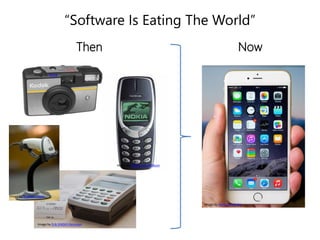
“Software Is Eating The World”
Then Now
Image by Erik (HASH) Hersman
Image by Michael Casey
Image by Alfred
Image by Remko van Dokkum
Image by Kārlis Dambrāns
Image by Alfred
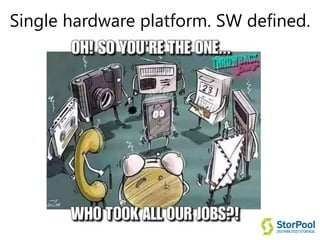
Single hardware platform. SW defined.
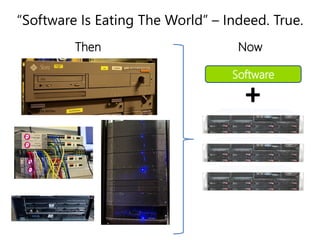
“Software Is Eating The World” – Indeed. True.
Image by Bob Mical
Image by derfian
Software
+
Leonardo Rizzi Image by Bob Mical
Then Now
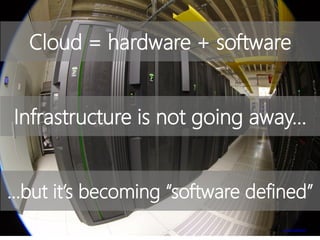
Infrastructure is not going away…
…but it’s becoming “software defined”
Image by is van Zuijlekom
Cloud = hardware + software
BUT WHY?!
Because, innovation in the
Cloud/IT stack can be used:
1. As a competitive advantage
2. To directly boost your bottom line
(higher profitability + new revenue)
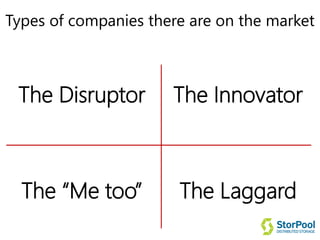
Types of companies there are on the market
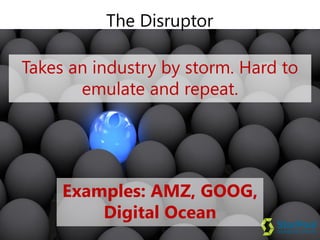
The Disruptor
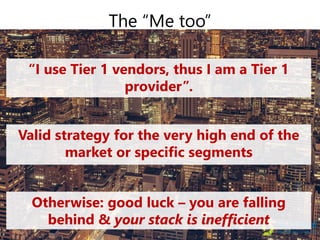
The “Me too”
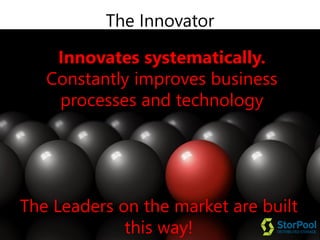
The Innovator
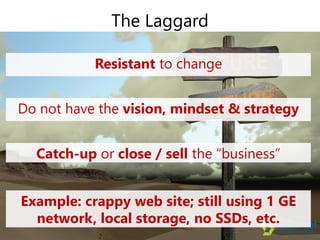
The Laggard
Examples: AMZ, GOOG,
Digital Ocean
The Disruptor
Takes an industry by storm. Hard to
emulate and repeat.
The Innovator
The Leaders on the market are built
this way!
Innovates systematically.
Constantly improves business
processes and technology
“I use Tier 1 vendors, thus I am a Tier 1
provider”.
The “Me too”
Valid strategy for the very high end of the
market or specific segments
Otherwise: good luck – you are falling
behind & your stack is inefficient
The Laggard
Resistant to change
Do not have the vision, mindset & strategy
Catch-up or close / sell the “business”
Example: crappy web site; still using 1 GE
network, local storage, no SSDs, etc.
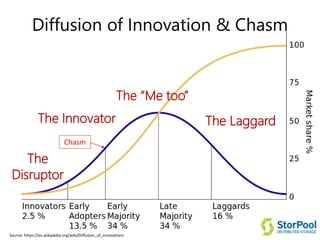
Diffusion of Innovation & Chasm
The
Disruptor
The Innovator
The “Me too”
The Laggard
Chasm
Source: https://en.wikipedia.org/wiki/Diffusion_of_innovations
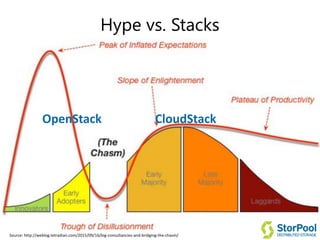
Hype vs. Stacks
OpenStack CloudStack
Source: http://weblog.tetradian.com/2015/09/16/big-consultancies-and-bridging-the-chasm/
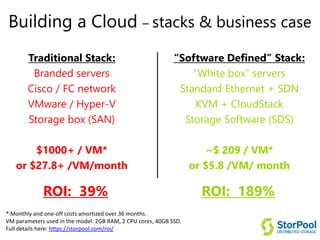
Building a Cloud – stacks & business case
Traditional Stack:
Branded servers
Cisco / FC network
VMware / Hyper-V
Storage box (SAN)
$1000+ / VM*
or $27.8+ /VM/month
“Software Defined” Stack:
“White box” servers
Standard Ethernet + SDN
KVM + CloudStack
Storage Software (SDS)
~$ 209 / VM*
or $5.8 /VM/ month
ROI: 39% ROI: 189%
* Monthly and one-off costs amortized over 36 months.
VM parameters used in the model: 2GB RAM, 2 CPU cores, 40GB SSD.
Full details here: https://storpool.com/roi/
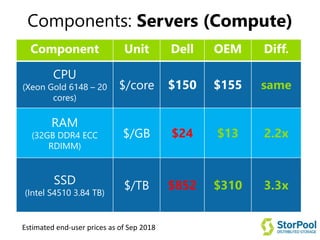
Components: Servers (Compute)
Component Unit Dell OEM Diff.
CPU
(Xeon Gold 6148 – 20
cores)
$/core $150 $155 same
RAM
(32GB DDR4 ECC
RDIMM)
$/GB $24 $13 2.2x
SSD
(Intel S4510 3.84 TB)
$/TB $852 $310 3.3x
Estimated end-user prices as of Sep 2018
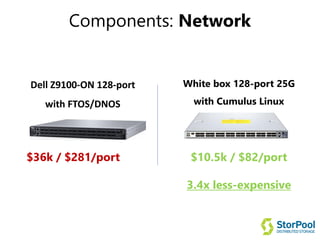
Components: Network
Dell Z9100-ON 128-port
with FTOS/DNOS
White box 128-port 25G
with Cumulus Linux
$36k / $281/port $10.5k / $82/port
3.4x less-expensive
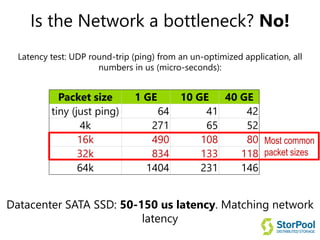
Is the Network a bottleneck? No!
Latency test: UDP round-trip (ping) from an un-optimized application, all
numbers in us (micro-seconds):
Packet size 1 GE 10 GE 40 GE
tiny (just ping) 64 41 42
4k 271 65 52
16k 490 108 80
32k 834 133 118
64k 1404 231 146
Datacenter SATA SSD: 50-150 us latency. Matching network
latency
Most common
packet sizes
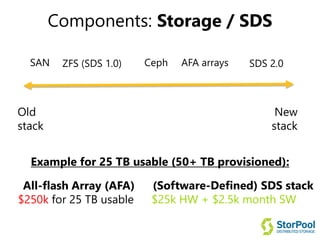
Components: Storage / SDS
SAN
Old
stack
New
stack
AFA arraysZFS (SDS 1.0) Ceph SDS 2.0
Example for 25 TB usable (50+ TB provisioned):
All-flash Array (AFA)
$250k for 25 TB usable
(Software-Defined) SDS stack
$25k HW + $2.5k month SW
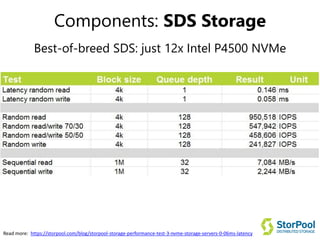
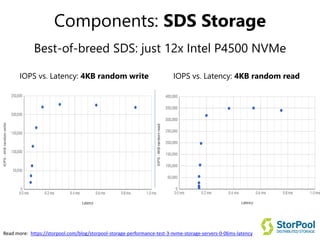
Components: SDS Storage
Best-of-breed SDS: just 12x Intel P4500 NVMe
Read more: https://storpool.com/blog/storpool-storage-performance-test-3-nvme-storage-servers-0-06ms-latency
Components: SDS Storage
Best-of-breed SDS: just 12x Intel P4500 NVMe
Read more: https://storpool.com/blog/storpool-storage-performance-test-3-nvme-storage-servers-0-06ms-latency
IOPS vs. Latency: 4KB random readIOPS vs. Latency: 4KB random write
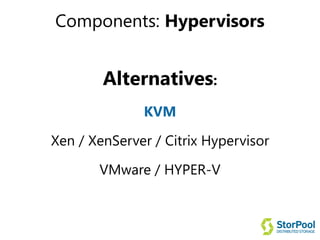
Components: Hypervisors
Alternatives:
KVM
Xen / XenServer / Citrix Hypervisor
VMware / HYPER-V
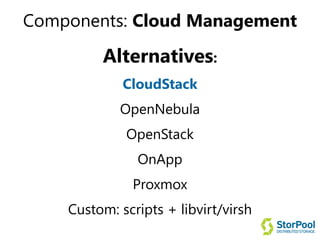
Components: Cloud Management
Alternatives:
CloudStack
OpenNebula
OpenStack
OnApp
Proxmox
Custom: scripts + libvirt/virsh
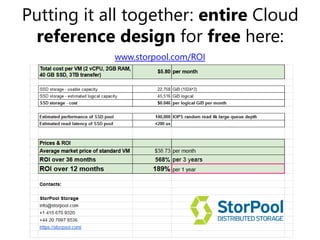
Putting it all together: entire Cloud
reference design for free here:
www.storpool.com/ROI
Other Tactical tips (1)
Other ideas on squeezing extra returns:
 For hypervisors: use higher density hypervisors with
32-36 cores (E5-2697v4). Better unit economics
($/VM).
 Put loads of RAM. 512GB. For running VMs, RAM is
the usual bottleneck.
 Avoid BASE-T. Switch to SFP+
Other Tactical tips (2)
 Switches: 25/50/100 GE there are many very good
price/quality options – (Mellanox, QCT, Arista, EdgeCore
Cumulus).
 Use larger SSDs. E.g. 4/8 TB or larger. The bigger the
better - lowers price/GB.
 Consider NVMe for critical apps. ~30-50% more
expensive, but up 10x faster (rand read, latency)
 Some components we tested and find better (in blue):
https://goo.gl/oBsESr
Other Tactical tips (3)
 “Software-defined” technologies are only as good as
the hardware (HW) they run on. For consistent
performance and reliability use compatible HW or vendor’s
prescribed configs. Otherwise: a trade-off between
investment/cost and performance/results
 SDS is not a silver bullet – it is a great solution but fits in
some cases better than others. You may still need different
products for different use cases. E.g. “unified storage”
sounds great but in practice you’ll end up with different
solutions for block, file & object to work well.
Other Tactical tips (4)
 Look for end-to-end data-integrity functionality in
SDS products. Maybe the most critical feature of an SDS
product in terms of preserving your data.
 Always use datacenter grade SSDs. Consumer grade
drives usually have throttling (limit of IOPS) and no power-
loss protection, making them unfit (and RISKY) for business
use.
 For high performance storage: go for triple replication
with SDS, not double. 3x is the best trade-off between
cost and extra data reliability/longevity for high-
performance use cases.
Q&A
StorPool Storage
info@storpool.com
www.storpool.com
The best storage when building a cloud.

Building software defined clouds - Boyan Ivanov

  • 1.
    Tactical advice onbuilding software- defined clouds
  • 2.
    Image by theaucitron Software-defined– why, what, how …and not “marketing-defined”
  • 3.
    “Software Is EatingThe World” Then Now Image by Erik (HASH) Hersman Image by Michael Casey Image by Alfred Image by Remko van Dokkum Image by Kārlis Dambrāns Image by Alfred
  • 4.
  • 5.
    “Software Is EatingThe World” – Indeed. True. Image by Bob Mical Image by derfian Software + Leonardo Rizzi Image by Bob Mical Then Now
  • 6.
    Infrastructure is notgoing away… …but it’s becoming “software defined” Image by is van Zuijlekom Cloud = hardware + software
  • 7.
    BUT WHY?! Because, innovationin the Cloud/IT stack can be used: 1. As a competitive advantage 2. To directly boost your bottom line (higher profitability + new revenue)
  • 8.
    Types of companiesthere are on the market The Disruptor The “Me too” The Innovator The Laggard
  • 9.
    Examples: AMZ, GOOG, DigitalOcean The Disruptor Takes an industry by storm. Hard to emulate and repeat.
  • 10.
    The Innovator The Leaderson the market are built this way! Innovates systematically. Constantly improves business processes and technology
  • 11.
    “I use Tier1 vendors, thus I am a Tier 1 provider”. The “Me too” Valid strategy for the very high end of the market or specific segments Otherwise: good luck – you are falling behind & your stack is inefficient
  • 12.
    The Laggard Resistant tochange Do not have the vision, mindset & strategy Catch-up or close / sell the “business” Example: crappy web site; still using 1 GE network, local storage, no SSDs, etc.
  • 13.
    Diffusion of Innovation& Chasm The Disruptor The Innovator The “Me too” The Laggard Chasm Source: https://en.wikipedia.org/wiki/Diffusion_of_innovations
  • 14.
    Hype vs. Stacks OpenStackCloudStack Source: http://weblog.tetradian.com/2015/09/16/big-consultancies-and-bridging-the-chasm/
  • 15.
    Building a Cloud– stacks & business case Traditional Stack: Branded servers Cisco / FC network VMware / Hyper-V Storage box (SAN) $1000+ / VM* or $27.8+ /VM/month “Software Defined” Stack: “White box” servers Standard Ethernet + SDN KVM + CloudStack Storage Software (SDS) ~$ 209 / VM* or $5.8 /VM/ month ROI: 39% ROI: 189% * Monthly and one-off costs amortized over 36 months. VM parameters used in the model: 2GB RAM, 2 CPU cores, 40GB SSD. Full details here: https://storpool.com/roi/
  • 16.
    Components: Servers (Compute) ComponentUnit Dell OEM Diff. CPU (Xeon Gold 6148 – 20 cores) $/core $150 $155 same RAM (32GB DDR4 ECC RDIMM) $/GB $24 $13 2.2x SSD (Intel S4510 3.84 TB) $/TB $852 $310 3.3x Estimated end-user prices as of Sep 2018
  • 17.
    Components: Network Dell Z9100-ON128-port with FTOS/DNOS White box 128-port 25G with Cumulus Linux $36k / $281/port $10.5k / $82/port 3.4x less-expensive
  • 18.
    Is the Networka bottleneck? No! Latency test: UDP round-trip (ping) from an un-optimized application, all numbers in us (micro-seconds): Packet size 1 GE 10 GE 40 GE tiny (just ping) 64 41 42 4k 271 65 52 16k 490 108 80 32k 834 133 118 64k 1404 231 146 Datacenter SATA SSD: 50-150 us latency. Matching network latency Most common packet sizes
  • 19.
    Components: Storage /SDS SAN Old stack New stack AFA arraysZFS (SDS 1.0) Ceph SDS 2.0 Example for 25 TB usable (50+ TB provisioned): All-flash Array (AFA) $250k for 25 TB usable (Software-Defined) SDS stack $25k HW + $2.5k month SW
  • 20.
    Components: SDS Storage Best-of-breedSDS: just 12x Intel P4500 NVMe Read more: https://storpool.com/blog/storpool-storage-performance-test-3-nvme-storage-servers-0-06ms-latency
  • 21.
    Components: SDS Storage Best-of-breedSDS: just 12x Intel P4500 NVMe Read more: https://storpool.com/blog/storpool-storage-performance-test-3-nvme-storage-servers-0-06ms-latency IOPS vs. Latency: 4KB random readIOPS vs. Latency: 4KB random write
  • 22.
    Components: Hypervisors Alternatives: KVM Xen /XenServer / Citrix Hypervisor VMware / HYPER-V
  • 23.
  • 24.
    Putting it alltogether: entire Cloud reference design for free here: www.storpool.com/ROI
  • 25.
    Other Tactical tips(1) Other ideas on squeezing extra returns:  For hypervisors: use higher density hypervisors with 32-36 cores (E5-2697v4). Better unit economics ($/VM).  Put loads of RAM. 512GB. For running VMs, RAM is the usual bottleneck.  Avoid BASE-T. Switch to SFP+
  • 26.
    Other Tactical tips(2)  Switches: 25/50/100 GE there are many very good price/quality options – (Mellanox, QCT, Arista, EdgeCore Cumulus).  Use larger SSDs. E.g. 4/8 TB or larger. The bigger the better - lowers price/GB.  Consider NVMe for critical apps. ~30-50% more expensive, but up 10x faster (rand read, latency)  Some components we tested and find better (in blue): https://goo.gl/oBsESr
  • 27.
    Other Tactical tips(3)  “Software-defined” technologies are only as good as the hardware (HW) they run on. For consistent performance and reliability use compatible HW or vendor’s prescribed configs. Otherwise: a trade-off between investment/cost and performance/results  SDS is not a silver bullet – it is a great solution but fits in some cases better than others. You may still need different products for different use cases. E.g. “unified storage” sounds great but in practice you’ll end up with different solutions for block, file & object to work well.
  • 28.
    Other Tactical tips(4)  Look for end-to-end data-integrity functionality in SDS products. Maybe the most critical feature of an SDS product in terms of preserving your data.  Always use datacenter grade SSDs. Consumer grade drives usually have throttling (limit of IOPS) and no power- loss protection, making them unfit (and RISKY) for business use.  For high performance storage: go for triple replication with SDS, not double. 3x is the best trade-off between cost and extra data reliability/longevity for high- performance use cases.
  • 29.