
OpenStack at Scale inside
NetApp
Manasi Prabhavalkar
NetApp Inc.
August 24, 2016
 Manasi Prabhavalkar
 Systems Architect for OpenStack in the
Engineering Shared Infrastructure Services group
AKA Customer Zero
 Masters in Computer Science @ NC State
University
 Bleeding edge of technology to serve as a platform
for innovation inside NetApp
About Me
© 2016 NetApp, Inc. All rights reserved.2
@manasip11
3
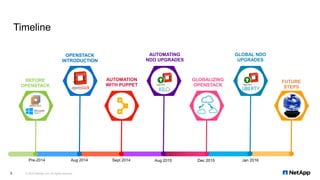
AUTOMATION
WITH PUPPET
GLOBALIZING
OPENSTACK
FUTURE
STEPS
OPENSTACK
INTRODUCTION
BEFORE
OPENSTACK
AUTOMATING
NDO UPGRADES
GLOBAL NDO
UPGRADES
Pre-2014 Aug 2014 Sept 2014 Aug 2015 Dec 2015 Jan 2016
Timeline
© 2016 NetApp, Inc. All rights reserved.
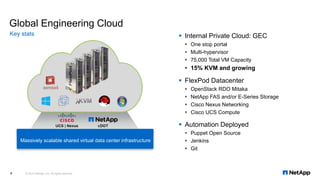
Global Engineering Cloud
Key stats
© 2016 NetApp, Inc. All rights reserved.4
 Internal Private Cloud: GEC
 One stop portal
 Multi-hypervisor
 75,000 Total VM Capacity
 15% KVM and growing
 FlexPod Datacenter
 OpenStack RDO Mitaka
 NetApp FAS and/or E-Series Storage
 Cisco Nexus Networking
 Cisco UCS Compute
 Automation Deployed
 Puppet Open Source
 Jenkins
 Git
Massively scalable shared virtual data center infrastructure
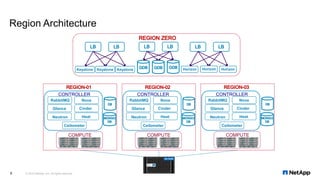
Region Architecture
© 2016 NetApp, Inc. All rights reserved.5
Glance
Nova
Neutron
Cinder
Ceilometer
Heat
CONTROLLER
RabbitMQ
COMPUTESLOT
1
SLOT
5
SLOT
3
SLOT
7
SLOT
2
SLOT
6
SLOT
4
SLOT
8
!
UCS 5108
OK FAIL OK FAIL OK FAIL OK FAIL
! ResetConsole
UCS B200 M3
! ResetConsole
UCS B200 M3
! ResetConsole
UCS B200 M3
! ResetConsole
UCS B200 M3
! ResetConsole
UCS B200 M3
! ResetConsole
UCS B200 M3
! ResetConsole
UCS B200 M3
! ResetConsole
UCS B200 M3
SLOT
1
SLOT
5
SLOT
3
SLOT
7
SLOT
2
SLOT
6
SLOT
4
SLOT
8
!
UCS 5108
OK FAIL OK FAIL OK FAIL OK FAIL
! ResetConsole
UCS B200 M3
! ResetConsole
UCS B200 M3
! ResetConsole
UCS B200 M3
! ResetConsole
UCS B200 M3
! ResetConsole
UCS B200 M3
! ResetConsole
UCS B200 M3
! ResetConsole
UCS B200 M3
! ResetConsole
UCS B200 M3
Keystone HorizonKeystone Keystone Horizon Horizon
Glance
Nova
Neutron
Cinder
Ceilometer
Heat
CONTROLLER
RabbitMQ
COMPUTESLOT
1
SLOT
5
SLOT
3
SLOT
7
SLOT
2
SLOT
6
SLOT
4
SLOT
8
!
UCS 5108
OK FAIL OK FAIL OK FAIL OK FAIL
! ResetConsole
UCS B200 M3
! ResetConsole
UCS B200 M3
! ResetConsole
UCS B200 M3
! ResetConsole
UCS B200 M3
! ResetConsole
UCS B200 M3
! ResetConsole
UCS B200 M3
! ResetConsole
UCS B200 M3
! ResetConsole
UCS B200 M3
SLOT
1
SLOT
5
SLOT
3
SLOT
7
SLOT
2
SLOT
6
SLOT
4
SLOT
8
!
UCS 5108
OK FAIL OK FAIL OK FAIL OK FAIL
! ResetConsole
UCS B200 M3
! ResetConsole
UCS B200 M3
! ResetConsole
UCS B200 M3
! ResetConsole
UCS B200 M3
! ResetConsole
UCS B200 M3
! ResetConsole
UCS B200 M3
! ResetConsole
UCS B200 M3
! ResetConsole
UCS B200 M3
Glance
Nova
Neutron
Cinder
Ceilometer
Heat
CONTROLLER
RabbitMQ
COMPUTESLOT
1
SLOT
5
SLOT
3
SLOT
7
SLOT
2
SLOT
6
SLOT
4
SLOT
8
!
UCS 5108
OK FAIL OK FAIL OK FAIL OK FAIL
! ResetConsole
UCS B200 M3
! ResetConsole
UCS B200 M3
! ResetConsole
UCS B200 M3
! ResetConsole
UCS B200 M3
! ResetConsole
UCS B200 M3
! ResetConsole
UCS B200 M3
! ResetConsole
UCS B200 M3
! ResetConsole
UCS B200 M3
SLOT
1
SLOT
5
SLOT
3
SLOT
7
SLOT
2
SLOT
6
SLOT
4
SLOT
8
!
UCS 5108
OK FAIL OK FAIL OK FAIL OK FAIL
! ResetConsole
UCS B200 M3
! ResetConsole
UCS B200 M3
! ResetConsole
UCS B200 M3
! ResetConsole
UCS B200 M3
! ResetConsole
UCS B200 M3
! ResetConsole
UCS B200 M3
! ResetConsole
UCS B200 M3
! ResetConsole
UCS B200 M3
6
01
05
10
15
20
25
30
35
40
02
03
04
06
07
08
09
11
12
13
14
16
17
18
19
21
22
23
24
26
27
28
29
31
32
33
34
36
37
38
39
41
42
01
05
10
15
20
25
30
35
40
02
03
04
06
07
08
09
11
12
13
14
16
17
18
19
21
22
23
24
26
27
28
29
31
32
33
34
36
37
38
39
41
42
STS
BCN
ACT
Cisco Nexus 9396PX
1
2
1 2 3 4 5 6 7 8 9 10 11 12 13 14 15 16 17 18 19 20 21 22 23 24 25 26 27 28 29 30 31 32 33 34 35 36 37 38 39 40 41 42 43 44 45 46 47 48
N9K-M12PQ STS 1 2
ACT
3 4
ACT
5 6
ACT
7 8
ACT
9 10
ACT
11 12
ACT
STS
BCN
ACT
Cisco Nexus 9396PX
1
2
1 2 3 4 5 6 7 8 9 10 11 12 13 14 15 16 17 18 19 20 21 22 23 24 25 26 27 28 29 30 31 32 33 34 35 36 37 38 39 40 41 42 43 44 45 46 47 48
N9K-M12PQ STS 1 2
ACT
3 4
ACT
5 6
ACT
7 8
ACT
9 10
ACT
11 12
ACT
A B
FAS8040FAS8040
4 5 6 70 1 2 3 12 13 14 158 9 10 11 20 21 22 2316 17 18 19
DS2246
1200GB
1200GB
1200GB
1200GB
1200GB
1200GB
1200GB
1200GB
1200GB
1200GB
1200GB
1200GB
1200GB
1200GB
1200GB
1200GB
1200GB
1200GB
1200GB
1200GB
1200GB
1200GB
1200GB
1200GB
4 5 6 70 1 2 3 12 13 14 158 9 10 11 20 21 22 2316 17 18 19
DS2246
1200GB
1200GB
1200GB
1200GB
1200GB
1200GB
1200GB
1200GB
1200GB
1200GB
1200GB
1200GB
1200GB
1200GB
1200GB
1200GB
1200GB
1200GB
1200GB
1200GB
1200GB
1200GB
1200GB
1200GB
CISCO UCS 6248UP 1 2 3 4 5 6 7 8 9 10 11 12 13 14 15 16 17 18 19 20 21 22 23 24 25 26 27 28 29 30 31 32
STAT
ID
SLOT
1
SLOT
5
SLOT
3
SLOT
7
SLOT
2
SLOT
6
SLOT
4
SLOT
8
!
UCS 5108
OK FAIL OK FAIL OK FAIL OK FAIL
SLOT
1
SLOT
5
SLOT
3
SLOT
7
SLOT
2
SLOT
6
SLOT
4
SLOT
8
!
UCS 5108
OK FAIL OK FAIL OK FAIL OK FAIL
CISCO UCS 6248UP 1 2 3 4 5 6 7 8 9 10 11 12 13 14 15 16 17 18 19 20 21 22 23 24 25 26 27 28 29 30 31 32
STAT
ID
4 5 6 70 1 2 3 12 13 14 158 9 10 11 20 21 22 2316 17 18 19
DS2246
1200GB
1200GB
1200GB
1200GB
1200GB
1200GB
1200GB
1200GB
1200GB
1200GB
1200GB
1200GB
1200GB
1200GB
1200GB
1200GB
1200GB
1200GB
1200GB
1200GB
1200GB
1200GB
1200GB
1200GB
4 5 6 70 1 2 3 12 13 14 158 9 10 11 20 21 22 2316 17 18 19
DS2246
1200GB
1200GB
1200GB
1200GB
1200GB
1200GB
1200GB
1200GB
1200GB
1200GB
1200GB
1200GB
1200GB
1200GB
1200GB
1200GB
1200GB
1200GB
1200GB
1200GB
1200GB
1200GB
1200GB
1200GB
! ResetConsole
UCS B200 M4
! ResetConsole
UCS B200 M4
! ResetConsole
UCS B200 M4
! ResetConsole
UCS B200 M4
! ResetConsole
UCS B200 M4
! ResetConsole
UCS B200 M4
! ResetConsole
UCS B200 M4
! ResetConsole
UCS B200 M4
! ResetConsole
UCS B200 M4
! ResetConsole
UCS B200 M4
! ResetConsole
UCS B200 M4
! ResetConsole
UCS B200 M4
! ResetConsole
UCS B200 M4
! ResetConsole
UCS B200 M4
! ResetConsole
UCS B200 M4
! ResetConsole
UCS B200 M4
! ResetConsole
UCS B200 M4
PUPPET
ROLES
FLEXCLONE AND
ASSIGN BOOT LUN
ASSIGN SERVICE PROFILE
CREATE FLEXVOLS FOR CINDER
AND NOVA STORAGE
VLAN
####
CREATE VLANS
FOR INSTANCES
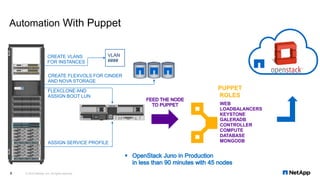
Automation With Puppet
© 2016 NetApp, Inc. All rights reserved.
WEB
LOADBALANCERS
KEYSTONE
GALERADB
CONTROLLER
COMPUTE
DATABASE
MONGODB
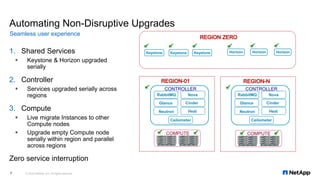
1. Shared Services
 Keystone & Horizon upgraded
serially
2. Controller
 Services upgraded serially across
regions
3. Compute
 Live migrate Instances to other
Compute nodes
 Upgrade empty Compute node
serially within region and parallel
across regions
Zero service interruption
Automating Non-Disruptive Upgrades
Seamless user experience
© 2016 NetApp, Inc. All rights reserved.7
COMPUTESLOT
1
SLOT
5
SLOT
3
SLOT
7
SLOT
2
SLOT
6
SLOT
4
SLOT
8
!
UCS 5108
OK FAIL OK FAIL OK FAIL OK FAIL
! ResetConsole
UCS B200 M3
! ResetConsole
UCS B200 M3
! ResetConsole
UCS B200 M3
! ResetConsole
UCS B200 M3
! ResetConsole
UCS B200 M3
! ResetConsole
UCS B200 M3
! ResetConsole
UCS B200 M3
! ResetConsole
UCS B200 M3
SLOT
1
SLOT
5
SLOT
3
SLOT
7
SLOT
2
SLOT
6
SLOT
4
SLOT
8
!
UCS 5108
OK FAIL OK FAIL OK FAIL OK FAIL
! ResetConsole
UCS B200 M3
! ResetConsole
UCS B200 M3
! ResetConsole
UCS B200 M3
! ResetConsole
UCS B200 M3
! ResetConsole
UCS B200 M3
! ResetConsole
UCS B200 M3
! ResetConsole
UCS B200 M3
! ResetConsole
UCS B200 M3
COMPUTESLOT
1
SLOT
5
SLOT
3
SLOT
7
SLOT
2
SLOT
6
SLOT
4
SLOT
8
!
UCS 5108
OK FAIL OK FAIL OK FAIL OK FAIL
! ResetConsole
UCS B200 M3
! ResetConsole
UCS B200 M3
! ResetConsole
UCS B200 M3
! ResetConsole
UCS B200 M3
! ResetConsole
UCS B200 M3
! ResetConsole
UCS B200 M3
! ResetConsole
UCS B200 M3
! ResetConsole
UCS B200 M3
SLOT
1
SLOT
5
SLOT
3
SLOT
7
SLOT
2
SLOT
6
SLOT
4
SLOT
8
!
UCS 5108
OK FAIL OK FAIL OK FAIL OK FAIL
! ResetConsole
UCS B200 M3
! ResetConsole
UCS B200 M3
! ResetConsole
UCS B200 M3
! ResetConsole
UCS B200 M3
! ResetConsole
UCS B200 M3
! ResetConsole
UCS B200 M3
! ResetConsole
UCS B200 M3
! ResetConsole
UCS B200 M3
Glance
Nova
Neutron
Cinder
Ceilometer
Heat
CONTROLLER
RabbitMQ
Glance
Nova
Neutron
Cinder
Ceilometer
Heat
CONTROLLER
RabbitMQ
Keystone Keystone Keystone Horizon HorizonHorizon
© 2016 NetApp, Inc. All rights reserved.8
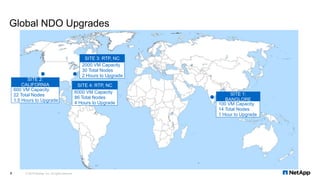
Global NDO Upgrades
2000 VM Capacity
30 Total Nodes
2 Hours to Upgrade
SITE 3: RTP, NC
600 VM Capacity
22 Total Nodes
1.5 Hours to Upgrade
SITE 2:
CALIFORNIA
6000 VM Capacity
86 Total Nodes
4 Hours to Upgrade
SITE 4: RTP, NC
100 VM Capacity
14 Total Nodes
1 Hour to Upgrade
SITE 1:
BANGLORE
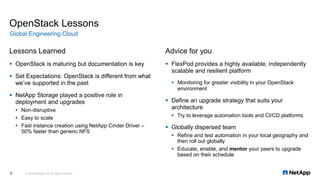
Lessons Learned
 OpenStack is maturing but documentation is key
 Set Expectations: OpenStack is different from what
we’ve supported in the past
 NetApp Storage played a positive role in
deployment and upgrades
 Non-disruptive
 Easy to scale
 Fast instance creation using NetApp Cinder Driver –
50% faster than generic NFS
OpenStack Lessons
Advice for you
 FlexPod provides a highly available, independently
scalable and resilient platform
 Monitoring for greater visibility in your OpenStack
environment
 Define an upgrade strategy that suits your
architecture
 Try to leverage automation tools and CI/CD platforms
 Globally dispersed team
 Refine and test automation in your local geography and
then roll out globally
 Educate, enable, and mentor your peers to upgrade
based on their schedule
© 2016 NetApp, Inc. All rights reserved.9
Global Engineering Cloud
10
Where we’re going next
© 2016 NetApp, Inc. All rights reserved.
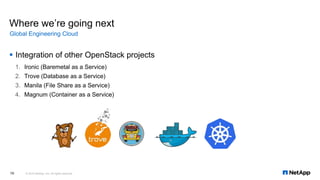
 Integration of other OpenStack projects
1. Ironic (Baremetal as a Service)
2. Trove (Database as a Service)
3. Manila (File Share as a Service)
4. Magnum (Container as a Service)
Global Engineering Cloud
Key Takeaways
11 © 2016 NetApp, Inc. All rights reserved.
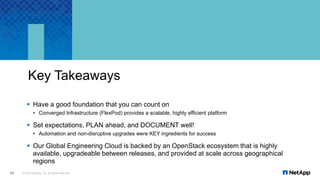
 Have a good foundation that you can count on
 Converged Infrastructure (FlexPod) provides a scalable, highly efficient platform
 Set expectations, PLAN ahead, and DOCUMENT well!
 Automation and non-disruptive upgrades were KEY ingredients for success
 Our Global Engineering Cloud is backed by an OpenStack ecosystem that is highly
available, upgradeable between releases, and provided at scale across geographical
regions
Other collateral
 NEW Technical Report (FlexPod OSP8):
http://nt-ap.com/1XN5Tgc
 RHEL-OSP6 on FlexPod Deployment:
http://bit.ly/1Q7b3Qb
 RHEL-OSP6 on FlexPod Design:
http://bit.ly/1LFCHEz
Reference architectures
© 2016 NetApp, Inc. All rights reserved.12
Thank You

OpenStack at Scale Inside NetApp

  • 1.
    OpenStack at Scaleinside NetApp Manasi Prabhavalkar NetApp Inc. August 24, 2016
  • 2.
     Manasi Prabhavalkar Systems Architect for OpenStack in the Engineering Shared Infrastructure Services group AKA Customer Zero  Masters in Computer Science @ NC State University  Bleeding edge of technology to serve as a platform for innovation inside NetApp About Me © 2016 NetApp, Inc. All rights reserved.2 @manasip11
  • 3.
    3 AUTOMATION WITH PUPPET GLOBALIZING OPENSTACK FUTURE STEPS OPENSTACK INTRODUCTION BEFORE OPENSTACK AUTOMATING NDO UPGRADES GLOBALNDO UPGRADES Pre-2014 Aug 2014 Sept 2014 Aug 2015 Dec 2015 Jan 2016 Timeline © 2016 NetApp, Inc. All rights reserved.
  • 4.
    Global Engineering Cloud Keystats © 2016 NetApp, Inc. All rights reserved.4  Internal Private Cloud: GEC  One stop portal  Multi-hypervisor  75,000 Total VM Capacity  15% KVM and growing  FlexPod Datacenter  OpenStack RDO Mitaka  NetApp FAS and/or E-Series Storage  Cisco Nexus Networking  Cisco UCS Compute  Automation Deployed  Puppet Open Source  Jenkins  Git Massively scalable shared virtual data center infrastructure
  • 5.
    Region Architecture © 2016NetApp, Inc. All rights reserved.5 Glance Nova Neutron Cinder Ceilometer Heat CONTROLLER RabbitMQ COMPUTESLOT 1 SLOT 5 SLOT 3 SLOT 7 SLOT 2 SLOT 6 SLOT 4 SLOT 8 ! UCS 5108 OK FAIL OK FAIL OK FAIL OK FAIL ! ResetConsole UCS B200 M3 ! ResetConsole UCS B200 M3 ! ResetConsole UCS B200 M3 ! ResetConsole UCS B200 M3 ! ResetConsole UCS B200 M3 ! ResetConsole UCS B200 M3 ! ResetConsole UCS B200 M3 ! ResetConsole UCS B200 M3 SLOT 1 SLOT 5 SLOT 3 SLOT 7 SLOT 2 SLOT 6 SLOT 4 SLOT 8 ! UCS 5108 OK FAIL OK FAIL OK FAIL OK FAIL ! ResetConsole UCS B200 M3 ! ResetConsole UCS B200 M3 ! ResetConsole UCS B200 M3 ! ResetConsole UCS B200 M3 ! ResetConsole UCS B200 M3 ! ResetConsole UCS B200 M3 ! ResetConsole UCS B200 M3 ! ResetConsole UCS B200 M3 Keystone HorizonKeystone Keystone Horizon Horizon Glance Nova Neutron Cinder Ceilometer Heat CONTROLLER RabbitMQ COMPUTESLOT 1 SLOT 5 SLOT 3 SLOT 7 SLOT 2 SLOT 6 SLOT 4 SLOT 8 ! UCS 5108 OK FAIL OK FAIL OK FAIL OK FAIL ! ResetConsole UCS B200 M3 ! ResetConsole UCS B200 M3 ! ResetConsole UCS B200 M3 ! ResetConsole UCS B200 M3 ! ResetConsole UCS B200 M3 ! ResetConsole UCS B200 M3 ! ResetConsole UCS B200 M3 ! ResetConsole UCS B200 M3 SLOT 1 SLOT 5 SLOT 3 SLOT 7 SLOT 2 SLOT 6 SLOT 4 SLOT 8 ! UCS 5108 OK FAIL OK FAIL OK FAIL OK FAIL ! ResetConsole UCS B200 M3 ! ResetConsole UCS B200 M3 ! ResetConsole UCS B200 M3 ! ResetConsole UCS B200 M3 ! ResetConsole UCS B200 M3 ! ResetConsole UCS B200 M3 ! ResetConsole UCS B200 M3 ! ResetConsole UCS B200 M3 Glance Nova Neutron Cinder Ceilometer Heat CONTROLLER RabbitMQ COMPUTESLOT 1 SLOT 5 SLOT 3 SLOT 7 SLOT 2 SLOT 6 SLOT 4 SLOT 8 ! UCS 5108 OK FAIL OK FAIL OK FAIL OK FAIL ! ResetConsole UCS B200 M3 ! ResetConsole UCS B200 M3 ! ResetConsole UCS B200 M3 ! ResetConsole UCS B200 M3 ! ResetConsole UCS B200 M3 ! ResetConsole UCS B200 M3 ! ResetConsole UCS B200 M3 ! ResetConsole UCS B200 M3 SLOT 1 SLOT 5 SLOT 3 SLOT 7 SLOT 2 SLOT 6 SLOT 4 SLOT 8 ! UCS 5108 OK FAIL OK FAIL OK FAIL OK FAIL ! ResetConsole UCS B200 M3 ! ResetConsole UCS B200 M3 ! ResetConsole UCS B200 M3 ! ResetConsole UCS B200 M3 ! ResetConsole UCS B200 M3 ! ResetConsole UCS B200 M3 ! ResetConsole UCS B200 M3 ! ResetConsole UCS B200 M3
  • 6.
    6 01 05 10 15 20 25 30 35 40 02 03 04 06 07 08 09 11 12 13 14 16 17 18 19 21 22 23 24 26 27 28 29 31 32 33 34 36 37 38 39 41 42 01 05 10 15 20 25 30 35 40 02 03 04 06 07 08 09 11 12 13 14 16 17 18 19 21 22 23 24 26 27 28 29 31 32 33 34 36 37 38 39 41 42 STS BCN ACT Cisco Nexus 9396PX 1 2 12 3 4 5 6 7 8 9 10 11 12 13 14 15 16 17 18 19 20 21 22 23 24 25 26 27 28 29 30 31 32 33 34 35 36 37 38 39 40 41 42 43 44 45 46 47 48 N9K-M12PQ STS 1 2 ACT 3 4 ACT 5 6 ACT 7 8 ACT 9 10 ACT 11 12 ACT STS BCN ACT Cisco Nexus 9396PX 1 2 1 2 3 4 5 6 7 8 9 10 11 12 13 14 15 16 17 18 19 20 21 22 23 24 25 26 27 28 29 30 31 32 33 34 35 36 37 38 39 40 41 42 43 44 45 46 47 48 N9K-M12PQ STS 1 2 ACT 3 4 ACT 5 6 ACT 7 8 ACT 9 10 ACT 11 12 ACT A B FAS8040FAS8040 4 5 6 70 1 2 3 12 13 14 158 9 10 11 20 21 22 2316 17 18 19 DS2246 1200GB 1200GB 1200GB 1200GB 1200GB 1200GB 1200GB 1200GB 1200GB 1200GB 1200GB 1200GB 1200GB 1200GB 1200GB 1200GB 1200GB 1200GB 1200GB 1200GB 1200GB 1200GB 1200GB 1200GB 4 5 6 70 1 2 3 12 13 14 158 9 10 11 20 21 22 2316 17 18 19 DS2246 1200GB 1200GB 1200GB 1200GB 1200GB 1200GB 1200GB 1200GB 1200GB 1200GB 1200GB 1200GB 1200GB 1200GB 1200GB 1200GB 1200GB 1200GB 1200GB 1200GB 1200GB 1200GB 1200GB 1200GB CISCO UCS 6248UP 1 2 3 4 5 6 7 8 9 10 11 12 13 14 15 16 17 18 19 20 21 22 23 24 25 26 27 28 29 30 31 32 STAT ID SLOT 1 SLOT 5 SLOT 3 SLOT 7 SLOT 2 SLOT 6 SLOT 4 SLOT 8 ! UCS 5108 OK FAIL OK FAIL OK FAIL OK FAIL SLOT 1 SLOT 5 SLOT 3 SLOT 7 SLOT 2 SLOT 6 SLOT 4 SLOT 8 ! UCS 5108 OK FAIL OK FAIL OK FAIL OK FAIL CISCO UCS 6248UP 1 2 3 4 5 6 7 8 9 10 11 12 13 14 15 16 17 18 19 20 21 22 23 24 25 26 27 28 29 30 31 32 STAT ID 4 5 6 70 1 2 3 12 13 14 158 9 10 11 20 21 22 2316 17 18 19 DS2246 1200GB 1200GB 1200GB 1200GB 1200GB 1200GB 1200GB 1200GB 1200GB 1200GB 1200GB 1200GB 1200GB 1200GB 1200GB 1200GB 1200GB 1200GB 1200GB 1200GB 1200GB 1200GB 1200GB 1200GB 4 5 6 70 1 2 3 12 13 14 158 9 10 11 20 21 22 2316 17 18 19 DS2246 1200GB 1200GB 1200GB 1200GB 1200GB 1200GB 1200GB 1200GB 1200GB 1200GB 1200GB 1200GB 1200GB 1200GB 1200GB 1200GB 1200GB 1200GB 1200GB 1200GB 1200GB 1200GB 1200GB 1200GB ! ResetConsole UCS B200 M4 ! ResetConsole UCS B200 M4 ! ResetConsole UCS B200 M4 ! ResetConsole UCS B200 M4 ! ResetConsole UCS B200 M4 ! ResetConsole UCS B200 M4 ! ResetConsole UCS B200 M4 ! ResetConsole UCS B200 M4 ! ResetConsole UCS B200 M4 ! ResetConsole UCS B200 M4 ! ResetConsole UCS B200 M4 ! ResetConsole UCS B200 M4 ! ResetConsole UCS B200 M4 ! ResetConsole UCS B200 M4 ! ResetConsole UCS B200 M4 ! ResetConsole UCS B200 M4 ! ResetConsole UCS B200 M4 PUPPET ROLES FLEXCLONE AND ASSIGN BOOT LUN ASSIGN SERVICE PROFILE CREATE FLEXVOLS FOR CINDER AND NOVA STORAGE VLAN #### CREATE VLANS FOR INSTANCES Automation With Puppet © 2016 NetApp, Inc. All rights reserved. WEB LOADBALANCERS KEYSTONE GALERADB CONTROLLER COMPUTE DATABASE MONGODB
  • 7.
    1. Shared Services Keystone & Horizon upgraded serially 2. Controller  Services upgraded serially across regions 3. Compute  Live migrate Instances to other Compute nodes  Upgrade empty Compute node serially within region and parallel across regions Zero service interruption Automating Non-Disruptive Upgrades Seamless user experience © 2016 NetApp, Inc. All rights reserved.7 COMPUTESLOT 1 SLOT 5 SLOT 3 SLOT 7 SLOT 2 SLOT 6 SLOT 4 SLOT 8 ! UCS 5108 OK FAIL OK FAIL OK FAIL OK FAIL ! ResetConsole UCS B200 M3 ! ResetConsole UCS B200 M3 ! ResetConsole UCS B200 M3 ! ResetConsole UCS B200 M3 ! ResetConsole UCS B200 M3 ! ResetConsole UCS B200 M3 ! ResetConsole UCS B200 M3 ! ResetConsole UCS B200 M3 SLOT 1 SLOT 5 SLOT 3 SLOT 7 SLOT 2 SLOT 6 SLOT 4 SLOT 8 ! UCS 5108 OK FAIL OK FAIL OK FAIL OK FAIL ! ResetConsole UCS B200 M3 ! ResetConsole UCS B200 M3 ! ResetConsole UCS B200 M3 ! ResetConsole UCS B200 M3 ! ResetConsole UCS B200 M3 ! ResetConsole UCS B200 M3 ! ResetConsole UCS B200 M3 ! ResetConsole UCS B200 M3 COMPUTESLOT 1 SLOT 5 SLOT 3 SLOT 7 SLOT 2 SLOT 6 SLOT 4 SLOT 8 ! UCS 5108 OK FAIL OK FAIL OK FAIL OK FAIL ! ResetConsole UCS B200 M3 ! ResetConsole UCS B200 M3 ! ResetConsole UCS B200 M3 ! ResetConsole UCS B200 M3 ! ResetConsole UCS B200 M3 ! ResetConsole UCS B200 M3 ! ResetConsole UCS B200 M3 ! ResetConsole UCS B200 M3 SLOT 1 SLOT 5 SLOT 3 SLOT 7 SLOT 2 SLOT 6 SLOT 4 SLOT 8 ! UCS 5108 OK FAIL OK FAIL OK FAIL OK FAIL ! ResetConsole UCS B200 M3 ! ResetConsole UCS B200 M3 ! ResetConsole UCS B200 M3 ! ResetConsole UCS B200 M3 ! ResetConsole UCS B200 M3 ! ResetConsole UCS B200 M3 ! ResetConsole UCS B200 M3 ! ResetConsole UCS B200 M3 Glance Nova Neutron Cinder Ceilometer Heat CONTROLLER RabbitMQ Glance Nova Neutron Cinder Ceilometer Heat CONTROLLER RabbitMQ Keystone Keystone Keystone Horizon HorizonHorizon
  • 8.
    © 2016 NetApp,Inc. All rights reserved.8 Global NDO Upgrades 2000 VM Capacity 30 Total Nodes 2 Hours to Upgrade SITE 3: RTP, NC 600 VM Capacity 22 Total Nodes 1.5 Hours to Upgrade SITE 2: CALIFORNIA 6000 VM Capacity 86 Total Nodes 4 Hours to Upgrade SITE 4: RTP, NC 100 VM Capacity 14 Total Nodes 1 Hour to Upgrade SITE 1: BANGLORE
  • 9.
    Lessons Learned  OpenStackis maturing but documentation is key  Set Expectations: OpenStack is different from what we’ve supported in the past  NetApp Storage played a positive role in deployment and upgrades  Non-disruptive  Easy to scale  Fast instance creation using NetApp Cinder Driver – 50% faster than generic NFS OpenStack Lessons Advice for you  FlexPod provides a highly available, independently scalable and resilient platform  Monitoring for greater visibility in your OpenStack environment  Define an upgrade strategy that suits your architecture  Try to leverage automation tools and CI/CD platforms  Globally dispersed team  Refine and test automation in your local geography and then roll out globally  Educate, enable, and mentor your peers to upgrade based on their schedule © 2016 NetApp, Inc. All rights reserved.9 Global Engineering Cloud
  • 10.
    10 Where we’re goingnext © 2016 NetApp, Inc. All rights reserved.  Integration of other OpenStack projects 1. Ironic (Baremetal as a Service) 2. Trove (Database as a Service) 3. Manila (File Share as a Service) 4. Magnum (Container as a Service) Global Engineering Cloud
  • 11.
    Key Takeaways 11 ©2016 NetApp, Inc. All rights reserved.  Have a good foundation that you can count on  Converged Infrastructure (FlexPod) provides a scalable, highly efficient platform  Set expectations, PLAN ahead, and DOCUMENT well!  Automation and non-disruptive upgrades were KEY ingredients for success  Our Global Engineering Cloud is backed by an OpenStack ecosystem that is highly available, upgradeable between releases, and provided at scale across geographical regions
  • 12.
    Other collateral  NEWTechnical Report (FlexPod OSP8): http://nt-ap.com/1XN5Tgc  RHEL-OSP6 on FlexPod Deployment: http://bit.ly/1Q7b3Qb  RHEL-OSP6 on FlexPod Design: http://bit.ly/1LFCHEz Reference architectures © 2016 NetApp, Inc. All rights reserved.12
  • 13.

Editor's Notes

  • #3 Dave + Manasi 1 minute My name is Manasi Prabhavalkar. Fresh out of college after completing my Masters degree at NC State, I was fortunate enough to have landed the most interesting job. For the past 2 years I have been a Systems Architect for OpenStack in the Engineering Shared Infrastructure Services organization at NetApp. Today we are here to share our experience as an Engineering org into the rapidly evolving world of OpenStack
  • #4 Dave 1 minute For each hexagon, a few bullet points should guide the conversation: Overall – this presentation represents a 1.5 year journey of Intro – introduce our mission statement, what we do, how we started with OpenStack Automation – absolutely needed, how we were able to leverage Puppet for deployments Upgrades – how we were able to take said automation and do upgrades to Kilo locally Globalizing – Lets adapt to deploying openstack globally since we’re a global team and company Global Upgrades – best of both worlds, lets employ what we’ve learned locally to our entire team, and seamlessly upgrade to OpenStack Liberty Next steps – where we’re going next, what keeps us excited throughout the day Our Agenda for today is going to represent how we introduced and past year and half at NetApp Today we are going to share the NetApp Engineering success story Our learnings In this session we are going to take you guys through our journey of implementing OpenStack in NetApp Engineering. time-span of a year and a half This session today represents our exciting journey of implementing OpenStack and some of the milestones that we achieved throughout. It is a story of our engineering org adopting OpenStack as a small part of our internal private cloud, and making it a huge success We are going to talk about who we are and what we do as an organization how we started off with OpenStack We are going to talk about who we are as an organization and how we decided to embrace OpenStack back in Sept 2014. And how our journey just got interesting after that. How we made our way through automating deployments, automating upgrades using Puppet and went on to globalize OpenStack at our 3 major sites. The high point of our journey was implementing 2 live-upgrades in a Production env in a time-span of just 5 months. So stay tuned
  • #5 Dave 3 minutes 6gb Mem IaaS Puppet comfort Today our Global Engg cloud GEC as we call it is a self-service cloud portal that has 3 different hypervisors under its belt. Vmware, HyperV and KVM on OpenStack. Why OpenStack? NetApp made a strategic decision to embrace OpenStack, we are Customer Zero NetApp has been involved with OpenStack since 2011, both from a development perspective (Folsom release) and from an internal deployment perspective Needed to reduce Hypervisor licensing costs Increase breadth of NetApp QA testing Match customer expectations and deployments Scalable Multi-Region Design 15 compute nodes in each region (1000 VM per region) Ceilometer in each region for performance Secure Multi-Tenancy (71 SVMs, GEC Service based Tenancy model, build environment as service) Modular Scale as you Grow Architecture So now lets talk about how we got there.
  • #6 Manasi 3 minutes Explain a region Region arch Scale model HA features Stats We talked about the highly available Keystone service, Horizon and we also had a highly available GaleraDB cluster hosting the shared databases which mainly included keystone, cinder and glance. Then there was the single controller node and in order to address that concern we decided to go with Region architecture. So we stamped out a region with One controller, its own native DB and MongoDB and 15 Compute nodes. This allowed us to scale horizontally by having new regions which shared the same Keystone and Horizon services that we called as Region Zero. expectations Each region serves as its own OpenStack deployment with its own Nova and Neutron services. Image store and Cinder share is backed by NetApp NFS backend and are shared across all the regions. So basically each regions hosts all the services of OpenStack however the glance and cinder in each region talk to the same shared db in region zero The motivation behind this arch was Staring off with each region having a /22 cidr and so a VM capacity of 1000 This gave us a scaling model helping us grow by 1000VMs every time we add a new region. Also we expected our region zero to handle upto 10 regions after which we would consider adding a new node to the shared region. Each region has its own neutron and nova DB and is backed by a NetApp NFS store for instances This region strategy helped us keep the OpenStack arch as close to our Vmware and HyperV archs as possible. One OpenStack region was analogous to a Vmware/hyperV cluster of 15 compute. We wanted to keep it as familiar as possible and so we did not change too many things at the same time. This helped the Operations team to be more comfortable in adopting KVM on OpenStack as a new addition to GEC. Now even if a Region fails, still the OpenStack requests coming to GEC can be routed to any of the other regions making it highly available for our customers. The arch phase was the most imp milestone of our journey. We successfully came up with a highly available, modular and so easily scalable architecture that helped us set the stage for defining our live-upgrade strategy as well. Today we have OpenStack globally at 4 sites with 10 regions and 160 Compute giving us a VM capacity of 7500 which serves as 10% of the total GEC capacity. 4 sites 10 regions 160 Compute ~7500 6GB VM capacity GEC Total Capacity: 70K
  • #7 Manasi 2min Puppet+FlexPod Puppet automation takes over Puppet roles Big picture Deployed Juno in 90 minutes Once the storage is ready and the node is prepped we feed it to our puppet master. The puppetmaster consists of all the necessary code to spin up a new Production-ready OpenStack env. The puppet master assigns it a suitable role in our architecture and then configures it for us. Our arch allows for 8 different roles which are Web(horizon), database(regional db), mongodb (for ceilometer), keystone, GaleraDB (for shared db), compute, controller and lb By this time we were on the Juno release of OpenStack in prod with a region zero and 3 deployment regions. It took Puppet just 90min to spin up the entire env ready to deliver a VM capacity of 3000 instances. Basically our automation strategy involves configuring storage and let Puppet handle the rest Who thought automating OpenStack deployment would be so much easier
  • #8 Manasi 4 minutes Make sure hardware upgraded Juno to Kilo upgrade Define strategy Segmented upgrades Explain each segment Time to upgrade No end user disruptions After successfully automating the OpenStack deployment with Puppet we decided to automate live-upgrades too. Now it was time to upgrade our env from Juno to Kilo We wanted to define an upgrade strategy which was repeatable and automated. We also wanted it to be non-disruptive enabling existing production VMs to work during the upgrade. Our modular architecture helped us make this task easier to accomplish. This Now let me take you guys through our live-upgrade strategy. We started off by upgrading the keystone node first as it is shared across all of the regions in our env We did the upgrade serially to maintain service continuity. All the regions continued to work with the upgraded keystone because of backwards compatibility. Then we moved on to the web nodes and upgraded them serially too to maintain service continuity. Users in our env use the GEC portal as the user interface so the web upgrade was non-disruptive. Next we went to the controller. We upgraded each controller serially across regions. Existing VMs continued to work during the upgrade however the region would not be able to service new requests during the 5 minute puppet process. Our strategy was to toggle off a region in our GEC portal and stop any new deployments to it, then upgrade the region controller and once the upgrade was successful toggle the region back on again in the portal. After the controllers we moved on to compute nodes. We took the first compute node in each region, live-migrated all VMs to other nodes in that region and then upgraded the empty compute node. We upgraded all compute serially within a region but in parallel across the regions. Our Puppet process took approximately 5 minutes for each node to upgrade
  • #9 Manasi 2 minutes Global upgrade Time for Kilo to Liberty Prev experience/lessons learnt 4 env to upgrade, firmware first Smallest -> largest stats Span of a week Upgrade roadmap More capacity planned When we rolled out OpenStack globally we were on the Kilo release of OpenStack. During the start of 2016 it was time for next live-upgrade to Liberty. This time we had a successfully tested upgrade strategy but 4 different sites to be upgraded as compared to only 1 that we had before. This is where the previous upgrade experience, puppet automation and the training sessions for operations paid off. This upgrade was so much smoother thanks to the lessons learned from the previous experience as well as maturity of OpenStack. This time we had the local operations team running the show and we acting as mere advisors. This time we were more confident and prepared making this the most successful global upgrade to date. **In a span of a week we had globally upgraded to Liberty in all our OpenStack envs. The largest upgrade was at RTP with 900 active VMs and 86 nodes which took well under 4 hours to accomplish thanks to our operations team. Upgrade roadmap – As soon as a new release candidate is launched we get that in our dev env and update our Puppet automation for the next upgrade. When it is GA released we start testing out live-upgrades in Dev and also test it against our GEC portal for stability After rigorous testing in Dev for a week after GA we move it to the staging env for 2 weeks. When we are satisfied with the results then we schedule a global upgrade in Production after 6 weeks of GA release. Site 1: 5 active Site 2: 30 active Site 3: 50 active Site 4: 900 active
  • #10 Dave (Lessons Learned) Manasi (Advice for you) 4 minutes LM Ours = 5
  • #11 Manasi Other projects and plans Trove = Oracle and MongoDB primarily 1 minute Dave Manila Rest 1 minute
  • #12 Dave/Manasi/Manasi 1 minute
  • #13 Dave 30 seconds