
Running High Availability Drupal
Websites with Acquia and AWS


Miles Ward                John O’Keefe
Sr. Solutions Architect   Sr. Director , Operations
Amazon Web Services       Acquia
                          Jess Iandiorio
                          Sr. Director, Cloud Product
                          Marketing
                          Acquia
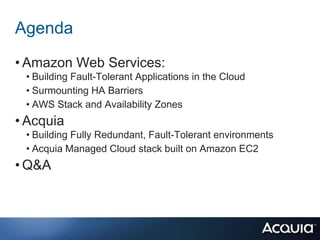
Agenda
• Amazon Web Services:
 • Building Fault-Tolerant Applications in the Cloud
 • Surmounting HA Barriers
 • AWS Stack and Availability Zones
• Acquia
 • Building Fully Redundant, Fault-Tolerant environments
 • Acquia Managed Cloud stack built on Amazon EC2
• Q&A
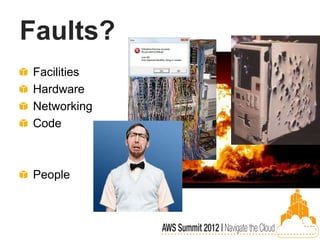
Faults?
Facilities
Hardware
Networking
Code


People
What is “Fault-Tolerant”?
Degrees of risk mitigation - not
binary


Automated

Tested!
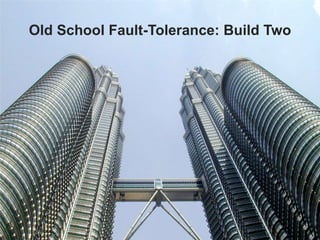
Old School Fault-Tolerance: Build Two
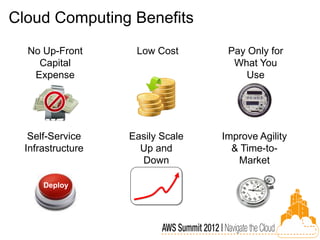
Cloud Computing Benefits
  No Up-Front       Low Cost       Pay Only for
    Capital                         What You
   Expense                            Use


   Self-Service    Easily Scale   Improve Agility
  Infrastructure     Up and         & Time-to-
                     Down            Market

      Deploy
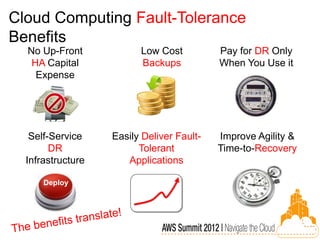
Cloud Computing Fault-Tolerance
Benefits
  No Up-Front            Low Cost          Pay for DR Only
   HA Capital            Backups           When You Use it
    Expense


   Self-Service    Easily Deliver Fault-   Improve Agility &
        DR               Tolerant          Time-to-Recovery
  Infrastructure      Applications

      Deploy
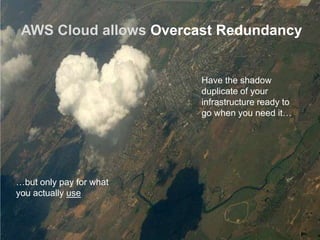
AWS Cloud allows Overcast Redundancy


                         Have the shadow
                         duplicate of your
                         infrastructure ready to
                         go when you need it…


…but only pay for what
you actually use
Old Barriers to HA
are now Surmountable


  Cost

  Complexity

  Expertise
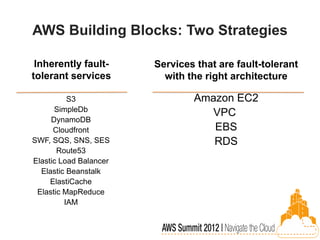
AWS Building Blocks: Two Strategies

 Inherently fault-      Services that are fault-tolerant
tolerant services         with the right architecture

          S3                    Amazon EC2
      SimpleDb
                                   VPC
     DynamoDB
      Cloudfront                   EBS
SWF, SQS, SNS, SES                 RDS
       Route53
Elastic Load Balancer
  Elastic Beanstalk
     ElastiCache
 Elastic MapReduce
         IAM
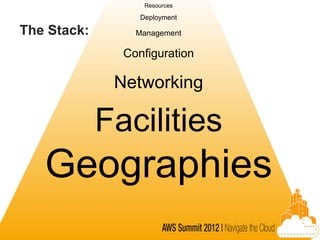
Resources

                  Deployment

The Stack:       Management

               Configuration

              Networking

             Facilities
   Geographies
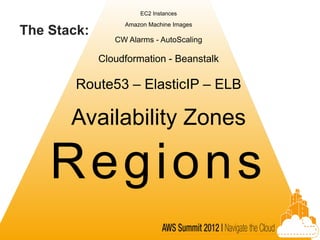
EC2 Instances
                  Amazon Machine Images
The Stack:
                CW Alarms - AutoScaling

             Cloudformation - Beanstalk

        Route53 – ElasticIP – ELB

       Availability Zones

    Regio n s
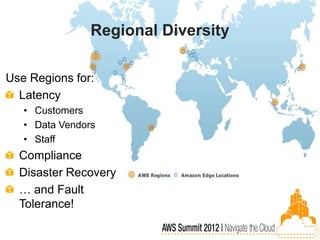
Regional Diversity

Use Regions for:
  Latency
   • Customers
   • Data Vendors
   • Staff
  Compliance
  Disaster Recovery
  … and Fault
  Tolerance!
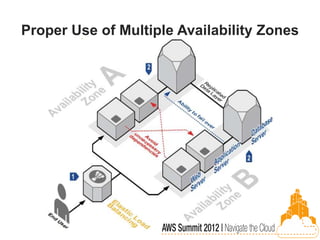
Proper Use of Multiple Availability Zones
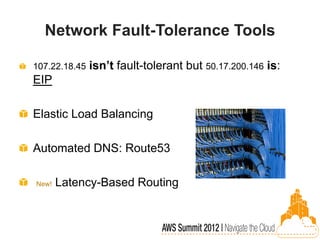
Network Fault-Tolerance Tools

107.22.18.45   isn’t fault-tolerant but 50.17.200.146 is:
EIP

Elastic Load Balancing

Automated DNS: Route53

New!   Latency-Based Routing
Cloudformation – Elastic Beanstalk


  Q: Is your stack unique?
Cloudwatch – Alarms – AutoScaling
AMI’s

Maintenance is critical

Alternatives: Chef, Puppet, cfn-init, etc.

New!   When in doubt: 64-bit

Replicate for DR
EC2 Instances

Consistent, reliable building block

100% API controlled

Reserved Instances

EBS

Immense Fleet Scale
New EC2 VPC feature:
Elastic Network Interface


      Up to 2 Addresses
      Span Subnets
      Attach/Detach
      Public or Private
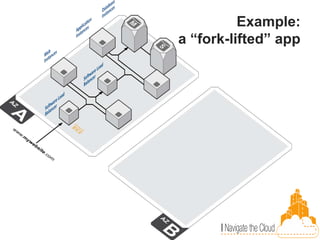
Example:
a “fork-lifted” app
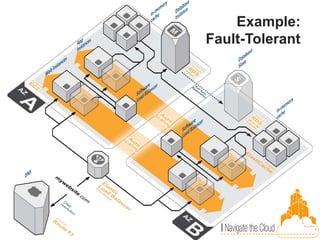
Example:
Fault-Tolerant
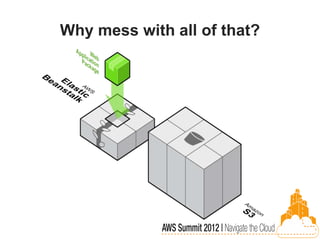
Why mess with all of that?
Acquia
High Availability for Drupal Sites
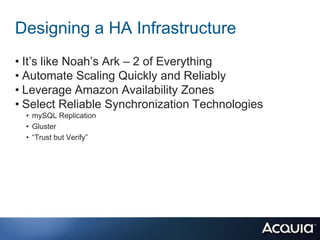
Designing a HA Infrastructure
• It’s like Noah’s Ark – 2 of Everything
• Automate Scaling Quickly and Reliably
• Leverage Amazon Availability Zones
• Select Reliable Synchronization Technologies
  • mySQL Replication
  • Gluster
  • “Trust but Verify”
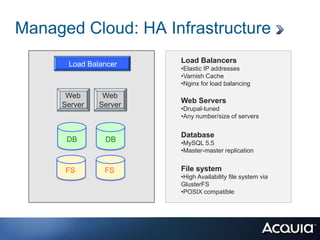
Managed Cloud: HA Infrastructure
      Load Balancer    Load Balancers
                       •Elastic IP addresses
                       •Varnish Cache
                       •Nginx for load balancing
      Web      Web
                       Web Servers
     Server   Server
                       •Drupal-tuned
                       •Any number/size of servers


                       Database
      DB       DB      •MySQL 5.5
                       •Master-master replication


      FS       FS      File system
                       •High Availability file system via
                       GlusterFS
                       •POSIX compatible
If Availability is Your Lifeblood –
Consider Multi-Region Failover
• Run Your Site From at Least Two AWS Regions
• Use an Enterprise-class Database Replication
  Technology – Tungsten from Continuent
• Implement a Content Distribution Network (CDN)
  • Durability
  • Manageability
  • Security
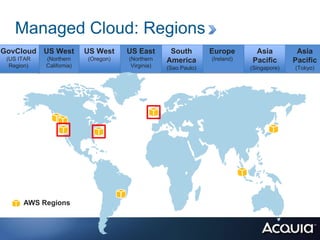
Managed Cloud: Regions
GovCloud US West          US West    US East       South        Europe       Asia          Asia
 (US ITAR   (Northern     (Oregon)   (Northern    America       (Ireland)   Pacific       Pacific
  Region)   California)               Virginia)   (Sao Paulo)               (Singapore)   (Tokyo)


      AWS Regions
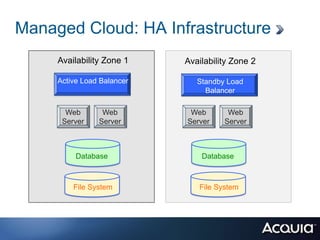
Managed Cloud: HA Infrastructure
     Availability Zone 1    Availability Zone 2

          Load Balancer
     Active Load Balancer      Standby Load
                                 Balancer

       Web       Web         Web       Web
      Server    Server      Server    Server


          Database              Database


         File System           File System
Nothing is Irreplaceable
• All Components of the Platform Can Tolerate Failure
• Create Failures – Netflix’s “Chaos Monkey”
• General Best Practices:
  • Disaster recovery
  • Replication
  • Backups
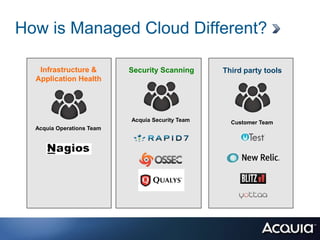
How is Managed Cloud Different?

   Infrastructure &        Security Scanning      Third party tools
  Application Health


                           Acquia Security Team     Customer Team
  Acquia Operations Team
Worry free, Enterprise-class Drupal hosting


www.acquia.com/products-services/acquia-managed-cloud
Questions
• For more information visit:
   http://www.acquia.com
• Contact us: sales@acquia.com or 888.9.ACQUIA
• Follow us: @acquia

• Comments welcome:
• Jess.iandiorio@Acquia.com
• John.Okeefe@Acquia.com
• miward@amazon.com

       Today’s webinar recording will be posted to:
  http://acquia.com/resources/recorded_webinars

Running High Availability Websites with Acquia and AWS

  • 2.
    Running High AvailabilityDrupal Websites with Acquia and AWS Miles Ward John O’Keefe Sr. Solutions Architect Sr. Director , Operations Amazon Web Services Acquia Jess Iandiorio Sr. Director, Cloud Product Marketing Acquia
  • 3.
    Agenda • Amazon WebServices: • Building Fault-Tolerant Applications in the Cloud • Surmounting HA Barriers • AWS Stack and Availability Zones • Acquia • Building Fully Redundant, Fault-Tolerant environments • Acquia Managed Cloud stack built on Amazon EC2 • Q&A
  • 4.
  • 5.
    What is “Fault-Tolerant”? Degreesof risk mitigation - not binary Automated Tested!
  • 6.
  • 7.
    Cloud Computing Benefits No Up-Front Low Cost Pay Only for Capital What You Expense Use Self-Service Easily Scale Improve Agility Infrastructure Up and & Time-to- Down Market Deploy
  • 8.
    Cloud Computing Fault-Tolerance Benefits No Up-Front Low Cost Pay for DR Only HA Capital Backups When You Use it Expense Self-Service Easily Deliver Fault- Improve Agility & DR Tolerant Time-to-Recovery Infrastructure Applications Deploy
  • 9.
    AWS Cloud allowsOvercast Redundancy Have the shadow duplicate of your infrastructure ready to go when you need it… …but only pay for what you actually use
  • 10.
    Old Barriers toHA are now Surmountable Cost Complexity Expertise
  • 11.
    AWS Building Blocks:Two Strategies Inherently fault- Services that are fault-tolerant tolerant services with the right architecture S3 Amazon EC2 SimpleDb VPC DynamoDB Cloudfront EBS SWF, SQS, SNS, SES RDS Route53 Elastic Load Balancer Elastic Beanstalk ElastiCache Elastic MapReduce IAM
  • 12.
    Resources Deployment The Stack: Management Configuration Networking Facilities Geographies
  • 13.
    EC2 Instances Amazon Machine Images The Stack: CW Alarms - AutoScaling Cloudformation - Beanstalk Route53 – ElasticIP – ELB Availability Zones Regio n s
  • 14.
    Regional Diversity Use Regionsfor: Latency • Customers • Data Vendors • Staff Compliance Disaster Recovery … and Fault Tolerance!
  • 15.
    Proper Use ofMultiple Availability Zones
  • 16.
    Network Fault-Tolerance Tools 107.22.18.45 isn’t fault-tolerant but 50.17.200.146 is: EIP Elastic Load Balancing Automated DNS: Route53 New! Latency-Based Routing
  • 17.
    Cloudformation – ElasticBeanstalk Q: Is your stack unique?
  • 18.
    Cloudwatch – Alarms– AutoScaling
  • 19.
    AMI’s Maintenance is critical Alternatives:Chef, Puppet, cfn-init, etc. New! When in doubt: 64-bit Replicate for DR
  • 20.
    EC2 Instances Consistent, reliablebuilding block 100% API controlled Reserved Instances EBS Immense Fleet Scale
  • 21.
    New EC2 VPCfeature: Elastic Network Interface Up to 2 Addresses Span Subnets Attach/Detach Public or Private
  • 22.
  • 23.
  • 24.
    Why mess withall of that?
  • 25.
  • 26.
    Designing a HAInfrastructure • It’s like Noah’s Ark – 2 of Everything • Automate Scaling Quickly and Reliably • Leverage Amazon Availability Zones • Select Reliable Synchronization Technologies • mySQL Replication • Gluster • “Trust but Verify”
  • 27.
    Managed Cloud: HAInfrastructure Load Balancer Load Balancers •Elastic IP addresses •Varnish Cache •Nginx for load balancing Web Web Web Servers Server Server •Drupal-tuned •Any number/size of servers Database DB DB •MySQL 5.5 •Master-master replication FS FS File system •High Availability file system via GlusterFS •POSIX compatible
  • 28.
    If Availability isYour Lifeblood – Consider Multi-Region Failover • Run Your Site From at Least Two AWS Regions • Use an Enterprise-class Database Replication Technology – Tungsten from Continuent • Implement a Content Distribution Network (CDN) • Durability • Manageability • Security
  • 29.
    Managed Cloud: Regions GovCloudUS West US West US East South Europe Asia Asia (US ITAR (Northern (Oregon) (Northern America (Ireland) Pacific Pacific Region) California) Virginia) (Sao Paulo) (Singapore) (Tokyo) AWS Regions
  • 30.
    Managed Cloud: HAInfrastructure Availability Zone 1 Availability Zone 2 Load Balancer Active Load Balancer Standby Load Balancer Web Web Web Web Server Server Server Server Database Database File System File System
  • 31.
    Nothing is Irreplaceable •All Components of the Platform Can Tolerate Failure • Create Failures – Netflix’s “Chaos Monkey” • General Best Practices: • Disaster recovery • Replication • Backups
  • 32.
    How is ManagedCloud Different? Infrastructure & Security Scanning Third party tools Application Health Acquia Security Team Customer Team Acquia Operations Team
  • 33.
    Worry free, Enterprise-classDrupal hosting www.acquia.com/products-services/acquia-managed-cloud
  • 34.
    Questions • For moreinformation visit: http://www.acquia.com • Contact us: sales@acquia.com or 888.9.ACQUIA • Follow us: @acquia • Comments welcome: • Jess.iandiorio@Acquia.com • John.Okeefe@Acquia.com • miward@amazon.com Today’s webinar recording will be posted to: http://acquia.com/resources/recorded_webinars

Editor's Notes

  • #2 In this video we’ll take a look at Managed Cloud – Acquia’s Drupal tuned Platform-as-a-Service.
  • #8 Cloud computing is a better way to run your business. The cloud helps companies of all sizesbecome moreagile. Instead of running your applications yourself you can run them on the cloud where IT infrastructure is offered as a service like a utility. With the cloud, your company saves money: there are no up-front capital expenses as you don’t have to buy hardware for your projects. The massive scale and fast pace of innovation of the cloud drive the costs down for you. In the cloud, you pay only for what you use just like electricity.The cloud can also help your company save time and improve agility – it’s faster to get started: you can build new environments in minutes as you don’t need to wait for new servers to arrive. The elastic nature of the cloud makes it easy to scale up and down as needed. At the end of the day you have more resources left for innovation which allows you to focus on projects that can really impact your businesses like building and deploying more applications. “With the high growth nature of our business, we were looking for a cloud solution to enable us to scale fast. Think twice before buying your next server. Cloud computing is the way forward.” - Sami Lababidi, CTO, Playfish
  • #10 AWS is useful for low-end traditional DR to high-end HA, but…AWS encourages a rethinking of traditional DR / HA practicesEverything in the cloud is “off-site” and (potentially) “multi-site”Using multiple sites (multiple AZs) comes largely for freeUsing multiple geographically-distributed sites (multiple Regions) is significantly cheaper and easierTends to move the default design point away from “cold” Disaster Recovery toward “hot” High AvailabilityMakes it easier to stack multiple mechanismse.g., Basic HA within one Region, DR site in second Region
  • #13 Each item a
  • #14 Each item a
  • #15 Fault Separation Amazon EC2 provides customers the flexibility to place instances within multiple geographic regions as well as across multiple Availability Zones. Each Availability Zone is designed with fault separation. This means that Availability Zones are physically separated within a typical metropolitan region, on different flood plains, in seismically stable areas. In addition to discrete uninterruptable power source (UPS) and onsite backup generation facilities, they are each fed via different grids from independent utilities to further reduce single points of failure. They are all redundantly connected to multiple tier-1 transit providers. It should be noted that although traffic flowing across the private networks between Availability Zones in a single region is on AWS-controlled infrastructure, all communications between regions is across public Internet infrastructure, so appropriate encryption methods should be used to protect sensitive data. Data are not replicated between regions unless proactively done so by the customer.
  • #16 Distinct physical locationsLow-latency network connections between AzsIndependent power, cooling, network, securityAlways partition app stacks across 2 or more AzsElastic Load Balance across instances in multiple AzsDon’t confuse AZ’s with Regions!
  • #18 Note, the question is not “do you need to automate your deployment” or “should I use automation when I’m using the cloud?” the answer to that is YES!The question is; if you’re using fully standard PHP or Java stacks, why manage it? Beanstalk does that great, with zero lock-in. If what you need is more complex, perhaps cloudformation (note, you can do BOTH!)
  • #23 Three-Tier Web App has been “fork-lifted” to the cloudEverything in a single Availability ZoneLoad balanced at the Web tier and App tier using software load balancersMaster and Standby databaseElastic IP on front end load balancer onlyS3 used as DB backup instead of tapeHow can you use AWS features to make this app more highly available?
  • #24 Three-Tier Web App has been “fork-lifted” to the cloudEverything in a single Availability ZoneLoad balanced at the Web tier and App tier using software load balancersMaster and Standby databaseElastic IP on front end load balancer onlyS3 used as DB backup instead of tapeHow can you use AWS features to make this app more highly available?
  • #32 Chaos Monkey link: http://techblog.netflix.com/2010/12/5-lessons-weve-learned-using-aws.html