IT Disaster Recovery
for Medical Practices
High Level Overview
November, 2010
3-131 www.keystone-it.com
Agenda
•  Business Continuity, DR and Data Backup
•  HIPAA Regulatory Concerns
•  Scenario: “Your Worst Nightmare”
•  Disaster Recovery Planning
•  Business Costs of Data
•  The Recommended Solution
•  Factors to Consider
3-132 www.keystone-it.com
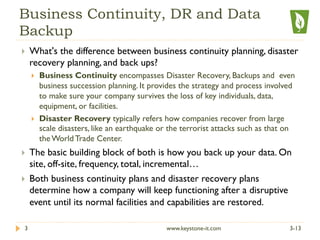
Business Continuity, DR and Data
Backup
}  What's the difference between business continuity planning, disaster
recovery planning, and back ups?
}  Business Continuity encompasses Disaster Recovery, Backups and even
business succession planning. It provides the strategy and process involved
to make sure your company survives the loss of key individuals, data,
equipment, or facilities.
}  Disaster Recovery typically refers how companies recover from large
scale disasters, like an earthquake or the terrorist attacks such as that on
the World Trade Center.
}  The basic building block of both is how you back up your data. On
site, off-site, frequency, total, incremental…
}  Both business continuity plans and disaster recovery plans
determine how a company will keep functioning after a disruptive
event until its normal facilities and capabilities are restored.
3-133 www.keystone-it.com
Regulatory Concerns
}  HIPAA Privacy Rule – General guidelines relative to
Protected Health Information (PHI)
}  HIPAA Security Rule – Specifically regarding electronic
PHI (ePHI)
}  Two considerations:
}  General Access
}  Emergency Access
3-134 www.keystone-it.com
HIPAA Security Rule
General Access:
}  The Security Rule defines General Access in §164.304 as:
}  “the ability or the means necessary to read, write, modify, or communicate
data/information or otherwise use any system resource.”
3-135 www.keystone-it.com
HIPAA Security Rule
Emergency Access:
}  The Security Rule defines the Emergency Access Procedure in
§164.312.
}  This specification requires a covered entity to:
}  “…establish procedures for obtaining necessary electronic
protected health information during an emergency….”
}  Procedures must be established beforehand to instruct
workforce members on possible ways to gain access to
needed ePHI in a situation in which normal environmental
systems, such as electrical power, have been severely
damaged or rendered inoperative due to a natural or
manmade disaster.”
3-136 www.keystone-it.com
This means….
YOU MUST HAVE A DISASTER RECOVERY PLAN!
3/21/13www.keystone-it.com7
By the Numbers
}  93% of companies that lost their data for 10 days or more
filed for bankruptcy within one year of the disaster, and
50% filed for bankruptcy immediately. (Source: National
Archives & Records Administration in Washington.)
}  20% of small to medium businesses will suffer a major
disaster causing loss of critical data every 5 years.
(Source: Richmond House Group)
}  This year, 40% of small to medium businesses that manage
their own network and use the Internet for more than e-
mail will have their network accessed by a hacker, and
more than 50% won’t even know they were attacked.
(Source: Gartner Group)
3-138 www.keystone-it.com
By the Numbers
}  About 70% of business people have experienced (or will
experience) data loss due to accidental deletion, disk or
system failure, viruses, fire or some other disaster
(Source: Carbonite, an online backup service)
3-139 www.keystone-it.com
Close Your Eyes……
A case for change
3-1310 www.keystone-it.com
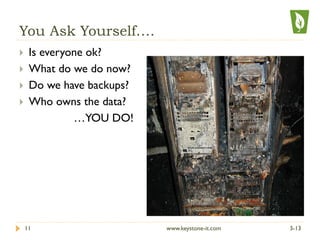
You Ask Yourself….
}  Is everyone ok?
}  What do we do now?
}  Do we have backups?
}  Who owns the data?
…YOU DO!
3-1311 www.keystone-it.com
Disaster Recovery Plan
}  Create a Disaster Recovery Plan NOW!
}  Document step by step recovery procedures necessary for you
to completely rebuild infrastructure and restore data
}  Include personal contact information on all stakeholders,
vendors, contractors, and personnel
}  Test the plan…
}  Rehearse
}  Run test data restores
}  Time yourself...
}  Disseminate the DRP
}  Make several copies
}  Store off-site
3-1312 www.keystone-it.com
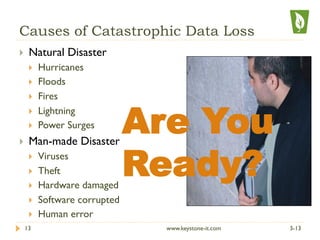
Causes of Catastrophic Data Loss
}  Natural Disaster
}  Hurricanes
}  Floods
}  Fires
}  Lightning
}  Power Surges
}  Man-made Disaster
}  Viruses
}  Theft
}  Hardware damaged
}  Software corrupted
}  Human error
Are You
Ready?
3-1313 www.keystone-it.com
Are You Ready? Little Sioux Scout Ranch, Iowa
3-1314 www.keystone-it.com
Are You Ready? New Orleans
3-1315 www.keystone-it.com
Are You Ready?
3-1316 www.keystone-it.com
Business Costs of Data
} The value of data varies significantly among industries, the size of the
company and even by an application within the same firm. The lost business
opportunity due to a website outage for a small law firm may be
inconsequential. The cost to a company such as Amazon, American Express,
eBay orVisa may be on the order of several million dollars per hour.
} To determine the value of data, answer the following questions:
} What are the costs for lost data per hour for the applications that are being
protected?
} What are the costs for delayed processing (data not lost, although application isn't
running for some time) on a per hour basis?
3-1317 www.keystone-it.com
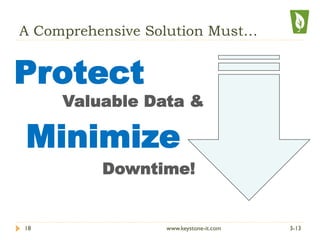
A Comprehensive Solution Must…
Valuable Data &
Minimize
Downtime!
Protect
3-1318 www.keystone-it.com
BDR – The Recommended Solution
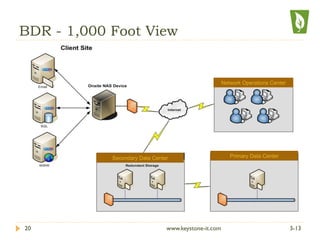
BDR = Backup & Disaster Recovery Server
3-1319 www.keystone-it.com
BDR - 1,000 Foot View
Network Operations Center
Secondary Data Center Primary Data Center
3-1320 www.keystone-it.com
BDR Solution Details
}  On-site and Off-site Backups
}  No hardware investment – Service based
}  HAAS: Hardware As A Service
}  A Microsoft Windows Server-only solution
}  A BDR is required at each location where servers exist
}  Block Level Backups vs. File-level
}  Incremental Forever Methodology - near real-time
backup (every 15 minutes)
}  Security: 256 AES Encryption on NAS and off-site
}  HIPAA Compliant
3-1321 www.keystone-it.com
State-of-the-Art Technology
}  Standby server - NAS speedily converts to a
virtual server and business continues within
minutes
}  Allows for seamless, daily off-site, HIPAA-compliant
storage
}  Data stored at multiple highly available, highly secure
Data Centers
}  Easy web-based restoration of files
}  BDR provides capability to perform bare metal
restores to dissimilar hardware
3-1322 www.keystone-it.com
Restoration and Virtualization
}  Restore MS-SQL databases, individual files, file folders,
email messages, and Exchange mailboxes
}  In the event of catastrophe (such as a natural disaster
or fire), a new NAS will be imaged at our collocation
facility and sent shipped overnight.
}  For HIPAA compliance, data will never be hosted,
only stored at a collocation facility. It is encrypted
without the encryption key; it won’t be accessible by
3rd parties.
3-1323 www.keystone-it.com
Factors to Consider
}  A viable solution should cover all the computing
platforms in the business that it is being utilized.
}  Off-site and on-site backups should occur at regular
intervals to meet individual clients’ needs.
}  Backups should occur rapidly and seamlessly to avoid
interfering with server performance while the backup
process is being executed.
3-1324 www.keystone-it.com
Factors to Consider
}  For best results, off-site backup should be provided at
a hardened, secure data center, and that has a high
level of physical security in place along with internet
and power redundancy
}  Data should be secure on-site as well as off-site by
using a high level of encryption per regulatory
guidelines for PHI.
}  The encryption key should be kept in a secure
location (such as the DRP document) either by the
end-client themselves, or their respective solution
provider
3-1325 www.keystone-it.com
Factors to Consider
}  It’s important to know the recovery time frame following
a server crash or catastrophe.The procedure for
rebounding must not be complex, but rather, comprised
of a few simple, straight-forward steps recorded in a DRP
document.
}  Ensure that there are no hidden fees — the cost to
maintain and manage the solution on a weekly, monthly,
and annual basis — plus any labor expenditures — should
be taken into consideration before signing a deal.
}  Are you being provided with coverage 24 hours per day,
365 days per year?
3-1326 www.keystone-it.com
Questions?
3-1327 www.keystone-it.com
info@keystone-it.com

Disaster Recovery Planning

  • 1.
    IT Disaster Recovery forMedical Practices High Level Overview November, 2010 3-131 www.keystone-it.com
  • 2.
    Agenda •  Business Continuity,DR and Data Backup •  HIPAA Regulatory Concerns •  Scenario: “Your Worst Nightmare” •  Disaster Recovery Planning •  Business Costs of Data •  The Recommended Solution •  Factors to Consider 3-132 www.keystone-it.com
  • 3.
    Business Continuity, DRand Data Backup }  What's the difference between business continuity planning, disaster recovery planning, and back ups? }  Business Continuity encompasses Disaster Recovery, Backups and even business succession planning. It provides the strategy and process involved to make sure your company survives the loss of key individuals, data, equipment, or facilities. }  Disaster Recovery typically refers how companies recover from large scale disasters, like an earthquake or the terrorist attacks such as that on the World Trade Center. }  The basic building block of both is how you back up your data. On site, off-site, frequency, total, incremental… }  Both business continuity plans and disaster recovery plans determine how a company will keep functioning after a disruptive event until its normal facilities and capabilities are restored. 3-133 www.keystone-it.com
  • 4.
    Regulatory Concerns }  HIPAAPrivacy Rule – General guidelines relative to Protected Health Information (PHI) }  HIPAA Security Rule – Specifically regarding electronic PHI (ePHI) }  Two considerations: }  General Access }  Emergency Access 3-134 www.keystone-it.com
  • 5.
    HIPAA Security Rule GeneralAccess: }  The Security Rule defines General Access in §164.304 as: }  “the ability or the means necessary to read, write, modify, or communicate data/information or otherwise use any system resource.” 3-135 www.keystone-it.com
  • 6.
    HIPAA Security Rule EmergencyAccess: }  The Security Rule defines the Emergency Access Procedure in §164.312. }  This specification requires a covered entity to: }  “…establish procedures for obtaining necessary electronic protected health information during an emergency….” }  Procedures must be established beforehand to instruct workforce members on possible ways to gain access to needed ePHI in a situation in which normal environmental systems, such as electrical power, have been severely damaged or rendered inoperative due to a natural or manmade disaster.” 3-136 www.keystone-it.com
  • 7.
    This means…. YOU MUSTHAVE A DISASTER RECOVERY PLAN! 3/21/13www.keystone-it.com7
  • 8.
    By the Numbers } 93% of companies that lost their data for 10 days or more filed for bankruptcy within one year of the disaster, and 50% filed for bankruptcy immediately. (Source: National Archives & Records Administration in Washington.) }  20% of small to medium businesses will suffer a major disaster causing loss of critical data every 5 years. (Source: Richmond House Group) }  This year, 40% of small to medium businesses that manage their own network and use the Internet for more than e- mail will have their network accessed by a hacker, and more than 50% won’t even know they were attacked. (Source: Gartner Group) 3-138 www.keystone-it.com
  • 9.
    By the Numbers } About 70% of business people have experienced (or will experience) data loss due to accidental deletion, disk or system failure, viruses, fire or some other disaster (Source: Carbonite, an online backup service) 3-139 www.keystone-it.com
  • 10.
    Close Your Eyes…… Acase for change 3-1310 www.keystone-it.com
  • 11.
    You Ask Yourself…. } Is everyone ok? }  What do we do now? }  Do we have backups? }  Who owns the data? …YOU DO! 3-1311 www.keystone-it.com
  • 12.
    Disaster Recovery Plan } Create a Disaster Recovery Plan NOW! }  Document step by step recovery procedures necessary for you to completely rebuild infrastructure and restore data }  Include personal contact information on all stakeholders, vendors, contractors, and personnel }  Test the plan… }  Rehearse }  Run test data restores }  Time yourself... }  Disseminate the DRP }  Make several copies }  Store off-site 3-1312 www.keystone-it.com
  • 13.
    Causes of CatastrophicData Loss }  Natural Disaster }  Hurricanes }  Floods }  Fires }  Lightning }  Power Surges }  Man-made Disaster }  Viruses }  Theft }  Hardware damaged }  Software corrupted }  Human error Are You Ready? 3-1313 www.keystone-it.com
  • 14.
    Are You Ready?Little Sioux Scout Ranch, Iowa 3-1314 www.keystone-it.com
  • 15.
    Are You Ready?New Orleans 3-1315 www.keystone-it.com
  • 16.
    Are You Ready? 3-1316www.keystone-it.com
  • 17.
    Business Costs ofData } The value of data varies significantly among industries, the size of the company and even by an application within the same firm. The lost business opportunity due to a website outage for a small law firm may be inconsequential. The cost to a company such as Amazon, American Express, eBay orVisa may be on the order of several million dollars per hour. } To determine the value of data, answer the following questions: } What are the costs for lost data per hour for the applications that are being protected? } What are the costs for delayed processing (data not lost, although application isn't running for some time) on a per hour basis? 3-1317 www.keystone-it.com
  • 18.
    A Comprehensive SolutionMust… Valuable Data & Minimize Downtime! Protect 3-1318 www.keystone-it.com
  • 19.
    BDR – TheRecommended Solution BDR = Backup & Disaster Recovery Server 3-1319 www.keystone-it.com
  • 20.
    BDR - 1,000Foot View Network Operations Center Secondary Data Center Primary Data Center 3-1320 www.keystone-it.com
  • 21.
    BDR Solution Details } On-site and Off-site Backups }  No hardware investment – Service based }  HAAS: Hardware As A Service }  A Microsoft Windows Server-only solution }  A BDR is required at each location where servers exist }  Block Level Backups vs. File-level }  Incremental Forever Methodology - near real-time backup (every 15 minutes) }  Security: 256 AES Encryption on NAS and off-site }  HIPAA Compliant 3-1321 www.keystone-it.com
  • 22.
    State-of-the-Art Technology }  Standbyserver - NAS speedily converts to a virtual server and business continues within minutes }  Allows for seamless, daily off-site, HIPAA-compliant storage }  Data stored at multiple highly available, highly secure Data Centers }  Easy web-based restoration of files }  BDR provides capability to perform bare metal restores to dissimilar hardware 3-1322 www.keystone-it.com
  • 23.
    Restoration and Virtualization } Restore MS-SQL databases, individual files, file folders, email messages, and Exchange mailboxes }  In the event of catastrophe (such as a natural disaster or fire), a new NAS will be imaged at our collocation facility and sent shipped overnight. }  For HIPAA compliance, data will never be hosted, only stored at a collocation facility. It is encrypted without the encryption key; it won’t be accessible by 3rd parties. 3-1323 www.keystone-it.com
  • 24.
    Factors to Consider } A viable solution should cover all the computing platforms in the business that it is being utilized. }  Off-site and on-site backups should occur at regular intervals to meet individual clients’ needs. }  Backups should occur rapidly and seamlessly to avoid interfering with server performance while the backup process is being executed. 3-1324 www.keystone-it.com
  • 25.
    Factors to Consider } For best results, off-site backup should be provided at a hardened, secure data center, and that has a high level of physical security in place along with internet and power redundancy }  Data should be secure on-site as well as off-site by using a high level of encryption per regulatory guidelines for PHI. }  The encryption key should be kept in a secure location (such as the DRP document) either by the end-client themselves, or their respective solution provider 3-1325 www.keystone-it.com
  • 26.
    Factors to Consider } It’s important to know the recovery time frame following a server crash or catastrophe.The procedure for rebounding must not be complex, but rather, comprised of a few simple, straight-forward steps recorded in a DRP document. }  Ensure that there are no hidden fees — the cost to maintain and manage the solution on a weekly, monthly, and annual basis — plus any labor expenditures — should be taken into consideration before signing a deal. }  Are you being provided with coverage 24 hours per day, 365 days per year? 3-1326 www.keystone-it.com
  • 27.