

Disaster Recovery
Business & Technology
Varrow Madness
March 20, 2014
Andrew Miller
Managing Systems Architect
vExpert, VCP 3/4/5, EMC Unified/Symmetrix TA
t: @andriven w: www.thinkmeta.net
• If tweeting, include #VM14 hashtag.
• Feel free to send me commentary at @andriven
• Hours of stuff packed in hour so…
• No shame about content source.
Housekeeping
1. One Big Reason
2. Business Discussion
3. Technology Overview
• Who is this guy?
Agenda
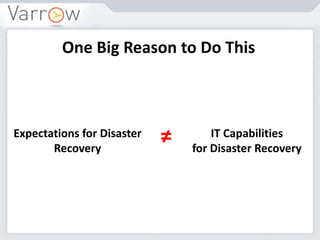
One Big Reason to Do This
Expectations for Disaster
Recovery
IT Capabilities
for Disaster Recovery
≠
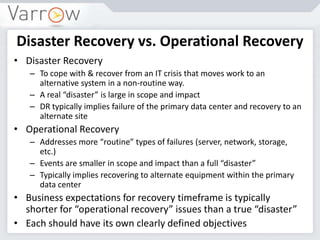
What is a Disaster?
• Disaster: An event that affects a service or system such
that significant effort is required to restore the original
performance level.
Âť IT Service Management Forum
 But what does that look like IN
OUR ENVIRONMENT?
 What disaster and recovery
scenarios should we plan for?
 Where do we begin?
 How do we do it?
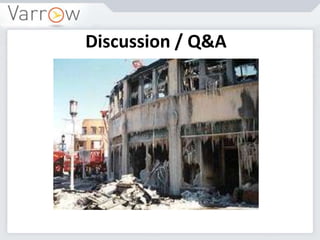
Example of a Disaster
Disaster Recovery vs. Operational Recovery
• Disaster Recovery
– To cope with & recover from an IT crisis that moves work to an
alternative system in a non-routine way.
– A real “disaster” is large in scope and impact
– DR typically implies failure of the primary data center and recovery to an
alternate site
• Operational Recovery
– Addresses more “routine” types of failures (server, network, storage,
etc.)
– Events are smaller in scope and impact than a full “disaster”
– Typically implies recovering to alternate equipment within the primary
data center
• Business expectations for recovery timeframe is typically
shorter for “operational recovery” issues than a true “disaster”
• Each should have its own clearly defined objectives
Risks, Threats and Vulnerabilities
Risk is a function of the likelihood of a given threat
acting upon a particular potential vulnerability,
and the resulting impact of that adverse event on
the organization.
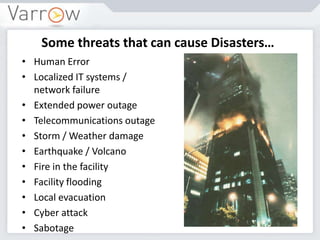
Some threats that can cause Disasters…
• Human Error
• Localized IT systems /
network failure
• Extended power outage
• Telecommunications outage
• Storm / Weather damage
• Earthquake / Volcano
• Fire in the facility
• Facility flooding
• Local evacuation
• Cyber attack
• Sabotage
(Varrow) Disaster Recovery Approach
• Interviews with key personnel to understand Business Process priorities
and establish Business Impact Analysis (BIA).
• Review existing IT production infrastructure, including applications,
servers, storage, network, and external connectivity. Identify Risks and
Gaps.
• Establish Disaster Impact Scenarios and Disaster Recovery strategies to
meet requirements.
• Recommend Roadmap for establishing recovery capabilities and
documenting plans.
• Implement required recovery capabilities.
• Develop framework and content for IT DR Plan.
• Develop maintenance and test procedures for IT DR Plan.
• Address Business Continuity requirements and planning as appropriate.
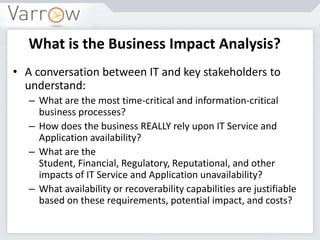
What is the Business Impact Analysis?
• A conversation between IT and key stakeholders to
understand:
– What are the most time-critical and information-critical
business processes?
– How does the business REALLY rely upon IT Service and
Application availability?
– What are the
Student, Financial, Regulatory, Reputational, and other
impacts of IT Service and Application unavailability?
– What availability or recoverability capabilities are justifiable
based on these requirements, potential impact, and costs?
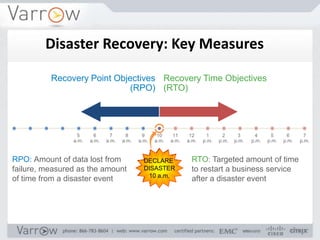
DECLARE
DISASTER
10 a.m.
Recovery Point Objectives
(RPO)
Recovery Time Objectives
(RTO)
RPO: Amount of data lost from
failure, measured as the amount
of time from a disaster event
RTO: Targeted amount of time
to restart a business service
after a disaster event
5
a.m.
6
a.m.
7
a.m.
8
a.m.
9
a.m.
10
a.m.
11
a.m.
12
a.m.
1
p.m.
2
p.m.
3
p.m.
4
p.m.
5
p.m.
6
p.m.
7
p.m.
Disaster Recovery: Key Measures
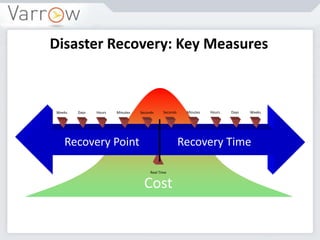
Cost
Disaster Recovery: Key Measures
Weeks Days Hours Minutes Seconds WeeksDaysHoursMinutesSeconds
Recovery Point Recovery Time
Real Time
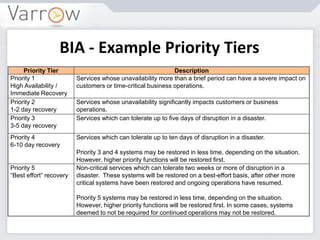
BIA - Example Priority Tiers
Priority Tier Description
Priority 1
High Availability /
Immediate Recovery
Services whose unavailability more than a brief period can have a severe impact on
customers or time-critical business operations.
Priority 2
1-2 day recovery
Services whose unavailability significantly impacts customers or business
operations.
Priority 3
3-5 day recovery
Services which can tolerate up to five days of disruption in a disaster.
Priority 4
6-10 day recovery
Services which can tolerate up to ten days of disruption in a disaster.
Priority 3 and 4 systems may be restored in less time, depending on the situation.
However, higher priority functions will be restored first.
Priority 5
“Best effort” recovery
Non-critical services which can tolerate two weeks or more of disruption in a
disaster. These systems will be restored on a best-effort basis, after other more
critical systems have been restored and ongoing operations have resumed.
Priority 5 systems may be restored in less time, depending on the situation.
However, higher priority functions will be restored first. In some cases, systems
deemed to not be required for continued operations may not be restored.
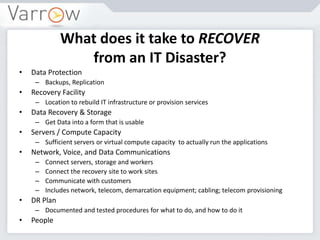
What does it take to RECOVER
from an IT Disaster?
• Data Protection
– Backups, Replication
• Recovery Facility
– Location to rebuild IT infrastructure or provision services
• Data Recovery & Storage
– Get Data into a form that is usable
• Servers / Compute Capacity
– Sufficient servers or virtual compute capacity to actually run the applications
• Network, Voice, and Data Communications
– Connect servers, storage and workers
– Connect the recovery site to work sites
– Communicate with customers
– Includes network, telecom, demarcation equipment; cabling; telecom provisioning
• DR Plan
– Documented and tested procedures for what to do, and how to do it
• People
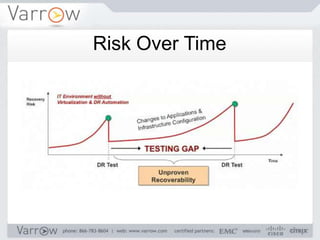
Risk Over Time
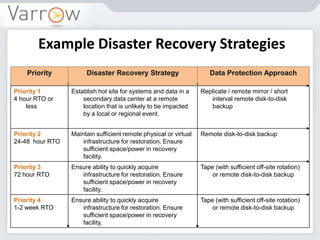
Example Disaster Recovery Strategies
Priority Disaster Recovery Strategy Data Protection Approach
Priority 1
4 hour RTO or
less
Establish hot site for systems and data in a
secondary data center at a remote
location that is unlikely to be impacted
by a local or regional event.
Replicate / remote mirror / short
interval remote disk-to-disk
backup
Priority 2
24-48 hour RTO
Maintain sufficient remote physical or virtual
infrastructure for restoration. Ensure
sufficient space/power in recovery
facility.
Remote disk-to-disk backup
Priority 3
72 hour RTO
Ensure ability to quickly acquire
infrastructure for restoration. Ensure
sufficient space/power in recovery
facility.
Tape (with sufficient off-site rotation)
or remote disk-to-disk backup
Priority 4
1-2 week RTO
Ensure ability to quickly acquire
infrastructure for restoration. Ensure
sufficient space/power in recovery
facility.
Tape (with sufficient off-site rotation)
or remote disk-to-disk backup
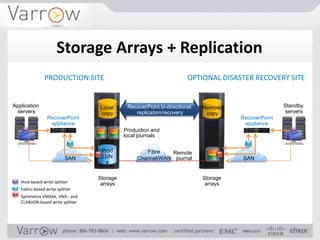
SAN
OPTIONAL DISASTER RECOVERY SITEPRODUCTION SITE
Prod
LUN
s
Fibre
Channel/WAN
Local
copy
Application
servers
SAN
RecoverPoint
appliance
RecoverPoint bi-directional
replication/recovery
Remote
copy
Standby
servers
RecoverPoint
appliance
Production and
local journals
Remote
journal
Storage
arrays
Storage
arraysHost-based write splitter
Fabric-based write splitter
Symmetrix VMAXe, VNX-, and
CLARiiON-based write splitter
Storage Arrays + Replication
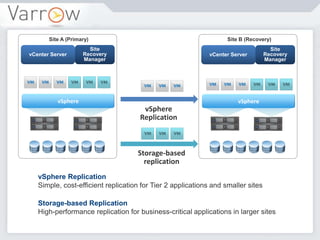
vSphere Replication
Simple, cost-efficient replication for Tier 2 applications and smaller sites
Storage-based Replication
High-performance replication for business-critical applications in larger sites
vCenter Server
Site
Recovery
Manager
vSphere
vCenter Server
Site
Recovery
Manager
vSphere
vSphere
Replication
Storage-based
replication
Site A (Primary) Site B (Recovery)
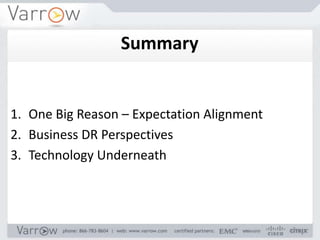
1. One Big Reason – Expectation Alignment
2. Business DR Perspectives
3. Technology Underneath
Summary
Discussion / Q&A
Thank you.

Varrow Madness 2014 DR Presentation

  • 1.
    Disaster Recovery Business &Technology Varrow Madness March 20, 2014 Andrew Miller Managing Systems Architect vExpert, VCP 3/4/5, EMC Unified/Symmetrix TA t: @andriven w: www.thinkmeta.net
  • 2.
    • If tweeting,include #VM14 hashtag. • Feel free to send me commentary at @andriven • Hours of stuff packed in hour so… • No shame about content source. Housekeeping
  • 3.
    1. One BigReason 2. Business Discussion 3. Technology Overview • Who is this guy? Agenda
  • 4.
    One Big Reasonto Do This Expectations for Disaster Recovery IT Capabilities for Disaster Recovery ≠
  • 5.
    What is aDisaster? • Disaster: An event that affects a service or system such that significant effort is required to restore the original performance level. » IT Service Management Forum  But what does that look like IN OUR ENVIRONMENT?  What disaster and recovery scenarios should we plan for?  Where do we begin?  How do we do it?
  • 6.
    Example of aDisaster
  • 7.
    Disaster Recovery vs.Operational Recovery • Disaster Recovery – To cope with & recover from an IT crisis that moves work to an alternative system in a non-routine way. – A real “disaster” is large in scope and impact – DR typically implies failure of the primary data center and recovery to an alternate site • Operational Recovery – Addresses more “routine” types of failures (server, network, storage, etc.) – Events are smaller in scope and impact than a full “disaster” – Typically implies recovering to alternate equipment within the primary data center • Business expectations for recovery timeframe is typically shorter for “operational recovery” issues than a true “disaster” • Each should have its own clearly defined objectives
  • 8.
    Risks, Threats andVulnerabilities Risk is a function of the likelihood of a given threat acting upon a particular potential vulnerability, and the resulting impact of that adverse event on the organization.
  • 9.
    Some threats thatcan cause Disasters… • Human Error • Localized IT systems / network failure • Extended power outage • Telecommunications outage • Storm / Weather damage • Earthquake / Volcano • Fire in the facility • Facility flooding • Local evacuation • Cyber attack • Sabotage
  • 10.
    (Varrow) Disaster RecoveryApproach • Interviews with key personnel to understand Business Process priorities and establish Business Impact Analysis (BIA). • Review existing IT production infrastructure, including applications, servers, storage, network, and external connectivity. Identify Risks and Gaps. • Establish Disaster Impact Scenarios and Disaster Recovery strategies to meet requirements. • Recommend Roadmap for establishing recovery capabilities and documenting plans. • Implement required recovery capabilities. • Develop framework and content for IT DR Plan. • Develop maintenance and test procedures for IT DR Plan. • Address Business Continuity requirements and planning as appropriate.
  • 11.
    What is theBusiness Impact Analysis? • A conversation between IT and key stakeholders to understand: – What are the most time-critical and information-critical business processes? – How does the business REALLY rely upon IT Service and Application availability? – What are the Student, Financial, Regulatory, Reputational, and other impacts of IT Service and Application unavailability? – What availability or recoverability capabilities are justifiable based on these requirements, potential impact, and costs?
  • 12.
    DECLARE DISASTER 10 a.m. Recovery PointObjectives (RPO) Recovery Time Objectives (RTO) RPO: Amount of data lost from failure, measured as the amount of time from a disaster event RTO: Targeted amount of time to restart a business service after a disaster event 5 a.m. 6 a.m. 7 a.m. 8 a.m. 9 a.m. 10 a.m. 11 a.m. 12 a.m. 1 p.m. 2 p.m. 3 p.m. 4 p.m. 5 p.m. 6 p.m. 7 p.m. Disaster Recovery: Key Measures
  • 13.
    Cost Disaster Recovery: KeyMeasures Weeks Days Hours Minutes Seconds WeeksDaysHoursMinutesSeconds Recovery Point Recovery Time Real Time
  • 14.
    BIA - ExamplePriority Tiers Priority Tier Description Priority 1 High Availability / Immediate Recovery Services whose unavailability more than a brief period can have a severe impact on customers or time-critical business operations. Priority 2 1-2 day recovery Services whose unavailability significantly impacts customers or business operations. Priority 3 3-5 day recovery Services which can tolerate up to five days of disruption in a disaster. Priority 4 6-10 day recovery Services which can tolerate up to ten days of disruption in a disaster. Priority 3 and 4 systems may be restored in less time, depending on the situation. However, higher priority functions will be restored first. Priority 5 “Best effort” recovery Non-critical services which can tolerate two weeks or more of disruption in a disaster. These systems will be restored on a best-effort basis, after other more critical systems have been restored and ongoing operations have resumed. Priority 5 systems may be restored in less time, depending on the situation. However, higher priority functions will be restored first. In some cases, systems deemed to not be required for continued operations may not be restored.
  • 15.
    What does ittake to RECOVER from an IT Disaster? • Data Protection – Backups, Replication • Recovery Facility – Location to rebuild IT infrastructure or provision services • Data Recovery & Storage – Get Data into a form that is usable • Servers / Compute Capacity – Sufficient servers or virtual compute capacity to actually run the applications • Network, Voice, and Data Communications – Connect servers, storage and workers – Connect the recovery site to work sites – Communicate with customers – Includes network, telecom, demarcation equipment; cabling; telecom provisioning • DR Plan – Documented and tested procedures for what to do, and how to do it • People
  • 16.
  • 17.
    Example Disaster RecoveryStrategies Priority Disaster Recovery Strategy Data Protection Approach Priority 1 4 hour RTO or less Establish hot site for systems and data in a secondary data center at a remote location that is unlikely to be impacted by a local or regional event. Replicate / remote mirror / short interval remote disk-to-disk backup Priority 2 24-48 hour RTO Maintain sufficient remote physical or virtual infrastructure for restoration. Ensure sufficient space/power in recovery facility. Remote disk-to-disk backup Priority 3 72 hour RTO Ensure ability to quickly acquire infrastructure for restoration. Ensure sufficient space/power in recovery facility. Tape (with sufficient off-site rotation) or remote disk-to-disk backup Priority 4 1-2 week RTO Ensure ability to quickly acquire infrastructure for restoration. Ensure sufficient space/power in recovery facility. Tape (with sufficient off-site rotation) or remote disk-to-disk backup
  • 18.
    SAN OPTIONAL DISASTER RECOVERYSITEPRODUCTION SITE Prod LUN s Fibre Channel/WAN Local copy Application servers SAN RecoverPoint appliance RecoverPoint bi-directional replication/recovery Remote copy Standby servers RecoverPoint appliance Production and local journals Remote journal Storage arrays Storage arraysHost-based write splitter Fabric-based write splitter Symmetrix VMAXe, VNX-, and CLARiiON-based write splitter Storage Arrays + Replication
  • 19.
    vSphere Replication Simple, cost-efficientreplication for Tier 2 applications and smaller sites Storage-based Replication High-performance replication for business-critical applications in larger sites vCenter Server Site Recovery Manager vSphere vCenter Server Site Recovery Manager vSphere vSphere Replication Storage-based replication Site A (Primary) Site B (Recovery)
  • 20.
    1. One BigReason – Expectation Alignment 2. Business DR Perspectives 3. Technology Underneath Summary
  • 21.
  • 22.

Editor's Notes

  • #4 How many hands-on with technology?How many manage/work with those who are?
  • #10 Guess which is highest?
  • #11 Whether you work with Varrow or not, I’d say this is how you should go about it.
  • #12 Story about app that kept people from working – 30 minutes later employee asked.