AUTHOR: MOHAMMED ABDEL KHALEQ DWIKAT EMAIL:dwikatmo@gmail.com
TOPIC: VISUAL BASIC II / FORMS DATE: 1/31/2020 PAGE: 1 OF 5
AANN NNAAJJAAHH NNAATTIIOONNAALL UUNNIIVVEERRSSIITTYY
VVIISSUUAALL BBAASSIICC..NNEETT FFOORRMMSS
MMAANNAAGGEEMMEENNTT IINNFFOORRMMAATTIIOONN SSYYSSTTEEMMSS
PPRREEPPAARREEDD BBYY ::
MMOOHHAAMMMMEEDD AABBDDEELL KKHHAALLEEQQ DDWWIIKKAATT
dwikatmo@najah.edu
:facebook.com/dwikatmo
: dwikatmo@gmail.com
3311//0011//22002200
VVIISSUUAALL BBAASSIICC..NNEETT FFOORRMMSS//AAPPPPLLIICCAATTIIOONNSS
11.. PPRROOPPEERRTTIIEESS
22.. EEVVEENNTTSS
33.. MMEETTHHOODDSS
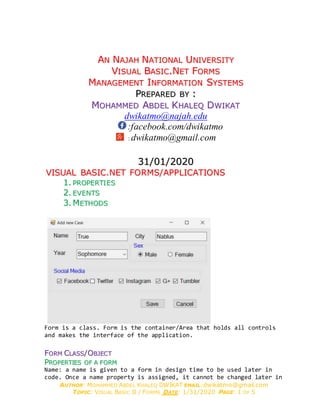
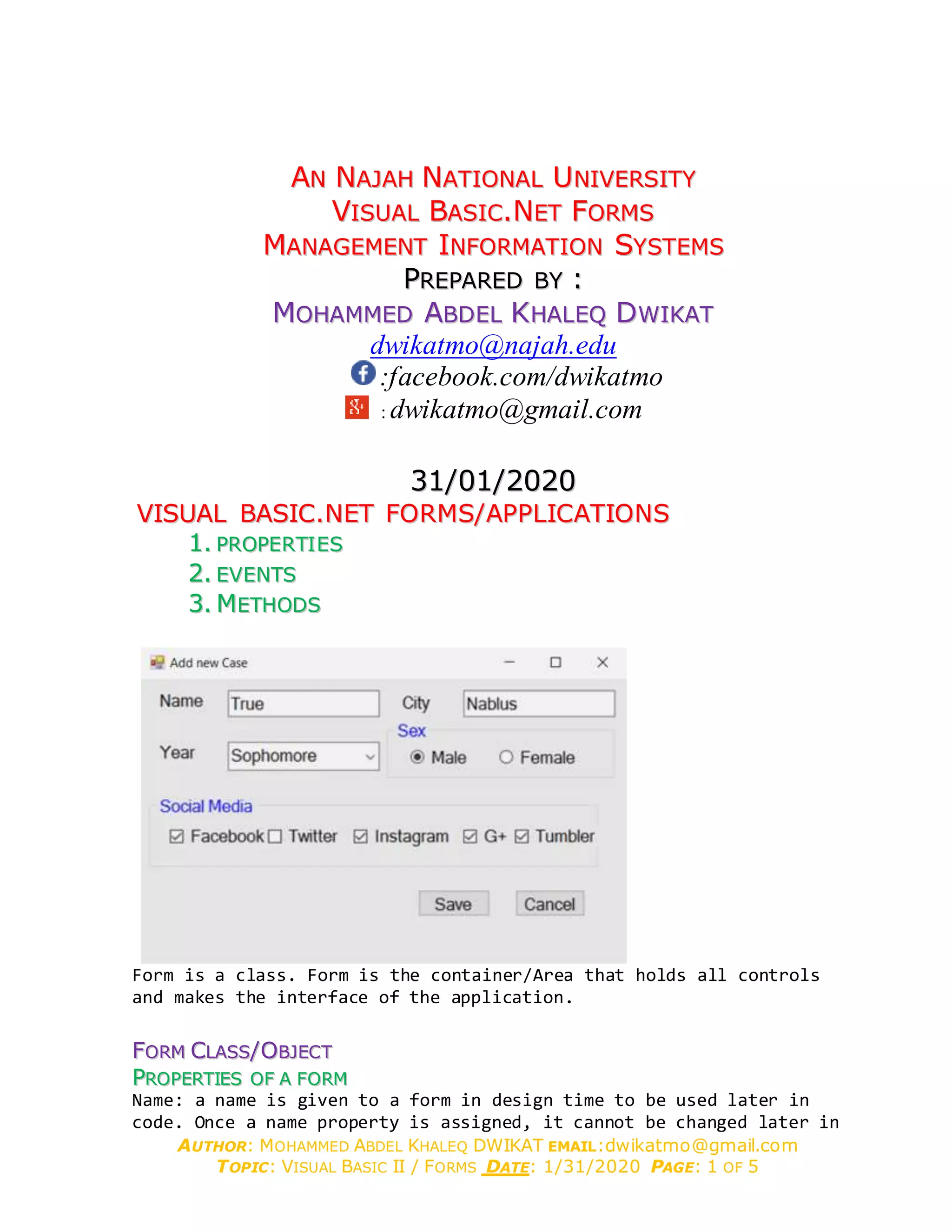
Form is a class. Form is the container/Area that holds all controls
and makes the interface of the application.
FFOORRMM CCLLAASSSS//OOBBJJEECCTT
PPRROOPPEERRTTIIEESS OOFF AA FFOORRMM
Name: a name is given to a form in design time to be used later in
code. Once a name property is assigned, it cannot be changed later in
AUTHOR: MOHAMMED ABDEL KHALEQ DWIKAT EMAIL:dwikatmo@gmail.com
TOPIC: VISUAL BASIC II / FORMS DATE: 1/31/2020 PAGE: 2 OF 5
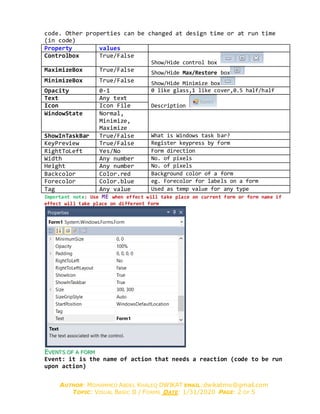
code. Other properties can be changed at design time or at run time
(in code)
Property values
Controlbox True/False
Show/Hide control box
MaximizeBox True/False Show/Hide Max/Restore box
MinimizeBox True/False Show/Hide Minimize box
Opacity 0-1 0 like glass,1 like cover,0.5 half/half
Text Any text
DescriptionIcon Icon File
WindowState Normal,
Minimize,
Maximize
ShowInTaskBar True/False What is Windows task bar?
KeyPreview True/False Register keypress by form
RightToLeft Yes/No Form direction
Width Any number No. of pixels
Height Any number No. of pixels
Backcolor Color.red Background color of a form
Forecolor Color.blue eg. Forecolor for labels on a form
Tag Any value Used as temp value for any type
Important note: Use ME when effect will take place on current form or form name if
effect will take place on different form
EEVVEENNTT SS OOFF AA FFOORRMM
Event: it is the name of action that needs a reaction (code to be run
upon action)
AUTHOR: MOHAMMED ABDEL KHALEQ DWIKAT EMAIL:dwikatmo@gmail.com
TOPIC: VISUAL BASIC II / FORMS DATE: 1/31/2020 PAGE: 3 OF 5
Event COMMENTS
Load When form loaded into memory
Click Any click
MouseClick = MouseDown + MouseUp
MouseDown Mouse is pushed down
MouseUp Mouse is released up
KeyPress = KeyDown + KeyUp
KeyDown Key is pushed down
KeyUp Key is released up
FormClosing Upon closing the form
FormClosed After the form is closed
Private Sub Form1_Load(sender As System.Object, e As System.EventArgs) Handles MyBase.Load
'Write code here'For example to initialize variable values
End Sub
You can ask user if he want to save changes when (before) the form closed
Private Sub Form1_FormClosing(sender As Object, e As
System.Windows.Forms.FormClosedEventArgs) Handles Me.FormClosing
'If Data changed then ask user whether to save it or not
End Sub
MMEETTHHOODDSS OOFF AA FFOORRMM
If we want to close any form by code written on the form itself, we
write
Method COMMENTS
close Close the form (remove it from memory) - me.close
, form1.colse
show Show the form - form1.show()
showdialog Show the form as dialog –form1.showDialog()
Hide Me.hide or form1.hide (remains in memory)
Centertoparent Display it centered relative to parent
CenterToScreen Display it centered relative to screen
The .close() method, will close any form and remove it from memory, we
write the form name to be closed as formName.close()
Close form2 (code is written on form2) me.close()
Close form2 (code is written on form1) form2.close()
Open form2 code
What is Dialog mean – it means a form is shown and your action is
required before you can go to previous form or any other form)
Form2.ShowDialog() (you can’t go back to from1 unless you close form2)
Form2.Show()’(you can go back to from1 then again to form2 and so on)
Close form2 when clicking on it
AUTHOR: MOHAMMED ABDEL KHALEQ DWIKAT EMAIL:dwikatmo@gmail.com
TOPIC: VISUAL BASIC II / FORMS DATE: 1/31/2020 PAGE: 4 OF 5
Me.Close() 'This will close any form that is written on it
UUSSEE FFOORRMM EEVVEENNTTSS,, PPRROOPPEERRTTIIEESS AANNDD MMEETTHHOODDSS
UUSSIINNGG EEVVEENNTT KKEEYYPPRREESSSS
11.. HHOOWW TT OO RREEAADD AA KKEEYY TT HHAATT IISS PPRREESSSSEEDD OONN AA FFOORRMM
On the event Keypress of the form, you can read the key pressed
on the keyboard, (provided that the form keypreview is set to true)
T1.Text = e.KeyChar (one character)
22.. HHOOWW TT OO CCHHAANNGGEE TT HHEE KKEEYY PPRREESSSSEEDD WWIITT HH AANNOOTT HHEERR OONNEE ((CCHHAANNGGEE EENNTT EERR TT OO TTAABB))
If Asc(e.KeyChar) = Asc(vbCrLf) Then SendKeys.Send(vbTab)
The same is applied if you want to prevent keyboard from writing
letters in a textbox, only allow numeric textbox to accept numbers
from 0 to 9 an minus -, and dot .
ASCII code for 0 is 48, for 9 is 57, for minus sign is 45, for dot .
is 46
We write the following code on keypress event
Select Case Asc(e.KeyChar)
Case 48 To 57, 45, 46
Case Else
e.KeyChar = ""
End Select
22 WWAAYYSS TTOO CCHHAANNGGEE PPRROOPPEERRTTIIEESS OOFF AANN OOBBJJEECCTT((ffoorrmm oobbjjeecctt hheerree))
To see the form properties press F4, change it, run to see changes
you can also change the properties by code (except the name)
assume we have form1
or you can change it by code like this
Form1.Text = "‫الشاشة‬ ‫"الرئيسية‬
WWHHYY FFOORRMM IISS CCOONNSSIIDDEERREEDD AASS CCLLAASSSS
This means we can create object that is identical to the original
class, for example this code
Dim f As New Form1
f.Show()
Whenever executed, create a copy of the form f1, then display it.
Please note that any object created is hidden (Not visible) by
default.
AUTHOR: MOHAMMED ABDEL KHALEQ DWIKAT EMAIL:dwikatmo@gmail.com
TOPIC: VISUAL BASIC II / FORMS DATE: 1/31/2020 PAGE: 5 OF 5
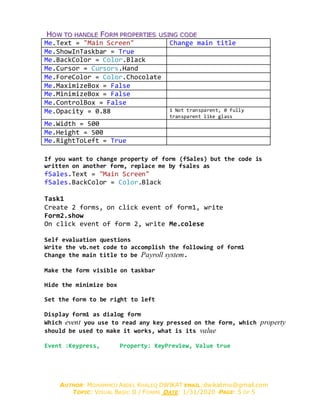
HHOOWW TTOO HHAANNDDLLEE FFOORRMM PPRROOPPEERRTTIIEESS UUSSIINNGG CCOODDEE
Me.Text = "Main Screen" Change main title
Me.ShowInTaskbar = True
Me.BackColor = Color.Black
Me.Cursor = Cursors.Hand
Me.ForeColor = Color.Chocolate
Me.MaximizeBox = False
Me.MinimizeBox = False
Me.ControlBox = False
Me.Opacity = 0.88 1 Not transparent, 0 fully
transparent like glass
Me.Width = 500
Me.Height = 500
Me.RightToLeft = True
If you want to change property of form (fSales) but the code is
written on another form, replace me by fsales as
fSales.Text = "Main Screen"
fSales.BackColor = Color.Black
Task1
Create 2 forms, on click event of form1, write
Form2.show
On click event of form 2, write Me.colese
Self evaluation questions
Write the vb.net code to accomplish the following of form1
Change the main title to be Payroll system.
Make the form visible on taskbar
Hide the minimize box
Set the form to be right to left
Display form1 as dialog form
Which event you use to read any key pressed on the form, which property
should be used to make it works, what is its value
Event :Keypress, Property: KeyPreview, Value true

Forms visual Basic .net

  • 1.
    AUTHOR: MOHAMMED ABDELKHALEQ DWIKAT EMAIL:dwikatmo@gmail.com TOPIC: VISUAL BASIC II / FORMS DATE: 1/31/2020 PAGE: 1 OF 5 AANN NNAAJJAAHH NNAATTIIOONNAALL UUNNIIVVEERRSSIITTYY VVIISSUUAALL BBAASSIICC..NNEETT FFOORRMMSS MMAANNAAGGEEMMEENNTT IINNFFOORRMMAATTIIOONN SSYYSSTTEEMMSS PPRREEPPAARREEDD BBYY :: MMOOHHAAMMMMEEDD AABBDDEELL KKHHAALLEEQQ DDWWIIKKAATT dwikatmo@najah.edu :facebook.com/dwikatmo : dwikatmo@gmail.com 3311//0011//22002200 VVIISSUUAALL BBAASSIICC..NNEETT FFOORRMMSS//AAPPPPLLIICCAATTIIOONNSS 11.. PPRROOPPEERRTTIIEESS 22.. EEVVEENNTTSS 33.. MMEETTHHOODDSS Form is a class. Form is the container/Area that holds all controls and makes the interface of the application. FFOORRMM CCLLAASSSS//OOBBJJEECCTT PPRROOPPEERRTTIIEESS OOFF AA FFOORRMM Name: a name is given to a form in design time to be used later in code. Once a name property is assigned, it cannot be changed later in
  • 2.
    AUTHOR: MOHAMMED ABDELKHALEQ DWIKAT EMAIL:dwikatmo@gmail.com TOPIC: VISUAL BASIC II / FORMS DATE: 1/31/2020 PAGE: 2 OF 5 code. Other properties can be changed at design time or at run time (in code) Property values Controlbox True/False Show/Hide control box MaximizeBox True/False Show/Hide Max/Restore box MinimizeBox True/False Show/Hide Minimize box Opacity 0-1 0 like glass,1 like cover,0.5 half/half Text Any text DescriptionIcon Icon File WindowState Normal, Minimize, Maximize ShowInTaskBar True/False What is Windows task bar? KeyPreview True/False Register keypress by form RightToLeft Yes/No Form direction Width Any number No. of pixels Height Any number No. of pixels Backcolor Color.red Background color of a form Forecolor Color.blue eg. Forecolor for labels on a form Tag Any value Used as temp value for any type Important note: Use ME when effect will take place on current form or form name if effect will take place on different form EEVVEENNTT SS OOFF AA FFOORRMM Event: it is the name of action that needs a reaction (code to be run upon action)
  • 3.
    AUTHOR: MOHAMMED ABDELKHALEQ DWIKAT EMAIL:dwikatmo@gmail.com TOPIC: VISUAL BASIC II / FORMS DATE: 1/31/2020 PAGE: 3 OF 5 Event COMMENTS Load When form loaded into memory Click Any click MouseClick = MouseDown + MouseUp MouseDown Mouse is pushed down MouseUp Mouse is released up KeyPress = KeyDown + KeyUp KeyDown Key is pushed down KeyUp Key is released up FormClosing Upon closing the form FormClosed After the form is closed Private Sub Form1_Load(sender As System.Object, e As System.EventArgs) Handles MyBase.Load 'Write code here'For example to initialize variable values End Sub You can ask user if he want to save changes when (before) the form closed Private Sub Form1_FormClosing(sender As Object, e As System.Windows.Forms.FormClosedEventArgs) Handles Me.FormClosing 'If Data changed then ask user whether to save it or not End Sub MMEETTHHOODDSS OOFF AA FFOORRMM If we want to close any form by code written on the form itself, we write Method COMMENTS close Close the form (remove it from memory) - me.close , form1.colse show Show the form - form1.show() showdialog Show the form as dialog –form1.showDialog() Hide Me.hide or form1.hide (remains in memory) Centertoparent Display it centered relative to parent CenterToScreen Display it centered relative to screen The .close() method, will close any form and remove it from memory, we write the form name to be closed as formName.close() Close form2 (code is written on form2) me.close() Close form2 (code is written on form1) form2.close() Open form2 code What is Dialog mean – it means a form is shown and your action is required before you can go to previous form or any other form) Form2.ShowDialog() (you can’t go back to from1 unless you close form2) Form2.Show()’(you can go back to from1 then again to form2 and so on) Close form2 when clicking on it
  • 4.
    AUTHOR: MOHAMMED ABDELKHALEQ DWIKAT EMAIL:dwikatmo@gmail.com TOPIC: VISUAL BASIC II / FORMS DATE: 1/31/2020 PAGE: 4 OF 5 Me.Close() 'This will close any form that is written on it UUSSEE FFOORRMM EEVVEENNTTSS,, PPRROOPPEERRTTIIEESS AANNDD MMEETTHHOODDSS UUSSIINNGG EEVVEENNTT KKEEYYPPRREESSSS 11.. HHOOWW TT OO RREEAADD AA KKEEYY TT HHAATT IISS PPRREESSSSEEDD OONN AA FFOORRMM On the event Keypress of the form, you can read the key pressed on the keyboard, (provided that the form keypreview is set to true) T1.Text = e.KeyChar (one character) 22.. HHOOWW TT OO CCHHAANNGGEE TT HHEE KKEEYY PPRREESSSSEEDD WWIITT HH AANNOOTT HHEERR OONNEE ((CCHHAANNGGEE EENNTT EERR TT OO TTAABB)) If Asc(e.KeyChar) = Asc(vbCrLf) Then SendKeys.Send(vbTab) The same is applied if you want to prevent keyboard from writing letters in a textbox, only allow numeric textbox to accept numbers from 0 to 9 an minus -, and dot . ASCII code for 0 is 48, for 9 is 57, for minus sign is 45, for dot . is 46 We write the following code on keypress event Select Case Asc(e.KeyChar) Case 48 To 57, 45, 46 Case Else e.KeyChar = "" End Select 22 WWAAYYSS TTOO CCHHAANNGGEE PPRROOPPEERRTTIIEESS OOFF AANN OOBBJJEECCTT((ffoorrmm oobbjjeecctt hheerree)) To see the form properties press F4, change it, run to see changes you can also change the properties by code (except the name) assume we have form1 or you can change it by code like this Form1.Text = "‫الشاشة‬ ‫"الرئيسية‬ WWHHYY FFOORRMM IISS CCOONNSSIIDDEERREEDD AASS CCLLAASSSS This means we can create object that is identical to the original class, for example this code Dim f As New Form1 f.Show() Whenever executed, create a copy of the form f1, then display it. Please note that any object created is hidden (Not visible) by default.
  • 5.
    AUTHOR: MOHAMMED ABDELKHALEQ DWIKAT EMAIL:dwikatmo@gmail.com TOPIC: VISUAL BASIC II / FORMS DATE: 1/31/2020 PAGE: 5 OF 5 HHOOWW TTOO HHAANNDDLLEE FFOORRMM PPRROOPPEERRTTIIEESS UUSSIINNGG CCOODDEE Me.Text = "Main Screen" Change main title Me.ShowInTaskbar = True Me.BackColor = Color.Black Me.Cursor = Cursors.Hand Me.ForeColor = Color.Chocolate Me.MaximizeBox = False Me.MinimizeBox = False Me.ControlBox = False Me.Opacity = 0.88 1 Not transparent, 0 fully transparent like glass Me.Width = 500 Me.Height = 500 Me.RightToLeft = True If you want to change property of form (fSales) but the code is written on another form, replace me by fsales as fSales.Text = "Main Screen" fSales.BackColor = Color.Black Task1 Create 2 forms, on click event of form1, write Form2.show On click event of form 2, write Me.colese Self evaluation questions Write the vb.net code to accomplish the following of form1 Change the main title to be Payroll system. Make the form visible on taskbar Hide the minimize box Set the form to be right to left Display form1 as dialog form Which event you use to read any key pressed on the form, which property should be used to make it works, what is its value Event :Keypress, Property: KeyPreview, Value true