D R . M D . A N W A R U L I S L A M
L I B R A R I A N
S H E R - E - B A N G L A A G R I C U L T U R A L U N I V E R S I T Y
&
S E C R E T A R Y G E N E R A L
L I B R A R Y A S S O C I AT I O N O F B A N G L A D E S H ( L A B )
A N W A R P U L A K @ G M A I L . C O M
ARCHIVE
An archive is an accumulation of historical records or the physical place
they are located. Archives contain primary source documents that have
accumulated over the course of an individual or organization's lifetime,
and are kept to show the function of that person or organization.
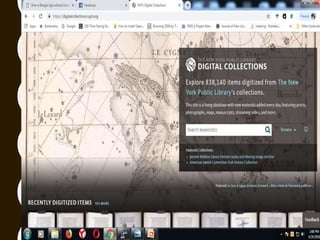
DIGITAL ARCHIVE
In library and archival science, digital preservation is a formal endeavor
to ensure that digital information of continuing value remains accessible
and usable.
Digitization, less commonly digitalization, is the process of converting
information into a digital (i.e. computer-readable) format, in which the
information is organized into bits.
Born-digital refers to materials that originate in a digital form. This is in
contrast to digital reformatting, through which analog materials
become digital. Other terms that might be encountered as synonymous
include "natively digital", "digital-first", and "digital-exclusive".
ARCHIVE VS DIGITAL ARCHIVE
DOCUMENT MANAGEMENT SYSTEM
• A document management system (DMS) is a system
(based on computer programs in the case of the
management of digital documents) used to track,
manage and store documents and reduce paper.
• The term has some overlap with the concepts of content
management systems. It is often viewed as a
component of enterprise content management (ECM)
systems and related to digital asset
management, document imaging, workflow systems
and records management systems.
• Document management systems commonly provide
storage, versioning, metadata, security, as well as
indexing and retrieval capabilities.
FEATURES OF DIGITAL
LIBRARY
• No physical boundary.
• Round the clock availability
• Multiple access..
• Information retrieval.
• Preservation and conservation.
• Space.
• Added value.
• Easily accessible.
DIGITAL LIBRARY SOFTWARE
• Alfresco
• Biblical software
• Digital
Commons
• DSpace
• EPrints
• Expanded
Books
• Fedora
Commons
• Greenstone
• Imagen Ltd
• International
Image
• Interoperability
Framework
• IntraText
• Invenio
• Islandora
• Logos Bible
Software
• MyCoRe
• Olive Tree Bible
Software
• Omeka
• OPUS
(software)
• SABDA
• Samvera
• SimpleDL
• SobekCM
DIGITAL ACHIEVING
OAI-PMH
• The Open Archives Initiative Protocol for Metadata
Harvesting (OAI-PMH) is a protocol developed for harvesting
metadata descriptions of records in an archive so that services
can be built using metadata from many archives. An
implementation of OAI-PMH must support representing
metadata in Dublin Core, but may also support additional
representations.
DOCUMENT MANAGEMENT SYSTEM
Standardization
• ISO 2709 Information and documentation – Format for information
exchange
• ISO 15836 Information and documentation – The Dublin Core metadata
element set
• ISO 15489 Information and documentation – Records management
• ISO 21127 Information and documentation – A reference ontology for the
interchange of cultural heritage information
• ISO 23950 Information and documentation – Information retrieval
(Z39.50) – Application service definition and protocol specification
• ISO 10244 Document management – Business process baselining and
analysis
• ISO 32000 Document management – Portable document format
DIGITAL DOCUMENT ARCHIVING VS
PHYSICAL ARCHIVES
Physical archives
• Physical archives usually refer to the process of archiving paper
documents. However, archiving important information like forms,
medical records, legal documents, customer files or conference
papers in paper may not be a good idea.
– Paper cannot be stored over a long period.
– Microforms (microfilm and microfiche) were invented in the eighties.
• Microforms are more durable than paper, but because of their small size,
they can be easily damaged.
• Another disadvantage of using microforms is that they require bulky
equipment to view the information.
DIGITAL DOCUMENT ARCHIVING VS
PHYSICAL ARCHIVES
Digital Document Archiving
• With the invention of scanner, digital document archiving came into being.
– Scanners are used to capture a digital image of a document, which can then be easily
stored on a server or hard drive.
– The biggest advantage of digitally archiving documents is that data cannot be
tampered with.
– Save on space, as you will only be using up virtual space.
• When a document is scanned, you have the option of saving it in varied image
formats, such as PDF, JPEG, TIFF or BMP.
• Through the use of optical character recognition, a scanned PDF document can
be made text searchable.
• PDF documents can be compressed to a very small size.
• By digitally archiving will never need to worry about losing your information. ???
DIGITAL DOCUMENT ARCHIVING VS
PHYSICAL ARCHIVES
4 great reasons to go digital with your data
Document archiving can be done simply by outsource document archiving to
a service provider. Outsourcing is not only cost-effective, but can also help to
save time and effort, which can be invested into core business ventures.
Here are four benefits that you can leverage by outsourcing document
archiving:
• Get access to fast and accurate document archiving services at an
affordable cost
• Save on making investments in digital archiving technology or
infrastructure
• Focus on core business, while staying assured that experts are archiving
data
• Archive information in any format of choice
DIGITAL ACHIEVING
• Document can be stored
• Users of the document
• Security
• Longevity
• Backup
• Software can be used
• Digitization the records
• Measuring the Vulnerability
• Access control
• Vulnerabilities
• Indexing
• Retrieval the records
• Searching
Digital archiving

Digital archiving

  • 1.
    D R .M D . A N W A R U L I S L A M L I B R A R I A N S H E R - E - B A N G L A A G R I C U L T U R A L U N I V E R S I T Y & S E C R E T A R Y G E N E R A L L I B R A R Y A S S O C I AT I O N O F B A N G L A D E S H ( L A B ) A N W A R P U L A K @ G M A I L . C O M
  • 2.
    ARCHIVE An archive isan accumulation of historical records or the physical place they are located. Archives contain primary source documents that have accumulated over the course of an individual or organization's lifetime, and are kept to show the function of that person or organization. DIGITAL ARCHIVE In library and archival science, digital preservation is a formal endeavor to ensure that digital information of continuing value remains accessible and usable. Digitization, less commonly digitalization, is the process of converting information into a digital (i.e. computer-readable) format, in which the information is organized into bits. Born-digital refers to materials that originate in a digital form. This is in contrast to digital reformatting, through which analog materials become digital. Other terms that might be encountered as synonymous include "natively digital", "digital-first", and "digital-exclusive". ARCHIVE VS DIGITAL ARCHIVE
  • 3.
    DOCUMENT MANAGEMENT SYSTEM •A document management system (DMS) is a system (based on computer programs in the case of the management of digital documents) used to track, manage and store documents and reduce paper. • The term has some overlap with the concepts of content management systems. It is often viewed as a component of enterprise content management (ECM) systems and related to digital asset management, document imaging, workflow systems and records management systems. • Document management systems commonly provide storage, versioning, metadata, security, as well as indexing and retrieval capabilities.
  • 4.
    FEATURES OF DIGITAL LIBRARY •No physical boundary. • Round the clock availability • Multiple access.. • Information retrieval. • Preservation and conservation. • Space. • Added value. • Easily accessible.
  • 5.
    DIGITAL LIBRARY SOFTWARE •Alfresco • Biblical software • Digital Commons • DSpace • EPrints • Expanded Books • Fedora Commons • Greenstone • Imagen Ltd • International Image • Interoperability Framework • IntraText • Invenio • Islandora • Logos Bible Software • MyCoRe • Olive Tree Bible Software • Omeka • OPUS (software) • SABDA • Samvera • SimpleDL • SobekCM
  • 6.
  • 7.
    OAI-PMH • The OpenArchives Initiative Protocol for Metadata Harvesting (OAI-PMH) is a protocol developed for harvesting metadata descriptions of records in an archive so that services can be built using metadata from many archives. An implementation of OAI-PMH must support representing metadata in Dublin Core, but may also support additional representations.
  • 8.
    DOCUMENT MANAGEMENT SYSTEM Standardization •ISO 2709 Information and documentation – Format for information exchange • ISO 15836 Information and documentation – The Dublin Core metadata element set • ISO 15489 Information and documentation – Records management • ISO 21127 Information and documentation – A reference ontology for the interchange of cultural heritage information • ISO 23950 Information and documentation – Information retrieval (Z39.50) – Application service definition and protocol specification • ISO 10244 Document management – Business process baselining and analysis • ISO 32000 Document management – Portable document format
  • 9.
    DIGITAL DOCUMENT ARCHIVINGVS PHYSICAL ARCHIVES Physical archives • Physical archives usually refer to the process of archiving paper documents. However, archiving important information like forms, medical records, legal documents, customer files or conference papers in paper may not be a good idea. – Paper cannot be stored over a long period. – Microforms (microfilm and microfiche) were invented in the eighties. • Microforms are more durable than paper, but because of their small size, they can be easily damaged. • Another disadvantage of using microforms is that they require bulky equipment to view the information.
  • 10.
    DIGITAL DOCUMENT ARCHIVINGVS PHYSICAL ARCHIVES Digital Document Archiving • With the invention of scanner, digital document archiving came into being. – Scanners are used to capture a digital image of a document, which can then be easily stored on a server or hard drive. – The biggest advantage of digitally archiving documents is that data cannot be tampered with. – Save on space, as you will only be using up virtual space. • When a document is scanned, you have the option of saving it in varied image formats, such as PDF, JPEG, TIFF or BMP. • Through the use of optical character recognition, a scanned PDF document can be made text searchable. • PDF documents can be compressed to a very small size. • By digitally archiving will never need to worry about losing your information. ???
  • 11.
    DIGITAL DOCUMENT ARCHIVINGVS PHYSICAL ARCHIVES 4 great reasons to go digital with your data Document archiving can be done simply by outsource document archiving to a service provider. Outsourcing is not only cost-effective, but can also help to save time and effort, which can be invested into core business ventures. Here are four benefits that you can leverage by outsourcing document archiving: • Get access to fast and accurate document archiving services at an affordable cost • Save on making investments in digital archiving technology or infrastructure • Focus on core business, while staying assured that experts are archiving data • Archive information in any format of choice
  • 14.
    DIGITAL ACHIEVING • Documentcan be stored • Users of the document • Security • Longevity • Backup • Software can be used • Digitization the records • Measuring the Vulnerability • Access control • Vulnerabilities • Indexing • Retrieval the records • Searching