AGORA
Dr. Md. Anwarul Islam
Librarian
Sher-e-Bangla Agricultural University
Dhaka, Bangladesh
anwarpulak@gmail.com
HOW TO ACCESS
e-Resources Access Tutorial Series of SAU Library
http://www.saulibrary.edu.bd
About AGORA
• AGORA stands for –
Access to Global Online Research in Agriculture.
• AGORA programme, set up by the Food and Agriculture
Organization of the UN (FAO).
• AGORA provides a collection of up to 6,100 key journals and
5,800 books to 2,900 institutions in more than 100 countries.
• AGORA is designed to agriculture and life sciences in the
developing world.
• AGORA is one of the four programmes of Research4Life:
HINARI, AGORA, OARE and ARDI .
Eligibility to access
• AGORA Core Offer includes two groups of
countries, areas, or territories.
• Local, not-for-profit institutions in two groups of
countries, areas, or territories may register for
access to the publications through the Core Offer
of AGORA.
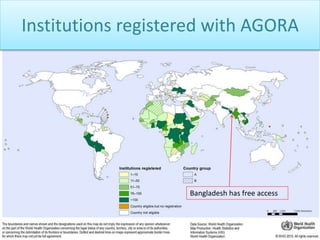
• Bangladeshi institutes have free access after
registration.
Institutions registered with AGORA
Bangladesh has free access
• Research4Life is the collective name for the
four programmes –
HINARI, AGORA, OARE and ARDI – that
provides developing countries with free or low
cost access to academic and professional
peer-reviewed content online.
Site URL http://www.research4life.org/
Access to AGORA - 1
• AGORA provides username and password based
access.
• May collect your institutional username and
password from Librarian.
• Should not share the username and password.
• Should not access to AGORA by your institutional
username and password from abroad.
Access to AGORA - 2
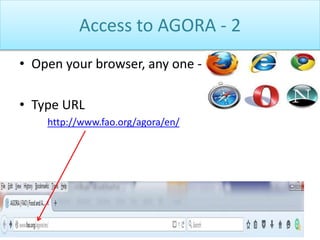
• Open your browser, any one -
• Type URL
http://www.fao.org/agora/en/
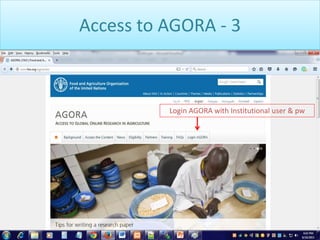
Access to AGORA - 3
Login AGORA with Institutional user & pw
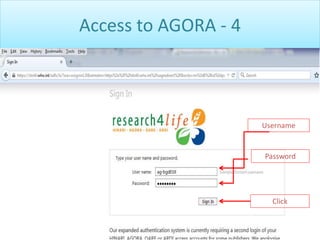
Access to AGORA - 4
Username
Password
Click
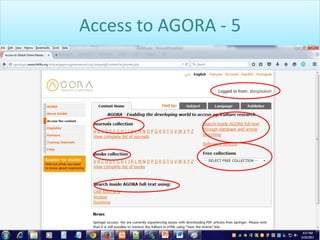
Access to AGORA - 5
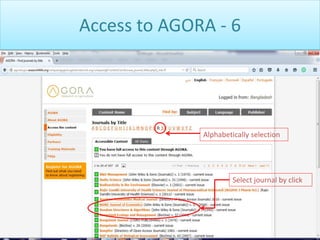
Access to AGORA - 6
Select journal by click
Alphabetically selection
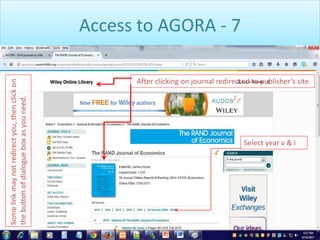
Access to AGORA - 7
After clicking on journal redirected to publisher’s site
Select year v & i
Somelinkmaynotredirectyou,thenclickon
thebuttonofdialogueboxasyouneed.
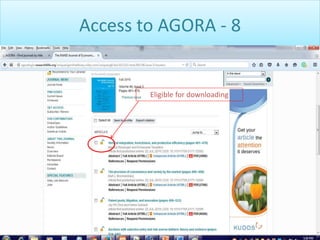
Access to AGORA - 8
Eligible for downloading
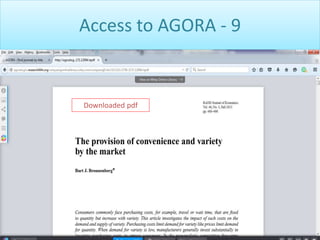
Access to AGORA - 9
Downloaded pdf
The End
&
Thank You

AGORA : How to Access

  • 1.
    AGORA Dr. Md. AnwarulIslam Librarian Sher-e-Bangla Agricultural University Dhaka, Bangladesh anwarpulak@gmail.com HOW TO ACCESS e-Resources Access Tutorial Series of SAU Library http://www.saulibrary.edu.bd
  • 2.
    About AGORA • AGORAstands for – Access to Global Online Research in Agriculture. • AGORA programme, set up by the Food and Agriculture Organization of the UN (FAO). • AGORA provides a collection of up to 6,100 key journals and 5,800 books to 2,900 institutions in more than 100 countries. • AGORA is designed to agriculture and life sciences in the developing world. • AGORA is one of the four programmes of Research4Life: HINARI, AGORA, OARE and ARDI .
  • 3.
    Eligibility to access •AGORA Core Offer includes two groups of countries, areas, or territories. • Local, not-for-profit institutions in two groups of countries, areas, or territories may register for access to the publications through the Core Offer of AGORA. • Bangladeshi institutes have free access after registration.
  • 4.
    Institutions registered withAGORA Bangladesh has free access
  • 5.
    • Research4Life isthe collective name for the four programmes – HINARI, AGORA, OARE and ARDI – that provides developing countries with free or low cost access to academic and professional peer-reviewed content online. Site URL http://www.research4life.org/
  • 6.
    Access to AGORA- 1 • AGORA provides username and password based access. • May collect your institutional username and password from Librarian. • Should not share the username and password. • Should not access to AGORA by your institutional username and password from abroad.
  • 7.
    Access to AGORA- 2 • Open your browser, any one - • Type URL http://www.fao.org/agora/en/
  • 8.
    Access to AGORA- 3 Login AGORA with Institutional user & pw
  • 9.
    Access to AGORA- 4 Username Password Click
  • 10.
  • 11.
    Access to AGORA- 6 Select journal by click Alphabetically selection
  • 12.
    Access to AGORA- 7 After clicking on journal redirected to publisher’s site Select year v & i Somelinkmaynotredirectyou,thenclickon thebuttonofdialogueboxasyouneed.
  • 13.
    Access to AGORA- 8 Eligible for downloading
  • 14.
    Access to AGORA- 9 Downloaded pdf
  • 15.