UBC Library's Digital
Preservation Strategy
Bronwen Sprout, Digital Initiatives Coordinator
Sarah Romkey, Rare Books and Special Collections Archivist
with input from Artefactual Systems
UBC Library
April 28, 2014
overview
• What is digital preservation?
• Our approach to digital preservation
• Working with Artefactual
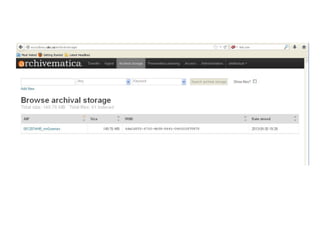
• Archivematica
• Born digital archives
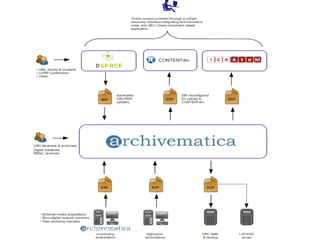
• Archivematica and integration with other
systems (AtoM, CONTENTdm, cIRcle)
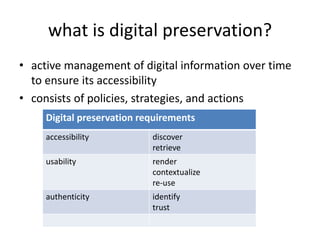
what is digital preservation?
• active management of digital information over time
to ensure its accessibility
• consists of policies, strategies, and actions
Digital preservation requirements
accessibility discover
retrieve
usability render
contextualize
re-use
authenticity identify
trust
• Develop a comprehensive preservation system
for UBC Library
• Work with Artefactual
• Use Archivematica as a tool to apply OAIS-
compliant preservation processes AND
integrate it with existing systems used to
manage digital objects
• Build internal technical and staff capacity
our approach
working with artefactual
• 2011 - present:
– gap analysis
– identification of pilot projects
– early testing of archivematica
– legacy media from RBSC
– procedures for born-digital material
– website archiving
– more archivematica testing
– CONTENTdm and DSpace integration development
and testing
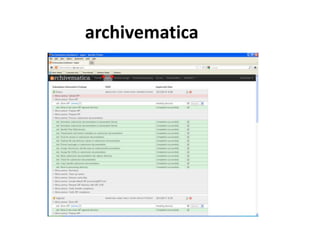
archivematica
• “a free and open source digital preservation
system that is designed to maintain standards-
based, long term access to collections of
digital objects” http://www.archivematica.org
• micro-services provide integrated suite of
software tools in compliance with ISO-OAIS
model
archivematica
what is “born digital?”
• Quick survey:
• Do you take digital photographs?
• Do you print some of your digital photographs?
• Do you print ALL of your digital photographs?
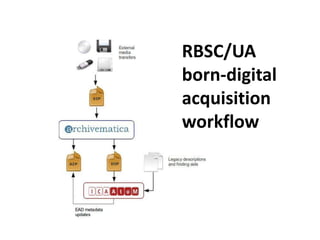
RBSC/UA
born-digital
acquisition
workflow
legacy media
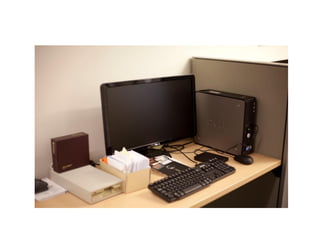
a new acquisition
• "First" born-digital acquisition
• Donor questionnaire
• Physical transfer of files
• Hardware and software
• Workflow documentation
• Donor gift agreement
• First AIPs stored April 2013; still in processing
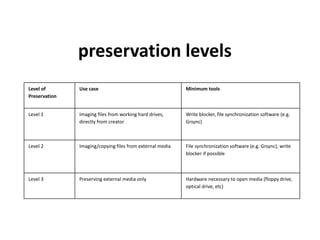
Level of
Preservation
Use case Minimum tools
Level 1 Imaging files from working hard drives,
directly from creator
Write blocker, file synchronization software (e.g.
Grsync)
Level 2 Imaging/copying files from external media File synchronization software (e.g. Grsync), write
blocker if possible
Level 3 Preserving external media only Hardware necessary to open media (floppy drive,
optical drive, etc)
preservation levels
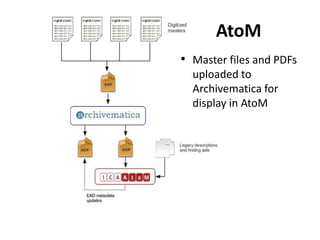
AtoM
• Master files and PDFs
uploaded to
Archivematica for
display in AtoM
CONTENTdm
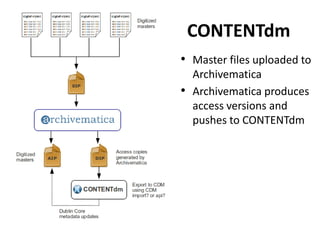
• Master files uploaded to
Archivematica
• Archivematica produces
access versions and
pushes to CONTENTdm
cIRcle (DSpace)
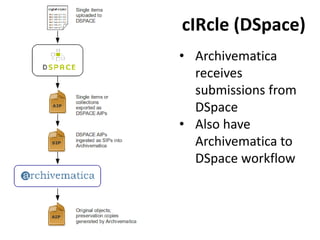
• Archivematica
receives
submissions from
DSpace
• Also have
Archivematica to
DSpace workflow
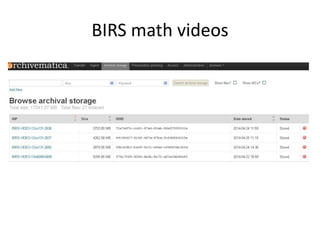
BIRS math videos
Next steps and future work
• TRAC (Trusted Repository Audit Checklist) self-
audit
• Policy development
• Research data
• Website archiving

UBC Library's Digital Preservation Strategy

  • 1.
    UBC Library's Digital PreservationStrategy Bronwen Sprout, Digital Initiatives Coordinator Sarah Romkey, Rare Books and Special Collections Archivist with input from Artefactual Systems UBC Library April 28, 2014
  • 2.
    overview • What isdigital preservation? • Our approach to digital preservation • Working with Artefactual • Archivematica • Born digital archives • Archivematica and integration with other systems (AtoM, CONTENTdm, cIRcle)
  • 3.
    what is digitalpreservation? • active management of digital information over time to ensure its accessibility • consists of policies, strategies, and actions Digital preservation requirements accessibility discover retrieve usability render contextualize re-use authenticity identify trust
  • 4.
    • Develop acomprehensive preservation system for UBC Library • Work with Artefactual • Use Archivematica as a tool to apply OAIS- compliant preservation processes AND integrate it with existing systems used to manage digital objects • Build internal technical and staff capacity our approach
  • 5.
    working with artefactual •2011 - present: – gap analysis – identification of pilot projects – early testing of archivematica – legacy media from RBSC – procedures for born-digital material – website archiving – more archivematica testing – CONTENTdm and DSpace integration development and testing
  • 6.
    archivematica • “a freeand open source digital preservation system that is designed to maintain standards- based, long term access to collections of digital objects” http://www.archivematica.org • micro-services provide integrated suite of software tools in compliance with ISO-OAIS model
  • 7.
  • 8.
    what is “borndigital?” • Quick survey: • Do you take digital photographs? • Do you print some of your digital photographs? • Do you print ALL of your digital photographs?
  • 9.
  • 10.
  • 11.
    a new acquisition •"First" born-digital acquisition • Donor questionnaire • Physical transfer of files • Hardware and software • Workflow documentation • Donor gift agreement • First AIPs stored April 2013; still in processing
  • 14.
    Level of Preservation Use caseMinimum tools Level 1 Imaging files from working hard drives, directly from creator Write blocker, file synchronization software (e.g. Grsync) Level 2 Imaging/copying files from external media File synchronization software (e.g. Grsync), write blocker if possible Level 3 Preserving external media only Hardware necessary to open media (floppy drive, optical drive, etc) preservation levels
  • 15.
    AtoM • Master filesand PDFs uploaded to Archivematica for display in AtoM
  • 16.
    CONTENTdm • Master filesuploaded to Archivematica • Archivematica produces access versions and pushes to CONTENTdm
  • 17.
    cIRcle (DSpace) • Archivematica receives submissionsfrom DSpace • Also have Archivematica to DSpace workflow
  • 18.
  • 20.
    Next steps andfuture work • TRAC (Trusted Repository Audit Checklist) self- audit • Policy development • Research data • Website archiving