Ciaran Emmett
DIGIPAK DEVELOPMENT
FRONT COVER
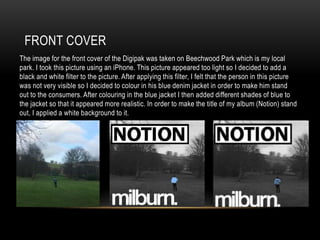
The image for the front cover of the Digipak was taken on Beechwood Park which is my local
park. I took this picture using an iPhone. This picture appeared too light so I decided to add a
black and white filter to the picture. After applying this filter, I felt that the person in this picture
was not very visible so I decided to colour in his blue denim jacket in order to make him stand
out to the consumers. After colouring in the blue jacket I then added different shades of blue to
the jacket so that it appeared more realistic. In order to make the title of my album (Notion) stand
out, I applied a white background to it.
CD COVER
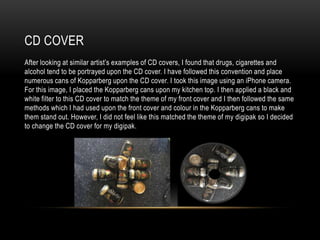
After looking at similar artist’s examples of CD covers, I found that drugs, cigarettes and
alcohol tend to be portrayed upon the CD cover. I have followed this convention and place
numerous cans of Kopparberg upon the CD cover. I took this image using an iPhone camera.
For this image, I placed the Kopparberg cans upon my kitchen top. I then applied a black and
white filter to this CD cover to match the theme of my front cover and I then followed the same
methods which I had used upon the front cover and colour in the Kopparberg cans to make
them stand out. However, I did not feel like this matched the theme of my digipak so I decided
to change the CD cover for my digipak.
CD COVER
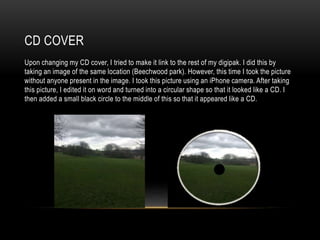
Upon changing my CD cover, I tried to make it link to the rest of my digipak. I did this by
taking an image of the same location (Beechwood park). However, this time I took the picture
without anyone present in the image. I took this picture using an iPhone camera. After taking
this picture, I edited it on word and turned into a circular shape so that it looked like a CD. I
then added a small black circle to the middle of this so that it appeared like a CD.
INSIDE COVER
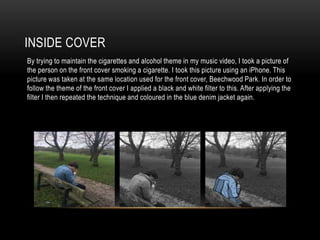
By trying to maintain the cigarettes and alcohol theme in my music video, I took a picture of
the person on the front cover smoking a cigarette. I took this picture using an iPhone. This
picture was taken at the same location used for the front cover, Beechwood Park. In order to
follow the theme of the front cover I applied a black and white filter to this. After applying the
filter I then repeated the technique and coloured in the blue denim jacket again.
INSIDE COVER
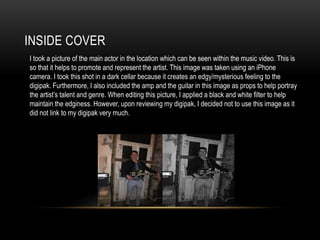
I took a picture of the main actor in the location which can be seen within the music video. This is
so that it helps to promote and represent the artist. This image was taken using an iPhone
camera. I took this shot in a dark cellar because it creates an edgy/mysterious feeling to the
digipak. Furthermore, I also included the amp and the guitar in this image as props to help portray
the artist’s talent and genre. When editing this picture, I applied a black and white filter to help
maintain the edginess. However, upon reviewing my digipak, I decided not to use this image as it
did not link to my digipak very much.
INSIDE COVER
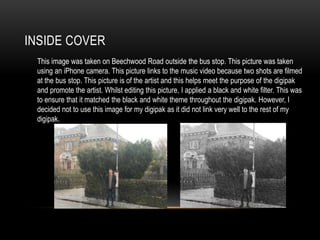
This image was taken on Beechwood Road outside the bus stop. This picture was taken
using an iPhone camera. This picture links to the music video because two shots are filmed
at the bus stop. This picture is of the artist and this helps meet the purpose of the digipak
and promote the artist. Whilst editing this picture, I applied a black and white filter. This was
to ensure that it matched the black and white theme throughout the digipak. However, I
decided not to use this image for my digipak as it did not link very well to the rest of my
digipak.
INSIDE COVER
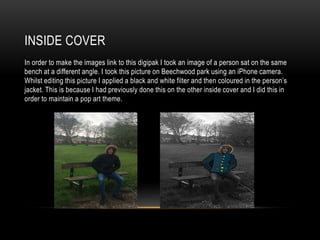
In order to make the images link to this digipak I took an image of a person sat on the same
bench at a different angle. I took this picture on Beechwood park using an iPhone camera.
Whilst editing this picture I applied a black and white filter and then coloured in the person’s
jacket. This is because I had previously done this on the other inside cover and I did this in
order to maintain a pop art theme.
INSIDE COVER
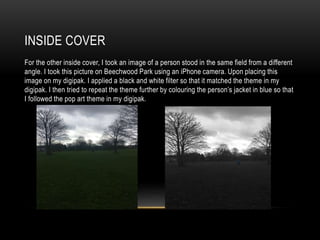
For the other inside cover, I took an image of a person stood in the same field from a different
angle. I took this picture on Beechwood Park using an iPhone camera. Upon placing this
image on my digipak. I applied a black and white filter so that it matched the theme in my
digipak. I then tried to repeat the theme further by colouring the person’s jacket in blue so that
I followed the pop art theme in my digipak.

Digipak Development

  • 1.
  • 2.
    FRONT COVER The imagefor the front cover of the Digipak was taken on Beechwood Park which is my local park. I took this picture using an iPhone. This picture appeared too light so I decided to add a black and white filter to the picture. After applying this filter, I felt that the person in this picture was not very visible so I decided to colour in his blue denim jacket in order to make him stand out to the consumers. After colouring in the blue jacket I then added different shades of blue to the jacket so that it appeared more realistic. In order to make the title of my album (Notion) stand out, I applied a white background to it.
  • 3.
    CD COVER After lookingat similar artist’s examples of CD covers, I found that drugs, cigarettes and alcohol tend to be portrayed upon the CD cover. I have followed this convention and place numerous cans of Kopparberg upon the CD cover. I took this image using an iPhone camera. For this image, I placed the Kopparberg cans upon my kitchen top. I then applied a black and white filter to this CD cover to match the theme of my front cover and I then followed the same methods which I had used upon the front cover and colour in the Kopparberg cans to make them stand out. However, I did not feel like this matched the theme of my digipak so I decided to change the CD cover for my digipak.
  • 4.
    CD COVER Upon changingmy CD cover, I tried to make it link to the rest of my digipak. I did this by taking an image of the same location (Beechwood park). However, this time I took the picture without anyone present in the image. I took this picture using an iPhone camera. After taking this picture, I edited it on word and turned into a circular shape so that it looked like a CD. I then added a small black circle to the middle of this so that it appeared like a CD.
  • 5.
    INSIDE COVER By tryingto maintain the cigarettes and alcohol theme in my music video, I took a picture of the person on the front cover smoking a cigarette. I took this picture using an iPhone. This picture was taken at the same location used for the front cover, Beechwood Park. In order to follow the theme of the front cover I applied a black and white filter to this. After applying the filter I then repeated the technique and coloured in the blue denim jacket again.
  • 6.
    INSIDE COVER I tooka picture of the main actor in the location which can be seen within the music video. This is so that it helps to promote and represent the artist. This image was taken using an iPhone camera. I took this shot in a dark cellar because it creates an edgy/mysterious feeling to the digipak. Furthermore, I also included the amp and the guitar in this image as props to help portray the artist’s talent and genre. When editing this picture, I applied a black and white filter to help maintain the edginess. However, upon reviewing my digipak, I decided not to use this image as it did not link to my digipak very much.
  • 7.
    INSIDE COVER This imagewas taken on Beechwood Road outside the bus stop. This picture was taken using an iPhone camera. This picture links to the music video because two shots are filmed at the bus stop. This picture is of the artist and this helps meet the purpose of the digipak and promote the artist. Whilst editing this picture, I applied a black and white filter. This was to ensure that it matched the black and white theme throughout the digipak. However, I decided not to use this image for my digipak as it did not link very well to the rest of my digipak.
  • 8.
    INSIDE COVER In orderto make the images link to this digipak I took an image of a person sat on the same bench at a different angle. I took this picture on Beechwood park using an iPhone camera. Whilst editing this picture I applied a black and white filter and then coloured in the person’s jacket. This is because I had previously done this on the other inside cover and I did this in order to maintain a pop art theme.
  • 9.
    INSIDE COVER For theother inside cover, I took an image of a person stood in the same field from a different angle. I took this picture on Beechwood Park using an iPhone camera. Upon placing this image on my digipak. I applied a black and white filter so that it matched the theme in my digipak. I then tried to repeat the theme further by colouring the person’s jacket in blue so that I followed the pop art theme in my digipak.