Development of Java tools
                      using
                   SWT and WALA
    • Builder example
    • SWT, - The Standard Widget Toolkit
    • WALA, - for static analysis of Java bytecode
    • Example: Profile generator
    • Conclusion


Infinit Højniveausprog, 10 February 2010
Hans Søndergaard
                                                     1
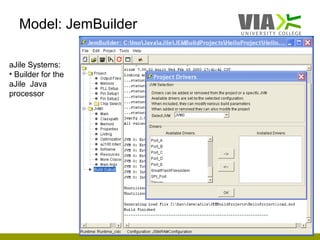
Model: JemBuilder

aJile Systems:
• Builder for the
aJile Java
processor


                       2
GUI programming using SWT

• SWT : The Standard Widget Toolkit
  – designed to provide efficient, portable access
    to the user-interface facilities of the operating
    systems on which it is implemented
  – part of Eclipse
  – many code snippets
  – see http://www.eclipse.org/swt/


                                                        3
SWT versus Swing


• No clear difference as to performance
• Swing
  – has more memory consumption than SWT
  – has all its components implemented by itself
    • has much more classes to be loaded in runtime.


                                                       4
Analysis of Java bytecode


 • WALA provides static analysis capabilities for Java bytecode

 • WALA features include:

      Java type system and class hierarchy analysis
      Interprocedural dataflow analysis
      Pointer analysis and call graph construction
      General framework for iterative dataflow
      General analysis utilities and data structures
      A dynamic load-time instrumentation library for Java

 • open source license
 • http://wala.sourceforge.net/wiki/index.php/Main_Page
                                                                  5
Example: PositiveListChecker

•    Scans a list of classes to be checked
•    A Profile must be available
      – a positive list of classes with methods
•    The result is written in a report file.

    Generated report file:

         Not on positive list
         ====================
         (type, class, method)
         (7, java/lang/Object, null)
         (10, hello/NotPositiveClass, staticMethod1)
         (7, hello/NotPositiveClass, null)


                                                       6
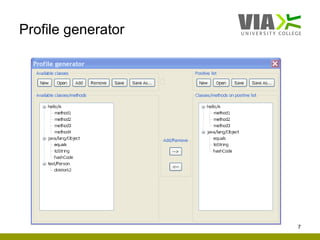
Profile generator


                    7
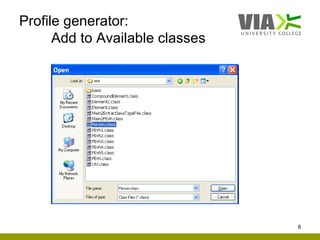
Profile generator:
      Add to Available classes


                                 8
Code snippet:
      Available classes: Add

Button addButton = new Button (composite, SWT.PUSH);
addButton.setText (" Add ");

addButton.addSelectionListener (new SelectionAdapter () {
  public void widgetSelected (SelectionEvent e) {
     FileDialog fileDialog = new FileDialog(fileList.getShell(), SWT.OPEN);
     String[] filterNames = new String[] {"Class Files“,"Jar Files“,"All
    Files(*)"};
     String [] filterExtensions = new String [] {"*.class", "*.jar", "*"};
     ...
     String fileName = fileDialog.open();
     ... // see next slide
  }
});


                                                                              9
Code snippet:
   Available classes: Add
String[] args = {fileName}; // class or jar file
try {
  pjchecker.ClassList list = new ClassList (args); // uses WALA lib
  HashSet<ClassInfo> classSet = list.getClassList();

 Iterator<ClassInfo> itr = classSet.iterator();
 for (; itr.hasNext(); )
 {
   ClassInfo info = itr.next();
   if (info.methodName == null) // a class
     availableClassList.addClass(info.className);
   else // a method
     availableClassList.addMethod(info.className, info.methodName);
 }
 createTree (availableListTree, availableClassList);
}
catch(...) {...}


                                                                      10
Code snippet:
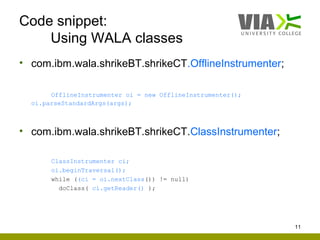
    Using WALA classes
• com.ibm.wala.shrikeBT.shrikeCT.OfflineInstrumenter;

       OfflineInstrumenter oi = new OfflineInstrumenter();
  oi.parseStandardArgs(args);


• com.ibm.wala.shrikeBT.shrikeCT.ClassInstrumenter;

       ClassInstrumenter ci;
       oi.beginTraversal();
       while ((ci = oi.nextClass()) != null)
         doClass( ci.getReader() );


                                                             11
Code snippet:
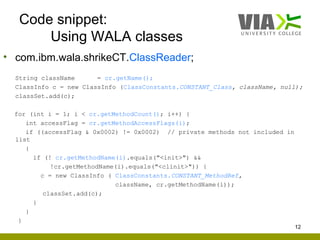
       Using WALA classes
• com.ibm.wala.shrikeCT.ClassReader;
  String className      = cr.getName();
  ClassInfo c = new ClassInfo (ClassConstants.CONSTANT_Class, className, null);
  classSet.add(c);

  for (int i = 1; i < cr.getMethodCount(); i++) {
     int accessFlag = cr.getMethodAccessFlags(i);
     if ((accessFlag & 0x0002) != 0x0002) // private methods not included in
  list
     {
       if (! cr.getMethodName(i).equals("<init>") &&
            !cr.getMethodName(i).equals("<clinit>")) {
         c = new ClassInfo ( ClassConstants.CONSTANT_MethodRef,
                             className, cr.getMethodName(i));
          classSet.add(c);
       }
     }
   }
                                                                               12
Conclusion

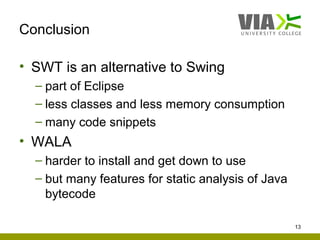
• SWT is an alternative to Swing
  – part of Eclipse
  – less classes and less memory consumption
  – many code snippets
• WALA
  – harder to install and get down to use
  – but many features for static analysis of Java
    bytecode

                                                    13

Development of Java tools using SWT and WALA af Hans Søndergaard, ViaUC

  • 1.
    Development of Javatools using SWT and WALA • Builder example • SWT, - The Standard Widget Toolkit • WALA, - for static analysis of Java bytecode • Example: Profile generator • Conclusion Infinit Højniveausprog, 10 February 2010 Hans Søndergaard 1
  • 2.
    Model: JemBuilder aJile Systems: •Builder for the aJile Java processor 2
  • 3.
    GUI programming usingSWT • SWT : The Standard Widget Toolkit – designed to provide efficient, portable access to the user-interface facilities of the operating systems on which it is implemented – part of Eclipse – many code snippets – see http://www.eclipse.org/swt/ 3
  • 4.
    SWT versus Swing •No clear difference as to performance • Swing – has more memory consumption than SWT – has all its components implemented by itself • has much more classes to be loaded in runtime. 4
  • 5.
    Analysis of Javabytecode • WALA provides static analysis capabilities for Java bytecode • WALA features include:  Java type system and class hierarchy analysis  Interprocedural dataflow analysis  Pointer analysis and call graph construction  General framework for iterative dataflow  General analysis utilities and data structures  A dynamic load-time instrumentation library for Java • open source license • http://wala.sourceforge.net/wiki/index.php/Main_Page 5
  • 6.
    Example: PositiveListChecker • Scans a list of classes to be checked • A Profile must be available – a positive list of classes with methods • The result is written in a report file. Generated report file: Not on positive list ==================== (type, class, method) (7, java/lang/Object, null) (10, hello/NotPositiveClass, staticMethod1) (7, hello/NotPositiveClass, null) 6
  • 7.
  • 8.
    Profile generator: Add to Available classes 8
  • 9.
    Code snippet: Available classes: Add Button addButton = new Button (composite, SWT.PUSH); addButton.setText (" Add "); addButton.addSelectionListener (new SelectionAdapter () { public void widgetSelected (SelectionEvent e) { FileDialog fileDialog = new FileDialog(fileList.getShell(), SWT.OPEN); String[] filterNames = new String[] {"Class Files“,"Jar Files“,"All Files(*)"}; String [] filterExtensions = new String [] {"*.class", "*.jar", "*"}; ... String fileName = fileDialog.open(); ... // see next slide } }); 9
  • 10.
    Code snippet: Available classes: Add String[] args = {fileName}; // class or jar file try { pjchecker.ClassList list = new ClassList (args); // uses WALA lib HashSet<ClassInfo> classSet = list.getClassList(); Iterator<ClassInfo> itr = classSet.iterator(); for (; itr.hasNext(); ) { ClassInfo info = itr.next(); if (info.methodName == null) // a class availableClassList.addClass(info.className); else // a method availableClassList.addMethod(info.className, info.methodName); } createTree (availableListTree, availableClassList); } catch(...) {...} 10
  • 11.
    Code snippet: Using WALA classes • com.ibm.wala.shrikeBT.shrikeCT.OfflineInstrumenter; OfflineInstrumenter oi = new OfflineInstrumenter(); oi.parseStandardArgs(args); • com.ibm.wala.shrikeBT.shrikeCT.ClassInstrumenter; ClassInstrumenter ci; oi.beginTraversal(); while ((ci = oi.nextClass()) != null) doClass( ci.getReader() ); 11
  • 12.
    Code snippet: Using WALA classes • com.ibm.wala.shrikeCT.ClassReader; String className = cr.getName(); ClassInfo c = new ClassInfo (ClassConstants.CONSTANT_Class, className, null); classSet.add(c); for (int i = 1; i < cr.getMethodCount(); i++) { int accessFlag = cr.getMethodAccessFlags(i); if ((accessFlag & 0x0002) != 0x0002) // private methods not included in list { if (! cr.getMethodName(i).equals("<init>") && !cr.getMethodName(i).equals("<clinit>")) { c = new ClassInfo ( ClassConstants.CONSTANT_MethodRef, className, cr.getMethodName(i)); classSet.add(c); } } } 12
  • 13.
    Conclusion • SWT isan alternative to Swing – part of Eclipse – less classes and less memory consumption – many code snippets • WALA – harder to install and get down to use – but many features for static analysis of Java bytecode 13