Fall 2011

CMPE 202- Software Systems Engineering

    Research Project – Java7


           Submitted by

        Manjula Kollipara


           Submitted to

        Prof. Paul Nguyen


   Date: November 26th 2011


                                         1
CHAPTER 1.History on Evolution of Java7

1.1 Background

Since 1995, Java has changed our world and our expectations....

With growing technology today, we take it granted that we can be connected and access applications and
its contents anywhere, anytime. This is all because of Java; we expect digital devices to be smarter, more
functional, and way more entertaining.

1.2Prerequisites for the evolution of Java language:

In 1991, a small group of Sun Microsystems engineers called “Green Team” led by James Gosling
decided to develop a language for consumer devices such as cable boxes.
They wanted the language to be
1. small and use efficient code since these devices do not have powerful CPUs.
2. hardware independent since different manufacturers would use different CPUs.

1.3 Conclusion

The above conditions allowed them to decide to compile the code to an intermediate machine-like code
for an imaginary CPU called a virtual machine. Apparently, there is a real CPU that implements this
virtual CPU. This intermediate code (called byte code) is completely hardware independent. The
Interpreter converts the byte code to appropriate machine code. Thus, once the interpreter has been
installed on a computer, it can run any byte coded program.

1.4 Naming Convention:

The Green Team chose C++ as their language and not C, because they wanted the language to be more
object oriented rather than procedural. The original name of the language was “Oak”. Eventually they
discovered that there was already a programming language called “Oak”, so they changed the name of the
language to” Java”.

1.5 Artifacts

The Green project had a lot of trouble getting others interested in Java for smart devices. The Green Team
demonstrated their new language with an interactive, handheld home-entertainment controller that was
originally targeted at the digital cable television industry. Unfortunately, the concept was much too
advanced for them at that time. It was most adaptable for Internet, which was just starting to take off.

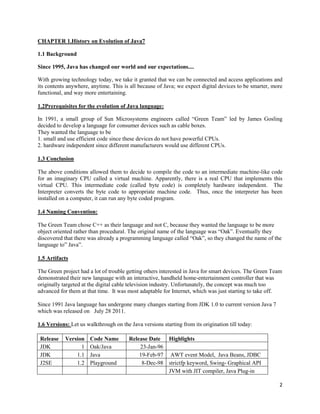
Since 1991 Java language has undergone many changes starting from JDK 1.0 to current version Java 7
which was released on July 28 2011.

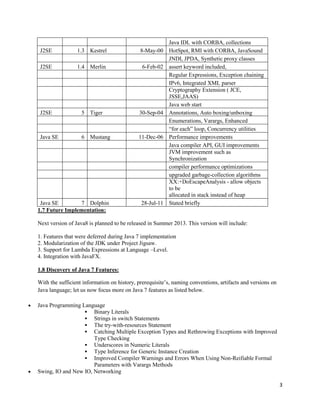
1.6 Versions: Let us walkthrough on the Java versions starting from its origination till today:

 Release    Version    Code Name        Release Date Highlights
 JDK              1    Oak/Java             23-Jan-96
 JDK            1.1    Java                 19-Feb-97 AWT event Model, Java Beans, JDBC
 J2SE           1.2    Playground            8-Dec-98 strictfp keyword, Swing- Graphical API
                                                      JVM with JIT compiler, Java Plug-in

                                                                                                        2
Java IDL with CORBA, collections
 J2SE            1.3 Kestrel                 8-May-00    HotSpot, RMI with CORBA, JavaSound
                                                         JNDI, JPDA, Synthetic proxy classes
 J2SE            1.4 Merlin                  6-Feb-02    assert keyword included,
                                                         Regular Expressions, Exception chaining
                                                         IPv6, Integrated XML parser
                                                         Cryptography Extension ( JCE,
                                                         JSSE,JAAS)
                                                         Java web start
 J2SE              5 Tiger                  30-Sep-04    Annotations, Auto boxing/unboxing
                                                         Enumerations, Varargs, Enhanced
                                                         “for each” loop, Concurrency utilities
 Java SE           6 Mustang                11-Dec-06    Performance improvements
                                                         Java compiler API, GUI improvements
                                                         JVM improvement such as
                                                         Synchronization
                                                         compiler performance optimizations
                                                         upgraded garbage-collection algorithms
                                                         XX:+DoEscapeAnalysis - allow objects
                                                         to be
                                                         allocated in stack instead of heap
 Java SE         7 Dolphin                   28-Jul-11   Stated briefly
1.7 Future Implementation:

Next version of Java8 is planned to be released in Summer 2013. This version will include:

1. Features that were deferred during Java 7 implementation
2. Modularization of the JDK under Project Jigsaw.
3. Support for Lambda Expressions at Language –Level.
4. Integration with JavaFX.

1.8 Discovery of Java 7 Features:

With the sufficient information on history, prerequisite’s, naming conventions, artifacts and versions on
Java language; let us now focus more on Java 7 features as listed below.

Java Programming Language
                   Binary Literals
                   Strings in switch Statements
                   The try-with-resources Statement
                   Catching Multiple Exception Types and Rethrowing Exceptions with Improved
                      Type Checking
                   Underscores in Numeric Literals
                   Type Inference for Generic Instance Creation
                   Improved Compiler Warnings and Errors When Using Non-Reifiable Formal
                      Parameters with Varargs Methods
Swing, IO and New IO, Networking

                                                                                                            3
Security, Concurrency Utilities
Rich Internet Applications (RIA)/Deployment
                     Requesting and Customizing Applet Decoration in Dragg able Applets
                     Embedding JNLP File in Applet Tag
                     Deploying without Codebase
                     Handling Applet Initialization Status with Event Handlers
Java 2D, Java XML - JAXP, JAXB, and JAX-WS
Java.lang Package; Multithreaded Custom Class Loaders in Java SE 7
Java Virtual Machine (JVM)
                     Java Virtual Machine Support for Non-Java Languages
                     Garbage-First Collector
                     Java HotSpot Virtual Machine Performance Enhancements


CHAPTER 2. Existing Examples using Java 7 features

Now let us look at some of the examples using Java 7 features.

2.1 ProgrammingLanguage

2.1.1String in Switch statement: One other language that implements this feature is Shell scripting in
Linux.One of the most easy-to-usefeatures implemented in Java 7 is having strings in switch
statement.With this, the code is more readable and also the compiler can generate efficient byte code.

public static void main(String[] args) throws IOException {
reader = new BufferedReader(new InputStreamReader(System.in));
System.out.println("Please enter you choice of version");
version = reader.readLine();
switch (version)
        {
case "java5": System.out.println("Yes, you entered java5"); break;
case "java6": System.out.println("Your Entry was java6"); break;
case "java7": System.out.println("Current version is java7");
break;
        }
2.1.2 Binary Literals:

Public void testBinaryIntegralLiterals(){
       int binary = 0b1000;
       If(binary == 8){
       System.out.println(true);}
       Else{
       System.out.println(false);}
}
2.1.3Multi-Catch:

The below part of the code is from the Project-coin that implemented most of the Java 7 features.

Public static void printBalance(String accountId){
Try{
BigDecimal balance = getBalance(accountId);
}
Catch(AccountFrozenException     |

                                                                                                    4
ComplianceViolationException              |
        AccountClosedException e)
{
System.out.println(“Please visit your local branch office for further help”);}
}


2.1.4 Try-catch Method:

        Public static void Main(string[] args)
        {
            // Creating an object of the FileStream class
            //Note: One file named as Write should in 'Test' folder in 'C' drive.
try(FileStreamfs = new FileStream(@"C:TestWrite.txt", FileMode.Open)){
StreamReadersr = new StreamReader(fs);
            // Reading data from the file
            String str = sr.ReadLine();
Console.WriteLine("Text from the file is as follows:");
Console.WriteLine(str);
sr.Close();
fs.Close();
             } catch(exception e){}
        }


2.1.5 Underscores between literals: In Java 7 we can use “_” (underscore) as part of literal.
Public void testUnderScoreNumericLiterals(){
       intoneMillion_ = 1_000_000;
       IntoneMillion = 1000000;
       If(oneMilion_ == oneMillion){
              System.out.println(true);}
       Else{
       System.out.println(false);
       }
}


Some of the rules to be followed before using “_” in literal:
1. It is not legal to start literal value with “_” : Example: int x=_1000;
2. Literal should not end with Underscore. Ex: int l= 1000_;
3. Underscored can be implemented after the decimal point.: Example: float x=2.323_000
4. Underscores can be included in other numeric typesalso.Ex: int bytes = 0x123_456
5. consequitive underscored are not allowed. Example: int I = 100____000;
6. Underscored are not allowed before and after the decimal point.
Ex: double d = 1000_.000, e= 1000._000;


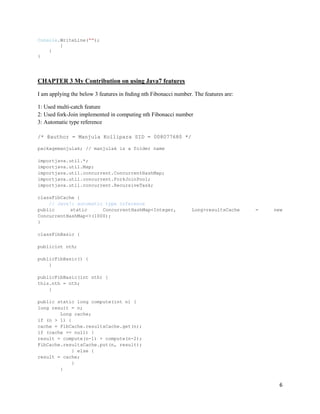
2.1.6 Type reference for generic instance creation; Diamond syntax

Map<String, List<String>> map = new HashMap<>();
            {
GCDemoobj = newGCDemo();
            }


                                                                                                5
Console.WriteLine("");
        }
    }
}


CHAPTER 3 My Contribution on using Java7 features

I am applying the below 3 features in fnding nth Fibonacci number. The features are:

1: Used multi-catch feature
2: Used fork-Join implemented in computing nth Fibonacci number
3: Automatic type reference

/* @author = Manjula Kollipara SID = 008077680 */

packagemanjulak; // manjulak is a folder name

importjava.util.*;
importjava.util.Map;
importjava.util.concurrent.ConcurrentHashMap;
importjava.util.concurrent.ForkJoinPool;
importjava.util.concurrent.RecursiveTask;

classFibCache {
    // Java7: automatic type inference
public      static     ConcurrentHashMap<Integer,                 Long>resultsCache    =   new
ConcurrentHashMap<>(1000);
}

classFibBasic {

publicint nth;

publicFibBasic() {
    }

publicFibBasic(int nth) {
this.nth = nth;
    }

public static long compute(int n) {
long result = n;
        Long cache;
if (n > 1) {
cache = FibCache.resultsCache.get(n);
if (cache == null) {
result = compute(n-1) + compute(n-2);
FibCache.resultsCache.put(n, result);
            } else {
result = cache;
            }
        }


                                                                                             6
return result;
    }

public long compute() {
System.out.println(Thread.currentThread().getName() + ": " + nth);
return compute(nth);
    }
}

classFibTask extends RecursiveTask<Long> {
privateint nth;
private static intfork_join_threshold = 10;

publicFibTask(int n) {
this.nth = n;
    }

    // Java7: FORK-JOIN
    @Override
public Long compute() {
long result = 0;

if (nth <= this.fork_join_threshold) {
            //System.out.println(Thread.currentThread().getName() + ": " + nth);

result = new FibBasic().compute(nth);
return result;
        }

          Long cachen1 = null, cachen2 = null;
inttmp;

          cachen1 = FibCache.resultsCache.get(nth-1);
          cachen2 = FibCache.resultsCache.get(nth-2);

          List<FibTask>subTasks = new LinkedList<>();

if (cachen1 == null) {
subTasks.add(new FibTask(nth-1));
        } else {
result += cachen1;
tmp = nth-1;
             //System.out.println(Thread.currentThread().getName() + ": found cache: ["
+ tmp + "] -> " + cachen1);
        }

if (cachen2 == null) {
subTasks.add(new FibTask(nth-2));
        } else {
result += cachen2;
tmp = nth-2;
             //System.out.println(Thread.currentThread().getName() + ": found cache: ["
+ tmp + "] -> " + cachen2);
        }


                                                                                     7
for (RecursiveTask<Long> task : subTasks) {
task.fork();
        }

for (FibTask task : subTasks) {
result += task.join();
        }

        //System.out.println(Thread.currentThread().getName() + ": " + nth);
FibCache.resultsCache.put(nth, result);
        //System.out.println(Thread.currentThread().getName() + ": update cache: [" +
nth + "] <- " + result);
return result;
    }
}

public class j7demo {

    /**
     * @paramargs the command line arguments
     */
public static void main(String[] args) {
intsysCpus = Runtime.getRuntime().availableProcessors();
intcpuArg = 0, fibNum = 0;
long result = 0;
longtotalFJTime = 0, totalTime = 0;

// Java7: Multi-Catch
try {
fibNum = Integer.parseInt(args[1]);
cpuArg = Integer.parseInt(args[2]);
if (cpuArg>sysCpus) cpuArg = sysCpus;
        } catch (ArrayIndexOutOfBoundsException | NumberFormatException e) {
cpuArg = sysCpus;
        }

ForkJoinPooltaskPool = new ForkJoinPool(cpuArg);
FibTaskfibTask = new FibTask(fibNum);

        // compute non-fork-join timing (recursive method)
totalTime = System.currentTimeMillis();
result = FibBasic.compute(fibNum);
totalTime = System.currentTimeMillis() - totalTime;

        // clear cache for fj method
FibCache.resultsCache.clear();

        // compute fork-join timing (recursive & for-join method)
totalFJTime = System.currentTimeMillis();
result = taskPool.invoke(fibTask);
totalFJTime = System.currentTimeMillis() - totalFJTime;

System.out.println("cpuArg: " + cpuArg +", fibNum: " + fibNum + ", result: " + result
+


                                                                                    8
", FJ-time: " + totalFJTime + "ms" + ", non-FJ-time: " + totalTime +
"ms");

return;
    }
}

Output:


References

[1] http://wikipedia.org

[2] http://www.oracle.com/technetwork/java/javase/jdk7-relnotes-418459.html

[3] http://java.dzone.com/articles/new-java-7-language-features

[4] http://java.dzone.com/articles/java-7-%E2%80%93-project-coin-feature

[5] http://docs.oracle.com/javase/7/docs/technotes/guides/language/try-with-resources.html

[6] http://java.dzone.com/articles/new-java-7-language-features


                                                                                             9

Java 7 Dolphin manjula kollipara

  • 1.
    Fall 2011 CMPE 202-Software Systems Engineering Research Project – Java7 Submitted by Manjula Kollipara Submitted to Prof. Paul Nguyen Date: November 26th 2011 1
  • 2.
    CHAPTER 1.History onEvolution of Java7 1.1 Background Since 1995, Java has changed our world and our expectations.... With growing technology today, we take it granted that we can be connected and access applications and its contents anywhere, anytime. This is all because of Java; we expect digital devices to be smarter, more functional, and way more entertaining. 1.2Prerequisites for the evolution of Java language: In 1991, a small group of Sun Microsystems engineers called “Green Team” led by James Gosling decided to develop a language for consumer devices such as cable boxes. They wanted the language to be 1. small and use efficient code since these devices do not have powerful CPUs. 2. hardware independent since different manufacturers would use different CPUs. 1.3 Conclusion The above conditions allowed them to decide to compile the code to an intermediate machine-like code for an imaginary CPU called a virtual machine. Apparently, there is a real CPU that implements this virtual CPU. This intermediate code (called byte code) is completely hardware independent. The Interpreter converts the byte code to appropriate machine code. Thus, once the interpreter has been installed on a computer, it can run any byte coded program. 1.4 Naming Convention: The Green Team chose C++ as their language and not C, because they wanted the language to be more object oriented rather than procedural. The original name of the language was “Oak”. Eventually they discovered that there was already a programming language called “Oak”, so they changed the name of the language to” Java”. 1.5 Artifacts The Green project had a lot of trouble getting others interested in Java for smart devices. The Green Team demonstrated their new language with an interactive, handheld home-entertainment controller that was originally targeted at the digital cable television industry. Unfortunately, the concept was much too advanced for them at that time. It was most adaptable for Internet, which was just starting to take off. Since 1991 Java language has undergone many changes starting from JDK 1.0 to current version Java 7 which was released on July 28 2011. 1.6 Versions: Let us walkthrough on the Java versions starting from its origination till today: Release Version Code Name Release Date Highlights JDK 1 Oak/Java 23-Jan-96 JDK 1.1 Java 19-Feb-97 AWT event Model, Java Beans, JDBC J2SE 1.2 Playground 8-Dec-98 strictfp keyword, Swing- Graphical API JVM with JIT compiler, Java Plug-in 2
  • 3.
    Java IDL withCORBA, collections J2SE 1.3 Kestrel 8-May-00 HotSpot, RMI with CORBA, JavaSound JNDI, JPDA, Synthetic proxy classes J2SE 1.4 Merlin 6-Feb-02 assert keyword included, Regular Expressions, Exception chaining IPv6, Integrated XML parser Cryptography Extension ( JCE, JSSE,JAAS) Java web start J2SE 5 Tiger 30-Sep-04 Annotations, Auto boxing/unboxing Enumerations, Varargs, Enhanced “for each” loop, Concurrency utilities Java SE 6 Mustang 11-Dec-06 Performance improvements Java compiler API, GUI improvements JVM improvement such as Synchronization compiler performance optimizations upgraded garbage-collection algorithms XX:+DoEscapeAnalysis - allow objects to be allocated in stack instead of heap Java SE 7 Dolphin 28-Jul-11 Stated briefly 1.7 Future Implementation: Next version of Java8 is planned to be released in Summer 2013. This version will include: 1. Features that were deferred during Java 7 implementation 2. Modularization of the JDK under Project Jigsaw. 3. Support for Lambda Expressions at Language –Level. 4. Integration with JavaFX. 1.8 Discovery of Java 7 Features: With the sufficient information on history, prerequisite’s, naming conventions, artifacts and versions on Java language; let us now focus more on Java 7 features as listed below. Java Programming Language  Binary Literals  Strings in switch Statements  The try-with-resources Statement  Catching Multiple Exception Types and Rethrowing Exceptions with Improved Type Checking  Underscores in Numeric Literals  Type Inference for Generic Instance Creation  Improved Compiler Warnings and Errors When Using Non-Reifiable Formal Parameters with Varargs Methods Swing, IO and New IO, Networking 3
  • 4.
    Security, Concurrency Utilities RichInternet Applications (RIA)/Deployment  Requesting and Customizing Applet Decoration in Dragg able Applets  Embedding JNLP File in Applet Tag  Deploying without Codebase  Handling Applet Initialization Status with Event Handlers Java 2D, Java XML - JAXP, JAXB, and JAX-WS Java.lang Package; Multithreaded Custom Class Loaders in Java SE 7 Java Virtual Machine (JVM)  Java Virtual Machine Support for Non-Java Languages  Garbage-First Collector  Java HotSpot Virtual Machine Performance Enhancements CHAPTER 2. Existing Examples using Java 7 features Now let us look at some of the examples using Java 7 features. 2.1 ProgrammingLanguage 2.1.1String in Switch statement: One other language that implements this feature is Shell scripting in Linux.One of the most easy-to-usefeatures implemented in Java 7 is having strings in switch statement.With this, the code is more readable and also the compiler can generate efficient byte code. public static void main(String[] args) throws IOException { reader = new BufferedReader(new InputStreamReader(System.in)); System.out.println("Please enter you choice of version"); version = reader.readLine(); switch (version) { case "java5": System.out.println("Yes, you entered java5"); break; case "java6": System.out.println("Your Entry was java6"); break; case "java7": System.out.println("Current version is java7"); break; } 2.1.2 Binary Literals: Public void testBinaryIntegralLiterals(){ int binary = 0b1000; If(binary == 8){ System.out.println(true);} Else{ System.out.println(false);} } 2.1.3Multi-Catch: The below part of the code is from the Project-coin that implemented most of the Java 7 features. Public static void printBalance(String accountId){ Try{ BigDecimal balance = getBalance(accountId); } Catch(AccountFrozenException | 4
  • 5.
    ComplianceViolationException | AccountClosedException e) { System.out.println(“Please visit your local branch office for further help”);} } 2.1.4 Try-catch Method: Public static void Main(string[] args) { // Creating an object of the FileStream class //Note: One file named as Write should in 'Test' folder in 'C' drive. try(FileStreamfs = new FileStream(@"C:TestWrite.txt", FileMode.Open)){ StreamReadersr = new StreamReader(fs); // Reading data from the file String str = sr.ReadLine(); Console.WriteLine("Text from the file is as follows:"); Console.WriteLine(str); sr.Close(); fs.Close(); } catch(exception e){} } 2.1.5 Underscores between literals: In Java 7 we can use “_” (underscore) as part of literal. Public void testUnderScoreNumericLiterals(){ intoneMillion_ = 1_000_000; IntoneMillion = 1000000; If(oneMilion_ == oneMillion){ System.out.println(true);} Else{ System.out.println(false); } } Some of the rules to be followed before using “_” in literal: 1. It is not legal to start literal value with “_” : Example: int x=_1000; 2. Literal should not end with Underscore. Ex: int l= 1000_; 3. Underscored can be implemented after the decimal point.: Example: float x=2.323_000 4. Underscores can be included in other numeric typesalso.Ex: int bytes = 0x123_456 5. consequitive underscored are not allowed. Example: int I = 100____000; 6. Underscored are not allowed before and after the decimal point. Ex: double d = 1000_.000, e= 1000._000; 2.1.6 Type reference for generic instance creation; Diamond syntax Map<String, List<String>> map = new HashMap<>(); { GCDemoobj = newGCDemo(); } 5
  • 6.
    Console.WriteLine(""); } } } CHAPTER 3 My Contribution on using Java7 features I am applying the below 3 features in fnding nth Fibonacci number. The features are: 1: Used multi-catch feature 2: Used fork-Join implemented in computing nth Fibonacci number 3: Automatic type reference /* @author = Manjula Kollipara SID = 008077680 */ packagemanjulak; // manjulak is a folder name importjava.util.*; importjava.util.Map; importjava.util.concurrent.ConcurrentHashMap; importjava.util.concurrent.ForkJoinPool; importjava.util.concurrent.RecursiveTask; classFibCache { // Java7: automatic type inference public static ConcurrentHashMap<Integer, Long>resultsCache = new ConcurrentHashMap<>(1000); } classFibBasic { publicint nth; publicFibBasic() { } publicFibBasic(int nth) { this.nth = nth; } public static long compute(int n) { long result = n; Long cache; if (n > 1) { cache = FibCache.resultsCache.get(n); if (cache == null) { result = compute(n-1) + compute(n-2); FibCache.resultsCache.put(n, result); } else { result = cache; } } 6
  • 7.
    return result; } public long compute() { System.out.println(Thread.currentThread().getName() + ": " + nth); return compute(nth); } } classFibTask extends RecursiveTask<Long> { privateint nth; private static intfork_join_threshold = 10; publicFibTask(int n) { this.nth = n; } // Java7: FORK-JOIN @Override public Long compute() { long result = 0; if (nth <= this.fork_join_threshold) { //System.out.println(Thread.currentThread().getName() + ": " + nth); result = new FibBasic().compute(nth); return result; } Long cachen1 = null, cachen2 = null; inttmp; cachen1 = FibCache.resultsCache.get(nth-1); cachen2 = FibCache.resultsCache.get(nth-2); List<FibTask>subTasks = new LinkedList<>(); if (cachen1 == null) { subTasks.add(new FibTask(nth-1)); } else { result += cachen1; tmp = nth-1; //System.out.println(Thread.currentThread().getName() + ": found cache: [" + tmp + "] -> " + cachen1); } if (cachen2 == null) { subTasks.add(new FibTask(nth-2)); } else { result += cachen2; tmp = nth-2; //System.out.println(Thread.currentThread().getName() + ": found cache: [" + tmp + "] -> " + cachen2); } 7
  • 8.
    for (RecursiveTask<Long> task: subTasks) { task.fork(); } for (FibTask task : subTasks) { result += task.join(); } //System.out.println(Thread.currentThread().getName() + ": " + nth); FibCache.resultsCache.put(nth, result); //System.out.println(Thread.currentThread().getName() + ": update cache: [" + nth + "] <- " + result); return result; } } public class j7demo { /** * @paramargs the command line arguments */ public static void main(String[] args) { intsysCpus = Runtime.getRuntime().availableProcessors(); intcpuArg = 0, fibNum = 0; long result = 0; longtotalFJTime = 0, totalTime = 0; // Java7: Multi-Catch try { fibNum = Integer.parseInt(args[1]); cpuArg = Integer.parseInt(args[2]); if (cpuArg>sysCpus) cpuArg = sysCpus; } catch (ArrayIndexOutOfBoundsException | NumberFormatException e) { cpuArg = sysCpus; } ForkJoinPooltaskPool = new ForkJoinPool(cpuArg); FibTaskfibTask = new FibTask(fibNum); // compute non-fork-join timing (recursive method) totalTime = System.currentTimeMillis(); result = FibBasic.compute(fibNum); totalTime = System.currentTimeMillis() - totalTime; // clear cache for fj method FibCache.resultsCache.clear(); // compute fork-join timing (recursive & for-join method) totalFJTime = System.currentTimeMillis(); result = taskPool.invoke(fibTask); totalFJTime = System.currentTimeMillis() - totalFJTime; System.out.println("cpuArg: " + cpuArg +", fibNum: " + fibNum + ", result: " + result + 8
  • 9.
    ", FJ-time: "+ totalFJTime + "ms" + ", non-FJ-time: " + totalTime + "ms"); return; } } Output: References [1] http://wikipedia.org [2] http://www.oracle.com/technetwork/java/javase/jdk7-relnotes-418459.html [3] http://java.dzone.com/articles/new-java-7-language-features [4] http://java.dzone.com/articles/java-7-%E2%80%93-project-coin-feature [5] http://docs.oracle.com/javase/7/docs/technotes/guides/language/try-with-resources.html [6] http://java.dzone.com/articles/new-java-7-language-features 9