C# Advanced
   Part 2
Applications
•   Console Windows apps
•   Windows Forms
•   Web services, WCF services
•   Web forms
•   ASP.NET MVC apps
•   Windows services
•   Libraries
Assembly
• Is a deployment unit
• .EXE or .DLL
• Contains manifest + code
  (metadata tables + IL)
Types
Can contain:
• Constant
• Field
• Instance constructor
• Type constructor
• Method. Method is not virtual by default.
  Virtual, new , override, sealed, abstract
Types (cont’d)
•   Property. Can be virtual
•   Overloaded operator
•   Conversion operator
•   Event. Can be virtual
•   Type
Access modifiers
•   Private
•   Protected (Family)
•   Internal
•   Family and assembly -- Not supported in C#
•   Family or assembly (protected internal)
•   Public
Types
• Value types – stack, inline
• Reference types – heap, by reference
Object lifetime
•   Allocate memory. Fill it with 0x00.
•   Init memory -- constructor.
•   Use the object -- call methods, access fields.
•   Cleanup.
•   Deallocate memory (only GC is responsible for
    this).
Object References
• CLR knows about all references to objects.
• Root reference (in active local var or in static
  field).
• Non-root reference (in instance field)
Finalization
• Mechanism that allows the object to correctly
  cleanup itself before GC releases memory.
• Time when finalizers are called is
  undetermined.
• Order in which finalizers are called is
  undetermined.
• Partially constructed objects are also finalized
IDisposable
• Used when the object needs explicit cleanup
What are Exceptions?
• An exception is any error condition or
  unexpected behavior encountered by an
  executing program.
• In the .NET Framework, an exception is an object
  that inherits from the Exception Class class.
• The exception is passed up the stack until the
  application handles it or the program terminates.
Use Exceptions or not use exceptions?
-
•   Вони невидимі з викликаючого коду.
•   Створюються непередбачувані точки виходу з метода.
•   Exceptions повільні. (exceptions use resources only when an exception occurs.)
+
• Зручність використання.
• Інформативність отриманих помилок більша по відношенні до
  статус-кодів.
• Принцип використання. Throw на самий верхній рівень.
• Більш елегантні архітектурні рішення та зменшення часу
  розробки.
C# Exception handling
•   try…catch…finally
•   throw
•   Catch as high as you can
•   try{ }
     catch(Exception1){ /*exception1 handler*/ }
     catch(Exception2) { /*exception2 handler*/ }
     catch(Exception) { /*exception handler*/ }
IDisposable
• The primary use of this interface is to release
  unmanaged resources.

• When calling a class that implements the
  IDisposable interface, use the try/finally
  pattern to make sure that unmanaged
  resources are disposed of even if an exception
  interrupts your application.
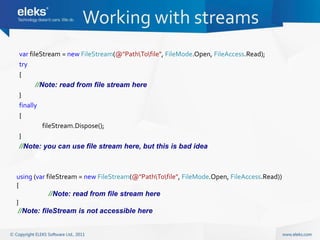
Working with streams
var fileStream = new FileStream(@"PathTofile", FileMode.Open, FileAccess.Read);
try
{
       //Note: read from file stream here
}
finally
{
          fileStream.Dispose();
}
//Note: you can use file stream here, but this is bad idea


using (var fileStream = new FileStream(@"PathTofile", FileMode.Open, FileAccess.Read))
{
            //Note: read from file stream here
}
 //Note: fileStream is not accessible here
Attributes
• Attributes provide a powerful method of
  associating declarative information with C#
  code (types, methods, properties, and so
  forth).
Aspect Oriented Programming
•   Logging
•   Data validating
•   Security mechanism
•   …
Validation sample (AOP sample)
  public class User
 {
        [StringLengthValidator(1, 255, MessageTemplate = "Login cannot be empty.")]
        public string Login { get; set; }

       [StringLengthValidator(1, 127, MessageTemplate = "Domain cannot be empty.")]
       public string Domain { get; set; }

       public string FirstName { get; set; }

       public string LastName { get; set; }

       [StringLengthValidator(1, 50, MessageTemplate = "Email cannot be empty.")]
       public string Email { get; set; }
 }


http://msdn.microsoft.com/en-us/library/ff648831.aspx - Enterprise Library Validation Application Block
Custom attributes
- Creating
 [AttributeUsage(AttributeTargets.Method, AllowMultiple = false)]
    public class LoggingRequiredAttribute : Attribute
    {
    }

- Usages
 public class UserService
    {
        [LoggingRequired]
        public static void CreateUser()
        {
            //Note: logic here
        }

           public static void EditUser()
           {
               //Note: logic here
           }
    }
Questions?

06.1 .Net memory management

  • 1.
  • 2.
    Applications • Console Windows apps • Windows Forms • Web services, WCF services • Web forms • ASP.NET MVC apps • Windows services • Libraries
  • 3.
    Assembly • Is adeployment unit • .EXE or .DLL • Contains manifest + code (metadata tables + IL)
  • 4.
    Types Can contain: • Constant •Field • Instance constructor • Type constructor • Method. Method is not virtual by default. Virtual, new , override, sealed, abstract
  • 5.
    Types (cont’d) • Property. Can be virtual • Overloaded operator • Conversion operator • Event. Can be virtual • Type
  • 6.
    Access modifiers • Private • Protected (Family) • Internal • Family and assembly -- Not supported in C# • Family or assembly (protected internal) • Public
  • 7.
    Types • Value types– stack, inline • Reference types – heap, by reference
  • 8.
    Object lifetime • Allocate memory. Fill it with 0x00. • Init memory -- constructor. • Use the object -- call methods, access fields. • Cleanup. • Deallocate memory (only GC is responsible for this).
  • 9.
    Object References • CLRknows about all references to objects. • Root reference (in active local var or in static field). • Non-root reference (in instance field)
  • 10.
    Finalization • Mechanism thatallows the object to correctly cleanup itself before GC releases memory. • Time when finalizers are called is undetermined. • Order in which finalizers are called is undetermined. • Partially constructed objects are also finalized
  • 11.
    IDisposable • Used whenthe object needs explicit cleanup
  • 12.
    What are Exceptions? •An exception is any error condition or unexpected behavior encountered by an executing program. • In the .NET Framework, an exception is an object that inherits from the Exception Class class. • The exception is passed up the stack until the application handles it or the program terminates.
  • 13.
    Use Exceptions ornot use exceptions? - • Вони невидимі з викликаючого коду. • Створюються непередбачувані точки виходу з метода. • Exceptions повільні. (exceptions use resources only when an exception occurs.) + • Зручність використання. • Інформативність отриманих помилок більша по відношенні до статус-кодів. • Принцип використання. Throw на самий верхній рівень. • Більш елегантні архітектурні рішення та зменшення часу розробки.
  • 14.
    C# Exception handling • try…catch…finally • throw • Catch as high as you can • try{ } catch(Exception1){ /*exception1 handler*/ } catch(Exception2) { /*exception2 handler*/ } catch(Exception) { /*exception handler*/ }
  • 15.
    IDisposable • The primaryuse of this interface is to release unmanaged resources. • When calling a class that implements the IDisposable interface, use the try/finally pattern to make sure that unmanaged resources are disposed of even if an exception interrupts your application.
  • 16.
    Working with streams varfileStream = new FileStream(@"PathTofile", FileMode.Open, FileAccess.Read); try { //Note: read from file stream here } finally { fileStream.Dispose(); } //Note: you can use file stream here, but this is bad idea using (var fileStream = new FileStream(@"PathTofile", FileMode.Open, FileAccess.Read)) { //Note: read from file stream here } //Note: fileStream is not accessible here
  • 17.
    Attributes • Attributes providea powerful method of associating declarative information with C# code (types, methods, properties, and so forth).
  • 18.
    Aspect Oriented Programming • Logging • Data validating • Security mechanism • …
  • 19.
    Validation sample (AOPsample) public class User { [StringLengthValidator(1, 255, MessageTemplate = "Login cannot be empty.")] public string Login { get; set; } [StringLengthValidator(1, 127, MessageTemplate = "Domain cannot be empty.")] public string Domain { get; set; } public string FirstName { get; set; } public string LastName { get; set; } [StringLengthValidator(1, 50, MessageTemplate = "Email cannot be empty.")] public string Email { get; set; } } http://msdn.microsoft.com/en-us/library/ff648831.aspx - Enterprise Library Validation Application Block
  • 20.
    Custom attributes - Creating [AttributeUsage(AttributeTargets.Method, AllowMultiple = false)] public class LoggingRequiredAttribute : Attribute { } - Usages public class UserService { [LoggingRequired] public static void CreateUser() { //Note: logic here } public static void EditUser() { //Note: logic here } }
  • 21.