Eclipse May 18, 2010
About IDEs An IDE is an  I ntegrated  D evelopment  E nvironment Different IDEs meet different needs BlueJ, DrJava are designed as teaching tools Emphasis is on ease of use for beginners Little to learn, so students can concentrate on learning Java Eclipse, JBuilder, NetBeans are designed as professional-level work tools Emphasis is on supporting professional programmers More to learn, but well worth it in the long run We will use Eclipse, but other professional IDEs are similar The following slides are taken from   www.eclipse.org/eclipse/presentation/eclipse-slides.ppt
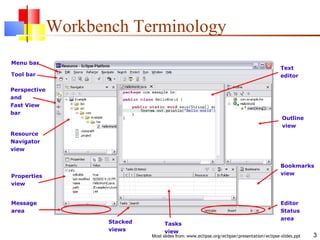
Workbench Terminology Tool bar Perspective and Fast View bar Resource Navigator view Stacked views Properties view Tasks view Outline view Bookmarks view Menu bar Message area Editor Status area Text editor
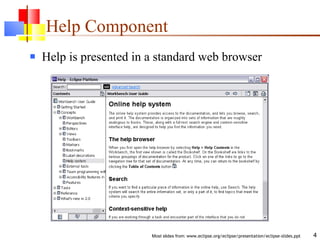
Help Component Help is presented in a standard web browser
Java Development Tools JDT = Java development tools State of the art Java development environment Built atop Eclipse Platform Implemented as Eclipse plug-ins Using Eclipse Platform APIs and extension points Included in Eclipse Project releases Available as separately installable feature Part of Eclipse SDK drops
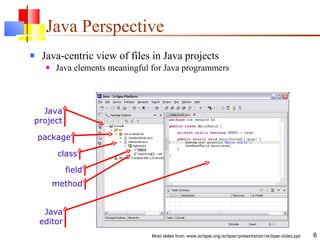
Java Perspective Java-centric view of files in Java projects Java elements meaningful for Java programmers Java project package class field method Java editor
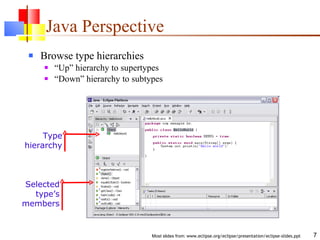
Java Perspective Browse type hierarchies “ Up” hierarchy to supertypes “ Down” hierarchy to subtypes Type hierarchy Selected type’s members
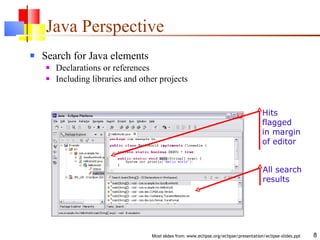
Java Perspective Search for Java elements Declarations or references Including libraries and other projects Hits flagged in margin of editor All search results
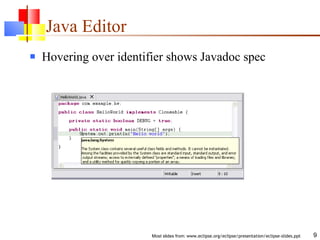
Java Editor Hovering over identifier shows Javadoc spec
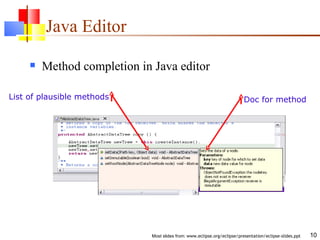
Java Editor Method completion in Java editor List of plausible methods Doc for method
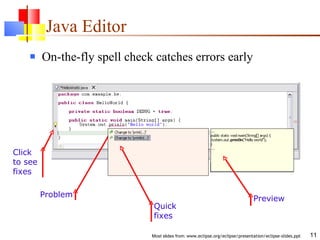
Java Editor On-the-fly spell check catches errors early Click to see fixes Problem Preview Quick fixes
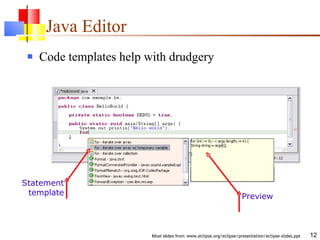
Java Editor Code templates help with drudgery Statement template Preview
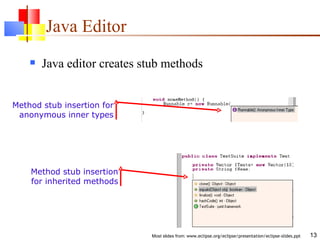
Java Editor Method stub insertion for inherited methods Method stub insertion for anonymous inner types Java editor creates stub methods
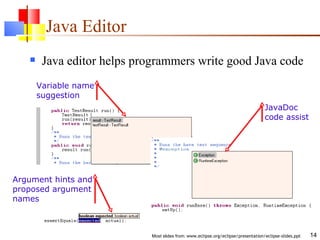
Java Editor Variable name suggestion Argument hints and proposed argument names JavaDoc code assist Java editor helps programmers write good Java code
Java Editor Other features of Java editor include Local method history Code formatter Source code for binary libraries Built-in refactoring
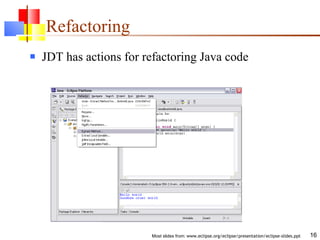
Refactoring JDT has actions for refactoring Java code
Refactoring Refactoring actions rewrite source code Within a single Java source file Across multiple interrelated Java source files Refactoring actions preserve program semantics Does not alter what program does Just affects the way it does it Encourages exploratory programming Encourages higher code quality Makes it easier to rewrite poor code
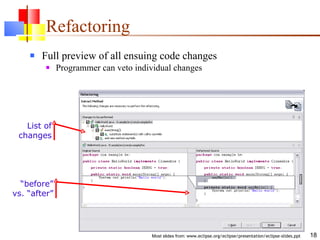
Refactoring Full preview of all ensuing code changes Programmer can veto individual changes List of changes “ before” vs. “after”
Refactoring Growing catalog of refactoring actions Organize imports Rename {field, method, class, package} Move {field, method, class} Extract method Extract local variable Inline local variable Reorder method parameters
Eclipse Java Compiler Eclipse Java compiler JCK-compliant Java compiler (selectable 1.3 and 1.4) Helpful error messages Generates runnable code even in presence of errors Fully-automatic incremental recompilation High performance Scales to large projects Multiple other uses besides the obvious Syntax and spell checking Analyze structure inside Java source file Name resolution Content assist Refactoring Searches
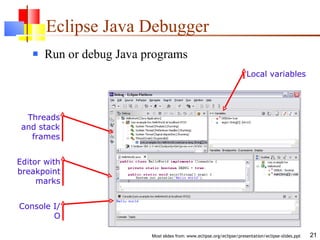
Eclipse Java Debugger Run or debug Java programs Threads and stack frames Editor with breakpoint marks Console I/O Local variables
Eclipse Java Debugger Run Java programs In separate target JVM (user selectable) Console provides stdout, stdin, stderr Scrapbook pages for executing Java code snippets Debug Java programs Full source code debugging Any JPDA-compliant JVM Debugger features include Method and exception breakpoints Conditional breakpoints Watchpoints Step over, into, return; run to line Inspect and modify fields and local variables Evaluate snippets in context of method Hot swap (if target JVM supports)
The End

Eclipse

  • 1.
  • 2.
    About IDEs AnIDE is an I ntegrated D evelopment E nvironment Different IDEs meet different needs BlueJ, DrJava are designed as teaching tools Emphasis is on ease of use for beginners Little to learn, so students can concentrate on learning Java Eclipse, JBuilder, NetBeans are designed as professional-level work tools Emphasis is on supporting professional programmers More to learn, but well worth it in the long run We will use Eclipse, but other professional IDEs are similar The following slides are taken from www.eclipse.org/eclipse/presentation/eclipse-slides.ppt
  • 3.
    Workbench Terminology Toolbar Perspective and Fast View bar Resource Navigator view Stacked views Properties view Tasks view Outline view Bookmarks view Menu bar Message area Editor Status area Text editor
  • 4.
    Help Component Helpis presented in a standard web browser
  • 5.
    Java Development ToolsJDT = Java development tools State of the art Java development environment Built atop Eclipse Platform Implemented as Eclipse plug-ins Using Eclipse Platform APIs and extension points Included in Eclipse Project releases Available as separately installable feature Part of Eclipse SDK drops
  • 6.
    Java Perspective Java-centricview of files in Java projects Java elements meaningful for Java programmers Java project package class field method Java editor
  • 7.
    Java Perspective Browsetype hierarchies “ Up” hierarchy to supertypes “ Down” hierarchy to subtypes Type hierarchy Selected type’s members
  • 8.
    Java Perspective Searchfor Java elements Declarations or references Including libraries and other projects Hits flagged in margin of editor All search results
  • 9.
    Java Editor Hoveringover identifier shows Javadoc spec
  • 10.
    Java Editor Methodcompletion in Java editor List of plausible methods Doc for method
  • 11.
    Java Editor On-the-flyspell check catches errors early Click to see fixes Problem Preview Quick fixes
  • 12.
    Java Editor Codetemplates help with drudgery Statement template Preview
  • 13.
    Java Editor Methodstub insertion for inherited methods Method stub insertion for anonymous inner types Java editor creates stub methods
  • 14.
    Java Editor Variablename suggestion Argument hints and proposed argument names JavaDoc code assist Java editor helps programmers write good Java code
  • 15.
    Java Editor Otherfeatures of Java editor include Local method history Code formatter Source code for binary libraries Built-in refactoring
  • 16.
    Refactoring JDT hasactions for refactoring Java code
  • 17.
    Refactoring Refactoring actionsrewrite source code Within a single Java source file Across multiple interrelated Java source files Refactoring actions preserve program semantics Does not alter what program does Just affects the way it does it Encourages exploratory programming Encourages higher code quality Makes it easier to rewrite poor code
  • 18.
    Refactoring Full previewof all ensuing code changes Programmer can veto individual changes List of changes “ before” vs. “after”
  • 19.
    Refactoring Growing catalogof refactoring actions Organize imports Rename {field, method, class, package} Move {field, method, class} Extract method Extract local variable Inline local variable Reorder method parameters
  • 20.
    Eclipse Java CompilerEclipse Java compiler JCK-compliant Java compiler (selectable 1.3 and 1.4) Helpful error messages Generates runnable code even in presence of errors Fully-automatic incremental recompilation High performance Scales to large projects Multiple other uses besides the obvious Syntax and spell checking Analyze structure inside Java source file Name resolution Content assist Refactoring Searches
  • 21.
    Eclipse Java DebuggerRun or debug Java programs Threads and stack frames Editor with breakpoint marks Console I/O Local variables
  • 22.
    Eclipse Java DebuggerRun Java programs In separate target JVM (user selectable) Console provides stdout, stdin, stderr Scrapbook pages for executing Java code snippets Debug Java programs Full source code debugging Any JPDA-compliant JVM Debugger features include Method and exception breakpoints Conditional breakpoints Watchpoints Step over, into, return; run to line Inspect and modify fields and local variables Evaluate snippets in context of method Hot swap (if target JVM supports)
  • 23.

Editor's Notes

  • #4 [Contains animated elements]
  • #10 [Contains animated elements]
  • #11 [Contains animated elements]
  • #12 [Contains animated elements] Syntax and spell checking are done on-the-fly. Calls Java compiler to parse source code and resolve names in context. Developers refer to those wavy red lines as “the red sea” :-). Problem markers are appear in the left margin of editor. “ Red X” instead of “light bulb” if no proposed corrections.
  • #13 [Contains animated elements]
  • #14 [Contains animated elements]
  • #15 [Contains animated elements]
  • #19 Screen shot shows Extract Method applied to the print statement in HelloWorld.main method.
  • #21 Scales to large projects, like Eclipse itself.