Development for Administrators


                         Bill Buchan - HADSL


Monday, 8 October 2007                         1
Introduction:1
       Bill             Buchan
             Director,
                      HADSL. We develop administration tools.
             Dual PCLP in v3, v4, v5, v6, and now v7
                  (Exam    Junkie)
       Experience                in large corporate environments
             100,000        + users
       Experience                in migrating applications
             36,000        separate apps in the last five years!


                                                                    2

Monday, 8 October 2007                                                  2
Introduction:2
       This    session leads you through best practices for dealing
           with applications in your environment
             Avoid  common pitfalls
             Make your environment more secure

             Prevent developers destroying your environment

             Basic coding techniques in
                  @formula

                  LotusScript


                                                                 3

Monday, 8 October 2007                                                 3
Introduction: 3
       Administrators             are from Mars – Developers are from
        Venus.....
        A good developer has some administration skills, and a
        good administrator has some development skills
             This   is why PCLP requires you to take one exam “from the other
                side”...
       This             should give you a good kick start on that journey


                                                                             4

Monday, 8 October 2007                                                           4
Agenda
       Development,   Test & Production Environments
       Deploying Applications

       Signing Agents

       Quick @Formula Language Agents

       Essential LotusScript

       Quick LotusScript Agents

       Summary


                                                        5

Monday, 8 October 2007                                      5
Development, Test & Production: 1
       You              should have:
             A developers “sandbox”
             A User Testing Domain

             A Production System

       Why              ?
             Proper change control
             Allows developers to simulate system changes
                  Without     destroying your production system!
             Allows         you to test version upgrades
                                                                    6

Monday, 8 October 2007                                                  6
Development, Test & Production: 2
       VMWare           is your friend:
             Workstation       < $200
             Server:    Free
       Can  create multiple partitions, and set breakpoints
       Can move partitions around between machines

       Easy to back up and roll back

       http://www.vmware.com


                                                               7

Monday, 8 October 2007                                             7
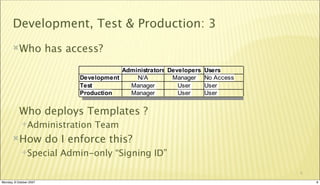
Development, Test & Production: 3
       Who              has access?


           Who deploys Templates ?
             Administration       Team
       How              do I enforce this?
             Special       Admin-only “Signing ID”

                                                      8

Monday, 8 October 2007                                    8
Development, Test & Production: 4
       Isnt             this a lot of work?
             Yes – its more work than normal
             Encourages less changes and more testing from Developers

             Gives you a proper change control mechanism

       Prevents:
             Unauthorised change
             Developers having Manager access to environment


                                                                         9

Monday, 8 October 2007                                                       9
Development, Test & Production: 5
       Use              different certifiers for these domains
             And have different user ID's
             Use multiple notes directories to run multiple clients
                  DONT      use location documents!
             DONT          allow these environments to connect to each other
                  Its    a security weakness


                                                                                10

Monday, 8 October 2007                                                               10
Agenda
       Development,   Test & Production Environments
       Deploying Applications

       Signing Agents

       Quick @Formula Language Agents

       Essential LotusScript

       Quick LotusScript Agents

       Summary


                                                        11

Monday, 8 October 2007                                       11
Deploying Applications: 1
       Process:
             Developers        create/change applications
                  Create release notes
                  Sends template from Dev environment to Administrator

             Administrator  deploys to Test, asks users to test application
             IF passed testing, deploys application to production
                  Else   start again


                                                                               12

Monday, 8 October 2007                                                              12
Deploying Applications: 2
       Change/Release                       Notes
                  Created  by Developers
                  Lists changes

                  Outlines deployment requirements
                          Dependencies   on other databases, Platform
                          Client version issues
                          Any “restricted” agents
                          Any logging and monitoring requirements


                                                                         13

Monday, 8 October 2007                                                        13
Deploying Applications: 3
       What             to watch for:
             Hardcoded        server name, application name or replica ID
                  Use   “profile” documents and document how Administration team sets
                     up application
             Scheduled       agents
                  What   level of access is required
             “Trusted      Servers” requirement
                  Does   this application access other servers?


                                                                                   14

Monday, 8 October 2007                                                                  14
Deploying Applications: 4
       Keep             all versions and release notes in a database
             A simple discussion database is a good start
             Ensures that templates are backed up

       Better:
             Create       a version control database
       Best:
             Use        a version control and deployment system
                  such    as Ciao! & BuildManager from Teamstudio


                                                                        15

Monday, 8 October 2007                                                       15
Deploying Applications: 5
       When             deploying
             Always use “Design, Replace”
             Always use the “Signing ID”

             Remember to set any scheduled agents

             Access Control:
                  Should never contain names
                  Should always contain groups

                  Group name and/or description should point to application


                                                                               16

Monday, 8 October 2007                                                              16
Agenda
       Development,   Test & Production Environments
       Deploying Applications

       Signing Agents

       Quick @Formula Language Agents

       Essential LotusScript

       Quick LotusScript Agents

       Summary


                                                        17

Monday, 8 October 2007                                       17
Signing Agents: 1
       All   scheduled agents should be signed during
           deployment.
             Remember:  Developers only have “User” rights in production.
              Their ID may not have access to required databases
             This means that you should use a special “Signing” ID
                  Such   as “Template Development/CompanyName”


                                                                             18

Monday, 8 October 2007                                                            18
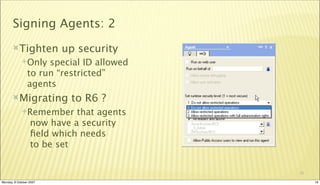
Signing Agents: 2
       Tighten          up security
             Only   special ID allowed
                to run “restricted”
                agents
       Migrating          to R6 ?
             Remember      that agents
                  now have a security
                  field which needs
                  to be set


                                          19

Monday, 8 October 2007                         19
Agenda
       Development,   Test & Production Environments
       Deploying Applications

       Signing Agents

       Quick @Formula Language Agents

       Essential LotusScript

       Quick LotusScript Agents

       Summary


                                                        20

Monday, 8 October 2007                                       20
Quick @Formula Agents: 1
       What             to use @Formula language for:
             Changes       to a number of documents
       What             NOT to use @Formula language for:
             User  Input
             Complex validation

             Multi-document “relational” updates

             If your @formula is more than 15 lines, consider LotusScript


Monday, 8 October 2007                                                       21
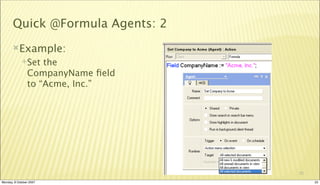
Quick @Formula Agents: 2
       Example:
             Set   the
                CompanyName field
                to “Acme, Inc.”


                                   22

Monday, 8 October 2007                  22
Agenda
       Development,   Test & Production Environments
       Deploying Applications

       Signing Agents

       Quick @Formula Language Agents

       Essential LotusScript

       Quick LotusScript Agents

       Summary


                                                        23

Monday, 8 October 2007                                       23
Essential LotusScript: 1
       LotusScript             is better for:
             Complex  transactions, complex business rules
             Creating Administration Requests
                  EG    @Formula doesnt “sign” fields
             Some   form of UI
             Its harder to get into

             Its easier to Debug


                                                              24

Monday, 8 October 2007                                             24
Essential LotusScript: 2
       LotusScript           is just like Visual Basic
             Accessing      Notes objects is via the Notes.. Objects
                  Backend code – document manipulation
                  Frontend code – modifying User Interface documents

             Most  of your work will be
             Writing backend agents to modify documents

             Call the Notes Administration tools


                                                                        25

Monday, 8 October 2007                                                       25
Essential LotusScript: 3
       Agents           can be
             Triggeredby the user from the action bar
             Scheduled and ran on workstations and servers

       Agents           can be passed “selected documents”
             Agents     run as
                  The user who signed the code on the server
                  The current user on the workstation


                                                                26

Monday, 8 October 2007                                               26
Essential LotusScript: 4
       Lots of online help
       Lots of examples in the help

       If you dont understand it – dont do it

       Test in your development environment!

       Be careful when changing documents in scheduled
        agents
             Replication   storm!


                                                          27

Monday, 8 October 2007                                         27
Agenda
       Development,   Test & Production Environments
       Deploying Applications

       Signing Agents

       Quick @Formula Language Agents

       Essential LotusScript

       Quick LotusScript Agents

       Summary


                                                        28

Monday, 8 October 2007                                       28
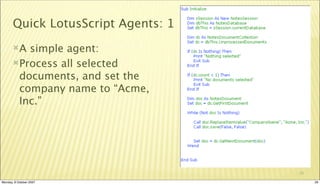
Quick LotusScript Agents: 1
       A simple agent:
       Process all selected
        documents, and set the
        company name to “Acme,
        Inc.”


                                     29

Monday, 8 October 2007                    29
Quick LotusScript Agents: 2
       Its          not as scary as it looks:
             Everything  is an Object
             You drill down through logical structures

             You can loop

       Remember:
             On-line help
             Lots and lots of online examples

             http://www.notes.net


                                                          30

Monday, 8 October 2007                                         30
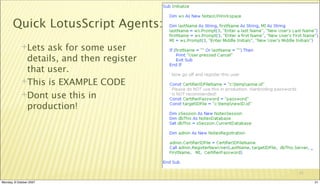
Quick LotusScript Agents: 3
             Lets ask for some user
              details, and then register
              that user.
             This is EXAMPLE CODE

             Dont use this in
              production!


                                           31

Monday, 8 October 2007                          31
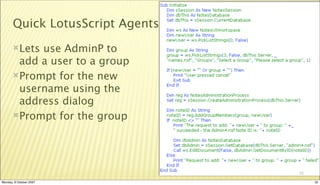
Quick LotusScript Agents: 4
       Letsuse AdminP to
        add a user to a group
       Prompt for the new
        username using the
        address dialog
       Prompt for the group


                                     32

Monday, 8 October 2007                    32
Agenda
       Development,   Test & Production Environments
       Deploying Applications

       Signing Agents

       Quick @Formula Language Agents

       Essential LotusScript

       Quick LotusScript Agents

       Summary


                                                        33

Monday, 8 October 2007                                       33
Summary
       Trustno-one!
       Proper change control saves your career

       Programming isnt hard
             (After      all, developers do it..)
       Be           cautious
             The        debugger is your friend


                                                     34

Monday, 8 October 2007                                    34
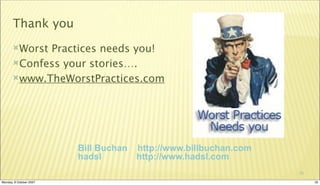
Thank you
       WorstPractices needs you!
       Confess your stories….

       www.TheWorstPractices.com


                         Bill Buchan   http://www.billbuchan.com
                         hadsl         http://www.hadsl.com
                                                                   35

Monday, 8 October 2007                                                  35

Softsphere - Development for administrators

  • 1.
    Development for Administrators Bill Buchan - HADSL Monday, 8 October 2007 1
  • 2.
    Introduction:1 Bill Buchan Director, HADSL. We develop administration tools. Dual PCLP in v3, v4, v5, v6, and now v7 (Exam Junkie) Experience in large corporate environments 100,000 + users Experience in migrating applications 36,000 separate apps in the last five years! 2 Monday, 8 October 2007 2
  • 3.
    Introduction:2 This session leads you through best practices for dealing with applications in your environment Avoid common pitfalls Make your environment more secure Prevent developers destroying your environment Basic coding techniques in @formula LotusScript 3 Monday, 8 October 2007 3
  • 4.
    Introduction: 3 Administrators are from Mars – Developers are from Venus.....  A good developer has some administration skills, and a good administrator has some development skills This is why PCLP requires you to take one exam “from the other side”... This should give you a good kick start on that journey 4 Monday, 8 October 2007 4
  • 5.
    Agenda Development, Test & Production Environments Deploying Applications Signing Agents Quick @Formula Language Agents Essential LotusScript Quick LotusScript Agents Summary 5 Monday, 8 October 2007 5
  • 6.
    Development, Test &Production: 1 You should have: A developers “sandbox” A User Testing Domain A Production System Why ? Proper change control Allows developers to simulate system changes Without destroying your production system! Allows you to test version upgrades 6 Monday, 8 October 2007 6
  • 7.
    Development, Test &Production: 2 VMWare is your friend: Workstation < $200 Server: Free Can create multiple partitions, and set breakpoints Can move partitions around between machines Easy to back up and roll back http://www.vmware.com 7 Monday, 8 October 2007 7
  • 8.
    Development, Test &Production: 3 Who has access? Who deploys Templates ? Administration Team How do I enforce this? Special Admin-only “Signing ID” 8 Monday, 8 October 2007 8
  • 9.
    Development, Test &Production: 4 Isnt this a lot of work? Yes – its more work than normal Encourages less changes and more testing from Developers Gives you a proper change control mechanism Prevents: Unauthorised change Developers having Manager access to environment 9 Monday, 8 October 2007 9
  • 10.
    Development, Test &Production: 5 Use different certifiers for these domains And have different user ID's Use multiple notes directories to run multiple clients DONT use location documents! DONT allow these environments to connect to each other Its a security weakness 10 Monday, 8 October 2007 10
  • 11.
    Agenda Development, Test & Production Environments Deploying Applications Signing Agents Quick @Formula Language Agents Essential LotusScript Quick LotusScript Agents Summary 11 Monday, 8 October 2007 11
  • 12.
    Deploying Applications: 1 Process: Developers create/change applications Create release notes Sends template from Dev environment to Administrator Administrator deploys to Test, asks users to test application IF passed testing, deploys application to production Else start again 12 Monday, 8 October 2007 12
  • 13.
    Deploying Applications: 2 Change/Release Notes Created by Developers Lists changes Outlines deployment requirements  Dependencies on other databases, Platform  Client version issues  Any “restricted” agents  Any logging and monitoring requirements 13 Monday, 8 October 2007 13
  • 14.
    Deploying Applications: 3 What to watch for: Hardcoded server name, application name or replica ID Use “profile” documents and document how Administration team sets up application Scheduled agents What level of access is required “Trusted Servers” requirement Does this application access other servers? 14 Monday, 8 October 2007 14
  • 15.
    Deploying Applications: 4 Keep all versions and release notes in a database A simple discussion database is a good start Ensures that templates are backed up Better: Create a version control database Best: Use a version control and deployment system such as Ciao! & BuildManager from Teamstudio 15 Monday, 8 October 2007 15
  • 16.
    Deploying Applications: 5 When deploying Always use “Design, Replace” Always use the “Signing ID” Remember to set any scheduled agents Access Control: Should never contain names Should always contain groups Group name and/or description should point to application 16 Monday, 8 October 2007 16
  • 17.
    Agenda Development, Test & Production Environments Deploying Applications Signing Agents Quick @Formula Language Agents Essential LotusScript Quick LotusScript Agents Summary 17 Monday, 8 October 2007 17
  • 18.
    Signing Agents: 1 All scheduled agents should be signed during deployment. Remember: Developers only have “User” rights in production. Their ID may not have access to required databases This means that you should use a special “Signing” ID Such as “Template Development/CompanyName” 18 Monday, 8 October 2007 18
  • 19.
    Signing Agents: 2 Tighten up security Only special ID allowed to run “restricted” agents Migrating to R6 ? Remember that agents now have a security field which needs to be set 19 Monday, 8 October 2007 19
  • 20.
    Agenda Development, Test & Production Environments Deploying Applications Signing Agents Quick @Formula Language Agents Essential LotusScript Quick LotusScript Agents Summary 20 Monday, 8 October 2007 20
  • 21.
    Quick @Formula Agents:1 What to use @Formula language for: Changes to a number of documents What NOT to use @Formula language for: User Input Complex validation Multi-document “relational” updates If your @formula is more than 15 lines, consider LotusScript Monday, 8 October 2007 21
  • 22.
    Quick @Formula Agents:2 Example: Set the CompanyName field to “Acme, Inc.” 22 Monday, 8 October 2007 22
  • 23.
    Agenda Development, Test & Production Environments Deploying Applications Signing Agents Quick @Formula Language Agents Essential LotusScript Quick LotusScript Agents Summary 23 Monday, 8 October 2007 23
  • 24.
    Essential LotusScript: 1 LotusScript is better for: Complex transactions, complex business rules Creating Administration Requests EG @Formula doesnt “sign” fields Some form of UI Its harder to get into Its easier to Debug 24 Monday, 8 October 2007 24
  • 25.
    Essential LotusScript: 2 LotusScript is just like Visual Basic Accessing Notes objects is via the Notes.. Objects Backend code – document manipulation Frontend code – modifying User Interface documents Most of your work will be Writing backend agents to modify documents Call the Notes Administration tools 25 Monday, 8 October 2007 25
  • 26.
    Essential LotusScript: 3 Agents can be Triggeredby the user from the action bar Scheduled and ran on workstations and servers Agents can be passed “selected documents” Agents run as The user who signed the code on the server The current user on the workstation 26 Monday, 8 October 2007 26
  • 27.
    Essential LotusScript: 4 Lots of online help Lots of examples in the help If you dont understand it – dont do it Test in your development environment! Be careful when changing documents in scheduled agents Replication storm! 27 Monday, 8 October 2007 27
  • 28.
    Agenda Development, Test & Production Environments Deploying Applications Signing Agents Quick @Formula Language Agents Essential LotusScript Quick LotusScript Agents Summary 28 Monday, 8 October 2007 28
  • 29.
    Quick LotusScript Agents:1 A simple agent: Process all selected documents, and set the company name to “Acme, Inc.” 29 Monday, 8 October 2007 29
  • 30.
    Quick LotusScript Agents:2 Its not as scary as it looks: Everything is an Object You drill down through logical structures You can loop Remember: On-line help Lots and lots of online examples http://www.notes.net 30 Monday, 8 October 2007 30
  • 31.
    Quick LotusScript Agents:3 Lets ask for some user details, and then register that user. This is EXAMPLE CODE Dont use this in production! 31 Monday, 8 October 2007 31
  • 32.
    Quick LotusScript Agents:4 Letsuse AdminP to add a user to a group Prompt for the new username using the address dialog Prompt for the group 32 Monday, 8 October 2007 32
  • 33.
    Agenda Development, Test & Production Environments Deploying Applications Signing Agents Quick @Formula Language Agents Essential LotusScript Quick LotusScript Agents Summary 33 Monday, 8 October 2007 33
  • 34.
    Summary Trustno-one! Proper change control saves your career Programming isnt hard (After all, developers do it..) Be cautious The debugger is your friend 34 Monday, 8 October 2007 34
  • 35.
    Thank you WorstPractices needs you! Confess your stories…. www.TheWorstPractices.com Bill Buchan http://www.billbuchan.com hadsl http://www.hadsl.com 35 Monday, 8 October 2007 35