Part 2: Improving your software development  process March 2011 Santa Clara Karim DJAAFAR CO of Jasmine Conseil
Outline Towards a better build process using agile tools Build Managements Continuous Integration, Principles and Tools  JasForge  project Using hudson in jasforge Project Demos
TOWARDS A BETTER BUILD PROCESS USING AGILE TOOLS
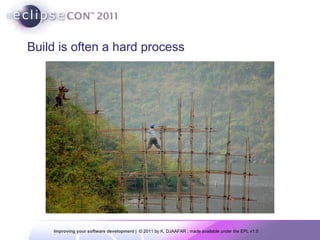
Build is often a hard process
What Is a Build? A build is much more than a compile (or its dynamic language variations) A build may consist of the compilation, testing, inspection, and deployment—among other things A build acts as the process for putting source code together and verifying that the software works as a cohesive unit.
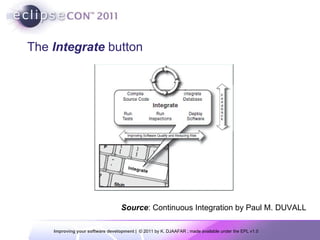
The  Integrate   button Source :  Continuous Integration by Paul M. DUVALL
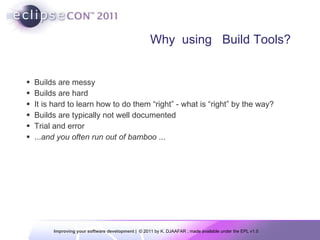
Why  using  Build Tools? Builds are messy Builds are hard It is hard to learn how to do them “right” - what is “right” by the way? Builds are typically not well documented Trial and error ... and you often run out of bamboo  ...
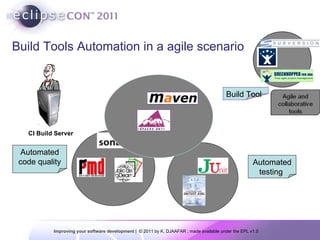
Build Tools Automation in a agile scenario CI Build Server Automated testing  Automated code quality Build Tool
Build Tool Collect input Process inputs Generate final outputs
Build Tool - Inputs Source code Java, SQL Resources Properties, XML Dependencies Libraries, components, frameworks
Build Tool - Processing Compile Run tests Copy files Replace keywords Package Install / deploy
Build Tool - Outputs JAR / WAR / EAR files Zip files Reports
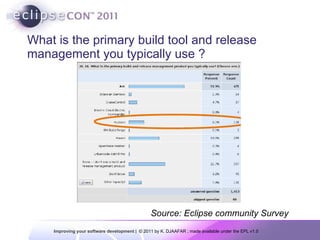
What is the primary build tool and release management you typically use ? Source: Eclipse community Survey
Maven Project and artifact-based build  platform Uses  repositories to manage  artifacts and third party libraries Customized by modifying the  behavior of the  life-cycle via plugins.
Maven and the Development Build Process Maven the source build management tool for enterprise Java projects Use declarative approche rather then the task-based approach used in Ant or in traditional Make files or shell scripts Promotes the use of standard directory  structures and a well-defined build lifecycle Support quality metric reporting and  documentation generation tool throw the use of plugins
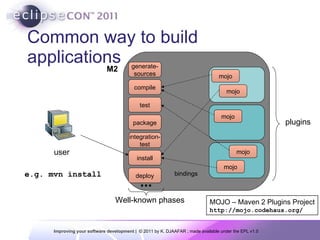
Phases: build life cycle The standard goals for building: compile & test -  compile and test the code package –  build and test the artifact install –  package the artifact and install to local  repository deploy  – package the artifact and copy to the  remote repository (release time) Release management
Common way to build applications MOJO – Maven 2 Plugins Project http://mojo.codehaus.org/ plugins user e.g. mvn install M2 generate- sources compile test install deploy package integration- test Well-known phases mojo mojo mojo mojo mojo bindings
CONTINUOUS INTEGRATION PRINCIPLES AND TOOLS
What is CI (Continuous Integration) ? “ Continuous Integration is a software development practice where members of a team integrate their work frequently, usually each person integrates at least daily - leading to multiple integrations per day. Each integration is verified by an automated build  (includingtest) to detect integration errors as quickly as possible.” Martin Fowler.
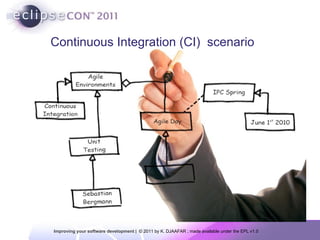
Continuous Integration (CI)  scenario
A CI scenario starts with the developer committing source code to the repository.  On a typical project, people in many project roles may commit changes that trigger a CI cycle:  Developers change source code,  database administrators (DBAs) change table definitions, build and deployment teams change configuration files, interface teams change DTD/XSD specifications,  and so on… Continuous Integration (CI)  scenario
Why do we need CI ? Replace big (and long) integration phases with small and frequent ones Ideally instantaneous Think of « incremental compilation » in Eclipse Minimize integration effort Keep the development process running … CI was introduced with XP principles and by Martin Fowler
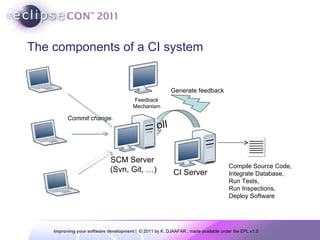
The components of a CI system Commit changes Compile Source Code, Integrate Database, Run Tests, Run Inspections, Deploy Software Feedback Mechanism Generate feedback SCM Server  (Svn, Git, …) CI Server
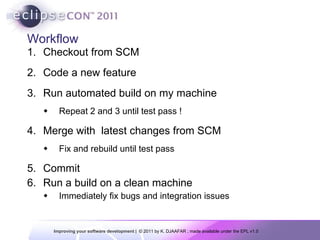
Workflow Checkout from SCM Code a new feature Run automated build on my machine Repeat 2 and 3 until test pass ! Merge with  latest changes from SCM Fix and rebuild until test pass Commit Run a build on a clean machine Immediately fix bugs and integration issues
Version Control Repository Simply put, you must use a version control repository in order to perform  CI Even if you don’t use CI, a version control repository should be standard for your project The purpose of a version control repository is to manage changes to source code and other software assets (such as documentation) using a controlled access repository There are  different types of version control systems you can use too We use  Subversion for most of the examples in this seminar
Continuous Integration not exist without TDD ! A software development practice where members of a team integrate their work frequently usually each person integrates at least daily (Martin Fowler)  CI leads to significantly reduced integration problems and allow a team to develop cohesive software more rapidly and reduce risk To complete this definition Automated, self-testing and fast  builds Make it easy for everyone to get the last executable Automate deployment Everyone can see what’s happening progress, statistics on code coverage tests, etc … Reduced risks
Continuous   Integration Major tools Hudson No install required  put a war in a  web container) Cruise Control Continuum Java and Ant/Maven based  Open Source  …
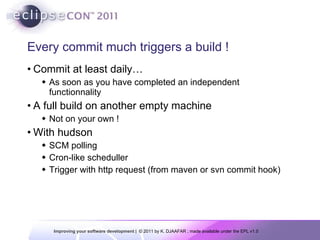
Every commit much triggers a build ! Commit at least daily… As soon as you have completed an independent functionnality A full build on another empty machine Not on your own !  With hudson SCM polling Cron-like scheduller Trigger with http request (from maven or svn commit hook)
JASFORGE  ©  PROJECT AND  HUDSON CI TOOL
Managing all the agile tool is a complex process Today, managing and taking control of your software process is a major  challenge for maintaining is capacity to be innovative and competitive Ho can we manage efficiently all these toolls in an unified way ? We must manage the quality of our software development en meet the requirements and delays  in a predictive mode This is the aim of  JasForge ©  Project ( http://www.jasforge.com ) : Taking the control of your development process using an “agile “ approache
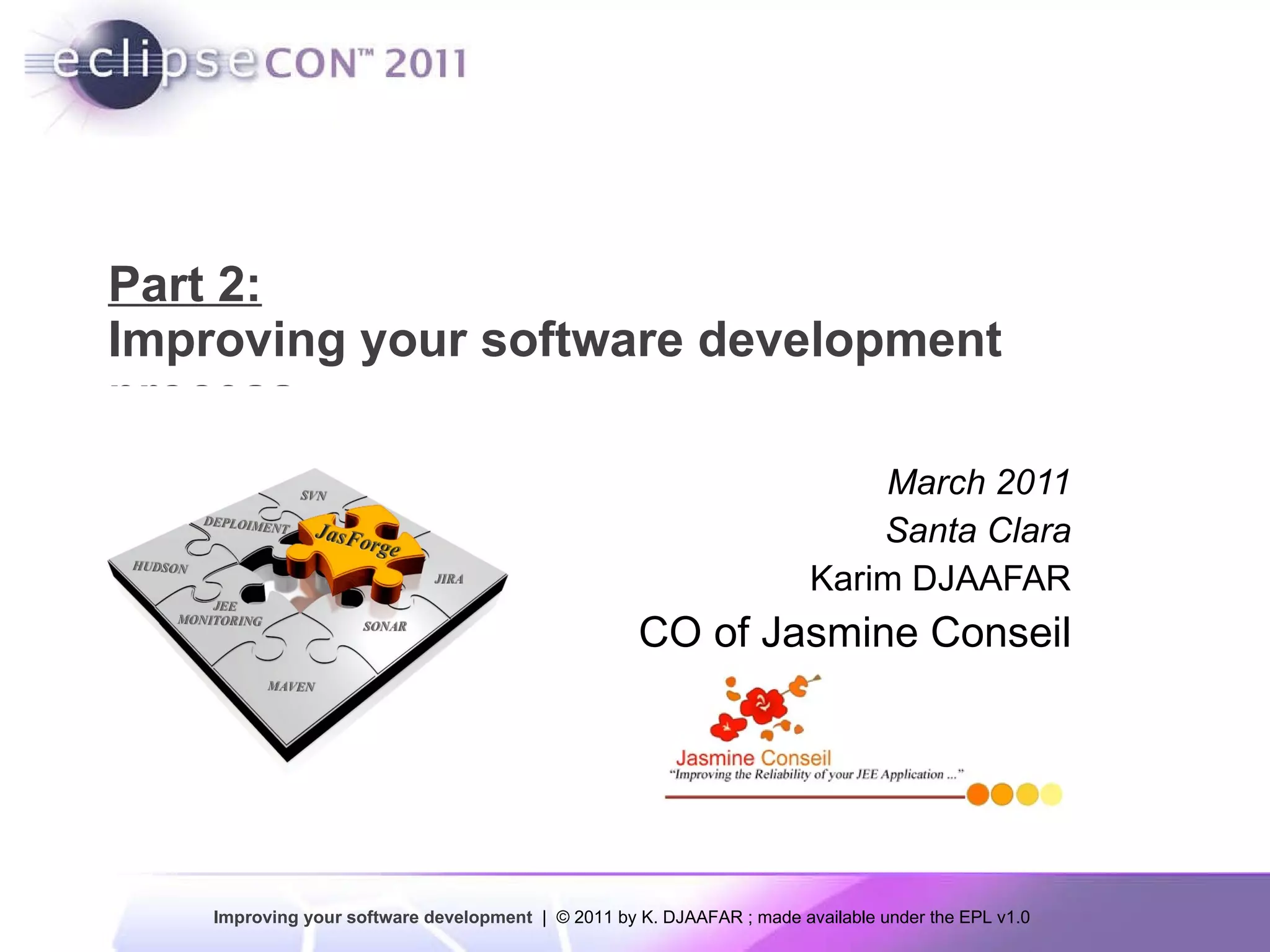
What is JasForge ? Jasforge  is an Open Source project   to build  a scalable  Team  collaboration platform  for Integrating  work across  the phases  of  the  development  lifecycle Available: Community Edition  (Eclipse Public License) Enterprise Edition Exemple  of  tools  : hudson
Hudson ? Open-source CI server Writen in java  ( https://hudson.dev.java.net/  ) Extensibility 230+ community-developed public plugins By 230+ contributors Estimated 13,000 installations
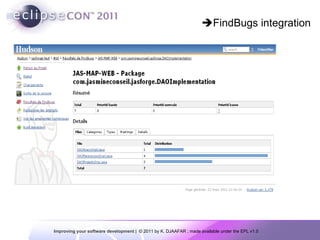
Basic Feature Set Hudson notices that there is a code change Checks out the source code CVS, Subversion, ClearCase, Mercurial, Accurev, Perforce, Git, StarTeam, … Builds Ant, Maven, shell script, NAnt, … Record and publish results Tool Integration Findbugs, Corbertura, ...
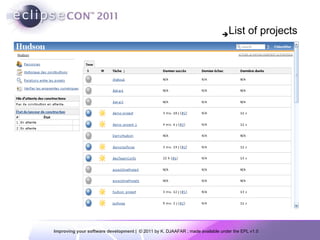
 List of projects
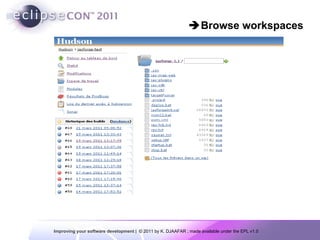
 Browse workspaces
 FindBugs integration
 Tracking changes
Provides Feedback RSS feeds Email/IM notification Tray application to notify developers Linux/Windows (Toolbar), Mac (Growl)
JASFORGE  ©   HUDSON TOOLS
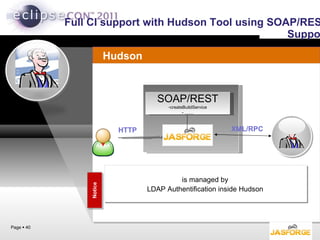
Full CI support with Hudson Tool using SOAP/REST Support Notice is managed by LDAP Authentification inside Hudson  Page     XML/RPC Hudson SOAP/REST createBuildService …… HTTP
Simple scenarios:
Thank you for your Attention Jasforge: A Jasmine  Conseil  concept http://www.jasmineconseil.com Need More information ? [email_address]

Part 2 improving your software development v1.0

  • 1.
    Part 2: Improvingyour software development process March 2011 Santa Clara Karim DJAAFAR CO of Jasmine Conseil
  • 2.
    Outline Towards abetter build process using agile tools Build Managements Continuous Integration, Principles and Tools JasForge project Using hudson in jasforge Project Demos
  • 3.
    TOWARDS A BETTERBUILD PROCESS USING AGILE TOOLS
  • 4.
    Build is oftena hard process
  • 5.
    What Is aBuild? A build is much more than a compile (or its dynamic language variations) A build may consist of the compilation, testing, inspection, and deployment—among other things A build acts as the process for putting source code together and verifying that the software works as a cohesive unit.
  • 6.
    The Integrate button Source : Continuous Integration by Paul M. DUVALL
  • 7.
    Why using Build Tools? Builds are messy Builds are hard It is hard to learn how to do them “right” - what is “right” by the way? Builds are typically not well documented Trial and error ... and you often run out of bamboo ...
  • 8.
    Build Tools Automationin a agile scenario CI Build Server Automated testing Automated code quality Build Tool
  • 9.
    Build Tool Collectinput Process inputs Generate final outputs
  • 10.
    Build Tool -Inputs Source code Java, SQL Resources Properties, XML Dependencies Libraries, components, frameworks
  • 11.
    Build Tool -Processing Compile Run tests Copy files Replace keywords Package Install / deploy
  • 12.
    Build Tool -Outputs JAR / WAR / EAR files Zip files Reports
  • 13.
    What is theprimary build tool and release management you typically use ? Source: Eclipse community Survey
  • 14.
    Maven Project andartifact-based build platform Uses repositories to manage artifacts and third party libraries Customized by modifying the behavior of the life-cycle via plugins.
  • 15.
    Maven and theDevelopment Build Process Maven the source build management tool for enterprise Java projects Use declarative approche rather then the task-based approach used in Ant or in traditional Make files or shell scripts Promotes the use of standard directory structures and a well-defined build lifecycle Support quality metric reporting and documentation generation tool throw the use of plugins
  • 16.
    Phases: build lifecycle The standard goals for building: compile & test - compile and test the code package – build and test the artifact install – package the artifact and install to local repository deploy – package the artifact and copy to the remote repository (release time) Release management
  • 17.
    Common way tobuild applications MOJO – Maven 2 Plugins Project http://mojo.codehaus.org/ plugins user e.g. mvn install M2 generate- sources compile test install deploy package integration- test Well-known phases mojo mojo mojo mojo mojo bindings
  • 18.
  • 19.
    What is CI(Continuous Integration) ? “ Continuous Integration is a software development practice where members of a team integrate their work frequently, usually each person integrates at least daily - leading to multiple integrations per day. Each integration is verified by an automated build (includingtest) to detect integration errors as quickly as possible.” Martin Fowler.
  • 20.
  • 21.
    A CI scenariostarts with the developer committing source code to the repository. On a typical project, people in many project roles may commit changes that trigger a CI cycle: Developers change source code, database administrators (DBAs) change table definitions, build and deployment teams change configuration files, interface teams change DTD/XSD specifications, and so on… Continuous Integration (CI) scenario
  • 22.
    Why do weneed CI ? Replace big (and long) integration phases with small and frequent ones Ideally instantaneous Think of « incremental compilation » in Eclipse Minimize integration effort Keep the development process running … CI was introduced with XP principles and by Martin Fowler
  • 23.
    The components ofa CI system Commit changes Compile Source Code, Integrate Database, Run Tests, Run Inspections, Deploy Software Feedback Mechanism Generate feedback SCM Server (Svn, Git, …) CI Server
  • 24.
    Workflow Checkout fromSCM Code a new feature Run automated build on my machine Repeat 2 and 3 until test pass ! Merge with latest changes from SCM Fix and rebuild until test pass Commit Run a build on a clean machine Immediately fix bugs and integration issues
  • 25.
    Version Control RepositorySimply put, you must use a version control repository in order to perform CI Even if you don’t use CI, a version control repository should be standard for your project The purpose of a version control repository is to manage changes to source code and other software assets (such as documentation) using a controlled access repository There are different types of version control systems you can use too We use Subversion for most of the examples in this seminar
  • 26.
    Continuous Integration notexist without TDD ! A software development practice where members of a team integrate their work frequently usually each person integrates at least daily (Martin Fowler) CI leads to significantly reduced integration problems and allow a team to develop cohesive software more rapidly and reduce risk To complete this definition Automated, self-testing and fast builds Make it easy for everyone to get the last executable Automate deployment Everyone can see what’s happening progress, statistics on code coverage tests, etc … Reduced risks
  • 27.
    Continuous Integration Major tools Hudson No install required put a war in a web container) Cruise Control Continuum Java and Ant/Maven based Open Source …
  • 28.
    Every commit muchtriggers a build ! Commit at least daily… As soon as you have completed an independent functionnality A full build on another empty machine Not on your own ! With hudson SCM polling Cron-like scheduller Trigger with http request (from maven or svn commit hook)
  • 29.
    JASFORGE © PROJECT AND HUDSON CI TOOL
  • 30.
    Managing all theagile tool is a complex process Today, managing and taking control of your software process is a major challenge for maintaining is capacity to be innovative and competitive Ho can we manage efficiently all these toolls in an unified way ? We must manage the quality of our software development en meet the requirements and delays in a predictive mode This is the aim of JasForge © Project ( http://www.jasforge.com ) : Taking the control of your development process using an “agile “ approache
  • 31.
    What is JasForge? Jasforge is an Open Source project to build a scalable Team collaboration platform for Integrating work across the phases of the development lifecycle Available: Community Edition (Eclipse Public License) Enterprise Edition Exemple of tools : hudson
  • 32.
    Hudson ? Open-sourceCI server Writen in java ( https://hudson.dev.java.net/ ) Extensibility 230+ community-developed public plugins By 230+ contributors Estimated 13,000 installations
  • 33.
    Basic Feature SetHudson notices that there is a code change Checks out the source code CVS, Subversion, ClearCase, Mercurial, Accurev, Perforce, Git, StarTeam, … Builds Ant, Maven, shell script, NAnt, … Record and publish results Tool Integration Findbugs, Corbertura, ...
  • 34.
     List ofprojects
  • 35.
  • 36.
  • 37.
  • 38.
    Provides Feedback RSSfeeds Email/IM notification Tray application to notify developers Linux/Windows (Toolbar), Mac (Growl)
  • 39.
    JASFORGE © HUDSON TOOLS
  • 40.
    Full CI supportwith Hudson Tool using SOAP/REST Support Notice is managed by LDAP Authentification inside Hudson Page  XML/RPC Hudson SOAP/REST createBuildService …… HTTP
  • 41.
  • 42.
    Thank you foryour Attention Jasforge: A Jasmine Conseil concept http://www.jasmineconseil.com Need More information ? [email_address]

Editor's Notes

  • #24 1. First, a developer commits code to the version control repository. Meanwhile, the CI server on the integration build machine is polling this repository for changes (e.g., every few minutes). 2. Soon after a commit occurs, the CI server detects that changes have occurred in the version control repository, so the CI server retrieves the latest copy of the code from the repository and then executes a build script, which integrates the software. 3. The CI server generates feedback by e-mailing build results to specified project members. 4. The CI server continues to poll for changes in the version control repository.
  • #32 An agile Platform to manage Continuous Integration Process Help development team to better collaborate and be efficient in their daily task (project creation, development, tests, integration, deployment ...)   A central platform for the creation and managing of middle to complex projects, from the inception to the deployment Available in two edition: Community Edition (Eclipse Public License) Enterprise Edition
  • #42 Démo video CreateProject ImportProject