Hudson/Jenkins and uDeploy
                             Continuous integration meets
                         awesome deployment automation
    Eric Minick
    Tech Evangelist


1
Agenda
•   Why the integration?
•   Demo: Configuring the Plugin
•   Demo: A CI build moves into uDeploy
•   Demo: Deployment coordination
•   Q&A


2
About Hudson / Jenkins
• Open source (MIT) Continuous Integration
  server

• The tool forked in early 2011


3
Jenkins use in a nutshell
• CI tool for developers
    – Perform builds and early testing automatically to
      provide rapid feedback about build quality


• Some teams treat these builds as “the build”
  passed to operations teams.


4
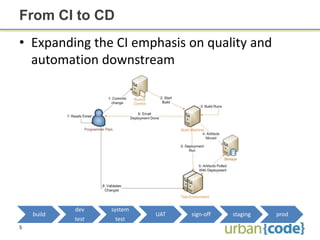
From CI to CD
• Expanding the CI emphasis on quality and
  automation downstream


            dev    system
    build                   UAT   sign-off   staging   prod
            test    test
5
Changing deployment needs
• Production style deployments
    – Load balancers, can’t drop tables, downtime
      windows, etc, etc, etc
• Environment aware
• Additional security nearer to production
• Approvals

• Thinking outside the scope of one dev team


6
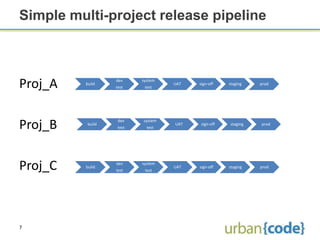
Simple multi-project release pipeline


Proj_A   build
                  dev
                  test
                          system
                           test
                                   UAT   sign-off    staging   prod


Proj_B    build
                   dev
                   test
                          system
                            test
                                   UAT    sign-off   staging   prod


Proj_C    build
                  dev
                  test
                          system
                           test
                                   UAT   sign-off    staging   prod


7
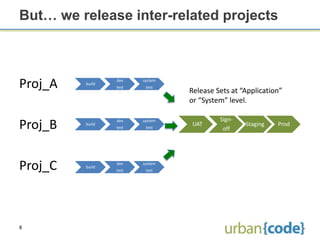
But… we release inter-related projects


Proj_A   build
                 dev
                 test
                        system
                         test
                                 Release Sets at “Application”
                                 or “System” level.

                                          Sign-
Proj_B   build
                 dev
                 test
                        system
                         test
                                 UAT
                                           off
                                                  Staging   Prod


Proj_C   build
                 dev
                 test
                        system
                         test


8
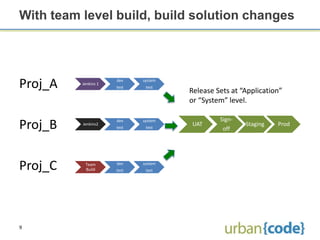
With team level build, build solution changes


Proj_A    Jenkins 1
                      dev
                      test
                             system
                              test
                                      Release Sets at “Application”
                                      or “System” level.

                                               Sign-
Proj_B    Jenkins2
                      dev
                      test
                             system
                              test
                                      UAT
                                                off
                                                       Staging   Prod


Proj_C     Team
           Build
                      dev
                      test
                             system
                              test


9
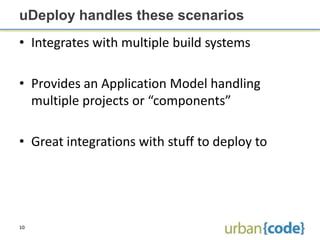
uDeploy handles these scenarios
• Integrates with multiple build systems

• Provides an Application Model handling
  multiple projects or “components”

• Great integrations with stuff to deploy to


10
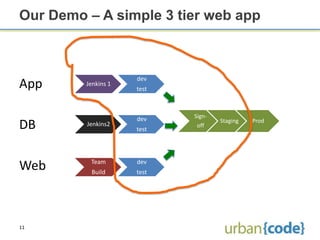
Our Demo – A simple 3 tier web app


                     dev
App      Jenkins 1
                     test


                     dev    Sign-
                                    Staging   Prod
DB       Jenkins2
                     test
                             off


          Team       dev
Web       Build      test


11
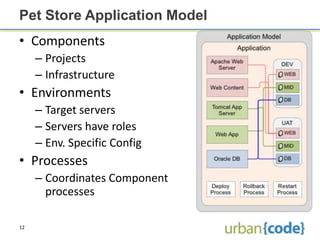
Pet Store Application Model
• Components
     – Projects
     – Infrastructure
• Environments
     – Target servers
     – Servers have roles
     – Env. Specific Config
• Processes
     – Coordinates Component
       processes

12
Demo Time


13
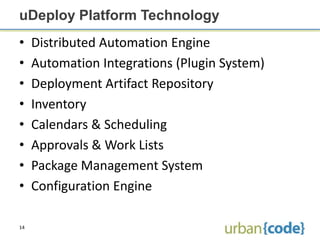
uDeploy Platform Technology
•    Distributed Automation Engine
•    Automation Integrations (Plugin System)
•    Deployment Artifact Repository
•    Inventory
•    Calendars & Scheduling
•    Approvals & Work Lists
•    Package Management System
•    Configuration Engine

14
Other supported build tools include
•    Hudson
•    JetBrainsTeamCity
•    Microsoft Team Build
•    Cruise Control
•    Urbancode AnthillPro

• Missing your favorite? Let us know.


15
UrbanCode’sDevOps Tools

• AnthillPro / uBuild: Continuous
  Integration, Build Pipelines and Build
  Management

• uDeploy: Model driven deployment
  automation

• uCloud: Environment provisioning integrated
  with existing virtualization (coming soon)

16
Q&A
                            Thank You!
     Eric Minick – eric@urbancode.com


17

2012 01-jenkins-udeploy

  • 1.
    Hudson/Jenkins and uDeploy Continuous integration meets awesome deployment automation Eric Minick Tech Evangelist 1
  • 2.
    Agenda • Why the integration? • Demo: Configuring the Plugin • Demo: A CI build moves into uDeploy • Demo: Deployment coordination • Q&A 2
  • 3.
    About Hudson /Jenkins • Open source (MIT) Continuous Integration server • The tool forked in early 2011 3
  • 4.
    Jenkins use ina nutshell • CI tool for developers – Perform builds and early testing automatically to provide rapid feedback about build quality • Some teams treat these builds as “the build” passed to operations teams. 4
  • 5.
    From CI toCD • Expanding the CI emphasis on quality and automation downstream dev system build UAT sign-off staging prod test test 5
  • 6.
    Changing deployment needs •Production style deployments – Load balancers, can’t drop tables, downtime windows, etc, etc, etc • Environment aware • Additional security nearer to production • Approvals • Thinking outside the scope of one dev team 6
  • 7.
    Simple multi-project releasepipeline Proj_A build dev test system test UAT sign-off staging prod Proj_B build dev test system test UAT sign-off staging prod Proj_C build dev test system test UAT sign-off staging prod 7
  • 8.
    But… we releaseinter-related projects Proj_A build dev test system test Release Sets at “Application” or “System” level. Sign- Proj_B build dev test system test UAT off Staging Prod Proj_C build dev test system test 8
  • 9.
    With team levelbuild, build solution changes Proj_A Jenkins 1 dev test system test Release Sets at “Application” or “System” level. Sign- Proj_B Jenkins2 dev test system test UAT off Staging Prod Proj_C Team Build dev test system test 9
  • 10.
    uDeploy handles thesescenarios • Integrates with multiple build systems • Provides an Application Model handling multiple projects or “components” • Great integrations with stuff to deploy to 10
  • 11.
    Our Demo –A simple 3 tier web app dev App Jenkins 1 test dev Sign- Staging Prod DB Jenkins2 test off Team dev Web Build test 11
  • 12.
    Pet Store ApplicationModel • Components – Projects – Infrastructure • Environments – Target servers – Servers have roles – Env. Specific Config • Processes – Coordinates Component processes 12
  • 13.
  • 14.
    uDeploy Platform Technology • Distributed Automation Engine • Automation Integrations (Plugin System) • Deployment Artifact Repository • Inventory • Calendars & Scheduling • Approvals & Work Lists • Package Management System • Configuration Engine 14
  • 15.
    Other supported buildtools include • Hudson • JetBrainsTeamCity • Microsoft Team Build • Cruise Control • Urbancode AnthillPro • Missing your favorite? Let us know. 15
  • 16.
    UrbanCode’sDevOps Tools • AnthillPro/ uBuild: Continuous Integration, Build Pipelines and Build Management • uDeploy: Model driven deployment automation • uCloud: Environment provisioning integrated with existing virtualization (coming soon) 16
  • 17.
    Q&A Thank You! Eric Minick – eric@urbancode.com 17