Pycon 2016
Developing Apps for Android and Other
Platforms with Kivy and Python
Pushpendra Tiwari
Outline
 Introduction
 Python
 Kivy
 Limitations
 Credits
Python
Python
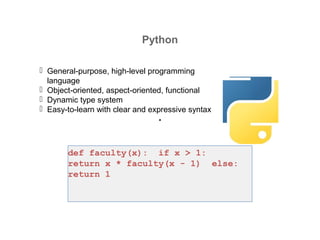
 General-purpose, high-level programming
language
 Object-oriented, aspect-oriented, functional
 Dynamic type system
 Easy-to-learn with clear and expressive syntax
def faculty(x): if x > 1:
return x * faculty(x - 1) else:
return 1
Python on Mobile Devices
Early Mobile Development with
Python
 PyS60 for Symbian
 Python CE for Windows Mobile
Current Mobile Development
with Python
• Scripting Layer for Android
(SL4A)
• Python for Android (Py4A)
• PySide / Qt for Android
• WinRT / IronPython for
Windows 8
• Kivy…
Kivy
Kivy
 Platform-independent Python-
Framework
 Available for
 Android
 iOS
 Meego
 Windows
 Linux
 OSX
 (Raspberry Pi)
 Development in Python on all
platforms
 Not emulated!
kivy.org
Kivy Basics
 Framework for Natural User Interfaces
(NUI)
 Touchscreens / Multi-Touch
 GPU accelerated graphics
• Based on OpenGL ES 2.0
 Suitable for prototypes as well as products
• Porting to new platforms is easy
Kivy Software
 Open Source (LGPL), 7 Core developer
• Source code: https://github.com/kivy
• Documentation: http://kivy.org/docs
• Kivy on Google Play:
https://play.google.com/store/apps/details?id=org.kivy.pygame
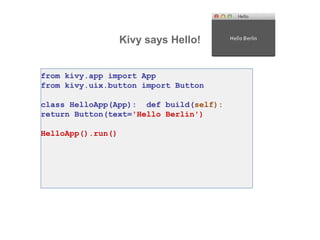
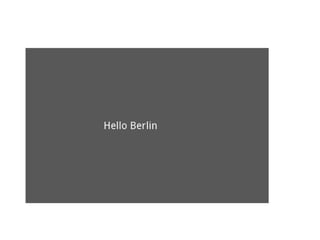
Kivy says Hello!
from kivy.app import App
from kivy.uix.button import Button
class HelloApp(App): def build(self):
return Button(text='Hello Berlin')
HelloApp().run()
Development with Kivy
 Python for widgets, input, program logic
• Language KV for layout und graphics
• Cython for low-level access to graphic routines
“Hello Berlin” with KV
from kivy.app import App
class HelloApp(App): pass
HelloApp().run()
#:kivy 1.0
Button:
text: ‘Hello Berlin’
File hello.kv
defines root widget
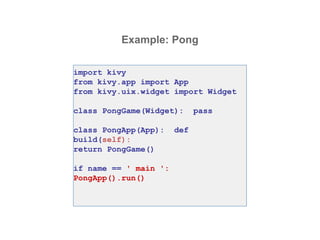
Example: Pong
import kivy
from kivy.app import App
from kivy.uix.widget import Widget
class PongGame(Widget): pass
class PongApp(App): def
build(self):
return PongGame()
if name == ' main ':
PongApp().run()
Pong Graphics
#:kivy 1.6.0
<PongGame>:
canvas:
Rectangle:
pos: self.center_x - 5, 0
size: 10, self.height
Label:
font_size: 70
center_x: root.width / 4 top: root.top
- 50 text: "0"
Label:
font_size: 70
center_x: root.width * 3 / 4 top:
root.top - 50
text: "0"
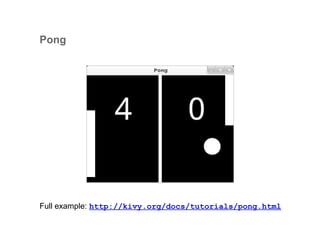
Pong
Full example: http://kivy.org/docs/tutorials/pong.html
Accessing Java Classes from Python
 Smartphones have many APIs
 Camera, Compass, Contacts, Location, …
 Access from Python via PyJNIus
• https://github.com/kivy/pyjnius
• Implemented with JNI and Java reflection
Example
from jnius import autoclass
Hardware = autoclass('org.renpy.android.Hardware')
print 'DPI is', Hardware.getDPI()
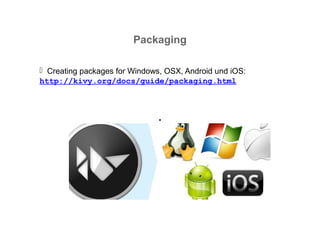
Packaging
 Creating packages for Windows, OSX, Android und iOS:
http://kivy.org/docs/guide/packaging.html
Build Tools
Tool chain
 Python-for-android
 Cross compiler for ARM
 Android SDK & NDK
 Python and some Python packages
Buildozer
• Hides the complexity: Downloads, compiles, packages Kivy source code
• https://github.com/kivy/buildozer
% buildozer android debug deploy run
Kivy Showcase
Limitations
Missing, but Planned (or In Progress)
User Interface Designer
 Design tool for Kivy Language KV
Abstraction of mobile APIs
• Platform-independent Python wrapper for platform APIs (Android, iOS,
Linux/Mac/Windows)
Porting to Raspberry Pi
• Useful for small/cheap standalone systems
Credits
Thanks to the Kivy developers
 Mathieu Virbel (@mathieuvirbel)
• Thomas Hansen (@hansent)
• Gabriel Pettier (@tshirtman)
• and many others
Questions?
Summary
 Kivy allows platform-independent development of apps
for Android, iOS, Meego, Windows, OSX and Linux
 Suitable for multi-touch and graphics applications, such
as kiosk systems, exhibits, games, …er Twitter:

Developing apps with Kivy

  • 1.
    Pycon 2016 Developing Appsfor Android and Other Platforms with Kivy and Python Pushpendra Tiwari
  • 2.
    Outline  Introduction  Python Kivy  Limitations  Credits
  • 3.
  • 4.
    Python  General-purpose, high-levelprogramming language  Object-oriented, aspect-oriented, functional  Dynamic type system  Easy-to-learn with clear and expressive syntax def faculty(x): if x > 1: return x * faculty(x - 1) else: return 1
  • 5.
    Python on MobileDevices Early Mobile Development with Python  PyS60 for Symbian  Python CE for Windows Mobile Current Mobile Development with Python • Scripting Layer for Android (SL4A) • Python for Android (Py4A) • PySide / Qt for Android • WinRT / IronPython for Windows 8 • Kivy…
  • 6.
  • 7.
    Kivy  Platform-independent Python- Framework Available for  Android  iOS  Meego  Windows  Linux  OSX  (Raspberry Pi)  Development in Python on all platforms  Not emulated! kivy.org
  • 8.
    Kivy Basics  Frameworkfor Natural User Interfaces (NUI)  Touchscreens / Multi-Touch  GPU accelerated graphics • Based on OpenGL ES 2.0  Suitable for prototypes as well as products • Porting to new platforms is easy
  • 9.
    Kivy Software  OpenSource (LGPL), 7 Core developer • Source code: https://github.com/kivy • Documentation: http://kivy.org/docs • Kivy on Google Play: https://play.google.com/store/apps/details?id=org.kivy.pygame
  • 10.
    Kivy says Hello! fromkivy.app import App from kivy.uix.button import Button class HelloApp(App): def build(self): return Button(text='Hello Berlin') HelloApp().run()
  • 12.
    Development with Kivy Python for widgets, input, program logic • Language KV for layout und graphics • Cython for low-level access to graphic routines
  • 13.
    “Hello Berlin” withKV from kivy.app import App class HelloApp(App): pass HelloApp().run() #:kivy 1.0 Button: text: ‘Hello Berlin’ File hello.kv defines root widget
  • 14.
    Example: Pong import kivy fromkivy.app import App from kivy.uix.widget import Widget class PongGame(Widget): pass class PongApp(App): def build(self): return PongGame() if name == ' main ': PongApp().run()
  • 15.
    Pong Graphics #:kivy 1.6.0 <PongGame>: canvas: Rectangle: pos:self.center_x - 5, 0 size: 10, self.height Label: font_size: 70 center_x: root.width / 4 top: root.top - 50 text: "0" Label: font_size: 70 center_x: root.width * 3 / 4 top: root.top - 50 text: "0"
  • 16.
  • 17.
    Accessing Java Classesfrom Python  Smartphones have many APIs  Camera, Compass, Contacts, Location, …  Access from Python via PyJNIus • https://github.com/kivy/pyjnius • Implemented with JNI and Java reflection Example from jnius import autoclass Hardware = autoclass('org.renpy.android.Hardware') print 'DPI is', Hardware.getDPI()
  • 18.
    Packaging  Creating packagesfor Windows, OSX, Android und iOS: http://kivy.org/docs/guide/packaging.html
  • 19.
    Build Tools Tool chain Python-for-android  Cross compiler for ARM  Android SDK & NDK  Python and some Python packages Buildozer • Hides the complexity: Downloads, compiles, packages Kivy source code • https://github.com/kivy/buildozer % buildozer android debug deploy run
  • 20.
  • 21.
  • 22.
    Missing, but Planned(or In Progress) User Interface Designer  Design tool for Kivy Language KV Abstraction of mobile APIs • Platform-independent Python wrapper for platform APIs (Android, iOS, Linux/Mac/Windows) Porting to Raspberry Pi • Useful for small/cheap standalone systems
  • 23.
    Credits Thanks to theKivy developers  Mathieu Virbel (@mathieuvirbel) • Thomas Hansen (@hansent) • Gabriel Pettier (@tshirtman) • and many others
  • 24.
    Questions? Summary  Kivy allowsplatform-independent development of apps for Android, iOS, Meego, Windows, OSX and Linux  Suitable for multi-touch and graphics applications, such as kiosk systems, exhibits, games, …er Twitter: