Introduction
to Kivy
A Cross-Platform Python UI Library
In this Session we shall
discuss:
 How to setup kivy
 Some key features of kivy
 Make a simple ‘Hello World’ application
 Introduce the ‘kv’ language
 Package the application for the android market
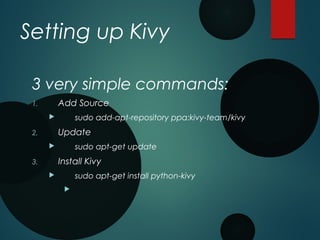
Setting up Kivy
3 very simple commands:
1. Add Source
 sudo add-apt-repository ppa:kivy-team/kivy
2. Update
 sudo apt-get update
3. Install Kivy
 sudo apt-get install python-kivy

Basic Components of Kivy
§ App
§ Widget
§ ScreenManger
§ Screen
§ Layouts
§ Button
§ Label
§ TextInput
§ Image
§ Clock
§ SoundLoader
§ Animation
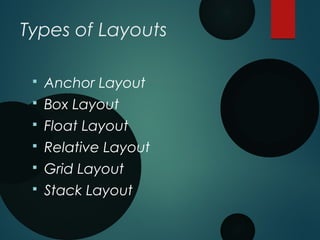
Types of Layouts
§ Anchor Layout
§ Box Layout
§ Float Layout
§ Relative Layout
§ Grid Layout
§ Stack Layout
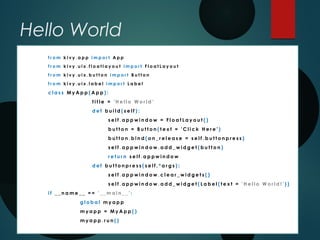
Hello World
f r o m k i v y . a p p i m p o r t A p p
f r o m k i v y . u i x . f l o a t l a y o u t i m p o r t F l o a t L a y o u t
f r o m k i v y . u i x . b u t t o n i m p o r t B u t t o n
f r o m k i v y . u i x . l a b e l i m p o r t L a b e l
c l a s s M y A p p ( A p p ) :
t i t l e = ' H e l l o W o r l d '
d e f b u i l d ( s e l f ) :
s e l f . a p p w i n d o w = F l o a t L a y o u t ( )
b u t t o n = B u t t o n ( t e x t = ' C l i c k H e r e ' )
b u t t o n . b i n d ( o n _ r e l e a s e = s e l f . b u t t o n p r e s s )
s e l f . a p p w i n d o w . a d d _ w i d g e t ( b u t t o n )
r e t u r n s e l f . a p p w i n d o w
d e f b u t t o n p r e s s ( s e l f , * a r g s ) :
s e l f . a p p w i n d o w . c l e a r _ w i d g e t s ( )
s e l f . a p p w i n d o w . a d d _ w i d g e t ( L a b e l ( t e x t = ' H e l l o W o r l d ! ' ) )
i f _ _ n a m e _ _ = = ' _ _ m a i n _ _ ' :
g l o b a l m y a p p
m y a p p = M y A p p ( )
m y a p p . r u n ( )
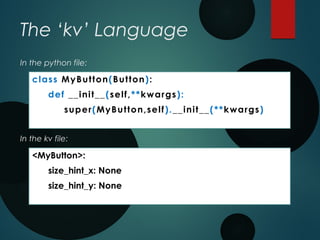
The ‘kv’ Language
class MyButton(Button):
def __init__(self,**kwargs):
super(MyButton,self).__init__(**kwargs)
<MyButton>:
size_hint_x: None
size_hint_y: None
In the kv file:
In the python file:
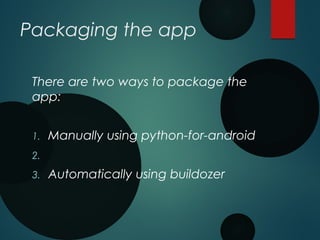
Packaging the app
There are two ways to package the
app:
1. Manually using python-for-android
2.
3. Automatically using buildozer
Prerequisites for manual
packaging:
§ Build-Essential and others:
§ sudo apt-get install build-essential patch git-core ccache ant python-pip python-dev
§ Latest Cython:
§ Pip install –upgrade cython
§ Android SDK
§ http://developer.android.com/sdk/index.html
§ Android NDK
§ http://developer.android.com/sdk/ndk/index.html
§ Environment variables
§ export ANDROIDSDK=/path/to/android-sdk
§ export ANDROIDNDK=/path/to/android-ndk
§ export ANDROIDNDKVER=rX
§ export ANDROIDAPI=X
§ export PATH=$ANDROIDNDK:$ANDROIDSDK/platform-tools:$ANDROIDSDK/tools:
$PATH
§
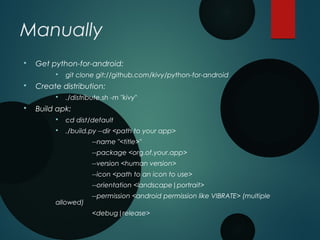
Manually
§ Get python-for-android:
§ git clone git://github.com/kivy/python-for-android
§ Create distribution:
§ ./distribute.sh -m "kivy"
§ Build apk:
§ cd dist/default
§ ./build.py --dir <path to your app>
--name "<title>"
--package <org.of.your.app>
--version <human version>
--icon <path to an icon to use>
--orientation <landscape|portrait>
--permission <android permission like VIBRATE> (multiple
allowed)
<debug|release>
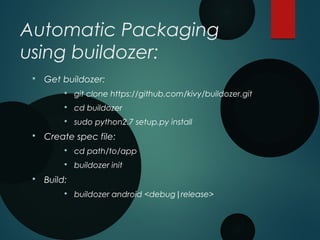
Automatic Packaging
using buildozer:
§ Get buildozer:
§ git clone https://github.com/kivy/buildozer.git
§ cd buildozer
§ sudo python2.7 setup.py install
§ Create spec file:
§ cd path/to/app
§ buildozer init
§ Build:
§ buildozer android <debug|release>
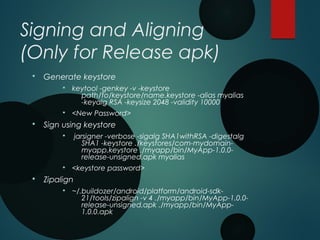
Signing and Aligning
(Only for Release apk)
§ Generate keystore
§ keytool -genkey -v -keystore
path/to/keystore/name.keystore -alias myalias
-keyalg RSA -keysize 2048 -validity 10000
§ <New Password>
§ Sign using keystore
§ jarsigner -verbose -sigalg SHA1withRSA -digestalg
SHA1 -keystore ./keystores/com-mydomain-
myapp.keystore ./myapp/bin/MyApp-1.0.0-
release-unsigned.apk myalias
§ <keystore password>
§ Zipalign
§ ~/.buildozer/android/platform/android-sdk-
21/tools/zipalign -v 4 ./myapp/bin/MyApp-1.0.0-
release-unsigned.apk ./myapp/bin/MyApp-
1.0.0.apk
All Done!
Congratulations on your first apk!
Thank You!

Kivy - Python UI Library for Any Platform

  • 1.
  • 2.
    In this Sessionwe shall discuss:  How to setup kivy  Some key features of kivy  Make a simple ‘Hello World’ application  Introduce the ‘kv’ language  Package the application for the android market
  • 3.
    Setting up Kivy 3very simple commands: 1. Add Source  sudo add-apt-repository ppa:kivy-team/kivy 2. Update  sudo apt-get update 3. Install Kivy  sudo apt-get install python-kivy 
  • 4.
    Basic Components ofKivy § App § Widget § ScreenManger § Screen § Layouts § Button § Label § TextInput § Image § Clock § SoundLoader § Animation
  • 5.
    Types of Layouts §Anchor Layout § Box Layout § Float Layout § Relative Layout § Grid Layout § Stack Layout
  • 6.
    Hello World f ro m k i v y . a p p i m p o r t A p p f r o m k i v y . u i x . f l o a t l a y o u t i m p o r t F l o a t L a y o u t f r o m k i v y . u i x . b u t t o n i m p o r t B u t t o n f r o m k i v y . u i x . l a b e l i m p o r t L a b e l c l a s s M y A p p ( A p p ) : t i t l e = ' H e l l o W o r l d ' d e f b u i l d ( s e l f ) : s e l f . a p p w i n d o w = F l o a t L a y o u t ( ) b u t t o n = B u t t o n ( t e x t = ' C l i c k H e r e ' ) b u t t o n . b i n d ( o n _ r e l e a s e = s e l f . b u t t o n p r e s s ) s e l f . a p p w i n d o w . a d d _ w i d g e t ( b u t t o n ) r e t u r n s e l f . a p p w i n d o w d e f b u t t o n p r e s s ( s e l f , * a r g s ) : s e l f . a p p w i n d o w . c l e a r _ w i d g e t s ( ) s e l f . a p p w i n d o w . a d d _ w i d g e t ( L a b e l ( t e x t = ' H e l l o W o r l d ! ' ) ) i f _ _ n a m e _ _ = = ' _ _ m a i n _ _ ' : g l o b a l m y a p p m y a p p = M y A p p ( ) m y a p p . r u n ( )
  • 7.
    The ‘kv’ Language classMyButton(Button): def __init__(self,**kwargs): super(MyButton,self).__init__(**kwargs) <MyButton>: size_hint_x: None size_hint_y: None In the kv file: In the python file:
  • 8.
    Packaging the app Thereare two ways to package the app: 1. Manually using python-for-android 2. 3. Automatically using buildozer
  • 9.
    Prerequisites for manual packaging: §Build-Essential and others: § sudo apt-get install build-essential patch git-core ccache ant python-pip python-dev § Latest Cython: § Pip install –upgrade cython § Android SDK § http://developer.android.com/sdk/index.html § Android NDK § http://developer.android.com/sdk/ndk/index.html § Environment variables § export ANDROIDSDK=/path/to/android-sdk § export ANDROIDNDK=/path/to/android-ndk § export ANDROIDNDKVER=rX § export ANDROIDAPI=X § export PATH=$ANDROIDNDK:$ANDROIDSDK/platform-tools:$ANDROIDSDK/tools: $PATH §
  • 10.
    Manually § Get python-for-android: §git clone git://github.com/kivy/python-for-android § Create distribution: § ./distribute.sh -m "kivy" § Build apk: § cd dist/default § ./build.py --dir <path to your app> --name "<title>" --package <org.of.your.app> --version <human version> --icon <path to an icon to use> --orientation <landscape|portrait> --permission <android permission like VIBRATE> (multiple allowed) <debug|release>
  • 11.
    Automatic Packaging using buildozer: §Get buildozer: § git clone https://github.com/kivy/buildozer.git § cd buildozer § sudo python2.7 setup.py install § Create spec file: § cd path/to/app § buildozer init § Build: § buildozer android <debug|release>
  • 12.
    Signing and Aligning (Onlyfor Release apk) § Generate keystore § keytool -genkey -v -keystore path/to/keystore/name.keystore -alias myalias -keyalg RSA -keysize 2048 -validity 10000 § <New Password> § Sign using keystore § jarsigner -verbose -sigalg SHA1withRSA -digestalg SHA1 -keystore ./keystores/com-mydomain- myapp.keystore ./myapp/bin/MyApp-1.0.0- release-unsigned.apk myalias § <keystore password> § Zipalign § ~/.buildozer/android/platform/android-sdk- 21/tools/zipalign -v 4 ./myapp/bin/MyApp-1.0.0- release-unsigned.apk ./myapp/bin/MyApp- 1.0.0.apk
  • 13.
  • 14.