Introduction to Python
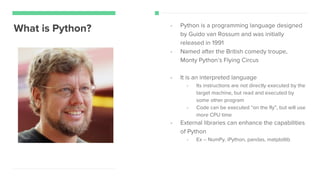
What is Python? - Python is a programming language designed
by Guido van Rossum and was initially
released in 1991
- Named after the British comedy troupe,
Monty Python’s Flying Circus
- It is an interpreted language
- Its instructions are not directly executed by the
target machine, but read and executed by
some other program
- Code can be executed “on the fly”, but will use
more CPU time
- External libraries can enhance the capabilities
of Python
- Ex -- NumPy, iPython, pandas, matplotlib
Python Features
Elegant syntax
Easy to use language
Large standard library
Basic data types
Object-oriented programming with classes and
multiple inheritance
Free software
Python Version?
- Python 2 was started in 2000
- Python 2.7 was released in 2010
- Will lose support in 2020
- Python 3.0 was released in 2008
- More and more libraries are
starting to support Python 3.4
- Which to use?
- A lot more expansive support and
resources for Python 2
- Some Python 3 features are
backwards compatible
- BUT the future is looking towards
Python 3
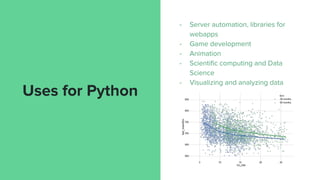
Uses for Python
- Server automation, libraries for
webapps
- Game development
- Animation
- Scientific computing and Data
Science
- Visualizing and analyzing data
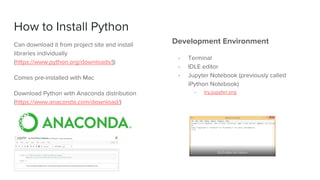
How to Install Python
Can download it from project site and install
libraries individually
(https://www.python.org/downloads/))
Comes pre-installed with Mac
Download Python with Anaconda distribution
(https://www.anaconda.com/download/)
Development Environment
- Terminal
- IDLE editor
- Jupyter Notebook (previously called
iPython Notebook)
- try.jupyter.org
Jupyter Notebook
The browser hosts it, but it’s pulling data
from the directory you’re running on your
computer
Notebooks are downloadable as .ipynb files
Cell → where you run the code
- also possible to write markdown
- # Comments in Python
Kernel is what your cell is running, the code
that’s running
Shortcuts
Shift + Enter → runs code
Tab → for autocomplete methods
Shift + Tab → expanded view of
help popups
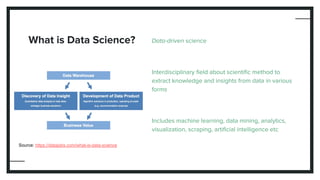
What is Data Science? Data-driven science
Interdisciplinary field about scientific method to
extract knowledge and insights from data in various
forms
Includes machine learning, data mining, analytics,
visualization, scraping, artificial intelligence etc
Source: https://datajobs.com/what-is-data-science
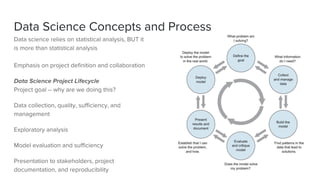
Data Science Concepts and Process
Data science relies on statistical analysis, BUT it
is more than statistical analysis
Emphasis on project definition and collaboration
Data Science Project Lifecycle
Project goal -- why are we doing this?
Data collection, quality, sufficiency, and
management
Exploratory analysis
Model evaluation and sufficiency
Presentation to stakeholders, project
documentation, and reproducibility
Source: http://www.glassdoor.com
Intro to the
Python
Language
For Data Analysis:
- Get by with basic, key concepts
- Become familiar with libraries
- Use the technologies to your advantage
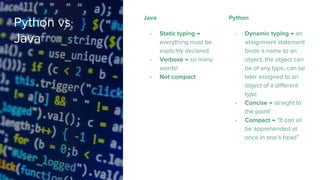
Python vs
Java
Java
- Static typing →
everything must be
explicitly declared
- Verbose → so many
words!
- Not compact
Python
- Dynamic typing → an
assignment statement
binds a name to an
object, the object can
be of any type, can be
later assigned to an
object of a different
type
- Concise → straight to
the point!
- Compact → “It can all
be apprehended at
once in one’s head”
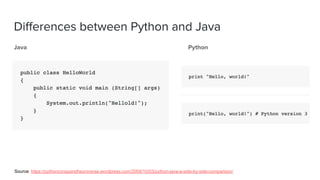
Differences between Python and Java
Java Python
Source: https://pythonconquerstheuniverse.wordpress.com/2009/10/03/python-java-a-side-by-side-comparison/
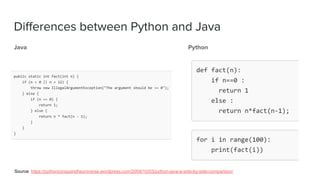
Differences between Python and Java
Java Python
Source: https://pythonconquerstheuniverse.wordpress.com/2009/10/03/python-java-a-side-by-side-comparison/
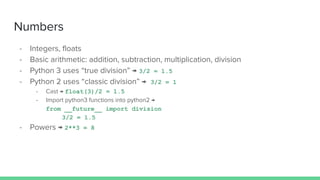
Numbers
- Integers, floats
- Basic arithmetic: addition, subtraction, multiplication, division
- Python 3 uses “true division” → 3/2 = 1.5
- Python 2 uses “classic division” → 3/2 = 1
- Cast → float(3)/2 = 1.5
- Import python3 functions into python2 →
from __future__ import division
3/2 = 1.5
- Powers → 2**3 = 8
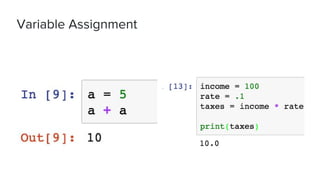
Variable Assignment
Strings
Strings use single or double quotes, depending on formatting
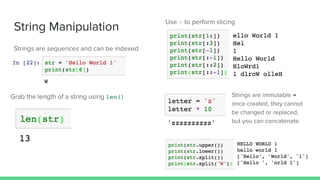
String Manipulation
Strings are sequences and can be indexed
Grab the length of a string using len()
Use : to perform slicing
Strings are immutable →
once created, they cannot
be changed or replaced,
but you can concatenate
Lists
Lists can work similarly to strings -- they use the
len() function and square brackets to access data
Source: https://developers.google.com/edu/python/lists
Assignment with = will not make a copy, it
will make the 2 variables point to the same
same list
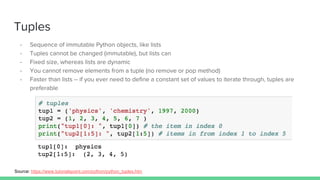
Tuples
- Sequence of immutable Python objects, like lists
- Tuples cannot be changed (immutable), but lists can
- Fixed size, whereas lists are dynamic
- You cannot remove elements from a tuple (no remove or pop method)
- Faster than lists -- if you ever need to define a constant set of values to iterate through, tuples are
preferable
Source: https://www.tutorialspoint.com/python/python_tuples.htm
Dictionaries
- Associative array, also known as hash
- Any key in the dictionary is associated or mapped to a value
- Unordered key-value-pairs
Python
Libraries
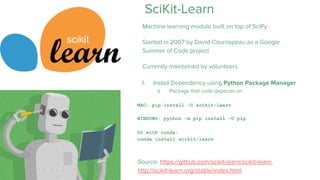
SciKit-Learn
Machine learning module built on top of SciPy
Started in 2007 by David Cournapeau as a Google
Summer of Code project
Currently maintained by volunteers
Source: https://github.com/scikit-learn/scikit-learn,
http://scikit-learn.org/stable/index.html
1. Install Dependency using Python Package Manager
a. Package that code depends on
MAC: pip install -U scikit-learn
WINDOWS: python -m pip install -U pip
Or with conda:
conda install scikit-learn
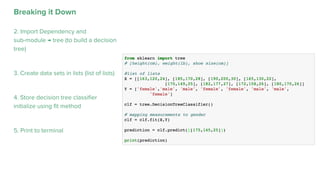
Predicting
Gender
Example program taken from
Siraj Raval: https://youtu.be/T5pRlIbr6gg
Breaking it Down
2. Import Dependency and
sub-module → tree (to build a decision
tree)
3. Create data sets in lists (list of lists)
4. Store decision tree classifier
initialize using fit method
5. Print to terminal
pandas
Popular python package for data analysis &
manipulation
Well suited for ordered and unordered data,
tabular data, arbitrary matrix data,
observational/statistical data
- Python package pro
- Install using conda or pip
pip install pandas
Source: https://github.com/pandas-dev/pandas
Popular Baby
Names
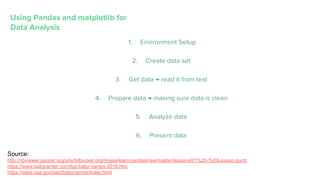
Using Pandas and matplotlib for
Data Analysis
1. Environment Setup
2. Create data set
3. Get data → read it from text
4. Prepare data → making sure data is clean
5. Analyze data
6. Present data
Source:
http://nbviewer.jupyter.org/urls/bitbucket.org/hrojas/learn-pandas/raw/master/lessons/01%20-%20Lesson.ipynb
https://www.babycenter.com/top-baby-names-2016.htm
https://www.ssa.gov/oact/babynames/index.html
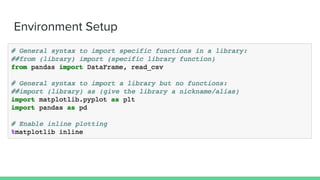
Environment Setup
Create Data Set
Merge the lists together using
zip()
Create Data Set → Create DataFrame
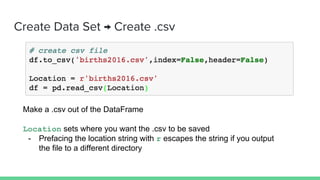
Create Data Set → Create .csv
Make a .csv out of the DataFrame
Location sets where you want the .csv to be saved
- Prefacing the location string with r escapes the string if you output
the file to a different directory
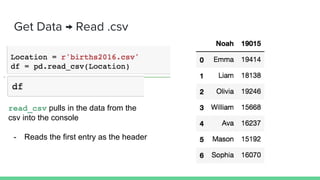
Get Data → Read .csv
read_csv pulls in the data from the
csv into the console
- Reads the first entry as the header
Get Data → Edit .csv
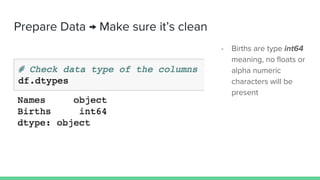
Prepare Data → Make sure it’s clean
- Births are type int64
meaning, no floats or
alpha numeric
characters will be
present
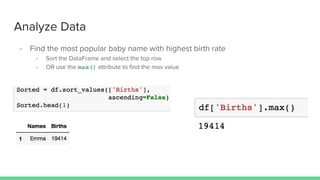
Analyze Data
- Find the most popular baby name with highest birth rate
- Sort the DataFrame and select the top row
- OR use the max() attribute to find the max value
Present Data → Plot the DataFrame
- Plot the Births column and label the graph to show the highest point on the
graph → with the table, the end user can navigate the data clearly
- plot() is a pandas attribute that lets you plot the data in the dataframe
References,
Resources and
Further Study
Siraj Raval - Learn Python for Data Science (short, bite sized):
https://www.youtube.com/playlist?list=PL2-dafEMk2A6QKz1m
rk1uIGfHkC1zZ6UU
Introduction to Data Science in Python (U of M):
https://www.coursera.org/learn/python-data-analysis
Python and Data Sciences Courses:
https://www.kaggle.com/wiki/Tutorials
Step by Step Approach…:
http://bigdata-madesimple.com/step-by-step-approach-to-per
form-data-analysis-using-python/

Introduction To Python

  • 1.
  • 2.
    What is Python?- Python is a programming language designed by Guido van Rossum and was initially released in 1991 - Named after the British comedy troupe, Monty Python’s Flying Circus - It is an interpreted language - Its instructions are not directly executed by the target machine, but read and executed by some other program - Code can be executed “on the fly”, but will use more CPU time - External libraries can enhance the capabilities of Python - Ex -- NumPy, iPython, pandas, matplotlib
  • 3.
    Python Features Elegant syntax Easyto use language Large standard library Basic data types Object-oriented programming with classes and multiple inheritance Free software
  • 4.
    Python Version? - Python2 was started in 2000 - Python 2.7 was released in 2010 - Will lose support in 2020 - Python 3.0 was released in 2008 - More and more libraries are starting to support Python 3.4 - Which to use? - A lot more expansive support and resources for Python 2 - Some Python 3 features are backwards compatible - BUT the future is looking towards Python 3
  • 5.
    Uses for Python -Server automation, libraries for webapps - Game development - Animation - Scientific computing and Data Science - Visualizing and analyzing data
  • 6.
    How to InstallPython Can download it from project site and install libraries individually (https://www.python.org/downloads/)) Comes pre-installed with Mac Download Python with Anaconda distribution (https://www.anaconda.com/download/) Development Environment - Terminal - IDLE editor - Jupyter Notebook (previously called iPython Notebook) - try.jupyter.org
  • 7.
    Jupyter Notebook The browserhosts it, but it’s pulling data from the directory you’re running on your computer Notebooks are downloadable as .ipynb files Cell → where you run the code - also possible to write markdown - # Comments in Python Kernel is what your cell is running, the code that’s running Shortcuts Shift + Enter → runs code Tab → for autocomplete methods Shift + Tab → expanded view of help popups
  • 8.
    What is DataScience? Data-driven science Interdisciplinary field about scientific method to extract knowledge and insights from data in various forms Includes machine learning, data mining, analytics, visualization, scraping, artificial intelligence etc Source: https://datajobs.com/what-is-data-science
  • 9.
    Data Science Conceptsand Process Data science relies on statistical analysis, BUT it is more than statistical analysis Emphasis on project definition and collaboration Data Science Project Lifecycle Project goal -- why are we doing this? Data collection, quality, sufficiency, and management Exploratory analysis Model evaluation and sufficiency Presentation to stakeholders, project documentation, and reproducibility
  • 10.
  • 11.
    Intro to the Python Language ForData Analysis: - Get by with basic, key concepts - Become familiar with libraries - Use the technologies to your advantage
  • 12.
    Python vs Java Java - Statictyping → everything must be explicitly declared - Verbose → so many words! - Not compact Python - Dynamic typing → an assignment statement binds a name to an object, the object can be of any type, can be later assigned to an object of a different type - Concise → straight to the point! - Compact → “It can all be apprehended at once in one’s head”
  • 13.
    Differences between Pythonand Java Java Python Source: https://pythonconquerstheuniverse.wordpress.com/2009/10/03/python-java-a-side-by-side-comparison/
  • 14.
    Differences between Pythonand Java Java Python Source: https://pythonconquerstheuniverse.wordpress.com/2009/10/03/python-java-a-side-by-side-comparison/
  • 15.
    Numbers - Integers, floats -Basic arithmetic: addition, subtraction, multiplication, division - Python 3 uses “true division” → 3/2 = 1.5 - Python 2 uses “classic division” → 3/2 = 1 - Cast → float(3)/2 = 1.5 - Import python3 functions into python2 → from __future__ import division 3/2 = 1.5 - Powers → 2**3 = 8
  • 16.
  • 17.
    Strings Strings use singleor double quotes, depending on formatting
  • 18.
    String Manipulation Strings aresequences and can be indexed Grab the length of a string using len() Use : to perform slicing Strings are immutable → once created, they cannot be changed or replaced, but you can concatenate
  • 19.
    Lists Lists can worksimilarly to strings -- they use the len() function and square brackets to access data Source: https://developers.google.com/edu/python/lists Assignment with = will not make a copy, it will make the 2 variables point to the same same list
  • 20.
    Tuples - Sequence ofimmutable Python objects, like lists - Tuples cannot be changed (immutable), but lists can - Fixed size, whereas lists are dynamic - You cannot remove elements from a tuple (no remove or pop method) - Faster than lists -- if you ever need to define a constant set of values to iterate through, tuples are preferable Source: https://www.tutorialspoint.com/python/python_tuples.htm
  • 21.
    Dictionaries - Associative array,also known as hash - Any key in the dictionary is associated or mapped to a value - Unordered key-value-pairs
  • 22.
  • 23.
    SciKit-Learn Machine learning modulebuilt on top of SciPy Started in 2007 by David Cournapeau as a Google Summer of Code project Currently maintained by volunteers Source: https://github.com/scikit-learn/scikit-learn, http://scikit-learn.org/stable/index.html 1. Install Dependency using Python Package Manager a. Package that code depends on MAC: pip install -U scikit-learn WINDOWS: python -m pip install -U pip Or with conda: conda install scikit-learn
  • 24.
    Predicting Gender Example program takenfrom Siraj Raval: https://youtu.be/T5pRlIbr6gg
  • 25.
    Breaking it Down 2.Import Dependency and sub-module → tree (to build a decision tree) 3. Create data sets in lists (list of lists) 4. Store decision tree classifier initialize using fit method 5. Print to terminal
  • 26.
    pandas Popular python packagefor data analysis & manipulation Well suited for ordered and unordered data, tabular data, arbitrary matrix data, observational/statistical data - Python package pro - Install using conda or pip pip install pandas Source: https://github.com/pandas-dev/pandas
  • 27.
  • 28.
    Using Pandas andmatplotlib for Data Analysis 1. Environment Setup 2. Create data set 3. Get data → read it from text 4. Prepare data → making sure data is clean 5. Analyze data 6. Present data Source: http://nbviewer.jupyter.org/urls/bitbucket.org/hrojas/learn-pandas/raw/master/lessons/01%20-%20Lesson.ipynb https://www.babycenter.com/top-baby-names-2016.htm https://www.ssa.gov/oact/babynames/index.html
  • 29.
  • 30.
    Create Data Set Mergethe lists together using zip()
  • 31.
    Create Data Set→ Create DataFrame
  • 32.
    Create Data Set→ Create .csv Make a .csv out of the DataFrame Location sets where you want the .csv to be saved - Prefacing the location string with r escapes the string if you output the file to a different directory
  • 33.
    Get Data →Read .csv read_csv pulls in the data from the csv into the console - Reads the first entry as the header
  • 34.
    Get Data →Edit .csv
  • 35.
    Prepare Data →Make sure it’s clean - Births are type int64 meaning, no floats or alpha numeric characters will be present
  • 36.
    Analyze Data - Findthe most popular baby name with highest birth rate - Sort the DataFrame and select the top row - OR use the max() attribute to find the max value
  • 37.
    Present Data →Plot the DataFrame - Plot the Births column and label the graph to show the highest point on the graph → with the table, the end user can navigate the data clearly - plot() is a pandas attribute that lets you plot the data in the dataframe
  • 40.
    References, Resources and Further Study SirajRaval - Learn Python for Data Science (short, bite sized): https://www.youtube.com/playlist?list=PL2-dafEMk2A6QKz1m rk1uIGfHkC1zZ6UU Introduction to Data Science in Python (U of M): https://www.coursera.org/learn/python-data-analysis Python and Data Sciences Courses: https://www.kaggle.com/wiki/Tutorials Step by Step Approach…: http://bigdata-madesimple.com/step-by-step-approach-to-per form-data-analysis-using-python/