Microsoft PowerPoint:
                                      Screen Elements
                PowerPoint is a presentation application used to create slides that may include
                text, bulleted lists, charts, graphics, tables and more. The presentation can be
                printed, projected from a computer to a screen (called a slide show) or even
                published to a web page including webcam technology.

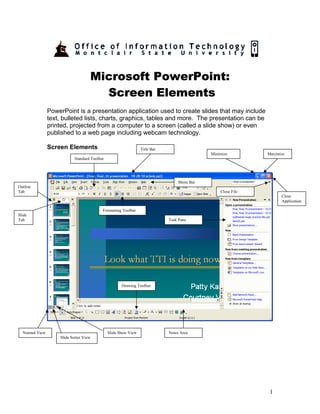
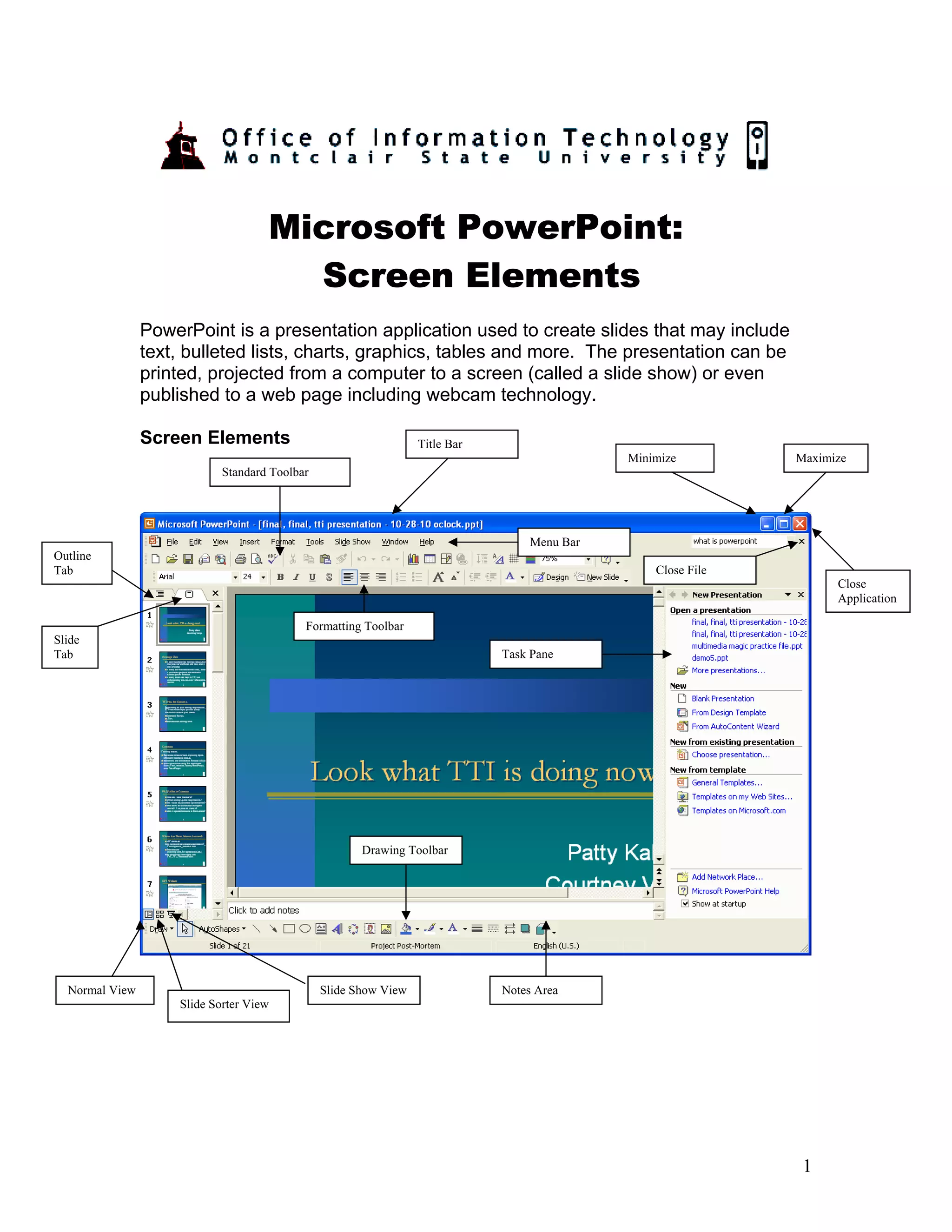
                Screen Elements                                  Title Bar
                                                                                            Minimize         Maximize
                            Standard Toolbar


                                                                                 Menu Bar
Outline
Tab                                                                                             Close File
                                                                                                                   Close
                                                                                                                   Application

                                           Formatting Toolbar
Slide
Tab                                                                          Task Pane


                                                      Drawing Toolbar


  Normal View                                  Slide Show View               Notes Area
                    Slide Sorter View


                                                                                                              1
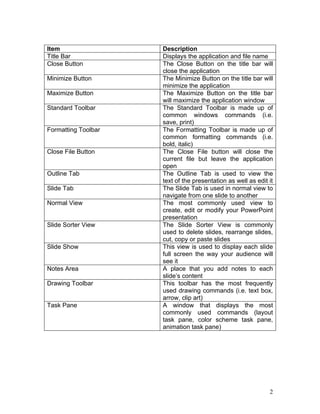
Item                 Description
Title Bar            Displays the application and file name
Close Button         The Close Button on the title bar will
                     close the application
Minimize Button      The Minimize Button on the title bar will
                     minimize the application
Maximize Button      The Maximize Button on the title bar
                     will maximize the application window
Standard Toolbar     The Standard Toolbar is made up of
                     common windows commands (i.e.
                     save, print)
Formatting Toolbar   The Formatting Toolbar is made up of
                     common formatting commands (i.e.
                     bold, italic)
Close File Button    The Close File button will close the
                     current file but leave the application
                     open
Outline Tab          The Outline Tab is used to view the
                     text of the presentation as well as edit it
Slide Tab            The Slide Tab is used in normal view to
                     navigate from one slide to another
Normal View          The most commonly used view to
                     create, edit or modify your PowerPoint
                     presentation
Slide Sorter View    The Slide Sorter View is commonly
                     used to delete slides, rearrange slides,
                     cut, copy or paste slides
Slide Show           This view is used to display each slide
                     full screen the way your audience will
                     see it
Notes Area           A place that you add notes to each
                     slide’s content
Drawing Toolbar      This toolbar has the most frequently
                     used drawing commands (i.e. text box,
                     arrow, clip art)
Task Pane            A window that displays the most
                     commonly used commands (layout
                     task pane, color scheme task pane,
                     animation task pane)


                                                              2

Screen elements

  • 1.
    Microsoft PowerPoint: Screen Elements PowerPoint is a presentation application used to create slides that may include text, bulleted lists, charts, graphics, tables and more. The presentation can be printed, projected from a computer to a screen (called a slide show) or even published to a web page including webcam technology. Screen Elements Title Bar Minimize Maximize Standard Toolbar Menu Bar Outline Tab Close File Close Application Formatting Toolbar Slide Tab Task Pane Drawing Toolbar Normal View Slide Show View Notes Area Slide Sorter View 1
  • 2.
    Item Description Title Bar Displays the application and file name Close Button The Close Button on the title bar will close the application Minimize Button The Minimize Button on the title bar will minimize the application Maximize Button The Maximize Button on the title bar will maximize the application window Standard Toolbar The Standard Toolbar is made up of common windows commands (i.e. save, print) Formatting Toolbar The Formatting Toolbar is made up of common formatting commands (i.e. bold, italic) Close File Button The Close File button will close the current file but leave the application open Outline Tab The Outline Tab is used to view the text of the presentation as well as edit it Slide Tab The Slide Tab is used in normal view to navigate from one slide to another Normal View The most commonly used view to create, edit or modify your PowerPoint presentation Slide Sorter View The Slide Sorter View is commonly used to delete slides, rearrange slides, cut, copy or paste slides Slide Show This view is used to display each slide full screen the way your audience will see it Notes Area A place that you add notes to each slide’s content Drawing Toolbar This toolbar has the most frequently used drawing commands (i.e. text box, arrow, clip art) Task Pane A window that displays the most commonly used commands (layout task pane, color scheme task pane, animation task pane) 2