(GUI)
GRAPHICAL USER
INTERFACE
GRAPHICAL USER INTERFACE
Graphical User Interface (GUI) refers to the
use of pictures rather than just words to
represent the input and output of a program.
A Desktop of a computer is the screen
display on a monitor comprising the
background, icons, applications and files.
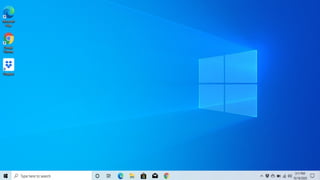
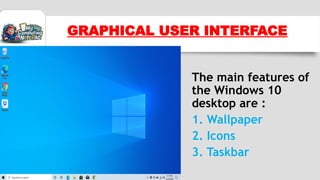
The main features of
the Windows 10
desktop are :
1. Wallpaper
2. Icons
3. Taskbar
GRAPHICAL USER INTERFACE
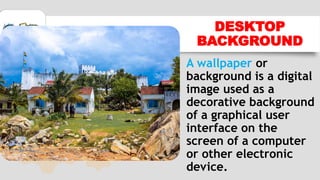
A wallpaper or
background is a digital
image used as a
decorative background
of a graphical user
interface on the
screen of a computer
or other electronic
device.
DESKTOP
BACKGROUND
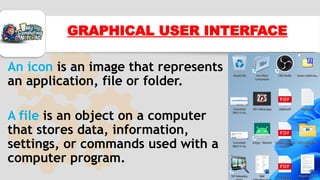
An icon is an image that represents
an application, file or folder.
A file is an object on a computer
that stores data, information,
settings, or commands used with a
computer program.
GRAPHICAL USER INTERFACE
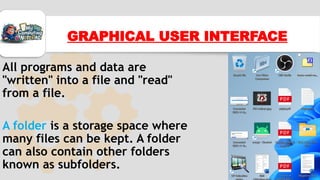
All programs and data are
"written" into a file and "read"
from a file.
A folder is a storage space where
many files can be kept. A folder
can also contain other folders
known as subfolders.
GRAPHICAL USER INTERFACE
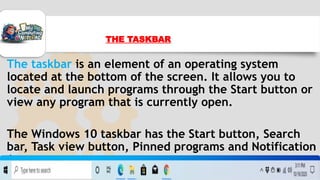
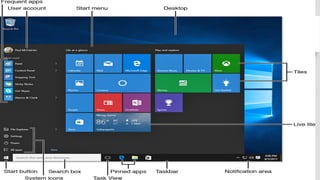
The taskbar is an element of an operating system
located at the bottom of the screen. It allows you to
locate and launch programs through the Start button or
view any program that is currently open.
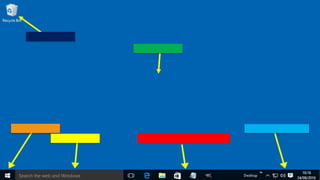
The Windows 10 taskbar has the Start button, Search
bar, Task view button, Pinned programs and Notification
Area
THE TASKBAR
1. It helps the user to have quick access to running
programs
2. It is used to shut down or restart a computer
3. It houses the start menu which helps us to launch
applications
4. The taskbar displays time and can show date
5. It helps us to manage windows that are already opened
6. It also displays running programs
FUNCTIONS OF TASKBAR
Start button: It is located at the extreme left
corner of the task bar.
The start button has the symbol of Windows
logo
The Start is used to open the Start Menu which
consists of a column listing program folders,
documents, favourites, control panel, search,
run, help and shutdown.
FEATURES OF TASKBAR
1.It is used to search for missing files and folders
2.It helps us to launch applications on the
computer
3.It helps us to make computer settings
4.It helps us to shut down or restart the
computer
IMPORTANCE OF THE
START MENU
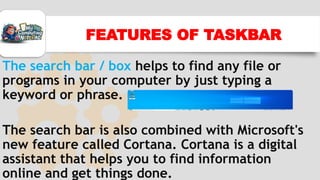
The search bar / box helps to find any file or
programs in your computer by just typing a
keyword or phrase.
The search bar is also combined with Microsoft's
new feature called Cortana. Cortana is a digital
assistant that helps you to find information
online and get things done.
FEATURES OF TASKBAR
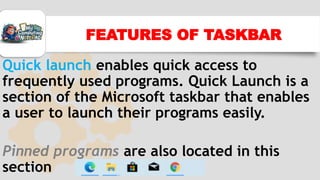
Quick launch enables quick access to
frequently used programs. Quick Launch is a
section of the Microsoft taskbar that enables
a user to launch their programs easily.
Pinned programs are also located in this
section
FEATURES OF TASKBAR
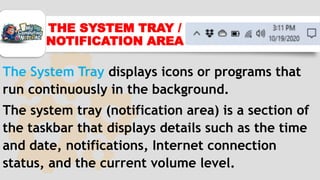
The System Tray displays icons or programs that
run continuously in the background.
The system tray (notification area) is a section of
the taskbar that displays details such as the time
and date, notifications, Internet connection
status, and the current volume level.
THE SYSTEM TRAY /
NOTIFICATION AREA
WHAT HAVE YOU LEARNT?
ASSESSMENT TIME
1. Mention any five (5) features of the
taskbar
2. Identify the main parts of the GUI

Introduction to MS Windows Interface - Graphical User Interface(GUI)

  • 1.
  • 3.
    GRAPHICAL USER INTERFACE GraphicalUser Interface (GUI) refers to the use of pictures rather than just words to represent the input and output of a program. A Desktop of a computer is the screen display on a monitor comprising the background, icons, applications and files.
  • 4.
    The main featuresof the Windows 10 desktop are : 1. Wallpaper 2. Icons 3. Taskbar GRAPHICAL USER INTERFACE
  • 5.
    A wallpaper or backgroundis a digital image used as a decorative background of a graphical user interface on the screen of a computer or other electronic device. DESKTOP BACKGROUND
  • 6.
    An icon isan image that represents an application, file or folder. A file is an object on a computer that stores data, information, settings, or commands used with a computer program. GRAPHICAL USER INTERFACE
  • 7.
    All programs anddata are "written" into a file and "read" from a file. A folder is a storage space where many files can be kept. A folder can also contain other folders known as subfolders. GRAPHICAL USER INTERFACE
  • 8.
    The taskbar isan element of an operating system located at the bottom of the screen. It allows you to locate and launch programs through the Start button or view any program that is currently open. The Windows 10 taskbar has the Start button, Search bar, Task view button, Pinned programs and Notification Area THE TASKBAR
  • 9.
    1. It helpsthe user to have quick access to running programs 2. It is used to shut down or restart a computer 3. It houses the start menu which helps us to launch applications 4. The taskbar displays time and can show date 5. It helps us to manage windows that are already opened 6. It also displays running programs FUNCTIONS OF TASKBAR
  • 10.
    Start button: Itis located at the extreme left corner of the task bar. The start button has the symbol of Windows logo The Start is used to open the Start Menu which consists of a column listing program folders, documents, favourites, control panel, search, run, help and shutdown. FEATURES OF TASKBAR
  • 12.
    1.It is usedto search for missing files and folders 2.It helps us to launch applications on the computer 3.It helps us to make computer settings 4.It helps us to shut down or restart the computer IMPORTANCE OF THE START MENU
  • 13.
    The search bar/ box helps to find any file or programs in your computer by just typing a keyword or phrase. The search bar is also combined with Microsoft's new feature called Cortana. Cortana is a digital assistant that helps you to find information online and get things done. FEATURES OF TASKBAR
  • 14.
    Quick launch enablesquick access to frequently used programs. Quick Launch is a section of the Microsoft taskbar that enables a user to launch their programs easily. Pinned programs are also located in this section FEATURES OF TASKBAR
  • 15.
    The System Traydisplays icons or programs that run continuously in the background. The system tray (notification area) is a section of the taskbar that displays details such as the time and date, notifications, Internet connection status, and the current volume level. THE SYSTEM TRAY / NOTIFICATION AREA
  • 17.
  • 18.
    ASSESSMENT TIME 1. Mentionany five (5) features of the taskbar 2. Identify the main parts of the GUI