TSD:
Securing sensitive
and restricted data
Dag-Erling Smørgrav
EuroBSDCon 2014
What are sensitive
and restricted data?
● Gene sequences
● Patient records
● Survey responses
● A/V recordings of patients and respondents
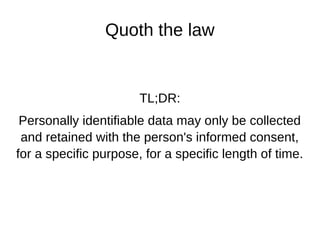
Quoth the law
TL;DR:
Personally identifiable data may only be collected
and retained with the person's informed consent,
for a specific purpose, for a specific length of time.
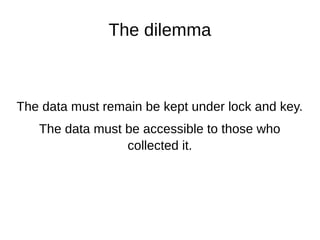
The dilemma
The data must remain be kept under lock and key.
The data must be accessible to those who
collected it.
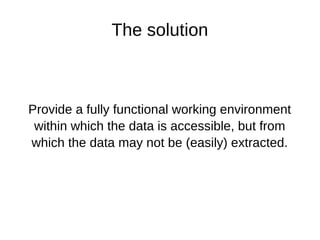
The solution
Provide a fully functional working environment
within which the data is accessible, but from
which the data may not be (easily) extracted.
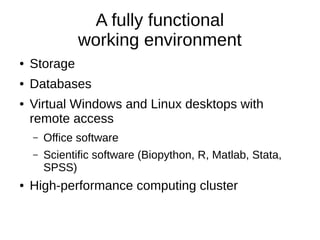
A fully functional
working environment
● Storage
● Databases
● Virtual Windows and Linux desktops with
remote access
– Office software
– Scientific software (Biopython, R, Matlab, Stata,
SPSS)
● High-performance computing cluster
Data transfer
● The only direct access is through RDP or
SPICE (remote desktops) over an SSH tunnel.
● Clipboard, shared folders and other easily-used
side channels are disabled.
● Data is transferred through a data lock which
logs all transfers with user, file name, file size
and SHA256 checksum.
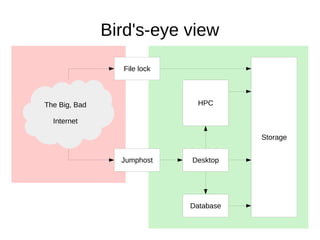
Storage
HPC
Database
Desktop
File lock
Jumphost
The Big, Bad
Internet
Bird's-eye view
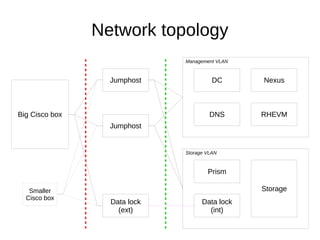
Network topology
Jumphost
Data lock
(ext)
Jumphost
Big Cisco box
Smaller
Cisco box
Storage VLAN
Data lock
(int)
Storage
Prism
Management VLAN
DC
DNS
Nexus
RHEVM
Jumphosts
● Dual role: router / firewall and login
– In hindsight, these should have been separate;
there are (surmountable) technical obstacles.
● Router / firewall: pf + pfsync + carp + authpf
● Login: OpenSSH with two-factor authentication
– RFC 6238 TOTP for users with smartphones
– RFC 4226 HOTP with YubiKeys for others
Multiplicity
There are, at present, around 45 different
research projects using TSD.
They must, of course, be kept separate.
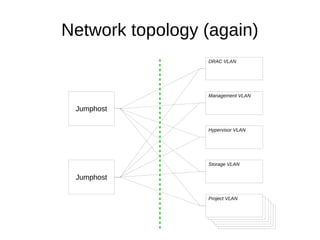
Network topology (again)
Jumphost
Jumphost
Storage VLAN
Management VLAN
DRAC VLAN
Hypervisor VLAN
Project VLANProject VLANProject VLANProject VLANProject VLANProject VLAN
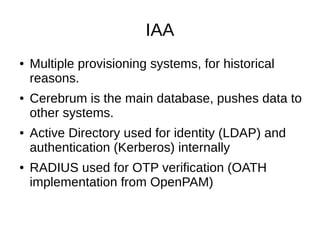
IAA
● Multiple provisioning systems, for historical
reasons.
● Cerebrum is the main database, pushes data to
other systems.
● Active Directory used for identity (LDAP) and
authentication (Kerberos) internally
● RADIUS used for OTP verification (OATH
implementation from OpenPAM)
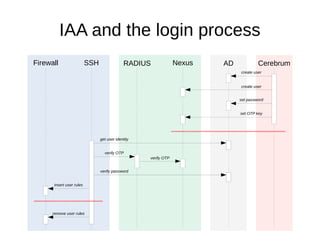
SSH RADIUS Nexus AD CerebrumFirewall
create user
create user
set password
set OTP key
get user identity
verify OTP
verify password
verify OTP
insert user rules
remove user rules
IAA and the login process
Provisioning
● Automatic provisioning (creation and installation) of VMs
based on data in Cerebrum
● Automatic configuration of new VLANs and subnets
(only partially implemented)
● pf address tables updated based on machine roles
assigned in Cerebrum, allows fine-grained control of
network traffic
● Users are affiliated with projects, allows restricting their
authpf ruleset to only VMs belonging to those projects
(not yet implemented)
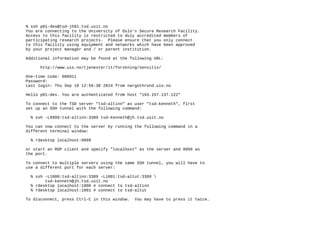
% ssh p01-des@tsd-jh01.tsd.usit.no
You are connecting to the University of Oslo's Secure Research Facility.
Access to this facility is restricted to duly accredited members of
participating research projects. Please ensure that you only connect
to this facility using equipment and networks which have been approved
by your project manager and / or parent institution.
Additional information may be found at the following URL:
http://www.uio.no/tjenester/it/forskning/sensitiv/
One-time code: 608911
Password:
Last login: Thu Sep 18 12:56:38 2014 from nargothrond.uio.no
Hello p01-des. You are authenticated from host "193.157.137.122"
To connect to the TSD server "tsd-altinn" as user "tsd-kenneth", first
set up an SSH tunnel with the following command:
% ssh -L9999:tsd-altinn:3389 tsd-kenneth@jh.tsd.usit.no
You can now connect to the server by running the following command in a
different terminal window:
% rdesktop localhost:9999
or start an RDP client and specify "localhost" as the server and 9999 as
the port.
To connect to multiple servers using the same SSH tunnel, you will have to
use a different port for each server:
% ssh -L1000:tsd-altinn:3389 -L1001:tsd-altut:3389 
tsd-kenneth@jh.tsd.usit.no
% rdesktop localhost:1000 # connect to tsd-altinn
% rdesktop localhost:1001 # connect to tsd-altut
To disconnect, press Ctrl-C in this window. You may have to press it twice.
Where the rubber
meets the road
IPv6
TSD was intended to be an IPv6-only
environment, but a lot of software still does not
support IPv6, or does not support it correctly.
– RHEV does not support IPv6 at all.
– Cannot use SLAAC: Linux source address selection
is broken. Forced to use carp on the inside.
– Also found and fixed bugs in FreeBSD's rtadvd
before we gave up SLAAC.
pf and carp
● Found and fixed bug in FreeBSD source address
selection (only when using carp)
● Found, but haven't fixed, bug with routing of IPv6
UDP packets (possibly checksum corruption in pf)
● State table filled up with long-lived state entries
for DNS, NTP, Kerberos etc. requests
– Greatly reduced timeout for UDP state entries
– Greatly increased table size
IAA issues
● FreeRADIUS is difficult to configure correctly
and slightly unreliable
● nss_ldap is slightly broken (my bad!)
Questions

University of Oslo's TSD service - storing sensitive & restricted data by Dag-Erling Smørgrav

  • 1.
    TSD: Securing sensitive and restricteddata Dag-Erling Smørgrav EuroBSDCon 2014
  • 3.
    What are sensitive andrestricted data? ● Gene sequences ● Patient records ● Survey responses ● A/V recordings of patients and respondents
  • 4.
    Quoth the law TL;DR: Personallyidentifiable data may only be collected and retained with the person's informed consent, for a specific purpose, for a specific length of time.
  • 5.
    The dilemma The datamust remain be kept under lock and key. The data must be accessible to those who collected it.
  • 6.
    The solution Provide afully functional working environment within which the data is accessible, but from which the data may not be (easily) extracted.
  • 7.
    A fully functional workingenvironment ● Storage ● Databases ● Virtual Windows and Linux desktops with remote access – Office software – Scientific software (Biopython, R, Matlab, Stata, SPSS) ● High-performance computing cluster
  • 8.
    Data transfer ● Theonly direct access is through RDP or SPICE (remote desktops) over an SSH tunnel. ● Clipboard, shared folders and other easily-used side channels are disabled. ● Data is transferred through a data lock which logs all transfers with user, file name, file size and SHA256 checksum.
  • 9.
  • 10.
    Network topology Jumphost Data lock (ext) Jumphost BigCisco box Smaller Cisco box Storage VLAN Data lock (int) Storage Prism Management VLAN DC DNS Nexus RHEVM
  • 11.
    Jumphosts ● Dual role:router / firewall and login – In hindsight, these should have been separate; there are (surmountable) technical obstacles. ● Router / firewall: pf + pfsync + carp + authpf ● Login: OpenSSH with two-factor authentication – RFC 6238 TOTP for users with smartphones – RFC 4226 HOTP with YubiKeys for others
  • 12.
    Multiplicity There are, atpresent, around 45 different research projects using TSD. They must, of course, be kept separate.
  • 13.
    Network topology (again) Jumphost Jumphost StorageVLAN Management VLAN DRAC VLAN Hypervisor VLAN Project VLANProject VLANProject VLANProject VLANProject VLANProject VLAN
  • 14.
    IAA ● Multiple provisioningsystems, for historical reasons. ● Cerebrum is the main database, pushes data to other systems. ● Active Directory used for identity (LDAP) and authentication (Kerberos) internally ● RADIUS used for OTP verification (OATH implementation from OpenPAM)
  • 15.
    SSH RADIUS NexusAD CerebrumFirewall create user create user set password set OTP key get user identity verify OTP verify password verify OTP insert user rules remove user rules IAA and the login process
  • 16.
    Provisioning ● Automatic provisioning(creation and installation) of VMs based on data in Cerebrum ● Automatic configuration of new VLANs and subnets (only partially implemented) ● pf address tables updated based on machine roles assigned in Cerebrum, allows fine-grained control of network traffic ● Users are affiliated with projects, allows restricting their authpf ruleset to only VMs belonging to those projects (not yet implemented)
  • 17.
    % ssh p01-des@tsd-jh01.tsd.usit.no Youare connecting to the University of Oslo's Secure Research Facility. Access to this facility is restricted to duly accredited members of participating research projects. Please ensure that you only connect to this facility using equipment and networks which have been approved by your project manager and / or parent institution. Additional information may be found at the following URL: http://www.uio.no/tjenester/it/forskning/sensitiv/ One-time code: 608911 Password: Last login: Thu Sep 18 12:56:38 2014 from nargothrond.uio.no Hello p01-des. You are authenticated from host "193.157.137.122" To connect to the TSD server "tsd-altinn" as user "tsd-kenneth", first set up an SSH tunnel with the following command: % ssh -L9999:tsd-altinn:3389 tsd-kenneth@jh.tsd.usit.no You can now connect to the server by running the following command in a different terminal window: % rdesktop localhost:9999 or start an RDP client and specify "localhost" as the server and 9999 as the port. To connect to multiple servers using the same SSH tunnel, you will have to use a different port for each server: % ssh -L1000:tsd-altinn:3389 -L1001:tsd-altut:3389 tsd-kenneth@jh.tsd.usit.no % rdesktop localhost:1000 # connect to tsd-altinn % rdesktop localhost:1001 # connect to tsd-altut To disconnect, press Ctrl-C in this window. You may have to press it twice.
  • 18.
  • 19.
    IPv6 TSD was intendedto be an IPv6-only environment, but a lot of software still does not support IPv6, or does not support it correctly. – RHEV does not support IPv6 at all. – Cannot use SLAAC: Linux source address selection is broken. Forced to use carp on the inside. – Also found and fixed bugs in FreeBSD's rtadvd before we gave up SLAAC.
  • 20.
    pf and carp ●Found and fixed bug in FreeBSD source address selection (only when using carp) ● Found, but haven't fixed, bug with routing of IPv6 UDP packets (possibly checksum corruption in pf) ● State table filled up with long-lived state entries for DNS, NTP, Kerberos etc. requests – Greatly reduced timeout for UDP state entries – Greatly increased table size
  • 21.
    IAA issues ● FreeRADIUSis difficult to configure correctly and slightly unreliable ● nss_ldap is slightly broken (my bad!)
  • 22.