Jan SmitVMware OEM AlliancesVMware – Energize and Save
VMware – The Proven Industry LeaderCompany Overview~$2.3 billion in 2009 revenueOver $2 billion in cash20%+ operating margins~7,000 employees worldwide5th largest infrastructure software company in the worldProven in the Trenches170,000+ VMware customers100% of Fortune 100100% of Fortune Global 10096% of Fortune 100095% of Fortune Global 5002
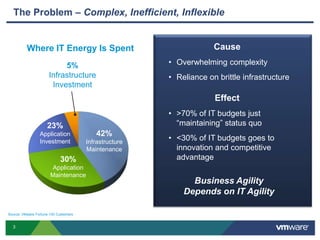
The Problem – Complex, Inefficient, InflexibleCauseOverwhelming complexity
Reliance on brittle infrastructureEffect>70% of IT budgets just “maintaining” status quo
Where IT Energy Is Spent5%Infrastructure Investment23%Application Investment42%Infrastructure Maintenance30%Application MaintenanceBusiness Agility Depends on IT Agility Source: VMware Fortune 100 Customers3
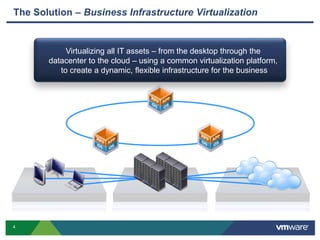
The Solution – Business Infrastructure VirtualizationVirtualizing all IT assets – from the desktop through the datacenter to the cloud – using a common virtualization platform, to create a dynamic, flexible infrastructure for the business4
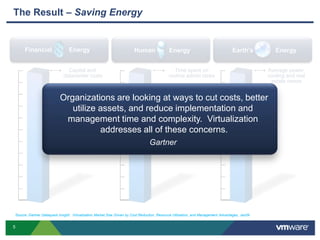
Financial          EnergyHuman        EnergyEarth’s             EnergyCapital and datacenter costsAverage power,cooling and realestate needsTime spent on routine admin tasksThe Result – Saving EnergyOrganizations are looking at ways to cut costs, betterutilize assets, and reduce implementation and management time and complexity.  Virtualization addresses all of these concerns.Gartner Source: Gartner Dataquest Insight:  Virtualization Market Size Driven by Cost Reduction, Resource Utilization, and Management Advantages, Jan095
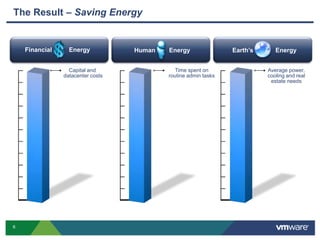
Financial          EnergyHuman        EnergyEarth’s             EnergyCapital and datacenter costsAverage power,cooling and realestate needsTime spent on routine admin tasksThe Result – Saving Energy6
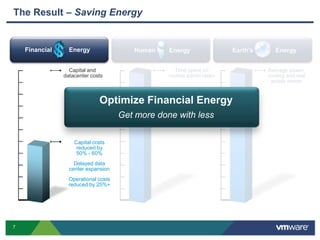
Financial          EnergyHuman        EnergyEarth’s             EnergyCapital and datacenter costsAverage power,cooling and realestate needsTime spent on routine admin tasksThe Result – Saving EnergyOptimize Financial EnergyGet more done with lessCapital costs reduced by 50% - 60%Delayed datacenter expansionOperational costs reduced by 25%+ 7
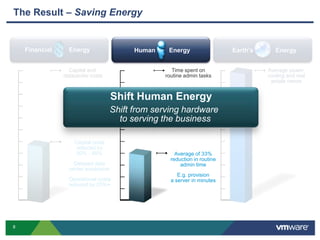
Financial          EnergyHuman        EnergyEarth’s             EnergyCapital and datacenter costsAverage power,cooling and realestate needsTime spent on routine admin tasksShift Human EnergyShift from serving hardware to serving the businessCapital costs reduced by 50% - 60%Delayed datacenter expansionOperational costs reduced by 25%+ The Result – Saving EnergyAverage of 33% reduction in routine admin timeE.g. provision a server in minutes8
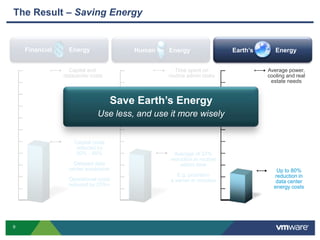
Financial          EnergyHuman        EnergyEarth’s             EnergyCapital and datacenter costsAverage power,cooling and realestate needsTime spent on routine admin tasksSave Earth’s EnergyUse less, and use it more wiselyCapital costs reduced by 50% - 60%Delayed datacenter expansionOperational costs reduced by 25%+ Average of 33% reduction in routine admin timeE.g. provision a server in minutesThe Result – Saving EnergyUp to 80% reduction in data center energy costs9
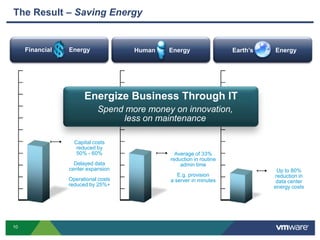
Financial          EnergyHuman        EnergyEarth’s             EnergyEnergize Business Through ITSpend more money on innovation,less on maintenanceCapital costs reduced by 50% - 60%Delayed datacenter expansionOperational costs reduced by 25%+ Average of 33% reduction in routine admin timeE.g. provision a server in minutesUp to 80% reduction in data center energy costsThe Result – Saving Energy10
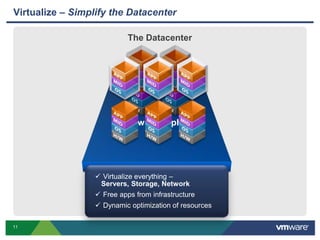
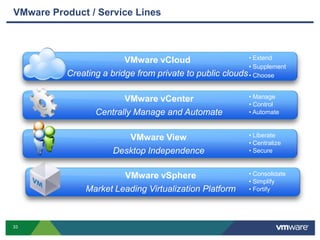
VMware vSphereVirtualize – Simplify the DatacenterThe Datacenter Virtualize everything – Servers, Storage, Network
 Free apps from infrastructure
 Dynamic optimization of resources11
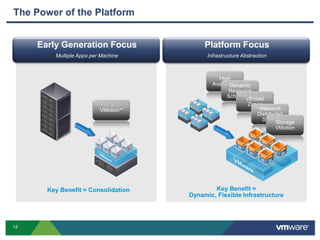
Platform FocusInfrastructure AbstractionEarly Generation FocusMultiple Apps per MachineHigh AvailabilityDynamic Resource SchedulingvShield ZonesvNetwork Distributed SwitchStorage VMotionVMotion™The Power of the PlatformKey Benefit =Dynamic, Flexible InfrastructureKey Benefit = Consolidation12
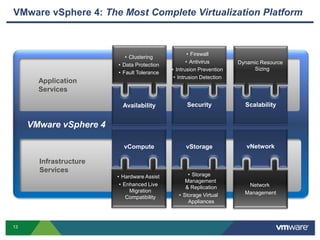
VMware vSphere 4: The Most Complete Virtualization Platform Application ServicesInfrastructure ServicesClustering
Data Protection
Fault Tolerance
Firewall
Antivirus
Intrusion Prevention
Intrusion DetectionDynamic ResourceSizingScalabilitySecurityAvailabilityVMware vSphere 4vNetworkvStoragevComputeHardware Assist
Enhanced Live Migration Compatibility
StorageManagement & Replication
Storage Virtual AppliancesNetwork Management13
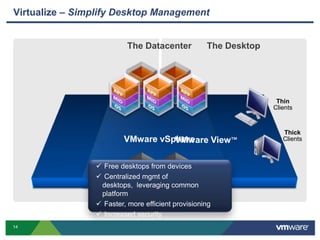
The DesktopVirtualize – Simplify Desktop ManagementThe DatacenterThinClientsThickClientsVMware vSphereVMware View™ Free desktops from devices
 Centralized mgmt of desktops,  leveraging common platform
 Faster, more efficient provisioning
 Increased security14
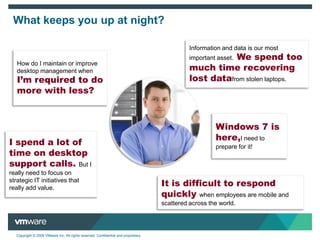
What keeps you up at night?Information and data is our most important asset.  We spend too much time recovering lost datafrom stolen laptops.How do I maintain or improve  desktop management when I’m required to do more with less?Windows 7 is here,I need to prepare for it!I spend a lot of time on desktop support calls. But I really need to focus on strategic IT initiatives that really add value.It is difficult to respond quickly when employees are mobile and scattered across the world.
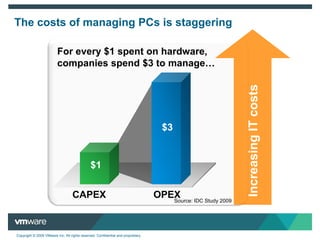
For every $1 spent on hardware, companies spend $3 to manage…$3$3Increasing IT costs$1OPEXCAPEXThe costs of managing PCs is staggeringSource: IDC Study 2009
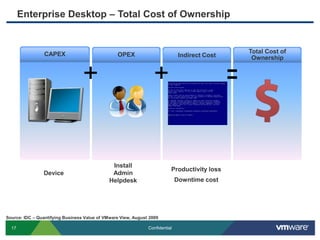
Enterprise Desktop – Total Cost of OwnershipEnterprise Desktop – Total Cost of OwnershipCAPEXOPEXIndirect CostTotal Cost of Ownership++=InstallAdminHelpdeskProductivity lossDowntime cost DeviceSource: IDC – Quantifying Business Value of VMware View, August 2009
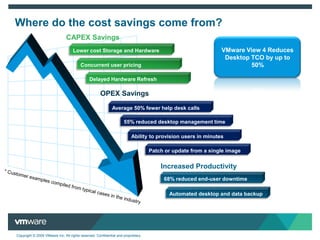
Where do the cost savings come from? CAPEX SavingsVMware View 4 Reduces Desktop TCO by up to 50%Lower cost Storage and Hardware Concurrent user pricing Delayed Hardware RefreshOPEX SavingsAverage 50% fewer help desk calls55% reduced desktop management timeAbility to provision users in minutesPatch or update from a single imageIncreased Productivity68% reduced end-user downtime * Customer examples compiled from typical cases in the industryAutomated desktop and data backup
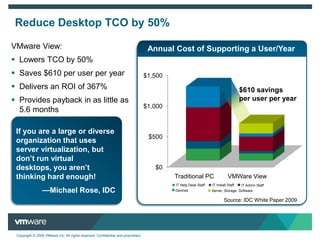
VMware View:Lowers TCO by 50%
Saves $610 per user per year
Delivers an ROI of 367%
Provides payback in as little as 5.6 monthsAnnual Cost of Supporting a User/YearReduce Desktop TCO by 50%$610 savings per user per yearIf you are a large or diverse organization that uses server virtualization, but don’t run virtual desktops, you aren’t thinking hard enough!—Michael Rose, IDCIT Install Staff IT Help Desk Staff IT Admin Staff DevicesServer, Storage, Software Source: IDC White Paper 2009
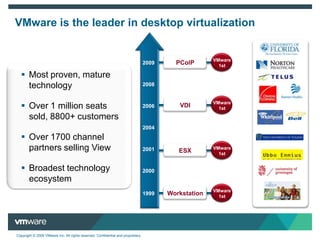
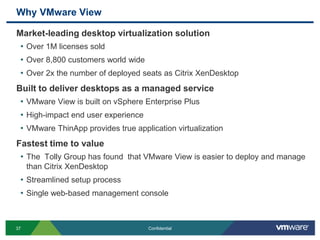
PColP2009Most proven, mature technology
Over 1 million seats sold, 8800+ customers

Dell Seminar Euroborg Groningen

  • 1.
    Jan SmitVMware OEMAlliancesVMware – Energize and Save
  • 2.
    VMware – TheProven Industry LeaderCompany Overview~$2.3 billion in 2009 revenueOver $2 billion in cash20%+ operating margins~7,000 employees worldwide5th largest infrastructure software company in the worldProven in the Trenches170,000+ VMware customers100% of Fortune 100100% of Fortune Global 10096% of Fortune 100095% of Fortune Global 5002
  • 3.
    The Problem –Complex, Inefficient, InflexibleCauseOverwhelming complexity
  • 4.
    Reliance on brittleinfrastructureEffect>70% of IT budgets just “maintaining” status quo
  • 5.
    Where IT EnergyIs Spent5%Infrastructure Investment23%Application Investment42%Infrastructure Maintenance30%Application MaintenanceBusiness Agility Depends on IT Agility Source: VMware Fortune 100 Customers3
  • 6.
    The Solution –Business Infrastructure VirtualizationVirtualizing all IT assets – from the desktop through the datacenter to the cloud – using a common virtualization platform, to create a dynamic, flexible infrastructure for the business4
  • 7.
    Financial EnergyHuman EnergyEarth’s EnergyCapital and datacenter costsAverage power,cooling and realestate needsTime spent on routine admin tasksThe Result – Saving EnergyOrganizations are looking at ways to cut costs, betterutilize assets, and reduce implementation and management time and complexity. Virtualization addresses all of these concerns.Gartner Source: Gartner Dataquest Insight: Virtualization Market Size Driven by Cost Reduction, Resource Utilization, and Management Advantages, Jan095
  • 8.
    Financial EnergyHuman EnergyEarth’s EnergyCapital and datacenter costsAverage power,cooling and realestate needsTime spent on routine admin tasksThe Result – Saving Energy6
  • 9.
    Financial EnergyHuman EnergyEarth’s EnergyCapital and datacenter costsAverage power,cooling and realestate needsTime spent on routine admin tasksThe Result – Saving EnergyOptimize Financial EnergyGet more done with lessCapital costs reduced by 50% - 60%Delayed datacenter expansionOperational costs reduced by 25%+ 7
  • 10.
    Financial EnergyHuman EnergyEarth’s EnergyCapital and datacenter costsAverage power,cooling and realestate needsTime spent on routine admin tasksShift Human EnergyShift from serving hardware to serving the businessCapital costs reduced by 50% - 60%Delayed datacenter expansionOperational costs reduced by 25%+ The Result – Saving EnergyAverage of 33% reduction in routine admin timeE.g. provision a server in minutes8
  • 11.
    Financial EnergyHuman EnergyEarth’s EnergyCapital and datacenter costsAverage power,cooling and realestate needsTime spent on routine admin tasksSave Earth’s EnergyUse less, and use it more wiselyCapital costs reduced by 50% - 60%Delayed datacenter expansionOperational costs reduced by 25%+ Average of 33% reduction in routine admin timeE.g. provision a server in minutesThe Result – Saving EnergyUp to 80% reduction in data center energy costs9
  • 12.
    Financial EnergyHuman EnergyEarth’s EnergyEnergize Business Through ITSpend more money on innovation,less on maintenanceCapital costs reduced by 50% - 60%Delayed datacenter expansionOperational costs reduced by 25%+ Average of 33% reduction in routine admin timeE.g. provision a server in minutesUp to 80% reduction in data center energy costsThe Result – Saving Energy10
  • 13.
    VMware vSphereVirtualize –Simplify the DatacenterThe Datacenter Virtualize everything – Servers, Storage, Network
  • 14.
    Free appsfrom infrastructure
  • 15.
    Dynamic optimizationof resources11
  • 16.
    Platform FocusInfrastructure AbstractionEarlyGeneration FocusMultiple Apps per MachineHigh AvailabilityDynamic Resource SchedulingvShield ZonesvNetwork Distributed SwitchStorage VMotionVMotion™The Power of the PlatformKey Benefit =Dynamic, Flexible InfrastructureKey Benefit = Consolidation12
  • 17.
    VMware vSphere 4:The Most Complete Virtualization Platform Application ServicesInfrastructure ServicesClustering
  • 18.
  • 19.
  • 20.
  • 21.
  • 22.
  • 23.
  • 24.
  • 25.
  • 26.
  • 27.
    The DesktopVirtualize –Simplify Desktop ManagementThe DatacenterThinClientsThickClientsVMware vSphereVMware View™ Free desktops from devices
  • 28.
    Centralized mgmtof desktops, leveraging common platform
  • 29.
    Faster, moreefficient provisioning
  • 30.
  • 31.
    What keeps youup at night?Information and data is our most important asset. We spend too much time recovering lost datafrom stolen laptops.How do I maintain or improve desktop management when I’m required to do more with less?Windows 7 is here,I need to prepare for it!I spend a lot of time on desktop support calls. But I really need to focus on strategic IT initiatives that really add value.It is difficult to respond quickly when employees are mobile and scattered across the world.
  • 32.
    For every $1spent on hardware, companies spend $3 to manage…$3$3Increasing IT costs$1OPEXCAPEXThe costs of managing PCs is staggeringSource: IDC Study 2009
  • 33.
    Enterprise Desktop –Total Cost of OwnershipEnterprise Desktop – Total Cost of OwnershipCAPEXOPEXIndirect CostTotal Cost of Ownership++=InstallAdminHelpdeskProductivity lossDowntime cost DeviceSource: IDC – Quantifying Business Value of VMware View, August 2009
  • 34.
    Where do thecost savings come from? CAPEX SavingsVMware View 4 Reduces Desktop TCO by up to 50%Lower cost Storage and Hardware Concurrent user pricing Delayed Hardware RefreshOPEX SavingsAverage 50% fewer help desk calls55% reduced desktop management timeAbility to provision users in minutesPatch or update from a single imageIncreased Productivity68% reduced end-user downtime * Customer examples compiled from typical cases in the industryAutomated desktop and data backup
  • 35.
  • 36.
    Saves $610 peruser per year
  • 37.
  • 38.
    Provides payback inas little as 5.6 monthsAnnual Cost of Supporting a User/YearReduce Desktop TCO by 50%$610 savings per user per yearIf you are a large or diverse organization that uses server virtualization, but don’t run virtual desktops, you aren’t thinking hard enough!—Michael Rose, IDCIT Install Staff IT Help Desk Staff IT Admin Staff DevicesServer, Storage, Software Source: IDC White Paper 2009
  • 39.
  • 40.
    Over 1 millionseats sold, 8800+ customers

Editor's Notes

  • #16 IT organizations are faced with a variety of challenges associated with managing the desktop infrastructure. These challenges include the following:I’m required to do more with less - IT departments are routinely asked to do more with smaller budgets, less headcount and demand from end users continues to increaseWe spend too much time recovering lost data – lost data = lost user productivity and recovering data from a failed drive can be expensive. Windows 7 is here - disruptive events, such as the introduction and adoption of Windows 7 force IT to research, test, pilot, etc… adding to the existing workloadIt’s Difficult to respond quickly – Global companies with users distributed across time zones require IT and helpdesk support around the clock. I spend a lot of time on desktop support calls – companies spend a significant amount of time and money addressing end-user problems via the help desk
  • #17 With all these challenges, come rising IT costs.A recent IDC study in 2009 sponsored by VMware indicates that for every $1 spent on hardware purchases, enterprises pay $3 to support that hardware —a 1:3 ratio.That’s a significant hit on IT budgets. As desktops get more complex and end users get more sophisticated it’s not getting any betterSupport costs include patch deployment, software deployment and upgrades, asset management, and inventory.
  • #19 VMware View offers significant, tangible savings with the ability to reduce the overall Total Cost of Ownership (TCO) for desktops by up to 50% See the IDC report “Quantifying the Business Value of VMware View” (Sept 2009)CAPEX savings- reduction to costs associated with hardware and infrastructureLower cost storage options – our partners such as NetApp have new low cost storage optionsConcurrent User Pricing - you only need to buy licenses for those users who are active. Think of a call center with 1000 users and 2 shifts. With this scenario you only have to buy 500 licenses of View Delayed Hardware Refresh – with desktops running in the datacenter existing end devices (laptops & PCs) can reused and extended beyond the traditional lifespanOPEX saving – cost associated with managing the desktop infrastructureAverage 50% fewer help desk calls – desktop virtualization simplifies desktop management and removes the burden from the end-user. VMware View customers have reported significant reduction in help desk calls. 55% reduced desktop management time – IT can more efficiently manage virtual desktops including patching, upgrading and rolling out new imagesAbility to provision users in minutes – new users can be quickly provisioned (given a new desktop) based on a standardized, parent desktop image reducing the burden on ITPatch or update from a single image – IT can patch and update desktop images centrally and does so by working with fewer parent imagesIncreased productivity – benefits realized by end users that result in improved bottom line68% reduced end-user downtime – virtual desktops benefit from robust high availability features in the platform meaning applications and data are always availableAutomated desktop and data backup – not only does this mean that desktops and data are always available but end-users don’t have to worry about doing this manuallyIf an end device should fail users are back on line quickly since their applications and data are all stored in the data center
  • #20 According to the most recent IDC research ‘Quantifying the Business Value of VMware View’, a study commissioned by VMware, VMware View customers were able to:Lower their total cost of ownership of desktops by 50%Save over $600 per user per yearRealize an average ROI of 367%Experience a payback period as short as 5.6 months
  • #21 The market is ready and VMware is the right desktop virtualization solutionMost proven, mature technology – VMware is the most trusted and most widely deployed virtualization vendor Over 1 million seats sold, 7000+ customers – VMware has sold over 1 million desktop virtualization seats to over 7000 customersOver 1700 Channel Partners Selling View – We have the support and momentum of over 1700 channel partners who are selling the VMware View solutionBroadest Technology Ecosystem – VMware has partnered with the leading vendors of solutions in networking, security, storage, server, thin client and more to ensure that View works well and is validated with supporting infrastructure.
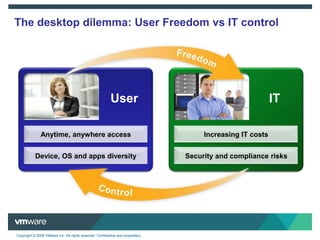
  • #22 There remains an ongoing struggle between users and IT. At its core is freedom (users) vs. control (IT)To be the most productive, users also want anytime, anywhere access to data and corporate systems. They want to work from home, in an airport, or at the local coffee shop, and they want the laptop experience to just like they were using a desktop at work. Users also have a diverse set of needs across operating systems, apps and devices – all of which differ from one user to another. This creates an increasingly complex IT infrastructure that needs to be managed. These needs are often in direct competition with IT. A user’s freedom usually equates to IT headaches. Traditional desktop management binds a user their OS and apps to their hardware – creating a delicate IT stack that can easily be broken when one of the components requires or encounters a change. Multiply that across all of the possible configurations in an organization and you quickly have an unmanageable environment that leads to compliance and security risks, increased help desk calls, and impacts SLAs—and, ultimately drives up IT costs.
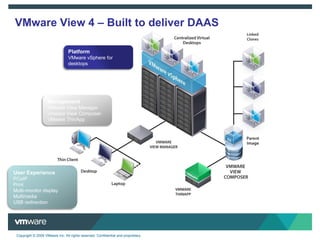
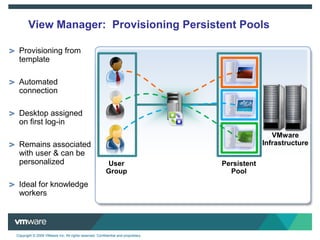
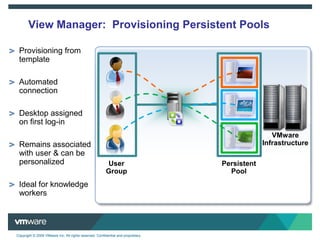
  • #23 The following high level architecture diagram gives you an overview of the VMware View solution and where all of the components fitNOTE: we again highlight the 3 key components of the solution - Platform, Management and User ExperiencePlatformvSphere for Desktops VMware View is tightly integrated with vSphere and therefore leverages and benefits from the robust set of features in that platformvSphere includes many features and optimizations built specifically for delivering VMware ViewvCenter (Not Shown) is used to manage the virtualization platformManagementVMware View Manager View Manager is the core to the VMware View solution providing centralized management of the desktop environment and brokering of connections to desktops in the data centerVMware View ComposerView Composer delivers storage optimizations to reduce storage requirements and simplify desktop managementVMware ThinAppThinApp address the requirement for application virtualization in both virtual and physical desktop environmentsUser ExperienceUsers can access their virtual desktops from a variety of devices including desktops, laptops and thin clientsThese users can be on the LAN or across the WANVMware View has a number technologies addressing user experience which we will talk about in the following slides
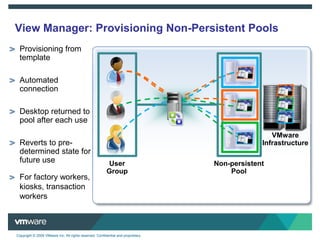
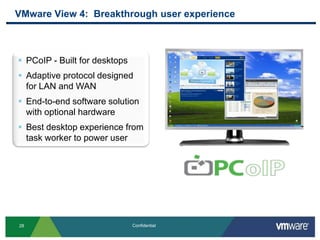
  • #29 Transcript:The other breakthrough that is coming in View 4 is the user experience. And this has been addressed specifically by the introduction of a new display protocol called PCoIP. PCoIP was purpose-built to deliver desktops and is an adaptive protocol. So that means that it's great to deliver desktops to end-users who are on the LAN and also to those who are across the WAN. VMware has implemented this protocol in software. So we can support an endpoint device that supports PCoIP connecting to a virtual desktop in the data center that supports PCoIP. But one of the unique things about the View solution is that we can also leverage hardware PCoIP endpoints to address the requirements of the very high-end end-users. And with hardware and software we can deliver the best end-user experience from the task worker all the way up to the very demanding power user.Author’s Original Notes:VMware has addressed user experience head on in View 4 with the release of the PCoIP display protocol.PCoIP is a new high performance display protocol delivered in View 4 that is purpose built to deliver a superior end user experience from the task worker to the designer on LAN or across the WAN.Built for DesktopsUnlike traditional display protocols (like RDP) that were originally developed for delivering applications on the LAN, PCoIP was built specifically for the challenge of delivering a rich desktop experience to today’s demanding end-users.Designed for the LAN or WANThe PCoIP protocol is designed to deliver the best user experience to end-users accessing their virtual desktop from any locationLAN users will get an excellent user experience that is comparable to a traditional desktopWAN users will get a productive desktop experience depending link quality (bandwidth and latency). PCoIP has adaptive technologies built in to ensure the best user experience regardless of network conditionsEnd to end software implementationThe View 4 PCoIP protocol is a software solution that does not require any special hardware to runThis supports a software client (View Client) connecting through View Manager to a virtual desktop hosted in the datacenterThe View solution can, however, leverage hardware PCoIP acceleration to address requirements for the very high end usersSuperior Desktop Experience From The Task Worker To The Power UserPCoIP is also optimized to deliver a great experience to the full range of end-users regardless of the task being performed. We will talk more about this in an upcoming slideFlexibility to Address the Widest Variety of Use CasesWith the software implementation and the ability to leverage hardware for the very high end, the VMware View solution has the unique ability to address the full range of use cases with a single solution
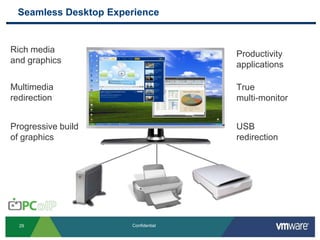
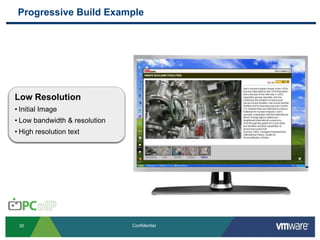
  • #30 Transcript:VMware View 4 with PCoIP delivers a seamless desktop experience. And this means that we can allow our end-users to interact with a virtual desktop much as they would with a traditional desktop. We have support for rich media and graphics. We have support for the full line of productivity applications, your typical Microsoft Office, Word, Excel, Internet Explorer, other types of browsers, as well as home grown applications. We also support multimedia redirection which enables us to deliver the best user experience to end-users regardless of the content that they're accessing. VMware View 4 also supports true multi-monitor support. We'll take a look at that in an upcoming slide in a little bit more detail. We also have progressive build of graphics. The next slide goes into that in more detail as well. And we also support USB redirection. And that means that I can plug in a USB peripheral at my local device and that input is redirected to my desktop in the data center.Author’s Original Notes:With a desktop virtualization solution it is important to provide end-users with an experience that matches that of their traditional desktopThe following are some of the key components to ensure a superior desktop experience:Rich Media & Graphics – support for pictures/graphics and rich media such as video and flash contentMultimedia Redirection – providing the ability to redirect content to be rendered on the client device instead of in the datacenter where the virtual desktop is. With redirection local resources can be leveraged to deliver the best user experienceProgressive Build of Graphics – With the ability to quickly deliver a low resolution image and build up to the full resolution image, PCoIP ensures that end-users can be productive even when they are faced with less than optimal network conditions.Productivity Applications – support for productivity applications such as Microsoft Office (Word, Excel, Power Point), Adobe Acrobat, Web Browsers, data entry, home grown applications and more True Multi-monitor – PCoIP has the ability to support up to 4 monitors and treat them all independently for things like resolution and pivot. This is not stretching the desktop as some protocols doUSB redirection – Input from a USB device that is plugged in to a local client will be directed to the virtual desktop in the data center. This will enable a user to plug in something like a memory stick and access it from their virtual desktop. Other supported devices include but are not limited to, mass storage devices, USB printers, scanners, etc…
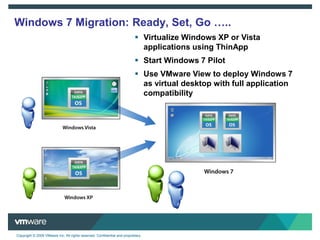
  • #33 VMware View and ThinApp can help ease the migration from your existing OS (XP or Vista) to Windows 7Since applications that have been virtualized using ThinApp are self contained in their own virtual wrapper they have no dependencies on the underlying operating systemThis enables the ability to easily move applications across operating environments without having to worry about incompatibilitiesAlso, desktops that have been virtualized can easily be upgraded to newer versions and quickly deployed to end users. This enables the ability to quickly roll out Windows 7 desktops to end users