



www.botify.com
Decrypt Google's behavior
with Botify Log Analyzer
Botify Webinar
October 18th, 2017
1
1. Web Server Log Files Analysis: The Big Picture
2. What For? Many Use Cases
3. Real-Life Examples
4. Q&As
Webinar Agenda
1 - Web Server Logs Files
Analysis: The Big Picture
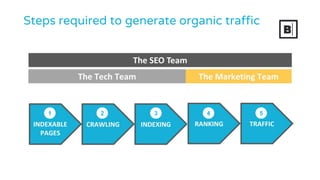
Steps required to generate organic traffic
1 2 3 4 5
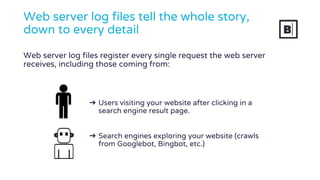
➔ Users visiting your website after clicking in a
search engine result page.
➔ Search engines exploring your website (crawls
from Googlebot, Bingbot, etc.)
Web server log files tell the whole story,
down to every detail
Web server log files register every single request the web server
receives, including those coming from:
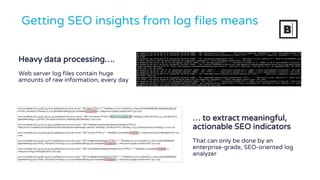
Heavy data processing….
Web server log files contain huge
amounts of raw information, every day
Getting SEO insights from log files means
… to extract meaningful,
actionable SEO indicators
That can only be done by an
enterprise-grade, SEO-oriented log
analyzer
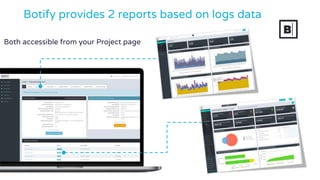
Both accessible from your Project page
Botify provides 2 reports based on logs data
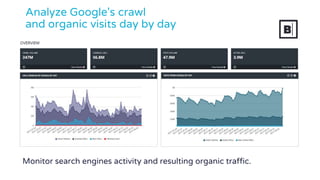
Analyze Google's crawl
and organic visits day by day
Monitor search engines activity and resulting organic traffic.
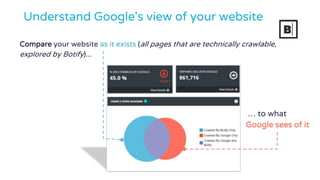
Compare your website as it exists (all pages that are technically crawlable,
explored by Botify)...
Understand Google's view of your website
… to what
Google sees of it
2 - Many Use Cases
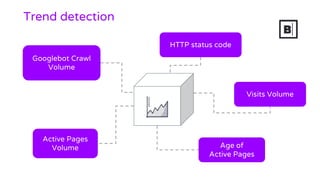
Trend detection
Active Pages
Volume
Visits Volume
HTTP status code
Age of
Active Pages
Googlebot Crawl
Volume
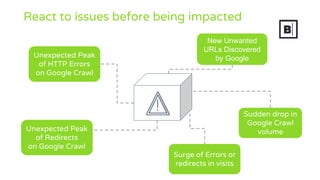
React to issues before being impacted
Unexpected Peak
of HTTP Errors
on Google Crawl
Sudden drop in
Google Crawl
volume
New Unwanted
URLs Discovered
by Google
Unexpected Peak
of Redirects
on Google Crawl
Surge of Errors or
redirects in visits
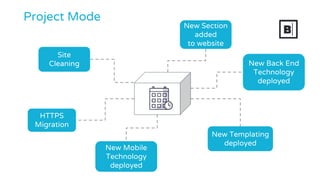
Project Mode
HTTPS
Migration
Site
Cleaning
New Templating
deployed
New Section
added
to website
New Mobile
Technology
deployed
New Back End
Technology
deployed
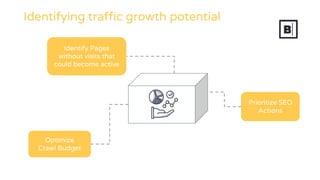
Identifying traffic growth potential
Optimize
Crawl Budget
Prioritize SEO
Actions
Identify Pages
without visits that
could become active
3 - Real-Life Examples
www.botify.com
> Migrations
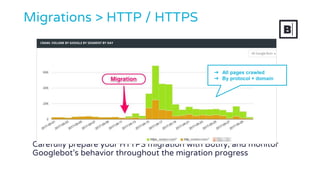
Carefully prepare your HTTPS migration with Botify, and monitor
Googlebot’s behavior throughout the migration progress
Migrations > HTTP / HTTPS
➔ All pages crawled
➔ By protocol + domain
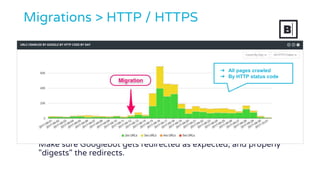
Make sure Googlebot gets redirected as expected, and properly
"digests" the redirects.
Migrations > HTTP / HTTPS
➔ All pages crawled
➔ By HTTP status code
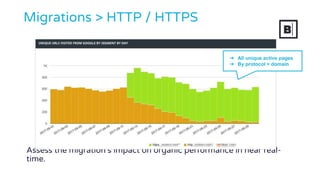
Assess the migration’s impact on organic performance in near real-
time.
Migrations > HTTP / HTTPS
➔ All unique active pages
➔ By protocol + domain
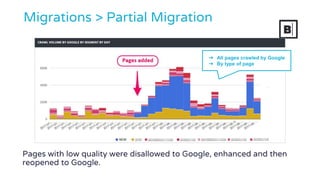
Pages with low quality were disallowed to Google, enhanced and then
reopened to Google.
Migrations > Partial Migration
➔ All pages crawled by Google
➔ By type of page
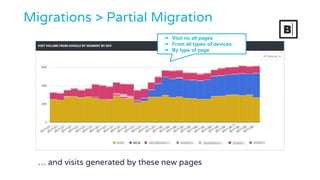
… and visits generated by these new pages
Migrations > Partial Migration
➔ Visit no all pages
➔ From all types of devices
➔ By type of page
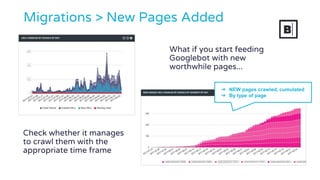
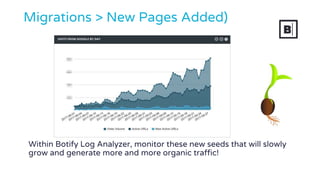
What if you start feeding
Googlebot with new
worthwhile pages...
Migrations > New Pages Added
Check whether it manages
to crawl them with the
appropriate time frame
➔ NEW pages crawled, cumulated
➔ By type of page
Within Botify Log Analyzer, monitor these new seeds that will slowly
grow and generate more and more organic traffic!
Migrations > New Pages Added)
www.botify.com
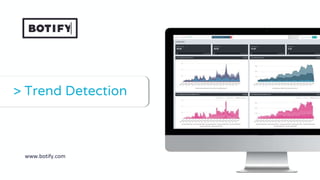
> Trend Detection
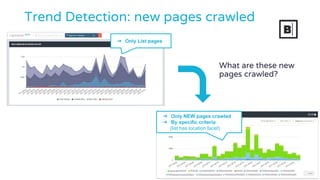
What are these new
pages crawled?
➔ Only List pages
➔ Only NEW pages crawled
➔ By specific criteria
(list has location facet)
Trend Detection: new pages crawled
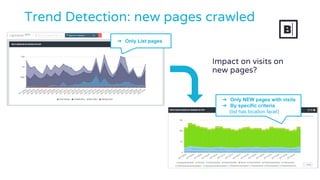
Impact on visits on
new pages?
Trend Detection: new pages crawled
➔ Only NEW pages with visits
➔ By specific criteria
(list has location facet)
➔ Only List pages
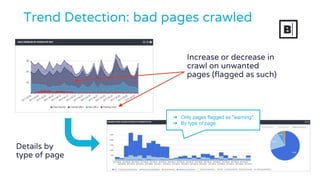
Trend Detection: bad pages crawled
Increase or decrease in
crawl on unwanted
pages (flagged as such)
Details by
type of page
➔ Only pages flagged as "warning"
➔ By type of page
www.botify.com
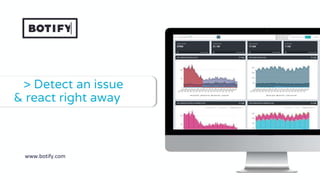
> Detect an issue
& react right away
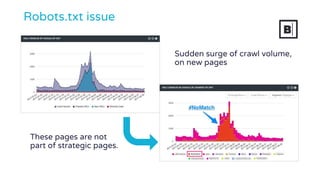
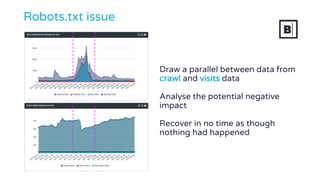
Robots.txt issue
These pages are not
part of strategic pages.
Sudden surge of crawl volume,
on new pages
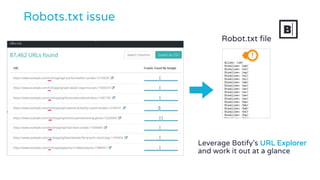
Robots.txt issue
Robot.txt file
Leverage Botify’s URL Explorer
and work it out at a glance
Draw a parallel between data from
crawl and visits data
Analyse the potential negative
impact
Recover in no time as though
nothing had happened
Robots.txt issue
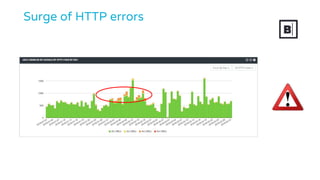
Surge of HTTP errors
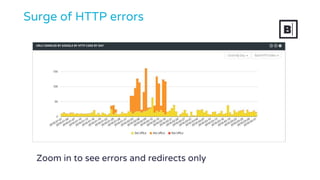
Zoom in to see errors and redirects only
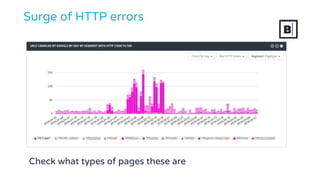
Surge of HTTP errors
Check what types of pages these are
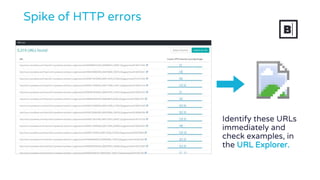
Spike of HTTP errors
Identify these URLs
immediately and
check examples, in
the URL Explorer.
www.botify.com
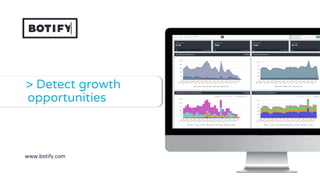
> Detect growth
opportunities
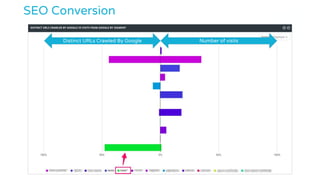
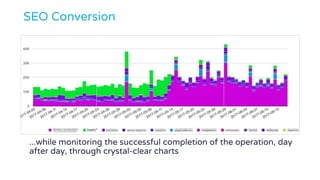
SEO Conversion
Distinct URLs Crawled By Google Number of visits
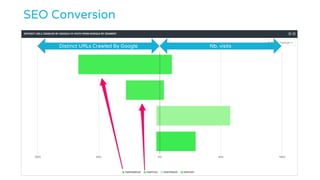
SEO Conversion
Distinct URLs Crawled By Google Nb. visits
SEO Conversion
...while monitoring the successful completion of the operation, day
after day, through crystal-clear charts
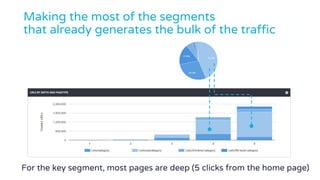
Making the most of the segments
that already generates the bulk of the traffic
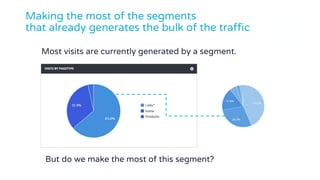
But do we make the most of this segment?
Most visits are currently generated by a segment.
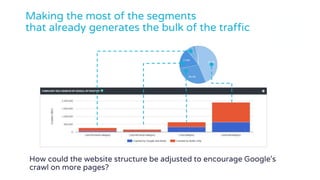
How could the website structure be adjusted to encourage Google's
crawl on more pages?
Making the most of the segments
that already generates the bulk of the traffic
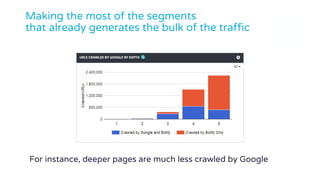
For instance, deeper pages are much less crawled by Google
Making the most of the segments
that already generates the bulk of the traffic
Making the most of the segments
that already generates the bulk of the traffic
For the key segment, most pages are deep (5 clicks from the home page)
4 - Q&As
Thanks for your attention

Decrypt Google’s Behavior with Botify Log Analyzer

  • 1.
    www.botify.com Decrypt Google's behavior withBotify Log Analyzer Botify Webinar October 18th, 2017 1
  • 2.
    1. Web ServerLog Files Analysis: The Big Picture 2. What For? Many Use Cases 3. Real-Life Examples 4. Q&As Webinar Agenda
  • 3.
    1 - WebServer Logs Files Analysis: The Big Picture
  • 4.
    Steps required togenerate organic traffic 1 2 3 4 5
  • 5.
    ➔ Users visitingyour website after clicking in a search engine result page. ➔ Search engines exploring your website (crawls from Googlebot, Bingbot, etc.) Web server log files tell the whole story, down to every detail Web server log files register every single request the web server receives, including those coming from:
  • 6.
    Heavy data processing…. Webserver log files contain huge amounts of raw information, every day Getting SEO insights from log files means … to extract meaningful, actionable SEO indicators That can only be done by an enterprise-grade, SEO-oriented log analyzer
  • 7.
    Both accessible fromyour Project page Botify provides 2 reports based on logs data
  • 8.
    Analyze Google's crawl andorganic visits day by day Monitor search engines activity and resulting organic traffic.
  • 9.
    Compare your websiteas it exists (all pages that are technically crawlable, explored by Botify)... Understand Google's view of your website … to what Google sees of it
  • 10.
    2 - ManyUse Cases
  • 11.
    Trend detection Active Pages Volume VisitsVolume HTTP status code Age of Active Pages Googlebot Crawl Volume
  • 12.
    React to issuesbefore being impacted Unexpected Peak of HTTP Errors on Google Crawl Sudden drop in Google Crawl volume New Unwanted URLs Discovered by Google Unexpected Peak of Redirects on Google Crawl Surge of Errors or redirects in visits
  • 13.
    Project Mode HTTPS Migration Site Cleaning New Templating deployed NewSection added to website New Mobile Technology deployed New Back End Technology deployed
  • 14.
    Identifying traffic growthpotential Optimize Crawl Budget Prioritize SEO Actions Identify Pages without visits that could become active
  • 15.
    3 - Real-LifeExamples
  • 16.
  • 17.
    Carefully prepare yourHTTPS migration with Botify, and monitor Googlebot’s behavior throughout the migration progress Migrations > HTTP / HTTPS ➔ All pages crawled ➔ By protocol + domain
  • 18.
    Make sure Googlebotgets redirected as expected, and properly "digests" the redirects. Migrations > HTTP / HTTPS ➔ All pages crawled ➔ By HTTP status code
  • 19.
    Assess the migration’simpact on organic performance in near real- time. Migrations > HTTP / HTTPS ➔ All unique active pages ➔ By protocol + domain
  • 20.
    Pages with lowquality were disallowed to Google, enhanced and then reopened to Google. Migrations > Partial Migration ➔ All pages crawled by Google ➔ By type of page
  • 21.
    … and visitsgenerated by these new pages Migrations > Partial Migration ➔ Visit no all pages ➔ From all types of devices ➔ By type of page
  • 22.
    What if youstart feeding Googlebot with new worthwhile pages... Migrations > New Pages Added Check whether it manages to crawl them with the appropriate time frame ➔ NEW pages crawled, cumulated ➔ By type of page
  • 23.
    Within Botify LogAnalyzer, monitor these new seeds that will slowly grow and generate more and more organic traffic! Migrations > New Pages Added)
  • 24.
  • 25.
    What are thesenew pages crawled? ➔ Only List pages ➔ Only NEW pages crawled ➔ By specific criteria (list has location facet) Trend Detection: new pages crawled
  • 26.
    Impact on visitson new pages? Trend Detection: new pages crawled ➔ Only NEW pages with visits ➔ By specific criteria (list has location facet) ➔ Only List pages
  • 27.
    Trend Detection: badpages crawled Increase or decrease in crawl on unwanted pages (flagged as such) Details by type of page ➔ Only pages flagged as "warning" ➔ By type of page
  • 28.
    www.botify.com > Detect anissue & react right away
  • 29.
    Robots.txt issue These pagesare not part of strategic pages. Sudden surge of crawl volume, on new pages
  • 30.
    Robots.txt issue Robot.txt file LeverageBotify’s URL Explorer and work it out at a glance
  • 31.
    Draw a parallelbetween data from crawl and visits data Analyse the potential negative impact Recover in no time as though nothing had happened Robots.txt issue
  • 32.
  • 33.
    Zoom in tosee errors and redirects only Surge of HTTP errors
  • 34.
    Surge of HTTPerrors Check what types of pages these are
  • 35.
    Spike of HTTPerrors Identify these URLs immediately and check examples, in the URL Explorer.
  • 36.
  • 37.
    SEO Conversion Distinct URLsCrawled By Google Number of visits
  • 38.
    SEO Conversion Distinct URLsCrawled By Google Nb. visits
  • 39.
    SEO Conversion ...while monitoringthe successful completion of the operation, day after day, through crystal-clear charts
  • 40.
    Making the mostof the segments that already generates the bulk of the traffic But do we make the most of this segment? Most visits are currently generated by a segment.
  • 41.
    How could thewebsite structure be adjusted to encourage Google's crawl on more pages? Making the most of the segments that already generates the bulk of the traffic
  • 42.
    For instance, deeperpages are much less crawled by Google Making the most of the segments that already generates the bulk of the traffic
  • 43.
    Making the mostof the segments that already generates the bulk of the traffic For the key segment, most pages are deep (5 clicks from the home page)
  • 44.
  • 45.
    Thanks for yourattention