Log Analysis and PRO Use Cases
for Search Marketers
Dave Sottimano - Untagged.io - Madrid 2016
Prepare yourself for bullet point
hell.
It’s meant for reading:
bit.ly/untagged2016
Lo siento :(
You know what makes me sad?
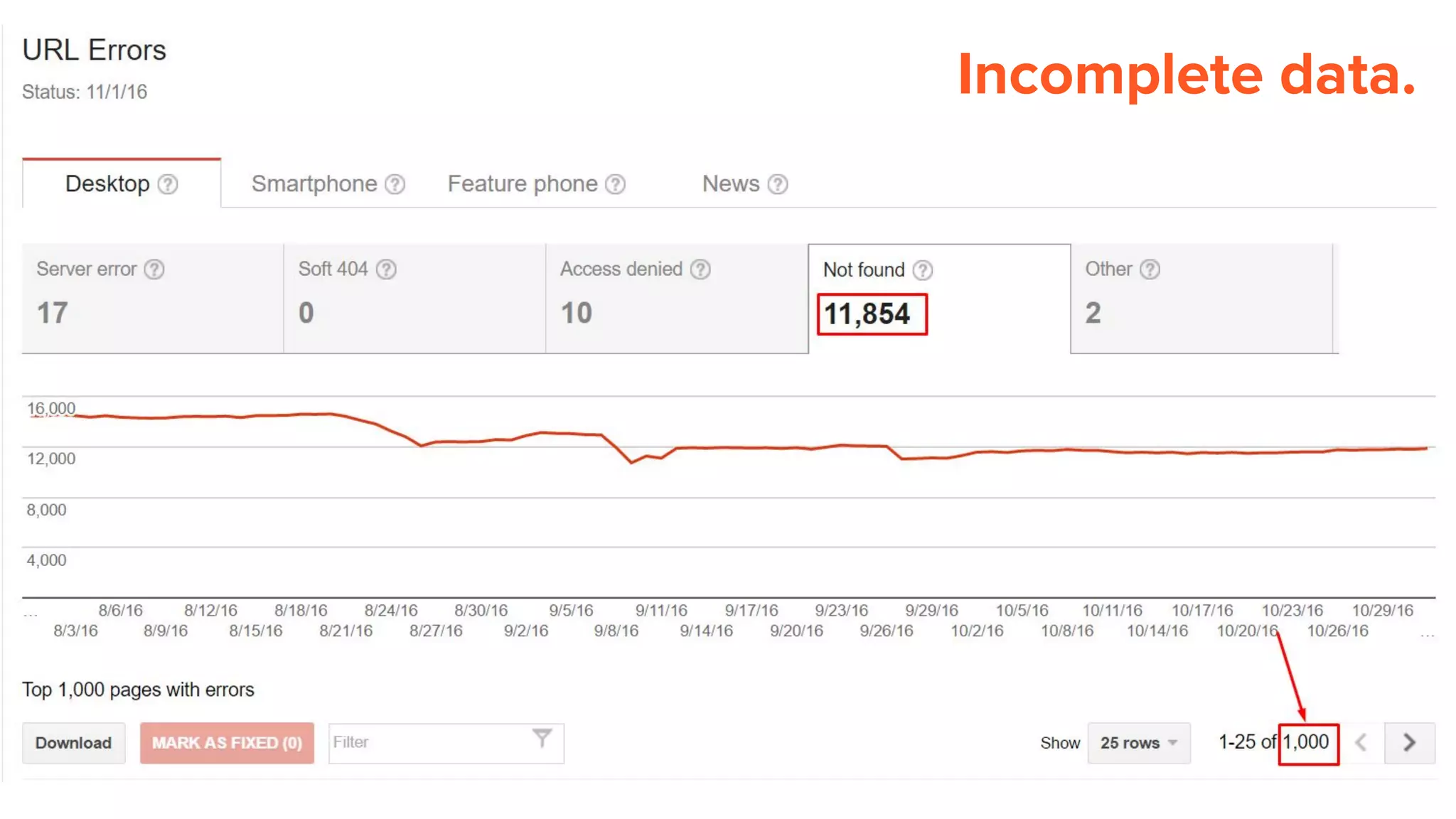
Incomplete data.
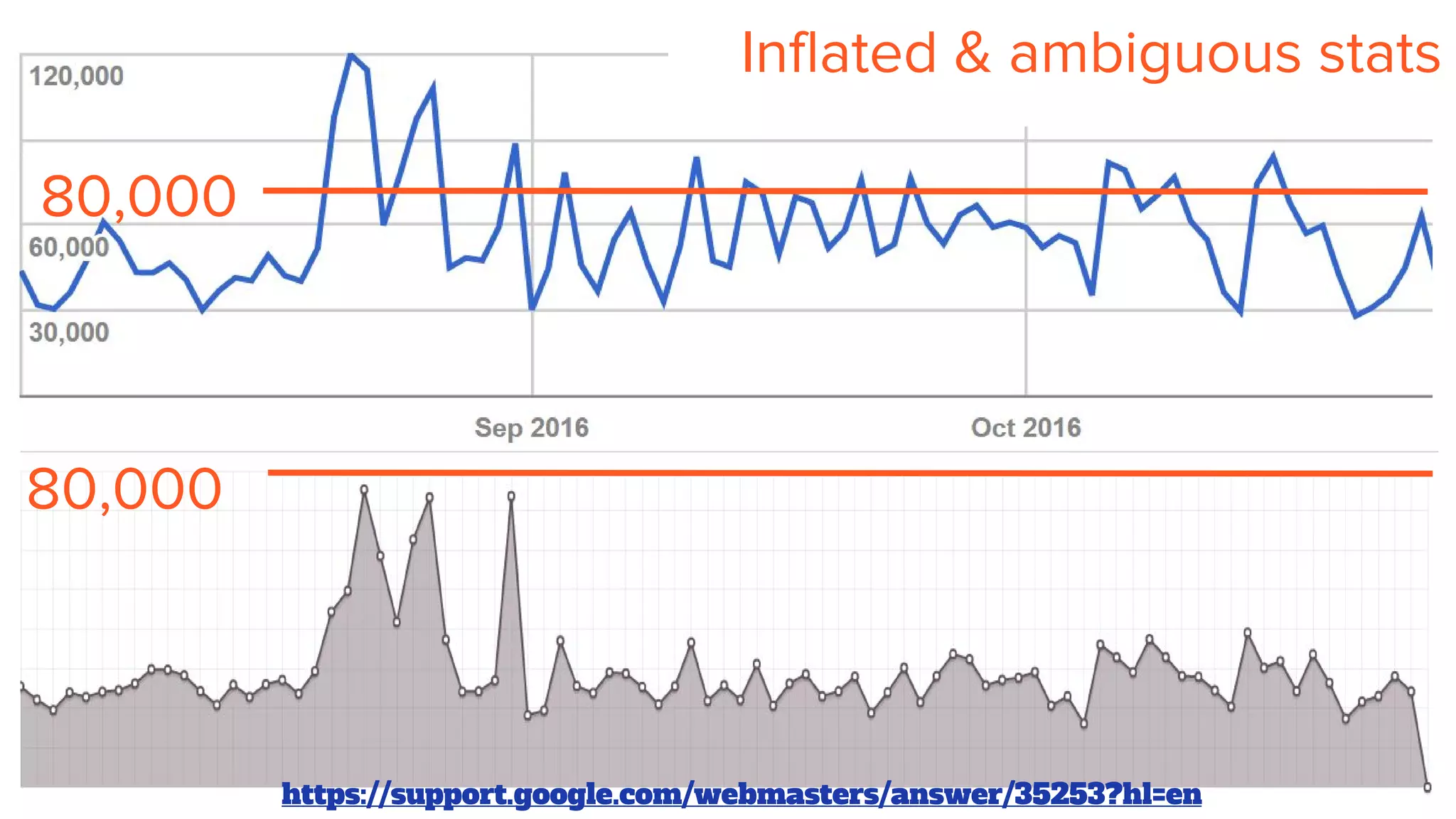
Inflated & ambiguous stats
80,000
80,000
https://support.google.com/webmasters/answer/35253?hl=en
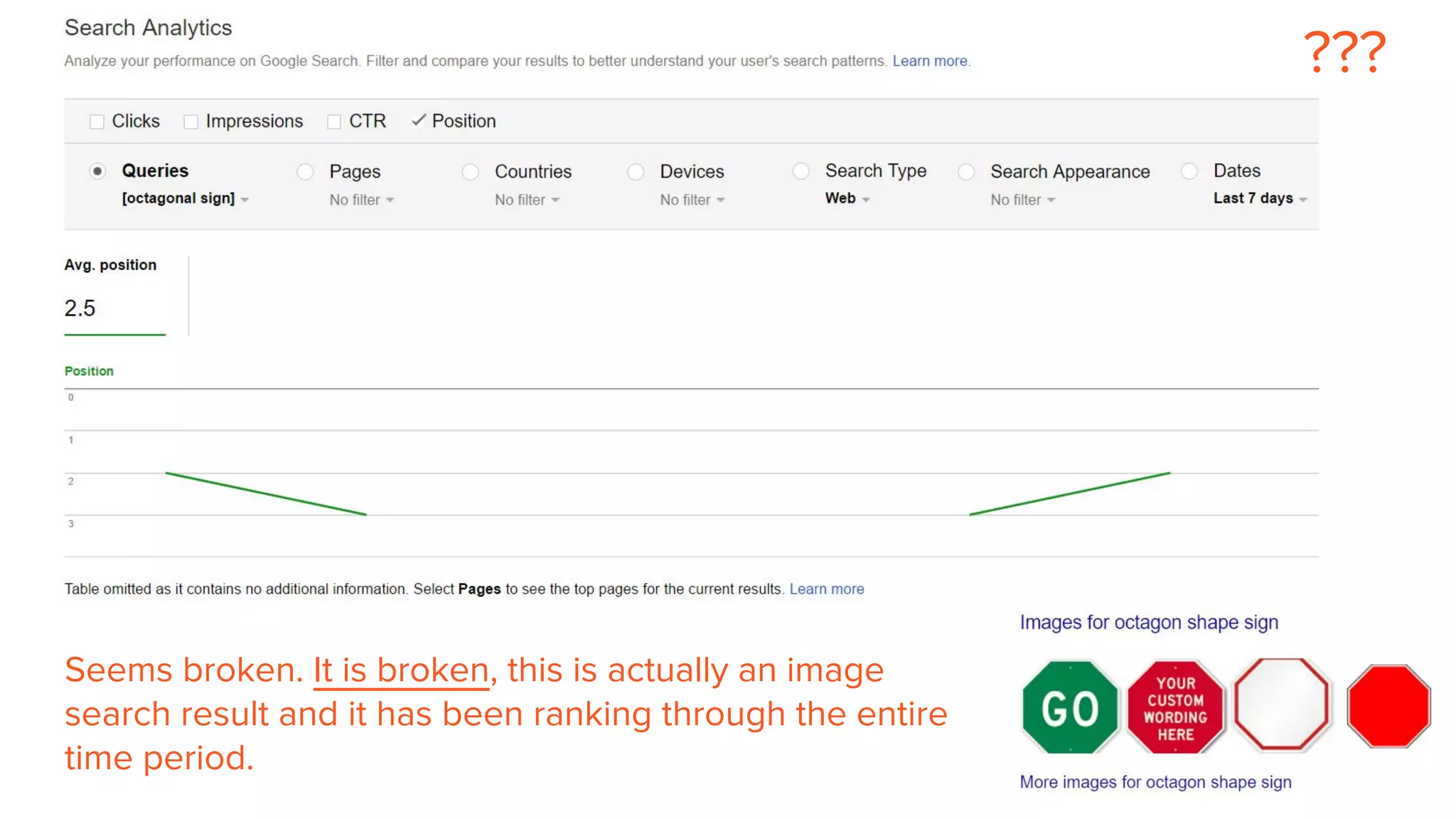
Seems broken. It is broken, this is actually an image
search result and it has been ranking through the entire
time period.
???
But hey, reporting stats for the entire
internet isn’t easy.
So, thank you Google.
..but, we need better data.
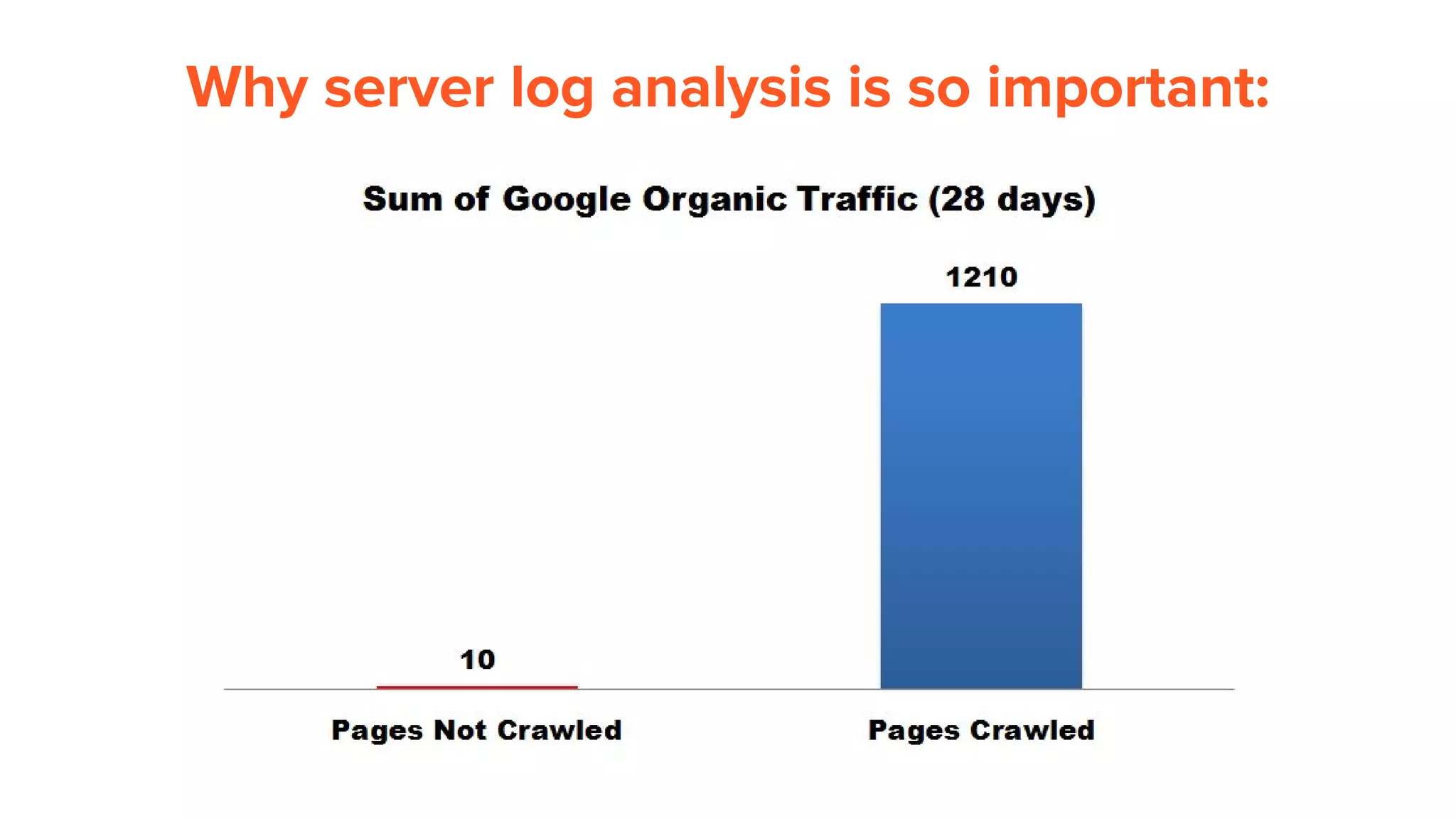
Why server log analysis is so important:
How do we try and increase crawl frequency?
Increase External link count (includes links from social sites)
List valuable pages in sitemaps and ping Google
Increase Internal link count (crawl paths)
Create new pages, and update older pages (avoid stagnation)
Ensure pages are unique, reduce internal duplication
Avoid internally linking to redirects or broken pages
Testing. Lots of testing.
What actions do SEOs take from log analysis?
● Optimize Googlebot crawl
○ restructure link architecture, apply directives, block via robots.txt
● Find server errors or Googlebot induced errors
○ Try to fix any 4xx, 5xx error codes
○ Use browser user agent referer fields to uncover source of errors
● Understand Googlebot crawl rate & behaviour for SEO testing
○ Helpful for testing and insights and constantly questioning best practices
● Block badly behaving bots, prevent bandwidth drain
○ Look for hotlinking bandwidth drain, i.e images from porn sites
● Find unreported links through referer fields
○ Link crawlers don’t find every link, server logs are necessary for comprehensive audits
● Double check Analytics data
○ Helpful for correcting analytics setup or understanding why referers aren’t passed correctly
The hard part:
Getting the right data and
merging.
Step 1: Get the right fields logged
206.248.146.167 - - [25/Aug/2015:06:50:01 +0000] "GET /shoes HTTP/1.0" 200 251
"https://www.google.ca/" “example.com” "Mozilla/5.0 (Windows NT 6.1; WOW64)
AppleWebKit/537.36 (KHTML, like Gecko) Chrome/44.0.2403.157 Safari/537.36"
User agent
IP Address Date/Time
Referer
Method
Response code
Page
Response time
Hostname
Step 2: Ensure the correct originating IP is logged
Load balancers, proxies or CDN’s may overwrite the original IP of the request. Use
X-Forwarded-For header for to ensure you have the original IP
IIS: http://www.loadbalancer.org/blog/iis-and-x-forwarded-for-header
Apache: http://www.loadbalancer.org/blog/apache-and-x-forwarded-for-headers
Nginx: https://easyengine.io/tutorials/nginx/forwarding-visitors-real-ip/
CloudFlare:
https://support.cloudflare.com/hc/en-us/sections/200805497-Restoring-Visitor-IPs
Step 3: Ensure we have all of the logs
● Triple check the hostname! If you’re analyzing example.com, desktop for
instance, ensure you’re not counting the mobile version (m.example.com) or
other subdomains (forum.example.com). Be very careful to get the right data
or you will pull your hair out. Ask system administrators!
● If the server stores cached copies and serves them from another server, get
those logs too and combine them for the target domain analysis.
● Too much data? Ask for selective logging for Googlebot user agent only
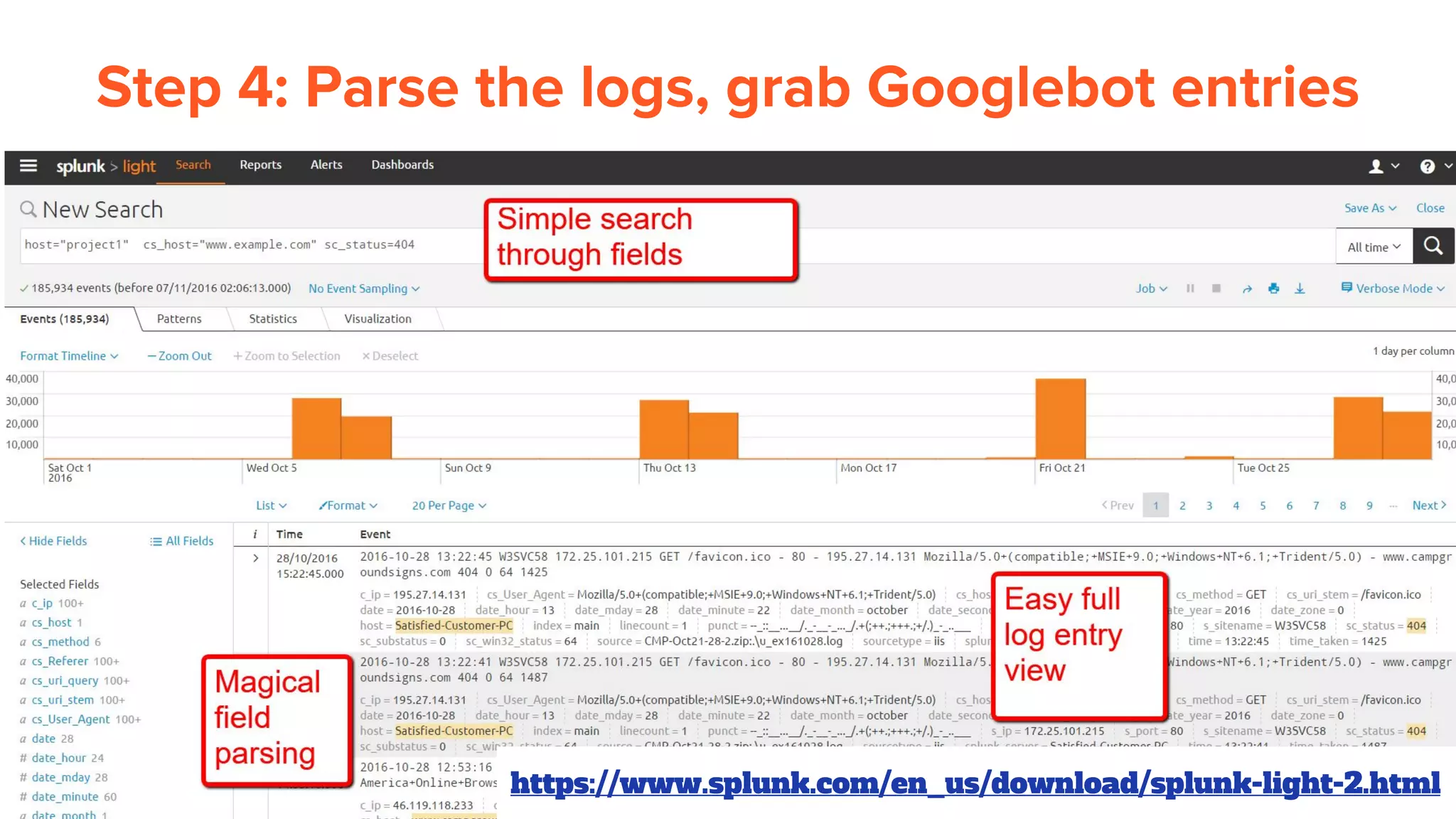
Step 4: Parse the logs, grab Googlebot entries
https://www.splunk.com/en_us/download/splunk-light-2.html
Step 5: Verify Googlebot entries by DNS
1. Segment out logs with user-agent: Mozilla/5.0 (compatible; Googlebot/2.1;
+http://www.google.com/bot.html)
2. Take the original IP in the logs, example: 66.249.65.63
3. Reverse DNS lookup: crawl-66-249-65-63.googlebot.com
4. DNS lookup: 66.249.65.63 (confirmed!)
https://support.google.com/webmasters/answer/80553?hl=en
Software I use: http://www.nirsoft.net/utils/ipnetinfo.html
Note to myself: Look out for Google Mobile user
agents
Mozilla/5.0+(iPhone;+CPU+iPhone+OS+6_0+like+Mac+OS+X)+AppleWebKit/536.26
+(KHTML,+like+Gecko)+Version/6.0+Mobile/10A5376e+Safari/8536.25+(compatible;
+Googlebot/2.1;++http://www.google.com/bot.html)
This is a verified Googlebot from 66.249.65.63, but it’s not listed on the official
crawlers page.
Official Google: Mobile-first Indexing
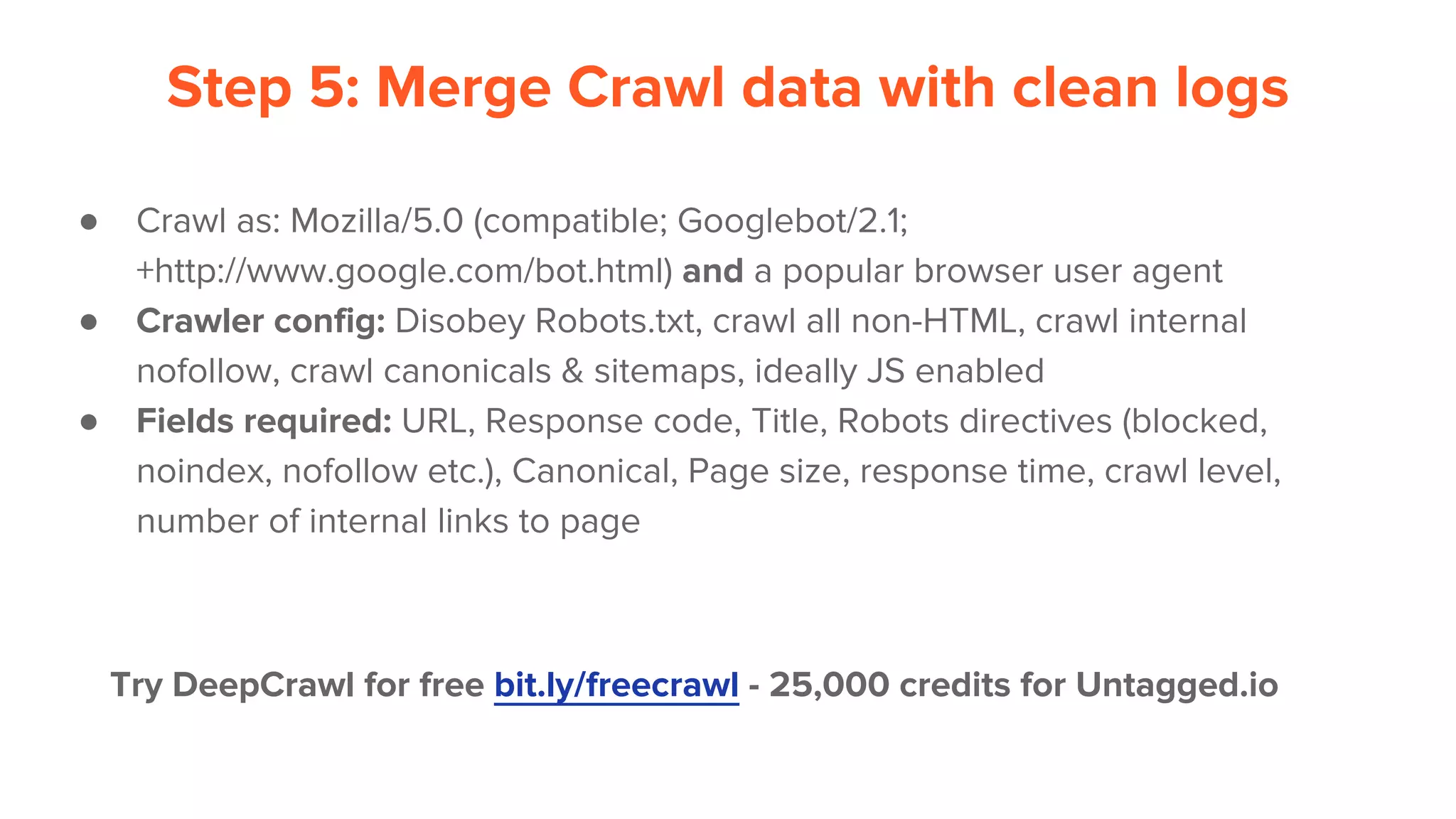
Step 5: Merge Crawl data with clean logs
● Crawl as: Mozilla/5.0 (compatible; Googlebot/2.1;
+http://www.google.com/bot.html) and a popular browser user agent
● Crawler config: Disobey Robots.txt, crawl all non-HTML, crawl internal
nofollow, crawl canonicals & sitemaps, ideally JS enabled
● Fields required: URL, Response code, Title, Robots directives (blocked,
noindex, nofollow etc.), Canonical, Page size, response time, crawl level,
number of internal links to page
Try DeepCrawl for free bit.ly/freecrawl - 25,000 credits for Untagged.io
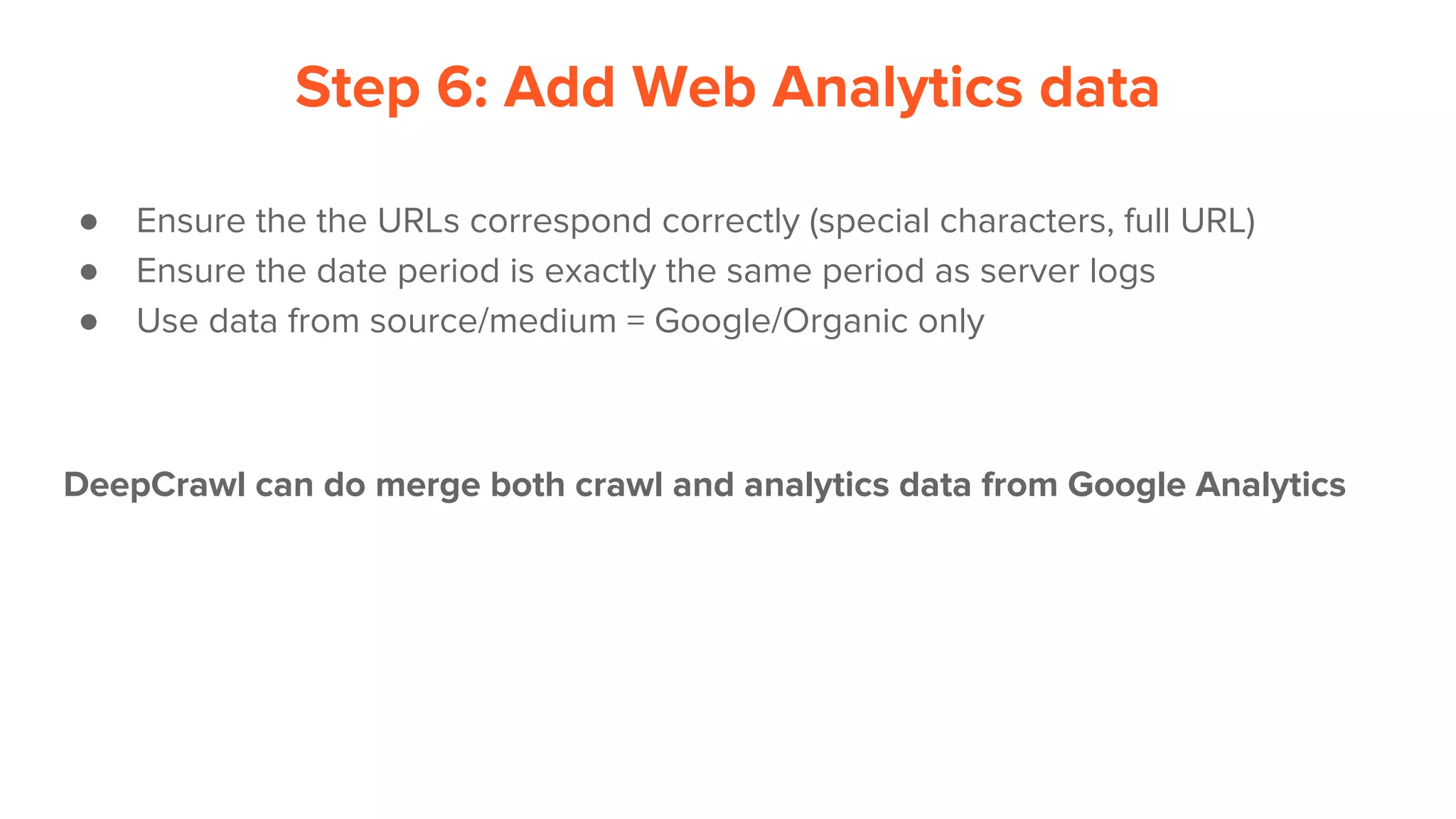
Step 6: Add Web Analytics data
● Ensure the the URLs correspond correctly (special characters, full URL)
● Ensure the date period is exactly the same period as server logs
● Use data from source/medium = Google/Organic only
DeepCrawl can do merge both crawl and analytics data from Google Analytics
So far...
● Have all logs from the right host with the right
fields
● Have the original IP addresses
● Confirmed real Googlebot visits
● Merged crawl data and analytics data perfectly
Just when you think all the data is correct,
something will go wrong, guaranteed ;)
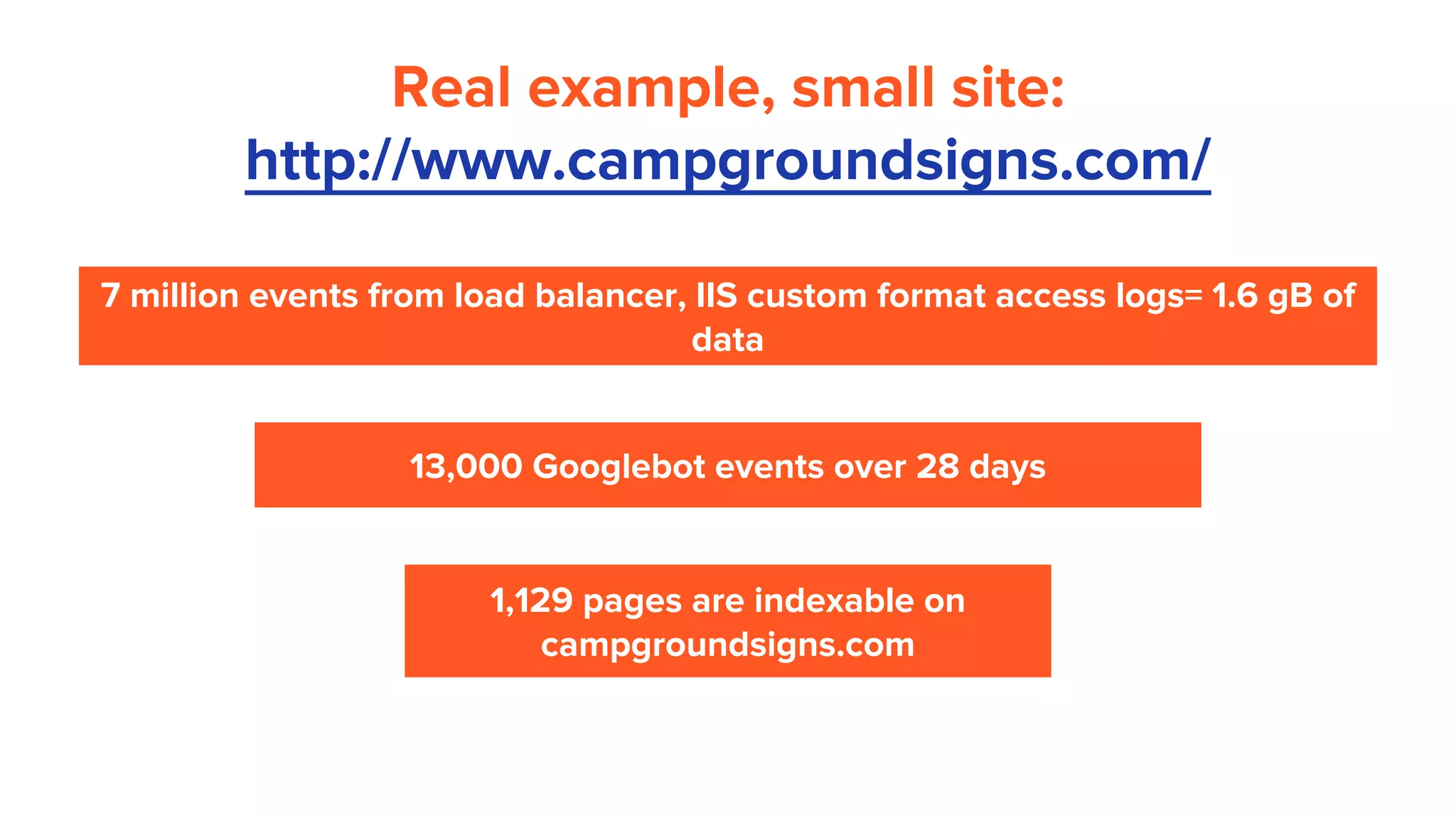
Real example, small site:
http://www.campgroundsigns.com/
7 million events from load balancer, IIS custom format access logs= 1.6 gB of
data
13,000 Googlebot events over 28 days
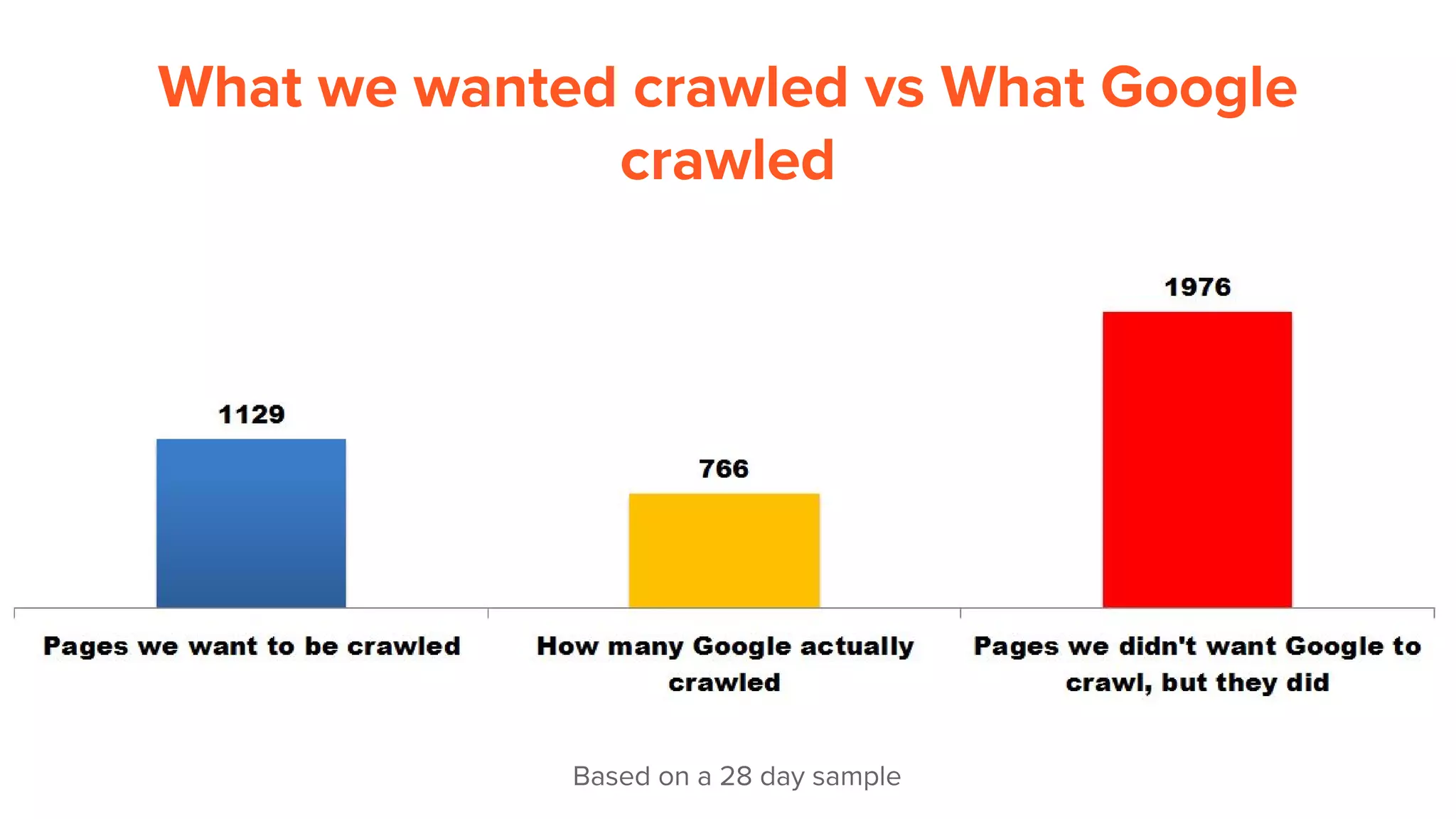
1,129 pages are indexable on
campgroundsigns.com
Caveat!
The following are observations based on 1 small website. The
observations for this site are only for this site and are not
representative.
Each website and it’s Googlebot crawl activity are different.
Special thanks to campgroundsigns.com for volunteering for
the analysis
What is Google crawling?
What we wanted crawled vs What Google
crawled
Based on a 28 day sample
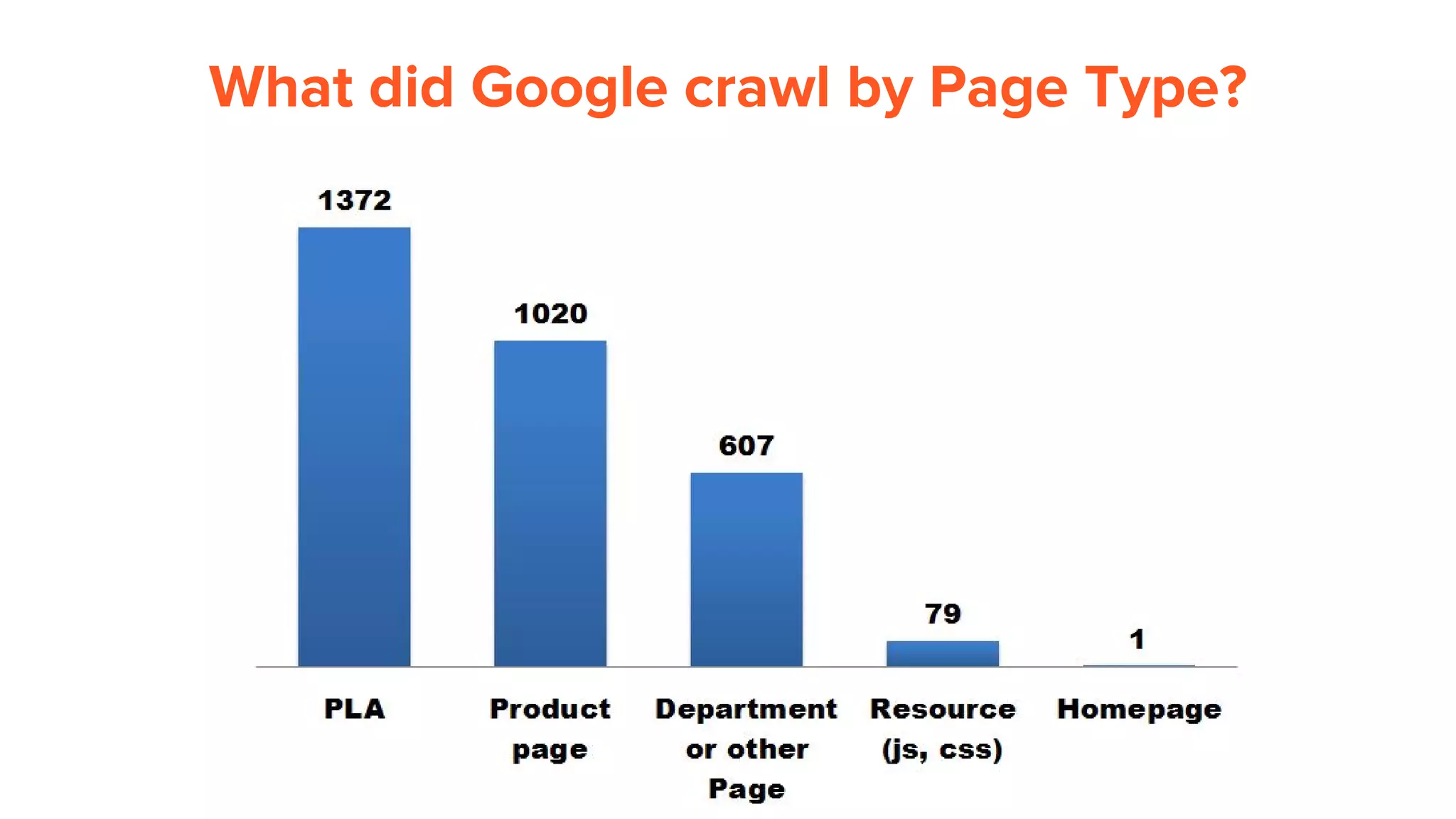
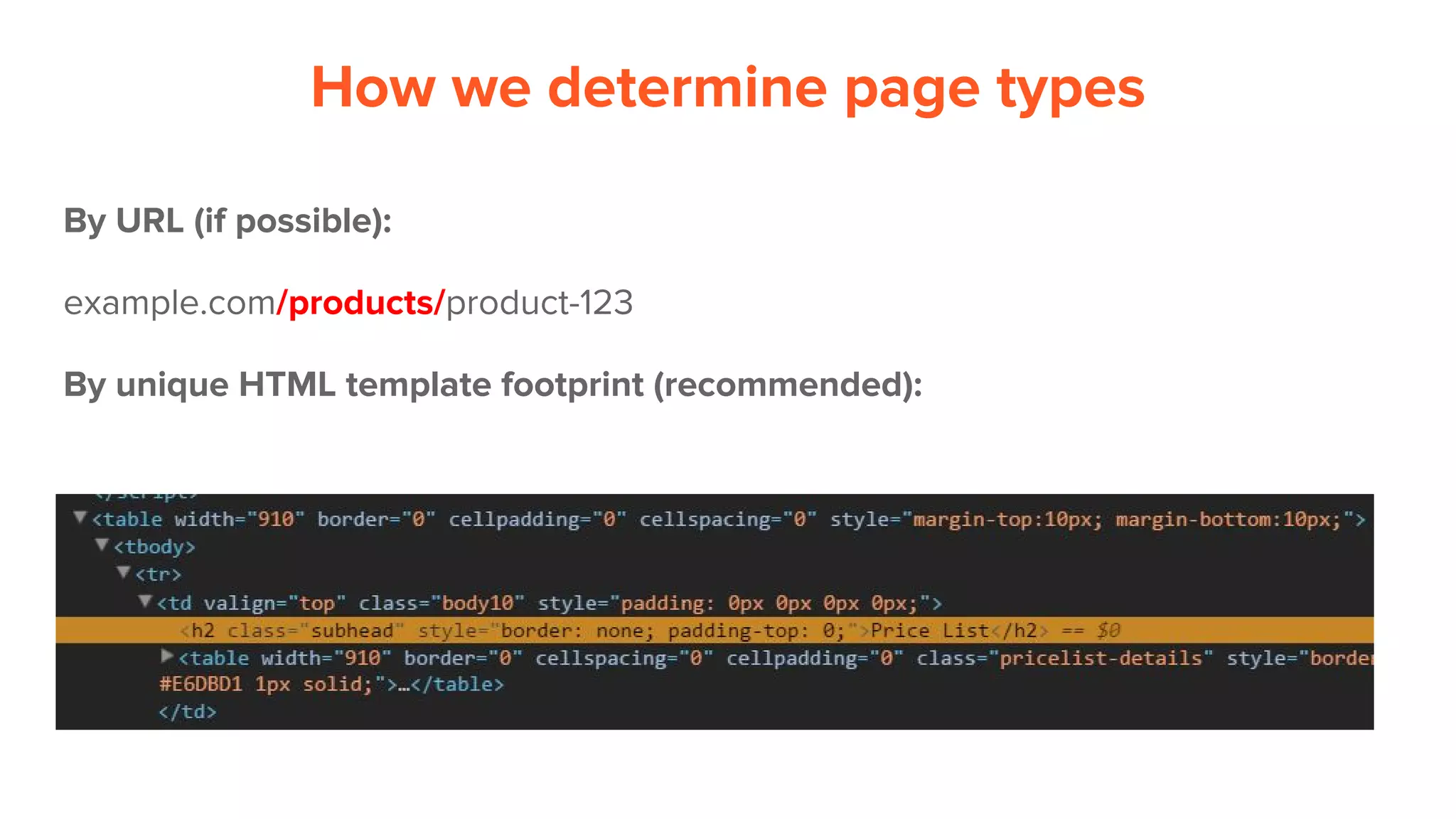
What did Google crawl by Page Type?
How we determine page types
By URL (if possible):
example.com/products/product-123
By unique HTML template footprint (recommended):
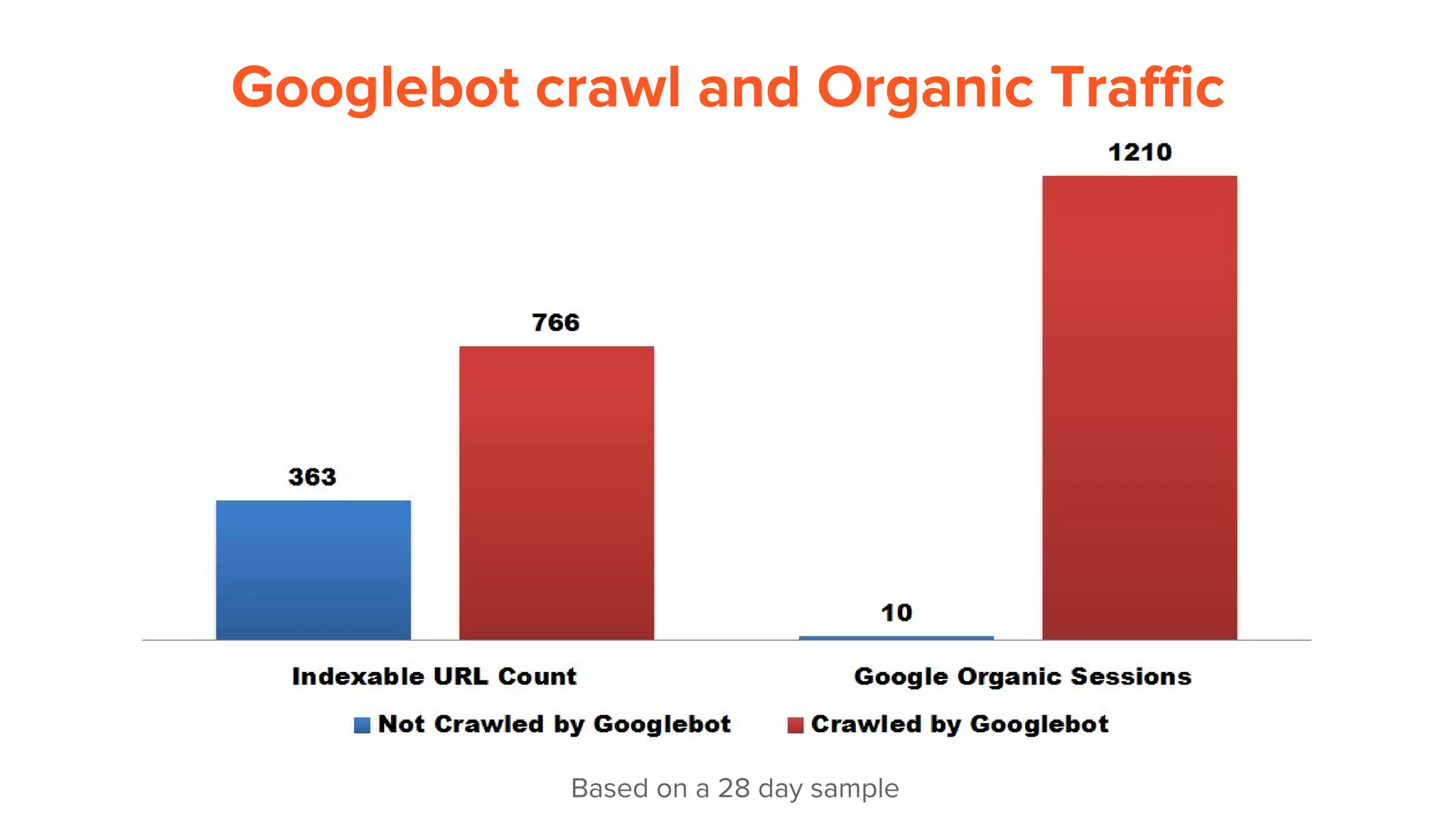
How does crawl
affect traffic?
Googlebot crawl and Organic Traffic
Based on a 28 day sample
Is Googlebot using
it’s crawl wisely?
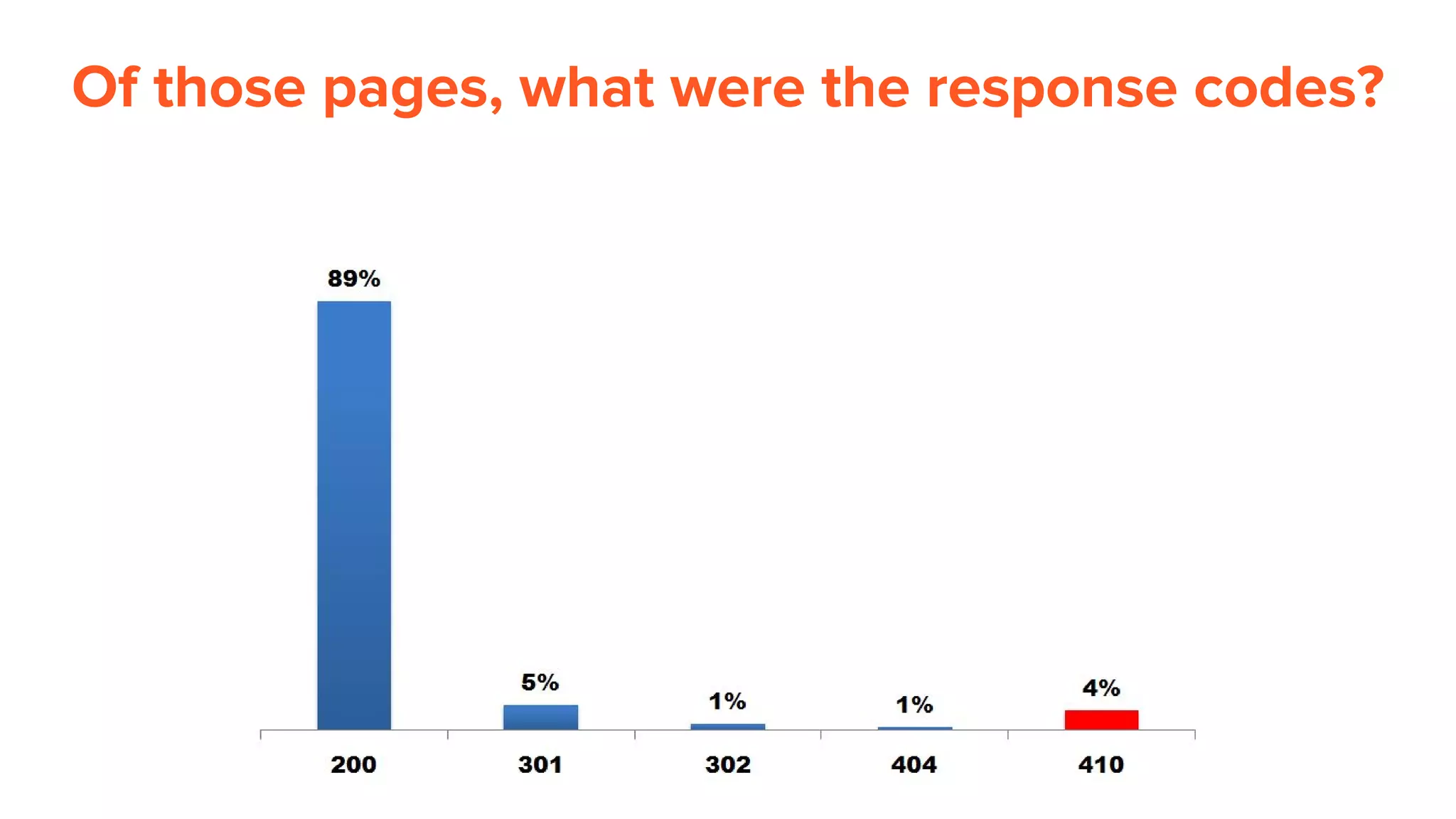
Of those pages, what were the response codes?
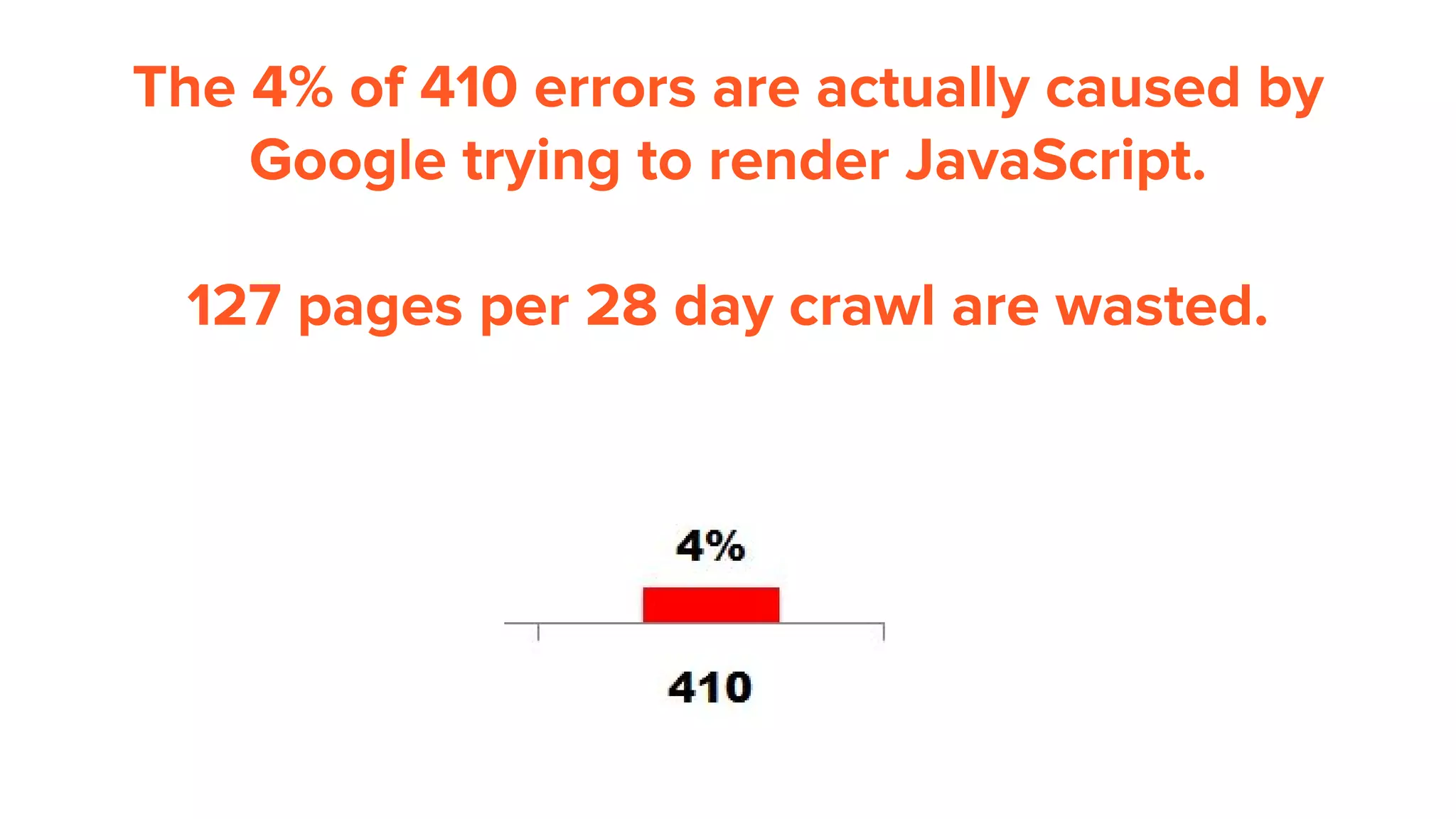
The 4% of 410 errors are actually caused by
Google trying to render JavaScript.
127 pages per 28 day crawl are wasted.
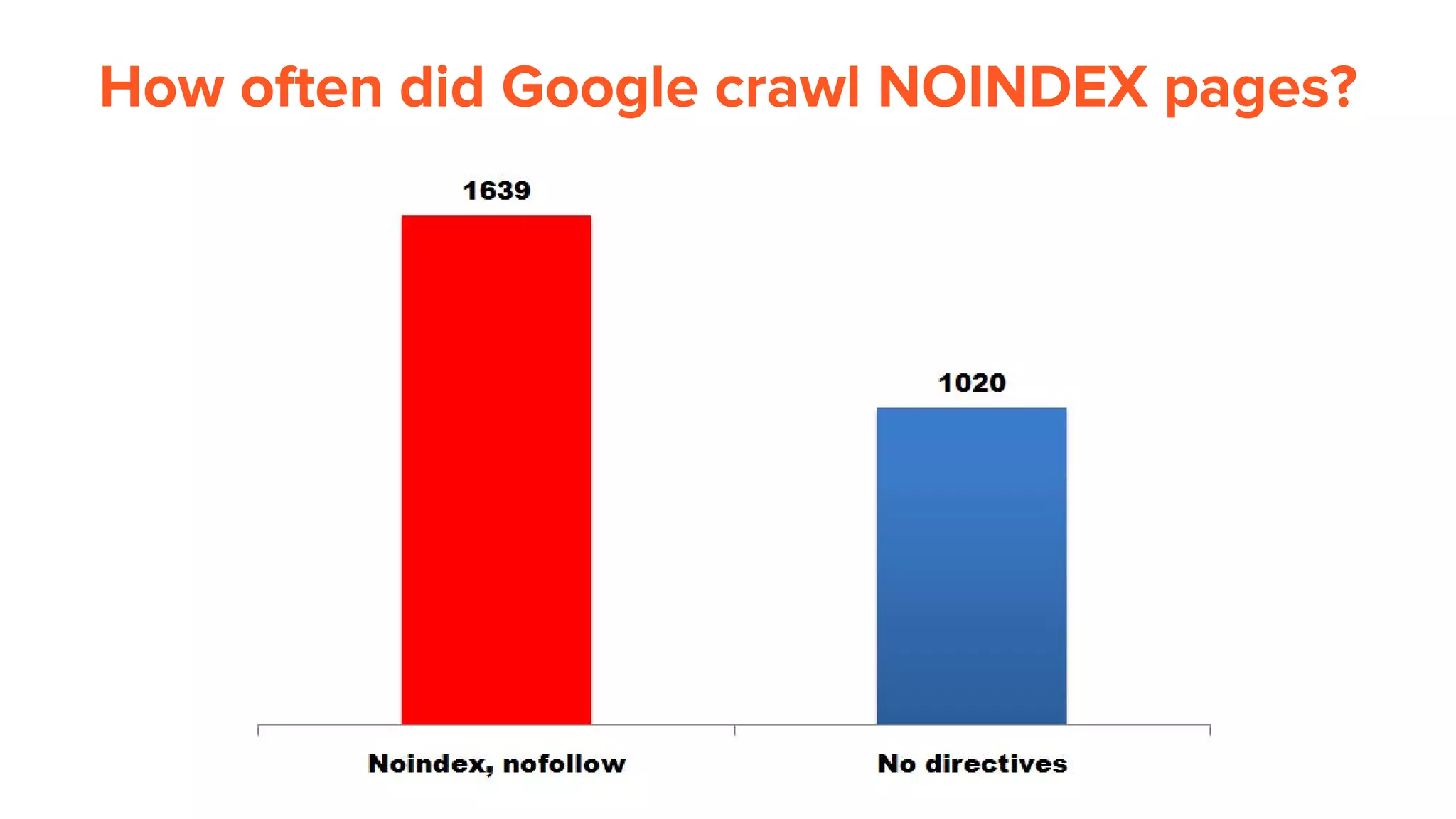
How often did Google crawl NOINDEX pages?
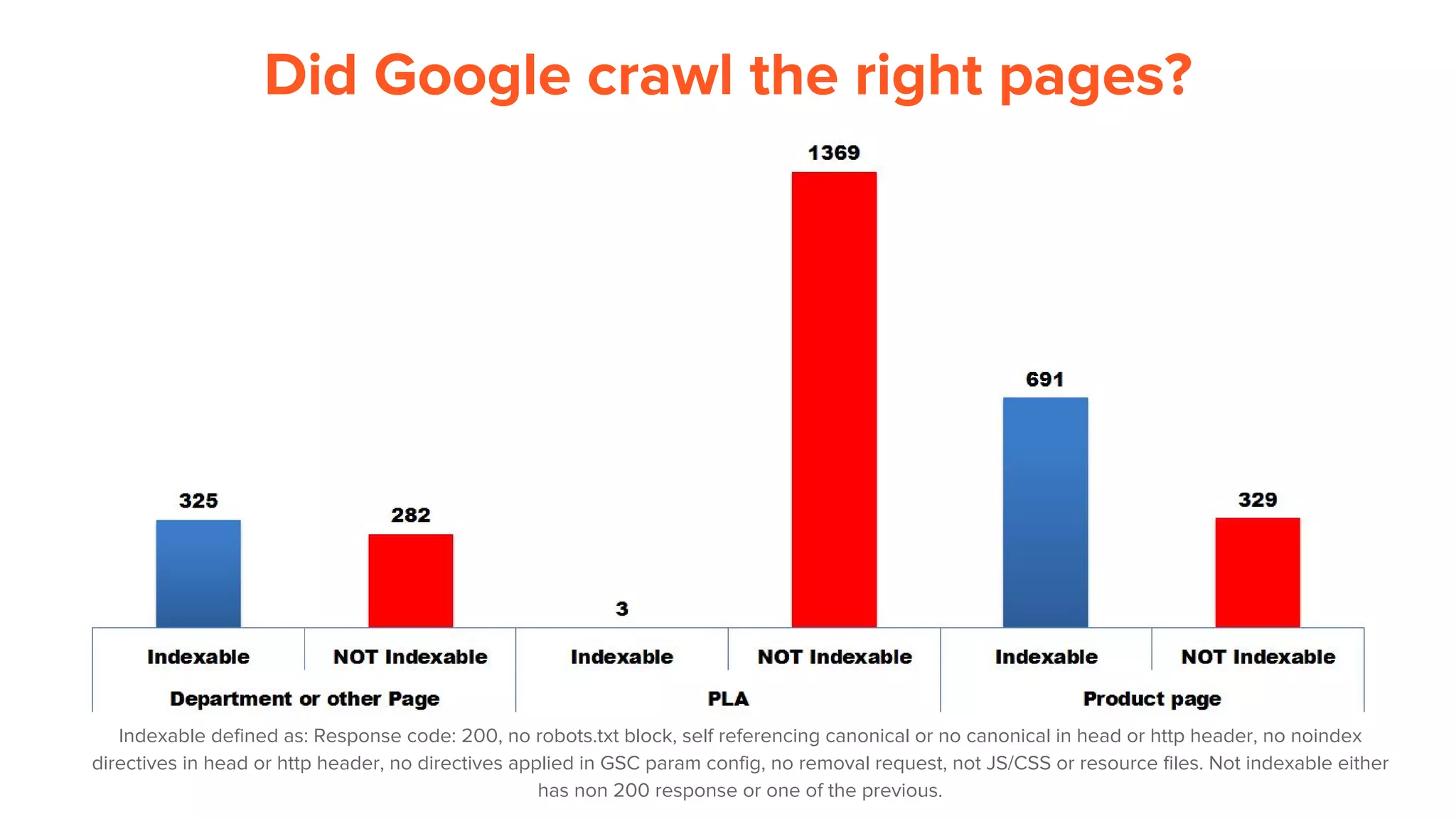
Did Google crawl the right pages?
Indexable defined as: Response code: 200, no robots.txt block, self referencing canonical or no canonical in head or http header, no noindex
directives in head or http header, no directives applied in GSC param config, no removal request, not JS/CSS or resource files. Not indexable either
has non 200 response or one of the previous.
Generally, we see reduced crawl activity to
pages with NOINDEX.
There’s something wrong.
PLA = Product listing Ad.
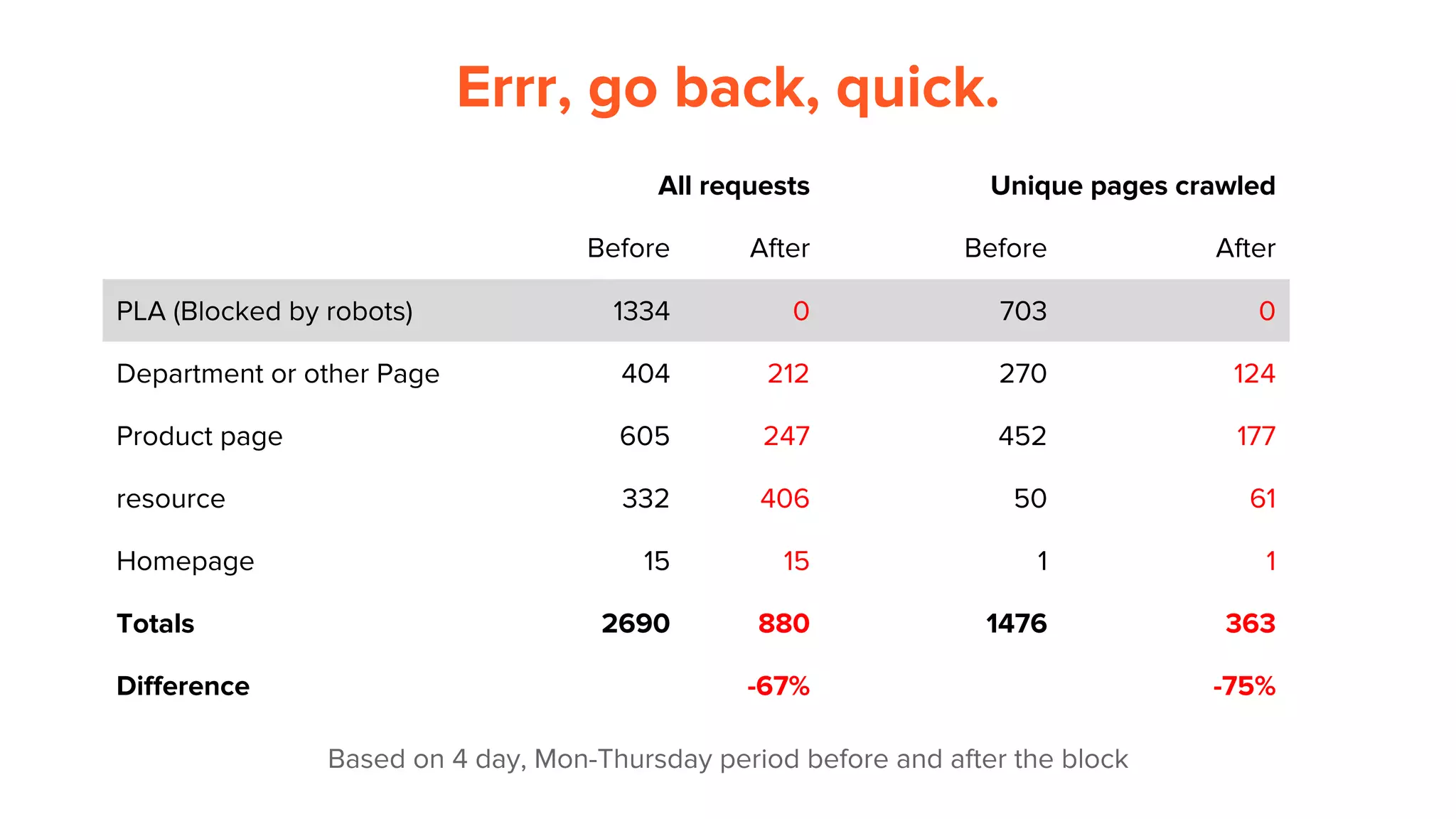
We tried to block the PLA
pages to divert attention
to important pages:
Based on 4 day, Mon-Thursday period before and after the block
Errr, go back, quick.
All requests Unique pages crawled
Before After Before After
PLA (Blocked by robots) 1334 0 703 0
Department or other Page 404 212 270 124
Product page 605 247 452 177
resource 332 406 50 61
Homepage 15 15 1 1
Totals 2690 880 1476 363
Difference -67% -75%
Turns out, Google uses their regular Googlebot
crawler to crawl them, not Adbot.
It was a mistake blocking these. We’ll try
canonicals next.
https://support.google.com/merchants/answer/160156?hl=en
Insights:
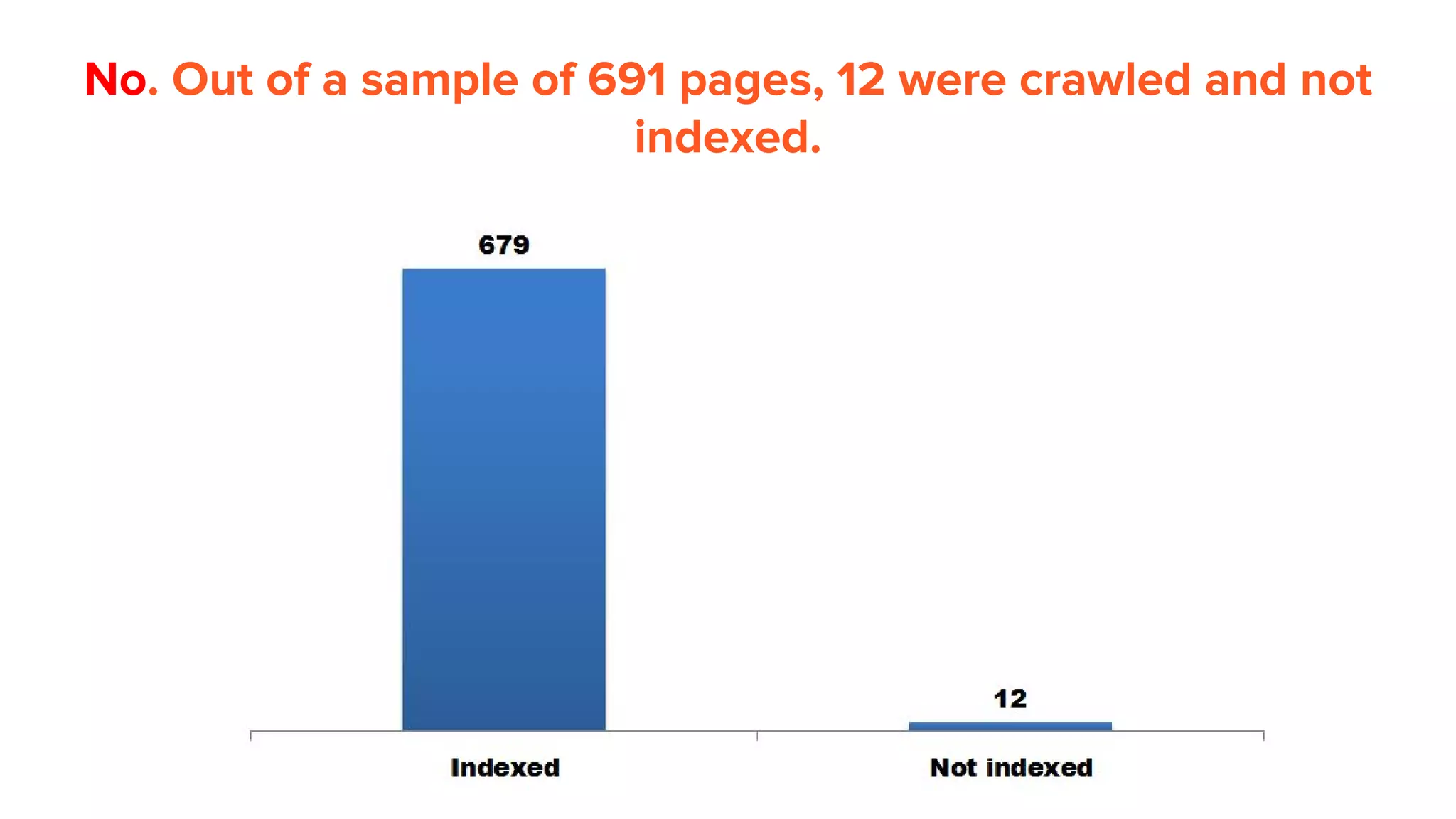
If Googlebot crawls a
page, is it always indexed?
No. Out of a sample of 691 pages, 12 were crawled and not
indexed.
Insights:
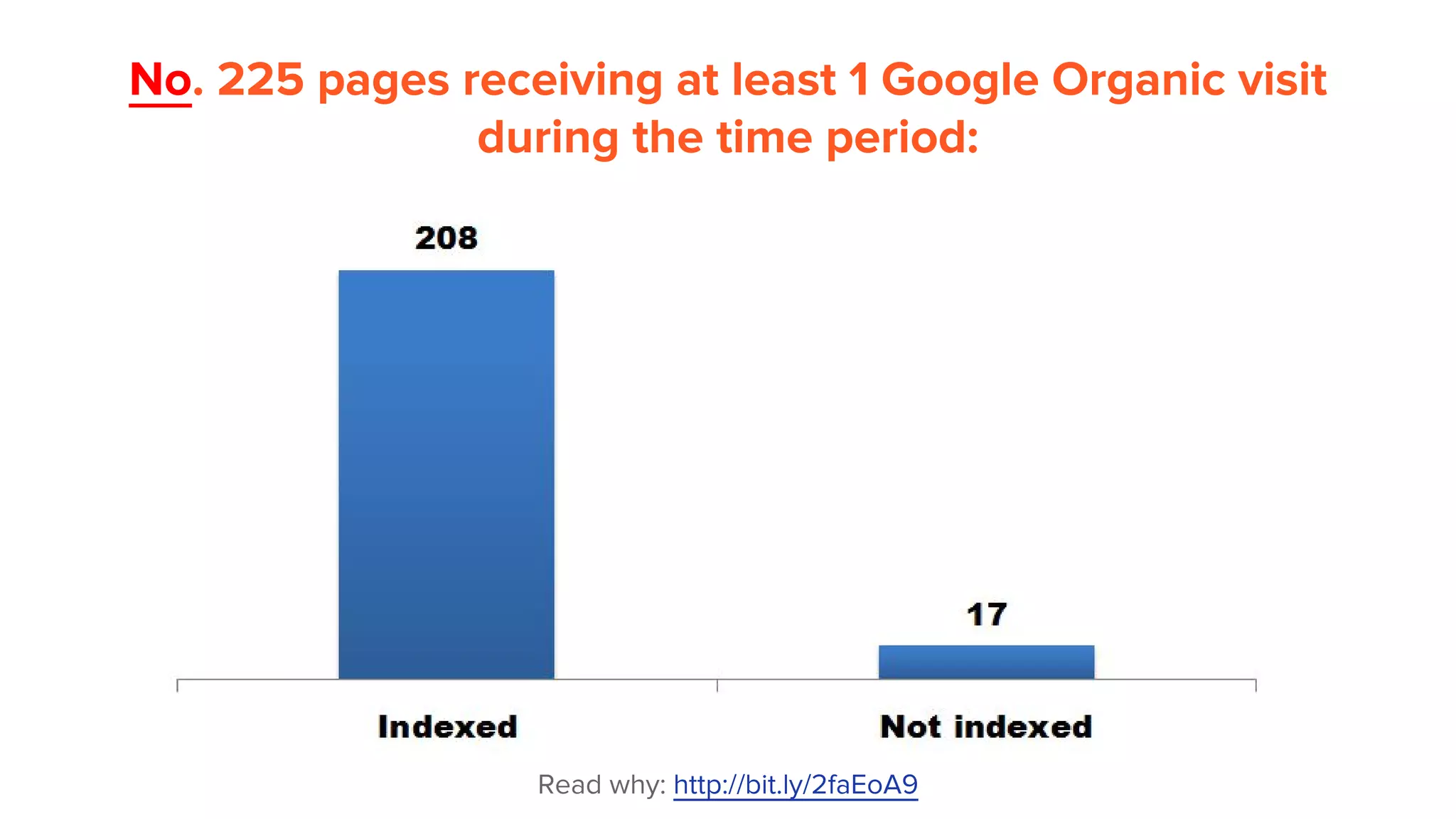
If a page gets Google
organic traffic, is it always
indexed?
No. 225 pages receiving at least 1 Google Organic visit
during the time period:
Read why: http://bit.ly/2faEoA9
How did I check
indexation?
Sorry, this section is not
available for non
attendees!
Frequent question for SEOs:
How long will it take for Google
to update index after a
migration?
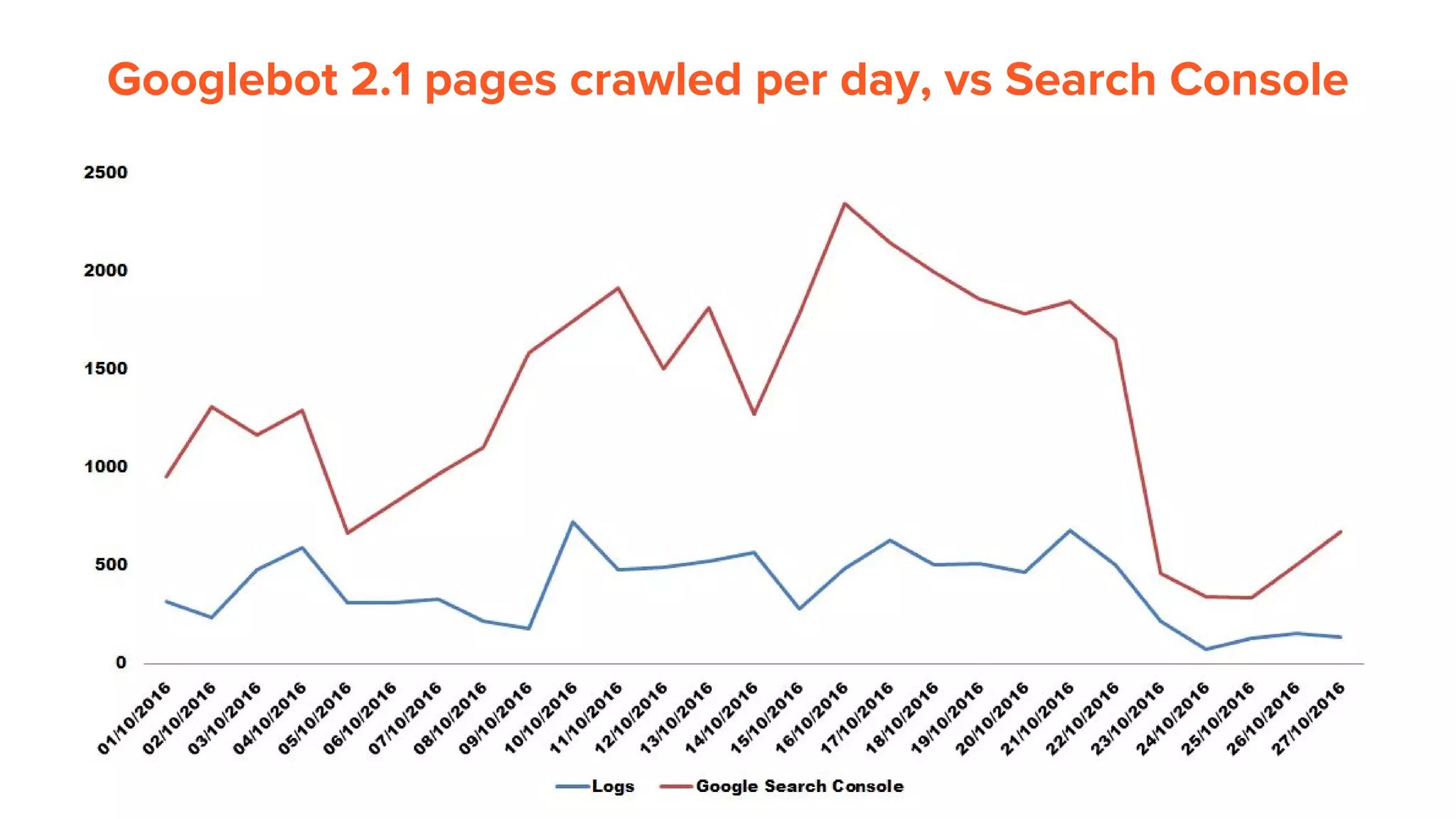
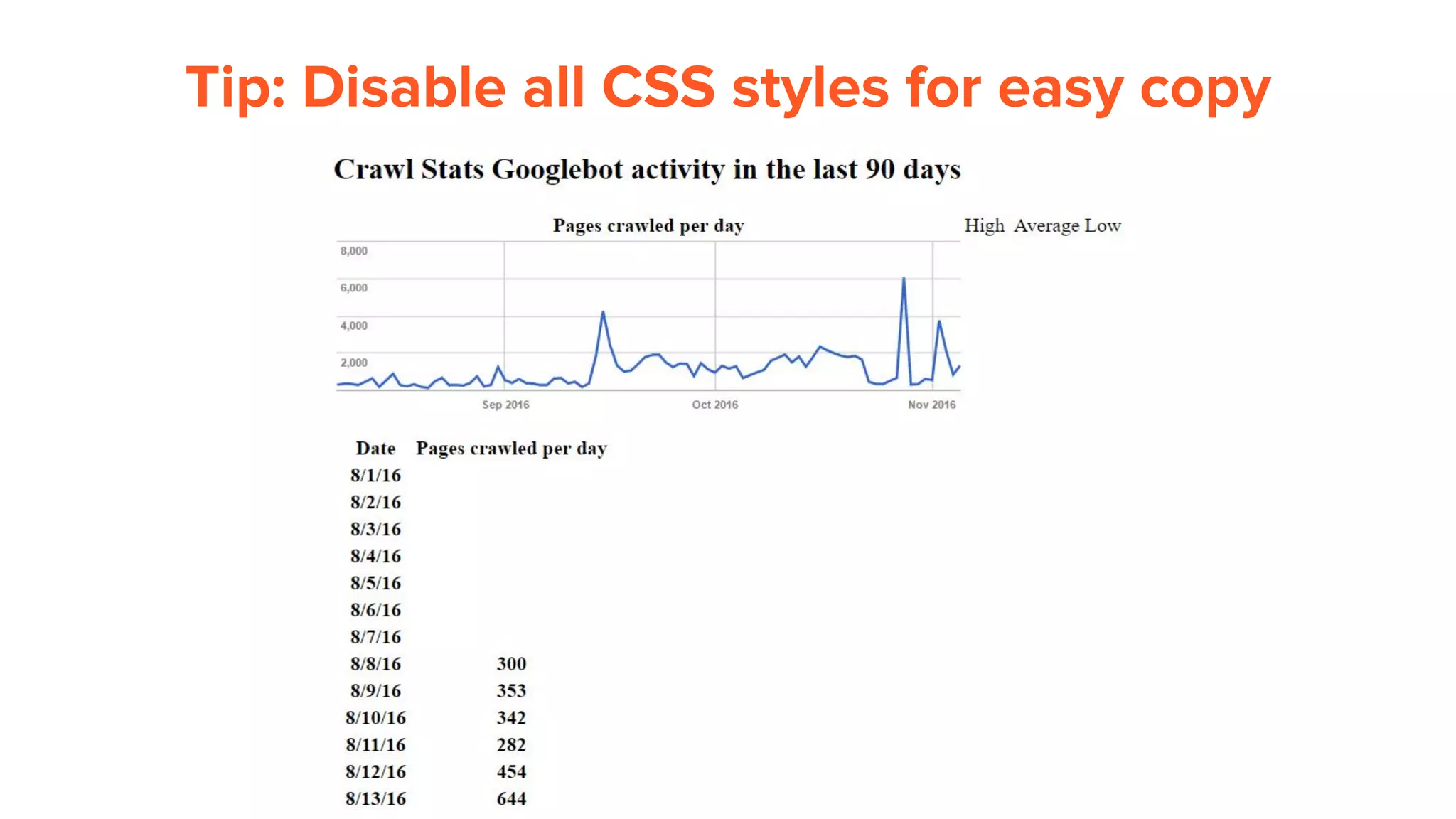
Googlebot 2.1 pages crawled per day, vs Search Console
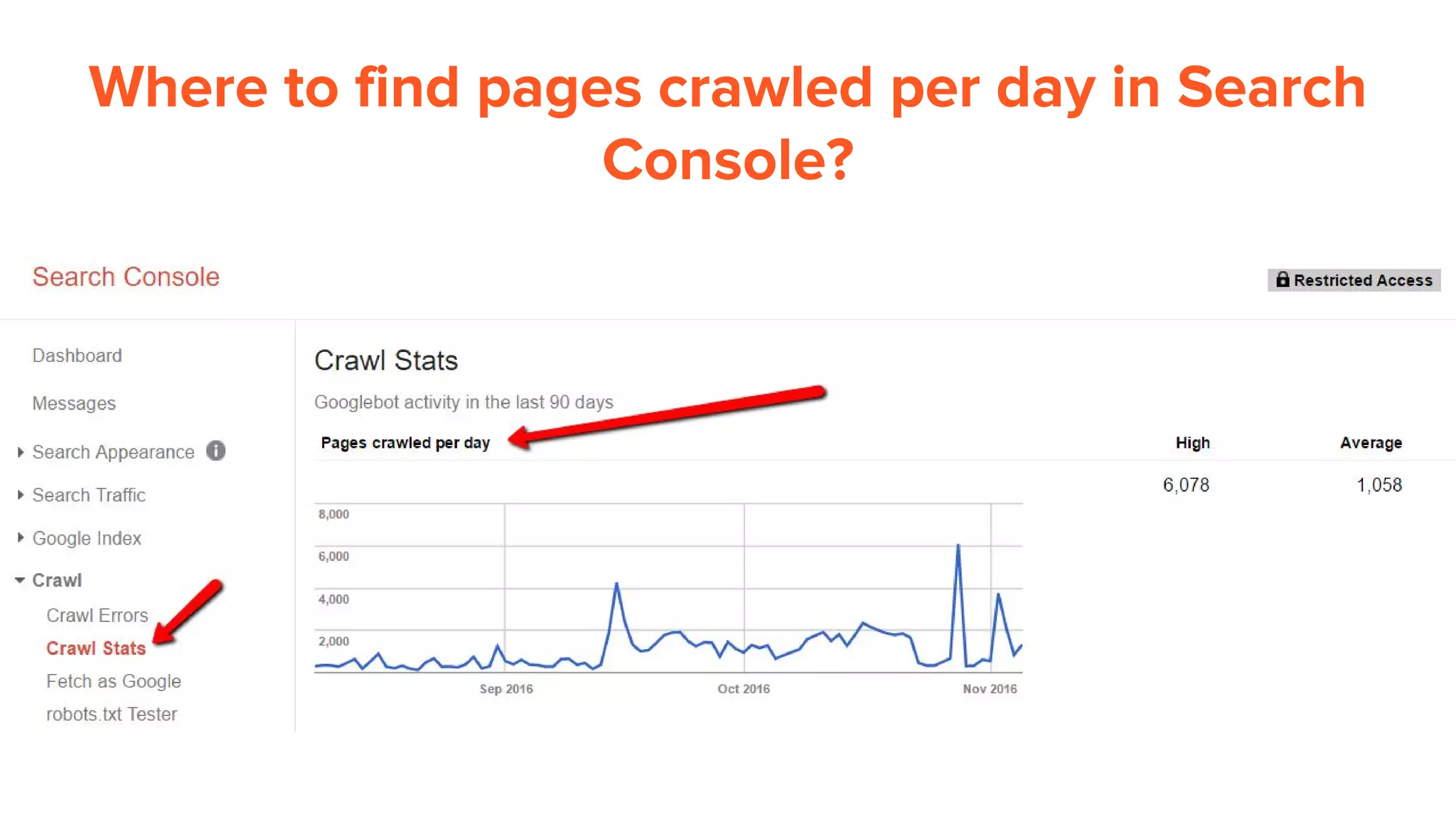
Where to find pages crawled per day in Search
Console?
Tip: Disable all CSS styles for easy copy
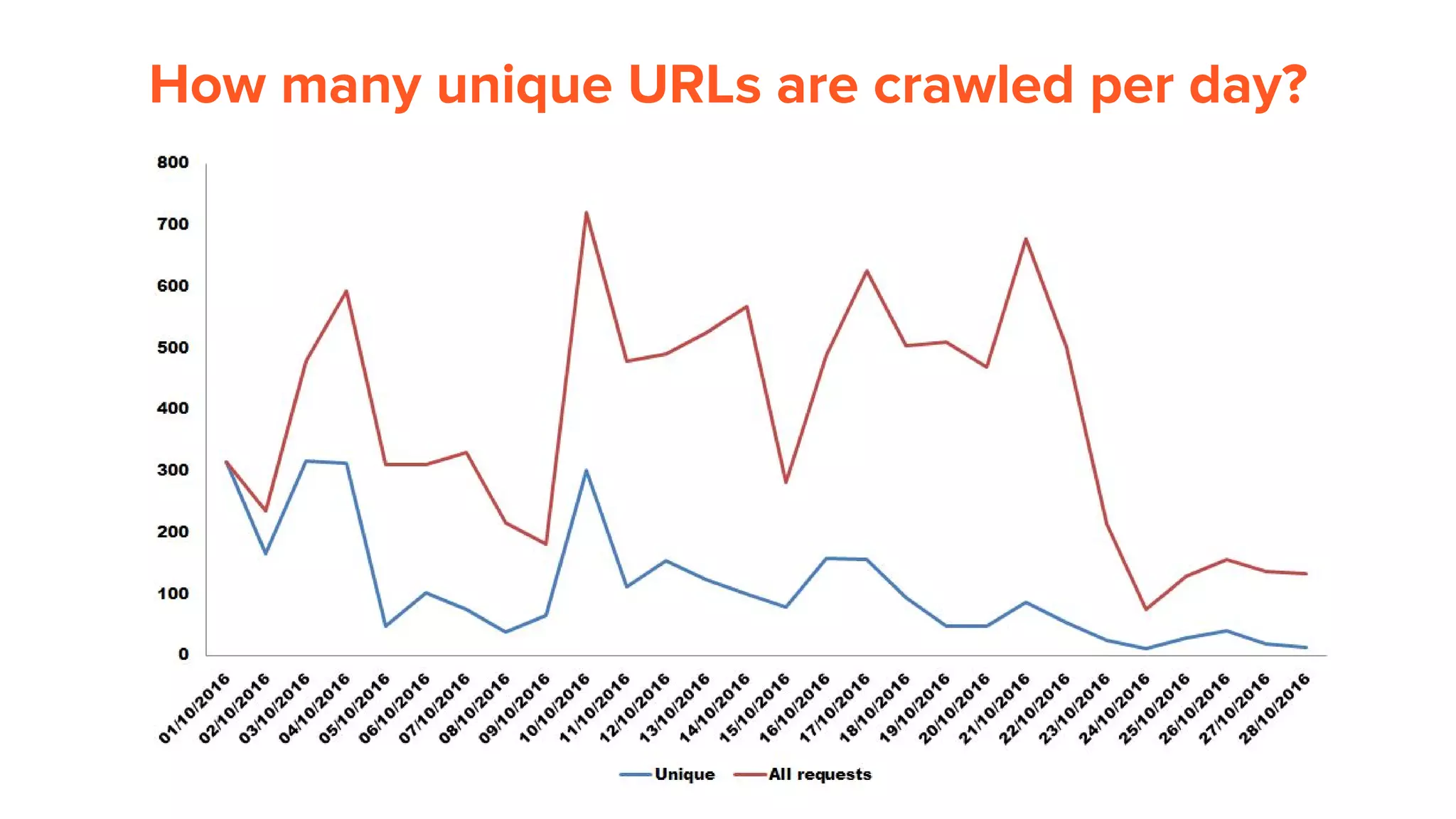
How many unique URLs are crawled per day?
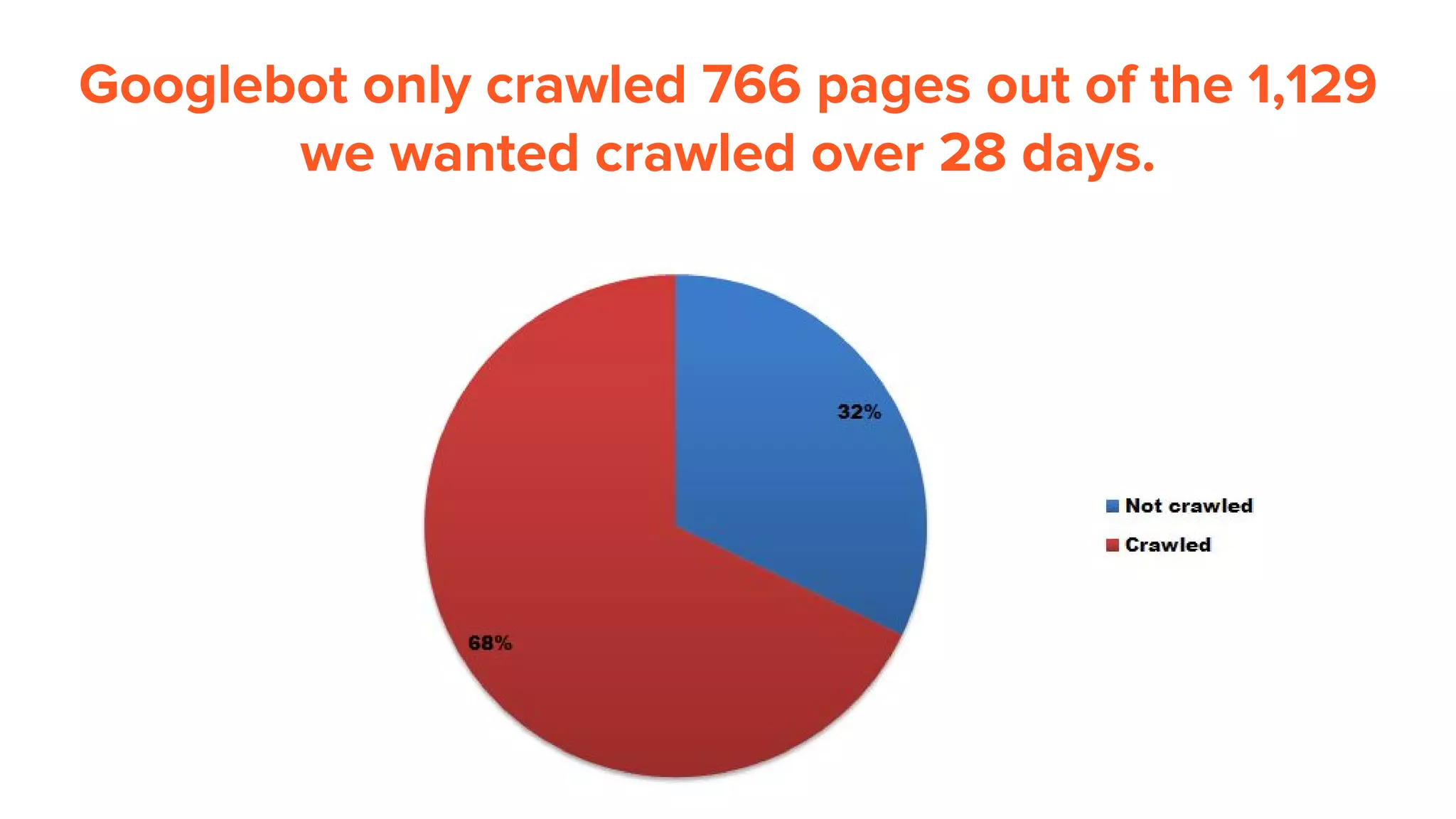
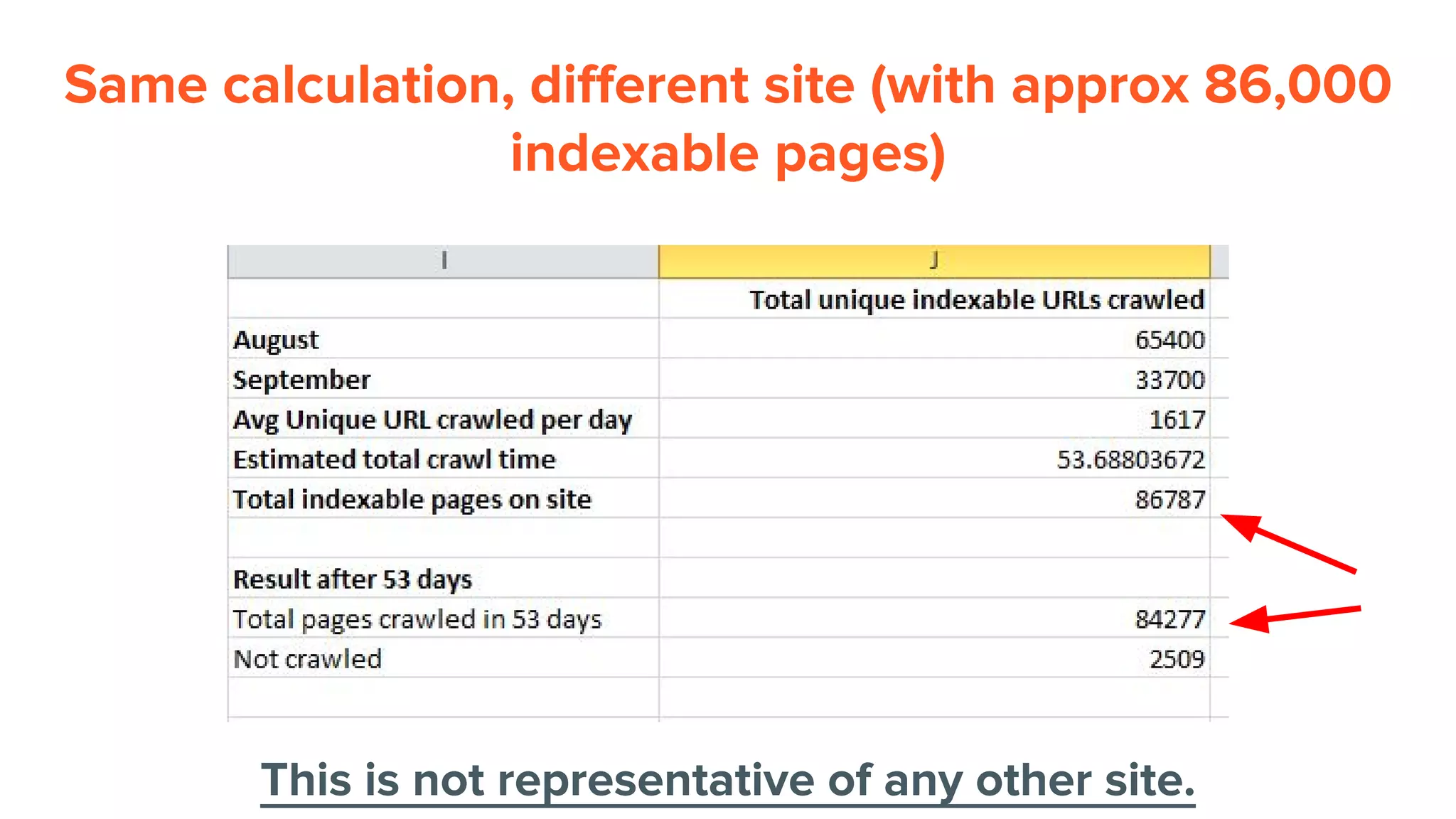
Googlebot only crawled 766 pages out of the 1,129
we wanted crawled over 28 days.
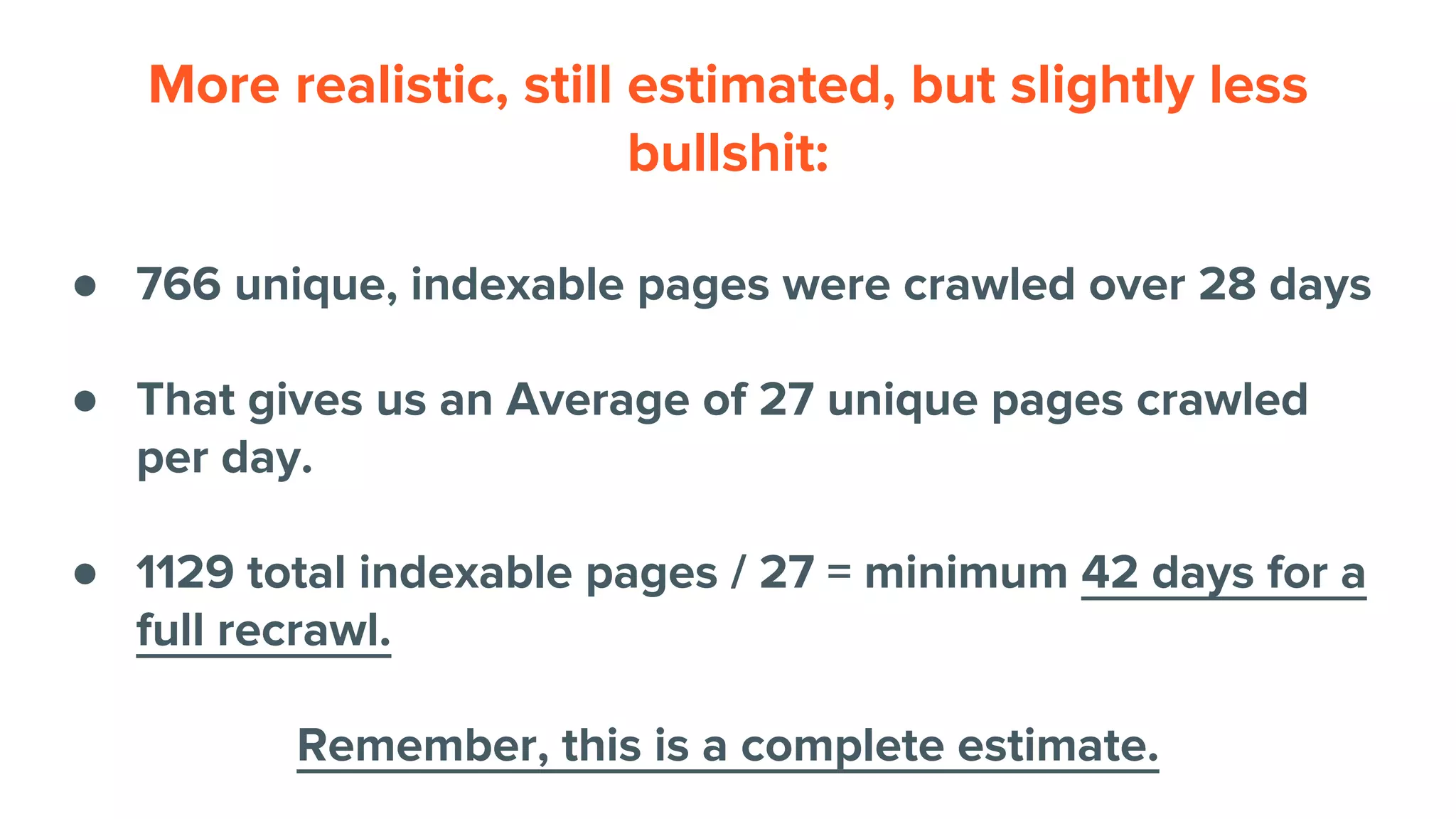
More realistic, still estimated, but slightly less
bullshit:
● 766 unique, indexable pages were crawled over 28 days
● That gives us an Average of 27 unique pages crawled
per day.
● 1129 total indexable pages / 27 = minimum 42 days for a
full recrawl.
Remember, this is a complete estimate.
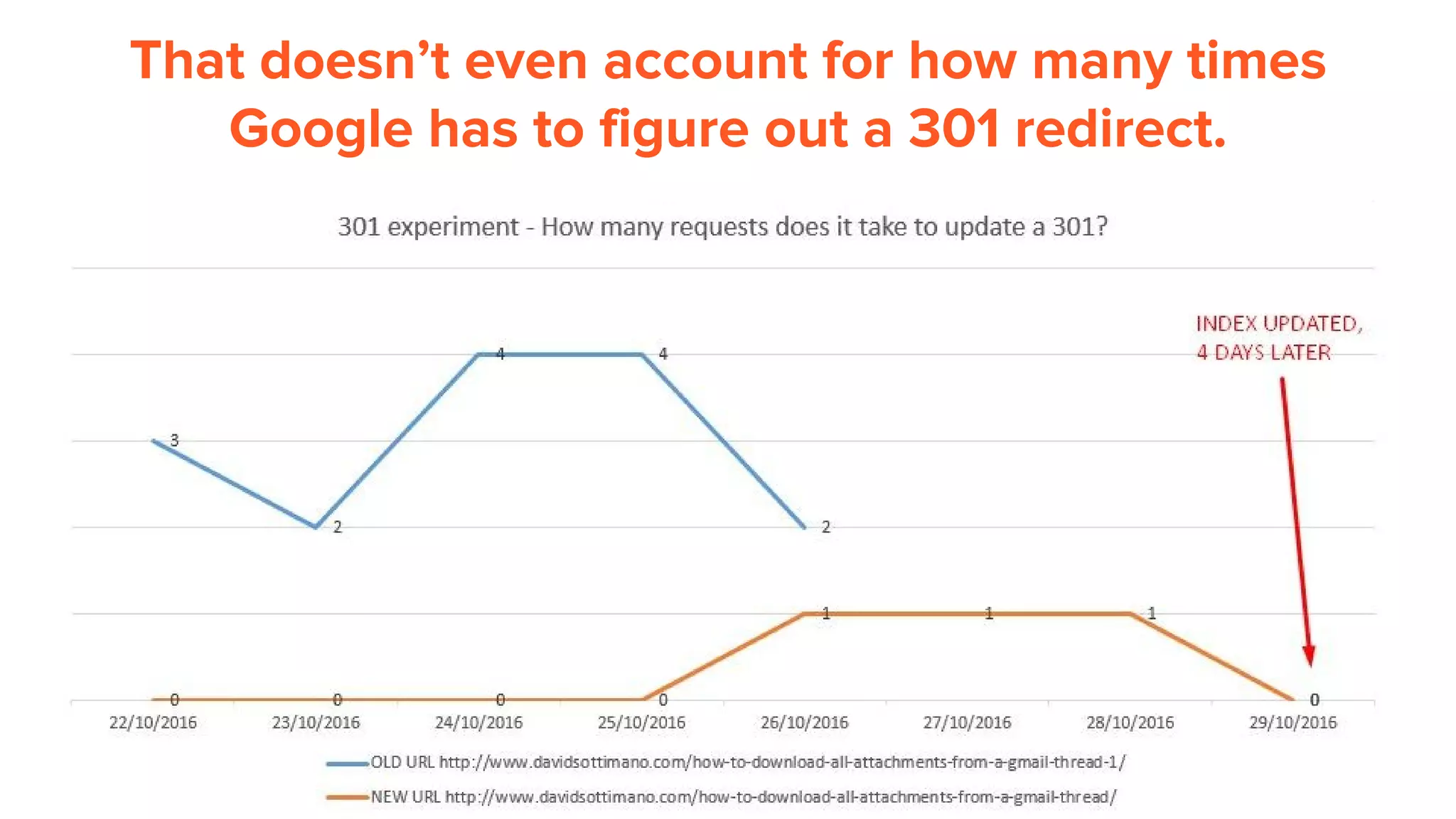
That doesn’t even account for how many times
Google has to figure out a 301 redirect.
Same calculation, different site (with approx 86,000
indexable pages)
This is not representative of any other site.
Fixing the problems isn’t
always easy.
But it does pay off.
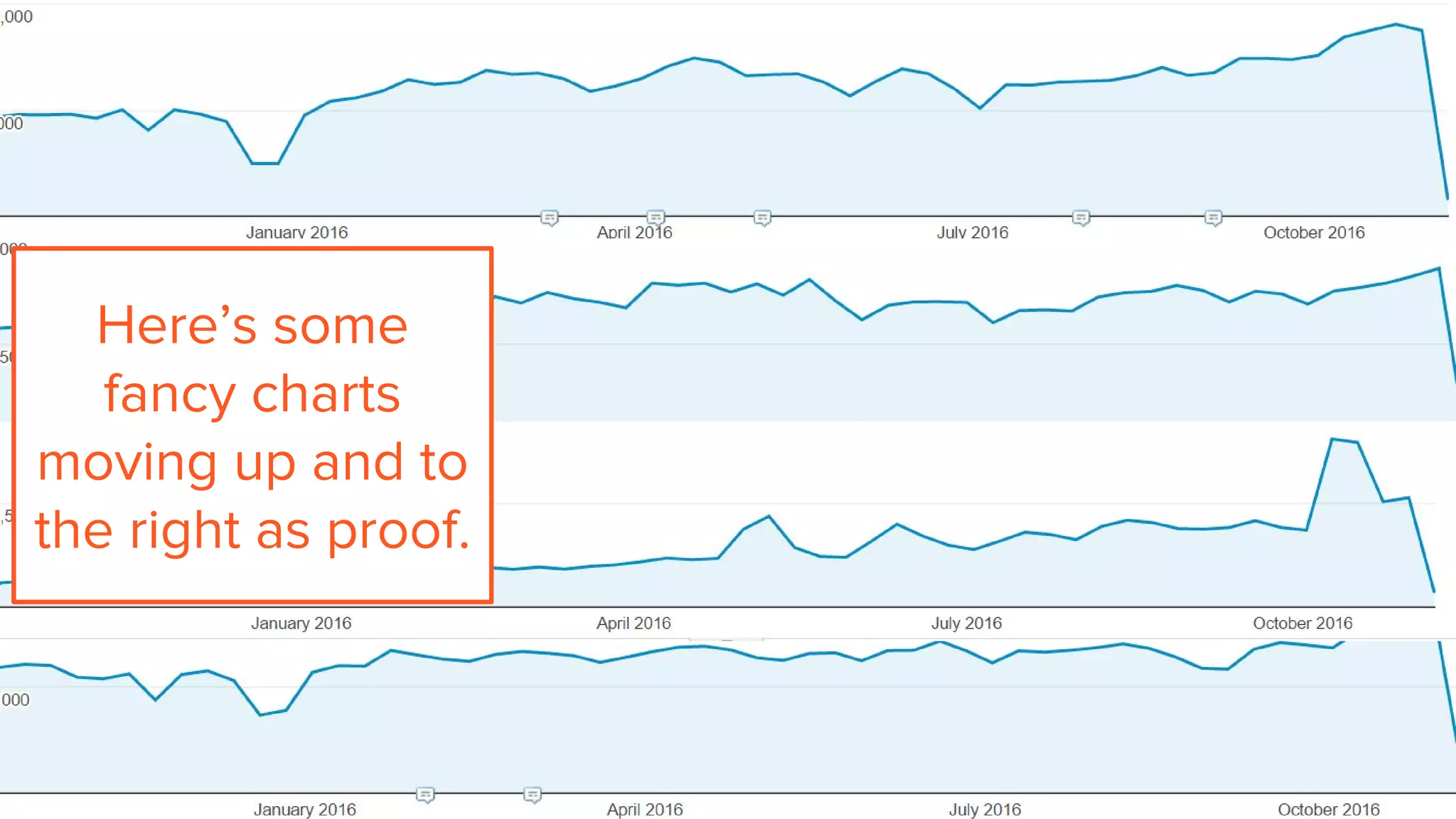
Here’s some
fancy charts
moving up and to
the right as proof.
Things to
remember:
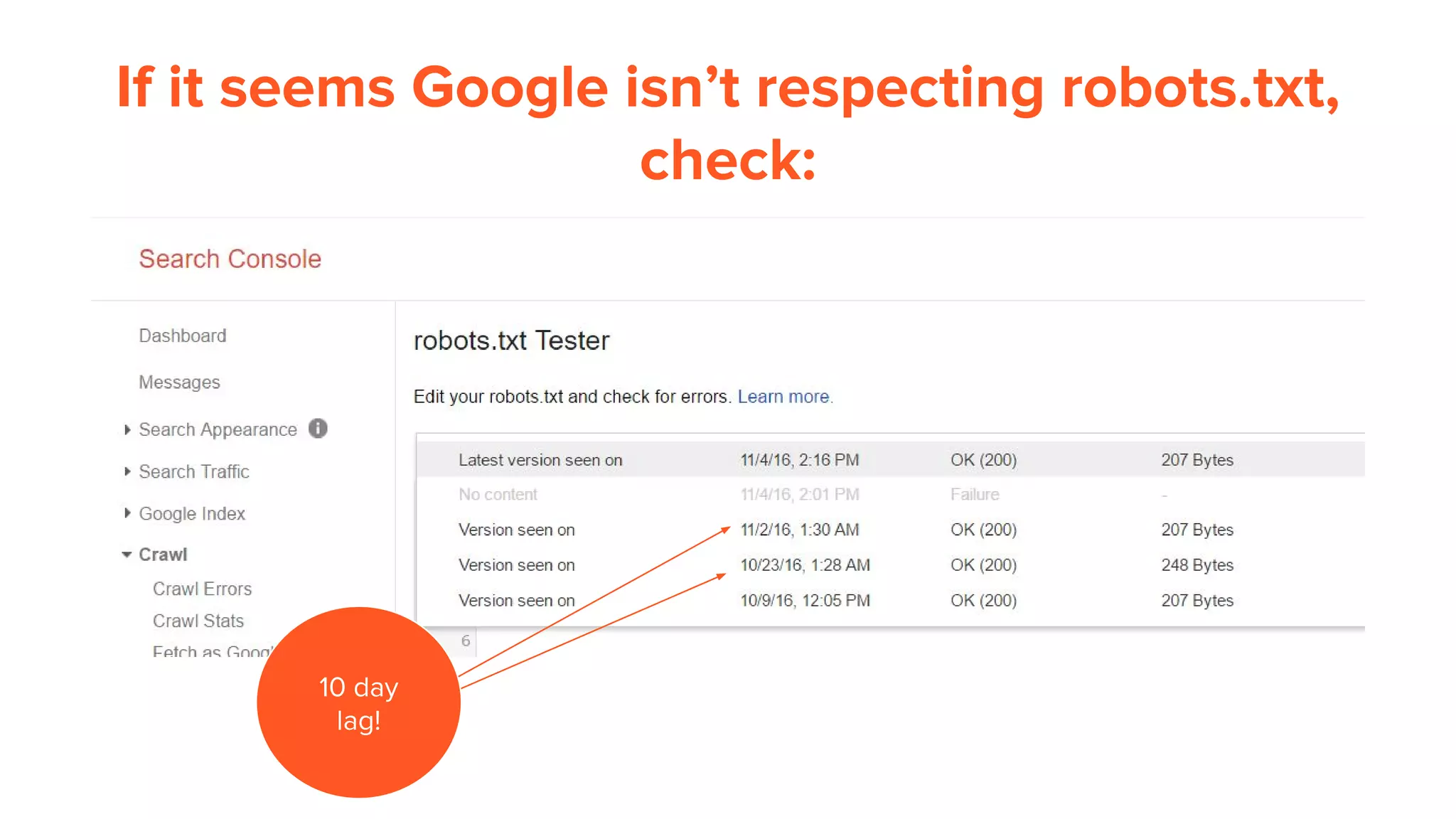
If it seems Google isn’t respecting robots.txt,
check:
10 day
lag!
Server log analysis is hard. Here’s why:
● Data size challenges, example: 7 million events = 1.6 gB (and that’s tiny)
● Lots of different servers logging with custom formats
● Often, obtaining them means surpassing people problems & technical
challenges
● Any small mistakes combining crawl, analytics, search console data can make
the entire analysis useless
● Combining large datasets requires either some form of programming or
technical knowledge; it’s not for everyone.
● Many available tools aren’t comprehensive enough for SEO purposes yet.
That being said, they are the best thing since patatas bravas
con alioli.
Things that can corrupt your results
● Thinking you’re seeing Googlebot but it’s not really Googlebot
● Not accounting for robots.txt restrictions changes or other directive changed in
crawl data during logging period
● Incorrect field mapping, i.e. mistake referer for page request
● Incorrect merging of crawl and analytics data
Helpful links for log analysis
Guides:
● A Complete Guide to Log Analysis with Big Query - Dominic Woodman
● The Ultimate Guide to Log File Analysis - Daniel Butler
● SEO Finds in Your Server Log Tim Resnik
● How to Use Server Log Analysis for Technical SEO Samuel Scott
Software:
● Splunk
● SEO Log File Analyser
● Logz.io
● Botify
Muchas gracias Untagged!
@dsottimano
http://www.definemg.com

Log analysis and pro use cases for search marketers online version (1)

  • 1.
    Log Analysis andPRO Use Cases for Search Marketers Dave Sottimano - Untagged.io - Madrid 2016
  • 2.
    Prepare yourself forbullet point hell. It’s meant for reading: bit.ly/untagged2016 Lo siento :(
  • 3.
    You know whatmakes me sad?
  • 4.
  • 5.
    Inflated & ambiguousstats 80,000 80,000 https://support.google.com/webmasters/answer/35253?hl=en
  • 6.
    Seems broken. Itis broken, this is actually an image search result and it has been ranking through the entire time period. ???
  • 7.
    But hey, reportingstats for the entire internet isn’t easy. So, thank you Google.
  • 8.
    ..but, we needbetter data.
  • 9.
    Why server loganalysis is so important:
  • 10.
    How do wetry and increase crawl frequency? Increase External link count (includes links from social sites) List valuable pages in sitemaps and ping Google Increase Internal link count (crawl paths) Create new pages, and update older pages (avoid stagnation) Ensure pages are unique, reduce internal duplication Avoid internally linking to redirects or broken pages Testing. Lots of testing.
  • 11.
    What actions doSEOs take from log analysis? ● Optimize Googlebot crawl ○ restructure link architecture, apply directives, block via robots.txt ● Find server errors or Googlebot induced errors ○ Try to fix any 4xx, 5xx error codes ○ Use browser user agent referer fields to uncover source of errors ● Understand Googlebot crawl rate & behaviour for SEO testing ○ Helpful for testing and insights and constantly questioning best practices ● Block badly behaving bots, prevent bandwidth drain ○ Look for hotlinking bandwidth drain, i.e images from porn sites ● Find unreported links through referer fields ○ Link crawlers don’t find every link, server logs are necessary for comprehensive audits ● Double check Analytics data ○ Helpful for correcting analytics setup or understanding why referers aren’t passed correctly
  • 12.
    The hard part: Gettingthe right data and merging.
  • 13.
    Step 1: Getthe right fields logged 206.248.146.167 - - [25/Aug/2015:06:50:01 +0000] "GET /shoes HTTP/1.0" 200 251 "https://www.google.ca/" “example.com” "Mozilla/5.0 (Windows NT 6.1; WOW64) AppleWebKit/537.36 (KHTML, like Gecko) Chrome/44.0.2403.157 Safari/537.36" User agent IP Address Date/Time Referer Method Response code Page Response time Hostname
  • 14.
    Step 2: Ensurethe correct originating IP is logged Load balancers, proxies or CDN’s may overwrite the original IP of the request. Use X-Forwarded-For header for to ensure you have the original IP IIS: http://www.loadbalancer.org/blog/iis-and-x-forwarded-for-header Apache: http://www.loadbalancer.org/blog/apache-and-x-forwarded-for-headers Nginx: https://easyengine.io/tutorials/nginx/forwarding-visitors-real-ip/ CloudFlare: https://support.cloudflare.com/hc/en-us/sections/200805497-Restoring-Visitor-IPs
  • 15.
    Step 3: Ensurewe have all of the logs ● Triple check the hostname! If you’re analyzing example.com, desktop for instance, ensure you’re not counting the mobile version (m.example.com) or other subdomains (forum.example.com). Be very careful to get the right data or you will pull your hair out. Ask system administrators! ● If the server stores cached copies and serves them from another server, get those logs too and combine them for the target domain analysis. ● Too much data? Ask for selective logging for Googlebot user agent only
  • 16.
    Step 4: Parsethe logs, grab Googlebot entries https://www.splunk.com/en_us/download/splunk-light-2.html
  • 17.
    Step 5: VerifyGooglebot entries by DNS 1. Segment out logs with user-agent: Mozilla/5.0 (compatible; Googlebot/2.1; +http://www.google.com/bot.html) 2. Take the original IP in the logs, example: 66.249.65.63 3. Reverse DNS lookup: crawl-66-249-65-63.googlebot.com 4. DNS lookup: 66.249.65.63 (confirmed!) https://support.google.com/webmasters/answer/80553?hl=en Software I use: http://www.nirsoft.net/utils/ipnetinfo.html
  • 18.
    Note to myself:Look out for Google Mobile user agents Mozilla/5.0+(iPhone;+CPU+iPhone+OS+6_0+like+Mac+OS+X)+AppleWebKit/536.26 +(KHTML,+like+Gecko)+Version/6.0+Mobile/10A5376e+Safari/8536.25+(compatible; +Googlebot/2.1;++http://www.google.com/bot.html) This is a verified Googlebot from 66.249.65.63, but it’s not listed on the official crawlers page. Official Google: Mobile-first Indexing
  • 19.
    Step 5: MergeCrawl data with clean logs ● Crawl as: Mozilla/5.0 (compatible; Googlebot/2.1; +http://www.google.com/bot.html) and a popular browser user agent ● Crawler config: Disobey Robots.txt, crawl all non-HTML, crawl internal nofollow, crawl canonicals & sitemaps, ideally JS enabled ● Fields required: URL, Response code, Title, Robots directives (blocked, noindex, nofollow etc.), Canonical, Page size, response time, crawl level, number of internal links to page Try DeepCrawl for free bit.ly/freecrawl - 25,000 credits for Untagged.io
  • 20.
    Step 6: AddWeb Analytics data ● Ensure the the URLs correspond correctly (special characters, full URL) ● Ensure the date period is exactly the same period as server logs ● Use data from source/medium = Google/Organic only DeepCrawl can do merge both crawl and analytics data from Google Analytics
  • 21.
    So far... ● Haveall logs from the right host with the right fields ● Have the original IP addresses ● Confirmed real Googlebot visits ● Merged crawl data and analytics data perfectly
  • 22.
    Just when youthink all the data is correct, something will go wrong, guaranteed ;)
  • 23.
    Real example, smallsite: http://www.campgroundsigns.com/ 7 million events from load balancer, IIS custom format access logs= 1.6 gB of data 13,000 Googlebot events over 28 days 1,129 pages are indexable on campgroundsigns.com
  • 24.
    Caveat! The following areobservations based on 1 small website. The observations for this site are only for this site and are not representative. Each website and it’s Googlebot crawl activity are different. Special thanks to campgroundsigns.com for volunteering for the analysis
  • 25.
    What is Googlecrawling?
  • 26.
    What we wantedcrawled vs What Google crawled Based on a 28 day sample
  • 27.
    What did Googlecrawl by Page Type?
  • 28.
    How we determinepage types By URL (if possible): example.com/products/product-123 By unique HTML template footprint (recommended):
  • 29.
  • 30.
    Googlebot crawl andOrganic Traffic Based on a 28 day sample
  • 31.
  • 32.
    Of those pages,what were the response codes?
  • 33.
    The 4% of410 errors are actually caused by Google trying to render JavaScript. 127 pages per 28 day crawl are wasted.
  • 34.
    How often didGoogle crawl NOINDEX pages?
  • 35.
    Did Google crawlthe right pages? Indexable defined as: Response code: 200, no robots.txt block, self referencing canonical or no canonical in head or http header, no noindex directives in head or http header, no directives applied in GSC param config, no removal request, not JS/CSS or resource files. Not indexable either has non 200 response or one of the previous.
  • 36.
    Generally, we seereduced crawl activity to pages with NOINDEX. There’s something wrong. PLA = Product listing Ad.
  • 37.
    We tried toblock the PLA pages to divert attention to important pages:
  • 38.
    Based on 4day, Mon-Thursday period before and after the block Errr, go back, quick. All requests Unique pages crawled Before After Before After PLA (Blocked by robots) 1334 0 703 0 Department or other Page 404 212 270 124 Product page 605 247 452 177 resource 332 406 50 61 Homepage 15 15 1 1 Totals 2690 880 1476 363 Difference -67% -75%
  • 39.
    Turns out, Googleuses their regular Googlebot crawler to crawl them, not Adbot. It was a mistake blocking these. We’ll try canonicals next. https://support.google.com/merchants/answer/160156?hl=en
  • 40.
    Insights: If Googlebot crawlsa page, is it always indexed?
  • 41.
    No. Out ofa sample of 691 pages, 12 were crawled and not indexed.
  • 42.
    Insights: If a pagegets Google organic traffic, is it always indexed?
  • 43.
    No. 225 pagesreceiving at least 1 Google Organic visit during the time period: Read why: http://bit.ly/2faEoA9
  • 44.
    How did Icheck indexation? Sorry, this section is not available for non attendees!
  • 45.
    Frequent question forSEOs: How long will it take for Google to update index after a migration?
  • 46.
    Googlebot 2.1 pagescrawled per day, vs Search Console
  • 47.
    Where to findpages crawled per day in Search Console?
  • 48.
    Tip: Disable allCSS styles for easy copy
  • 49.
    How many uniqueURLs are crawled per day?
  • 50.
    Googlebot only crawled766 pages out of the 1,129 we wanted crawled over 28 days.
  • 51.
    More realistic, stillestimated, but slightly less bullshit: ● 766 unique, indexable pages were crawled over 28 days ● That gives us an Average of 27 unique pages crawled per day. ● 1129 total indexable pages / 27 = minimum 42 days for a full recrawl. Remember, this is a complete estimate.
  • 52.
    That doesn’t evenaccount for how many times Google has to figure out a 301 redirect.
  • 53.
    Same calculation, differentsite (with approx 86,000 indexable pages) This is not representative of any other site.
  • 54.
    Fixing the problemsisn’t always easy. But it does pay off.
  • 55.
    Here’s some fancy charts movingup and to the right as proof.
  • 56.
  • 57.
    If it seemsGoogle isn’t respecting robots.txt, check: 10 day lag!
  • 58.
    Server log analysisis hard. Here’s why: ● Data size challenges, example: 7 million events = 1.6 gB (and that’s tiny) ● Lots of different servers logging with custom formats ● Often, obtaining them means surpassing people problems & technical challenges ● Any small mistakes combining crawl, analytics, search console data can make the entire analysis useless ● Combining large datasets requires either some form of programming or technical knowledge; it’s not for everyone. ● Many available tools aren’t comprehensive enough for SEO purposes yet. That being said, they are the best thing since patatas bravas con alioli.
  • 59.
    Things that cancorrupt your results ● Thinking you’re seeing Googlebot but it’s not really Googlebot ● Not accounting for robots.txt restrictions changes or other directive changed in crawl data during logging period ● Incorrect field mapping, i.e. mistake referer for page request ● Incorrect merging of crawl and analytics data
  • 60.
    Helpful links forlog analysis Guides: ● A Complete Guide to Log Analysis with Big Query - Dominic Woodman ● The Ultimate Guide to Log File Analysis - Daniel Butler ● SEO Finds in Your Server Log Tim Resnik ● How to Use Server Log Analysis for Technical SEO Samuel Scott Software: ● Splunk ● SEO Log File Analyser ● Logz.io ● Botify
  • 61.