MINI-Link TN
DCN Configuration Via CLI
BY: Khalil Al-alami
Khalil Al-Alami | Page 2
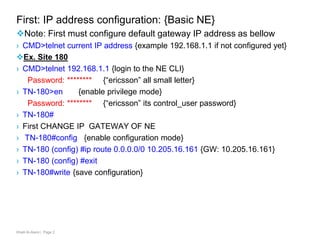
First: IP address configuration: {Basic NE}
Note: First must configure default gateway IP address as bellow
› CMD>telnet current IP address {example 192.168.1.1 if not configured yet}
Ex. Site 180
› CMD>telnet 192.168.1.1 {login to the NE CLI}
Password: ******** {“ericsson” all small letter}
› TN-180>en {enable privilege mode}
Password: ******** {“ericsson” its control_user password}
› TN-180#
› First CHANGE IP GATEWAY OF NE
› TN-180#config {enable configuration mode}
› TN-180 (config) #ip route 0.0.0.0/0 10.205.16.161 {GW: 10.205.16.161}
› TN-180 (config) #exit
› TN-180#write {save configuration}
Khalil Al-Alami | Page 3
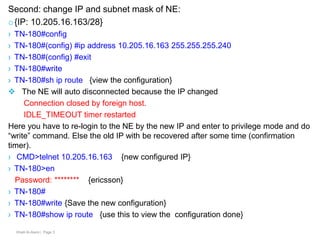
Second: change IP and subnet mask of NE:
o{IP: 10.205.16.163/28}
› TN-180#config
› TN-180#(config) #ip address 10.205.16.163 255.255.255.240
› TN-180#(config) #exit
› TN-180#write
› TN-180#sh ip route {view the configuration}
 The NE will auto disconnected because the IP changed
Connection closed by foreign host.
IDLE_TIMEOUT timer restarted
Here you have to re-login to the NE by the new IP and enter to privilege mode and do
“write” command. Else the old IP with be recovered after some time (confirmation
timer).
› CMD>telnet 10.205.16.163 {new configured IP}
› TN-180>en
Password: ******** {ericsson}
› TN-180#
› TN-180#write {Save the new configuration}
› TN-180#show ip route {use this to view the configuration done}
Khalil Al-Alami | Page 4
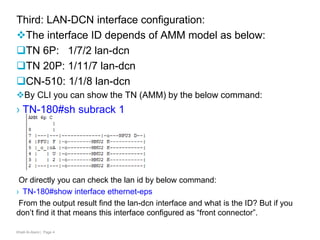
Third: LAN-DCN interface configuration:
The interface ID depends of AMM model as below:
TN 6P: 1/7/2 lan-dcn
TN 20P: 1/11/7 lan-dcn
CN-510: 1/1/8 lan-dcn
By CLI you can show the TN (AMM) by the below command:
› TN-180#sh subrack 1
Or directly you can check the lan id by below command:
› TN-180#show interface ethernet-eps
From the output result find the lan-dcn interface and what is the ID? But if you
don’t find it that means this interface configured as “front connector”.
Khalil Al-Alami | Page 5
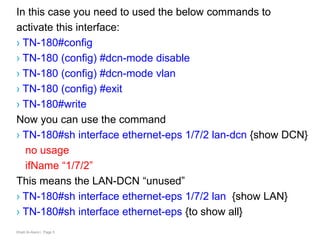
In this case you need to used the below commands to
activate this interface:
› TN-180#config
› TN-180 (config) #dcn-mode disable
› TN-180 (config) #dcn-mode vlan
› TN-180 (config) #exit
› TN-180#write
Now you can use the command
› TN-180#sh interface ethernet-eps 1/7/2 lan-dcn {show DCN}
no usage
ifName “1/7/2”
This means the LAN-DCN “unused”
› TN-180#sh interface ethernet-eps 1/7/2 lan {show LAN}
› TN-180#sh interface ethernet-eps {to show all}
Khalil Al-Alami | Page 6
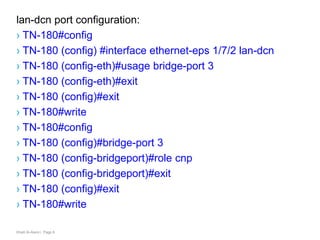
lan-dcn port configuration:
› TN-180#config
› TN-180 (config) #interface ethernet-eps 1/7/2 lan-dcn
› TN-180 (config-eth)#usage bridge-port 3
› TN-180 (config-eth)#exit
› TN-180 (config)#exit
› TN-180#write
› TN-180#config
› TN-180 (config)#bridge-port 3
› TN-180 (config-bridgeport)#role cnp
› TN-180 (config-bridgeport)#exit
› TN-180 (config)#exit
› TN-180#write
Khalil Al-Alami | Page 7
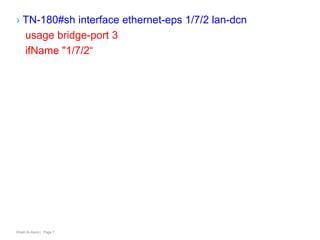
› TN-180#sh interface ethernet-eps 1/7/2 lan-dcn
usage bridge-port 3
ifName "1/7/2“
Khalil Al-Alami | Page 8
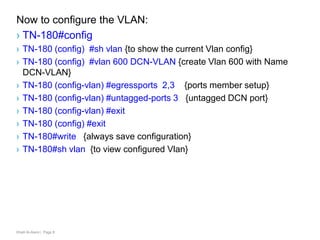
Now to configure the VLAN:
› TN-180#config
› TN-180 (config) #sh vlan {to show the current Vlan config}
› TN-180 (config) #vlan 600 DCN-VLAN {create Vlan 600 with Name
DCN-VLAN}
› TN-180 (config-vlan) #egressports 2,3 {ports member setup}
› TN-180 (config-vlan) #untagged-ports 3 {untagged DCN port}
› TN-180 (config-vlan) #exit
› TN-180 (config) #exit
› TN-180#write {always save configuration}
› TN-180#sh vlan {to view configured Vlan}
Khalil Al-Alami | Page 9
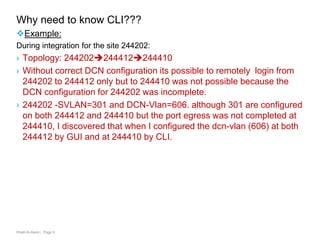
Why need to know CLI???
Example:
During integration for the site 244202:
› Topology: 244202244412244410
› Without correct DCN configuration its possible to remotely login from
244202 to 244412 only but to 244410 was not possible because the
DCN configuration for 244202 was incomplete.
› 244202 -SVLAN=301 and DCN-Vlan=606. although 301 are configured
on both 244412 and 244410 but the port egress was not completed at
244410, I discovered that when I configured the dcn-vlan (606) at both
244412 by GUI and at 244410 by CLI.
Thank you all

Dcn configuration via cli

  • 1.
    MINI-Link TN DCN ConfigurationVia CLI BY: Khalil Al-alami
  • 2.
    Khalil Al-Alami |Page 2 First: IP address configuration: {Basic NE} Note: First must configure default gateway IP address as bellow › CMD>telnet current IP address {example 192.168.1.1 if not configured yet} Ex. Site 180 › CMD>telnet 192.168.1.1 {login to the NE CLI} Password: ******** {“ericsson” all small letter} › TN-180>en {enable privilege mode} Password: ******** {“ericsson” its control_user password} › TN-180# › First CHANGE IP GATEWAY OF NE › TN-180#config {enable configuration mode} › TN-180 (config) #ip route 0.0.0.0/0 10.205.16.161 {GW: 10.205.16.161} › TN-180 (config) #exit › TN-180#write {save configuration}
  • 3.
    Khalil Al-Alami |Page 3 Second: change IP and subnet mask of NE: o{IP: 10.205.16.163/28} › TN-180#config › TN-180#(config) #ip address 10.205.16.163 255.255.255.240 › TN-180#(config) #exit › TN-180#write › TN-180#sh ip route {view the configuration}  The NE will auto disconnected because the IP changed Connection closed by foreign host. IDLE_TIMEOUT timer restarted Here you have to re-login to the NE by the new IP and enter to privilege mode and do “write” command. Else the old IP with be recovered after some time (confirmation timer). › CMD>telnet 10.205.16.163 {new configured IP} › TN-180>en Password: ******** {ericsson} › TN-180# › TN-180#write {Save the new configuration} › TN-180#show ip route {use this to view the configuration done}
  • 4.
    Khalil Al-Alami |Page 4 Third: LAN-DCN interface configuration: The interface ID depends of AMM model as below: TN 6P: 1/7/2 lan-dcn TN 20P: 1/11/7 lan-dcn CN-510: 1/1/8 lan-dcn By CLI you can show the TN (AMM) by the below command: › TN-180#sh subrack 1 Or directly you can check the lan id by below command: › TN-180#show interface ethernet-eps From the output result find the lan-dcn interface and what is the ID? But if you don’t find it that means this interface configured as “front connector”.
  • 5.
    Khalil Al-Alami |Page 5 In this case you need to used the below commands to activate this interface: › TN-180#config › TN-180 (config) #dcn-mode disable › TN-180 (config) #dcn-mode vlan › TN-180 (config) #exit › TN-180#write Now you can use the command › TN-180#sh interface ethernet-eps 1/7/2 lan-dcn {show DCN} no usage ifName “1/7/2” This means the LAN-DCN “unused” › TN-180#sh interface ethernet-eps 1/7/2 lan {show LAN} › TN-180#sh interface ethernet-eps {to show all}
  • 6.
    Khalil Al-Alami |Page 6 lan-dcn port configuration: › TN-180#config › TN-180 (config) #interface ethernet-eps 1/7/2 lan-dcn › TN-180 (config-eth)#usage bridge-port 3 › TN-180 (config-eth)#exit › TN-180 (config)#exit › TN-180#write › TN-180#config › TN-180 (config)#bridge-port 3 › TN-180 (config-bridgeport)#role cnp › TN-180 (config-bridgeport)#exit › TN-180 (config)#exit › TN-180#write
  • 7.
    Khalil Al-Alami |Page 7 › TN-180#sh interface ethernet-eps 1/7/2 lan-dcn usage bridge-port 3 ifName "1/7/2“
  • 8.
    Khalil Al-Alami |Page 8 Now to configure the VLAN: › TN-180#config › TN-180 (config) #sh vlan {to show the current Vlan config} › TN-180 (config) #vlan 600 DCN-VLAN {create Vlan 600 with Name DCN-VLAN} › TN-180 (config-vlan) #egressports 2,3 {ports member setup} › TN-180 (config-vlan) #untagged-ports 3 {untagged DCN port} › TN-180 (config-vlan) #exit › TN-180 (config) #exit › TN-180#write {always save configuration} › TN-180#sh vlan {to view configured Vlan}
  • 9.
    Khalil Al-Alami |Page 9 Why need to know CLI??? Example: During integration for the site 244202: › Topology: 244202244412244410 › Without correct DCN configuration its possible to remotely login from 244202 to 244412 only but to 244410 was not possible because the DCN configuration for 244202 was incomplete. › 244202 -SVLAN=301 and DCN-Vlan=606. although 301 are configured on both 244412 and 244410 but the port egress was not completed at 244410, I discovered that when I configured the dcn-vlan (606) at both 244412 by GUI and at 244410 by CLI.
  • 10.