AMOS - COMMANDLINE INTERFACE
1. GETTING STARTED
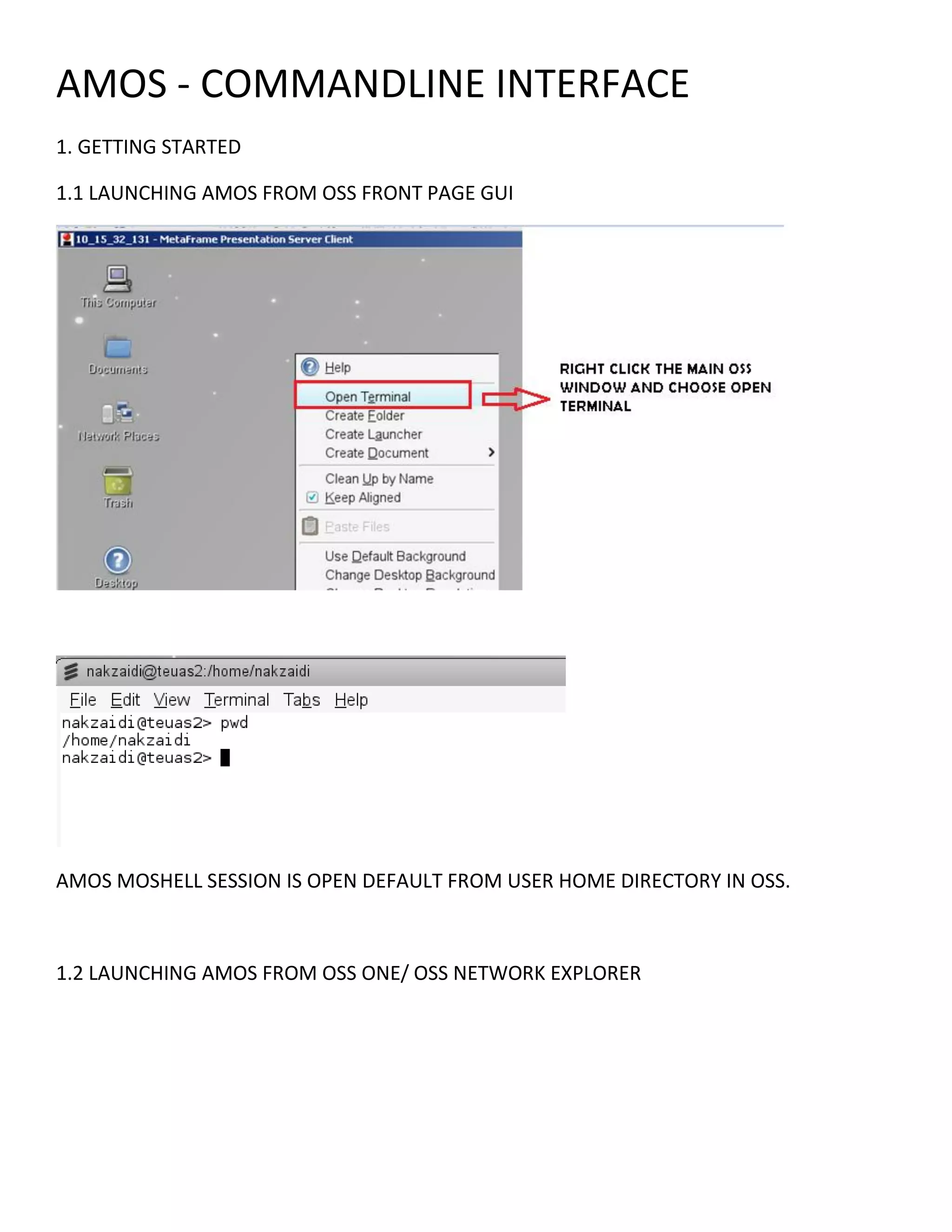
1.1 LAUNCHING AMOS FROM OSS FRONT PAGE GUI
AMOS MOSHELL SESSION IS OPEN DEFAULT FROM USER HOME DIRECTORY IN OSS.
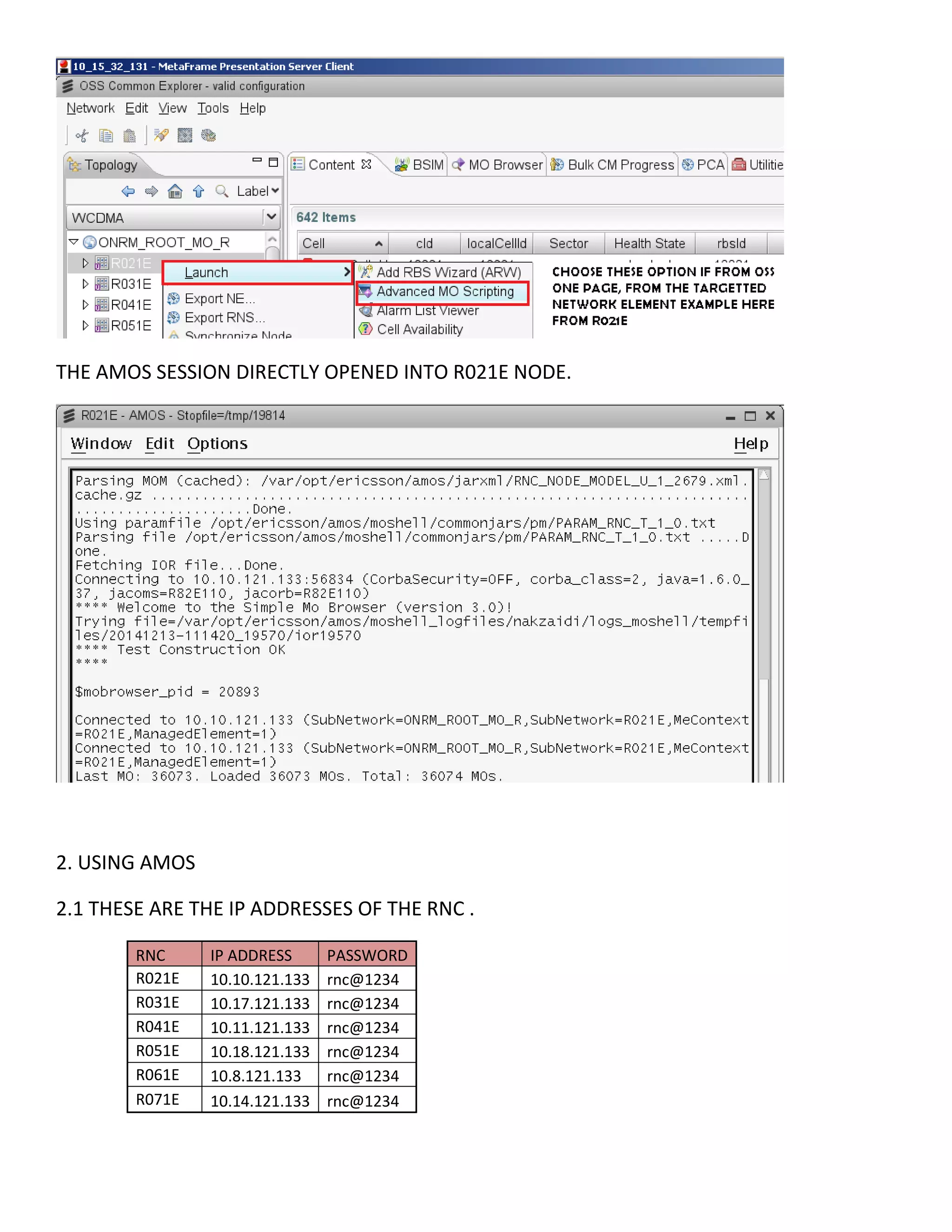
1.2 LAUNCHING AMOS FROM OSS ONE/ OSS NETWORK EXPLORER
THE AMOS SESSION DIRECTLY OPENED INTO R021E NODE.
2. USING AMOS
2.1 THESE ARE THE IP ADDRESSES OF THE RNC .
RNC IP ADDRESS PASSWORD
R021E 10.10.121.133 rnc@1234
R031E 10.17.121.133 rnc@1234
R041E 10.11.121.133 rnc@1234
R051E 10.18.121.133 rnc@1234
R061E 10.8.121.133 rnc@1234
R071E 10.14.121.133 rnc@1234
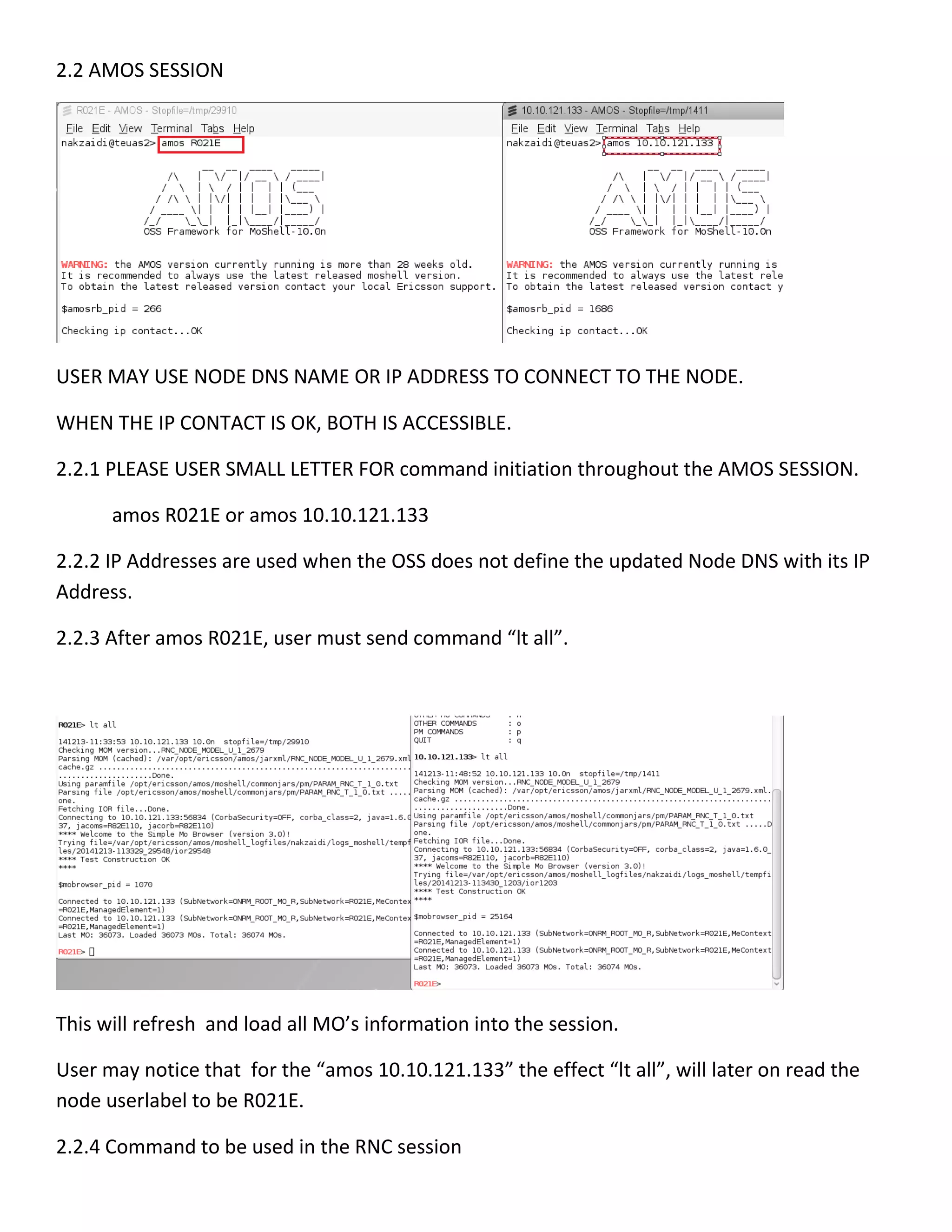
2.2 AMOS SESSION
USER MAY USE NODE DNS NAME OR IP ADDRESS TO CONNECT TO THE NODE.
WHEN THE IP CONTACT IS OK, BOTH IS ACCESSIBLE.
2.2.1 PLEASE USER SMALL LETTER FOR command initiation throughout the AMOS SESSION.
amos R021E or amos 10.10.121.133
2.2.2 IP Addresses are used when the OSS does not define the updated Node DNS with its IP
Address.
2.2.3 After amos R021E, user must send command “lt all”.
This will refresh and load all MO’s information into the session.
User may notice that for the “amos 10.10.121.133” the effect “lt all”, will later on read the
node userlabel to be R021E.
2.2.4 Command to be used in the RNC session
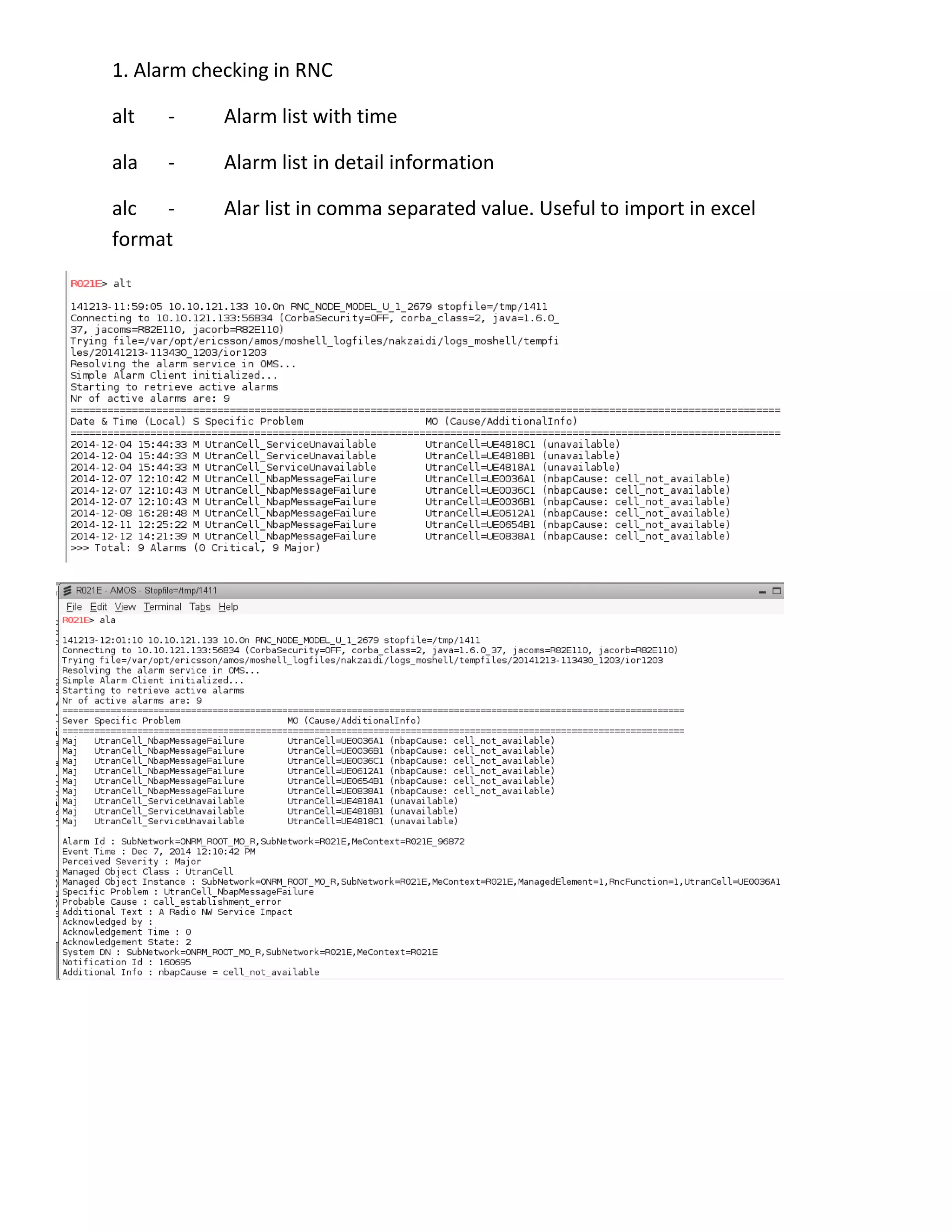
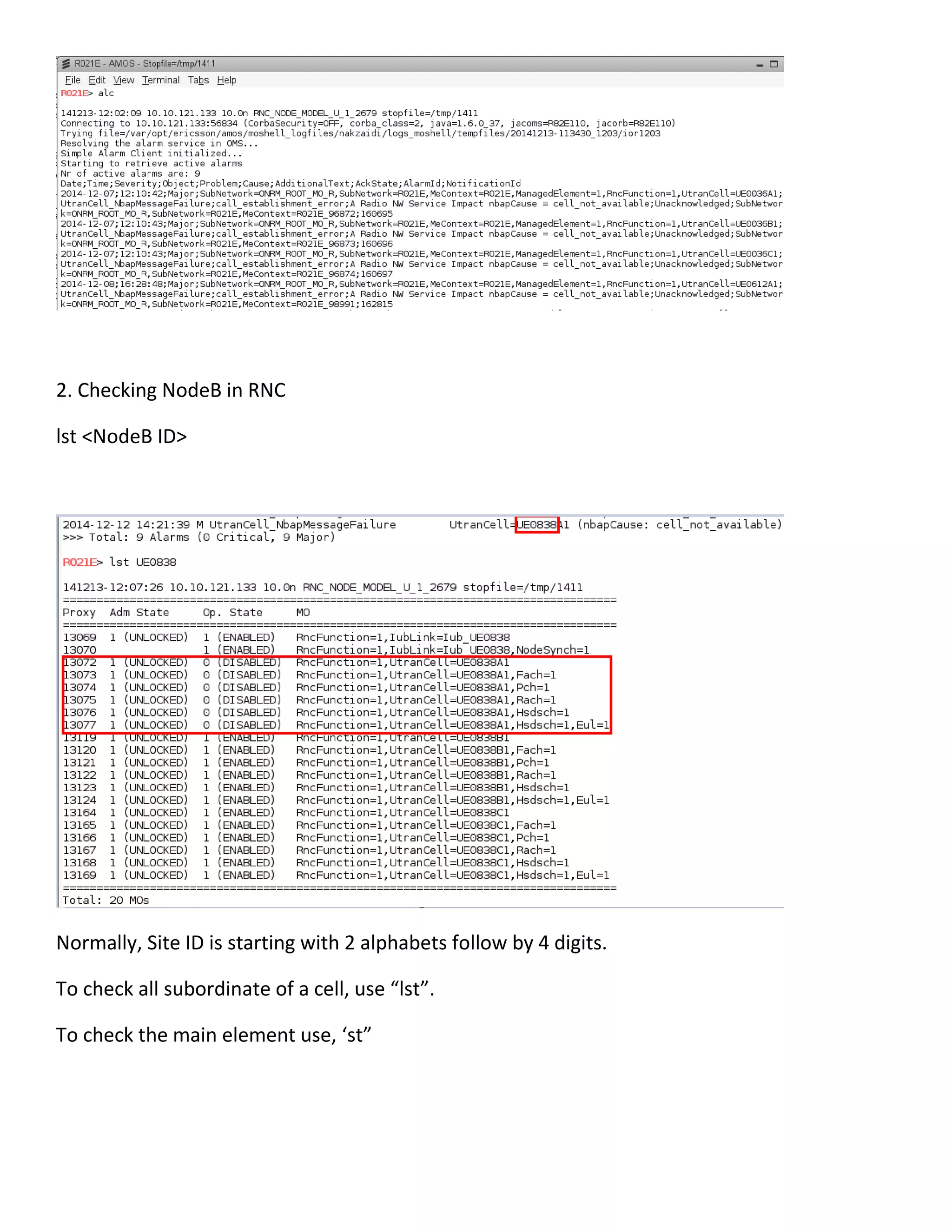
1. Alarm checking in RNC
alt - Alarm list with time
ala - Alarm list in detail information
alc - Alar list in comma separated value. Useful to import in excel
format
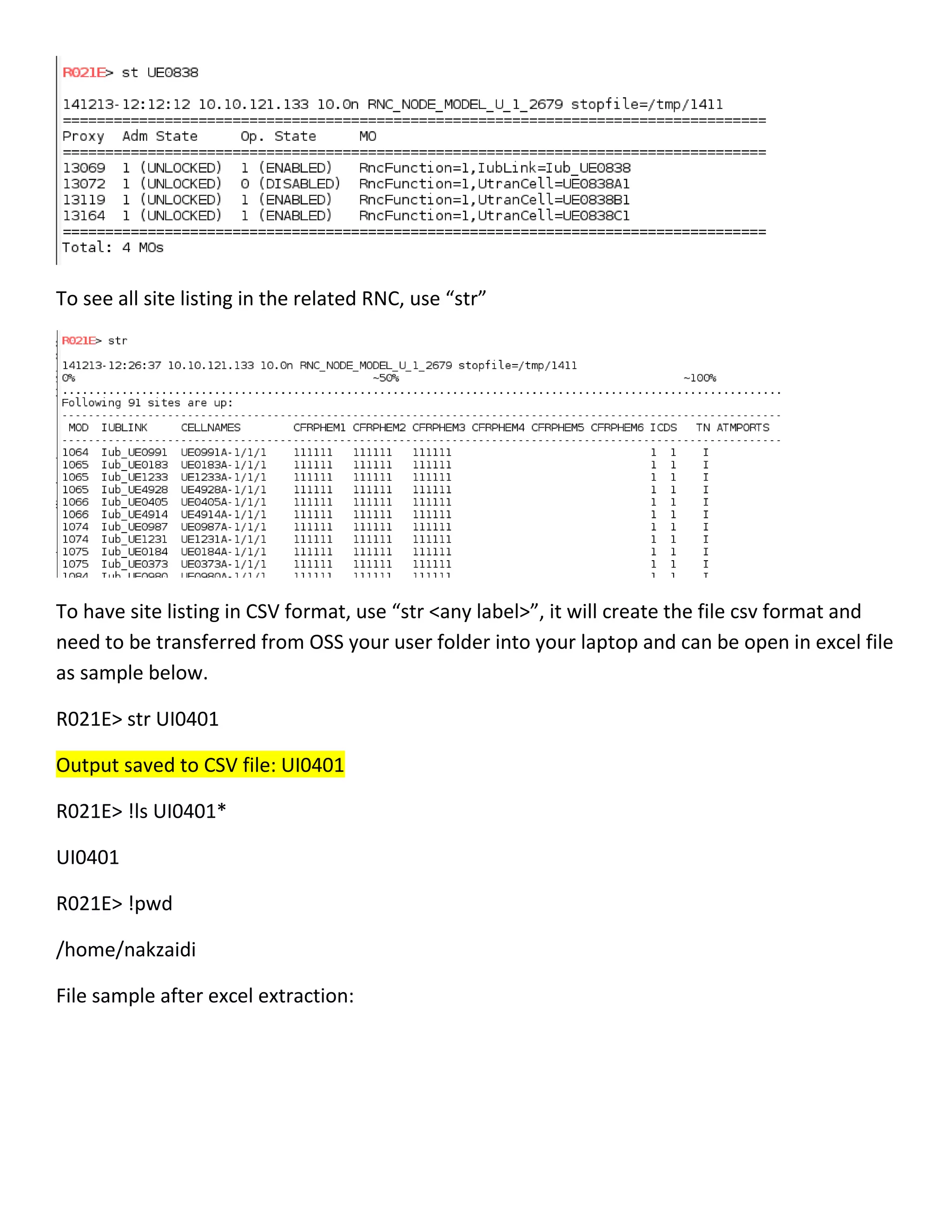
2. Checking NodeB in RNC
lst <NodeB ID>
Normally, Site ID is starting with 2 alphabets follow by 4 digits.
To check all subordinate of a cell, use “lst”.
To check the main element use, ‘st”
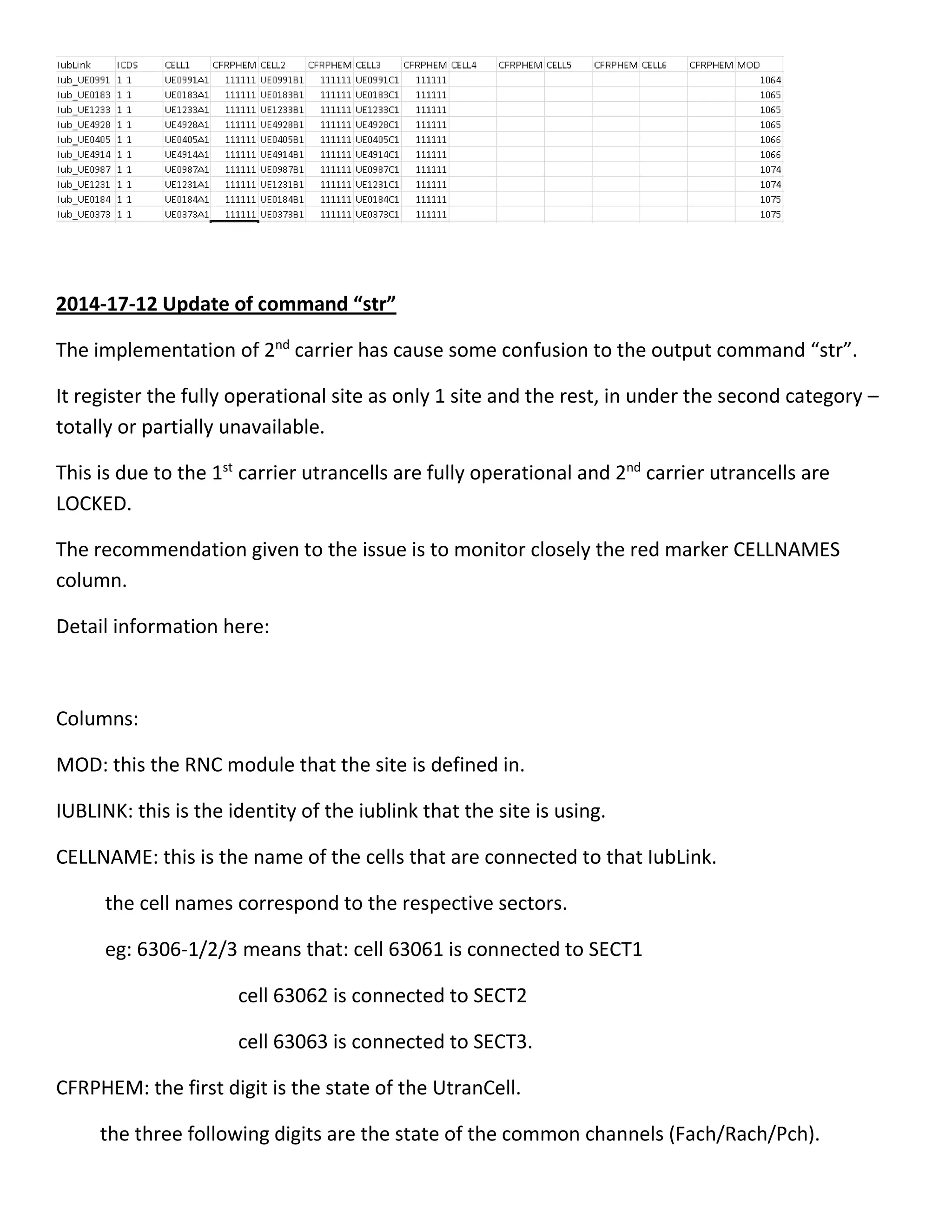
To see all site listing in the related RNC, use “str”
To have site listing in CSV format, use “str <any label>”, it will create the file csv format and
need to be transferred from OSS your user folder into your laptop and can be open in excel file
as sample below.
R021E> str UI0401
Output saved to CSV file: UI0401
R021E> !ls UI0401*
UI0401
R021E> !pwd
/home/nakzaidi
File sample after excel extraction:
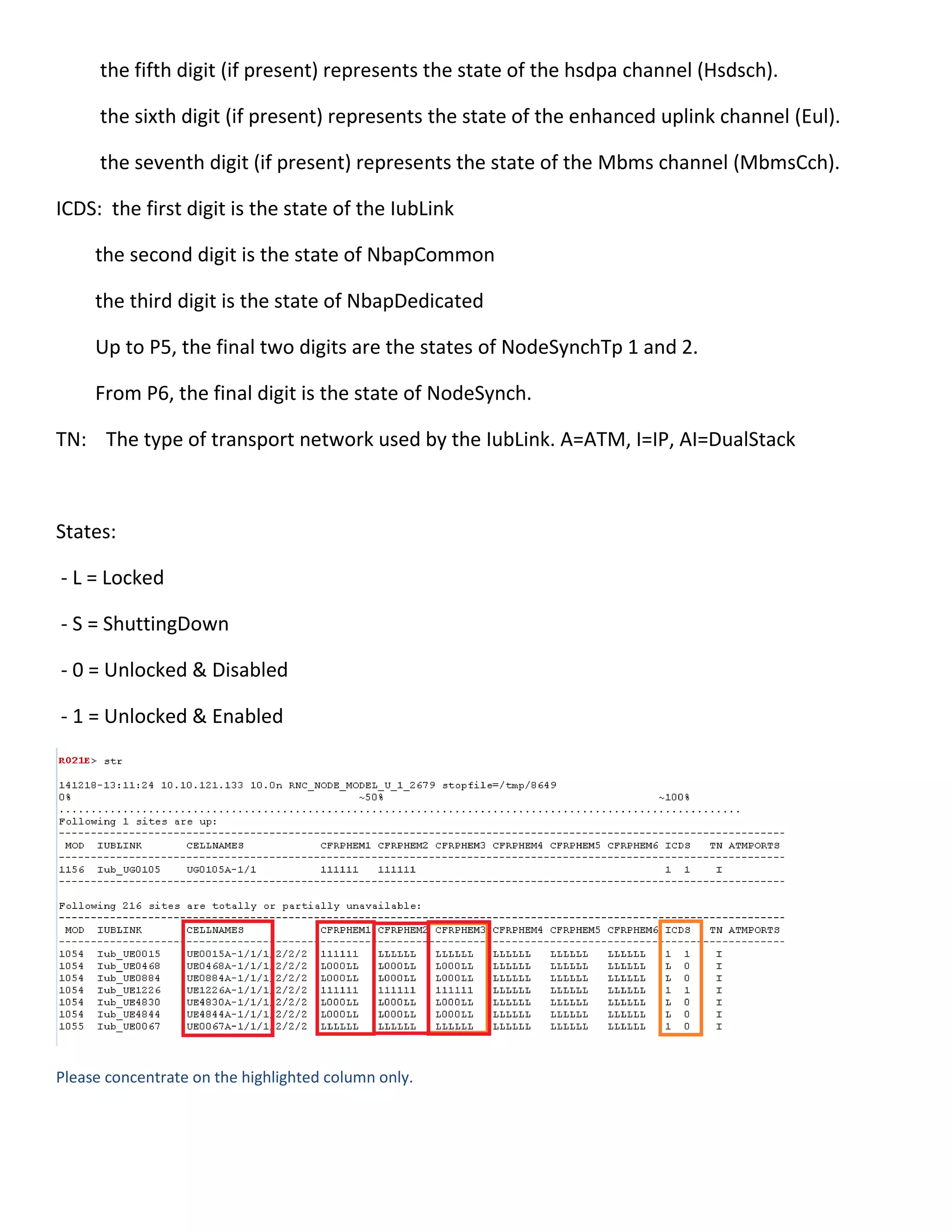
2014-17-12 Update of command “str”
The implementation of 2nd
carrier has cause some confusion to the output command “str”.
It register the fully operational site as only 1 site and the rest, in under the second category –
totally or partially unavailable.
This is due to the 1st
carrier utrancells are fully operational and 2nd
carrier utrancells are
LOCKED.
The recommendation given to the issue is to monitor closely the red marker CELLNAMES
column.
Detail information here:
Columns:
MOD: this the RNC module that the site is defined in.
IUBLINK: this is the identity of the iublink that the site is using.
CELLNAME: this is the name of the cells that are connected to that IubLink.
the cell names correspond to the respective sectors.
eg: 6306-1/2/3 means that: cell 63061 is connected to SECT1
cell 63062 is connected to SECT2
cell 63063 is connected to SECT3.
CFRPHEM: the first digit is the state of the UtranCell.
the three following digits are the state of the common channels (Fach/Rach/Pch).
the fifth digit (if present) represents the state of the hsdpa channel (Hsdsch).
the sixth digit (if present) represents the state of the enhanced uplink channel (Eul).
the seventh digit (if present) represents the state of the Mbms channel (MbmsCch).
ICDS: the first digit is the state of the IubLink
the second digit is the state of NbapCommon
the third digit is the state of NbapDedicated
Up to P5, the final two digits are the states of NodeSynchTp 1 and 2.
From P6, the final digit is the state of NodeSynch.
TN: The type of transport network used by the IubLink. A=ATM, I=IP, AI=DualStack
States:
- L = Locked
- S = ShuttingDown
- 0 = Unlocked & Disabled
- 1 = Unlocked & Enabled
Please concentrate on the highlighted column only.
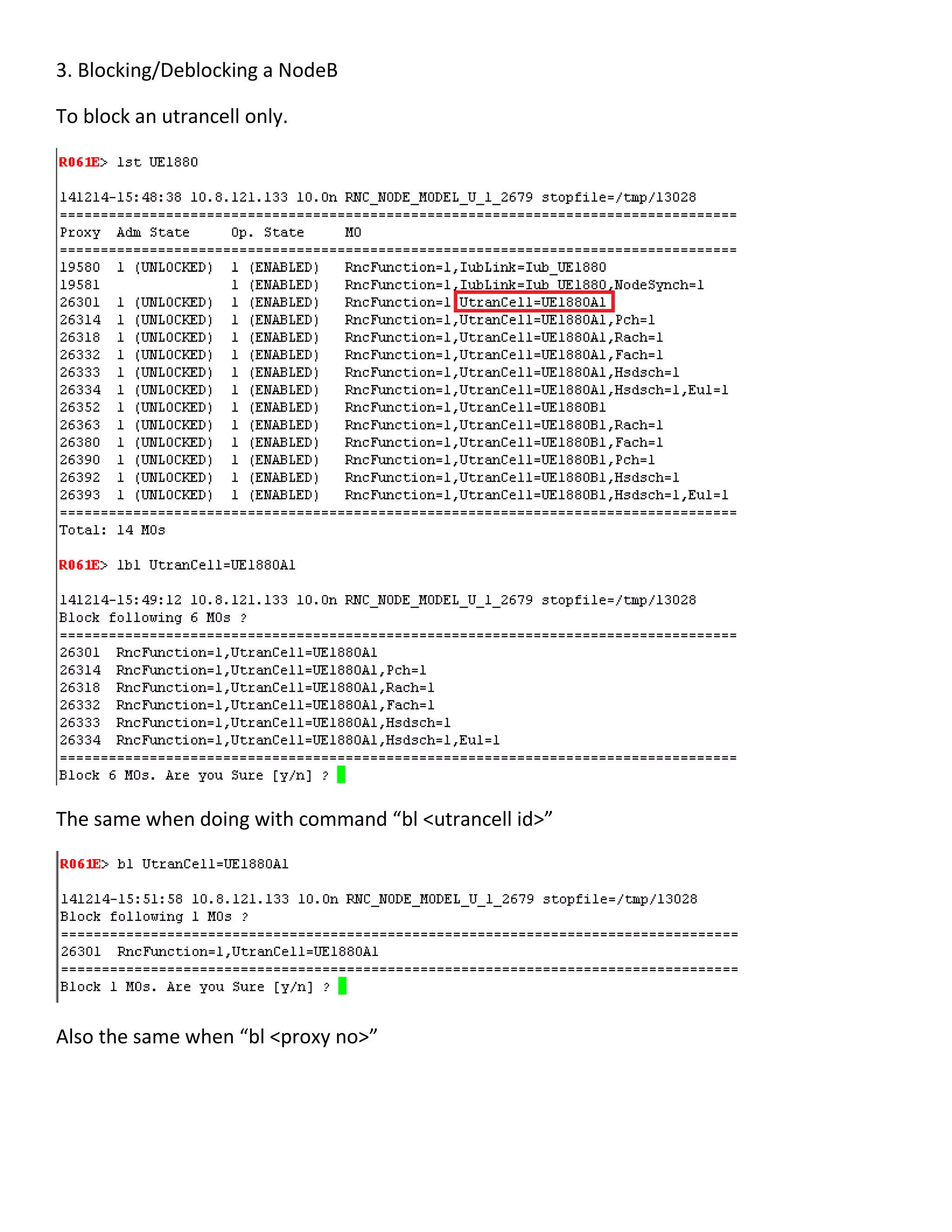
3. Blocking/Deblocking a NodeB
To block an utrancell only.
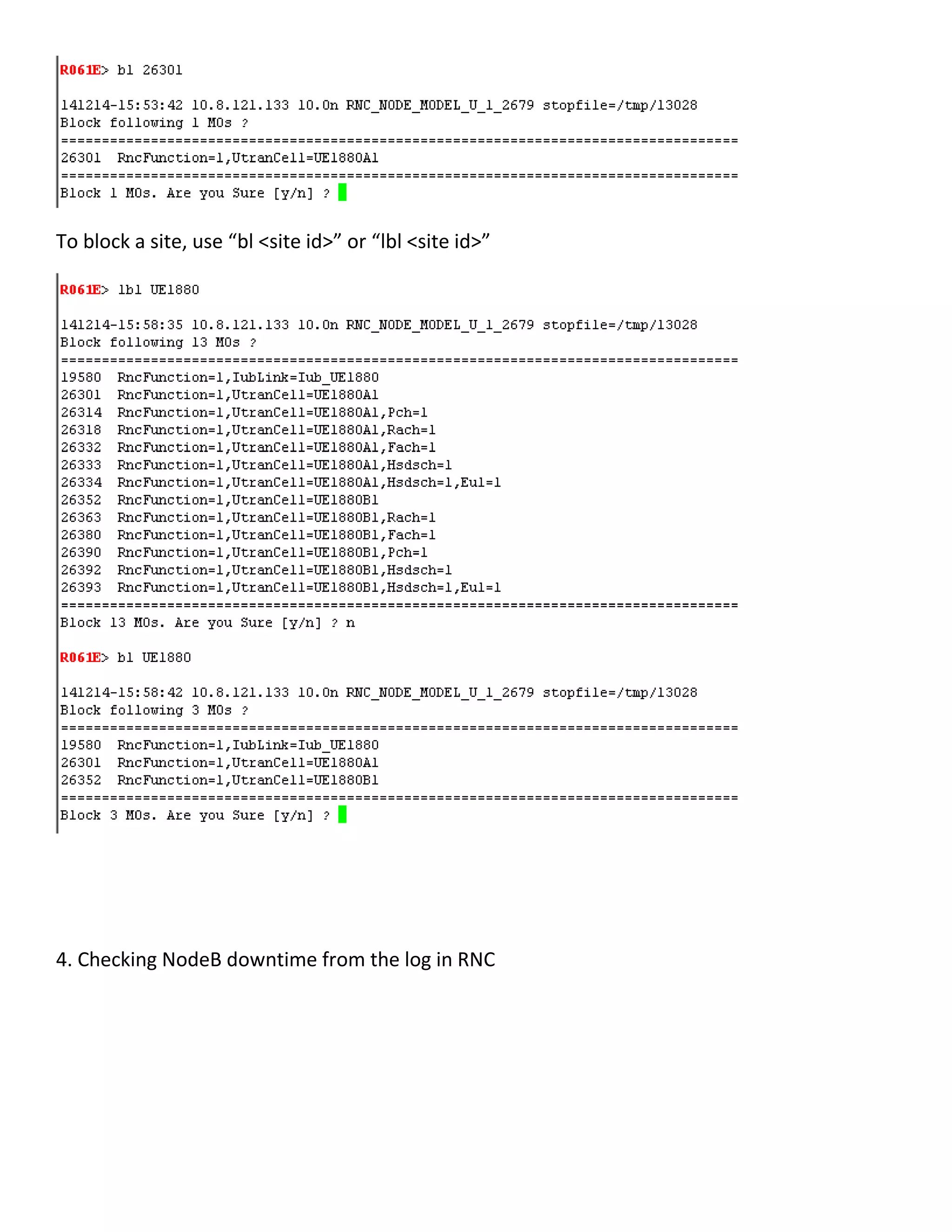
The same when doing with command “bl <utrancell id>”
Also the same when “bl <proxy no>”
To block a site, use “bl <site id>” or “lbl <site id>”
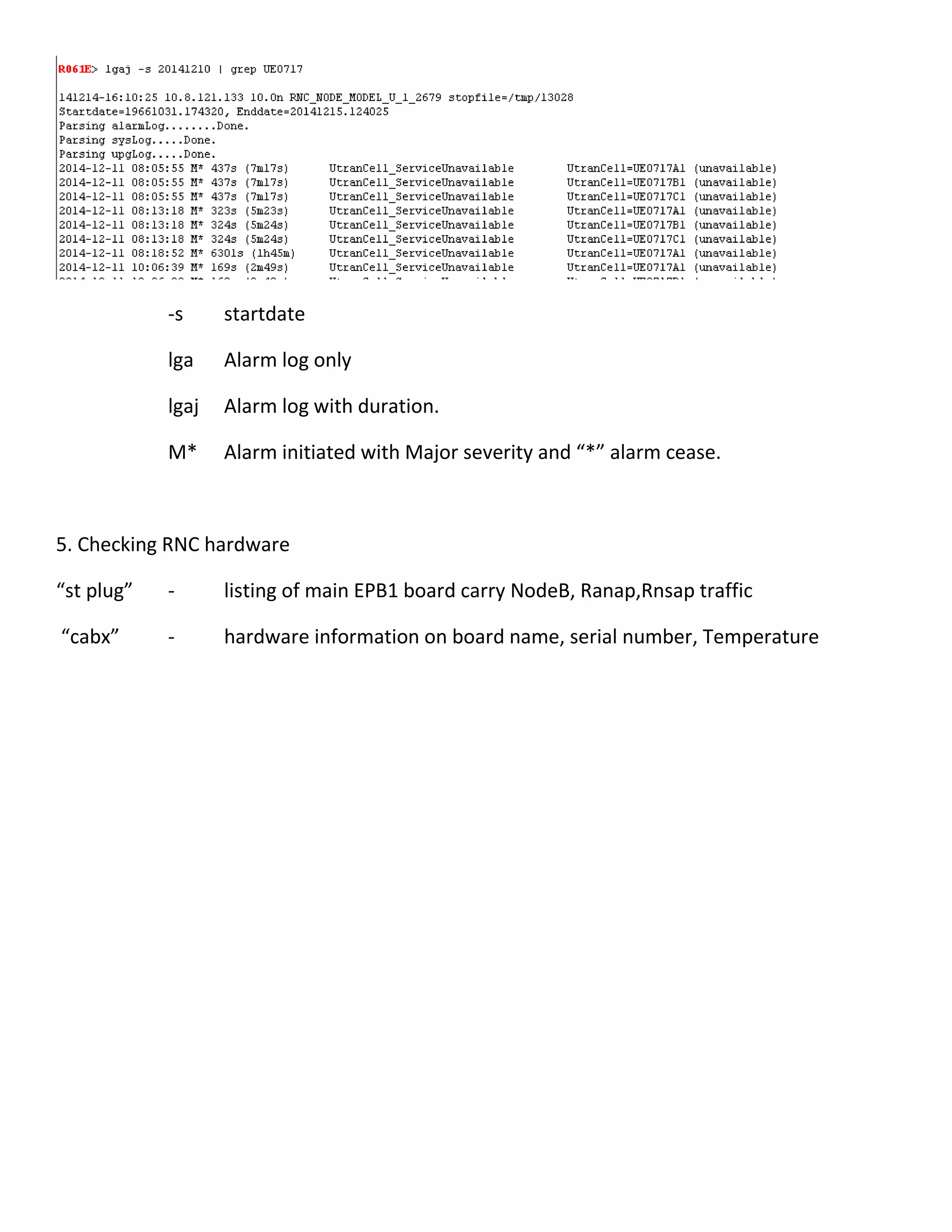
4. Checking NodeB downtime from the log in RNC
-s startdate
lga Alarm log only
lgaj Alarm log with duration.
M* Alarm initiated with Major severity and “*” alarm cease.
5. Checking RNC hardware
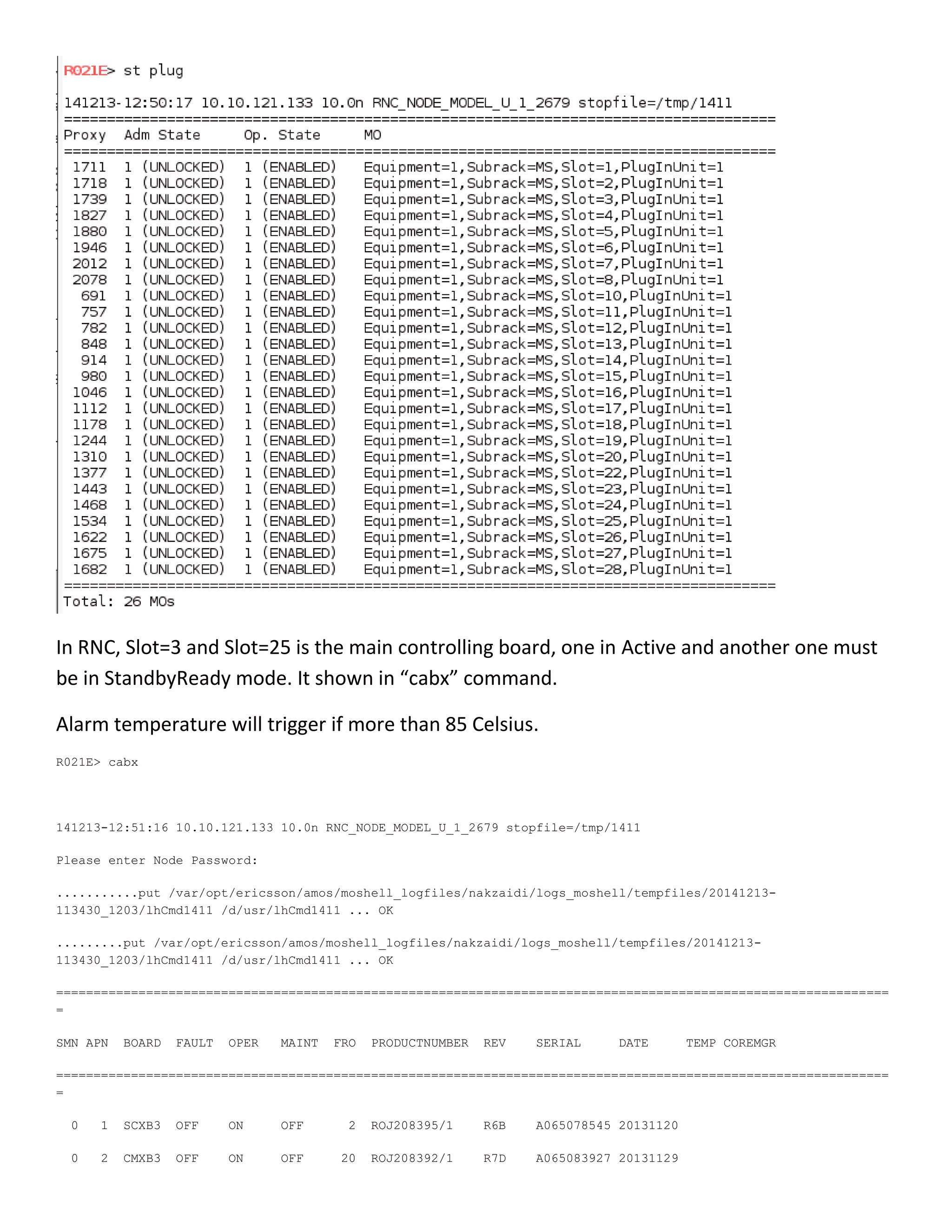
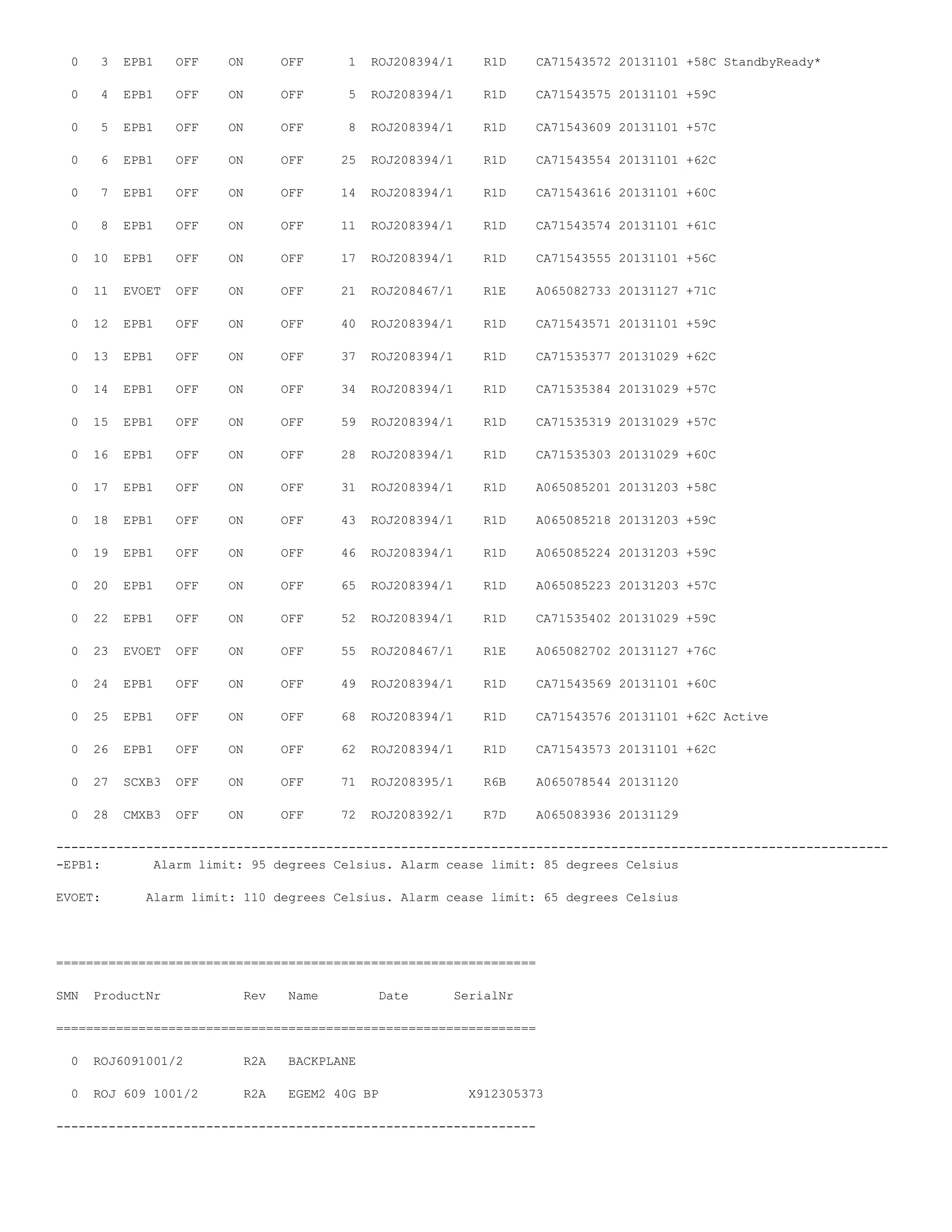
“st plug” - listing of main EPB1 board carry NodeB, Ranap,Rnsap traffic
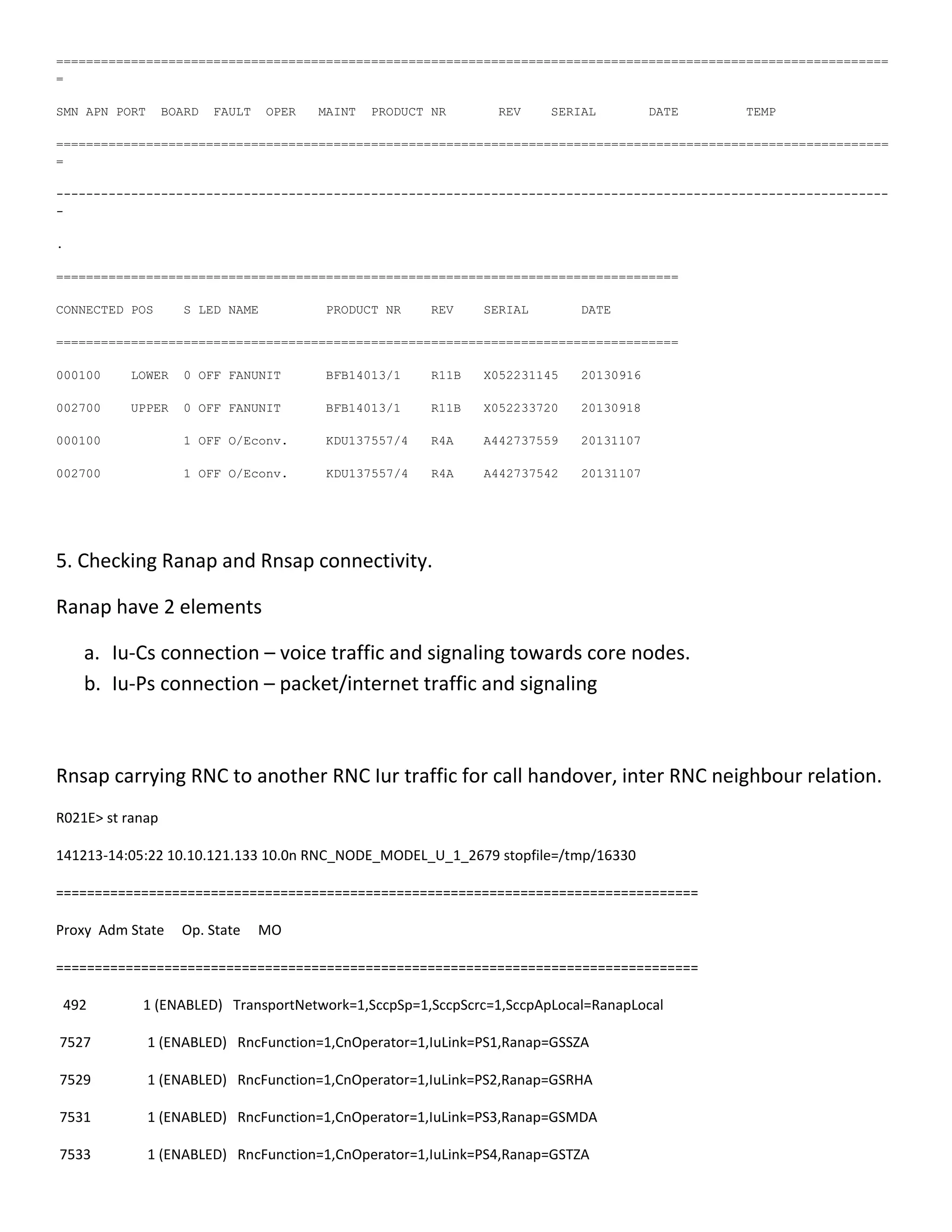
“cabx” - hardware information on board name, serial number, Temperature
In RNC, Slot=3 and Slot=25 is the main controlling board, one in Active and another one must
be in StandbyReady mode. It shown in “cabx” command.
Alarm temperature will trigger if more than 85 Celsius.
R021E> cabx
141213-12:51:16 10.10.121.133 10.0n RNC_NODE_MODEL_U_1_2679 stopfile=/tmp/1411
Please enter Node Password:
...........put /var/opt/ericsson/amos/moshell_logfiles/nakzaidi/logs_moshell/tempfiles/20141213-
113430_1203/lhCmd1411 /d/usr/lhCmd1411 ... OK
.........put /var/opt/ericsson/amos/moshell_logfiles/nakzaidi/logs_moshell/tempfiles/20141213-
113430_1203/lhCmd1411 /d/usr/lhCmd1411 ... OK
===============================================================================================================
=
SMN APN BOARD FAULT OPER MAINT FRO PRODUCTNUMBER REV SERIAL DATE TEMP COREMGR
===============================================================================================================
=
0 1 SCXB3 OFF ON OFF 2 ROJ208395/1 R6B A065078545 20131120
0 2 CMXB3 OFF ON OFF 20 ROJ208392/1 R7D A065083927 20131129
0 3 EPB1 OFF ON OFF 1 ROJ208394/1 R1D CA71543572 20131101 +58C StandbyReady*
0 4 EPB1 OFF ON OFF 5 ROJ208394/1 R1D CA71543575 20131101 +59C
0 5 EPB1 OFF ON OFF 8 ROJ208394/1 R1D CA71543609 20131101 +57C
0 6 EPB1 OFF ON OFF 25 ROJ208394/1 R1D CA71543554 20131101 +62C
0 7 EPB1 OFF ON OFF 14 ROJ208394/1 R1D CA71543616 20131101 +60C
0 8 EPB1 OFF ON OFF 11 ROJ208394/1 R1D CA71543574 20131101 +61C
0 10 EPB1 OFF ON OFF 17 ROJ208394/1 R1D CA71543555 20131101 +56C
0 11 EVOET OFF ON OFF 21 ROJ208467/1 R1E A065082733 20131127 +71C
0 12 EPB1 OFF ON OFF 40 ROJ208394/1 R1D CA71543571 20131101 +59C
0 13 EPB1 OFF ON OFF 37 ROJ208394/1 R1D CA71535377 20131029 +62C
0 14 EPB1 OFF ON OFF 34 ROJ208394/1 R1D CA71535384 20131029 +57C
0 15 EPB1 OFF ON OFF 59 ROJ208394/1 R1D CA71535319 20131029 +57C
0 16 EPB1 OFF ON OFF 28 ROJ208394/1 R1D CA71535303 20131029 +60C
0 17 EPB1 OFF ON OFF 31 ROJ208394/1 R1D A065085201 20131203 +58C
0 18 EPB1 OFF ON OFF 43 ROJ208394/1 R1D A065085218 20131203 +59C
0 19 EPB1 OFF ON OFF 46 ROJ208394/1 R1D A065085224 20131203 +59C
0 20 EPB1 OFF ON OFF 65 ROJ208394/1 R1D A065085223 20131203 +57C
0 22 EPB1 OFF ON OFF 52 ROJ208394/1 R1D CA71535402 20131029 +59C
0 23 EVOET OFF ON OFF 55 ROJ208467/1 R1E A065082702 20131127 +76C
0 24 EPB1 OFF ON OFF 49 ROJ208394/1 R1D CA71543569 20131101 +60C
0 25 EPB1 OFF ON OFF 68 ROJ208394/1 R1D CA71543576 20131101 +62C Active
0 26 EPB1 OFF ON OFF 62 ROJ208394/1 R1D CA71543573 20131101 +62C
0 27 SCXB3 OFF ON OFF 71 ROJ208395/1 R6B A065078544 20131120
0 28 CMXB3 OFF ON OFF 72 ROJ208392/1 R7D A065083936 20131129
---------------------------------------------------------------------------------------------------------------
-EPB1: Alarm limit: 95 degrees Celsius. Alarm cease limit: 85 degrees Celsius
EVOET: Alarm limit: 110 degrees Celsius. Alarm cease limit: 65 degrees Celsius
================================================================
SMN ProductNr Rev Name Date SerialNr
================================================================
0 ROJ6091001/2 R2A BACKPLANE
0 ROJ 609 1001/2 R2A EGEM2 40G BP X912305373
----------------------------------------------------------------
===============================================================================================================
=
SMN APN PORT BOARD FAULT OPER MAINT PRODUCT NR REV SERIAL DATE TEMP
===============================================================================================================
=
---------------------------------------------------------------------------------------------------------------
-
.
===================================================================================
CONNECTED POS S LED NAME PRODUCT NR REV SERIAL DATE
===================================================================================
000100 LOWER 0 OFF FANUNIT BFB14013/1 R11B X052231145 20130916
002700 UPPER 0 OFF FANUNIT BFB14013/1 R11B X052233720 20130918
000100 1 OFF O/Econv. KDU137557/4 R4A A442737559 20131107
002700 1 OFF O/Econv. KDU137557/4 R4A A442737542 20131107
5. Checking Ranap and Rnsap connectivity.
Ranap have 2 elements
a. Iu-Cs connection – voice traffic and signaling towards core nodes.
b. Iu-Ps connection – packet/internet traffic and signaling
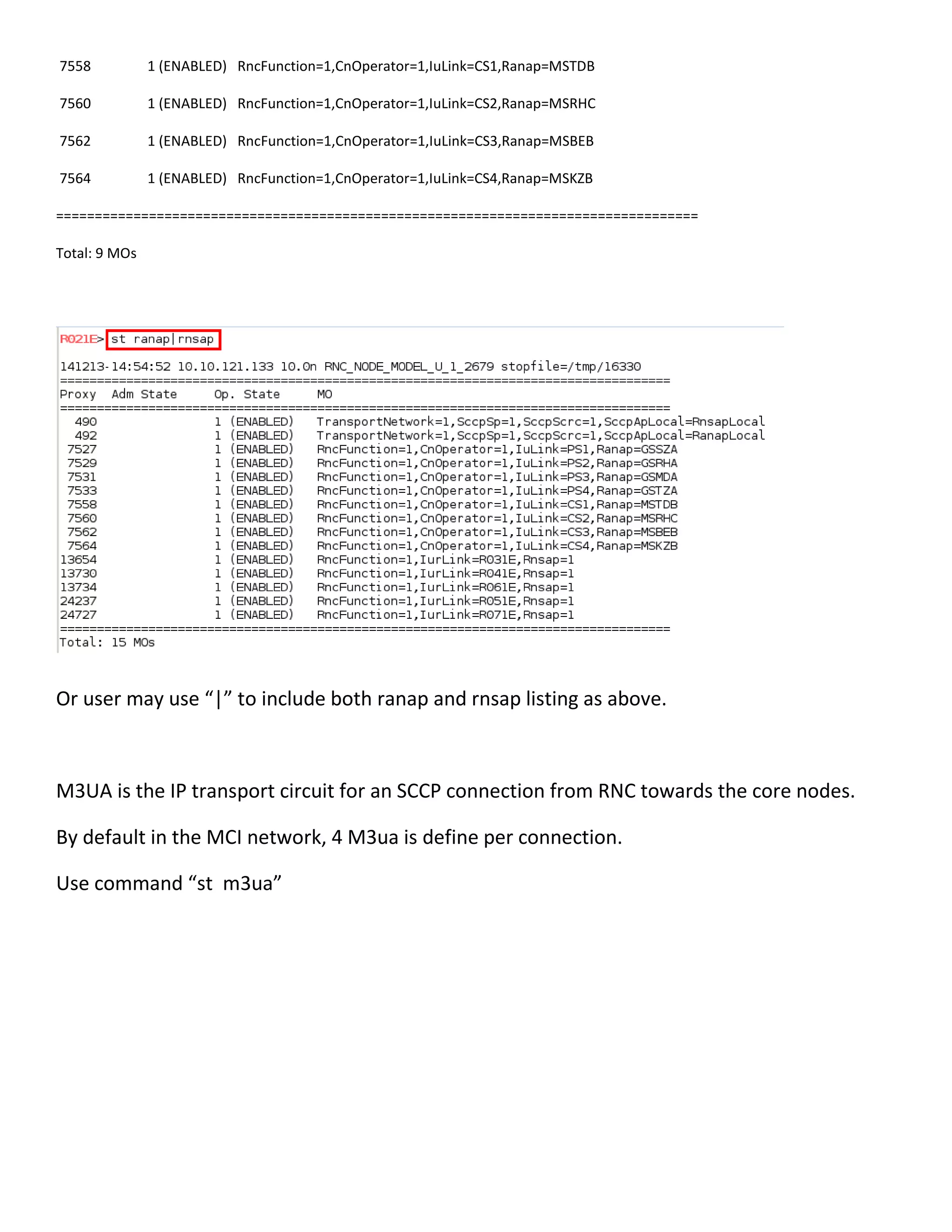
Rnsap carrying RNC to another RNC Iur traffic for call handover, inter RNC neighbour relation.
R021E> st ranap
141213-14:05:22 10.10.121.133 10.0n RNC_NODE_MODEL_U_1_2679 stopfile=/tmp/16330
===================================================================================
Proxy Adm State Op. State MO
===================================================================================
492 1 (ENABLED) TransportNetwork=1,SccpSp=1,SccpScrc=1,SccpApLocal=RanapLocal
7527 1 (ENABLED) RncFunction=1,CnOperator=1,IuLink=PS1,Ranap=GSSZA
7529 1 (ENABLED) RncFunction=1,CnOperator=1,IuLink=PS2,Ranap=GSRHA
7531 1 (ENABLED) RncFunction=1,CnOperator=1,IuLink=PS3,Ranap=GSMDA
7533 1 (ENABLED) RncFunction=1,CnOperator=1,IuLink=PS4,Ranap=GSTZA
7558 1 (ENABLED) RncFunction=1,CnOperator=1,IuLink=CS1,Ranap=MSTDB
7560 1 (ENABLED) RncFunction=1,CnOperator=1,IuLink=CS2,Ranap=MSRHC
7562 1 (ENABLED) RncFunction=1,CnOperator=1,IuLink=CS3,Ranap=MSBEB
7564 1 (ENABLED) RncFunction=1,CnOperator=1,IuLink=CS4,Ranap=MSKZB
===================================================================================
Total: 9 MOs
Or user may use “|” to include both ranap and rnsap listing as above.
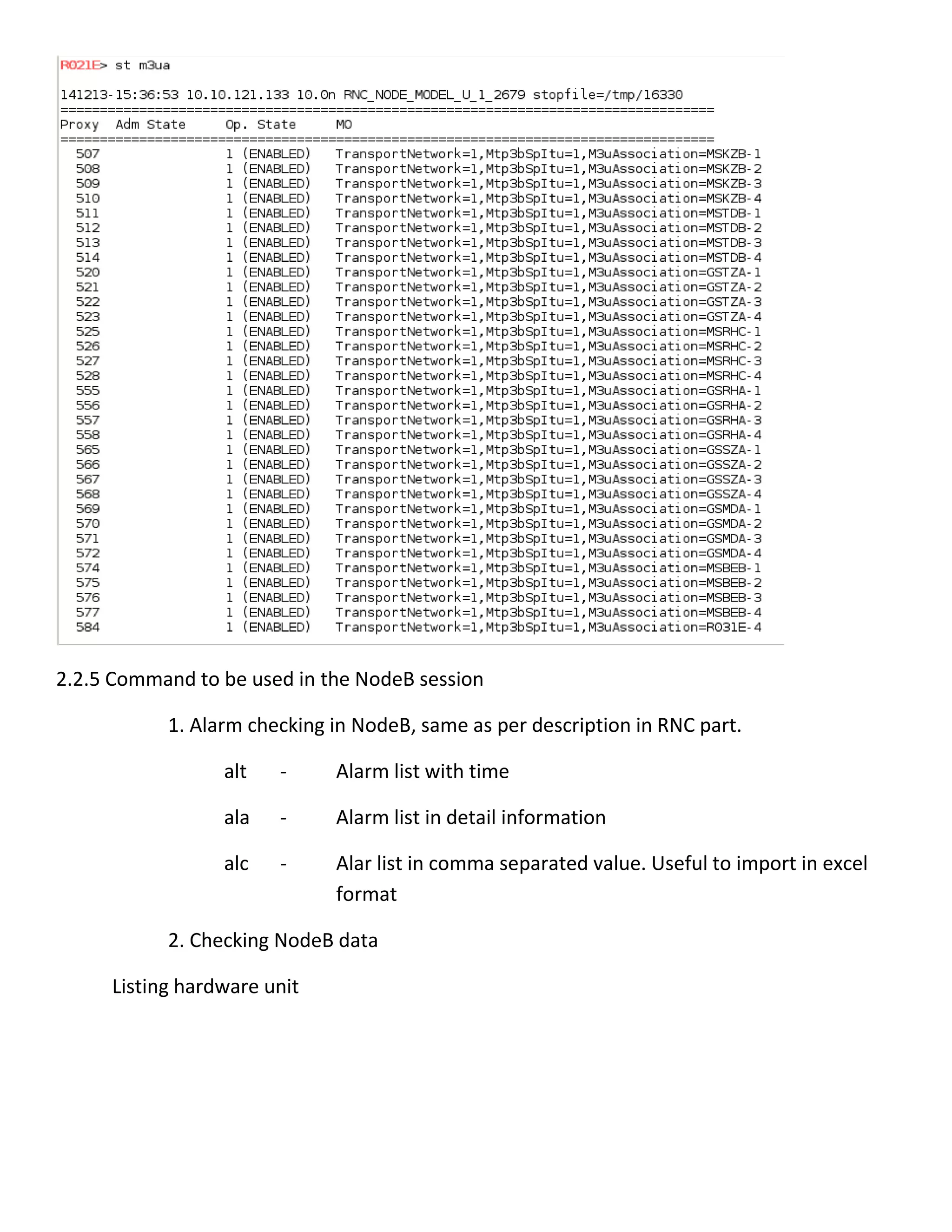
M3UA is the IP transport circuit for an SCCP connection from RNC towards the core nodes.
By default in the MCI network, 4 M3ua is define per connection.
Use command “st m3ua”
2.2.5 Command to be used in the NodeB session
1. Alarm checking in NodeB, same as per description in RNC part.
alt - Alarm list with time
ala - Alarm list in detail information
alc - Alar list in comma separated value. Useful to import in excel
format
2. Checking NodeB data
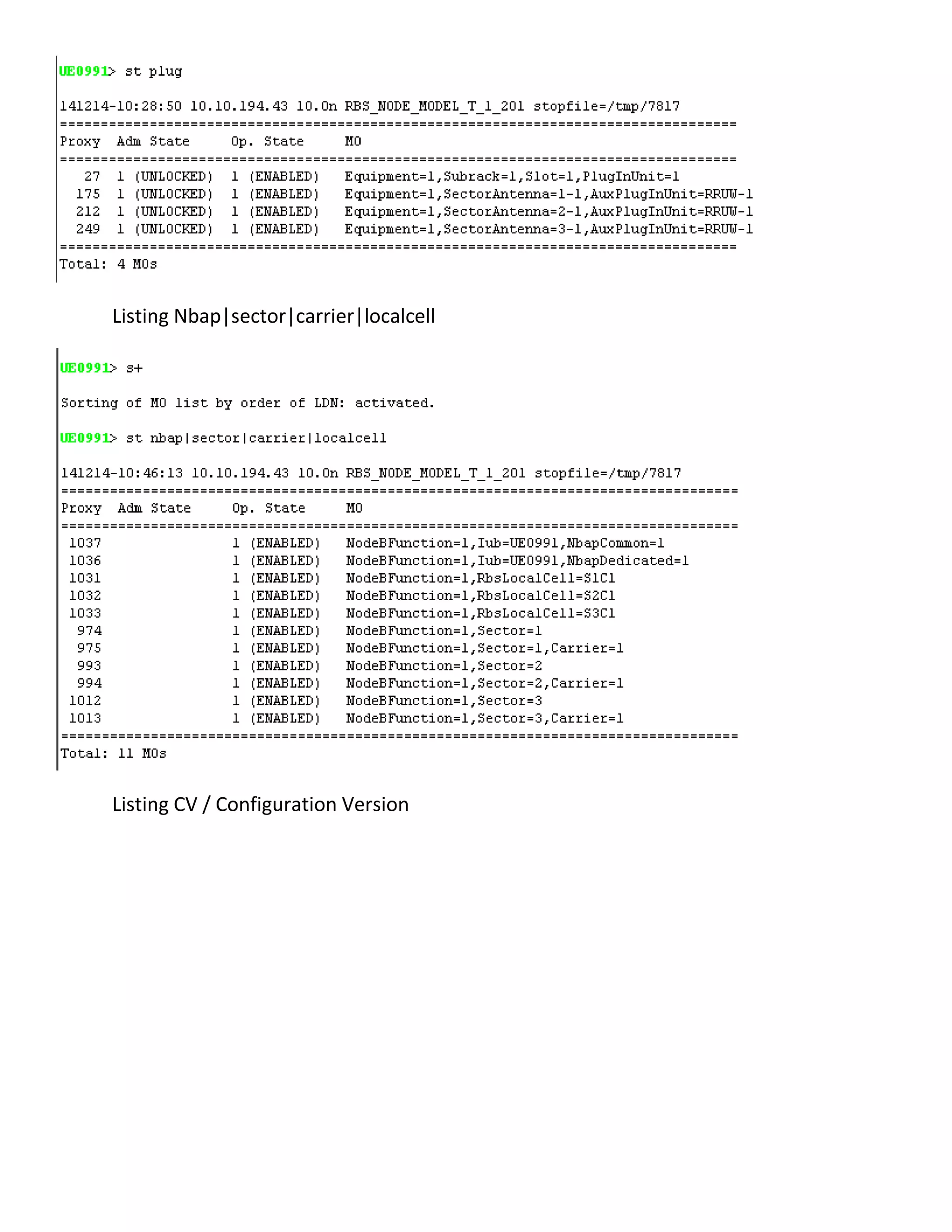
Listing hardware unit
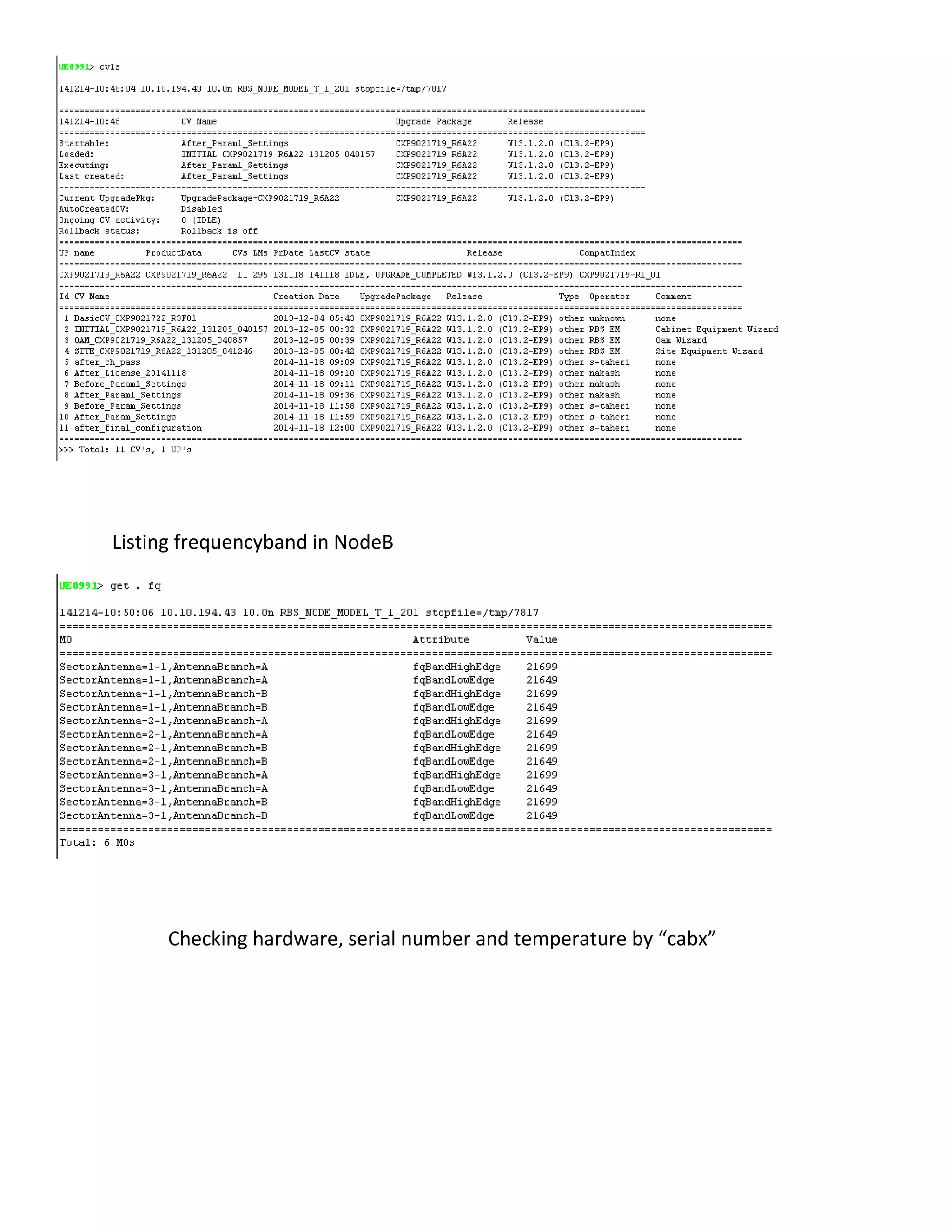
Listing Nbap|sector|carrier|localcell
Listing CV / Configuration Version
Listing frequencyband in NodeB
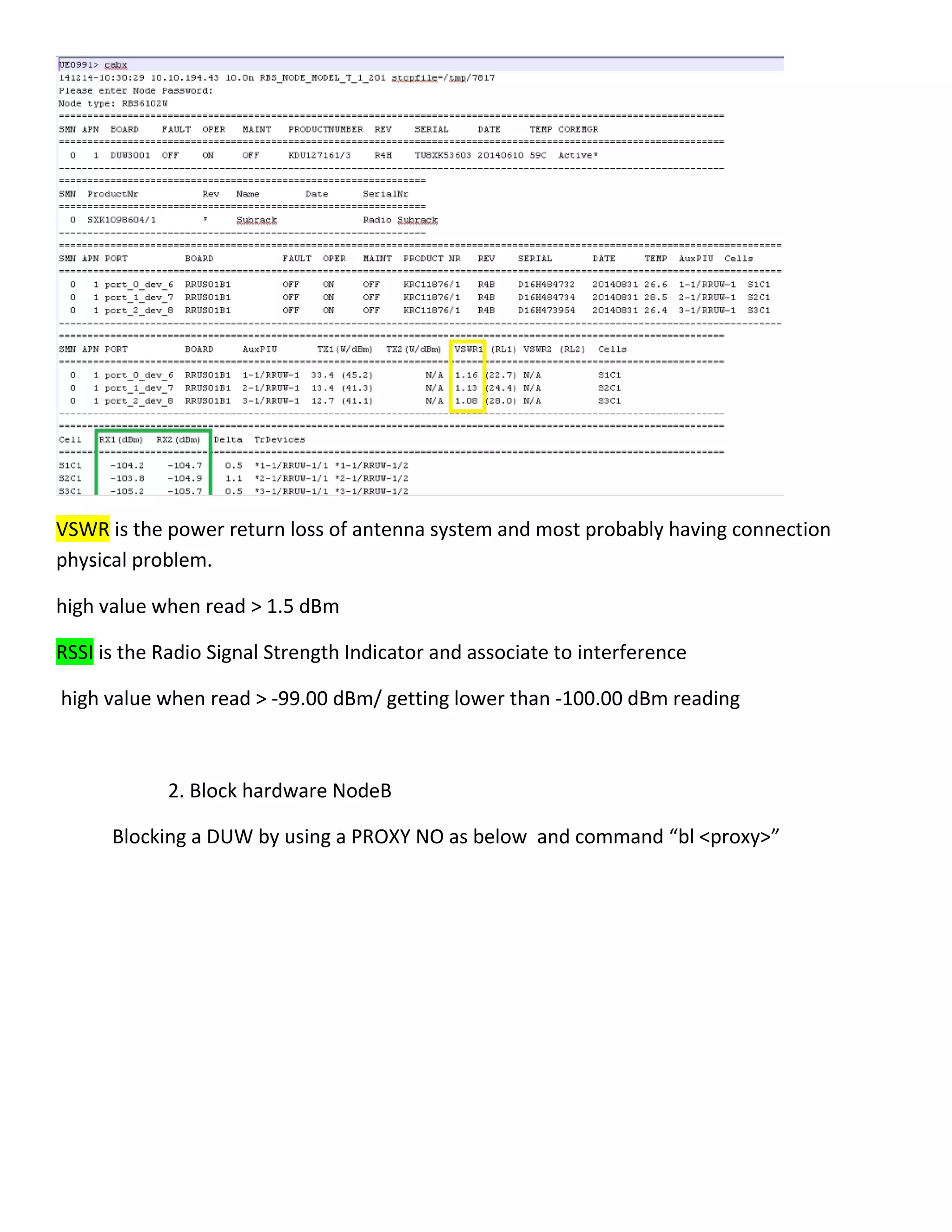
Checking hardware, serial number and temperature by “cabx”
VSWR is the power return loss of antenna system and most probably having connection
physical problem.
high value when read > 1.5 dBm
RSSI is the Radio Signal Strength Indicator and associate to interference
high value when read > -99.00 dBm/ getting lower than -100.00 dBm reading
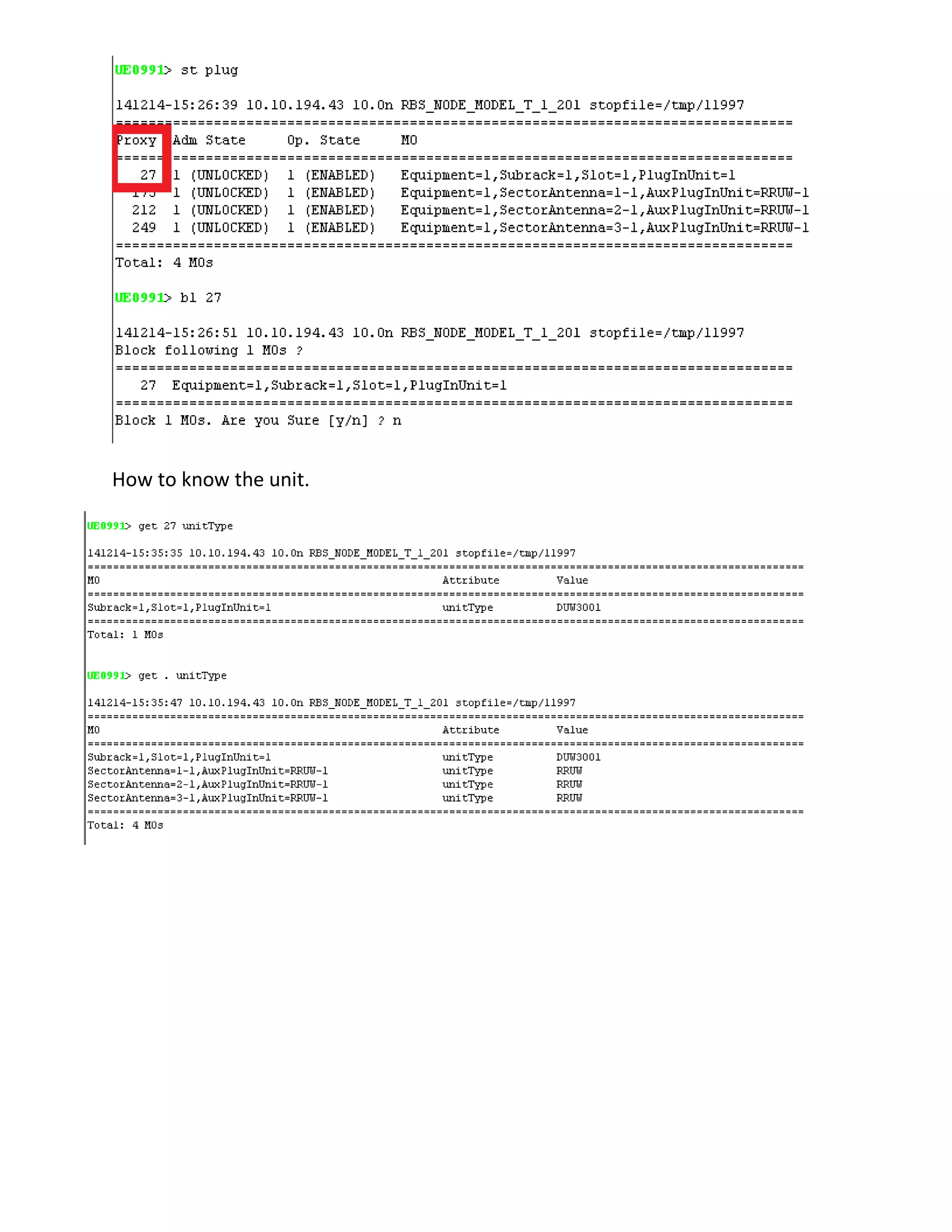
2. Block hardware NodeB
Blocking a DUW by using a PROXY NO as below and command “bl <proxy>”
How to know the unit.

Amos command

  • 1.
    AMOS - COMMANDLINEINTERFACE 1. GETTING STARTED 1.1 LAUNCHING AMOS FROM OSS FRONT PAGE GUI AMOS MOSHELL SESSION IS OPEN DEFAULT FROM USER HOME DIRECTORY IN OSS. 1.2 LAUNCHING AMOS FROM OSS ONE/ OSS NETWORK EXPLORER
  • 2.
    THE AMOS SESSIONDIRECTLY OPENED INTO R021E NODE. 2. USING AMOS 2.1 THESE ARE THE IP ADDRESSES OF THE RNC . RNC IP ADDRESS PASSWORD R021E 10.10.121.133 rnc@1234 R031E 10.17.121.133 rnc@1234 R041E 10.11.121.133 rnc@1234 R051E 10.18.121.133 rnc@1234 R061E 10.8.121.133 rnc@1234 R071E 10.14.121.133 rnc@1234
  • 3.
    2.2 AMOS SESSION USERMAY USE NODE DNS NAME OR IP ADDRESS TO CONNECT TO THE NODE. WHEN THE IP CONTACT IS OK, BOTH IS ACCESSIBLE. 2.2.1 PLEASE USER SMALL LETTER FOR command initiation throughout the AMOS SESSION. amos R021E or amos 10.10.121.133 2.2.2 IP Addresses are used when the OSS does not define the updated Node DNS with its IP Address. 2.2.3 After amos R021E, user must send command “lt all”. This will refresh and load all MO’s information into the session. User may notice that for the “amos 10.10.121.133” the effect “lt all”, will later on read the node userlabel to be R021E. 2.2.4 Command to be used in the RNC session
  • 4.
    1. Alarm checkingin RNC alt - Alarm list with time ala - Alarm list in detail information alc - Alar list in comma separated value. Useful to import in excel format
  • 5.
    2. Checking NodeBin RNC lst <NodeB ID> Normally, Site ID is starting with 2 alphabets follow by 4 digits. To check all subordinate of a cell, use “lst”. To check the main element use, ‘st”
  • 6.
    To see allsite listing in the related RNC, use “str” To have site listing in CSV format, use “str <any label>”, it will create the file csv format and need to be transferred from OSS your user folder into your laptop and can be open in excel file as sample below. R021E> str UI0401 Output saved to CSV file: UI0401 R021E> !ls UI0401* UI0401 R021E> !pwd /home/nakzaidi File sample after excel extraction:
  • 7.
    2014-17-12 Update ofcommand “str” The implementation of 2nd carrier has cause some confusion to the output command “str”. It register the fully operational site as only 1 site and the rest, in under the second category – totally or partially unavailable. This is due to the 1st carrier utrancells are fully operational and 2nd carrier utrancells are LOCKED. The recommendation given to the issue is to monitor closely the red marker CELLNAMES column. Detail information here: Columns: MOD: this the RNC module that the site is defined in. IUBLINK: this is the identity of the iublink that the site is using. CELLNAME: this is the name of the cells that are connected to that IubLink. the cell names correspond to the respective sectors. eg: 6306-1/2/3 means that: cell 63061 is connected to SECT1 cell 63062 is connected to SECT2 cell 63063 is connected to SECT3. CFRPHEM: the first digit is the state of the UtranCell. the three following digits are the state of the common channels (Fach/Rach/Pch).
  • 8.
    the fifth digit(if present) represents the state of the hsdpa channel (Hsdsch). the sixth digit (if present) represents the state of the enhanced uplink channel (Eul). the seventh digit (if present) represents the state of the Mbms channel (MbmsCch). ICDS: the first digit is the state of the IubLink the second digit is the state of NbapCommon the third digit is the state of NbapDedicated Up to P5, the final two digits are the states of NodeSynchTp 1 and 2. From P6, the final digit is the state of NodeSynch. TN: The type of transport network used by the IubLink. A=ATM, I=IP, AI=DualStack States: - L = Locked - S = ShuttingDown - 0 = Unlocked & Disabled - 1 = Unlocked & Enabled Please concentrate on the highlighted column only.
  • 9.
    3. Blocking/Deblocking aNodeB To block an utrancell only. The same when doing with command “bl <utrancell id>” Also the same when “bl <proxy no>”
  • 10.
    To block asite, use “bl <site id>” or “lbl <site id>” 4. Checking NodeB downtime from the log in RNC
  • 11.
    -s startdate lga Alarmlog only lgaj Alarm log with duration. M* Alarm initiated with Major severity and “*” alarm cease. 5. Checking RNC hardware “st plug” - listing of main EPB1 board carry NodeB, Ranap,Rnsap traffic “cabx” - hardware information on board name, serial number, Temperature
  • 12.
    In RNC, Slot=3and Slot=25 is the main controlling board, one in Active and another one must be in StandbyReady mode. It shown in “cabx” command. Alarm temperature will trigger if more than 85 Celsius. R021E> cabx 141213-12:51:16 10.10.121.133 10.0n RNC_NODE_MODEL_U_1_2679 stopfile=/tmp/1411 Please enter Node Password: ...........put /var/opt/ericsson/amos/moshell_logfiles/nakzaidi/logs_moshell/tempfiles/20141213- 113430_1203/lhCmd1411 /d/usr/lhCmd1411 ... OK .........put /var/opt/ericsson/amos/moshell_logfiles/nakzaidi/logs_moshell/tempfiles/20141213- 113430_1203/lhCmd1411 /d/usr/lhCmd1411 ... OK =============================================================================================================== = SMN APN BOARD FAULT OPER MAINT FRO PRODUCTNUMBER REV SERIAL DATE TEMP COREMGR =============================================================================================================== = 0 1 SCXB3 OFF ON OFF 2 ROJ208395/1 R6B A065078545 20131120 0 2 CMXB3 OFF ON OFF 20 ROJ208392/1 R7D A065083927 20131129
  • 13.
    0 3 EPB1OFF ON OFF 1 ROJ208394/1 R1D CA71543572 20131101 +58C StandbyReady* 0 4 EPB1 OFF ON OFF 5 ROJ208394/1 R1D CA71543575 20131101 +59C 0 5 EPB1 OFF ON OFF 8 ROJ208394/1 R1D CA71543609 20131101 +57C 0 6 EPB1 OFF ON OFF 25 ROJ208394/1 R1D CA71543554 20131101 +62C 0 7 EPB1 OFF ON OFF 14 ROJ208394/1 R1D CA71543616 20131101 +60C 0 8 EPB1 OFF ON OFF 11 ROJ208394/1 R1D CA71543574 20131101 +61C 0 10 EPB1 OFF ON OFF 17 ROJ208394/1 R1D CA71543555 20131101 +56C 0 11 EVOET OFF ON OFF 21 ROJ208467/1 R1E A065082733 20131127 +71C 0 12 EPB1 OFF ON OFF 40 ROJ208394/1 R1D CA71543571 20131101 +59C 0 13 EPB1 OFF ON OFF 37 ROJ208394/1 R1D CA71535377 20131029 +62C 0 14 EPB1 OFF ON OFF 34 ROJ208394/1 R1D CA71535384 20131029 +57C 0 15 EPB1 OFF ON OFF 59 ROJ208394/1 R1D CA71535319 20131029 +57C 0 16 EPB1 OFF ON OFF 28 ROJ208394/1 R1D CA71535303 20131029 +60C 0 17 EPB1 OFF ON OFF 31 ROJ208394/1 R1D A065085201 20131203 +58C 0 18 EPB1 OFF ON OFF 43 ROJ208394/1 R1D A065085218 20131203 +59C 0 19 EPB1 OFF ON OFF 46 ROJ208394/1 R1D A065085224 20131203 +59C 0 20 EPB1 OFF ON OFF 65 ROJ208394/1 R1D A065085223 20131203 +57C 0 22 EPB1 OFF ON OFF 52 ROJ208394/1 R1D CA71535402 20131029 +59C 0 23 EVOET OFF ON OFF 55 ROJ208467/1 R1E A065082702 20131127 +76C 0 24 EPB1 OFF ON OFF 49 ROJ208394/1 R1D CA71543569 20131101 +60C 0 25 EPB1 OFF ON OFF 68 ROJ208394/1 R1D CA71543576 20131101 +62C Active 0 26 EPB1 OFF ON OFF 62 ROJ208394/1 R1D CA71543573 20131101 +62C 0 27 SCXB3 OFF ON OFF 71 ROJ208395/1 R6B A065078544 20131120 0 28 CMXB3 OFF ON OFF 72 ROJ208392/1 R7D A065083936 20131129 --------------------------------------------------------------------------------------------------------------- -EPB1: Alarm limit: 95 degrees Celsius. Alarm cease limit: 85 degrees Celsius EVOET: Alarm limit: 110 degrees Celsius. Alarm cease limit: 65 degrees Celsius ================================================================ SMN ProductNr Rev Name Date SerialNr ================================================================ 0 ROJ6091001/2 R2A BACKPLANE 0 ROJ 609 1001/2 R2A EGEM2 40G BP X912305373 ----------------------------------------------------------------
  • 14.
    =============================================================================================================== = SMN APN PORTBOARD FAULT OPER MAINT PRODUCT NR REV SERIAL DATE TEMP =============================================================================================================== = --------------------------------------------------------------------------------------------------------------- - . =================================================================================== CONNECTED POS S LED NAME PRODUCT NR REV SERIAL DATE =================================================================================== 000100 LOWER 0 OFF FANUNIT BFB14013/1 R11B X052231145 20130916 002700 UPPER 0 OFF FANUNIT BFB14013/1 R11B X052233720 20130918 000100 1 OFF O/Econv. KDU137557/4 R4A A442737559 20131107 002700 1 OFF O/Econv. KDU137557/4 R4A A442737542 20131107 5. Checking Ranap and Rnsap connectivity. Ranap have 2 elements a. Iu-Cs connection – voice traffic and signaling towards core nodes. b. Iu-Ps connection – packet/internet traffic and signaling Rnsap carrying RNC to another RNC Iur traffic for call handover, inter RNC neighbour relation. R021E> st ranap 141213-14:05:22 10.10.121.133 10.0n RNC_NODE_MODEL_U_1_2679 stopfile=/tmp/16330 =================================================================================== Proxy Adm State Op. State MO =================================================================================== 492 1 (ENABLED) TransportNetwork=1,SccpSp=1,SccpScrc=1,SccpApLocal=RanapLocal 7527 1 (ENABLED) RncFunction=1,CnOperator=1,IuLink=PS1,Ranap=GSSZA 7529 1 (ENABLED) RncFunction=1,CnOperator=1,IuLink=PS2,Ranap=GSRHA 7531 1 (ENABLED) RncFunction=1,CnOperator=1,IuLink=PS3,Ranap=GSMDA 7533 1 (ENABLED) RncFunction=1,CnOperator=1,IuLink=PS4,Ranap=GSTZA
  • 15.
    7558 1 (ENABLED)RncFunction=1,CnOperator=1,IuLink=CS1,Ranap=MSTDB 7560 1 (ENABLED) RncFunction=1,CnOperator=1,IuLink=CS2,Ranap=MSRHC 7562 1 (ENABLED) RncFunction=1,CnOperator=1,IuLink=CS3,Ranap=MSBEB 7564 1 (ENABLED) RncFunction=1,CnOperator=1,IuLink=CS4,Ranap=MSKZB =================================================================================== Total: 9 MOs Or user may use “|” to include both ranap and rnsap listing as above. M3UA is the IP transport circuit for an SCCP connection from RNC towards the core nodes. By default in the MCI network, 4 M3ua is define per connection. Use command “st m3ua”
  • 16.
    2.2.5 Command tobe used in the NodeB session 1. Alarm checking in NodeB, same as per description in RNC part. alt - Alarm list with time ala - Alarm list in detail information alc - Alar list in comma separated value. Useful to import in excel format 2. Checking NodeB data Listing hardware unit
  • 17.
  • 18.
    Listing frequencyband inNodeB Checking hardware, serial number and temperature by “cabx”
  • 19.
    VSWR is thepower return loss of antenna system and most probably having connection physical problem. high value when read > 1.5 dBm RSSI is the Radio Signal Strength Indicator and associate to interference high value when read > -99.00 dBm/ getting lower than -100.00 dBm reading 2. Block hardware NodeB Blocking a DUW by using a PROXY NO as below and command “bl <proxy>”
  • 20.
    How to knowthe unit.