JNCIA - JUNOS
Eng. Ahmed Nosehy
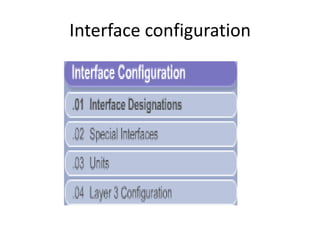
Interface configuration
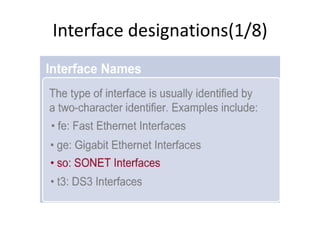
Interface designations(1/8)
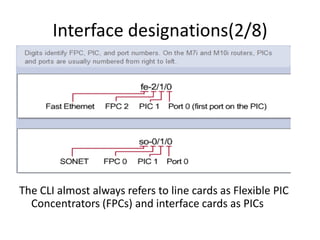
Interface designations(2/8)
The CLI almost always refers to line cards as Flexible PIC
Concentrators (FPCs) and interface cards as PICs
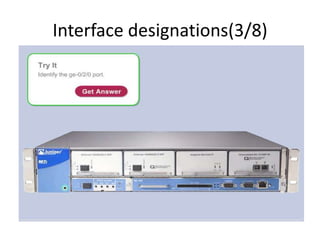
Interface designations(3/8)
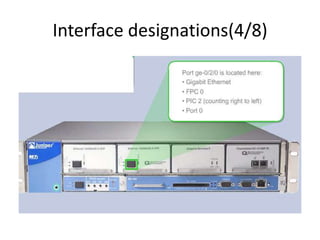
Interface designations(4/8)
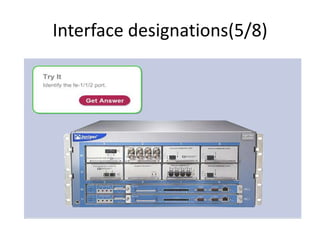
Interface designations(5/8)
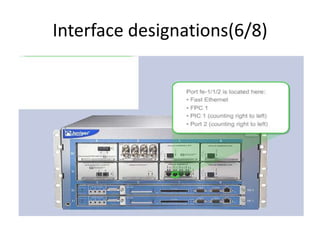
Interface designations(6/8)
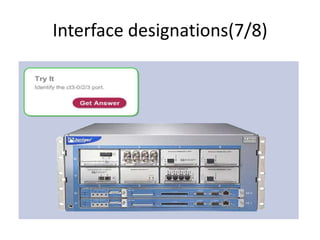
Interface designations(7/8)
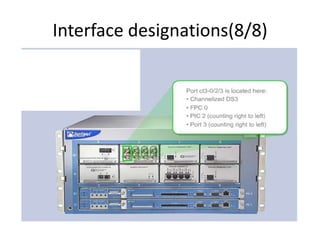
Interface designations(8/8)
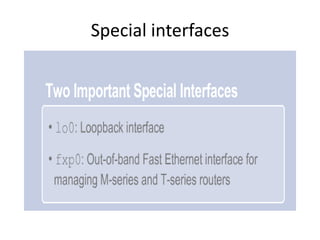
Special interfaces
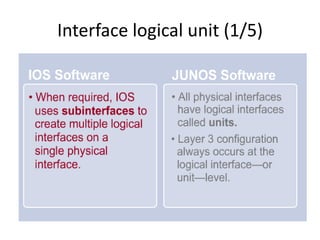
Interface logical unit (1/5)
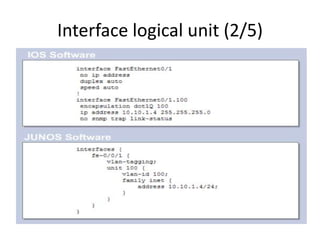
Interface logical unit (2/5)
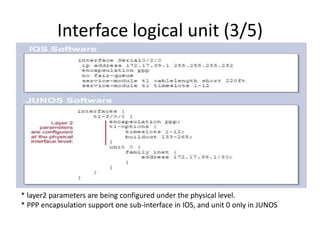
Interface logical unit (3/5)
* layer2 parameters are being configured under the physical level.
* PPP encapsulation support one sub-interface in IOS, and unit 0 only in JUNOS
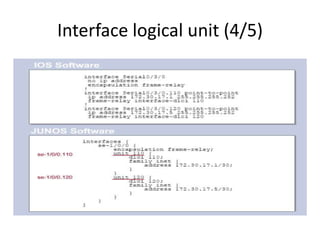
Interface logical unit (4/5)
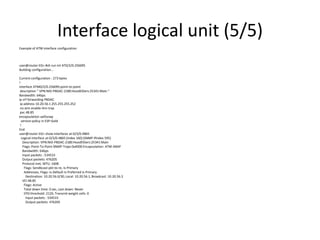
Interface logical unit (5/5)
Example of ATM interface configuration
user@router-EG> #sh run int AT0/2/0.256095
Building configuration...
Current configuration : 273 bytes
!
interface ATM0/2/0.256095 point-to-point
description " VPN:NID-PBDAC-2180:HoodElDers:25341:Main "
Bandwidth: 64bps
ip vrf forwarding PBDAC
ip address 10.20.56.1255.255.255.252
no atm enable-ilmi-trap
pvc 48.85
encapsulation aal5snap
service-policy in ESP-Gold
!
End
user@router-EG> show interfaces at-0/3/0.4865
Logical interface at-0/3/0.4865 (Index 160) (SNMP ifIndex 595)
Description: VPN:NID-PBDAC-2180:HoodElDers:25341:Main
Flags: Point-To-Point SNMP-Traps 0x4000 Encapsulation: ATM-SNAP
Bandwidth: 64bps
Input packets : 534533
Output packets: 476205
Protocol inet, MTU: 1608
Flags: Sendbcast-pkt-to-re, Is-Primary
Addresses, Flags: Is-Default Is-Preferred Is-Primary
Destination: 10.20.56.0/30, Local: 10.20.56.1, Broadcast: 10.20.56.3
VCI 48.85
Flags: Active
Total down time: 0 sec, Last down: Never
EPD threshold: 2129, Transmit weight cells: 0
Input packets : 534533
Output packets: 476205
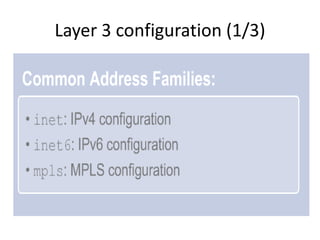
Layer 3 configuration (1/3)
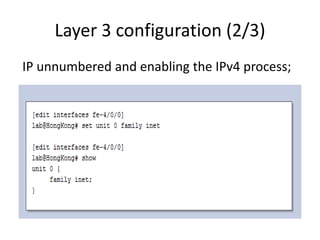
Layer 3 configuration (2/3)
IP unnumbered and enabling the IPv4 process;
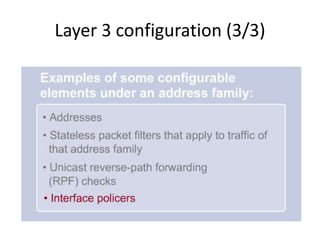
Layer 3 configuration (3/3)
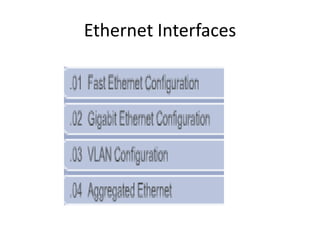
Ethernet Interfaces
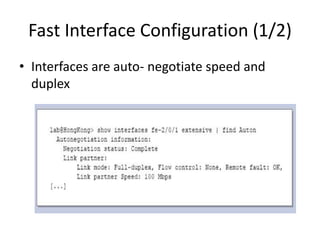
Fast Interface Configuration (1/2)
• Interfaces are auto- negotiate speed and
duplex
Fast Interface Configuration (2/2)
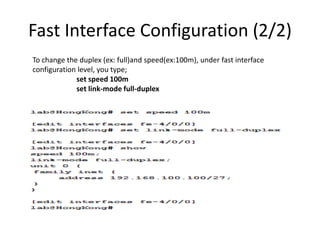
To change the duplex (ex: full)and speed(ex:100m), under fast interface
configuration level, you type;
set speed 100m
set link-mode full-duplex
Gigabit Ethernet Configuration (1/2)
• You can edit physical parameters under
(ether-options or gigether-option)configuration level.
• ether-option or gigether-option are being depended
on the switch catalyst.
set ether-options speed 100m
set ether-options link-mode full-duplex
set ether-options auto-negotiation
Gigabit Ethernet Configuration (2/2)
User@A-S01J-EG> show interfaces ge-0/0/20
Physical interface: ge-0/0/20, Enabled, Physical link is Up
Interface index: 199, SNMP ifIndex: 588
Description: ESP-Fathala-AUTO-L3VPN-1226-11
Link-level type: Ethernet, MTU: 1514, Speed: Auto, Duplex: Auto, BPDU Error: None, MAC-REWRITE Error: None, Loopback: Disabled, Source filtering: Disabled,
Flow control: Enabled, Auto-negotiation: Enabled, Remote fault: Online
Device flags : Present Running
Interface flags: SNMP-Traps Internal: 0x0
Link flags : None
CoS queues : 8 supported, 8 maximum usable queues
Current address: 2c:6b:f5:8b:29:14, Hardware address: 2c:6b:f5:8b:29:14
Last flapped : 2014-01-2303:38:42EET (1w0d 09:16 ago)
Input rate : 4819136 bps (922 pps)
Output rate : 1144728bps (851 pps)
Active alarms : None
Active defects : None
Interface transmit statistics: Disabled
Logical interface ge-0/0/20.0(Index 122) (SNMP ifIndex 594)
Flags: SNMP-Traps 0x0 Encapsulation: ENET2
Input packets : 0
Output packets: 13338516
Protocol eth-switch
Flags: Trunk-Mode
{master:0}
User@A-S01J-EG> configure private
warning: uncommitted changes will be discarded on exit
Entering configuration mode
{master:0}[edit]
User@A-S01J-EG# edit interfaces ge-0/0/20
{master:0}[edit interfaces ge-0/0/20]
User@A-S01J-EG# edit ether-options
{master:0}[edit interfaces ge-0/0/20 ether-options]
User@A-S01J-EG# set speed 100m
{master:0}[edit interfaces ge-0/0/20 ether-options]
ahmed.nosehy@SEMOHA-S01J-ALX-EG# set link-mode full-duplex
{master:0}[edit interfaces ge-0/0/20 ether-options]
VLAN configuration(1/4)
VLAN configuration(2/4)
Example of editing vlan configuration
{master:0}[edit interfaces]
User @ switch # edit ge-0/0/19
{master:0}[edit interfaces ge-0/0/19]
User @ switch # show
description ESP-Hiltion-Ramsis-INT-30622-6;
{master:0}[edit interfaces ge-0/0/19]
User @ switch # set vlan-tagging
{master:0}[edit interfaces ge-0/0/19]
User @ switch # set unit 10 vlan-id 100
{master:0}[edit interfaces ge-0/0/19]
User @ switch # set unit 11 vlan-id 200
User @ switch # set unit 11 family inet address 2.2.2.2/30
{master:0}[edit interfaces ge-0/0/19]
User @ switch # show
description ESP-Hiltion-Ramsis-INT-30622-6;
vlan-tagging;
unit 10 {
vlan-id 100;
family inet {
address 1.1.1.1/30;
}
}
unit 11 {
vlan-id 200;
family inet {
address 2.2.2.2/30;
}
}
VLAN configuration(3/4)
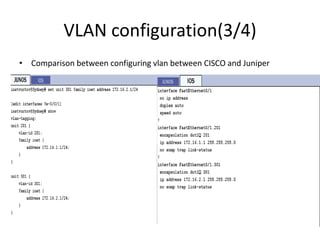
• Comparison between configuring vlan between CISCO and Juniper
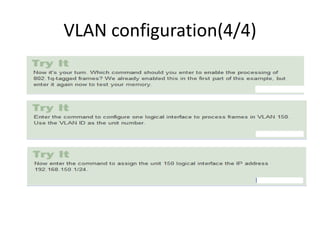
VLAN configuration(4/4)
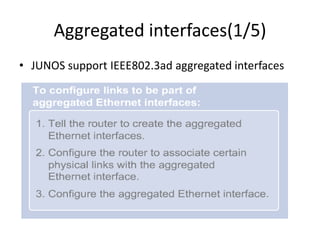
Aggregated interfaces(1/5)
• JUNOS support IEEE802.3ad aggregated interfaces
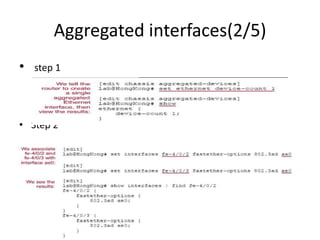
Aggregated interfaces(2/5)
• step 1
• Step 2
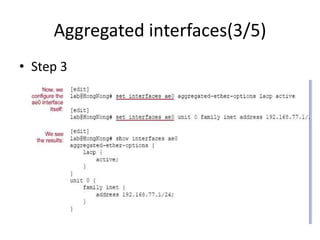
Aggregated interfaces(3/5)
• Step 3
Aggregated interfaces(4/5)
{master:0}[edit]
user@sw-EG# set interfaces ge-1/0/19 ether-options 802.3ad ae0
{master:0}[edit]
user@sw-EG# set interfaces ge-1/0/20 ether-options 802.3ad ae0
{master:0}[edit]
user@sw-EG#
user@sw-EG# show interfaces | find ge-1/0/19
ge-1/0/19{
description ESP-CIB-SmartV-L3VPN-17898-4;
ether-options {
802.3ad ae0;
ge-1/0/20{
description NTRA-Test;
ether-options {
802.3ad ae0;
}
}
{master:0}[edit]
user@sw-EG# set interfaces ae0 aggregated-ether-options lacp active
{master:0}[edit]
user@sw-EG# set interfaces ae0 unit 200 family inet address 3.3.3.3/30
{master:0}[edit]
user@sw-EG# show interfaces ae0
aggregated-ether-options {
lacp {
active;
}
}
unit 200 {
family inet {
address 3.3.3.3/30;
}
}
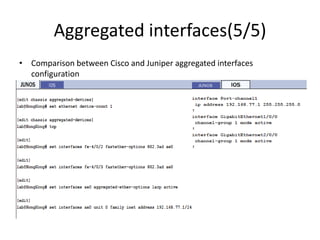
Aggregated interfaces(5/5)
• Comparison between Cisco and Juniper aggregated interfaces
configuration
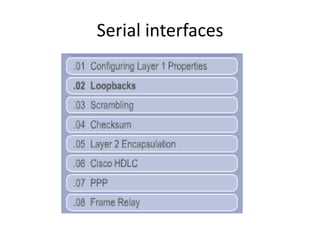
Serial interfaces
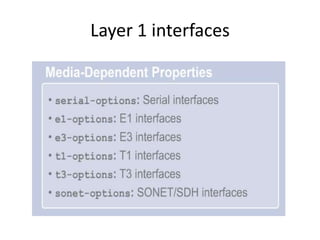
Layer 1 interfaces
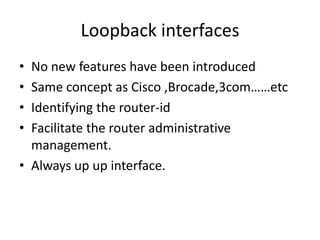
Loopback interfaces
• No new features have been introduced
• Same concept as Cisco ,Brocade,3com……etc
• Identifying the router-id
• Facilitate the router administrative
management.
• Always up up interface.
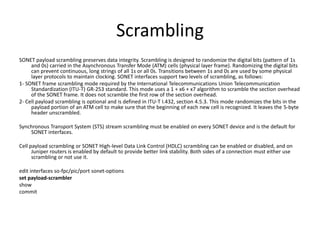
Scrambling
SONET payload scrambling preserves data integrity. Scrambling is designed to randomize the digital bits (pattern of 1s
and 0s) carried in the Asynchronous Transfer Mode (ATM) cells (physical layer frame). Randomizing the digital bits
can prevent continuous, long strings of all 1s or all 0s. Transitions between 1s and 0s are used by some physical
layer protocols to maintain clocking. SONET interfaces support two levels of scrambling, as follows:
1- SONET frame scrambling mode required by the International Telecommunications Union Telecommunication
Standardization (ITU-T) GR-253 standard. This mode uses a 1 + x6 + x7 algorithm to scramble the section overhead
of the SONET frame. It does not scramble the first row of the section overhead.
2- Cell payload scrambling is optional and is defined in ITU-T I.432, section 4.5.3. This mode randomizes the bits in the
payload portion of an ATM cell to make sure that the beginning of each new cell is recognized. It leaves the 5-byte
header unscrambled.
Synchronous Transport System (STS) stream scrambling must be enabled on every SONET device and is the default for
SONET interfaces.
Cell payload scrambling or SONET High-level Data Link Control (HDLC) scrambling can be enabled or disabled, and on
Juniper routers is enabled by default to provide better link stability. Both sides of a connection must either use
scrambling or not use it.
edit interfaces so-fpc/pic/port sonet-options
set payload-scrambler
show
commit
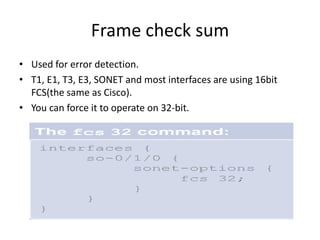
Frame check sum
• Used for error detection.
• T1, E1, T3, E3, SONET and most interfaces are using 16bit
FCS(the same as Cisco).
• You can force it to operate on 32-bit.
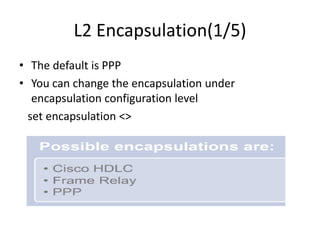
L2 Encapsulation(1/5)
• The default is PPP
• You can change the encapsulation under
encapsulation configuration level
set encapsulation <>
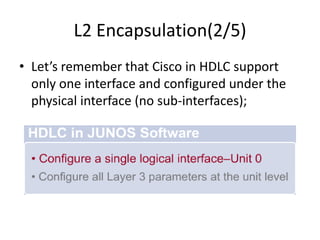
L2 Encapsulation(2/5)
• Let’s remember that Cisco in HDLC support
only one interface and configured under the
physical interface (no sub-interfaces);
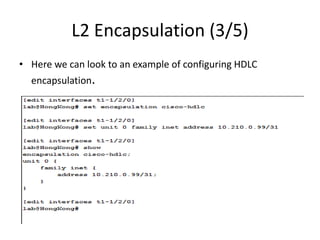
L2 Encapsulation (3/5)
• Here we can look to an example of configuring HDLC
encapsulation.
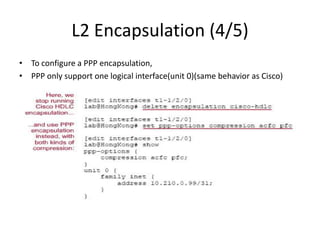
L2 Encapsulation (4/5)
• To configure a PPP encapsulation,
• PPP only support one logical interface(unit 0)(same behavior as Cisco)
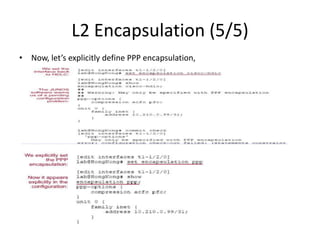
L2 Encapsulation (5/5)
• Now, let’s explicitly define PPP encapsulation,
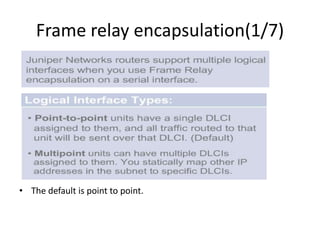
Frame relay encapsulation(1/7)
• The default is point to point.
Frame relay encapsulation(2/7)
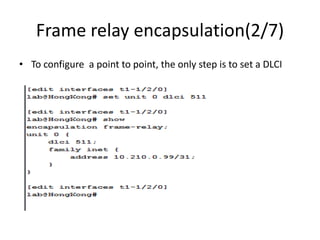
• To configure a point to point, the only step is to set a DLCI
Frame relay encapsulation(3/7)
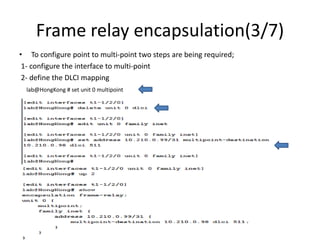
• To configure point to multi-point two steps are being required;
1- configure the interface to multi-point
2- define the DLCI mapping
lab@HongKong # set unit 0 multipoint
Frame relay encapsulation(4/7)
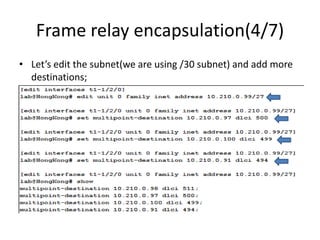
• Let’s edit the subnet(we are using /30 subnet) and add more
destinations;
Frame relay encapsulation(5/7)
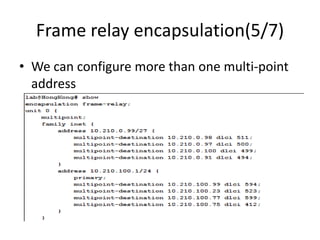
• We can configure more than one multi-point
address
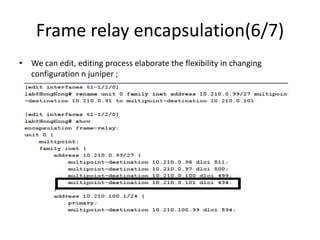
Frame relay encapsulation(6/7)
• We can edit, editing process elaborate the flexibility in changing
configuration n juniper ;
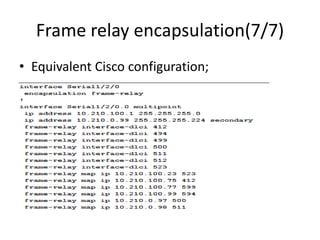
Frame relay encapsulation(7/7)
• Equivalent Cisco configuration;
Monitoring interfaces
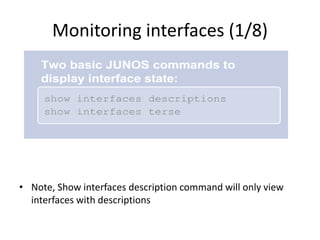
Monitoring interfaces (1/8)
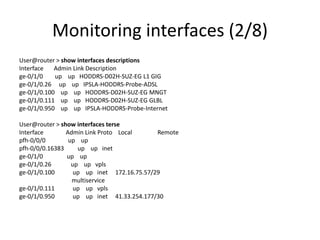
• Note, Show interfaces description command will only view
interfaces with descriptions
Monitoring interfaces (2/8)
User@router > show interfaces descriptions
Interface Admin Link Description
ge-0/1/0 up up HODDRS-D02H-SUZ-EG L1 GIG
ge-0/1/0.26 up up IPSLA-HODDRS-Probe-ADSL
ge-0/1/0.100 up up HODDRS-D02H-SUZ-EG MNGT
ge-0/1/0.111 up up HODDRS-D02H-SUZ-EG GLBL
ge-0/1/0.950 up up IPSLA-HODDRS-Probe-Internet
User@router > show interfaces terse
Interface Admin Link Proto Local Remote
pfh-0/0/0 up up
pfh-0/0/0.16383 up up inet
ge-0/1/0 up up
ge-0/1/0.26 up up vpls
ge-0/1/0.100 up up inet 172.16.75.57/29
multiservice
ge-0/1/0.111 up up vpls
ge-0/1/0.950 up up inet 41.33.254.177/30
Monitoring interfaces (3/8)
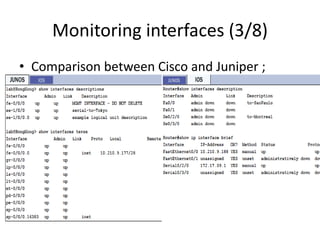
• Comparison between Cisco and Juniper ;
Monitoring interfaces (4/8)
Monitoring interfaces (5/8)
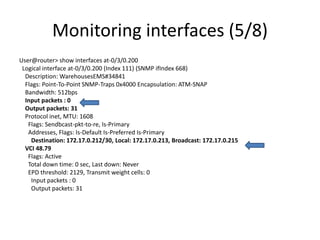
User@router> show interfaces at-0/3/0.200
Logical interface at-0/3/0.200 (Index 111) (SNMP ifIndex 668)
Description: WarehousesEMS#34841
Flags: Point-To-Point SNMP-Traps 0x4000 Encapsulation: ATM-SNAP
Bandwidth: 512bps
Input packets : 0
Output packets: 31
Protocol inet, MTU: 1608
Flags: Sendbcast-pkt-to-re, Is-Primary
Addresses, Flags: Is-Default Is-Preferred Is-Primary
Destination: 172.17.0.212/30, Local: 172.17.0.213, Broadcast: 172.17.0.215
VCI 48.79
Flags: Active
Total down time: 0 sec, Last down: Never
EPD threshold: 2129, Transmit weight cells: 0
Input packets : 0
Output packets: 31
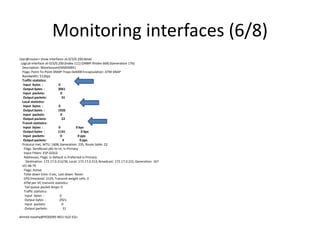
Monitoring interfaces (6/8)
User@router> show interfaces at-0/3/0.200detail
Logical interface at-0/3/0.200 (Index 111) (SNMP ifIndex 668) (Generation 176)
Description: WarehousesEMS#34841
Flags: Point-To-Point SNMP-Traps 0x4000 Encapsulation: ATM-SNAP
Bandwidth: 512bps
Traffic statistics:
Input bytes : 0
Output bytes : 3061
Input packets: 0
Output packets: 31
Local statistics:
Input bytes : 0
Output bytes : 1920
Input packets: 0
Output packets: 22
Transit statistics:
Input bytes : 0 0 bps
Output bytes : 1141 0 bps
Input packets: 0 0 pps
Output packets: 9 0 pps
Protocol inet, MTU: 1608, Generation: 235, Route table: 22
Flags: Sendbcast-pkt-to-re, Is-Primary
Input Filters: ESP-GOLD
Addresses, Flags: Is-Default Is-Preferred Is-Primary
Destination: 172.17.0.212/30, Local: 172.17.0.213, Broadcast: 172.17.0.215, Generation: 167
VCI 48.79
Flags: Active
Total down time: 0 sec, Last down: Never
EPD threshold: 2129, Transmit weight cells: 0
ATM per-VC transmit statistics:
Tail queue packet drops: 0
Traffic statistics:
Input bytes : 0
Output bytes : 2921
Input packets: 0
Output packets: 31
ahmed.nosehy@HODDRS-R01J-SUZ-EG>
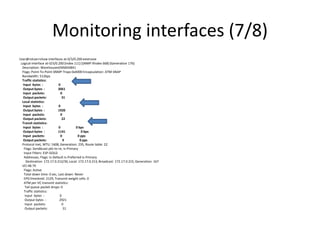
Monitoring interfaces (7/8)
User@rotuer>show interfaces at-0/3/0.200 extensive
Logical interface at-0/3/0.200 (Index 111) (SNMP ifIndex 668) (Generation 176)
Description: WarehousesEMS#34841
Flags: Point-To-Point SNMP-Traps 0x4000 Encapsulation: ATM-SNAP
Bandwidth: 512bps
Traffic statistics:
Input bytes : 0
Output bytes : 3061
Input packets: 0
Output packets: 31
Local statistics:
Input bytes : 0
Output bytes : 1920
Input packets: 0
Output packets: 22
Transit statistics:
Input bytes : 0 0 bps
Output bytes : 1141 0 bps
Input packets: 0 0 pps
Output packets: 9 0 pps
Protocol inet, MTU: 1608, Generation: 235, Route table: 22
Flags: Sendbcast-pkt-to-re, Is-Primary
Input Filters: ESP-GOLD
Addresses, Flags: Is-Default Is-Preferred Is-Primary
Destination: 172.17.0.212/30, Local: 172.17.0.213, Broadcast: 172.17.0.215, Generation: 167
VCI 48.79
Flags: Active
Total down time: 0 sec, Last down: Never
EPD threshold: 2129, Transmit weight cells: 0
ATM per-VC transmit statistics:
Tail queue packet drops: 0
Traffic statistics:
Input bytes : 0
Output bytes : 2921
Input packets: 0
Output packets: 31
Monitoring interfaces (8/8)
user@router> monitor interface at-0/3/0.200
HODDRS-R01J-SUZ-EG Seconds: 23 Time: 18:11:55
Delay: 2/0/21
Interface: at-0/3/0.200, Enabled, Link is Up
Flags: Point-To-Point SNMP-Traps 0x4000
Encapsulation: ATM-SNAP
VCI 48.79
Local statistics: Current delta
Input bytes: 0 [0]
Output bytes: 1920 [0]
Input packets: 0 [0]
Output packets: 22 [0]
Remote statistics:
Input bytes: 0 (0 bps) [0]
Output bytes: 1141 (0 bps) [0]
Input packets: 0 (0 pps) [0]
Output packets: 9 (0 pps) [0]
Traffic statistics:
Input bytes: 0 [0]
Output bytes: 3061 [0]
Input packets: 0 [0]
Output packets: 31 [0]
Protocol: inet, MTU: 1608, Flags: Is-Primary
VCI 48.79, Flags: Active 0x400
Total down time: 0 sec, Last down: Never
Traffic statistics:
Input bytes : 0
Output bytes : 2921
Input packets: 0
Output packets: 31
Glossary

Session 2

  • 1.
    JNCIA - JUNOS Eng.Ahmed Nosehy
  • 2.
  • 3.
  • 4.
    Interface designations(2/8) The CLIalmost always refers to line cards as Flexible PIC Concentrators (FPCs) and interface cards as PICs
  • 5.
  • 6.
  • 7.
  • 8.
  • 9.
  • 10.
  • 11.
  • 12.
  • 13.
  • 14.
    Interface logical unit(3/5) * layer2 parameters are being configured under the physical level. * PPP encapsulation support one sub-interface in IOS, and unit 0 only in JUNOS
  • 15.
  • 16.
    Interface logical unit(5/5) Example of ATM interface configuration user@router-EG> #sh run int AT0/2/0.256095 Building configuration... Current configuration : 273 bytes ! interface ATM0/2/0.256095 point-to-point description " VPN:NID-PBDAC-2180:HoodElDers:25341:Main " Bandwidth: 64bps ip vrf forwarding PBDAC ip address 10.20.56.1255.255.255.252 no atm enable-ilmi-trap pvc 48.85 encapsulation aal5snap service-policy in ESP-Gold ! End user@router-EG> show interfaces at-0/3/0.4865 Logical interface at-0/3/0.4865 (Index 160) (SNMP ifIndex 595) Description: VPN:NID-PBDAC-2180:HoodElDers:25341:Main Flags: Point-To-Point SNMP-Traps 0x4000 Encapsulation: ATM-SNAP Bandwidth: 64bps Input packets : 534533 Output packets: 476205 Protocol inet, MTU: 1608 Flags: Sendbcast-pkt-to-re, Is-Primary Addresses, Flags: Is-Default Is-Preferred Is-Primary Destination: 10.20.56.0/30, Local: 10.20.56.1, Broadcast: 10.20.56.3 VCI 48.85 Flags: Active Total down time: 0 sec, Last down: Never EPD threshold: 2129, Transmit weight cells: 0 Input packets : 534533 Output packets: 476205
  • 17.
  • 18.
    Layer 3 configuration(2/3) IP unnumbered and enabling the IPv4 process;
  • 19.
  • 20.
  • 21.
    Fast Interface Configuration(1/2) • Interfaces are auto- negotiate speed and duplex
  • 22.
    Fast Interface Configuration(2/2) To change the duplex (ex: full)and speed(ex:100m), under fast interface configuration level, you type; set speed 100m set link-mode full-duplex
  • 23.
    Gigabit Ethernet Configuration(1/2) • You can edit physical parameters under (ether-options or gigether-option)configuration level. • ether-option or gigether-option are being depended on the switch catalyst. set ether-options speed 100m set ether-options link-mode full-duplex set ether-options auto-negotiation
  • 24.
    Gigabit Ethernet Configuration(2/2) User@A-S01J-EG> show interfaces ge-0/0/20 Physical interface: ge-0/0/20, Enabled, Physical link is Up Interface index: 199, SNMP ifIndex: 588 Description: ESP-Fathala-AUTO-L3VPN-1226-11 Link-level type: Ethernet, MTU: 1514, Speed: Auto, Duplex: Auto, BPDU Error: None, MAC-REWRITE Error: None, Loopback: Disabled, Source filtering: Disabled, Flow control: Enabled, Auto-negotiation: Enabled, Remote fault: Online Device flags : Present Running Interface flags: SNMP-Traps Internal: 0x0 Link flags : None CoS queues : 8 supported, 8 maximum usable queues Current address: 2c:6b:f5:8b:29:14, Hardware address: 2c:6b:f5:8b:29:14 Last flapped : 2014-01-2303:38:42EET (1w0d 09:16 ago) Input rate : 4819136 bps (922 pps) Output rate : 1144728bps (851 pps) Active alarms : None Active defects : None Interface transmit statistics: Disabled Logical interface ge-0/0/20.0(Index 122) (SNMP ifIndex 594) Flags: SNMP-Traps 0x0 Encapsulation: ENET2 Input packets : 0 Output packets: 13338516 Protocol eth-switch Flags: Trunk-Mode {master:0} User@A-S01J-EG> configure private warning: uncommitted changes will be discarded on exit Entering configuration mode {master:0}[edit] User@A-S01J-EG# edit interfaces ge-0/0/20 {master:0}[edit interfaces ge-0/0/20] User@A-S01J-EG# edit ether-options {master:0}[edit interfaces ge-0/0/20 ether-options] User@A-S01J-EG# set speed 100m {master:0}[edit interfaces ge-0/0/20 ether-options] ahmed.nosehy@SEMOHA-S01J-ALX-EG# set link-mode full-duplex {master:0}[edit interfaces ge-0/0/20 ether-options]
  • 25.
  • 26.
    VLAN configuration(2/4) Example ofediting vlan configuration {master:0}[edit interfaces] User @ switch # edit ge-0/0/19 {master:0}[edit interfaces ge-0/0/19] User @ switch # show description ESP-Hiltion-Ramsis-INT-30622-6; {master:0}[edit interfaces ge-0/0/19] User @ switch # set vlan-tagging {master:0}[edit interfaces ge-0/0/19] User @ switch # set unit 10 vlan-id 100 {master:0}[edit interfaces ge-0/0/19] User @ switch # set unit 11 vlan-id 200 User @ switch # set unit 11 family inet address 2.2.2.2/30 {master:0}[edit interfaces ge-0/0/19] User @ switch # show description ESP-Hiltion-Ramsis-INT-30622-6; vlan-tagging; unit 10 { vlan-id 100; family inet { address 1.1.1.1/30; } } unit 11 { vlan-id 200; family inet { address 2.2.2.2/30; } }
  • 27.
    VLAN configuration(3/4) • Comparisonbetween configuring vlan between CISCO and Juniper
  • 28.
  • 29.
    Aggregated interfaces(1/5) • JUNOSsupport IEEE802.3ad aggregated interfaces
  • 30.
  • 31.
  • 32.
    Aggregated interfaces(4/5) {master:0}[edit] user@sw-EG# setinterfaces ge-1/0/19 ether-options 802.3ad ae0 {master:0}[edit] user@sw-EG# set interfaces ge-1/0/20 ether-options 802.3ad ae0 {master:0}[edit] user@sw-EG# user@sw-EG# show interfaces | find ge-1/0/19 ge-1/0/19{ description ESP-CIB-SmartV-L3VPN-17898-4; ether-options { 802.3ad ae0; ge-1/0/20{ description NTRA-Test; ether-options { 802.3ad ae0; } } {master:0}[edit] user@sw-EG# set interfaces ae0 aggregated-ether-options lacp active {master:0}[edit] user@sw-EG# set interfaces ae0 unit 200 family inet address 3.3.3.3/30 {master:0}[edit] user@sw-EG# show interfaces ae0 aggregated-ether-options { lacp { active; } } unit 200 { family inet { address 3.3.3.3/30; } }
  • 33.
    Aggregated interfaces(5/5) • Comparisonbetween Cisco and Juniper aggregated interfaces configuration
  • 34.
  • 35.
  • 36.
    Loopback interfaces • Nonew features have been introduced • Same concept as Cisco ,Brocade,3com……etc • Identifying the router-id • Facilitate the router administrative management. • Always up up interface.
  • 37.
    Scrambling SONET payload scramblingpreserves data integrity. Scrambling is designed to randomize the digital bits (pattern of 1s and 0s) carried in the Asynchronous Transfer Mode (ATM) cells (physical layer frame). Randomizing the digital bits can prevent continuous, long strings of all 1s or all 0s. Transitions between 1s and 0s are used by some physical layer protocols to maintain clocking. SONET interfaces support two levels of scrambling, as follows: 1- SONET frame scrambling mode required by the International Telecommunications Union Telecommunication Standardization (ITU-T) GR-253 standard. This mode uses a 1 + x6 + x7 algorithm to scramble the section overhead of the SONET frame. It does not scramble the first row of the section overhead. 2- Cell payload scrambling is optional and is defined in ITU-T I.432, section 4.5.3. This mode randomizes the bits in the payload portion of an ATM cell to make sure that the beginning of each new cell is recognized. It leaves the 5-byte header unscrambled. Synchronous Transport System (STS) stream scrambling must be enabled on every SONET device and is the default for SONET interfaces. Cell payload scrambling or SONET High-level Data Link Control (HDLC) scrambling can be enabled or disabled, and on Juniper routers is enabled by default to provide better link stability. Both sides of a connection must either use scrambling or not use it. edit interfaces so-fpc/pic/port sonet-options set payload-scrambler show commit
  • 38.
    Frame check sum •Used for error detection. • T1, E1, T3, E3, SONET and most interfaces are using 16bit FCS(the same as Cisco). • You can force it to operate on 32-bit.
  • 39.
    L2 Encapsulation(1/5) • Thedefault is PPP • You can change the encapsulation under encapsulation configuration level set encapsulation <>
  • 40.
    L2 Encapsulation(2/5) • Let’sremember that Cisco in HDLC support only one interface and configured under the physical interface (no sub-interfaces);
  • 41.
    L2 Encapsulation (3/5) •Here we can look to an example of configuring HDLC encapsulation.
  • 42.
    L2 Encapsulation (4/5) •To configure a PPP encapsulation, • PPP only support one logical interface(unit 0)(same behavior as Cisco)
  • 43.
    L2 Encapsulation (5/5) •Now, let’s explicitly define PPP encapsulation,
  • 44.
    Frame relay encapsulation(1/7) •The default is point to point.
  • 45.
    Frame relay encapsulation(2/7) •To configure a point to point, the only step is to set a DLCI
  • 46.
    Frame relay encapsulation(3/7) •To configure point to multi-point two steps are being required; 1- configure the interface to multi-point 2- define the DLCI mapping lab@HongKong # set unit 0 multipoint
  • 47.
    Frame relay encapsulation(4/7) •Let’s edit the subnet(we are using /30 subnet) and add more destinations;
  • 48.
    Frame relay encapsulation(5/7) •We can configure more than one multi-point address
  • 49.
    Frame relay encapsulation(6/7) •We can edit, editing process elaborate the flexibility in changing configuration n juniper ;
  • 50.
    Frame relay encapsulation(7/7) •Equivalent Cisco configuration;
  • 51.
  • 52.
    Monitoring interfaces (1/8) •Note, Show interfaces description command will only view interfaces with descriptions
  • 53.
    Monitoring interfaces (2/8) User@router> show interfaces descriptions Interface Admin Link Description ge-0/1/0 up up HODDRS-D02H-SUZ-EG L1 GIG ge-0/1/0.26 up up IPSLA-HODDRS-Probe-ADSL ge-0/1/0.100 up up HODDRS-D02H-SUZ-EG MNGT ge-0/1/0.111 up up HODDRS-D02H-SUZ-EG GLBL ge-0/1/0.950 up up IPSLA-HODDRS-Probe-Internet User@router > show interfaces terse Interface Admin Link Proto Local Remote pfh-0/0/0 up up pfh-0/0/0.16383 up up inet ge-0/1/0 up up ge-0/1/0.26 up up vpls ge-0/1/0.100 up up inet 172.16.75.57/29 multiservice ge-0/1/0.111 up up vpls ge-0/1/0.950 up up inet 41.33.254.177/30
  • 54.
    Monitoring interfaces (3/8) •Comparison between Cisco and Juniper ;
  • 55.
  • 56.
    Monitoring interfaces (5/8) User@router>show interfaces at-0/3/0.200 Logical interface at-0/3/0.200 (Index 111) (SNMP ifIndex 668) Description: WarehousesEMS#34841 Flags: Point-To-Point SNMP-Traps 0x4000 Encapsulation: ATM-SNAP Bandwidth: 512bps Input packets : 0 Output packets: 31 Protocol inet, MTU: 1608 Flags: Sendbcast-pkt-to-re, Is-Primary Addresses, Flags: Is-Default Is-Preferred Is-Primary Destination: 172.17.0.212/30, Local: 172.17.0.213, Broadcast: 172.17.0.215 VCI 48.79 Flags: Active Total down time: 0 sec, Last down: Never EPD threshold: 2129, Transmit weight cells: 0 Input packets : 0 Output packets: 31
  • 57.
    Monitoring interfaces (6/8) User@router>show interfaces at-0/3/0.200detail Logical interface at-0/3/0.200 (Index 111) (SNMP ifIndex 668) (Generation 176) Description: WarehousesEMS#34841 Flags: Point-To-Point SNMP-Traps 0x4000 Encapsulation: ATM-SNAP Bandwidth: 512bps Traffic statistics: Input bytes : 0 Output bytes : 3061 Input packets: 0 Output packets: 31 Local statistics: Input bytes : 0 Output bytes : 1920 Input packets: 0 Output packets: 22 Transit statistics: Input bytes : 0 0 bps Output bytes : 1141 0 bps Input packets: 0 0 pps Output packets: 9 0 pps Protocol inet, MTU: 1608, Generation: 235, Route table: 22 Flags: Sendbcast-pkt-to-re, Is-Primary Input Filters: ESP-GOLD Addresses, Flags: Is-Default Is-Preferred Is-Primary Destination: 172.17.0.212/30, Local: 172.17.0.213, Broadcast: 172.17.0.215, Generation: 167 VCI 48.79 Flags: Active Total down time: 0 sec, Last down: Never EPD threshold: 2129, Transmit weight cells: 0 ATM per-VC transmit statistics: Tail queue packet drops: 0 Traffic statistics: Input bytes : 0 Output bytes : 2921 Input packets: 0 Output packets: 31 ahmed.nosehy@HODDRS-R01J-SUZ-EG>
  • 58.
    Monitoring interfaces (7/8) User@rotuer>showinterfaces at-0/3/0.200 extensive Logical interface at-0/3/0.200 (Index 111) (SNMP ifIndex 668) (Generation 176) Description: WarehousesEMS#34841 Flags: Point-To-Point SNMP-Traps 0x4000 Encapsulation: ATM-SNAP Bandwidth: 512bps Traffic statistics: Input bytes : 0 Output bytes : 3061 Input packets: 0 Output packets: 31 Local statistics: Input bytes : 0 Output bytes : 1920 Input packets: 0 Output packets: 22 Transit statistics: Input bytes : 0 0 bps Output bytes : 1141 0 bps Input packets: 0 0 pps Output packets: 9 0 pps Protocol inet, MTU: 1608, Generation: 235, Route table: 22 Flags: Sendbcast-pkt-to-re, Is-Primary Input Filters: ESP-GOLD Addresses, Flags: Is-Default Is-Preferred Is-Primary Destination: 172.17.0.212/30, Local: 172.17.0.213, Broadcast: 172.17.0.215, Generation: 167 VCI 48.79 Flags: Active Total down time: 0 sec, Last down: Never EPD threshold: 2129, Transmit weight cells: 0 ATM per-VC transmit statistics: Tail queue packet drops: 0 Traffic statistics: Input bytes : 0 Output bytes : 2921 Input packets: 0 Output packets: 31
  • 59.
    Monitoring interfaces (8/8) user@router>monitor interface at-0/3/0.200 HODDRS-R01J-SUZ-EG Seconds: 23 Time: 18:11:55 Delay: 2/0/21 Interface: at-0/3/0.200, Enabled, Link is Up Flags: Point-To-Point SNMP-Traps 0x4000 Encapsulation: ATM-SNAP VCI 48.79 Local statistics: Current delta Input bytes: 0 [0] Output bytes: 1920 [0] Input packets: 0 [0] Output packets: 22 [0] Remote statistics: Input bytes: 0 (0 bps) [0] Output bytes: 1141 (0 bps) [0] Input packets: 0 (0 pps) [0] Output packets: 9 (0 pps) [0] Traffic statistics: Input bytes: 0 [0] Output bytes: 3061 [0] Input packets: 0 [0] Output packets: 31 [0] Protocol: inet, MTU: 1608, Flags: Is-Primary VCI 48.79, Flags: Active 0x400 Total down time: 0 sec, Last down: Never Traffic statistics: Input bytes : 0 Output bytes : 2921 Input packets: 0 Output packets: 31
  • 60.