UNIT 1
BCA II SEM
Prepared By: Ms. Sushma Malik
SYLLABUS
 UNIT – II
 Introduction to Query Language, QBE (Query by Example), NoSQL,
MongoDB
 Introduction to SQL: Overview, Characteristics of SQL. Advantage of
SQL, SQL data types and literals.
 Types of SQL commands: DDL, DML, DCL. Basic SQL Queries.
 Logical operators: BETWEEN, IN, AND, OR and NOT
 Null Values: Disallowing Null Values, Comparisons Using Null Values
 Integrity constraints: Primary Key, Not NULL, Unique, Check,
Referential key
 Introduction to Nested Queries, Correlated Nested Queries, Set-
Comparison Operators, Aggregate Operators: The GROUP BY and
HAVING Clauses,
 Joins: Inner joins, Outer Joins, Left outer, Right outer, full outer joins.
 Overview of views and indexes.
Prepared By: Ms. Sushma Malik
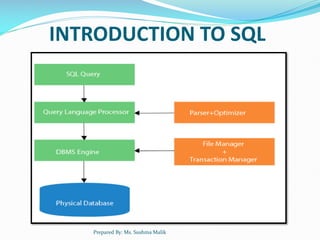
INTRODUCTION TO SQL
 SQL stands for Structured Query Language. It is used
for storing and managing data in relational database
management system (RDMS).
 It is a standard language for Relational Database
System. It enables a user to create, read, update and
delete relational databases and tables.
 All the RDBMS like MySQL, Informix, Oracle, MS
Access and SQL Server use SQL as their standard
database language.
 SQL allows users to query the database in a number of
ways, using English-like statements.
Prepared By: Ms. Sushma Malik
INTRODUCTION TO SQL
Prepared By: Ms. Sushma Malik
CHARACTERISTICS OF SQL
 SQL is easy to learn.
 SQL is used to access data from relational database
management systems.
 SQL can execute queries against the database.
 SQL is used to describe the data.
 SQL is used to define the data in the database and
manipulate it when needed.
 SQL is used to create and drop the database and table.
 SQL is used to create a view, stored procedure,
function in a database.
 SQL allows users to set permissions on tables,
procedures, and views.
Prepared By: Ms. Sushma Malik
ADVANTAGE OF SQL
 High speed
 Using the SQL queries, the user can quickly and
efficiently retrieve a large amount of records from a
database.
 No coding needed
 In the standard SQL, it is very easy to manage the
database system. It doesn't require a substantial amount
of code to manage the database system.
 Well defined standards
 Long established are used by the SQL databases that are
being used by ISO and ANSI.
Prepared By: Ms. Sushma Malik
ADVANTAGE OF SQL
 Portability
 SQL can be used in laptop, PCs, server and even some
mobile phones.
 Interactive language
 SQL is a domain language used to communicate with
the database. It is also used to receive answers to the
complex questions in seconds.
 Multiple data view
 Using the SQL language, the users can make different
views of the database structure.
Prepared By: Ms. Sushma Malik
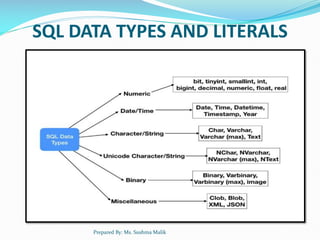
SQL DATA TYPES AND LITERALS
 Every field or column in a table is given a data type
when a table is defined. These data types describe the
kind of information which can be stored in a column.
 In SQL, this is done by assigning each field a data type
that indicates the kind of values the field will contain.
All the values in a given field must be of the same type.
 There are commonly five types of data type in SQL:
i. CHAR
ii. VARCHAR
iii. NUMBER
iv. DATE
v. LONG
Prepared By: Ms. Sushma Malik
SQL DATA TYPES AND LITERALS
Prepared By: Ms. Sushma Malik
SQL DATA TYPES
 CHAR:
 A column defined with a CHAR data type is allowed to
store all types of characters which include letters both
uppercase and lowercase letters, such as – A, B, …, Z
and a, b, …, z and special characters like @, #, &, $, etc.
 VARCHAR (size)
 It is similar to CHAR but it can store variable sized
strings having a maximum length determined by ‘size’.
The maximum value the ‘size’ can have is 2000
characters.
Prepared By: Ms. Sushma Malik
SQL DATA TYPES
 NUMBER:
 It is used to store variable-length numeric data.
 DATE:
 This type of data is used to store date and time
information. The default format is DD-MM-YY.
 LONG:
 This data type stores variable-length character strings
containing up to 2 gigabytes size. But LONG data type
has some following limitations:
Prepared By: Ms. Sushma Malik
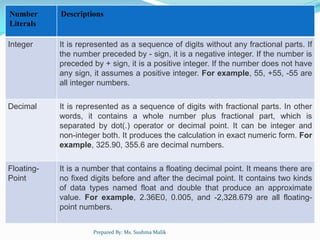
LITERALS
 Literals are the notations or idea to represent/express a
non-changing value. In MySQL, literals are similar to the
constant. We can use a literal while declaring a variable or
executing the queries.
 String Literal
 The string in MySQL is a sequence of characters or bytes
that are enclosed in single quotes (') or double
quotes ("). For example, 'first string' and "second string"
both are the same.
 Numeric literals in MySQL
 are used to specify the two types of literal values:
the exact-value (integer and decimal), and
the approximate value (floating-point) literals. It can be
positive or negative values.
Prepared By: Ms. Sushma Malik
Number
Literals
Descriptions
Integer It is represented as a sequence of digits without any fractional parts. If
the number preceded by - sign, it is a negative integer. If the number is
preceded by + sign, it is a positive integer. If the number does not have
any sign, it assumes a positive integer. For example, 55, +55, -55 are
all integer numbers.
Decimal It is represented as a sequence of digits with fractional parts. In other
words, it contains a whole number plus fractional part, which is
separated by dot(.) operator or decimal point. It can be integer and
non-integer both. It produces the calculation in exact numeric form. For
example, 325.90, 355.6 are decimal numbers.
Floating-
Point
It is a number that contains a floating decimal point. It means there are
no fixed digits before and after the decimal point. It contains two kinds
of data types named float and double that produce an approximate
value. For example, 2.36E0, 0.005, and -2,328.679 are all floating-
point numbers.
Prepared By: Ms. Sushma Malik
TYPES OF SQL COMMANDS
 SQL commands are instructions. It is used to
communicate with the database. It is also used to
perform specific tasks, functions, and queries of data.
 SQL can perform various tasks like create a table, add
data to tables, drop the table, modify the table, set
permission for users.
 Types of SQL Commands
 There are five types of SQL commands: DDL, DML,
DCL, TCL, and DQL.
Prepared By: Ms. Sushma Malik
TYPES OF SQL COMMANDS
Prepared By: Ms. Sushma Malik
DATA DEFINITION LANGUAGE (DDL)
 DDL changes the structure of the table like creating a
table, deleting a table, altering a table, etc.
 All the command of DDL are auto-committed that
means it permanently save all the changes in the
database.
 Here are some commands that come under DDL:
 CREATE
 ALTER
 DROP
 TRUNCATE
Prepared By: Ms. Sushma Malik
DATA DEFINITION LANGUAGE (DDL)
 CREATE It is used to create a new table in the database.
 Syntax:
 CREATE TABLE TABLE_NAME (COLUMN_NAME DATAT
YPES[,....]);
 Example:
 CREATE TABLE EMPLOYEE(Name VARCHAR2(20), Email
VARCHAR2(100), DOB DATE);
 DROP: It is used to delete both the structure and record
stored in the table.
 Syntax
 DROP TABLE table_name;
 Example
 DROP TABLE EMPLOYEE;
Prepared By: Ms. Sushma Malik
DATA DEFINITION LANGUAGE (DDL)
 ALTER: It is used to alter the structure of the database.
This change could be either to modify the characteristics of
an existing attribute or probably to add a new attribute.
 Syntax:
 To add a new column in the table
 ALTER TABLE table_name ADD column_name COLUMN-
definition;
 To modify existing column in the table:
 ALTER TABLE table_name
MODIFY(column_definitions....);
 EXAMPLE
 ALTER TABLE STU_DETAILS ADD(ADDRESS
VARCHAR2(20));
 ALTER TABLE STU_DETAILS MODIFY (NAME
VARCHAR2(20));
Prepared By: Ms. Sushma Malik
DATA DEFINITION LANGUAGE (DDL)
 TRUNCATE: It is used to delete all the rows from the
table and free the space containing the table.
 Syntax:
 TRUNCATE TABLE table_name;
 Example:
 TRUNCATE TABLE EMPLOYEE;
Prepared By: Ms. Sushma Malik
DATA MANIPULATION LANGUAGE
 DML commands are used to modify the database. It is
responsible for all form of changes in the database.
 The command of DML is not auto-committed that
means it can't permanently save all the changes in the
database. They can be rollback.
 Here are some commands that come under DML:
 INSERT
 UPDATE
 DELETE
Prepared By: Ms. Sushma Malik
DATA MANIPULATION LANGUAGE
 INSERT: The INSERT statement is a SQL query. It is
used to insert data into the row of a table.
 Syntax:
 INSERT INTO TABLE_NAME (col1, col2, col3,.... col N)
VALUES (value1, value2, value3, .... valueN);
 Or
 INSERT INTO TABLE_NAME
 VALUES (value1, value2, value3, .... valueN);
Prepared By: Ms. Sushma Malik
DATA MANIPULATION LANGUAGE
 UPDATE: This command is used to update or modify
the value of a column in the table.
 Syntax:
 UPDATE table_name SET [column_name1= value1,...co
lumn_nameN = valueN] [WHERE CONDITION]
 For example:
UPDATE students
SET User_Name = 'Sonoo'
WHERE Student_Id = '3'
Prepared By: Ms. Sushma Malik
DATA MANIPULATION LANGUAGE
 DELETE: It is used to remove one or more row from a
table.
 Syntax:
 DELETE FROM table_name [WHERE condition];
For example:
DELETE FROM javatpoint
WHERE Author="Sonoo";
Prepared By: Ms. Sushma Malik
DATA CONTROL LANGUAGE
 DCL commands are used to grant and take back
authority from any database user.
 Here are some commands that come under DCL:
 Grant
 Revoke
Prepared By: Ms. Sushma Malik
DATA CONTROL LANGUAGE
 Grant: It is used to give user access privileges to a
database.
 Example
 GRANT SELECT, UPDATE ON MY_TABLE TO SOME
_USER, ANOTHER_USER;
 Revoke: It is used to take back permissions from the
user.
 Example
 REVOKE SELECT, UPDATE ON MY_TABLE FROM US
ER1, USER2;
Prepared By: Ms. Sushma Malik
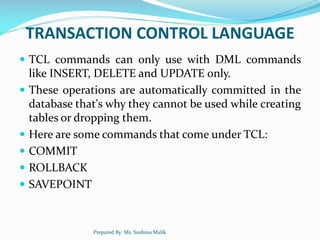
TRANSACTION CONTROL LANGUAGE
 TCL commands can only use with DML commands
like INSERT, DELETE and UPDATE only.
 These operations are automatically committed in the
database that's why they cannot be used while creating
tables or dropping them.
 Here are some commands that come under TCL:
 COMMIT
 ROLLBACK
 SAVEPOINT
Prepared By: Ms. Sushma Malik
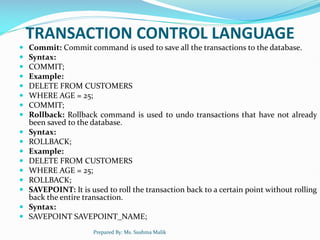
TRANSACTION CONTROL LANGUAGE
 Commit: Commit command is used to save all the transactions to the database.
 Syntax:
 COMMIT;
 Example:
 DELETE FROM CUSTOMERS
 WHERE AGE = 25;
 COMMIT;
 Rollback: Rollback command is used to undo transactions that have not already
been saved to the database.
 Syntax:
 ROLLBACK;
 Example:
 DELETE FROM CUSTOMERS
 WHERE AGE = 25;
 ROLLBACK;
 SAVEPOINT: It is used to roll the transaction back to a certain point without rolling
back the entire transaction.
 Syntax:
 SAVEPOINT SAVEPOINT_NAME;
Prepared By: Ms. Sushma Malik
DATA QUERY LANGUAGE
 DQL is used to fetch the data from the database.
 It uses only one command:
 SELECT: This is the same as the projection operation of
relational algebra. It is used to select the attribute based on
the condition described by WHERE clause.
 Syntax:
 SELECT expressions
 FROM TABLES
 WHERE conditions;
 For example:
 SELECT emp_name
 FROM employee
 WHERE age > 20;
Prepared By: Ms. Sushma Malik
SQL OPERATOR
Prepared By: Ms. Sushma Malik
SQL ARITHMETIC OPERATORS
Operato
r
Description Example
+ It adds the value of both operands. a+b will give 30
- It is used to subtract the right-hand operand
from the left-hand operand.
a-b will give 10
* It is used to multiply the value of both
operands.
a*b will give 200
/ It is used to divide the left-hand operand by the
right-hand operand.
a/b will give 2
% It is used to divide the left-hand operand by the
right-hand operand and returns reminder.
a%b will give 0
Prepared By: Ms. Sushma Malik
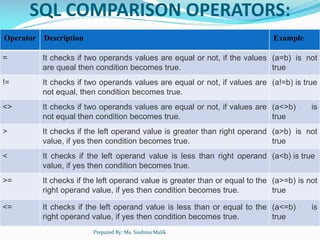
SQL COMPARISON OPERATORS:
Operator Description Example
= It checks if two operands values are equal or not, if the values
are queal then condition becomes true.
(a=b) is not
true
!= It checks if two operands values are equal or not, if values are
not equal, then condition becomes true.
(a!=b) is true
<> It checks if two operands values are equal or not, if values are
not equal then condition becomes true.
(a<>b) is
true
> It checks if the left operand value is greater than right operand
value, if yes then condition becomes true.
(a>b) is not
true
< It checks if the left operand value is less than right operand
value, if yes then condition becomes true.
(a<b) is true
>= It checks if the left operand value is greater than or equal to the
right operand value, if yes then condition becomes true.
(a>=b) is not
true
<= It checks if the left operand value is less than or equal to the
right operand value, if yes then condition becomes true.
(a<=b) is
true
Prepared By: Ms. Sushma Malik
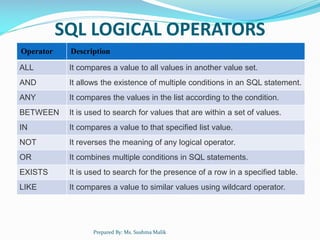
SQL LOGICAL OPERATORS
Operator Description
ALL It compares a value to all values in another value set.
AND It allows the existence of multiple conditions in an SQL statement.
ANY It compares the values in the list according to the condition.
BETWEEN It is used to search for values that are within a set of values.
IN It compares a value to that specified list value.
NOT It reverses the meaning of any logical operator.
OR It combines multiple conditions in SQL statements.
EXISTS It is used to search for the presence of a row in a specified table.
LIKE It compares a value to similar values using wildcard operator.
Prepared By: Ms. Sushma Malik
SQL Logical Operators
 Logical operators are used to specify conditions in the
structured query language (SQL) statement. They are also
used to serve as conjunctions for multiple conditions in a
statement.
 The different logical operators are shown below −
 ALL − It is used to compare a value with every value in a list
or returned by a query. Must be preceded by =, !=, >, < ,<=,
or >= evaluates.
 For example,
 select * from emp where salary>= ALL(1500,4000);
Prepared By: Ms. Sushma Malik
SQL Logical Operators
 AND − Returns TRUE if both component conditions are TRUE.
Returns FALSE if either is FALSE; otherwise returns UNKNOWN.
 For example,
 select * from emp where job=’manager’ AND
deptno=20;
 OR − Return TRUE if either component condition is TRUE. Return
FALSE if both are FALSE. Otherwise, return UNKNOWN.
 For example,
 select * from emp where job=’manager’ OR
deptno=20;
Prepared By: Ms. Sushma Malik
SQL Logical Operators
 IN − It is equivalent to any test. Equivalent to = ANY, The In operator is used to
compare a value to a list of literal values that have been specified.
 For example,
 select * from empl081 where salary IN (35000,50000);
 NOT − Returns TRUE if the condition is FALSE. Returns FALSE, if it is TRUE. If
it is UNKNOWN, it remains UNKNOWN.
 For example,
 select * from emp where NOT (job is NULL)
 select * from emp where NOT(salary between 2000 AND 5000);
Prepared By: Ms. Sushma Malik
SQL Logical Operators
 BETWEEN − It is used to define range limits.
 For example,
 If we want to find all employees whose age is in between 40 and
50 the query is as follows
 Select * from employee where age between 40 AND 50;
 LIKE − It is used to compare values to a list of literal values that
are specified. “%” character is used to match any substring and
“_” character is used to match any character. It expresses a
pattern by using the ‘like’ comparison operator.
 For example,
 To display all names whose second letter is ‘b’, use the below
mentioned command −
 select * from emp where ename LIKE ‘_b%’;
Prepared By: Ms. Sushma Malik
SQL Logical Operators
 To display a person details whose first letter is ‘A’ and
third letter is ‘d’, use the command given below −
 Select * from emp where ename LIKE ‘A_d_’;
Prepared By: Ms. Sushma Malik
NULL Values
 The SQL NULL is the term used to represent a missing value. A
NULL value in a table is a value in a field that appears to be
blank.
 A field with a NULL value is a field with no value. It is very
important to understand that a NULL value is different than a
zero value or a field that contains spaces.
 Syntax
 The basic syntax of NULL while creating a table.
 SQL> CREATE TABLE CUSTOMERS(
 ID INT NOT NULL,
 NAME VARCHAR (20) NOT NULL,
 AGE INT NOT NULL,
 ADDRESS CHAR (25) ,
 SALARY DECIMAL (18, 2),
 PRIMARY KEY (ID)
 );
Prepared By: Ms. Sushma Malik
NULL Values
 Here, NOT NULL signifies that column should always
accept an explicit value of the given data type. There
are two columns where we did not use NOT NULL,
which means these columns could be NULL.
 A field with a NULL value is the one that has been left
blank during the record creation.
Prepared By: Ms. Sushma Malik
Importance of NULL value:
 It is important to understand that a NULL value is
different from a zero value.
 A NULL value is used to represent a missing value, but
that it usually has one of three different interpretations:
 The value unknown (value exists but is not known)
 Value not available (exists but is purposely withheld)
 Attribute not applicable (undefined for this tuple)
 It is often not possible to determine which of the
meanings is intended. Hence, SQL does not distinguish
between the different meanings of NULL.
Prepared By: Ms. Sushma Malik
Principles of NULL values:
 Setting a NULL value is appropriate when the actual value
is unknown, or when a value would not be meaningful.
 A NULL value is not equivalent to a value of ZERO if the
data type is a number and is not equivalent to spaces if the
data type is character.
 A NULL value can be inserted into columns of any data
type.
 A NULL value will evaluate NULL in any expression.
 Suppose if any column has a NULL value, then UNIQUE,
FOREIGN key, CHECK constraints will ignore by SQL.
Prepared By: Ms. Sushma Malik
What is a SQL NULL value?
 In terms of the relational database model, a NULL value
indicates an unknown value. If we widen this theoretical
explanation, the NULL value points to an unknown value
but this unknown value does not equivalent to a zero
value or a field that contains spaces.
 Due to this structure of the NULL values, it is not
possible to use traditional comparison (=, <, > and <>)
operators in the queries. As a matter of fact, in the SQL
Standards using the WHERE clause as the below will
lead to return empty result sets.
Prepared By: Ms. Sushma Malik
What is a SQL NULL value?
 SELECT column_name1, column_name2, column_name3
, ... , column_nameN
 FROM table_name
 WHERE column_nameN = NULL
 For this reason, working with the NULL values might be a
bit complicated and are required to use certain built-in fu
nctions which are customized for handling NULL values.
Prepared By: Ms. Sushma Malik
IS NULL Condition
 The IS NULL condition is used to return rows that
contain the NULL values in a column and its syntax is
like below:
 SELECT column_name1, column_name2, column_nam
e3, ... , column_nameN
 FROM table_name
 WHERE column_nameN IS NULL
 The IS NOT NULL condition is used to return the row
s that contain non-NULL values in a column.
Prepared By: Ms. Sushma Malik
INTEGRITY CONSTRAINTS
 Constraints in SQL Server are predefined rules and
restrictions that are enforced in a single column or multiple
columns, regarding the values allowed in the columns, to
maintain the integrity, accuracy, and reliability of that
column’s data.
 In other words, if the inserted data meets the constraint
rule, it will be inserted successfully. If the inserted data
violates the defined constraint, the insert operation will be
aborted.
 Constraints in SQL Server can be defined at the column
level, where it is specified as part of the column definition
and will be applied to that column only, or declared
independently at the table level.
 In this case, the constraint rules will be applied to more
than one column in the specified table.
Prepared By: Ms. Sushma Malik
INTEGRITY CONSTRAINTS
 The constraint can be created within the CREATE TABLE T-
SQL command while creating the table or added using
ALTER TABLE T-SQL command after creating the table.
 Adding the constraint after creating the table, the existing
data will be checked for the constraint rule before creating
that constraint.
 There are six main constraints that are commonly used in
SQL Server
 SQL NOT NULL
 UNIQUE
 PRIMARY KEY
 FOREIGN KEY
 CHECK
 DEFAULT
Prepared By: Ms. Sushma Malik
NOT NULL Constraint
 By default, a column can hold NULL values. If you do
not want a column to have a NULL value, use the NOT
NULL constraint.
 If we specify a field in a table to be NOT NULL. Then
the field will never accept null value.
 That is, you will be not allowed to insert a new row in
the table without specifying any value to this field.
 It restricts a column from having a NULL value.
 We use ALTER statement and MODIFY statement to
specify this constraint.
Prepared By: Ms. Sushma Malik
NOT NULL Constraint
Prepared By: Ms. Sushma Malik
UNIQUE Constraint
 The UNIQUE constraint in SQL is used to ensure that
no duplicate values will be inserted into a specific
column or combination of columns that are
participating in the UNIQUE constraint and not part
of the PRIMARY KEY.
 This constraint helps to uniquely identify each row in
the table. i.e. for a particular column, all the rows
should have unique values.
 We can have more than one UNIQUE columns in a
table.
Prepared By: Ms. Sushma Malik
UNIQUE Constraint
 It ensures that a column will only have unique values.
A UNIQUE constraint field cannot have any duplicate
data.
 It prevents two records from having identical values in
a column
 We use ALTER statement and MODIFY statement to
specify this constraint.
Prepared By: Ms. Sushma Malik
UNIQUE Constraint
Prepared By: Ms. Sushma Malik
Primary Key Constraint
 Primary key constraint uniquely identifies each record
in a database.
 A Primary Key must contain unique value and it must
not contain null value.
 The PRIMARY KEY constraint consists of one column
or multiple columns with values that uniquely identify
each row in the table.
 The SQL PRIMARY KEY constraint combines between
the UNIQUE and SQL NOT NULL constraints, where
the column or set of columns that are participating in
the PRIMARY KEY cannot accept a NULL value.
Prepared By: Ms. Sushma Malik
Primary Key Constraint
 The PRIMARY KEY is used mainly to enforce the entity
integrity of the table.
 Entity integrity ensures that each row in the table is a
uniquely identifiable entity.
 A table can have only one field as primary key.
Prepared By: Ms. Sushma Malik
Primary Key Constraint Vs Unique
 PRIMARY KEY constraint differs from the UNIQUE
constraint in that; you can create multiple UNIQUE
constraints in a table, with the ability to define only
one SQL PRIMARY KEY per each table.
 Another difference is that the UNIQUE constraint
allows for one NULL value, but the PRIMARY KEY
does not allow NULL values.
Prepared By: Ms. Sushma Malik
Primary Key Constraint
Prepared By: Ms. Sushma Malik
FOREIGN KEY
 A foreign key is a key used to link two tables together.
 Foreign Key is used to relate two tables.
 The relationship between the two tables matches the
Primary Key in one of the tables with a Foreign Key in
the second table.
 This is also called a referencing key.
 We use ALTER statement and ADD statement to
specify this constraint.
Prepared By: Ms. Sushma Malik
FOREIGN KEY
Prepared By: Ms. Sushma Malik
Customer_details order_details
FOREIGN KEY
Prepared By: Ms. Sushma Malik
Behaviour of Foreign Key Column on Delete
 There are two ways to maintain the integrity of data in
Child table, when a particular record is deleted in the
main table.
 When two tables are connected with Foreign key, and
certain data in the main table is deleted, for which a
record exits in the child table, then we must have some
mechanism to save the integrity of data in the child
table.
Prepared By: Ms. Sushma Malik
FOREIGN KEY
Prepared By: Ms. Sushma Malik
FOREIGN KEY
 On Delete Cascade : This will remove the record
from child table, if that value of foreign key is deleted
from the main table.
 On Delete Null : This will set all the values in that
record of child table as NULL, for which the value of
foreign key is deleted from the main table.
 If we don't use any of the above, then we cannot delete
data from the main table for which data in child table
exists. We will get an error if we try to do so.
Prepared By: Ms. Sushma Malik
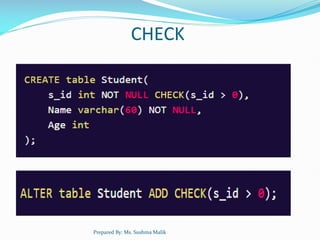
CHECK
 Using the CHECK constraint we can specify a
condition for a field, which should be satisfied at the
time
 Its like condition checking before saving data into a
column. of entering values for this field.
Prepared By: Ms. Sushma Malik
CHECK
Prepared By: Ms. Sushma Malik
DEFAULT
 This constraint is used to provide a default value for
the fields.
 That is, if at the time of entering new records in the
table if the user does not specify any value for these
fields then the default value will be assigned to them.
Prepared By: Ms. Sushma Malik
DEFAULT
Prepared By: Ms. Sushma Malik
Introduction to Nested Queries
 In nested queries, a query is written inside a query. The
result of inner query is used in execution of outer
query.
 A nested query is a query that has another query
embedded within it. The embedded query is called a
subquery.
Prepared By: Ms. Sushma Malik
Important Rule for Nested Queries
 A subquery can be placed in a number of SQL clauses like
WHERE clause, FROM clause, HAVING clause.
 You can use Subquery with SELECT, UPDATE, INSERT,
DELETE statements along with the operators like =, <, >,
>=, <=, IN, BETWEEN, etc.
 A subquery is a query within another query. The outer
query is known as the main query, and the inner query is
known as a subquery.
 Subqueries are on the right side of the comparison
operator.
 A subquery is enclosed in parentheses.
 In the Subquery, ORDER BY command cannot be used. But
GROUP BY command can be used to perform the same
function as ORDER BY command.
Prepared By: Ms. Sushma Malik
Important Rule for Nested Queries
 User can put a nested SELECT within the WHERE clause
with comparison operators or the IN, NOT IN, ANY, or ALL
operators.
 The IN operator checks if a certain value is in the table
returned by the subquery.
 The NOT IN operator filters out the rows corresponding to
the values not present in that table returned by a subquery.
 The ANY operator is used with comparison operators to
evaluate if any of the values returned by the subquery
satisfy the condition.
 The ALL operator is also used with comparison operators
to evaluate if all values returned by the subquery satisfy the
condition.
Prepared By: Ms. Sushma Malik
Subqueries with the Select Statement
 Subqueries are most frequently used with the SELECT
statement. The basic syntax is as follows −
Prepared By: Ms. Sushma Malik
Find All Students That Have Above-average
GPA?
Prepared By: Ms. Sushma Malik
1 2
3
Prepared By: Ms. Sushma Malik
Subqueries with the INSERT Statement
 Subqueries also can be used with INSERT statements.
The INSERT statement uses the data returned from
the subquery to insert into another table.
Prepared By: Ms. Sushma Malik
Subqueries with the UPDATE Statement
 The subquery can be used in conjunction with the
UPDATE statement. Either single or multiple columns
in a table can be updated when using a subquery with
the UPDATE statement.
Prepared By: Ms. Sushma Malik
Subqueries with the DELETE Statement
Prepared By: Ms. Sushma Malik
Assignment 9
 Find the details of those employees whose
salary is equal to maximum salary in the
organisation
 SELECT * from emp_2906 where salary =
(SELECT max(salary) from emp_2906);
Prepared By: Ms. Sushma Malik
 Find the details of those employees who earn less
than the average salary of the organisation.
 SELECT * from emp_2906 where salary <
(SELECT avg(salary) from emp_2906);
Prepared By: Ms. Sushma Malik
 Find all employees name of the department
where Kanishk works.
 SELECT * from emp_2906 where dptno =
(SELECT dptno from emp_2906 where
ename='Kanishk');
Prepared By: Ms. Sushma Malik
 Find all the details of the employees who draw
more than the average salary in the organization.
 select * from emp_2906 where salary > (select
avg(salary) from emp_2906);
Prepared By: Ms. Sushma Malik
 Find all the details of the person who draws
the second highest salary.
 select * from emp_2906 where salary =
(select max(salary) from emp_2906
where salary <(select max(salary) from
emp_2906));
Prepared By: Ms. Sushma Malik
SQL Aggregate Functions
 In database management an aggregate function is a
function where the values of multiple rows are
grouped together as input on certain criteria to form a
single value of more significant meaning.
 SQL aggregation function is used to perform the
calculations on multiple rows of a single column of a
table. It returns a single value.
 It is also used to summarize the data.
Prepared By: Ms. Sushma Malik
COUNT FUNCTION
 COUNT function is used to Count the number of rows
in a database table. It can work on both numeric and
non-numeric data types.
 COUNT function uses the COUNT(*) that returns the
count of all the rows in a specified table. COUNT(*)
considers duplicate and Null.
Prepared By: Ms. Sushma Malik
SUM Function
 Sum function is used to calculate the sum of all
selected columns. It works on numeric fields only.
Prepared By: Ms. Sushma Malik
AVG function
 The AVG function is used to calculate the average value
of the numeric type. AVG function returns the average
of all non-Null values.
Prepared By: Ms. Sushma Malik
MAX Function and MIN Function
 MAX function is used to find the maximum value of a
certain column. This function determines the largest
value of all selected values of a column.
 MIN function is used to find the minimum value of a
certain column. This function determines the smallest
value of all selected values of a column.
Prepared By: Ms. Sushma Malik
SQL GROUP BY Clause
 The GROUP BY clause is a SQL command that is used
to group rows that have the same values. The
GROUP BY clause is used in the SELECT statement.
Optionally it is used in conjunction with aggregate
functions to produce summary reports from the
database.
 That’s what it does, summarizing data from the
database.
 The queries that contain the GROUP BY clause are
called grouped queries and only return a single row for
every grouped item.
Prepared By: Ms. Sushma Malik
 Group By single column: Group By single column is
used to place all the rows with the same value. These
values are of that specified column in one group. It
signifies that all rows will put an equal amount
through a single column, which is of one appropriate
column in one group.
Prepared By: Ms. Sushma Malik
 Groups based on several columns: A group of some
columns are GROUP BY column 1, column2, etc.
Here, we are placing all rows in a group with the
similar values of both column 1 and column 2.
Prepared By: Ms. Sushma Malik
HAVING Clause in SQL
 The HAVING clause places the condition in the groups
defined by the GROUP BY clause in the SELECT
statement.
 This SQL clause is implemented after the 'GROUP BY'
clause in the 'SELECT' statement.
 This clause is used in SQL because we cannot use the
WHERE clause with the SQL aggregate functions.
Both WHERE and HAVING clauses are used for
filtering the records in SQL queries.
Prepared By: Ms. Sushma Malik
Difference between HAVING and
WHERE Clause
HAVING WHERE
1. The HAVING clause is used in
database systems to fetch the
data/values from the groups according
to the given condition.
1. The WHERE clause is used in
database systems to fetch the
data/values from the tables according
to the given condition.
2. The HAVING clause is always
executed with the GROUP BY clause.
2. The WHERE clause can be
executed without the GROUP BY
clause.
3. The HAVING clause can include
SQL aggregate functions in a query or
statement.
3. We cannot use the SQL aggregate
function with WHERE clause in
statements.
4. We can only use SELECT statement
with HAVING clause for filtering the
records.
4. Whereas, we can easily use
WHERE clause with UPDATE,
DELETE, and SELECT statements.
Prepared By: Ms. Sushma Malik
Syntax of HAVING clause in SQL
 SELECT column_Name1, column_Name2, ....., column
_NameN aggregate_function_name(column_Name)
FROM table_name
GROUP BY column_Name1
HAVING condition;
Prepared By: Ms. Sushma Malik
SQL | Join (Inner, Left, Right and
Full Joins)
 The join clause allows us to retrieve data from two or
more related tables into a meaningful result set. We can
join the table using a SELECT statement and a join
condition. It indicates how SQL Server can use data from
one table to select rows from another table. In general,
tables are related to each other using foreign
key constraints.
 In a JOIN query, a condition indicates how two tables are
related:
 Choose columns from each table that should be used in the
join. A join condition indicates a foreign key from one table
and its corresponding key in the other table.
 Specify the logical operator to compare values from the
columns like =, <, or >.
Prepared By: Ms. Sushma Malik
INNER JOIN
 The most important and frequently used of the joins is
the INNER JOIN. They are also referred to as
an EQUIJOIN.
 The INNER JOIN creates a new result table by combining
column values of two tables (table1 and table2) based
upon the join-predicate.
 The query compares each row of table1 with each row of
table2 to find all pairs of rows which satisfy the join-
predicate.
 When the join-predicate is satisfied, column values for
each matched pair of rows of A and B are combined into a
result row.
Prepared By: Ms. Sushma Malik
basic syntax of the INNER JOIN
Prepared By: Ms. Sushma Malik
OUTER JOIN
 OUTER JOIN in SQL Server returns all records from
both tables that satisfy the join condition. In other
words, this join will not return only the matching record
but also return all unmatched rows from one or both
tables.
 We can categories the OUTER JOIN further into three
types:
 LEFT OUTER JOIN
 RIGHT OUTER JOIN
 FULL OUTER JOIN
Prepared By: Ms. Sushma Malik
LEFT OUTER JOIN
 The LEFT OUTER JOIN retrieves all the records
from the left table and matching rows from the
right table. It will return NULL when no matching
record is found in the right side table. Since OUTER is
an optional keyword, it is also known as LEFT JOIN.
Prepared By: Ms. Sushma Malik
SQL RIGHT JOIN
 The SQL right join returns all the values from the rows
of right table. It also includes the matched values from
left table but if there is no matching in both tables, it
returns NULL.
Prepared By: Ms. Sushma Malik
SQL FULL JOIN
 The SQL full join is the result of combination of both
left and right outer join and the join tables have all the
records from both tables. It puts NULL on the place of
matches not found.
Prepared By: Ms. Sushma Malik
SQL Cross Join
 Join operation in SQL is used to combine multiple tables
together into a single table.
 If we use the cross join to combine two different tables,
then we will get the Cartesian product of the sets of rows
from the joined table. When each row of the first table is
combined with each row from the second table, it is known
as Cartesian join or cross join.
 After performing the cross join operation, the total number
of rows present in the final table will be equal to the
product of the number of rows present in table 1 and the
number of rows present in table 2.
Prepared By: Ms. Sushma Malik
Views in SQL
 Views in SQL are considered as a virtual table. A view
also contains rows and columns.
 To create the view, we can select the fields from one or
more tables present in the database.
 A View can either have all the rows of a table or
specific rows based on certain condition.
Prepared By: Ms. Sushma Malik
Creating View from a single table
Prepared By: Ms. Sushma Malik
Creating View from multiple tables
Prepared By: Ms. Sushma Malik
Uses of a View
 A good database should contain views due to the given reasons:
 Restricting data access – Views provide an additional level of
table security by restricting access to a predetermined set of rows
and columns of a table.
 Hiding data complexity – A view can hide the complexity that
exists in a multiple table join.
 Simplify commands for the user – Views allows the user to
select information from multiple tables without requiring the
users to actually know how to perform a join.
 Store complex queries – Views can be used to store complex
queries.
 Rename Columns – Views can also be used to rename the
columns without affecting the base tables provided the number
of columns in view must match the number of columns specified
in select statement. Thus, renaming helps to to hide the names
of the columns of the base tables.
 Multiple view facility – Different views can be created on the
same table for different users.
Prepared By: Ms. Sushma Malik
Deleting View
Prepared By: Ms. Sushma Malik
SQL INDEX
 The Index in SQL is a special table used to speed up the
searching of the data in the database tables. It also retrieves
a vast amount of data from the tables frequently. The
INDEX requires its own space in the hard disk.
 For example, if you want to reference all pages in a book
that discusses a certain topic, you first refer to the index,
which lists all the topics alphabetically and are then
referred to one or more specific page numbers.
 An index helps to speed up SELECT queries
and WHERE clauses, but it slows down data input, with
the UPDATE and the INSERT statements.
 In SQL, an Index is created on the fields of the tables. We
can easily build one or more indexes on a table. The
creation and deletion of the Index do not affect the data of
the database.
Prepared By: Ms. Sushma Malik
Why SQL Index?
 The following reasons tell why Index is necessary in SQL:
 SQL Indexes can search the information of the large
database quickly.
 This concept is a quick process for those columns, including
different values.
 This data structure sorts the data values of columns (fields)
either in ascending or descending order. And then, it assigns
the entry for each value.
 Each Index table contains only two columns. The first
column is row_id, and the other is indexed-column.
 When indexes are used with smaller tables, the performance
of the index may not be recognized.
Prepared By: Ms. Sushma Malik
Create an INDEX and
Create UNIQUE INDEX
 Here, Index_Name is the name of that index that we
want to create, and Table_Name is the name of the
table on which the index is to be created.
The Column_Name represents the name of the
column on which index is to be applied.
Prepared By: Ms. Sushma Malik
Rename an INDEX and Remove an
INDEX
Prepared By: Ms. Sushma Malik
When should indexes be avoided?
 Although indexes are intended to enhance a database's
performance, there are times when they should be avoided.
 The following guidelines indicate when the use of an index
should be reconsidered.
 Indexes should not be used on small tables.
 Tables that have frequent, large batch updates or insert
operations.
 Indexes should not be used on columns that contain a high
number of NULL values.
 Columns that are frequently manipulated should not be
indexed.
 When the table needs to be updated frequently.
Prepared By: Ms. Sushma Malik
SQL | SEQUENCES
 Sequence is a set of integers 1, 2, 3, … that are generated and
supported by some database systems to produce unique
values on demand.
 A sequence is a user defined schema bound object that
generates a sequence of numeric values.
 Sequences are frequently used in many databases because
many applications require each row in a table to contain a
unique value and sequences provides an easy way to
generate them.
 The sequence of numeric values is generated in an
ascending or descending order at defined intervals and
can be configured to restart when exceeds max_value.
Prepared By: Ms. Sushma Malik
Example to use sequence
Prepared By: Ms. Sushma Malik
SQL Trigger
 Triggers are stored programs, which are automatically
executed or fired when some events occur. Triggers
are, in fact, written to be executed in response to any
of the following events −
 A database manipulation (DML) statement
(DELETE, INSERT, or UPDATE)
 A database definition (DDL) statement (CREATE,
ALTER, or DROP).
 A database operation (SERVERERROR, LOGON,
LOGOFF, STARTUP, or SHUTDOWN).
 Triggers can be defined on the table, view, schema, or
database with which the event is associated.
Prepared By: Ms. Sushma Malik
Types of SQL Server Triggers
 We can categorize the triggers in SQL Server in mainly
three types:
 Data Definition Language (DDL) Triggers
 Data Manipulation Language (DML) Triggers
 Logon Triggers
Prepared By: Ms. Sushma Malik
DDL Triggers
 DDL triggers are fired in response to the DDL events, such as
CREATE, ALTER, and DROP statements. We can create these
triggers at the database level or server level, depending on the
type of DDL events. It can also be executed in response to
certain system-defined stored procedures that do DDL-like
operations.
 The DDL triggers are useful in the following scenario:
 When we need to prevent the database schema from changing
 When we need to audit changes made in the database schema
 When we need to respond to a change made in the database
schema
Prepared By: Ms. Sushma Malik
DML Triggers
 DML triggers are fired in response to DML events like
INSERT, UPDATE, and DELETE statements in the
user's table or view. It can also be executed in response
to DML-like operations performed by system-defined
stored procedures.
 The DML triggers can be classified into two types:
 After Triggers
 Instead Of Triggers

Prepared By: Ms. Sushma Malik
After Triggers
 After trigger fires, when SQL Server completes the
triggering action successfully, that fired it. Generally,
this trigger is executed when a table completes an
insert, update or delete operations. It is not supported
in views. Sometimes it is known as FOR triggers.
 We can classify this trigger further into three types:
 AFTER INSERT Trigger
 AFTER UPDATE Trigger
 AFTER DELETE Trigger
Prepared By: Ms. Sushma Malik
Instead of Triggers
 Instead of Trigger fires before SQL Server begins to
execute the triggering operation that triggered it. It
means that no condition constraint check is needed
before the trigger runs. As a result, even if the constraint
check fails, this trigger will fire. It is the opposite of the
AFTER trigger. We can create the INSTEAD OF triggers
on a table that executes successfully but doesn't contain
the table's actual insert, update, or delete operations.
 We can classify this trigger further into three types:
 INSTEAD OF INSERT Trigger
 INSTEAD OF UPDATE Trigger
 INSTEAD OF DELETE Trigger
Prepared By: Ms. Sushma Malik
Logon Triggers
 Logon triggers are fires in response to a LOGON
event. The LOGON event occurs when a user session
is generated with an SQL Server instance, which is
made after the authentication process of logging is
completed but before establishing a user session. As a
result, the SQL Server error log will display all
messages created by the trigger, including error
messages and the PRINT statement messages. If
authentication fails, logon triggers do not execute.
These triggers may be used to audit and control server
sessions, such as tracking login activity or limiting the
number of sessions for a particular login.
Prepared By: Ms. Sushma Malik
Advantages of Triggers
 The following are the advantages of using triggers in SQL
Server:
 Triggers set database object rules and roll back if any
change does not satisfy those rules. The trigger will inspect
the data and make changes if necessary.
 Triggers help us to enforce data integrity.
 Triggers help us to validate data before inserted or updated.
 Triggers help us to keep a log of records.
 Triggers increase SQL queries' performance because they
do not need to compile each time they are executed.
 Triggers reduce the client-side code that saves time and
effort.
 Triggers are easy to maintain.
Prepared By: Ms. Sushma Malik
Disadvantages of Triggers
 The following are the disadvantages of using triggers in
SQL Server:
 Triggers only allow using extended validations.
 Triggers are invoked automatically, and their execution is
invisible to the user. Therefore, it isn't easy to troubleshoot
what happens in the database layer.
 Triggers may increase the overhead of the database server.
 We can define the same trigger action for multiple user
actions such as INSERT and UPDATE in the same CREATE
TRIGGER statement.
 We can create a trigger in the current database only, but it
can reference objects outside the current database.
Prepared By: Ms. Sushma Malik
Stored Procedures in SQL
 Stored procedure is used to save time to write code
again and again by storing the same in database and
also get the required output by passing parameters.
 Stored Procedures are created to perform one or
more DML operations on Database. It is nothing but
the group of SQL statements that accepts some input
in the form of parameters and performs some task and
may or may not returns a value.
Prepared By: Ms. Sushma Malik
Features of Stored Procedures in
SQL Server
 The following are the features of stored procedure in SQL Server:
 Reduced Traffic: A stored procedure reduces network traffic
between the application and the database server, resulting in
increased performance. It is because instead of sending
several SQL statements, the application only needs to send the
name of the stored procedure and its parameters.
 Stronger Security: The procedure is always secure because it
manages which processes and activities we can perform. It
removes the need for permissions to be granted at the database
object level and simplifies the security layers.
 Reusable: Stored procedures are reusable. It reduces code
inconsistency, prevents unnecessary rewrites of the same code,
and makes the code transparent to all applications or users.
Prepared By: Ms. Sushma Malik
Features of Stored Procedures in
SQL Server
 Easy Maintenance: The procedures are easier to
maintain without restarting or deploying the
application.
 Improved Performance: Stored Procedure increases
the application performance. Once we create the
stored procedures and compile them the first time, it
creates an execution plan reused for subsequent
executions. The procedure is usually processed quicker
because the query processor does not have to create a
new plan.
Prepared By: Ms. Sushma Malik

Database management system unit 1 Bca 2-semester notes

  • 1.
    UNIT 1 BCA IISEM Prepared By: Ms. Sushma Malik
  • 2.
    SYLLABUS  UNIT –II  Introduction to Query Language, QBE (Query by Example), NoSQL, MongoDB  Introduction to SQL: Overview, Characteristics of SQL. Advantage of SQL, SQL data types and literals.  Types of SQL commands: DDL, DML, DCL. Basic SQL Queries.  Logical operators: BETWEEN, IN, AND, OR and NOT  Null Values: Disallowing Null Values, Comparisons Using Null Values  Integrity constraints: Primary Key, Not NULL, Unique, Check, Referential key  Introduction to Nested Queries, Correlated Nested Queries, Set- Comparison Operators, Aggregate Operators: The GROUP BY and HAVING Clauses,  Joins: Inner joins, Outer Joins, Left outer, Right outer, full outer joins.  Overview of views and indexes. Prepared By: Ms. Sushma Malik
  • 3.
    INTRODUCTION TO SQL SQL stands for Structured Query Language. It is used for storing and managing data in relational database management system (RDMS).  It is a standard language for Relational Database System. It enables a user to create, read, update and delete relational databases and tables.  All the RDBMS like MySQL, Informix, Oracle, MS Access and SQL Server use SQL as their standard database language.  SQL allows users to query the database in a number of ways, using English-like statements. Prepared By: Ms. Sushma Malik
  • 4.
    INTRODUCTION TO SQL PreparedBy: Ms. Sushma Malik
  • 5.
    CHARACTERISTICS OF SQL SQL is easy to learn.  SQL is used to access data from relational database management systems.  SQL can execute queries against the database.  SQL is used to describe the data.  SQL is used to define the data in the database and manipulate it when needed.  SQL is used to create and drop the database and table.  SQL is used to create a view, stored procedure, function in a database.  SQL allows users to set permissions on tables, procedures, and views. Prepared By: Ms. Sushma Malik
  • 6.
    ADVANTAGE OF SQL High speed  Using the SQL queries, the user can quickly and efficiently retrieve a large amount of records from a database.  No coding needed  In the standard SQL, it is very easy to manage the database system. It doesn't require a substantial amount of code to manage the database system.  Well defined standards  Long established are used by the SQL databases that are being used by ISO and ANSI. Prepared By: Ms. Sushma Malik
  • 7.
    ADVANTAGE OF SQL Portability  SQL can be used in laptop, PCs, server and even some mobile phones.  Interactive language  SQL is a domain language used to communicate with the database. It is also used to receive answers to the complex questions in seconds.  Multiple data view  Using the SQL language, the users can make different views of the database structure. Prepared By: Ms. Sushma Malik
  • 8.
    SQL DATA TYPESAND LITERALS  Every field or column in a table is given a data type when a table is defined. These data types describe the kind of information which can be stored in a column.  In SQL, this is done by assigning each field a data type that indicates the kind of values the field will contain. All the values in a given field must be of the same type.  There are commonly five types of data type in SQL: i. CHAR ii. VARCHAR iii. NUMBER iv. DATE v. LONG Prepared By: Ms. Sushma Malik
  • 9.
    SQL DATA TYPESAND LITERALS Prepared By: Ms. Sushma Malik
  • 10.
    SQL DATA TYPES CHAR:  A column defined with a CHAR data type is allowed to store all types of characters which include letters both uppercase and lowercase letters, such as – A, B, …, Z and a, b, …, z and special characters like @, #, &, $, etc.  VARCHAR (size)  It is similar to CHAR but it can store variable sized strings having a maximum length determined by ‘size’. The maximum value the ‘size’ can have is 2000 characters. Prepared By: Ms. Sushma Malik
  • 11.
    SQL DATA TYPES NUMBER:  It is used to store variable-length numeric data.  DATE:  This type of data is used to store date and time information. The default format is DD-MM-YY.  LONG:  This data type stores variable-length character strings containing up to 2 gigabytes size. But LONG data type has some following limitations: Prepared By: Ms. Sushma Malik
  • 12.
    LITERALS  Literals arethe notations or idea to represent/express a non-changing value. In MySQL, literals are similar to the constant. We can use a literal while declaring a variable or executing the queries.  String Literal  The string in MySQL is a sequence of characters or bytes that are enclosed in single quotes (') or double quotes ("). For example, 'first string' and "second string" both are the same.  Numeric literals in MySQL  are used to specify the two types of literal values: the exact-value (integer and decimal), and the approximate value (floating-point) literals. It can be positive or negative values. Prepared By: Ms. Sushma Malik
  • 13.
    Number Literals Descriptions Integer It isrepresented as a sequence of digits without any fractional parts. If the number preceded by - sign, it is a negative integer. If the number is preceded by + sign, it is a positive integer. If the number does not have any sign, it assumes a positive integer. For example, 55, +55, -55 are all integer numbers. Decimal It is represented as a sequence of digits with fractional parts. In other words, it contains a whole number plus fractional part, which is separated by dot(.) operator or decimal point. It can be integer and non-integer both. It produces the calculation in exact numeric form. For example, 325.90, 355.6 are decimal numbers. Floating- Point It is a number that contains a floating decimal point. It means there are no fixed digits before and after the decimal point. It contains two kinds of data types named float and double that produce an approximate value. For example, 2.36E0, 0.005, and -2,328.679 are all floating- point numbers. Prepared By: Ms. Sushma Malik
  • 14.
    TYPES OF SQLCOMMANDS  SQL commands are instructions. It is used to communicate with the database. It is also used to perform specific tasks, functions, and queries of data.  SQL can perform various tasks like create a table, add data to tables, drop the table, modify the table, set permission for users.  Types of SQL Commands  There are five types of SQL commands: DDL, DML, DCL, TCL, and DQL. Prepared By: Ms. Sushma Malik
  • 15.
    TYPES OF SQLCOMMANDS Prepared By: Ms. Sushma Malik
  • 16.
    DATA DEFINITION LANGUAGE(DDL)  DDL changes the structure of the table like creating a table, deleting a table, altering a table, etc.  All the command of DDL are auto-committed that means it permanently save all the changes in the database.  Here are some commands that come under DDL:  CREATE  ALTER  DROP  TRUNCATE Prepared By: Ms. Sushma Malik
  • 17.
    DATA DEFINITION LANGUAGE(DDL)  CREATE It is used to create a new table in the database.  Syntax:  CREATE TABLE TABLE_NAME (COLUMN_NAME DATAT YPES[,....]);  Example:  CREATE TABLE EMPLOYEE(Name VARCHAR2(20), Email VARCHAR2(100), DOB DATE);  DROP: It is used to delete both the structure and record stored in the table.  Syntax  DROP TABLE table_name;  Example  DROP TABLE EMPLOYEE; Prepared By: Ms. Sushma Malik
  • 18.
    DATA DEFINITION LANGUAGE(DDL)  ALTER: It is used to alter the structure of the database. This change could be either to modify the characteristics of an existing attribute or probably to add a new attribute.  Syntax:  To add a new column in the table  ALTER TABLE table_name ADD column_name COLUMN- definition;  To modify existing column in the table:  ALTER TABLE table_name MODIFY(column_definitions....);  EXAMPLE  ALTER TABLE STU_DETAILS ADD(ADDRESS VARCHAR2(20));  ALTER TABLE STU_DETAILS MODIFY (NAME VARCHAR2(20)); Prepared By: Ms. Sushma Malik
  • 19.
    DATA DEFINITION LANGUAGE(DDL)  TRUNCATE: It is used to delete all the rows from the table and free the space containing the table.  Syntax:  TRUNCATE TABLE table_name;  Example:  TRUNCATE TABLE EMPLOYEE; Prepared By: Ms. Sushma Malik
  • 20.
    DATA MANIPULATION LANGUAGE DML commands are used to modify the database. It is responsible for all form of changes in the database.  The command of DML is not auto-committed that means it can't permanently save all the changes in the database. They can be rollback.  Here are some commands that come under DML:  INSERT  UPDATE  DELETE Prepared By: Ms. Sushma Malik
  • 21.
    DATA MANIPULATION LANGUAGE INSERT: The INSERT statement is a SQL query. It is used to insert data into the row of a table.  Syntax:  INSERT INTO TABLE_NAME (col1, col2, col3,.... col N) VALUES (value1, value2, value3, .... valueN);  Or  INSERT INTO TABLE_NAME  VALUES (value1, value2, value3, .... valueN); Prepared By: Ms. Sushma Malik
  • 22.
    DATA MANIPULATION LANGUAGE UPDATE: This command is used to update or modify the value of a column in the table.  Syntax:  UPDATE table_name SET [column_name1= value1,...co lumn_nameN = valueN] [WHERE CONDITION]  For example: UPDATE students SET User_Name = 'Sonoo' WHERE Student_Id = '3' Prepared By: Ms. Sushma Malik
  • 23.
    DATA MANIPULATION LANGUAGE DELETE: It is used to remove one or more row from a table.  Syntax:  DELETE FROM table_name [WHERE condition]; For example: DELETE FROM javatpoint WHERE Author="Sonoo"; Prepared By: Ms. Sushma Malik
  • 24.
    DATA CONTROL LANGUAGE DCL commands are used to grant and take back authority from any database user.  Here are some commands that come under DCL:  Grant  Revoke Prepared By: Ms. Sushma Malik
  • 25.
    DATA CONTROL LANGUAGE Grant: It is used to give user access privileges to a database.  Example  GRANT SELECT, UPDATE ON MY_TABLE TO SOME _USER, ANOTHER_USER;  Revoke: It is used to take back permissions from the user.  Example  REVOKE SELECT, UPDATE ON MY_TABLE FROM US ER1, USER2; Prepared By: Ms. Sushma Malik
  • 26.
    TRANSACTION CONTROL LANGUAGE TCL commands can only use with DML commands like INSERT, DELETE and UPDATE only.  These operations are automatically committed in the database that's why they cannot be used while creating tables or dropping them.  Here are some commands that come under TCL:  COMMIT  ROLLBACK  SAVEPOINT Prepared By: Ms. Sushma Malik
  • 27.
    TRANSACTION CONTROL LANGUAGE Commit: Commit command is used to save all the transactions to the database.  Syntax:  COMMIT;  Example:  DELETE FROM CUSTOMERS  WHERE AGE = 25;  COMMIT;  Rollback: Rollback command is used to undo transactions that have not already been saved to the database.  Syntax:  ROLLBACK;  Example:  DELETE FROM CUSTOMERS  WHERE AGE = 25;  ROLLBACK;  SAVEPOINT: It is used to roll the transaction back to a certain point without rolling back the entire transaction.  Syntax:  SAVEPOINT SAVEPOINT_NAME; Prepared By: Ms. Sushma Malik
  • 28.
    DATA QUERY LANGUAGE DQL is used to fetch the data from the database.  It uses only one command:  SELECT: This is the same as the projection operation of relational algebra. It is used to select the attribute based on the condition described by WHERE clause.  Syntax:  SELECT expressions  FROM TABLES  WHERE conditions;  For example:  SELECT emp_name  FROM employee  WHERE age > 20; Prepared By: Ms. Sushma Malik
  • 29.
    SQL OPERATOR Prepared By:Ms. Sushma Malik
  • 30.
    SQL ARITHMETIC OPERATORS Operato r DescriptionExample + It adds the value of both operands. a+b will give 30 - It is used to subtract the right-hand operand from the left-hand operand. a-b will give 10 * It is used to multiply the value of both operands. a*b will give 200 / It is used to divide the left-hand operand by the right-hand operand. a/b will give 2 % It is used to divide the left-hand operand by the right-hand operand and returns reminder. a%b will give 0 Prepared By: Ms. Sushma Malik
  • 31.
    SQL COMPARISON OPERATORS: OperatorDescription Example = It checks if two operands values are equal or not, if the values are queal then condition becomes true. (a=b) is not true != It checks if two operands values are equal or not, if values are not equal, then condition becomes true. (a!=b) is true <> It checks if two operands values are equal or not, if values are not equal then condition becomes true. (a<>b) is true > It checks if the left operand value is greater than right operand value, if yes then condition becomes true. (a>b) is not true < It checks if the left operand value is less than right operand value, if yes then condition becomes true. (a<b) is true >= It checks if the left operand value is greater than or equal to the right operand value, if yes then condition becomes true. (a>=b) is not true <= It checks if the left operand value is less than or equal to the right operand value, if yes then condition becomes true. (a<=b) is true Prepared By: Ms. Sushma Malik
  • 32.
    SQL LOGICAL OPERATORS OperatorDescription ALL It compares a value to all values in another value set. AND It allows the existence of multiple conditions in an SQL statement. ANY It compares the values in the list according to the condition. BETWEEN It is used to search for values that are within a set of values. IN It compares a value to that specified list value. NOT It reverses the meaning of any logical operator. OR It combines multiple conditions in SQL statements. EXISTS It is used to search for the presence of a row in a specified table. LIKE It compares a value to similar values using wildcard operator. Prepared By: Ms. Sushma Malik
  • 33.
    SQL Logical Operators Logical operators are used to specify conditions in the structured query language (SQL) statement. They are also used to serve as conjunctions for multiple conditions in a statement.  The different logical operators are shown below −  ALL − It is used to compare a value with every value in a list or returned by a query. Must be preceded by =, !=, >, < ,<=, or >= evaluates.  For example,  select * from emp where salary>= ALL(1500,4000); Prepared By: Ms. Sushma Malik
  • 34.
    SQL Logical Operators AND − Returns TRUE if both component conditions are TRUE. Returns FALSE if either is FALSE; otherwise returns UNKNOWN.  For example,  select * from emp where job=’manager’ AND deptno=20;  OR − Return TRUE if either component condition is TRUE. Return FALSE if both are FALSE. Otherwise, return UNKNOWN.  For example,  select * from emp where job=’manager’ OR deptno=20; Prepared By: Ms. Sushma Malik
  • 35.
    SQL Logical Operators IN − It is equivalent to any test. Equivalent to = ANY, The In operator is used to compare a value to a list of literal values that have been specified.  For example,  select * from empl081 where salary IN (35000,50000);  NOT − Returns TRUE if the condition is FALSE. Returns FALSE, if it is TRUE. If it is UNKNOWN, it remains UNKNOWN.  For example,  select * from emp where NOT (job is NULL)  select * from emp where NOT(salary between 2000 AND 5000); Prepared By: Ms. Sushma Malik
  • 36.
    SQL Logical Operators BETWEEN − It is used to define range limits.  For example,  If we want to find all employees whose age is in between 40 and 50 the query is as follows  Select * from employee where age between 40 AND 50;  LIKE − It is used to compare values to a list of literal values that are specified. “%” character is used to match any substring and “_” character is used to match any character. It expresses a pattern by using the ‘like’ comparison operator.  For example,  To display all names whose second letter is ‘b’, use the below mentioned command −  select * from emp where ename LIKE ‘_b%’; Prepared By: Ms. Sushma Malik
  • 37.
    SQL Logical Operators To display a person details whose first letter is ‘A’ and third letter is ‘d’, use the command given below −  Select * from emp where ename LIKE ‘A_d_’; Prepared By: Ms. Sushma Malik
  • 38.
    NULL Values  TheSQL NULL is the term used to represent a missing value. A NULL value in a table is a value in a field that appears to be blank.  A field with a NULL value is a field with no value. It is very important to understand that a NULL value is different than a zero value or a field that contains spaces.  Syntax  The basic syntax of NULL while creating a table.  SQL> CREATE TABLE CUSTOMERS(  ID INT NOT NULL,  NAME VARCHAR (20) NOT NULL,  AGE INT NOT NULL,  ADDRESS CHAR (25) ,  SALARY DECIMAL (18, 2),  PRIMARY KEY (ID)  ); Prepared By: Ms. Sushma Malik
  • 39.
    NULL Values  Here,NOT NULL signifies that column should always accept an explicit value of the given data type. There are two columns where we did not use NOT NULL, which means these columns could be NULL.  A field with a NULL value is the one that has been left blank during the record creation. Prepared By: Ms. Sushma Malik
  • 40.
    Importance of NULLvalue:  It is important to understand that a NULL value is different from a zero value.  A NULL value is used to represent a missing value, but that it usually has one of three different interpretations:  The value unknown (value exists but is not known)  Value not available (exists but is purposely withheld)  Attribute not applicable (undefined for this tuple)  It is often not possible to determine which of the meanings is intended. Hence, SQL does not distinguish between the different meanings of NULL. Prepared By: Ms. Sushma Malik
  • 41.
    Principles of NULLvalues:  Setting a NULL value is appropriate when the actual value is unknown, or when a value would not be meaningful.  A NULL value is not equivalent to a value of ZERO if the data type is a number and is not equivalent to spaces if the data type is character.  A NULL value can be inserted into columns of any data type.  A NULL value will evaluate NULL in any expression.  Suppose if any column has a NULL value, then UNIQUE, FOREIGN key, CHECK constraints will ignore by SQL. Prepared By: Ms. Sushma Malik
  • 42.
    What is aSQL NULL value?  In terms of the relational database model, a NULL value indicates an unknown value. If we widen this theoretical explanation, the NULL value points to an unknown value but this unknown value does not equivalent to a zero value or a field that contains spaces.  Due to this structure of the NULL values, it is not possible to use traditional comparison (=, <, > and <>) operators in the queries. As a matter of fact, in the SQL Standards using the WHERE clause as the below will lead to return empty result sets. Prepared By: Ms. Sushma Malik
  • 43.
    What is aSQL NULL value?  SELECT column_name1, column_name2, column_name3 , ... , column_nameN  FROM table_name  WHERE column_nameN = NULL  For this reason, working with the NULL values might be a bit complicated and are required to use certain built-in fu nctions which are customized for handling NULL values. Prepared By: Ms. Sushma Malik
  • 44.
    IS NULL Condition The IS NULL condition is used to return rows that contain the NULL values in a column and its syntax is like below:  SELECT column_name1, column_name2, column_nam e3, ... , column_nameN  FROM table_name  WHERE column_nameN IS NULL  The IS NOT NULL condition is used to return the row s that contain non-NULL values in a column. Prepared By: Ms. Sushma Malik
  • 45.
    INTEGRITY CONSTRAINTS  Constraintsin SQL Server are predefined rules and restrictions that are enforced in a single column or multiple columns, regarding the values allowed in the columns, to maintain the integrity, accuracy, and reliability of that column’s data.  In other words, if the inserted data meets the constraint rule, it will be inserted successfully. If the inserted data violates the defined constraint, the insert operation will be aborted.  Constraints in SQL Server can be defined at the column level, where it is specified as part of the column definition and will be applied to that column only, or declared independently at the table level.  In this case, the constraint rules will be applied to more than one column in the specified table. Prepared By: Ms. Sushma Malik
  • 46.
    INTEGRITY CONSTRAINTS  Theconstraint can be created within the CREATE TABLE T- SQL command while creating the table or added using ALTER TABLE T-SQL command after creating the table.  Adding the constraint after creating the table, the existing data will be checked for the constraint rule before creating that constraint.  There are six main constraints that are commonly used in SQL Server  SQL NOT NULL  UNIQUE  PRIMARY KEY  FOREIGN KEY  CHECK  DEFAULT Prepared By: Ms. Sushma Malik
  • 47.
    NOT NULL Constraint By default, a column can hold NULL values. If you do not want a column to have a NULL value, use the NOT NULL constraint.  If we specify a field in a table to be NOT NULL. Then the field will never accept null value.  That is, you will be not allowed to insert a new row in the table without specifying any value to this field.  It restricts a column from having a NULL value.  We use ALTER statement and MODIFY statement to specify this constraint. Prepared By: Ms. Sushma Malik
  • 48.
    NOT NULL Constraint PreparedBy: Ms. Sushma Malik
  • 49.
    UNIQUE Constraint  TheUNIQUE constraint in SQL is used to ensure that no duplicate values will be inserted into a specific column or combination of columns that are participating in the UNIQUE constraint and not part of the PRIMARY KEY.  This constraint helps to uniquely identify each row in the table. i.e. for a particular column, all the rows should have unique values.  We can have more than one UNIQUE columns in a table. Prepared By: Ms. Sushma Malik
  • 50.
    UNIQUE Constraint  Itensures that a column will only have unique values. A UNIQUE constraint field cannot have any duplicate data.  It prevents two records from having identical values in a column  We use ALTER statement and MODIFY statement to specify this constraint. Prepared By: Ms. Sushma Malik
  • 51.
  • 52.
    Primary Key Constraint Primary key constraint uniquely identifies each record in a database.  A Primary Key must contain unique value and it must not contain null value.  The PRIMARY KEY constraint consists of one column or multiple columns with values that uniquely identify each row in the table.  The SQL PRIMARY KEY constraint combines between the UNIQUE and SQL NOT NULL constraints, where the column or set of columns that are participating in the PRIMARY KEY cannot accept a NULL value. Prepared By: Ms. Sushma Malik
  • 53.
    Primary Key Constraint The PRIMARY KEY is used mainly to enforce the entity integrity of the table.  Entity integrity ensures that each row in the table is a uniquely identifiable entity.  A table can have only one field as primary key. Prepared By: Ms. Sushma Malik
  • 54.
    Primary Key ConstraintVs Unique  PRIMARY KEY constraint differs from the UNIQUE constraint in that; you can create multiple UNIQUE constraints in a table, with the ability to define only one SQL PRIMARY KEY per each table.  Another difference is that the UNIQUE constraint allows for one NULL value, but the PRIMARY KEY does not allow NULL values. Prepared By: Ms. Sushma Malik
  • 55.
    Primary Key Constraint PreparedBy: Ms. Sushma Malik
  • 56.
    FOREIGN KEY  Aforeign key is a key used to link two tables together.  Foreign Key is used to relate two tables.  The relationship between the two tables matches the Primary Key in one of the tables with a Foreign Key in the second table.  This is also called a referencing key.  We use ALTER statement and ADD statement to specify this constraint. Prepared By: Ms. Sushma Malik
  • 57.
    FOREIGN KEY Prepared By:Ms. Sushma Malik Customer_details order_details
  • 58.
    FOREIGN KEY Prepared By:Ms. Sushma Malik
  • 59.
    Behaviour of ForeignKey Column on Delete  There are two ways to maintain the integrity of data in Child table, when a particular record is deleted in the main table.  When two tables are connected with Foreign key, and certain data in the main table is deleted, for which a record exits in the child table, then we must have some mechanism to save the integrity of data in the child table. Prepared By: Ms. Sushma Malik
  • 60.
    FOREIGN KEY Prepared By:Ms. Sushma Malik
  • 61.
    FOREIGN KEY  OnDelete Cascade : This will remove the record from child table, if that value of foreign key is deleted from the main table.  On Delete Null : This will set all the values in that record of child table as NULL, for which the value of foreign key is deleted from the main table.  If we don't use any of the above, then we cannot delete data from the main table for which data in child table exists. We will get an error if we try to do so. Prepared By: Ms. Sushma Malik
  • 62.
    CHECK  Using theCHECK constraint we can specify a condition for a field, which should be satisfied at the time  Its like condition checking before saving data into a column. of entering values for this field. Prepared By: Ms. Sushma Malik
  • 63.
  • 64.
    DEFAULT  This constraintis used to provide a default value for the fields.  That is, if at the time of entering new records in the table if the user does not specify any value for these fields then the default value will be assigned to them. Prepared By: Ms. Sushma Malik
  • 65.
  • 66.
    Introduction to NestedQueries  In nested queries, a query is written inside a query. The result of inner query is used in execution of outer query.  A nested query is a query that has another query embedded within it. The embedded query is called a subquery. Prepared By: Ms. Sushma Malik
  • 67.
    Important Rule forNested Queries  A subquery can be placed in a number of SQL clauses like WHERE clause, FROM clause, HAVING clause.  You can use Subquery with SELECT, UPDATE, INSERT, DELETE statements along with the operators like =, <, >, >=, <=, IN, BETWEEN, etc.  A subquery is a query within another query. The outer query is known as the main query, and the inner query is known as a subquery.  Subqueries are on the right side of the comparison operator.  A subquery is enclosed in parentheses.  In the Subquery, ORDER BY command cannot be used. But GROUP BY command can be used to perform the same function as ORDER BY command. Prepared By: Ms. Sushma Malik
  • 68.
    Important Rule forNested Queries  User can put a nested SELECT within the WHERE clause with comparison operators or the IN, NOT IN, ANY, or ALL operators.  The IN operator checks if a certain value is in the table returned by the subquery.  The NOT IN operator filters out the rows corresponding to the values not present in that table returned by a subquery.  The ANY operator is used with comparison operators to evaluate if any of the values returned by the subquery satisfy the condition.  The ALL operator is also used with comparison operators to evaluate if all values returned by the subquery satisfy the condition. Prepared By: Ms. Sushma Malik
  • 69.
    Subqueries with theSelect Statement  Subqueries are most frequently used with the SELECT statement. The basic syntax is as follows − Prepared By: Ms. Sushma Malik
  • 70.
    Find All StudentsThat Have Above-average GPA? Prepared By: Ms. Sushma Malik
  • 71.
    Prepared By: Ms.Sushma Malik 1 2 3
  • 72.
    Prepared By: Ms.Sushma Malik
  • 73.
    Prepared By: Ms.Sushma Malik
  • 74.
    Subqueries with theINSERT Statement  Subqueries also can be used with INSERT statements. The INSERT statement uses the data returned from the subquery to insert into another table. Prepared By: Ms. Sushma Malik
  • 75.
    Prepared By: Ms.Sushma Malik
  • 76.
    Subqueries with theUPDATE Statement  The subquery can be used in conjunction with the UPDATE statement. Either single or multiple columns in a table can be updated when using a subquery with the UPDATE statement. Prepared By: Ms. Sushma Malik
  • 77.
    Prepared By: Ms.Sushma Malik
  • 78.
    Subqueries with theDELETE Statement Prepared By: Ms. Sushma Malik
  • 79.
    Prepared By: Ms.Sushma Malik
  • 80.
    Assignment 9  Findthe details of those employees whose salary is equal to maximum salary in the organisation  SELECT * from emp_2906 where salary = (SELECT max(salary) from emp_2906); Prepared By: Ms. Sushma Malik
  • 81.
     Find thedetails of those employees who earn less than the average salary of the organisation.  SELECT * from emp_2906 where salary < (SELECT avg(salary) from emp_2906); Prepared By: Ms. Sushma Malik
  • 82.
     Find allemployees name of the department where Kanishk works.  SELECT * from emp_2906 where dptno = (SELECT dptno from emp_2906 where ename='Kanishk'); Prepared By: Ms. Sushma Malik
  • 83.
     Find allthe details of the employees who draw more than the average salary in the organization.  select * from emp_2906 where salary > (select avg(salary) from emp_2906); Prepared By: Ms. Sushma Malik
  • 84.
     Find allthe details of the person who draws the second highest salary.  select * from emp_2906 where salary = (select max(salary) from emp_2906 where salary <(select max(salary) from emp_2906)); Prepared By: Ms. Sushma Malik
  • 85.
    SQL Aggregate Functions In database management an aggregate function is a function where the values of multiple rows are grouped together as input on certain criteria to form a single value of more significant meaning.  SQL aggregation function is used to perform the calculations on multiple rows of a single column of a table. It returns a single value.  It is also used to summarize the data. Prepared By: Ms. Sushma Malik
  • 86.
    Prepared By: Ms.Sushma Malik
  • 87.
    COUNT FUNCTION  COUNTfunction is used to Count the number of rows in a database table. It can work on both numeric and non-numeric data types.  COUNT function uses the COUNT(*) that returns the count of all the rows in a specified table. COUNT(*) considers duplicate and Null. Prepared By: Ms. Sushma Malik
  • 88.
    Prepared By: Ms.Sushma Malik
  • 89.
    SUM Function  Sumfunction is used to calculate the sum of all selected columns. It works on numeric fields only. Prepared By: Ms. Sushma Malik
  • 90.
    Prepared By: Ms.Sushma Malik
  • 91.
    AVG function  TheAVG function is used to calculate the average value of the numeric type. AVG function returns the average of all non-Null values. Prepared By: Ms. Sushma Malik
  • 92.
    Prepared By: Ms.Sushma Malik
  • 93.
    MAX Function andMIN Function  MAX function is used to find the maximum value of a certain column. This function determines the largest value of all selected values of a column.  MIN function is used to find the minimum value of a certain column. This function determines the smallest value of all selected values of a column. Prepared By: Ms. Sushma Malik
  • 94.
    Prepared By: Ms.Sushma Malik
  • 95.
    SQL GROUP BYClause  The GROUP BY clause is a SQL command that is used to group rows that have the same values. The GROUP BY clause is used in the SELECT statement. Optionally it is used in conjunction with aggregate functions to produce summary reports from the database.  That’s what it does, summarizing data from the database.  The queries that contain the GROUP BY clause are called grouped queries and only return a single row for every grouped item. Prepared By: Ms. Sushma Malik
  • 96.
    Prepared By: Ms.Sushma Malik
  • 97.
     Group Bysingle column: Group By single column is used to place all the rows with the same value. These values are of that specified column in one group. It signifies that all rows will put an equal amount through a single column, which is of one appropriate column in one group. Prepared By: Ms. Sushma Malik
  • 98.
    Prepared By: Ms.Sushma Malik
  • 99.
     Groups basedon several columns: A group of some columns are GROUP BY column 1, column2, etc. Here, we are placing all rows in a group with the similar values of both column 1 and column 2. Prepared By: Ms. Sushma Malik
  • 100.
    Prepared By: Ms.Sushma Malik
  • 101.
    HAVING Clause inSQL  The HAVING clause places the condition in the groups defined by the GROUP BY clause in the SELECT statement.  This SQL clause is implemented after the 'GROUP BY' clause in the 'SELECT' statement.  This clause is used in SQL because we cannot use the WHERE clause with the SQL aggregate functions. Both WHERE and HAVING clauses are used for filtering the records in SQL queries. Prepared By: Ms. Sushma Malik
  • 102.
    Difference between HAVINGand WHERE Clause HAVING WHERE 1. The HAVING clause is used in database systems to fetch the data/values from the groups according to the given condition. 1. The WHERE clause is used in database systems to fetch the data/values from the tables according to the given condition. 2. The HAVING clause is always executed with the GROUP BY clause. 2. The WHERE clause can be executed without the GROUP BY clause. 3. The HAVING clause can include SQL aggregate functions in a query or statement. 3. We cannot use the SQL aggregate function with WHERE clause in statements. 4. We can only use SELECT statement with HAVING clause for filtering the records. 4. Whereas, we can easily use WHERE clause with UPDATE, DELETE, and SELECT statements. Prepared By: Ms. Sushma Malik
  • 103.
    Syntax of HAVINGclause in SQL  SELECT column_Name1, column_Name2, ....., column _NameN aggregate_function_name(column_Name) FROM table_name GROUP BY column_Name1 HAVING condition; Prepared By: Ms. Sushma Malik
  • 104.
    Prepared By: Ms.Sushma Malik
  • 105.
    Prepared By: Ms.Sushma Malik
  • 106.
    Prepared By: Ms.Sushma Malik
  • 107.
    Prepared By: Ms.Sushma Malik
  • 108.
    Prepared By: Ms.Sushma Malik
  • 109.
    SQL | Join(Inner, Left, Right and Full Joins)  The join clause allows us to retrieve data from two or more related tables into a meaningful result set. We can join the table using a SELECT statement and a join condition. It indicates how SQL Server can use data from one table to select rows from another table. In general, tables are related to each other using foreign key constraints.  In a JOIN query, a condition indicates how two tables are related:  Choose columns from each table that should be used in the join. A join condition indicates a foreign key from one table and its corresponding key in the other table.  Specify the logical operator to compare values from the columns like =, <, or >. Prepared By: Ms. Sushma Malik
  • 110.
    Prepared By: Ms.Sushma Malik
  • 111.
    INNER JOIN  Themost important and frequently used of the joins is the INNER JOIN. They are also referred to as an EQUIJOIN.  The INNER JOIN creates a new result table by combining column values of two tables (table1 and table2) based upon the join-predicate.  The query compares each row of table1 with each row of table2 to find all pairs of rows which satisfy the join- predicate.  When the join-predicate is satisfied, column values for each matched pair of rows of A and B are combined into a result row. Prepared By: Ms. Sushma Malik
  • 112.
    basic syntax ofthe INNER JOIN Prepared By: Ms. Sushma Malik
  • 113.
    Prepared By: Ms.Sushma Malik
  • 114.
    Prepared By: Ms.Sushma Malik
  • 115.
    OUTER JOIN  OUTERJOIN in SQL Server returns all records from both tables that satisfy the join condition. In other words, this join will not return only the matching record but also return all unmatched rows from one or both tables.  We can categories the OUTER JOIN further into three types:  LEFT OUTER JOIN  RIGHT OUTER JOIN  FULL OUTER JOIN Prepared By: Ms. Sushma Malik
  • 116.
    LEFT OUTER JOIN The LEFT OUTER JOIN retrieves all the records from the left table and matching rows from the right table. It will return NULL when no matching record is found in the right side table. Since OUTER is an optional keyword, it is also known as LEFT JOIN. Prepared By: Ms. Sushma Malik
  • 117.
    Prepared By: Ms.Sushma Malik
  • 118.
    Prepared By: Ms.Sushma Malik
  • 119.
    Prepared By: Ms.Sushma Malik
  • 120.
    Prepared By: Ms.Sushma Malik
  • 121.
    SQL RIGHT JOIN The SQL right join returns all the values from the rows of right table. It also includes the matched values from left table but if there is no matching in both tables, it returns NULL. Prepared By: Ms. Sushma Malik
  • 122.
    Prepared By: Ms.Sushma Malik
  • 123.
    Prepared By: Ms.Sushma Malik
  • 124.
    SQL FULL JOIN The SQL full join is the result of combination of both left and right outer join and the join tables have all the records from both tables. It puts NULL on the place of matches not found. Prepared By: Ms. Sushma Malik
  • 125.
    Prepared By: Ms.Sushma Malik
  • 126.
    Prepared By: Ms.Sushma Malik
  • 127.
    SQL Cross Join Join operation in SQL is used to combine multiple tables together into a single table.  If we use the cross join to combine two different tables, then we will get the Cartesian product of the sets of rows from the joined table. When each row of the first table is combined with each row from the second table, it is known as Cartesian join or cross join.  After performing the cross join operation, the total number of rows present in the final table will be equal to the product of the number of rows present in table 1 and the number of rows present in table 2. Prepared By: Ms. Sushma Malik
  • 128.
    Prepared By: Ms.Sushma Malik
  • 129.
    Prepared By: Ms.Sushma Malik
  • 130.
    Views in SQL Views in SQL are considered as a virtual table. A view also contains rows and columns.  To create the view, we can select the fields from one or more tables present in the database.  A View can either have all the rows of a table or specific rows based on certain condition. Prepared By: Ms. Sushma Malik
  • 131.
    Creating View froma single table Prepared By: Ms. Sushma Malik
  • 132.
    Creating View frommultiple tables Prepared By: Ms. Sushma Malik
  • 133.
    Uses of aView  A good database should contain views due to the given reasons:  Restricting data access – Views provide an additional level of table security by restricting access to a predetermined set of rows and columns of a table.  Hiding data complexity – A view can hide the complexity that exists in a multiple table join.  Simplify commands for the user – Views allows the user to select information from multiple tables without requiring the users to actually know how to perform a join.  Store complex queries – Views can be used to store complex queries.  Rename Columns – Views can also be used to rename the columns without affecting the base tables provided the number of columns in view must match the number of columns specified in select statement. Thus, renaming helps to to hide the names of the columns of the base tables.  Multiple view facility – Different views can be created on the same table for different users. Prepared By: Ms. Sushma Malik
  • 134.
  • 135.
    SQL INDEX  TheIndex in SQL is a special table used to speed up the searching of the data in the database tables. It also retrieves a vast amount of data from the tables frequently. The INDEX requires its own space in the hard disk.  For example, if you want to reference all pages in a book that discusses a certain topic, you first refer to the index, which lists all the topics alphabetically and are then referred to one or more specific page numbers.  An index helps to speed up SELECT queries and WHERE clauses, but it slows down data input, with the UPDATE and the INSERT statements.  In SQL, an Index is created on the fields of the tables. We can easily build one or more indexes on a table. The creation and deletion of the Index do not affect the data of the database. Prepared By: Ms. Sushma Malik
  • 136.
    Why SQL Index? The following reasons tell why Index is necessary in SQL:  SQL Indexes can search the information of the large database quickly.  This concept is a quick process for those columns, including different values.  This data structure sorts the data values of columns (fields) either in ascending or descending order. And then, it assigns the entry for each value.  Each Index table contains only two columns. The first column is row_id, and the other is indexed-column.  When indexes are used with smaller tables, the performance of the index may not be recognized. Prepared By: Ms. Sushma Malik
  • 137.
    Create an INDEXand Create UNIQUE INDEX  Here, Index_Name is the name of that index that we want to create, and Table_Name is the name of the table on which the index is to be created. The Column_Name represents the name of the column on which index is to be applied. Prepared By: Ms. Sushma Malik
  • 138.
    Rename an INDEXand Remove an INDEX Prepared By: Ms. Sushma Malik
  • 139.
    When should indexesbe avoided?  Although indexes are intended to enhance a database's performance, there are times when they should be avoided.  The following guidelines indicate when the use of an index should be reconsidered.  Indexes should not be used on small tables.  Tables that have frequent, large batch updates or insert operations.  Indexes should not be used on columns that contain a high number of NULL values.  Columns that are frequently manipulated should not be indexed.  When the table needs to be updated frequently. Prepared By: Ms. Sushma Malik
  • 140.
    SQL | SEQUENCES Sequence is a set of integers 1, 2, 3, … that are generated and supported by some database systems to produce unique values on demand.  A sequence is a user defined schema bound object that generates a sequence of numeric values.  Sequences are frequently used in many databases because many applications require each row in a table to contain a unique value and sequences provides an easy way to generate them.  The sequence of numeric values is generated in an ascending or descending order at defined intervals and can be configured to restart when exceeds max_value. Prepared By: Ms. Sushma Malik
  • 141.
    Prepared By: Ms.Sushma Malik
  • 142.
    Example to usesequence Prepared By: Ms. Sushma Malik
  • 143.
    SQL Trigger  Triggersare stored programs, which are automatically executed or fired when some events occur. Triggers are, in fact, written to be executed in response to any of the following events −  A database manipulation (DML) statement (DELETE, INSERT, or UPDATE)  A database definition (DDL) statement (CREATE, ALTER, or DROP).  A database operation (SERVERERROR, LOGON, LOGOFF, STARTUP, or SHUTDOWN).  Triggers can be defined on the table, view, schema, or database with which the event is associated. Prepared By: Ms. Sushma Malik
  • 144.
    Prepared By: Ms.Sushma Malik
  • 145.
    Types of SQLServer Triggers  We can categorize the triggers in SQL Server in mainly three types:  Data Definition Language (DDL) Triggers  Data Manipulation Language (DML) Triggers  Logon Triggers Prepared By: Ms. Sushma Malik
  • 146.
    DDL Triggers  DDLtriggers are fired in response to the DDL events, such as CREATE, ALTER, and DROP statements. We can create these triggers at the database level or server level, depending on the type of DDL events. It can also be executed in response to certain system-defined stored procedures that do DDL-like operations.  The DDL triggers are useful in the following scenario:  When we need to prevent the database schema from changing  When we need to audit changes made in the database schema  When we need to respond to a change made in the database schema Prepared By: Ms. Sushma Malik
  • 147.
    DML Triggers  DMLtriggers are fired in response to DML events like INSERT, UPDATE, and DELETE statements in the user's table or view. It can also be executed in response to DML-like operations performed by system-defined stored procedures.  The DML triggers can be classified into two types:  After Triggers  Instead Of Triggers  Prepared By: Ms. Sushma Malik
  • 148.
    After Triggers  Aftertrigger fires, when SQL Server completes the triggering action successfully, that fired it. Generally, this trigger is executed when a table completes an insert, update or delete operations. It is not supported in views. Sometimes it is known as FOR triggers.  We can classify this trigger further into three types:  AFTER INSERT Trigger  AFTER UPDATE Trigger  AFTER DELETE Trigger Prepared By: Ms. Sushma Malik
  • 149.
    Instead of Triggers Instead of Trigger fires before SQL Server begins to execute the triggering operation that triggered it. It means that no condition constraint check is needed before the trigger runs. As a result, even if the constraint check fails, this trigger will fire. It is the opposite of the AFTER trigger. We can create the INSTEAD OF triggers on a table that executes successfully but doesn't contain the table's actual insert, update, or delete operations.  We can classify this trigger further into three types:  INSTEAD OF INSERT Trigger  INSTEAD OF UPDATE Trigger  INSTEAD OF DELETE Trigger Prepared By: Ms. Sushma Malik
  • 150.
    Logon Triggers  Logontriggers are fires in response to a LOGON event. The LOGON event occurs when a user session is generated with an SQL Server instance, which is made after the authentication process of logging is completed but before establishing a user session. As a result, the SQL Server error log will display all messages created by the trigger, including error messages and the PRINT statement messages. If authentication fails, logon triggers do not execute. These triggers may be used to audit and control server sessions, such as tracking login activity or limiting the number of sessions for a particular login. Prepared By: Ms. Sushma Malik
  • 151.
    Advantages of Triggers The following are the advantages of using triggers in SQL Server:  Triggers set database object rules and roll back if any change does not satisfy those rules. The trigger will inspect the data and make changes if necessary.  Triggers help us to enforce data integrity.  Triggers help us to validate data before inserted or updated.  Triggers help us to keep a log of records.  Triggers increase SQL queries' performance because they do not need to compile each time they are executed.  Triggers reduce the client-side code that saves time and effort.  Triggers are easy to maintain. Prepared By: Ms. Sushma Malik
  • 152.
    Disadvantages of Triggers The following are the disadvantages of using triggers in SQL Server:  Triggers only allow using extended validations.  Triggers are invoked automatically, and their execution is invisible to the user. Therefore, it isn't easy to troubleshoot what happens in the database layer.  Triggers may increase the overhead of the database server.  We can define the same trigger action for multiple user actions such as INSERT and UPDATE in the same CREATE TRIGGER statement.  We can create a trigger in the current database only, but it can reference objects outside the current database. Prepared By: Ms. Sushma Malik
  • 153.
    Stored Procedures inSQL  Stored procedure is used to save time to write code again and again by storing the same in database and also get the required output by passing parameters.  Stored Procedures are created to perform one or more DML operations on Database. It is nothing but the group of SQL statements that accepts some input in the form of parameters and performs some task and may or may not returns a value. Prepared By: Ms. Sushma Malik
  • 154.
    Prepared By: Ms.Sushma Malik
  • 155.
    Features of StoredProcedures in SQL Server  The following are the features of stored procedure in SQL Server:  Reduced Traffic: A stored procedure reduces network traffic between the application and the database server, resulting in increased performance. It is because instead of sending several SQL statements, the application only needs to send the name of the stored procedure and its parameters.  Stronger Security: The procedure is always secure because it manages which processes and activities we can perform. It removes the need for permissions to be granted at the database object level and simplifies the security layers.  Reusable: Stored procedures are reusable. It reduces code inconsistency, prevents unnecessary rewrites of the same code, and makes the code transparent to all applications or users. Prepared By: Ms. Sushma Malik
  • 156.
    Features of StoredProcedures in SQL Server  Easy Maintenance: The procedures are easier to maintain without restarting or deploying the application.  Improved Performance: Stored Procedure increases the application performance. Once we create the stored procedures and compile them the first time, it creates an execution plan reused for subsequent executions. The procedure is usually processed quicker because the query processor does not have to create a new plan. Prepared By: Ms. Sushma Malik