Database
Languages
Database languages can
be used to read, store and
update the data in the
database.
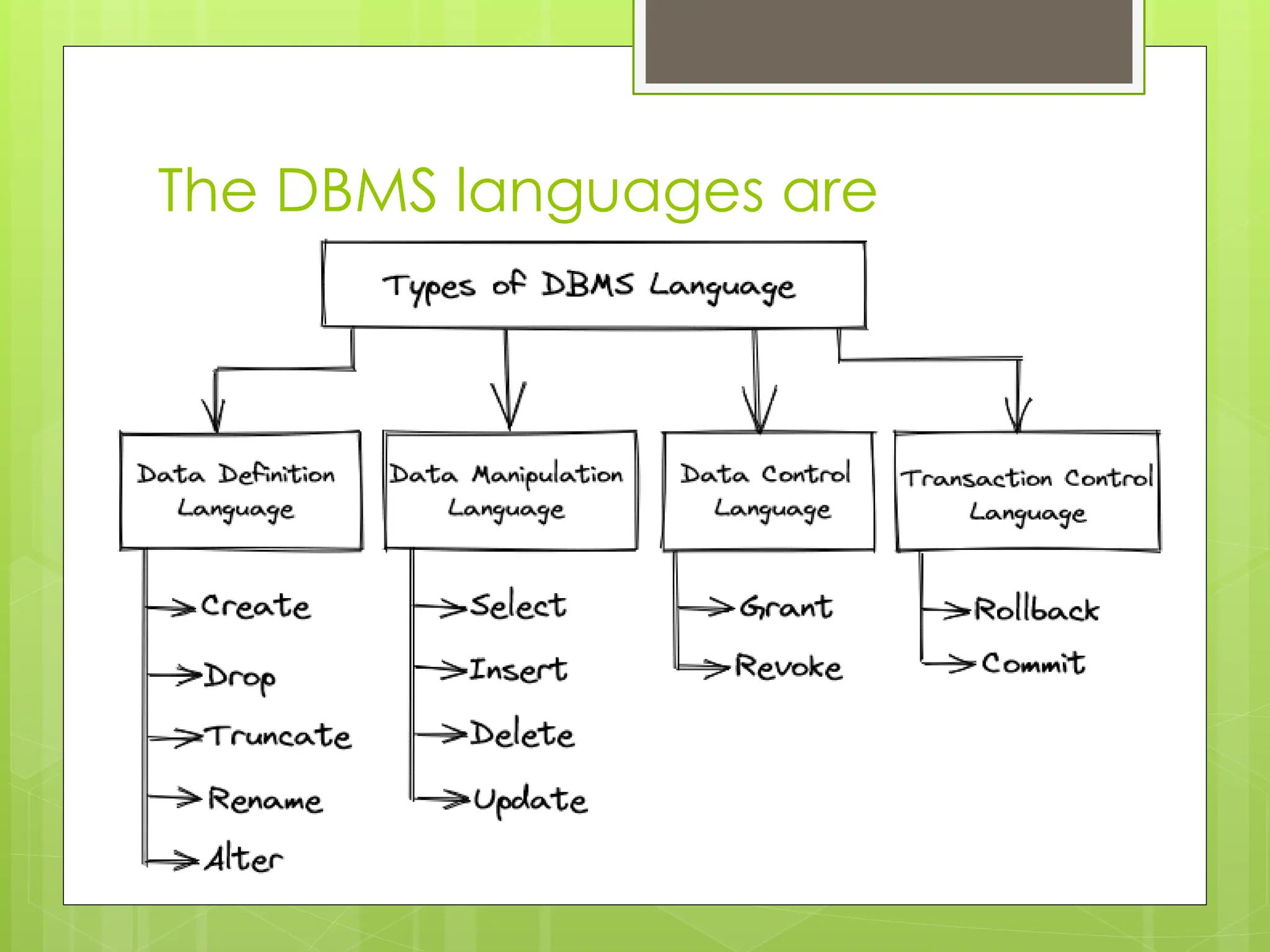
The DBMS languages are
pictorially represented as follows
Data Definition Language
Statements (DDL)
 Data Definition Language Statements (DDL)
statements are used to define the database
structure or schema. Different types of DDL
commands are
1. Create
2. Drop
3. Alter
4. Truncate
5. Describe
Create Command
 Create command is used to create Databases, Tables,
and Views etc.
 Syntax for Creating Databases:
 CREATE DATABASE <Database Name>;
 Example:
 If you want to create new database, then CREATE
DATABASE statement would be as follows:
 SQL> CREATE DATABASE university;
Create Command
 Syntax for Creating Table
 CREATE TABLE table_name(
column1 datatype,
column2 datatype,
column3 datatype,
.....
columnN datatype,
);
Drop command
 Drop command is used to drop the database or table.
 Syntax for Dropping the Database:
 DROP DATABASE <Database Name>;
 Example:
 If you want to delete an existing database testDB then DROP
DATABASE statement would be as follows:
 SQL> DROP DATABASE testDB;
 Syntax for Dropping Table:
 DROP TABLE table_name;
 Eg: Drop table student;
ALTER Command
 ALTER: It is used to alter the structure of the database object.
This change could be either to modify the characteristics of
an existing attribute or probably to add a new attribute.
 Syntax:
 To add a new column in the table
1. ALTER TABLE table_name ADD column_name COLUMN-
definition;
 To modify existing column in the table:
1. ALTER TABLE MODIFY(COLUMN DEFINITION....);
 EXAMPLE
1. ALTER TABLE STU_DETAILS ADD(ADDRESS VARCHAR2(20));
2. ALTER TABLE STU_DETAILS MODIFY (NAME VARCHAR2(20));
TRUNCATE Command
 TRUNCATE: It is used to delete all the rows from the table and
free the space containing the table.
 Syntax:
1. TRUNCATE TABLE table_name;
 Example:
1. TRUNCATE TABLE EMPLOYEE;
 DESCRIBE: It is used to describe the table
 Syntax:
1. DESCRIBE TABLE table_name;
 Example:
1. DESCRIBE TABLE EMPLOYEE;
Data Manipulation Language
Statements (DML)
 Data Manipulation Language
Statements (DML) statements are used to
put data, modify data and delete data from
the database tables. Different types of DML
commands are
1. Insert
2. Update
3. Delete
4. Select
INSERT Command
 INSERT: The INSERT statement is a SQL query. It is
used to insert data into the row of a table.
 Syntax:
1. INSERT INTO TABLE_NAME (col1, col2, col3,.... col N)
VALUES (value1, value2, value3, .... valueN);
 Or
 2.INSERT INTO TABLE_NAME VALUES (value1, value2,
value3, .... valueN);
 For example:
1. INSERT INTO javatpoint (Author, Subject) VALUES
("Sandy", "DBMS");
UPDATE Command
 UPDATE: This command is used to update or modify the
value of a column in the table.
 Syntax:
1. UPDATE table_name SET [column_name1= value1,...column
_nameN = valueN] [WHERE CONDITION]
 For example:
1. UPDATE students SET User_Name = 'Sandy'
WHERE Student_Id = '3'
 DELETE: It is used to remove one or more row from a table.
 Syntax:
1. DELETE FROM table_name [WHERE condition];
 For example:
 DELETE FROM java WHERE Author=“sandy";
SELECT Command
 SELECT: This is used to select the attribute based on the
condition described by WHERE clause.
 Syntax:
 SELECT expressions
 FROM TABLES
 WHERE conditions;
 For example:
 SELECT emp_name
 FROM employee
 WHERE age > 20;
DCL command
 DCL commands are used to grant and take back
authority from any database user.
 Here are some commands that come under DCL:
 a. Grant
 b. Revoke
a. Grant: It is used to give user access privileges to a
database.
b. Revoke: It is used to take back permissions from the
user.
TCL command
 TCL commands can only be used with DML commands like INSERT,
DELETE and UPDATE only.
 These operations are automatically committed in the database that's
why they cannot be used while creating tables or dropping them.
The commands include:
 COMMIT
 ROLLBACK
 SAVEPOINT
 a. Commit: Commit command is used to save all the transactions to
the database.
 b. Rollback: Rollback command is used to undo transactions that
have not already been saved to the database.
 c. Savepoint: It is used to roll the transaction back to a certain point
without rolling back the entire transaction

Database Languages power point presentation

  • 1.
    Database Languages Database languages can beused to read, store and update the data in the database.
  • 2.
    The DBMS languagesare pictorially represented as follows
  • 3.
    Data Definition Language Statements(DDL)  Data Definition Language Statements (DDL) statements are used to define the database structure or schema. Different types of DDL commands are 1. Create 2. Drop 3. Alter 4. Truncate 5. Describe
  • 4.
    Create Command  Createcommand is used to create Databases, Tables, and Views etc.  Syntax for Creating Databases:  CREATE DATABASE <Database Name>;  Example:  If you want to create new database, then CREATE DATABASE statement would be as follows:  SQL> CREATE DATABASE university;
  • 5.
    Create Command  Syntaxfor Creating Table  CREATE TABLE table_name( column1 datatype, column2 datatype, column3 datatype, ..... columnN datatype, );
  • 6.
    Drop command  Dropcommand is used to drop the database or table.  Syntax for Dropping the Database:  DROP DATABASE <Database Name>;  Example:  If you want to delete an existing database testDB then DROP DATABASE statement would be as follows:  SQL> DROP DATABASE testDB;  Syntax for Dropping Table:  DROP TABLE table_name;  Eg: Drop table student;
  • 7.
    ALTER Command  ALTER:It is used to alter the structure of the database object. This change could be either to modify the characteristics of an existing attribute or probably to add a new attribute.  Syntax:  To add a new column in the table 1. ALTER TABLE table_name ADD column_name COLUMN- definition;  To modify existing column in the table: 1. ALTER TABLE MODIFY(COLUMN DEFINITION....);  EXAMPLE 1. ALTER TABLE STU_DETAILS ADD(ADDRESS VARCHAR2(20)); 2. ALTER TABLE STU_DETAILS MODIFY (NAME VARCHAR2(20));
  • 8.
    TRUNCATE Command  TRUNCATE:It is used to delete all the rows from the table and free the space containing the table.  Syntax: 1. TRUNCATE TABLE table_name;  Example: 1. TRUNCATE TABLE EMPLOYEE;  DESCRIBE: It is used to describe the table  Syntax: 1. DESCRIBE TABLE table_name;  Example: 1. DESCRIBE TABLE EMPLOYEE;
  • 9.
    Data Manipulation Language Statements(DML)  Data Manipulation Language Statements (DML) statements are used to put data, modify data and delete data from the database tables. Different types of DML commands are 1. Insert 2. Update 3. Delete 4. Select
  • 10.
    INSERT Command  INSERT:The INSERT statement is a SQL query. It is used to insert data into the row of a table.  Syntax: 1. INSERT INTO TABLE_NAME (col1, col2, col3,.... col N) VALUES (value1, value2, value3, .... valueN);  Or  2.INSERT INTO TABLE_NAME VALUES (value1, value2, value3, .... valueN);  For example: 1. INSERT INTO javatpoint (Author, Subject) VALUES ("Sandy", "DBMS");
  • 11.
    UPDATE Command  UPDATE:This command is used to update or modify the value of a column in the table.  Syntax: 1. UPDATE table_name SET [column_name1= value1,...column _nameN = valueN] [WHERE CONDITION]  For example: 1. UPDATE students SET User_Name = 'Sandy' WHERE Student_Id = '3'  DELETE: It is used to remove one or more row from a table.  Syntax: 1. DELETE FROM table_name [WHERE condition];  For example:  DELETE FROM java WHERE Author=“sandy";
  • 12.
    SELECT Command  SELECT:This is used to select the attribute based on the condition described by WHERE clause.  Syntax:  SELECT expressions  FROM TABLES  WHERE conditions;  For example:  SELECT emp_name  FROM employee  WHERE age > 20;
  • 13.
    DCL command  DCLcommands are used to grant and take back authority from any database user.  Here are some commands that come under DCL:  a. Grant  b. Revoke a. Grant: It is used to give user access privileges to a database. b. Revoke: It is used to take back permissions from the user.
  • 14.
    TCL command  TCLcommands can only be used with DML commands like INSERT, DELETE and UPDATE only.  These operations are automatically committed in the database that's why they cannot be used while creating tables or dropping them. The commands include:  COMMIT  ROLLBACK  SAVEPOINT  a. Commit: Commit command is used to save all the transactions to the database.  b. Rollback: Rollback command is used to undo transactions that have not already been saved to the database.  c. Savepoint: It is used to roll the transaction back to a certain point without rolling back the entire transaction