Data Visualization
April 3, 2015
• When you should graph
• What you should graph
• Given some data, how would you graph it
When should you graph your data?
2Data Visualization
Always
Don’t just make graphs for client reports -- graph your data for
yourself, so you understand it.
If you use a table in a report, see if you can make it into a graph.
Why graphs?
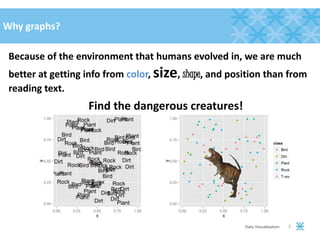
Because of the environment that humans evolved in, we are much
better at getting info from color, size, shape, and position than from
reading text.
3Data Visualization
Find the dangerous creatures!
Why graphs work
• Color
•Size
• Shape
• Position
4Data Visualization
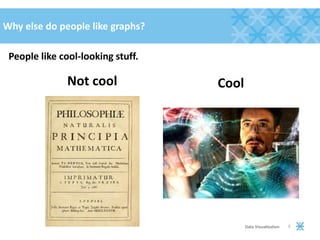
Why else do people like graphs?
People like cool-looking stuff.
5Data Visualization
Not cool Cool
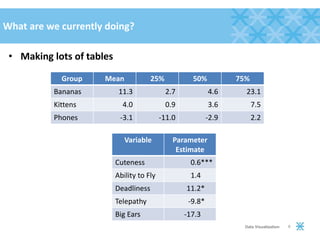
What are we currently doing?
• Making lots of tables
6Data Visualization
Group Mean 25% 50% 75%
Bananas 11.3 2.7 4.6 23.1
Kittens 4.0 0.9 3.6 7.5
Phones -3.1 -11.0 -2.9 2.2
Variable Parameter
Estimate
Cuteness 0.6***
Ability to Fly 1.4***
Deadliness 11.2***
Telepathy -9.8***
Big Ears -17.3***
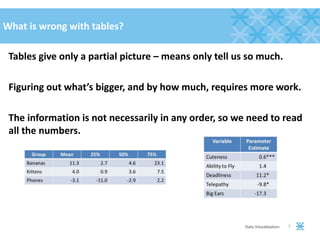
What is wrong with tables?
Tables give only a partial picture – means only tell us so much.
Figuring out what’s bigger, and by how much, requires more work.
The information is not necessarily in any order, so we need to read
all the numbers.
7Data Visualization
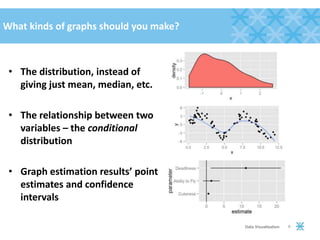
What kinds of graphs should you make?
• The distribution, instead of
giving just mean, median, etc.
• The relationship between two
variables – the conditional
distribution
• Graph estimation results’ point
estimates and confidence
intervals
8Data Visualization
What to expect out of this presentation
1. Discussion of the type of graph (e.g. distributions)
2. How the type of graph applies to continuous vs. categorical data
3. Extensions (e.g. graphing more than one at a time)
What not to expect: how to do these in any particular software.
9Data Visualization
Distributions
10Data Visualization
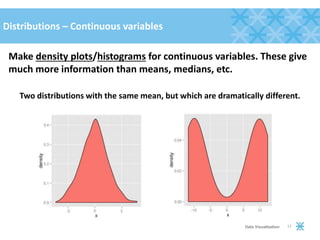
Distributions – Continuous variables
Make density plots/histograms for continuous variables. These give
much more information than means, medians, etc.
Two distributions with the same mean, but which are dramatically different.
11Data Visualization
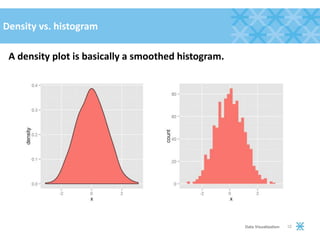
Density vs. histogram
A density plot is basically a smoothed histogram.
12Data Visualization
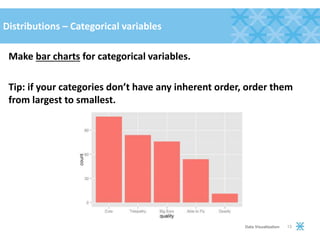
Distributions – Categorical variables
Make bar charts for categorical variables.
Tip: if your categories don’t have any inherent order, order them
from largest to smallest.
13Data Visualization
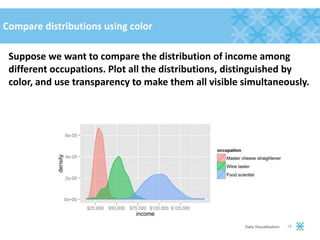
Compare distributions using color
Suppose we want to compare the distribution of income among
different occupations. Plot all the distributions, distinguished by
color, and use transparency to make them all visible simultaneously.
14Data Visualization
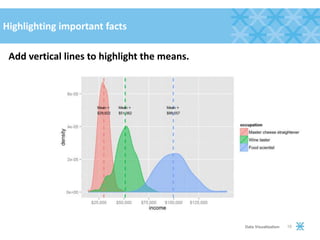
Highlighting important facts
Add vertical lines to highlight the means.
15Data Visualization
Relationships
16Data Visualization
Relationships between variables
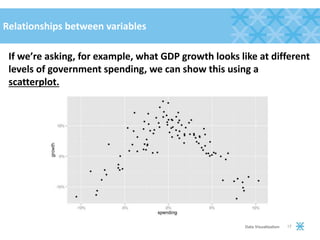
If we’re asking, for example, what GDP growth looks like at different
levels of government spending, we can show this using a
scatterplot.
17Data Visualization
How to show trends
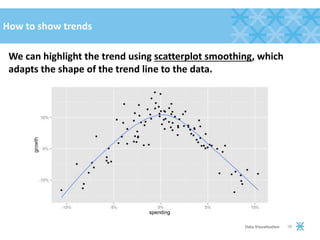
We can highlight the trend using scatterplot smoothing, which
adapts the shape of the trend line to the data.
18Data Visualization
How to show multiple groups
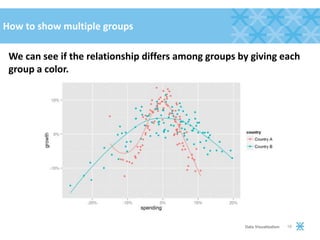
We can see if the relationship differs among groups by giving each
group a color.
19Data Visualization
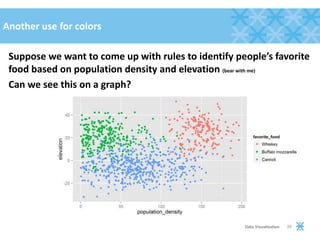
Another use for colors
Suppose we want to come up with rules to identify people’s favorite
food based on population density and elevation (bear with me)
Can we see this on a graph?
20Data Visualization
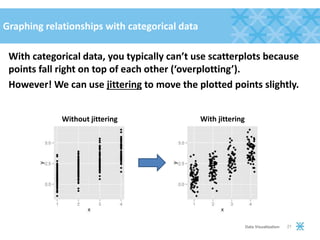
Graphing relationships with categorical data
With categorical data, you typically can’t use scatterplots because
points fall right on top of each other (‘overplotting’).
However! We can use jittering to move the plotted points slightly.
21Data Visualization
Without jittering With jittering
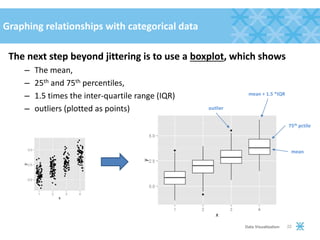
Graphing relationships with categorical data
The next step beyond jittering is to use a boxplot, which shows
– The mean,
– 25th and 75th percentiles,
– 1.5 times the inter-quartile range (IQR)
– outliers (plotted as points)
22Data Visualization
mean
75th pctile
mean + 1.5 *IQR
outlier
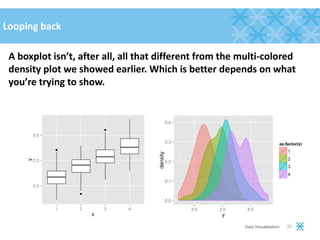
Looping back
A boxplot isn’t, after all, all that different from the multi-colored
density plot we showed earlier. Which is better depends on what
you’re trying to show.
23Data Visualization
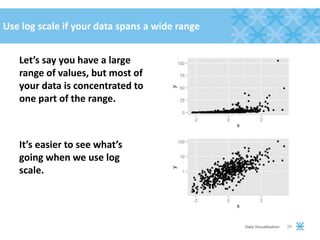
Use log scale if your data spans a wide range
Let’s say you have a large
range of values, but most of
your data is concentrated to
one part of the range.
It’s easier to see what’s
going when we use log
scale.
24Data Visualization
Estimation results
25Data Visualization
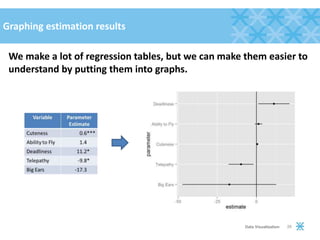
Graphing estimation results
We make a lot of regression tables, but we can make them easier to
understand by putting them into graphs.
26Data Visualization
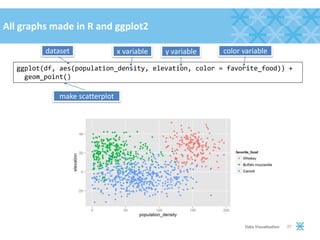
ggplot(df, aes(population_density, elevation, color = favorite_food)) +
geom_point()
27Data Visualization
dataset x variable y variable
make scatterplot
color variable
All graphs made in R and ggplot2
Data Visualization Checklist
• Always graph
• Use color, size, shape, and position
• Three important types of graph:
– Distribution
– Relationship
– Estimation results
• Highlight important facts
• Make it cool-looking
28Data Visualization

Data Visualization by David Kretch

  • 1.
    Data Visualization April 3,2015 • When you should graph • What you should graph • Given some data, how would you graph it
  • 2.
    When should yougraph your data? 2Data Visualization Always Don’t just make graphs for client reports -- graph your data for yourself, so you understand it. If you use a table in a report, see if you can make it into a graph.
  • 3.
    Why graphs? Because ofthe environment that humans evolved in, we are much better at getting info from color, size, shape, and position than from reading text. 3Data Visualization Find the dangerous creatures!
  • 4.
    Why graphs work •Color •Size • Shape • Position 4Data Visualization
  • 5.
    Why else dopeople like graphs? People like cool-looking stuff. 5Data Visualization Not cool Cool
  • 6.
    What are wecurrently doing? • Making lots of tables 6Data Visualization Group Mean 25% 50% 75% Bananas 11.3 2.7 4.6 23.1 Kittens 4.0 0.9 3.6 7.5 Phones -3.1 -11.0 -2.9 2.2 Variable Parameter Estimate Cuteness 0.6*** Ability to Fly 1.4*** Deadliness 11.2*** Telepathy -9.8*** Big Ears -17.3***
  • 7.
    What is wrongwith tables? Tables give only a partial picture – means only tell us so much. Figuring out what’s bigger, and by how much, requires more work. The information is not necessarily in any order, so we need to read all the numbers. 7Data Visualization
  • 8.
    What kinds ofgraphs should you make? • The distribution, instead of giving just mean, median, etc. • The relationship between two variables – the conditional distribution • Graph estimation results’ point estimates and confidence intervals 8Data Visualization
  • 9.
    What to expectout of this presentation 1. Discussion of the type of graph (e.g. distributions) 2. How the type of graph applies to continuous vs. categorical data 3. Extensions (e.g. graphing more than one at a time) What not to expect: how to do these in any particular software. 9Data Visualization
  • 10.
  • 11.
    Distributions – Continuousvariables Make density plots/histograms for continuous variables. These give much more information than means, medians, etc. Two distributions with the same mean, but which are dramatically different. 11Data Visualization
  • 12.
    Density vs. histogram Adensity plot is basically a smoothed histogram. 12Data Visualization
  • 13.
    Distributions – Categoricalvariables Make bar charts for categorical variables. Tip: if your categories don’t have any inherent order, order them from largest to smallest. 13Data Visualization
  • 14.
    Compare distributions usingcolor Suppose we want to compare the distribution of income among different occupations. Plot all the distributions, distinguished by color, and use transparency to make them all visible simultaneously. 14Data Visualization
  • 15.
    Highlighting important facts Addvertical lines to highlight the means. 15Data Visualization
  • 16.
  • 17.
    Relationships between variables Ifwe’re asking, for example, what GDP growth looks like at different levels of government spending, we can show this using a scatterplot. 17Data Visualization
  • 18.
    How to showtrends We can highlight the trend using scatterplot smoothing, which adapts the shape of the trend line to the data. 18Data Visualization
  • 19.
    How to showmultiple groups We can see if the relationship differs among groups by giving each group a color. 19Data Visualization
  • 20.
    Another use forcolors Suppose we want to come up with rules to identify people’s favorite food based on population density and elevation (bear with me) Can we see this on a graph? 20Data Visualization
  • 21.
    Graphing relationships withcategorical data With categorical data, you typically can’t use scatterplots because points fall right on top of each other (‘overplotting’). However! We can use jittering to move the plotted points slightly. 21Data Visualization Without jittering With jittering
  • 22.
    Graphing relationships withcategorical data The next step beyond jittering is to use a boxplot, which shows – The mean, – 25th and 75th percentiles, – 1.5 times the inter-quartile range (IQR) – outliers (plotted as points) 22Data Visualization mean 75th pctile mean + 1.5 *IQR outlier
  • 23.
    Looping back A boxplotisn’t, after all, all that different from the multi-colored density plot we showed earlier. Which is better depends on what you’re trying to show. 23Data Visualization
  • 24.
    Use log scaleif your data spans a wide range Let’s say you have a large range of values, but most of your data is concentrated to one part of the range. It’s easier to see what’s going when we use log scale. 24Data Visualization
  • 25.
  • 26.
    Graphing estimation results Wemake a lot of regression tables, but we can make them easier to understand by putting them into graphs. 26Data Visualization
  • 27.
    ggplot(df, aes(population_density, elevation,color = favorite_food)) + geom_point() 27Data Visualization dataset x variable y variable make scatterplot color variable All graphs made in R and ggplot2
  • 28.
    Data Visualization Checklist •Always graph • Use color, size, shape, and position • Three important types of graph: – Distribution – Relationship – Estimation results • Highlight important facts • Make it cool-looking 28Data Visualization