Data Time Travel by
Delta Time Machine
Burak Yavuz | Software Engineer
Vini Jaiswal | Customer Success Engineer
Who are we?
● Software Engineer @ Databricks
“We make your streams come true”
● Apache Spark Committer
● MS in Management Science & Engineering - Stanford University
● BS in Mechanical Engineering - Bogazici University, Turkey
● Customer Success Engineer @ Databricks
“Making Customers Successful with their data and ML/AI use cases”
● Data Science Lead - Citi | Data Intern - Southwest Airlines
● MS in Information Technology & Management - UTDallas
● BS in Electrical Engineering - Rajiv Gandhi Technology University, India
Vini Jaiswal
Burak Yavuz
Agenda
Intro to Time Travel
Time Travel Use Cases
▪ Data Archiving
▪ Rollbacks
▪ Governance
▪ Reproducing ML experiments
Solving with Delta
Demo - Riding the time machine
Introduction to Time Travel
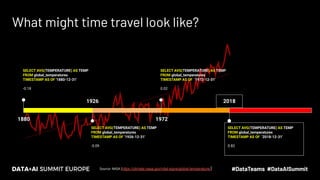
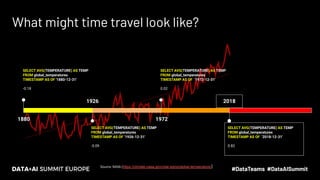
What might time travel look like?
Source: NASA (https://climate.nasa.gov/vital-signs/global-temperature/)
1926
SELECT AVG(TEMPERATURE) AS TEMP
FROM global_temperatures
TIMESTAMP AS OF ‘1926-12-31'
-0.09
1972
SELECT AVG(TEMPERATURE) AS TEMP
FROM global_temperatures
TIMESTAMP AS OF ‘1972-12-31'
0.02
1880
SELECT AVG(TEMPERATURE) AS TEMP
FROM global_temperatures
TIMESTAMP AS OF '1880-12-31'
-0.18
2018
SELECT AVG(TEMPERATURE) AS TEMP
FROM global_temperatures
TIMESTAMP AS OF ‘2018-12-31'
0.82
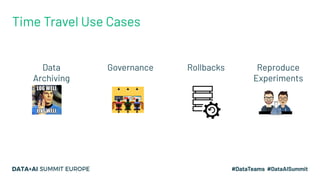
Data
Archiving
Governance Rollbacks Reproduce
Experiments
Time Travel Use Cases
Data Archiving
● Changes to data need to be stored and be retrievable for regulatory reasons
● May need to store data for many years (7+)
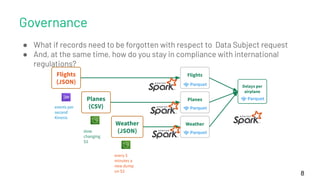
Governance
8
Flights
Delays per
airplane
Planes
Weather
● What if records need to be forgotten with respect to Data Subject request
● And, at the same time, how do you stay in compliance with international
regulations?
Flights
(JSON)
events per
second
Kinesis
Planes
(CSV)
slow
changing
S3
Weather
(JSON)
every 5
minutes a
new dump
on S3
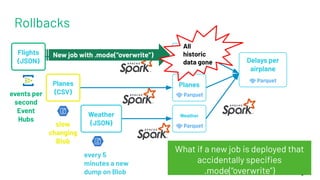
Rollbacks
9
Flights
Planes
Weather
Flights
(JSON)
events per
second
Event
Hubs
Planes
(CSV)
slow
changing
Blob
Weather
(JSON)
every 5
minutes a new
dump on Blob
What if a new job is deployed that
accidentally specifies
.mode(“overwrite”)
New job with .mode(“overwrite”)
Delays per
airplane
All
historic
data gone
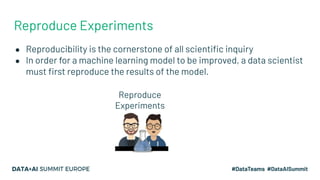
Reproduce Experiments
● Reproducibility is the cornerstone of all scientific inquiry
● In order for a machine learning model to be improved, a data scientist
must first reproduce the results of the model.
Reproduce
Experiments
Solving with Delta
For more info check out
Diving Into Delta Lake:
Unpacking the Transaction Log
Wednesday (Nov 11) 15:00 GMT
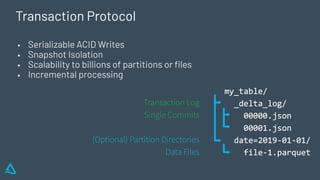
Transaction Protocol
▪ Serializable ACID Writes
▪ Snapshot Isolation
▪ Scalability to billions of partitions or files
▪ Incremental processing
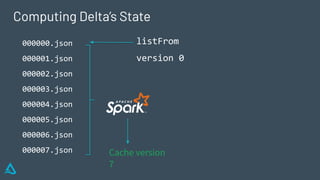
Computing Delta’s State
000000.json
000001.json
000002.json
000003.json
000004.json
000005.json
000006.json
000007.json
listFrom
version 0
Cache version
7
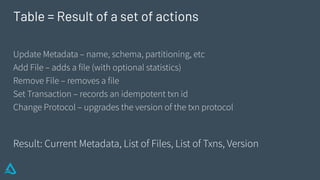
Update Metadata – name, schema, partitioning, etc
Add File – adds a file (with optional statistics)
Remove File – removes a file
Set Transaction – records an idempotent txn id
Change Protocol – upgrades the version of the txn protocol
Result: Current Metadata, List of Files, List of Txns, Version
Table = Result of a set of actions
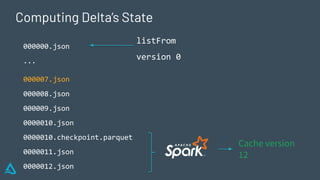
Computing Delta’s State
000000.json
...
000007.json
000008.json
000009.json
0000010.json
0000010.checkpoint.parquet
0000011.json
0000012.json
Cache version
12
listFrom
version 0
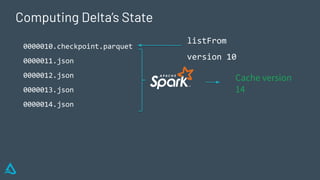
Computing Delta’s State
0000010.checkpoint.parquet
0000011.json
0000012.json
0000013.json
0000014.json
Cache version
14
listFrom
version 10
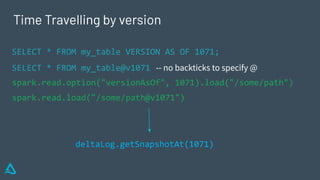
Time Travelling by version
SELECT * FROM my_table VERSION AS OF 1071;
SELECT * FROM my_table@v1071 -- no backticks to specify @
spark.read.option("versionAsOf", 1071).load("/some/path")
spark.read.load("/some/path@v1071")
deltaLog.getSnapshotAt(1071)
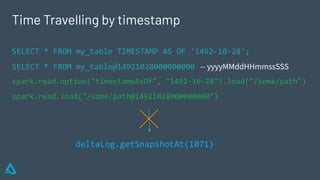
Time Travelling by timestamp
SELECT * FROM my_table TIMESTAMP AS OF '1492-10-28';
SELECT * FROM my_table@14921028000000000 -- yyyyMMddHHmmssSSS
spark.read.option("timestampAsOf", "1492-10-28").load("/some/path")
spark.read.load("/some/path@14921028000000000")
deltaLog.getSnapshotAt(1071)
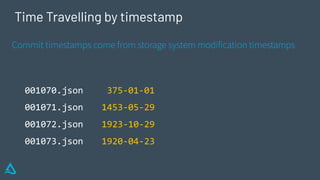
Time Travelling by timestamp
001070.json
001071.json
001072.json
001073.json
Commit timestamps come from storage system modification timestamps
375-01-01
1453-05-29
1923-10-29
1920-04-23
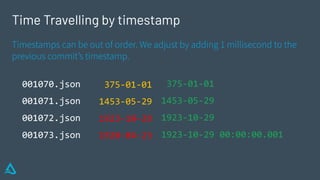
Time Travelling by timestamp
001070.json
001071.json
001072.json
001073.json
Timestamps can be out of order. We adjust by adding 1 millisecond to the
previous commit’s timestamp.
375-01-01
1453-05-29
1923-10-29
1920-04-23
375-01-01
1453-05-29
1923-10-29
1923-10-29 00:00:00.001
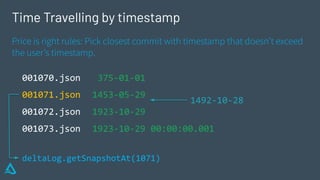
Time Travelling by timestamp
001070.json
001071.json
001072.json
001073.json
Price is right rules: Pick closest commit with timestamp that doesn’t exceed
the user’s timestamp.
375-01-01
1453-05-29
1923-10-29
1923-10-29 00:00:00.001
1492-10-28
deltaLog.getSnapshotAt(1071)
Back to the Use Cases
Data Archiving
● Changes to data need to be stored and be retrievable for regulatory reasons
○ Should you be storing changes (CDC) or the latest snapshot?
● May need to store data for many years (7+)
○ How do you make it cost efficient?
What might time travel look like?
1926
SELECT AVG(TEMPERATURE) AS TEMP
FROM global_temperatures
TIMESTAMP AS OF ‘1926-12-31'
-0.09
1972
SELECT AVG(TEMPERATURE) AS TEMP
FROM global_temperatures
TIMESTAMP AS OF ‘1972-12-31'
0.02
1880
SELECT AVG(TEMPERATURE) AS TEMP
FROM global_temperatures
TIMESTAMP AS OF '1880-12-31'
-0.18
2018
SELECT AVG(TEMPERATURE) AS TEMP
FROM global_temperatures
TIMESTAMP AS OF ‘2018-12-31'
0.82
Source: NASA (https://climate.nasa.gov/vital-signs/global-temperature/)
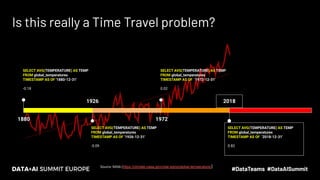
Is this really a Time Travel problem?
Source: NASA (https://climate.nasa.gov/vital-signs/global-temperature/)
1926
SELECT AVG(TEMPERATURE) AS TEMP
FROM global_temperatures
TIMESTAMP AS OF ‘1926-12-31'
-0.09
1972
SELECT AVG(TEMPERATURE) AS TEMP
FROM global_temperatures
TIMESTAMP AS OF ‘1972-12-31'
0.02
1880
SELECT AVG(TEMPERATURE) AS TEMP
FROM global_temperatures
TIMESTAMP AS OF '1880-12-31'
-0.18
2018
SELECT AVG(TEMPERATURE) AS TEMP
FROM global_temperatures
TIMESTAMP AS OF ‘2018-12-31'
0.82
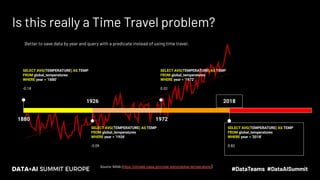
Is this really a Time Travel problem?
Source: NASA (https://climate.nasa.gov/vital-signs/global-temperature/)
1926
SELECT AVG(TEMPERATURE) AS TEMP
FROM global_temperatures
WHERE year = '1926'
-0.09
1972
SELECT AVG(TEMPERATURE) AS TEMP
FROM global_temperatures
WHERE year = '1972'
0.02
1880
SELECT AVG(TEMPERATURE) AS TEMP
FROM global_temperatures
WHERE year = '1880'
-0.18
2018
SELECT AVG(TEMPERATURE) AS TEMP
FROM global_temperatures
WHERE year = '2018'
0.82
Better to save data by year and query with a predicate instead of using time travel.
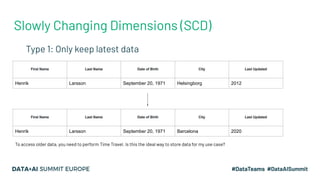
Slowly Changing Dimensions (SCD)
- Type 1: Only keep latest data
First Name Last Name Date of Birth City Last Updated
Henrik Larsson September 20, 1971 Helsingborg 2012
First Name Last Name Date of Birth City Last Updated
Henrik Larsson September 20, 1971 Barcelona 2020
To access older data, you need to perform Time Travel. Is this the ideal way to store data for my use case?
Problems with SCD Type 1 + Time Travel
● Trade-off between data recency, query performance, and storage
costs
○ Data recency requires many frequent updates
○ Better query performance requires regular compaction of the data
○ The two above lead to many copies of the data
○ Many copies of the data lead to prohibitive storage costs
● Time Travel requires older copies of the data to exist
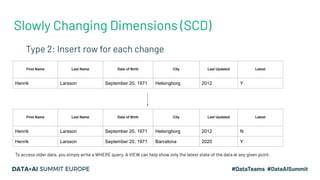
Slowly Changing Dimensions (SCD)
- Type 2: Insert row for each change
First Name Last Name Date of Birth City Last Updated Latest
Henrik Larsson September 20, 1971 Helsingborg 2012 Y
First Name Last Name Date of Birth City Last Updated Latest
Henrik Larsson September 20, 1971 Helsingborg 2012 N
Henrik Larsson September 20, 1971 Barcelona 2020 Y
To access older data, you simply write a WHERE query. A VIEW can help show only the latest state of the data at any given point.
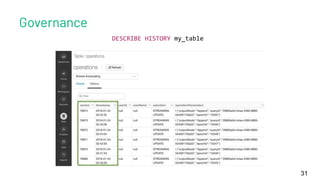
Governance
31
DESCRIBE HISTORY my_table
Rollbacks
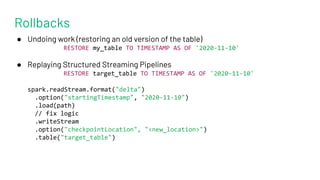
● Undoing work (restoring an old version of the table)
RESTORE my_table TO TIMESTAMP AS OF '2020-11-10'
● Replaying Structured Streaming Pipelines
RESTORE target_table TO TIMESTAMP AS OF '2020-11-10'
spark.readStream.format("delta")
.option("startingTimestamp", "2020-11-10")
.load(path)
// fix logic
.writeStream
.option("checkpointLocation", "<new_location>")
.table("target_table")
Rollbacks
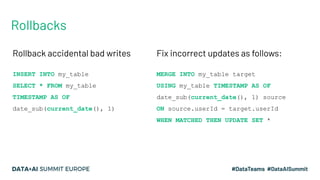
Rollback accidental bad writes
INSERT INTO my_table
SELECT * FROM my_table
TIMESTAMP AS OF
date_sub(current_date(), 1)
Fix incorrect updates as follows:
MERGE INTO my_table target
USING my_table TIMESTAMP AS OF
date_sub(current_date(), 1) source
ON source.userId = target.userId
WHEN MATCHED THEN UPDATE SET *
Reproduce Experiments
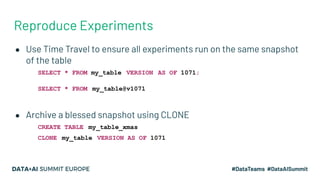
● Use Time Travel to ensure all experiments run on the same snapshot
of the table
○ SELECT * FROM my_table VERSION AS OF 1071;
○ SELECT * FROM my_table@v1071
● Archive a blessed snapshot using CLONE
○ CREATE TABLE my_table_xmas
○ CLONE my_table VERSION AS OF 1071
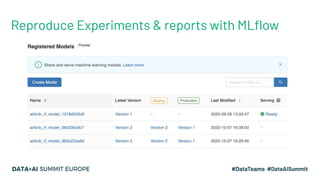
Reproduce Experiments & reports with MLflow
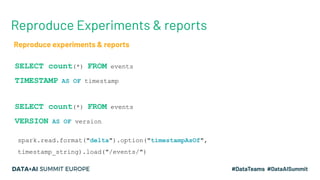
Reproduce Experiments & reports
SELECT count(*) FROM events
TIMESTAMP AS OF timestamp
SELECT count(*) FROM events
VERSION AS OF version
spark.read.format("delta").option("timestampAsOf",
timestamp_string).load("/events/")
Reproduce experiments & reports
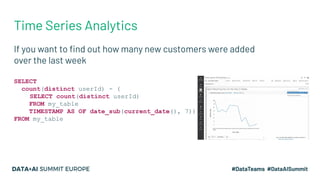
Time Series Analytics
If you want to find out how many new customers were added
over the last week
SELECT
count(distinct userId) - (
SELECT count(distinct userId)
FROM my_table
TIMESTAMP AS OF date_sub(current_date(), 7))
FROM my_table
DEMO - Riding the time machine
Feedback
Your feedback is important to us.
Don’t forget to rate
and review the sessions.

Data Time Travel by Delta Time Machine

  • 1.
    Data Time Travelby Delta Time Machine Burak Yavuz | Software Engineer Vini Jaiswal | Customer Success Engineer
  • 2.
    Who are we? ●Software Engineer @ Databricks “We make your streams come true” ● Apache Spark Committer ● MS in Management Science & Engineering - Stanford University ● BS in Mechanical Engineering - Bogazici University, Turkey ● Customer Success Engineer @ Databricks “Making Customers Successful with their data and ML/AI use cases” ● Data Science Lead - Citi | Data Intern - Southwest Airlines ● MS in Information Technology & Management - UTDallas ● BS in Electrical Engineering - Rajiv Gandhi Technology University, India Vini Jaiswal Burak Yavuz
  • 3.
    Agenda Intro to TimeTravel Time Travel Use Cases ▪ Data Archiving ▪ Rollbacks ▪ Governance ▪ Reproducing ML experiments Solving with Delta Demo - Riding the time machine
  • 4.
  • 5.
    What might timetravel look like? Source: NASA (https://climate.nasa.gov/vital-signs/global-temperature/) 1926 SELECT AVG(TEMPERATURE) AS TEMP FROM global_temperatures TIMESTAMP AS OF ‘1926-12-31' -0.09 1972 SELECT AVG(TEMPERATURE) AS TEMP FROM global_temperatures TIMESTAMP AS OF ‘1972-12-31' 0.02 1880 SELECT AVG(TEMPERATURE) AS TEMP FROM global_temperatures TIMESTAMP AS OF '1880-12-31' -0.18 2018 SELECT AVG(TEMPERATURE) AS TEMP FROM global_temperatures TIMESTAMP AS OF ‘2018-12-31' 0.82
  • 6.
  • 7.
    Data Archiving ● Changesto data need to be stored and be retrievable for regulatory reasons ● May need to store data for many years (7+)
  • 8.
    Governance 8 Flights Delays per airplane Planes Weather ● Whatif records need to be forgotten with respect to Data Subject request ● And, at the same time, how do you stay in compliance with international regulations? Flights (JSON) events per second Kinesis Planes (CSV) slow changing S3 Weather (JSON) every 5 minutes a new dump on S3
  • 9.
    Rollbacks 9 Flights Planes Weather Flights (JSON) events per second Event Hubs Planes (CSV) slow changing Blob Weather (JSON) every 5 minutesa new dump on Blob What if a new job is deployed that accidentally specifies .mode(“overwrite”) New job with .mode(“overwrite”) Delays per airplane All historic data gone
  • 10.
    Reproduce Experiments ● Reproducibilityis the cornerstone of all scientific inquiry ● In order for a machine learning model to be improved, a data scientist must first reproduce the results of the model. Reproduce Experiments
  • 11.
  • 12.
    For more infocheck out Diving Into Delta Lake: Unpacking the Transaction Log Wednesday (Nov 11) 15:00 GMT
  • 13.
    Transaction Protocol ▪ SerializableACID Writes ▪ Snapshot Isolation ▪ Scalability to billions of partitions or files ▪ Incremental processing
  • 14.
  • 15.
    Update Metadata –name, schema, partitioning, etc Add File – adds a file (with optional statistics) Remove File – removes a file Set Transaction – records an idempotent txn id Change Protocol – upgrades the version of the txn protocol Result: Current Metadata, List of Files, List of Txns, Version Table = Result of a set of actions
  • 16.
  • 17.
  • 18.
    Time Travelling byversion SELECT * FROM my_table VERSION AS OF 1071; SELECT * FROM my_table@v1071 -- no backticks to specify @ spark.read.option("versionAsOf", 1071).load("/some/path") spark.read.load("/some/path@v1071") deltaLog.getSnapshotAt(1071)
  • 19.
    Time Travelling bytimestamp SELECT * FROM my_table TIMESTAMP AS OF '1492-10-28'; SELECT * FROM my_table@14921028000000000 -- yyyyMMddHHmmssSSS spark.read.option("timestampAsOf", "1492-10-28").load("/some/path") spark.read.load("/some/path@14921028000000000") deltaLog.getSnapshotAt(1071)
  • 20.
    Time Travelling bytimestamp 001070.json 001071.json 001072.json 001073.json Commit timestamps come from storage system modification timestamps 375-01-01 1453-05-29 1923-10-29 1920-04-23
  • 21.
    Time Travelling bytimestamp 001070.json 001071.json 001072.json 001073.json Timestamps can be out of order. We adjust by adding 1 millisecond to the previous commit’s timestamp. 375-01-01 1453-05-29 1923-10-29 1920-04-23 375-01-01 1453-05-29 1923-10-29 1923-10-29 00:00:00.001
  • 22.
    Time Travelling bytimestamp 001070.json 001071.json 001072.json 001073.json Price is right rules: Pick closest commit with timestamp that doesn’t exceed the user’s timestamp. 375-01-01 1453-05-29 1923-10-29 1923-10-29 00:00:00.001 1492-10-28 deltaLog.getSnapshotAt(1071)
  • 23.
    Back to theUse Cases
  • 24.
    Data Archiving ● Changesto data need to be stored and be retrievable for regulatory reasons ○ Should you be storing changes (CDC) or the latest snapshot? ● May need to store data for many years (7+) ○ How do you make it cost efficient?
  • 25.
    What might timetravel look like? 1926 SELECT AVG(TEMPERATURE) AS TEMP FROM global_temperatures TIMESTAMP AS OF ‘1926-12-31' -0.09 1972 SELECT AVG(TEMPERATURE) AS TEMP FROM global_temperatures TIMESTAMP AS OF ‘1972-12-31' 0.02 1880 SELECT AVG(TEMPERATURE) AS TEMP FROM global_temperatures TIMESTAMP AS OF '1880-12-31' -0.18 2018 SELECT AVG(TEMPERATURE) AS TEMP FROM global_temperatures TIMESTAMP AS OF ‘2018-12-31' 0.82 Source: NASA (https://climate.nasa.gov/vital-signs/global-temperature/)
  • 26.
    Is this reallya Time Travel problem? Source: NASA (https://climate.nasa.gov/vital-signs/global-temperature/) 1926 SELECT AVG(TEMPERATURE) AS TEMP FROM global_temperatures TIMESTAMP AS OF ‘1926-12-31' -0.09 1972 SELECT AVG(TEMPERATURE) AS TEMP FROM global_temperatures TIMESTAMP AS OF ‘1972-12-31' 0.02 1880 SELECT AVG(TEMPERATURE) AS TEMP FROM global_temperatures TIMESTAMP AS OF '1880-12-31' -0.18 2018 SELECT AVG(TEMPERATURE) AS TEMP FROM global_temperatures TIMESTAMP AS OF ‘2018-12-31' 0.82
  • 27.
    Is this reallya Time Travel problem? Source: NASA (https://climate.nasa.gov/vital-signs/global-temperature/) 1926 SELECT AVG(TEMPERATURE) AS TEMP FROM global_temperatures WHERE year = '1926' -0.09 1972 SELECT AVG(TEMPERATURE) AS TEMP FROM global_temperatures WHERE year = '1972' 0.02 1880 SELECT AVG(TEMPERATURE) AS TEMP FROM global_temperatures WHERE year = '1880' -0.18 2018 SELECT AVG(TEMPERATURE) AS TEMP FROM global_temperatures WHERE year = '2018' 0.82 Better to save data by year and query with a predicate instead of using time travel.
  • 28.
    Slowly Changing Dimensions(SCD) - Type 1: Only keep latest data First Name Last Name Date of Birth City Last Updated Henrik Larsson September 20, 1971 Helsingborg 2012 First Name Last Name Date of Birth City Last Updated Henrik Larsson September 20, 1971 Barcelona 2020 To access older data, you need to perform Time Travel. Is this the ideal way to store data for my use case?
  • 29.
    Problems with SCDType 1 + Time Travel ● Trade-off between data recency, query performance, and storage costs ○ Data recency requires many frequent updates ○ Better query performance requires regular compaction of the data ○ The two above lead to many copies of the data ○ Many copies of the data lead to prohibitive storage costs ● Time Travel requires older copies of the data to exist
  • 30.
    Slowly Changing Dimensions(SCD) - Type 2: Insert row for each change First Name Last Name Date of Birth City Last Updated Latest Henrik Larsson September 20, 1971 Helsingborg 2012 Y First Name Last Name Date of Birth City Last Updated Latest Henrik Larsson September 20, 1971 Helsingborg 2012 N Henrik Larsson September 20, 1971 Barcelona 2020 Y To access older data, you simply write a WHERE query. A VIEW can help show only the latest state of the data at any given point.
  • 31.
  • 32.
    Rollbacks ● Undoing work(restoring an old version of the table) RESTORE my_table TO TIMESTAMP AS OF '2020-11-10' ● Replaying Structured Streaming Pipelines RESTORE target_table TO TIMESTAMP AS OF '2020-11-10' spark.readStream.format("delta") .option("startingTimestamp", "2020-11-10") .load(path) // fix logic .writeStream .option("checkpointLocation", "<new_location>") .table("target_table")
  • 33.
    Rollbacks Rollback accidental badwrites INSERT INTO my_table SELECT * FROM my_table TIMESTAMP AS OF date_sub(current_date(), 1) Fix incorrect updates as follows: MERGE INTO my_table target USING my_table TIMESTAMP AS OF date_sub(current_date(), 1) source ON source.userId = target.userId WHEN MATCHED THEN UPDATE SET *
  • 34.
    Reproduce Experiments ● UseTime Travel to ensure all experiments run on the same snapshot of the table ○ SELECT * FROM my_table VERSION AS OF 1071; ○ SELECT * FROM my_table@v1071 ● Archive a blessed snapshot using CLONE ○ CREATE TABLE my_table_xmas ○ CLONE my_table VERSION AS OF 1071
  • 35.
    Reproduce Experiments &reports with MLflow
  • 36.
    Reproduce Experiments &reports SELECT count(*) FROM events TIMESTAMP AS OF timestamp SELECT count(*) FROM events VERSION AS OF version spark.read.format("delta").option("timestampAsOf", timestamp_string).load("/events/") Reproduce experiments & reports
  • 37.
    Time Series Analytics Ifyou want to find out how many new customers were added over the last week SELECT count(distinct userId) - ( SELECT count(distinct userId) FROM my_table TIMESTAMP AS OF date_sub(current_date(), 7)) FROM my_table
  • 38.
    DEMO - Ridingthe time machine
  • 39.
    Feedback Your feedback isimportant to us. Don’t forget to rate and review the sessions.