Data Protection and Security
NAZAR K A
Deputy Manager
ITI Limited
Contact: 9400568432 Nazarka_pkd@itiltd.co.in
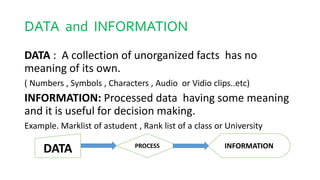
DATA and INFORMATION
DATA : A collection of unorganized facts has no
meaning of its own.
( Numbers , Symbols , Characters , Audio or Vidio clips..etc)
INFORMATION: Processed data having some meaning
and it is useful for decision making.
Example. Marklist of astudent , Rank list of a class or University
PROCESS
DATA INFORMATION
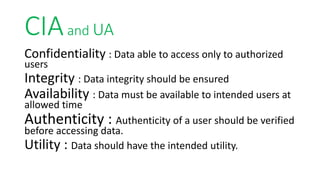
CIAand UA
Confidentiality : Data able to access only to authorized
users
Integrity : Data integrity should be ensured
Availability : Data must be available to intended users at
allowed time
Authenticity : Authenticity of a user should be verified
before accessing data.
Utility : Data should have the intended utility.
Data Protection and Security
• Data protection is the process of safeguarding
important data from corruption, compromise or loss
and providing the capability to restore the data to a
functional state should something happen to data as
inaccessible or unusable..
• Data security refers to the process of protecting data from
unauthorized access and data corruption throughout its
lifecycle. Data security includes data encryption,
hashing, tokenization, and key management practices that
protect data across all applications and platforms.
Both are same in some point, by data security we can achieve data protection.
Data protection
•RAID
•Data Backup and Restoration
•Cloud backup
•Disaster Recovery Station
Data security & Data breaches
Data is the most valuable asset for any business. No matter what industry
you are in, it’s critical to take care of your data, whether it is financial
reports, healthcare records or a start-up business plan following are the way
data breaches occures
• Cyberattacks in which hackers bypass your security technologies and get
into your important software or your security platform
• Theft or loss of devices containing protected information
• Data theft by employees or other internal users, such as contractors or
partners
• Human errors such as accidentally sending sensitive data to someone
unauthorized to see it
MALWARE
Malware = MALicious + soft WARE
Malware is intrusive software that is designed to
damage and destroy computers and computer systems.
Malware is a contraction for “malicious software.”
Examples of common malware includes viruses, worms,
Trojan viruses, spyware, adware, and ransomware.
Types of Malware
• viruses : Malicious program without our consent
•Worm. : Hide and replicate fast from PC to PC
•Trojan : Destroy our computer systems
•Ransomware : Restrict our access to PC
•Rootkits : Give unauthorized access to our PC
•Adware : Popup annoying advertisments
•Spyware : Will record and sent our activity in PC
Cyber attack
•A cyber attack is an attempt to disable
computers, steal data, or use a breached
computer system to launch additional attacks.
Cybercriminals use different methods to launch
a cyber attack that includes malware, phishing,
ransomware, man-in-the-middle attack, or
other methods.
AntiVirus
•What is Anti Virus?
Antivirus is a kind of software used to prevent, scan,
detect and delete viruses and other kinds of malicious
software from your computer or laptop.
Once installed, most antivirus software runs
automatically in the background to provide real-time
protection against virus attacks.
Hacking =Unauthorized Computer Access
Hacking is the process of gaining unauthorized access into a
computer system, or group of computer systems. This is
done through cracking of passwords and codes which gives
access to the systems.
The access to a password is obtained by the hacker through
password cracking algorithms programs. Just like any thief, a
hacker will choose the most vulnerable targets they can find.
But instead of using physical tool, they use software to
steal your personal data.
What Hackers are Looking For
Personally Identifiable Information (PII) are
pieces of information like User name and
Password to enable intrude in your system in order
to commit fraud, identity theft, and other financially
damaging crimes against you
It is like a tool used by thief to enter your house
through vulnerable spot.
What is Firewall
• A firewall can be defined as a special type of network security device
or a software program that monitors and filters incoming and
outgoing network traffic based on a defined set of security rules. It
acts as a barrier between internal private networks and external
sources (such as the public Internet).
• The primary purpose of a firewall is to allow non-threatening traffic
and prevent malicious or unwanted data traffic for protecting the
computer from viruses and attacks. A firewall is a cybersecurity tool
that filters network traffic and helps users block malicious software
from accessing the Internet in infected computers.
Why Firewall
• Firewalls are primarily used to prevent malware and network-based
attacks. Additionally, they can help in blocking application-layer
attacks. These firewalls act as a gatekeeper or a barrier. They monitor
every attempt between our computer and another network. They do
not allow data packets to be transferred through them unless the
data is coming or going from a user-specified trusted source.
• Firewalls are designed in such a way that they can react quickly to
detect and counter-attacks throughout the network. They can work
with rules configured to protect the network and perform quick
assessments to find any suspicious activity. In short, we can point to
the firewall as a traffic controller.
Firewall Types
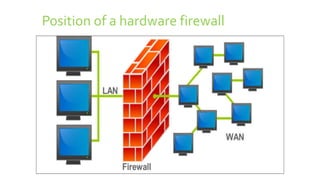
1. HARDWARE FIREWALL : A Special device placed in between internal
network LAN and Gate way to external network WAN
2. SOFTWARE FIREWALL : Software program in the computer for not
allowing data traffic from undesired sites and locations.
3. Cloud Based Firewall : cloud firewalls are hosted in the cloud. This
cloud-delivered model for firewalls is also reffered as FAAS =
Firewall as a Service
We are discussing HARDWARE FIREWALL in following slides.
Position of a hardware firewall

Data protection and security

  • 1.
    Data Protection andSecurity NAZAR K A Deputy Manager ITI Limited Contact: 9400568432 Nazarka_pkd@itiltd.co.in
  • 2.
    DATA and INFORMATION DATA: A collection of unorganized facts has no meaning of its own. ( Numbers , Symbols , Characters , Audio or Vidio clips..etc) INFORMATION: Processed data having some meaning and it is useful for decision making. Example. Marklist of astudent , Rank list of a class or University PROCESS DATA INFORMATION
  • 3.
    CIAand UA Confidentiality :Data able to access only to authorized users Integrity : Data integrity should be ensured Availability : Data must be available to intended users at allowed time Authenticity : Authenticity of a user should be verified before accessing data. Utility : Data should have the intended utility.
  • 4.
    Data Protection andSecurity • Data protection is the process of safeguarding important data from corruption, compromise or loss and providing the capability to restore the data to a functional state should something happen to data as inaccessible or unusable.. • Data security refers to the process of protecting data from unauthorized access and data corruption throughout its lifecycle. Data security includes data encryption, hashing, tokenization, and key management practices that protect data across all applications and platforms. Both are same in some point, by data security we can achieve data protection.
  • 5.
    Data protection •RAID •Data Backupand Restoration •Cloud backup •Disaster Recovery Station
  • 6.
    Data security &Data breaches Data is the most valuable asset for any business. No matter what industry you are in, it’s critical to take care of your data, whether it is financial reports, healthcare records or a start-up business plan following are the way data breaches occures • Cyberattacks in which hackers bypass your security technologies and get into your important software or your security platform • Theft or loss of devices containing protected information • Data theft by employees or other internal users, such as contractors or partners • Human errors such as accidentally sending sensitive data to someone unauthorized to see it
  • 7.
    MALWARE Malware = MALicious+ soft WARE Malware is intrusive software that is designed to damage and destroy computers and computer systems. Malware is a contraction for “malicious software.” Examples of common malware includes viruses, worms, Trojan viruses, spyware, adware, and ransomware.
  • 8.
    Types of Malware •viruses : Malicious program without our consent •Worm. : Hide and replicate fast from PC to PC •Trojan : Destroy our computer systems •Ransomware : Restrict our access to PC •Rootkits : Give unauthorized access to our PC •Adware : Popup annoying advertisments •Spyware : Will record and sent our activity in PC
  • 9.
    Cyber attack •A cyberattack is an attempt to disable computers, steal data, or use a breached computer system to launch additional attacks. Cybercriminals use different methods to launch a cyber attack that includes malware, phishing, ransomware, man-in-the-middle attack, or other methods.
  • 10.
    AntiVirus •What is AntiVirus? Antivirus is a kind of software used to prevent, scan, detect and delete viruses and other kinds of malicious software from your computer or laptop. Once installed, most antivirus software runs automatically in the background to provide real-time protection against virus attacks.
  • 11.
    Hacking =Unauthorized ComputerAccess Hacking is the process of gaining unauthorized access into a computer system, or group of computer systems. This is done through cracking of passwords and codes which gives access to the systems. The access to a password is obtained by the hacker through password cracking algorithms programs. Just like any thief, a hacker will choose the most vulnerable targets they can find. But instead of using physical tool, they use software to steal your personal data.
  • 12.
    What Hackers areLooking For Personally Identifiable Information (PII) are pieces of information like User name and Password to enable intrude in your system in order to commit fraud, identity theft, and other financially damaging crimes against you It is like a tool used by thief to enter your house through vulnerable spot.
  • 13.
    What is Firewall •A firewall can be defined as a special type of network security device or a software program that monitors and filters incoming and outgoing network traffic based on a defined set of security rules. It acts as a barrier between internal private networks and external sources (such as the public Internet). • The primary purpose of a firewall is to allow non-threatening traffic and prevent malicious or unwanted data traffic for protecting the computer from viruses and attacks. A firewall is a cybersecurity tool that filters network traffic and helps users block malicious software from accessing the Internet in infected computers.
  • 14.
    Why Firewall • Firewallsare primarily used to prevent malware and network-based attacks. Additionally, they can help in blocking application-layer attacks. These firewalls act as a gatekeeper or a barrier. They monitor every attempt between our computer and another network. They do not allow data packets to be transferred through them unless the data is coming or going from a user-specified trusted source. • Firewalls are designed in such a way that they can react quickly to detect and counter-attacks throughout the network. They can work with rules configured to protect the network and perform quick assessments to find any suspicious activity. In short, we can point to the firewall as a traffic controller.
  • 15.
    Firewall Types 1. HARDWAREFIREWALL : A Special device placed in between internal network LAN and Gate way to external network WAN 2. SOFTWARE FIREWALL : Software program in the computer for not allowing data traffic from undesired sites and locations. 3. Cloud Based Firewall : cloud firewalls are hosted in the cloud. This cloud-delivered model for firewalls is also reffered as FAAS = Firewall as a Service We are discussing HARDWARE FIREWALL in following slides.
  • 16.
    Position of ahardware firewall