
DATA MANAGEMENT
WHAT IS A DATABASE SYSTEM?
 Database: a very large, integrated collection of data.
 Models a real-world enterprise
 Entities (e.g., teams, games)
 Relationships (e.g.,The
Forty-Niners are playing in The Superbowl)
 More recently, also includes active components , often called
“business logic”. (e.g., the BCS ranking system)
 A Database Management System (DBMS) is a software system designed
to store, manage, and facilitate access to databases.
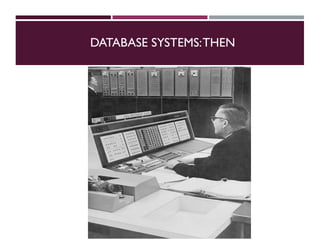
DATABASE SYSTEMS:THEN
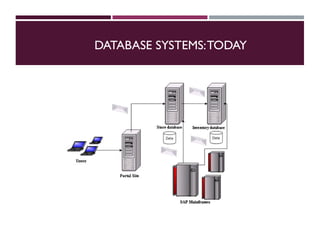
DATABASE SYSTEMS:TODAY
IS THE WWW A DBMS?
 Fairly sophisticated search available
 crawler indexes pages on the web
 Keyword-based search for pages
 But, currently
 data is mostly unstructured and untyped
 search only:
 can’t modify the data
 can’t get summaries, complex combinations of data
 few guarantees provided for freshness of data, consistency across data
items, fault tolerance, …
 Web sites typically have a DBMS in the background to provide these
functions.
 The picture is changing
 New standards e.g., XML, SemanticWeb can help data modeling
 Research groups (e.g., at Berkeley) are working on providing some of
“SEARCH”VS. QUERY
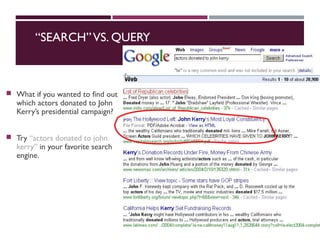
 What if you wanted to find out
which actors donated to John
Kerry’s presidential campaign?
 Try “actors donated to john
kerry” in your favorite search
engine.
IS A FILE SYSTEM A DBMS?
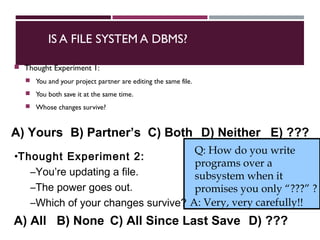
 Thought Experiment 1:
 You and your project partner are editing the same file.
 You both save it at the same time.
 Whose changes survive?
Q: How do you write
programs over a
subsystem when it
promises you only “???” ?
A: Very, very carefully!!
•Thought Experiment 2:
–You’re updating a file.
–The power goes out.
–Which of your changes survive?
A) Yours B) Partner’s C) Both D) Neither E) ???
A) All B) None C) All Since Last Save D) ???
CURRENT COMMERCIAL OUTLOOK
 A major part of the software industry:
 Oracle, IBM, Microsoft, Sybase
 also Informix (now IBM),Teradata
 smaller players: java-based dbms, devices, OO, …
 Lots of related industries
 data warehouse, document management, storage, backup, reporting,
business intelligence, app integration
 Relational products dominant and evolving
 adapting for extensibility (user-defined types), adding native XML
support.
 Open Source coming on strong
 MySQL, PostgreSQL, BerkeleyDB
DESCRIBING DATA: DATA MODELS
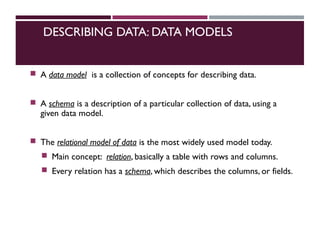
 A data model is a collection of concepts for describing data.
 A schema is a description of a particular collection of data, using a
given data model.
 The relational model of data is the most widely used model today.
 Main concept: relation, basically a table with rows and columns.
 Every relation has a schema, which describes the columns, or fields.
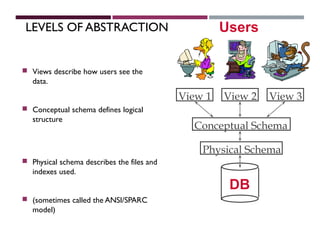
LEVELS OF ABSTRACTION
 Views describe how users see the
data.
 Conceptual schema defines logical
structure
 Physical schema describes the files and
indexes used.
 (sometimes called the ANSI/SPARC
model)
Physical Schema
Conceptual Schema
View 1 View 2 View 3
DB
Users
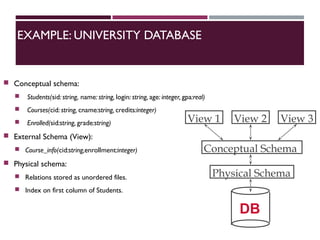
EXAMPLE: UNIVERSITY DATABASE
 Conceptual schema:
 Students(sid: string, name: string, login: string, age: integer, gpa:real)
 Courses(cid: string, cname:string, credits:integer)
 Enrolled(sid:string, grade:string)
 External Schema (View):
 Course_info(cid:string,enrollment:integer)
 Physical schema:
 Relations stored as unordered files.
 Index on first column of Students.
Physical Schema
Conceptual Schema
View 1 View 2 View 3
DB
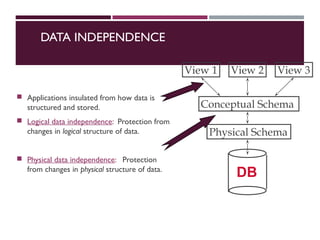
DATA INDEPENDENCE
 Applications insulated from how data is
structured and stored.
 Logical data independence: Protection from
changes in logical structure of data.
 Physical data independence: Protection
from changes in physical structure of data.
Physical Schema
Conceptual Schema
View 1 View 2 View 3
DB
CONCURRENCY CONTROL
 Concurrent execution of user programs: key to good DBMS
performance.
 Disk accesses frequent, pretty slow
 Keep the CPU working on several programs concurrently.
 Interleaving actions of different programs: trouble!
 e.g., account-transfer & print statement at same time
 DBMS ensures such problems don’t arise.
 Users/programmers can pretend they are using a single-user system.
(called “Isolation”)
 Thank goodness! Don’t have to program “very, very carefully”.
TRANSACTIONS:ACID PROPERTIES
 Key concept is a transaction: a sequence of database actions (reads/writes).
 DBMS ensures atomicity (all-or-nothing property) even if system crashes in
the middle of a Xact.
 Each transaction, executed completely, must take the DB between consistent
states or must not run at all.
 DBMS ensures that concurrent transactions appear to run in isolation.
 DBMS ensures durability of committed Xacts even if system crashes.
 Note: can specify simple integrity constraints on the data.The DBMS
enforces these.
 Beyond this, the DBMS does not understand the semantics of the data.
 Ensuring that a single transaction (run alone) preserves consistency is
largely the user’s responsibility!
ENSURING TRANSACTION PROPERITES
 DBMS ensures atomicity (all-or-nothing property) even if system crashes in
the middle of a Xact.
 DBMS ensures durability of committed Xacts even if system crashes.
 Idea: Keep a log (history) of all actions carried out by the DBMS while
executing a set of Xacts:
 Before a change is made to the database, the corresponding log entry is
forced to a safe location.
 After a crash, the effects of partially executed transactions are undone
using the log. Effects of committed transactions are redone using the log.
 trickier than it sounds!
THE LOG
 The following actions are recorded in the log:
 Ti writes an object: the old value and the new value.
 Log record must go to disk before the changed page!
 Ti commits/aborts: a log record indicating this action.
 Log is often duplexed and archived on “stable” storage.
 All log related activities (and in fact, all concurrency control related activities such
as lock/unlock, dealing with deadlocks etc.) are handled transparently by the
DBMS.
STRUCTURE OF A DBMS
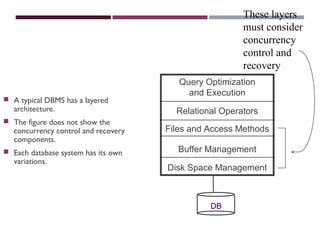
 A typical DBMS has a layered
architecture.
 The figure does not show the
concurrency control and recovery
components.
 Each database system has its own
variations.
Query Optimization
and Execution
Relational Operators
Files and Access Methods
Buffer Management
Disk Space Management
DB
These layers
must consider
concurrency
control and
recovery
ADVANTAGES OF A DBMS
 Data independence
 Efficient data access
 Data integrity & security
 Data administration
 Concurrent access, crash recovery
 Reduced application development time
 So why not use them always?
 Expensive/complicated to set up & maintain
 This cost & complexity must be offset by need
 General-purpose, not suited for special-purpose tasks (e.g. text search!)
DATABASES MAKE THESE HAPPY ...
 DBMS vendors, programmers
 Oracle, IBM, MS, Sybase, …
 End users in many fields
 Business, education, science, …
 DB application programmers
 Build enterprise applications on top of DBMSs
 Build web services that run off DBMSs
 Database administrators (DBAs)
 Design logical/physical schemas
 Handle security and authorization
 Data availability, crash recovery
 Database tuning as needs evolve
THANKYOU

Introduction to Data Management

  • 1.
  • 2.
    WHAT IS ADATABASE SYSTEM?  Database: a very large, integrated collection of data.  Models a real-world enterprise  Entities (e.g., teams, games)  Relationships (e.g.,The Forty-Niners are playing in The Superbowl)  More recently, also includes active components , often called “business logic”. (e.g., the BCS ranking system)  A Database Management System (DBMS) is a software system designed to store, manage, and facilitate access to databases.
  • 3.
  • 4.
  • 5.
    IS THE WWWA DBMS?  Fairly sophisticated search available  crawler indexes pages on the web  Keyword-based search for pages  But, currently  data is mostly unstructured and untyped  search only:  can’t modify the data  can’t get summaries, complex combinations of data  few guarantees provided for freshness of data, consistency across data items, fault tolerance, …  Web sites typically have a DBMS in the background to provide these functions.  The picture is changing  New standards e.g., XML, SemanticWeb can help data modeling  Research groups (e.g., at Berkeley) are working on providing some of
  • 6.
    “SEARCH”VS. QUERY  Whatif you wanted to find out which actors donated to John Kerry’s presidential campaign?  Try “actors donated to john kerry” in your favorite search engine.
  • 7.
    IS A FILESYSTEM A DBMS?  Thought Experiment 1:  You and your project partner are editing the same file.  You both save it at the same time.  Whose changes survive? Q: How do you write programs over a subsystem when it promises you only “???” ? A: Very, very carefully!! •Thought Experiment 2: –You’re updating a file. –The power goes out. –Which of your changes survive? A) Yours B) Partner’s C) Both D) Neither E) ??? A) All B) None C) All Since Last Save D) ???
  • 8.
    CURRENT COMMERCIAL OUTLOOK A major part of the software industry:  Oracle, IBM, Microsoft, Sybase  also Informix (now IBM),Teradata  smaller players: java-based dbms, devices, OO, …  Lots of related industries  data warehouse, document management, storage, backup, reporting, business intelligence, app integration  Relational products dominant and evolving  adapting for extensibility (user-defined types), adding native XML support.  Open Source coming on strong  MySQL, PostgreSQL, BerkeleyDB
  • 9.
    DESCRIBING DATA: DATAMODELS  A data model is a collection of concepts for describing data.  A schema is a description of a particular collection of data, using a given data model.  The relational model of data is the most widely used model today.  Main concept: relation, basically a table with rows and columns.  Every relation has a schema, which describes the columns, or fields.
  • 10.
    LEVELS OF ABSTRACTION Views describe how users see the data.  Conceptual schema defines logical structure  Physical schema describes the files and indexes used.  (sometimes called the ANSI/SPARC model) Physical Schema Conceptual Schema View 1 View 2 View 3 DB Users
  • 11.
    EXAMPLE: UNIVERSITY DATABASE Conceptual schema:  Students(sid: string, name: string, login: string, age: integer, gpa:real)  Courses(cid: string, cname:string, credits:integer)  Enrolled(sid:string, grade:string)  External Schema (View):  Course_info(cid:string,enrollment:integer)  Physical schema:  Relations stored as unordered files.  Index on first column of Students. Physical Schema Conceptual Schema View 1 View 2 View 3 DB
  • 12.
    DATA INDEPENDENCE  Applicationsinsulated from how data is structured and stored.  Logical data independence: Protection from changes in logical structure of data.  Physical data independence: Protection from changes in physical structure of data. Physical Schema Conceptual Schema View 1 View 2 View 3 DB
  • 13.
    CONCURRENCY CONTROL  Concurrentexecution of user programs: key to good DBMS performance.  Disk accesses frequent, pretty slow  Keep the CPU working on several programs concurrently.  Interleaving actions of different programs: trouble!  e.g., account-transfer & print statement at same time  DBMS ensures such problems don’t arise.  Users/programmers can pretend they are using a single-user system. (called “Isolation”)  Thank goodness! Don’t have to program “very, very carefully”.
  • 14.
    TRANSACTIONS:ACID PROPERTIES  Keyconcept is a transaction: a sequence of database actions (reads/writes).  DBMS ensures atomicity (all-or-nothing property) even if system crashes in the middle of a Xact.  Each transaction, executed completely, must take the DB between consistent states or must not run at all.  DBMS ensures that concurrent transactions appear to run in isolation.  DBMS ensures durability of committed Xacts even if system crashes.  Note: can specify simple integrity constraints on the data.The DBMS enforces these.  Beyond this, the DBMS does not understand the semantics of the data.  Ensuring that a single transaction (run alone) preserves consistency is largely the user’s responsibility!
  • 15.
    ENSURING TRANSACTION PROPERITES DBMS ensures atomicity (all-or-nothing property) even if system crashes in the middle of a Xact.  DBMS ensures durability of committed Xacts even if system crashes.  Idea: Keep a log (history) of all actions carried out by the DBMS while executing a set of Xacts:  Before a change is made to the database, the corresponding log entry is forced to a safe location.  After a crash, the effects of partially executed transactions are undone using the log. Effects of committed transactions are redone using the log.  trickier than it sounds!
  • 16.
    THE LOG  Thefollowing actions are recorded in the log:  Ti writes an object: the old value and the new value.  Log record must go to disk before the changed page!  Ti commits/aborts: a log record indicating this action.  Log is often duplexed and archived on “stable” storage.  All log related activities (and in fact, all concurrency control related activities such as lock/unlock, dealing with deadlocks etc.) are handled transparently by the DBMS.
  • 17.
    STRUCTURE OF ADBMS  A typical DBMS has a layered architecture.  The figure does not show the concurrency control and recovery components.  Each database system has its own variations. Query Optimization and Execution Relational Operators Files and Access Methods Buffer Management Disk Space Management DB These layers must consider concurrency control and recovery
  • 18.
    ADVANTAGES OF ADBMS  Data independence  Efficient data access  Data integrity & security  Data administration  Concurrent access, crash recovery  Reduced application development time  So why not use them always?  Expensive/complicated to set up & maintain  This cost & complexity must be offset by need  General-purpose, not suited for special-purpose tasks (e.g. text search!)
  • 19.
    DATABASES MAKE THESEHAPPY ...  DBMS vendors, programmers  Oracle, IBM, MS, Sybase, …  End users in many fields  Business, education, science, …  DB application programmers  Build enterprise applications on top of DBMSs  Build web services that run off DBMSs  Database administrators (DBAs)  Design logical/physical schemas  Handle security and authorization  Data availability, crash recovery  Database tuning as needs evolve
  • 20.