DQS/MDS INTRO’S
&
DQS MATCHING
Microsoft
SQL Server 2012
SQL Server 2014
Neil Hambly
SQL Server
Evangelist /
Practice Lead
PASS
London
Chapter Leader
Melissa Data MVP
PASS
Virtual Chapter
“Professional
Development”
Leader
Contributing
Author
Agenda
Matching Project
What is record matching?
Data Issues
DQS Matching Process
DQS Data Matching Principles
Matching Policy
DQS Intro
MDS Intro
Data Cleansing:
Modifications, removal, correcting data or incomplete,
either computer-assisted or interactively.
Matching:
Identification of duplicates in a rules-based process,
perform de-duplication., verifying data quality using
reference data provider. Use reference data services from
Azure Marketplace providers
Profiling:
Analysis of data for insight into its data quality , domain
management, matching, and data cleansing processes.
Profiling is a powerful tool in a DQS data quality solution.
Monitoring:
Determine the state of data quality activities. Validate
data quality solution is doing what it was designed to do.
Knowledge Base:
DQS is a knowledge-driven solution , analyzing data using
knowledge built with DQS. Create data quality processes
to enhance the knowledge of data , continuously
improving data quality
• Create a Matching Policy
• Data Quality Matching
• Match Similar Data
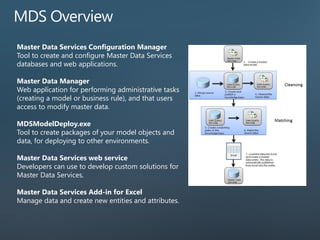
Master Data Services Configuration Manager
Tool to create and configure Master Data Services
databases and web applications.
Master Data Manager
Web application for performing administrative tasks
(creating a model or business rule), and that users
access to modify master data.
MDSModelDeploy.exe
Tool to create packages of your model objects and
data, for deploying to other environments.
Master Data Services web service
Developers can use to develop custom solutions for
Master Data Services.
Master Data Services Add-in for Excel
Manage data and create new entities and attributes.
Import Example
Record matching is the task of identifying
records that match the same real world
entity.
The Cost of Duplicate Data
…a few examples…
Direct marketing communications are doubled up unnecessarily.
Product shipments and customer-site based services could be sent
to the wrong address due to an incorrect duplicate record being
used.
Your sales reporting may be inaccurate due to an over-
inflated number of customers.
Inaccurate sales analysis due to sales being split between multiple
records that represent the same customer, resulting in an
undervaluing of some key customers.
Where do Duplicate Records come from?
Poorly designed software No verification of existing records upon entry
Formatting &
abbreviations
"Doctor Robert Smith" Vs. "Dr. Bob Smith".
Data validation Human errors can creep into the system when fields’
input is not validated
Company merging and
acquisitions
Merging systems may result in duplicates in the merged
data.
Change of attributes The same person may appear to not exist in the
database if some of the attributes were changed
(e.g., address, name etc.)
…Data Issues…
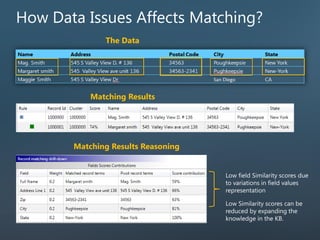
There are different ways to represent the same person or address in a database:
Data is ‘fuzzy’ in nature (spelling mistakes, abbreviations etc.).
How Data Issues Affects Matching?
Matching Results
Matching Results Reasoning
The Data
Integrated
Profiling
Progress NotificationsStatus
Build
Use
DQ Projects
Knowledge Management
Knowledge
Base
Sample
Data
Identifies exact and approximate matches, enabling
removal of duplicate data.
Enables creating a matching policy interactively using a
computer-assisted process.
Ensures that values that are equivalent, but were entered
in a different format or style, are in fact rendered
uniform.
A matching policy is prepared in the knowledge base.
A matching policy consists of matching rules that
assess how well one record matches to another.
Specify in the rule whether records’ values have to be
an exact match, similar, or prerequisite.
Train your policy by running and tuning each rule
separately.
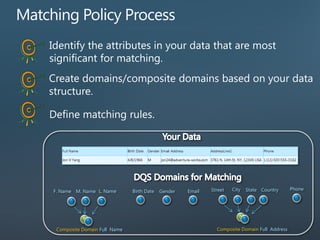
Identify the attributes in your data that are most
significant for matching.
Create domains/composite domains based on your data
structure.
Define matching rules.
Birth Date Gender
Composite Domain Full Name
F. Name M. Name L. Name Email Phone
Composite Domain Full Address
Street City State Country
Similarity, select Similar if field values can be similar. Select Exact if field values must
be identical.
Weight, determines the contribution of each domain in the rule to the overall
matching score for two records.
Prerequisite validates whether field values return a 100% match; else the records are
not considered a match.
Minimum matching score is the threshold at or above which two records are
considered to be a match.
Domains of type ‘Date’, ‘Integer’ or ‘Decimal’ can be matched using the
‘Similar’ property by assigning a tolerance either in percentage or integer.
Field values that fall within the defined tolerance are considered a match.
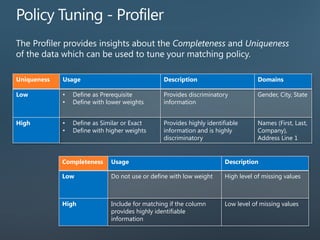
Uniqueness Usage Description Domains
Low • Define as Prerequisite
• Define with lower weights
Provides discriminatory
information
Gender, City, State
High • Define as Similar or Exact
• Define with higher weights
Provides highly identifiable
information and is highly
discriminatory
Names (First, Last,
Company),
Address Line 1
Completeness Usage Description
Low Do not use or define with low weight High level of missing values
High Include for matching if the column
provides highly identifiable
information
Low level of missing values
• The Matching Results tab displays statistics for the current and
previous run of a matching rule.
• Restore the previous rule.
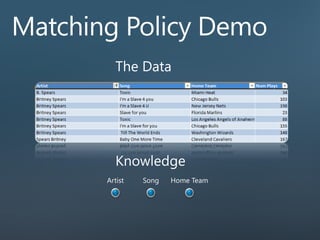
Home TeamSongArtist
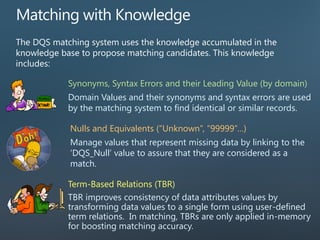
The DQS matching system uses the knowledge accumulated in the
knowledge base to propose matching candidates. This knowledge
includes:
Synonyms, Syntax Errors and their Leading Value (by domain)
Domain Values and their synonyms and syntax errors are used
by the matching system to find identical or similar records.
Term-Based Relations (TBR)
TBR improves consistency of data attributes values by
transforming data values to a single form using user-defined
term relations. In matching, TBRs are only applied in-memory
for boosting matching accuracy.
Nulls and Equivalents (“Unknown”, “99999”…)
Manage values that represent missing data by linking to the
‘DQS_Null’ value to assure that they are considered as a
match.
String 1 String 2 Similarity Score Character
Before After
175 CLEARBROOK ROAD P.O. BOX 535 175 CLEARBROOK ROAD P.O.BOX 535 0.92 1.00 .
1834 E. 42ND STREET 1834 E. 42ND. ST. 0.695 0.857 .
1721 DE KALB AVE, NE 1721 DE KALB AVE NE 0.88 1.00 ,
14538 S. GARFIELD AVE., BLDG. 1-B 14538 S GARFIELD AVE BLDG 1B 0.676 0.944 , . -
#704, SJ Technoville BD, 60-19 704 SJ Technoville BD 60 19 0.65 1.00 # , -
Example:
Export - export both matching results (clusters) and survivors
(unique records).
A Matching project is performed in three steps:
Mapping - map source columns to domains.
Matching - run matching and view the results; it includes additional
functionality such as:
• Reject records
• Filter results by ‘Matched’ & ‘Unmatched’ and by matching
score.
• Display clusters in two different methods (overlapping and
non- overlapping )
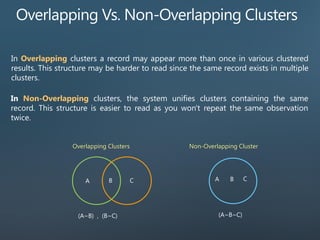
In Overlapping clusters a record may appear more than once in various clustered
results. This structure may be harder to read since the same record exists in multiple
clusters.
In Non-Overlapping clusters, the system unifies clusters containing the same
record. This structure is easier to read as you won't repeat the same observation
twice.
Overlapping Clusters
(A~B) , (B~C)
Non-Overlapping Cluster
(A~B~C)
Overlapping Clusters
Non-Overlapping Clusters
Check the Rejected box to move the records out of the proposed cluster upon
moving to the next page in the activity. Unlike the Cleansing Data Project where
records move between tabs instantly, the rejected records are not removed from
the clusters on the user interface.
DQS Client User Interface
Exported Matching Results
Matching and Survivorship results can be exported to a SQL table,
Excel or CSV file for further analysis or consumption.
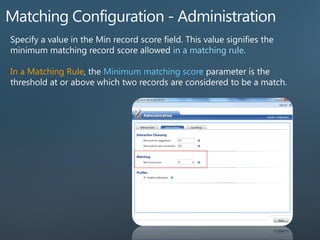
in a matching rule
In a Matching Rule Minimum matching score parameter
http://speakerscore.com/S7PT
THANK YOU

Dqs mds-matching 15042015

  • 1.
    DQS/MDS INTRO’S & DQS MATCHING Microsoft SQLServer 2012 SQL Server 2014 Neil Hambly SQL Server Evangelist / Practice Lead PASS London Chapter Leader Melissa Data MVP PASS Virtual Chapter “Professional Development” Leader Contributing Author
  • 2.
    Agenda Matching Project What isrecord matching? Data Issues DQS Matching Process DQS Data Matching Principles Matching Policy DQS Intro MDS Intro
  • 3.
    Data Cleansing: Modifications, removal,correcting data or incomplete, either computer-assisted or interactively. Matching: Identification of duplicates in a rules-based process, perform de-duplication., verifying data quality using reference data provider. Use reference data services from Azure Marketplace providers Profiling: Analysis of data for insight into its data quality , domain management, matching, and data cleansing processes. Profiling is a powerful tool in a DQS data quality solution. Monitoring: Determine the state of data quality activities. Validate data quality solution is doing what it was designed to do. Knowledge Base: DQS is a knowledge-driven solution , analyzing data using knowledge built with DQS. Create data quality processes to enhance the knowledge of data , continuously improving data quality
  • 4.
    • Create aMatching Policy • Data Quality Matching • Match Similar Data
  • 5.
    Master Data ServicesConfiguration Manager Tool to create and configure Master Data Services databases and web applications. Master Data Manager Web application for performing administrative tasks (creating a model or business rule), and that users access to modify master data. MDSModelDeploy.exe Tool to create packages of your model objects and data, for deploying to other environments. Master Data Services web service Developers can use to develop custom solutions for Master Data Services. Master Data Services Add-in for Excel Manage data and create new entities and attributes.
  • 9.
  • 10.
    Record matching isthe task of identifying records that match the same real world entity.
  • 11.
    The Cost ofDuplicate Data …a few examples… Direct marketing communications are doubled up unnecessarily. Product shipments and customer-site based services could be sent to the wrong address due to an incorrect duplicate record being used. Your sales reporting may be inaccurate due to an over- inflated number of customers. Inaccurate sales analysis due to sales being split between multiple records that represent the same customer, resulting in an undervaluing of some key customers.
  • 12.
    Where do DuplicateRecords come from? Poorly designed software No verification of existing records upon entry Formatting & abbreviations "Doctor Robert Smith" Vs. "Dr. Bob Smith". Data validation Human errors can creep into the system when fields’ input is not validated Company merging and acquisitions Merging systems may result in duplicates in the merged data. Change of attributes The same person may appear to not exist in the database if some of the attributes were changed (e.g., address, name etc.)
  • 13.
    …Data Issues… There aredifferent ways to represent the same person or address in a database: Data is ‘fuzzy’ in nature (spelling mistakes, abbreviations etc.).
  • 14.
    How Data IssuesAffects Matching? Matching Results Matching Results Reasoning The Data
  • 16.
  • 17.
    Identifies exact andapproximate matches, enabling removal of duplicate data. Enables creating a matching policy interactively using a computer-assisted process. Ensures that values that are equivalent, but were entered in a different format or style, are in fact rendered uniform.
  • 19.
    A matching policyis prepared in the knowledge base. A matching policy consists of matching rules that assess how well one record matches to another. Specify in the rule whether records’ values have to be an exact match, similar, or prerequisite. Train your policy by running and tuning each rule separately.
  • 20.
    Identify the attributesin your data that are most significant for matching. Create domains/composite domains based on your data structure. Define matching rules. Birth Date Gender Composite Domain Full Name F. Name M. Name L. Name Email Phone Composite Domain Full Address Street City State Country
  • 21.
    Similarity, select Similarif field values can be similar. Select Exact if field values must be identical. Weight, determines the contribution of each domain in the rule to the overall matching score for two records. Prerequisite validates whether field values return a 100% match; else the records are not considered a match. Minimum matching score is the threshold at or above which two records are considered to be a match.
  • 22.
    Domains of type‘Date’, ‘Integer’ or ‘Decimal’ can be matched using the ‘Similar’ property by assigning a tolerance either in percentage or integer. Field values that fall within the defined tolerance are considered a match.
  • 23.
    Uniqueness Usage DescriptionDomains Low • Define as Prerequisite • Define with lower weights Provides discriminatory information Gender, City, State High • Define as Similar or Exact • Define with higher weights Provides highly identifiable information and is highly discriminatory Names (First, Last, Company), Address Line 1 Completeness Usage Description Low Do not use or define with low weight High level of missing values High Include for matching if the column provides highly identifiable information Low level of missing values
  • 24.
    • The MatchingResults tab displays statistics for the current and previous run of a matching rule. • Restore the previous rule.
  • 25.
  • 27.
    The DQS matchingsystem uses the knowledge accumulated in the knowledge base to propose matching candidates. This knowledge includes: Synonyms, Syntax Errors and their Leading Value (by domain) Domain Values and their synonyms and syntax errors are used by the matching system to find identical or similar records. Term-Based Relations (TBR) TBR improves consistency of data attributes values by transforming data values to a single form using user-defined term relations. In matching, TBRs are only applied in-memory for boosting matching accuracy. Nulls and Equivalents (“Unknown”, “99999”…) Manage values that represent missing data by linking to the ‘DQS_Null’ value to assure that they are considered as a match.
  • 28.
    String 1 String2 Similarity Score Character Before After 175 CLEARBROOK ROAD P.O. BOX 535 175 CLEARBROOK ROAD P.O.BOX 535 0.92 1.00 . 1834 E. 42ND STREET 1834 E. 42ND. ST. 0.695 0.857 . 1721 DE KALB AVE, NE 1721 DE KALB AVE NE 0.88 1.00 , 14538 S. GARFIELD AVE., BLDG. 1-B 14538 S GARFIELD AVE BLDG 1B 0.676 0.944 , . - #704, SJ Technoville BD, 60-19 704 SJ Technoville BD 60 19 0.65 1.00 # , - Example:
  • 30.
    Export - exportboth matching results (clusters) and survivors (unique records). A Matching project is performed in three steps: Mapping - map source columns to domains. Matching - run matching and view the results; it includes additional functionality such as: • Reject records • Filter results by ‘Matched’ & ‘Unmatched’ and by matching score. • Display clusters in two different methods (overlapping and non- overlapping )
  • 31.
    In Overlapping clustersa record may appear more than once in various clustered results. This structure may be harder to read since the same record exists in multiple clusters. In Non-Overlapping clusters, the system unifies clusters containing the same record. This structure is easier to read as you won't repeat the same observation twice. Overlapping Clusters (A~B) , (B~C) Non-Overlapping Cluster (A~B~C)
  • 32.
  • 33.
    Check the Rejectedbox to move the records out of the proposed cluster upon moving to the next page in the activity. Unlike the Cleansing Data Project where records move between tabs instantly, the rejected records are not removed from the clusters on the user interface. DQS Client User Interface Exported Matching Results
  • 34.
    Matching and Survivorshipresults can be exported to a SQL table, Excel or CSV file for further analysis or consumption.
  • 35.
    in a matchingrule In a Matching Rule Minimum matching score parameter
  • 36.