
AWS RDS
MIGRATION
Presented by Hardik Shah
Website www.blazeclan.com
Follow us @clouditbetter
Contact +91 9890 802 529
KEY TAKEAWAYS
Migrating Databases
Migrating minimal databases with minimal downtime to AWS RDS, Amazon Redshift and
Amazon Aurora
On Premise to Cloud
Migration of databases to same and different engines and from on premise to cloud
Schema Conversion
Schema conversion from Oracle and SQL Server to MySQL and Aurora
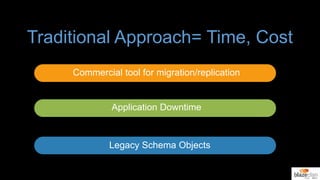
Traditional Approach= Time, Cost
Commercial tool for migration/replication
Application Downtime
Legacy Schema Objects
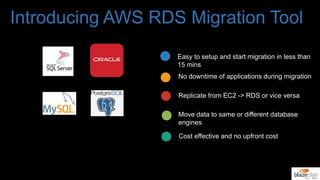
Introducing AWS RDS Migration Tool
Easy to setup and start migration in less than
15 mins
No downtime of applications during migration
Replicate from EC2 -> RDS or vice versa
Move data to same or different database
engines
Cost effective and no upfront cost
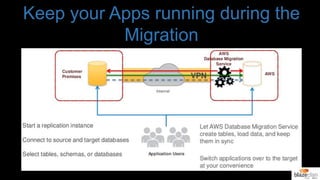
Keep your Apps running during the
Migration
Amazon RDS Migration
Tool consists of a Web-based
console and a replication server
to replicate data across
heterogeneous data sources.
Amazon RDS Migration Tool can
execute replication between
enterprise databases including
Oracle, Microsoft SQL Server,
and IBM DB2.
Replication is log based, which
means that only the changes
are read. This reduces the
impact on the source
databases.
Amazon RDS Migration
Tool can carry out two types of
replication: Full Load and
Change Processing (CDC).
Load data
efficiently and
quickly to
operational data
stores/
warehouses
Create
copies of
production
databases
Distribute
data
across
databases
Amazon
RDS
Migration
Tool has
high
throughput,
speed, and
scale.
Full Load: The full
load process
creates files or
tables at the target
database,
automatically
defines the
metadata that is
required at the
target, and
populates the
tables with data
from the source.
Change
Processing (CDC):
Change processing
captures changes
in the source data
or metadata as
they occur and
applies them to the
target database as
soon as possible in
near-real-time.
Features
Load reduction: It is recommended that you have a copy of all or of a subset of a collection on a different
server to reduce the load on the main server.
Improved service: Users of the copy of the information may get better access to the copy of the data
than to the original.
Security considerations: Some users might be allowed access to a subset of the data and only this
subset is made available as a replicated copy to those users.
Geographic distribution: The enterprise (for example, a chain of retail stores or warehouses)
may be widely distributed and each node uses primarily its own subset of the data (in addition
to all of the data being available at a central location for less common use).
Disaster Recovery: A copy of the main data is required for rapid failover (the capability to
switch over to a redundant or standby computer server, in case of failure of the main
system).
Support the need for implementing "cloud" computing.
Replication
During replication, a collection
of data is copied from system
A to system B. A is known as
the source (for this collection),
B is known as the target. A
system can be either a source
or a target or even both (within
certain restrictions). When a
number of sources and targets
and data collections are
defined, the replication
topology can be quite
complex.
Integrity: Make sure that the data in
the target actually reflects the
completed result of a change in the
source and not some intermediate
invalid result.
Latency: How out-of-date is the
copy?
Consistency: Make sure that if
the change affects several
different tables or rows, the
copy reflects a consistent state
all were changed or none).
The first two issues are the
responsibility of the replicator.
While some latency is
unavoidable in any system, a
good replicator will aim not to
exceed several seconds of
latency as a general rule.
Replication Tasks
The definition of a task consists of:
Specifying the source and target databases
Specifying the source and target tables to be kept in sync
Specifying the relevant source table columns
Specifying filtering conditions (if any) for each source table, as Boolean predicates on the values one or
more source columns (the predicates are in SQLite syntax)
Listing the target table columns and (optionally) specifying their data types and values (as expressions or
functions over the values of one or more source or target columns, using SQL syntax). If not specified, the
same column names and values as the source tables are used, with default mapping of the source DBMS
data types onto the target DBMS data types. Amazon RDS Migration Tool automatically takes care of the
required filtering, transformations and computations during the Load or CDC execution.
Replication Tasks
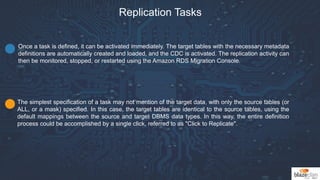
The simplest specification of a task may not mention of the target data, with only the source tables (or
ALL, or a mask) specified. In this case, the target tables are identical to the source tables, using the
default mappings between the source and target DBMS data types. In this way, the entire definition
process could be accomplished by a single click, referred to as "Click to Replicate".
Once a task is defined, it can be activated immediately. The target tables with the necessary metadata
definitions are automatically created and loaded, and the CDC is activated. The replication activity can
then be monitored, stopped, or restarted using the Amazon RDS Migration Console.
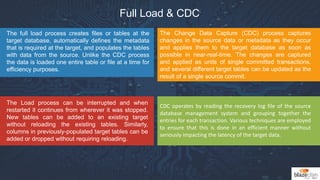
Full Load & CDC
The full load process creates files or tables at the
target database, automatically defines the metadata
that is required at the target, and populates the tables
with data from the source. Unlike the CDC process
the data is loaded one entire table or file at a time for
efficiency purposes.
The Load process can be interrupted and when
restarted it continues from wherever it was stopped.
New tables can be added to an existing target
without reloading the existing tables. Similarly,
columns in previously-populated target tables can be
added or dropped without requiring reloading.
CDC operates by reading the recovery log file of the source
database management system and grouping together the
entries for each transaction. Various techniques are employed
to ensure that this is done in an efficient manner without
seriously impacting the latency of the target data.
The Change Data Capture (CDC) process captures
changes in the source data or metadata as they occur
and applies them to the target database as soon as
possible in near-real-time. The changes are captured
and applied as units of single committed transactions,
and several different target tables can be updated as the
result of a single source commit.
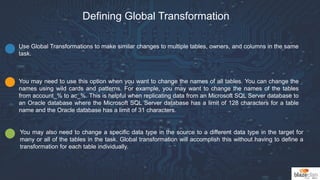
Defining Global Transformation
Use Global Transformations to make similar changes to multiple tables, owners, and columns in the same
task.
You may need to use this option when you want to change the names of all tables. You can change the
names using wild cards and patterns. For example, you may want to change the names of the tables
from account_% to ac_%. This is helpful when replicating data from an Microsoft SQL Server database to
an Oracle database where the Microsoft SQL Server database has a limit of 128 characters for a table
name and the Oracle database has a limit of 31 characters.
You may also need to change a specific data type in the source to a different data type in the target for
many or all of the tables in the task. Global transformation will accomplish this without having to define a
transformation for each table individually.
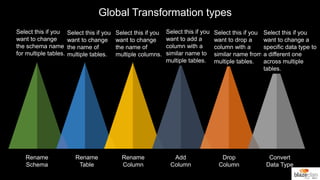
Global Transformation types
Rename
Schema
Rename
Table
Rename
Column
Add
Column
Drop
Column
Convert
Data Type
Select this if you
want to change
the schema name
for multiple tables.
Select this if you
want to change
the name of
multiple tables.
Select this if you
want to change
the name of
multiple columns.
Select this if you
want to add a
column with a
similar name to
multiple tables.
Select this if you
want to drop a
column with a
similar name from
multiple tables.
Select this if you
want to change a
specific data type to
a different one
across multiple
tables.
THANK YOU
Follow Us:

AWS RDS Migration Tool

  • 1.
    AWS RDS MIGRATION Presented byHardik Shah Website www.blazeclan.com Follow us @clouditbetter Contact +91 9890 802 529
  • 2.
    KEY TAKEAWAYS Migrating Databases Migratingminimal databases with minimal downtime to AWS RDS, Amazon Redshift and Amazon Aurora On Premise to Cloud Migration of databases to same and different engines and from on premise to cloud Schema Conversion Schema conversion from Oracle and SQL Server to MySQL and Aurora
  • 3.
    Traditional Approach= Time,Cost Commercial tool for migration/replication Application Downtime Legacy Schema Objects
  • 4.
    Introducing AWS RDSMigration Tool Easy to setup and start migration in less than 15 mins No downtime of applications during migration Replicate from EC2 -> RDS or vice versa Move data to same or different database engines Cost effective and no upfront cost
  • 5.
    Keep your Appsrunning during the Migration
  • 6.
    Amazon RDS Migration Toolconsists of a Web-based console and a replication server to replicate data across heterogeneous data sources. Amazon RDS Migration Tool can execute replication between enterprise databases including Oracle, Microsoft SQL Server, and IBM DB2. Replication is log based, which means that only the changes are read. This reduces the impact on the source databases. Amazon RDS Migration Tool can carry out two types of replication: Full Load and Change Processing (CDC).
  • 7.
    Load data efficiently and quicklyto operational data stores/ warehouses Create copies of production databases Distribute data across databases Amazon RDS Migration Tool has high throughput, speed, and scale. Full Load: The full load process creates files or tables at the target database, automatically defines the metadata that is required at the target, and populates the tables with data from the source. Change Processing (CDC): Change processing captures changes in the source data or metadata as they occur and applies them to the target database as soon as possible in near-real-time. Features
  • 8.
    Load reduction: Itis recommended that you have a copy of all or of a subset of a collection on a different server to reduce the load on the main server. Improved service: Users of the copy of the information may get better access to the copy of the data than to the original. Security considerations: Some users might be allowed access to a subset of the data and only this subset is made available as a replicated copy to those users. Geographic distribution: The enterprise (for example, a chain of retail stores or warehouses) may be widely distributed and each node uses primarily its own subset of the data (in addition to all of the data being available at a central location for less common use). Disaster Recovery: A copy of the main data is required for rapid failover (the capability to switch over to a redundant or standby computer server, in case of failure of the main system). Support the need for implementing "cloud" computing. Replication
  • 9.
    During replication, acollection of data is copied from system A to system B. A is known as the source (for this collection), B is known as the target. A system can be either a source or a target or even both (within certain restrictions). When a number of sources and targets and data collections are defined, the replication topology can be quite complex. Integrity: Make sure that the data in the target actually reflects the completed result of a change in the source and not some intermediate invalid result. Latency: How out-of-date is the copy? Consistency: Make sure that if the change affects several different tables or rows, the copy reflects a consistent state all were changed or none). The first two issues are the responsibility of the replicator. While some latency is unavoidable in any system, a good replicator will aim not to exceed several seconds of latency as a general rule.
  • 10.
    Replication Tasks The definitionof a task consists of: Specifying the source and target databases Specifying the source and target tables to be kept in sync Specifying the relevant source table columns Specifying filtering conditions (if any) for each source table, as Boolean predicates on the values one or more source columns (the predicates are in SQLite syntax) Listing the target table columns and (optionally) specifying their data types and values (as expressions or functions over the values of one or more source or target columns, using SQL syntax). If not specified, the same column names and values as the source tables are used, with default mapping of the source DBMS data types onto the target DBMS data types. Amazon RDS Migration Tool automatically takes care of the required filtering, transformations and computations during the Load or CDC execution.
  • 11.
    Replication Tasks The simplestspecification of a task may not mention of the target data, with only the source tables (or ALL, or a mask) specified. In this case, the target tables are identical to the source tables, using the default mappings between the source and target DBMS data types. In this way, the entire definition process could be accomplished by a single click, referred to as "Click to Replicate". Once a task is defined, it can be activated immediately. The target tables with the necessary metadata definitions are automatically created and loaded, and the CDC is activated. The replication activity can then be monitored, stopped, or restarted using the Amazon RDS Migration Console.
  • 12.
    Full Load &CDC The full load process creates files or tables at the target database, automatically defines the metadata that is required at the target, and populates the tables with data from the source. Unlike the CDC process the data is loaded one entire table or file at a time for efficiency purposes. The Load process can be interrupted and when restarted it continues from wherever it was stopped. New tables can be added to an existing target without reloading the existing tables. Similarly, columns in previously-populated target tables can be added or dropped without requiring reloading. CDC operates by reading the recovery log file of the source database management system and grouping together the entries for each transaction. Various techniques are employed to ensure that this is done in an efficient manner without seriously impacting the latency of the target data. The Change Data Capture (CDC) process captures changes in the source data or metadata as they occur and applies them to the target database as soon as possible in near-real-time. The changes are captured and applied as units of single committed transactions, and several different target tables can be updated as the result of a single source commit.
  • 13.
    Defining Global Transformation UseGlobal Transformations to make similar changes to multiple tables, owners, and columns in the same task. You may need to use this option when you want to change the names of all tables. You can change the names using wild cards and patterns. For example, you may want to change the names of the tables from account_% to ac_%. This is helpful when replicating data from an Microsoft SQL Server database to an Oracle database where the Microsoft SQL Server database has a limit of 128 characters for a table name and the Oracle database has a limit of 31 characters. You may also need to change a specific data type in the source to a different data type in the target for many or all of the tables in the task. Global transformation will accomplish this without having to define a transformation for each table individually.
  • 14.
    Global Transformation types Rename Schema Rename Table Rename Column Add Column Drop Column Convert DataType Select this if you want to change the schema name for multiple tables. Select this if you want to change the name of multiple tables. Select this if you want to change the name of multiple columns. Select this if you want to add a column with a similar name to multiple tables. Select this if you want to drop a column with a similar name from multiple tables. Select this if you want to change a specific data type to a different one across multiple tables.
  • 15.