2
OUTLINE
Definition of operatingsystem
Reasons for studying OS
OS components
OS functions
Type of systems
Batch Systems
Time-sharing system
Single User Interactive system
Parallel system
Distributed system
Real-time system
Single-tasking system
Multi-tasking system
Interrupts
OS services
System call
System structure
3.
What is anOperating System?
• A program that acts as an intermediary between a user of a
computer and the computer hardware.
• Operating system goals:
Execute user programs and make solving user problems
easier.
Make the computer system convenient to use.
• Use the computer hardware in an efficient manner.
3
4.
4
Indicate Some Reasonsfor Studying
Operating Systems
• Understand how computers work under the hood
• To learn how to manage complexity through appropriate
abstractions
• To learn about system design.
• Because OSs are everywhere!
5.
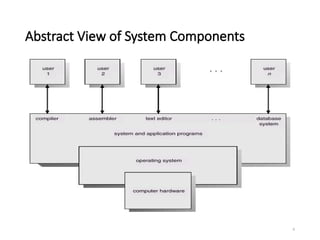
Computer System Components
1.Hardware – provides basic computing resources (CPU, memory,
I/O devices).
2.Operating system – controls and coordinates the use of the
hardware among the various application programs for the
various users.
3. Applications programs – define the ways in which the system
resources are used to solve the computing problems of the
users (compilers, database systems, video games, business
programs).
4. Users (people, machines, other computers).
5
Operating System Definitions
•Software between applications and hardware
• Resource allocator – manages and allocates resources.
• Resource Manager
Give resources to applications
Take resources from applications
Protection and Security
• Control program – controls the execution of user programs and
operations of I/O devices .
• Kernel – the one program running at all times (all else being application
programs).
7
8.
8
Operating System Functions
•Process Management
Creating and destroying the user and system processes.
Allocating hardware resources among the processes.
Controlling the progress of processes.
Providing mechanisms for process communications.
• Memory Management
Keep track of each location of memory, i.e. each memory
location is either free or allocated.
De-allocation technique policy for memory
9.
9
Operating System Functions(Cont.)
• File Management
Creating and deleting of files and directories.
Mapping files onto secondary storage.
Backing up files on stable storage media.
Transmission of file elements between main and secondary
storage
•I/O System Management
It includes buffering, caching and spooling.
A general device driver interface.
Drivers for specific hardware devices
10.
Types of Systems
•Batch system
• submit large number of jobs at one time
• system decides what to run and when
• Time Sharing system
• multiple users connected to single machine
• few processors, many terminals
• Single User Interactive system
• one user, one machine
• traditional personal computer
11.
Types of Systems
•Parallel system
• traditional multiprocessor system
• higher throughput and better fault tolerance
• Distributed system
• networked computers
• Real Time system
• very strict response time requirements
• hardware or software
12.
Single Tasking System
•Only one program can perform at a time
• Simple to implement
• only one process attempting to use resources
• Few security risks
• Poor utilization of the CPU and other resources
• Example: MS-DOS
13.
Multitasking System
• Verycomplex
• Serious security issues
• how to protect one program from another sharing the same memory
• Much higher utilization of system resources
• Example: Unix, Windows NT
14.
14
Interrupts
• Interrupt isan event external to the currently executing program that
causes a change in the normal flow of instruction execution; usually
generated by hardware devices external to the CPU.
• Interrupts are signals sent to the CPU by external devices, normally
I/O devices. They tell the CPU to stop its current activities and
execute the appropriate part of the operating system.
• The occurrence of an event is usually signaled by an interrupt either
from the hardware or the software.
• Interrupts are important because they give the user better control
over the computer. Without interrupts, a user may have to wait for a
given application to have a higher priority over the CPU to be ran.
This ensures that the CPU will deal with the process immediately.
15.
15
Interrupts (Cont.)
Why Interrupts?
•People like connecting devices
A computer is much more than the CPU
Keyboard, mouse, screen, disk drives, Scanner, printer, sound
card, camera, etc.
• These devices occasionally need CPU service
But we can’t predict when
• External events typically occur on a macroscopic timescale
we want to keep the CPU busy between events
• Need a way for CPU to find out devices need attention
16.
16
Interrupts (Cont.)
Possible Solution:Polling
• CPU periodically checks each device to see if it needs service
× takes CPU time even when no requests pending
× overhead may be reduced at expense of response time
can be efficient if events arrive rapidly
• “Polling is like picking up your phone every few seconds to see if you
have a call. …”
17.
17
Interrupts (Cont.)
Alternative: Interrupts
•Give each device a wire (interrupt line) that it can use to signal the
processor
When interrupt signaled, processor executes a routine called an
interrupt handler to deal with the interrupt
No overhead when no requests pending
18.
18
Interrupts (Cont.)
Polling vs.Interrupts
• Polling is like picking up your phone every few seconds to see if you
have a call. Interrupts are like waiting for the phone to ring.
• Interrupts win if processor has other work to do and event response
time is not critical
• Polling can be better if processor has to respond to an event timely.
May be used in device controller that contains dedicated
secondary processor
19.
19
Interrupts (Cont.)
Types ofInterrupts
• Hardware interrupts
are generated by hardware devices to signal that they need some attention from
the OS.
They may have just received some data (e.g., keystrokes on the keyboard or a data
on the Ethernet card); or they have just completed a task which the operating
system previous requested, such as transferring data between the hard drive and
memory.
• Software interrupts
Used to transfer control to the operating system
Program generated interrupts are a means for user programs to call a function of
the operating system
Software may trigger an interrupt by executing a special operation called system call
• Traps(Exceptions)
Exception within a program
When the hardware detects that the program is doing something wrong, it will
usually generate an interrupt.
20.
20
Operating System Services
Anoperating system provides an environment for the execution of
programs by providing services needed by those programs.
• Program execution – system capability to load a program into memory
and to run it.
• I/O operations – since user programs cannot execute I/O operations
directly, the operating system must provide some means to perform I/O.
• File-system manipulation – program capability to read, write, create, and
delete files.
• Communications – exchange of information between processes executing
either on the same computer or on different systems tied together by a
network. Implemented via shared memory or message passing.
• Error detection – ensure correct computing by detecting errors in the CPU
and memory hardware, in I/O devices, or in user programs.
21.
21
Operating System Services(Cont.)
Additional functions exist not for helping the user, but rather for
ensuring efficient system operations.
• Resource allocation – allocating resources to multiple users or
multiple jobs running at the same time.
• Accounting – keep track of and record which users use how much
and what kinds of computer resources for account billing or for
accumulating usage statistics.
• Protection – ensuring that all access to system resources is
controlled.
22.
22
System Calls
• Systemcalls are routines run by the OS on behalf of the user
• the method used by a process to request action by the operating
system.
• Applications cannot perform privileged operations themselves
• Must request OS to do so on their behalf by issuing system calls
• If a process is running a user program in user mode and needs a
system service, such as reading data from a file, it has to execute a
trap instruction to transfer control to the operating system.
• The operating system then figures out what the calling process wants
by inspecting the parameters. Then it carries out the system call and
returns control to the instruction following the system call.
23.
23
System Calls (Cont.)
Systemcalls can be grouped roughly into five major categories:
• Process control
end, abort
load, execute
create process, terminate process
get process attributes, set process attributes
wait for time
wait event, signal event
allocate and free memory
• File management
create file, delete file
open, close
read, write, reposition
get file attributes, set file attributes
24.
24
System Calls (Cont.)
•Device management
request device, release device
read, write, reposition
get device attributes, set device attributes
logically attach or detach devices
• Information maintenance
get time or date, set time or date
get system data, set system data
get process, file, or device attributes
set process, file, or device attributes
25.
25
System Calls (Cont.)
•Communications
create, delete communication connection
send, receive messages
transfer status information
attach or detach remote devices
26.
26
System Structure
• Asystem as large and complex as a modern operating system must
be engineered carefully if it is to function properly and be modified
easily.
• The essence of operating system structure is to manage the
complexity of the software.
• Operating system structure refers to the internal organization of the
software.