Cyber SecurityAwareness
For Executives and Non-IT Professionals
Learning Agenda
• The Landscape
• Cyber Crime
• Types of Cyber threats
• Cyber Security
• Measures of Protection
• Cyber Law in India
Information,Technology & Society
• The Information is the data that is of interest
• The Technology used to create, communicate, distribute, manipulate, store
or destroy information
• The technology is any mechanism capable of data processing
• The Society is a group of people involved in social interaction
• Becoming socialized means learning what kind(s) of behavior is appropriate
in given situation
• Society and IT and co-evolving and impact each other
Trends in Digitization
• Storing social and intellectual interactions
• Gathering and synthesizing information that was disconnected
• Higher expectations from technology than people
Cyber Crime
• Cyber crimes can involve criminal activities
that are traditional in nature, such as theft,
fraud, forgery, defamation and mischief, all
of which are subject to the Indian Penal
Code.
• The abuse of computers has also given birth
to a gamut of new age crimes that are
addressed by the InformationTechnology
Act, 2000.
Types of Cyber Crime
• Hacking (illegal intrusion into a system/network)
• Denial of Service attack
• Virus dissemination
• CyberTerrorism
• Software piracy
Purpose of Cyber Crime
• Financial Fraud
• Damage to data/system/network
• Theft of proprietary information
• System penetration
• Denial of Service
• Unauthorized access
• Abuse of privileges
• Spreading viruses
What is Cyber Security?
• Cybersecurity is a subset of information
security; the practice of defending
data/information (electronic or physical)
from unauthorized access, use, disclosure,
disruption, modification, perusal,
inspection, recording or destruction
• Shared responsibility between merchants
and users
• Cyber security involves protecting that
information by preventing, detecting, and
responding to attacks.
Source: https://en.wikipedia.org/wiki/Information_security
What is Cyber Security?
• Cyber Security are the processes employed to
safeguard and secure assets used to carry
information of an organization from being
stolen or attacked.
• It requires extensive knowledge of the possible
threats such asVirus or such other malicious
objects.
• Identity management, risk management and
incident management form the crux of cyber
security strategies of an organization.
Goals of Cyber Security
• Confidentiality
• Making sure that we keep our data and our information private from those who do not
“need to know”
• Integrity
• Making sure that our data is not tampered with, so that any information we send or
receive is accurate and truthful
• Availability
• Making sure that we, our clients and anyone else who needs to get to our data is able
to easily and securely access it
Why Cyber SecurityTraining?
• Business Continuity &Trust factor
• Protection of data and systems
• Prevention of unauthorized access
• Safeguarding Personally Identifiable Information
• Reduces security related risks upto 75%
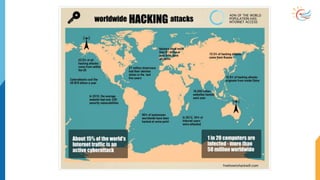
Map
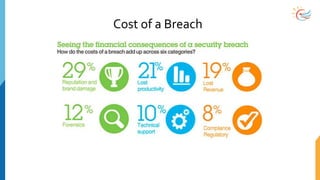
Cost of a Breach
Sources of Attacks
• Virus /Worms / *-wares (Executables)
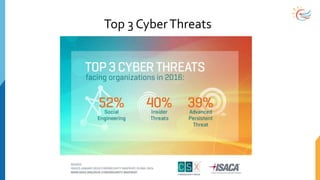
• Social Engineering (Phishing)
• Hackers who are very patient
• PEOPLE !!
Personally Identifiable Information
• Any information that can lead to locating and contacting an individual and
identifying that individual uniquely
• First name & Last name, phone number, address
• Credit card number, Account number,
• Biometric Data, Mothers maiden name, employer information
• This data is used to access and change
• Account recovery questions
• Background check questions
• Bank security questions
• PII records have a monetary value
• The majority of identity theft incidents (85%) involved the fraudulent use of
existing account information, such as credit card or bank account information.
Protecting ID theft
• Recognize different types of theft
• Payment card fraud
• Device sharing (laptops and mobiles)
• Default passwords for network devices
• Sharing credentials
• Guard your PII
• Account numbers and credentials
• Give least amount of PII if absolutely necessary
• Identify the requester properly
• Shred papers showing PII
• Be aware of “Social Engineering”
Virus
• Small software programs designed to spread
• Can copy itself through attached medium (USB drives, Networks,
• Virus might corrupt or delete the data
• Can easily spread by emails as attachments
• Different fromTrojan Horse
• Does not reproduce
• Appears harmless until executed
Malware
• Malware is the umbrella term for
• Virus, worms, trojan horses, ransomware, spyware, adware, scareware
• Executable scripts
• Nature to spread
• Caused by Security defects of the softwares
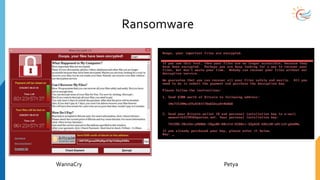
Ransomware
WannaCry Petya
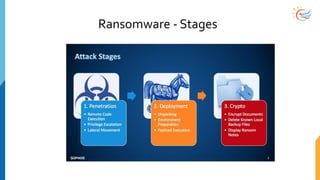
Ransomware - Stages
Denial-of-Service (DoS) Attack
• Preventing legitimate users from accessing information
• Flooding the network/inbox till it reaches the limit
• Distributed DoS attack through multiple systems
• Prevention
• Antivirus updates and Firewall checks
• Isolating originator
Threats
• OrganizedThreats
• Terrorists/Mafia
• Nation Sponsored Cyberwarfare
• InsiderThreats
• Corporate Espionage
• Former Employees
• Insiders Selling Information
• Common PersistentThreats
• Hacktivists
• Data thieves
• Individuals looking for recognition
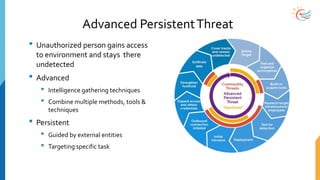
Advanced PersistentThreat
• Unauthorized person gains access
to environment and stays there
undetected
• Advanced
• Intelligence gathering techniques
• Combine multiple methods, tools &
techniques
• Persistent
• Guided by external entities
• Targeting specific task
Malware – Prevention
• Antivirus and Anti malware softwares
• Update Operating system with latest patches
• Periodically scan the files in your system
• Scan your web accessible points
• Remove Grayware (unnecessary programs that slow down)
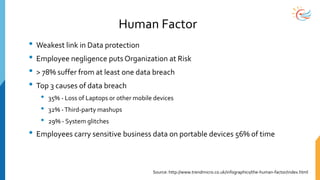
Human Factor
• Weakest link in Data protection
• Employee negligence puts Organization at Risk
• > 78% suffer from at least one data breach
• Top 3 causes of data breach
• 35% - Loss of Laptops or other mobile devices
• 32% -Third-party mashups
• 29% - System glitches
• Employees carry sensitive business data on portable devices 56% of time
Source: http://www.trendmicro.co.uk/infographics/the-human-factor/index.html
Top 3 CyberThreats
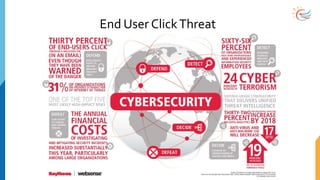
End User ClickThreat
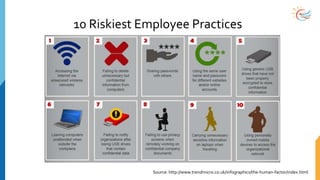
10 Riskiest Employee Practices
Source: http://www.trendmicro.co.uk/infographics/the-human-factor/index.html
Why should we care?
• Often a successful attack originates with the attacker on the premise
• People take shortcuts
• People aren’t careful with their credentials (keys, swipecards)
• Buildings designed for function/cost instead of security
• Attackers are smart!
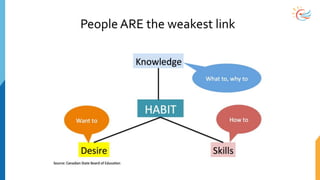
People ARE the weakest link
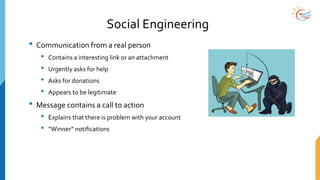
Social Engineering
• Communication from a real person
• Contains a interesting link or an attachment
• Urgently asks for help
• Asks for donations
• Appears to be legitimate
• Message contains a call to action
• Explains that there is problem with your account
• “Winner” notifications
Types of Social engineering
• According toTripwire.com there are five types of social engineering attacks
that are on the rise
• Phishing
• Pretexting
• Baiting
• Quid Pro Quo
• Tailgating
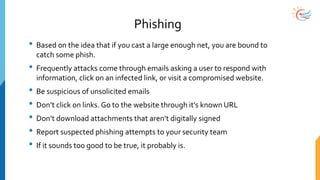
Phishing
• Based on the idea that if you cast a large enough net, you are bound to
catch some phish.
• Frequently attacks come through emails asking a user to respond with
information, click on an infected link, or visit a compromised website.
• Be suspicious of unsolicited emails
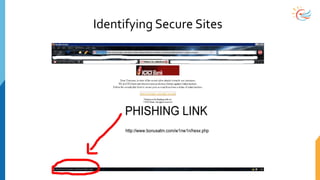
• Don’t click on links. Go to the website through it’s known URL
• Don’t download attachments that aren’t digitally signed
• Report suspected phishing attempts to your security team
• If it sounds too good to be true, it probably is.
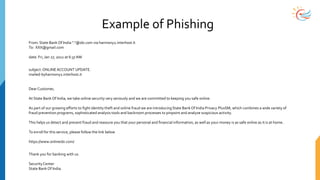
Example of Phishing
From: State Bank Of India "."@sbi.com via harmony2.interhost.it
To: XXX@gmail.com
date: Fri, Jan 27, 2012 at 6:37 AM
subject:ONLINEACCOUNT UPDATE.
mailed-byharmony2.interhost.it
Dear Customer,
At State Bank Of India, we take online security very seriously and we are committed to keeping you safe online.
As part of our growing efforts to fight identity theft and online fraud we are introducingState Bank Of India Privacy PlusSM, which combines a wide variety of
fraud prevention programs, sophisticated analysis tools and backroom processes to pinpoint and analyze suspicious activity.
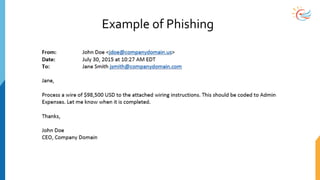
This helps us detect and prevent fraud and reassure you that your personal and financial information, as well as your money is as safe online as it is at home.
To enroll for this service, please follow the link below
https://www.onlinesbi.com/
Thank you for banking with us.
SecurityCenter
State Bank Of India.
Example of Phishing
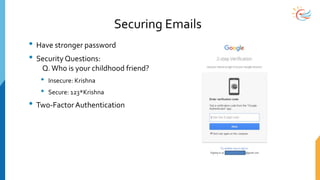
Securing Emails
• Have stronger password
• Security Questions:
Q.Who is your childhood friend?
• Insecure: Krishna
• Secure: 123*Krishna
• Two-Factor Authentication
Pretexting
• An attacker uses the pretext that they have a legitimate need for the information.
For example, a credit card company calls and tells you that there has been a
problem with your card.They then ask for your card number and other information
• A “service rep” calls and needs to reset your password because your system has
been compromised
• These attacks often use urgency as a tool to add pressure to the victim.
• Follow company policy. When in doubt refer to a supervisor to make the decision.
• Be skeptical.
• Don’t allow intimidation to work. No legitimate individual should force you to
violate the company security policy
• Never disclose password information
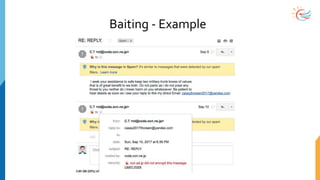
Baiting
• Promising something good in exchange for an action or information
• A USB stick found in the parking lot might have interesting information on
it.
• Download this gaming app, when it actually contains malware
• Scan all downloaded items
• Avoid downloads from untrusted sources
• Avoid downloads that haven’t been digitally signed.
Baiting - Example
Quid Pro Quo
• Similar to Baiting, but offers a service rather than a good in exchange for
information or an action
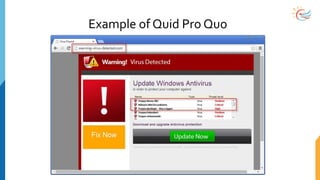
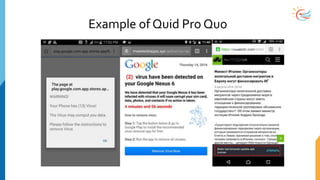
• I will help you with a bug in your system if you’ll just turn off your anti-virus
program
• Allow me remote access to your system so I can show you how to install this
file
• When in doubt follow policy and check with your IT Security department.
Example of Quid Pro Quo
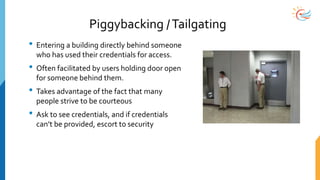
Piggybacking /Tailgating
• Entering a building directly behind someone
who has used their credentials for access.
• Often facilitated by users holding door open
for someone behind them.
• Takes advantage of the fact that many
people strive to be courteous
• Ask to see credentials, and if credentials
can’t be provided, escort to security
Social Engineering - Prevention
• Slow-down
• Trust no one!
• Research the facts
• Be aware of any download
• Secure your computing devices
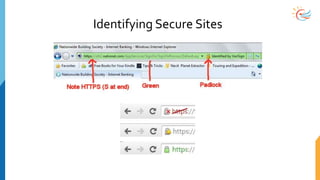
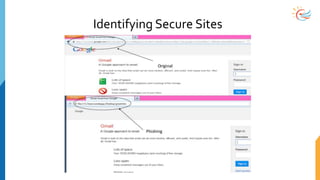
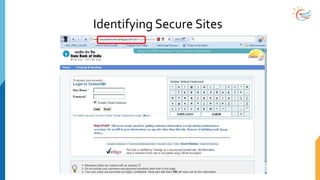
• Look at the URL in the browser’s address bar
• Require multifactor authentication
• When in doubt, call your security team
Social Media Risk
• Misuse of public contacts
• Spread your personal pics
• Harassment
• Cyber bullying
• Phone number gathering
• Criminals browse social media sights looking for targets
Social Media Risk - Prevention
• Have stronger passwords
• Don’t share personal information, like phone number
• Check your name in Google and Facebook frequently
• Recognizing different types
• Scams, fake offers, fake people
• Seems real, because our “friends” are there
• Guarding
• Think before you post
• Monitor their accounts
Identifying UnsecureWebsites
• Browser Hijacking: If a site won’t allow you to access any other site, be
suspicious!
• Has your homepage or search engine been modified without your
permission?
• Encourages download or purchase of suspicious applications, e.g. “Buy
Now”, pop-ups
• Does the site install toolbars or applications without your permission. Often
“free downloads” install spyware or other applications on your system.
• Sites that say they have “Scanned your computer and have detected
viruses” should always be treated with suspicion
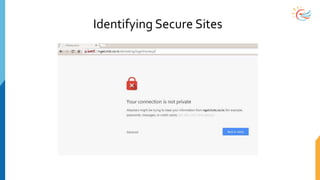
Identifying Secure Sites
WiFi Risk
• Easy to hack or crack
• Wifi credentials are often spelled out
• Default passwords are not changed
• BringYour Own Device (BYOD) Risk
• Prevention
• Always use stronger password protection
• For office: use MAC filters
Mobile Risk
• Pocket sized computers becoming eye-candies for hackers
• People want data
• Unlocked passwords are food for brains
• Your phone is a snapshot of yourself
Mobile Risk - Prevention
• Auto-lock your phone
• Password protection. If possible, biometric authentication
• Antivirus and Data safeguard apps
• Update software and apps
• Avoid shopping or banking on a public network
• Be aware about people behind your shoulder
• Backup your data
• Report lost mobile devices
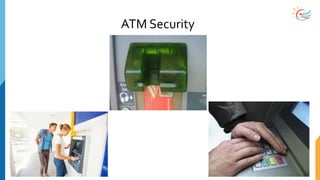
ATM Security
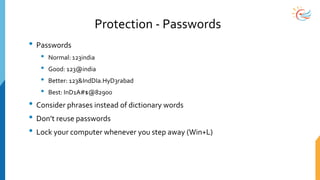
Protection - Passwords
• Passwords
• Normal: 123india
• Good: 123@india
• Better: 123&IndDIa.HyD3rabad
• Best: InD1A#$@82900
• Consider phrases instead of dictionary words
• Don’t reuse passwords
• Lock your computer whenever you step away (Win+L)
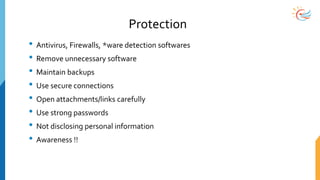
Protection
• Antivirus, Firewalls, *ware detection softwares
• Remove unnecessary software
• Maintain backups
• Use secure connections
• Open attachments/links carefully
• Use strong passwords
• Not disclosing personal information
• Awareness !!
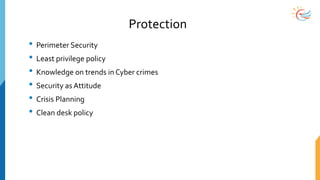
Protection
• Perimeter Security
• Least privilege policy
• Knowledge on trends in Cyber crimes
• Security as Attitude
• Crisis Planning
• Clean desk policy
Cyber Law in India
• Cyber Law is the law governing cyber space
• Cyber space is a very wide term and includes computers, networks, software, data
storage devices, the internet, websites, emails and electronic devices such as
cellphones,ATM Machines etc.
• Cyber Law of India encompasses laws relating to
• Cyber Crimes
• Electronic and Digital Signatures
• Intellectual Property
• Data Protection and Privacy
Cyber Law in India
• IT Act, 2000
• Primary source of cyber law in India is the InformationTechnologyAct, 2000 (IT Act)
• Purpose is to provide legal recognition to electronic commerce and facilitate filing of
electronic records with Government
• Has 94 sections segregated into 13 chapters
• IT Amendment Act, 2008
• Focus on Information Security
• Added new sections on offences including CyberTerrorism and Data protection
Cyber Law in India - Objectives
• Regulation of Certifying Authorities
• Scheme of things for DSC
• Penalties and Adjudication for various offences
• Cyber Regulations AppellateTribunal
• Offence investigation by DSP level officer
• Legalized email as valid form of communication
• Allows E-governance
• Monetary remedies upto Rs.1Cr
Cyber Law in India - Downside
• No provisions for IPR, Copyrights etc.
• No regulation of Electronic Payments Gateway
• DSP has to file charge sheet for all cases related to Cyber law
• Possibility of cyber crime in many corners of internet
• No internet censorship
Computer Forensics
• Process of identifying, preserving, analyzing and presenting the digital
evidence in such a manner that the evidences are legally acceptable
• Preserving Digital Evidences
• Any data that is recorded or preserved on any medium in or by a computer system or
other similar device that can be read or understood by a person or a computer system
or similar device
• Steps of Investigation
• Acquisition, Identification, Evaluation, Presentation
• Evidences should not be tampered
• Assessing damage and abuse
Locations for Digital Evidence
• Internet History Files
• Temporary Internet Files
• Slack/Unallocated Space
• Buddy lists, personal chat records
• News groups postings
• Settings, folder structure
• File Storage Dates
• Software/Hardware added
• File sharing ability
• Emails
Cybersecurity AssessmentTool
• Five Questions forCyber risk management
• Where is the data?
• Who owns the data?
• What InformationTechnology (IT) control framework do you believe in?
• What does “normal” look like?
• How do you know?
Ref: https://www.ffiec.gov/pdf/cybersecurity/FFIEC_CAT_May_2017_All_Documents_Combined.pdf
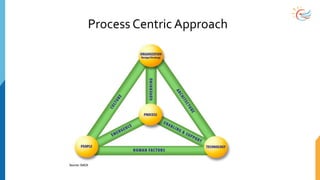
Process Centric Approach
Best Practices
• Always logoff or lock your system if you leave (even for a minute)
• Encrypt sensitive files
• Never let someone have access to your system with your credentials
• Protect your passwords
• Secure laptops with cable locks when unattended
• Report any potential breach
Conclusion
• Cyber Security is always under attack
• Protect your passwords
• Protect your company information, assets & your information
• Attackers will target IoT
• New threats will emerge with technology advancements
• Get Informed & Get Involved
• Trust your instincts: If something feels wrong, it is. Report the issues and ask
for help if necessary
• Be an advocate for physical security … speak up!
Quiz
• What is PII?
• What are the goals of Cyber Security?
• What is Advanced PersistentThreat?
• How to identify legitimate sites and emails?
• How can Cybercrimes be reported?
• What is Cyber Law in India
Glossary
• Access Point
• Asset
• Adware
• Algorithm
• Attack
• Availability
• Authentication
• Authorization
• Backdoor
• Botnet
• Brute force Attack
• Cryptography
• Cyberwar
• Compliance
• Data Leakage
• DoS, DDoS
• Digital Certificate
• Encyption
• Evidence
• Exploit
• Firewall
• Forensics
• Freeware
• Governance
• Hardening
• Hijack
• HTTP/HTTPS
• Identity
• Incident
• Intrusion (IDS&IPS)
• MAC address
Glossary
• Password
• Penetration
• Phishing
• Port
• Protocol
• Proxy Server
• Reverse Engineering
• Routers
• Scan
• Security Plan
• Signature
• Spam
• Spoof
• Script Injection
• Tamper
• Threat
• Trojan Horse
• User
• URI & URL
• Virus
• Virtual Private
Network
• Web Server
• Zero-dayAttack
• Zombie Computer

Cyber Security Awareness Session for Executives and Non-IT professionals

  • 1.
  • 2.
    Learning Agenda • TheLandscape • Cyber Crime • Types of Cyber threats • Cyber Security • Measures of Protection • Cyber Law in India
  • 3.
    Information,Technology & Society •The Information is the data that is of interest • The Technology used to create, communicate, distribute, manipulate, store or destroy information • The technology is any mechanism capable of data processing • The Society is a group of people involved in social interaction • Becoming socialized means learning what kind(s) of behavior is appropriate in given situation • Society and IT and co-evolving and impact each other
  • 4.
    Trends in Digitization •Storing social and intellectual interactions • Gathering and synthesizing information that was disconnected • Higher expectations from technology than people
  • 5.
    Cyber Crime • Cybercrimes can involve criminal activities that are traditional in nature, such as theft, fraud, forgery, defamation and mischief, all of which are subject to the Indian Penal Code. • The abuse of computers has also given birth to a gamut of new age crimes that are addressed by the InformationTechnology Act, 2000.
  • 6.
    Types of CyberCrime • Hacking (illegal intrusion into a system/network) • Denial of Service attack • Virus dissemination • CyberTerrorism • Software piracy
  • 7.
    Purpose of CyberCrime • Financial Fraud • Damage to data/system/network • Theft of proprietary information • System penetration • Denial of Service • Unauthorized access • Abuse of privileges • Spreading viruses
  • 8.
    What is CyberSecurity? • Cybersecurity is a subset of information security; the practice of defending data/information (electronic or physical) from unauthorized access, use, disclosure, disruption, modification, perusal, inspection, recording or destruction • Shared responsibility between merchants and users • Cyber security involves protecting that information by preventing, detecting, and responding to attacks. Source: https://en.wikipedia.org/wiki/Information_security
  • 9.
    What is CyberSecurity? • Cyber Security are the processes employed to safeguard and secure assets used to carry information of an organization from being stolen or attacked. • It requires extensive knowledge of the possible threats such asVirus or such other malicious objects. • Identity management, risk management and incident management form the crux of cyber security strategies of an organization.
  • 10.
    Goals of CyberSecurity • Confidentiality • Making sure that we keep our data and our information private from those who do not “need to know” • Integrity • Making sure that our data is not tampered with, so that any information we send or receive is accurate and truthful • Availability • Making sure that we, our clients and anyone else who needs to get to our data is able to easily and securely access it
  • 11.
    Why Cyber SecurityTraining? •Business Continuity &Trust factor • Protection of data and systems • Prevention of unauthorized access • Safeguarding Personally Identifiable Information • Reduces security related risks upto 75%
  • 12.
  • 13.
    Cost of aBreach
  • 14.
    Sources of Attacks •Virus /Worms / *-wares (Executables) • Social Engineering (Phishing) • Hackers who are very patient • PEOPLE !!
  • 15.
    Personally Identifiable Information •Any information that can lead to locating and contacting an individual and identifying that individual uniquely • First name & Last name, phone number, address • Credit card number, Account number, • Biometric Data, Mothers maiden name, employer information • This data is used to access and change • Account recovery questions • Background check questions • Bank security questions • PII records have a monetary value • The majority of identity theft incidents (85%) involved the fraudulent use of existing account information, such as credit card or bank account information.
  • 16.
    Protecting ID theft •Recognize different types of theft • Payment card fraud • Device sharing (laptops and mobiles) • Default passwords for network devices • Sharing credentials • Guard your PII • Account numbers and credentials • Give least amount of PII if absolutely necessary • Identify the requester properly • Shred papers showing PII • Be aware of “Social Engineering”
  • 17.
    Virus • Small softwareprograms designed to spread • Can copy itself through attached medium (USB drives, Networks, • Virus might corrupt or delete the data • Can easily spread by emails as attachments • Different fromTrojan Horse • Does not reproduce • Appears harmless until executed
  • 18.
    Malware • Malware isthe umbrella term for • Virus, worms, trojan horses, ransomware, spyware, adware, scareware • Executable scripts • Nature to spread • Caused by Security defects of the softwares
  • 19.
  • 20.
  • 21.
    Denial-of-Service (DoS) Attack •Preventing legitimate users from accessing information • Flooding the network/inbox till it reaches the limit • Distributed DoS attack through multiple systems • Prevention • Antivirus updates and Firewall checks • Isolating originator
  • 22.
    Threats • OrganizedThreats • Terrorists/Mafia •Nation Sponsored Cyberwarfare • InsiderThreats • Corporate Espionage • Former Employees • Insiders Selling Information • Common PersistentThreats • Hacktivists • Data thieves • Individuals looking for recognition
  • 23.
    Advanced PersistentThreat • Unauthorizedperson gains access to environment and stays there undetected • Advanced • Intelligence gathering techniques • Combine multiple methods, tools & techniques • Persistent • Guided by external entities • Targeting specific task
  • 24.
    Malware – Prevention •Antivirus and Anti malware softwares • Update Operating system with latest patches • Periodically scan the files in your system • Scan your web accessible points • Remove Grayware (unnecessary programs that slow down)
  • 25.
    Human Factor • Weakestlink in Data protection • Employee negligence puts Organization at Risk • > 78% suffer from at least one data breach • Top 3 causes of data breach • 35% - Loss of Laptops or other mobile devices • 32% -Third-party mashups • 29% - System glitches • Employees carry sensitive business data on portable devices 56% of time Source: http://www.trendmicro.co.uk/infographics/the-human-factor/index.html
  • 26.
  • 27.
  • 28.
    10 Riskiest EmployeePractices Source: http://www.trendmicro.co.uk/infographics/the-human-factor/index.html
  • 29.
    Why should wecare? • Often a successful attack originates with the attacker on the premise • People take shortcuts • People aren’t careful with their credentials (keys, swipecards) • Buildings designed for function/cost instead of security • Attackers are smart!
  • 30.
    People ARE theweakest link
  • 31.
    Social Engineering • Communicationfrom a real person • Contains a interesting link or an attachment • Urgently asks for help • Asks for donations • Appears to be legitimate • Message contains a call to action • Explains that there is problem with your account • “Winner” notifications
  • 32.
    Types of Socialengineering • According toTripwire.com there are five types of social engineering attacks that are on the rise • Phishing • Pretexting • Baiting • Quid Pro Quo • Tailgating
  • 33.
    Phishing • Based onthe idea that if you cast a large enough net, you are bound to catch some phish. • Frequently attacks come through emails asking a user to respond with information, click on an infected link, or visit a compromised website. • Be suspicious of unsolicited emails • Don’t click on links. Go to the website through it’s known URL • Don’t download attachments that aren’t digitally signed • Report suspected phishing attempts to your security team • If it sounds too good to be true, it probably is.
  • 34.
    Example of Phishing From:State Bank Of India "."@sbi.com via harmony2.interhost.it To: XXX@gmail.com date: Fri, Jan 27, 2012 at 6:37 AM subject:ONLINEACCOUNT UPDATE. mailed-byharmony2.interhost.it Dear Customer, At State Bank Of India, we take online security very seriously and we are committed to keeping you safe online. As part of our growing efforts to fight identity theft and online fraud we are introducingState Bank Of India Privacy PlusSM, which combines a wide variety of fraud prevention programs, sophisticated analysis tools and backroom processes to pinpoint and analyze suspicious activity. This helps us detect and prevent fraud and reassure you that your personal and financial information, as well as your money is as safe online as it is at home. To enroll for this service, please follow the link below https://www.onlinesbi.com/ Thank you for banking with us. SecurityCenter State Bank Of India.
  • 35.
  • 36.
    Securing Emails • Havestronger password • Security Questions: Q.Who is your childhood friend? • Insecure: Krishna • Secure: 123*Krishna • Two-Factor Authentication
  • 37.
    Pretexting • An attackeruses the pretext that they have a legitimate need for the information. For example, a credit card company calls and tells you that there has been a problem with your card.They then ask for your card number and other information • A “service rep” calls and needs to reset your password because your system has been compromised • These attacks often use urgency as a tool to add pressure to the victim. • Follow company policy. When in doubt refer to a supervisor to make the decision. • Be skeptical. • Don’t allow intimidation to work. No legitimate individual should force you to violate the company security policy • Never disclose password information
  • 38.
    Baiting • Promising somethinggood in exchange for an action or information • A USB stick found in the parking lot might have interesting information on it. • Download this gaming app, when it actually contains malware • Scan all downloaded items • Avoid downloads from untrusted sources • Avoid downloads that haven’t been digitally signed.
  • 39.
  • 40.
    Quid Pro Quo •Similar to Baiting, but offers a service rather than a good in exchange for information or an action • I will help you with a bug in your system if you’ll just turn off your anti-virus program • Allow me remote access to your system so I can show you how to install this file • When in doubt follow policy and check with your IT Security department.
  • 41.
  • 42.
  • 43.
    Piggybacking /Tailgating • Enteringa building directly behind someone who has used their credentials for access. • Often facilitated by users holding door open for someone behind them. • Takes advantage of the fact that many people strive to be courteous • Ask to see credentials, and if credentials can’t be provided, escort to security
  • 44.
    Social Engineering -Prevention • Slow-down • Trust no one! • Research the facts • Be aware of any download • Secure your computing devices • Look at the URL in the browser’s address bar • Require multifactor authentication • When in doubt, call your security team
  • 45.
    Social Media Risk •Misuse of public contacts • Spread your personal pics • Harassment • Cyber bullying • Phone number gathering • Criminals browse social media sights looking for targets
  • 46.
    Social Media Risk- Prevention • Have stronger passwords • Don’t share personal information, like phone number • Check your name in Google and Facebook frequently • Recognizing different types • Scams, fake offers, fake people • Seems real, because our “friends” are there • Guarding • Think before you post • Monitor their accounts
  • 47.
    Identifying UnsecureWebsites • BrowserHijacking: If a site won’t allow you to access any other site, be suspicious! • Has your homepage or search engine been modified without your permission? • Encourages download or purchase of suspicious applications, e.g. “Buy Now”, pop-ups • Does the site install toolbars or applications without your permission. Often “free downloads” install spyware or other applications on your system. • Sites that say they have “Scanned your computer and have detected viruses” should always be treated with suspicion
  • 48.
  • 49.
  • 50.
  • 51.
  • 52.
  • 53.
    WiFi Risk • Easyto hack or crack • Wifi credentials are often spelled out • Default passwords are not changed • BringYour Own Device (BYOD) Risk • Prevention • Always use stronger password protection • For office: use MAC filters
  • 54.
    Mobile Risk • Pocketsized computers becoming eye-candies for hackers • People want data • Unlocked passwords are food for brains • Your phone is a snapshot of yourself
  • 55.
    Mobile Risk -Prevention • Auto-lock your phone • Password protection. If possible, biometric authentication • Antivirus and Data safeguard apps • Update software and apps • Avoid shopping or banking on a public network • Be aware about people behind your shoulder • Backup your data • Report lost mobile devices
  • 56.
  • 57.
    Protection - Passwords •Passwords • Normal: 123india • Good: 123@india • Better: 123&IndDIa.HyD3rabad • Best: InD1A#$@82900 • Consider phrases instead of dictionary words • Don’t reuse passwords • Lock your computer whenever you step away (Win+L)
  • 58.
    Protection • Antivirus, Firewalls,*ware detection softwares • Remove unnecessary software • Maintain backups • Use secure connections • Open attachments/links carefully • Use strong passwords • Not disclosing personal information • Awareness !!
  • 59.
    Protection • Perimeter Security •Least privilege policy • Knowledge on trends in Cyber crimes • Security as Attitude • Crisis Planning • Clean desk policy
  • 60.
    Cyber Law inIndia • Cyber Law is the law governing cyber space • Cyber space is a very wide term and includes computers, networks, software, data storage devices, the internet, websites, emails and electronic devices such as cellphones,ATM Machines etc. • Cyber Law of India encompasses laws relating to • Cyber Crimes • Electronic and Digital Signatures • Intellectual Property • Data Protection and Privacy
  • 61.
    Cyber Law inIndia • IT Act, 2000 • Primary source of cyber law in India is the InformationTechnologyAct, 2000 (IT Act) • Purpose is to provide legal recognition to electronic commerce and facilitate filing of electronic records with Government • Has 94 sections segregated into 13 chapters • IT Amendment Act, 2008 • Focus on Information Security • Added new sections on offences including CyberTerrorism and Data protection
  • 62.
    Cyber Law inIndia - Objectives • Regulation of Certifying Authorities • Scheme of things for DSC • Penalties and Adjudication for various offences • Cyber Regulations AppellateTribunal • Offence investigation by DSP level officer • Legalized email as valid form of communication • Allows E-governance • Monetary remedies upto Rs.1Cr
  • 63.
    Cyber Law inIndia - Downside • No provisions for IPR, Copyrights etc. • No regulation of Electronic Payments Gateway • DSP has to file charge sheet for all cases related to Cyber law • Possibility of cyber crime in many corners of internet • No internet censorship
  • 64.
    Computer Forensics • Processof identifying, preserving, analyzing and presenting the digital evidence in such a manner that the evidences are legally acceptable • Preserving Digital Evidences • Any data that is recorded or preserved on any medium in or by a computer system or other similar device that can be read or understood by a person or a computer system or similar device • Steps of Investigation • Acquisition, Identification, Evaluation, Presentation • Evidences should not be tampered • Assessing damage and abuse
  • 65.
    Locations for DigitalEvidence • Internet History Files • Temporary Internet Files • Slack/Unallocated Space • Buddy lists, personal chat records • News groups postings • Settings, folder structure • File Storage Dates • Software/Hardware added • File sharing ability • Emails
  • 66.
    Cybersecurity AssessmentTool • FiveQuestions forCyber risk management • Where is the data? • Who owns the data? • What InformationTechnology (IT) control framework do you believe in? • What does “normal” look like? • How do you know? Ref: https://www.ffiec.gov/pdf/cybersecurity/FFIEC_CAT_May_2017_All_Documents_Combined.pdf
  • 67.
  • 68.
    Best Practices • Alwayslogoff or lock your system if you leave (even for a minute) • Encrypt sensitive files • Never let someone have access to your system with your credentials • Protect your passwords • Secure laptops with cable locks when unattended • Report any potential breach
  • 69.
    Conclusion • Cyber Securityis always under attack • Protect your passwords • Protect your company information, assets & your information • Attackers will target IoT • New threats will emerge with technology advancements • Get Informed & Get Involved • Trust your instincts: If something feels wrong, it is. Report the issues and ask for help if necessary • Be an advocate for physical security … speak up!
  • 70.
    Quiz • What isPII? • What are the goals of Cyber Security? • What is Advanced PersistentThreat? • How to identify legitimate sites and emails? • How can Cybercrimes be reported? • What is Cyber Law in India
  • 71.
    Glossary • Access Point •Asset • Adware • Algorithm • Attack • Availability • Authentication • Authorization • Backdoor • Botnet • Brute force Attack • Cryptography • Cyberwar • Compliance • Data Leakage • DoS, DDoS • Digital Certificate • Encyption • Evidence • Exploit • Firewall • Forensics • Freeware • Governance • Hardening • Hijack • HTTP/HTTPS • Identity • Incident • Intrusion (IDS&IPS) • MAC address
  • 72.
    Glossary • Password • Penetration •Phishing • Port • Protocol • Proxy Server • Reverse Engineering • Routers • Scan • Security Plan • Signature • Spam • Spoof • Script Injection • Tamper • Threat • Trojan Horse • User • URI & URL • Virus • Virtual Private Network • Web Server • Zero-dayAttack • Zombie Computer

Editor's Notes

  • #28 https://py-sec.org/2016/03/16/0x4-end-user-click-threat/
  • #72 Governance is processes, rules, framework Hardening is at various levels, os, application, server, network etc Media Access Control address (MAC address)
  • #73 Governance is processes, rules, framework. HARDENING is at various levels, os, application, server, network etc Media Access Control address (MAC address). PHISHING attempt to acquire sensitive info. SIGNATURE is distinct pattern that can be identified. THREAT is a possible danger that might exploit. URI is generic term for all types of addresses on WWW. VPN is extension of network protected by a firewall