Security Awareness Training
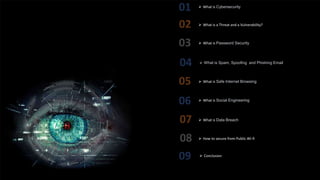
 What is Cybersecurity
 What is a Threat and a Vulnerability?
 What is Safe Internet Browsing
 What is Social Engineering
 What is Spam, Spoofing and Phishing Email
 How to secure from Public Wi-fi
 What is Data Breach
 What is Password Security
 Conclusion
What is Cyber Security?
Confidentiality, Integrity, and Availability (CIA)
1.Confidentiality: This refers to the protection of information from
unauthorized access or disclosure.
2.Integrity: This refers to the accuracy and completeness of data and
ensuring that it is not modified or altered without authorization.
3.Availability: This refers to the ability of authorized users to access
information when they need it.
Cybersecurity is a practice where organizations protect internal and external
Servers, IOT's, Personal Machine, Mobile Devices, networks, data, and digital
assets from unauthorized access and disclose the confidential data publicly and
avoid disruption, modification, or destruction. This involves implementing a
combination of technologies, processes, practices, and measures designed to
safeguard digital environments from cyber threats.
Threat
A threat is any potential danger or unwanted
occurrence that can compromise the security of
classified information of the organization.
Examples of threats include malware, phishing
attacks, denial of service (DoS) attacks, theft, and
unauthorized access.
Vulnerability
Vulnerabilities is a weaknesses or gaps in an
organization's security system that can be exploited
or hacked by attackers to carry out a threat to steal
or destroy users or organizations data.
Vulnerabilities can be present in hardware,
software.
Examples of vulnerabilities include unpatched
software, weak passwords, lack of access controls,
and insufficient physical security.
What is a Threat and a Vulnerability?
What is Password Security?
Passwords are a key part of our cyber security strategy and are fundamental to protecting the business and therefore the
livelihood of our employees.
The policy covers all employees who are responsible for one or more account or have access to any resource that requires a
password
Creating Strong Password
Step 1—Choose a phrase—for example: ‘I catch the number 14 bus on Fridays’
Step 2—Use the first character of each word: I c t n 14 b o f
Step 3—Mix with lower and uppercase letters: iCTn14bOf
Step 4—Incorporate special characters (such as !@#$%^&*()_+|~-=`{}[]:”;’<>?,./ ) and numbers to increase complexity. Using
this method, the final password could be:
i*CTn#14bOf5
1.Password Protection: Employees need to secure their passwords and ensure they are difficult to guess or crack. This includes
building complex passwords that can’t be compromised.
2.MFA: Using Two factor Authentication to verify identity is secure way to protect your account. Some of the common
methods are using smart card or PIN or SMS receives to mobile. In addition to that Biometric data like fingerprint facial
recognition can be used to avoid unauthorized access to user account.
What is Spam, Spoofing & Phishing Email?
Phishing is a type of fraud that occurs when someone tries to trick you into
giving them personal or financial information. Cyber attackers may do this
by sending you an email that looks like it's from a genuine company or by
creating a fake website that looks legitimate.
Spam is an unsolicited email that often contains commercial messages or website links. Email spam are More casual and
significant problem to businesses and individuals have been bombarded with huge number of emails and messages in social
media. Moreover, spam can be very difficult to filter out, and it often clogs up inboxes and slows down email servers.
Spoofing describes a attacker who impersonates as your friend or boss or
higher official of individual or organization, with the intent to gather
personal or business information. Hackers leverage common social
engineering maneuvers and fake email, websites, or phone numbers to
trick victims into providing confidential information, downloading
attachments, or clicking links that install malware.
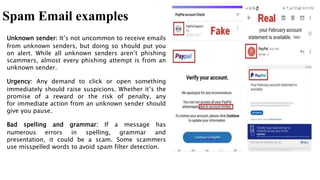
Spam Email examples
Unknown sender: It’s not uncommon to receive emails
from unknown senders, but doing so should put you
on alert. While all unknown senders aren’t phishing
scammers, almost every phishing attempt is from an
unknown sender.
Urgency: Any demand to click or open something
immediately should raise suspicions. Whether it’s the
promise of a reward or the risk of penalty, any
for immediate action from an unknown sender should
give you pause.
Bad spelling and grammar: If a message has
numerous errors in spelling, grammar and
presentation, it could be a scam. Some scammers
use misspelled words to avoid spam filter detection.
Spoofing Email Examples
•Be sure to not click on the links; instead, hover over them. A small box
should show you the URL to which the link will take you.
•Identify any grammatical or spelling errors.
•Do not click on any attachments from unfamiliar sources.
•Generic greetings like "Dear customer" instead of your name
•Don't engage with the email if the email
asks you about personal information such
as usernames, passwords, or account
numbers.
•Email content contains information about
deadlines or expiration dates.
•Urgent deadlines prompt you to ask for
your personal information.
Phishing Email Examples
1) say they’ve noticed some suspicious activity or log-in
attempts — they haven’t
2) claim there’s a problem with your account or your
payment information — there isn’t
3) say you need to confirm some personal or financial
information — you don’t
4) include an invoice you don’t recognize — it’s fake
5) want you to click on a link to make a payment — but the link has
malware
6) say you’re eligible to register for a government refund — it’s a scam
7) offer a coupon for free stuff — it’s not real
What is Safe Internet Browsing?
Safe browsing is a general and smart way of practice to use internet in a secure and responsible manner
to minimize the risk of encountering malicious websites, malware, or falling victim to online scams.
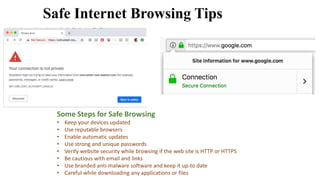
Some Steps for Safe Browsing
• Keep your devices updated
• Use reputable browsers
• Enable automatic updates
• Use strong and unique passwords
• Verify website security while browsing if the web site is HTTP or HTTPS
• Be cautious with email and links
• Use branded anti-malware software and keep it up-to date
• Careful while downloading any applications or files
Safe Internet Browsing Tips
What is Social Engineering?
Social Engineering is the use of deception to manipulate individual or employees into divulging confidential or personal information that
may be used for fraudulent purposes. Hackers use psychological manipulation based on your social media presence and use that
information to build a story to so the person is tricked into giving out that personal or confidential information.
What is Data Breach?
Data breach refers to an incident or an event that occurred in an organization where hackers or unauthorized individuals gain
access to sensitive, confidential, or protected data without permission.
Types of Data Breaches
An Accidental Insider: An individual who is working in accompany using co-workers computer and reading files without
having the proper authorization.
A Malicious Insider: An individual who shares data with the intent of causing harm to an individual or organization. This
person may have access to confidential information, but he/she intended to use the data to exploit them.
Lost or Stolen Devices: An unencrypted and unlocked laptop or mobile device or HDD any thing that contains sensitive
information.
Malicious Outside Criminal: Hackers who use various attack vectors to gather information from various networks to exploit
users
How to secure from Public Wi-fi?
While using Public Wi-Fi which is free and fast, people ignore that how significant security risk that it could be.
Hackers create unsecured free wi-fi in open areas like Café, Shopping malls, Airports, Hotels, so that people can
easily accessed in such a way attacker can gain access to your mobile device and collect sensitive information.
% Avoid using sensitive data in public wi-fi
% Use Branded and secure VPN to encrypt the data
% Turnoff File sharing
% Keep your software up to date of all applications and OS
% Use Multi factor Authentication while accessing sensitive data
% Disable automatic Wi-Fi Connection
Conclusion
In this awareness training we have explored various topics, including the types of cyber threats, common attack vectors,
and preventive measures. We have seen and explored about the significance of strong passwords, the dangers of phishing
emails and social engineering.
Thank You
Every individual of us plays a vital role in maintaining a
secure digital environment of personal and professional
information. By applying the practices from this
training, we can protect not only ourselves but also our
colleagues, families, and communities.

Security Awareness Training.pptx

  • 1.
  • 2.
     What isCybersecurity  What is a Threat and a Vulnerability?  What is Safe Internet Browsing  What is Social Engineering  What is Spam, Spoofing and Phishing Email  How to secure from Public Wi-fi  What is Data Breach  What is Password Security  Conclusion
  • 3.
    What is CyberSecurity? Confidentiality, Integrity, and Availability (CIA) 1.Confidentiality: This refers to the protection of information from unauthorized access or disclosure. 2.Integrity: This refers to the accuracy and completeness of data and ensuring that it is not modified or altered without authorization. 3.Availability: This refers to the ability of authorized users to access information when they need it. Cybersecurity is a practice where organizations protect internal and external Servers, IOT's, Personal Machine, Mobile Devices, networks, data, and digital assets from unauthorized access and disclose the confidential data publicly and avoid disruption, modification, or destruction. This involves implementing a combination of technologies, processes, practices, and measures designed to safeguard digital environments from cyber threats.
  • 4.
    Threat A threat isany potential danger or unwanted occurrence that can compromise the security of classified information of the organization. Examples of threats include malware, phishing attacks, denial of service (DoS) attacks, theft, and unauthorized access. Vulnerability Vulnerabilities is a weaknesses or gaps in an organization's security system that can be exploited or hacked by attackers to carry out a threat to steal or destroy users or organizations data. Vulnerabilities can be present in hardware, software. Examples of vulnerabilities include unpatched software, weak passwords, lack of access controls, and insufficient physical security. What is a Threat and a Vulnerability?
  • 5.
    What is PasswordSecurity? Passwords are a key part of our cyber security strategy and are fundamental to protecting the business and therefore the livelihood of our employees. The policy covers all employees who are responsible for one or more account or have access to any resource that requires a password
  • 6.
    Creating Strong Password Step1—Choose a phrase—for example: ‘I catch the number 14 bus on Fridays’ Step 2—Use the first character of each word: I c t n 14 b o f Step 3—Mix with lower and uppercase letters: iCTn14bOf Step 4—Incorporate special characters (such as !@#$%^&*()_+|~-=`{}[]:”;’<>?,./ ) and numbers to increase complexity. Using this method, the final password could be: i*CTn#14bOf5 1.Password Protection: Employees need to secure their passwords and ensure they are difficult to guess or crack. This includes building complex passwords that can’t be compromised. 2.MFA: Using Two factor Authentication to verify identity is secure way to protect your account. Some of the common methods are using smart card or PIN or SMS receives to mobile. In addition to that Biometric data like fingerprint facial recognition can be used to avoid unauthorized access to user account.
  • 7.
    What is Spam,Spoofing & Phishing Email? Phishing is a type of fraud that occurs when someone tries to trick you into giving them personal or financial information. Cyber attackers may do this by sending you an email that looks like it's from a genuine company or by creating a fake website that looks legitimate. Spam is an unsolicited email that often contains commercial messages or website links. Email spam are More casual and significant problem to businesses and individuals have been bombarded with huge number of emails and messages in social media. Moreover, spam can be very difficult to filter out, and it often clogs up inboxes and slows down email servers. Spoofing describes a attacker who impersonates as your friend or boss or higher official of individual or organization, with the intent to gather personal or business information. Hackers leverage common social engineering maneuvers and fake email, websites, or phone numbers to trick victims into providing confidential information, downloading attachments, or clicking links that install malware.
  • 8.
    Spam Email examples Unknownsender: It’s not uncommon to receive emails from unknown senders, but doing so should put you on alert. While all unknown senders aren’t phishing scammers, almost every phishing attempt is from an unknown sender. Urgency: Any demand to click or open something immediately should raise suspicions. Whether it’s the promise of a reward or the risk of penalty, any for immediate action from an unknown sender should give you pause. Bad spelling and grammar: If a message has numerous errors in spelling, grammar and presentation, it could be a scam. Some scammers use misspelled words to avoid spam filter detection.
  • 9.
    Spoofing Email Examples •Besure to not click on the links; instead, hover over them. A small box should show you the URL to which the link will take you. •Identify any grammatical or spelling errors. •Do not click on any attachments from unfamiliar sources. •Generic greetings like "Dear customer" instead of your name •Don't engage with the email if the email asks you about personal information such as usernames, passwords, or account numbers. •Email content contains information about deadlines or expiration dates. •Urgent deadlines prompt you to ask for your personal information.
  • 10.
    Phishing Email Examples 1)say they’ve noticed some suspicious activity or log-in attempts — they haven’t 2) claim there’s a problem with your account or your payment information — there isn’t 3) say you need to confirm some personal or financial information — you don’t 4) include an invoice you don’t recognize — it’s fake 5) want you to click on a link to make a payment — but the link has malware 6) say you’re eligible to register for a government refund — it’s a scam 7) offer a coupon for free stuff — it’s not real
  • 11.
    What is SafeInternet Browsing? Safe browsing is a general and smart way of practice to use internet in a secure and responsible manner to minimize the risk of encountering malicious websites, malware, or falling victim to online scams.
  • 12.
    Some Steps forSafe Browsing • Keep your devices updated • Use reputable browsers • Enable automatic updates • Use strong and unique passwords • Verify website security while browsing if the web site is HTTP or HTTPS • Be cautious with email and links • Use branded anti-malware software and keep it up-to date • Careful while downloading any applications or files Safe Internet Browsing Tips
  • 13.
    What is SocialEngineering? Social Engineering is the use of deception to manipulate individual or employees into divulging confidential or personal information that may be used for fraudulent purposes. Hackers use psychological manipulation based on your social media presence and use that information to build a story to so the person is tricked into giving out that personal or confidential information.
  • 14.
    What is DataBreach? Data breach refers to an incident or an event that occurred in an organization where hackers or unauthorized individuals gain access to sensitive, confidential, or protected data without permission.
  • 15.
    Types of DataBreaches An Accidental Insider: An individual who is working in accompany using co-workers computer and reading files without having the proper authorization. A Malicious Insider: An individual who shares data with the intent of causing harm to an individual or organization. This person may have access to confidential information, but he/she intended to use the data to exploit them. Lost or Stolen Devices: An unencrypted and unlocked laptop or mobile device or HDD any thing that contains sensitive information. Malicious Outside Criminal: Hackers who use various attack vectors to gather information from various networks to exploit users
  • 16.
    How to securefrom Public Wi-fi? While using Public Wi-Fi which is free and fast, people ignore that how significant security risk that it could be. Hackers create unsecured free wi-fi in open areas like Café, Shopping malls, Airports, Hotels, so that people can easily accessed in such a way attacker can gain access to your mobile device and collect sensitive information. % Avoid using sensitive data in public wi-fi % Use Branded and secure VPN to encrypt the data % Turnoff File sharing % Keep your software up to date of all applications and OS % Use Multi factor Authentication while accessing sensitive data % Disable automatic Wi-Fi Connection
  • 17.
    Conclusion In this awarenesstraining we have explored various topics, including the types of cyber threats, common attack vectors, and preventive measures. We have seen and explored about the significance of strong passwords, the dangers of phishing emails and social engineering. Thank You Every individual of us plays a vital role in maintaining a secure digital environment of personal and professional information. By applying the practices from this training, we can protect not only ourselves but also our colleagues, families, and communities.

Editor's Notes

  • #7 General Password Construction Guidelines Password Construction Requirements i. Be a minimum length of eight (8) characters on all systems. ii. Not be a dictionary word or proper name. iii. Not be the same as the User ID. iv. Expire within a maximum of 45 calendar days. v. Not be identical to the previous ten (5) passwords. vi. Not be transmitted in the clear or plaintext outside the secure location. vii. Not be displayed when entered. viii. Ensure passwords are only reset for authorized user.