Sivasakthi N (Cyber Security Organizer)
&
Yaswanth B (Cyber Security Co-Organizer)
From Attack to Defense – Exploring
Cybersecurity
Overview Of Cyber Security
Definition:
Cybersecurity is the practice of defending computer
systems, networks, and data from unauthorized
access or damage. It’s about keeping digital
“treasures” safe.
In today’s world, almost everything runs on
computers and networks. Our personal information,
our work, our finances—all depend on being secure
from attackers.
Significance:
Real-Life Examples
2017 Equifax Breach: Personal data of 147 million
people was exposed because attackers found a weak
spot - September.
Ransomware Attacks: Think of a thief locking up your
house and demanding money to unlock it. That’s how
ransomware works, but with computers.
E.g : WannaCry was a devastating global ransomware
attack that occurred in May 2017 - nfected over
200,000 computers in 150 countries,
2. Basic Principles of Cybersecurity
The CIA Triad
In cybersecurity, there’s a balance of three core principles that we must
always protect:
Confidentiality,
Integrity, and
Availability. We call it the CIA Triad.
Confidentiality (C)
“It’s like a secret. Only those who should know, know it. The rest, stay out.”
Protect sensitive information (like passwords, bank info) from unauthorized
access.
Integrity
“Imagine you’re writing in a notebook. If someone scribbled all over your
important notes, would that be helpful? No! Integrity ensures that no one
changes your data.”
Ensure that data remains accurate and unchanged by unauthorized
individuals.
.
“It’s not enough to just protect your secrets or your notes. You must be
able to access them whenever you need them. That’s availability.”
Make sure data is accessible when needed, especially during emergencies.
Availability (A)
Exploring the World of Ethical
Hacking
- Yaswanth (Cybersecurity Researcher and
Developer)
Introduction to Ethical Hacking
Ethical hacking : also known as penetration testing
or white-hat hacking
Purpose: Enhance security by identifying weaknesses
in systems.
Skills:: Networking, programming, and familiarity with
security tools like Wireshark, Metasploit, and Nmap.
Testing the vulnerability's impact
Types of Ethical Hackers
Types of Ethical Hackers:
• White Hat: Authorized to secure systems.
• Black Hat: Malicious hackers (opposite of ethical hacking).
• Gray Hat: Unauthorized but not malicious
Benefits:
• Prevents data breaches,Strengthens system defenses & Ensures
compliance with regulations like GDPR or HIPAA.
Applications:
• Banking and finance , Government and military & IoT and cloud systems.
Malware (Malicious Software)
• Description: Malware is designed to damage or disable systems, steal
data, or give unauthorized access.
• Includes viruses, worms, trojans, ransomware, and spyware.
• Viruses: Spread through files or programs and can replicate themselves
• Trojans: Disguised as legitimate software but carry out harmful actions once
installed.
Introduction to Common Cyber Threats
Cyber threats are malicious activities intended to compromise the
integrity, confidentiality, or availability of digital data, systems, and networks
Types of Common Cyber Threats:
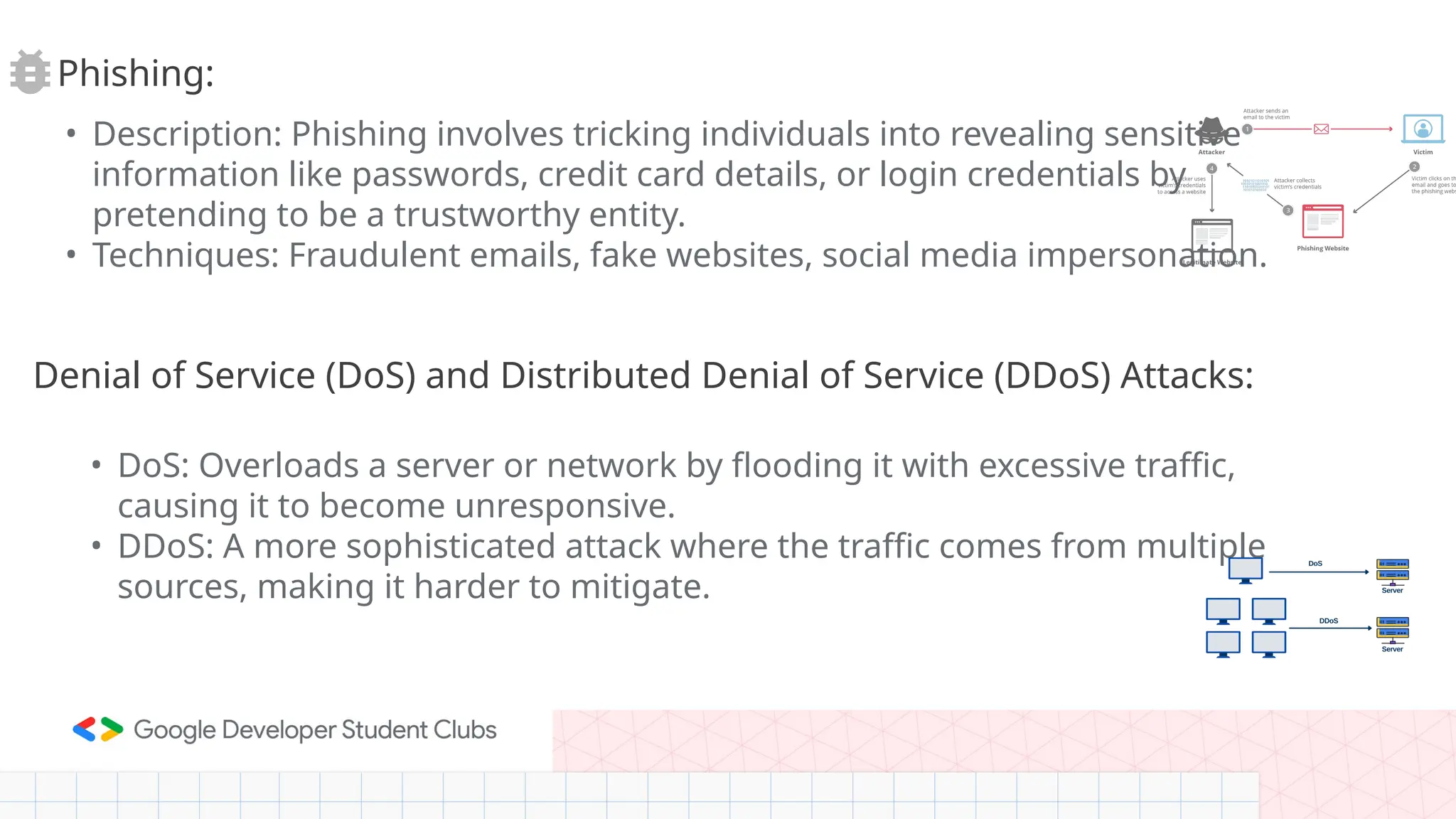
• Description: Phishing involves tricking individuals into revealing sensitive
information like passwords, credit card details, or login credentials by
pretending to be a trustworthy entity.
• Techniques: Fraudulent emails, fake websites, social media impersonation.
Phishing:
Denial of Service (DoS) and Distributed Denial of Service (DDoS) Attacks:
• DoS: Overloads a server or network by flooding it with excessive traffic,
causing it to become unresponsive.
• DDoS: A more sophisticated attack where the traffic comes from multiple
sources, making it harder to mitigate.
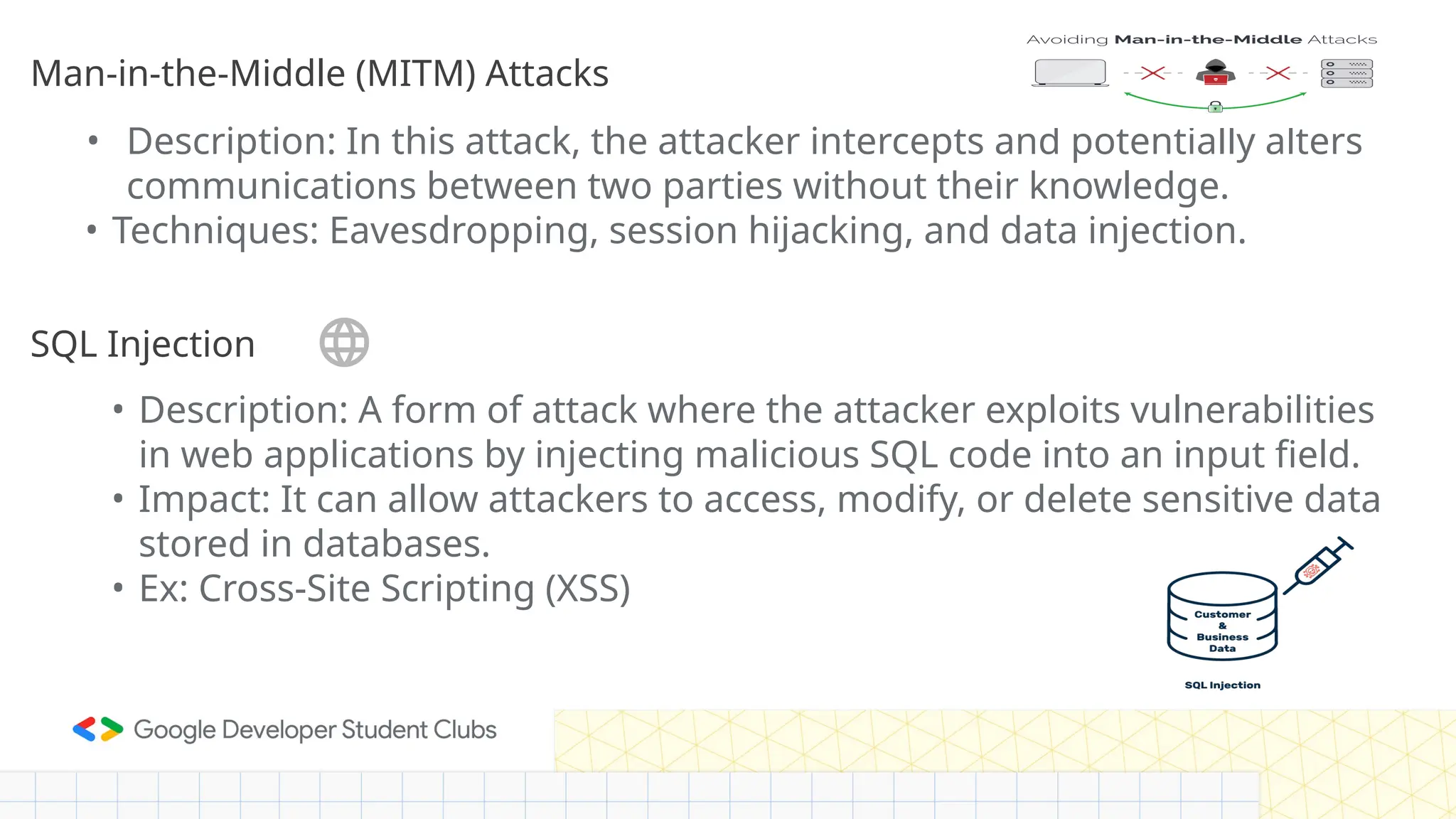
• Description: In this attack, the attacker intercepts and potentially alters
communications between two parties without their knowledge.
• Techniques: Eavesdropping, session hijacking, and data injection.
SQL Injection
Man-in-the-Middle (MITM) Attacks
• Description: A form of attack where the attacker exploits vulnerabilities
in web applications by injecting malicious SQL code into an input field.
• Impact: It can allow attackers to access, modify, or delete sensitive data
stored in databases.
• Ex: Cross-Site Scripting (XSS)
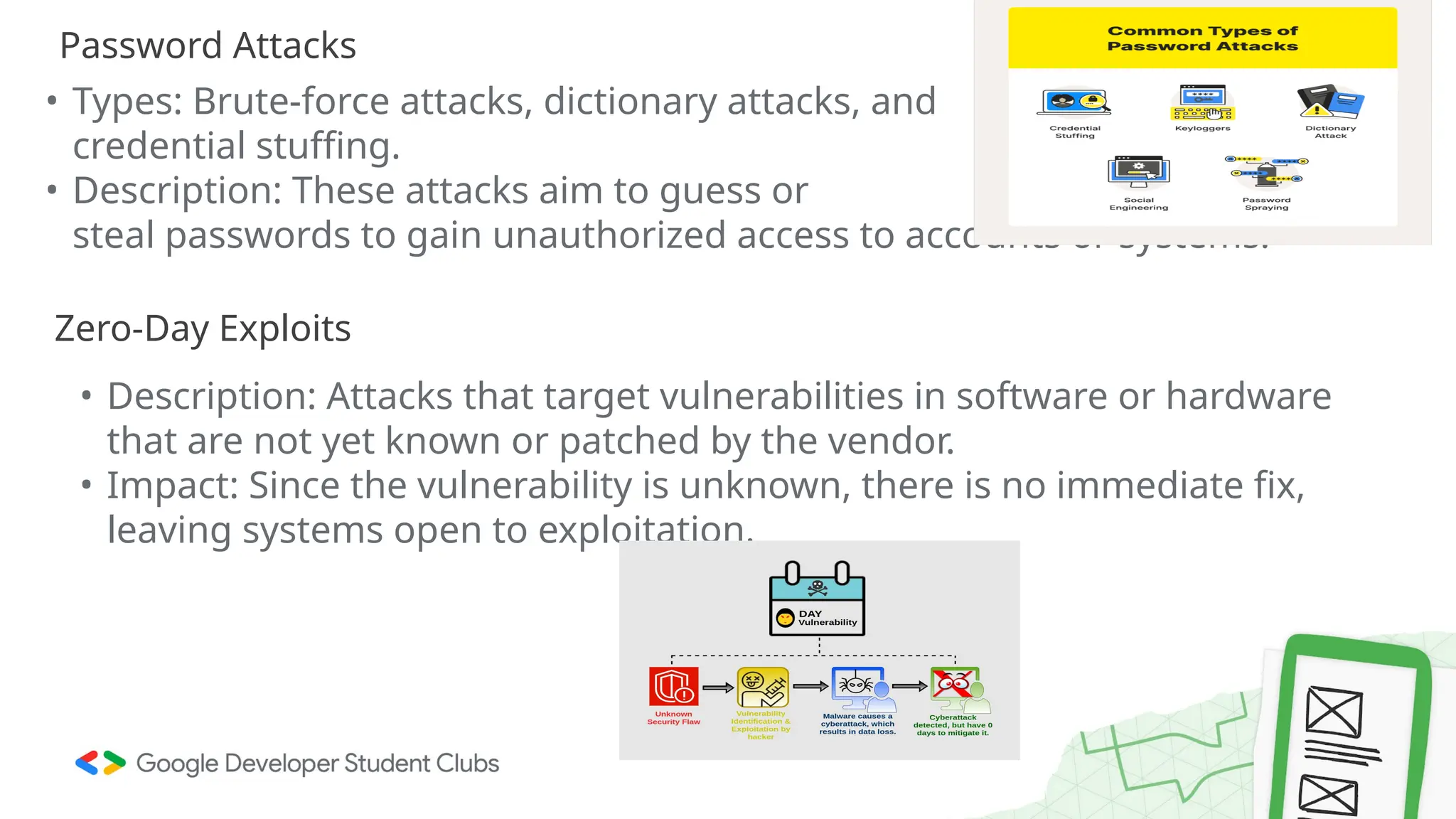
• Types: Brute-force attacks, dictionary attacks, and
credential stuffing.
• Description: These attacks aim to guess or
steal passwords to gain unauthorized access to accounts or systems.
Password Attacks
Zero-Day Exploits
• Description: Attacks that target vulnerabilities in software or hardware
that are not yet known or patched by the vendor.
• Impact: Since the vulnerability is unknown, there is no immediate fix,
leaving systems open to exploitation.
Social Engineering
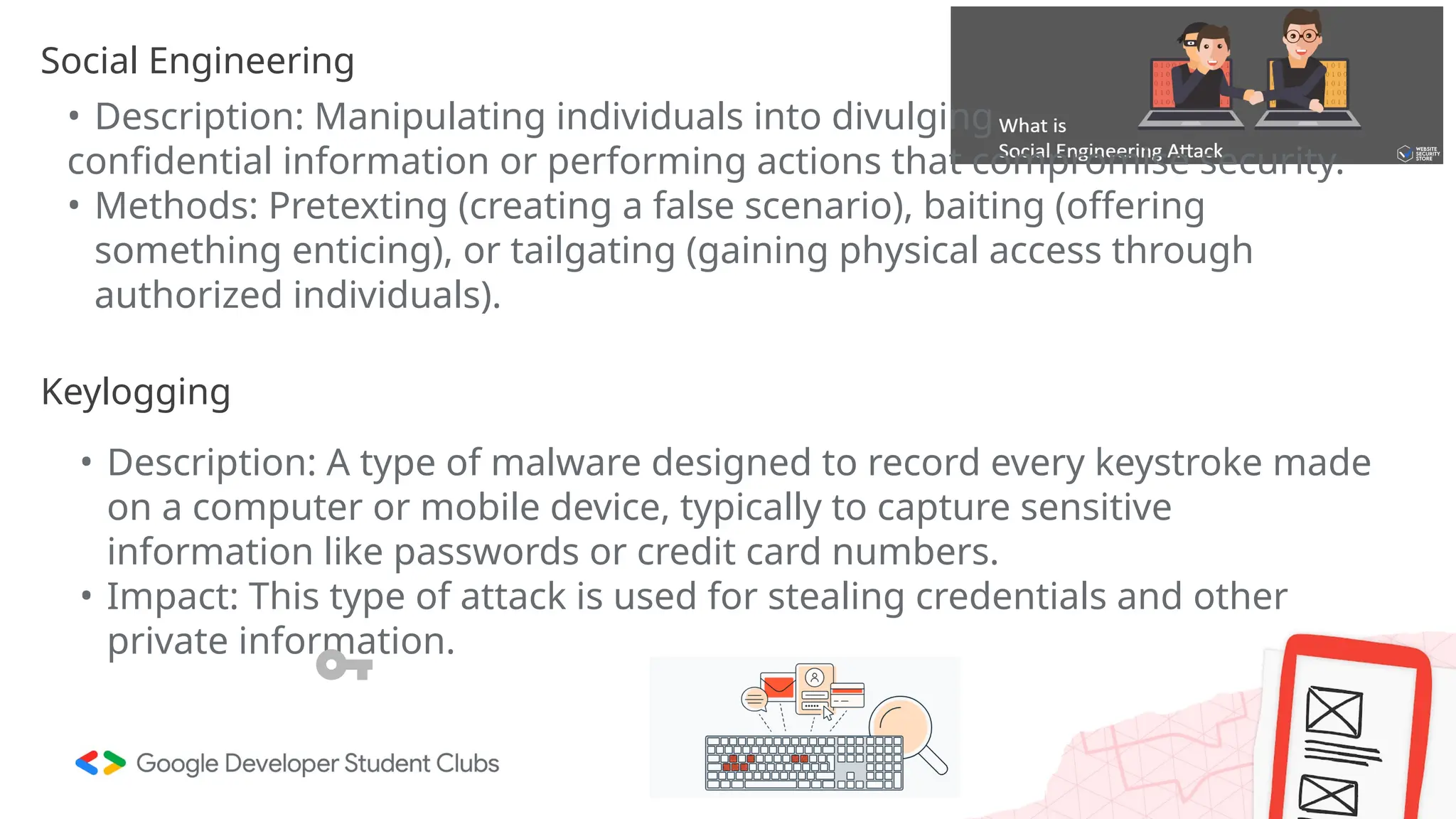
• Description: Manipulating individuals into divulging
confidential information or performing actions that compromise security.
• Methods: Pretexting (creating a false scenario), baiting (offering
something enticing), or tailgating (gaining physical access through
authorized individuals).
Keylogging
• Description: A type of malware designed to record every keystroke made
on a computer or mobile device, typically to capture sensitive
information like passwords or credit card numbers.
• Impact: This type of attack is used for stealing credentials and other
private information.
Prevention Practices
Email Verification:
• Never trust unsolicited emails: Always verify the sender's email address
to ensure its legitimacy.
• Look for red flags: Emails with poor grammar, suspicious links, or urgent
requests should be considered suspicious.
Hover Over Links:
• Before clicking any link in an email, hover your mouse over it to check
the URL. A legitimate link will match the expected domain.
Use Multi-Factor Authentication (MFA):
• Enable MFA for all accounts, adding an additional layer of protection
even if login credentials are compromised.
Real World Demos
SQL Injection - Let’s
Confuse the computers
How SQL Works ?
• “SQL is like asking a database to give you specific answers. When
hackers trick the system with their own questions, they can get
anything —passwords, personal data—anything stored in the
database.”
Understanding Phishing: A Real-World
Demonstration
There are many ways you can help keep the digital world
safe, and it’s not all about breaking into systems
Different Roles in Cybersecurity
What they do:
●Simulate cyberattacks on systems to find
vulnerabilities before real hackers do.
●Use the same techniques as malicious hackers but
with permission and a focus on defense.
1. Ethical Hacker (Penetration Tester)
The Guardian of the Digital World
What they do:
●Monitor systems for unusual activity or breaches.
●Analyze threats and provide recommendations to
enhance security.
2. Security Analyst
The Cybersecurity Firefighter
What they do:
●Act swiftly to mitigate damage during a breach or
attack.
●Investigate the source of the attack and recommend
ways to prevent recurrence.
3. Incident Responder
The Virus Decoder
What they do:
●Study malicious software to understand how it
works and develop defenses.
●Create decryption tools or signatures to detect and
eliminate malware.
4. Malware Analyst
The Cyber Spy
What they do:
Research and monitor hacker activities to predict
potential attacks.
Analyze global cybersecurity trends and
vulnerabilities.
5.Threat Intelligence Analyst
The System Builder
What they do:
●Design robust and secure networks, systems, and
applications.
●Anticipate attack vectors and build defenses into the
infrastructure.
6.Security Architect
The Innovator
What they do:
●Develop new tools and techniques to counteract
evolving cyber threats.
●Share findings with the cybersecurity community to
improve defenses.
7. Cybersecurity Researcher
And Many more to explore
7. Conclusion and Q&A
Key Points Recap
●Cybersecurity is essential to protect our digital lives.
●The CIA Triad (Confidentiality, Integrity, Availability)
is our foundation.
●Common threats like malware, phishing, and SQL
injection can be stopped with awareness and proper
practices.
●There are many career paths in cybersecurity that
help protect the digital world.
Once again—cybersecurity is about protecting our
digital world, ensuring that our data, identities, and
systems stay safe from
threats.Cybersecurity is a noble mission.But we must
also be ethical.
Cyber Security Road Map
Learn
Network
Security
Incident
Response
Application
Security
Emerging
Threats
Penetration
Testing
Certifications
Programming &
Scripting
Operating
System
Networking
Understanding the
Basics of
Cybersecurity
Continuous
Learning
Practical Specialized Stay updated
The challenge isn’t just hacking
the system; it’s leaving it stronger
than you found it.
- unknown
Thank You!

An An Exploration Into the Cyber Security

  • 1.
    Sivasakthi N (CyberSecurity Organizer) & Yaswanth B (Cyber Security Co-Organizer) From Attack to Defense – Exploring Cybersecurity
  • 2.
    Overview Of CyberSecurity Definition: Cybersecurity is the practice of defending computer systems, networks, and data from unauthorized access or damage. It’s about keeping digital “treasures” safe.
  • 3.
    In today’s world,almost everything runs on computers and networks. Our personal information, our work, our finances—all depend on being secure from attackers. Significance:
  • 4.
    Real-Life Examples 2017 EquifaxBreach: Personal data of 147 million people was exposed because attackers found a weak spot - September. Ransomware Attacks: Think of a thief locking up your house and demanding money to unlock it. That’s how ransomware works, but with computers. E.g : WannaCry was a devastating global ransomware attack that occurred in May 2017 - nfected over 200,000 computers in 150 countries,
  • 5.
    2. Basic Principlesof Cybersecurity The CIA Triad In cybersecurity, there’s a balance of three core principles that we must always protect: Confidentiality, Integrity, and Availability. We call it the CIA Triad.
  • 6.
    Confidentiality (C) “It’s likea secret. Only those who should know, know it. The rest, stay out.” Protect sensitive information (like passwords, bank info) from unauthorized access.
  • 7.
    Integrity “Imagine you’re writingin a notebook. If someone scribbled all over your important notes, would that be helpful? No! Integrity ensures that no one changes your data.” Ensure that data remains accurate and unchanged by unauthorized individuals. .
  • 8.
    “It’s not enoughto just protect your secrets or your notes. You must be able to access them whenever you need them. That’s availability.” Make sure data is accessible when needed, especially during emergencies. Availability (A)
  • 9.
    Exploring the Worldof Ethical Hacking - Yaswanth (Cybersecurity Researcher and Developer)
  • 10.
    Introduction to EthicalHacking Ethical hacking : also known as penetration testing or white-hat hacking Purpose: Enhance security by identifying weaknesses in systems. Skills:: Networking, programming, and familiarity with security tools like Wireshark, Metasploit, and Nmap.
  • 11.
    Testing the vulnerability'simpact Types of Ethical Hackers Types of Ethical Hackers: • White Hat: Authorized to secure systems. • Black Hat: Malicious hackers (opposite of ethical hacking). • Gray Hat: Unauthorized but not malicious Benefits: • Prevents data breaches,Strengthens system defenses & Ensures compliance with regulations like GDPR or HIPAA. Applications: • Banking and finance , Government and military & IoT and cloud systems.
  • 12.
    Malware (Malicious Software) •Description: Malware is designed to damage or disable systems, steal data, or give unauthorized access. • Includes viruses, worms, trojans, ransomware, and spyware. • Viruses: Spread through files or programs and can replicate themselves • Trojans: Disguised as legitimate software but carry out harmful actions once installed. Introduction to Common Cyber Threats Cyber threats are malicious activities intended to compromise the integrity, confidentiality, or availability of digital data, systems, and networks Types of Common Cyber Threats:
  • 13.
    • Description: Phishinginvolves tricking individuals into revealing sensitive information like passwords, credit card details, or login credentials by pretending to be a trustworthy entity. • Techniques: Fraudulent emails, fake websites, social media impersonation. Phishing: Denial of Service (DoS) and Distributed Denial of Service (DDoS) Attacks: • DoS: Overloads a server or network by flooding it with excessive traffic, causing it to become unresponsive. • DDoS: A more sophisticated attack where the traffic comes from multiple sources, making it harder to mitigate.
  • 14.
    • Description: Inthis attack, the attacker intercepts and potentially alters communications between two parties without their knowledge. • Techniques: Eavesdropping, session hijacking, and data injection. SQL Injection Man-in-the-Middle (MITM) Attacks • Description: A form of attack where the attacker exploits vulnerabilities in web applications by injecting malicious SQL code into an input field. • Impact: It can allow attackers to access, modify, or delete sensitive data stored in databases. • Ex: Cross-Site Scripting (XSS)
  • 15.
    • Types: Brute-forceattacks, dictionary attacks, and credential stuffing. • Description: These attacks aim to guess or steal passwords to gain unauthorized access to accounts or systems. Password Attacks Zero-Day Exploits • Description: Attacks that target vulnerabilities in software or hardware that are not yet known or patched by the vendor. • Impact: Since the vulnerability is unknown, there is no immediate fix, leaving systems open to exploitation.
  • 16.
    Social Engineering • Description:Manipulating individuals into divulging confidential information or performing actions that compromise security. • Methods: Pretexting (creating a false scenario), baiting (offering something enticing), or tailgating (gaining physical access through authorized individuals). Keylogging • Description: A type of malware designed to record every keystroke made on a computer or mobile device, typically to capture sensitive information like passwords or credit card numbers. • Impact: This type of attack is used for stealing credentials and other private information.
  • 17.
    Prevention Practices Email Verification: •Never trust unsolicited emails: Always verify the sender's email address to ensure its legitimacy. • Look for red flags: Emails with poor grammar, suspicious links, or urgent requests should be considered suspicious. Hover Over Links: • Before clicking any link in an email, hover your mouse over it to check the URL. A legitimate link will match the expected domain. Use Multi-Factor Authentication (MFA): • Enable MFA for all accounts, adding an additional layer of protection even if login credentials are compromised.
  • 18.
  • 19.
    SQL Injection -Let’s Confuse the computers
  • 20.
    How SQL Works? • “SQL is like asking a database to give you specific answers. When hackers trick the system with their own questions, they can get anything —passwords, personal data—anything stored in the database.”
  • 21.
    Understanding Phishing: AReal-World Demonstration
  • 22.
    There are manyways you can help keep the digital world safe, and it’s not all about breaking into systems Different Roles in Cybersecurity
  • 23.
    What they do: ●Simulatecyberattacks on systems to find vulnerabilities before real hackers do. ●Use the same techniques as malicious hackers but with permission and a focus on defense. 1. Ethical Hacker (Penetration Tester)
  • 24.
    The Guardian ofthe Digital World What they do: ●Monitor systems for unusual activity or breaches. ●Analyze threats and provide recommendations to enhance security. 2. Security Analyst
  • 25.
    The Cybersecurity Firefighter Whatthey do: ●Act swiftly to mitigate damage during a breach or attack. ●Investigate the source of the attack and recommend ways to prevent recurrence. 3. Incident Responder
  • 26.
    The Virus Decoder Whatthey do: ●Study malicious software to understand how it works and develop defenses. ●Create decryption tools or signatures to detect and eliminate malware. 4. Malware Analyst
  • 27.
    The Cyber Spy Whatthey do: Research and monitor hacker activities to predict potential attacks. Analyze global cybersecurity trends and vulnerabilities. 5.Threat Intelligence Analyst
  • 28.
    The System Builder Whatthey do: ●Design robust and secure networks, systems, and applications. ●Anticipate attack vectors and build defenses into the infrastructure. 6.Security Architect
  • 29.
    The Innovator What theydo: ●Develop new tools and techniques to counteract evolving cyber threats. ●Share findings with the cybersecurity community to improve defenses. 7. Cybersecurity Researcher
  • 30.
    And Many moreto explore
  • 31.
    7. Conclusion andQ&A Key Points Recap ●Cybersecurity is essential to protect our digital lives. ●The CIA Triad (Confidentiality, Integrity, Availability) is our foundation. ●Common threats like malware, phishing, and SQL injection can be stopped with awareness and proper practices. ●There are many career paths in cybersecurity that help protect the digital world.
  • 32.
    Once again—cybersecurity isabout protecting our digital world, ensuring that our data, identities, and systems stay safe from threats.Cybersecurity is a noble mission.But we must also be ethical.
  • 33.
    Cyber Security RoadMap Learn Network Security Incident Response Application Security Emerging Threats Penetration Testing Certifications Programming & Scripting Operating System Networking Understanding the Basics of Cybersecurity Continuous Learning Practical Specialized Stay updated
  • 34.
    The challenge isn’tjust hacking the system; it’s leaving it stronger than you found it. - unknown
  • 35.