CSS Selectors
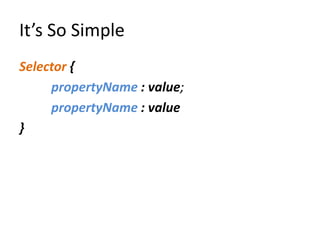
It’s So Simple
Selector {
     propertyName : value;
     propertyName : value
}
Basic Selectors
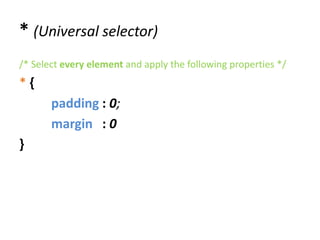
* (Universal selector)
/* Select every element and apply the following properties */
*{
       padding : 0;
       margin : 0
}
Tag Selector (Just random tag)
                         <!--
span {
                         Select all elements with tag span/ p
     background : red;   -->

}                        <!-- Many span elements -->
p{                       <span>Some span</span>
                         <span>Some span</span>
     width : 250px;
     font-size : 18px;   <!-- Many p elements -->
                         <p> Some paragraf</p>
}                        <p> Some paragraf</p>
#IdName (id selector)
#mainDiv {              <!-- Main div with ID -->
                        <div id=“mainDiv”></div>
    background : red;
    width : 500px;      <!-- Some divs -->
    height : 500px      <div> Just a Div</div>
                        <div> Just a Div</div>
}                       <div class=“classDiv”>
                                Just a Class Div
                        </div>
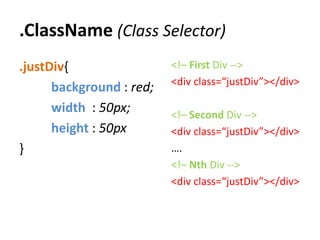
.ClassName (Class Selector)
.justDiv{                 <!– First Div -->
                          <div class=“justDiv”></div>
      background : red;
      width : 50px;       <!– Second Div -->
      height : 50px       <div class=“justDiv”></div>
}                         ….
                          <!– Nth Div -->
                          <div class=“justDiv”></div>
Attribute Selector
Selector[attributeName = “value”]
img[alt= “someAlt”] {       <img src=“#” alt=“someAlt”/>
       width : 500px;       <img src=“#” alt=“onlyAlt”/>

       height : 50px
}                           <form>
.allForms[type = “text”]{         <input type=“text”/>
       width : 150px;             <input type=“text”/>
       padding : 10px             <input type=“submit”/>
}                           </form>
Attribute Selector Magic
Selector[attr.Name ^= “value”]{
/*select attribute with value at the beginning */
}
Selector[attr.Name *= “value”]{
/* select attribute with value somewhere*/
}
Selector[attr.Name $= “value”]{
/*select attribute with value at the end*/
}
p[id ^=“beginning”] {   <p id=“beginning-id”>
       width : 500px;          Beginning Text
                        </p>
       height : 50px
}                       <p id=“this-is-somewere-id”>
p[id *= “somewere”] {          Somewere Text
       width : 500px;   </p>
       height : 50px
}                       <p id=“id-at-end”>
                               End Text
p[id $= “end”] {
                        </p>
       width : 500px;
       height : 50px
}
Combinators
Child and Sibling Selectors
Parent Child
<!-- Just a list -->
<ul>                                     ul li{
          <li>Item 1</li>
          <li>Item 2</li>
                                                  background : red;
          <ol>
                 <li>Nested Item</li>
                                         }
          </ol>
</ul>

<!-- List with class -->
                                         ul .Item {
<ul>                                            background : red;
          <li class=“item”>Item 1</li>
          <li>Item 2</li>                }
</ul>
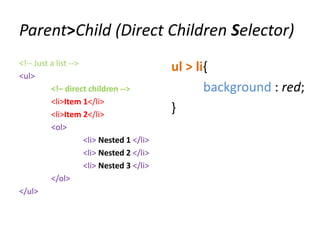
Parent>Child (Direct Children Selector)
<!-- Just a list -->
                                           ul > li{
<ul>
          <!– direct children -->                 background : red;
          <li>Item 1</li>
          <li>Item 2</li>
                                           }
          <ol>
                     <li> Nested 1 </li>
                     <li> Nested 2 </li>
                     <li> Nested 3 </li>
          </ol>
</ul>
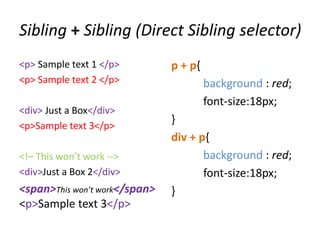
Sibling + Sibling (Direct Sibling selector)
<p> Sample text 1 </p>         p + p{
<p> Sample text 2 </p>                  background : red;
                                        font-size:18px;
<div> Just a Box</div>
<p>Sample text 3</p>
                               }
                               div + p{
<!– This won’t work -->               background : red;
<div>Just a Box 2</div>               font-size:18px;
<span>This won’t work</span>   }
<p>Sample text 3</p>
Sibling ~ Sibling (Any Sibling Selector)
<p> Sample text 1 </p>
                              p ~ p{
<p> Sample text 2 </p>
                                    background : red;
<div> Just a Box</div>
<p>Sample text 3</p>
                                    font-size:18px;
                              }
<!– This will work -->
<div>Just a Box 2</div>       div ~ p{
<span>This will work</span>         background : red;
<p>Sample text 3</p>
                                    font-size:18px;
                              }

Css selectors

  • 1.
  • 2.
    It’s So Simple Selector{ propertyName : value; propertyName : value }
  • 3.
  • 4.
    * (Universal selector) /*Select every element and apply the following properties */ *{ padding : 0; margin : 0 }
  • 5.
    Tag Selector (Justrandom tag) <!-- span { Select all elements with tag span/ p background : red; --> } <!-- Many span elements --> p{ <span>Some span</span> <span>Some span</span> width : 250px; font-size : 18px; <!-- Many p elements --> <p> Some paragraf</p> } <p> Some paragraf</p>
  • 6.
    #IdName (id selector) #mainDiv{ <!-- Main div with ID --> <div id=“mainDiv”></div> background : red; width : 500px; <!-- Some divs --> height : 500px <div> Just a Div</div> <div> Just a Div</div> } <div class=“classDiv”> Just a Class Div </div>
  • 7.
    .ClassName (Class Selector) .justDiv{ <!– First Div --> <div class=“justDiv”></div> background : red; width : 50px; <!– Second Div --> height : 50px <div class=“justDiv”></div> } …. <!– Nth Div --> <div class=“justDiv”></div>
  • 8.
  • 9.
    Selector[attributeName = “value”] img[alt=“someAlt”] { <img src=“#” alt=“someAlt”/> width : 500px; <img src=“#” alt=“onlyAlt”/> height : 50px } <form> .allForms[type = “text”]{ <input type=“text”/> width : 150px; <input type=“text”/> padding : 10px <input type=“submit”/> } </form>
  • 10.
    Attribute Selector Magic Selector[attr.Name^= “value”]{ /*select attribute with value at the beginning */ } Selector[attr.Name *= “value”]{ /* select attribute with value somewhere*/ } Selector[attr.Name $= “value”]{ /*select attribute with value at the end*/ }
  • 11.
    p[id ^=“beginning”] { <p id=“beginning-id”> width : 500px; Beginning Text </p> height : 50px } <p id=“this-is-somewere-id”> p[id *= “somewere”] { Somewere Text width : 500px; </p> height : 50px } <p id=“id-at-end”> End Text p[id $= “end”] { </p> width : 500px; height : 50px }
  • 12.
  • 13.
    Parent Child <!-- Justa list --> <ul> ul li{ <li>Item 1</li> <li>Item 2</li> background : red; <ol> <li>Nested Item</li> } </ol> </ul> <!-- List with class --> ul .Item { <ul> background : red; <li class=“item”>Item 1</li> <li>Item 2</li> } </ul>
  • 14.
    Parent>Child (Direct ChildrenSelector) <!-- Just a list --> ul > li{ <ul> <!– direct children --> background : red; <li>Item 1</li> <li>Item 2</li> } <ol> <li> Nested 1 </li> <li> Nested 2 </li> <li> Nested 3 </li> </ol> </ul>
  • 15.
    Sibling + Sibling(Direct Sibling selector) <p> Sample text 1 </p> p + p{ <p> Sample text 2 </p> background : red; font-size:18px; <div> Just a Box</div> <p>Sample text 3</p> } div + p{ <!– This won’t work --> background : red; <div>Just a Box 2</div> font-size:18px; <span>This won’t work</span> } <p>Sample text 3</p>
  • 16.
    Sibling ~ Sibling(Any Sibling Selector) <p> Sample text 1 </p> p ~ p{ <p> Sample text 2 </p> background : red; <div> Just a Box</div> <p>Sample text 3</p> font-size:18px; } <!– This will work --> <div>Just a Box 2</div> div ~ p{ <span>This will work</span> background : red; <p>Sample text 3</p> font-size:18px; }