INTRODUCTION
CSS are the powerful way to affect the presentation
 of a document or collection of a document.

 Mozilla and related browsers use CSS to affect the
  presentation of the browser Chrome itself.
Applying CSS

Uses
 We need to change the style of document.

 Easy to use.

 Time saving
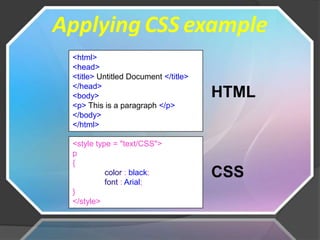
Applying CSS example
 <html>
 <head>
 <title> Untitled Document </title>
 </head>
 <body>                               HTML
 <p> This is a paragraph </p>
 </body>
 </html>

 <style type = "text/CSS">
 p
 {
           color : black;
           font : Arial;
                                      CSS
 }
 </style>
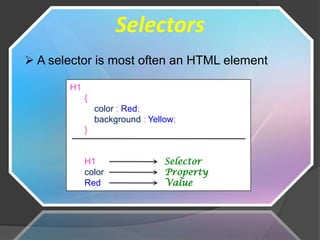
Selectors
 A selector is most often an HTML element

       H1
            {
                color : Red;
                background : Yellow;
            }


            H1                   Selector
            color                Property
            Red                  Value
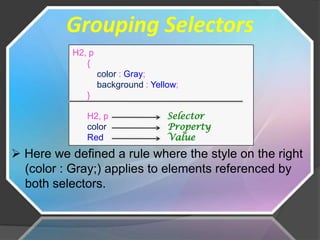
Grouping Selectors
           H2, p
              {
                   color : Gray;
                   background : Yellow;
              }

              H2, p                 Selector
              color                 Property
              Red                   Value
 Here we defined a rule where the style on the right
  (color : Gray;) applies to elements referenced by
  both selectors.
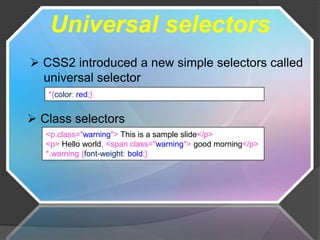
Universal selectors
 CSS2 introduced a new simple selectors called
  universal selector
   *{color: red;}


 Class selectors
   <p.class="warning"> This is a sample slide</p>
   <p> Hello world, <span class="warning"> good morning</p>
   *.warning {font-weight: bold;}
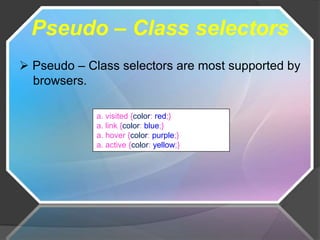
Pseudo – Class selectors
 Pseudo – Class selectors are most supported by
  browsers.

             a. visited {color: red;}
             a. link {color: blue;}
             a. hover {color: purple;}
             a. active {color: yellow;}
Advantages
 Save a lot of time

 Easy to use

 Page load faster

 Easy maintains
Disadvantages

 Browser compatibility.

 An extra download is required to import style
  information for each document.
Conclusion

 CSS is the most powerful way to make the
  website more attractive. CSS is easy to use
  and learn.
CSS

CSS

  • 2.
    INTRODUCTION CSS are thepowerful way to affect the presentation of a document or collection of a document.  Mozilla and related browsers use CSS to affect the presentation of the browser Chrome itself.
  • 3.
    Applying CSS Uses  Weneed to change the style of document.  Easy to use.  Time saving
  • 4.
    Applying CSS example <html> <head> <title> Untitled Document </title> </head> <body> HTML <p> This is a paragraph </p> </body> </html> <style type = "text/CSS"> p { color : black; font : Arial; CSS } </style>
  • 5.
    Selectors  A selectoris most often an HTML element H1 { color : Red; background : Yellow; } H1 Selector color Property Red Value
  • 6.
    Grouping Selectors H2, p { color : Gray; background : Yellow; } H2, p Selector color Property Red Value  Here we defined a rule where the style on the right (color : Gray;) applies to elements referenced by both selectors.
  • 7.
    Universal selectors  CSS2introduced a new simple selectors called universal selector *{color: red;}  Class selectors <p.class="warning"> This is a sample slide</p> <p> Hello world, <span class="warning"> good morning</p> *.warning {font-weight: bold;}
  • 8.
    Pseudo – Classselectors  Pseudo – Class selectors are most supported by browsers. a. visited {color: red;} a. link {color: blue;} a. hover {color: purple;} a. active {color: yellow;}
  • 9.
    Advantages  Save alot of time  Easy to use  Page load faster  Easy maintains
  • 10.
    Disadvantages  Browser compatibility. An extra download is required to import style information for each document.
  • 11.
    Conclusion  CSS isthe most powerful way to make the website more attractive. CSS is easy to use and learn.