JavaScript: What is it? 
• A programming language that (commonly) works 
client-side to control browser and website actions. 
• Common uses: 
– Screen movement 
– Mouse events 
– Pop up events (think notes & alerts) 
– Validate forms 
– Store information in cookies 
– Customize experience for specific users 
• Object-based (depending on who you talk to) 
• Embeds directly into an HTML page or linked to as a 
separate .js file.
How to code & test? 
• http://jsfiddle.net/ 
• Chrome Tools: JavaScript Console 
• Use Notepad++ to write JavaScript and save 
with .js extension… 
• …or just write it in your .html file! 
– http://www.u.arizona.edu/~londiem/crossroads_t 
yps_kairos-submission/home.html
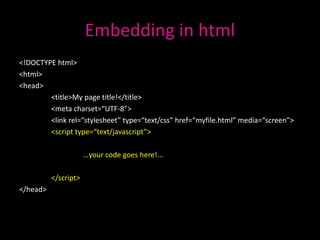
Embedding in html 
<!DOCTYPE html> 
<html> 
<head> 
<title>My page title!</title> 
<meta charset=“UTF-8”> 
<link rel=“stylesheet” type=“text/css” href=“myfile.html” media=“screen”> 
<script type=“text/javascript”> 
…your code goes here!... 
</script> 
</head>
…and in individual html tags! 
<html> 
<head><title>My Page</title></head> 
<body> 
<br /> 
<p><a href="myfile.html">My Page</a></p> 
<br /> 
<br /> 
<br /> 
<br /> 
<p><a href="myfile.html" onMouseover="window.alert('Hello');">My Page</a></p> 
</body> 
</html>
Working with strings & statements 
alert(“DON’T PANIC!”); 
confirm(“Hurray for school!”); 
prompt(“Want some ice cream?”);
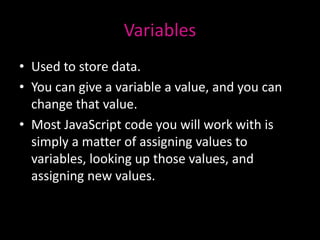
Variables 
• Used to store data. 
• You can give a variable a value, and you can 
change that value. 
• Most JavaScript code you will work with is 
simply a matter of assigning values to 
variables, looking up those values, and 
assigning new values.
Basic function syntax 
var NAME = function (PARAMETER) {ACTION} 
var square = function(number) { return number * number; }; 
alert(square(9));
Space is meaningless 
var square = function(num) { return num * num; }; 
alert(square(9)); 
var square = function (num) { 
return num * num; 
}; 
alert(square(9));
Tips 
• Check your " and ' quotes match 
• Carefully nest things (if you open something, 
close it) 
• Take care with capitalisation 
• Lay it out neatly - use tabs 
• Be patient

Intro to java script

  • 2.
    JavaScript: What isit? • A programming language that (commonly) works client-side to control browser and website actions. • Common uses: – Screen movement – Mouse events – Pop up events (think notes & alerts) – Validate forms – Store information in cookies – Customize experience for specific users • Object-based (depending on who you talk to) • Embeds directly into an HTML page or linked to as a separate .js file.
  • 3.
    How to code& test? • http://jsfiddle.net/ • Chrome Tools: JavaScript Console • Use Notepad++ to write JavaScript and save with .js extension… • …or just write it in your .html file! – http://www.u.arizona.edu/~londiem/crossroads_t yps_kairos-submission/home.html
  • 4.
    Embedding in html <!DOCTYPE html> <html> <head> <title>My page title!</title> <meta charset=“UTF-8”> <link rel=“stylesheet” type=“text/css” href=“myfile.html” media=“screen”> <script type=“text/javascript”> …your code goes here!... </script> </head>
  • 5.
    …and in individualhtml tags! <html> <head><title>My Page</title></head> <body> <br /> <p><a href="myfile.html">My Page</a></p> <br /> <br /> <br /> <br /> <p><a href="myfile.html" onMouseover="window.alert('Hello');">My Page</a></p> </body> </html>
  • 6.
    Working with strings& statements alert(“DON’T PANIC!”); confirm(“Hurray for school!”); prompt(“Want some ice cream?”);
  • 7.
    Variables • Usedto store data. • You can give a variable a value, and you can change that value. • Most JavaScript code you will work with is simply a matter of assigning values to variables, looking up those values, and assigning new values.
  • 8.
    Basic function syntax var NAME = function (PARAMETER) {ACTION} var square = function(number) { return number * number; }; alert(square(9));
  • 9.
    Space is meaningless var square = function(num) { return num * num; }; alert(square(9)); var square = function (num) { return num * num; }; alert(square(9));
  • 10.
    Tips • Checkyour " and ' quotes match • Carefully nest things (if you open something, close it) • Take care with capitalisation • Lay it out neatly - use tabs • Be patient