


Emmet(Zen Coding)
Overview
What is Emmet?
“Emmet (previously known as Zen Coding)
is a web-developer’s toolkit that can
greatly improve your HTML & CSS
workflow:”
                          Emmet web site
How to Install it?
You should have one of those IDE
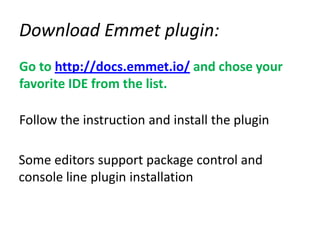
Download Emmet plugin:
Go to http://docs.emmet.io/ and chose your
favorite IDE from the list.

Follow the instruction and install the plugin

Some editors support package control and
console line plugin installation
Syntax
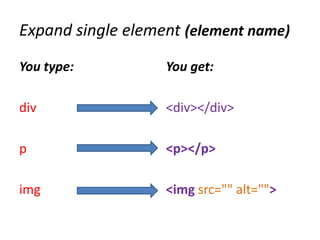
Expand single element (element name)
You type:          You get:

div                <div></div>

p                  <p></p>

img                <img src="" alt="">
Expand multiple elements (*n)
                 You get:
You type:

                 <div></div>
 div*2           <div></div>

                 <p></p>
                 <p></p>
 p*3             <p></p>
                 <p></p>

 img*2           <img src="" alt="">
                 <img src="" alt="">
Add Custom text in elements({})
You type:         You get:

 p{Lorem ipsum}   <p>
                         Lorem ipsum
                  </p>


 a{Click me}
                  <a href=“”>Click me</a>
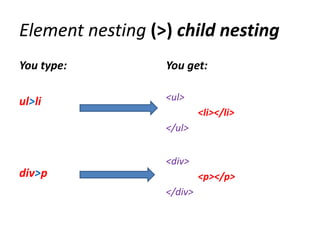
Element nesting (>) child nesting
You type:         You get:

ul>li             <ul>
                           <li></li>
                  </ul>


                  <div>
div>p                      <p></p>
                  </div>
Element nesting (+) siblings nesting
You type:                      You get:

 Same Level as second div
                               <div></div>
                               <div>
div+div>p+span                       <p></p>
                                     <span></span>
                               </div>
 Same Level as the p element
Element nesting (^) climb up
You type:                            You get:

 Level 2 nesting   Back to Level 1
                                     <div>
                                              <p>
div>p>span^span                               <span></span>
                                              </p>
                                              <span></span>
                                     </div>
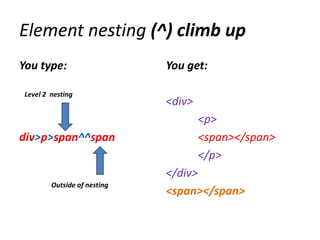
Element nesting (^) climb up
You type:                     You get:

 Level 2 nesting
                              <div>
                                      <p>
div>p>span^^span                      <span></span>
                                      </p>
                              </div>
         Outside of nesting
                              <span></span>
Attributs
Id attribute:           <div id=“header”>
div#header              </div>


class attribute         <div class=“someHeader”>
                        </div>
div.someHeader

                        <div name=“theHead”>
custom attribute
                        </div>
div[name = “theHead”]

Emmet(zen coding)

  • 1.
  • 2.
  • 3.
    “Emmet (previously knownas Zen Coding) is a web-developer’s toolkit that can greatly improve your HTML & CSS workflow:” Emmet web site
  • 4.
  • 5.
    You should haveone of those IDE
  • 6.
    Download Emmet plugin: Goto http://docs.emmet.io/ and chose your favorite IDE from the list. Follow the instruction and install the plugin Some editors support package control and console line plugin installation
  • 7.
  • 8.
    Expand single element(element name) You type: You get: div <div></div> p <p></p> img <img src="" alt="">
  • 9.
    Expand multiple elements(*n) You get: You type: <div></div> div*2 <div></div> <p></p> <p></p> p*3 <p></p> <p></p> img*2 <img src="" alt=""> <img src="" alt="">
  • 10.
    Add Custom textin elements({}) You type: You get: p{Lorem ipsum} <p> Lorem ipsum </p> a{Click me} <a href=“”>Click me</a>
  • 11.
    Element nesting (>)child nesting You type: You get: ul>li <ul> <li></li> </ul> <div> div>p <p></p> </div>
  • 12.
    Element nesting (+)siblings nesting You type: You get: Same Level as second div <div></div> <div> div+div>p+span <p></p> <span></span> </div> Same Level as the p element
  • 13.
    Element nesting (^)climb up You type: You get: Level 2 nesting Back to Level 1 <div> <p> div>p>span^span <span></span> </p> <span></span> </div>
  • 14.
    Element nesting (^)climb up You type: You get: Level 2 nesting <div> <p> div>p>span^^span <span></span> </p> </div> Outside of nesting <span></span>
  • 15.
    Attributs Id attribute: <div id=“header”> div#header </div> class attribute <div class=“someHeader”> </div> div.someHeader <div name=“theHead”> custom attribute </div> div[name = “theHead”]