PUNE MOBILE
DEVELOPERS
CROSS PLATFORM MOBILE
TECHNOLOGIES
14th September, 2013
AGENDA
 Introduction and Icebreaker
 Technology Presentations
 Mobile JSF
 Titanium
 Kony
 MoSync
 Open Discussion
 Concluding Address
 Networking and Refreshments
INTRODUCTION
 Started as mobile community in Talentica last year.
 Open to anybody who is interested in mobile
development
 Share our experiences in mobile development
space.
 Increase awareness of fast growing mobile
technologies among Developers
ICE-BREAKER – 1
Android vs iOS
vs Windows vs
others ?
ICE-BREAKER – 1
ICE-BREAKER – 2
How many
Apps do you
have?
ICE-BREAKER – 2
Android - 53
iPhone - 83
CROSS PLATFORM TECHNOLOGIES
 Solution for growing number of mobile operating
systems and device specifications.
 Business impact – Short time to market and
reduced development costs
 Future proof – Application portability to new OS
 Single technology expertise – No need to have 4
different skills to develop on different OS.
MOBILE WEB - JSF
STOCK MARKET
Team Members:
1. Smrutiranjan Sahu
2. Shreyash Thakare
PLATFORM OVERVIEW
 Java server faces(JSF) is a server side user interface
component framework for Java technology-based web
applications
 Used to create server side applications which run on
browsers.
 Offers lots of re-useable code, MVC for web
applications, clean separation of roles, built in AJAX
capabilities and has huge vendor and industry support.
 Primefaces is a JSF based framework that provides rich UI
components making developers life easier 
 PrimeFaces Mobile is a UI kit to create JSF web applications
optimized for mobile devices.
 Powered by jQuery Mobile with PrimeFaces
extensions, various platforms such as
iPhone, Android, Palm, Blackberry, Windows Mobile are
supported.
DEVELOPMENT ENVIRONMENT
 Eclipse
 JSF (Primefaces Mobile), Prime Push
 Spring, Maven (optional)
PLATFORM PROS & CONS
 Apps that run on a mobile browser and require rich
UI components could use this framework.
 Easy to learn.
 Just one jar with no dependencies and nothing else
to configure.
 Various themes available as well as custom themes
are possible.
 Issues with integrating custom css.
 Paid support 
 No clear distinction between desktop & mobile
components.(Need trial & error approach)
COMPATIBILITIES WITH MOBILE OS
 Support same as JQuery Mobile.
 Works on almost all the latest mobile
browsers except for old phone browsers.
APPLICATION DEMO 1
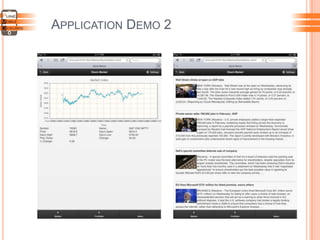
APPLICATION DEMO 2
ISSUES FACED
 Displaying Date/Time in OHLC chart.
 Auto resizing chart on orientation change.
 Formatting values inside list.
 CSS issue in Autosuggest, Table.
TITANIUM APPCELERATOR
RSS FEED APP
Team Members:
1. Ajay Chawda
2. Samarth Gahire
3. Manish Zope
4. Deepish Adwani
PLATFORM OVERVIEW
 Developed and maintained by Appcelerator
inc.
 A cross platform javascript based
framework.
 Easy access to native os and hardware
features.
 Modular and extensible architecture
 Growing developer community (5L+
Developers)
 It's FREE
DEVELOPMENT ENVIRONMENT
 Native SDK should be installed.
 Titanium Studio (IDE) (or Aptana eclipse
plugin can be used).
 Installed Titanium studio on Windows
XP, Windows 7 and Ubuntu. (Support also
available for MAC)
 Tested the app on emulator and device
both.
DEVELOPMENT ENVIRONMENT
COMPATIBILITIES WITH MOBILE OS
 Android
 IOS
 Blackberry
 Tizen
ALLOY FRAMEWORK
 Alloy - Powerful MVC i.e UI and app logic
 Alloy is built on Node.js, available on npm and
integrated with Titanium Studio.
 The goal is to make Titanium development
easier, faster and more scalable
 To use Alloy, node.js and Node.ACS should be
installed.
 You can use XML for views and JSON for styling
(tss).
 Reusable widgets and templates
 Built-in Backbone.js (which is base of MVC which
have rich model and collection APIs) and
Underscore.js support which provides variety of
utility functions like array and iterative helpers.
PLATFORM PROS & CONS
 Rapid prototyping
 Web-oriented / Javascript
 Cross-platform
 Growing community
 Increasing complexity
 Toolkit pain
 Bulky build
 Lot of if else cases to be handled
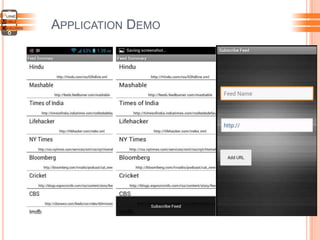
APPLICATION DEMO
APPLICATION DEMO

APPLICATION DEMO
ISSUES FACED
 Debugging issue.
 Faced some bugs in representing the
data, but quickly figured out the workaround
as support is easily available.
 Code maintainability is an issue for titanium.
But same can be overcome by using Alloy
framework.
 We need to figure out workarounds for the
bugs with the titanium new releases
KONY
PEOPLE SEARCH APP
Team Members:
1. Avinash
2. Rohit
KONY
 Birth- 2007 with “Write once and Run everywhere”
motto.
 Eclipse IDE with plugins for development and
debugging.
 Develop native and HTML5 web apps.
 JavaScript based.
 Easily integrated with back-end systems.
 Support for third party libraries.
PLATFORM- 10,000 FEET OVERVIEW
(INTERFACE DESIGN)
PLATFORM- 10,000 FEET OVERVIEW
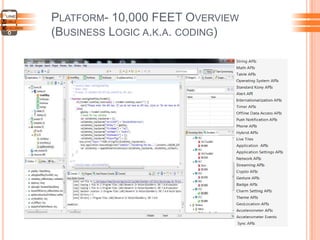
(BUSINESS LOGIC A.K.A. CODING)
PLATFORM- 10,000 FEET OVERVIEW
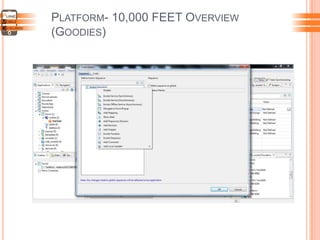
(GOODIES)
PLATFORM- 10,000 FEET OVERVIEW
(WHAT YOU CAN EXPECT)
ENTERPRISE APPS
Mobile
App Kony
Server
Backend
Server
(Your Web-
page, or if
you run
enterprise
server)
PLATFORM- AS WE KNOW NOW.
 Support for all popular platforms
(Android, iOS, BB, Win8, Desktop Browser).
 Cross-platform API as well as Platform-Specific API.
 Foreign Function Interface for third-party libraies like
:barcode scanning, augmented reality, diagnostic
sensors, NFC functions, pen-based features, accessing
non-UI libraries, embedded third party UI widgets (i.e.
sencha or jquery mobile).
 Enterprise focus (Kony Server Bundled): Kony Server
for easy backend integration. Web
Services(REST, SOAP, JSON), ERM/CRP(SAP, Seibel
etc).
PROS & CONS
 Comprehensive set of UI Widgets and API supported by rich
documentation.
 Develop once or develop separate for platforms. Your choice.
 Native code generation for platforms in addition to Single
Page Application for Mobile/Desktop browsers.
 HTML-scrapping and Web services integration really simple to
develop.
 Support for all the latest platform releases.
 Resource Hungry IDE.
 Slow build-time for BB. It takes forever to build and run.
 No drawing APIs. You can NOT develop cool games.
 Bugs in IDE plugins and SPA plugins.
 No Demo versions for download. Need to buy it or request for
evaluation.
APPLICATION DEMO
 Used Rest services exposed by pipl.com
 Kony‟s XHR API used for service call and Kony‟s
Segment Widget aka List View to present data.
MOSYNC
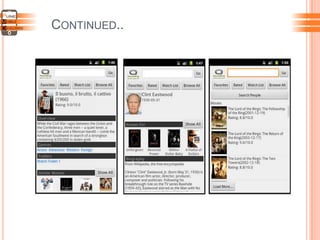
TMDB APP
Team Members:
1. Chetan Verma
2. Sudhir Naik
PLATFORM OVERVIEW
 Free and open source SDK for mobile
applications
 Produces native mobile applications for multiple
platforms
 Can use C/C++ and/or HTML5/JavaScript
 Targeted for both web developers and PC/Mac
desktop developers
 Supports Android 2.x-4.x, iOS, Windows Mobile
Classic, Windows Phone, Symbian S60, Java
Mobile and the Moblin platform.
 Available for Windows and Mac OS
 Extensive documentation available
 First version was launched in early 2005!
DEVELOPMENT ENVIRONMENT
MoSync SDK
 Targeted at both C++ and HTML5/JS
development
 Integrated with the Eclipse development
environment
 Supported on MS Windows and Mac OS X
(Linux users can use VirtualBox OSE)
 Very easy to setup!
 ADT required to develop Android Apps
DEVELOPMENT ENVIRONMENT
MoSync Reload
 Targeted exclusively at HTML5/JavaScript development
 Web based JavaScript Workbench that helps to speed-
up and simplify the development of the JavaScript code
 Instantly see the result on any number of devices or
emulators
 Requires „Reload Client‟ to be installed on test devices
 Requires Mosync SDK to compile native applications for
various platforms
DEVELOPMENT ENVIRONMENT
PLATFORM PROS & CONS
 Can use C++ or HTML5/JavaScript or combination of
both – Wormhole technology
 Supports STL
 Different methods for designing user interface
 Fast UI development using Mosync Reload
 Supports OpenGL
 Compiles native applications
 Suitable for all kind of applications
 Commercial license and an open source GPL-2 license
 Extensive online documentation and help available
Continued…
PLATFORM PROS & CONS
 No Debugger for NativeUI Applications
 JavaScript and C++ bridge is function based and
not very intuitive
 Native UI applications built using HTML5 may not
be efficient on some platforms
 Some features not implemented or not efficient on
all platforms.
COMPATIBILITIES WITH MOBILE OS
General support for most features
Experimental implementations of some features, but not fully tested
Backward compatibility only; no support for this release's new features or not yet
tested
More details @ http://www.mosync.com/widepage/feature-platform-
support
Platform Versions
Android 2.2 2.3.3 3.x.x 4.x
Blackberry 4.x 5.x 6.x 7.x
iOS 5.1.x 6.0.x 6.1.x
Java ME MIDP 2.x 3.0
Moblin 2.x
Symbian S60 2nd S60 3rd S60 5th Symbian^3 Anna Belle
Windows Mobile 2003 5.x 6.0 6.1 6.5
Windows Phone 7.5 7.8 8
APPLICATION DEMO
 themoviedb.org is a free and community maintained movie
database. TMDB is used by many popular media centers like
XBMC, Plex, MythTV and MediaPortal.
CONTINUED..
OPEN DISCUSSION
Cross Platform Mobile Technologies

Cross Platform Mobile Technologies

  • 1.
    PUNE MOBILE DEVELOPERS CROSS PLATFORMMOBILE TECHNOLOGIES 14th September, 2013
  • 2.
    AGENDA  Introduction andIcebreaker  Technology Presentations  Mobile JSF  Titanium  Kony  MoSync  Open Discussion  Concluding Address  Networking and Refreshments
  • 3.
    INTRODUCTION  Started asmobile community in Talentica last year.  Open to anybody who is interested in mobile development  Share our experiences in mobile development space.  Increase awareness of fast growing mobile technologies among Developers
  • 4.
    ICE-BREAKER – 1 Androidvs iOS vs Windows vs others ?
  • 5.
  • 6.
    ICE-BREAKER – 2 Howmany Apps do you have?
  • 7.
    ICE-BREAKER – 2 Android- 53 iPhone - 83
  • 8.
    CROSS PLATFORM TECHNOLOGIES Solution for growing number of mobile operating systems and device specifications.  Business impact – Short time to market and reduced development costs  Future proof – Application portability to new OS  Single technology expertise – No need to have 4 different skills to develop on different OS.
  • 9.
    MOBILE WEB -JSF STOCK MARKET Team Members: 1. Smrutiranjan Sahu 2. Shreyash Thakare
  • 10.
    PLATFORM OVERVIEW  Javaserver faces(JSF) is a server side user interface component framework for Java technology-based web applications  Used to create server side applications which run on browsers.  Offers lots of re-useable code, MVC for web applications, clean separation of roles, built in AJAX capabilities and has huge vendor and industry support.  Primefaces is a JSF based framework that provides rich UI components making developers life easier   PrimeFaces Mobile is a UI kit to create JSF web applications optimized for mobile devices.  Powered by jQuery Mobile with PrimeFaces extensions, various platforms such as iPhone, Android, Palm, Blackberry, Windows Mobile are supported.
  • 11.
    DEVELOPMENT ENVIRONMENT  Eclipse JSF (Primefaces Mobile), Prime Push  Spring, Maven (optional)
  • 12.
    PLATFORM PROS &CONS  Apps that run on a mobile browser and require rich UI components could use this framework.  Easy to learn.  Just one jar with no dependencies and nothing else to configure.  Various themes available as well as custom themes are possible.  Issues with integrating custom css.  Paid support   No clear distinction between desktop & mobile components.(Need trial & error approach)
  • 13.
    COMPATIBILITIES WITH MOBILEOS  Support same as JQuery Mobile.  Works on almost all the latest mobile browsers except for old phone browsers.
  • 14.
  • 15.
  • 16.
    ISSUES FACED  DisplayingDate/Time in OHLC chart.  Auto resizing chart on orientation change.  Formatting values inside list.  CSS issue in Autosuggest, Table.
  • 18.
    TITANIUM APPCELERATOR RSS FEEDAPP Team Members: 1. Ajay Chawda 2. Samarth Gahire 3. Manish Zope 4. Deepish Adwani
  • 19.
    PLATFORM OVERVIEW  Developedand maintained by Appcelerator inc.  A cross platform javascript based framework.  Easy access to native os and hardware features.  Modular and extensible architecture  Growing developer community (5L+ Developers)  It's FREE
  • 20.
    DEVELOPMENT ENVIRONMENT  NativeSDK should be installed.  Titanium Studio (IDE) (or Aptana eclipse plugin can be used).  Installed Titanium studio on Windows XP, Windows 7 and Ubuntu. (Support also available for MAC)  Tested the app on emulator and device both.
  • 21.
  • 22.
    COMPATIBILITIES WITH MOBILEOS  Android  IOS  Blackberry  Tizen
  • 23.
    ALLOY FRAMEWORK  Alloy- Powerful MVC i.e UI and app logic  Alloy is built on Node.js, available on npm and integrated with Titanium Studio.  The goal is to make Titanium development easier, faster and more scalable  To use Alloy, node.js and Node.ACS should be installed.  You can use XML for views and JSON for styling (tss).  Reusable widgets and templates  Built-in Backbone.js (which is base of MVC which have rich model and collection APIs) and Underscore.js support which provides variety of utility functions like array and iterative helpers.
  • 24.
    PLATFORM PROS &CONS  Rapid prototyping  Web-oriented / Javascript  Cross-platform  Growing community  Increasing complexity  Toolkit pain  Bulky build  Lot of if else cases to be handled
  • 25.
  • 26.
  • 27.
  • 28.
    ISSUES FACED  Debuggingissue.  Faced some bugs in representing the data, but quickly figured out the workaround as support is easily available.  Code maintainability is an issue for titanium. But same can be overcome by using Alloy framework.  We need to figure out workarounds for the bugs with the titanium new releases
  • 30.
    KONY PEOPLE SEARCH APP TeamMembers: 1. Avinash 2. Rohit
  • 31.
    KONY  Birth- 2007with “Write once and Run everywhere” motto.  Eclipse IDE with plugins for development and debugging.  Develop native and HTML5 web apps.  JavaScript based.  Easily integrated with back-end systems.  Support for third party libraries.
  • 32.
    PLATFORM- 10,000 FEETOVERVIEW (INTERFACE DESIGN)
  • 33.
    PLATFORM- 10,000 FEETOVERVIEW (BUSINESS LOGIC A.K.A. CODING)
  • 34.
    PLATFORM- 10,000 FEETOVERVIEW (GOODIES)
  • 35.
    PLATFORM- 10,000 FEETOVERVIEW (WHAT YOU CAN EXPECT)
  • 36.
    ENTERPRISE APPS Mobile App Kony Server Backend Server (YourWeb- page, or if you run enterprise server)
  • 37.
    PLATFORM- AS WEKNOW NOW.  Support for all popular platforms (Android, iOS, BB, Win8, Desktop Browser).  Cross-platform API as well as Platform-Specific API.  Foreign Function Interface for third-party libraies like :barcode scanning, augmented reality, diagnostic sensors, NFC functions, pen-based features, accessing non-UI libraries, embedded third party UI widgets (i.e. sencha or jquery mobile).  Enterprise focus (Kony Server Bundled): Kony Server for easy backend integration. Web Services(REST, SOAP, JSON), ERM/CRP(SAP, Seibel etc).
  • 38.
    PROS & CONS Comprehensive set of UI Widgets and API supported by rich documentation.  Develop once or develop separate for platforms. Your choice.  Native code generation for platforms in addition to Single Page Application for Mobile/Desktop browsers.  HTML-scrapping and Web services integration really simple to develop.  Support for all the latest platform releases.  Resource Hungry IDE.  Slow build-time for BB. It takes forever to build and run.  No drawing APIs. You can NOT develop cool games.  Bugs in IDE plugins and SPA plugins.  No Demo versions for download. Need to buy it or request for evaluation.
  • 39.
    APPLICATION DEMO  UsedRest services exposed by pipl.com  Kony‟s XHR API used for service call and Kony‟s Segment Widget aka List View to present data.
  • 41.
    MOSYNC TMDB APP Team Members: 1.Chetan Verma 2. Sudhir Naik
  • 42.
    PLATFORM OVERVIEW  Freeand open source SDK for mobile applications  Produces native mobile applications for multiple platforms  Can use C/C++ and/or HTML5/JavaScript  Targeted for both web developers and PC/Mac desktop developers  Supports Android 2.x-4.x, iOS, Windows Mobile Classic, Windows Phone, Symbian S60, Java Mobile and the Moblin platform.  Available for Windows and Mac OS  Extensive documentation available  First version was launched in early 2005!
  • 43.
    DEVELOPMENT ENVIRONMENT MoSync SDK Targeted at both C++ and HTML5/JS development  Integrated with the Eclipse development environment  Supported on MS Windows and Mac OS X (Linux users can use VirtualBox OSE)  Very easy to setup!  ADT required to develop Android Apps
  • 44.
    DEVELOPMENT ENVIRONMENT MoSync Reload Targeted exclusively at HTML5/JavaScript development  Web based JavaScript Workbench that helps to speed- up and simplify the development of the JavaScript code  Instantly see the result on any number of devices or emulators  Requires „Reload Client‟ to be installed on test devices  Requires Mosync SDK to compile native applications for various platforms
  • 45.
  • 46.
    PLATFORM PROS &CONS  Can use C++ or HTML5/JavaScript or combination of both – Wormhole technology  Supports STL  Different methods for designing user interface  Fast UI development using Mosync Reload  Supports OpenGL  Compiles native applications  Suitable for all kind of applications  Commercial license and an open source GPL-2 license  Extensive online documentation and help available Continued…
  • 47.
    PLATFORM PROS &CONS  No Debugger for NativeUI Applications  JavaScript and C++ bridge is function based and not very intuitive  Native UI applications built using HTML5 may not be efficient on some platforms  Some features not implemented or not efficient on all platforms.
  • 48.
    COMPATIBILITIES WITH MOBILEOS General support for most features Experimental implementations of some features, but not fully tested Backward compatibility only; no support for this release's new features or not yet tested More details @ http://www.mosync.com/widepage/feature-platform- support Platform Versions Android 2.2 2.3.3 3.x.x 4.x Blackberry 4.x 5.x 6.x 7.x iOS 5.1.x 6.0.x 6.1.x Java ME MIDP 2.x 3.0 Moblin 2.x Symbian S60 2nd S60 3rd S60 5th Symbian^3 Anna Belle Windows Mobile 2003 5.x 6.0 6.1 6.5 Windows Phone 7.5 7.8 8
  • 49.
    APPLICATION DEMO  themoviedb.orgis a free and community maintained movie database. TMDB is used by many popular media centers like XBMC, Plex, MythTV and MediaPortal.
  • 50.
  • 52.