Creative Communication: Using Web 2.0 as a Management Tool New York Library Association Annual Conference 2007 October 19, 2007 Rebekkah Smith Aldrich,  Mid-Hudson Library System Frank Rees, Howland Public Library Sponsored by the Library Administration & Management Section of NYLA (LAMS)
Management Communication Get everyone on the same page Give people the information they need to succeed Create a climate of trust
Web 2.0  &   Management Communication The goal of this presentation is to show you some cool Web 2.0 communication and collaboration tools that will help you seamlessly access, create, organize and share information with your staff, trustees, …
What is Web 2.0? “ Web 2.0 is shorthand for a new generation of services—and older, remixed ones—on the Web that let all of us  better communicate, interact, share, create, and publish information.” -Robert Lackie, Library Garden
Web 2.0    Library 2.0 “ [Library 2.0] is, to me, a service philosophy built upon: a willingness to change and try new things; a willingness to constantly re-evaluate our service offerings; and finally, a willingness to look outside our own world for solutions, be they technology-driven or not (this is where Web 2.0 fits in).” -Michael Casey, Library Crunch
Web 2.0 Philosophy “The Machine Is Us/ ing  Us”
Why Use Web 2.0 Communication Tools? 1.  They’re fun, easy to learn, and, in many cases  FREE.
Why Use Web 2.0 Communication Tools? 2. Our staffers are, or will be soon, Millenials and Generation Xers.
Why Use Web 2.0 Communication Tools? 3. Web 2.0 tools can help us streamline and share big-picture thinking with staff Web 2.0 is Open Participatory and (can be) Decentralized
“ The Transparent Library” “Sharing big-picture thinking with staff is beneficial because it moves the library forward.” --Michael Casey & Michael Stephens,  “ The Transparent Library,” Library Journal, 6.1.07
“ The Transparent Library”  continued… “It’s easy for staffers to give lip service to an idea they don’t believe in and then step back and watch it fail because they had no input or information or, in some cases, not even an inkling that a new service or technology was coming.” --Michael Casey & Michael Stephens,  “ The Transparent Library,” Library Journal, 6.1.07
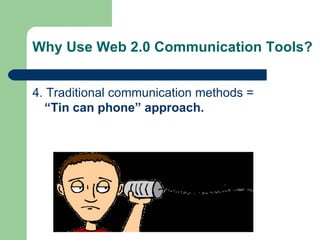
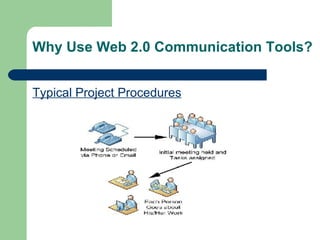
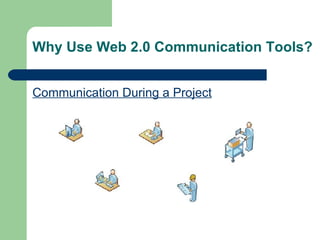
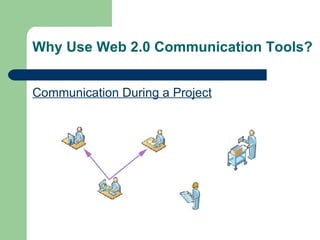
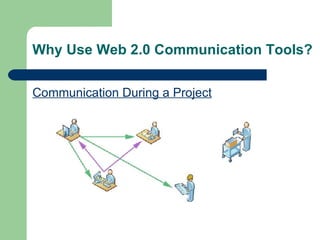
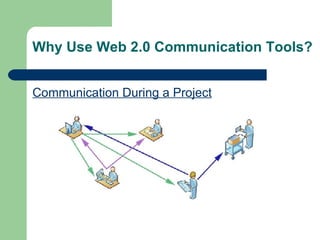
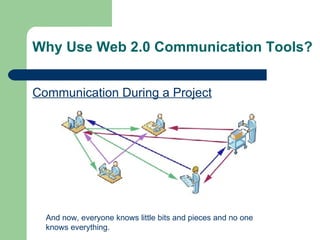
Why Use Web 2.0 Communication Tools? 4. Traditional communication methods =  “Tin can phone” approach.
Why Use Web 2.0 Communication Tools? Typical Project Procedures
Why Use Web 2.0 Communication Tools? Communication During a Project
Why Use Web 2.0 Communication Tools? Communication During a Project And now, everyone knows little bits and pieces and no one knows everything.
Why Use Web 2.0 Communication Tools? Web 2.0 tools can help us avoid the “tin-can” phone approach to communications and keep all staffers informed, up-to-date, and contributing!
Creative Communications Toolbox Many options Pick what will work for you Small vs. Large Libraries Tip: Look for the tools that will help you centralize communications and  document sharing
del.icio.us http://del.icio.us Keep links of your favorite websites—accessible from anywhere on the web. Share favorites with staff Discover new websites Presentation Bookmarks:  http://del. icio .us/LAMS_NYLA
YourDraft http://www. yourdraft .com WYSIWYG word processor Create shareable documents without passwords Cut and paste MS Word docs and retain formatting
tadalist.com http://www.tadalist.com Create personal or group lists of things to do Share lists with staffers You control access: public or selected people Email yourself  Creative Communications tadalist: http://frankrees59. tadalist .com/lists/public/759902
Google Apps http://www. google .com/a/ Includes Gmail, Google calendar, Google docs for you entire staff  Able to use your own custom domain, if you own one Share files & collaborate in real time No hardware or software to download, install or maintain Get up and running quickly; requires some technical knowledge—may need limited IT support. Free for registered not-for-profits with current 510(c)(3)
Google Calendar http://www.google.com/calendar/ Simple interface to keep track of daily events Integration with Gmail and Outlook Reminders via email or SMS Share with staffers or the world Requires free Gmail account
Google Docs http://www.google.com/google-d-s/tour1.html Create documents, spreadsheets, presentations Upload existing docs: DOC,XLS, ODT, CSV, PPT Share & collaborate in real time Control who sees your documents Requires free Gmail account Note: Does not work with Apple/Mac
eSnips http://www. esnips .com/ Online backup and storage Upload anything Share photos, videos, music, documents  Share or keep private Today’s handouts: http://www.esnips.com/web/CreativeCommunicationUsingWeb20
Blogs Easy to update = frequently updated Entries in reverse chronological order Entries are usually brief, chock full of links & commentary  Individual blog entries are save w/ unique URL, and can be categorized and searched Entries are archived automatically You control who contributes and comments
Blogs Blog Software: Good Choices Blogger:  www.blogger.com WordPress:  wordpress .com
Blogs Examples Howland Public Library Staff News  http://hplstaffnews.blogspot.com/ Director’s Blog Ann Arbor Library  http://www.aadl.org/taxonomy/term/86 Tompkins County Public Library  http://www. tcpl .org/comments/ Blogging Library Wiki  http://www. blogwithoutalibrary .net/links/index. php ?title=Welcome_to_the_ Blogging _Libraries_ Wiki
Wikis “ A type of website that allows anyone visiting the site to  add  , to remove, or otherwise to edit all content very quickly and easily, sometimes without the need for registration.  This ease of interaction and operation makes a wiki an effective tool for collaborative writing.” http://en. wikipedia .org/wiki/Wiki
Wiki Examples Wikipedia:  http://en.wikipedia.org/wiki/Main_Page LIBSuccess: A Best Practices Wiki  http://www.libsuccess.org/index.php?title=Main_Page
PB Wiki http:// pbwiki .com/ Build your own wiki in five minutes  Can be made public or kept private –  you decide Free (premium features can be purchased)
For Further Exploration To expand and explore your knowledge of Web 2.0, try  “23 Learning 2.0 Things”   (http:// plcmclearning . blogspot .com/)  by the Public Library of Charlotte & Mecklenburg County. Read the  “Web 2.0”  ( http://en.wikipedia.org/wiki/Web_2.0 ) Wikipedia article for a detailed and technical definition of Web 2.0. Use  del. icio .us  to explore the links used in the presentation ( http://del.icio.us/LAMS_NYLA ). Dive into Web 2.0 immediately and start communicating and collaborating with your staff!
Class Material Class materials, links, and handout are available online: Del.icio.us  (all presentation links) :  http://del. icio .us/LAMS_NYLA eSnips:   http://www.esnips.com/web/CreativeCommunicationUsingWeb20
Creative Communication:  Using Web 2.0 as a Management Tool Introducing Le book
Creative Communication:  Using Web 2.0 as a Management Tool Q &A

Creative Communications L A M S

  • 1.
    Creative Communication: UsingWeb 2.0 as a Management Tool New York Library Association Annual Conference 2007 October 19, 2007 Rebekkah Smith Aldrich, Mid-Hudson Library System Frank Rees, Howland Public Library Sponsored by the Library Administration & Management Section of NYLA (LAMS)
  • 2.
    Management Communication Geteveryone on the same page Give people the information they need to succeed Create a climate of trust
  • 3.
    Web 2.0 & Management Communication The goal of this presentation is to show you some cool Web 2.0 communication and collaboration tools that will help you seamlessly access, create, organize and share information with your staff, trustees, …
  • 4.
    What is Web2.0? “ Web 2.0 is shorthand for a new generation of services—and older, remixed ones—on the Web that let all of us better communicate, interact, share, create, and publish information.” -Robert Lackie, Library Garden
  • 5.
    Web 2.0  Library 2.0 “ [Library 2.0] is, to me, a service philosophy built upon: a willingness to change and try new things; a willingness to constantly re-evaluate our service offerings; and finally, a willingness to look outside our own world for solutions, be they technology-driven or not (this is where Web 2.0 fits in).” -Michael Casey, Library Crunch
  • 6.
    Web 2.0 Philosophy“The Machine Is Us/ ing Us”
  • 7.
    Why Use Web2.0 Communication Tools? 1. They’re fun, easy to learn, and, in many cases FREE.
  • 8.
    Why Use Web2.0 Communication Tools? 2. Our staffers are, or will be soon, Millenials and Generation Xers.
  • 9.
    Why Use Web2.0 Communication Tools? 3. Web 2.0 tools can help us streamline and share big-picture thinking with staff Web 2.0 is Open Participatory and (can be) Decentralized
  • 10.
    “ The TransparentLibrary” “Sharing big-picture thinking with staff is beneficial because it moves the library forward.” --Michael Casey & Michael Stephens, “ The Transparent Library,” Library Journal, 6.1.07
  • 11.
    “ The TransparentLibrary” continued… “It’s easy for staffers to give lip service to an idea they don’t believe in and then step back and watch it fail because they had no input or information or, in some cases, not even an inkling that a new service or technology was coming.” --Michael Casey & Michael Stephens, “ The Transparent Library,” Library Journal, 6.1.07
  • 12.
    Why Use Web2.0 Communication Tools? 4. Traditional communication methods = “Tin can phone” approach.
  • 13.
    Why Use Web2.0 Communication Tools? Typical Project Procedures
  • 14.
    Why Use Web2.0 Communication Tools? Communication During a Project
  • 15.
    Why Use Web2.0 Communication Tools? Communication During a Project
  • 16.
    Why Use Web2.0 Communication Tools? Communication During a Project
  • 17.
    Why Use Web2.0 Communication Tools? Communication During a Project
  • 18.
    Why Use Web2.0 Communication Tools? Communication During a Project And now, everyone knows little bits and pieces and no one knows everything.
  • 19.
    Why Use Web2.0 Communication Tools? Web 2.0 tools can help us avoid the “tin-can” phone approach to communications and keep all staffers informed, up-to-date, and contributing!
  • 20.
    Creative Communications ToolboxMany options Pick what will work for you Small vs. Large Libraries Tip: Look for the tools that will help you centralize communications and document sharing
  • 21.
    del.icio.us http://del.icio.us Keeplinks of your favorite websites—accessible from anywhere on the web. Share favorites with staff Discover new websites Presentation Bookmarks: http://del. icio .us/LAMS_NYLA
  • 22.
    YourDraft http://www. yourdraft.com WYSIWYG word processor Create shareable documents without passwords Cut and paste MS Word docs and retain formatting
  • 23.
    tadalist.com http://www.tadalist.com Createpersonal or group lists of things to do Share lists with staffers You control access: public or selected people Email yourself Creative Communications tadalist: http://frankrees59. tadalist .com/lists/public/759902
  • 24.
    Google Apps http://www.google .com/a/ Includes Gmail, Google calendar, Google docs for you entire staff Able to use your own custom domain, if you own one Share files & collaborate in real time No hardware or software to download, install or maintain Get up and running quickly; requires some technical knowledge—may need limited IT support. Free for registered not-for-profits with current 510(c)(3)
  • 25.
    Google Calendar http://www.google.com/calendar/Simple interface to keep track of daily events Integration with Gmail and Outlook Reminders via email or SMS Share with staffers or the world Requires free Gmail account
  • 26.
    Google Docs http://www.google.com/google-d-s/tour1.htmlCreate documents, spreadsheets, presentations Upload existing docs: DOC,XLS, ODT, CSV, PPT Share & collaborate in real time Control who sees your documents Requires free Gmail account Note: Does not work with Apple/Mac
  • 27.
    eSnips http://www. esnips.com/ Online backup and storage Upload anything Share photos, videos, music, documents Share or keep private Today’s handouts: http://www.esnips.com/web/CreativeCommunicationUsingWeb20
  • 28.
    Blogs Easy toupdate = frequently updated Entries in reverse chronological order Entries are usually brief, chock full of links & commentary Individual blog entries are save w/ unique URL, and can be categorized and searched Entries are archived automatically You control who contributes and comments
  • 29.
    Blogs Blog Software:Good Choices Blogger: www.blogger.com WordPress: wordpress .com
  • 30.
    Blogs Examples HowlandPublic Library Staff News http://hplstaffnews.blogspot.com/ Director’s Blog Ann Arbor Library http://www.aadl.org/taxonomy/term/86 Tompkins County Public Library http://www. tcpl .org/comments/ Blogging Library Wiki http://www. blogwithoutalibrary .net/links/index. php ?title=Welcome_to_the_ Blogging _Libraries_ Wiki
  • 31.
    Wikis “ Atype of website that allows anyone visiting the site to add , to remove, or otherwise to edit all content very quickly and easily, sometimes without the need for registration. This ease of interaction and operation makes a wiki an effective tool for collaborative writing.” http://en. wikipedia .org/wiki/Wiki
  • 32.
    Wiki Examples Wikipedia: http://en.wikipedia.org/wiki/Main_Page LIBSuccess: A Best Practices Wiki http://www.libsuccess.org/index.php?title=Main_Page
  • 33.
    PB Wiki http://pbwiki .com/ Build your own wiki in five minutes Can be made public or kept private – you decide Free (premium features can be purchased)
  • 34.
    For Further ExplorationTo expand and explore your knowledge of Web 2.0, try “23 Learning 2.0 Things” (http:// plcmclearning . blogspot .com/) by the Public Library of Charlotte & Mecklenburg County. Read the “Web 2.0” ( http://en.wikipedia.org/wiki/Web_2.0 ) Wikipedia article for a detailed and technical definition of Web 2.0. Use del. icio .us to explore the links used in the presentation ( http://del.icio.us/LAMS_NYLA ). Dive into Web 2.0 immediately and start communicating and collaborating with your staff!
  • 35.
    Class Material Classmaterials, links, and handout are available online: Del.icio.us (all presentation links) : http://del. icio .us/LAMS_NYLA eSnips: http://www.esnips.com/web/CreativeCommunicationUsingWeb20
  • 36.
    Creative Communication: Using Web 2.0 as a Management Tool Introducing Le book
  • 37.
    Creative Communication: Using Web 2.0 as a Management Tool Q &A